light MERCEDES-BENZ CL-CLASS 2000 Workshop Manual
[x] Cancel search | Manufacturer: MERCEDES-BENZ, Model Year: 2000, Model line: CL-CLASS, Model: MERCEDES-BENZ CL-CLASS 2000Pages: 424, PDF Size: 26.09 MB
Page 260 of 424
255 Driving systems
Te ch n ica l
data Instruments
and controlsOperationDrivingInstrument
cluster displayPractical hints Car care Index The speed stored in memory is displayed in the
multifunction display, and one or two segments around
the stored speed light up in the speedometer dial, see
page 267.
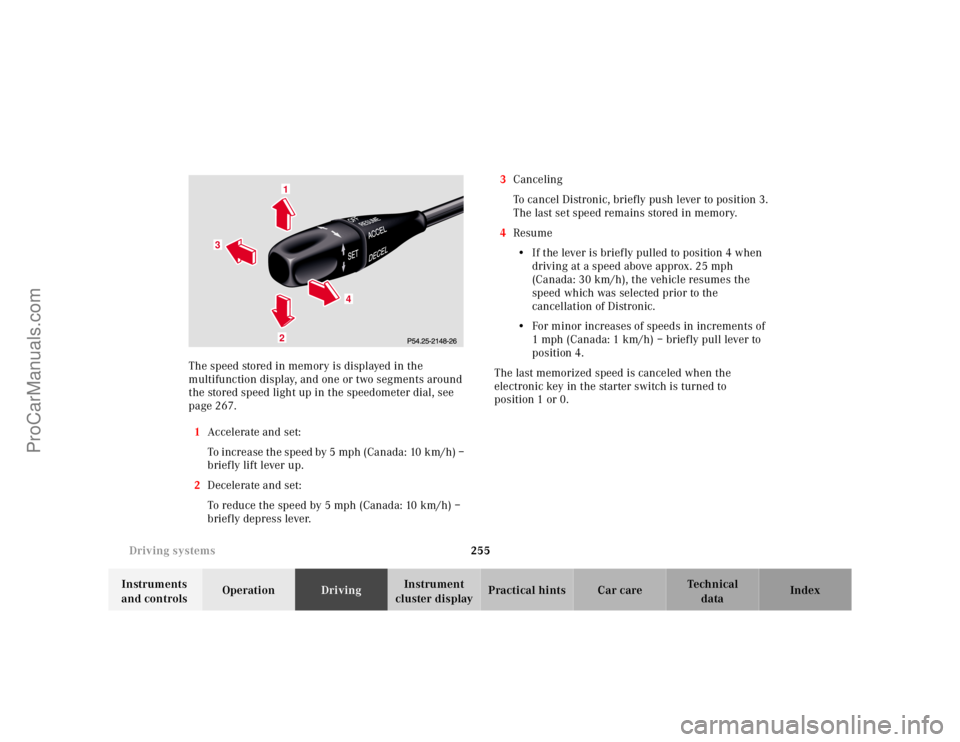
1Accelerate and set:
To increase the speed by 5 mph (Canada: 10 km/h) –
brief ly lift lever up.
2Decelerate and set:
To reduce the speed by 5 mph (Canada: 10 km/h) –
briefly depress lever.3Canceling
To cancel Distronic, briefly push lever to position 3.
The last set speed remains stored in memory.
4Resume
•If the lever is briefly pulled to position 4 when
driving at a speed above approx. 25 mph
(Canada: 30 km/h), the vehicle resumes the
speed which was selected prior to the
cancellation of Distronic.
•For minor increases of speeds in increments of
1 mph (Canada: 1 km/h) – briefly pull lever to
position 4.
The last memorized speed is canceled when the
electronic key in the starter switch is turned to
position 1 or 0.
1
3
4
2
ProCarManuals.com
Page 261 of 424
256 Driving systems
Te ch n ica l
data Instruments
and controlsOperationDrivingInstrument
cluster displayPractical hints Car care Index
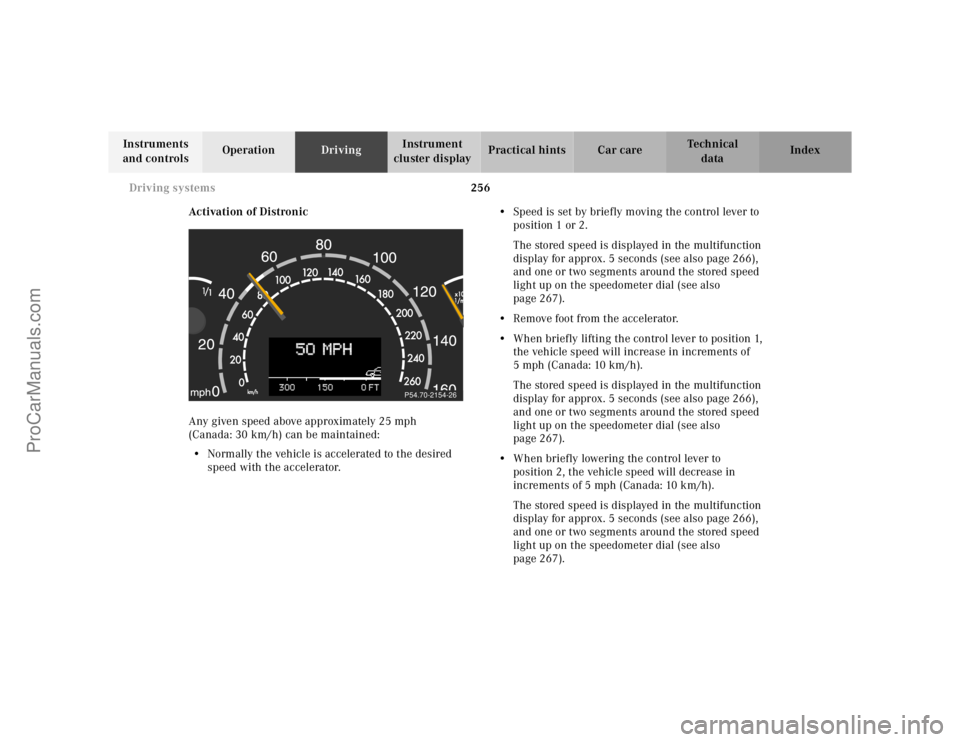
Activation of Distronic
Any given speed above approximately 25 mph
(Canada: 30 km/h) can be maintained:
•Normally the vehicle is accelerated to the desired
speed with the accelerator.•Speed is set by briefly moving the control lever to
position 1 or 2.
The stored speed is displayed in the multifunction
display for approx. 5 seconds (see also page 266),
and one or two segments around the stored speed
light up on the speedometer dial (see also
page 267).
•Remove foot from the accelerator.
•When briefly lifting the control lever to position 1,
the vehicle speed will increase in increments of
5 mph (Canada: 10 km/h).
The stored speed is displayed in the multifunction
display for approx. 5 seconds (see also page 266),
and one or two segments around the stored speed
light up on the speedometer dial (see also
page 267).
•When briefly lowering the control lever to
position 2, the vehicle speed will decrease in
increments of 5 mph (Canada: 10 km/h).
The stored speed is displayed in the multifunction
display for approx. 5 seconds (see also page 266),
and one or two segments around the stored speed
light up on the speedometer dial (see also
page 267).
P54.70-2154-26
ProCarManuals.com
Page 269 of 424
264 Driving systems
Te ch n ica l
data Instruments
and controlsOperationDrivingInstrument
cluster displayPractical hints Car care Index
Distance notification function
Even if Distronic is deactivated, the distance to the
vehicle ahead continues to be measured, see page 266
for multifunction display.
The Distronic lamp in the speedometer dial illuminates
to advise the driver of a situation which under normal
braking conditions and dry surfaces should have been
addressed by the driver.
The distance notification function can be activated
separately, see page 265. It operates when driving at
speeds above approx. 25 mph (Canada: 30 km/h).
When recognizing a stationary obstacle or a slower
vehicle moving in the vehicle’s path and the danger of a
collision exists, the distance warning lamp in the
speedometer dial lights up and simultaneously a
continuous warning sounds.
Note:
Model CL 55 AMG only:
Distance notification function is deactivated if the
vehicle speed exceeds approximately 160 mph
(260 km/h).Important!
With the Distronic switched off, only the distance
notification function operates, meaning the vehicle does
not slow down.
Important!
Complex driving situations are not always fully
recognized by Distronic, which could result in wrong or
missing distance warnings.
See page 261 for additional driving hints.
Wa r n i n g !
If the distance warning lamp in the speedometer
dial lights up while driving and a continuous
warning sounds, immediate attention on the part of
the driver is required.As required by the traffic situation, apply the
service brakes and navigate around a possible
obstacle. However, do not drive by relying on the
distance notification function as that will result in
an emergency braking application which,
especially depending on road surface conditions
and driver reaction, will not always be able to avoid
a collision.
ProCarManuals.com
Page 270 of 424
265 Driving systems
Te ch n ica l
data Instruments
and controlsOperationDrivingInstrument
cluster displayPractical hints Car care Index Distronic settings
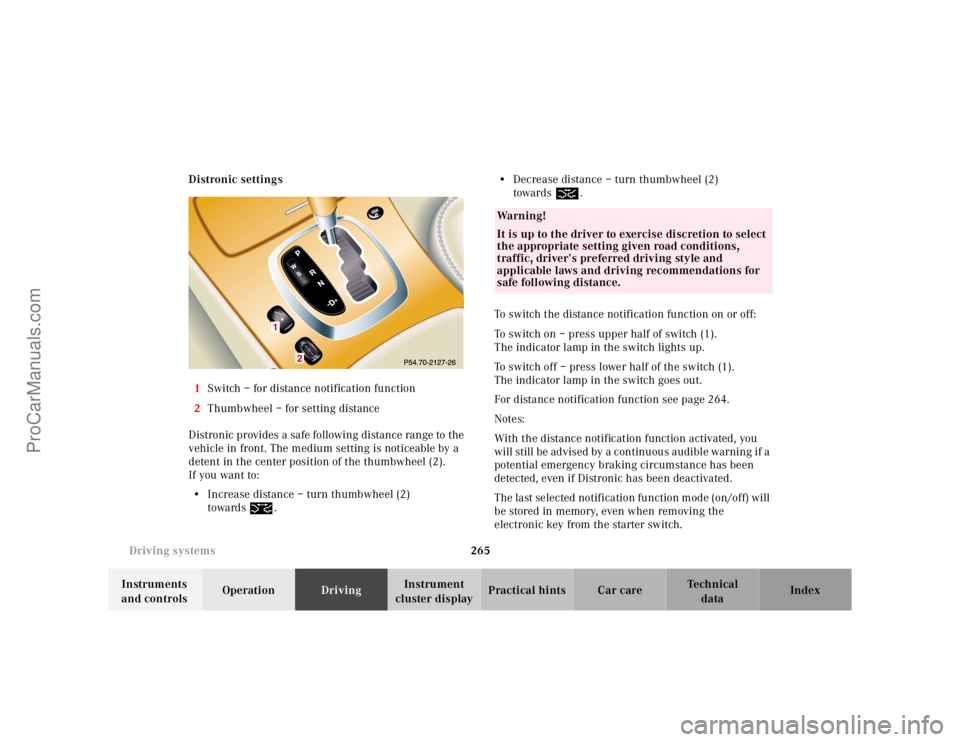
1Switch – for distance notification function
2Thumbwheel – for setting distance
Distronic provides a safe following distance range to the
vehicle in front. The medium setting is noticeable by a
detent in the center position of the thumbwheel (2).
If you want to:
•Increase distance – turn thumbwheel (2)
towards¯.•Decrease distance – turn thumbwheel (2)
towards®.
To switch the distance notification function on or off:
To switch on – press upper half of switch (1).
The indicator lamp in the switch lights up.
To switch off – press lower half of the switch (1).
The indicator lamp in the switch goes out.
For distance notification function see page 264.
Notes:
With the distance notification function activated, you
will still be advised by a continuous audible warning if a
potential emergency braking circumstance has been
detected, even if Distronic has been deactivated.
The last selected notification function mode (on/off) will
be stored in memory, even when removing the
electronic key from the starter switch.
Wa r n i n g !
It is up to the driver to exercise discretion to select
the appropriate setting given road conditions,
traffic, driver’s preferred driving style and
applicable laws and driving recommendations for
safe following distance.
ProCarManuals.com
Page 272 of 424
267 Driving systems
Te ch n ica l
data Instruments
and controlsOperationDrivingInstrument
cluster displayPractical hints Car care Index Displays in the speedometer dial
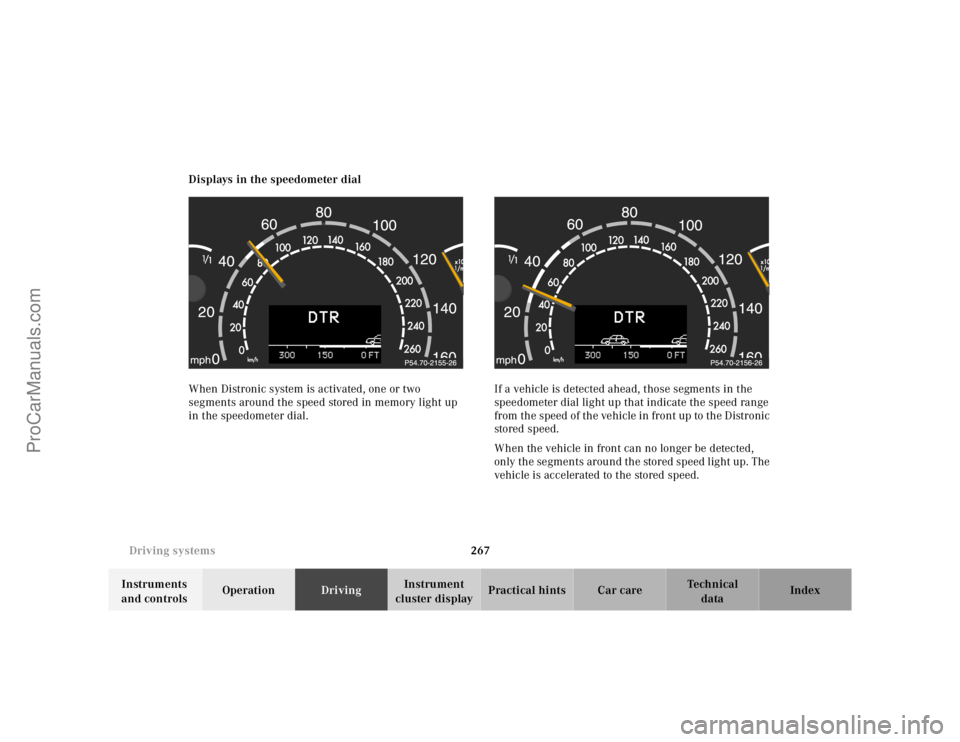
When Distronic system is activated, one or two
segments around the speed stored in memory light up
in the speedometer dial.If a vehicle is detected ahead, those segments in the
speedometer dial light up that indicate the speed range
from the speed of the vehicle in front up to the Distronic
stored speed.
When the vehicle in front can no longer be detected,
only the segments around the stored speed light up. The
vehicle is accelerated to the stored speed.
ProCarManuals.com
Page 274 of 424
269 Driving systems
Te ch n ica l
data Instruments
and controlsOperationDrivingInstrument
cluster displayPractical hints Car care Index Antilock brake system (ABS)
Important!
The ABS improves steering control of the vehicle during
hard braking maneuvers.
The ABS prevents the wheels from locking up above a
vehicle speed of approximately 5 mph (8 km/h)
independent of road surface conditions.At the instant one of the wheels is about to lock up, a
slight pulsation can be felt in the brake pedal,
indicating that the ABS is in the regulating mode. Keep
firm and steady pressure on the brake pedal while
experiencing the pulsation.
Continuous steady brake pedal pressure results in
applying the advantages of the ABS, namely braking
power and ability to steer the vehicle.
In the case of an emergency brake maneuver keep
continuous full pressure on the brake pedal. In this
manner only can the ABS be most effective.
On slippery road surfaces, the ABS will respond even
with light brake pedal pressure because of the
increased likelihood of locking wheels. The pulsating
brake pedal can be an indication of hazardous road
conditions and functions as a reminder to take extra
care while driving.
Wa r n i n g !
Do not pump the brake pedal, rather use firm,
steady brake pedal pressure. Pumping the brake
pedal defeats the purpose for ABS and significantly
reduces braking effectiveness.
ProCarManuals.com
Page 286 of 424
281 Parking system
Te ch n ica l
data Instruments
and controlsOperationDrivingInstrument
cluster displayPractical hints Car care Index Warning indicators
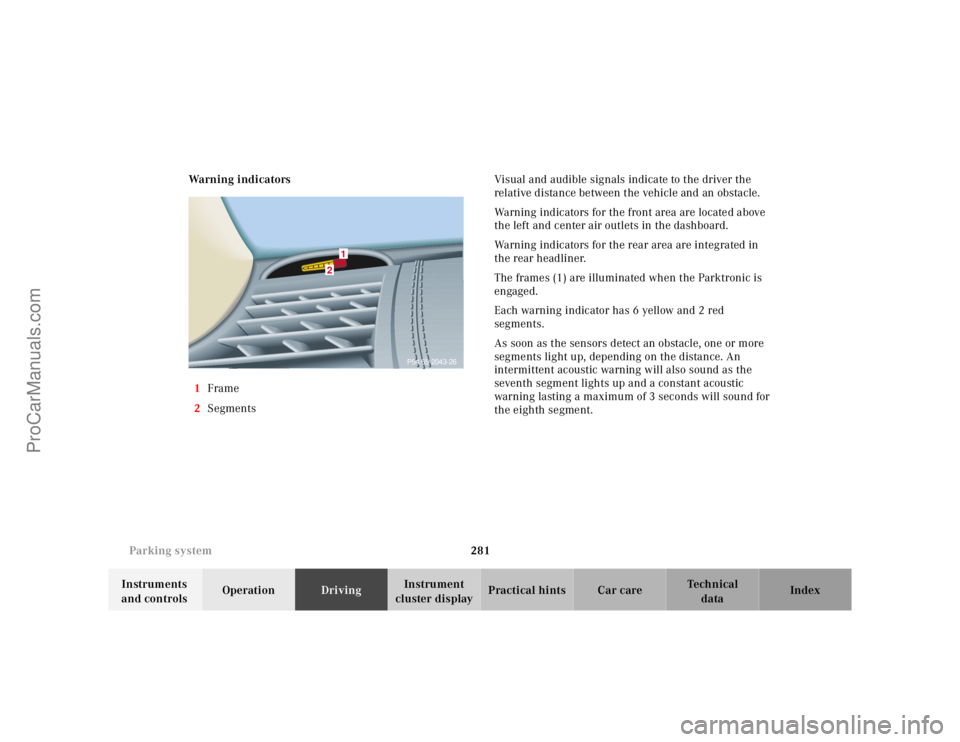
1Frame
2SegmentsVisual and audible signals indicate to the driver the
relative distance between the vehicle and an obstacle.
Warning indicators for the front area are located above
the left and center air outlets in the dashboard.
Warning indicators for the rear area are integrated in
the rear headliner.
The frames (1) are illuminated when the Parktronic is
engaged.
Each warning indicator has 6 yellow and 2 red
segments.
As soon as the sensors detect an obstacle, one or more
segments light up, depending on the distance. An
intermittent acoustic warning will also sound as the
seventh segment lights up and a constant acoustic
warning lasting a maximum of 3 seconds will sound for
the eighth segment.
2
1
P54.65-2043-26
ProCarManuals.com
Page 287 of 424
282 Parking system
Te ch n ica l
data Instruments
and controlsOperationDrivingInstrument
cluster displayPractical hints Car care Index
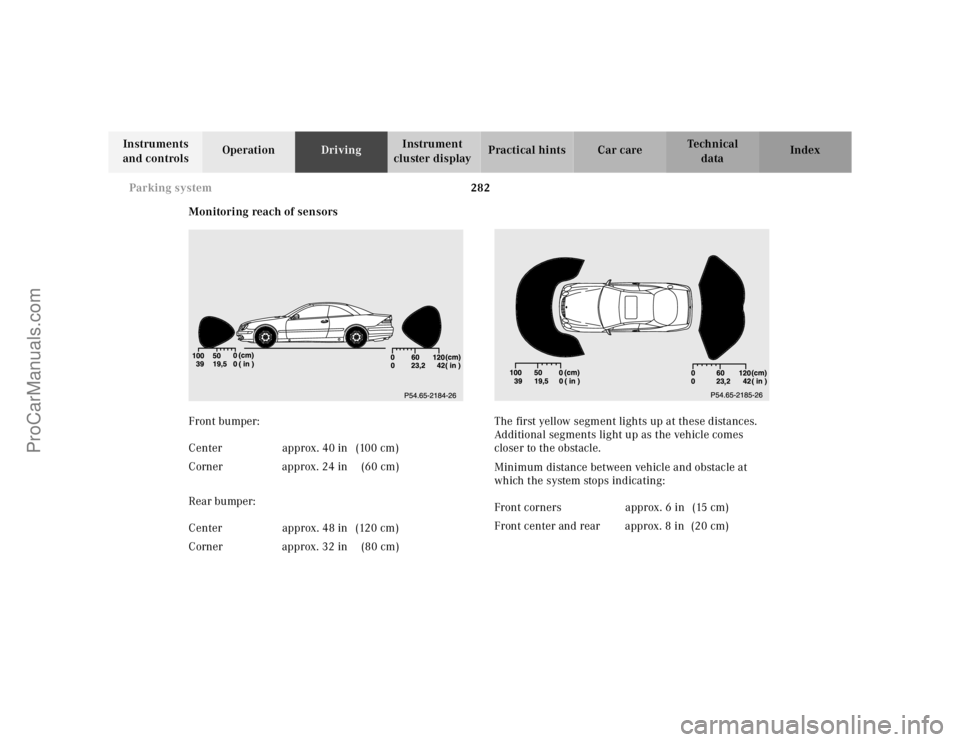
Monitoring reach of sensors
Front bumper:
Rear bumper:The first yellow segment lights up at these distances.
Additional segments light up as the vehicle comes
closer to the obstacle.
Minimum distance between vehicle and obstacle at
which the system stops indicating: Center approx. 40 in (100 cm)
Corner approx. 24 in (60 cm)
Center approx. 48 in (120 cm)
Corner approx. 32 in (80 cm)
Front corners approx. 6 in (15 cm)
Front center and rear approx. 8 in (20 cm)
ProCarManuals.com
Page 288 of 424
283 Parking system
Te ch n ica l
data Instruments
and controlsOperationDrivingInstrument
cluster displayPractical hints Car care Index The obstacle may not be recognized if outside the
shaded sensor field, and no longer be indicated when
approaching it any closer (warning indicators go out).
Parktronic malfunction
All red segments of the warning indicators light up, and
a warning sounds for 3 seconds, if Parktronic does not
function properly. The indicator lamp in the switch
lights up and the system switches off automatically!
A dirty sensor could be the reason. See page 378 for
instructions on cleaning the sensors in the bumpers.
After cleaning the sensors, turn electronic key in starter
switch to position 2. If the defect continues to be
displayed, have the system checked at your authorized
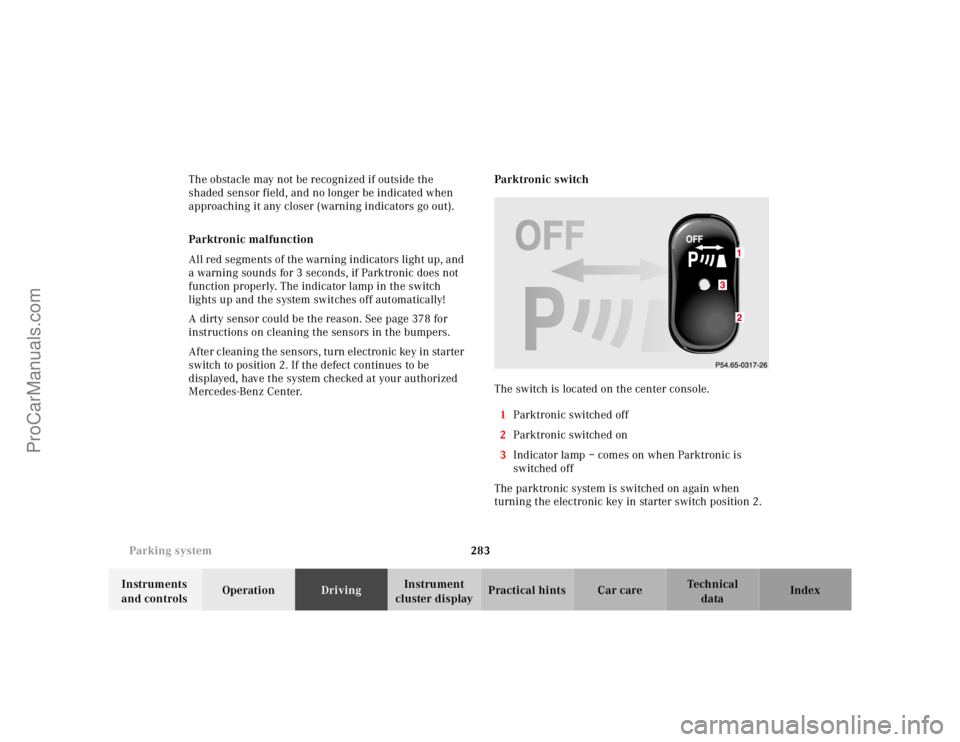
Mercedes-Benz Center.Parktronic switch
The switch is located on the center console.
1Parktronic switched off
2Parktronic switched on
3Indicator lamp – comes on when Parktronic is
switched off
The parktronic system is switched on again when
turning the electronic key in starter switch position 2.3
ProCarManuals.com
Page 292 of 424
287 Check regularly and before a long trip
Te ch n ica l
data Instruments
and controlsOperationDrivingInstrument
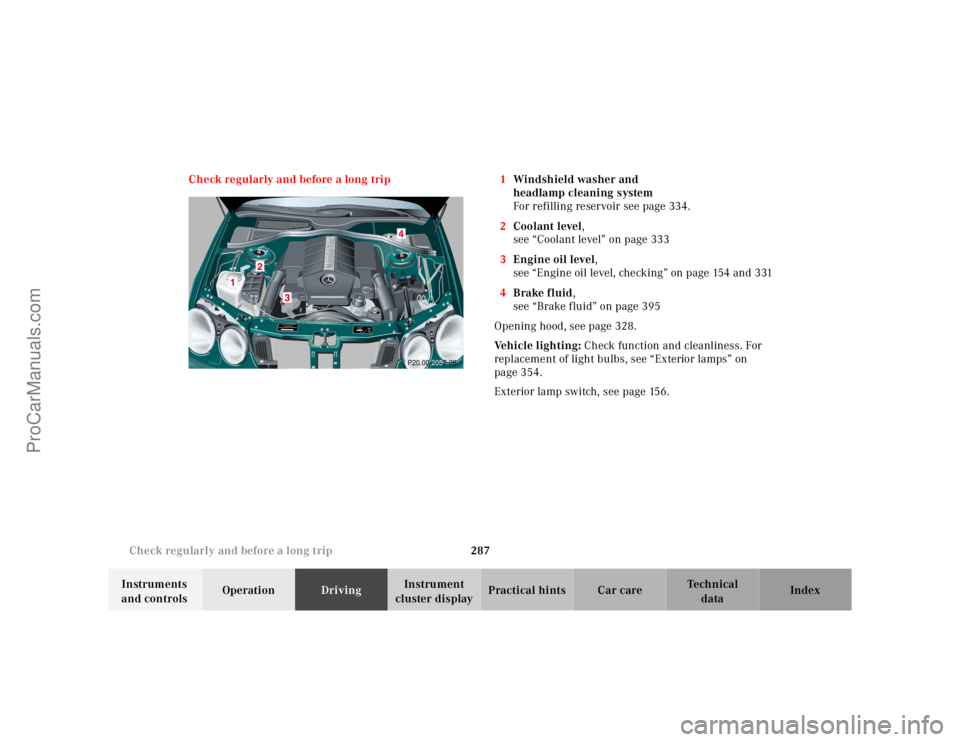
cluster displayPractical hints Car care Index Check regularly and before a long trip 1Windshield washer and
headlamp cleaning system
For refilling reservoir see page 334.
2Coolant level,
see “Coolant level” on page 333
3Engine oil level,
see “Engine oil level, checking” on page 154 and 331
4Brake fluid,
see “Brake fluid” on page 395
Opening hood, see page 328.
Ve h i c l e l i g h t i n g : Check function and cleanliness. For
replacement of light bulbs, see “Exterior lamps” on
page 354.
Exterior lamp switch, see page 156.
P20.00-2057-26
ProCarManuals.com