ad blue MERCEDES-BENZ CL CLASS 2010 User Guide
[x] Cancel search | Manufacturer: MERCEDES-BENZ, Model Year: 2010, Model line: CL CLASS, Model: MERCEDES-BENZ CL CLASS 2010Pages: 500, PDF Size: 9.32 MB
Page 139 of 500
outgoing call, the
No Service message will
appear for a short while.
R The SIM card is not inserted in GSM type
phone.
R When you remove the SmartKey from the
starter switch during a call in hand-free
mode, the call will be maintained for up to
30 minutes. It will then be terminated.
Switch to “Private Mode” on the mobile
phone before switching off COMAND to
maintain the call beyond that time limit.
Refer to the operating instructions of your
mobile phone.
R When you want to switch off COMAND
during a call in hands-free mode, the
message You cannot shut off COMAND
until you have finished your
telephone call. appears. Activating telephone mode
X Select Telephone.
or
X Press button 6 on telephone keypad.
or
X Press shortcut button S once or twice.
i The number of times you have to press
shortcut button S depends on the
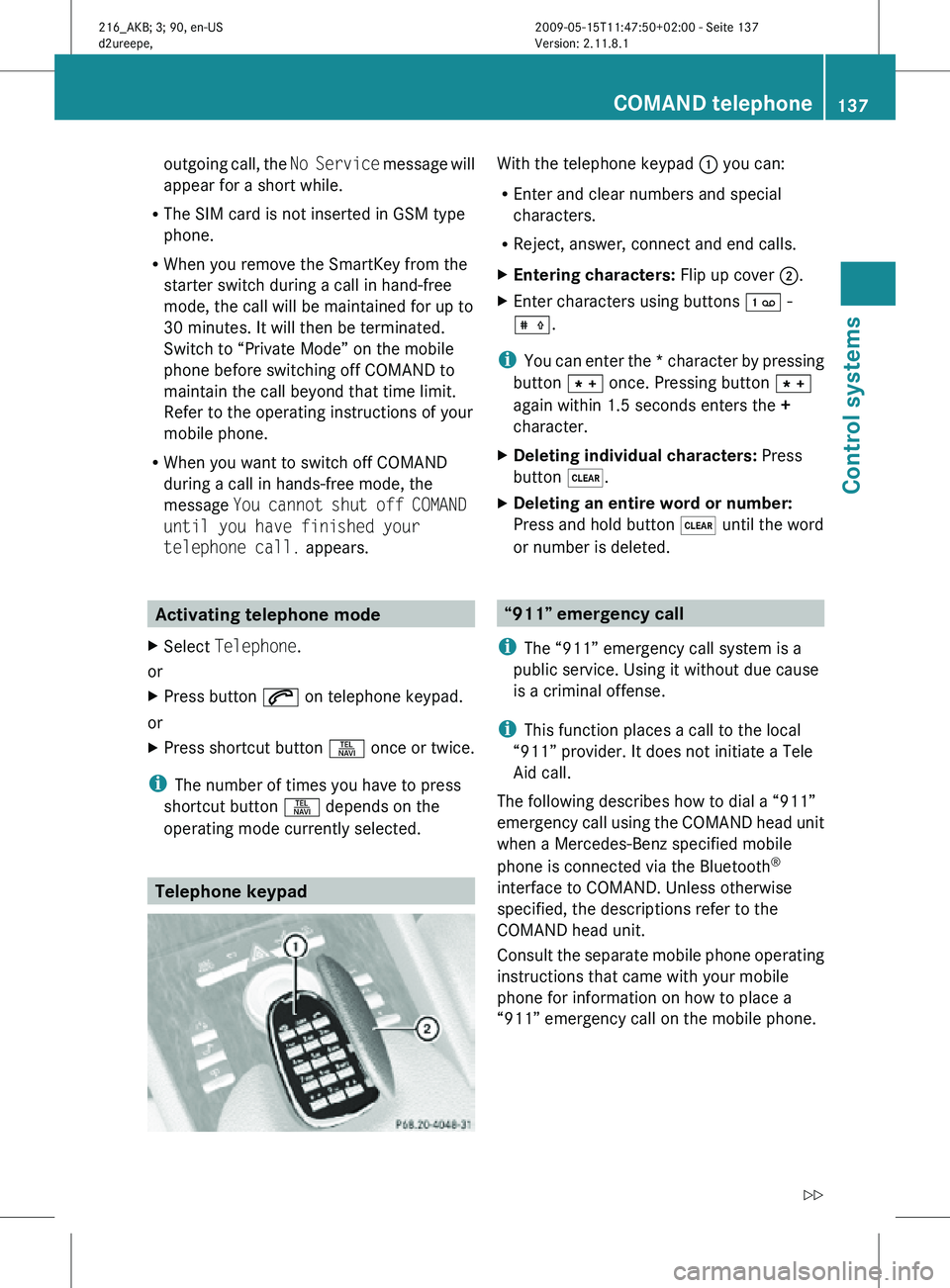
operating mode currently selected. Telephone keypad With the telephone keypad
: you can:
R Enter and clear numbers and special
characters.
R Reject, answer, connect and end calls.
X Entering characters: Flip up cover ;.
X Enter characters using buttons ´ -
Æ.
i You can enter the * character by pressing
button à once. Pressing button Ã
again within 1.5 seconds enters the +
character.
X Deleting individual characters: Press
button $.
X Deleting an entire word or number:
Press and hold button $ until the word
or number is deleted. “911” emergency call
i The “911” emergency call system is a
public service. Using it without due cause
is a criminal offense.
i This function places a call to the local
“911” provider. It does not initiate a Tele
Aid call.
The following describes how to dial a “911”
emergency call using the COMAND head unit
when a Mercedes-Benz specified mobile
phone is connected via the Bluetooth ®
interface to COMAND. Unless otherwise
specified, the descriptions refer to the
COMAND head unit.
Consult the separate mobile phone operating
instructions that came with your mobile
phone for information on how to place a
“911” emergency call on the mobile phone. COMAND telephone
137Control systems
216_AKB; 3; 90, en-US
d2ureepe, Version: 2.11.8.1 2009-05-15T11:47:50+02:00 - Seite 137 Z
Page 140 of 500
The following conditions must be met for a
“911” emergency call via COMAND:
R
Mobile phone must be switched on.
R The corresponding mobile
communications network must be
available.
i Emergency calls may not be possible with
all telephone networks or if certain network
services and/or telephone functions are
active. Check with your local service
providers.
If you cannot make an emergency call, you
will have to initiate rescue measures yourself.
Placing a “911” emergency call using
COMAND with the mobile phone
unlocked X
Press button S to switch to telephone
mode.
X Enter 911 using the telephone keypad in
the center console.
X Press button 6 on the telephone
keypad in the center console.
or
X Select 6 in the COMAND display and
press W for dialing to begin.
Connecting call… appears in the
COMAND display while the mobile phone
establishes the connection.
X Wait until the emergency call center
answers, then describe the emergency.
i Depending on the phone type, if no SIM
card is inserted in a GSM mobile phone or
if there is no service on a CDMA mobile
phone, NO SERVICE may appear in the
COMAND display. In that case, you only can
make an emergency call on the mobile
phone itself, without the use of COMAND. Placing a “911” emergency call with the
mobile phone locked i
If the mobile phone is locked, you only can
make an emergency call on the mobile
phone itself, without the use of COMAND. Bluetooth interface
Bluetooth ®
is a technology for wireless
exchange of data over short distances of up
to approximately 33 feet (10 m). You can
connect your mobile phone to COMAND or
exchange vCards using Bluetooth ®
.
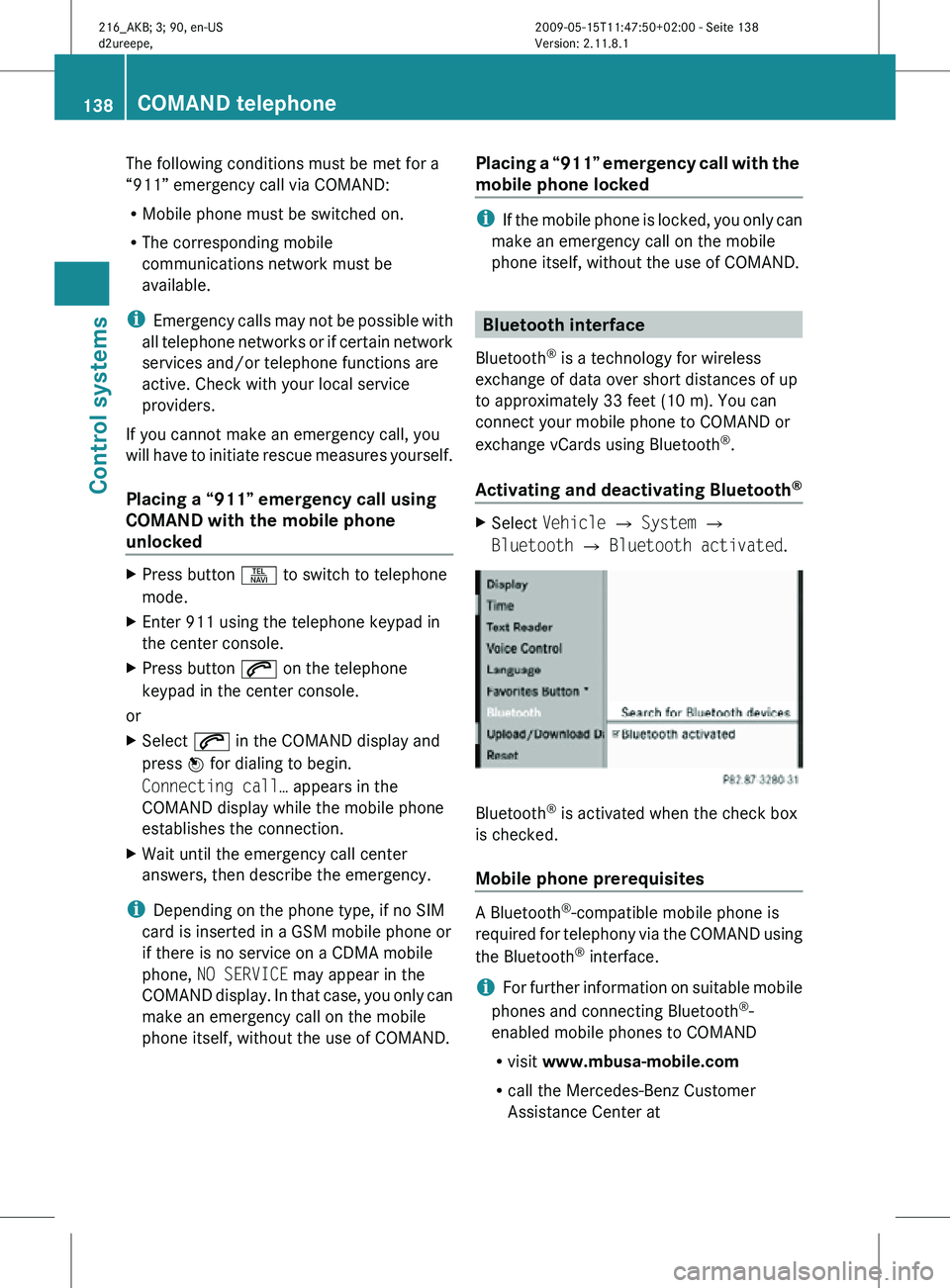
Activating and deactivating Bluetooth ® X
Select Vehicle Q System Q
Bluetooth Q Bluetooth activated. Bluetooth
®
is activated when the check box
is checked.
Mobile phone prerequisites A Bluetooth
®
-compatible mobile phone is
required for telephony via the COMAND using
the Bluetooth ®
interface.
i For further information on suitable mobile
phones and connecting Bluetooth ®
-
enabled mobile phones to COMAND
R visit www.mbusa-mobile.com
R call the Mercedes-Benz Customer
Assistance Center at 138
COMAND telephoneControl systems
216_AKB; 3; 90, en-US
d2ureepe,
Version: 2.11.8.1 2009-05-15T11:47:50+02:00 - Seite 138
Page 141 of 500
1-800-FOR-MERCedes
(1-800-367-6372)
(in the USA)
R call Customer Service at
1-800-387-0100
(in Canada)
The battery of the mobile phone should
always be charged sufficiently to avoid
malfunctions.
You should check the following on your
mobile phone (see your mobile phone
operating instructions) to prepare for
telephony via the Bluetooth ®
interface:
R Hands-Free Profile (HFP)
The mobile phone must support Hands-
Free Profile 1.0 or higher.
i Some displays, such as the signal
strength, appear depending on the
supported Hands-Free Profile version.
R Bluetooth ®
visibility
With certain mobile phones, the
Bluetooth ®
function must be activated but
also made "visible" to other devices.
R Bluetooth ®
device name
Each Bluetooth ®
device has a Bluetooth ®
device name. The device name is arbitrary,
but it may be identical for all devices of a
single mobile phone manufacturer. You
should therefore assign an individual and
unique device name to your mobile phone.
Connecting the mobile phone X
Switch on the mobile phone and enter the
PIN. Refer to the mobile phone operating
instructions for details.
X Activate the Bluetooth ®
functionality on
the mobile phone. Refer to mobile phone
operating instructions for detail.
Bluetooth ®
is activated in the COMAND by
default. If the Bluetooth function in the
COMAND is not activated, the message
Bluetooth not activated in system settings. appears. Activate Bluetooth
®
in
the COMAND manually (
Y page 138).
Authorizing the mobile phone
The mobile phone must be registered, e.g.
authorized, before you can use it in
connection with COMAND for the first time.
You can authorize several mobile phones.
COMAND will always connect to the last
connected mobile phone within range.
i If the connection to the last connected
mobile phone fails, COMAND searches for
the mobile phone that was connected
before that.
When authorizing a new mobile phone, it will
be connected automatically 5
.
X Select Data/Connections Q
Bluetooth Telephones Q Update.
The COMAND searches for Bluetooth ®
devices within range and lists them in the
Bluetooth ®
phone list.
The duration
of the search depends on the
number of Bluetooth ®
devices within range
and the characteristics of the mobile
phone, such as Hands-Free Profile version
and possibly required visibility.
5 Function available if supported by the mobile phone. COMAND telephone
139
Control systems
216_AKB; 3; 90, en-US
d2ureepe, Version: 2.11.8.1 2009-05-15T11:47:50+02:00 - Seite 139 Z
Page 142 of 500
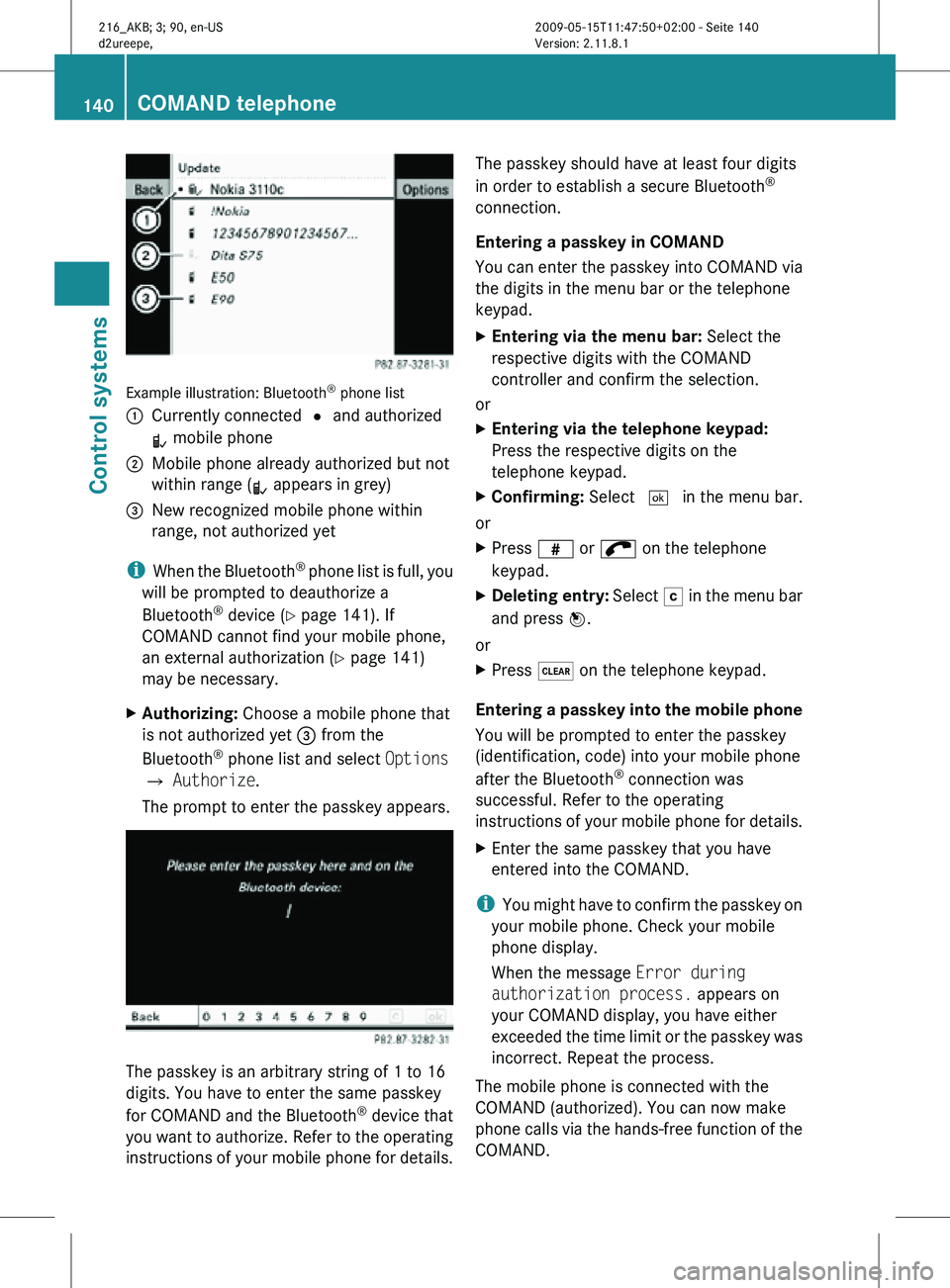
Example illustration: Bluetooth
®
phone list
: Currently connected # and authorized
L mobile phone
; Mobile phone already authorized but not
within range (L appears in grey)
= New recognized mobile phone within
range, not authorized yet
i When the Bluetooth ®
phone list is full, you
will be prompted to deauthorize a
Bluetooth ®
device ( Y page 141). If
COMAND cannot find your mobile phone,
an external authorization (Y page 141)
may be necessary.
X Authorizing: Choose a mobile phone that
is not authorized yet = from the
Bluetooth ®
phone list and select Options
Q Authorize.
The prompt to enter the passkey appears. The passkey is an arbitrary string of 1 to 16
digits. You have to enter the same passkey
for COMAND and the Bluetooth
®
device that
you want to authorize. Refer to the operating
instructions of your mobile phone for details. The passkey should have at least four digits
in order to establish a secure Bluetooth
®
connection.
Entering a passkey in COMAND
You can enter the passkey into COMAND via
the digits in the menu bar or the telephone
keypad.
X Entering via the menu bar: Select the
respective digits with the COMAND
controller and confirm the selection.
or
X Entering via the telephone keypad:
Press the respective digits on the
telephone keypad.
X Confirming: Select ¬ in the menu bar.
or
X Press z or ; on the telephone
keypad.
X Deleting entry: Select F in the menu bar
and press W.
or
X Press $ on the telephone keypad.
Entering a passkey into the mobile phone
You will be prompted to enter the passkey
(identification, code) into your mobile phone
after the Bluetooth ®
connection was
successful. Refer to the operating
instructions of your mobile phone for details.
X Enter the same passkey that you have
entered into the COMAND.
i You might have to confirm the passkey on
your mobile phone. Check your mobile
phone display.
When the message Error during
authorization process. appears on
your COMAND display, you have either
exceeded the time limit or the passkey was
incorrect. Repeat the process.
The mobile phone is connected with the
COMAND (authorized). You can now make
phone calls via the hands-free function of the
COMAND. 140
COMAND telephoneControl systems
216_AKB; 3; 90, en-US
d2ureepe,
Version: 2.11.8.1 2009-05-15T11:47:50+02:00 - Seite 140
Page 143 of 500
External authorization
Certain security settings in your mobile
phone may prevent COMAND from finding
your mobile phone. In this case, you might
want to check if your mobile phone can
recognize the COMAND. The Bluetooth
®
device name of COMAND is MB Bluetooth.
X Select Data/Connections Q
Bluetooth Telephones.
X Go to Update and select Options Q
External Authorization.
X Activate the Bluetooth ®
search on the
mobile phone. Refer to mobile phone
operating instructions for detail.
X Select MB Bluetooth
on the mobile phone.
X When prompted, enter the passkey into
COMAND and the mobile phone
(Y page 140).
Show details
Details can be displayed for each mobile
phone in the Bluetooth ®
phone list.
X Select Data/Connections Q
Bluetooth Telephones.
X Choose the mobile phone from the list and
select Options Q Details.
The following
mobile phone details appear:
R Bluetooth ®
name
R Bluetooth ®
address
R Availability status
R Authorization
R Bluetooth ®
Class (mobile phone,
notebook, etc.)
X Closing detail display: Slide XVY. Deauthorizing the mobile phone
X
Select Data/Connections Q
Bluetooth Telephones.
X Choose the mobile phone from the list and
select Options Q De-authorize.
You will be asked whether you want to
deauthorize the device.
X Select Yes.
i You should delete the device name MB
Bluetooth from the Bluetooth ®
list of the
mobile phone before authorizing that
mobile phone again.
Connecting another mobile phone
You can switch between several mobile
phones that you have authorized.
i Switching to another authorized mobile
phone is
only possible while no phone calls
are being made.
X Select Data/Connections Q
Bluetooth Telephones.
X Select the mobile phone from the
Bluetooth ®
phone list.
X Confirm the selection.
The selected mobile phone is connected
provided it is within Bluetooth ®
range and
Bluetooth ®
is activated on the respective
device.
You can
only connect one mobile phone at
a time. The currently connected mobile
phone is indicated by a dot # in the
Bluetooth ®
phone list ( Y page 140).
Main telephone menu When the connected mobile phone is ready,
the following display appears: COMAND telephone
141
Control systems
216_AKB; 3; 90, en-US
d2ureepe, Version: 2.11.8.1 2009-05-15T11:47:50+02:00 - Seite 141 Z
Page 144 of 500
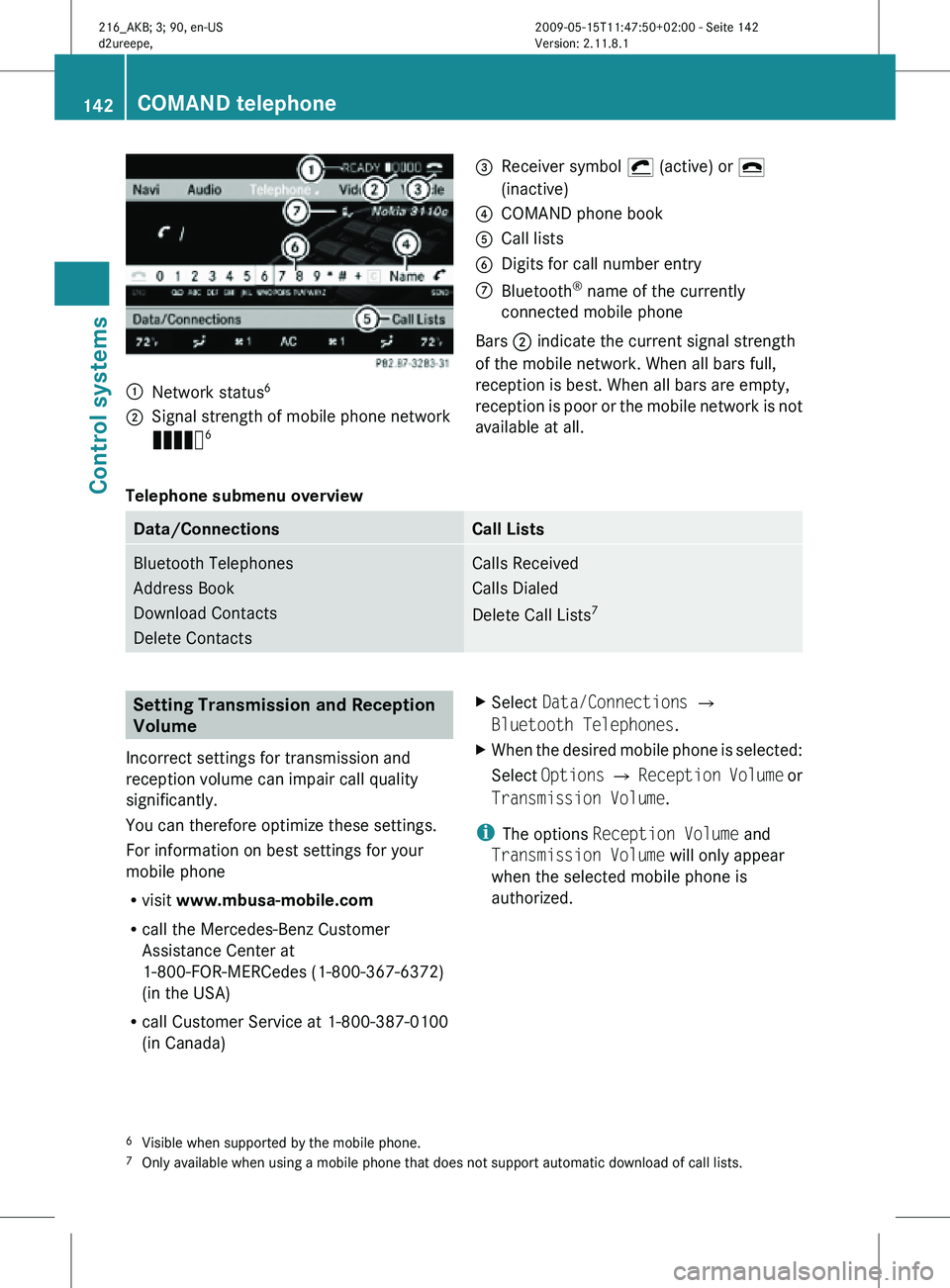
:
Network status 6
; Signal strength of mobile phone network
Ä 6 =
Receiver symbol ¡ (active) or ¢
(inactive)
? COMAND phone book
A Call lists
B Digits for call number entry
C Bluetooth ®
name of the currently
connected mobile phone
Bars ; indicate the current signal strength
of the mobile network. When all bars full,
reception is best. When all bars are empty,
reception is poor or the mobile network is not
available at all.
Telephone submenu overview Data/Connections Call Lists
Bluetooth Telephones
Address Book
Download Contacts
Delete Contacts Calls Received
Calls Dialed
Delete Call Lists
7 Setting Transmission and Reception
Volume
Incorrect settings for transmission and
reception volume can impair call quality
significantly.
You can therefore optimize these settings.
For information on best settings for your
mobile phone
R visit www.mbusa-mobile.com
R call the Mercedes-Benz Customer
Assistance Center at
1-800-FOR-MERCedes (1-800-367-6372)
(in the USA)
R call Customer Service at 1-800-387-0100
(in Canada) X
Select Data/Connections Q
Bluetooth Telephones.
X When the desired mobile phone is selected:
Select Options Q Reception Volume or
Transmission Volume.
i The options Reception Volume and
Transmission Volume will only appear
when the selected mobile phone is
authorized.
6 Visible when supported by the mobile phone.
7 Only available when using a mobile phone that does not support automatic download of call lists. 142
COMAND telephoneControl systems
216_AKB; 3; 90, en-US
d2ureepe,
Version: 2.11.8.1 2009-05-15T11:47:50+02:00 - Seite 142
Page 148 of 500
Calling an additional party
You can call another party during an active
call. The active call is put on hold.
X
Select NEW from the telephone menu and
press W.
or
X Press button 6 on the telephone
keypad in the center console.
X Enter the number to call manually
(Y page 143) or from the phone book
(Y page 149).
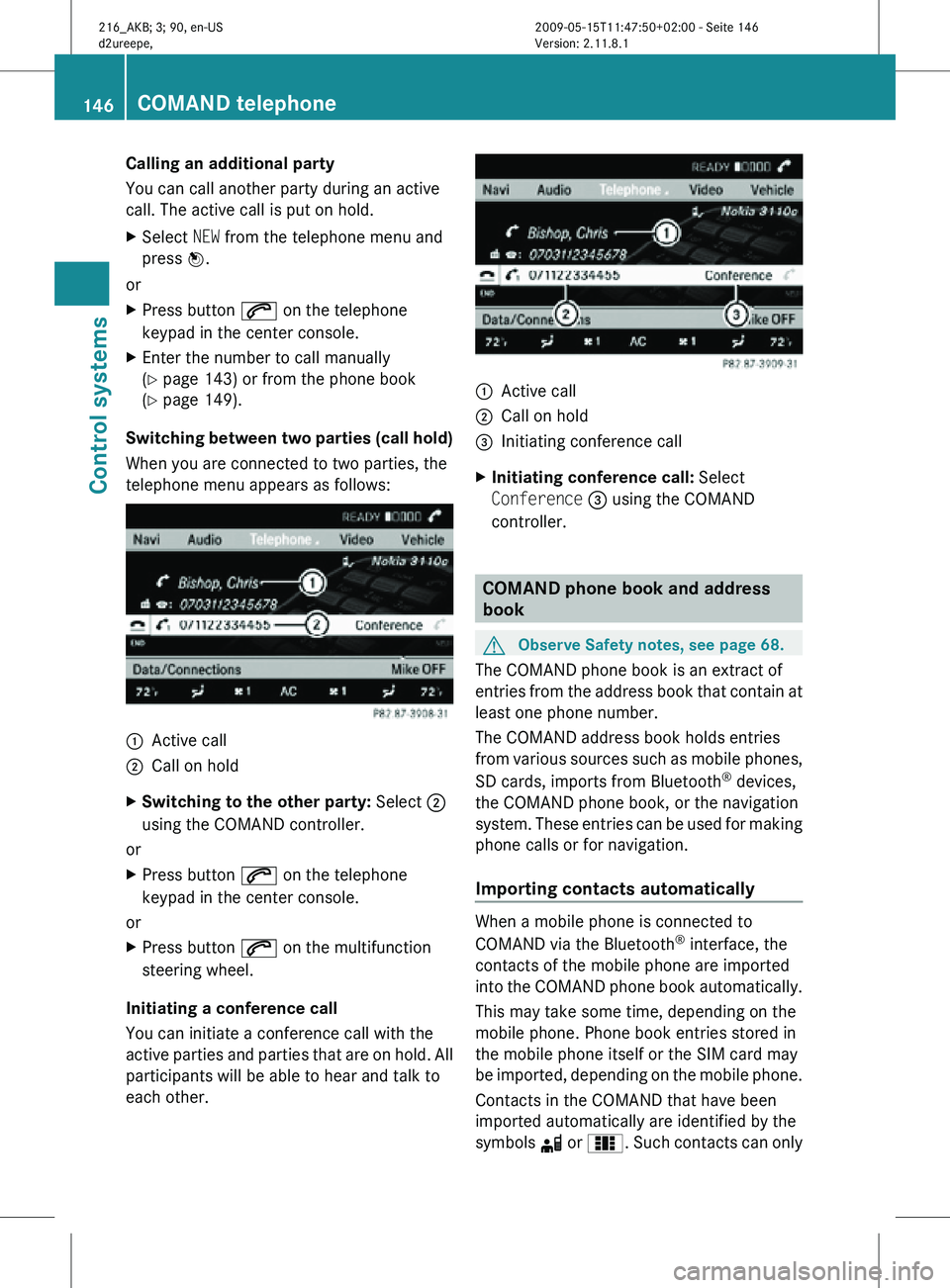
Switching between two parties (call hold)
When you are connected to two parties, the
telephone menu appears as follows: :
Active call
; Call on hold
X Switching to the other party: Select ;
using the COMAND controller.
or
X Press button 6 on the telephone
keypad in the center console.
or
X Press button 6 on the multifunction
steering wheel.
Initiating a conference call
You can initiate a conference call with the
active parties and parties that are on hold. All
participants will be able to hear and talk to
each other. :
Active call
; Call on hold
= Initiating conference call
X Initiating conference call: Select
Conference = using the COMAND
controller. COMAND phone book and address
book
G
Observe Safety notes, see page 68.
The COMAND phone book is an extract of
entries from the address book that contain at
least one phone number.
The COMAND address book holds entries
from various sources such as mobile phones,
SD cards, imports from Bluetooth ®
devices,
the COMAND phone book, or the navigation
system. These entries can be used for making
phone calls or for navigation.
Importing contacts automatically When a mobile phone is connected to
COMAND via the Bluetooth
®
interface, the
contacts of the mobile phone are imported
into the COMAND phone book automatically.
This may take some time, depending on the
mobile phone. Phone book entries stored in
the mobile phone itself or the SIM card may
be imported, depending on the mobile phone.
Contacts in the COMAND that have been
imported automatically are identified by the
symbols d or 0. Such contacts can only 146
COMAND telephoneControl systems
216_AKB; 3; 90, en-US
d2ureepe,
Version: 2.11.8.1 2009-05-15T11:47:50+02:00 - Seite 146
Page 149 of 500
be accessed when the respective mobile
phone is connected to COMAND via the
Bluetooth
®
interface.
Importing contacts manually i
Contacts that were imported manually
can always be accessed. Contacts that
were imported automatically can only be
accessed when the respective mobile
phone is connected to COMAND via the
Bluetooth ®
interface.
Data can be imported
R from memory card
R via the Bluetooth ®
interface (for example
Bluetooth ®
phone or Bluetooth ®
PC)
X Importing data: Load the memory card or
activate Bluetooth ®
in COMAND and the
Bluetooth ®
mobile phone/PC. Refer to
operating instructions of the respective
Bluetooth ®
device.
X Select Data/Connections Q Download
Contacts Q From Memory Card or Via
Bluetooth.
X Select Add or Overwrite.
i The contact data, or vCards 16
, must be
sent from the Bluetooth ®
device to
COMAND. Refer to operating instructions
of the respective Bluetooth ®
device. X
Stopping data import: Press W.
or
X Press %.
When the data have been imported, the
message Import successful. appears in
the COMAND display.
When the COMAND phone book memory is
full, the message Memory full.
Contacts could not be imported
completely. appears in the COMAND
display.
i When switching to another main function,
such as navigation, while importing data via
Bluetooth ®
, the import is aborted. The
import of vCards from a memory card
however will be continued.
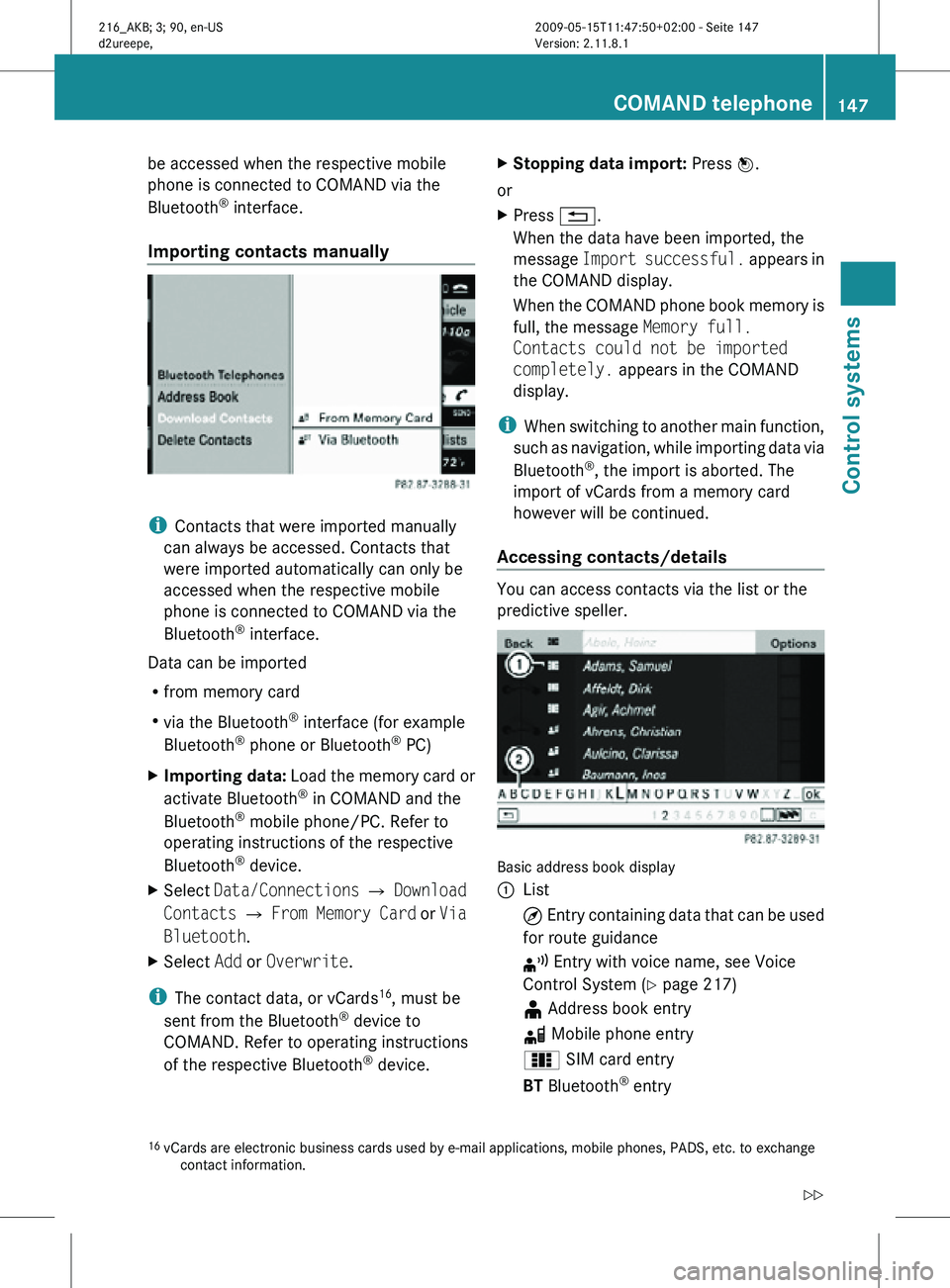
Accessing contacts/details You can access contacts via the list or the
predictive speller.
Basic address book display
:
List
¤ Entry containing data that can be used
for route guidance
¦ Entry with voice name, see Voice
Control System (Y page 217)
¥ Address book entry
d Mobile phone entry
0 SIM card entry
BT Bluetooth ®
entry
16 vCards are electronic business cards used by e-mail applications, mobile phones, PADS, etc. to exchange
contact information. COMAND telephone
147Control systems
216_AKB; 3; 90, en-US
d2ureepe, Version: 2.11.8.1 2009-05-15T11:47:50+02:00 - Seite 147 Z
Page 151 of 500
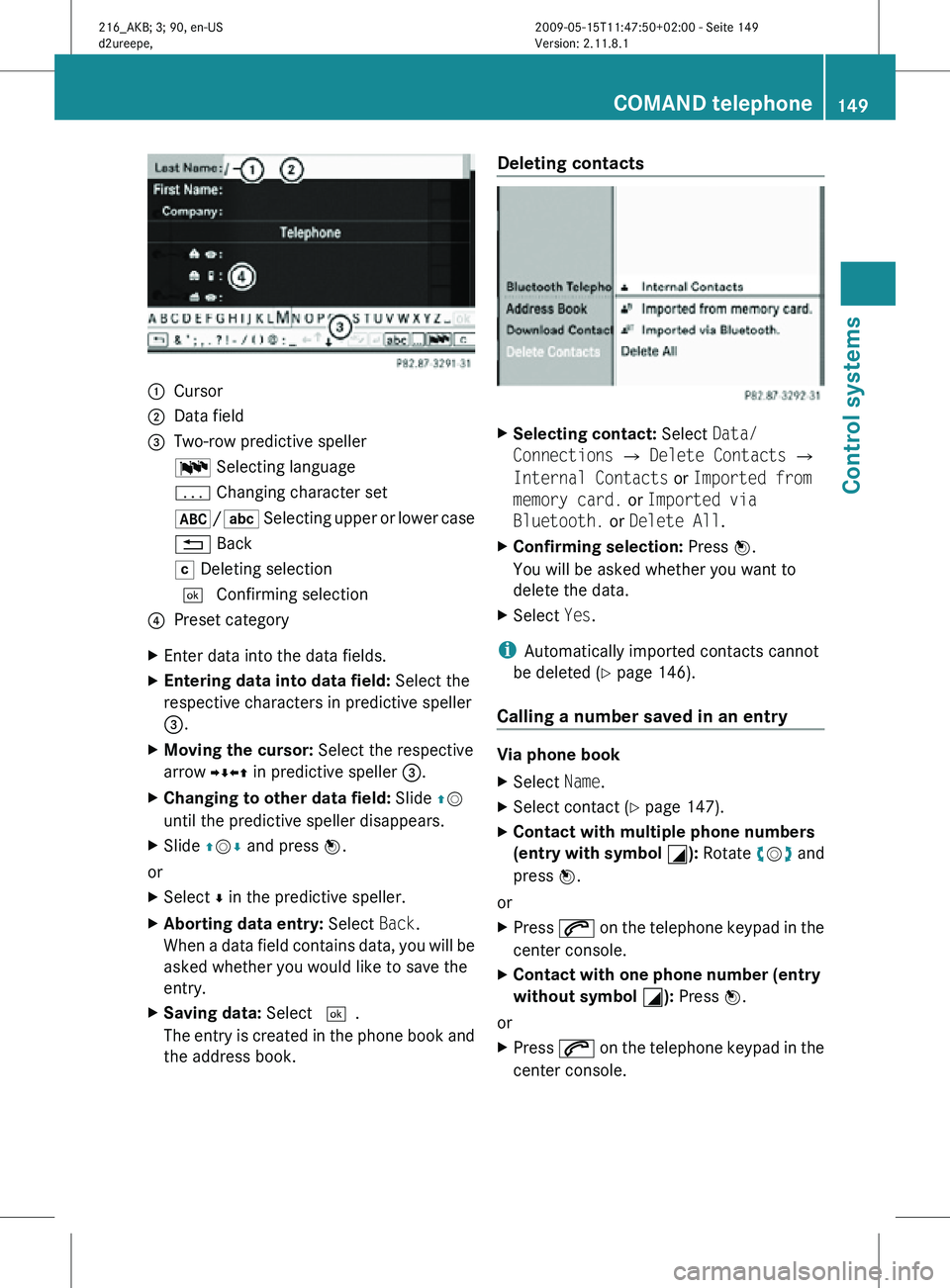
:
Cursor
; Data field
= Two-row predictive speller
B Selecting language
p Changing character set
*/E Selecting upper or lower case
% Back
F Deleting selection
¬ Confirming selection
? Preset category
X Enter data into the data fields.
X Entering data into data field: Select the
respective characters in predictive speller
=.
X Moving the cursor: Select the respective
arrow YÆXZ in predictive speller =.
X Changing to other data field: Slide ZV
until the predictive speller disappears.
X Slide ZVÆ and press W.
or
X Select Æ in the predictive speller.
X Aborting data entry: Select Back.
When a data field contains data, you will be
asked whether you would like to save the
entry.
X Saving data: Select ¬.
The entry is created in the phone book and
the address book. Deleting contacts
X
Selecting contact: Select Data/
Connections Q Delete Contacts Q
Internal Contacts or Imported from
memory card. or Imported via
Bluetooth. or Delete All.
X Confirming selection: Press W.
You will be asked whether you want to
delete the data.
X Select Yes.
i Automatically imported contacts cannot
be deleted (Y page 146).
Calling a number saved in an entry Via phone book
X
Select Name.
X Select contact (Y page 147).
X Contact with multiple phone numbers
(entry with symbol G): Rotate cVd and
press W.
or
X Press 6 on the telephone keypad in the
center console.
X Contact with one phone number (entry
without symbol G): Press W.
or
X Press 6 on the telephone keypad in the
center console. COMAND telephone
149Control systems
216_AKB; 3; 90, en-US
d2ureepe, Version: 2.11.8.1 2009-05-15T11:47:50+02:00 - Seite 149 Z
Page 187 of 500
i
Do not leave external devices in the
vehicle. Proper function of the device could
be impaired due to excessive
temperatures, for example when exposing
to direct sunlight or when the outside
temperature is extremely low. Mercedes-
Benz does not assume liability for damage
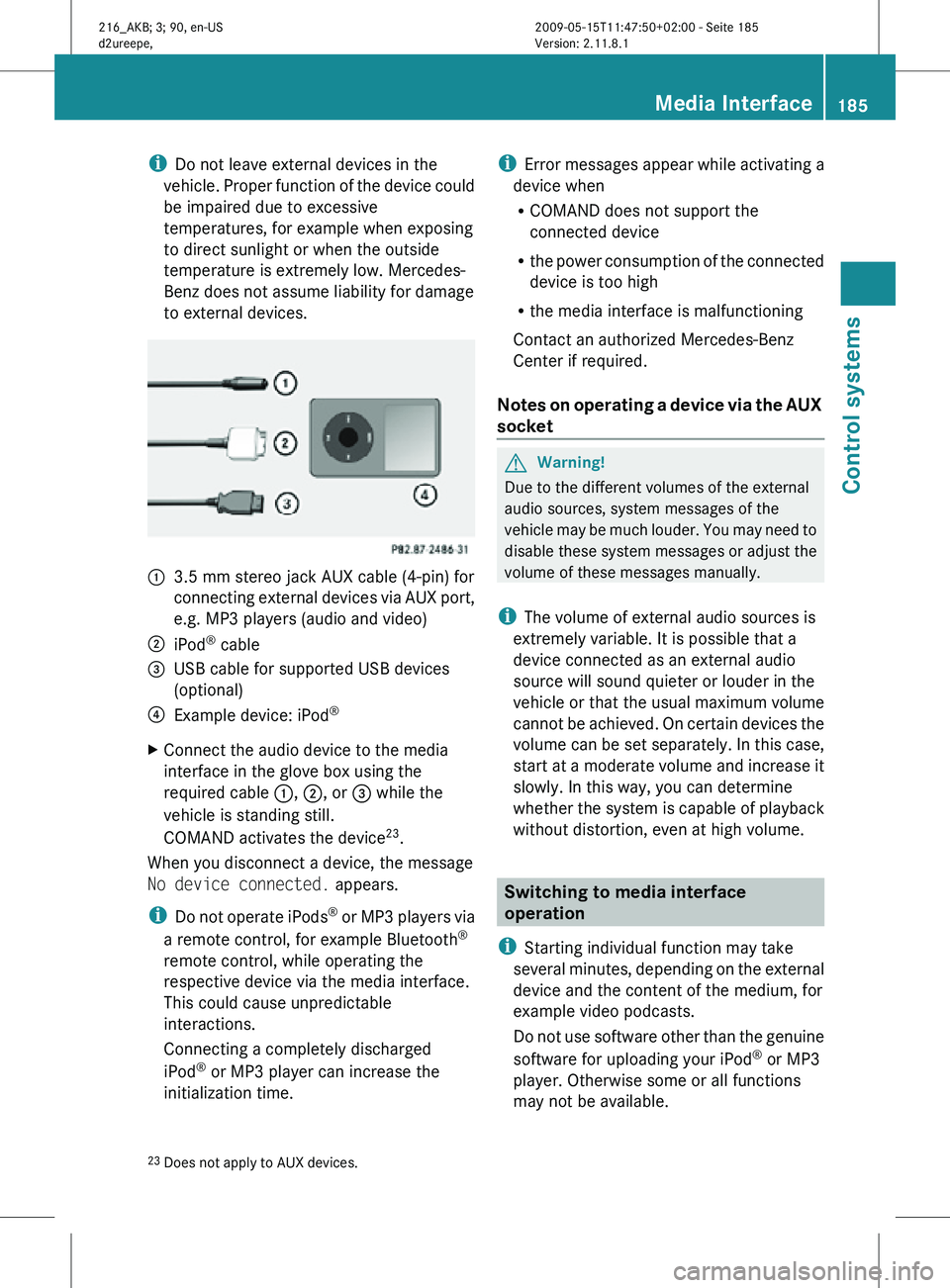
to external devices. :
3.5 mm stereo jack AUX cable (4-pin) for
connecting external devices via AUX port,
e.g. MP3 players (audio and video)
; iPod ®
cable
= USB cable for supported USB devices
(optional)
? Example device: iPod ®
X Connect the audio device to the media
interface in the glove box using the
required cable :, ;, or = while the
vehicle is standing still.
COMAND activates the device 23
.
When you disconnect a device, the message
No device connected. appears.
i Do not operate iPods ®
or MP3 players via
a remote control, for example Bluetooth ®
remote control, while operating the
respective device via the media interface.
This could cause unpredictable
interactions.
Connecting a completely discharged
iPod ®
or MP3 player can increase the
initialization time. i
Error messages appear while activating a
device when
R COMAND does not support the
connected device
R the power consumption of the connected
device is too high
R the media interface is malfunctioning
Contact an authorized Mercedes-Benz
Center if required.
Notes on operating a device via the AUX
socket G
Warning!
Due to the different volumes of the external
audio sources, system messages of the
vehicle may be much louder. You may need to
disable these system messages or adjust the
volume of these messages manually.
i The volume of external audio sources is
extremely variable. It is possible that a
device connected as an external audio
source will sound quieter or louder in the
vehicle or that the usual maximum volume
cannot be achieved. On certain devices the
volume can be set separately. In this case,
start at a moderate volume and increase it
slowly. In this way, you can determine
whether the system is capable of playback
without distortion, even at high volume. Switching to media interface
operation
i Starting individual function may take
several minutes, depending on the external
device and the content of the medium, for
example video podcasts.
Do not use software other than the genuine
software for uploading your iPod ®
or MP3
player. Otherwise some or all functions
may not be available.
23 Does not apply to AUX devices. Media Interface
185Control systems
216_AKB; 3; 90, en-US
d2ureepe, Version: 2.11.8.1 2009-05-15T11:47:50+02:00 - Seite 185 Z