phone MERCEDES-BENZ CL CLASS 2010 User Guide
[x] Cancel search | Manufacturer: MERCEDES-BENZ, Model Year: 2010, Model line: CL CLASS, Model: MERCEDES-BENZ CL CLASS 2010Pages: 500, PDF Size: 9.32 MB
Page 36 of 500
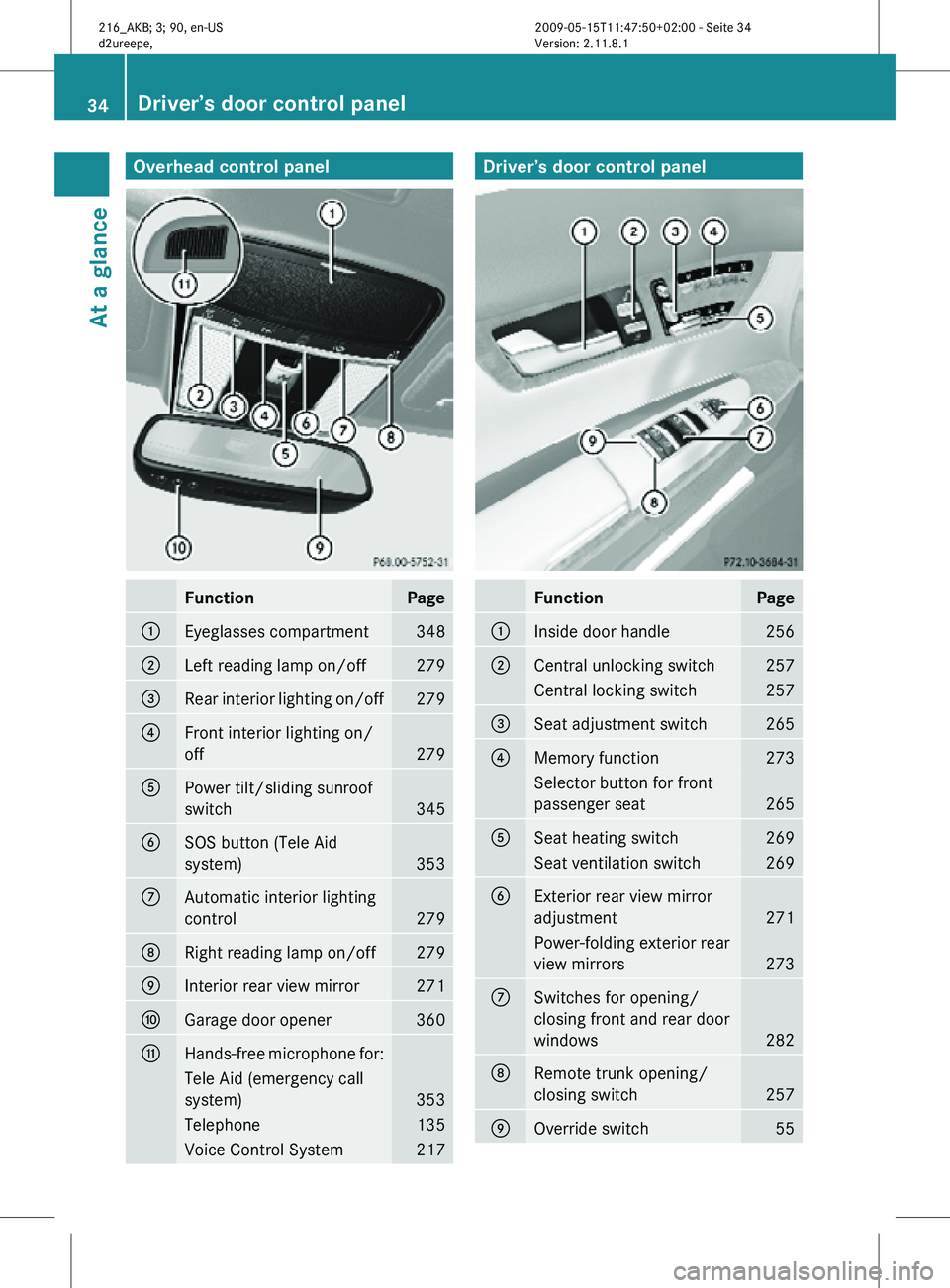
Overhead control panel
Function Page
:
Eyeglasses compartment 348
;
Left reading lamp on/off 279
=
Rear interior lighting on/off 279
?
Front interior lighting on/
off
279
A
Power tilt/sliding sunroof
switch
345
B
SOS button (Tele Aid
system)
353
C
Automatic interior lighting
control
279
D
Right reading lamp on/off 279
E
Interior rear view mirror 271
F
Garage door opener 360
G
Hands-free microphone for:
Tele Aid (emergency call
system)
353
Telephone 135
Voice Control System 217 Driver’s door control panel
Function Page
:
Inside door handle 256
;
Central unlocking switch 257
Central locking switch 257
=
Seat adjustment switch 265
?
Memory function 273
Selector button for front
passenger seat
265
A
Seat heating switch 269
Seat ventilation switch 269
B
Exterior rear view mirror
adjustment
271
Power-folding exterior rear
view mirrors
273
C
Switches for opening/
closing front and rear door
windows
282
D
Remote trunk opening/
closing switch
257
E
Override switch 5534
Driver’s door control panelAt a glance
216_AKB; 3; 90, en-US
d2ureepe,
Version: 2.11.8.1 2009-05-15T11:47:50+02:00 - Seite 34
Page 67 of 500
Anti-theft systems
Immobilizer
The immobilizer prevents unauthorized
persons from starting your vehicle.
When leaving the vehicle, always take the
SmartKey with you and lock the vehicle. The
engine can be started by anyone with a valid
SmartKey that is left inside the vehicle.
Activating X
With SmartKey: Remove the SmartKey
from the starter switch.
X With KEYLESS-GO: Turn off the engine and
open the driver’s door.
Deactivating X
Switch on the ignition.
i Starting the engine will also deactivate
the immobilizer.
In the event that the engine cannot be
started (yet the vehicle’s battery is
charged), the system is not operational.
Contact an authorized Mercedes-Benz
Center or call 1-800-FOR-MERCedes (in the
USA) or 1-800-387-0100 (in Canada). Anti-theft alarm system
Once the alarm system has been armed, a
visual and audible alarm is triggered when
someone opens
R a door
R the trunk
R the hood
The alarm will stay on even if the activating
element, a door, for example, is closed
immediately.
The alarm system will also be triggered when
R the vehicle is opened with the mechanical
key
R a door is opened from the inside To cancel the alarm after it has been
triggered, see “Canceling the alarm”
(Y page 66).
i
If the alarm stays on for more than
30 seconds, the Tele Aid system initiates a
call to the Customer Assistance Center
automatically. The Tele Aid system will
initiate the call provided that
R you have subscribed to the Tele Aid
service
R the Tele Aid service has been activated
properly
R the necessary mobile phone, power
supply and GPS coverage are available X
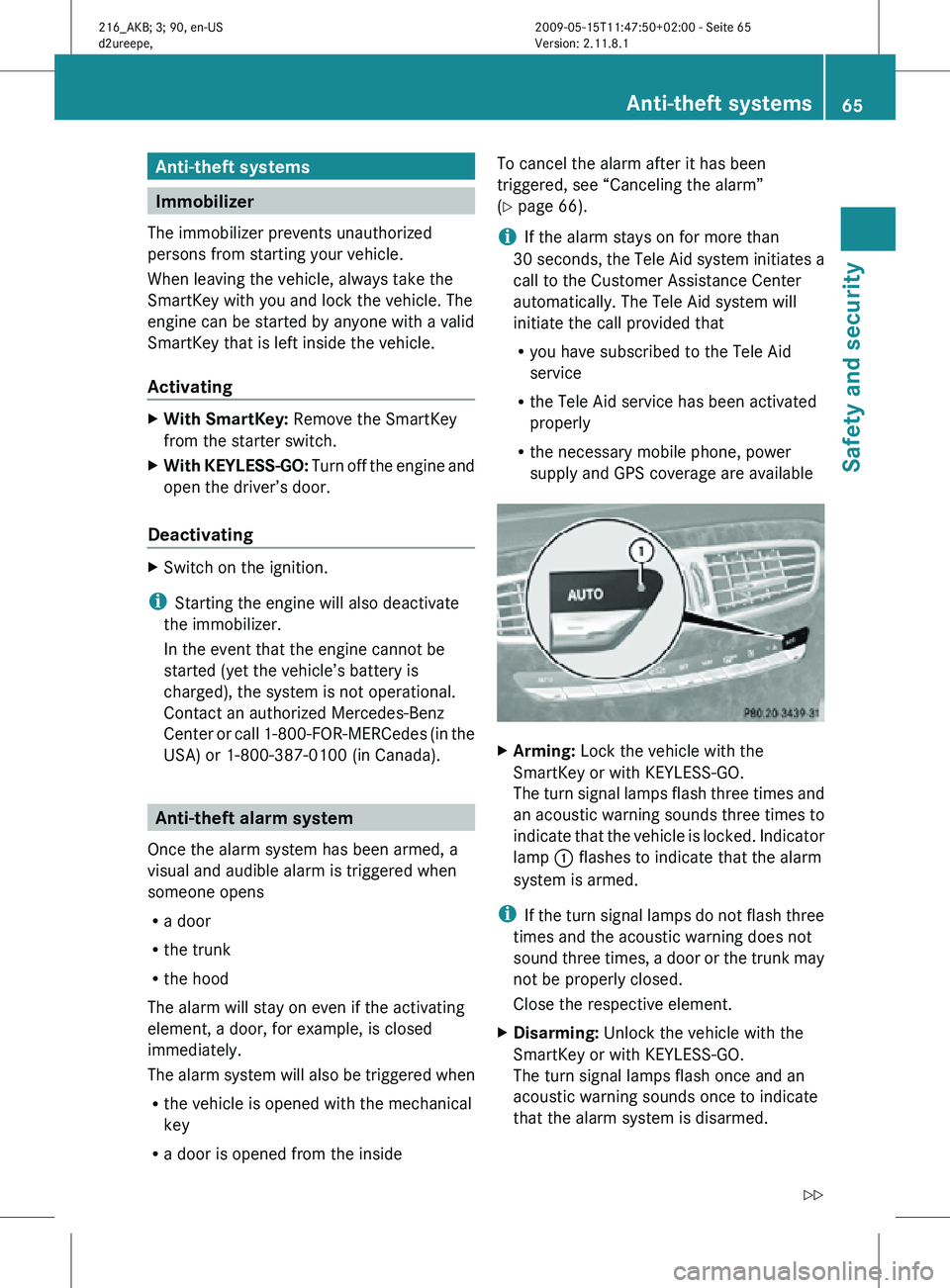
Arming: Lock the vehicle with the
SmartKey or with KEYLESS-GO.
The turn signal lamps flash three times and
an acoustic warning sounds three times to
indicate that the vehicle is locked. Indicator
lamp : flashes to indicate that the alarm
system is armed.
i If the turn signal lamps do not flash three
times and the acoustic warning does not
sound three times, a door or the trunk may
not be properly closed.
Close the respective element.
X Disarming: Unlock the vehicle with the
SmartKey or with KEYLESS-GO.
The turn signal lamps flash once and an
acoustic warning sounds once to indicate
that the alarm system is disarmed. Anti-theft systems
65Safety and security
216_AKB; 3; 90, en-US
d2ureepe, Version: 2.11.8.1 2009-05-15T11:47:50+02:00 - Seite 65 Z
Page 69 of 500
Vehicle equipment ..............................
68
COMAND introduction ........................68
COMAND system settings .................79
COMAND navigation (introduction) ...83
COMAND navigation system
(entering a destination) ......................93
COMAND navigation system (Point
of interest entry) ............................... 111
COMAND navigation system (route
guidance) ........................................... 116
COMAND navigation system (dur-
ing route guidance) ...........................122
COMAND navigation system (real-
time traffic) ....................................... 125
COMAND navigation system (des-
tination memory) .............................. 130
COMAND navigation system (last
destinations) ..................................... 134
COMAND telephone ..........................135
COMAND FM/AM radio ....................152
COMAND satellite radio ...................157
COMAND audio CD/audio DVD/
MP3 .................................................... 162
Audio AUX and video AUX ................172
COMAND video DVD .........................174Music Register
.................................. 180
Media Interface ................................. 183
COMAND vehicle menu ....................189
COMAND automatic climate control 194
COMAND seats .................................. 198
Instrument cluster control system . 201
Voice Control System introduction .217
Voice Control System navigation ....219
Voice Control System telephone .....225
Voice Control System address book 229
Voice Control System radio .............231
Voice Control System CD/DVD
changer/MP3 .................................... 234
Voice Control System external
devices ............................................... 236
Voice Control System command list 237
Voice Control System trouble-
shooting ............................................. 247
Voice Control System individuali-
zation ................................................. 250 67Control systems
216_AKB; 3; 90, en-US
d2ureepe,
Version: 2.11.8.1 2009-05-15T11:47:50+02:00 - Seite 67
Page 70 of 500
Vehicle equipment
i This Operator’s Manual describes all
features, standard or optional, potentially
available for your vehicle at the time of
purchase. Please be aware that your
vehicle might not be equipped with all
features described in this manual. COMAND introduction
COMAND operating safety
COMAND ( Cockpit Management and Data
System) is an information and operating
center for
vehicle sound and communications
systems. It includes the radio and navigation
system, as well as other optional equipment
(satellite radio, telephone, etc.). G
Warning!
Any alteration of electronic components or
software can cause malfunctions.
Radio, satellite radio, amplifier, CD/DVD
changer, navigation module, telephone and
Voice Control Systems are interconnected.
Therefore, if one of the components is not
operational, or has not been removed/
replaced properly, the function of other
components could be impaired.
Such conditions might seriously impair the
operating safety of your vehicle.
We recommend to have any service work on
electronic components carried out by an
authorized Mercedes-Benz Center. G
Warning!
In order to avoid distraction which could lead
to an
accident, the driver should enter system
settings while the vehicle is at a standstill, and
operate the system only when permitted by
road, weather and traffic conditions.
Bear in mind that at a speed of just 30 mph
(approximately 50 km/h), your vehicle is
covering a distance of 44 feet (approximately
14 m) every second. COMAND supplies you with information to
help you select your route more easily and
guide you conveniently and safely to your
destination. For safety reasons, we
encourage the driver to stop the vehicle in a
safe
place
before answering or placing a call,
or consulting the COMAND screen to read
navigational maps, instructions, or
downloaded information. G
Warning!
While the navigation system provides
directional assistance,
the driver must remain
focused on safe driving behavior, especially
attention to traffic and street signs, and
should utilize the system’s audio cues while
driving.
The navigation system does not supply any
information on stop signs, yield signs, traffic
regulations or traffic safety rules. Their
observance always remains in the driver’s
personal responsibility. Maps do not cover all
areas nor all routes within an area. Availability of functions while the
vehicle is in motion
For safety reasons, certain COMAND
functions are not available while the vehicle
is in motion or they are only available to a
limited extent. You will notice this, for
example, by
the fact that certain menu items
cannot be selected or that the COMAND
display shows a corresponding message. Switching COMAND on or off
X Press shortcut button u in the center
console (Y page 69).
COMAND calls up the last selected menu.
i When you switch off COMAND, you also
switch off the currently playing audio
source. During
a telephone call, you cannot
switch off COMAND. 68
COMAND introduction
Control systems
216_AKB; 3; 90, en-US
d2ureepe,
Version: 2.11.8.1 2009-05-15T11:47:50+02:00 - Seite 68
Page 71 of 500
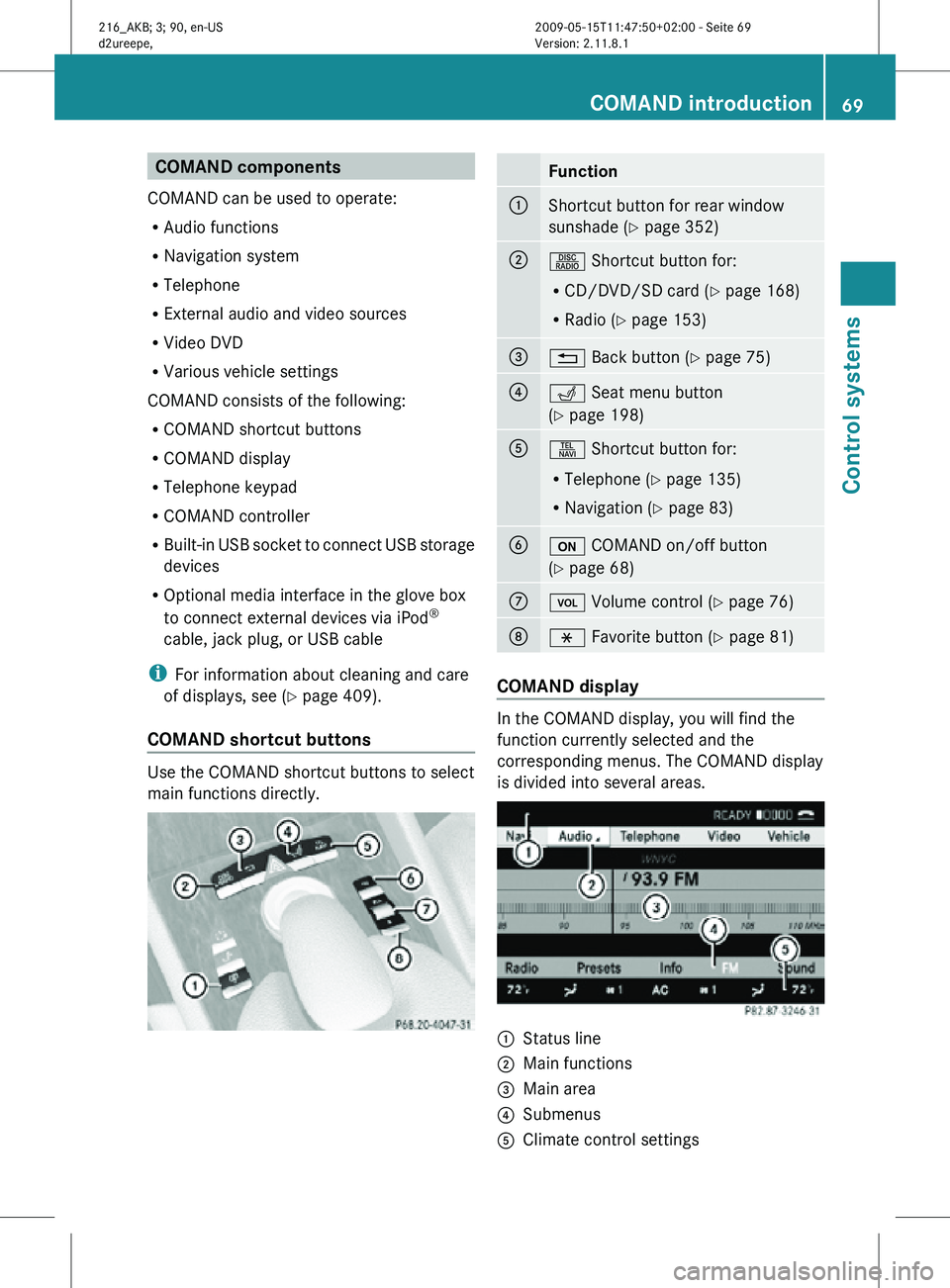
COMAND components
COMAND can be used to operate:
R Audio functions
R Navigation system
R Telephone
R External audio and video sources
R Video DVD
R Various vehicle settings
COMAND consists of the following:
R COMAND shortcut buttons
R COMAND display
R Telephone keypad
R COMAND controller
R Built-in USB socket to connect USB storage
devices
R Optional media interface in the glove box
to connect external devices via iPod ®
cable, jack plug, or USB cable
i For information about cleaning and care
of displays, see ( Y page 409).
COMAND shortcut buttons Use the COMAND shortcut buttons to select
main functions directly. Function
:
Shortcut button for rear window
sunshade (
Y page 352) ;
R Shortcut button for:
R
CD/DVD/SD card (Y page 168)
R Radio ( Y page 153) =
% Back button (Y page 75)
?
T Seat menu button
(Y page 198)
A
S Shortcut button for:
R
Telephone ( Y page 135)
R Navigation ( Y page 83) B
u COMAND on/off button
(Y page 68)
C
H Volume control (Y page 76)
D
h Favorite button (
Y page 81) COMAND display
In the COMAND display, you will find the
function currently selected and the
corresponding menus. The COMAND display
is divided into several areas.
:
Status line
; Main functions
= Main area
? Submenus
A Climate control settings COMAND introduction
69Control systems
216_AKB; 3; 90, en-US
d2ureepe, Version: 2.11.8.1 2009-05-15T11:47:50+02:00 - Seite 69 Z
Page 72 of 500

The currently selected main function is
highlighted.
Once you have selected a main function, main
area
= is active.
i The layout of the menus may vary
depending on your vehicle’s equipment.
This manual shows the menus for a fully
equipped vehicle.
Adjusting COMAND display illumination X
Increasing the illumination: Turn
knob : clockwise.
X Dimming the illumination: Turn knob :
counterclockwise.
Swiveling COMAND display With button
: or ; you can swivel the
COMAND display to the left or right. Instrument cluster multifunction
display This section describes features and controls
via the COMAND controller, display and
shortcut buttons only.
Related COMAND features are described in
the “Instrument cluster control system”
section (
Y page 201). It contains function
descriptions and operation of the instrument
cluster multifunction display and the
multifunction steering wheel buttons.
Telephone keypad X
Flip up cover ;.
With telephone keypad : you can
R enter and clear numbers and special
characters
R reject, answer, connect and end calls
(Y page 135)
R select preset radio stations and enter the
frequency manually ( Y page 155)
R select preset satellite radio stations and
enter the channel number (Y page 161)
R select a storage medium from the DVD
changer (Y page 170)
R select a track directly in CD mode, DVD
audio mode or MP3 mode (Y page 170), or
from a device connected to the media
interface (Y page 187) 70
COMAND introductionControl systems
216_AKB; 3; 90, en-US
d2ureepe,
Version: 2.11.8.1 2009-05-15T11:47:50+02:00 - Seite 70
Page 74 of 500
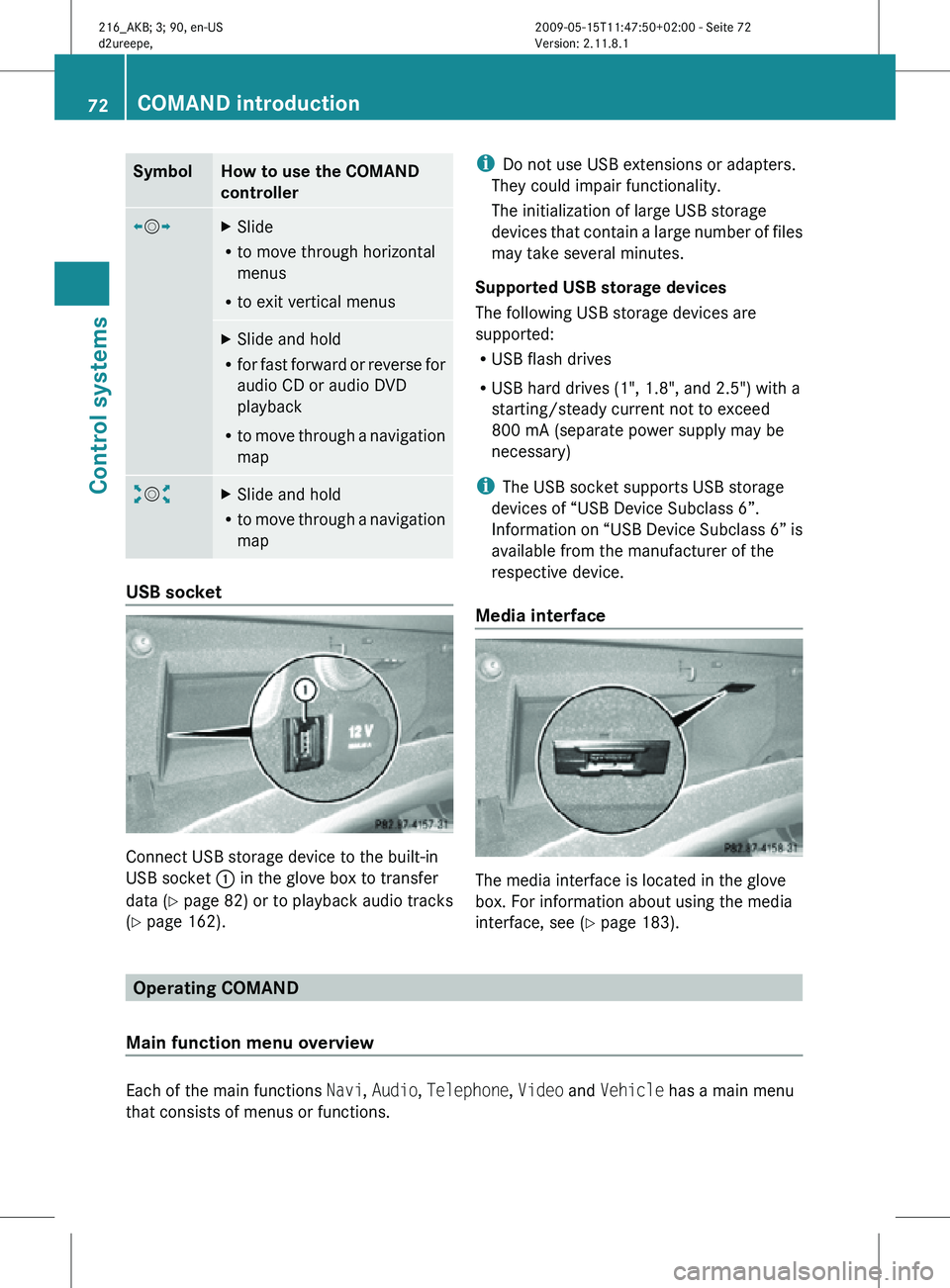
Symbol How to use the COMAND
controller
XVY
X
Slide
R to move through horizontal
menus
R to exit vertical menus X
Slide and hold
R for fast forward or reverse for
audio CD or audio DVD
playback
R to move through a navigation
map aVb
X
Slide and hold
R to move through a navigation
map USB socket
Connect USB storage device to the built-in
USB socket
: in the glove box to transfer
data ( Y page 82) or to playback audio tracks
(Y page 162). i
Do not use USB extensions or adapters.
They could impair functionality.
The initialization of large USB storage
devices that contain a large number of files
may take several minutes.
Supported USB storage devices
The following USB storage devices are
supported:
R USB flash drives
R USB hard drives (1", 1.8", and 2.5") with a
starting/steady current not to exceed
800 mA (separate power supply may be
necessary)
i The USB socket supports USB storage
devices of “USB Device Subclass 6”.
Information on “USB Device Subclass 6” is
available from the manufacturer of the
respective device.
Media interface The media interface is located in the glove
box. For information about using the media
interface, see (Y page 183).
Operating COMAND
Main function menu overview Each of the main functions
Navi, Audio, Telephone, Video and Vehicle has a main menu
that consists of menus or functions. 72
COMAND introductionControl systems
216_AKB; 3; 90, en-US
d2ureepe,
Version: 2.11.8.1 2009-05-15T11:47:50+02:00 - Seite 72
Page 75 of 500
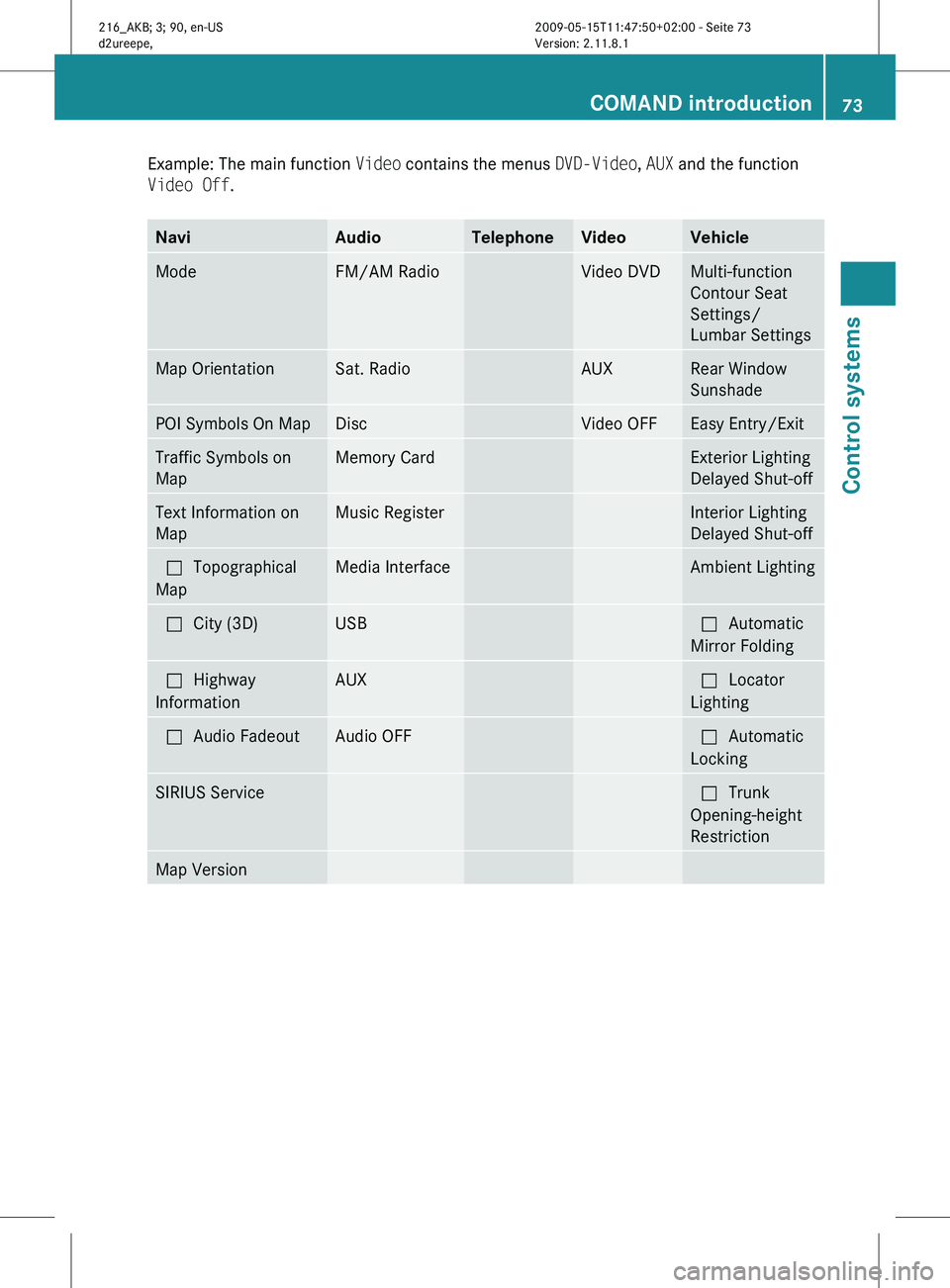
Example: The main function
Video contains the menus DVD-Video, AUX and the function
Video Off. Navi Audio Telephone Video Vehicle
Mode FM/AM Radio Video DVD Multi-function
Contour Seat
Settings/
Lumbar Settings
Map Orientation Sat. Radio AUX Rear Window
Sunshade
POI Symbols On Map Disc Video OFF Easy Entry/Exit
Traffic Symbols on
Map Memory Card Exterior Lighting
Delayed Shut-off
Text Information on
Map Music Register Interior Lighting
Delayed Shut-off
ªTopographical
Map Media Interface Ambient Lighting
ªCity (3D) USB ªAutomatic
Mirror Folding
ªHighway
Information AUX ªLocator
Lighting
ªAudio Fadeout Audio OFF ªAutomatic
Locking
SIRIUS Service ªTrunk
Opening-height
Restriction
Map Version COMAND introduction
73Control systems
216_AKB; 3; 90, en-US
d2ureepe, Version: 2.11.8.1 2009-05-15T11:47:50+02:00 - Seite 73 Z
Page 78 of 500
X
Switching to the next higher menu:
Press back button % briefly.
COMAND switches to the next higher menu
level within the currently active operating
mode.
X Switching to the main menu: Press and
hold back button %.
COMAND switches to the main menu of the
currently active operating mode. Basic functions
i The components and operating principles
of COMAND can be found on ( Y page 68).
Sound X
Muting: Press button 8 on the
multifunction steering wheel
(Y page 202).
The sound of the current audio source is
switched on or is muted.
i When the sound is muted, symbol 8
appears in the status line. When you
change the audio source, the sound is
switched on automatically. Navigation
announcements will be audible even when
the sound is muted.
Switching navigation announcements off
X Press button 8 on the multifunction
steering wheel during an announcement.
i The announcements remain switched off
even when you start a new route guidance
or switch COMAND off/on with the u
button. When you switch COMAND off by
removing the SmartKey from the starter
switch and then switch the ignition back on
after more than 3 minutes, the
announcements are switched back on
automatically.
X Switching navigation announcements
back on manually: Select Navi Q RPT
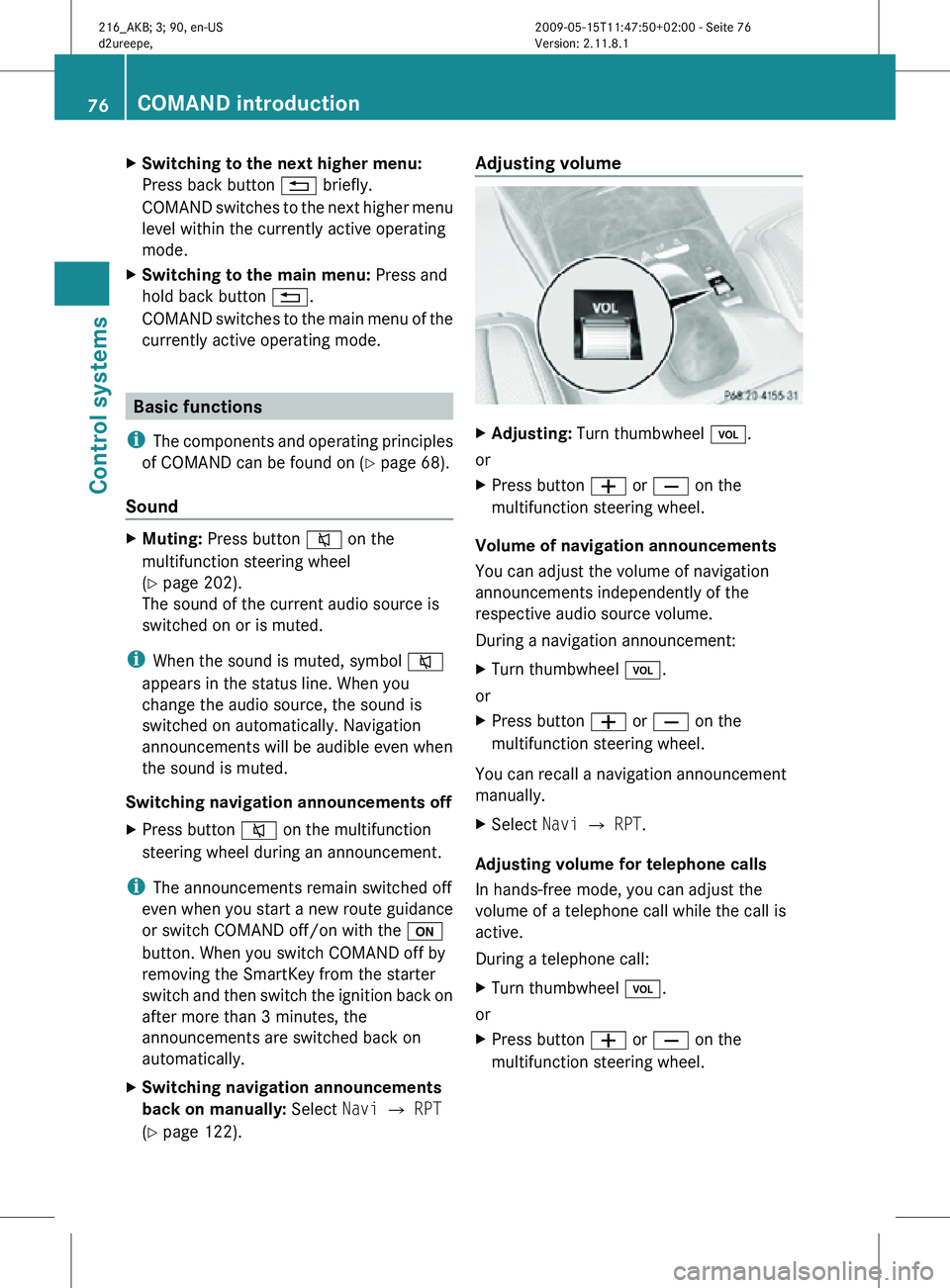
(Y page 122). Adjusting volume
X
Adjusting: Turn thumbwheel H.
or
X Press button W or X on the
multifunction steering wheel.
Volume of navigation announcements
You can adjust the volume of navigation
announcements independently of the
respective audio source volume.
During a navigation announcement:
X Turn thumbwheel H.
or
X Press button W or X on the
multifunction steering wheel.
You can recall a navigation announcement
manually.
X Select Navi Q RPT.
Adjusting volume for telephone calls
In hands-free mode, you can adjust the
volume of a telephone call while the call is
active.
During a telephone call:
X Turn thumbwheel H.
or
X Press button W or X on the
multifunction steering wheel. 76
COMAND introductionControl systems
216_AKB; 3; 90, en-US
d2ureepe,
Version: 2.11.8.1 2009-05-15T11:47:50+02:00 - Seite 76
Page 99 of 500
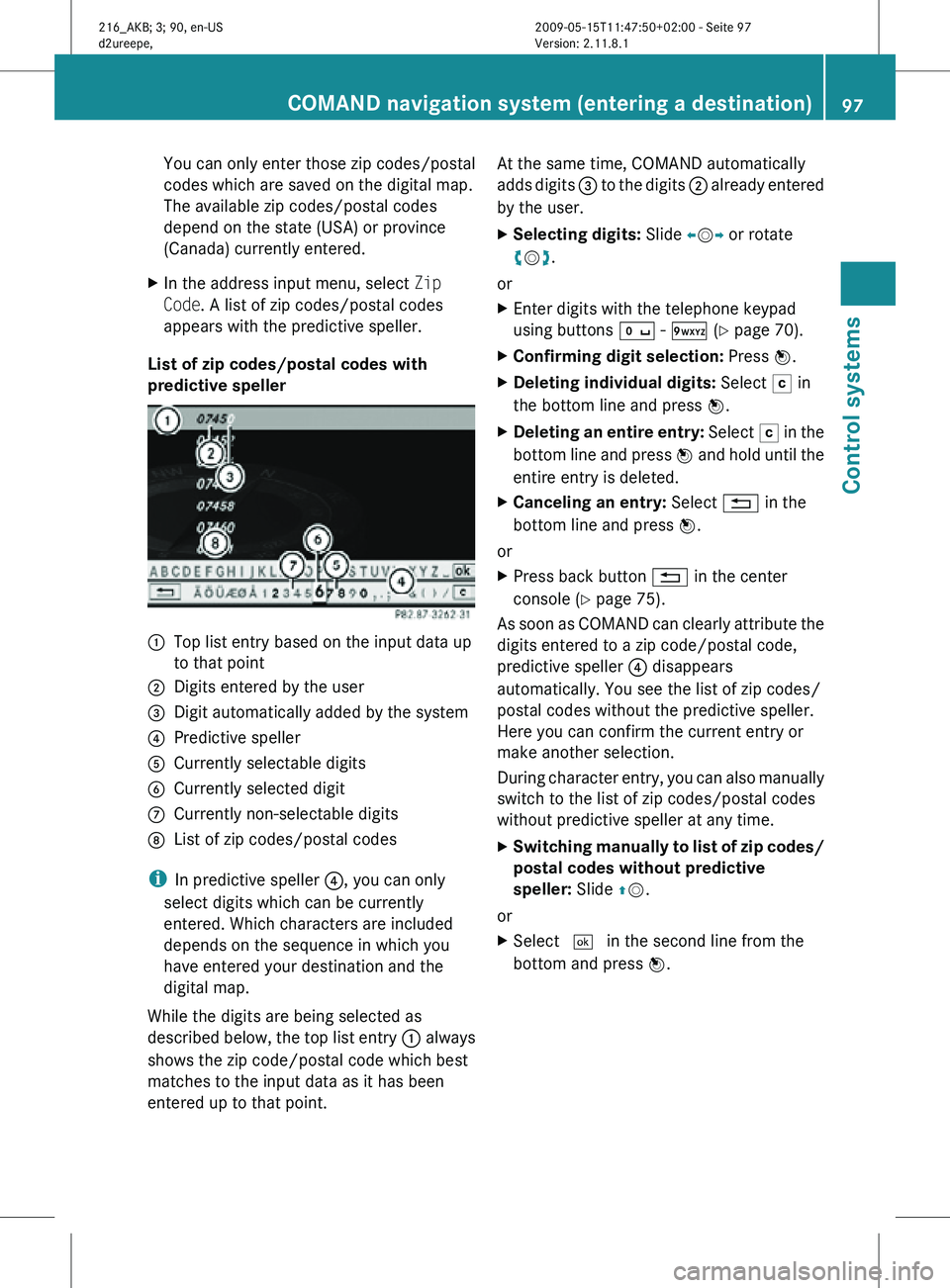
You can only enter those zip codes/postal
codes which are saved on the digital map.
The available zip codes/postal codes
depend on the state (USA) or province
(Canada) currently entered.
X In the address input menu, select Zip
Code. A list of zip codes/postal codes
appears with the predictive speller.
List of zip codes/postal codes with
predictive speller :
Top list entry based on the input data up
to that point
; Digits entered by the user
= Digit automatically added by the system
? Predictive speller
A Currently selectable digits
B Currently selected digit
C Currently non-selectable digits
D List of zip codes/postal codes
i In predictive speller ?, you can only
select digits which can be currently
entered. Which characters are included
depends on the sequence in which you
have entered your destination and the
digital map.
While the digits are being selected as
described below, the top list entry : always
shows the zip code/postal code which best
matches to the input data as it has been
entered up to that point. At the same time, COMAND automatically
adds digits
= to the digits ; already entered
by the user.
X Selecting digits: Slide XVY or rotate
cVd.
or
X Enter digits with the telephone keypad
using buttons Å - Ã (Y page 70).
X Confirming digit selection: Press W.
X Deleting individual digits: Select F in
the bottom line and press W.
X Deleting an entire entry: Select F in the
bottom line and press W and hold until the
entire entry is deleted.
X Canceling an entry: Select % in the
bottom line and press W.
or
X Press back button % in the center
console (Y page 75).
As soon as COMAND can clearly attribute the
digits entered to a zip code/postal code,
predictive speller ? disappears
automatically. You see the list of zip codes/
postal codes without the predictive speller.
Here you can confirm the current entry or
make another selection.
During character entry, you can also manually
switch to the list of zip codes/postal codes
without predictive speller at any time.
X Switching manually to list of zip codes/
postal codes without predictive
speller: Slide ZV.
or
X Select ¬ in the second line from the
bottom and press W. COMAND navigation system (entering a destination)
97Control systems
216_AKB; 3; 90, en-US
d2ureepe,Version: 2.11.8.1 2009-05-15T11:47:50+02:00 - Seite 97 Z