reset MERCEDES-BENZ CL CLASS 2010 Owner's Guide
[x] Cancel search | Manufacturer: MERCEDES-BENZ, Model Year: 2010, Model line: CL CLASS, Model: MERCEDES-BENZ CL CLASS 2010Pages: 500, PDF Size: 9.32 MB
Page 279 of 500
USA only
You can only switch on the high-beam
headlamps in low ambient lighting conditions.
The high-beam flasher is available at all times.
When the engine is running, and you turn the
exterior lamp switch to position T or
L, the manual headlamp mode has
priority over the daytime running lamp mode.
The corresponding exterior lamps come on
(Y page 275).
Fog lamps
Fog lamps cannot be switched on with the
exterior lamp switch in position c.
G
Warning!
In low ambient lighting or foggy conditions,
only switch from position c to L with
the vehicle at a standstill in a safe location.
Switching from c to L will briefly
switch off the headlamps. Doing so while
driving in low ambient lighting conditions may
result in an accident.
Fog lamps will operate with the parking lamps
and/or the low-beam headlamps on. Fog
lamps should only be used in conjunction with
low-beam headlamps. Consult your State or
Province Motor Vehicle Regulations
regarding permissible lamp operation.
X Switch on the ignition.
X Turn the exterior lamp switch to position
T or L (Y page 275).
X Switching on front fog lamps: Pull out the
exterior lamp switch to first stop.
The green indicator lamp N in the
exterior lamp switch comes on.
X Switching on rear fog lamp: Pull out the
exterior lamp switch to second stop.
The rear fog lamp, the front fog lamps, the
green N and the yellow indicator lamp
R in the exterior lamp switch come on.
X Switching off front fog lamps/rear fog
lamp: Push in the exterior lamp switch to
its stop. Locator lighting and night security
illumination The locator lighting and night security
illumination are described in the COMAND
vehicle menu section under (Y page 191).
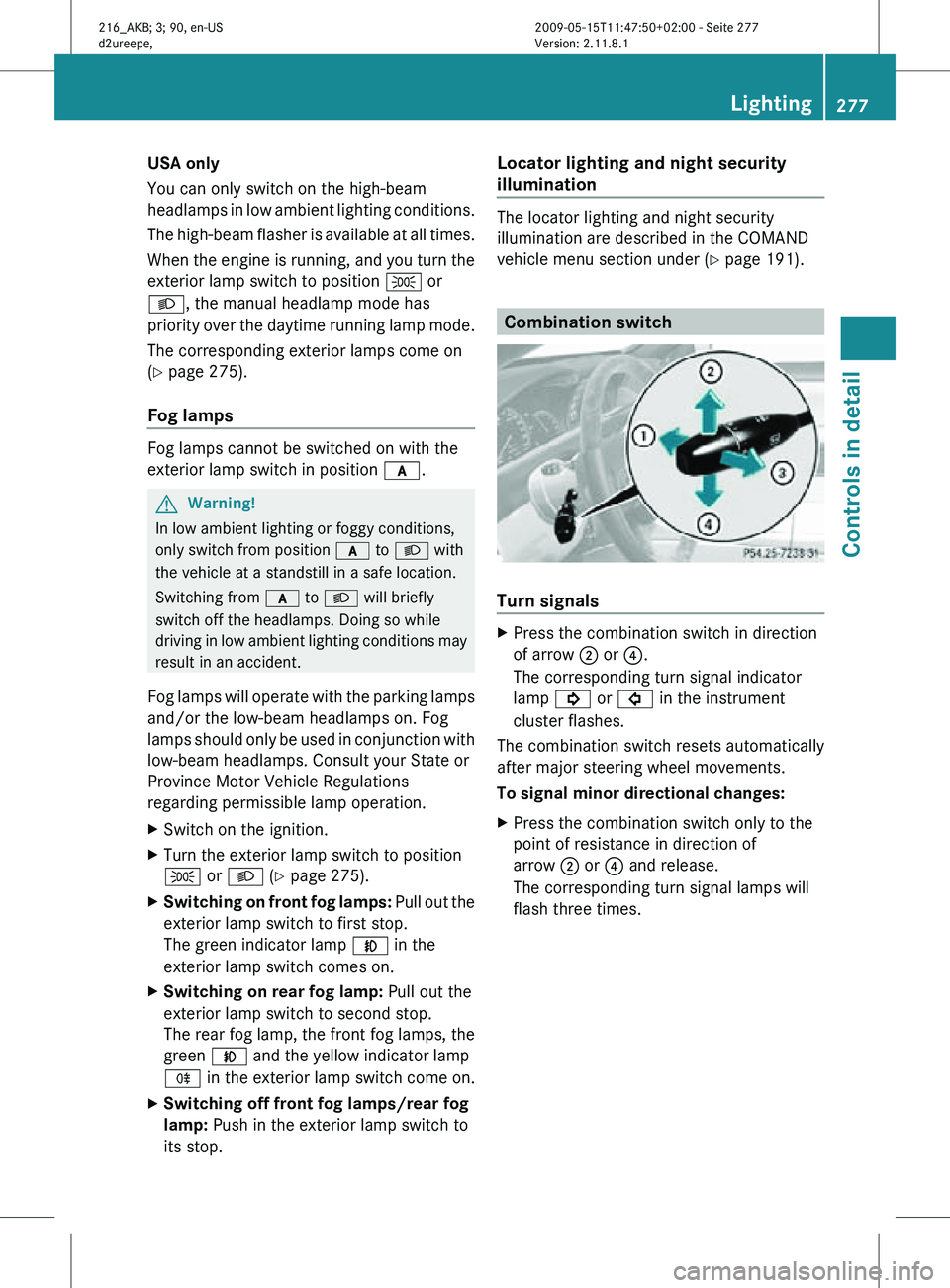
Combination switch
Turn signals
X
Press the combination switch in direction
of arrow ; or ?.
The corresponding turn signal indicator
lamp ! or # in the instrument
cluster flashes.
The combination switch resets automatically
after major steering wheel movements.
To signal minor directional changes:
X Press the combination switch only to the
point of resistance in direction of
arrow ; or ? and release.
The corresponding turn signal lamps will
flash three times. Lighting
277Controls in detail
216_AKB; 3; 90, en-US
d2ureepe, Version: 2.11.8.1 2009-05-15T11:47:50+02:00 - Seite 277 Z
Page 280 of 500

High beam
X
Turn the exterior lamp switch to position
L (Y page 275).
X Switching on: Push the combination
switch in direction of arrow :.
The high-beam headlamp indicator lamp
K in the instrument cluster comes on.
X Switching off: Pull the combination switch
in direction of arrow = to its original
position.
i Also note the information on high-beam
headlamps with activated automatic
headlamp mode ( Y page 275) or the
daytime running lamp mode ( Y page 276).
High-beam flasher X
Switching on: Pull the combination switch
briefly in direction of arrow =.Hazard warning flasher
The hazard warning flasher can be switched
on at all times, even with the SmartKey
removed from the starter switch.
The hazard warning flasher comes on
automatically when an air bag deploys.
CL 600 and CL 65 AMG (USA only):
The hazard warning flasher comes on
automatically when you brake the vehicle
strongly at a speed of more than 50 mph
(70 km/h) and bring it to a complete stop. X
Switching on: Press hazard warning
flasher switch :.
All turn signal lamps are flashing.
i With the hazard warning flasher activated
and the combination switch set for either
left or right turn, only the respective left or
right turn signals will operate when the
ignition is switched on.
X Switching off: Press hazard warning
flasher switch : again.
i If the hazard warning flasher was
activated automatically, press hazard
warning flasher switch : to switch it off.
CL 600 and CL 65 AMG (USA only):
When the hazard warning flasher was
activated by a hard stop automatically, it
will be switched off automatically at a
vehicle speed of above 6 mph (10 km/h). Headlamp cleaning system
The headlamps will be cleaned with a high-
pressure water jet automatically when the
engine is running and you have
R switched on the headlamps
and
R the windshield wipers have wiped the
windshield with washer fluid five times
The counter resets when you switch off the
ignition.
For information on filling up the washer
reservoir, see “Washer system and headlamp
cleaning system” ( Y page 372). Corner-illuminating lamps
The corner-illuminating lamps improve
illumination of the area in the direction into
which you are turning.
The corner-illuminating lamps will only
operate in low ambient lighting conditions. 278
LightingControls in detail
216_AKB; 3; 90, en-US
d2ureepe,
Version: 2.11.8.1 2009-05-15T11:47:50+02:00 - Seite 278
Page 304 of 500
Cruise control
The cruise control maintains the speed you
set for your vehicle automatically.
The use of the cruise control is recommended
for driving at a constant speed for extended
periods of time.
The currently set speed or last set speed
(“Resume” function) appears in the
multifunction display for approximately
5 seconds. The set speed is shown by a
triangle in the speedometer and the
corresponding speedometer segments from
the selected speed to the vehicle maximum
speed in the multifunction display are
illuminated. G
Warning!
The cruise control is a convenience system
designed to assist the driver during vehicle
operation. The driver is and must always
remain responsible for the vehicle’s speed
and for safe brake operation.
Only use the cruise control if the road, traffic,
and weather conditions make it advisable to
travel at a constant speed.
R The use of the cruise control can be
dangerous on winding roads or in heavy
traffic because conditions do not allow safe
driving at a constant speed.
R The use of the cruise control can be
dangerous on slippery roads. Rapid
changes in tire traction can result in wheel
spin and loss of control.
R Deactivate the cruise control when driving
in fog.
The “Resume” function should only be
operated if the driver is fully aware of the
previously set speed and wishes to resume
this particular preset speed. G
Warning!
When the cruise control is braking, the brake
pedal is retracted (i.e. depressed
automatically). The pedals’ range of motion
must not be impeded by any obstacles:
R Do not place any objects in the footwell.
R Make sure that the floormats and carpets
are securely in place.
R Do not rest your foot underneath the brake
pedal, as it could otherwise be trapped.
You could otherwise cause an accident and
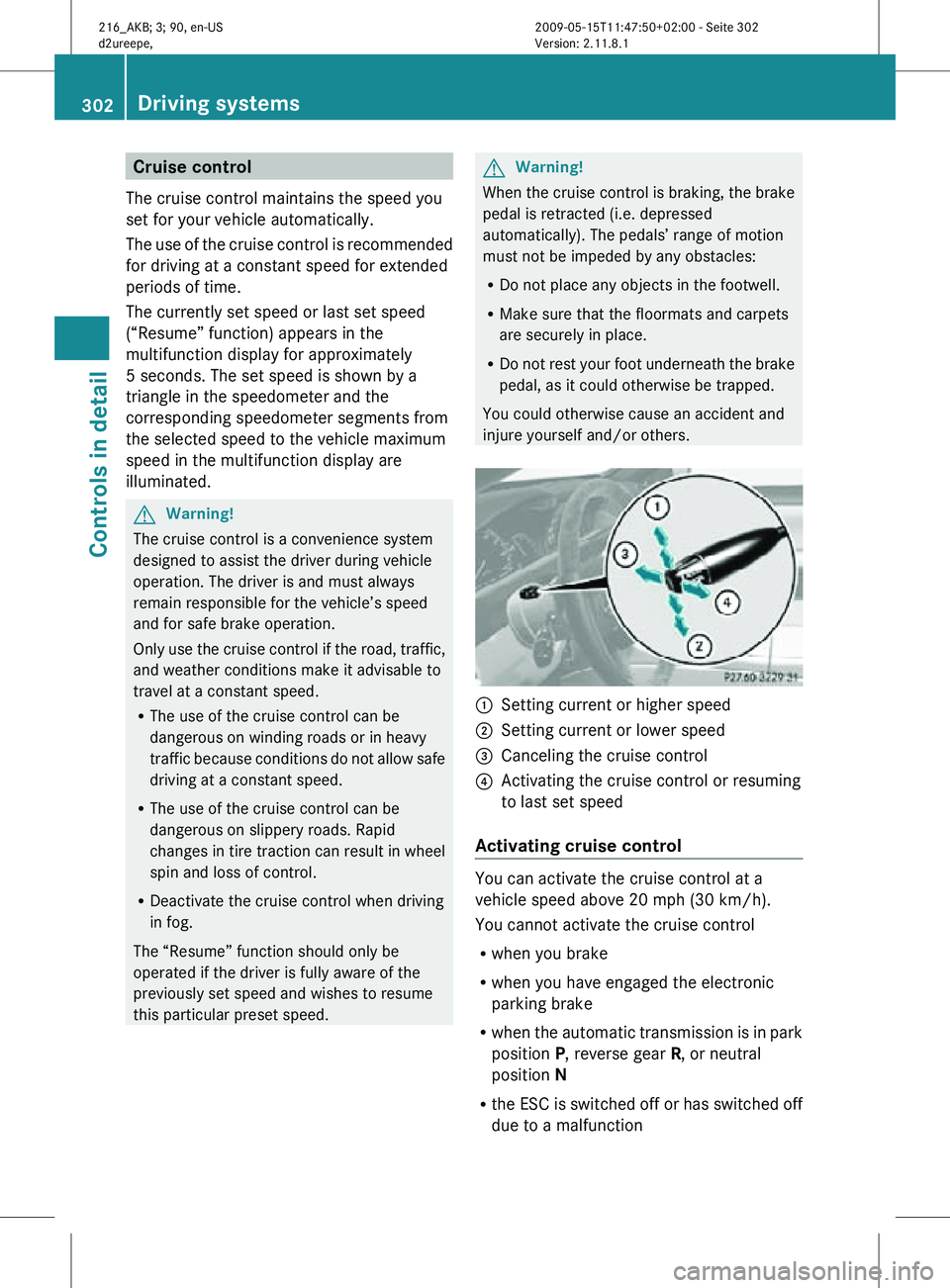
injure yourself and/or others. :
Setting current or higher speed
; Setting current or lower speed
= Canceling the cruise control
? Activating the cruise control or resuming
to last set speed
Activating cruise control You can activate the cruise control at a
vehicle speed above 20 mph (30 km/h).
You cannot activate the cruise control
R
when you brake
R when you have engaged the electronic
parking brake
R when the automatic transmission is in park
position P, reverse gear R, or neutral
position N
R the ESC is switched off or has switched off
due to a malfunction 302
Driving systemsControls in detail
216_AKB; 3; 90, en-US
d2ureepe,
Version: 2.11.8.1 2009-05-15T11:47:50+02:00 - Seite 302
Page 306 of 500

X
Increasing: Briefly lift the cruise control
lever up
to the resistance point in direction
of arrow :.
X Decreasing: Briefly press the cruise
control lever down to the resistance point
in direction of arrow ;.
X Release the cruise control lever.
The new speed is set and the vehicle will
accelerate or decelerate.
Adjustment in 5 mph (Canada:
10 km/h) increments
i The set speed value is increased or
decreased in 5 mph (Canada: 10 km/h)
increments each time you lift or press the
cruise control lever up or down past the
resistance point.
X Increasing: Briefly lift the cruise control
lever up past the resistance point in
direction of arrow
:.
X Decreasing: Briefly press the cruise
control lever down past the resistance
point in direction of arrow ;.
X Release the cruise control lever.
The new speed is set and the vehicle will
accelerate or
decelerate. Keep in mind that
it may take a brief moment until the vehicle
has reached the set speed.
Setting stored speed (Resume
function) G
Warning!
The set speed stored in memory should only
be set again if prevailing road conditions and
legal speed limits permit. Possible
acceleration or deceleration differences
arising from returning to the preset speed
could cause
an accident and/or serious injury
to you and others. X
Briefly pull the cruise control lever in
direction of arrow ?.
If no speed is stored, the current speed is
set and stored.
X Remove your foot from the accelerator
pedal.
The last stored speed is deleted from memory
when the engine is turned off. DISTRONIC PLUS
Safety notes When activated, the DISTRONIC PLUS
adaptive
cruise
control system increases the
driving convenience afforded by the cruise
control while traveling on expressways and
other major roadways.
R If the DISTRONIC PLUS distance sensor
detects a slower moving vehicle directly
ahead, your vehicle speed will be reduced
so that you follow that vehicle at your
preset following distance.
R If there is no vehicle directly ahead of you,
the DISTRONIC PLUS will function in the
same way as standard cruise control
(Y page 302). G
Warning!
The DISTRONIC PLUS requires familiarity with
its operational characteristics. We strongly
recommend that you review the following
information carefully before operating the
system. 304
Driving systems
Controls in detail
216_AKB; 3; 90, en-US
d2ureepe,
Version: 2.11.8.1 2009-05-15T11:47:50+02:00 - Seite 304
Page 308 of 500

switched on. Otherwise, you may not be able
to recognize dangerous situations until it is
too
late.
This could cause an accident in which
you and/or others could be injured. G
Warning!
The “Resume” function should only be
operated if the driver is fully aware of the
previously set speed and wishes to resume
this particular preset speed. G
Warning!
Close attention to road and traffic conditions
is imperative at all times, regardless of
whether or not the DISTRONIC PLUS is
activated.
Use of the DISTRONIC PLUS can be
dangerous on
winding roads or in heavy traffic
because conditions do not allow safe driving
at a constant speed.
The DISTRONIC PLUS will not react to
stationary objects in the roadway (e.g. a
stopped vehicle in a traffic jam or a disabled
vehicle). The DISTRONIC PLUS will also not
respond to oncoming vehicles.
Switch off the DISTRONIC PLUS:
R when changing from the left to the right
lane if vehicles are moving more slowly in
the left lane
R when entering a turn lane or highway off
ramp
R in complex driving situations, such as in
highway construction zones
In these situations, the DISTRONIC PLUS will
continue to maintain the set speed unless
deactivated.
The DISTRONIC PLUS is designed and
intended only to maintain a set speed and
keep a set distance from moving objects in
front of it.
The DISTRONIC PLUS functions in a speed
range of 0 to 120 mph
(Canada: 0 to 200 km/h) if a preceding
vehicle is detected. If no preceding vehicle is
detected the DISTRONIC PLUS functions in a speed range of 20 to 120 mph
(Canada: 30 to 200 km/h).
Always obey applicable speed limits.
Do not use the DISTRONIC PLUS if you are
driving
on
a road with steep uphill or downhill
slopes.
When traveling in Canada in a vehicle not
registered in Canada, you must switch off the
radar sensor system ( Y page 216). Canadian
law does not permit the use of the radar
sensor system for vehicles from outside of
Canada. When you switch off the radar sensor
system, the following functions are
deactivated:
R DISTRONIC PLUS
R BAS PLUS (Y page 57)
R PRE-SAFE ®
Brake (Y page 62)
R Park Assist ( Y page 324)
R Advanced Parking Guidance ( Y page 327)
R Blind Spot Assist (Y page 335)
i Due to its radar-emitting nature
DISTRONIC PLUS may have an appearance
similar to a radar detector to law
enforcement officials. You may want to
refer to this section of your Operator’s
Manual when asked.
i USA only:
This device has been approved by the FCC
as a “Vehicular Radar System”. The radar
sensor is intended for use in an automotive
radar system only. Removal, tampering, or
altering of the device will void any
warranties, and is not permitted by the
FCC. Do not tamper with, alter, or use in
any non-approved way.
Any unauthorized modification to this
device could void the user’s authority to
operate the equipment. 306
Driving systems
Controls in detail
216_AKB; 3; 90, en-US
d2ureepe,
Version: 2.11.8.1 2009-05-15T11:47:50+02:00 - Seite 306
Page 309 of 500
i
Canada only:
This device complies with RSS-210 of
Industry Canada. Operation is subject to
the following two conditions:
1. This device may not cause interference, and
2. this device must accept any interference received, including
interference that may cause undesired
operation of the device.
Removal, tampering, or altering of the
device will void any warranties, and is not
permitted. Do not tamper with, alter, or use
in any non-approved way.
Any unauthorized modification to this
device could void the user’s authority to
operate the equipment.
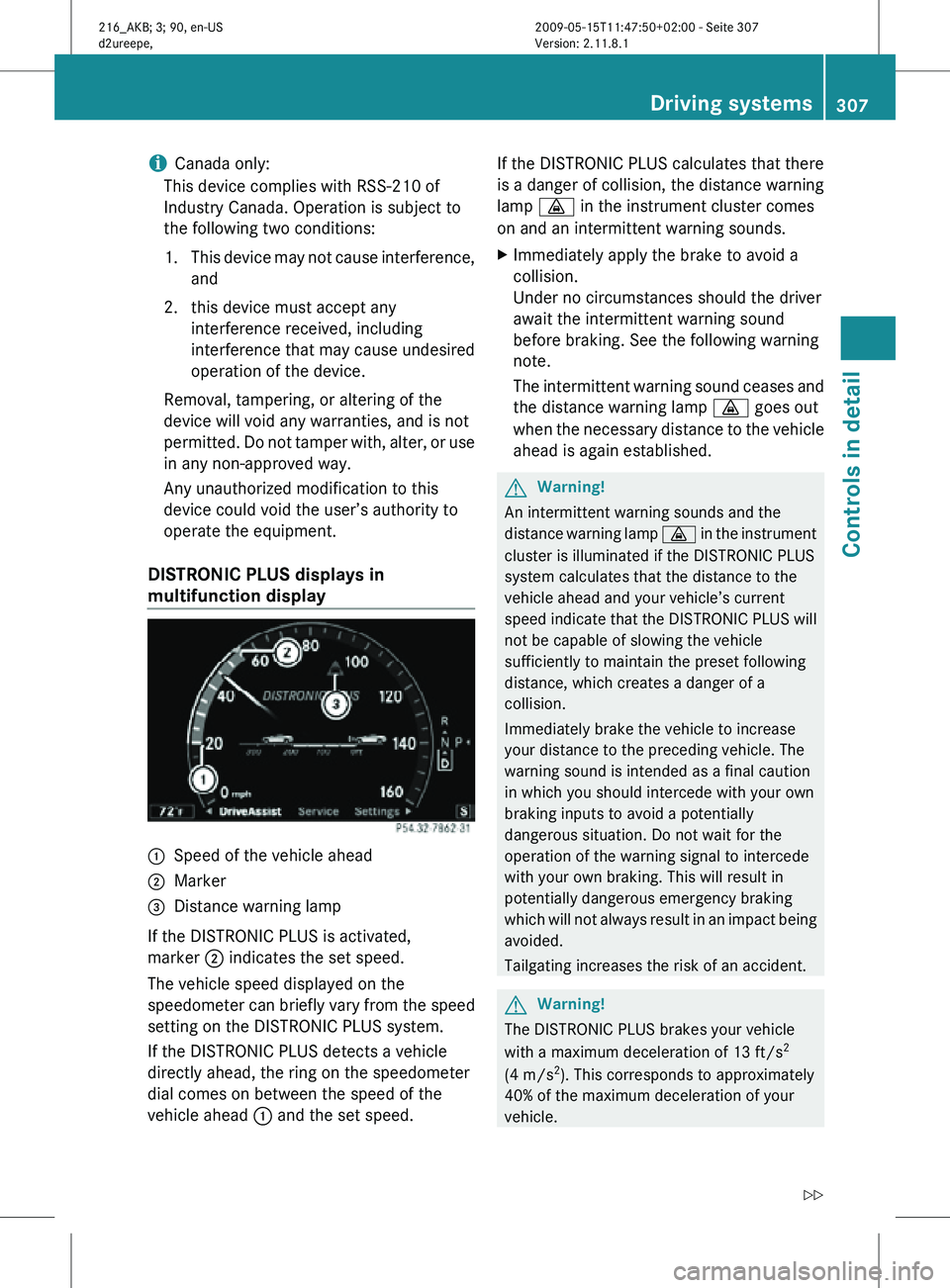
DISTRONIC PLUS displays in
multifunction display :
Speed of the vehicle ahead
; Marker
= Distance warning lamp
If the DISTRONIC PLUS is activated,
marker ; indicates the set speed.
The vehicle speed displayed on the
speedometer can briefly vary from the speed
setting on the DISTRONIC PLUS system.
If the DISTRONIC PLUS detects a vehicle
directly ahead, the ring on the speedometer
dial comes on between the speed of the
vehicle ahead : and the set speed. If the DISTRONIC PLUS calculates that there
is a danger of collision, the distance warning
lamp
· in the instrument cluster comes
on and an intermittent warning sounds.
X Immediately apply the brake to avoid a
collision.
Under no circumstances should the driver
await the intermittent warning sound
before braking. See the following warning
note.
The intermittent warning sound ceases and
the distance warning lamp · goes out
when the necessary distance to the vehicle
ahead is again established. G
Warning!
An intermittent warning sounds and the
distance warning lamp · in the instrument
cluster is illuminated if the DISTRONIC PLUS
system calculates that the distance to the
vehicle ahead and your vehicle’s current
speed indicate that the DISTRONIC PLUS will
not be capable of slowing the vehicle
sufficiently to maintain the preset following
distance, which creates a danger of a
collision.
Immediately brake the vehicle to increase
your distance to the preceding vehicle. The
warning sound is intended as a final caution
in which you should intercede with your own
braking inputs to avoid a potentially
dangerous situation. Do not wait for the
operation of the warning signal to intercede
with your own braking. This will result in
potentially dangerous emergency braking
which will not always result in an impact being
avoided.
Tailgating increases the risk of an accident. G
Warning!
The DISTRONIC PLUS brakes your vehicle
with a maximum deceleration of 13 ft/s 2
(4 m/s 2
). This corresponds to approximately
40% of the maximum deceleration of your
vehicle. Driving systems
307Controls in detail
216_AKB; 3; 90, en-US
d2ureepe, Version: 2.11.8.1 2009-05-15T11:47:50+02:00 - Seite 307 Z
Page 310 of 500
You must also apply the brakes yourself to
avoid a collision. The DISTRONIC PLUS brakes
the vehicle in an effort to restore the preset
distance or to maintain the set speed. The
brake pedal is automatically applied as this
happens which results in the brake pedal
moving
Keep driver’s foot area clear at all times,
including the area under the brake pedal.
Objects stored in this area may impair pedal
movement which could interfere with the
braking ability of the DISTRONIC PLUS
system.
Do not place your foot under the brake pedal
– your foot could become caught.
G
Warning!
If you do not receive visual or acoustic
warning signals during a critical traffic
situation, DISTRONIC PLUS has either not
recognized the collision risk, has been
deactivated or is malfunctioning.
Remember, whether or not DISTRONIC PLUS
is operating, it is ultimately always the drivers
responsibility to apply the brakes in order to
control the vehicle and avoid a collision.
Displaying the distance graphic In the
DriveAssist menu under Distance
Display you see the current settings for
DISTRONIC PLUS. The Information shown in
the multifunction display depends on whether
DISTRONIC PLUS is activated or deactivated.
For activating or deactivating the DISTRONIC
PLUS system, see “Activating DISTRONIC
PLUS” (Y page 309) or “Deactivating
DISTRONIC PLUS” (Y page 312).
The menu overview can be found on
(Y page 203). X
Press = or ; to select the
DriveAssist menu.
X Press : or 9 to select the
Distance Display function.
X Press a.
The DISTRONIC PLUS distance graphic
appears and you will see one of the
following displays in the multifunction
display.
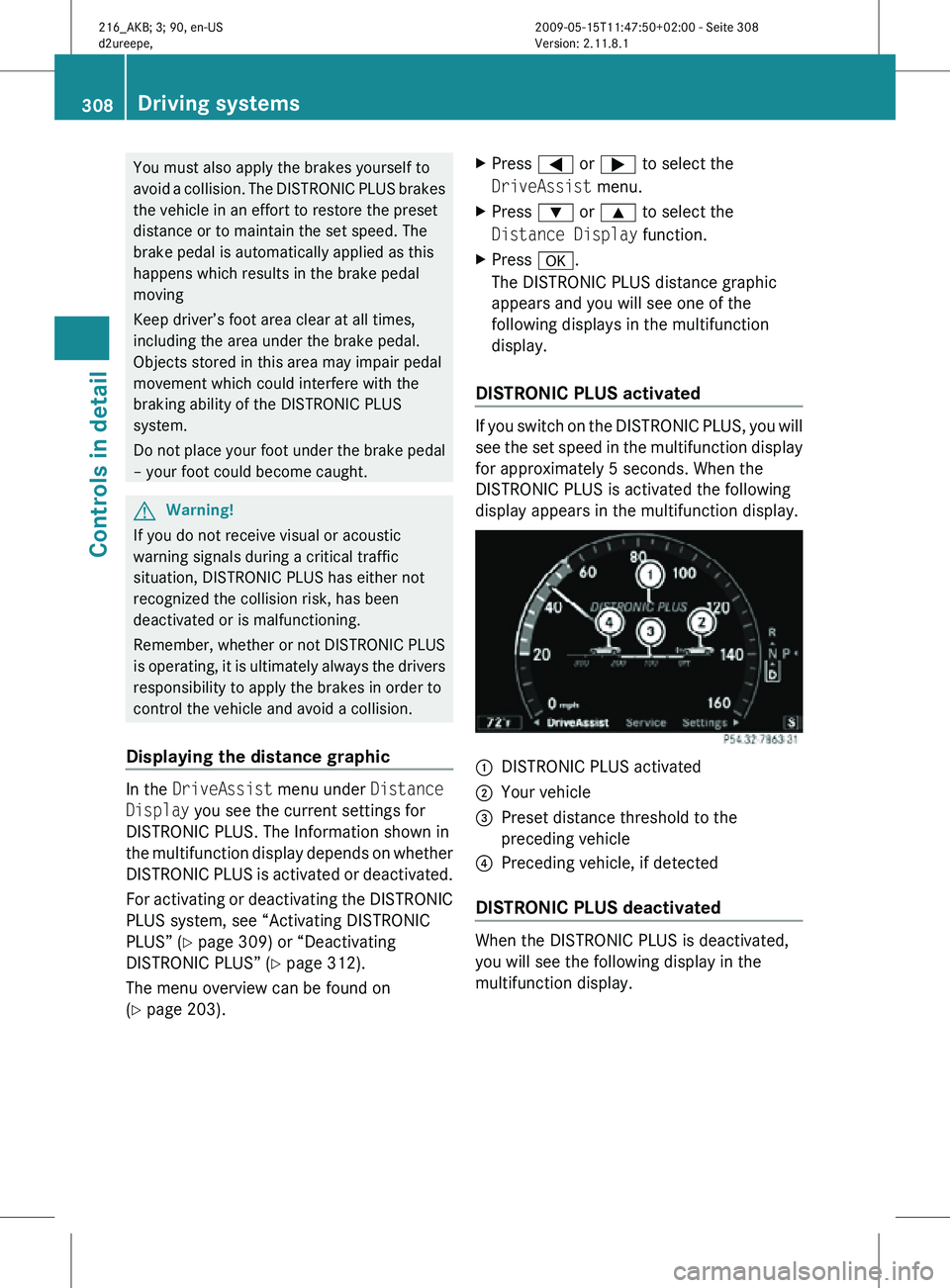
DISTRONIC PLUS activated If you switch on the DISTRONIC PLUS, you will
see the set speed in the multifunction display
for approximately 5 seconds. When the
DISTRONIC PLUS is activated the following
display appears in the multifunction display.
:
DISTRONIC PLUS activated
; Your vehicle
= Preset distance threshold to the
preceding vehicle
? Preceding vehicle, if detected
DISTRONIC PLUS deactivated When the DISTRONIC PLUS is deactivated,
you will see the following display in the
multifunction display.308
Driving systemsControls in detail
216_AKB; 3; 90, en-US
d2ureepe,
Version: 2.11.8.1 2009-05-15T11:47:50+02:00 - Seite 308
Page 311 of 500

:
Preceding vehicle, if detected
; Actual distance to the preceding vehicle
= Preset distance threshold to the
preceding vehicle
? Your vehicle
DISTRONIC PLUS lever :
Setting current or higher speed
; Setting current or lower speed
= Deactivating the DISTRONIC PLUS
? Activating the DISTRONIC PLUS or
resuming to the last set speed
A Setting following distance
Activating DISTRONIC PLUS G
Warning!
When the DISTRONIC PLUS is switched on,
the vehicle can be braked. You should
therefore switch off the DISTRONIC PLUS if
the vehicle must be towed. You can activate the DISTRONIC PLUS when
the vehicle speed is above 20 mph
(30 km/h).
It is also possible to activate the DISTRONIC
PLUS when the vehicle speed is below
20 mph (30 km/h) and the DISTRONIC PLUS
has detected a preceding vehicle.
If the DISTRONIC PLUS is activated, the set
speed is indicated with marker
;
(Y page 307) in the speedometer dial.
The maximum vehicle speed you can set is
120 mph (Canada: 200 km/h).
If the DISTRONIC PLUS is not activated after
the DISTRONIC PLUS lever is pulled in
direction of arrow ? (Y page 309), you will
see the message: DISTRONIC PLUS ---
mph (Canada: DISTRONIC PLUS --- kmh) in
the multifunction display.
In the following cases you cannot activate the
DISTRONIC PLUS:
R within 2 minutes after driving off, following
an engine start
R if the vehicle is secured with the electronic
parking brake
R if the ESC is switched off or has switched
off due to a malfunction
R when the automatic transmission is in park
position P, reverse gear R, or neutral
position N
R if the hood is open
R if the driver’s door is open and the driver
has not fastened his or her seat belt
R if the passenger door is open
R if the radar sensors are switched off
(Y page 216)
Switching on while driving You can switch on the DISTRONIC PLUS when
the vehicle speed is above 20 mph
(30 km/h).
Below 20 mph (30 km/h), you can only switch
on the DISTRONIC PLUS if the preceding Driving systems
309Controls in detail
216_AKB; 3; 90, en-US
d2ureepe, Version: 2.11.8.1 2009-05-15T11:47:50+02:00 - Seite 309 Z
Page 314 of 500
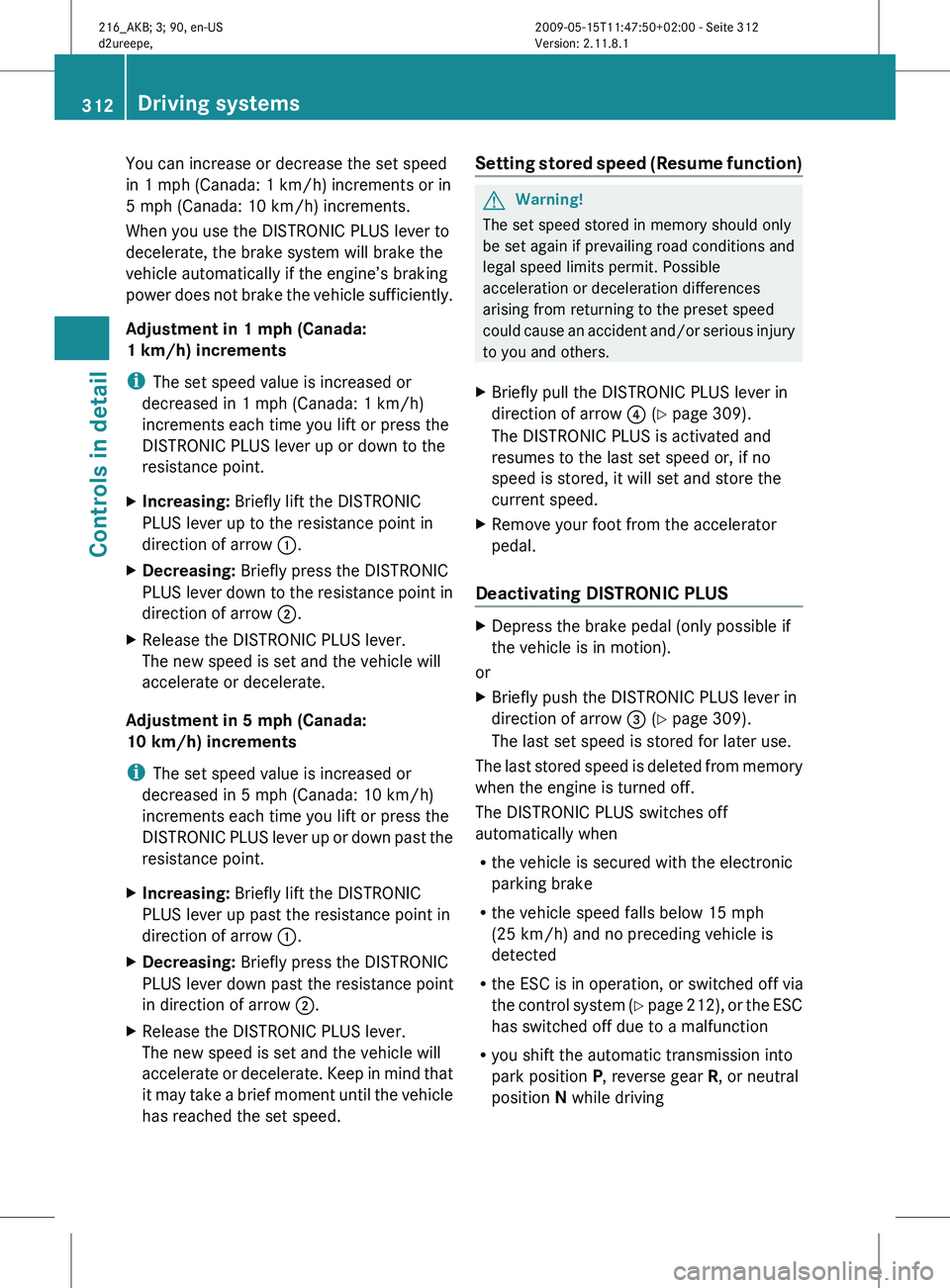
You can increase or decrease the set speed
in 1 mph (Canada:
1 km/h) increments or in
5 mph (Canada:
10 km/h) increments.
When you use the DISTRONIC PLUS lever to
decelerate, the brake system will brake the
vehicle automatically if the engine’s braking
power does not brake the vehicle sufficiently.
Adjustment in 1 mph (Canada:
1 km/h) increments
i The set speed value is increased or
decreased in 1 mph (Canada: 1 km/h)
increments each time you lift or press the
DISTRONIC PLUS lever up or down to the
resistance point.
X Increasing: Briefly lift the DISTRONIC
PLUS lever up to the resistance point in
direction of arrow :.
X Decreasing: Briefly press the DISTRONIC
PLUS lever
down to the resistance point in
direction of arrow ;.
X Release the DISTRONIC PLUS lever.
The new speed is set and the vehicle will
accelerate or decelerate.
Adjustment in 5 mph (Canada:
10 km/h) increments
i The set speed value is increased or
decreased in 5 mph (Canada: 10 km/h)
increments each time you lift or press the
DISTRONIC
PLUS lever up or down past the
resistance point.
X Increasing: Briefly lift the DISTRONIC
PLUS lever up past the resistance point in
direction of arrow :.
X Decreasing: Briefly press the DISTRONIC
PLUS lever down past the resistance point
in direction of arrow ;.
X Release the DISTRONIC PLUS lever.
The new speed is set and the vehicle will
accelerate or
decelerate. Keep in mind that
it may take a brief moment until the vehicle
has reached the set speed. Setting stored speed (Resume function) G
Warning!
The set speed stored in memory should only
be set again if prevailing road conditions and
legal speed limits permit. Possible
acceleration or deceleration differences
arising from returning to the preset speed
could cause
an accident and/or serious injury
to you and others.
X Briefly pull the DISTRONIC PLUS lever in
direction of arrow ? (Y page 309).
The DISTRONIC PLUS is activated and
resumes to the last set speed or, if no
speed is stored, it will set and store the
current speed.
X Remove your foot from the accelerator
pedal.
Deactivating DISTRONIC PLUS X
Depress the brake pedal (only possible if
the vehicle is in motion).
or
X Briefly push the DISTRONIC PLUS lever in
direction of arrow = (Y page 309).
The last set speed is stored for later use.
The last stored speed is deleted from memory
when the engine is turned off.
The DISTRONIC PLUS switches off
automatically when
R the vehicle is secured with the electronic
parking brake
R the vehicle speed falls below 15 mph
(25 km/h) and no preceding vehicle is
detected
R the ESC is in operation, or switched off via
the control
system (Y page 212), or the ESC
has switched off due to a malfunction
R you shift the automatic transmission into
park position P, reverse gear R, or neutral
position N while driving 312
Driving systems
Controls in detail
216_AKB; 3; 90, en-US
d2ureepe,
Version: 2.11.8.1 2009-05-15T11:47:50+02:00 - Seite 312
Page 404 of 500
vehicle damage not covered by the
Mercedes-Benz Limited Warranty.
Maintenance service indicator
message
Information on maintenance work and
maintenance intervals are specified in the
Maintenance Booklet. Contact an authorized
Mercedes-Benz Center, or visit
www.mbusa.com (USA only) for additional
information.
The maintenance service indicator message
will notify you when the next maintenance
service is required.
Starting approximately 1 month before the
next maintenance service is required, one of
the following messages will appear in the
multifunction display. The messages will
appear while you are driving or when you
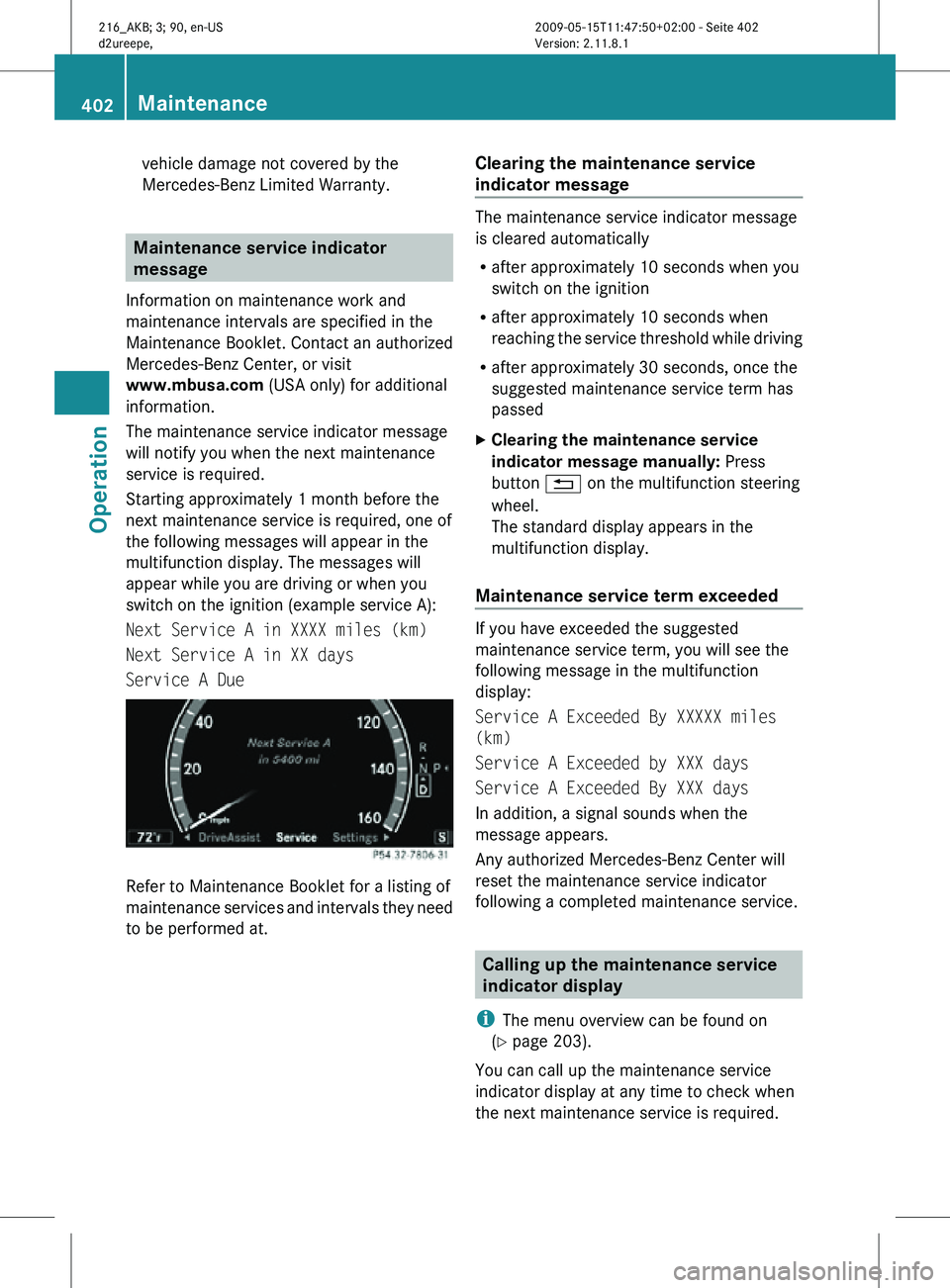
switch on the ignition (example service A):
Next Service A in XXXX miles (km)
Next Service A in XX days
Service A Due Refer to Maintenance Booklet for a listing of
maintenance services and intervals they need
to be performed at. Clearing the maintenance service
indicator message The maintenance service indicator message
is cleared automatically
R
after approximately 10 seconds when you
switch on the ignition
R after approximately 10 seconds when
reaching the service threshold while driving
R after approximately 30 seconds, once the
suggested maintenance service term has
passed
X Clearing the maintenance service
indicator message manually: Press
button % on the multifunction steering
wheel.
The standard display appears in the
multifunction display.
Maintenance service term exceeded If you have exceeded the suggested
maintenance service term, you will see the
following message in the multifunction
display:
Service A Exceeded By XXXXX miles
(km)
Service A Exceeded by XXX days
Service A Exceeded By XXX days
In addition, a signal sounds when the
message appears.
Any authorized Mercedes-Benz Center will
reset the maintenance service indicator
following a completed maintenance service.
Calling up the maintenance service
indicator display
i The menu overview can be found on
(Y page 203).
You can call up the maintenance service
indicator display at any time to check when
the next maintenance service is required. 402
MaintenanceOperation
216_AKB; 3; 90, en-US
d2ureepe,
Version: 2.11.8.1 2009-05-15T11:47:50+02:00 - Seite 402