phone MERCEDES-BENZ CL CLASS 2010 Repair Manual
[x] Cancel search | Manufacturer: MERCEDES-BENZ, Model Year: 2010, Model line: CL CLASS, Model: MERCEDES-BENZ CL CLASS 2010Pages: 500, PDF Size: 9.32 MB
Page 227 of 500

“Enter intersection”, “Enter crossing”
Use the command “Enter intersection” or
“Enter crossing” to enter an intersection.
Sample dialog:
\
Enter intersection.
^ Please say the name of the first street.
\ Forest Drive.
^ Forest Drive accepted.
^ Please say the name of the
intersecting street.
\ Dudley Street.
^ Dudley Street accepted.
The intersection is adopted for route
guidance.
“Enter house number” Use the command “Enter house number” to
enter a house number for the street
previously selected.
Sample dialog:
\
Enter house number.
^ Please say the house number.
\ Thirty-two.
^ House number accepted.
The house number is adopted for route
guidance.
“Correction” If you have entered a city or street, you can
use the “Correction” command to enter the
city or street again.
Voice Control System telephone
Safety notes
i For more information on telephone, see
(Y page 135). Safety notes for using the Voice Control
System G
Observe Safety notes, see page 217.
Safety notes for using the telephone G
Observe Safety notes, see page 135. Telephone operation
You can use the Voice Control System to
R dial phone number
R store names
and numbers in the COMAND
address book
R dial a phone number directly from the
COMAND address book
R delete the voice name of an address book
entry
R have the system read out the phone book
of the address book entry by entry
R manage and access an automated
answering system/voice mail box 29
R redial
The Voice Control System detects whether
R your telephone is switched on
R your telephone is connected via Bluetooth ®
R the corresponding mobile network is
logged in
R it is possible to dial
If dialing is not possible, the Voice Control
System will advise you accordingly.
i You can continue operating your mobile
phone using the telephone keypad or the
keypad on your phone. Telephone commands
For a list of commands, see ( Y page 237).
29 Only when supported by the mobile phone. Voice Control System telephone
225
Control systems
216_AKB; 3; 90, en-US
d2ureepe, Version: 2.11.8.1 2009-05-15T11:47:50+02:00 - Seite 225 Z
Page 228 of 500
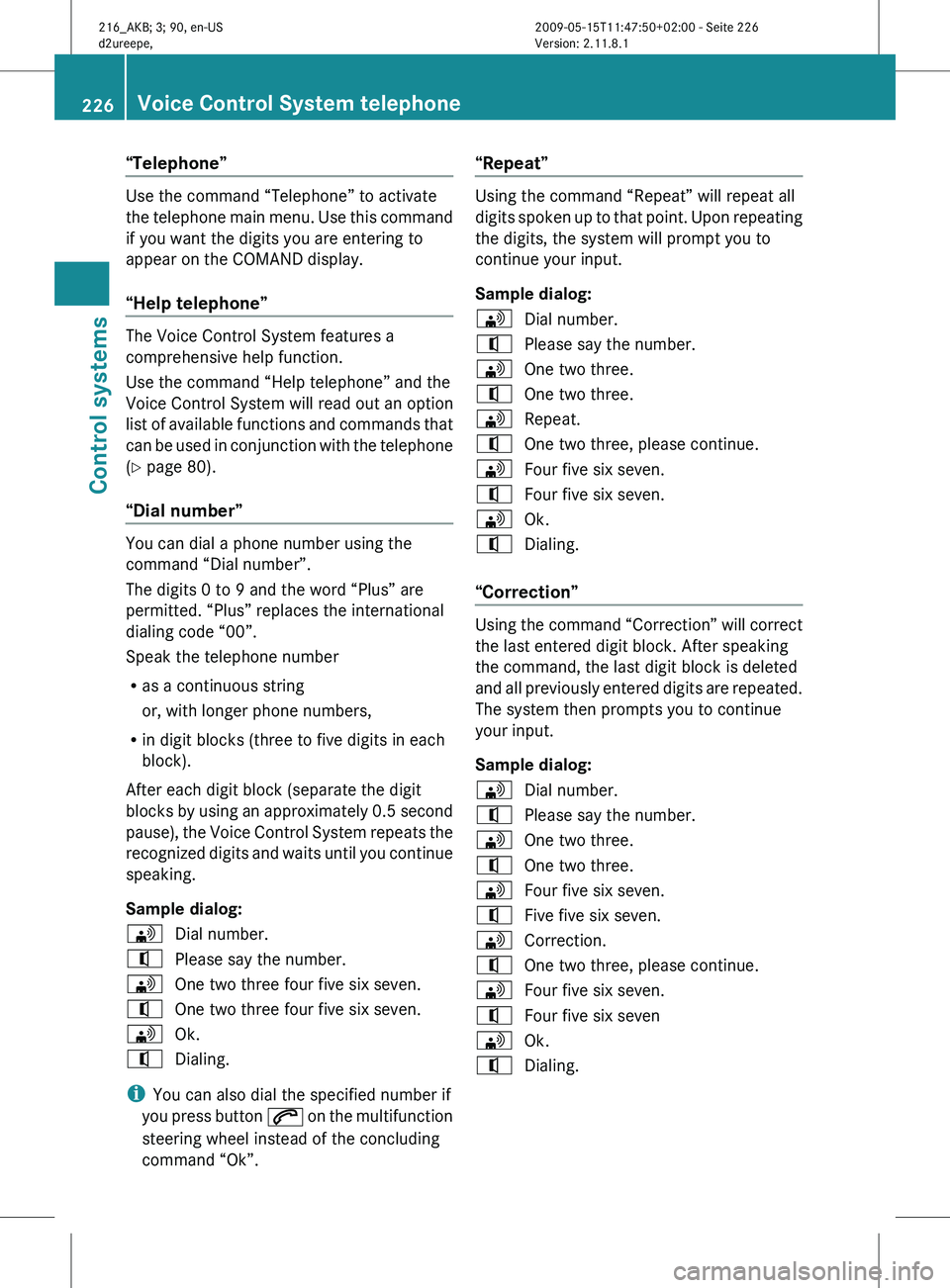
“Telephone”
Use the command “Telephone” to activate
the
telephone
main menu. Use this command
if you want the digits you are entering to
appear on the COMAND display.
“Help telephone” The Voice Control System features a
comprehensive help function.
Use the command “Help telephone” and the
Voice Control System will read out an option
list
of
available functions and commands that
can be used in conjunction with the telephone
(Y page 80).
“Dial number” You can dial a phone number using the
command “Dial number”.
The digits 0 to 9 and the word “Plus” are
permitted. “Plus” replaces the international
dialing code “00”.
Speak the telephone number
R
as a continuous string
or, with longer phone numbers,
R in digit blocks (three to five digits in each
block).
After each digit block (separate the digit
blocks by
using an approximately 0.5 second
pause), the Voice Control System repeats the
recognized digits and waits until you continue
speaking.
Sample dialog:
\ Dial number.
^ Please say the number.
\ One two three four five six seven.
^ One two three four five six seven.
\ Ok.
^ Dialing.
i You can also dial the specified number if
you press
button 6 on the multifunction
steering wheel instead of the concluding
command “Ok”. “Repeat” Using the command “Repeat” will repeat all
digits
spoken
up to that point. Upon repeating
the digits, the system will prompt you to
continue your input.
Sample dialog:
\ Dial number.
^ Please say the number.
\ One two three.
^ One two three.
\ Repeat.
^ One two three, please continue.
\ Four five six seven.
^ Four five six seven.
\ Ok.
^ Dialing.
“Correction” Using the command “Correction” will correct
the last entered digit block. After speaking
the command, the last digit block is deleted
and
all
previously entered digits are repeated.
The system then prompts you to continue
your input.
Sample dialog:
\ Dial number.
^ Please say the number.
\ One two three.
^ One two three.
\ Four five six seven.
^ Five five six seven.
\ Correction.
^ One two three, please continue.
\ Four five six seven.
^ Four five six seven
\ Ok.
^ Dialing. 226
Voice Control System telephone
Control systems
216_AKB; 3; 90, en-US
d2ureepe,
Version: 2.11.8.1 2009-05-15T11:47:50+02:00 - Seite 226
Page 229 of 500
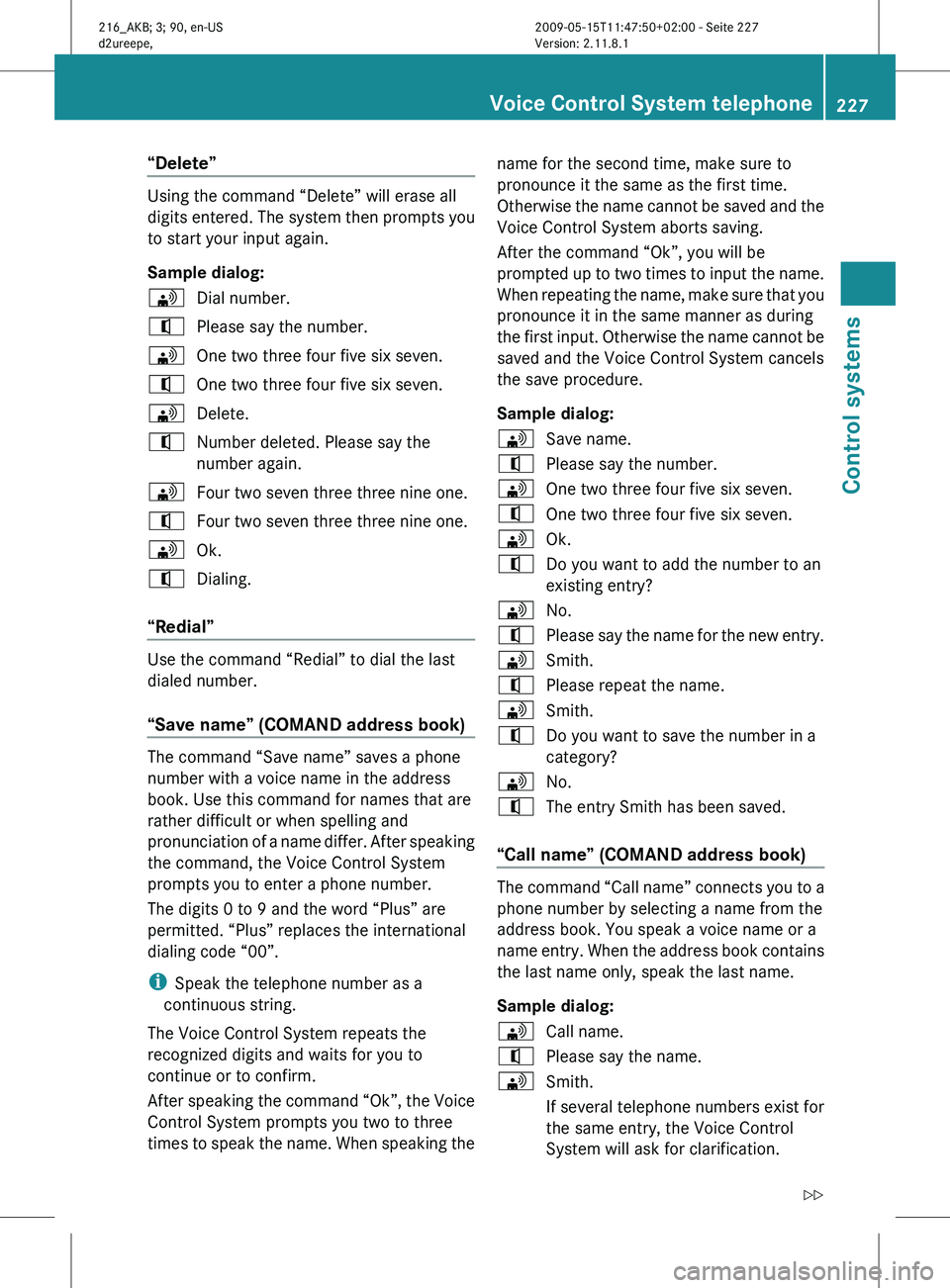
“Delete”
Using the command “Delete” will erase all
digits
entered.
The system then prompts you
to start your input again.
Sample dialog:
\ Dial number.
^ Please say the number.
\ One two three four five six seven.
^ One two three four five six seven.
\ Delete.
^ Number deleted. Please say the
number again.
\ Four two seven three three nine one.
^ Four two seven three three nine one.
\ Ok.
^ Dialing.
“Redial” Use the command “Redial” to dial the last
dialed number.
“Save name” (COMAND address book)
The command “Save name” saves a phone
number with a voice name in the address
book. Use this command for names that are
rather difficult or when spelling and
pronunciation
of
a name differ. After speaking
the command, the Voice Control System
prompts you to enter a phone number.
The digits 0 to 9 and the word “Plus” are
permitted. “Plus” replaces the international
dialing code “00”.
i Speak the telephone number as a
continuous string.
The Voice Control System repeats the
recognized digits and waits for you to
continue or to confirm.
After speaking the command “Ok”, the Voice
Control System prompts you two to three
times to speak the name. When speaking the name for the second time, make sure to
pronounce it the same as the first time.
Otherwise the
name cannot be saved and the
Voice Control System aborts saving.
After the command “Ok”, you will be
prompted up to two times to input the name.
When repeating the name, make sure that you
pronounce it in the same manner as during
the first input. Otherwise the name cannot be
saved and the Voice Control System cancels
the save procedure.
Sample dialog:
\ Save name.
^ Please say the number.
\ One two three four five six seven.
^ One two three four five six seven.
\ Ok.
^ Do you want to add the number to an
existing entry?
\ No.
^ Please say the name for the new entry.
\ Smith.
^ Please repeat the name.
\ Smith.
^ Do you want to save the number in a
category?
\ No.
^ The entry Smith has been saved.
“Call name” (COMAND address book) The command “Call name” connects you to a
phone number by selecting a name from the
address book. You speak a voice name or a
name
entry.
When the address book contains
the last name only, speak the last name.
Sample dialog:
\ Call name.
^ Please say the name.
\ Smith.
If several telephone numbers exist for
the same entry, the Voice Control
System will ask for clarification. Voice Control System telephone
227
Control systems
216_AKB; 3; 90, en-US
d2ureepe, Version: 2.11.8.1 2009-05-15T11:47:50+02:00 - Seite 227 Z
Page 230 of 500
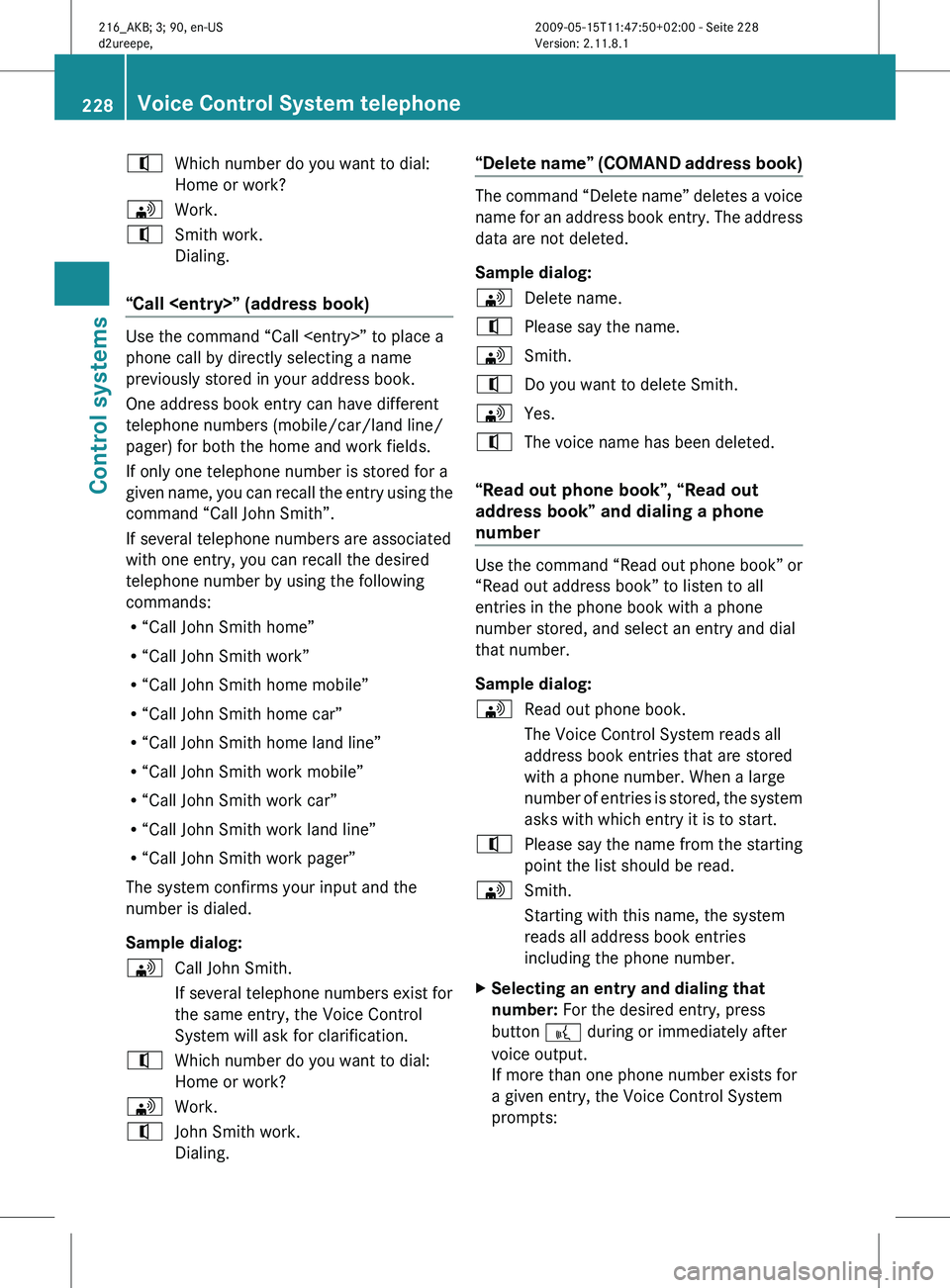
^
Which number do you want to dial:
Home or work?
\ Work.
^ Smith work.
Dialing.
“Call
phone call by directly selecting a name
previously stored in your address book.
One address book entry can have different
telephone numbers (mobile/car/land line/
pager) for both the home and work fields.
If only one telephone number is stored for a
given
name,
you can recall the entry using the
command “Call John Smith”.
If several telephone numbers are associated
with one entry, you can recall the desired
telephone number by using the following
commands:
R “Call John Smith home”
R “Call John Smith work”
R “Call John Smith home mobile”
R “Call John Smith home car”
R “Call John Smith home land line”
R “Call John Smith work mobile”
R “Call John Smith work car”
R “Call John Smith work land line”
R “Call John Smith work pager”
The system confirms your input and the
number is dialed.
Sample dialog:
\ Call John Smith.
If several telephone numbers exist for
the same entry, the Voice Control
System will ask for clarification.
^ Which number do you want to dial:
Home or work?
\ Work.
^ John Smith work.
Dialing. “Delete name” (COMAND address book) The command “Delete name” deletes a voice
name
for
an address book entry. The address
data are not deleted.
Sample dialog:
\ Delete name.
^ Please say the name.
\ Smith.
^ Do you want to delete Smith.
\ Yes.
^ The voice name has been deleted.
“Read out phone book”, “Read out
address book” and dialing a phone
number Use the command “Read out phone book” or
“Read out address book” to listen to all
entries in the phone book with a phone
number stored, and select an entry and dial
that number.
Sample dialog:
\
Read out phone book.
The Voice Control System reads all
address book entries that are stored
with a phone number. When a large
number of
entries is stored, the system
asks with which entry it is to start.
^ Please say the name from the starting
point the list should be read.
\ Smith.
Starting with this name, the system
reads all address book entries
including the phone number.
X Selecting an entry and dialing that
number: For the desired entry, press
button ? during or immediately after
voice output.
If more than one phone number exists for
a given entry, the Voice Control System
prompts: 228
Voice Control System telephone
Control systems
216_AKB; 3; 90, en-US
d2ureepe,
Version: 2.11.8.1 2009-05-15T11:47:50+02:00 - Seite 228
Page 231 of 500
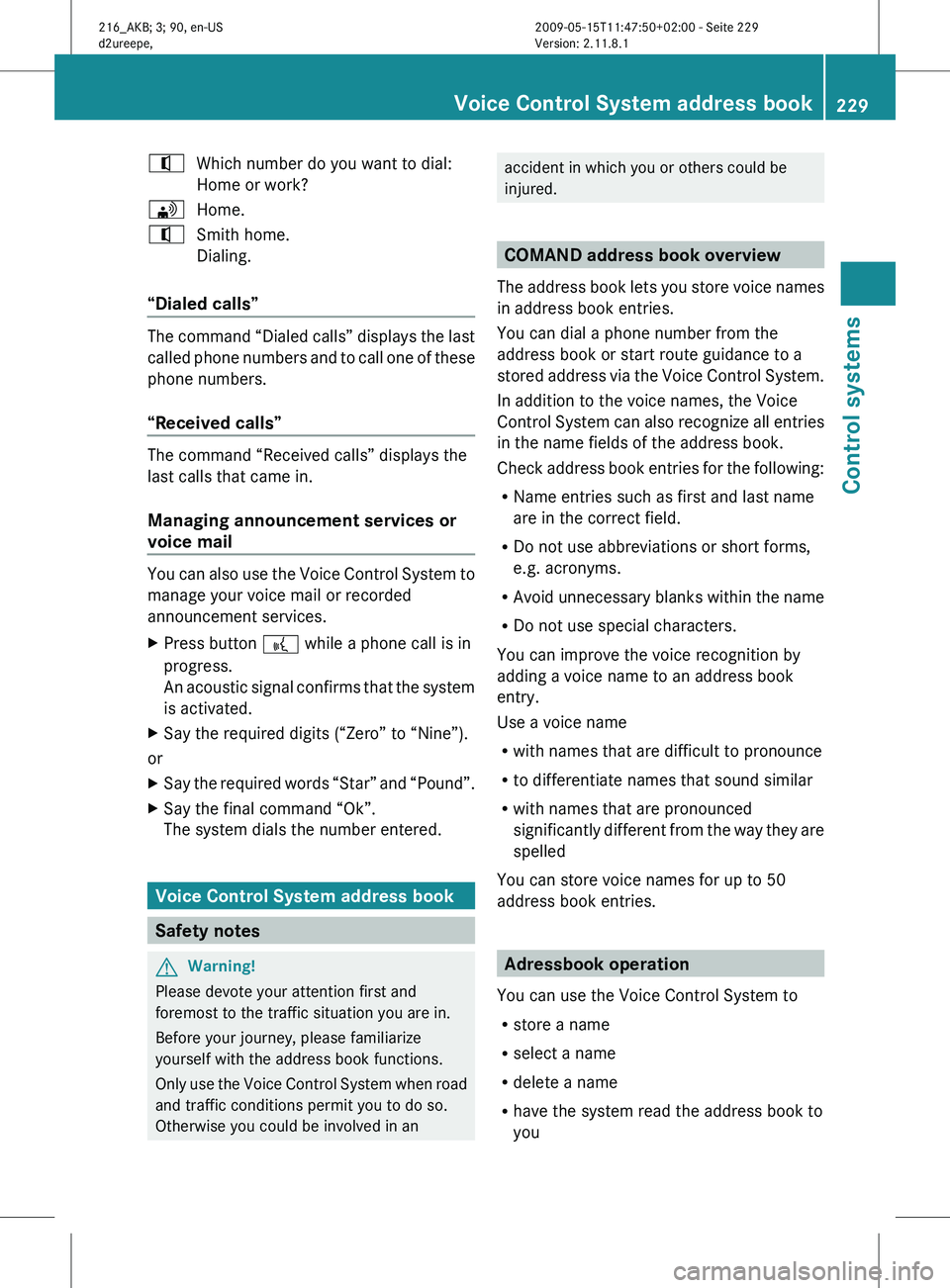
^
Which number do you want to dial:
Home or work?
\ Home.
^ Smith home.
Dialing.
“Dialed calls” The command “Dialed calls” displays the last
called
phone
numbers and to call one of these
phone numbers.
“Received calls” The command “Received calls” displays the
last calls that came in.
Managing announcement services or
voice mail
You can also use the Voice Control System to
manage your voice mail or recorded
announcement services.
X
Press button ? while a phone call is in
progress.
An acoustic
signal confirms that the system
is activated.
X Say the required digits (“Zero” to “Nine”).
or
X Say the required words “Star” and “Pound”.
X Say the final command “Ok”.
The system dials the number entered. Voice Control System address book
Safety notes
G
Warning!
Please devote your attention first and
foremost to the traffic situation you are in.
Before your journey, please familiarize
yourself with the address book functions.
Only use
the Voice Control System when road
and traffic conditions permit you to do so.
Otherwise you could be involved in an accident in which you or others could be
injured.
COMAND address book overview
The address
book lets you store voice names
in address book entries.
You can dial a phone number from the
address book or start route guidance to a
stored address via the Voice Control System.
In addition to the voice names, the Voice
Control System can also recognize all entries
in the name fields of the address book.
Check address book entries for the following:
R Name entries such as first and last name
are in the correct field.
R Do not use abbreviations or short forms,
e.g. acronyms.
R Avoid unnecessary blanks within the name
R Do not use special characters.
You can improve the voice recognition by
adding a voice name to an address book
entry.
Use a voice name
R with names that are difficult to pronounce
R to differentiate names that sound similar
R with names that are pronounced
significantly different from the way they are
spelled
You can store voice names for up to 50
address book entries. Adressbook operation
You can use the Voice Control System to
R store a name
R select a name
R delete a name
R have the system read the address book to
you Voice Control System address book
229
Control systems
216_AKB; 3; 90, en-US
d2ureepe, Version: 2.11.8.1 2009-05-15T11:47:50+02:00 - Seite 229 Z
Page 232 of 500
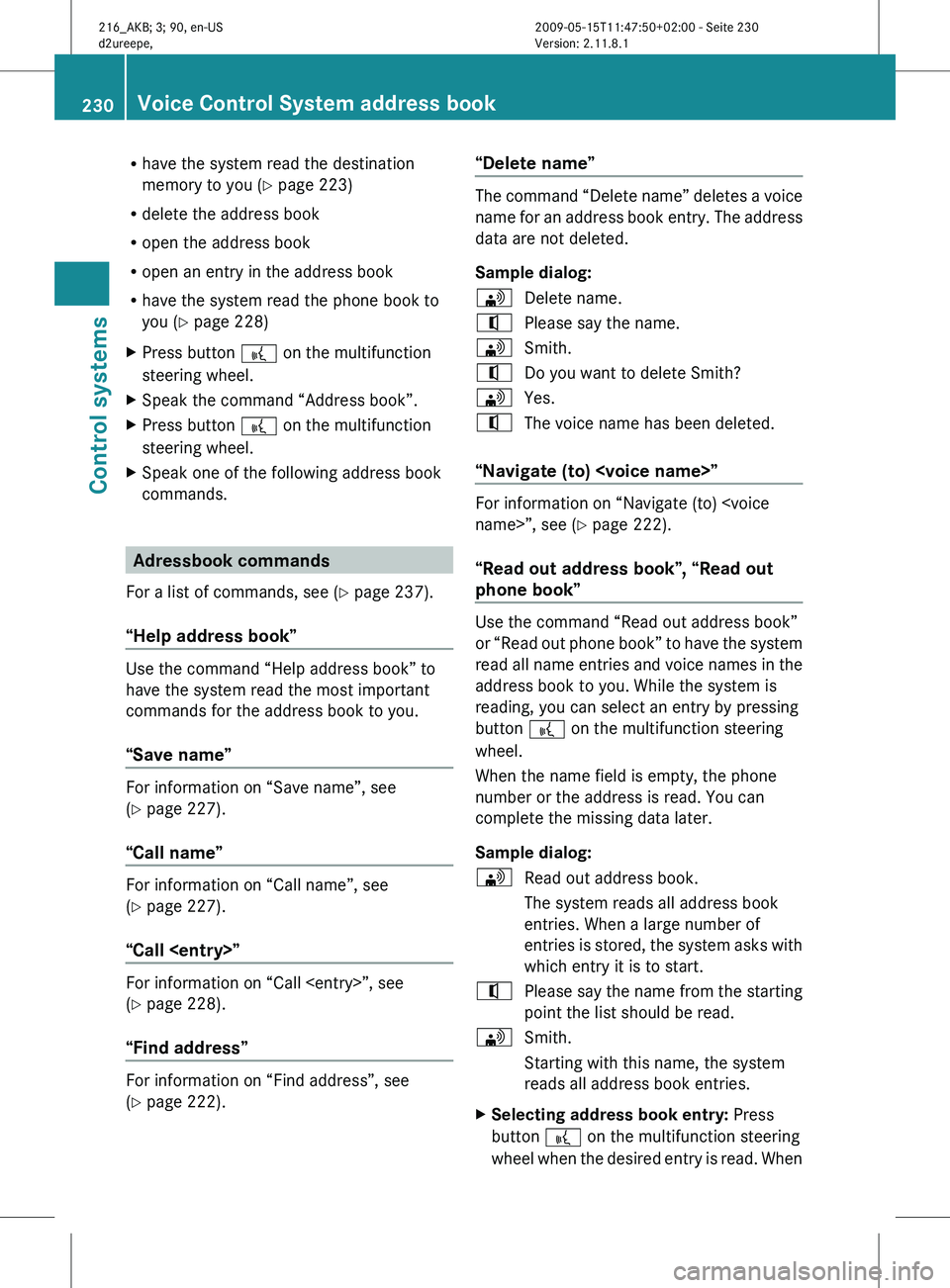
R
have the system read the destination
memory to you ( Y page 223)
R delete the address book
R open the address book
R open an entry in the address book
R have the system read the phone book to
you (
Y page 228)
X Press button ? on the multifunction
steering wheel.
X Speak the command “Address book”.
X Press button ? on the multifunction
steering wheel.
X Speak one of the following address book
commands. Adressbook commands
For a list of commands, see ( Y page 237).
“Help address book” Use the command “Help address book” to
have the system read the most important
commands for the address book to you.
“Save name”
For information on “Save name”, see
(Y page 227).
“Call name”
For information on “Call name”, see
(Y page 227).
“Call
For information on “Call
(Y page 228).
“Find address”
For information on “Find address”, see
(Y page 222). “Delete name” The command “Delete name” deletes a voice
name
for
an address book entry. The address
data are not deleted.
Sample dialog:
\ Delete name.
^ Please say the name.
\ Smith.
^ Do you want to delete Smith?
\ Yes.
^ The voice name has been deleted.
“Navigate (to)
Y page 222).
“Read out address book”, “Read out
phone book” Use the command “Read out address book”
or
“Read
out phone book” to have the system
read all name entries and voice names in the
address book to you. While the system is
reading, you can select an entry by pressing
button ? on the multifunction steering
wheel.
When the name field is empty, the phone
number or the address is read. You can
complete the missing data later.
Sample dialog:
\ Read out address book.
The system reads all address book
entries. When a large number of
entries is
stored, the system asks with
which entry it is to start.
^ Please say the name from the starting
point the list should be read.
\ Smith.
Starting with this name, the system
reads all address book entries.
X Selecting address book entry: Press
button ? on the multifunction steering
wheel when
the desired entry is read. When230
Voice Control System address book
Control systems
216_AKB; 3; 90, en-US
d2ureepe,
Version: 2.11.8.1 2009-05-15T11:47:50+02:00 - Seite 230
Page 233 of 500
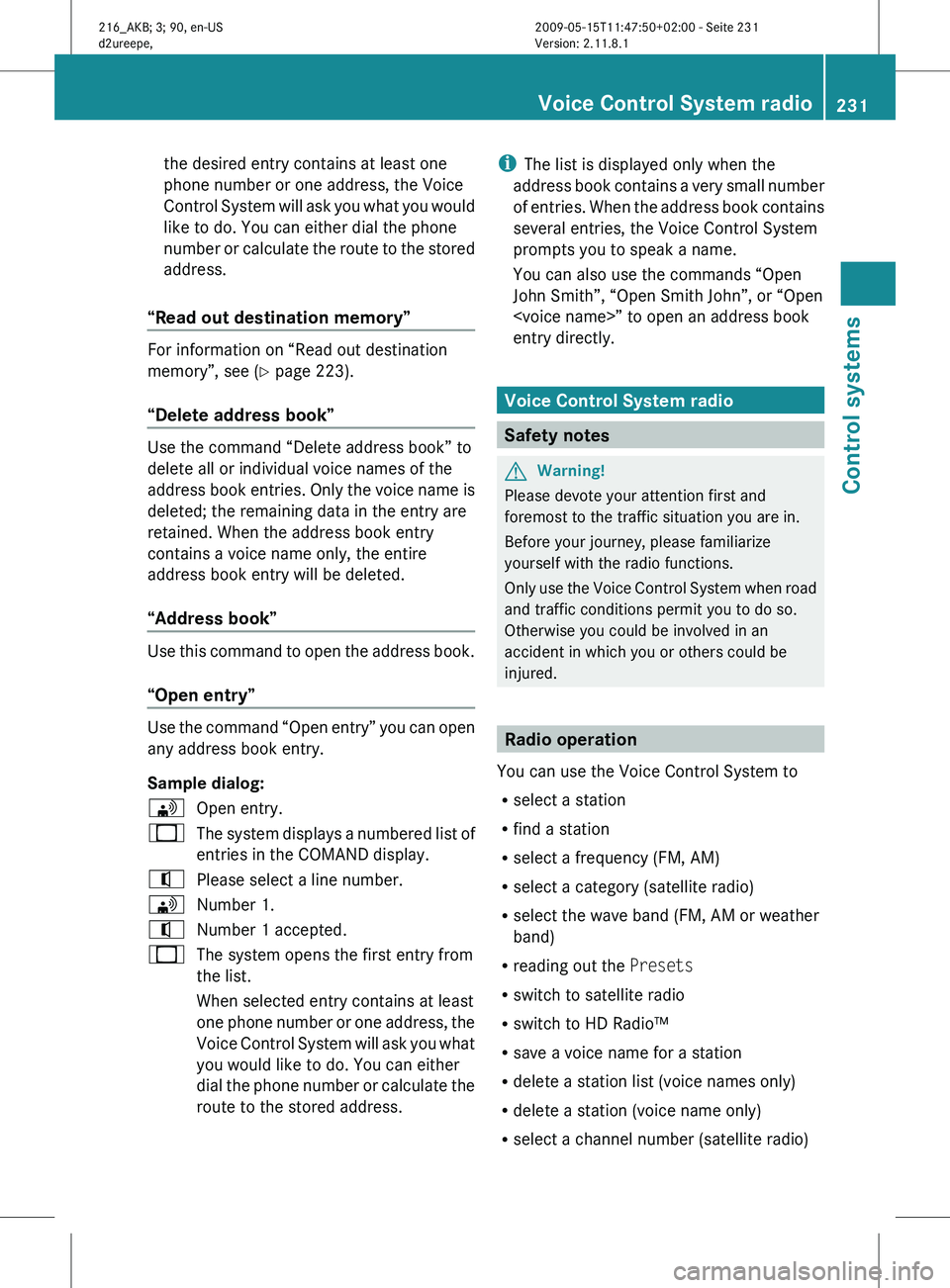
the desired entry contains at least one
phone number or one address, the Voice
Control
System
will ask you what you would
like to do. You can either dial the phone
number or calculate the route to the stored
address.
“Read out destination memory” For information on “Read out destination
memory”, see
(
Y
page 223).
“Delete address book” Use the command “Delete address book” to
delete all or individual voice names of the
address
book
entries. Only the voice name is
deleted; the remaining data in the entry are
retained. When the address book entry
contains a voice name only, the entire
address book entry will be deleted.
“Address book” Use this command to open the address book.
“Open entry”
Use the command “Open entry” you can open
any address book entry.
Sample dialog:
\
Open entry.
_ The system displays a numbered list of
entries in the COMAND display.
^ Please select a line number.
\ Number 1.
^ Number 1 accepted.
_ The system opens the first entry from
the list.
When selected entry contains at least
one phone
number or one address, the
Voice Control System will ask you what
you would like to do. You can either
dial the phone number or calculate the
route to the stored address. i
The list is displayed only when the
address book
contains a very small number
of entries. When the address book contains
several entries, the Voice Control System
prompts you to speak a name.
You can also use the commands “Open
John Smith”, “Open Smith John”, or “Open
entry directly. Voice Control System radio
Safety notes
G
Warning!
Please devote your attention first and
foremost to the traffic situation you are in.
Before your journey, please familiarize
yourself with the radio functions.
Only use
the Voice Control System when road
and traffic conditions permit you to do so.
Otherwise you could be involved in an
accident in which you or others could be
injured. Radio operation
You can use the Voice Control System to
R select a station
R find a station
R select a frequency (FM, AM)
R select a category (satellite radio)
R select the wave band (FM, AM or weather
band)
R reading out the Presets
R switch to satellite radio
R switch to HD Radio™
R save a voice name for a station
R delete a station list (voice names only)
R delete a station (voice name only)
R select a channel number (satellite radio) Voice Control System radio
231Control systems
216_AKB; 3; 90, en-US
d2ureepe, Version: 2.11.8.1 2009-05-15T11:47:50+02:00 - Seite 231 Z
Page 239 of 500
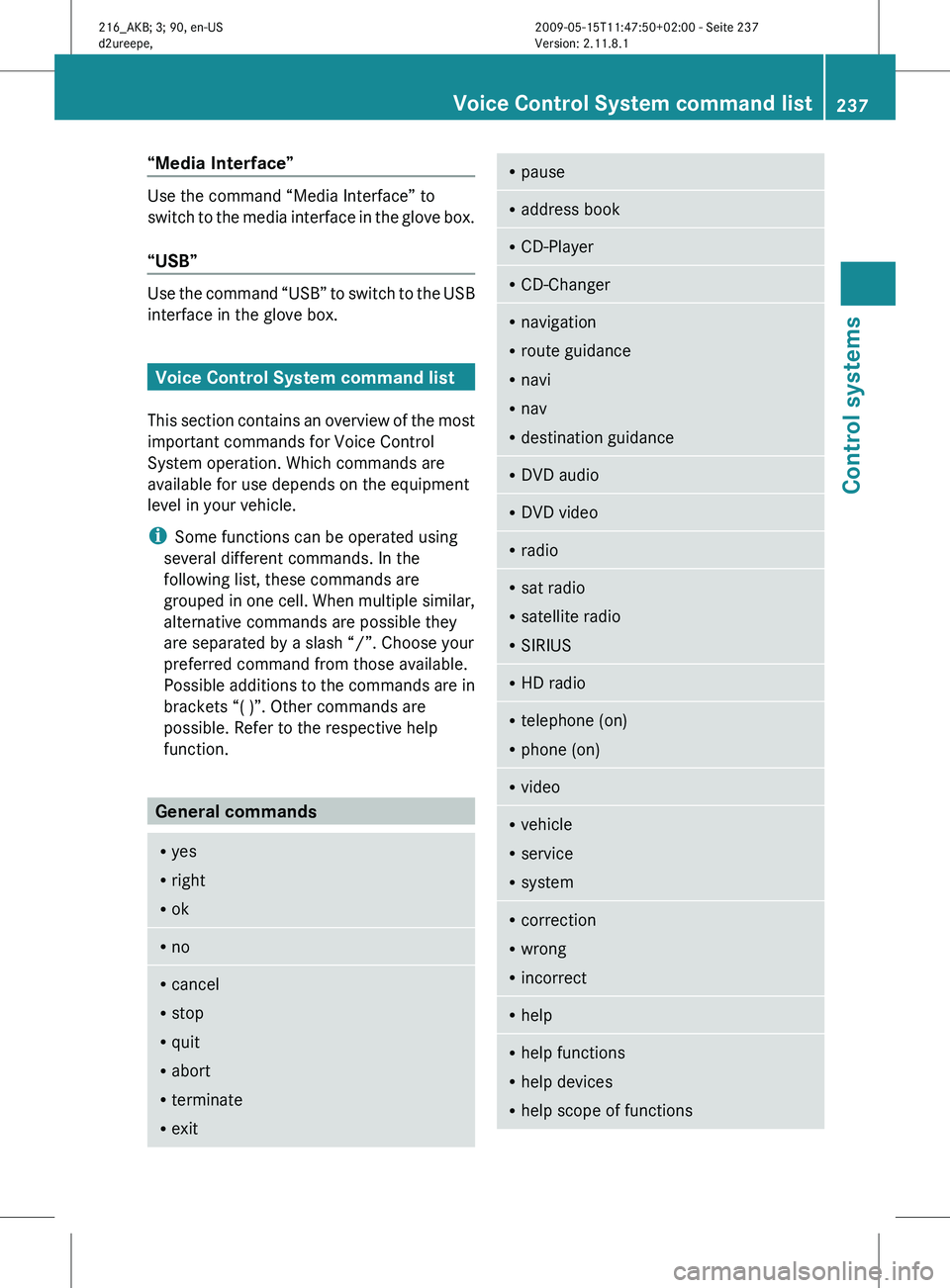
“Media Interface”
Use the command “Media Interface” to
switch
to
the media interface in the glove box.
“USB” Use the command “USB” to switch to the USB
interface in the glove box.
Voice Control System command list
This section
contains an overview of the most
important commands for Voice Control
System operation. Which commands are
available for use depends on the equipment
level in your vehicle.
i Some functions can be operated using
several different commands. In the
following list, these commands are
grouped in one cell. When multiple similar,
alternative commands are possible they
are separated by a slash “/”. Choose your
preferred command from those available.
Possible additions to the commands are in
brackets “( )”. Other commands are
possible. Refer to the respective help
function. General commands
R
yes
R right
R ok R
no R
cancel
R stop
R quit
R abort
R terminate
R exit R
pause R
address book R
CD-Player R
CD-Changer R
navigation
R route guidance
R navi
R nav
R destination guidance R
DVD audio R
DVD video R
radio R
sat radio
R satellite radio
R SIRIUS R
HD radio R
telephone (on)
R phone (on) R
video R
vehicle
R service
R system R
correction
R wrong
R incorrect R
help R
help functions
R help devices
R help scope of functions Voice Control System command list
237
Control systems
216_AKB; 3; 90, en-US
d2ureepe, Version: 2.11.8.1 2009-05-15T11:47:50+02:00 - Seite 237 Z
Page 240 of 500
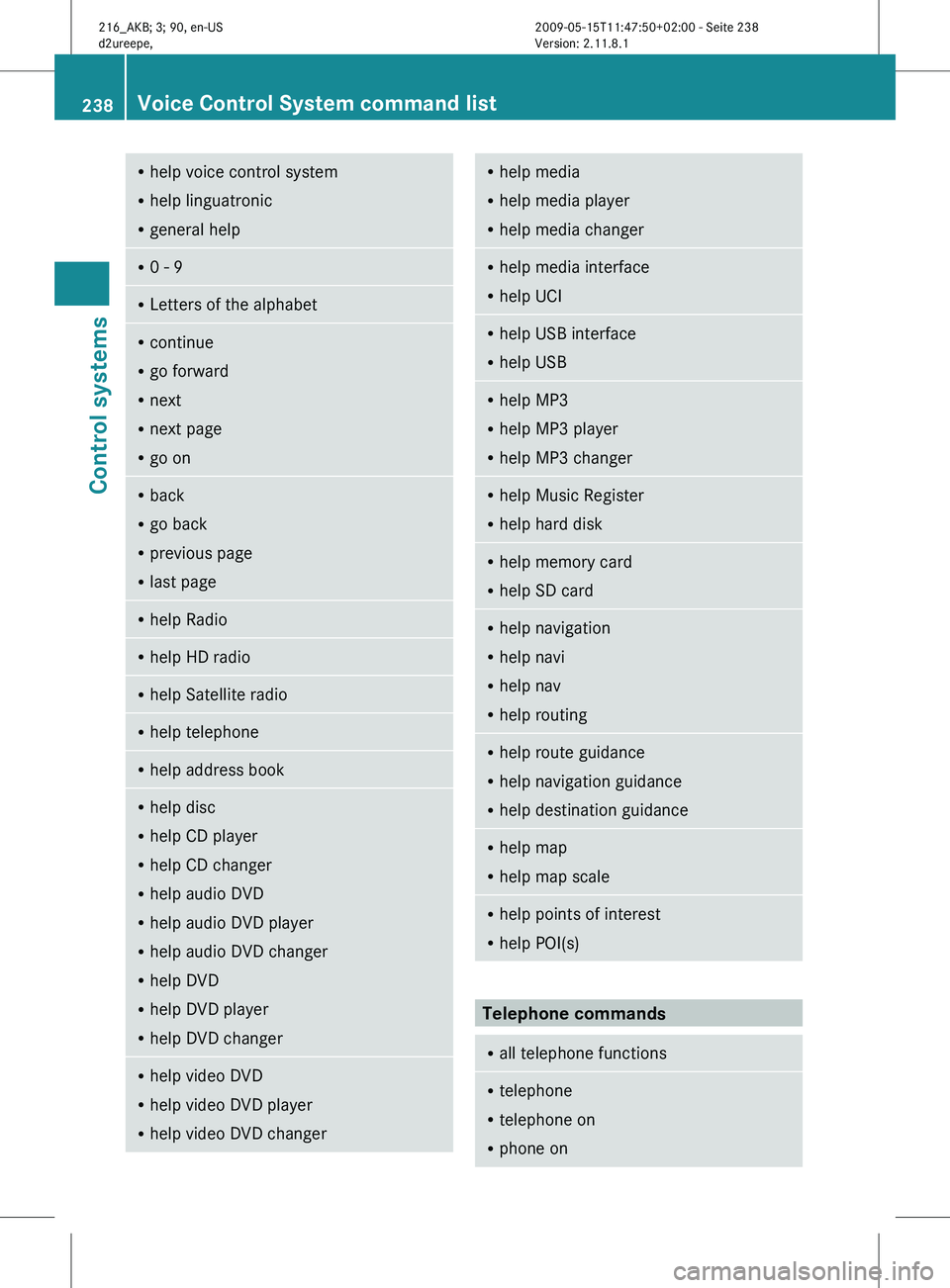
R
help voice control system
R help linguatronic
R general help R
0 - 9 R
Letters of the alphabet R
continue
R go forward
R next
R next page
R go on R
back
R go back
R previous page
R last page R
help Radio R
help HD radio R
help Satellite radio R
help telephone R
help address book R
help disc
R help CD player
R help CD changer
R help audio DVD
R help audio DVD player
R help audio DVD changer
R help DVD
R help DVD player
R help DVD changer R
help video DVD
R help video DVD player
R help video DVD changer R
help media
R help media player
R help media changer R
help media interface
R help UCI R
help USB interface
R help USB R
help MP3
R help MP3 player
R help MP3 changer R
help Music Register
R help hard disk R
help memory card
R help SD card R
help navigation
R help navi
R help nav
R help routing R
help route guidance
R help navigation guidance
R help destination guidance R
help map
R help map scale R
help points of interest
R help POI(s) Telephone commands
R
all telephone functions R
telephone
R telephone on
R phone on 238
Voice Control System command listControl systems
216_AKB; 3; 90, en-US
d2ureepe,
Version: 2.11.8.1 2009-05-15T11:47:50+02:00 - Seite 238
Page 241 of 500
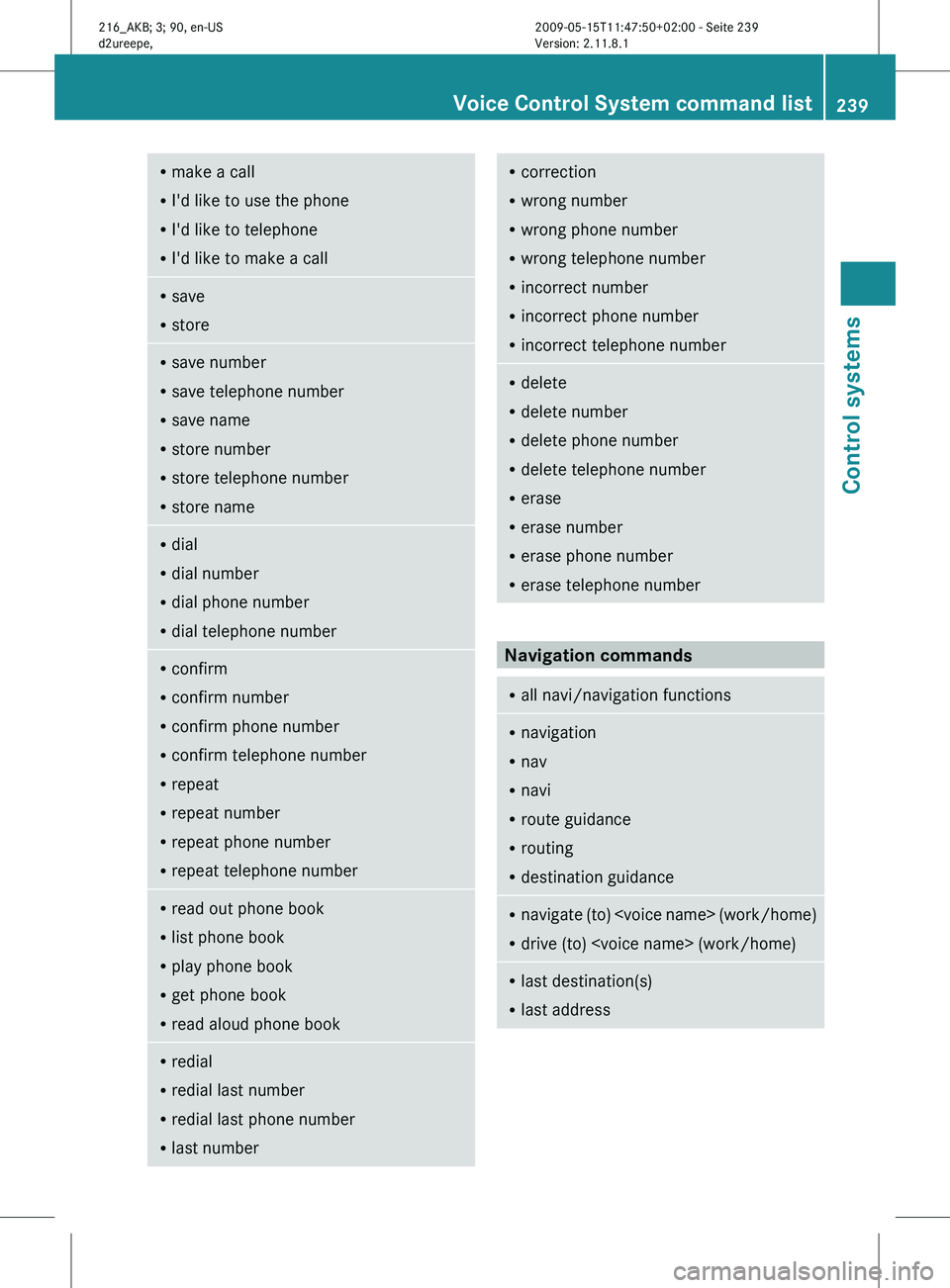
R
make a call
R I'd like to use the phone
R I'd like to telephone
R I'd like to make a call R
save
R store R
save number
R save telephone number
R save name
R store number
R store telephone number
R store name R
dial
R dial number
R dial phone number
R dial telephone number R
confirm
R confirm number
R confirm phone number
R confirm telephone number
R repeat
R repeat number
R repeat phone number
R repeat telephone number R
read out phone book
R list phone book
R play phone book
R get phone book
R read aloud phone book R
redial
R redial last number
R redial last phone number
R last number R
correction
R wrong number
R wrong phone number
R wrong telephone number
R incorrect number
R incorrect phone number
R incorrect telephone number R
delete
R delete number
R delete phone number
R delete telephone number
R erase
R erase number
R erase phone number
R erase telephone number Navigation commands
R
all navi/navigation functions R
navigation
R nav
R navi
R route guidance
R routing
R destination guidance R
navigate (to)
R drive (to)
last destination(s)
R last address Voice Control System command list
239
Control systems
216_AKB; 3; 90, en-US
d2ureepe, Version: 2.11.8.1 2009-05-15T11:47:50+02:00 - Seite 239 Z