reverse MERCEDES-BENZ CL-Class 2012 C216 User Guide
[x] Cancel search | Manufacturer: MERCEDES-BENZ, Model Year: 2012, Model line: CL-Class, Model: MERCEDES-BENZ CL-Class 2012 C216Pages: 488, PDF Size: 21.88 MB
Page 279 of 488
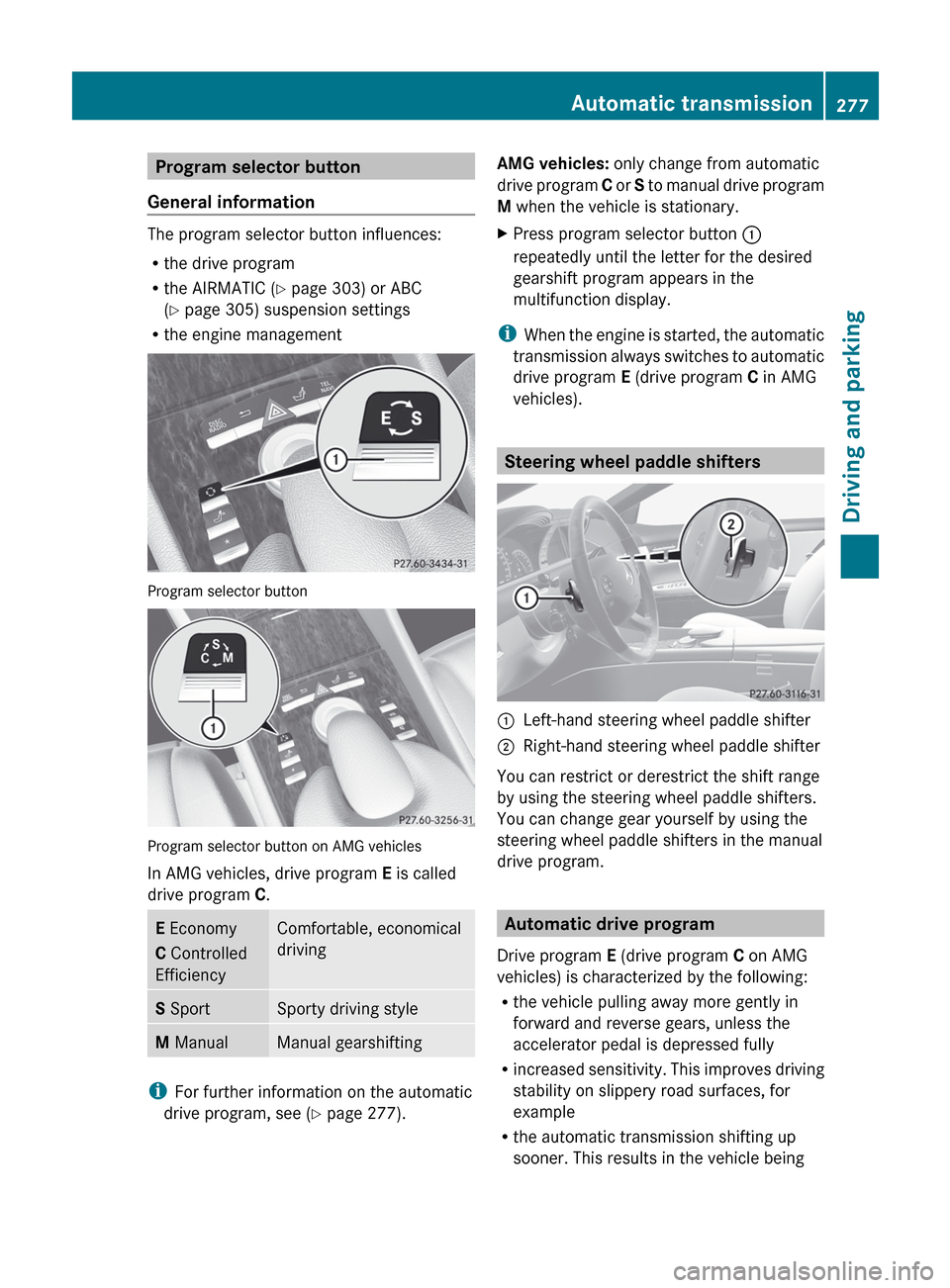
Program selector button
General information
The program selector button influences:
R the drive program
R the AIRMATIC ( Y page 303) or ABC
( Y page 305) suspension settings
R the engine management
Program selector button
Program selector button on AMG vehicles
In AMG vehicles, drive program E is called
drive program C.
E Economy
C Controlled
EfficiencyComfortable, economical
drivingS SportSporty driving styleM ManualManual gearshifting
i
For further information on the automatic
drive program, see ( Y page 277).
AMG vehicles: only change from automatic
drive program C or S to manual drive program
M when the vehicle is stationary.XPress program selector button :
repeatedly until the letter for the desired
gearshift program appears in the
multifunction display.
i When the engine is started, the automatic
transmission always switches to automatic
drive program E (drive program C in AMG
vehicles).
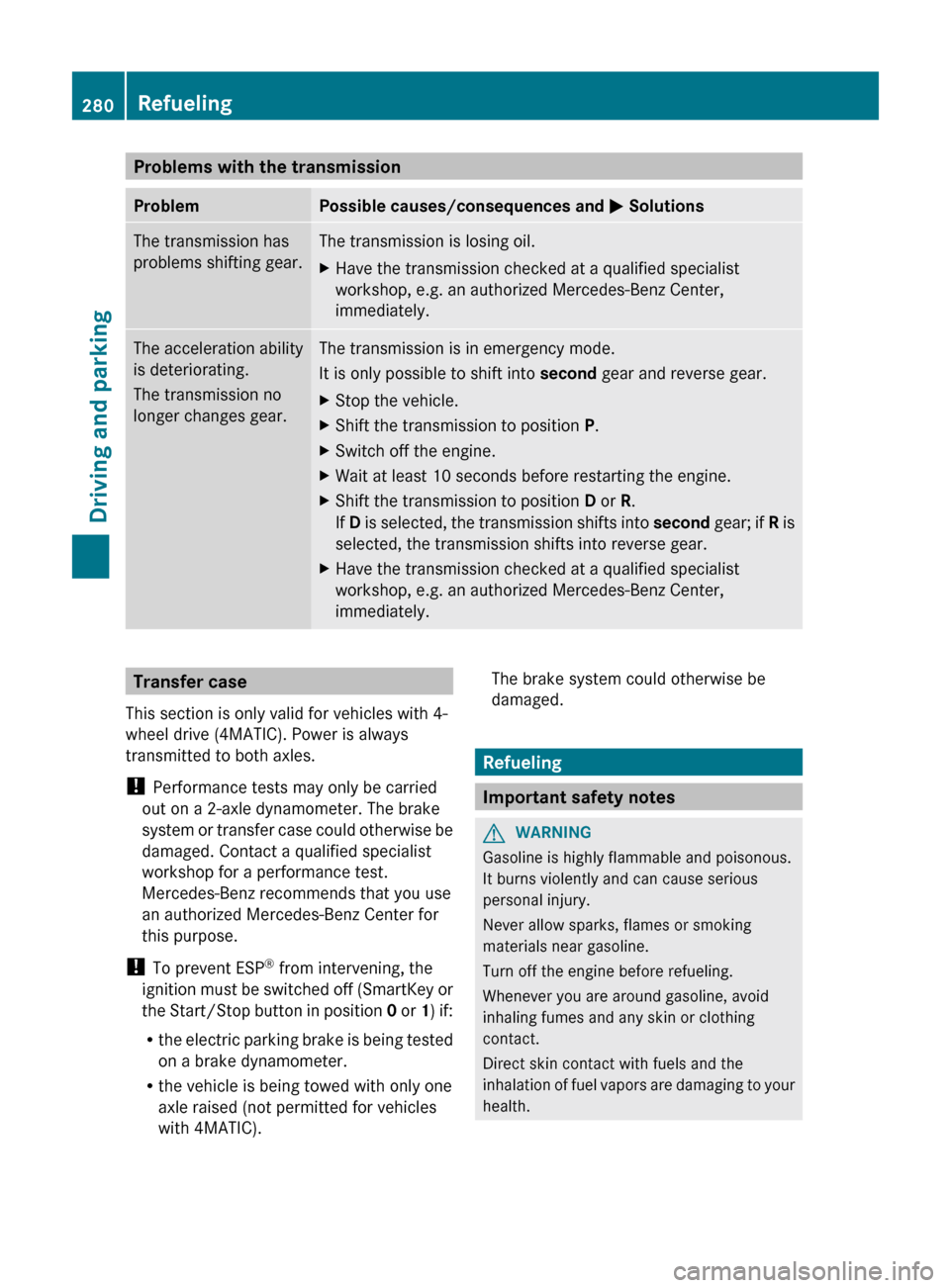
Steering wheel paddle shifters
:Left-hand steering wheel paddle shifter;Right-hand steering wheel paddle shifter
You can restrict or derestrict the shift range
by using the steering wheel paddle shifters.
You can change gear yourself by using the
steering wheel paddle shifters in the manual
drive program.
Automatic drive program
Drive program E (drive program C on AMG
vehicles) is characterized by the following:
R the vehicle pulling away more gently in
forward and reverse gears, unless the
accelerator pedal is depressed fully
R increased sensitivity. This improves driving
stability on slippery road surfaces, for
example
R the automatic transmission shifting up
sooner. This results in the vehicle being
Automatic transmission277Driving and parkingZ
Page 282 of 488
Problems with the transmissionProblemPossible causes/consequences and M SolutionsThe transmission has
problems shifting gear.The transmission is losing oil.XHave the transmission checked at a qualified specialist
workshop, e.g. an authorized Mercedes-Benz Center,
immediately.The acceleration ability
is deteriorating.
The transmission no
longer changes gear.The transmission is in emergency mode.
It is only possible to shift into second gear and reverse gear.XStop the vehicle.XShift the transmission to position P.XSwitch off the engine.XWait at least 10 seconds before restarting the engine.XShift the transmission to position D or R.
If D is selected, the transmission shifts into second gear; if R is
selected, the transmission shifts into reverse gear.XHave the transmission checked at a qualified specialist
workshop, e.g. an authorized Mercedes-Benz Center,
immediately.Transfer case
This section is only valid for vehicles with 4-
wheel drive (4MATIC). Power is always
transmitted to both axles.
! Performance tests may only be carried
out on a 2-axle dynamometer. The brake
system or transfer case could otherwise be
damaged. Contact a qualified specialist
workshop for a performance test.
Mercedes-Benz recommends that you use
an authorized Mercedes-Benz Center for
this purpose.
! To prevent ESP ®
from intervening, the
ignition must be switched off (SmartKey or
the Start/Stop button in position 0 or 1) if:
R the electric parking brake is being tested
on a brake dynamometer.
R the vehicle is being towed with only one
axle raised (not permitted for vehicles
with 4MATIC).The brake system could otherwise be
damaged.
Refueling
Important safety notes
GWARNING
Gasoline is highly flammable and poisonous.
It burns violently and can cause serious
personal injury.
Never allow sparks, flames or smoking
materials near gasoline.
Turn off the engine before refueling.
Whenever you are around gasoline, avoid
inhaling fumes and any skin or clothing
contact.
Direct skin contact with fuels and the
inhalation of fuel vapors are damaging to your
health.
280RefuelingDriving and parking
Page 314 of 488
Guidance only shows parking spaces on the
passenger side in the default setting. Parking
spaces on the driver's side are displayed as
soon as the turn signal on the driver's side is
activated. To park on the driver's side, you
must leave the driver's side turn signal
switched on until you have engaged reverse
gear. If a parking space is detected, parking
symbol ; changes to blue. Additionally, an
arrow pointing right = or left : is shown.
Parking Guidance will only detect parking
spaces:
R that are closed in at the back
R that are parallel to the direction of travel
R that are at least 5 ft (1.5 m) wide
R that are at least 4.3 ft (1.3 m) longer than
your vehicle
A parking space is displayed while you are
driving past it, and until you are
approximately 50 ft (15 m) away from it.
Parking
The following instructions refer to parking in
a space on the front-passenger side. To park
in a space on the driver's side, mirror the
instructions.
GWARNING
The Parking Guidance is only an aid and may
not detect all obstacles. The Parking
Guidance does not relieve you of the
responsibility to pay attention. You are always
responsible for safety and must continue to
pay attention to your immediate surroundings
when parking and maneuvering. Otherwise,
you could endanger yourself and others.
XStop the vehicle when the blue parking
space symbol shows the desired parking
space in the instrument cluster.XEngage reverse gear.
The multifunction display shows the
message: Check surroundings
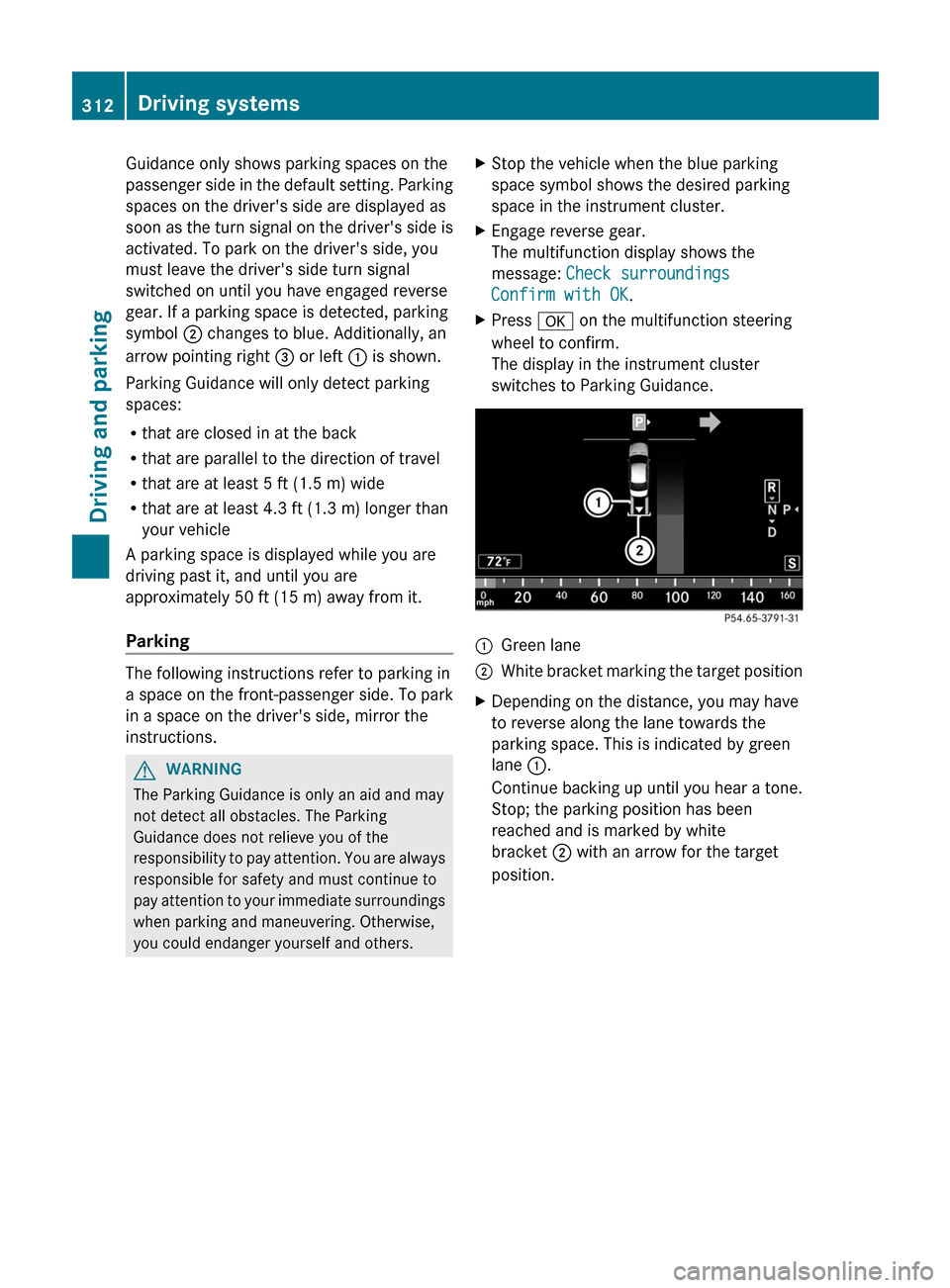
Confirm with OK .XPress a on the multifunction steering
wheel to confirm.
The display in the instrument cluster
switches to Parking Guidance.:Green lane;White bracket marking the target positionXDepending on the distance, you may have
to reverse along the lane towards the
parking space. This is indicated by green
lane :.
Continue backing up until you hear a tone.
Stop; the parking position has been
reached and is marked by white
bracket ; with an arrow for the target
position.312Driving systemsDriving and parking
Page 315 of 488
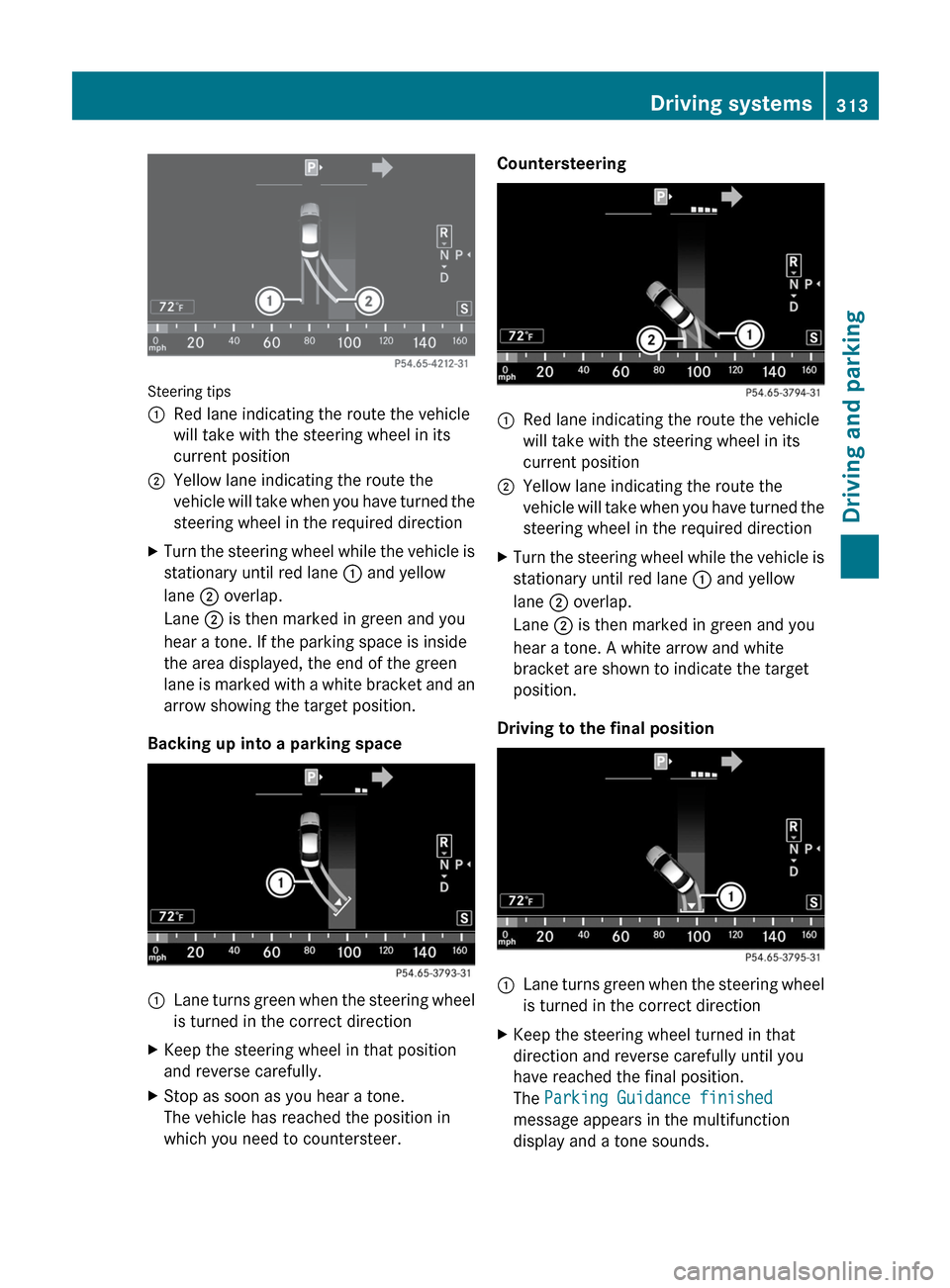
Steering tips
:Red lane indicating the route the vehicle
will take with the steering wheel in its
current position;Yellow lane indicating the route the
vehicle will take when you have turned the
steering wheel in the required directionXTurn the steering wheel while the vehicle is
stationary until red lane : and yellow
lane ; overlap.
Lane ; is then marked in green and you
hear a tone. If the parking space is inside
the area displayed, the end of the green
lane is marked with a white bracket and an
arrow showing the target position.
Backing up into a parking space
:Lane turns green when the steering wheel
is turned in the correct directionXKeep the steering wheel in that position
and reverse carefully.XStop as soon as you hear a tone.
The vehicle has reached the position in
which you need to countersteer.Countersteering:Red lane indicating the route the vehicle
will take with the steering wheel in its
current position;Yellow lane indicating the route the
vehicle will take when you have turned the
steering wheel in the required directionXTurn the steering wheel while the vehicle is
stationary until red lane : and yellow
lane ; overlap.
Lane ; is then marked in green and you
hear a tone. A white arrow and white
bracket are shown to indicate the target
position.
Driving to the final position
:Lane turns green when the steering wheel
is turned in the correct directionXKeep the steering wheel turned in that
direction and reverse carefully until you
have reached the final position.
The Parking Guidance finished
message appears in the multifunction
display and a tone sounds.Driving systems313Driving and parkingZ
Page 317 of 488
Rthe trunk lid is open
R it is raining or snowing strongly or if it is
foggy
R it is night or if you are parking/
maneuvering your vehicle in a very dark
area
R a very bright white light is affecting the
camera
R the immediate vicinity is illuminated with
fluorescent light (the display of the
COMAND system can flicker)
R temperature changes abruptly, for example
if you drive out of the cold into a heated
garage (condensation on the lens)
R the camera lens is dirty or covered
R the rear of your vehicle is damaged
In this case, have the position and the
setting of the camera checked at a
specialist workshop. Mercedes-Benz
recommends that you consult a Mercedes-
Benz Center for this purpose.
Do not use the rear view camera in these
situations. You could otherwise injure
yourself and other people and/or cause
damage - including damage to your vehicle -
while parking/maneuvering.
Activating the rear view cameraXMake sure that the SmartKey is in position
2 in the ignition lock.XEngage reverse gear.
The area behind the vehicle is shown in the
COMAND display with guide lines.
Guide lines in the COMAND display
GWARNING
Use of rear view camera can be dangerous if
you are color-blind or have impaired color
vision.
Only use rear view camera if you can see and
distinguish all colored guidelines shown by
rear view camera on the COMAND system
display.
GWARNING
Please note that objects that do not touch the
ground may appear to be further away than
they actually are, for example:
R the bumper of a vehicle parked behind you
R the trailer drawbar
R the ball coupling of a trailer tow hitch
R the rear end of a truck
R a slanted post
In such cases, you should not use the guide
lines to judge the distance. You may misjudge
the distance, which increases the risk of
impacting the objects.
Even if the object you approach is directly on
the ground, do not approach the object any
closer than the red guide line.
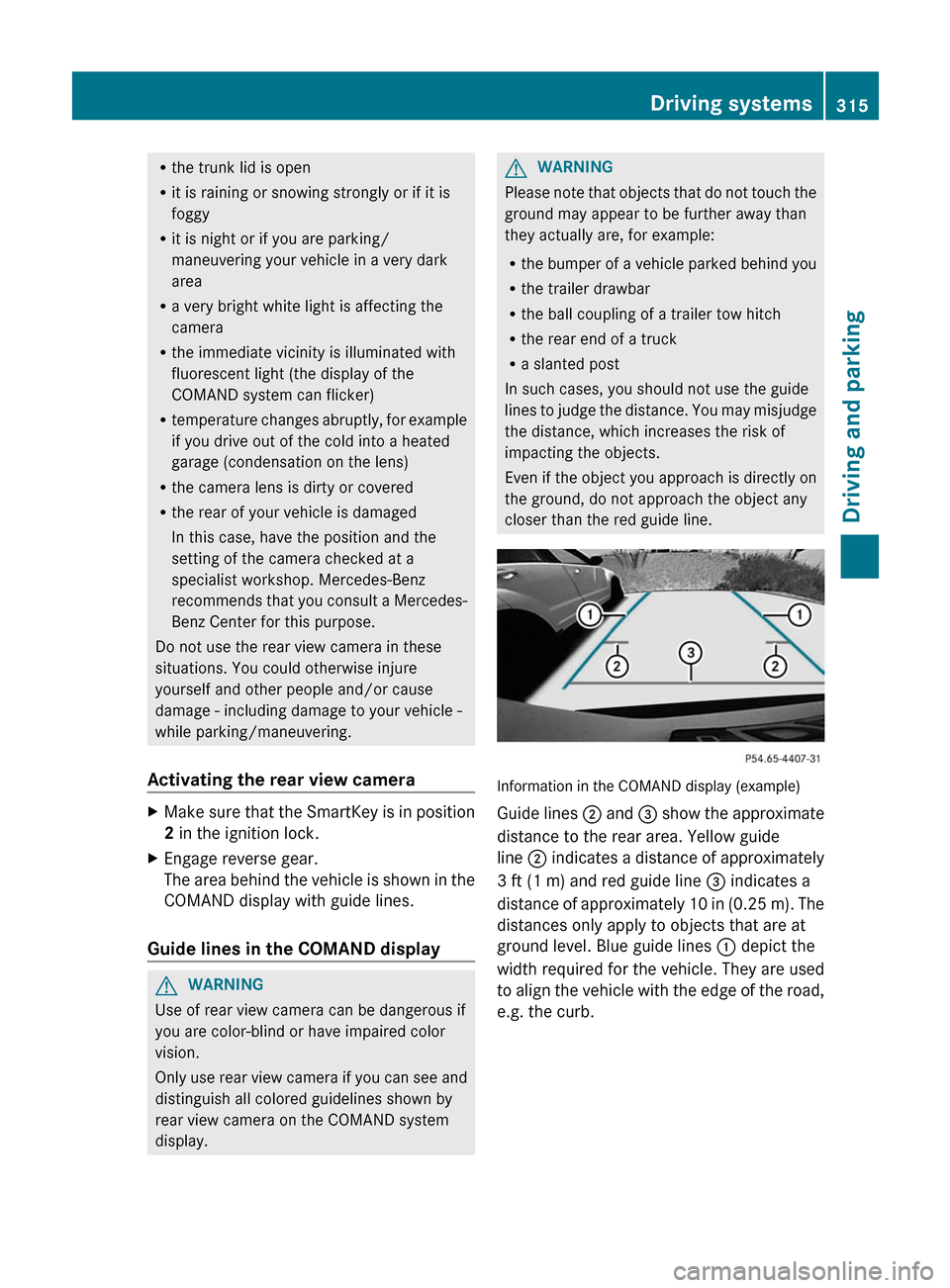
Information in the COMAND display (example)
Guide lines ; and = show the approximate
distance to the rear area. Yellow guide
line ; indicates a distance of approximately
3 ft (1 m) and red guide line = indicates a
distance of approximately 10 in (0.25 m). The
distances only apply to objects that are at
ground level. Blue guide lines : depict the
width required for the vehicle. They are used
to align the vehicle with the edge of the road,
e.g. the curb.
Driving systems315Driving and parkingZ
Page 320 of 488
iAnimals are not recognized by pedestrian
recognition.
Night View Assist Plus is able to recognize
pedestrians by typical characteristics, e.g. a
silhouette in the shape of a person.
Pedestrian recognition is then switched on
automatically if:
R Night View Assist Plus is activated.
R you are driving faster than 6 mph
(10 km/h).
R the surroundings are dark, e.g. when
driving outside built-up areas without
street lighting.
If pedestrian recognition is enabled, the
active pedestrian recognition symbol
( Y page 319) appears in the multifunction
display. If a pedestrian is now recognized,
they are framed and thereby highlighted. If
the pedestrian recognition system has
brought a pedestrian to your attention, look
through the windshield to evaluate the
situation. The actual distance to objects and
pedestrians cannot be gauged accurately by
looking at a screen.
It may be the case that objects are highlighted
as well as pedestrians.
Spotlight function
Pedestrian recognition with spotlight
function is activated automatically if:
R Night View Assist Plus with spotlight
function is activated.
R you are driving faster than 28 mph
(45 km/h).
R the surroundings are dark, e.g. when
driving outside built-up areas without
street lighting.
Only one pedestrian or one object can be
illuminated with the spotlight at any one time.
The spotlight function will not function if:
R pedestrians or objects cannot be
recognized due to fast cornering.
R pedestrians or objects are on the driver's
side of the vehicle.If you switch to symmetrical low beam
( Y page 244), pedestrians or objects on the
front-passenger side of the vehicle will not
be recognized instead.
It may be the case that pedestrians and other
objects are inadvertently illuminated.
Activating/deactivating Night View
Assist Plus with spotlight function
You can only activate Night View Assist Plus
with spotlight function if:
R the SmartKey is in position 2 in the ignition
lock.
R it is dark.
R the "Adaptive Highbeam Assist" function is
activated via the on-board computer
( Y page 344).
R the light switch is in position c.
R the combination switch is pushed forward
beyond the point of resistance.
R reverse gear has not been engaged.
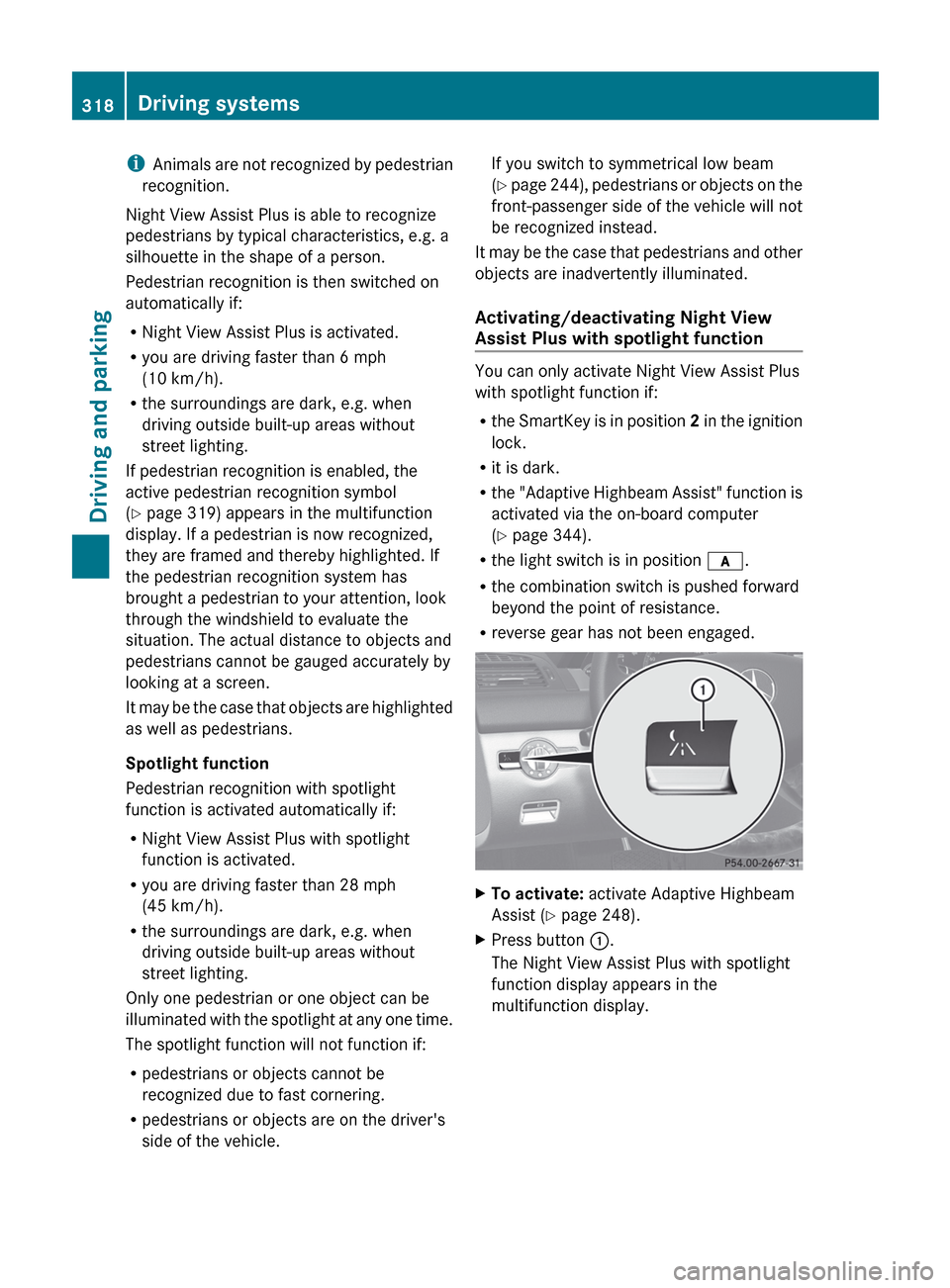
XTo activate: activate Adaptive Highbeam
Assist ( Y page 248).XPress button :.
The Night View Assist Plus with spotlight
function display appears in the
multifunction display.318Driving systemsDriving and parking
Page 322 of 488
You can only activate Night View Assist Plus
without spotlight function if:
R the SmartKey is in position 2 in the ignition
lock.
R it is dark.
R the light switch is in the c or L
position.
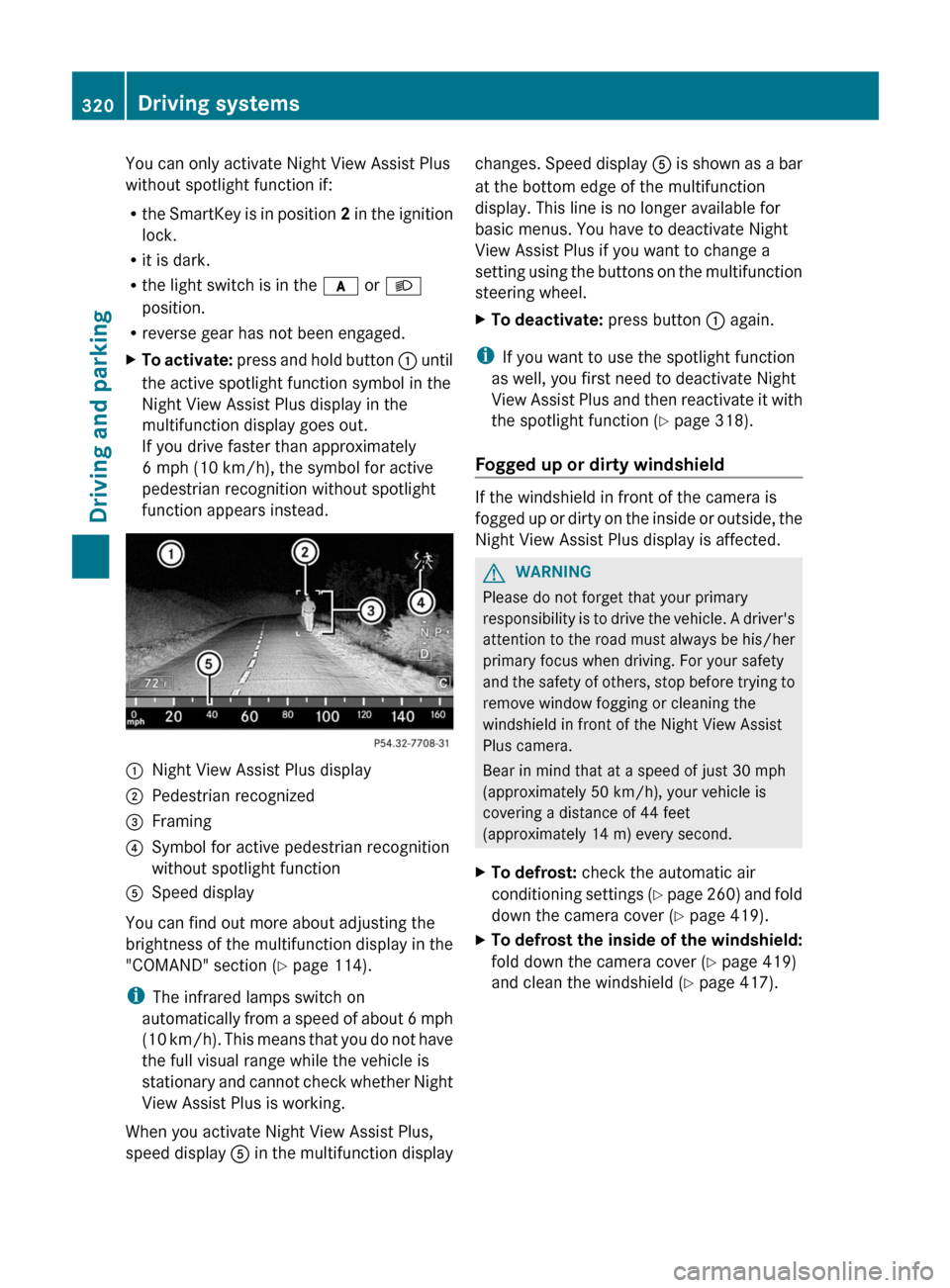
R reverse gear has not been engaged.XTo activate: press and hold button : until
the active spotlight function symbol in the
Night View Assist Plus display in the
multifunction display goes out.
If you drive faster than approximately
6 mph (10 km/h), the symbol for active
pedestrian recognition without spotlight
function appears instead.:Night View Assist Plus display;Pedestrian recognized=Framing?Symbol for active pedestrian recognition
without spotlight functionASpeed display
You can find out more about adjusting the
brightness of the multifunction display in the
"COMAND" section ( Y page 114).
i The infrared lamps switch on
automatically from a speed of about 6 mph
( 10 km/h). This means that you do not have
the full visual range while the vehicle is
stationary and cannot check whether Night
View Assist Plus is working.
When you activate Night View Assist Plus,
speed display A in the multifunction display
changes. Speed display A is shown as a bar
at the bottom edge of the multifunction
display. This line is no longer available for
basic menus. You have to deactivate Night
View Assist Plus if you want to change a
setting using the buttons on the multifunction
steering wheel.XTo deactivate: press button : again.
i
If you want to use the spotlight function
as well, you first need to deactivate Night
View Assist Plus and then reactivate it with
the spotlight function ( Y page 318).
Fogged up or dirty windshield
If the windshield in front of the camera is
fogged up or dirty on the inside or outside, the
Night View Assist Plus display is affected.
GWARNING
Please do not forget that your primary
responsibility is to drive the vehicle. A driver's
attention to the road must always be his/her
primary focus when driving. For your safety
and the safety of others, stop before trying to
remove window fogging or cleaning the
windshield in front of the Night View Assist
Plus camera.
Bear in mind that at a speed of just 30 mph
(approximately 50 km/h), your vehicle is
covering a distance of 44 feet
(approximately 14 m) every second.
XTo defrost: check the automatic air
conditioning settings (Y page 260) and fold
down the camera cover ( Y page 419).XTo defrost the inside of the windshield:
fold down the camera cover ( Y page 419)
and clean the windshield ( Y page 417).320Driving systemsDriving and parking
Page 325 of 488

Due to the nature of the system:
R warnings may be issued in error when
driving close to crash barriers or similar
solid lane borders.
R warnings may be interrupted when driving
alongside long vehicles, such as trucks, for
a prolonged time.
Two Active Blind Spot Assist radar sensors
are integrated into the front and rear bumpers
respectively. An additional radar sensor is
located behind the cover in the radiator grill.
Make sure that the sensor areas on the
bumpers and the sensor cover in the radiator
grill are free of dirt, ice and slush. The rear
sensors must not be covered, for example by
cycle racks or overhanging cargo. Following
a severe impact or in the event of damage to
the bumpers, have the function of the radar
sensors checked at a qualified specialist
workshop. Blind Spot Assist may otherwise
not work properly.
Indicator and warning display:Yellow indicator lamp/red warning lamp
When Active Blind Spot Assist is activated,
indicator lamp : lights up yellow in the
exterior mirrors up to a vehicle speed of
20 mph (30 km/h). When the vehicle speed
exceeds 20 mph (30 km/h), the indicator
lamp goes out and Active Blind Spot Assist is
ready for use.
When your speed exceeds approximately
20 mph (30 km/h), warning lamp : lights up
red on the corresponding side whenever a
vehicle is detected in the blind spot
monitoring range. This warning is always
given when a vehicle enters the blind spot
monitoring range from behind or from the
side. When you are passing another vehicle,
the warning is emitted only if the difference
in speed is less than 7 mph (12 km/h).
The yellow indicator lamp goes out if reverse
gear is engaged. In this event, Active Blind
Spot Assist is no longer active.
The brightness of the indicator/warning
lamps is adjusted automatically according to
the ambient light.GWARNING
Active Blind Spot Assist is not active at speeds
lower than 20 mph (30 km/h). The indicator
lamps in the exterior mirrors are yellow.
Vehicles in the monitoring range are then not
indicated.
Always pay attention to traffic conditions and
your surroundings. Otherwise, you may fail to
recognize dangers in time, cause an accident
and injure yourself and others.
Visual and audible collision warnings
If you switch on the appropriate turn signals
and a vehicle is detected in the side
monitoring range, you will receive a visual and
acoustic collision warning. You will hear a
double warning tone and red warning
lamp : flashes. If the turn signal remains on,
vehicles detected are indicated by the
flashing of red warning lamp :. There are no
further warning tones.
Course-correcting brake application
If Active Blind Spot Assist detects a risk of a
lateral collision in the monitoring range, a
course-correcting brake application is carried
out. This is meant to assist you in avoiding a
collision.
The course-correcting brake application is
available in the range between 20 mph
(30 km/h) and 120 mph (200 km/h).
If a course-correcting brake application
occurs, red warning lamp : flashes in the
Driving systems323Driving and parkingZ
Page 363 of 488
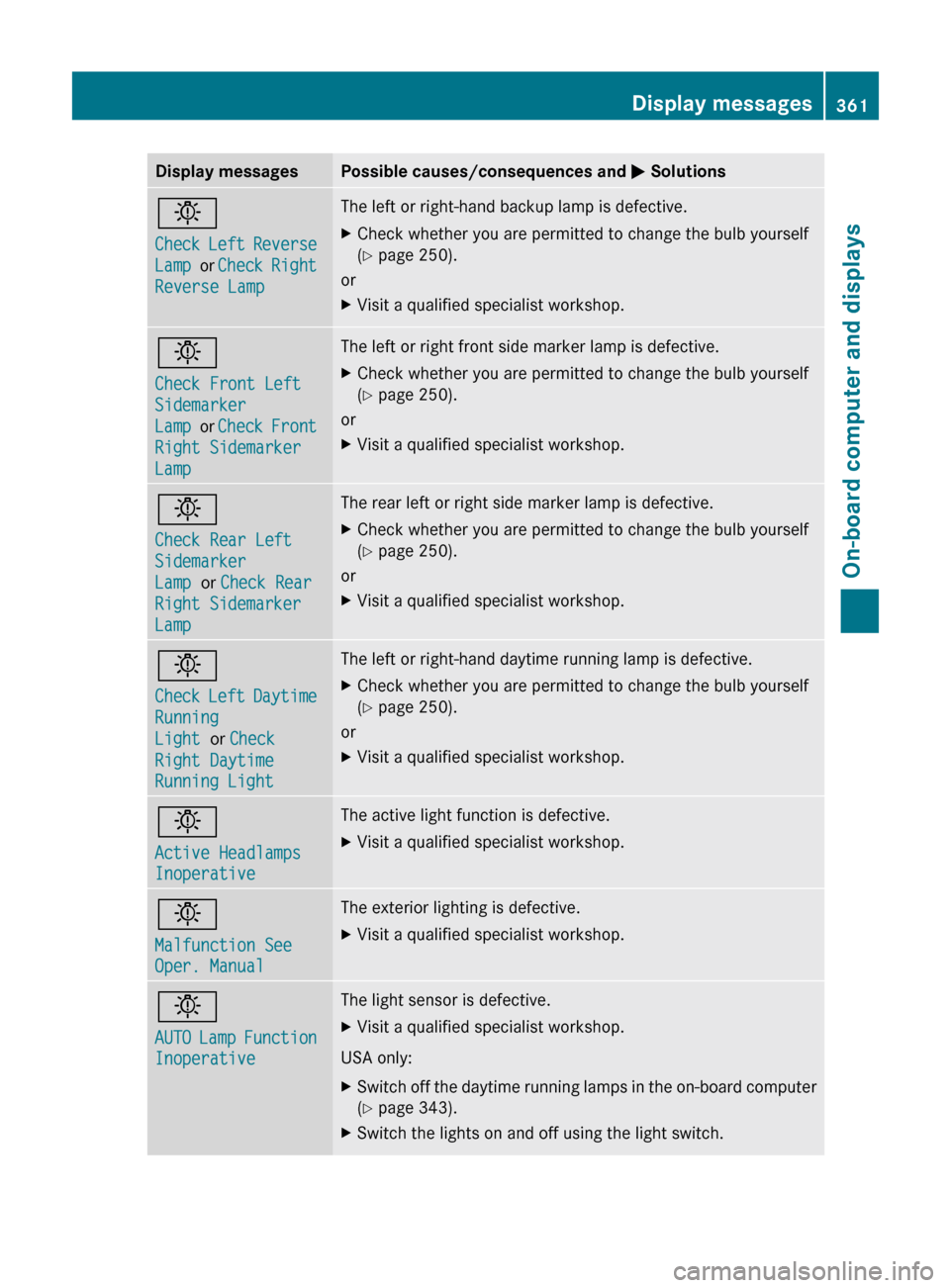
Display messagesPossible causes/consequences and M Solutionsb
Check Left Reverse
Lamp or Check Right
Reverse LampThe left or right-hand backup lamp is defective.XCheck whether you are permitted to change the bulb yourself
( Y page 250).
or
XVisit a qualified specialist workshop.b
Check Front Left
Sidemarker
Lamp or Check Front
Right Sidemarker
LampThe left or right front side marker lamp is defective.XCheck whether you are permitted to change the bulb yourself
( Y page 250).
or
XVisit a qualified specialist workshop.b
Check Rear Left
Sidemarker
Lamp or Check Rear
Right Sidemarker
LampThe rear left or right side marker lamp is defective.XCheck whether you are permitted to change the bulb yourself
( Y page 250).
or
XVisit a qualified specialist workshop.b
Check Left Daytime
Running
Light or Check
Right Daytime
Running Light The left or right-hand daytime running lamp is defective.XCheck whether you are permitted to change the bulb yourself
( Y page 250).
or
XVisit a qualified specialist workshop.b
Active Headlamps
InoperativeThe active light function is defective.XVisit a qualified specialist workshop.b
Malfunction See
Oper. ManualThe exterior lighting is defective.XVisit a qualified specialist workshop.b
AUTO Lamp Function
InoperativeThe light sensor is defective.XVisit a qualified specialist workshop.
USA only:
XSwitch off the daytime running lamps in the on-board computer
( Y page 343).XSwitch the lights on and off using the light switch.Display messages361On-board computer and displaysZ
Page 368 of 488
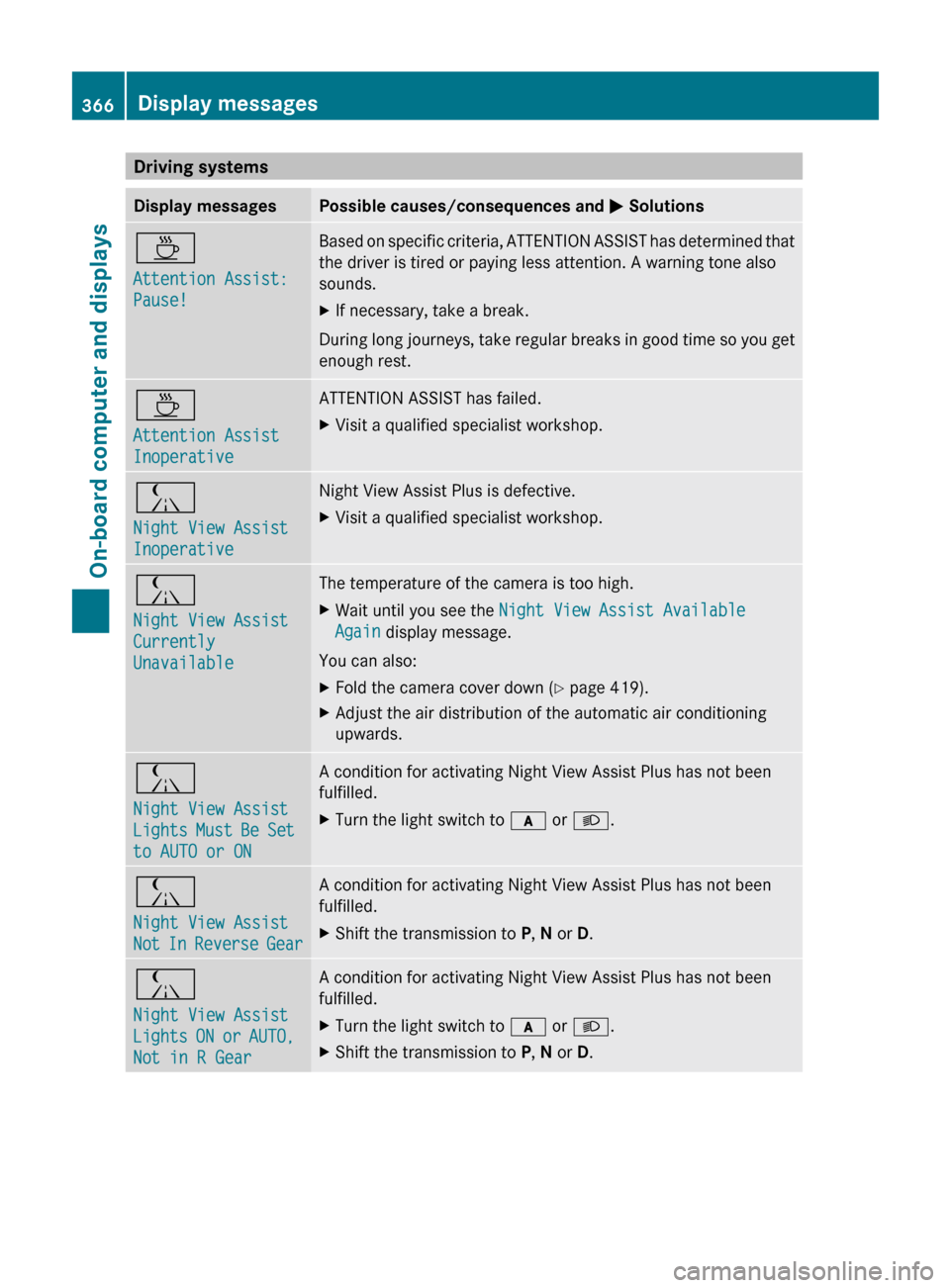
Driving systemsDisplay messagesPossible causes/consequences and M SolutionsÀ
Attention Assist:
Pause!Based on specific criteria, ATTENTION ASSIST has determined that
the driver is tired or paying less attention. A warning tone also
sounds.XIf necessary, take a break.
During long journeys, take regular breaks in good time so you get
enough rest.
À
Attention Assist
InoperativeATTENTION ASSIST has failed.XVisit a qualified specialist workshop.Á
Night View Assist
InoperativeNight View Assist Plus is defective.XVisit a qualified specialist workshop.Á
Night View Assist
Currently
UnavailableThe temperature of the camera is too high.XWait until you see the Night View Assist Available
Again display message.
You can also:
XFold the camera cover down ( Y page 419).XAdjust the air distribution of the automatic air conditioning
upwards.Á
Night View Assist
Lights Must Be Set
to AUTO or ONA condition for activating Night View Assist Plus has not been
fulfilled.XTurn the light switch to c or L .Á
Night View Assist
Not In Reverse GearA condition for activating Night View Assist Plus has not been
fulfilled.XShift the transmission to P, N or D.Á
Night View Assist
Lights ON or AUTO,
Not in R GearA condition for activating Night View Assist Plus has not been
fulfilled.XTurn the light switch to c or L .XShift the transmission to P, N or D.366Display messagesOn-board computer and displays