ignition MERCEDES-BENZ CL-Class 2012 C216 Manual PDF
[x] Cancel search | Manufacturer: MERCEDES-BENZ, Model Year: 2012, Model line: CL-Class, Model: MERCEDES-BENZ CL-Class 2012 C216Pages: 488, PDF Size: 21.88 MB
Page 326 of 488

exterior mirror and the following is shown in
the multifunction display, for example:GWARNING
Active Blind Spot Assist is only an aid
designed to assist driving. It is not a substitute
for attentive driving. In some cases, the
course-correcting brake application is not
sufficient to avoid a collision. In such a case,
you must steer, brake or accelerate.
In very rare cases, the system may
erroneously detect a danger of collision in the
area of crash barriers or similar lane borders
and apply the brakes. Active Blind Spot Assist
does not detect all traffic situations and road
users. Always make sure that there is
sufficient distance on the side for other traffic
or obstacles. An inappropriate brake
application may be interrupted at any time if
you steer slightly in the opposite direction or
accelerate.
You are responsible for driving at appropriate
speeds, braking in good time, and steering
correctly. Always adapt your driving style to
suit the prevailing road and weather
conditions. Always pay attention to traffic
conditions and your surroundings. Otherwise,
you may fail to recognize dangers in time,
cause an accident and injure yourself and
others.
There will be either no or only a weak course-
correcting brake application if:
R there are vehicles or obstacles, e.g. crash
barriers, located on both sides of your
vehicle.
R a vehicle approaches you too closely at the
side.
R you have adopted a sporty driving style with
high cornering speeds.
R you clearly brake or accelerate.
R a driving safety system intervenes, e.g.
ESP ®
or PRE-SAFE ®
Brake.
R ESP ®
is switched off.
R a loss of tire pressure or a defective tire is
detected.
Switching on Active Blind Spot AssistXMake sure that the radar sensor system
( Y page 344) and Active Blind Spot Assist
( Y page 343) are activated in the on-board
computer.XTurn the SmartKey to position 2 in the
ignition lock.
Warning lamps : light up red in the
exterior mirrors for approximately 1.5
seconds and then turn yellow.
Active Lane Keeping Assist
Important safety notes
Active Lane Keeping Assist monitors the area
in front of your vehicle by means of a camera
at the top of the windshield. Active Lane
Keeping Assist detects lane markings on the
road and warns you before you leave your
lane unintentionally. If you do not react to the
warning, a lane-correcting application of the
brakes can bring the vehicle back into the
original lane.
:Active Lane Keeping Assist camera
If you have selected the Display Unit
Speed-/Odometer (Y page 344) function in
the on-board computer and select km as the
unit of measurement, Active Lane Keeping
324Driving systemsDriving and parking
Page 333 of 488
! If the coolant temperature is too high a
display message is shown.
If the coolant temperature rises above
248 ‡(120 †), do not drive any further as
this could damage the engine.
Tachometer
The red band in the tachometer indicates the
engine's overrevving range.
! Do not drive in the overrevving range, as
this could damage the engine.
The fuel supply is interrupted to protect the
engine when the red band is reached.
Outside temperature display
The outside temperature display is in the
multifunction display ( Y page 332).
GWARNING
The outside temperature indicator is not
designed to serve as an ice-warning device
and is therefore unsuitable for that purpose.
Indicated temperatures just above the
freezing point do not guarantee that the road
surface is free of ice. The road may still be icy,
especially in wooded areas or on bridges.
Changes in the outside temperature are
displayed after a short delay.
Operating the on-board computer
The on-board computer is activated as soon
as you turn the SmartKey to position 2 in the
ignition lock.
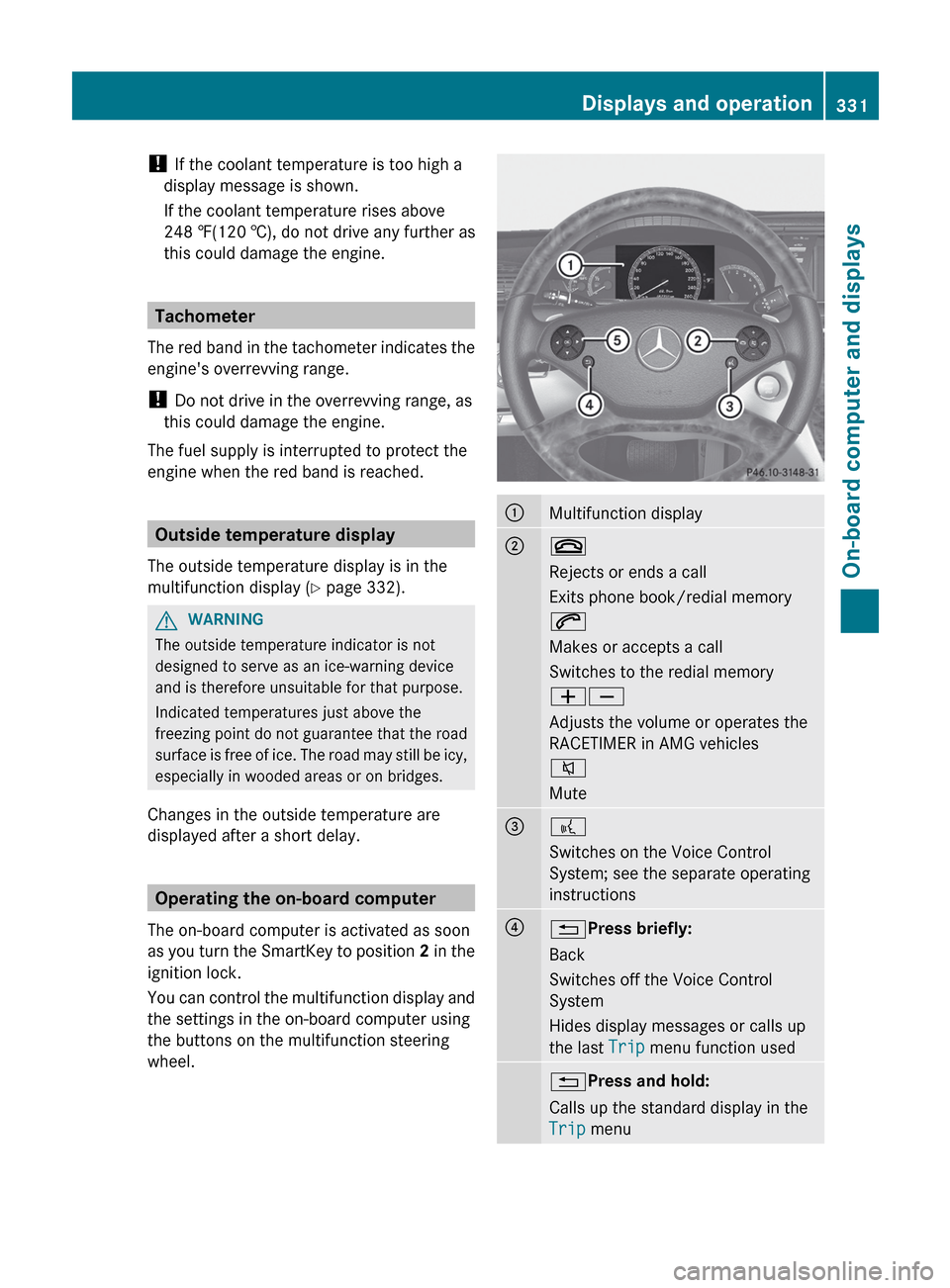
You can control the multifunction display and
the settings in the on-board computer using
the buttons on the multifunction steering
wheel.
:Multifunction display;~
Rejects or ends a call
Exits phone book/redial memory
6
Makes or accepts a call
Switches to the redial memory
WX
Adjusts the volume or operates the
RACETIMER in AMG vehicles
8
Mute=?
Switches on the Voice Control
System; see the separate operating
instructions?% Press briefly:
Back
Switches off the Voice Control
System
Hides display messages or calls up
the last Trip menu function used% Press and hold:
Calls up the standard display in the
Trip menuDisplays and operation331On-board computer and displaysZ
Page 336 of 488
Trip menu
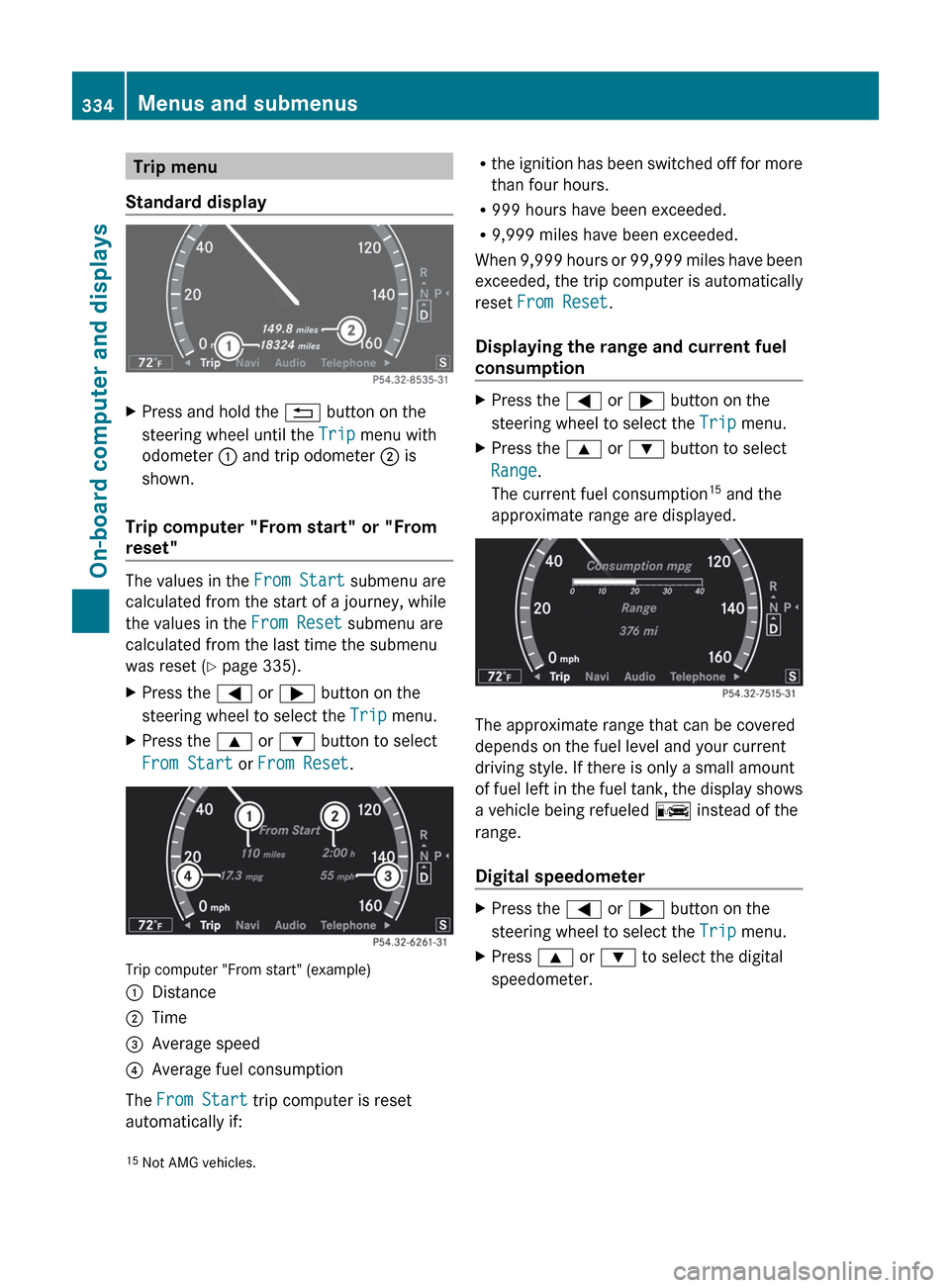
Standard displayXPress and hold the % button on the
steering wheel until the Trip menu with
odometer : and trip odometer ; is
shown.
Trip computer "From start" or "From
reset"
The values in the From Start submenu are
calculated from the start of a journey, while
the values in the From Reset submenu are
calculated from the last time the submenu
was reset ( Y page 335).
XPress the = or ; button on the
steering wheel to select the Trip menu.XPress the 9 or : button to select
From Start or From Reset .
Trip computer "From start" (example)
:Distance;Time=Average speed?Average fuel consumption
The From Start trip computer is reset
automatically if:
R the ignition has been switched off for more
than four hours.
R 999 hours have been exceeded.
R 9,999 miles have been exceeded.
When 9,999 hours or 99,999 miles have been
exceeded, the trip computer is automatically
reset From Reset .
Displaying the range and current fuel
consumptionXPress the = or ; button on the
steering wheel to select the Trip menu.XPress the 9 or : button to select
Range .
The current fuel consumption 15
and the
approximate range are displayed.
The approximate range that can be covered
depends on the fuel level and your current
driving style. If there is only a small amount
of fuel left in the fuel tank, the display shows
a vehicle being refueled C instead of the
range.
Digital speedometer
XPress the = or ; button on the
steering wheel to select the Trip menu.XPress 9 or : to select the digital
speedometer.15 Not AMG vehicles.334Menus and submenusOn-board computer and displays
Page 340 of 488

:Gear indicator;Upshift indicator=Engine oil temperature?Coolant temperature
Upshift indicator UP ; indicates that the
engine has reached the overrevving range
when in the manual gearshift program.
Upshift indicator UP ; fades out other
messages until you have shifted up.
When the engine oil temperature is below
80 †, the oil temperature is shown in blue.
Avoid driving at full engine output during this
time.
i CL 63 AMG: additionally, the status of the
ECO start/stop function ( Y page 270) will
be displayed.
RACETIMER
Displaying and starting RACETIMER
GWARNING
The RACETIMER feature is only for use on
roads and in conditions where high speed
driving is permitted. Racing on public roads is
prohibited under all circumstances. The driver
is and must always remain responsible for
following posted speed limits.
You can use the RACETIMER to store lap
times.
When RACETIMER is displayed, you cannot
adjust the volume using the W and X
buttons on the steering wheel.XPress = or ; on the steering wheel
to select the AMG menu.XPress the 9 button repeatedly until the
RACETIMER is shown.:Gear indicator;Seconds indicator=RACETIMER?Lap
You can start the RACETIMER when the
engine is running or if the SmartKey is in
position 2 in the ignition lock.
XTo start: press the W button to start the
RACETIMER.XTo display the intermediate time: press
the X button to show the intermediate
time.
The intermediate time is displayed for five
seconds.XTo stop: press the W button to stop the
RACETIMER.
The RACETIMER interrupts timing when you
stop the vehicle and turn the SmartKey to
position 1 in the ignition lock. When you turn
the SmartKey to position 2 or 3 and then
press the W button, timing is continued.
Storing the lap time and starting a new lap
It is possible to store a maximum of sixteen
laps.
338Menus and submenusOn-board computer and displays
Page 345 of 488
When ATTENTION ASSIST (Y page 316) is
activated, the À symbol appears in the
multifunction display when the ignition is on.
Activating/deactivating Active Blind
Spot Assist
You can use the Blind Spot Assist
function to activate or deactivate Active Blind
Spot Assist ( Y page 321).
XPress = or ; on the steering wheel
to select the DriveAssist menu.XPress 9 or : to select Blind Spot
Assist .XPress a.
The current selection is displayed.XTo activate/deactivate: press a
again.
Activating/deactivating Active Lane
Keeping Assist
You can use the Lane Keeping Assist
function to activate or deactivate Active Lane
Keeping Assist ( Y page 324).
XPress the = or ; button on the
steering wheel to select the DriveAssist
menu.XPress the 9 or : button to select
Lane Keeping Assist .XPress a.
The current selection is displayed.XTo activate/deactivate: press a
again.
If Active Lane Keeping Assist is activated, the
à symbol appears in the multifunction
display when the ignition is on.
Service menu
In the Service menu you can:
R call up display messages ( Y page 346)
R check the tire pressure electronically
( Y page 449)
R
call up the service due date ( Y page 413)
R check the oil level ( Y page 409)
Settings menu
Introduction
The Settings menu can be used for:
R switching the daytime running lamps on/
off
R switching Adaptive Highbeam Assist on/
off
R showing or hiding the additional
speedometer
R selecting the units for speed and distance
R activating/deactivating the radar sensor
system
Switching the daytime running lamps
on/off
This function is not available in Canada.
If you have activated the Daytime Running
Light function and the light switch is in the
$ or c position, the daytime running
lamps are switched on automatically when
the engine is running.
In the dark, the following also light up:
R the parking lamps
R the tail lamps
R the license plate lamp
R the side marker lamps
If you turn the light switch to a different
position, the corresponding lights are
switched on. If you switch off the daytime
running lamps at night, make sure that the
light switch is set to L or c .
The factory setting is On.
XPress the = or ; button on the
steering wheel to select the Settings
menu.XPress the 9 or : button to select
Day Running Lights .Menus and submenus343On-board computer and displaysZ
Page 348 of 488
Display messages
General notes
GWARNING
All categories of messages contain important information which should be taken note of and,
where a malfunction is indicated, addressed as soon as possible at an authorized Mercedes-Benz
Center.
Failure to repair the condition noted may cause damage not covered by the Mercedes-Benz
Limited Warranty, or result in property damage or personal injury.
Display messages appear in the multifunction display.
Display messages with graphic displays may be shown in simplified form in the Operator's
Manual and may differ from the messages shown in the multifunction display.
Please respond in accordance with the display messages and follow the additional notes in
this Operator's Manual.
Certain display messages are accompanied by an audible warning tone or a continuous tone.
When you stop and park the vehicle, please observe the notes on the HOLD function
( Y page 302) and parking ( Y page 283).
Hiding display messages
You can hide some display messages with a low priority.
XPress the a or % button on the steering wheel to hide the display message.
The display message is cleared.
Display messages with a low priority are shown in either yellow or white.
Display messages with a high priority are shown in red.
You cannot hide display messages of the highest priority. The multifunction display shows
these messages continuously until the causes for the messages have been remedied.
Message memory
The on-board computer saves certain display messages. You can call up the display messages
in the message memory .
XPress the = or ; button on the steering wheel to select the Service menu.
If there are display messages, the multifunction display shows, for example, 2 messages.XPress the 9 or : button to select the entry, e.g. 2 messages.XConfirm with a.XPress the 9 or : button to scroll through the display messages.
When the ignition is switched off, all display messages are deleted apart from some high-
priority display messages. Once the causes of the high-priority display messages have been
rectified, the corresponding display messages are also deleted.
346Display messagesOn-board computer and displays
Page 352 of 488
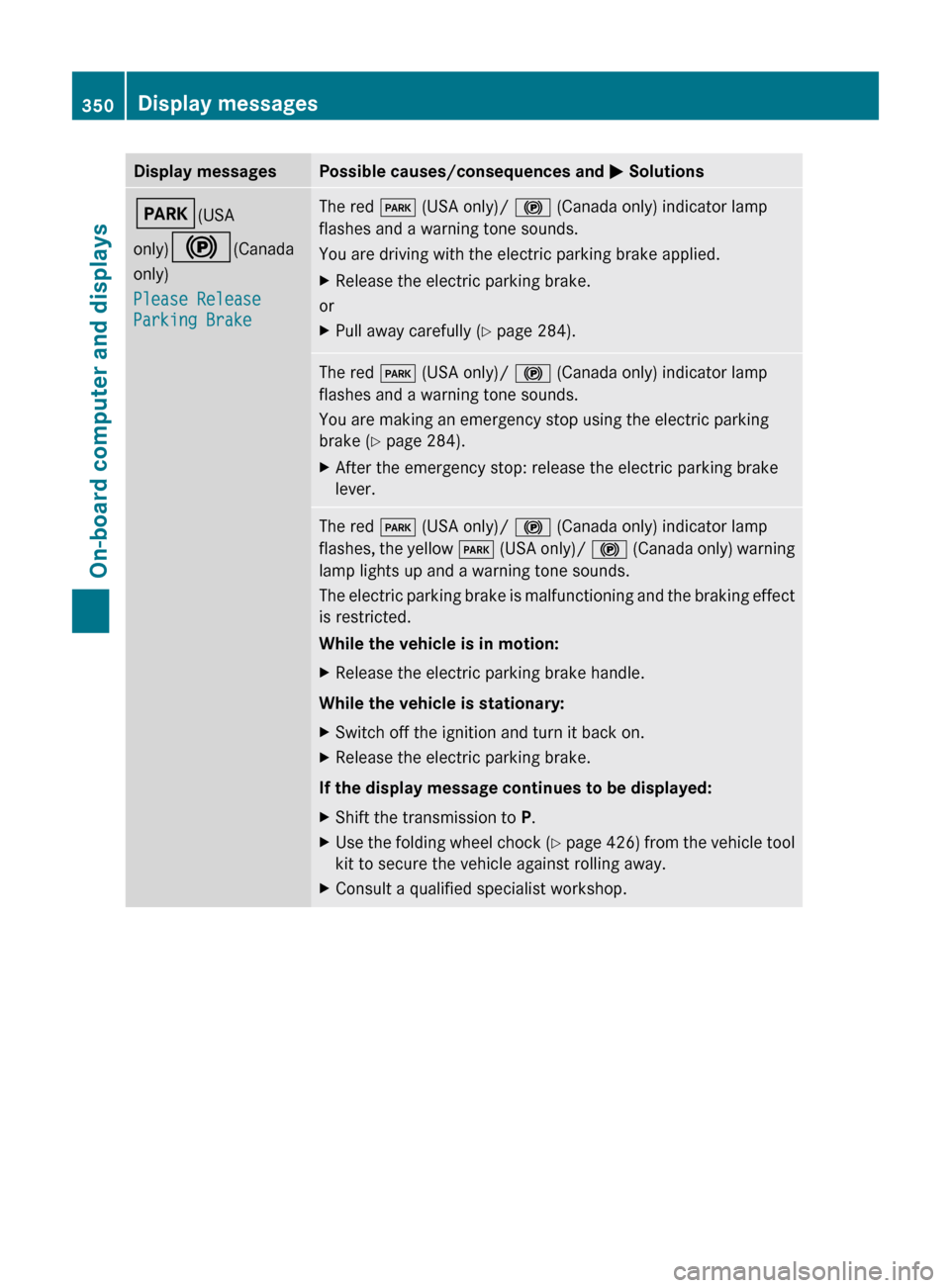
Display messagesPossible causes/consequences and M SolutionsF (USA
only) ! (Canada
only)
Please Release
Parking BrakeThe red F (USA only)/ ! (Canada only) indicator lamp
flashes and a warning tone sounds.
You are driving with the electric parking brake applied.XRelease the electric parking brake.
or
XPull away carefully ( Y page 284).The red F (USA only)/ ! (Canada only) indicator lamp
flashes and a warning tone sounds.
You are making an emergency stop using the electric parking
brake ( Y page 284).XAfter the emergency stop: release the electric parking brake
lever.The red F (USA only)/ ! (Canada only) indicator lamp
flashes, the yellow F (USA only)/ ! (Canada only) warning
lamp lights up and a warning tone sounds.
The electric parking brake is malfunctioning and the braking effect
is restricted.
While the vehicle is in motion:XRelease the electric parking brake handle.
While the vehicle is stationary:
XSwitch off the ignition and turn it back on.XRelease the electric parking brake.
If the display message continues to be displayed:
XShift the transmission to P.XUse the folding wheel chock (Y page 426) from the vehicle tool
kit to secure the vehicle against rolling away.XConsult a qualified specialist workshop.350Display messagesOn-board computer and displays
Page 353 of 488
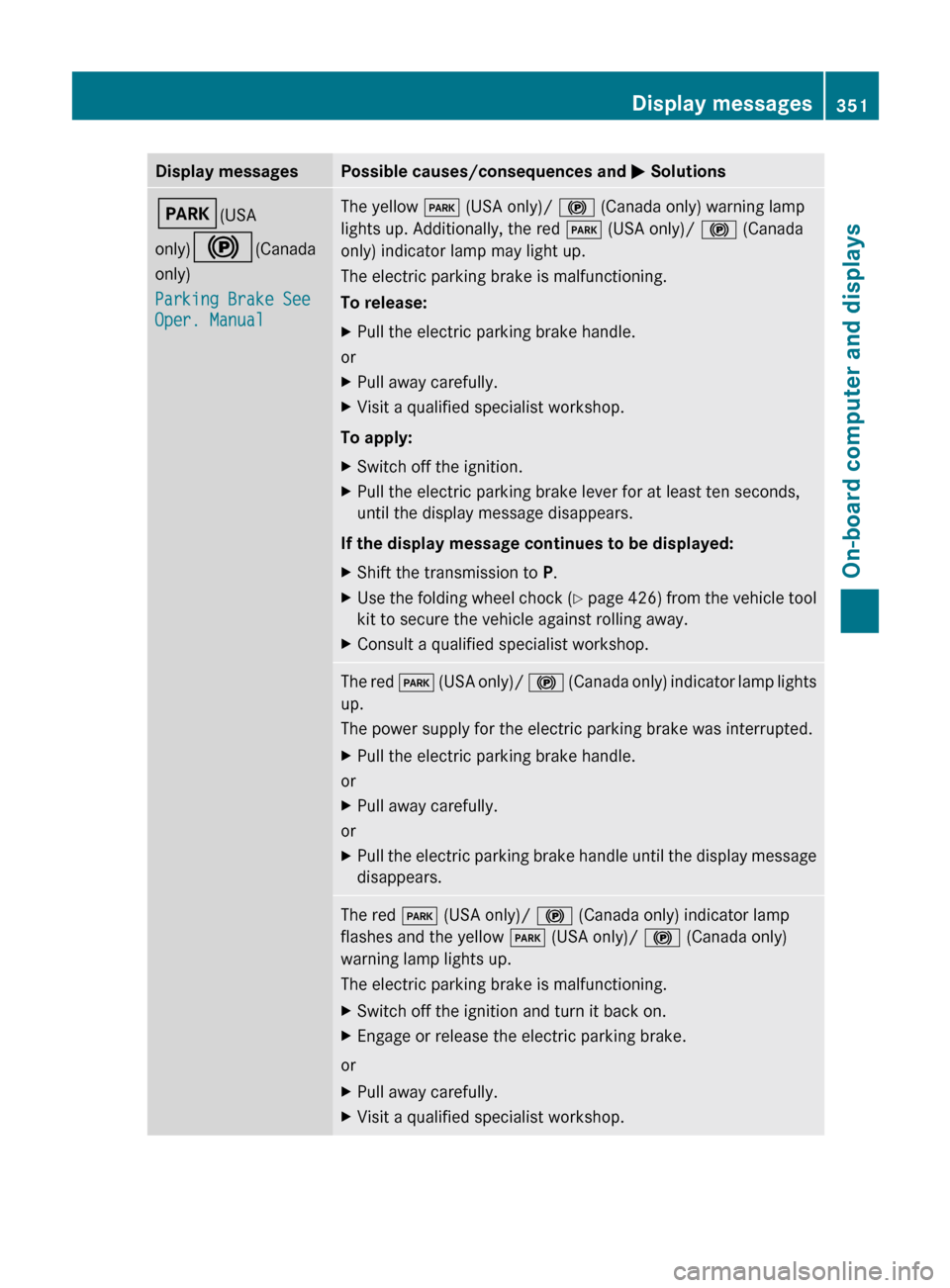
Display messagesPossible causes/consequences and M SolutionsF (USA
only) ! (Canada
only)
Parking Brake See
Oper. ManualThe yellow F (USA only)/ ! (Canada only) warning lamp
lights up. Additionally, the red F (USA only)/ ! (Canada
only) indicator lamp may light up.
The electric parking brake is malfunctioning.
To release:XPull the electric parking brake handle.
or
XPull away carefully.XVisit a qualified specialist workshop.
To apply:
XSwitch off the ignition.XPull the electric parking brake lever for at least ten seconds,
until the display message disappears.
If the display message continues to be displayed:
XShift the transmission to P.XUse the folding wheel chock (Y page 426) from the vehicle tool
kit to secure the vehicle against rolling away.XConsult a qualified specialist workshop.The red F (USA only)/ ! (Canada only) indicator lamp lights
up.
The power supply for the electric parking brake was interrupted.XPull the electric parking brake handle.
or
XPull away carefully.
or
XPull the electric parking brake handle until the display message
disappears.The red F (USA only)/ ! (Canada only) indicator lamp
flashes and the yellow F (USA only)/ ! (Canada only)
warning lamp lights up.
The electric parking brake is malfunctioning.XSwitch off the ignition and turn it back on.XEngage or release the electric parking brake.
or
XPull away carefully.XVisit a qualified specialist workshop.Display messages351On-board computer and displaysZ
Page 354 of 488
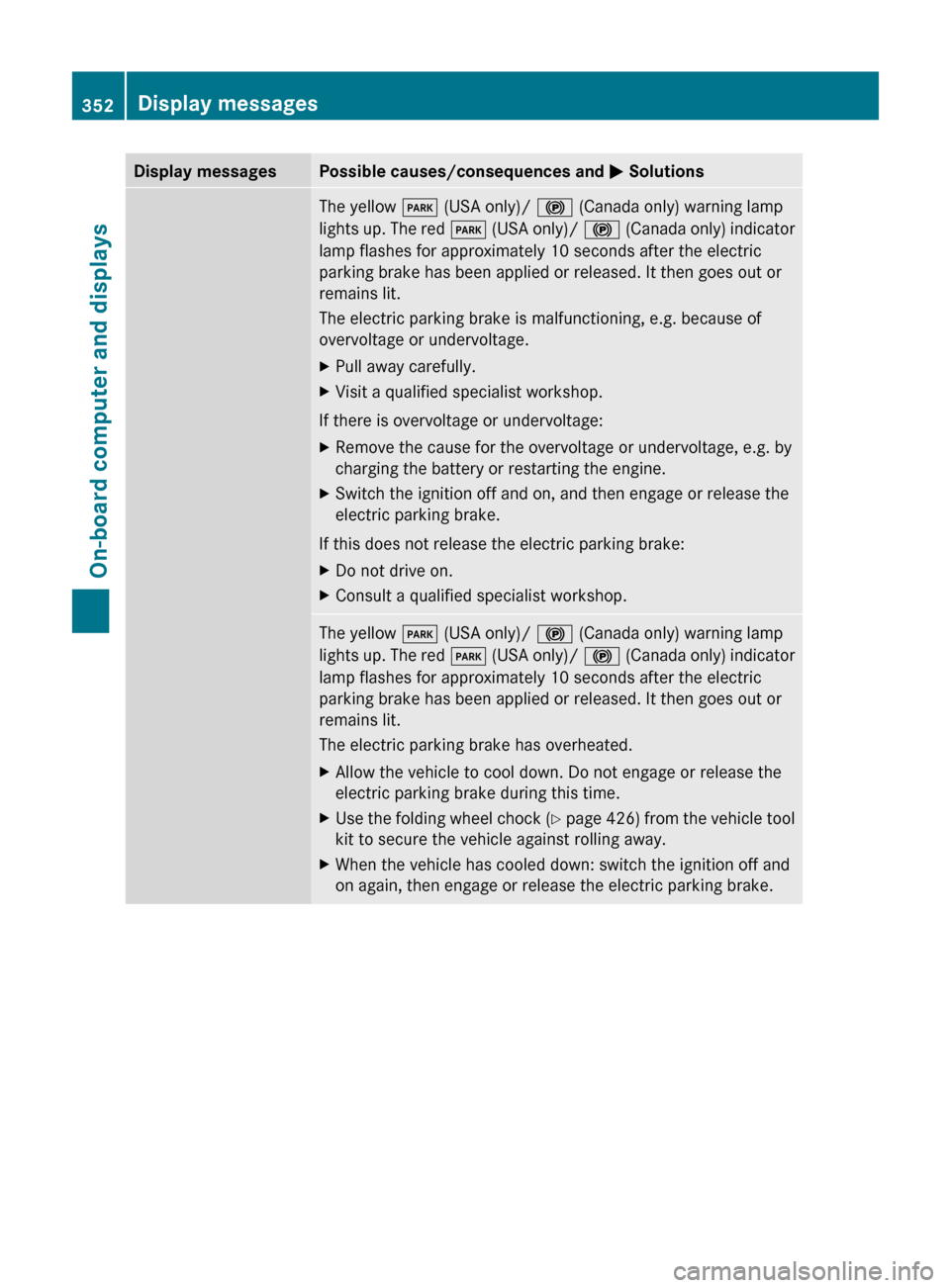
Display messagesPossible causes/consequences and M SolutionsThe yellow F (USA only)/ ! (Canada only) warning lamp
lights up. The red F (USA only)/ ! (Canada only) indicator
lamp flashes for approximately 10 seconds after the electric
parking brake has been applied or released. It then goes out or
remains lit.
The electric parking brake is malfunctioning, e.g. because of
overvoltage or undervoltage.XPull away carefully.XVisit a qualified specialist workshop.
If there is overvoltage or undervoltage:
XRemove the cause for the overvoltage or undervoltage, e.g. by
charging the battery or restarting the engine.XSwitch the ignition off and on, and then engage or release the
electric parking brake.
If this does not release the electric parking brake:
XDo not drive on.XConsult a qualified specialist workshop.The yellow F (USA only)/ ! (Canada only) warning lamp
lights up. The red F (USA only)/ ! (Canada only) indicator
lamp flashes for approximately 10 seconds after the electric
parking brake has been applied or released. It then goes out or
remains lit.
The electric parking brake has overheated.XAllow the vehicle to cool down. Do not engage or release the
electric parking brake during this time.XUse the folding wheel chock (Y page 426) from the vehicle tool
kit to secure the vehicle against rolling away.XWhen the vehicle has cooled down: switch the ignition off and
on again, then engage or release the electric parking brake.352Display messagesOn-board computer and displays
Page 355 of 488
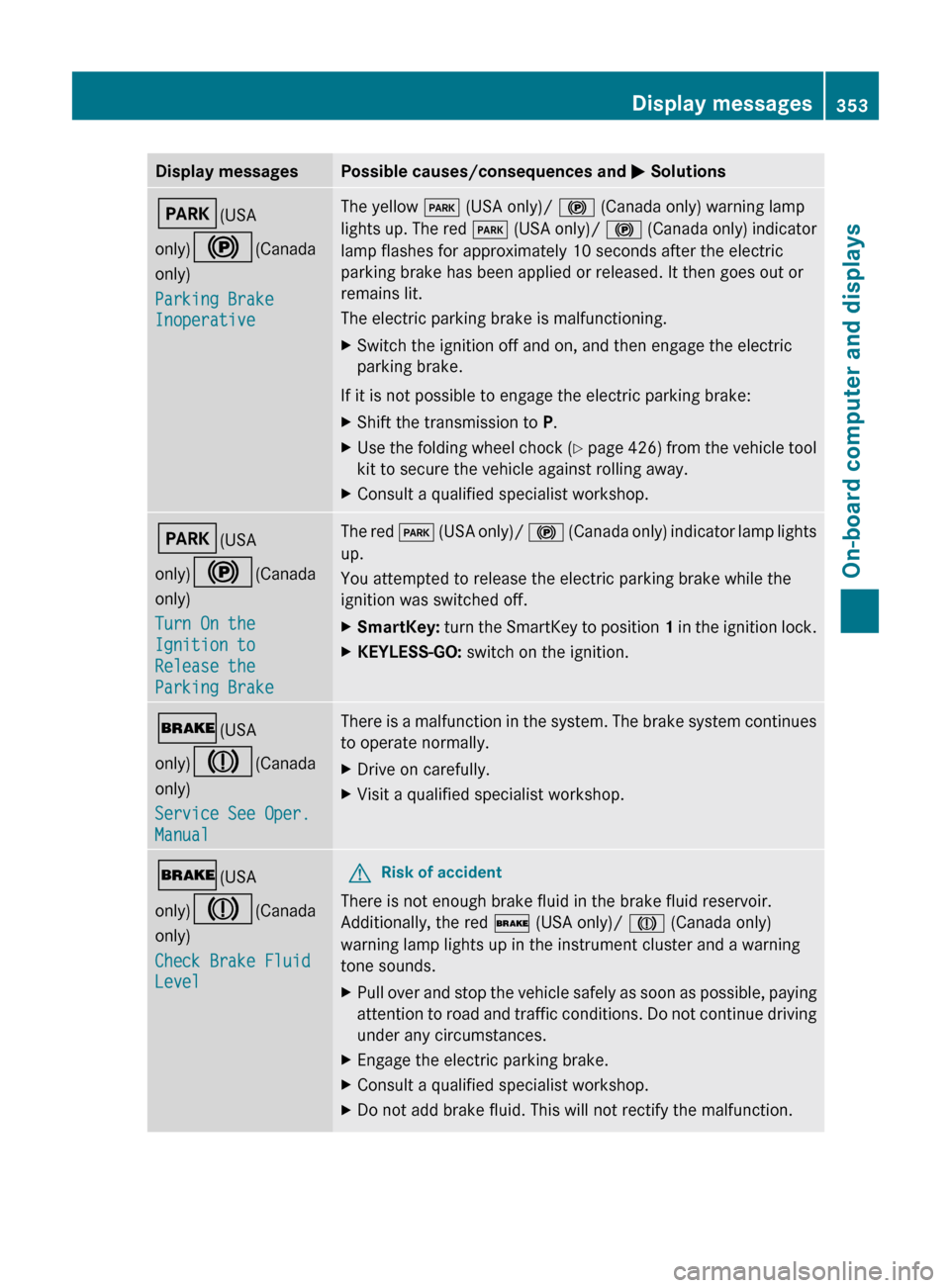
Display messagesPossible causes/consequences and M SolutionsF (USA
only) ! (Canada
only)
Parking Brake
InoperativeThe yellow F (USA only)/ ! (Canada only) warning lamp
lights up. The red F (USA only)/ ! (Canada only) indicator
lamp flashes for approximately 10 seconds after the electric
parking brake has been applied or released. It then goes out or
remains lit.
The electric parking brake is malfunctioning.XSwitch the ignition off and on, and then engage the electric
parking brake.
If it is not possible to engage the electric parking brake:
XShift the transmission to P.XUse the folding wheel chock (Y page 426) from the vehicle tool
kit to secure the vehicle against rolling away.XConsult a qualified specialist workshop.F (USA
only) ! (Canada
only)
Turn On the
Ignition to
Release the
Parking BrakeThe red F (USA only)/ ! (Canada only) indicator lamp lights
up.
You attempted to release the electric parking brake while the
ignition was switched off.XSmartKey: turn the SmartKey to position 1 in the ignition lock.XKEYLESS-GO: switch on the ignition.$(USA
only) J (Canada
only)
Service See Oper.
ManualThere is a malfunction in the system. The brake system continues
to operate normally.XDrive on carefully.XVisit a qualified specialist workshop.$ (USA
only) J (Canada
only)
Check Brake Fluid
LevelGRisk of accident
There is not enough brake fluid in the brake fluid reservoir.
Additionally, the red $ (USA only)/ J (Canada only)
warning lamp lights up in the instrument cluster and a warning
tone sounds.
XPull over and stop the vehicle safely as soon as possible, paying
attention to road and traffic conditions. Do not continue driving
under any circumstances.XEngage the electric parking brake.XConsult a qualified specialist workshop.XDo not add brake fluid. This will not rectify the malfunction.Display messages353On-board computer and displaysZ