fuel cap MERCEDES-BENZ CL-Class 2012 C216 Owner's Manual
[x] Cancel search | Manufacturer: MERCEDES-BENZ, Model Year: 2012, Model line: CL-Class, Model: MERCEDES-BENZ CL-Class 2012 C216Pages: 488, PDF Size: 21.88 MB
Page 13 of 488
Emergency releaseDriver's door .................................... 81
Trunk ............................................... 85
Vehicle ............................................. 81
Emergency spare wheel
Storage location ............................ 424
Emergency Tensioning Devices
Function ........................................... 55
Safety guidelines ............................. 41
Emissions purification
Service and warranty information ....26
Engine
Check Engine warning lamp ........... 384
Display message ............................ 362
ECO start/stop function ................270
Emergency starting ........................437
Engine number ............................... 474
Irregular running ............................ 272
Starting problems ..........................272
Starting the engine with the
SmartKey ....................................... 268
Starting with KEYLESS-GO .............269
Switching off .................................. 283
Engine electronics
Problem (malfunction) ...................272
Engine emergency stop .................... 439
Engine oil Adding ........................................... 410
Additives ........................................ 478
Checking the oil level ..................... 409
Checking the oil level using the
dipstick .......................................... 409
Checking the oil level using the
on-board computer ........................410
Display message ............................ 364
Filling capacity ............................... 476
Notes about oil grades ................... 478
Notes on oil level/consumption ....409
Temperature (on-board computer) . 337
Viscosity ........................................ 478
Entering the frequency ..................... 196
Entry Deleting ......................................... 121
Saving ............................................ 123ESP®
(Electronic Stability
Program) Deactivating/activating .................342
Deactivating/activating (notes) .......64
Display message ............................ 347
ETS/4ETS ........................................ 64
Function/notes ................................ 64
Important safety information ...........64
Warning lamp ................................. 381
ETS/4ETS (Electronic Traction
System) ................................................ 64
Exhaust check ................................... 287
Exhaust tail pipe (cleaning
instructions) ...................................... 419
Exterior lighting see Exterior lighting
Exterior mirror parking position
Adjusting (COMAND) .....................232
Exterior mirrors
Adjusting ....................................... 100
Dipping (automatic) .......................101
Folding in/out (automatically) .......101
Folding in/out (electrically) ...........101
Out of position (troubleshooting) ...101
Storing settings (memory
function) ........................................ 102
Storing the parking position ..........101
Eyeglasses compartment ................. 389
F
Factory setting (reset function) ....... 134
Fader, setting .................................... 125
Fast forward Audio mode (CD, DVD, MP3) .........209
Video DVD ..................................... 226
Fast rewind
Audio mode (CD, DVD, MP3) .........209
Video DVD ..................................... 226
Favorites (COMAND) ......................... 109
Filler cap see Fuel filler flap
First-aid kit ......................................... 424
Flat tire Changing a wheel/mounting the
spare wheel ................................... 425
MOExtended run-flat system .........429
Index11
Page 14 of 488
Preparing the vehicle .....................425
Raising the vehicle .........................426
Floormat ............................................. 405
Freeway information ......................... 171
Front fog lamps ................................. 246
Display message ............................ 360
Switching on/off ........................... 246
Front-passenger seat
Adjusting from the driver's seat .......94
Front windshield
see Windshield
Fuel
Additives ........................................ 477
Displaying the current
consumption .................................. 334
Displaying the range ......................334
Driving tips .................................... 286
Fuel gauge ....................................... 33
Important safety notes ..................477
Premium-grade unleaded gasoline . 477
Problem (malfunction) ...................283
Refueling ........................................ 280
Specifications ................................ 477
Tank content/reserve fuel .............476
Fuel filler flap, opening/closing ....... 281
Fuel level Calling up the range (on-board
computer) ...................................... 334
Fuel tank
Capacity ........................................ 476
Problem (malfunction) ...................283
Function buttons (COMAND) ............ 109
Fuses Allocation chart ............................. 438
Before changing ............................. 438
Dashboard fuse box .......................438
Engine emergency stop .................439
Fuse box in the engine
compartment ................................. 439
Fuse box in the rear compartment . 438
Important safety notes ..................437
G
Garage door opener Clearing the memory .....................405
Notes ............................................. 402
Opening/closing the garage door ..405
Programming (button in the rear-
view mirror) ................................... 403
Gasoline ............................................. 281
Gear indicator (on-board
computer) .......................................... 337
Gear or selector lever (cleaning
guidelines) ......................................... 420
Genuine Mercedes-Benz parts ......... 472
Glove box ........................................... 388
GPS reception .................................... 135
Gracenote Media Database .............. 210
H
Handbrake see Parking brake
Harman/kardon ®
Logic 7 ®
surround sound system see Surround sound (harman/
kardon ®
surround sound system)
Hazard warning lamps ...................... 247
HD Radio™ ......................................... 199
Heading up (navigation) ................... 168
Headlamp cleaning system Notes ............................................. 480
Headlamps
Adding fluid to cleaning system .....412
Cleaning system (function) ............246
Fogging up ..................................... 249
see Automatic headlamp mode
Head restraints
Adjusting ......................................... 95
Adjusting (electrically) .....................95
Adjusting (rear) ................................ 95
Heating
see Climate control
High-beam headlamps
Changing bulbs .............................. 251
Display message ............................ 360
Switching Adaptive Highbeam
Assist on/off ................................. 248
Switching on/off ........................... 247
Hill start assist .................................. 269
HOLD function Display message ............................ 368
Function/notes ............................. 302
12Index
Page 21 of 488
Destination reached ......................154
Lane recommendations .................152
Off-road ......................................... 157
Traffic reports ................................ 158
Route guidance (navigation) ............ 335
Route guidance (on-board
computer) .......................................... 335
Route information see Dynamic route guidance/TMC
S
Safety Children in the vehicle .....................55
Child restraint systems ....................55
Occupant Classification System
(OCS) ............................................... 46
Overview of occupant safety
systems ........................................... 40
Safety notes
Audio CD/DVD and MP3 mode .....204
Operating safety ............................ 106
Video DVD mode ........................... 224
Safety systems
see Driving safety systems
SatRadio ............................................. 200
Displaying information ...................204
Registering .................................... 201
Selecting a category ......................202
Screen
see Display
SD memory card
Loading .......................................... 205
Seat belts
Automatic comfort-fit feature ..........55
Belt force limiters ............................ 55
Cleaning ......................................... 421
Correct usage .................................. 52
Emergency Tensioning Devices ........ 55
Fastening ......................................... 53
Important safety guidelines .............51
Releasing ......................................... 54
Safety guidelines ............................. 41
Special seat belt retractor ...............57
Warning lamp ................................. 378
Warning lamp (function) ................... 54
Seats
Active multicontour seat .......... 97, 241
Adjusting (electrically) .....................94
Adjusting lumbar support ................97
Adjusting the head restraint ............95
Cleaning the cover .........................420
Correct driver's seat position ........... 92
Folding the backrests forward/
back ................................................. 96
Important safety notes ....................93
Multicontour seat ............................ 97
Seat backrest display message .....375
Seat heating problem ......................98
Seat ventilation problem ..................98
Selecting (COMAND) .....................239
Storing settings (memory
function) ........................................ 102
Switching seat heating on/off .........97
Switching seat ventilation on/off ....98
Selecting stations (radio)
Using station presets .....................196
Using station search ......................196
Sending DTMF tones ......................... 187
Sensors (cleaning instructions) ....... 418
Service see ASSYST PLUS service interval
display
Service interval display
Displaying service messages .........414
Hiding service messages ...............414
Notes ............................................. 414
Service messages ..........................413
Service menu (on-board computer) . 343
Service products Brake fluid ..................................... 479
Capacities ...................................... 476
Coolant (engine) ............................ 479
Engine oil ....................................... 478
Fuel ................................................ 477
Important safety notes ..................475
Refrigerant (air-conditioning
system) .......................................... 479
Washer fluid ................................... 480
Setting a station (radio)
Via manual frequency entry ...........196
Settings
Display ........................................... 127
Menu overview .............................. 111Index19
Page 283 of 488
GWARNING
Overfilling of the fuel tank may create
pressure in the system which could cause a
gas discharge. This could cause the gasoline
to spray back out when removing the fuel
pump nozzle, which could cause personal
injury.
! Do not use diesel to refuel vehicles with a
gasoline engine. Even small amounts of the
wrong fuel result in damage to the fuel
system and engine.
! Do not switch on the ignition if you
accidentally refuel with the wrong fuel.
Otherwise, the fuel will enter the fuel lines.
Notify a qualified specialist workshop and
have the fuel tank and fuel lines drained
completely.
Gasoline
Fuel grade
! You should only refuel with unleaded
premium-grade gasoline as this avoids
damaging the catalytic converter.
If engine running problems are apparent,
have the cause checked immediately and
repaired. Excess unburned fuel can
otherwise enter the catalytic converter,
leading to overheating and possibly
causing a fire.
! Use a filter when refueling from a fuel can.
Otherwise, the fuel lines and/or injection
system could be blocked by particles from
the fuel can.
i Only refuel with premium-grade unleaded
gasoline with a specified minimum octane
number of 91 (average value of 96 RON/
86 MON).
You will usually find information about the
fuel grade on the pump. If you cannot find
the label on the pump, ask the staff for
assistance.
You can find more information under "Fuel"
( Y page 477), or by contacting an
authorized Mercedes-Benz Service Center
or visiting http://www.mbusa.com (USA
only).
Refueling
Fuel filler flap
The fuel filler flap is unlocked or locked
automatically when you open or close the
vehicle with the SmartKey or using KEYLESS-
GO.
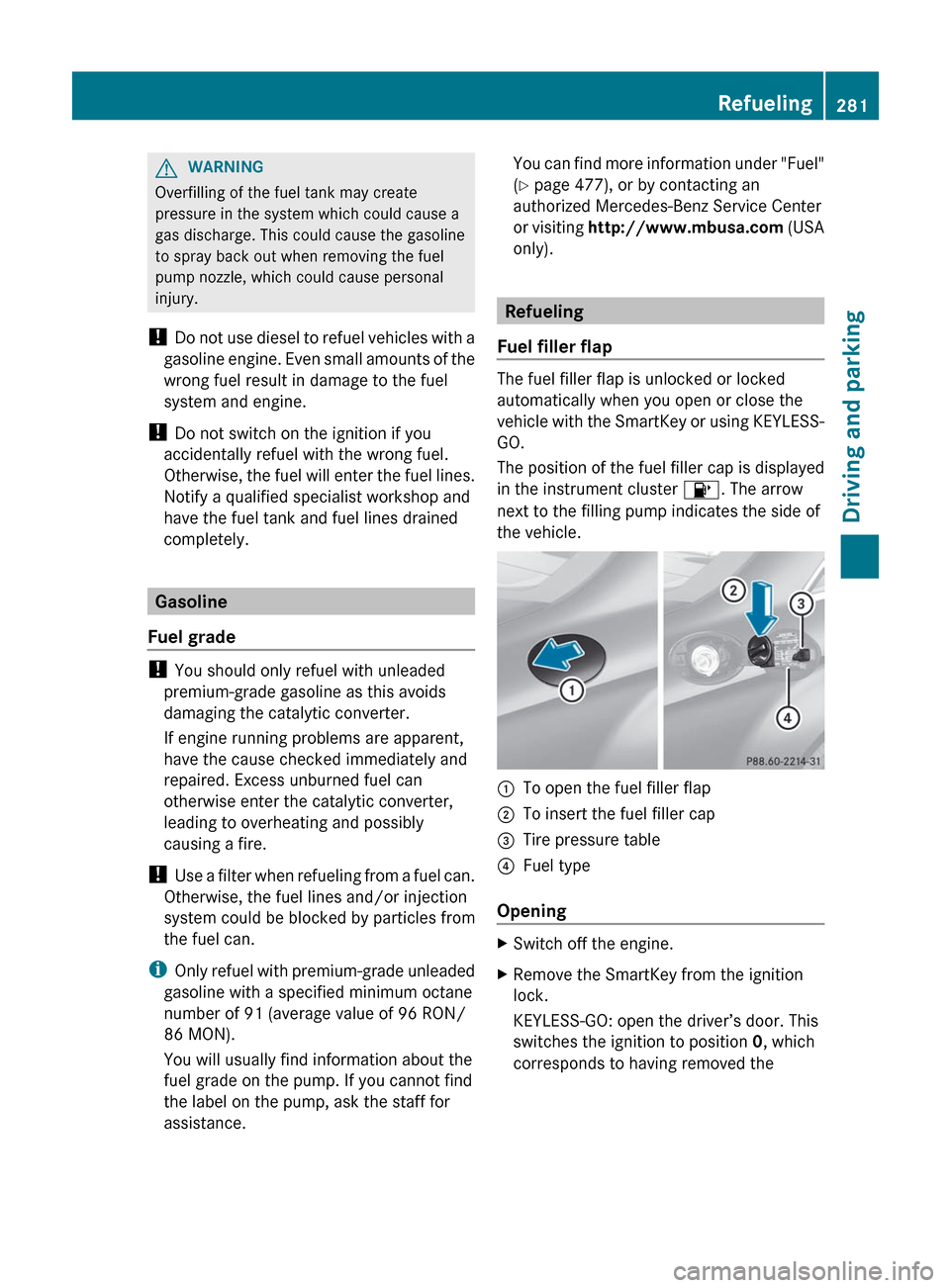
The position of the fuel filler cap is displayed
in the instrument cluster 8. The arrow
next to the filling pump indicates the side of
the vehicle.
:To open the fuel filler flap;To insert the fuel filler cap=Tire pressure table?Fuel type
Opening
XSwitch off the engine.XRemove the SmartKey from the ignition
lock.
KEYLESS-GO: open the driver’s door. This
switches the ignition to position 0, which
corresponds to having removed theRefueling281Driving and parkingZ
Page 284 of 488
SmartKey. The driver’s door can be closed
again.XPress the fuel filler flap in the direction of
arrow :.
The fuel filler flap opens slightly.XOpen the fuel filler flap.XTurn the fuel filler cap counter-clockwise
and remove it.XInsert the fuel filler cap into the holder
bracket on the inside of filler flap ;.XCompletely insert the pump nozzle into the
filler neck and refuel.XOnly fill the tank until the pump nozzle
switches off.
! Overfilling the fuel tank could damage the
fuel system.
Closing
XReplace the fuel filler cap and turn it
clockwise. The fuel filler cap audibly
engages.XClose the fuel filler flap.
i If you drive with the fuel filler cap open,
the reserve fuel warning lamp flashes. In
addition, the ; Check Engine warning
lamp may light up. A message appears in
the multifunction display ( Y page 365).
For further information on warning and
indicator lamps in the instrument cluster,
see ( Y page 384).
i Close the fuel filler flap before locking the
vehicle. A locking pin otherwise prevents
the fuel filler flap from closing after the
vehicle has been locked.
282RefuelingDriving and parking
Page 367 of 488
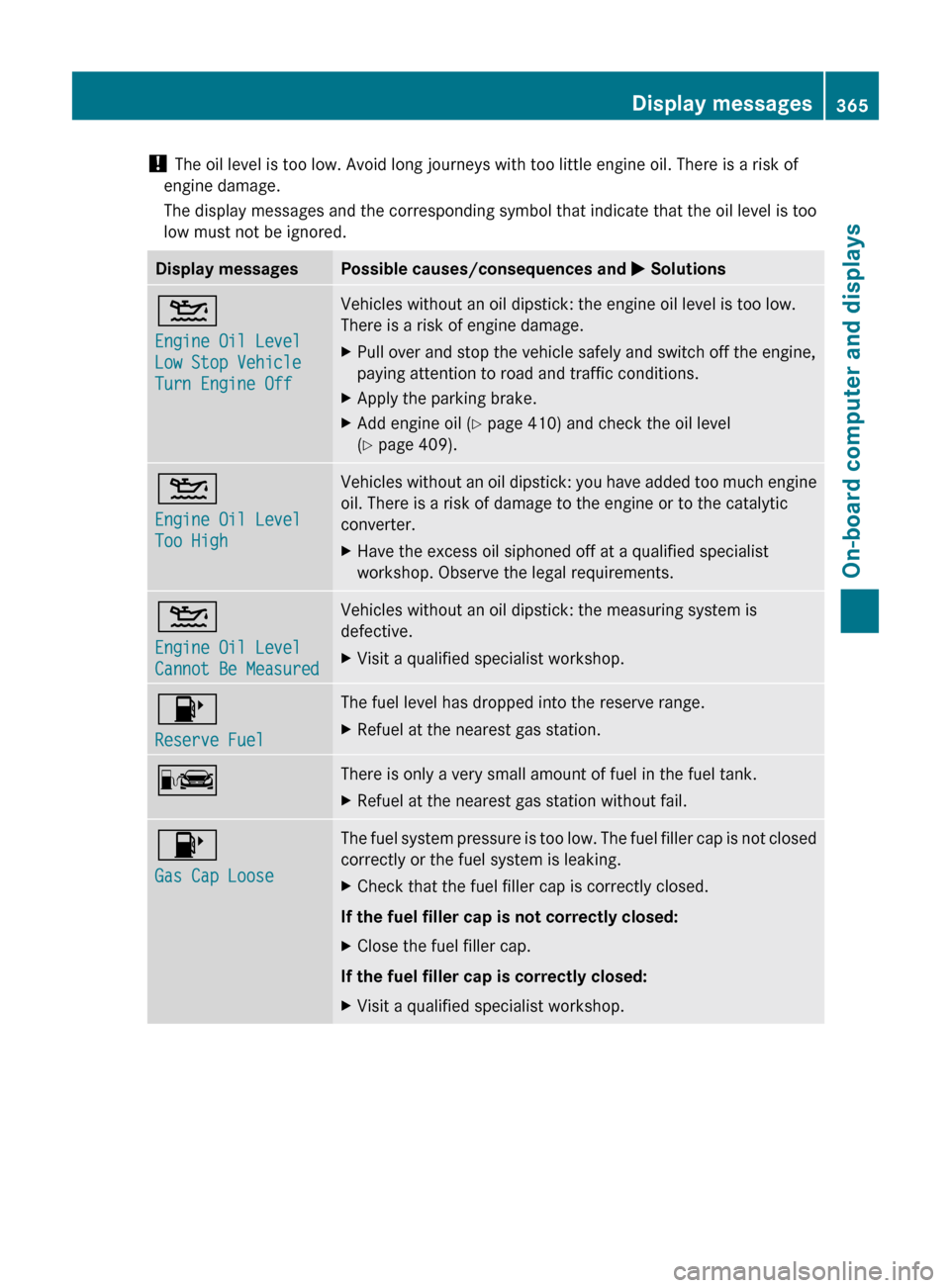
! The oil level is too low. Avoid long journeys with too little engine oil. There is a risk of
engine damage.
The display messages and the corresponding symbol that indicate that the oil level is too
low must not be ignored.Display messagesPossible causes/consequences and M Solutions4
Engine Oil Level
Low Stop Vehicle
Turn Engine OffVehicles without an oil dipstick: the engine oil level is too low.
There is a risk of engine damage.XPull over and stop the vehicle safely and switch off the engine,
paying attention to road and traffic conditions.XApply the parking brake.XAdd engine oil ( Y page 410) and check the oil level
( Y page 409).4
Engine Oil Level
Too HighVehicles without an oil dipstick: you have added too much engine
oil. There is a risk of damage to the engine or to the catalytic
converter.XHave the excess oil siphoned off at a qualified specialist
workshop. Observe the legal requirements.4
Engine Oil Level
Cannot Be MeasuredVehicles without an oil dipstick: the measuring system is
defective.XVisit a qualified specialist workshop.8
Reserve FuelThe fuel level has dropped into the reserve range.XRefuel at the nearest gas station.CThere is only a very small amount of fuel in the fuel tank.XRefuel at the nearest gas station without fail.8
Gas Cap LooseThe fuel system pressure is too low. The fuel filler cap is not closed
correctly or the fuel system is leaking.XCheck that the fuel filler cap is correctly closed.
If the fuel filler cap is not correctly closed:
XClose the fuel filler cap.
If the fuel filler cap is correctly closed:
XVisit a qualified specialist workshop.Display messages365On-board computer and displaysZ
Page 386 of 488
For your safety, we strongly recommend that you contact an authorized Mercedes-Benz Center
immediately to have the system checked. Otherwise the SRS may not be activated when needed
in an accident, which could result in serious or fatal injury, or it might deploy unexpectedly and
unnecessarily which could also result in injury.
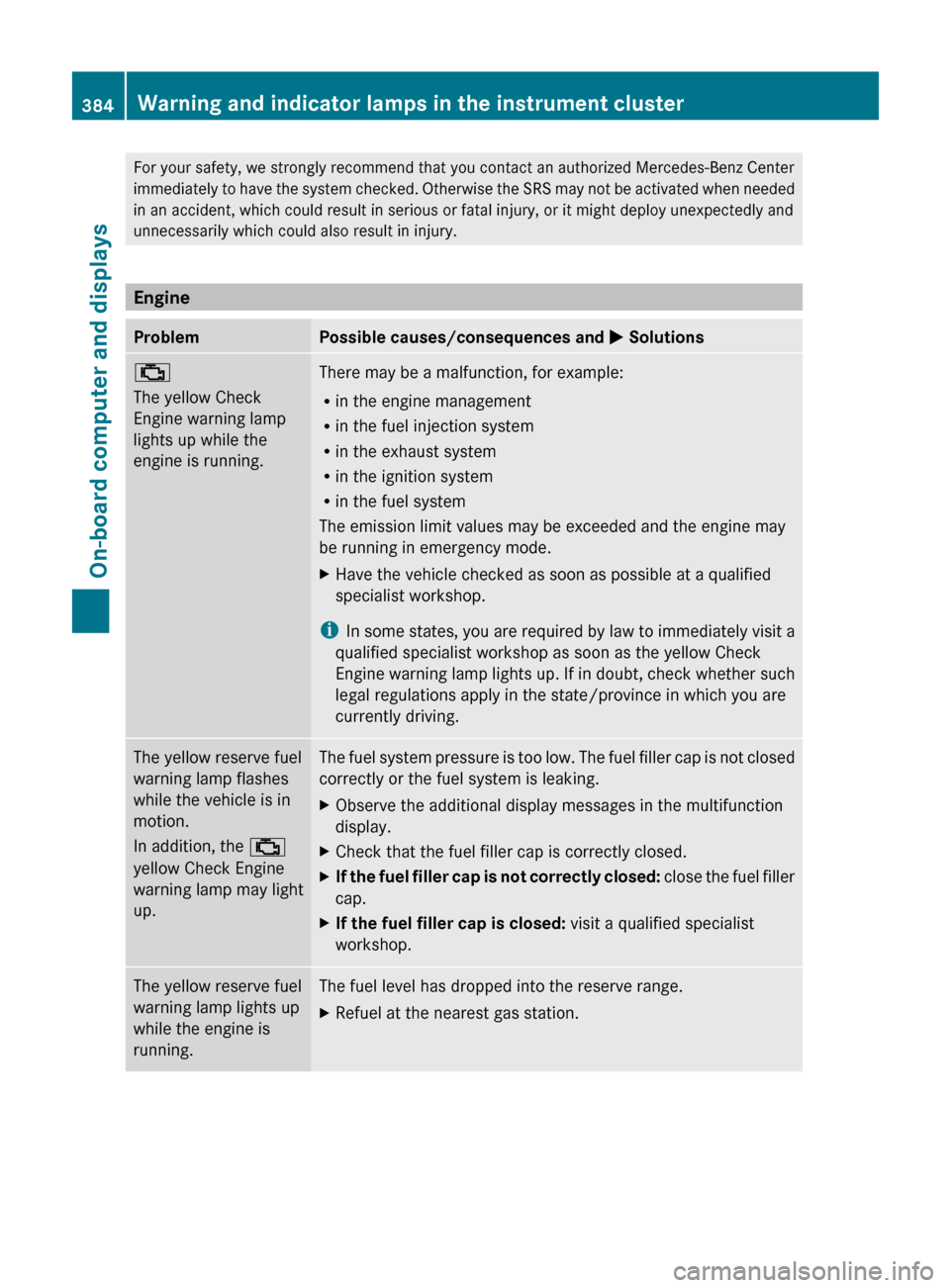
Engine
ProblemPossible causes/consequences and M Solutions;
The yellow Check
Engine warning lamp
lights up while the
engine is running.There may be a malfunction, for example:
R in the engine management
R in the fuel injection system
R in the exhaust system
R in the ignition system
R in the fuel system
The emission limit values may be exceeded and the engine may
be running in emergency mode.XHave the vehicle checked as soon as possible at a qualified
specialist workshop.
i In some states, you are required by law to immediately visit a
qualified specialist workshop as soon as the yellow Check
Engine warning lamp lights up. If in doubt, check whether such
legal regulations apply in the state/province in which you are
currently driving.
The yellow reserve fuel
warning lamp flashes
while the vehicle is in
motion.
In addition, the ;
yellow Check Engine
warning lamp may light
up.The fuel system pressure is too low. The fuel filler cap is not closed
correctly or the fuel system is leaking.XObserve the additional display messages in the multifunction
display.XCheck that the fuel filler cap is correctly closed.XIf the fuel filler cap is not correctly closed: close the fuel filler
cap.XIf the fuel filler cap is closed: visit a qualified specialist
workshop.The yellow reserve fuel
warning lamp lights up
while the engine is
running.The fuel level has dropped into the reserve range.XRefuel at the nearest gas station.384Warning and indicator lamps in the instrument clusterOn-board computer and displays
Page 447 of 488

impairs cornering ability and reduces driving
stability. Adapt your driving style accordingly.
Have the spare wheel replaced by a normal
wheel with an M+S tire at the nearest
Mercedes-Benz Center.
Snow chains
For safety reasons, Mercedes-Benz
recommends that you only use snow chains
which have been specially approved for your
vehicle by Mercedes-Benz, or are of a
corresponding standard of quality.
! You must drive at raised vehicle level if
snow chains have been mounted. The
vehicle could otherwise be damaged.
! There is not enough space for snow
chains on some wheel sizes. Observe the
information under "Tires and wheels" in the
"Technical Data" section to avoid damage
to the vehicle or the wheels.
R Only use snow chains when driving on
roads completely covered by snow. Do not
exceed the maximum permissible speed of
30 mph (50 km/h). Remove the snow
chains as soon as possible when you are no
longer driving on snow-covered roads.
R Local regulations may restrict the use of
snow chains. Applicable regulations must
be observed if you wish to mount snow
chains.
R Snow chains must not be mounted on
emergency spare wheels.
If you intend to mount snow chains, please
bear the following points in mind:
R you may not attach snow chains to all
wheel-tire combinations; see the
information under "Wheel and tire
combinations" in the "Wheels and tires"
section.
R mount snow chains only in pairs and only
to the rear wheels. Observe the
manufacturer's installation instructions.
! If snow chains are mounted on the front
wheels, the snow chains could grind
against the bodywork or components of the
chassis. This could result in damage to the
vehicle or the tires.
! Vehicles with steel wheels: if you wish
to mount snow chains on steel wheels,
make sure that you remove the respective
wheels' hubcaps first. The hubcaps may
otherwise be damaged.
i You may wish to deactivate
ESP ®
(Y page 64) when pulling away with
snow chains mounted. This way you can
allow the wheels to spin in a controlled
manner, achieving an increased driving
force (cutting action).
Tire pressure
Tire pressure specifications
GWARNING
Follow recommended tire inflation pressures.
Do not underinflate tires. Underinflated tires
wear excessively and/or unevenly, adversely
affect handling and fuel economy, and are
more likely to fail from being overheated.
Do not overinflate tires. Overinflated tires can
adversely affect handling and ride comfort,
wear unevenly, increase stopping distance,
and result in sudden deflation (blowout)
because they are more likely to become
punctured or damaged by road debris,
potholes etc.
Do not overload the tires by exceeding the
specified load limit as indicated on the Tire
and Loading Information placard on the
driver's door B-pillar. Overloading the tires
can overheat them, possibly causing a
blowout. Overloading the tires can also result
in handling or steering problems, or brake
failure.
The recommended tire pressures for the tires
mounted at the factory can be found on the
labels described here.
Tire pressure445Wheels and tiresZ
Page 451 of 488

Checking the tire pressures
Important safety notesGWARNING
Follow recommended tire inflation pressures.
Do not underinflate tires. Underinflated tires
wear excessively and/or unevenly, adversely
affect handling and fuel economy, and are
more likely to fail from being overheated.
Do not overinflate tires. Overinflated tires can
adversely affect handling and ride comfort,
wear unevenly, increase stopping distance,
and result in sudden deflation (blowout)
because they are more likely to become
punctured or damaged by road debris,
potholes etc.
Do not overload the tires by exceeding the
specified load limit as indicated on the Tire
and Loading Information placard on the
driver's door B-pillar. Overloading the tires
can overheat them, possibly causing a
blowout. Overloading the tires can also result
in handling or steering problems, or brake
failure.
Check the tire pressure at least once a month.
Only check and correct tire pressures when
the tires are cold ( Y page 445).
Checking tire pressure manually
To determine and set the correct tire
pressure, proceed as follows:
XRemove the valve cap of the tire that is to
be checked.XPress the tire pressure gauge securely onto
the valve.XRead the tire pressure and compare it with
the recommended value on the Tire and
Loading Information placard on the
B-pillar on the driver's side of your vehicle.XIf necessary, increase the tire pressure to
the recommended value ( Y page 445).XIf the tire pressure is too high, release air
by pressing down the metal pin in the valve
using the tip of a pen, for example. Thencheck the tire pressure again using the tire
pressure gauge.XScrew the valve cap onto the valve.XRepeat these steps for the other tires.
Tire pressure monitor
Important safety notes
If a tire pressure monitor system is installed,
the vehicle's wheels have sensors that
monitor the tire pressures in all four tires. The
tire pressure monitor warns you when the
pressure drops in one or more of the tires. The
tire pressure monitor only functions if the
correct wheel electronics units are installed
on all wheels.
The tire pressure monitor has a yellow
warning lamp in the instrument cluster for
indicating pressure loss/malfunctions (USA)
or pressure loss (Canada). Whether the
warning lamp flashes or lights up indicates
whether a tire pressure is too low or the tire
pressure monitoring system is
malfunctioning:
R if the warning lamp is lit continuously, the
tire pressure on one or more tires is
significantly too low. The tire pressure
monitor is not malfunctioning.
R USA only: if the warning lamp flashes for
60 seconds and then remains lit constantly,
the tire pressure monitor is malfunctioning.
GWARNING
Each tire, including the spare (if provided),
should be checked at least once a month
when cold and inflated to the pressure
recommended by the vehicle manufacturer
on the Tire and Loading Information placard
on the driver's door B-pillar or the tire
pressure label on the inside of the fuel filler
flap. If your vehicle has tires of a different size
than the size indicated on the Tire and Loading
Information placard or the tire pressure label,
you should determine the proper tire pressure
for those tires.
Tire pressure449Wheels and tiresZ
Page 466 of 488
Kilopascal (kPa)
Metric unit for tire pressure. 6.9 kPa is the
equivalent of 1 psi. Another unit for tire
pressure is bar. There are 100 kilopascals
(kPa) to 1 bar.
Load index
In addition to the load bearing index, the load
index may also be imprinted on the sidewall
of the tire. This specifies the load bearing
capacity more precisely.
Curb weight
The weight of a vehicle with standard
equipment including the maximum capacity
of fuel, oil and coolant. It also includes the air-
conditioning system and optional equipment
if these are installed in the vehicle, but does
not include passengers or luggage.
Maximum load rating
The maximum load rating in kilograms or
pounds is the maximum weight for which a
tire is approved.
Maximum permissible tire pressure
Maximum permissible tire pressure for one
tire.
Maximum load on one tire
Maximum load on one tire. This is calculated
by dividing the maximum axle load of one axle
by two.
PSI (pounds per square inch)
A standard unit of measure for tire pressure.
Aspect ratio
Relationship between tire height and tire
width in percent.
Tire pressure
This is pressure inside the tire applying an
outward force to each square inch of the tire's
surface. The tire pressure is specified in
pounds per square inch (psi), in kilopascal
(kPa) or in bar. The tire pressure should only
be corrected when the tires are cold.
Tire pressure of cold tires
The tires are cold:
R if the vehicle has been parked without
direct sunlight on the tires for at least three
hours and
R if the vehicle has not been driven more than
1 mile (1.6 km).
Tread
The part of the tire that comes into contact
with the road.
Bead
The tire bead ensures that the tire sits
securely on the wheel. There are several steel
wires in the bead to prevent the tire from
coming loose from the wheel rim.
Sidewall
The part of the tire between the tread and the
bead.
Weight of optional extras
The combined weight of those optional extras
that weigh more than the replaced standard
part and more than 2.3 kilograms (5 lbs).
464Definition of terms for tires and loadingWheels and tires