ad blue MERCEDES-BENZ CL-Class 2014 C217 Comand Manual
[x] Cancel search | Manufacturer: MERCEDES-BENZ, Model Year: 2014, Model line: CL-Class, Model: MERCEDES-BENZ CL-Class 2014 C217Pages: 274, PDF Size: 5.76 MB
Page 202 of 274
X
To switch the display: select1...6 changer by turning
003C0012003Dthe COMAND
controller and press 0037to confirm.
Depending on the previous setting, the
magazine trays are shown or not shown.
i If a disc canno tbe read, an entry appears
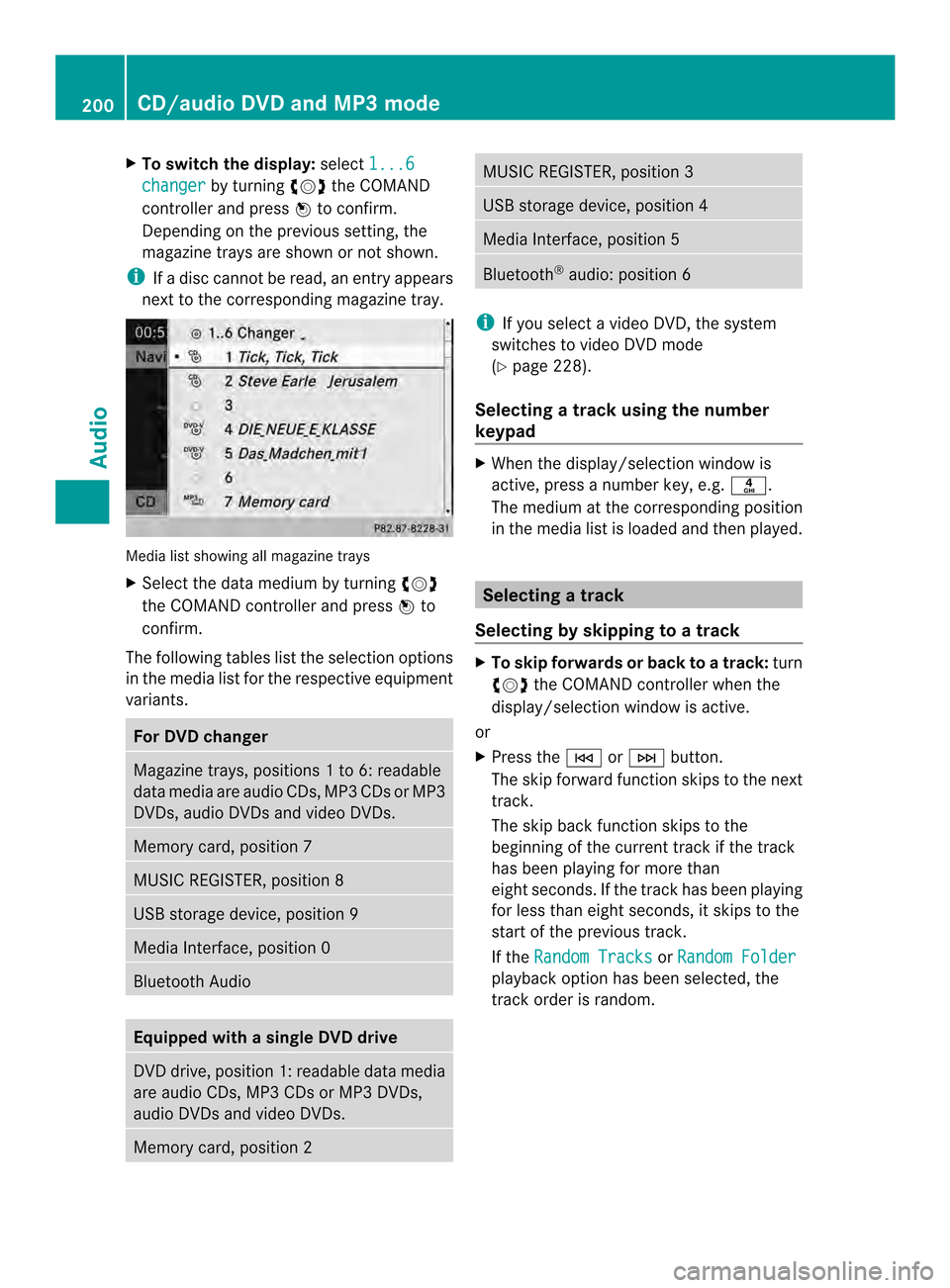
next to the corresponding magazine tray. Media list showing all magazine trays
X
Select the data medium by turning 003C0012003D
the COMAND controller and press 0037to
confirm.
The following tables list the selection options
in the media list for the respective equipment
variants. For DVD changer
Magazine trays, positions
1to 6: readable
data media are audio CDs, MP3 CDs or MP3
DVDs, audio DVDs and video DVDs. Memory card, position 7
MUSIC REGISTER, position 8
USB storage device, position 9
Media Interface, position 0
Bluetooth Audio
Equipped with a single DVD drive
DVD drive, position 1: readable data media
are audio CDs, MP3 CDs or MP3 DVDs,
audio DVDs and video DVDs.
Memory card, position 2 MUSIC REGISTER, position 3
USB storage device, position 4
Media Interface, position 5
Bluetooth
®
audio: position 6 i
If you select a video DVD, the system
switches to video DVD mode
(Y page 228).
Selecting atrac kusing the number
keypad X
When the display/selection window is
active, press a number key, e.g. 002C.
The medium at the corresponding position
in the media list is loaded and then played. Selecting
atrack
Selecting by skipping to atrack X
To skip forwards or back to a track: turn
003C0012003D the COMAND controller when the
display/selectio nwindow is active.
or
X Press the 0001or0002 button.
The skip forward function skips to the next
track.
The skip back function skips to the
beginning of the current track if the track
has been playing for more than
eight seconds .Ifthe track has been playing
for less than eight seconds, it skips to the
start of the previous track.
If the Random Tracks or
Random Folder playback option has been selected, the
track order is random.200
CD/audio DVD and MP3 modeAudio
Page 212 of 274
Switching modes using the function
button
X
Press the 0007function button repeatedly
until the MUSIC REGISTER is switched on.
By pressing the function button repeatedly,
you can change the operating mode in the
following order:
R CD/audio DVD/MP3 (disc)
R Memory card mode
R MUSIC REGISTER
R USB storage device
R Media Interface or audio AUX mode
R Bluetooth ®
audio mode
If music files are available, playback begins at
the point last listened to.
If there are no music files, you will see a
message to this effect.
X Confirm the message by pressing 0037and
store the music data (Y page 210).
Switching modes via the audio menu X
Select Audio in the main function bar by
sliding 00360012and turning 003C0012003Dthe COMAND
controller and press 0037to confirm.
If MUSIC REGISTER was the last mode
selected, it is now switched on.
If another audio source is switched on, you
can now switch on the MUSIC REGISTER in
the audio menu.
X Select Audio by sliding
00360012and turning
003C0012003D the COMAND controller and press
0037 to confirm.
The audio menu appears.
X Select Music Register and press
0037to
confirm.
Switching on with the number buttons X
Press the 0030(for a DVD changer) or
002B (for a single DVD drive) number key.
The MUSIC REGISTER is switched on. Importing music files
Introduction You can copy music files from the data carrier
in the single DVD drive or in the DVD changer
in the following file formats:
R MP3
R WMA
R AAC (with file extensions .m4p, .m4a, .m4b
and .aac)
X Switch on CD mode (Y page 197).
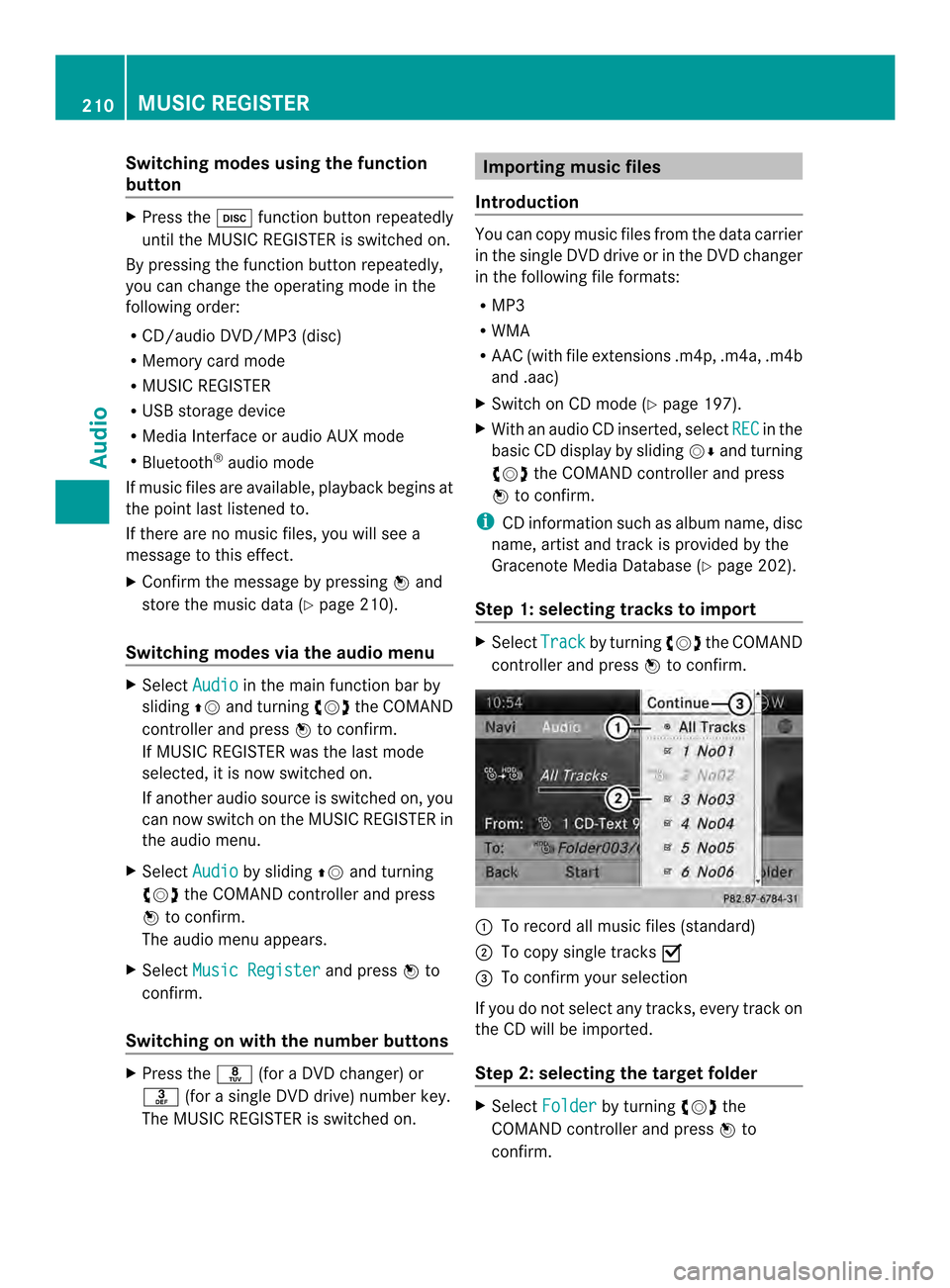
X With an audio CD inserted, select REC in the
basic CD display by sliding 00120008and turning
003C0012003D the COMAND controller and press
0037 to confirm.
i CD information such as albumn ame, disc
name, artist and track is provided by the
Gracenote Media Database ( Ypage 202).
Step 1: selecting tracks to import X
Select Track by turning
003C0012003Dthe COMAND
controller and press 0037to confirm. 0001
To record all music files (standard)
0002 To copy single tracks 0010
0014 To confirm your selection
If you do no tselect any tracks, every trac kon
the CD will be imported.
Ste p2:s electing the target folder X
Select Folder by turning
003C0012003Dthe
COMAND controller and press 0037to
confirm. 210
MUSIC REGISTERAudio
Page 215 of 274
The tracks in the currently active folder or
the curren ttrack list are played in a random
order.
X To selecto ptions:switch to the MUSIC
REGISTER (Y page 209).
X Select Music Register by sliding
00120008and
turning 003C0012003Dthe COMAND controller and
press 0037to confirm.
The options list appears. The 000Fdot
indicates the option selected.
X Select an option and press 0037to confirm.
The option is switched on. For all options
except Normal Track Sequence , you will
see a corresponding display in the display/
selectio nwindow.
i The Normal Track Sequence option is
automatically selected when you change
the disc you are currently listening to or
when you selec tadifferent medium. If an
option is selected, it remains selected after
COMAND is switched on or off. Bluetooth
®
audio mode Preconditions for the Bluetooth
®
audio device
Bluetooth ®
audio mode requires a
Bluetooth ®
-capable audio device. Observe
the information in the Bluetooth ®
audio
device's operating instructions.
Before using Bluetooth ®
audio mode, you
should chec kyour Bluetooth ®
audio device
for the following:
R Bluetooth ®
audio profile
The Bluetooth ®
audio device must support
the A2DP and AVRCP Bluetooth ®
audio
profiles.
R Bluetooth ®
visibility
Certain Bluetooth ®
audio devices do not
just require activation of the Bluetooth ®
function. In addition, your device must be
made "visible" to other devices.
R Bluetooth ®
device name This device name is predetermined but can
usually be changed. To make a clear
selection of the Bluetooth
®
device
possible, Mercedes-Benz recommends
that you customize the device name.
i A2DP (Advanced AudioDistribution
Profile): Bluetooth ®
audio profile for audio
data transmission
AVRCP (Audio VideoRemote Control
Profile): Bluetooth ®
audio profile for audio
data playback
i Not all Bluetooth ®
audio devices available
on the market are equall ysuitable. To
obtain more information about suitable
Bluetooth ®
audio devices and about
connecting Bluetooth ®
audio devices to
COMAND, visit
http://www.mbusa-mobile.com (USA).
Or call the Mercedes-Ben zCustomer
Assistance center at
1-800-FOR-MERCedes(1-800-367-6372)
(USA) or Custome rRelations at
1-800-387-0100 (Canada).
X Activate Bluetooth ®
and Bluetooth ®
visibility on the Bluetooth ®
audio device. Preconditions in COMAND
X Activate the Bluetooth ®
function in
COMAND(Y page 45). To connect Bluetooth
®
audio devices
General information Before using your Bluetooth
®
audio device
with COMAND for the first time, you will need
to authorize it.
When you authorize a new Bluetooth ®
audio
device, it is connected automatically.
Connection involves first searching for a
Bluetooth ®
audio device and then authorizing
it. Bluetooth
®
audio mode 213Audio Z
Page 216 of 274

You can authorize up to fifteen Bluetooth
®
devices.
i If you authorize a mobile phone that
supports Bluetooth ®
audio, the A2DP and
AVRCP Bluetooth ®
audio profiles are
connected automatically.
The mobile phone is the nentered:
R in the Bluetooth ®
telephone list
(Y page 130)
R in the Bluetooth ®
device list
(Y page 214).
Mercedes-Benz recommends authorizing a
mobile phone in Bluetooth ®
telephony
(Y page 130).
Searching for and authorizing a
Bluetooth ®
audio device Example: Bluetooth
®
device list
0001 Newly detected mobile phone with
Bluetooth ®
audio function in range
0002 Bluetooth ®
audio player not withi nrange
but previously authorized (symbol
appears in gray) The Bluetooth
®
device list displays all
authorized devices, whether they are within
range or not. After a device search, devices
which are within range but no tauthorized are
also displayed.
X Switch on Bluetooth ®
audio mode
(Y page 217).
If you see the No Bluetooth Audio Device Authorized message, you will
need to authorize the Bluetooth ®
audio
device first.
X Select BT Audio by sliding
00120008and turning
003C0012003D the COMAND controller and press
0037 to confirm.
X Confirm Bluetooth Audio Device List by pressing
0037the COMAND controller.
X To search: confirmSearch for BT Audio Devices by pressing the COMAND
controller 0037.
COMAND searches for Bluetooth ®
audio
devices within range and adds them to the
Bluetooth ®
device list .Bluetooth ®
audio
devices are detected if they support the
Bluetooth ®
audio profiles (A2DP, AVRCP).
The duration of the searc hdepends on the
number of Bluetooth ®
audio devices within
range and their characteristics.
X To authorize: select a Bluetooth ®
audio
device that has not yet been authorized
from the list ( 0001in the example) by turning
003C0012003D the COMAND controller.
X Select the symbol to the right of the
Bluetooth ®
audio device by sliding 00120035the
COMAND controller and press 0037to
confirm.
X Select Authorize and press
0037to confirm.
Depending on the Bluetooth ®
audio device
used, you now have two options for
continuing with authorization. 214
Bluetooth ®
audio modeAudio
Page 217 of 274
X
Option 1: enter the passkey (Y page 130).
After successful authorization, the
Bluetooth ®
audio device is connected and
starts playing.
X Option 2 (Secure Simple Pairing): if the
digit codes displayed in COMAND and on
the Bluetooth ®
audio device are the same,
confirm Yes by pressing
0037.
If you select Yes , authorization continues
and the Bluetooth ®
audio device is
connected. Playback starts.
If you select No , authorization will be
canceled.
i The Bluetooth ®
audio device must
support Bluetooth ®
version 2.1 for
connection via Secure Simple Pairing.
COMAND creates a six-digit code, which is
displayed on both devices that are to be
connected
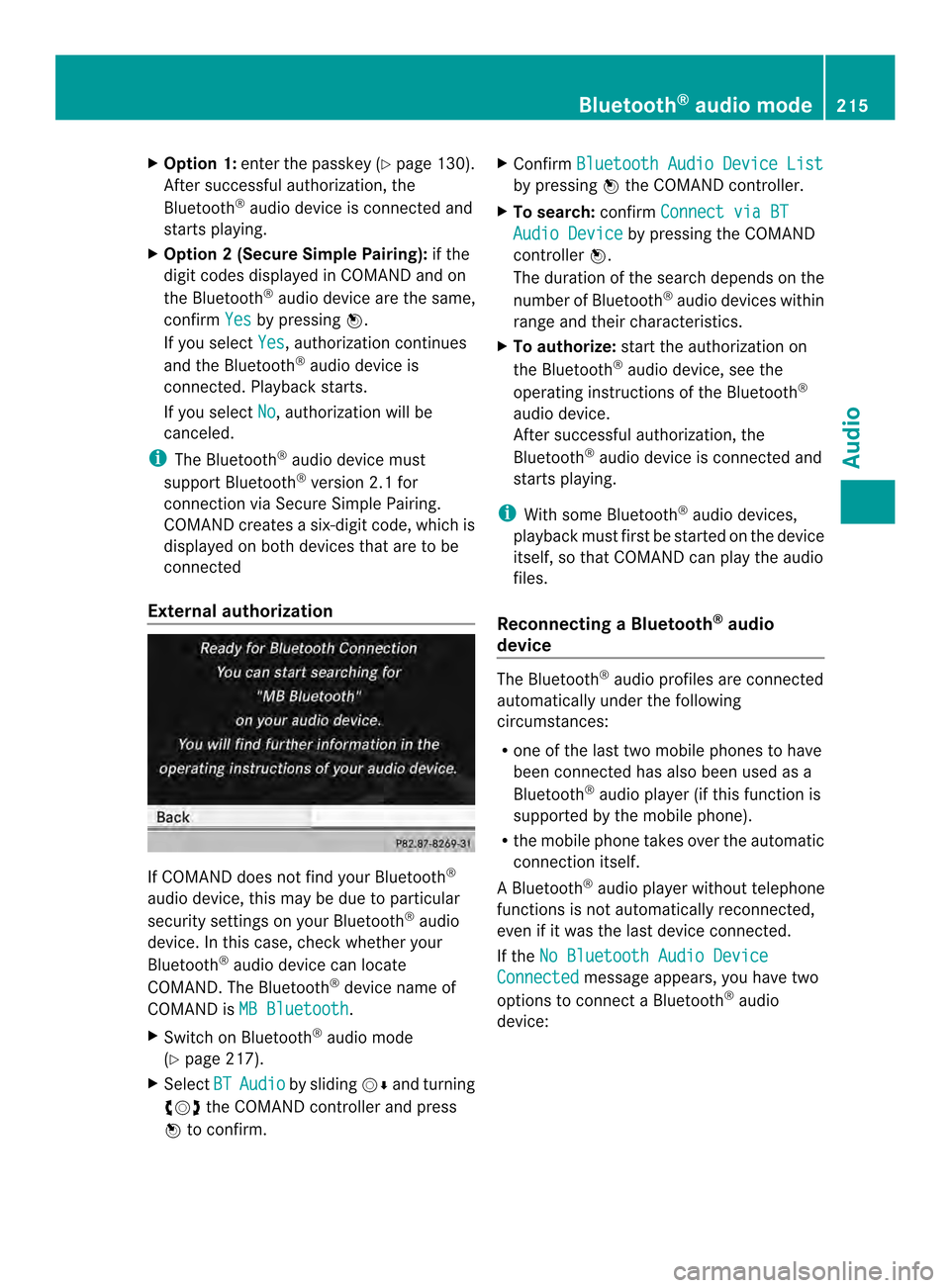
External authorization If COMAND does not find your Bluetooth
®
audio device, this may be due to particular
security settings on your Bluetooth ®
audio
device. In this case, check whether your
Bluetooth ®
audio device can locate
COMAND .The Bluetooth ®
device name of
COMAND is MB Bluetooth .
X Switch on Bluetooth ®
audio mode
(Y page 217).
X Select BT Audio by sliding
00120008and turning
003C0012003D the COMAND controller and press
0037 to confirm. X
Confirm Bluetooth Audio Device List by pressing
0037the COMAND controller.
X To search: confirmConnect via BT Audio Device by pressing the COMAND
controller 0037.
The duration of the search depends on the
number of Bluetooth ®
audio devices within
range and their characteristics.
X To authorize: start the authorization on
the Bluetooth ®
audio device, see the
operating instructions of the Bluetooth ®
audio device.
After successful authorization, the
Bluetooth ®
audio device is connected and
starts playing.
i With some Bluetooth ®
audio devices,
playback must first be started on the device
itself, so that COMAND can play the audio
files.
Reconnecting aBluetooth ®
audio
device The Bluetooth
®
audio profiles are connected
automatically under the following
circumstances:
R one of the last two mobile phones to have
been connected has also been used as a
Bluetooth ®
audio player (if this function is
supported by the mobile phone).
R the mobile phone takes over the automatic
connection itself.
AB luetooth ®
audio player without telephone
functions is not automatically reconnected,
even if it was the last device connected.
If the No Bluetooth Audio Device Connected message appears, you have two
options to connect a Bluetooth ®
audio
device: Bluetooth
®
audio mode 215Audio Z
Page 218 of 274

Connecting last device
X
Confirm Connect Last Device in the
basic display by pressing 0037the COMAND
controller.
If COMAND can locate the Bluetooth ®
audio device, it will be connected and start
playing.
i With some Bluetooth ®
audio devices,
playbac kmust first be started on the device
itself, so that COMAND can play the audio
files.
Connecting adevice from alist
X Select BT Audio by turning
003C0012003Dthe
COMAN Dcontroller and press 0037to
confirm.
X Confirm Bluetooth Audio Device List by pressing
0037the COMAND controller.
X Select a Bluetooth ®
audio device by turning
003C0012003D the COMAND controller and press
0037 to confirm.
If COMAND can locate the Bluetooth ®
audio device, it will be connected and start
playing.
i With some Bluetooth ®
audio devices,
playback must first be started on the device
itself, so that COMAND can play the audio
files.
Bluetooth ®
audio device and
simultaneous search for mobile phones During the search for mobile phones, the
connection with the Bluetooth
®
audio device
is terminated (Y page 129). In the
Bluetooth ®
audio basic display, you will see
the No Bluetooth Audio Device Connected message and the
Connect Last
Device menu item cannot be selected.
Displaying details X
Select a Bluetooth ®
audio device in the
Bluetooth ®
device list.
X Select the symbol to the right of the
Bluetooth ®
audio device by sliding 00120035the COMAND controller and press
0037to
confirm.
X Select Details and press
0037to confirm.
The following information concerning the
selected mobile phone is shown:
R Bluetooth ®
name
R Bluetooth ®
address
R availability status (shown after an
update)
R authorization status
X To close the detailed view: turn003C0012003D or
slide 003400120035 the COMAND controller.
De-authorizing (deregistering) a
Bluetooth ®
audio device X
Select a Bluetooth ®
audio device in the
Bluetooth ®
device list.
X Select the symbol to the right of the
Bluetooth ®
audio device by sliding 00120035the
COMAND controller and press 0037to
confirm.
X Select Delete and press
0037to confirm.
Ap rompt appears asking whethe ryou
really wish to de-authorize this device.
X Select Yes or
No .
If you select Yes , the device will be deleted
from the Bluetooth ®
device list.
If you select No , the process will be
canceled.
i Before re-authorizing the Bluetooth ®
audio device, you should also delete the
device name MB Bluetooth from your
Bluetooth ®
audio device's Bluetooth ®
list.
See the Bluetooth ®
audio device's
operating instructions. 216
Bluetooth ®
audio modeAudio
Page 219 of 274

Switching to Bluetooth
®
audio mode
The Bluetooth ®
audio basic display Example: Bluetooth
®
audio basic display
0001 Track name
0002 Current playback settings (no symbol for
"Normal track sequence")
0014 Album name
0013 Sound settings
0011 Media list
0012 Artist
0005 To stop 0014or start 0004playback
0006 To connect a Bluetooth ®
audio device, to
increase the volume on COMAND
0007 Bluetooth ®
audio data medium type
0008 Data medium position in the media list
i If the Bluetooth ®
audio device connected
supports metadata and corresponding data
is available, then the artist, track and album
name can be displayed.
Using the Bluetooth ®
audio basic
display X
Connect a Bluetooth ®
audio device
(Y page 213)
or
X Reconnec tthe Bluetooth ®
audio device
(Y page 215).
COMAND activates the Bluetooth ®
audio
device. The basic display appears and the
device starts playing. Using the function button X
Press the 0007function button one or more
times.
By pressing the function button repeatedly,
you can change the operating mode in the
following order:
R CD/audio DVD/MP3 (disc)
R Memory card mode
R MUSIC REGISTER
R USB storage device
R Media Interface or audio AUX mode
R Bluetooth ®
audio mode
Using the media list X
Select Bluetooth Audio in the media list
by turning 003C0012003Dthe COMAND controller
and press 0037to confirm (Y page 199).
COMAND activates the connected device.
You will see a message to this effect.T he
basic display then appears. Starting/stopping playback
X To start playback: select0004by sliding
00120008 and turning 003C0012003Dthe COMAND
controller and press 0037to confirm.
Playback starts. 0014is selected.
X To stop playback: select0014by turning
003C0012003D the COMAND controller and press
0037 to confirm.
Am essage appears. 0004is selected.
X To continue playback: select0004by
turning 003C0012003Dthe COMAND controller and
press 0037to confirm.
Am essage appears. 0014is selected. Bluetooth
®
audio mode 217Audio Z
Page 220 of 274
Restarting playback after stopping
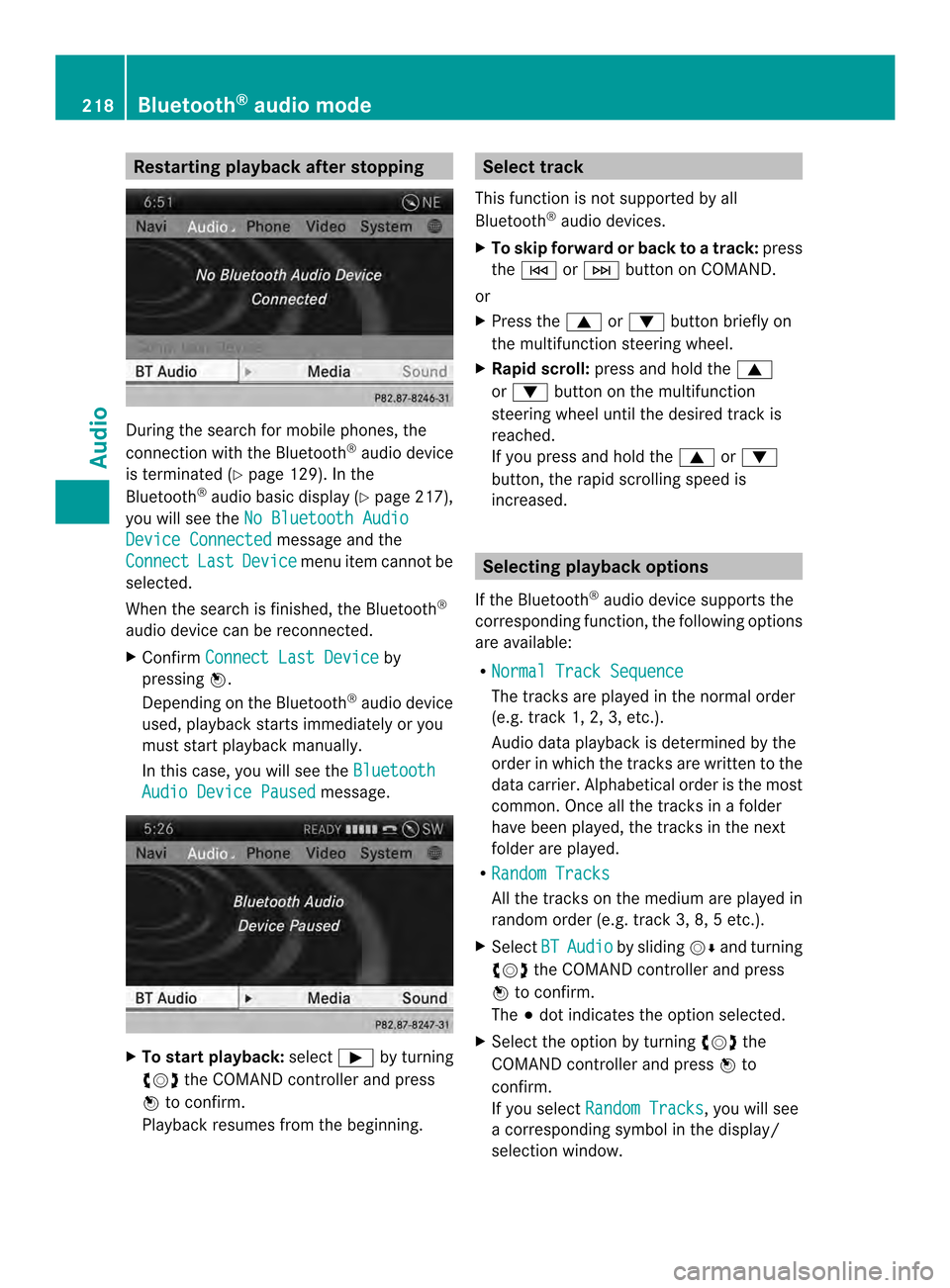
During the search for mobile phones, the
connection with the Bluetooth
®
audio device
is terminated (Y page 129). In the
Bluetooth ®
audio basic display (Y page 217),
you will see the No Bluetooth Audio Device Connected message and the
Connect Last Device menu item cannot be
selected.
Whe nthe search is finished, the Bluetooth ®
audio device can be reconnected.
X Confirm Connect Last Device by
pressing 0037.
Depending on the Bluetooth ®
audio device
used, playback starts immediately or you
must start playback manually.
In this case, you will see the BluetoothAudio Device Paused message.
X
To start playback: select0004by turning
003C0012003D the COMAND controller and press
0037 to confirm.
Playback resumes from the beginning. Selectt
rack
This functio nis not supported by all
Bluetooth ®
audio devices.
X To skip forward or back to a track: press
the 0001 or0002 button on COMAND.
or
X Press the 0008or0009 button briefly on
the multifunction steering wheel.
X Rapid scroll: press and hold the 0008
or 0009 button on the multifunction
steering wheel until the desired track is
reached.
If you press and hold the 0008or0009
button, the rapid scrolling speed is
increased. Selecting playback options
If the Bluetooth ®
audio device supports the
corresponding function, the following options
are available:
R Normal Track Sequence The tracks are played in the normal order
(e.g. track 1, 2, 3, etc.).
Audio data playback is determined by the
order in which the tracks are written to the
data carrier. Alphabetical order is the most
common. Once all the tracks in a folder
have been played, the tracks in the next
folder are played.
R Random Tracks All the tracks on the medium are played in
random order (e.g. track 3, 8, 5 etc.).
X Select BT Audio by sliding
00120008and turning
003C0012003D the COMAND controller and press
0037 to confirm.
The 000Fdot indicates the option selected.
X Select the option by turning 003C0012003Dthe
COMAND controller and press 0037to
confirm.
If you select Random Tracks , you will see
a corresponding symbol in the display/
selection window. 218
Bluetooth ®
audio modeAudio
Page 222 of 274
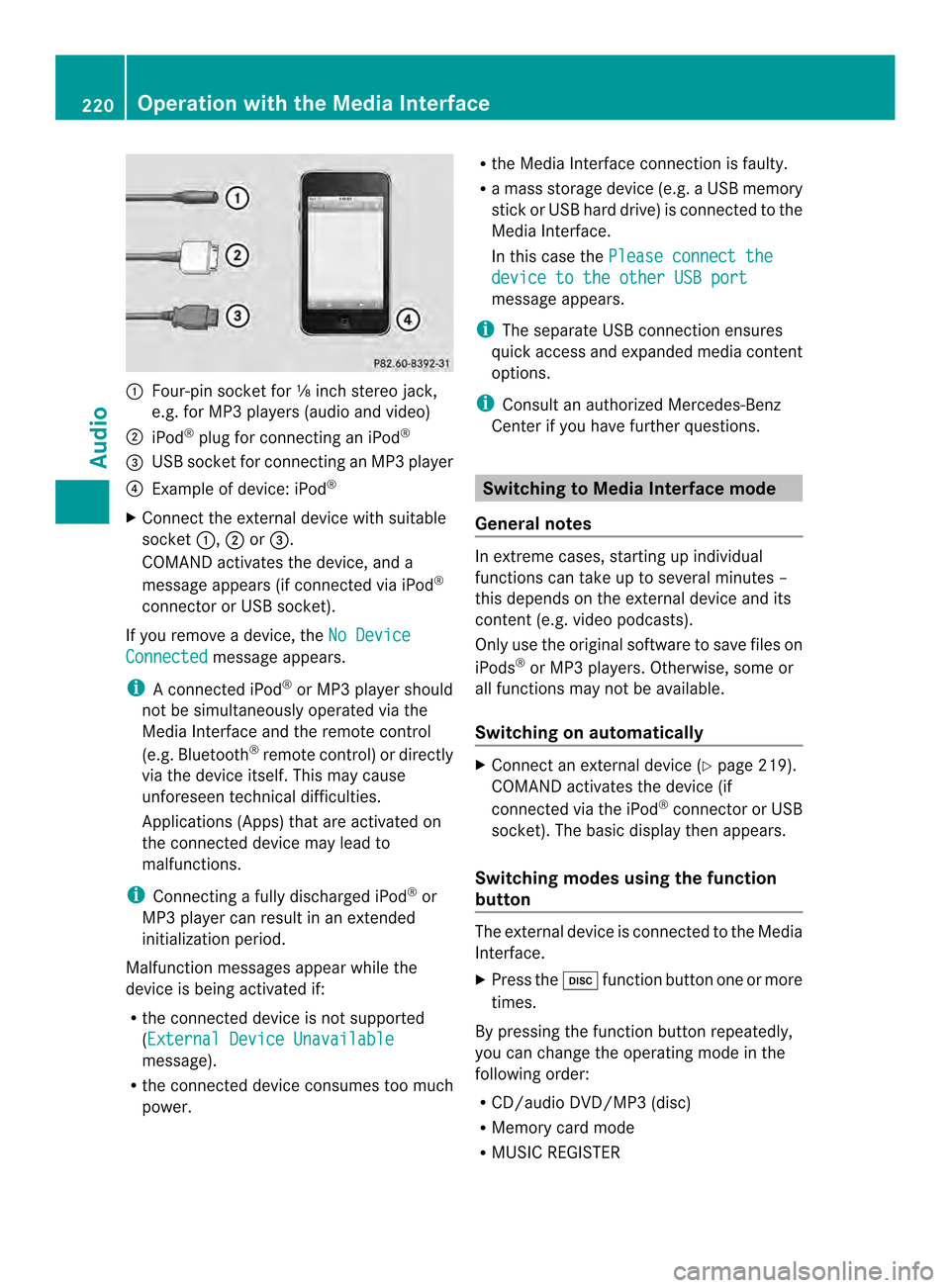
0001
Four-pin socket for ⅛ inch stereo jack,
e.g. for MP3 players (audio and video)
0002 iPod ®
plug for connecting an iPod ®
0014 USB socket for connecting an MP3 player
0013 Example of device: iPod ®
X Connect the external device with suitable
socket 0001,0002or0014.
COMAND activates the device, and a
message appears (i fconnected via iPod ®
connector or USB socket).
If you remove a device, the No DeviceConnected message appears.
i A connected iPod ®
or MP3 players hould
not be simultaneously operated via the
Media Interface and the remote control
(e.g. Bluetooth ®
remote control) or directly
via the device itself. This may cause
unforeseen technical difficulties.
Applications (Apps) that are activated on
the connected device may lead to
malfunctions.
i Connecting a fully discharged iPod ®
or
MP3 player can result in an extended
initialization period.
Malfunction messages appearw hile the
device is being activated if:
R the connected device is not supported
(External Device Unavailable message).
R the connected device consumes too much
power. R
the Media Interface connection is faulty.
R a mass storage device (e.g. a USB memory
stick or USB hard drive) is connected to the
Media Interface.
In this case the Please connect the device to the other USB port
message appears.
i The separate USB connection ensures
quick access and expanded media content
options.
i Consult an authorized Mercedes-Benz
Center if you have further questions. Switching to Media Interface mode
General notes In extreme cases, starting up individual
functions can take up to several minutes –
this depends on the external device and its
content (e.g. video podcasts).
Only use the original software to save files on
iPods
®
or MP3 players. Otherwise, some or
all functions may not be available.
Switching on automatically X
Connect an external device (Y page 219).
COMAND activates the device (if
connected via the iPod ®
connector or USB
socket). The basic display then appears.
Switching modes using the function
button The external device is connected to the Media
Interface.
X
Press the 0007function button one or more
times.
By pressing the function button repeatedly,
you can change the operating mode in the
following order:
R CD/audio DVD/MP3 (disc)
R Memory card mode
R MUSIC REGISTER 220
Operation with the Media InterfaceAudio
Page 223 of 274
R
USB storage device
R Media Interface or audio AUX mode
R Bluetooth ®
audio mode
Switching on using anumber key X
Press the 001Dnumber key (for a DVD
changer) or the 002Dnumber key (for a
single DVD drive).
This selects the connected external audio
device directly.
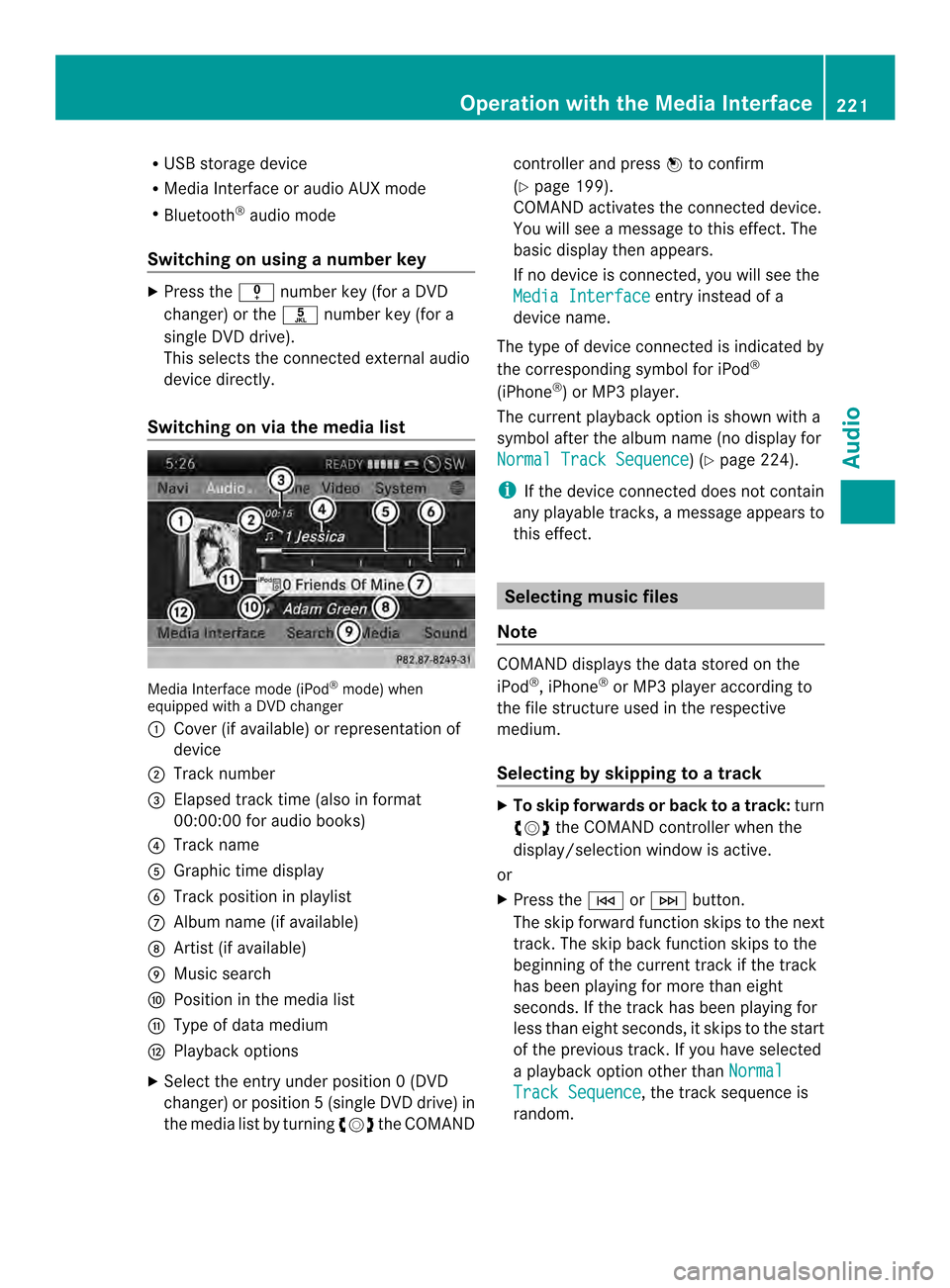
Switching on via the media list Media Interface mode (iPod
®
mode) when
equipped with a DVD changer
0001 Cove r(if available) or representation of
device
0002 Track number
0014 Elapsed track time (also in format
00:00:00 for audio books)
0013 Track name
0011 Graphic time display
0012 Trac kposition in playlist
0005 Album name (if available)
0006 Artist (if available)
0007 Music search
0008 Position in the media list
0009 Type of data medium
000B Playback options
X Select the entry under position 0 (DVD
changer) or position 5(single DVD drive) in
the media list by turning 003C0012003Dthe COMAND controller and press
0037to confirm
(Y page 199).
COMAND activates the connected device.
You will see a message to this effect. The
basic display then appears.
If no device is connected, you will see the
Media Interface entry instead of a
device name.
The type of device connected is indicated by
the corresponding symbol for iPod ®
(iPhone ®
) or MP3 player.
The current playback option is shown with a
symbol after the albumn ame (no display for
Normal Track Sequence ) (Y
page 224).
i If the device connected does not contain
any playable tracks, a message appears to
this effect. Selecting music files
Note COMAND displays the data stored on the
iPod
®
, iPhone ®
or MP3 player according to
the file structure used in the respective
medium.
Selecting by skipping to atrack X
To skip forwards or back to a track: turn
003C0012003D the COMAND controller when the
display/selectio nwindow is active.
or
X Press the 0001or0002 button.
The skip forward function skips to the next
track. The skip back function skips to the
beginning of the current track if the track
has been playing for more than eight
seconds .Ifthe track has been playing for
less than eight seconds, it skips to the start
of the previous track.Ify ou have selected
a playback option other than Normal Track Sequence , the track sequence is
random. Operation with the Media Interface
221Audio Z