ad blue MERCEDES-BENZ CL-Class 2014 C217 Comand Manual
[x] Cancel search | Manufacturer: MERCEDES-BENZ, Model Year: 2014, Model line: CL-Class, Model: MERCEDES-BENZ CL-Class 2014 C217Pages: 274, PDF Size: 5.76 MB
Page 46 of 274
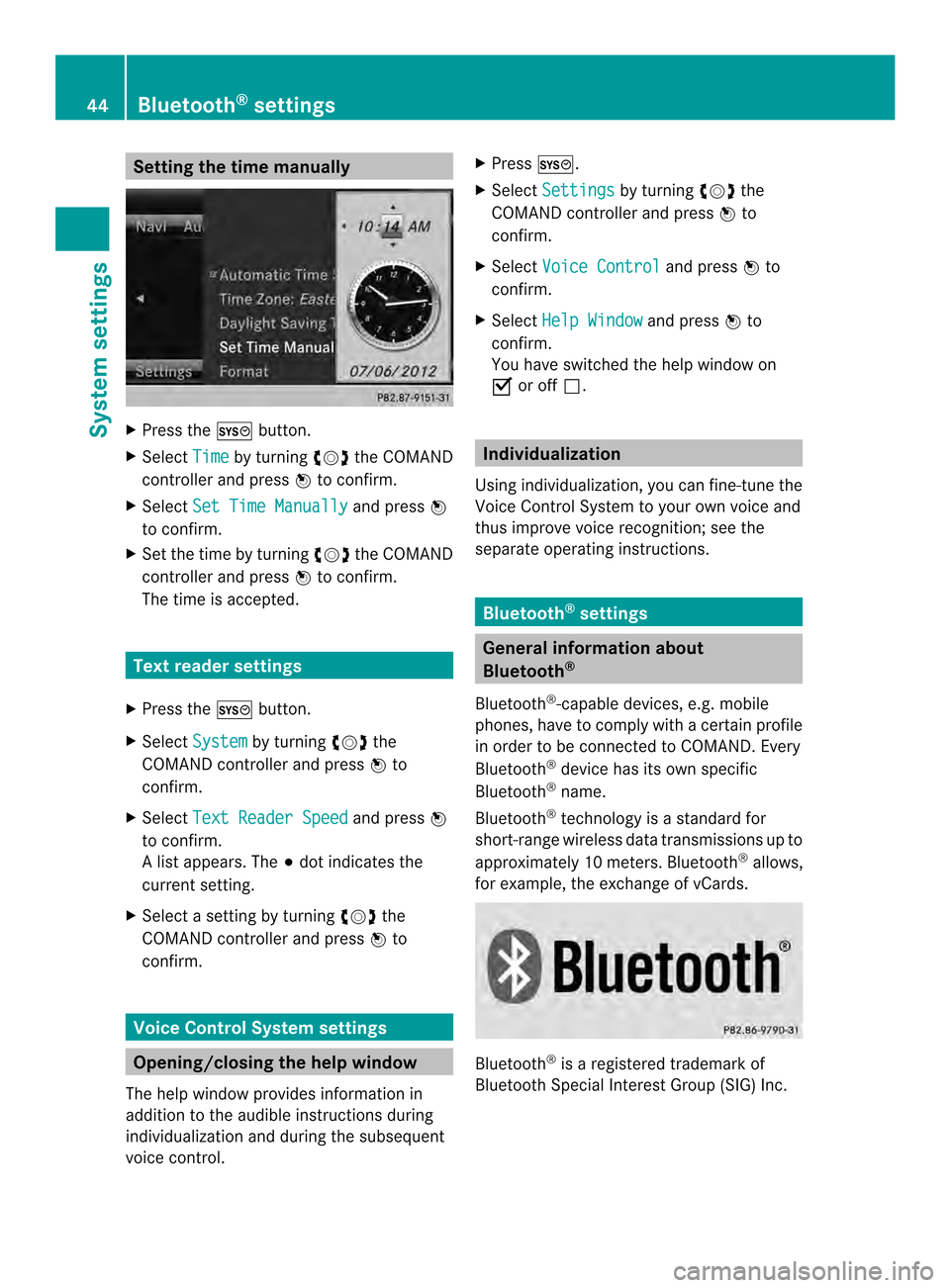
Setting the time manually
X
Press the 000Bbutton.
X Select Time by turning
003C0012003Dthe COMAND
controller and press 0037to confirm.
X Select Set Time Manually and press
0037
to confirm.
X Set the time by turning 003C0012003Dthe COMAND
controller and press 0037to confirm.
The time is accepted. Text reader settings
X Press the 000Bbutton.
X Select System by turning
003C0012003Dthe
COMAND controller and press 0037to
confirm.
X Select Text Reader Speed and press
0037
to confirm.
Al ist appears. The 000Fdot indicates the
current setting.
X Select a setting by turning 003C0012003Dthe
COMAND controller and press 0037to
confirm. Voice Control System settings
Opening/closing the help window
The help window provides information in
additio nto the audible instructions during
individualization and during the subsequent
voice control. X
Press 000B.
X Select Settings by turning
003C0012003Dthe
COMAND controller and press 0037to
confirm.
X Select Voice Control and press
0037to
confirm.
X Select Help Window and press
0037to
confirm.
You have switched the help window on
0010 or off 0003. Individualization
Using individualization, you can fine-tune the
Voice Control System to your own voice and
thus improve voice recognition; see the
separate operating instructions. Bluetooth
®
settings General information about
Bluetooth
®
Bluetooth ®
-capable devices, e.g. mobile
phones, have to comply with a certain profile
in order to be connected to COMAND. Every
Bluetooth ®
device has its own specific
Bluetooth ®
name.
Bluetooth ®
technology is a standard for
short-range wireless data transmissions up to
approximately 10 meters. Bluetooth ®
allows,
for example, the exchange of vCards. Bluetooth
®
is a registered trademark of
Bluetooth Special Interest Group (SIG) Inc. 44
Bluetooth ®
settingsSystem settings
Page 47 of 274
Activating/deactivating Bluetooth
®
X Press 000B.
The system menu appears.
X Select Settings by turning
003C0012003Dthe
COMAND controller and press 0037to
confirm.
X Select Activate Bluetooth and press
0037 to confirm.
This switches Bluetooth ®
on 0010 or off 0003. Setting the system language
This function allows you to determine the
language for the menu displays and the
navigation announcements .The selected
language affects the characters available for
entry.
The navigation announcements are not
available in all languages. If a language is not
available, the navigation announcements will
be in English.
When you set the system language, the
language of the Voice Control System will
change accordingly. If the selected language
is not supported by the Voice Control System,
English will be selected.
X Press the 000Bbutton.
X Select Settings by turning
003C0012003Dthe
COMAND controller and press 0037to
confirm.
X Select Language and press
0037to confirm.
The list of languages appears. The 000Fdot
indicates the current setting.
X Select the language by turning 003C0012003Dthe
COMAND controller and press 0037to
confirm.
COMAND loads the selected language and
sets it. Assigning
afavorites button
X To assign afavorites button: press the
000B button.
X Select Settings by turning
003C0012003Dthe
COMAND controller and press 0037to
confirm.
X Select Assign as Favorite and press
0037 to confirm.
The lis tofpredefined functions appears.
The dot 000Findicates the currently selected
function.
X Select the function by turning 003C0012003Dthe
COMAND controller and press 0037to
confirm.
The favorites button is assigned the
selected function.
X Example: to call up a favorite: press the
0019 favorites button.
This calls up the predefined function.
You can select the following predefined
functions in a menu:
R SplitView on/off : you can switch the
screen view for the front passenger on or
off.
R Display On/Off : you can switch the
display off or on.
R Full screen: 'Clock' :y
ou can call up
the full screen with the clock.
R 000CMenu :y
ou can call up the online and
Internet functions.
R Full screen: 'Map' :y
ou can call up the
full screen with the map.
R Spoken Driving Tip :y
ou can call up the
current driving recommendation.
R Display Traffic Messages :y
ou can call
up traffic reports.
R Navigate Home : you can start route
guidance to your home address if you have
already entered and saved the address
(Y page 69).
R Detour Menu :y
ou can call up the Detour
menu and then block a section of the route
and recalculate the route (Y page 92). Assigning
afavorites button
45Systemsettings
Page 90 of 274
Route guidance
Important notes
COMAND calculates the route to the
destination withou ttaking accoun tofthe
following, for example:
R traffic lights
R stop and give way signs
R merging lanes
R parking or stopping in a no parking/no
stopping zone
R other road and traffic rules and regulations
R narrow bridges
COMAND may give differing navigation
commands if the actual street/traffic
situation does not correspond with the digital
map's data. For example, if the road layout or
the direction of a one-way street has been
changed.
For this reason, you must always observe
road and traffic rules and regulations during
your journey. Road and traffic rules and
regulations always have priority over the
system's driving recommendations.
Route guidance begins once aroute has been
calculated (Y page 69).
COMAND guides you to your destination by
means of navigation announcements in the
form of audible navigation announcements
and route guidance displays.
The route guidance displays can be seen if the
display is switched to navigation mode.
If you do not follow the navigation
announcements or if you leave the calculated
route, COMAND automatically calculates a
new route to the destination.
If the digital map contains the corresponding
information, the following applies:
R during route guidance, COMAND tries to
avoid roads with restricted access. Those
roads, for example, that are closed to
through-traffic.
R roads that have time restrictions (e.g.
closed on Sundays and public holidays) are considered for route guidance on days
when they are open. For this purpose, the
relevant times must be correctly stored in
the database. Displays during route guidance
Change of direction Changes of direction have three phases:
R
preparation phase
R announcement phase
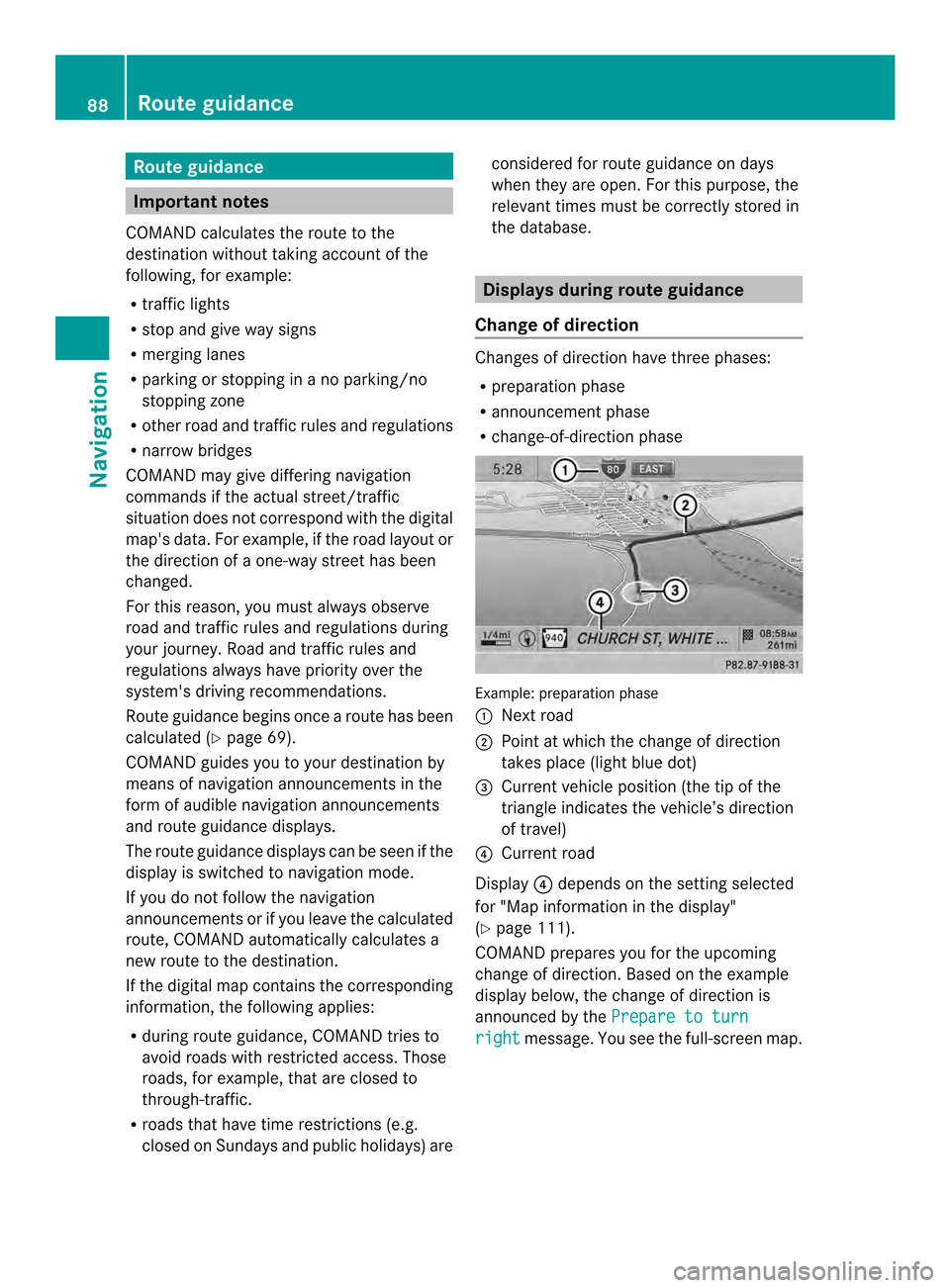
R change-of-direction phase Example: preparation phase
0001
Next road
0002 Point at which the change of direction
takes place (light blue dot)
0014 Current vehicle position (the tip of the
triangle indicates the vehicle’s direction
of travel)
0013 Current road
Display 0013depends on the setting selected
for "Map information in the display"
(Y page 111).
COMAND prepares you for the upcoming
change of direction .Based on the example
display below, the change of direction is
announced by the Prepare to turn right message. You see the full-scree
nmap. 88
Route guidanceNavigation
Page 91 of 274

Example: announcement phase
0001
Next road
0002 Change of direction (turn right here)
0014 Graphi crepresentation of the distance to
the next change of direction
0013 Distance to the next change of direction
0011 Route (highlighted in blue, shown in both
the left and right displays)
0012 Point at which the change of direction
takes place (light blue dot, shown in both
the left and right displays)
i The filled-in section of visual display for
distance 0014gets shorter the nearer you get
to the announced change of direction.
COMAND announces the imminen tchange of
direction. Based on the example display
below, the change of direction is announced
beforehand by the message: Please turnright in 500 ft. and follow the
The distance announced before the next
change of direction depends on the type of
road and its permissible maximum speed.
The display is now split into two sectors. In
the left half, you see the normal map view.
The right-hand half shows:
R an enlarged section of the area around the
intersection (crossing zoom) or
R a 3D image of the road's course with the
route indicating the next change of
direction Example: change-of-direction phase
0001
Current vehicle position (the tip of the
triangle indicates the vehicle’s direction
of travel)
0002 Graphic representation of the distance to
the next change of direction
0014 Distance to the next change of direction
COMAND announces the imminent change of
direction.
Based on the example display below, the
change of direction is announced 150 ft.
before the change of direction with the Now turn right message.
The display is split into two halves, as in the
announcemen tphase.
Once the change of direction is completed,
COMAND automatically switches back to full-
screen display.
Example of a display without changes
of direction 0001
Route (highlighted in blue)
0002 Current vehicle position
0014 Current road Route guidance
89Navigation Z
Page 92 of 274
0013
Map orientation selected
0011 Map scale selected
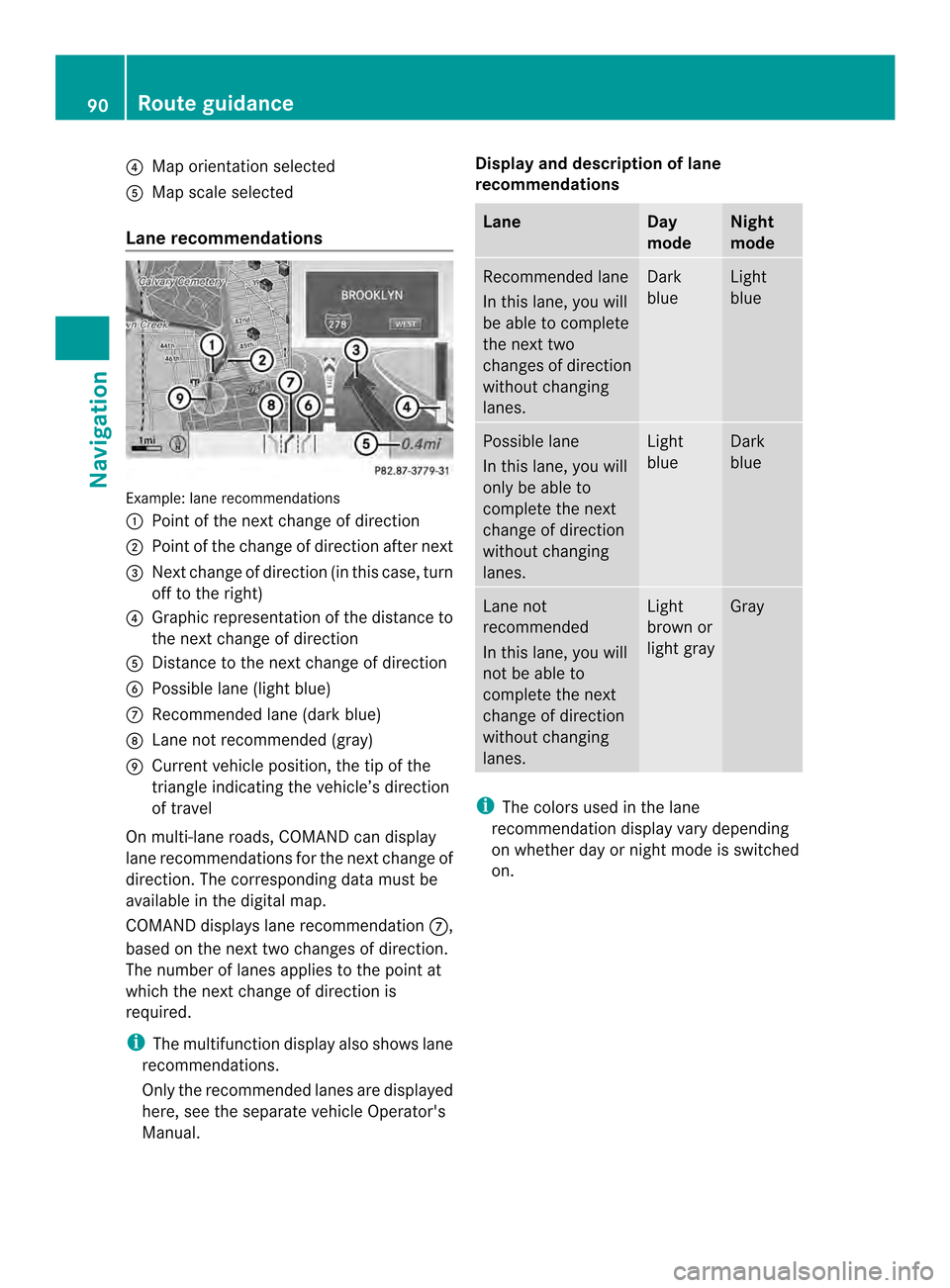
Lane recommendations Example: lane recommendations
0001 Point of the next change of direction
0002 Point of the change of direction after next
0014 Next change of direction (in this case, turn
off to the right)
0013 Graphic representation of the distance to
the next change of direction
0011 Distance to the next change of direction
0012 Possible lane (light blue)
0005 Recommended lane (dark blue)
0006 Lane not recommended (gray)
0007 Current vehicle position, the tip of the
triangle indicating the vehicle’s direction
of travel
On multi-lane roads, COMAND can display
lane recommendations for the next change of
direction. The corresponding data must be
available in the digital map.
COMAND displays lane recommendation 0005,
based on the next two changes of direction.
The number of lanes applies to the point at
which the next change of direction is
required.
i The multifunction display also shows lane
recommendations.
Only the recommended lanes are displayed
here, see the separate vehicle Operator's
Manual. Display and description of lane
recommendations Lane Day
mode Night
mode
Recommended lane
In this lane, you will
be able to complete
the next two
changes of direction
without changing
lanes. Dark
blue Light
blue
Possible lane
In this lane, you will
only be able to
complete the next
change of direction
without changing
lanes. Light
blue Dark
blue
Lane not
recommended
In this lane, you will
not be able to
complete the next
change of direction
without changing
lanes. Light
brown or
light gray Gray
i
The colors used in the lane
recommendation display vary depending
on whether day or night mode is switched
on. 90
Route guidanceNavigation
Page 95 of 274
X
Select Route in the navigation system
menu bar by turning 003C0012003Dthe COMAND
controlle rand press 0037to confirm.
X Select Detour and press
0037to confirm.
X To block a section of the route: select
Longer or
Shorter repeatedly and confirm
using 0037until the desired sectio nhas been
selected.
i The total length of the sectio nthat can be
blocked is defined by the digital map. The
menu items are available accordingly.
X To start route calculation: selectStart and press
0037to confirm.
X To delete the blockeds ection:select
Delete while the message is shown and
press 0037to confirm.
COMAND calculates the rout ewithout the
block.
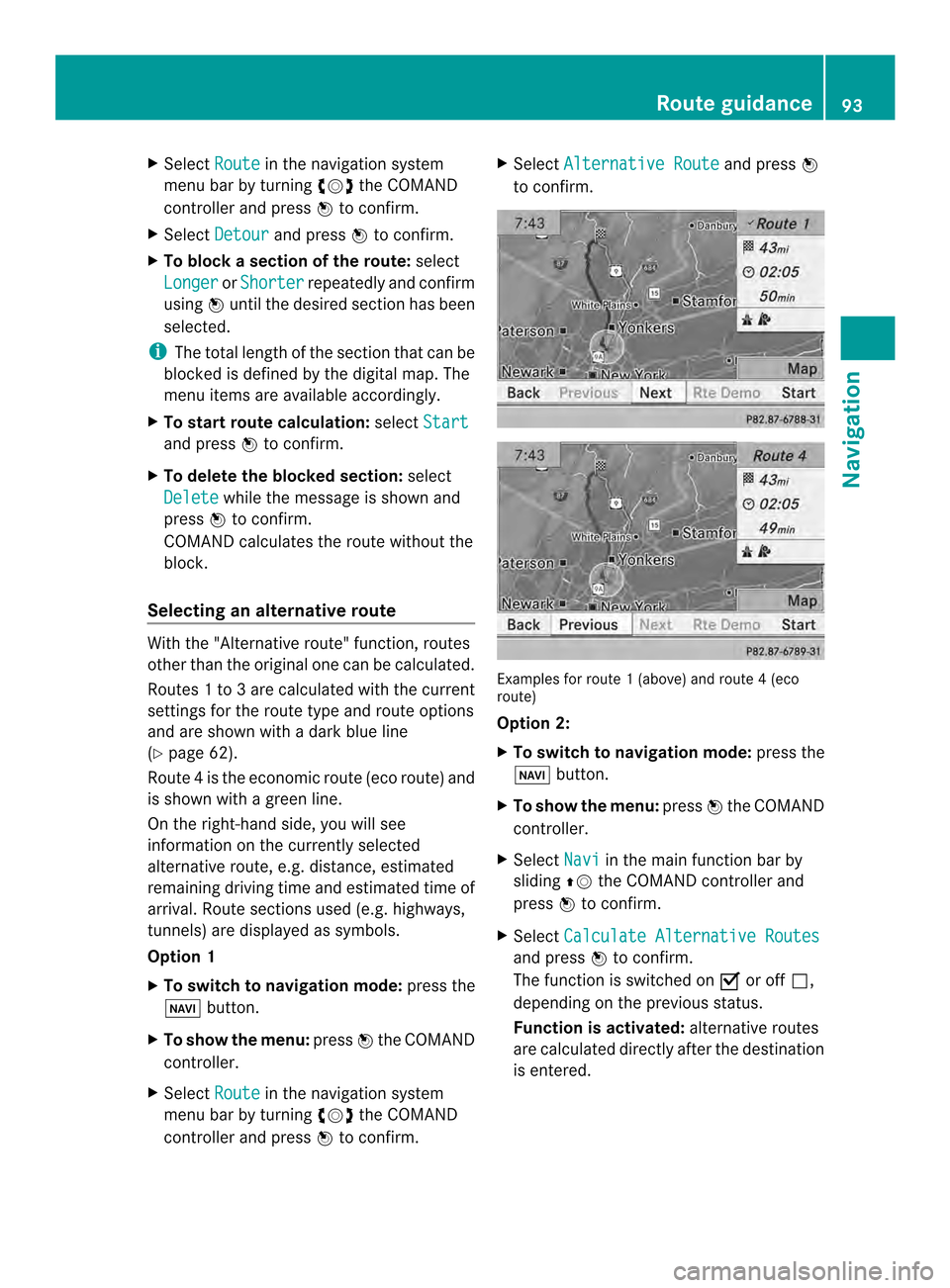
Selecting an alternative route With the "Alternative route" function, routes
other than the original one can be calculated.
Routes 1to3a re calculated with the current
settings for the route type and route options
and are show nwith a dark blue line
(Y page 62).
Route 4is the economic route (eco route) and
is shown with a green line.
On the right-hand side, you will see
information on the currently selected
alternative route, e.g. distance, estimated
remaining driving time and estimated time of
arrival. Route sections used (e.g. highways,
tunnels) are displayed as symbols.
Option 1
X To switch to navigation mode: press the
0012 button.
X To show the menu: press0037the COMAND
controller.
X Select Route in the navigation system
menu bar by turning 003C0012003Dthe COMAND
controller and press 0037to confirm. X
Select Alternative Route and press
0037
to confirm. Examples for route
1(above) and route 4(eco
route)
Option 2:
X To switch to navigation mode: press the
0012 button.
X To show the menu: press0037the COMAND
controller.
X Select Navi in the main function bar by
sliding 00360012the COMAND controller and
press 0037to confirm.
X Select Calculate Alternative Routes and press
0037to confirm.
The function is switched on 0010or off 0003,
depending on the previous status.
Function is activated: alternative routes
are calculated directly after the destination
is entered. Route guidance
93Navigation Z
Page 98 of 274
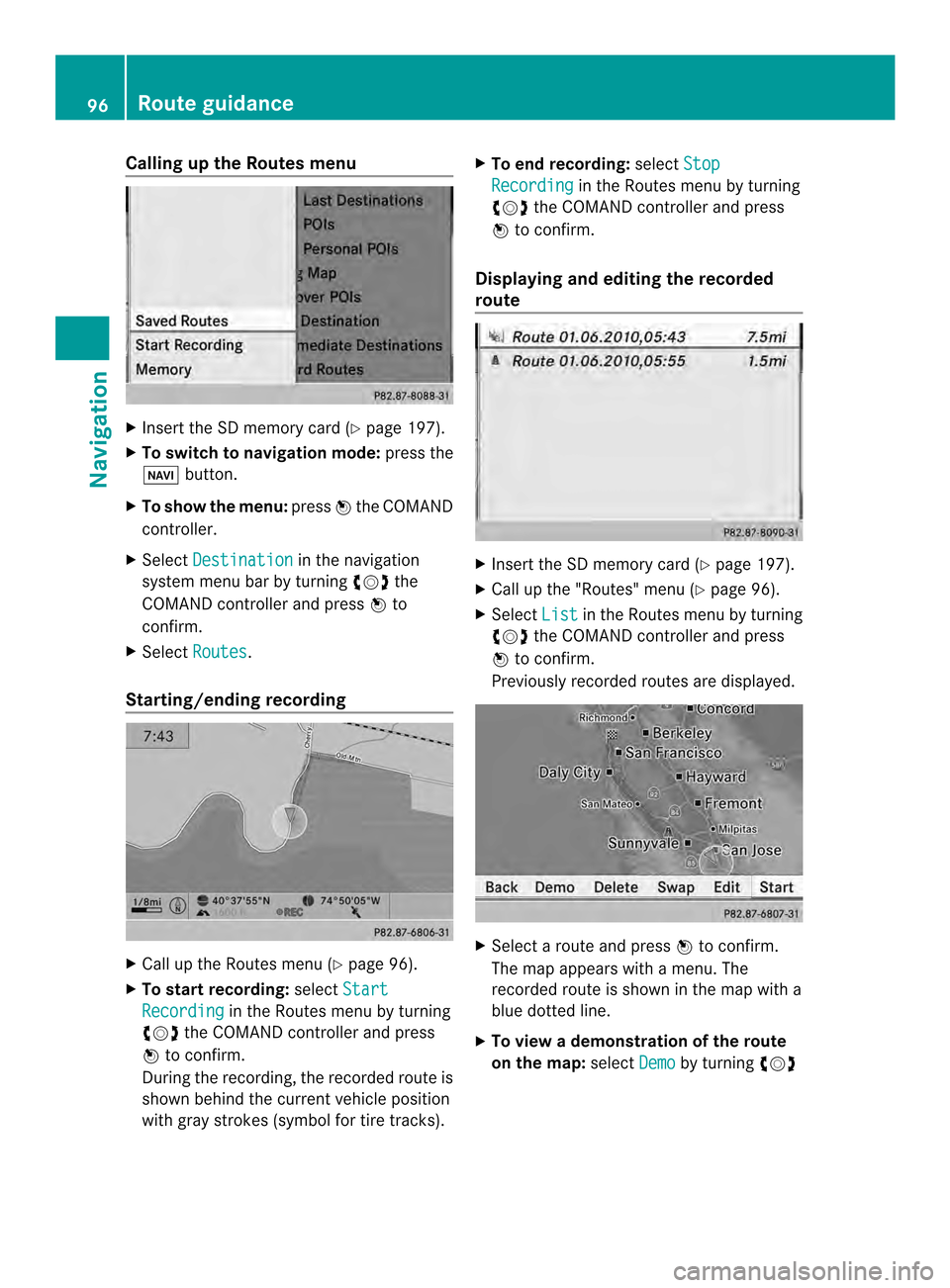
Calling up the Routes menu
X
Insert the SD memory car d(Ypage 197).
X To switch to navigation mode: press the
0012 button.
X To show the menu: press0037the COMAND
controller.
X Select Destination in the navigation
system menu bar by turning 003C0012003Dthe
COMAND controller and press 0037to
confirm.
X Select Routes .
Starting/ending recording X
Call up the Routes menu (Y page 96).
X To start recording: selectStart Recording in the Routes menu by turning
003C0012003D the COMAND controller and press
0037 to confirm.
During the recording, the recorded route is
shown behind the curren tvehicle position
with gray strokes (symbol for tire tracks). X
To end recording: selectStop Recording in the Routes menu by turning
003C0012003D the COMAND controller and press
0037 to confirm.
Displaying and editing the recorded
route X
Insert the SD memory card (Y page 197).
X Call up the "Routes" menu (Y page 96).
X Select List in the Routes menu by turning
003C0012003D the COMAND controller and press
0037 to confirm.
Previously recorded routes are displayed. X
Select a route and press 0037to confirm.
The map appears with a menu. The
recorded route is shown in the map with a
blue dotted line.
X To view a demonstration of the route
on the map: selectDemo by turning
003C0012003D 96
Route guidanceNavigation
Page 100 of 274

appropriateness for use may be affected by
various factors such as time of day, time of
year and immediate weather conditions that
canno tbe judged or taken into consideration
by the COMAND system.
Route guidance to a destination that is
not on a digitized road Example: route guidance to an off-road destination
0001 Off-road destination
0002 Off-road route section (blue dashes)
0014 Current vehicle position (the tip of the
triangle indicates the vehicle’s direction
of travel)
0013 Off-road (if available)
COMAND can guide you to destinations
which are within the area of the digital map,
but which are not themselves recorded on the
map.
These destinations are known as off-road
destinations, which you can enter using the
map, for example. In these cases, COMAND
guides you for as long as possible with
navigation announcements and displays on
roads known to the system.
If the vehicle reaches an area which is not part
of the digital map, the display appears as a
split-screen view. On the right, an arrow
appears that points to off-road
destination 0001.You will hear the
announcement:" Please follow the arrow on
the display" .As the vehicle approaches the
destination, the Area of destination reached message appears. Route guidance from an off-road
location to
adestination If the vehicle position is within the area
covered by the digital map, but the map does
not contain any information about that
location, the vehicle is in an off-road location.
COMAND is also able to guide you to a
destination even from an off-road location.
At the start of route guidance, you will see the
Off Mapped Road
message, an arrow and
the distance to the destination .The arrow
shows the compass heading to the actual
destination.
The route is highlighted blue, starting from
the last recognized street the vehicle was on
before it left the map.
As soon as the vehicle is back on a road
known to the system, route guidance
continues in the usual way.
Route guidance from an off-map
location to adestination If the vehicle position is outside the area
covered by the digital map, then the vehicle
is in an off-map location .COMAND is also
able to guide you to a destination even from
an off-map location.
At the start of route guidance, you will see the
Off Mapped Road message, an arrow and
the distance to the destination. The direction
arrow shows the compass heading to the
destination.
The route is highlighted in blue from the
nearest road known to the system.
As soon as the vehicle is back on a road
known to the system, route guidance
continues in the usual way.
Off-road during route guidance Due to roadworks, for example, there may be
differences between the data on the digital
map and the actual course of the road.
In such cases, the system will temporarily be
unable to locate the vehicle position on the98
Route guidanceNavigation
Page 127 of 274
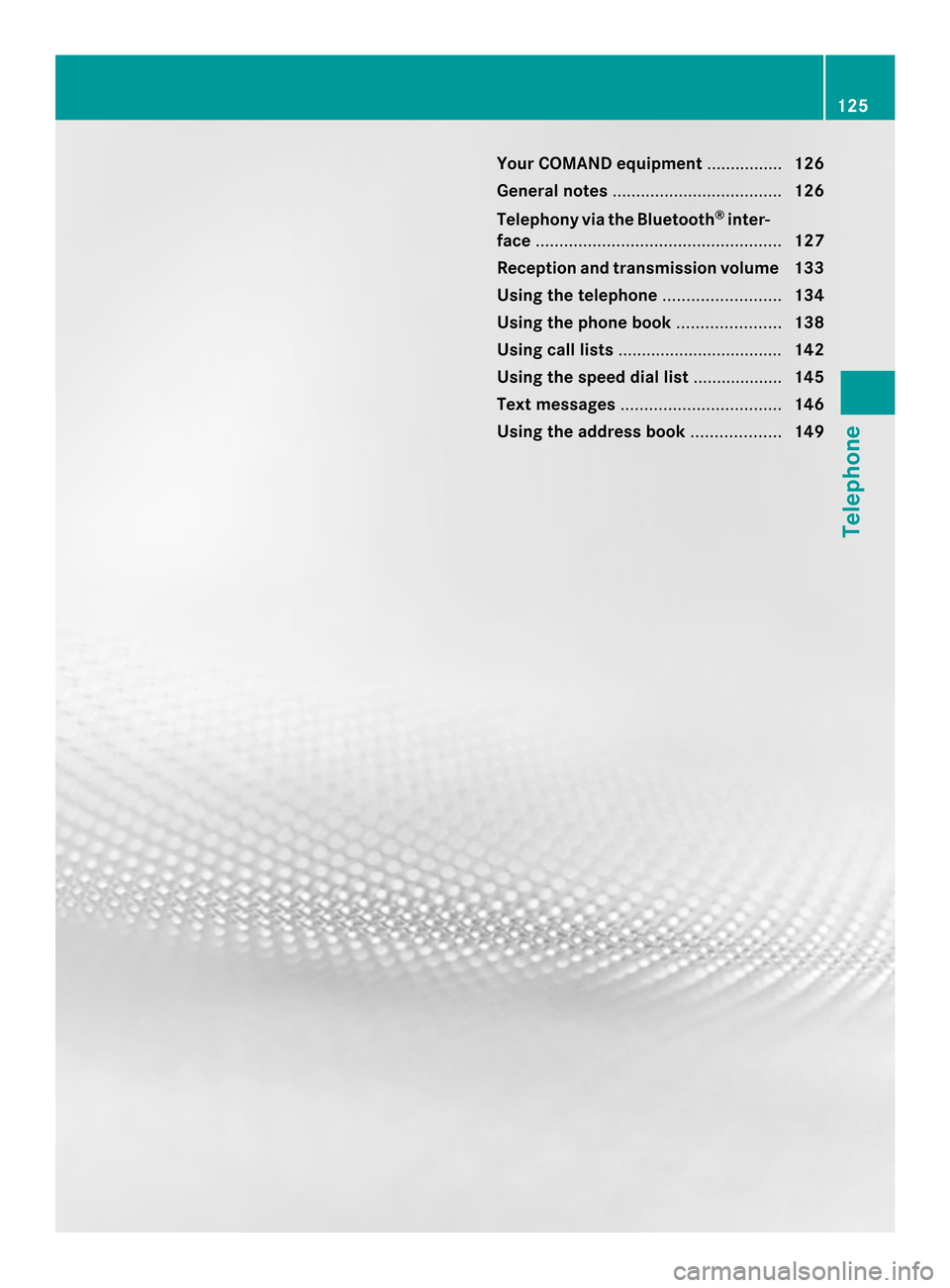
Your COMAND equipment
................126
General notes .................................... 126
Telephony via the Bluetooth ®
inter-
face .................................................... 127
Reception and transmission volume 133
Using the telephone .........................134
Using the phone book ......................138
Using call lists ................................... 142
Using the speed dial list ...................145
Text messages .................................. 146
Using the address book ...................149 125Telephone
Page 128 of 274
Your COMAND equipment
These operating instructions describe all the
standard and optional equipmen tfor your
COMAND system, as available at the time of
going to print. Country-specific differences
are possible. Please note that your COMAND
system may not be equipped with all the
features described. General notes
Important safety notes
G
WARNING
If you operate mobile communication
equipment while driving, you will be
distracted from traffic conditions. You could
also lose control of the vehicle. There is a risk
of an accident.
Only operate this equipment when the vehicle
is stationary.
If you make a call on your mobile phone while
driving, always use hands-free mode. Only
use the mobile phone when road, weather
and traffic conditions permit. Some
jurisdictions prohibit the driver from using a
mobile phone while driving a vehicle.
Bear in mind that at a speed of only 30 mph
(approximately 50 km/h), the vehicle covers
a distance of 44 feet (approximately 14 m)
per second.
Excessive levels of electromagnetic radiation
may cause damage to your health and the
health of others.
There is scientific discussion surrounding the
possible health risks posed by
electromagnetic fields. You can reduce this
risk by using an exterior antenna.
Therefore, only use mobile communication
equipment if it is connected to the exterior
antenna of the vehicle. Introduction
COMAND provides telephony via the
Bluetooth ®
interface.
When connecting Bluetooth ®
-capable mobile
phones with PBAP (Phone BookAccess
Profile), the contacts are automatically
downloaded to COMAND.
With a suitable mobile phone, you can use the
hands-free system and receive vCards via the
Bluetooth ®
interface.
You can use the text message function
(receiving and reading) if the mobile phone
supports the MAP (Message AccessProfile)
Bluetooth ®
profile.
You can obtain more detailed information
about suitable mobile phones and about
connecting Bluetooth ®
-capable mobile
phones to COMAND on the Internet at
http://www.mbusa-mobile.com. Or call
the Mercedes-Benz Customer Assistance
center at
1-800-FOR-MERCedes(1-800-367-6372) for
the USA or at 1-800-387-0100 for Canada. Call disconnection while the vehicle is
in motion
Ac all may be disconnected if:
R there is insufficient network coverage in
certain areas.
R you move from one transmitter/receiver
area (cell) into another and no channels are
free.
R you use a SIM card which is no tcompatible
with the network available. Operating options
You can operate the telephone by:
R using the COMAND controller:
turn 003C0012003D
slide 003400120035 or003600120008 126
General notesTelephone