light MERCEDES-BENZ CL COUPE 2009 Owners Manual
[x] Cancel search | Manufacturer: MERCEDES-BENZ, Model Year: 2009, Model line: CL COUPE, Model: MERCEDES-BENZ CL COUPE 2009Pages: 421, PDF Size: 10.78 MB
Page 252 of 421
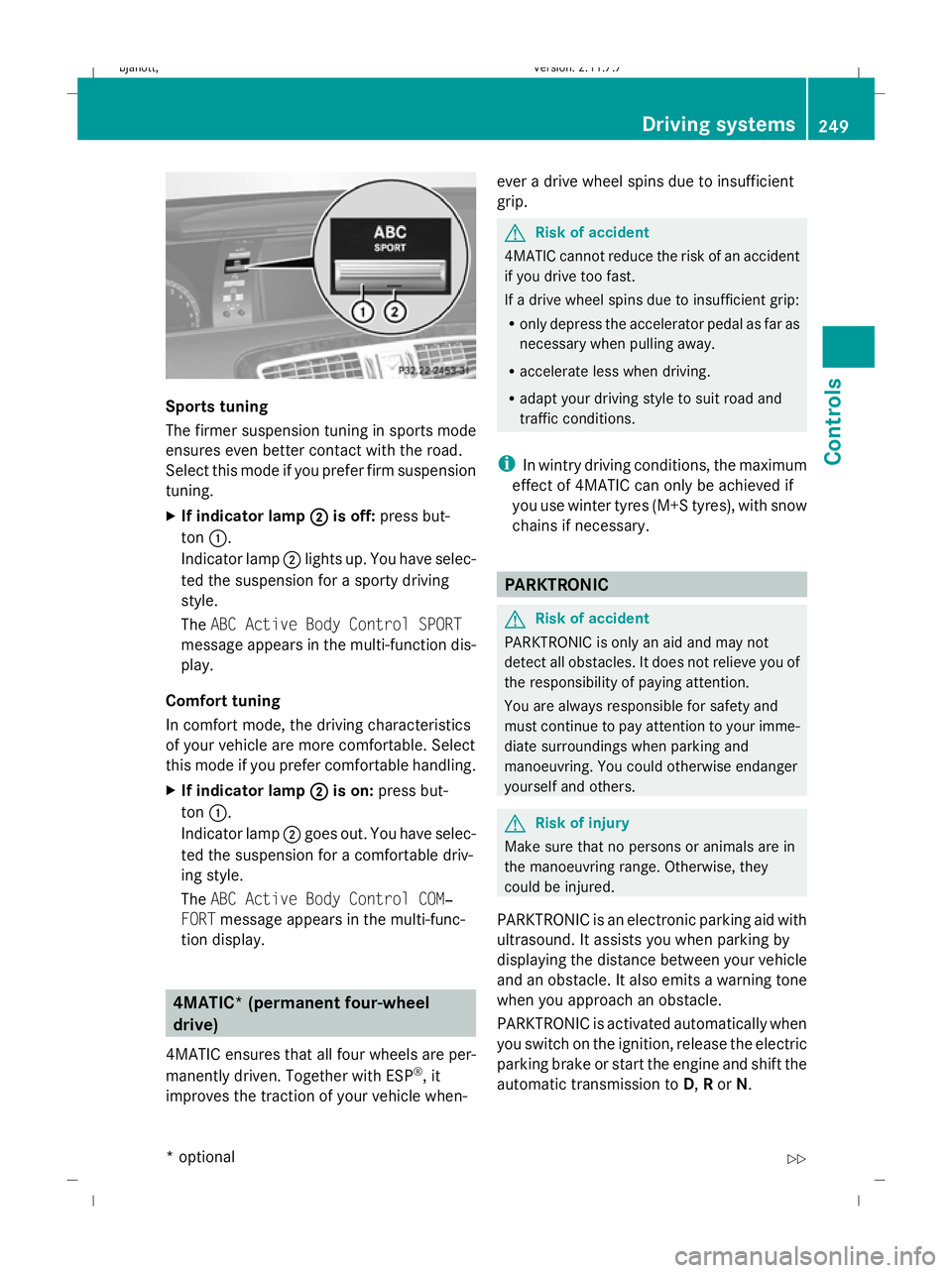
Sports tuning
The firmer suspension tuning in sports mode
ensures even better contact with the road.
Select this mode if you prefer firm suspension
tuning.
X
If indicator lamp ;
; is off: press but-
ton :.
Indicator lamp ;lights up. You have selec-
ted the suspension for a sporty driving
style.
The ABC Active Body Control SPORT
message appears in the multi-function dis-
play.
Comfort tuning
In comfort mode, the driving characteristics
of your vehicle are more comfortable. Select
this mode if you prefer comfortable handling.
X If indicator lamp ; ;is on: press but-
ton :.
Indicator lamp ;goes out. You have selec-
ted the suspension for a comfortable driv-
ing style.
The ABC Active Body Control COM‐
FORT message appears in the multi-func-
tion display. 4MATIC* (permanent four-wheel
drive)
4MATIC ensures that all four wheels are per-
manently driven. Together with ESP ®
, it
improves the traction of your vehicle when- ever a drive wheel spins due to insufficient
grip. G
Risk of accident
4MATIC cannot reduce the risk of an accident
if you drive too fast.
If a drive wheel spins due to insufficient grip:
R only depress the accelerator pedal as far as
necessary when pulling away.
R accelerate less when driving.
R adapt your driving style to suit road and
traffic conditions.
i In wintry driving conditions, the maximum
effect of 4MATIC can only be achieved if
you use winter tyres (M+S tyres), with snow
chains if necessary. PARKTRONIC
G
Risk of accident
PARKTRONIC is only an aid and may not
detect all obstacles. It does not relieve you of
the responsibility of paying attention.
You are always responsible for safety and
must continue to pay attention to your imme-
diate surroundings when parking and
manoeuvring. You could otherwise endanger
yourself and others. G
Risk of injury
Make sure that no persons or animals are in
the manoeuvring range. Otherwise, they
could be injured.
PARKTRONIC is an electronic parking aid with
ultrasound. It assists you when parking by
displaying the distance between your vehicle
and an obstacle. It also emits a warning tone
when you approach an obstacle.
PARKTRONIC is activated automatically when
you switch on the ignition, release the electric
parking brake or start the engine and shift the
automatic transmission to D,Ror N. Driving systems
249Controls
* optional
216_AKB; 2; 3, en-GB
bjanott,
Version: 2.11.7.7 2009-02-27T14:54:17+01:00 - Seite 249 Z
Dateiname: 6515230602_buchblock.pdf; erzeugt am 04. Mar 2009 11:16:02; WK
Page 253 of 421
PARKTRONIC is deactivated at speeds above
18 km/h. PARKTRONIC is reactivated at
lower speeds. PARKTRONIC is deactivated
when you shift the automatic transmission to
P or engage the electric parking brake and
switch off the engine.
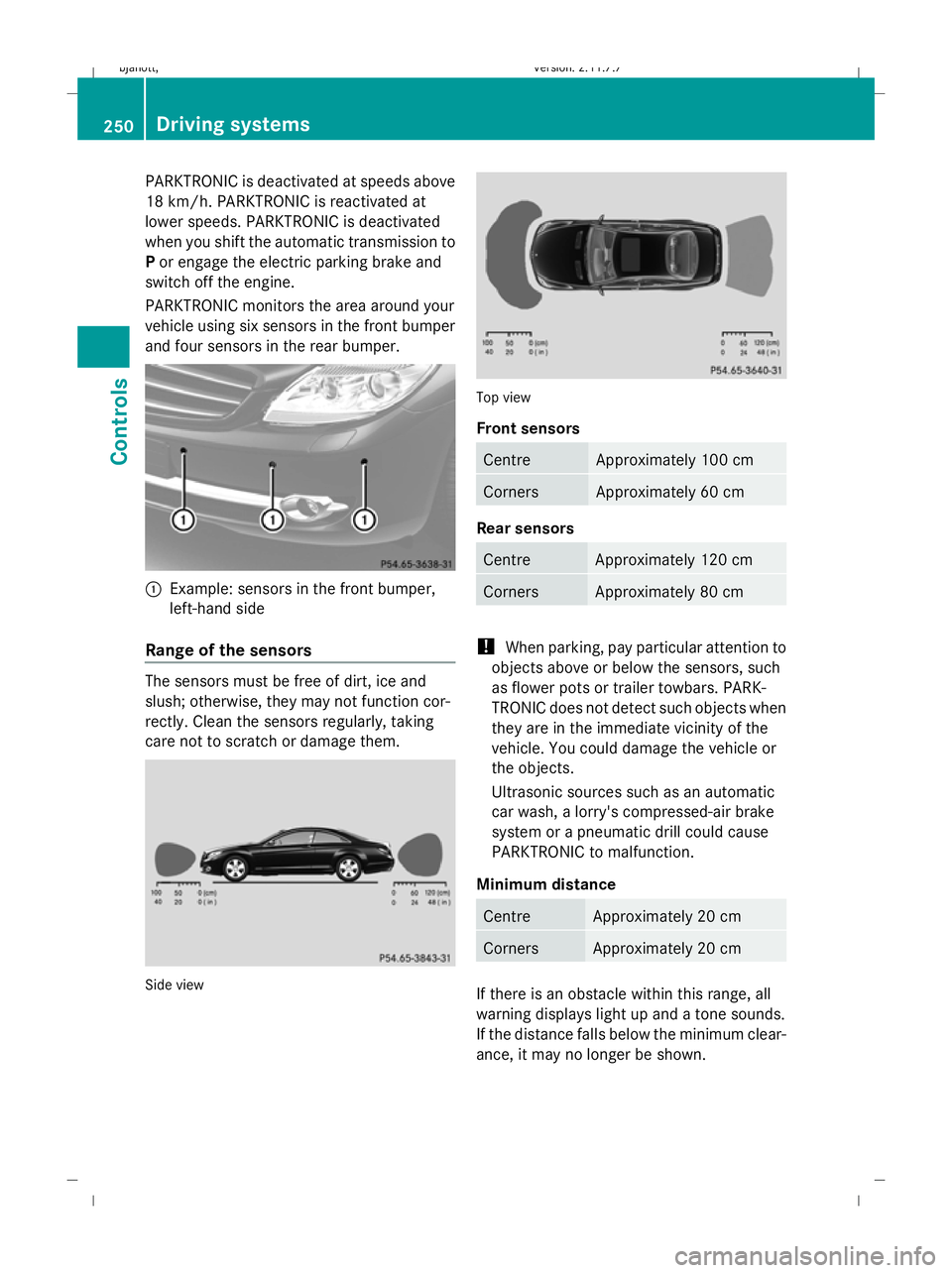
PARKTRONIC monitors the area around your
vehicle using six sensors in the front bumper
and four sensors in the rear bumper. :
Example: sensors in the front bumper,
left-hand side
Range of the sensors The sensors must be free of dirt, ice and
slush; otherwise, they may not function cor-
rectly. Clean the sensors regularly, taking
care not to scratch or damage them. Side view Top view
Front sensors
Centre Approximately 100 cm
Corners Approximately 60 cm
Rear sensors
Centre Approximately 120 cm
Corners Approximately 80 cm
!
When parking, pay particular attention to
objects above or below the sensors, such
as flower pots or trailer towbars. PARK-
TRONIC does not detect such objects when
they are in the immediate vicinity of the
vehicle. You could damage the vehicle or
the objects.
Ultrasonic sources such as an automatic
car wash, a lorry's compressed-air brake
system or a pneumatic drill could cause
PARKTRONIC to malfunction.
Minimum distance Centre Approximately 20 cm
Corners Approximately 20 cm
If there is an obstacle within this range, all
warning displays light up and a tone sounds.
If the distance falls below the minimum clear-
ance, it may no longer be shown.250
Driving systemsControls
216_AKB; 2; 3, en-GB
bjanott,
Version: 2.11.7.7 2009-02-27T14:54:17+01:00 - Seite 250
Dateiname: 6515230602_buchblock.pdf; erzeugt am 04. Mar 2009 11:16:03; WK
Page 254 of 421
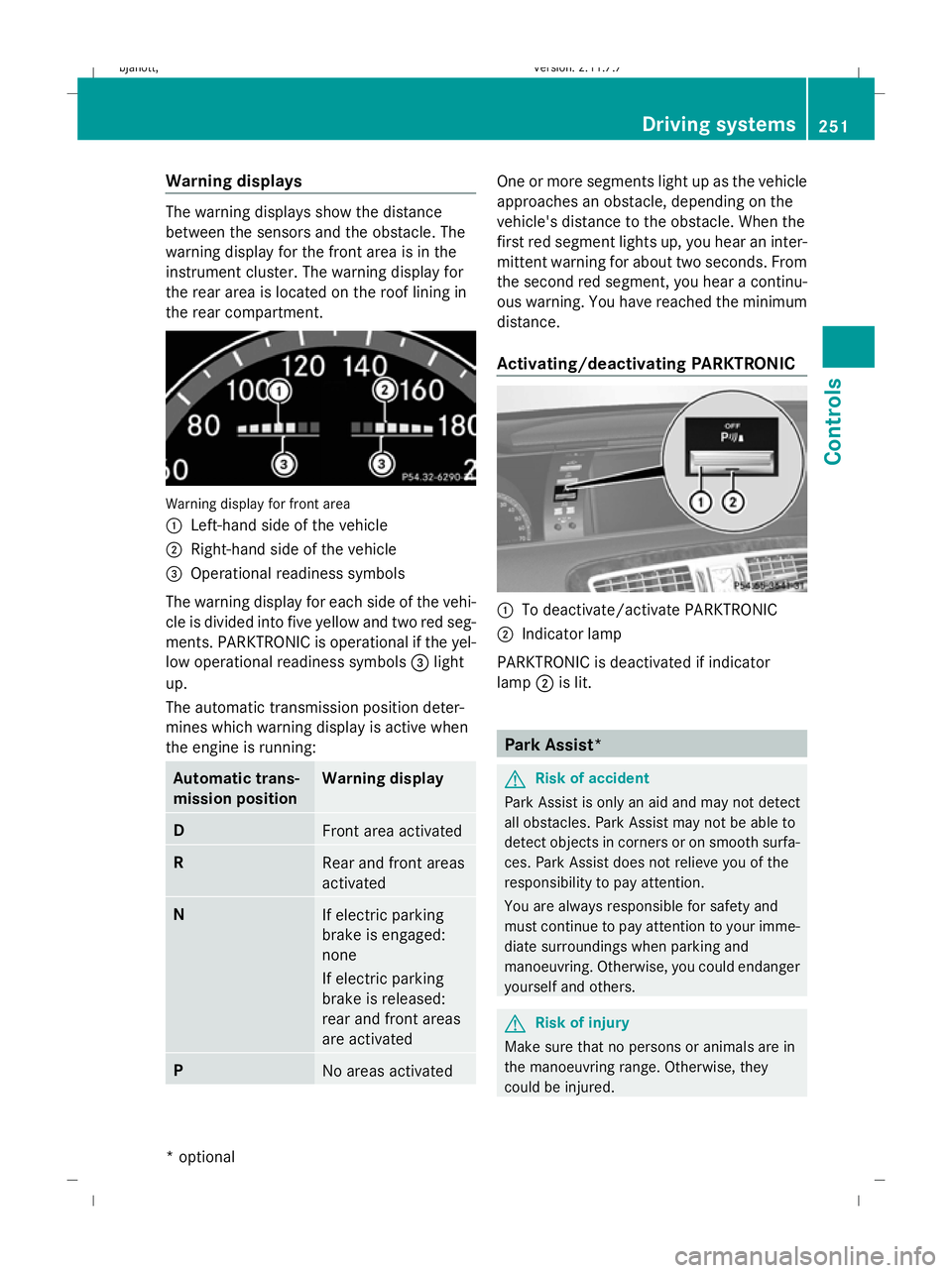
Warning displays
The warning displays show the distance
between the sensors and the obstacle. The
warning display for the front area is in the
instrument cluster. The warning display for
the rear area is located on the roof lining in
the rear compartment.
Warning display for front area
:
Left-hand side of the vehicle
; Right-hand side of the vehicle
= Operational readiness symbols
The warning display for each side of the vehi-
cle is divided into five yellow and two red seg-
ments. PARKTRONIC is operational if the yel-
low operational readiness symbols =light
up.
The automatic transmission position deter-
mines which warning display is active when
the engine is running: Automatic trans-
mission position Warning display
D
Front area activated
R
Rear and front areas
activated
N
If electric parking
brake is engaged:
none
If electric parking
brake is released:
rear and front areas
are activated
P
No areas activated One or more segments light up as the vehicle
approaches an obstacle, depending on the
vehicle's distance to the obstacle. When the
first red segment lights up, you hear an inter-
mittent warning for about two seconds. From
the second red segment, you hear a continu-
ous warning. You have reached the minimum
distance.
Activating/deactivating PARKTRONIC
:
To deactivate/activate PARKTRONIC
; Indicator lamp
PARKTRONIC is deactivated if indicator
lamp ;is lit. Park Assist*
G
Risk of accident
Park Assist is only an aid and may not detect
all obstacles. Park Assist may not be able to
detect objects in corners or on smooth surfa-
ces. Park Assist does not relieve you of the
responsibility to pay attention.
You are always responsible for safety and
must continue to pay attention to your imme-
diate surroundings when parking and
manoeuvring. Otherwise, you could endanger
yourself and others. G
Risk of injury
Make sure that no persons or animals are in
the manoeuvring range. Otherwise, they
could be injured. Driving systems
251Controls
* optional
216_AKB; 2; 3, en-GB
bjanott,
Version: 2.11.7.7 2009-02-27T14:54:17+01:00 - Seite 251 Z
Dateiname: 6515230602_buchblock.pdf; erzeugt am 04. Mar 2009 11:16:03; WK
Page 256 of 421
the area around the sensors, as Park Assist
may not work properly otherwise.
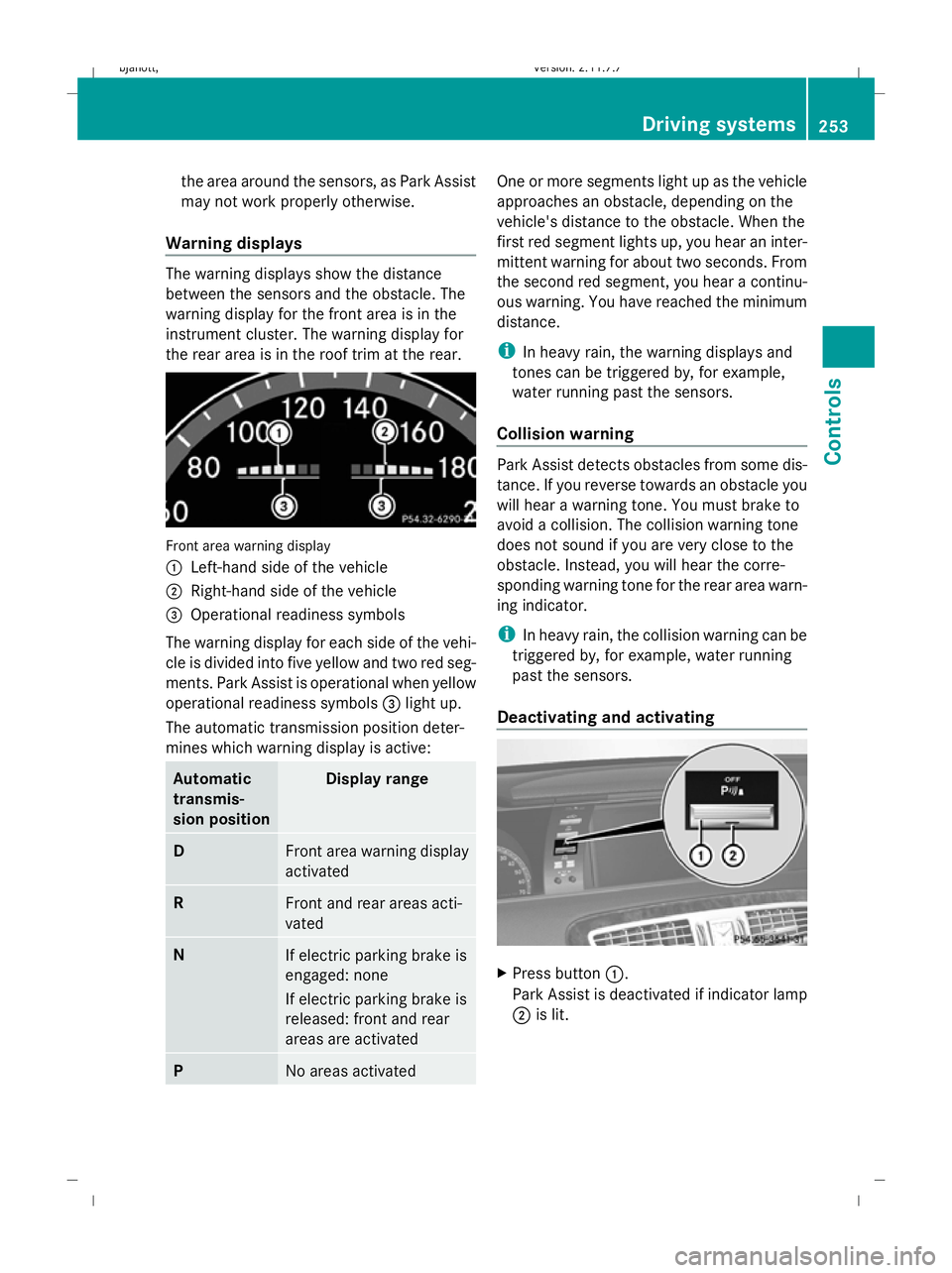
Warning displays The warning displays show the distance
between the sensors and the obstacle. The
warning display for the front area is in the
instrument cluster. The warning display for
the rear area is in the roof trim at the rear. Front area warning display
1
Left-hand side of the vehicle
2 Right-hand side of the vehicle
3 Operational readiness symbols
The warning display for each side of the vehi-
cle is divided into five yellow and two red seg-
ments. Park Assist is operational when yellow
operational readiness symbols 3light up.
The automatic transmission position deter-
mines which warning display is active: Automatic
transmis-
sion position Display range
D
Front area warning display
activated
R
Front and rear areas acti-
vated
N
If electric parking brake is
engaged: none
If electric parking brake is
released: front and rear
areas are activated P
No areas activated One or more segments light up as the vehicle
approaches an obstacle, depending on the
vehicle's distance to the obstacle. When the
first red segment lights up, you hear an inter-
mittent warning for about two seconds. From
the second red segment, you hear a continu-
ous warning. You have reached the minimum
distance.
i
In heavy rain, the warning displays and
tones can be triggered by, for example,
water running past the sensors.
Collision warning Park Assist detects obstacles from some dis-
tance. If you reverse towards an obstacle you
will hear a warning tone. You must brake to
avoid a collision. The collision warning tone
does not sound if you are very close to the
obstacle. Instead, you will hear the corre-
sponding warning tone for the rear area warn-
ing indicator.
i In heavy rain, the collision warning can be
triggered by, for example, water running
past the sensors.
Deactivating and activating X
Press button 1.
Park Assist is deactivated if indicator lamp
2 is lit. Driving systems
253Controls
216_AKB; 2; 3, en-GB
bjanott, Version: 2.11.7.7 2009-02-27T14:54:17+01:00 - Seite 253 Z
Dateiname: 6515230602_buchblock.pdf; erzeugt am 04. Mar 2009 11:16:04; WK
Page 261 of 421
G
Risk of accident
The reversing camera is only an aid and may
display obstacles in a distorted or incorrect
manner, or may not even display them at all.
The reversing camera does not relieve you of
the responsibility to pay attention. The cam-
era cannot show objects:
R very near to the rear bumper
R below the rear bumper
R in the area immediately above the boot lid
handle
You are always responsible for safety and
must continue to pay attention to your imme-
diate surroundings when parking and
manoeuvring. This applies to the areas
behind, in front of and next to the vehicle. You
could otherwise endanger yourself and oth-
ers. G
Risk of accident
Under the following circumstances, the
reversing camera will not function, or function
in a limited manner:
R if the boot lid is open
R in heavy rain, snow or fog
R at night or in very dark places
R if the camera is exposed to very bright light
R if the area is lit by fluorescent light (the dis-
play may flicker)
R if there is a sudden change in temperature,
e.g. when driving into a heated garage in
winter
R if the camera lens is dirty or obstructed
R if the rear of your vehicle is damaged. In this
event have the camera position and setting
checked at a qualified specialist workshop.
Mercedes-Benz recommends that you use
a Mercedes-Benz Service Centre for this
purpose.
Do not use the reversing camera in these
types of situation. You could otherwise injure others or damage objects and your vehicle
while you are parking.
Activating the reversing camera X
Make sure that the key is in position 2in
the ignition lock.
X Engage reverse gear.
The area behind the vehicle is shown in the
COMAND display with guide lines. G
Risk of accident
Please note that objects not on ground level
may appear to be further away than they
actually are. These include:
R the bumper of the vehicle parked behind
R trailer tow bars
R the tail-end of a lorry
R slanted posts
The lines are only guides, not accurate meas-
urements of the distance to an obstacle.
Therefore, you should never pass the red line
when approaching an obstacle. You could oth-
erwise cause an accident and injure yourself
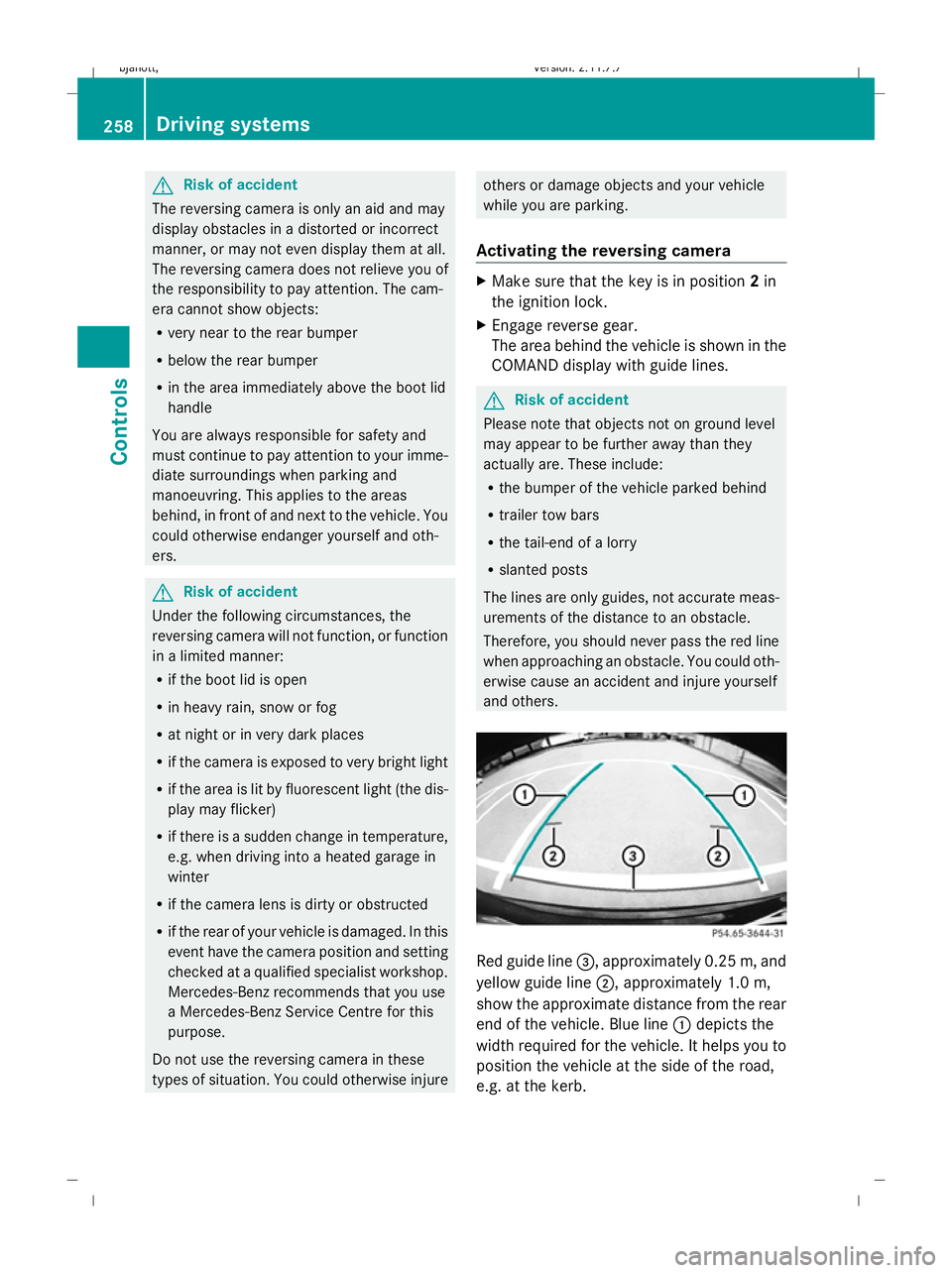
and others. Red guide line
=, approximately 0.25 m, and
yellow guide line ;, approximately 1.0 m,
show the approximate distance from the rear
end of the vehicle. Blue line :depicts the
width required for the vehicle. It helps you to
position the vehicle at the side of the road,
e.g. at the kerb. 258
Driving systemsControls
216_AKB; 2; 3, en-GB
bjanott,
Version: 2.11.7.7 2009-02-27T14:54:17+01:00 - Seite 258
Dateiname: 6515230602_buchblock.pdf; erzeugt am 04. Mar 2009 11:16:07; WK
Page 262 of 421
Night View Assist*
Night View Assist uses infrared as well as the
normal headlamps to light up the road. A
camera at the top of the windscreen picks up
the infrared light and displays a black and
white image in the multi-function display. The
image shown in the multi-function display
corresponds to a road lit up by main-beam
headlamps. This enables you to see the road's
course and any obstacles in good time. G
Risk of accident
Night View Assist is only an aid designed to
assist driving and does not relieve you of the
responsibility to pay attention. Continue to
look through the windscreen instead of rely-
ing on the Night View Assist display. You are
responsible for safety and must drive in
accordance with traffic conditions. You could
otherwise endanger yourself and others.
The system may be impaired or may not func-
tion if:
R there is poor visibility, e.g. due to snow,
rain, fog or spray.
R the windscreen is dirty, misted up or cov-
ered, for instance by a sticker, in the vicinity
of the camera.
R you drive around a bend or up or down an
incline.
Light from the headlamps of oncoming vehi-
cles does not affect the Night View Assist dis-
play. This is also the case if you cannot switch
on the main-beam headlamps because of
oncoming traffic. G
Risk of accident
Night View Assist does not detect objects in
the immediate vicinity of the vehicle. Look
through the windscreen when manoeuvring.
Make sure that there are no people or animals
in the area in which you are manoeuvring.
i Infrared light cannot be seen by the
human eye and therefore does not dazzle. Night View Assist can always remain on,
even if there is oncoming traffic.
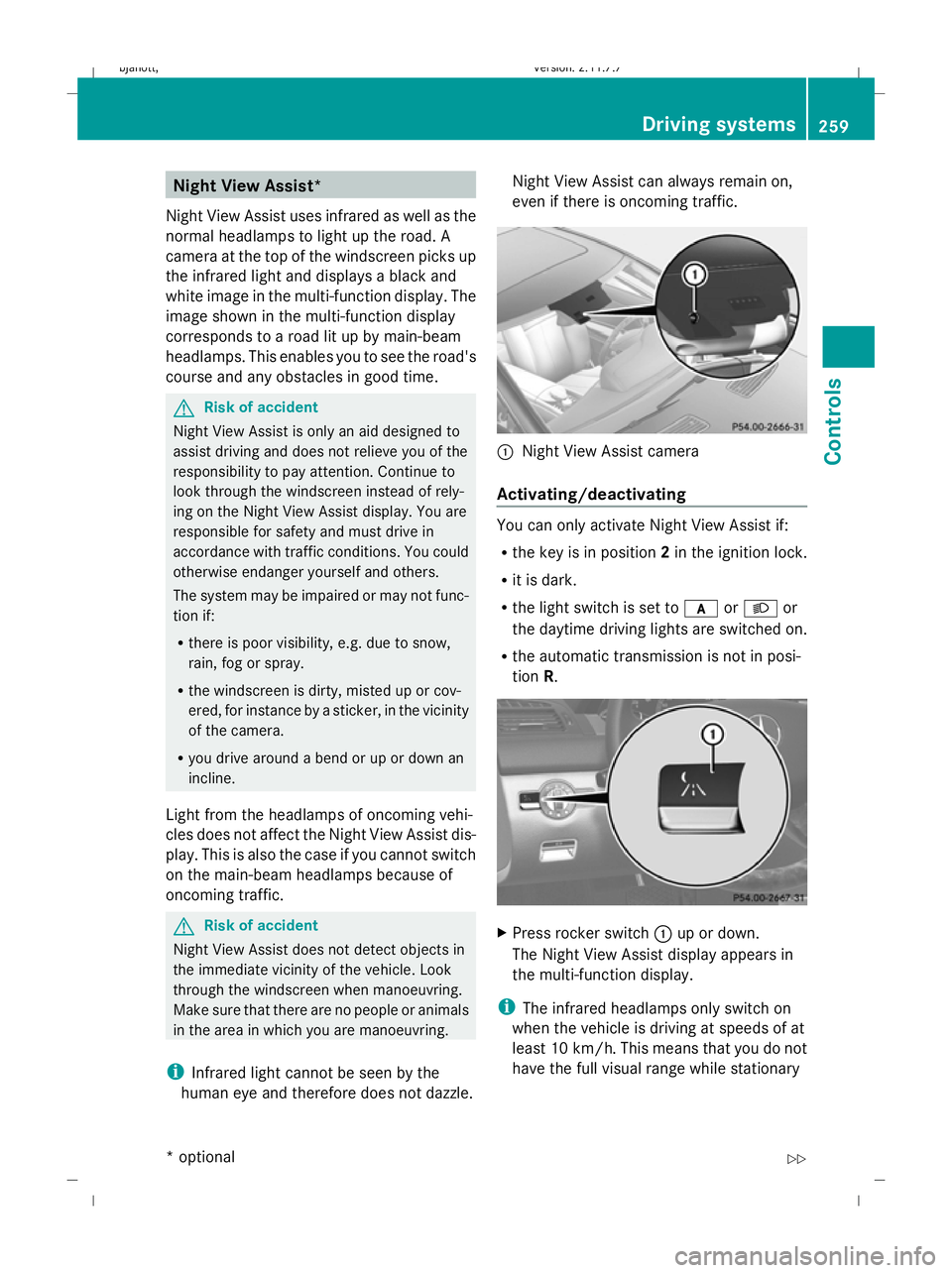
:
Night View Assist camera
Activating/deactivating You can only activate Night View Assist if:
R
the key is in position 2in the ignition lock.
R it is dark.
R the light switch is set to corL or
the daytime driving lights are switched on.
R the automatic transmission is not in posi-
tion R. X
Press rocker switch :up or down.
The Night View Assist display appears in
the multi-function display.
i The infrared headlamps only switch on
when the vehicle is driving at speeds of at
least 10 km/h. This means that you do not
have the full visual range while stationary Driving systems
259Controls
* option al
216_AKB; 2; 3, en-GB
bjanott
,V ersion: 2.11.7.7
2009-02-27T14:54:17+01:00 - Seite 259 Z
Dateiname: 6515230602_buchblock.pdf; erzeugt am 04. Mar 2009 11:16:08; WK
Page 265 of 421
Information and warning display
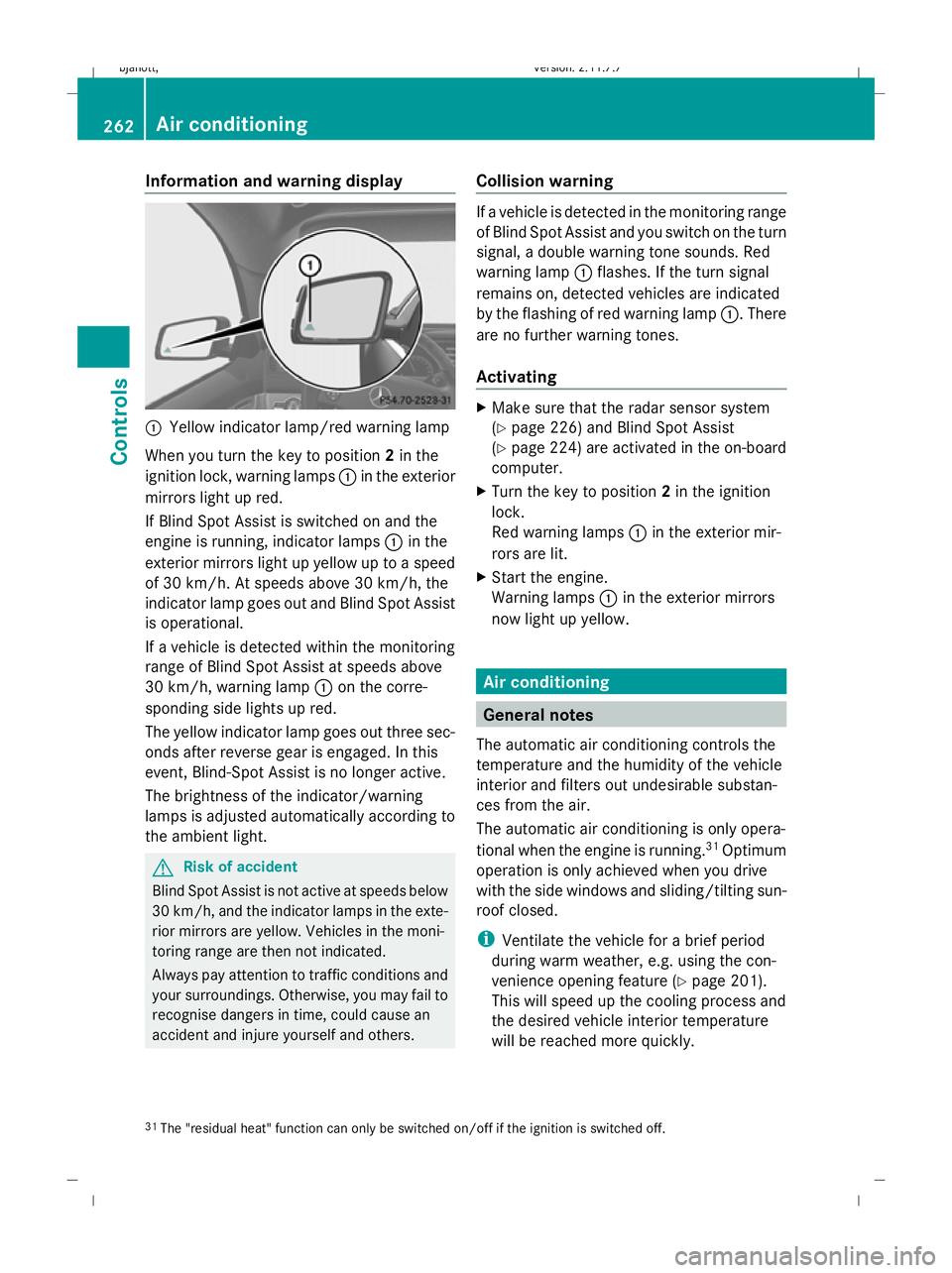
:
Yellow indicator lamp/red warning lamp
When you turn the key to position 2in the
ignition lock, warning lamps :in the exterior
mirrors light up red.
If Blind Spot Assist is switched on and the
engine is running, indicator lamps :in the
exterior mirrors light up yellow up to a speed
of 30 km/h. At speeds above 30 km/h, the
indicator lamp goes out and Blind Spot Assist
is operational.
If a vehicle is detected within the monitoring
range of Blind Spot Assist at speeds above
30 km/h, warning lamp :on the corre-
sponding side lights up red.
The yellow indicator lamp goes out three sec-
onds after reverse gear is engaged. In this
event, Blind-Spot Assist is no longer active.
The brightness of the indicator/warning
lamps is adjusted automatically according to
the ambient light. G
Risk of accident
Blind Spot Assist is not active at speeds below
30 km/h, and the indicator lamps in the exte-
rior mirrors are yellow. Vehicles in the moni-
toring range are then not indicated.
Always pay attention to traffic conditions and
your surroundings. Otherwise, you may fail to
recognise dangers in time, could cause an
accident and injure yourself and others. Collision warning If a vehicle is detected in the monitoring range
of Blind Spot Assist and you switch on the turn
signal, a double warning tone sounds. Red
warning lamp
:flashes. If the turn signal
remains on, detected vehicles are indicated
by the flashing of red warning lamp :. There
are no further warning tones.
Activating X
Make sure that the radar sensor system
(Y page 226) and Blind Spot Assist
(Y page 224) are activated in the on-board
computer.
X Turn the key to position 2in the ignition
lock.
Red warning lamps :in the exterior mir-
rors are lit.
X Start the engine.
Warning lamps :in the exterior mirrors
now light up yellow. Air conditioning
General notes
The automatic air conditioning controls the
temperature and the humidity of the vehicle
interior and filters out undesirable substan-
ces from the air.
The automatic air conditioning is only opera-
tional when the engine is running. 31
Optimum
operation is only achieved when you drive
with the side windows and sliding/tilting sun-
roof closed.
i Ventilate the vehicle for a brief period
during warm weather, e.g. using the con-
venience opening feature (Y page 201).
This will speed up the cooling process and
the desired vehicle interior temperature
will be reached more quickly.
31 The "residual heat" function can only be switched on/off if the ignition is switched off. 262
Air conditioningCont
rols
216_AKB; 2; 3, en-GB
bjanott, Version: 2.11.7.7 2009-02-27T14:54:17+01:00 - Seite 262
Dateiname: 6515230602_buchblock.pdf; erzeugt am 04. Mar 2009 11:16:09; WK
Page 271 of 421
Demisting the windows
Windows misted up on the inside X
Activate the "cooling function with air dehu-
midification" function.
X Activate automatic mode.
X If the windows continue to mist up, activate
the demisting function.
i You should only select this setting until
the windscreen is clear again.
Windows misted up on the outside X
Activate the windscreen wipers.
X Activate the automatic air conditioning.
i You should only select this setting until
the windscreen is clear again. Switching the rear window heating
on/off G
Risk of accident
Clear all windows of ice or snow before setting
off. Otherwise, impaired visibility could
endanger you and others.
i The rear window heating has a high cur-
rent draw. You should therefore switch it
off as soon as the window is clear, as it only
switches off automatically after several
minutes.
i If the battery voltage is too low, the rear
window heating may switch off.
X Turn the key to position 2in the ignition
lock.
X Press the ¤rocker switch up or down.
The indicator lamp in the ¤rocker
switch lights up or goes out. Activating/deactivating air-recircula-
tion mode
You can deactivate the flow of fresh air if
unpleasant odours are entering the vehicle
from outside. The air already inside the vehi-
cle will then be recirculated. G
Risk of accident
Only switch over to air-recirculation mode
briefly at low outside temperatures. Other-
wise, the windows could mist up, thus impair-
ing visibility and endangering yourself and
others. This may prevent you from observing
the traffic conditions, thereby causing an
accident.
X Turn the key to position 2in the ignition
lock.
X To activate: press thegrocker switch
up or down.
The indicator lamp in the grocker
switch comes on.
i Air-recirculation mode is activated auto-
matically at high outside temperatures. The
indicator lamp in the grocker switch is
not lit when automatic air-recirculation
mode is activated.
Outside air is added after about 30
minutes.
X To deactivate: press thegrocker
switch up or down.
The indicator lamp in the grocker
switch goes out. 268
Air conditioningCont
rols
216_AKB; 2; 3, en-GB
bjanott, Version: 2.11.7.7 2009-02-27T14:54:17+01:00 - Seite 268
Dateiname: 6515230602_buchblock.pdf; erzeugt am 04. Mar 2009 11:16:12; WK
Page 273 of 421
Switching the auxiliary heating/ven-
tilation* on/off
Notes on the auxiliary heating/ventila-
tion system G
Risk of poisoning
Exhaust fumes are produced when the auxili-
ary heating is in operation. Inhaling these
exhaust fumes can be poisonous. You should
therefore switch off the auxiliary heating in
confined spaces without an extraction sys-
tem, e.g. a garage. G
Risk of fire
When operating the auxiliary heating, parts of
the vehicle may become very hot, and highly
inflammable material such as fuels could be
ignited. Operating the auxiliary heating is thus
prohibited at filling stations or when your vehi-
cle is being refuelled. You must therefore
switch off the auxiliary heating at filling sta-
tions.
i Switch the auxiliary heating on regularly
once a month for about ten minutes.
The auxiliary heating heats the air in the vehi-
cle interior to the set temperature without
using the heat of the running engine. The aux-
iliary heating is operated using the vehicle's
fuel. For this reason, the tank content must
be at least at reserve fuel level to ensure that
the auxiliary heating functions.
The auxiliary heating/ventilation automati-
cally adjusts to changes in temperature and
weather conditions. For this reason, the aux-
iliary heating could switch from ventilation
mode to heating mode or from heating mode
to ventilation mode.
You cannot use the auxiliary ventilation to
cool the vehicle interior to a temperature
lower than the outside temperature. Before activating X
Turn the key to position 2in the ignition
lock.
X Set the temperature.
The auxiliary heating/ventilation can be acti-
vated even when the air conditioning is being
controlled manually. Optimum comfort can
be attained when the system is set to auto-
matic mode. set the temperature to 22 †.
The auxiliary heating/ventilation can be acti-
vated or deactivated using the remote control
or the rocker switch on the centre console.
You can use COMAND (Y page 172) or the
remote control to specify up to three depar-
ture times, one of which may be preselected.
Switching the auxiliary heating/venti-
lation on/off using the centre console
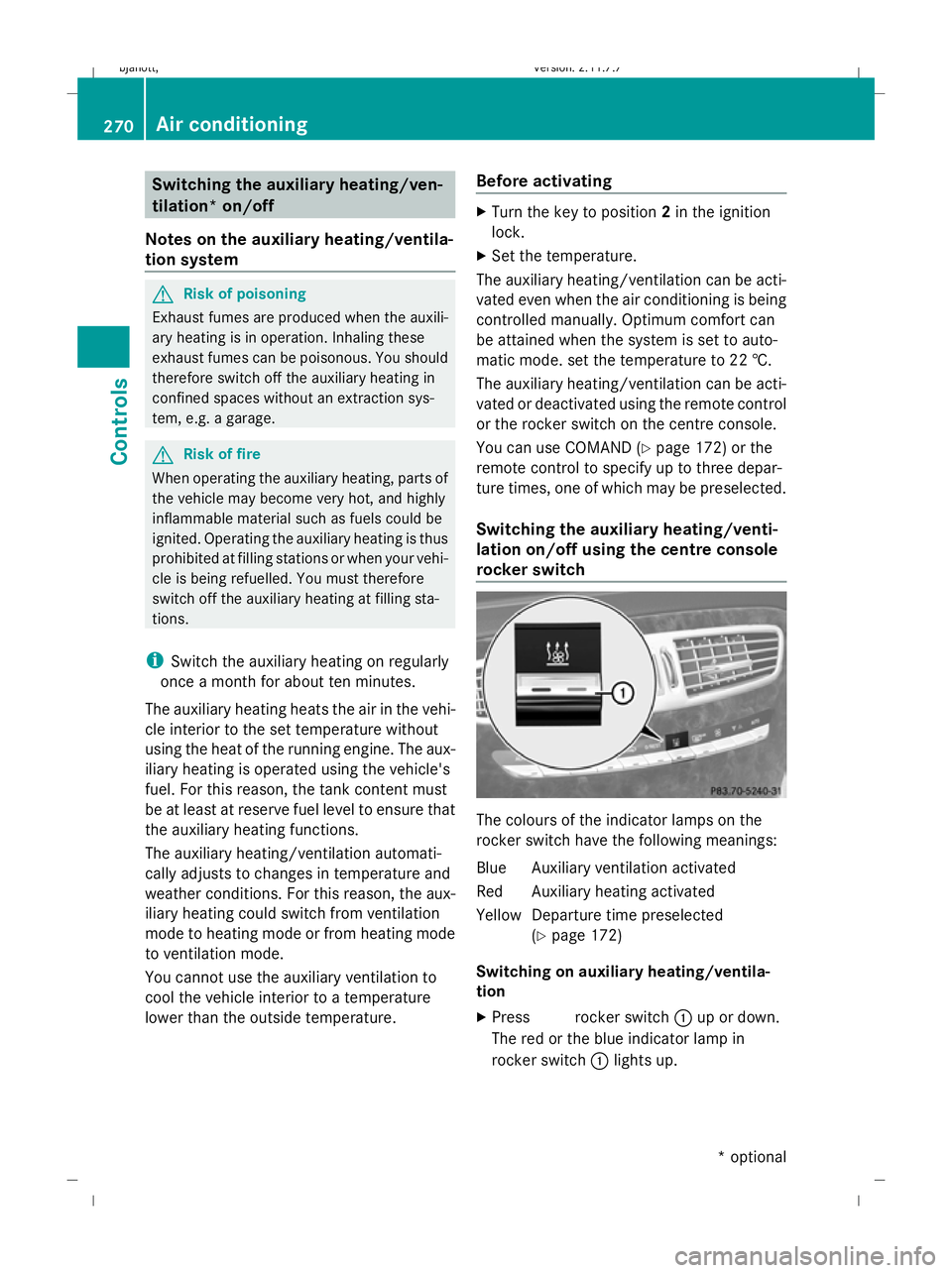
rocker switch The colours of the indicator lamps on the
rocker switch have the following meanings:
Blue Auxiliary ventilation activated
Red Auxiliary heating activated
Yellow Departure time preselected
(Ypage 172)
Switching on auxiliary heating/ventila-
tion
X Press &rocker switch :up or down.
The red or the blue indicator lamp in &
rocker switch :lights up. 270
Air conditioningControls
* optional
216_AKB; 2; 3, en-GB
bjanott,
Version: 2.11.7.7 2009-02-27T14:54:17+01:00 - Seite 270
Dateiname: 6515230602_buchblock.pdf; erzeugt am 04. Mar 2009 11:16:13; WK
Page 277 of 421
X
Start the engine.
X To switch on: briefly press&rocker
switch :up or down.
Red indicator lamp in &rocker
switch :lights up.
X To switch off: briefly press&rocker
switch :up or down.
Red indicator lamp in &rocker
switch :goes out. Sliding sunroof
General notes
G
Risk of injury
Make sure that nobody can become trapped
when closing the sliding sunroof. If there is a
risk of entrapment, release the switch and
push it briefly in any direction to stop the slid-
ing sunroof. G
Risk of injury
Children could injure themselves if they oper-
ate the sliding sunroof.
Never leave children unsupervised in the vehi-
cle. Always take the key with you when leaving
the vehicle, even if you are only leaving it for
a short time. G
Risk of injury
The glass in the panorama sunroof could
break in an accident. If you are not wearing a
seat belt, there is a risk that you could be
thrown through the opening in the event of the
vehicle overturning. Therefore, always wear a
seat belt to reduce the risk of injuries.
! Only open the panorama sliding sunroof
if it is free of snow and ice. Otherwise, mal-
functions may occur.
Do not allow anything to protrude from the
sliding sunroof. The seals could otherwise
be damaged. i
When the sliding sunroof is open, apart
from the normal airflow noises resonance
noises may also occur. They are caused by
minor pressure fluctuations in the vehicle
interior. Change the position of the sliding
sunroof or open a side window slightly to
reduce or eliminate these noises.
i Related topics:
R convenience opening from the out-
side (Y page 201) or from the inside
(Y page 269)
R convenience closing from the out-
side (Y page 201) or from the inside
(Y page 269)
R automatic closing of the sliding sunroof
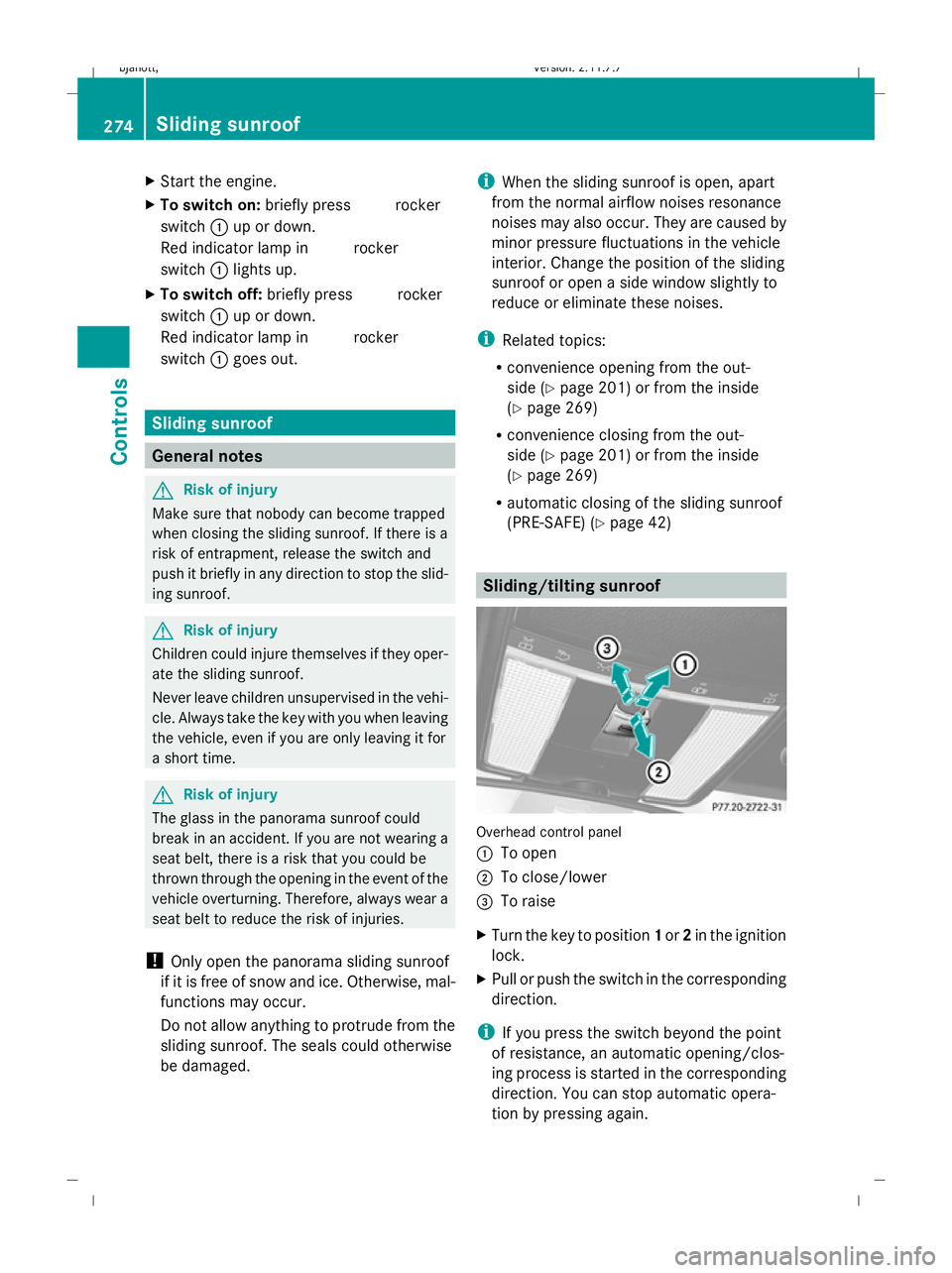
(PRE-SAFE) (Y page 42) Sliding/tilting sunroof
Overhead control panel
:
To open
; To close/lower
= To raise
X Turn the key to position 1or 2in the ignition
lock.
X Pull or push the switch in the corresponding
direction.
i If you press the switch beyond the point
of resistance, an automatic opening/clos-
ing process is started in the corresponding
direction. You can stop automatic opera-
tion by pressing again. 274
Sliding sunroofControls
216_AKB; 2; 3, en-GB
bjanott,
Version: 2.11.7.7 2009-02-27T14:54:17+01:00 - Seite 274
Dateiname: 6515230602_buchblock.pdf; erzeugt am 04. Mar 2009 11:16:14; WK