lock MERCEDES-BENZ CL COUPE 2009 Owners Manual
[x] Cancel search | Manufacturer: MERCEDES-BENZ, Model Year: 2009, Model line: CL COUPE, Model: MERCEDES-BENZ CL COUPE 2009Pages: 421, PDF Size: 10.78 MB
Page 114 of 421
Connecting a mobile phone
X
If the Bluetooth ®
interface is being
used for telephony: switch to the "Tele-
phone" menu, e.g. by pressing S.
X Select TelephoneQData/connec‐
tionsQBluetooth tele‐
phonesQConvenience telephony.
Telephone basic menu for convenience
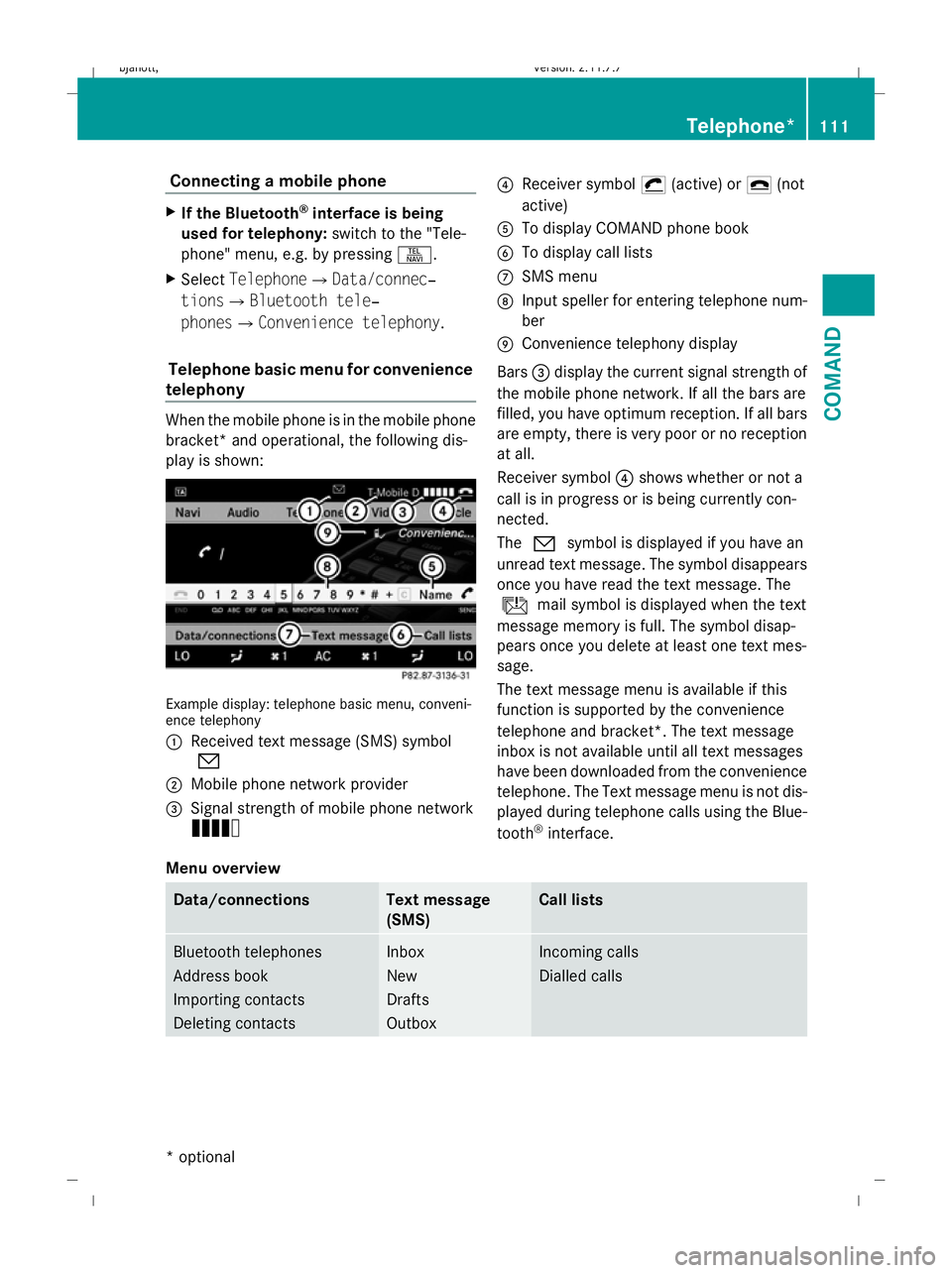
telephony When the mobile phone is in the mobile phone
bracket* and operational, the following dis-
play is shown: Example display: telephone basic menu, conveni-
ence telephony
:
Received text message (SMS) symbol
0
; Mobile phone network provider
= Signal strength of mobile phone network
Ä ?
Receiver symbol ¡(active) or ¢(not
active)
A To display COMAND phone book
B To display call lists
C SMS menu
D Input speller for entering telephone num-
ber
E Convenience telephony display
Bars =display the current signal strength of
the mobile phone network. If all the bars are
filled, you have optimum reception. If all bars
are empty, there is very poor or no reception
at all.
Receiver symbol ?shows whether or not a
call is in progress or is being currently con-
nected.
The 0 symbol is displayed if you have an
unread text message. The symbol disappears
once you have read the text message. The
ú mail symbol is displayed when the text
message memory is full. The symbol disap-
pears once you delete at least one text mes-
sage.
The text message menu is available if this
function is supported by the convenience
telephone and bracket*. The text message
inbox is not available until all text messages
have been downloaded from the convenience
telephone. The Text message menu is not dis-
played during telephone calls using the Blue-
tooth ®
interface.
Menu overview Data/connections Text message
(SMS) Call lists
Bluetooth telephones
Address book
Importing contacts
Deleting contacts Inbox
New
Drafts
Outbox Incoming calls
Dialled calls Telephone*
111COMAND
* optional
216_AKB; 2; 3, en-GB
bjanott
,V ersion: 2.11.7.7
2009-02-27T14:54:17+01:00 - Seite 111 Z
Dateiname: 6515230602_buchblock.pdf; erzeugt am 04. Mar 2009 11:15:07; WK
Page 115 of 421
Changing between Bluetooth
®
and
convenience telephony*
If your vehicle is equipped with convenience
telephony*, you can switch between teleph-
ony types. If you want to use another mobile
phone, you will first need to connect it
(Y page 107).
Switching telephony type during opera-
tion During operation, you can switch from one
telephony type to another by connecting
another mobile phone or by making a selec-
tion from the list.
Switching telephony type when switch-
ing on By default, COMAND performs the following
actions when it is switched on:
Mobile phone is inserted in mobile phone
bracket*
COMAND starts convenience telephony*.
If no mobile phone is inserted in the mobile
phone bracket*, the following message
appears: Telephone not inserted . This is
followed by a prompt asking you whether you
wish to switch to Bluetooth ®
telephony. If you
confirm by selecting Yes, theReady for
Bluetooth telephony... message will
appear. COMAND will search for the two
mobile phones last connected via the Blue-
tooth ®
interface. If one of the two mobile
phones is found, the telephone basic menu
for Bluetooth ®
telephony (Y page 109)
appears. If neither of the two mobile phones
is found, the Ready for Bluetooth tel‐
ephony... message remains on the display.
You now have to register your mobile phone
(Y page 107).
If there is a mobile phone in the bracket*, the
telephone basic menu for convenience tel-
ephony* (Y page 111) appears. No mobile phone is inserted in mobile
phone bracket*
COMAND starts telephony via the Blue-
tooth
®
interface and searches for the last two
mobile phones to have been connected via
the Bluetooth ®
interface. If one of the two
mobile phones is found, the telephone basic
menu for Bluetooth ®
telephony
(Y page 109) appears. If neither of the two
mobile phones is found, the Ready for
Bluetooth telephony... message
remains on the display. You now have to reg-
ister your mobile phone (Y page 107).
i The Bluetooth ®
connection to the mobile
phone remains active until the next time
COMAND is switched off if you do not con-
nect a different mobile phone via the phone
list. Reception and transmission volume
The following information is valid for Blue-
tooth ®
interface telephony and convenience
telephony*.
Incorrect reception and transmission volume
settings may result in serious impairment of
speech quality.
You can therefore optimise the settings. Find
out about the optimum setting for your mobile
phone from your Mercedes-Benz Service
Centre or on the Internet at
www.mercedes-benz.com.
X Select Data/connections QBlue‐
tooth telephones.
X Once the desired mobile phone has been
selected:
Select Options QReception volume or
Transmission volume.
i The Reception volume andTransmis‐
sion volume options only appear when
the selected mobile phone is authorised. 112
Telephone*COMAND
* optional
216_AKB; 2; 3, en-GB
bjanott
,V ersion: 2.11.7.7
2009-02-27T14:54:17+01:00 - Seite 112
Dateiname: 6515230602_buchblock.pdf; erzeugt am 04. Mar 2009 11:15:07; WK
Page 116 of 421
X
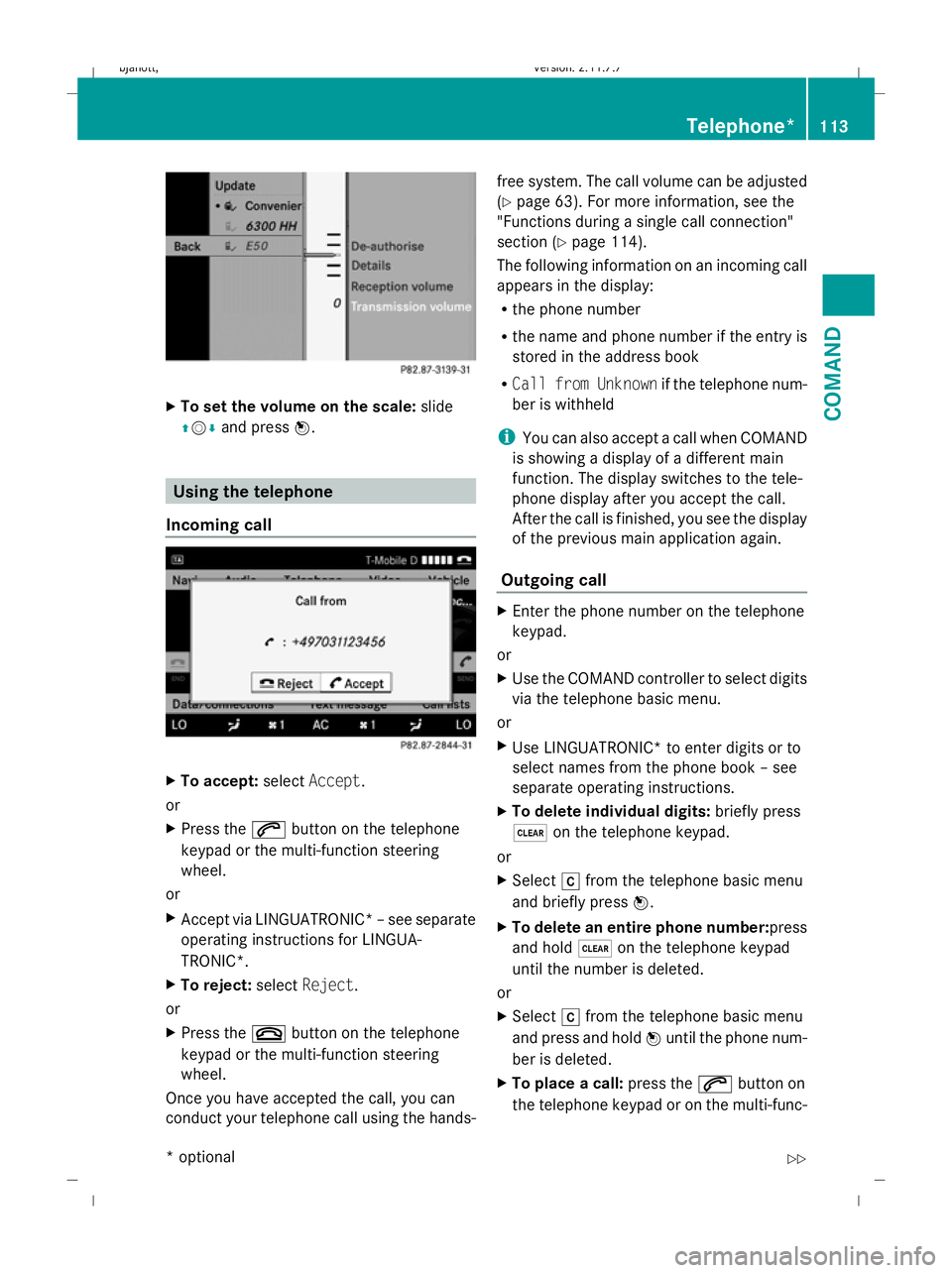
To set the volume on the scale: slide
ZV Æand press W. Using the telephone
Incoming call X
To accept: selectAccept .
or
X Press the 6button on the telephone
keypad or the multi-function steering
wheel.
or
X Accept via LINGUATRONIC* –see separate
operating instructions for LINGUA-
TRONIC*.
X To reject: selectReject.
or
X Press the ~button on the telephone
keypad or the multi-function steering
wheel.
Once you have accepted the call, you can
conduct your telephone call using the hands- free system. The call volume can be adjusted
(Y
page 63). For more information, see the
"Functions during a single call connection"
section (Y page 114).
The following information on an incoming call
appears in the display:
R the phone number
R the name and phone number if the entry is
stored in the address book
R Call from Unknown if the telephone num-
ber is withheld
i You can also accept a call when COMAND
is showing a display of a different main
function. The display switches to the tele-
phone display after you accept the call.
After the call is finished, you see the display
of the previous main application again.
Outgoing call X
Enter the phone number on the telephone
keypad.
or
X Use the COMAND controller to select digits
via the telephone basic menu.
or
X Use LINGUATRONIC* to enter digits or to
select names from the phone book – see
separate operating instructions.
X To delete individual digits: briefly press
$ on the telephone keypad.
or
X Select rfrom the telephone basic menu
and briefly press W.
X To delete an entire phone number: press
and hold $on the telephone keypad
until the number is deleted.
or
X Select rfrom the telephone basic menu
and press and hold Wuntil the phone num-
ber is deleted.
X To place a call: press the6button on
the telephone keypad or on the multi-func- Telephone*
113COMAND
* optional
216_AKB; 2; 3, en-GB
bjanott,
Version: 2.11.7.7 2009-02-27T14:54:17+01:00 - Seite 113 Z
Dateiname: 6515230602_buchblock.pdf; erzeugt am 04. Mar 2009 11:15:07; WK
Page 117 of 421
tion steering wheel or select the
6but-
ton from the telephone basic menu.
Redialling
X Change to the telephone basic menu.
X Press the 6button on the telephone
keypad.
or
X Select SENDfrom the telephone basic menu
and press W.
The list of dialled numbers appears. The
most recently dialled number is at the top.
X To select and place a call: slideZVÆand
use Wto select an entry, or press the
6 button on the COMAND control unit.
Calling voicemail 14
You can only call voicemail if the voicemail
number on the SIM card is stored under the
4 button on your mobile phone.
X Press and hold the 4button on the tele-
phone keypad.
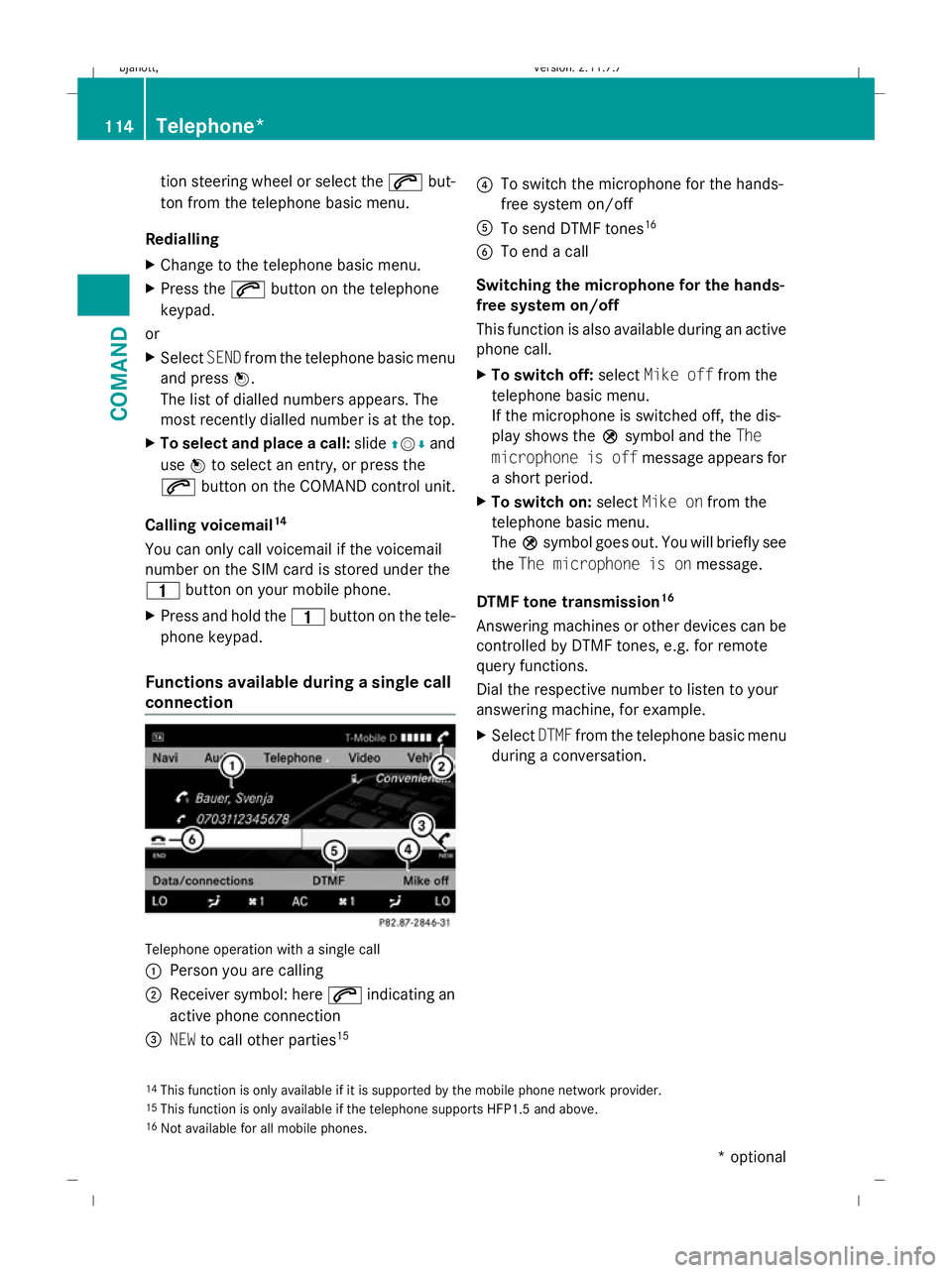
Functions available during a single call
connection Telephone operation with a single call
:
Person you are calling
; Receiver symbol: here 6indicating an
active phone connection
= NEW to call other parties 15 ?
To switch the microphone for the hands-
free system on/off
A To send DTMF tones 16
B To end a call
Switching the microphone for the hands-
free system on/off
This function is also available during an active
phone call.
X To switch off: selectMike off from the
telephone basic menu.
If the microphone is switched off, the dis-
play shows the Qsymbol and the The
microphone is off message appears for
a short period.
X To switch on: selectMike on from the
telephone basic menu.
The Qsymbol goes out. You will briefly see
the The microphone is on message.
DTMF tone transmission 16
Answering machines or other devices can be
controlled by DTMF tones, e.g. for remote
query functions.
Dial the respective number to listen to your
answering machine, for example.
X Select DTMFfrom the telephone basic menu
during a conversation.
14 This function is only available if it is supported by the mobile phone network provider.
15 This function is only available if the telephone supports HFP1.5 and above.
16 Not available for all mobile phones. 114
Telephone*COMAND
* optional
216_AKB; 2; 3, en-GB
bjanott,
Version: 2.11.7.7 2009-02-27T14:54:17+01:00 - Seite 114
Dateiname: 6515230602_buchblock.pdf; erzeugt am 04. Mar 2009 11:15:08; WK
Page 118 of 421
:
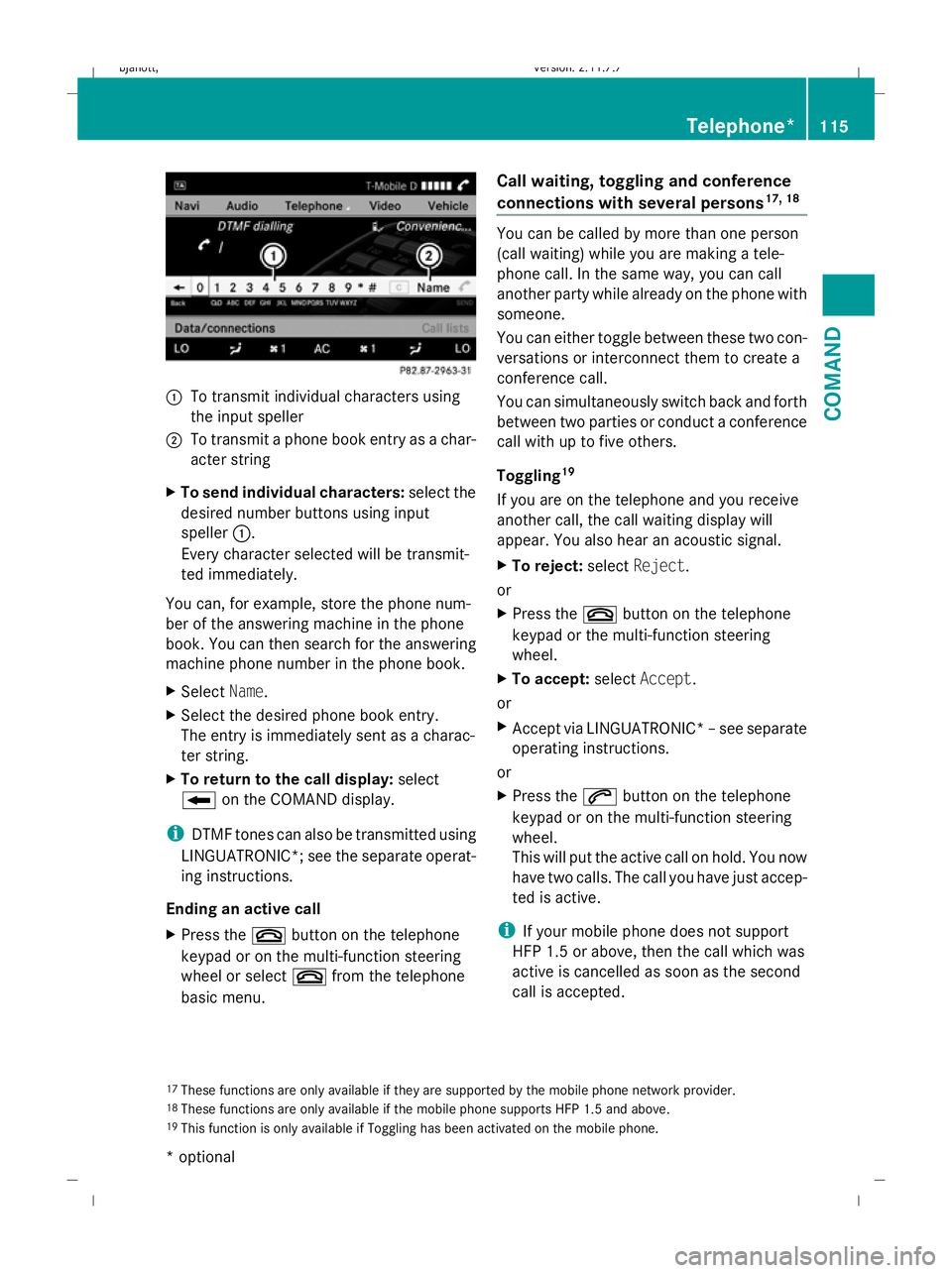
To transmit individual characters using
the input speller
; To transmit a phone book entry as a char-
acter string
X To send individual characters: select the
desired number buttons using input
speller :.
Every character selected will be transmit-
ted immediately.
You can, for example, store the phone num-
ber of the answering machine in the phone
book. You can then search for the answering
machine phone number in the phone book.
X Select Name.
X Select the desired phone book entry.
The entry is immediately sent as a charac-
ter string.
X To return to the call display: select
B on the COMAND display.
i DTMF tones can also be transmitted using
LINGUATRONIC*; see the separate operat-
ing instructions.
Ending an active call
X Press the ~button on the telephone
keypad or on the multi-function steering
wheel or select ~from the telephone
basic menu. Call waiting, toggling and conference
connections with several persons
17, 18 You can be called by more than one person
(call waiting) while you are making a tele-
phone call. In the same way, you can call
another party while already on the phone with
someone.
You can either toggle between these two con-
versations or interconnect them to create a
conference call.
You can simultaneously switch back and forth
between two parties or conduct a conference
call with up to five others.
Toggling
19
If you are on the telephone and you receive
another call, the call waiting display will
appear. You also hear an acoustic signal.
X To reject: selectReject.
or
X Press the ~button on the telephone
keypad or the multi-function steering
wheel.
X To accept: selectAccept.
or
X Accept via LINGUATRONIC* –see separate
operating instructions.
or
X Press the 6button on the telephone
keypad or on the multi-function steering
wheel.
This will put the active call on hold. You now
have two calls. The call you have just accep-
ted is active.
i If your mobile phone does not support
HFP 1.5 or above, then the call which was
active is cancelled as soon as the second
call is accepted.
17 These functions are only available if they are supported by the mobile phone network provider.
18 These functions are only available if the mobile phone supports HFP 1.5 and above.
19 This function is only available if Toggling has been activated on the mobile phone. Telephone*
115COMAND
* optional
216_AKB; 2; 3, en-GB
bjanott,
Version: 2.11.7.7
2009-02-27T14:54:17+01:00 - Seite 115 Z
Dateiname: 6515230602_buchblock.pdf; erzeugt am 04. Mar 2009 11:15:08; WK
Page 119 of 421
Calling additional parties
You can call a second person while on the
phone with someone else. This action puts
the previous call on hold.
X Select NEWfrom the telephone basic menu
and press W.
or
X Select SENDon the telephone keypad.
X Enter the phone number manually
(Y page 113) or using the phone book
(Y page 119).
Switching between two parties (toggling)
If you have added another party to your pre-
viously active call, the telephone menu then
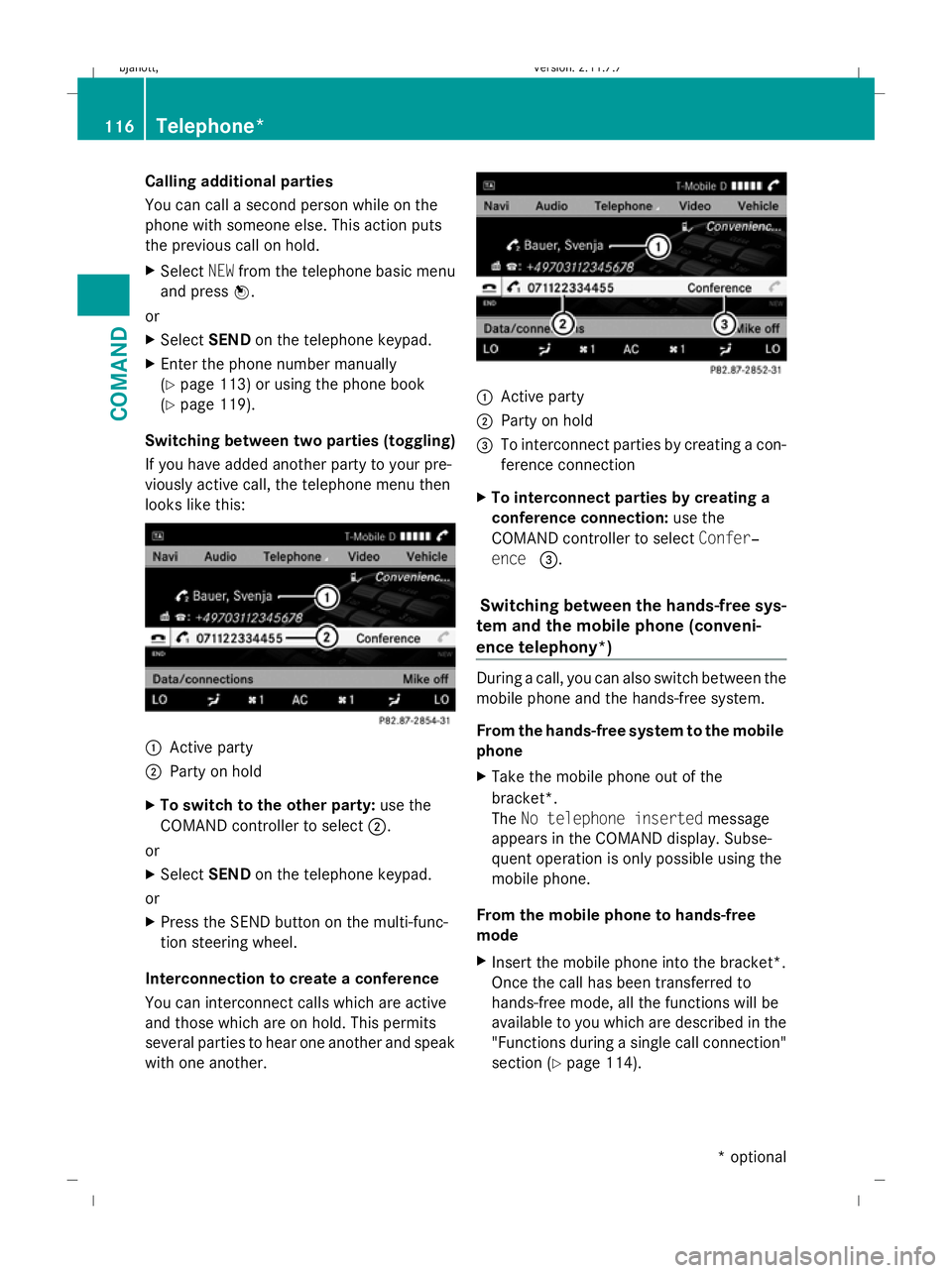
looks like this: :
Active party
; Party on hold
X To switch to the other party: use the
COMAND controller to select ;.
or
X Select SENDon the telephone keypad.
or
X Press the SEND button on the multi-func-
tion steering wheel.
Interconnection to create a conference
You can interconnect calls which are active
and those which are on hold. This permits
several parties to hear one another and speak
with one another. :
Active party
; Party on hold
= To interconnect parties by creating a con-
ference connection
X To interconnect parties by creating a
conference connection: use the
COMAND controller to select Confer‐
ence =.
Switching between the hands-free sys-
tem and the mobile phone (conveni-
ence telephony*) During a call, you can also switch between the
mobile phone and the hands-free system.
From the hands-free system to the mobile
phone
X
Take the mobile phone out of the
bracket*.
The No telephone inserted message
appears in the COMAND display. Subse-
quent operation is only possible using the
mobile phone.
From the mobile phone to hands-free
mode
X Insert the mobile phone into the bracket*.
Once the call has been transferred to
hands-free mode, all the functions will be
available to you which are described in the
"Functions during a single call connection"
section (Y page 114). 116
Telephone*COMAND
* optional
216_AKB; 2; 3, en-GB
bjanott
,V ersion: 2.11.7.7
2009-02-27T14:54:17+01:00 - Seite 116
Dateiname: 6515230602_buchblock.pdf; erzeugt am 04. Mar 2009 11:15:08; WK
Page 120 of 421
SMS* (convenience telephony*)
Text message (SMS) functions The following text message functions are
available:
R receiving text messages
R reading text messages
R writing text messages
R managing text messages
The following conditions must be fulfilled in
order to use the functions:
R the mobile phone has been inserted in the
mobile phone bracket* and is switched on.
R the PIN has been entered.
When the mobile phone is connected, the 200
most recent text messages which are cur-
rently stored on the phone are loaded to the
COMAND's text message (SMS) inbox and
displayed. This may take a few minutes.
When the mobile phone is connected to
COMAND via the bracket*, newly received
text messages will be displayed in COMAND's
text message inbox. An audible signal can
also be heard and the /symbol appears.
Text message (SMS) menu X
Call up SMSfrom the telephone basic menu.
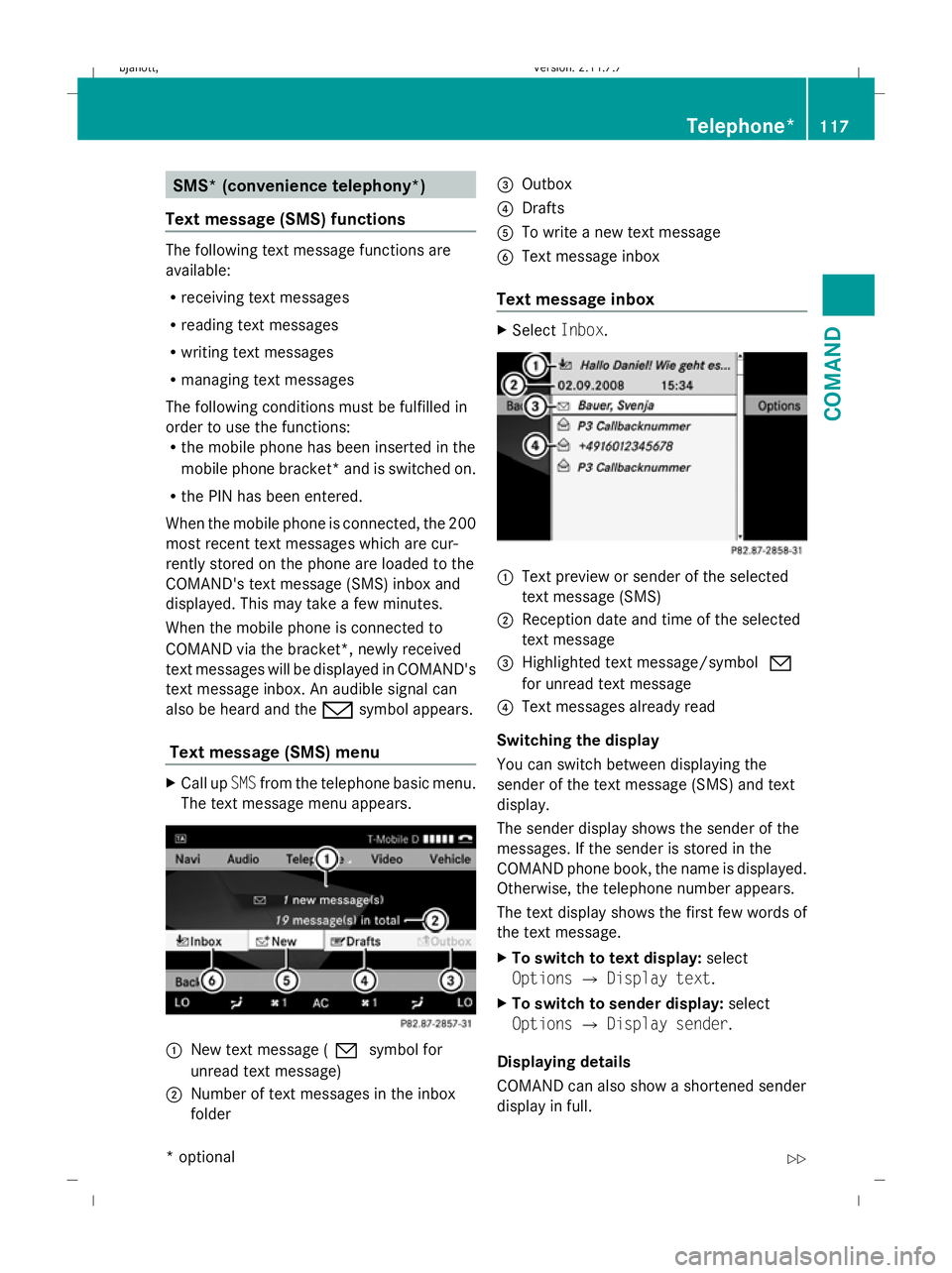
The text message menu appears. :
New text message (0 symbol for
unread text message)
; Number of text messages in the inbox
folder =
Outbox
? Drafts
A To write a new text message
B Text message inbox
Text message inbox X
Select Inbox. :
Text preview or sender of the selected
text message (SMS)
; Reception date and time of the selected
text message
= Highlighted text message/symbol 0
for unread text message
? Text messages already read
Switching the display
You can switch between displaying the
sender of the text message (SMS) and text
display.
The sender display shows the sender of the
messages. If the sender is stored in the
COMAND phone book, the name is displayed.
Otherwise, the telephone number appears.
The text display shows the first few words of
the text message.
X To switch to text display: select
Options QDisplay text.
X To switch to sender display: select
Options QDisplay sender.
Displaying details
COMAND can also show a shortened sender
display in full. Telephone*
117COMAND
* optional
216_AKB; 2; 3, en-GB
bjanott,
Version: 2.11.7.7 2009-02-27T14:54:17+01:00 - Seite 117 Z
Dateiname: 6515230602_buchblock.pdf; erzeugt am 04. Mar 2009 11:15:09; WK
Page 121 of 421

X
Select the desired text message from the
text message inbox.
X Select Options QDetails.
The detailed view appears.
X To close the detailed view: slideXVY.
Reading a text message X
Select the desired text message from the
text message inbox.
X Press W.
X To scroll through the display or to
select telephone numbers in the text:
slide ZVÆ.
The display scrolls up or down line by line,
or skips to the next or previous telephone
number and automatically highlights it.
X To return to the list: slideXVY.
Listening to a text message*
You can set the language (Y page 163) and
the speed of the read-aloud func-
tion* (Y page 160).
X Select and open the desired text message
from the text message inbox.
X Press Wand select Read aloud.
X To end reading aloud: pressWand select
End reading aloud.
Writing a new text message X
Select Newfrom the "SMS" menu. Entering the recipient
:
Recipient of the new text message
; To enter a telephone number using the
address book
= Input speller
X To enter the text message recipient
from the phone book: select;using the
COMAND controller.
X Select the desired recipient from the phone
book (Y page 120).
X To enter the recipient's phone number
manually: use the COMAND controller to
select the desired digits with input speller
=.
or
X Use the telephone keypad to enter the
desired digits.
i You can also respond directly to a text
message; the recipient will then be auto-
matically accepted. To do so, simply select
OptionsQReply in the text message
inbox. 118
Telephone*COMAND
* optional
216_AKB; 2; 3, en-GB
bjanott,
Version: 2.11.7.7 2009-02-27T14:54:17+01:00 - Seite 118
Dateiname: 6515230602_buchblock.pdf; erzeugt am 04. Mar 2009 11:15:09; WK
Page 122 of 421
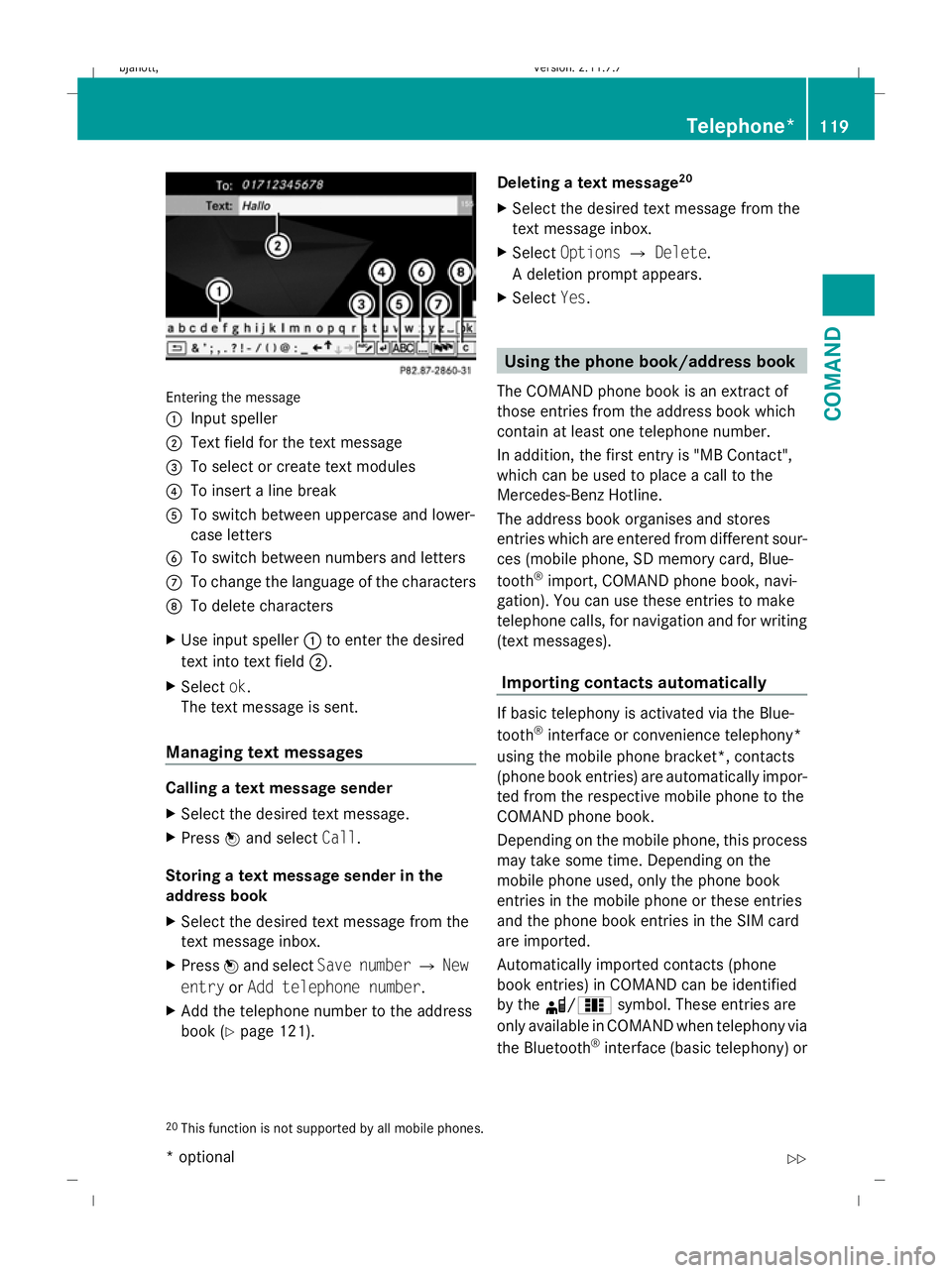
Entering the message
: Input speller
; Text field for the text message
= To select or create text modules
? To insert a line break
A To switch between uppercase and lower-
case letters
B To switch between numbers and letters
C To change the language of the characters
D To delete characters
X Use input speller :to enter the desired
text into text field ;.
X Select ok.
The text message is sent.
Managing text messages Calling a text message sender
X
Select the desired text message.
X Press Wand select Call.
Storing a text message sender in the
address book
X Select the desired text message from the
text message inbox.
X Press Wand select Save number QNew
entry orAdd telephone number .
X Add the telephone number to the address
book (Y page 121). Deleting a text message
20
X Select the desired text message from the
text message inbox.
X Select Options QDelete .
A deletion prompt appears.
X Select Yes. Using the phone book/address book
The COMAND phone book is an extract of
those entries from the address book which
contain at least one telephone number.
In addition, the first entry is "MB Contact",
which can be used to place a call to the
Mercedes-Benz Hotline.
The address book organises and stores
entries which are entered from different sour-
ces (mobile phone, SD memory card, Blue-
tooth ®
import, COMAND phone book, navi-
gation). You can use these entries to make
telephone calls, for navigation and for writing
(text messages).
Importing contacts automatically If basic telephony is activated via the Blue-
tooth
®
interface or convenience telephony*
using the mobile phone bracket*, contacts
(phone book entries) are automatically impor-
ted from the respective mobile phone to the
COMAND phone book.
Depending on the mobile phone, this process
may take some time. Depending on the
mobile phone used, only the phone book
entries in the mobile phone or these entries
and the phone book entries in the SIM card
are imported.
Automatically imported contacts (phone
book entries) in COMAND can be identified
by the d/0 symbol. These entries are
only available in COMAND when telephony via
the Bluetooth ®
interface (basic telephony) or
20 This function is not supported by all mobile phones. Telephone*
119COMAND
* optional
216_AKB; 2; 3, en-GB
bjanott,
Version: 2.11.7.7
2009-02-27T14:54:17+01:00 - Seite 119 Z
Dateiname: 6515230602_buchblock.pdf; erzeugt am 04. Mar 2009 11:15:09; WK
Page 123 of 421
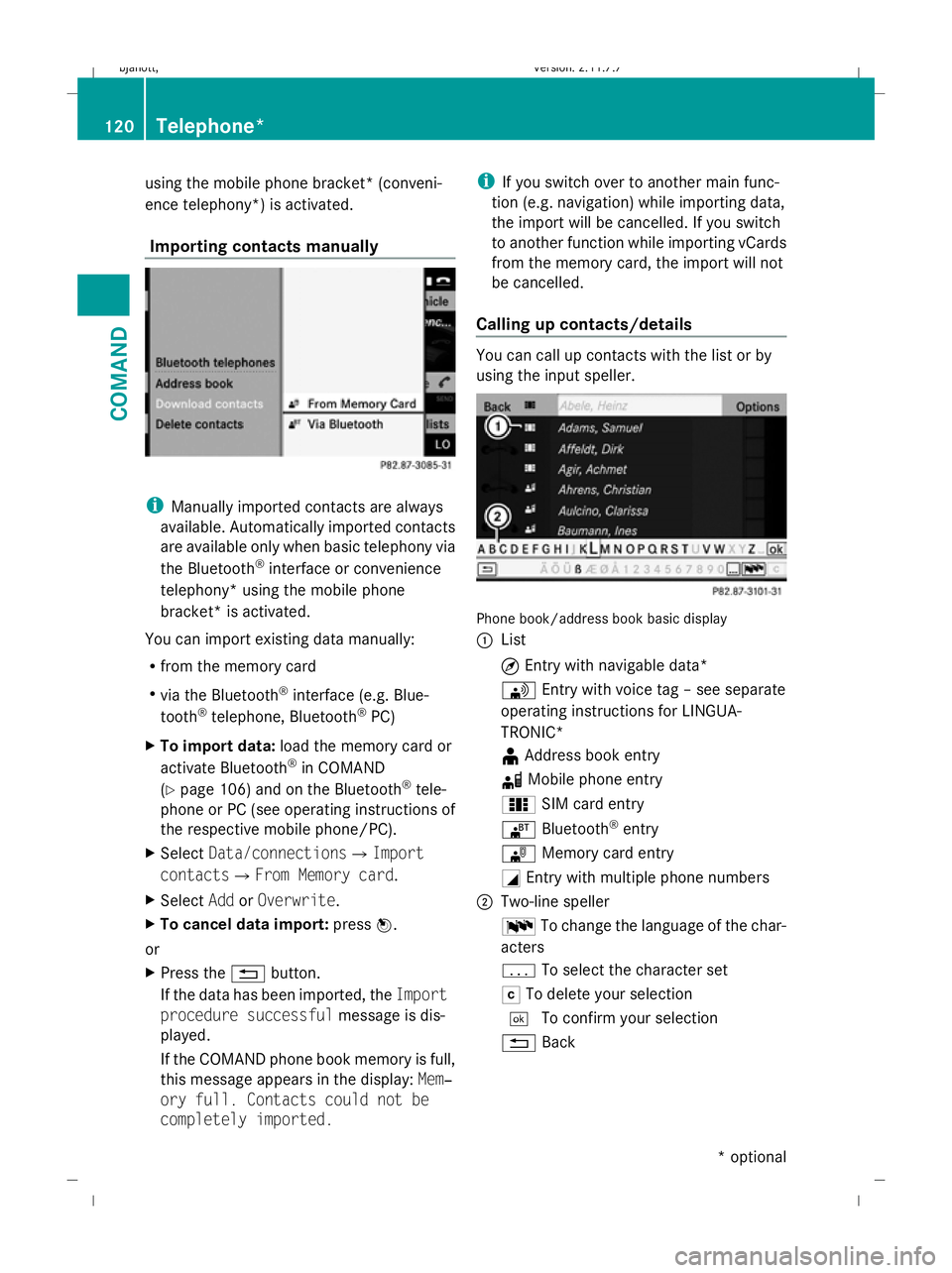
using the mobile phone bracket* (conveni-
ence telephony*) is activated.
Importing contacts manually i
Manually imported contacts are always
available. Automatically imported contacts
are available only when basic telephony via
the Bluetooth ®
interface or convenience
telephony* using the mobile phone
bracket* is activated.
You can import existing data manually:
R from the memory card
R via the Bluetooth ®
interface (e.g. Blue-
tooth ®
telephone, Bluetooth ®
PC)
X To import data: load the memory card or
activate Bluetooth ®
in COMAND
(Y page 106) and on the Bluetooth ®
tele-
phone or PC (see operating instructions of
the respective mobile phone/PC).
X Select Data/connectionsQImport
contactsQ From Memory card.
X Select AddorOverwrite .
X To cancel data import: pressW.
or
X Press the %button.
If the data has been imported, the Import
procedure successful message is dis-
played.
If the COMAND phone book memory is full,
this message appears in the display: Mem‐
ory full. Contacts could not be
completely imported. i
If you switch over to another main func-
tion (e.g. navigation) while importing data,
the import will be cancelled. If you switch
to another function while importing vCards
from the memory card, the import will not
be cancelled.
Calling up contacts/details You can call up contacts with the list or by
using the input speller.
Phone book/address book basic display
:
List
¤Entry with navigable data*
\ Entry with voice tag – see separate
operating instructions for LINGUA-
TRONIC*
¥ Address book entry
d Mobile phone entry
0 SIM card entry
® Bluetooth ®
entry
¯ Memory card entry
G Entry with multiple phone numbers
; Two-line speller
B To change the language of the char-
acters
p To select the character set
F To delete your selection
¬ To confirm your selection
% Back 120
Telephone*COMAND
* optional
216_AKB; 2; 3, en-GB
bjanott
,V ersion: 2.11.7.7
2009-02-27T14:54:17+01:00 - Seite 120
Dateiname: 6515230602_buchblock.pdf; erzeugt am 04. Mar 2009 11:15:10; WK