lock MERCEDES-BENZ CL COUPE 2009 Owners Manual
[x] Cancel search | Manufacturer: MERCEDES-BENZ, Model Year: 2009, Model line: CL COUPE, Model: MERCEDES-BENZ CL COUPE 2009Pages: 421, PDF Size: 10.78 MB
Page 154 of 421
:
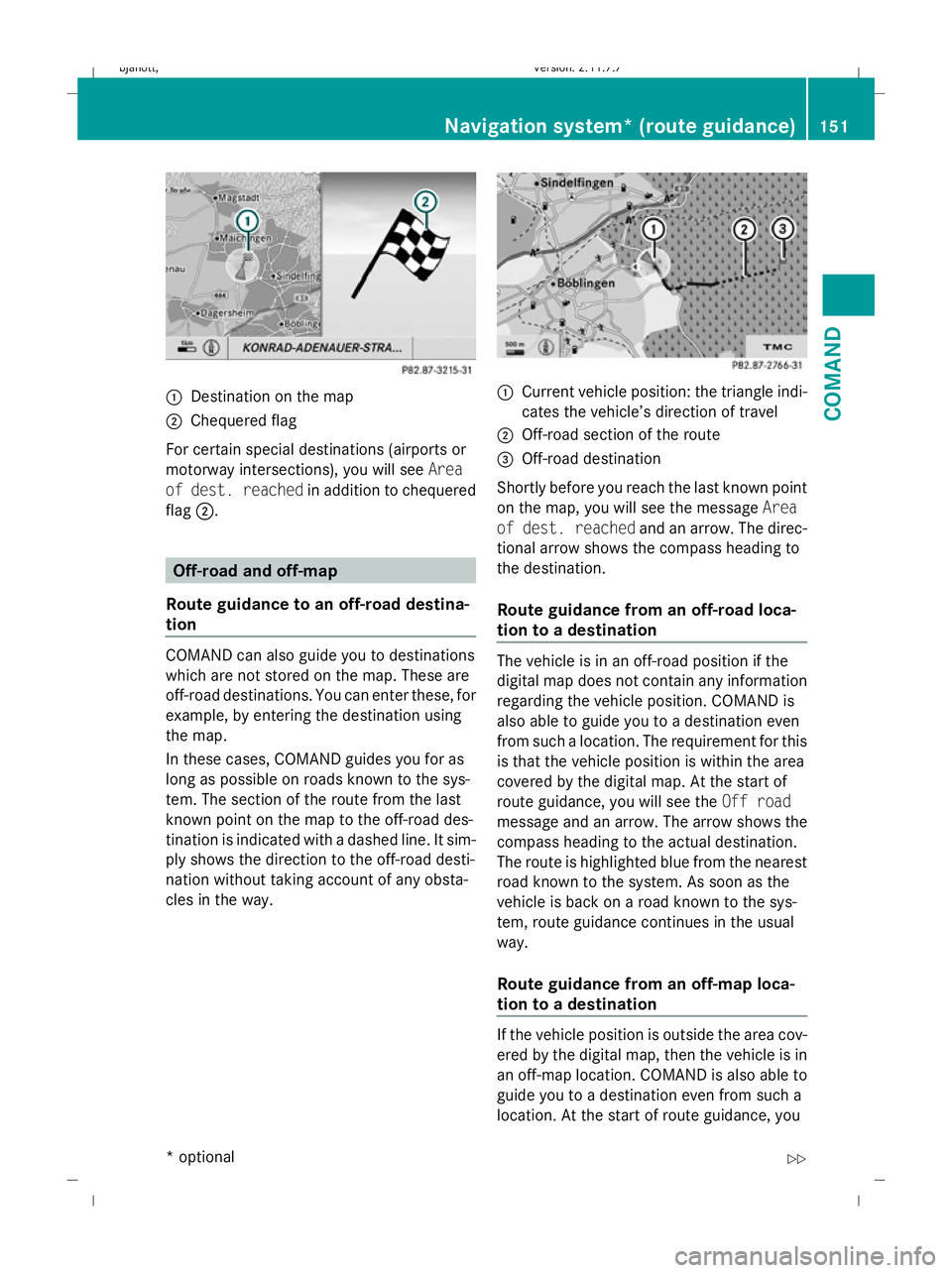
Destination on the map
; Chequered flag
For certain special destinations (airports or
motorway intersections), you will see Area
of dest. reached in addition to chequered
flag ;. Off-road and off-map
Route guidance to an off-road destina-
tion COMAND can also guide you to destinations
which are not stored on the map. These are
off-road destinations. You can enter these, for
example, by entering the destination using
the map.
In these cases, COMAND guides you for as
long as possible on roads known to the sys-
tem. The section of the route from the last
known point on the map to the off-road des-
tination is indicated with a dashed line. It sim-
ply shows the direction to the off-road desti-
nation without taking account of any obsta-
cles in the way. :
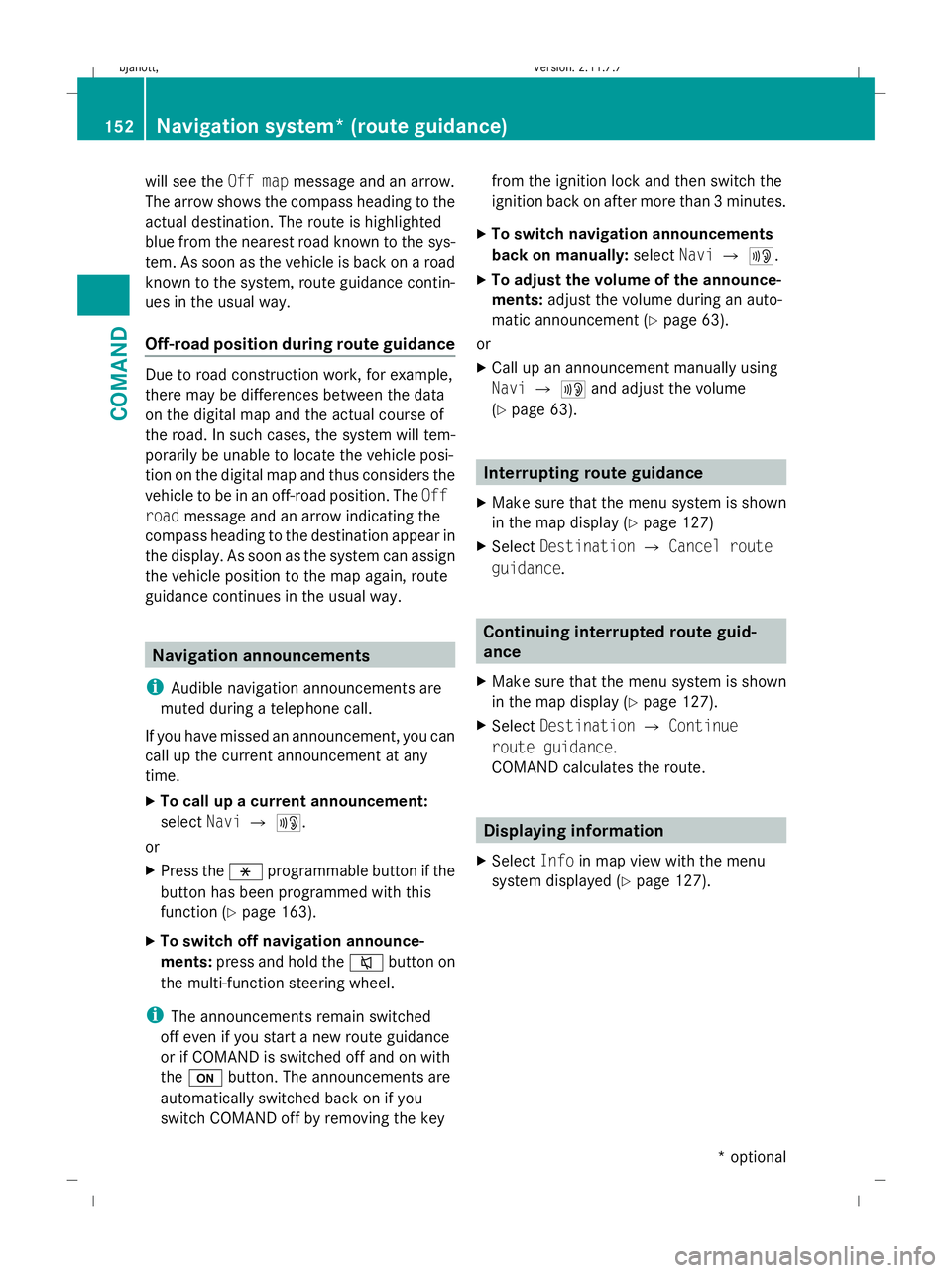
Current vehicle position: the triangle indi-
cates the vehicle’s direction of travel
; Off-road section of the route
= Off-road destination
Shortly before you reach the last known point
on the map, you will see the message Area
of dest. reached and an arrow. The direc-
tional arrow shows the compass heading to
the destination.
Route guidance from an off-road loca-
tion to a destination The vehicle is in an off-road position if the
digital map does not contain any information
regarding the vehicle position. COMAND is
also able to guide you to a destination even
from such a location. The requirement for this
is that the vehicle position is within the area
covered by the digital map. At the start of
route guidance, you will see the
Off road
message and an arrow. The arrow shows the
compass heading to the actual destination.
The route is highlighted blue from the nearest
road known to the system. As soon as the
vehicle is back on a road known to the sys-
tem, route guidance continues in the usual
way.
Route guidance from an off-map loca-
tion to a destination If the vehicle position is outside the area cov-
ered by the digital map, then the vehicle is in
an off-map location. COMAND is also able to
guide you to a destination even from such a
location. At the start of route guidance, youNavigation system* (route guidance)
151COMAND
* optional
216_AKB; 2; 3, en-GB
bjanott,
Version: 2.11.7.7 2009-02-27T14:54:17+01:00 - Seite 151 Z
Dateiname: 6515230602_buchblock.pdf; erzeugt am 04. Mar 2009 11:15:20; WK
Page 155 of 421
will see the
Off mapmessage and an arrow.
The arrow shows the compass heading to the
actual destination. The route is highlighted
blue from the nearest road known to the sys-
tem. As soon as the vehicle is back on a road
known to the system, route guidance contin-
ues in the usual way.
Off-road position during route guidance Due to road construction work, for example,
there may be differences between the data
on the digital map and the actual course of
the road. In such cases, the system will tem-
porarily be unable to locate the vehicle posi-
tion on the digital map and thus considers the
vehicle to be in an off-road position. The Off
road message and an arrow indicating the
compass heading to the destination appear in
the display. As soon as the system can assign
the vehicle position to the map again, route
guidance continues in the usual way. Navigation announcements
i Audible navigation announcements are
muted during a telephone call.
If you have missed an announcement, you can
call up the current announcement at any
time.
X To call up a current announcement:
select NaviQ+.
or
X Press the hprogrammable button if the
button has been programmed with this
function (Y page 163).
X To switch off navigation announce-
ments: press and hold the 8button on
the multi-function steering wheel.
i The announcements remain switched
off even if you start a new route guidance
or if COMAND is switched off and on with
the u button. The announcements are
automatically switched back on if you
switch COMAND off by removing the key from the ignition lock and then switch the
ignition back on after more than 3 minutes.
X To switch navigation announcements
back on manually: selectNaviQ+.
X To adjust the volume of the announce-
ments: adjust the volume during an auto-
matic announcement (Y page 63).
or
X Call up an announcement manually using
Navi Q+ and adjust the volume
(Y page 63). Interrupting route guidance
X Make sure that the menu system is shown
in the map display ( Ypage 127)
X Select Destination QCancel route
guidance. Continuing interrupted route guid-
ance
X Make sure that the menu system is shown
in the map display ( Ypage 127).
X Select Destination QContinue
route guidance.
COMAND calculates the route. Displaying information
X Select Infoin map view with the menu
system displayed (Y page 127).152
Navigation system* (route guidance)COMAND
* optional
216_AKB; 2; 3, en-GB
bjanott
,V ersion: 2.11.7.7
2009-02-27T14:54:17+01:00 - Seite 152
Dateiname: 6515230602_buchblock.pdf; erzeugt am 04. Mar 2009 11:15:20; WK
Page 156 of 421
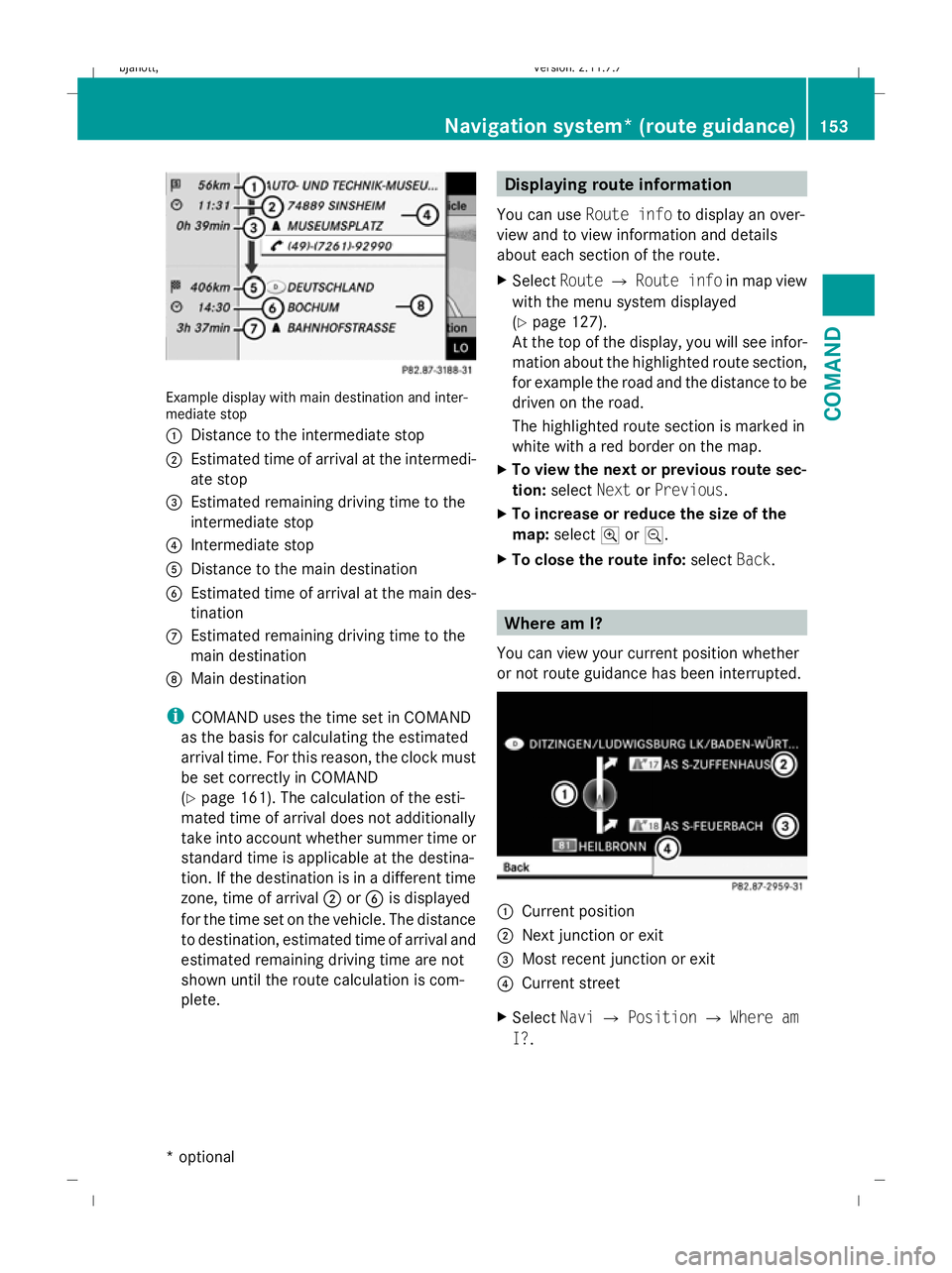
Example display with main destination and inter-
mediate stop
:
Distance to the intermediate stop
; Estimated time of arrival at the intermedi-
ate stop
= Estimated remaining driving time to the
intermediate stop
? Intermediate stop
A Distance to the main destination
B Estimated time of arrival at the main des-
tination
C Estimated remaining driving time to the
main destination
D Main destination
i COMAND uses the time set in COMAND
as the basis for calculating the estimated
arrival time. For this reason, the clock must
be set correctly in COMAND
(Y page 161). The calculation of the esti-
mated time of arrival does not additionally
take into account whether summer time or
standard time is applicable at the destina-
tion. If the destination is in a different time
zone, time of arrival ;orB is displayed
for the time set on the vehicle. The distance
to destination, estimated time of arrival and
estimated remaining driving time are not
shown until the route calculation is com-
plete. Displaying route information
You can use Route info to display an over-
view and to view information and details
about each section of the route.
X Select RouteQRoute info in map view
with the menu system displayed
(Y page 127).
At the top of the display, you will see infor-
mation about the highlighted route section,
for example the road and the distance to be
driven on the road.
The highlighted route section is marked in
white with a red border on the map.
X To view the next or previous route sec-
tion: select NextorPrevious.
X To increase or reduce the size of the
map: select NorM.
X To close the route info: selectBack. Where am I?
You can view your current position whether
or not route guidance has been interrupted. :
Current position
; Next junction or exit
= Most recent junction or exit
? Current street
X Select NaviQPosition QWhere am
I?. Navigation system* (route guidance)
153COMAND
* optional
216_AKB; 2; 3, en-GB
bjanott,
Version: 2.11.7.7 2009-02-27T14:54:17+01:00 - Seite 153 Z
Dateiname: 6515230602_buchblock.pdf; erzeugt am 04. Mar 2009 11:15:21; WK
Page 157 of 421
Compass
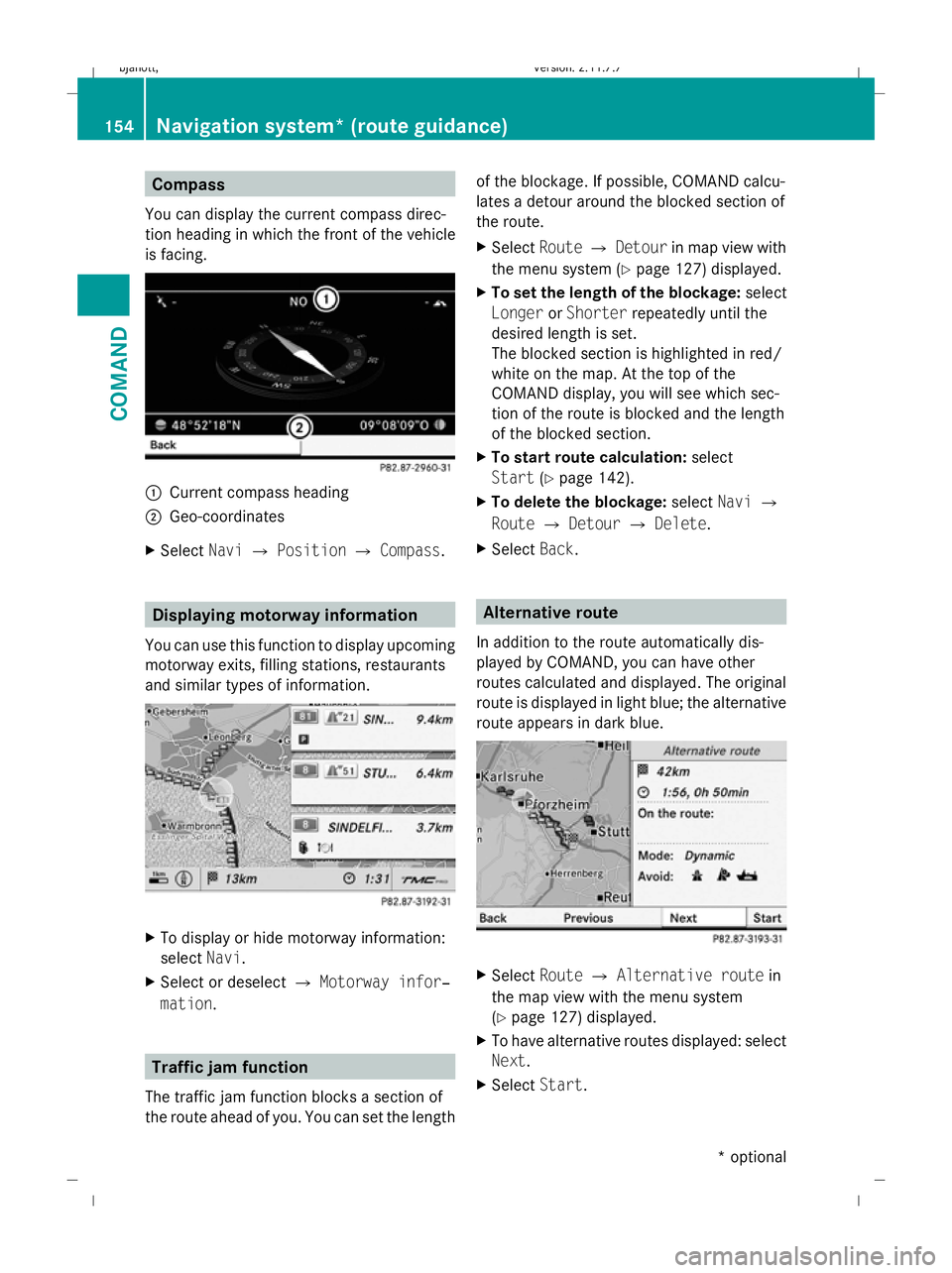
You can display the current compass direc-
tion heading in which the front of the vehicle
is facing. :
Current compass heading
; Geo-coordinates
X Select NaviQPosition QCompass. Displaying motorway information
You can use this function to display upcoming
motorway exits, filling stations, restaurants
and similar types of information. X
To display or hide motorway information:
select Navi.
X Select or deselect QMotorway infor‐
mation . Traffic jam function
The traffic jam function blocks a section of
the route ahead of you. You can set the length of the blockage. If possible, COMAND calcu-
lates a detour around the blocked section of
the route.
X
Select RouteQDetour in map view with
the menu system (Y page 127) displayed.
X To set the length of the blockage: select
Longer orShorter repeatedly until the
desired length is set.
The blocked section is highlighted in red/
white on the map. At the top of the
COMAND display, you will see which sec-
tion of the route is blocked and the length
of the blocked section.
X To start route calculation: select
Start (Ypage 142).
X To delete the blockage: selectNaviQ
Route QDetour QDelete .
X Select Back. Alternative route
In addition to the route automatically dis-
played by COMAND, you can have other
routes calculated and displayed. The original
route is displayed in light blue; the alternative
route appears in dark blue. X
Select RouteQAlternative route in
the map view with the menu system
(Y page 127) displayed.
X To have alternative routes displayed: select
Next.
X Select Start. 154
Navigation system* (route guidance)COMAND
* optional
216_AKB; 2; 3, en-GB
bjanott
,V ersion: 2.11.7.7
2009-02-27T14:54:17+01:00 - Seite 154
Dateiname: 6515230602_buchblock.pdf; erzeugt am 04. Mar 2009 11:15:22; WK
Page 158 of 421
Navigation* (route guidance with
RDS-TMC) Introduction to RDS-TMC
An RDS-TMC radio station transmits free-of-
charge RDS-TMC traffic reports in addition to
the radio programme. COMAND can receive
the RDS-TMC traffic reports and take them
into consideration for dynamic route guid-
ance. Thus, for example, the navigation sys-
tem can guide you around a traffic jam.
In Germany, COMAND uses top-quality traffic
data provided by T-Systems Traffic for the
TMCpro traffic jam warning service. This
information is available nationwide and 24
hours a day. In contrast to the public TMC
service, TMCpro uses reports from public
sources. Moreover, TMCpro utilises exclusive
data from its own automated sensor network
for monitoring traffic conditions. The traffic
announcements which are read over public
radio stations (TA) may differ from TMCpro
traffic announcements. Dynamic route guidance
The Dynamic route is the same type of route
as the Fast route. In addition, COMAND
takes RDS-TMC traffic announcements that
have been received into consideration 23
when calculating the route for dynamic route
guidance. If a quicker route is determined due
to reception of an RDS-TMC traffic announce-
ment, the navigation system changes the
route. If possible, it will bypass blockages.
X To switch on: setDynamic route as the
route type 23
.
Proceed as described in the "Setting the
route type" section (Y page 131).
X To switch off: select a different route type.
i COMAND calculates a new route if you
change the route type setting with route
guidance active. If you change the route
type setting when route guidance is inac- tive, COMAND uses the new setting for the
next route guidance.
If TMCpro is received, this is indicated by the
TMCpro symbol at the lower right in the dis-
play.
If a public TMC service is received, the TMC
symbol appears at the lower right in the dis-
play.
If RDS-TMC reception is not possible, no sym-
bol will appear. RDS-TMC displays on the map
COMAND can show certain traffic incidents
on the map. These displays can be seen on
map scales 50 m (0.05 miles) to 50 km (50
miles).
X To set the map scale: turncVduntil the
desired map scale is set.
Turning clockwise enlarges the map, turn-
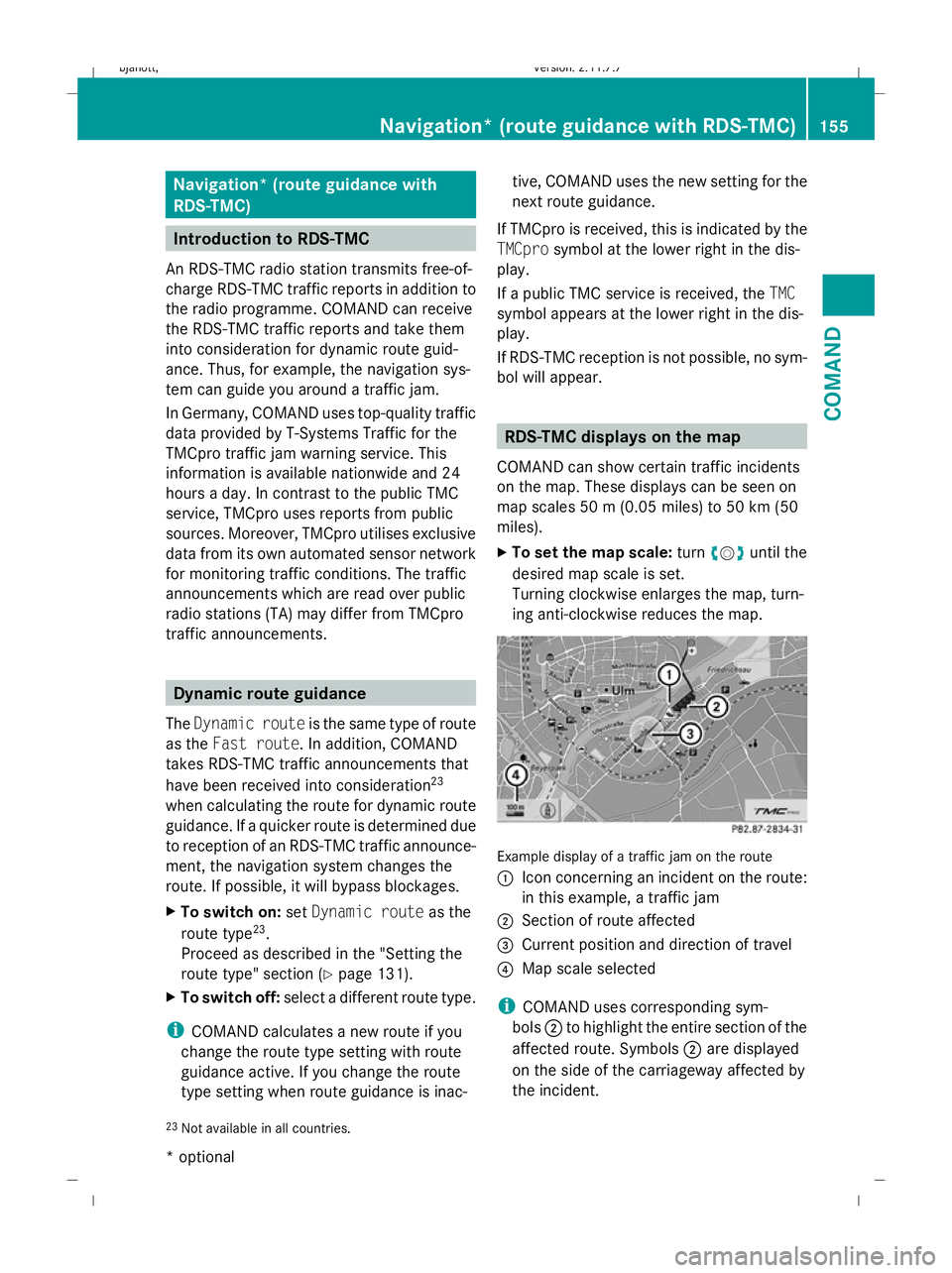
ing anti-clockwise reduces the map. Example display of a traffic jam on the route
:
Icon concerning an incident on the route:
in this example, a traffic jam
; Section of route affected
= Current position and direction of travel
? Map scale selected
i COMAND uses corresponding sym-
bols ;to highlight the entire section of the
affected route. Symbols ;are displayed
on the side of the carriageway affected by
the incident.
23 Not available in all countries. Navigation* (route guidance
with RDS-TMC)155COMAND
* optional
216_AKB; 2; 3, en-GB
bjanott,
Version: 2.11.7.7
2009-02-27T14:54:17+01:00 - Seite 155 Z
Dateiname: 6515230602_buchblock.pdf; erzeugt am 04. Mar 2009 11:15:23; WK
Page 159 of 421
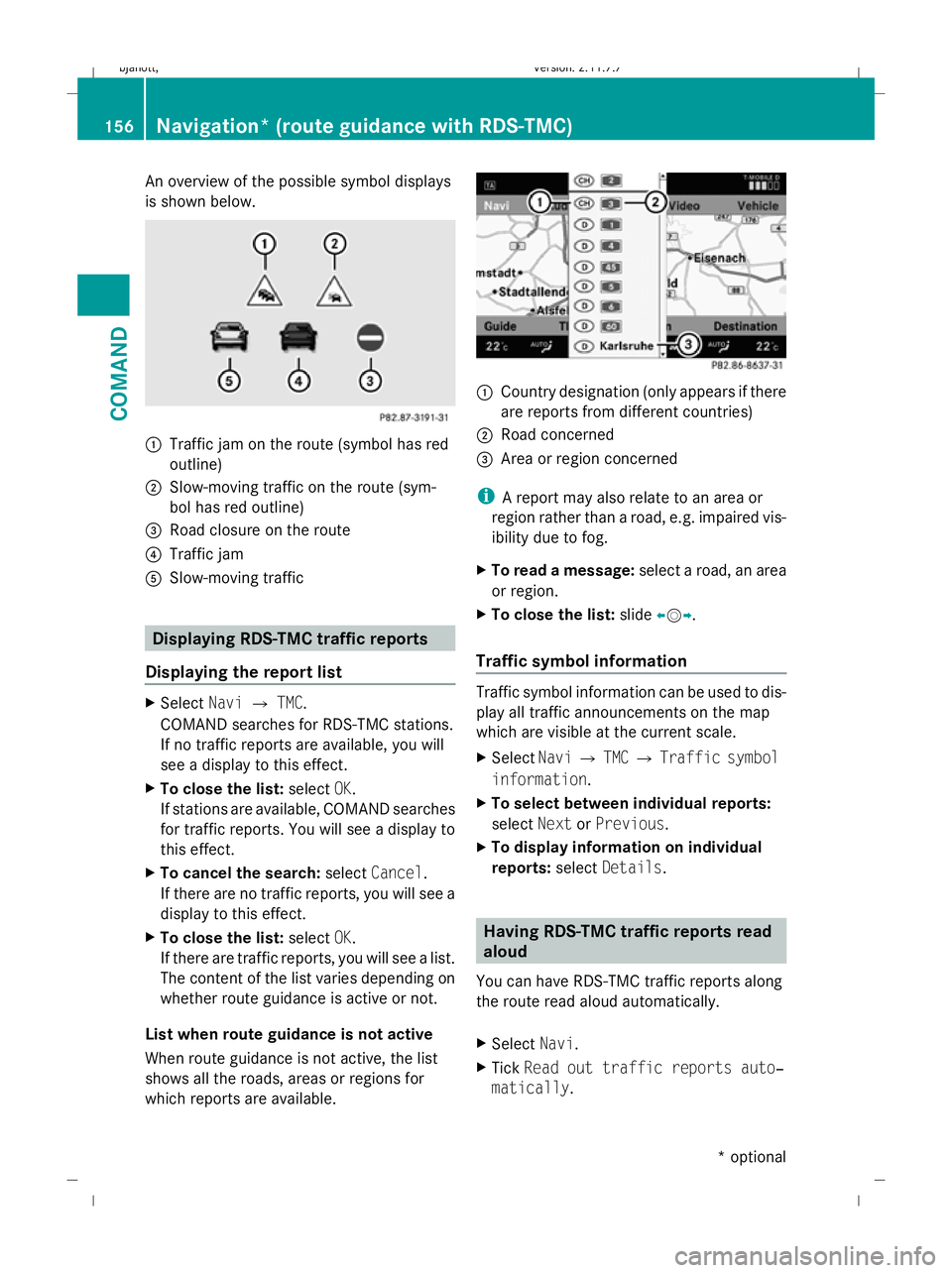
An overview of the possible symbol displays
is shown below. :
Traffic jam on the route (symbol has red
outline)
; Slow-moving traffic on the route (sym-
bol has red outline)
= Road closure on the route
? Traffic jam
A Slow-moving traffic Displaying RDS-TMC traffic reports
Displaying the report list X
Select NaviQTMC.
COMAND searches for RDS-TMC stations.
If no traffic reports are available, you will
see a display to this effect.
X To close the list: selectOK.
If stations are available, COMAND searches
for traffic reports. You will see a display to
this effect.
X To cancel the search: selectCancel .
If there are no traffic reports, you will see a
display to this effect.
X To close the list: selectOK.
If there are traffic reports, you will see a list.
The content of the list varies depending on
whether route guidance is active or not.
List when route guidance is not active
When route guidance is not active, the list
shows all the roads, areas or regions for
which reports are available. :
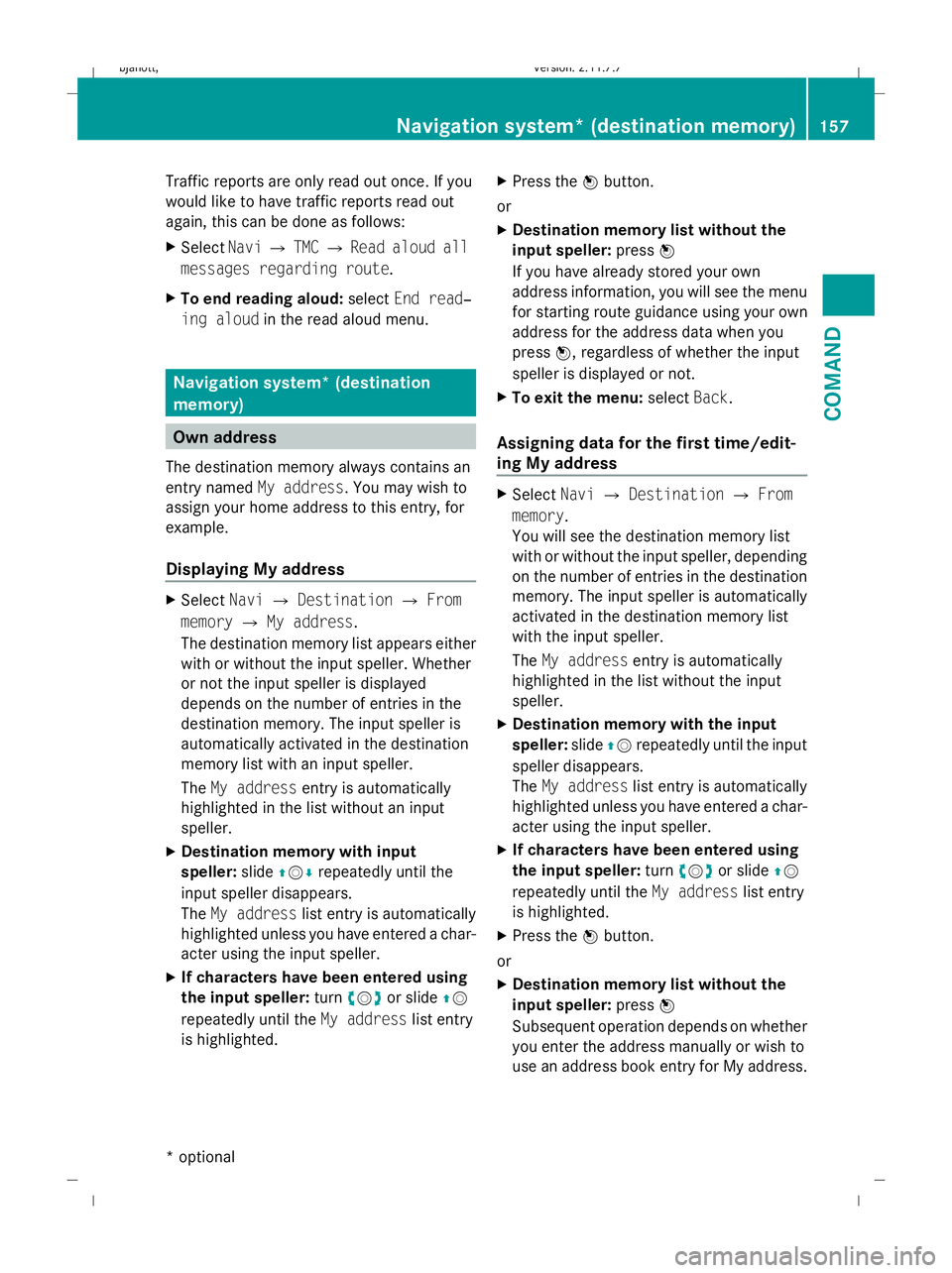
Country designation (only appears if there
are reports from different countries)
; Road concerned
= Area or region concerned
i A report may also relate to an area or
region rather than a road, e.g. impaired vis-
ibility due to fog.
X To read a message: select a road, an area
or region.
X To close the list: slideXVY.
Traffic symbol information Traffic symbol information can be used to dis-
play all traffic announcements on the map
which are visible at the current scale.
X
Select NaviQTMC QTraffic symbol
information.
X To select between individual reports:
select NextorPrevious.
X To display information on individual
reports: selectDetails. Having RDS-TMC traffic reports read
aloud
You can have RDS-TMC traffic reports along
the route read aloud automatically.
X Select Navi.
X Tick Read out traffic reports auto‐
matically . 156
Navigation* (route guidance with RDS-TMC)COMAND
* optional
216_AKB; 2; 3, en-GB
bjanott,
Version: 2.11.7.7 2009-02-27T14:54:17+01:00 - Seite 156
Dateiname: 6515230602_buchblock.pdf; erzeugt am 04. Mar 2009 11:15:24; WK
Page 160 of 421
Traffic reports are only read out once. If you
would like to have traffic reports read out
again, this can be done as follows:
X Select NaviQTMC QRead aloud all
messages regarding route.
X To end reading aloud: selectEnd read‐
ing aloud in the read aloud menu. Navigation system* (destination
memory)
Own address
The destination memory always contains an
entry named My address. You may wish to
assign your home address to this entry, for
example.
Displaying My address X
Select NaviQDestination QFrom
memory QMy address.
The destination memory list appears either
with or without the input speller. Whether
or not the input speller is displayed
depends on the number of entries in the
destination memory. The input speller is
automatically activated in the destination
memory list with an input speller.
The My address entry is automatically
highlighted in the list without an input
speller.
X Destination memory with input
speller: slideZVÆ repeatedly until the
input speller disappears.
The My address list entry is automatically
highlighted unless you have entered a char-
acter using the input speller.
X If characters have been entered using
the input speller: turncVd or slide ZV
repeatedly until the My addresslist entry
is highlighted. X
Press the Wbutton.
or
X Destination memory list without the
input speller: pressW
If you have already stored your own
address information, you will see the menu
for starting route guidance using your own
address for the address data when you
press W, regardless of whether the input
speller is displayed or not.
X To exit the menu: selectBack.
Assigning data for the first time/edit-
ing My address X
Select NaviQDestination QFrom
memory.
You will see the destination memory list
with or without the input speller, depending
on the number of entries in the destination
memory. The input speller is automatically
activated in the destination memory list
with the input speller.
The My address entry is automatically
highlighted in the list without the input
speller.
X Destination memory with the input
speller: slideZVrepeatedly until the input
speller disappears.
The My address list entry is automatically
highlighted unless you have entered a char-
acter using the input speller.
X If characters have been entered using
the input speller: turncVd or slide ZV
repeatedly until the My addresslist entry
is highlighted.
X Press the Wbutton.
or
X Destination memory list without the
input speller: pressW
Subsequent operation depends on whether
you enter the address manually or wish to
use an address book entry for My address. Navigation system* (destination memory)
157COMAND
* optional
216_AKB; 2; 3, en-GB
bjanott,
Version: 2.11.7.7 2009-02-27T14:54:17+01:00 - Seite 157 Z
Dateiname: 6515230602_buchblock.pdf; erzeugt am 04. Mar 2009 11:15:24; WK
Page 161 of 421
Entering an address manually
X
To assign data to My address for the
first time: selectSave with name.
or
X To edit My address: selectEditQ
Save with name.
In both cases, the address input menu
appears.
X Enter the address. Proceed in the same way
as you would enter a destination as descri-
bed in the "Entering a destination by
address" section (Y page 135).
X Select Saveafter you have entered the
address.
Your address is stored.
Using an address book entry for My
address
X To assign data to My address for the
first time: selectAssign address book
entry.
or
X To edit My address: selectChange Q
Assign to address book entry.
In both cases, the menu for searching for
an address book entry appears.
X Select the desired address book entry. Pro-
ceed as described in the "Calling up con-
tacts/details" section (Y page 120).
i The name of the town and of the street in
the address book entry must be spelled in
the same way as in the destination entry so
that the information matches the data on
the digital map. The country in the address
book can be written as follows so that it
matches the data on the digital map:
R Country name spelled in the language of
that country
R Country name spelled in the language set
as the system language
R Country name as an international coun-
try abbreviation for vehicles (e.g. D for Germany, E for Spain, F for France, I for
Italy, etc.)
X COMAND stores the entry as My address
in the destination memory if the address
data is complete and matches the digital
map data.
If address data is missing or if it does not
match the data on the digital map, a mes-
sage will be displayed informing you that
the address is incomplete.
X To close the message: selectOK.
Depending on which data is missing or does
not correspond with the digital map data, you
must now:
R select a country (Y page 136)
R enter a town (Y page 136)
R enter a street (Y page 138)
R enter a house number (Y page 140)
If the data is complete and it matches the
digital map data, COMAND stores the entry. Storing a destination in the destina-
tion memory
This function also stores the destination in
the address book. COMAND creates an
address book entry that contains the com-
plete, navigable address data. You can then
select this entry in the address book and start
route guidance to the address from there.
After the address has been entered X
Select Saveafter you have entered the
address ( Ypage 135).
During route guidance X
Select Destination QSave destina‐
tion during route guidance.
You can now select storage options. 158
Navigation system* (destination memory)COMAND
* optional
216_AKB; 2; 3, en-GB
bjanott,
Version: 2.11.7.7 2009-02-27T14:54:17+01:00 - Seite 158
Dateiname: 6515230602_buchblock.pdf; erzeugt am 04. Mar 2009 11:15:24; WK
Page 162 of 421
From the list of previous destinations
X
Select NaviQDestination QFrom
last destinations .
The list of previous destinations appears.
X Select the desired destination.
The address of the destination is displayed.
X Select Save.
You can now select storage options.
Selecting storage options Saving a destination with no name
X Select Save without name.
COMAND stores the destination in the des-
tination memory and uses the address as
the destination name.
or
X Select Save as My address.
COMAND stores the destination in the des-
tination memory as My address.
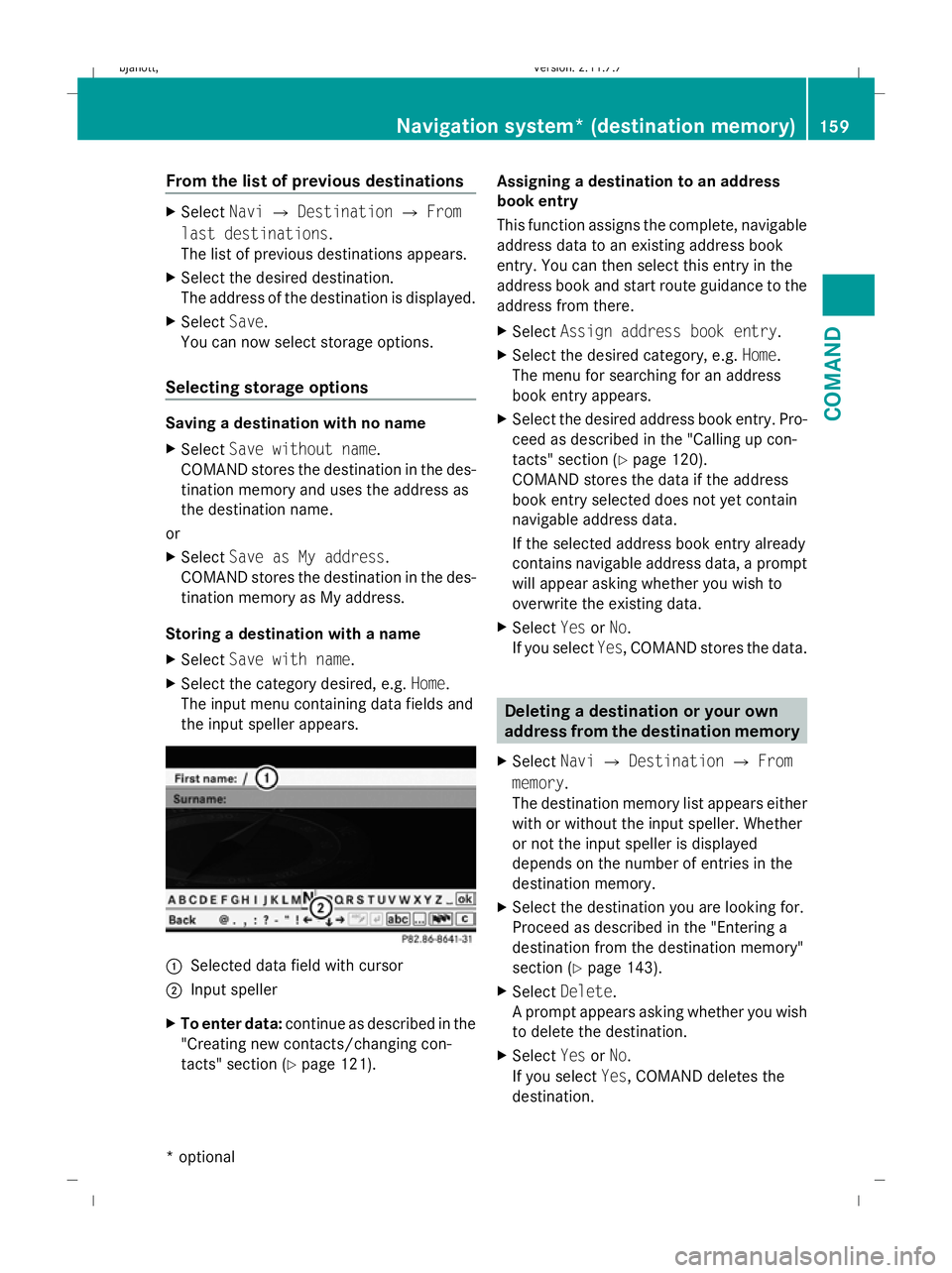
Storing a destination with a name
X Select Save with name.
X Select the category desired, e.g. Home.
The input menu containing data fields and
the input speller appears. :
Selected data field with cursor
; Input speller
X To enter data: continue as described in the
"Creating new contacts/changing con-
tacts" section (Y page 121). Assigning a destination to an address
book entry
This function assigns the complete, navigable
address data to an existing address book
entry. You can then select this entry in the
address book and start route guidance to the
address from there.
X
Select Assign address book entry.
X Select the desired category, e.g. Home.
The menu for searching for an address
book entry appears.
X Select the desired address book entry. Pro-
ceed as described in the "Calling up con-
tacts" section (Y page 120).
COMAND stores the data if the address
book entry selected does not yet contain
navigable address data.
If the selected address book entry already
contains navigable address data, a prompt
will appear asking whether you wish to
overwrite the existing data.
X Select YesorNo.
If you select Yes, COMAND stores the data. Deleting a destination or your own
address from the destination memory
X Select NaviQDestination QFrom
memory .
The destination memory list appears either
with or without the input speller. Whether
or not the input speller is displayed
depends on the number of entries in the
destination memory.
X Select the destination you are looking for.
Proceed as described in the "Entering a
destination from the destination memory"
section (Y page 143).
X Select Delete .
A prompt appears asking whether you wish
to delete the destination.
X Select YesorNo.
If you select Yes, COMAND deletes the
destination. Navigation system* (destination memory)
159COMAND
* optional
216_AKB; 2; 3, en-GB
bjanott
,V ersion: 2.11.7.7
2009-02-27T14:54:17+01:00 - Seite 159 Z
Dateiname: 6515230602_buchblock.pdf; erzeugt am 04. Mar 2009 11:15:25; WK
Page 163 of 421
i
If the navigable address data for the des-
tination being deleted is also assigned to
an address book entry, COMAND will also
delete this data from there. If the corre-
sponding address book entry does not con-
tain any further data, such as telephone
numbers, COMAND deletes the entire
address book entry. Navigation system* (previous desti-
nations) General notes
COMAND automatically stores the previous
destinations for which the route calculation
was launched. If the memory is full, COMAND
deletes the oldest destination.
You can also store one destination from the
list of previous destinations in the destination
memory. It will be stored there permanently. Storing a destination permanently in
the destination memory
X Proceed as described in the "From the list
of previous destinations" section
(Y page 159) Storing the vehicle position in the list
of previous destinations
X To set the map to the vehicle position:
select NaviQPosition QVehicle
position map.
X To save: selectNaviQPosition Q
Save crosshair position. Storing the crosshair position in the
list of previous destinations
i A crosshair appears on the map if you
have moved the map manually. You can
store the crosshair position as a destina-
tion in the list of previous destinations. X
If necessary, display the menu system:
press W.
X Select PositionQSave crosshair
position. Deleting a previous destination
X Select NaviQDestination QFrom
last destinations .
The list of previous destinations appears.
X Select the desired destination.
The address of the destination appears.
X Select Delete. System
Menu overview
You will not be able to use the system settings
in the following menus:
R Display QDay design, Night design, Auto-
matic
R Time QClock, Date, Format, Time zone
R LINGUATRONIC* QHelp window, New
individualisation, Delete individualisation
R Language QLanguage selection
R Favourites button QAssign programma-
ble button
R Reset QReset COMAND to factory set-
tings
R Text reader QSet read-aloud speed
R Bluetooth ®
Q Search for Bluetooth ®
devi-
ces, activate Bluetooth ®
R Data upload/download QCopy data to
storage medium, import data from storage
medium 160
SystemCOMAND
* optional
216_AKB; 2; 3, en-GB
bjanott,
Version: 2.11.7.7 2009-02-27T14:54:17+01:00 - Seite 160
Dateiname: 6515230602_buchblock.pdf; erzeugt am 04. Mar 2009 11:15:25; WK