lights MERCEDES-BENZ CL COUPE 2009 User Guide
[x] Cancel search | Manufacturer: MERCEDES-BENZ, Model Year: 2009, Model line: CL COUPE, Model: MERCEDES-BENZ CL COUPE 2009Pages: 421, PDF Size: 10.78 MB
Page 55 of 421
X
To deactivate: (Ypage 224).
The å warning lamp in the instrument
cluster goes out. EBV (electronic brake force distribu-
tion)
EBV monitors and controls the brake pres-
sure on the rear wheels to improve driving
stability when braking. G
Risk of accident
If EBV is malfunctioning, the brake system is
still available with full brake boosting effect.
However, the rear wheels can still lock, e.g.
under full braking. This could cause you to
lose control of your vehicle and cause an acci-
dent. You should therefore adapt your driving
style to the different handling characteristics. ADAPTIVE BRAKE
ADAPTIVE BRAKE offers exceptional braking
comfort and a higher level of braking safety.
In addition to the braking function, ADAPTIVE
BRAKE also has the HOLD convenience func-
tion (Y page 245) and hill start assist
(Y page 204). For further information, see
Driving tips (Y page 304). Distance warning function* (vehicles
with Distronic*)
This function will issue a warning at speeds of
around 30 km/h or more if:
R for a period of several seconds, the dis-
tance to the vehicle in front is too short for
the speed at which you are travelling. The
· distance warning lamp in the instru-
ment cluster will light up.
R you are approaching the vehicle in front too
rapidly. An intermittent warning tone will
then sound and the ·distance warning
lamp will light up in the instrument cluster. In order to maintain the appropriate distance
to the vehicle in front and thus prevent a
crash, you must apply the brakes yourself. G
Risk of accident
Pay particular attention to the traffic condi-
tions if the distance warning lamp ·in the
instrument cluster lights up or an intermittent
warning tone sounds.
If necessary, brake or manoeuvre to avoid an
obstacle.
X To activate/deactivate: activate or deac-
tivate the distance warning function in the
on-board computer (Y page 223).
After activating, the Äsymbol is dis-
played in the left-hand section of the multi-
function display.
For more information on the distance warning
function, see the Distronic section*
(Y page 229). PRE-SAFE
®
Brake* (vehicles with Dis-
tronic Plus*)
PRE-SAFE ®
Brake can help you to minimise
the risk of a frontal collision with a vehicle in
front or reduce the effects of such a collision.
This function will issue a warning at speeds of
around 30 km/h or more if:
R for a period of several seconds, the dis-
tance to the vehicle in front is too short for
the speed at which you are travelling. The
· distance warning lamp in the instru-
ment cluster will light up.
R you are approaching the vehicle in front too
rapidly. An intermittent warning tone will
then sound and the ·distance warning
lamp will light up in the instrument cluster.
Due to the nature of the system, particularly
complicated driving conditions may cause the
system to display an unnecessary warning. 52
Driving safety systemsSafety
* optional
216_AKB; 2; 3, en-GB
bjanott,
Version: 2.11.7.7 2009-02-27T14:54:17+01:00 - Seite 52
Dateiname: 6515230602_buchblock.pdf; erzeugt am 04. Mar 2009 11:14:50; WK
Page 56 of 421
G
Risk of accident
Pay particular attention to the traffic condi-
tions if the distance warning lamp ·in the
instrument cluster lights up or an intermittent
warning tone sounds. If necessary, brake or
manoeuvre to avoid an obstacle.
In addition, at speeds of around 30 km/h or
more, PRE-SAFE ®
Brake can:
R brake the vehicle gently and automatically
within a speed range of up to around
180 km/h
R trigger preventative passenger protection
measures (PRE-SAFE ®
) G
Risk of accident
PRE-SAFE ®
Brake is only an aid to assist you
when driving. You are responsible for main-
taining a safe distance from other vehicles,
the vehicle's speed and for braking in good
time. Always pay attention to the traffic con-
ditions. Otherwise, you may recognise dan-
gers too late, cause an accident and injure
yourself and others.
With the help of the radar sensor system,
PRE-SAFE ®
Brake can detect obstacles that
are in front of your vehicle for an extended
period of time. If you approach an obstacle
and PRE-SAFE ®
Brake detects a risk of a col-
lision, the system will initially alert you both
visually and acoustically. If you do not brake
or steer, the vehicle will automatically brake
slightly. In the event of an increased risk of a
collision, PRE-SAFE ®
is activated
(Y page 42). G
Risk of accident
Only clearly detected obstacles will trigger a
warning and initiate braking assistance by
PRE-SAFE ®
Brake. In particular, the detection of obstacles may
be restricted if there is:
R
dirt on the sensors or the sensors are cov-
ered
R snow or heavy rain
R interference from other radar sources
R strong radar reflections, for example in
multi-storey car parks
PRE-SAFE ®
Brake does not react to persons,
animals, oncoming vehicles and crossing traf-
fic.
PRE-SAFE ®
Brake may not detect narrow
vehicles such as motorcycles or vehicles driv-
ing on a different line. G
Risk of accident
Depending on the vehicle's speed, PRE-
SAFE ®
Brake will brake your vehicle up to
maximum of 4 m/s 2
. This is equivalent to
approximately 40 % of the maximum braking
power of the vehicle. You must also apply the
brakes yourself to avoid a collision.
In order to maintain the appropriate distance
to the vehicle in front and thus prevent a
crash, you must apply the brakes yourself.
At speeds up to approximately 70 km/h,
PRE-SAFE ®
Brake can also detect stationary
obstacles, for example stopped or parked
vehicles. G
Risk of accident
If, in a critical driving situation, you do not
receive a visual and acoustic warning:
R PRE-SAFE ®
Brake did not detect the risk of
a collision
R PRE-SAFE ®
Brake is deactivated
R PRE-SAFE ®
Brake has failed
You must then brake to avoid a collision. Driving safety systems
53Safety
216_AKB; 2; 3, en-GB
bjanott, Version: 2.11.7.7 2009-02-27T14:54:17+01:00 - Seite 53 Z
Dateiname: 6515230602_buchblock.pdf; erzeugt am 04. Mar 2009 11:14:50; WK
Page 121 of 421

X
Select the desired text message from the
text message inbox.
X Select Options QDetails.
The detailed view appears.
X To close the detailed view: slideXVY.
Reading a text message X
Select the desired text message from the
text message inbox.
X Press W.
X To scroll through the display or to
select telephone numbers in the text:
slide ZVÆ.
The display scrolls up or down line by line,
or skips to the next or previous telephone
number and automatically highlights it.
X To return to the list: slideXVY.
Listening to a text message*
You can set the language (Y page 163) and
the speed of the read-aloud func-
tion* (Y page 160).
X Select and open the desired text message
from the text message inbox.
X Press Wand select Read aloud.
X To end reading aloud: pressWand select
End reading aloud.
Writing a new text message X
Select Newfrom the "SMS" menu. Entering the recipient
:
Recipient of the new text message
; To enter a telephone number using the
address book
= Input speller
X To enter the text message recipient
from the phone book: select;using the
COMAND controller.
X Select the desired recipient from the phone
book (Y page 120).
X To enter the recipient's phone number
manually: use the COMAND controller to
select the desired digits with input speller
=.
or
X Use the telephone keypad to enter the
desired digits.
i You can also respond directly to a text
message; the recipient will then be auto-
matically accepted. To do so, simply select
OptionsQReply in the text message
inbox. 118
Telephone*COMAND
* optional
216_AKB; 2; 3, en-GB
bjanott,
Version: 2.11.7.7 2009-02-27T14:54:17+01:00 - Seite 118
Dateiname: 6515230602_buchblock.pdf; erzeugt am 04. Mar 2009 11:15:09; WK
Page 128 of 421
?
Data field for telephone number (filled in
automatically)
A Two-line speller
X For the following steps, follow the instruc-
tions as described in the "Add new contact"
section ( Ypage 121):
R switching the data field
R entering data
R deleting an entry
R cancelling an entry
R storing an entry
Adding to an existing entry in the address
book
X Open a call list.
X Select the list entry.
X Select OptionsQ Save number .
X Select Addto add an entry.
X Select a number category, e.g. Home.
X Select a telephone category, e.g. Mobile.
X Select Next (save) .
The search menu for address book entries
appears.
X Search for the desired entry (Y page 120).
X Once the search is completed, confirm the
selection.
COMAND stores the data if there are fewer
than five numbers assigned to the entry you
are searching for in the selected number
category.
You will see a message to this effect.
If five numbers are stored for the entry you
are searching for, a prompt will appear ask-
ing whether you wish to overwrite one of
the existing numbers.
X Select YesorNo. X
Confirm your selection.
If you select Yes, a selection list with the
five existing numbers is displayed.
X Select the number to be overwritten.
COMAND overwrites the selected number
with the new data. Navigation system* (introduction)
Safety notes
G
Risk of accident
For safety reasons, only enter a new destina-
tion when the vehicle is stationary.
COMAND calculates the route to the destina-
tion without taking account of the following,
for example:
R traffic lights
R stop and give way signs
R parking or stopping restrictions
R lane narrowing
R other road and traffic controls and regula-
tions
For this reason, you must always observe the
respective road and traffic rules and regula-
tions during your journey. Road and traffic
controls and regulations always have priority
over the navigation announcements gener-
ated by the system. General notes
Operational readiness of the navigation
system In vehicles for certain countries, the naviga-
tion system is not operational immediately
after delivery because the map software is
not pre-installed there.
If this is the case, you will see the following
message when you switch to navigation
mode:
The map software must be
installed. Please insert the DVD
containing the map software. Navigation system* (introduction)
125COMAND
* optional
216_AKB; 2; 3, en-GB
bjanott,
Version: 2.11.7.7 2009-02-27T14:54:17+01:00 - Seite 125 Z
Dateiname: 6515230602_buchblock.pdf; erzeugt am 04. Mar 2009 11:15:11; WK
Page 169 of 421
X
Select Vehicle.
The main area is active.
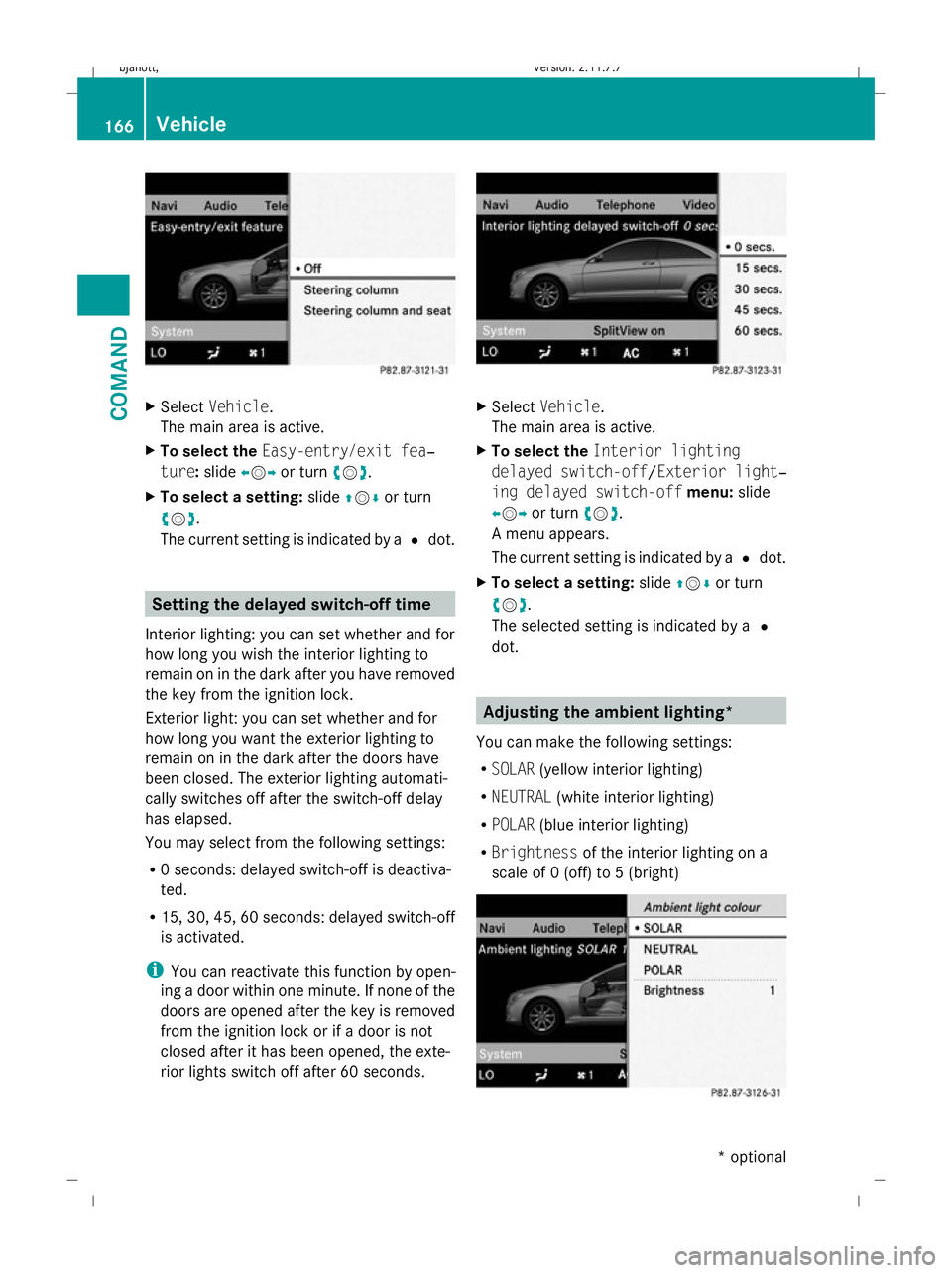
X To select the Easy-entry/exit fea‐
ture: slideXVY or turn cVd.
X To select a setting: slideZVÆ or turn
cVd .
The current setting is indicated by a #dot. Setting the delayed switch-off time
Interior lighting: you can set whether and for
how long you wish the interior lighting to
remain on in the dark after you have removed
the key from the ignition lock.
Exterior light: you can set whether and for
how long you want the exterior lighting to
remain on in the dark after the doors have
been closed. The exterior lighting automati-
cally switches off after the switch-off delay
has elapsed.
You may select from the following settings:
R 0 seconds: delayed switch-off is deactiva-
ted.
R 15, 30, 45, 60 seconds: delayed switch-off
is activated.
i You can reactivate this function by open-
ing a door within one minute. If none of the
doors are opened after the key is removed
from the ignition lock or if a door is not
closed after it has been opened, the exte-
rior lights switch off after 60 seconds. X
Select Vehicle.
The main area is active.
X To select the Interior lighting
delayed switch-off /Exterior light‐
ing delayed switch-off menu:slide
XVY or turn cVd.
A menu appears.
The current setting is indicated by a #dot.
X To select a setting: slideZVÆ or turn
cVd .
The selected setting is indicated by a #
dot. Adjusting the ambient lighting*
You can make the following settings:
R SOLAR (yellow interior lighting)
R NEUTRAL (white interior lighting)
R POLAR (blue interior lighting)
R Brightness of the interior lighting on a
scale of 0 (off) to 5 (bright) 166
VehicleCOMAND
* optional
216_AKB; 2; 3, en-GB
bjanott,
Version: 2.11.7.7 2009-02-27T14:54:17+01:00 - Seite 166
Dateiname: 6515230602_buchblock.pdf; erzeugt am 04. Mar 2009 11:15:28; WK
Page 175 of 421
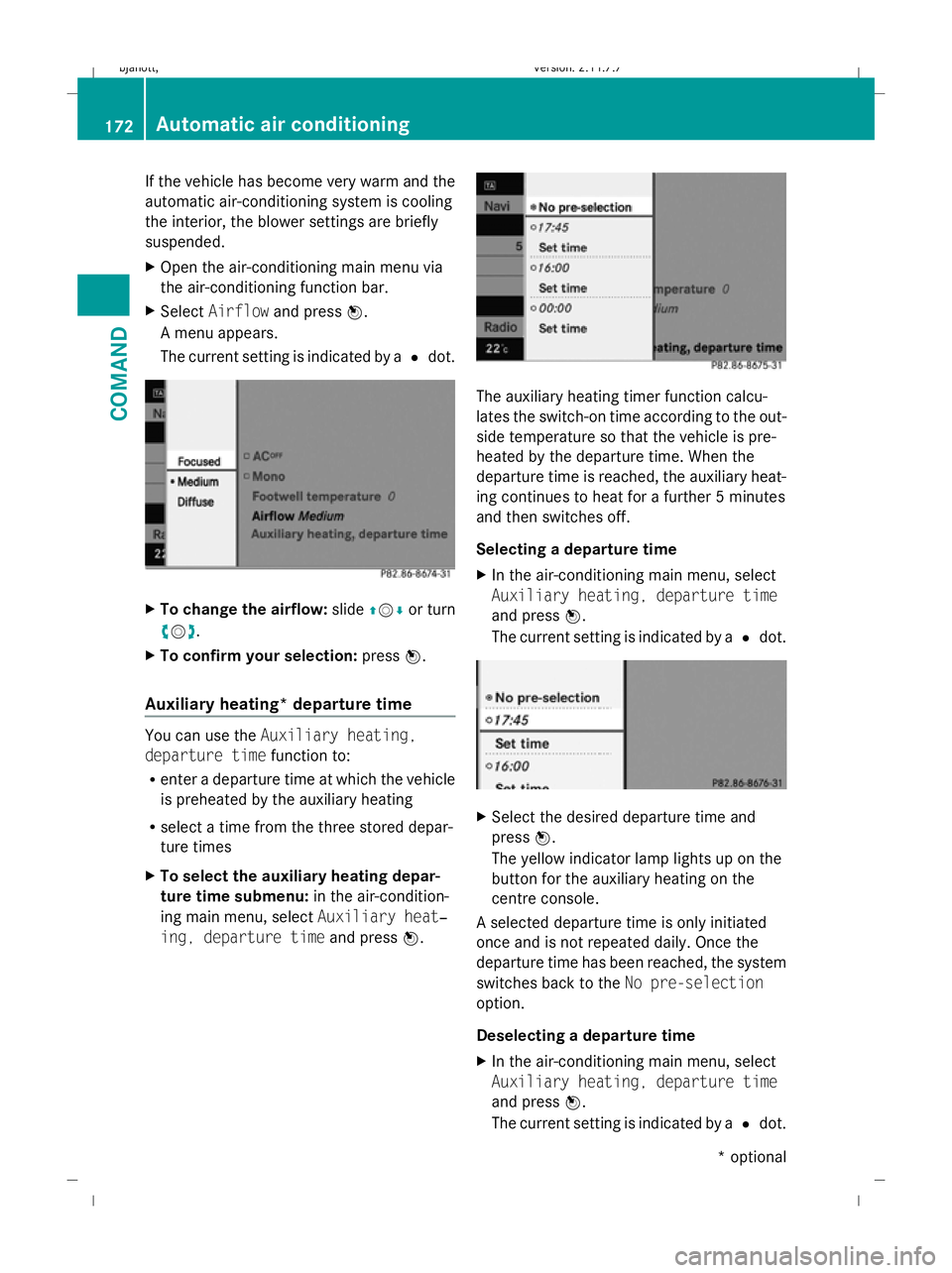
If the vehicle has become very warm and the
automatic air-conditioning system is cooling
the interior, the blower settings are briefly
suspended.
X Open the air-conditioning main menu via
the air-conditioning function bar.
X Select Airflow and press W.
A menu appears.
The current setting is indicated by a #dot. X
To change the airflow: slideZVÆ or turn
cVd.
X To confirm your selection: pressW.
Auxiliary heating* departure time You can use the
Auxiliary heating,
departure time function to:
R enter a departure time at which the vehicle
is preheated by the auxiliary heating
R select a time from the three stored depar-
ture times
X To select the auxiliary heating depar-
ture time submenu: in the air-condition-
ing main menu, select Auxiliary heat‐
ing, departure time and pressW. The auxiliary heating timer function calcu-
lates the switch-on time according to the out-
side temperature so that the vehicle is pre-
heated by the departure time. When the
departure time is reached, the auxiliary heat-
ing continues to heat for a further 5 minutes
and then switches off.
Selecting a departure time
X In the air-conditioning main menu, select
Auxiliary heating, departure time
and press W.
The current setting is indicated by a #dot. X
Select the desired departure time and
press W.
The yellow indicator lamp lights up on the
button for the auxiliary heating on the
centre console.
A selected departure time is only initiated
once and is not repeated daily. Once the
departure time has been reached, the system
switches back to the No pre-selection
option.
Deselecting a departure time
X In the air-conditioning main menu, select
Auxiliary heating, departure time
and press W.
The current setting is indicated by a #dot. 172
Automatic air conditioningCOMAND
* optional
216_AKB; 2; 3, en-GB
bjanott,
Version: 2.11.7.7 2009-02-27T14:54:17+01:00 - Seite 172
Dateiname: 6515230602_buchblock.pdf; erzeugt am 04. Mar 2009 11:15:32; WK
Page 180 of 421
Opening and closing
.........................178
Boot .................................................... 180
Key positions .................................... 182
Seats .................................................. 183
Steering wheel .................................. 187
Mirrors ............................................... 189
Memory function .............................. 190
Seat belts ........................................... 191
Lights ................................................. 194
Windscreen wipers ...........................199
Side windows .................................... 200
Driving and parking ..........................202
Automatic transmission ...................206
Instrument cluster ............................212
On-board computer ..........................213
Driving systems ................................ 227
Air conditioning ................................. 262
Sliding sunroof .................................. 274
Loading and stowing ........................275
Features ............................................. 280 177Controls
216_AKB; 2; 3, en-GB
bjanott,
Version: 2.11.7.7 2009-02-27T14:54:17+01:00 - Seite 177
Dateiname: 6515230602_buchblock.pdf; erzeugt am 04. Mar 2009 11:15:35; WK
Page 191 of 421
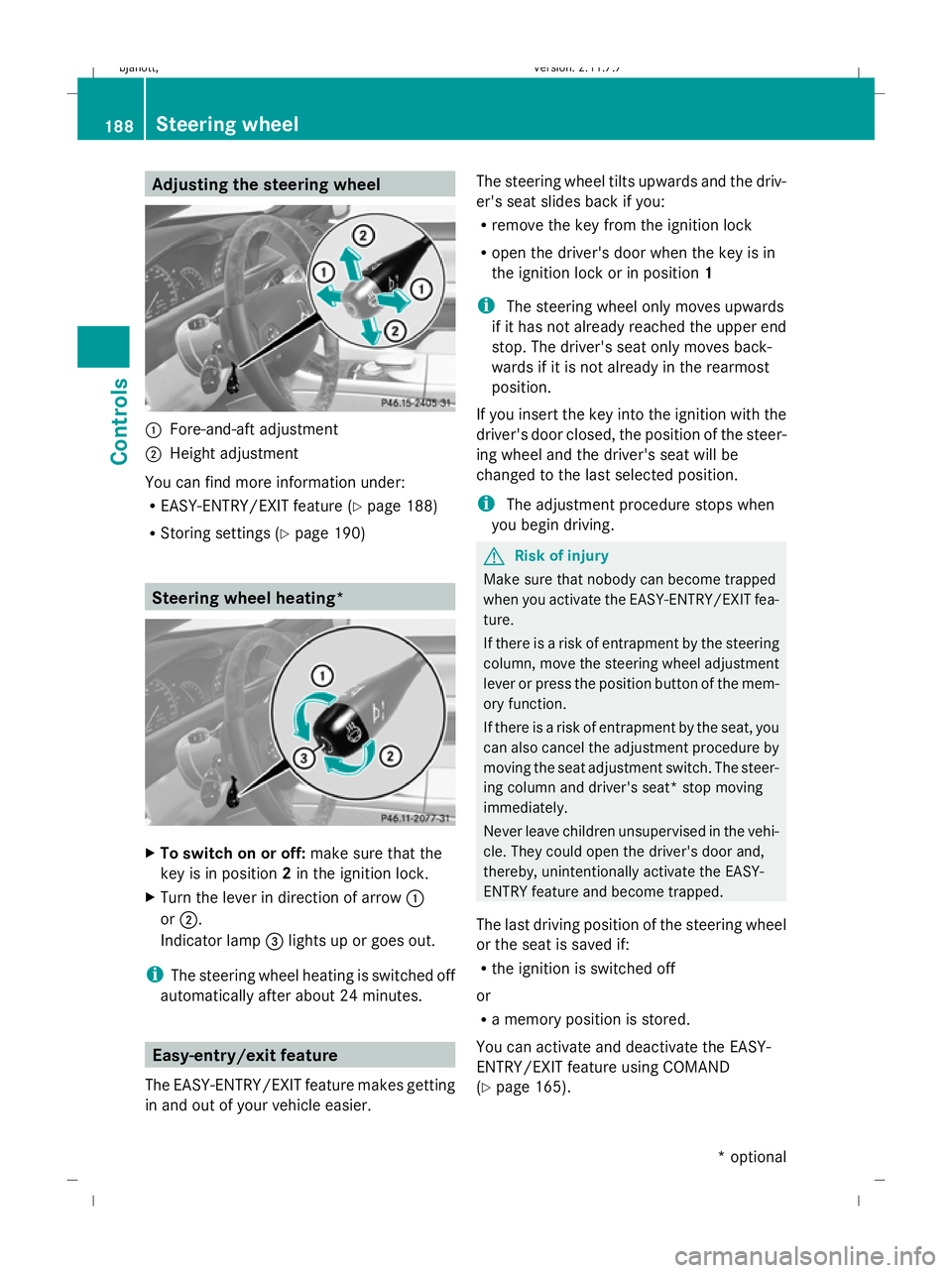
Adjusting the steering wheel
:
Fore-and-aft adjustment
; Height adjustment
You can find more information under:
R EASY-ENTRY/EXIT feature (Y page 188)
R Storing settings (Y page 190) Steering wheel heating*
X
To switch on or off: make sure that the
key is in position 2in the ignition lock.
X Turn the lever in direction of arrow :
or ;.
Indicator lamp =lights up or goes out.
i The steering wheel heating is switched off
automatically after about 24 minutes. Easy-entry/exit feature
The EASY-ENTRY/EXIT feature makes getting
in and out of your vehicle easier. The steering wheel tilts upwards and the driv-
er's seat slides back if you:
R remove the key from the ignition lock
R open the driver's door when the key is in
the ignition lock or in position 1
i The steering wheel only moves upwards
if it has not already reached the upper end
stop. The driver's seat only moves back-
wards if it is not already in the rearmost
position.
If you insert the key into the ignition with the
driver's door closed, the position of the steer-
ing wheel and the driver's seat will be
changed to the last selected position.
i The adjustment procedure stops when
you begin driving. G
Risk of injury
Make sure that nobody can become trapped
when you activate the EASY-ENTRY/EXIT fea-
ture.
If there is a risk of entrapment by the steering
column, move the steering wheel adjustment
lever or press the position button of the mem-
ory function.
If there is a risk of entrapment by the seat, you
can also cancel the adjustment procedure by
moving the seat adjustment switch. The steer-
ing column and driver's seat* stop moving
immediately.
Never leave children unsupervised in the vehi-
cle. They could open the driver's door and,
thereby, unintentionally activate the EASY-
ENTRY feature and become trapped.
The last driving position of the steering wheel
or the seat is saved if:
R the ignition is switched off
or
R a memory position is stored.
You can activate and deactivate the EASY-
ENTRY/EXIT feature using COMAND
(Y page 165). 188
Steering wheelCont
rols
* option al
216_AKB; 2; 3, en-GB
bjanott
,V ersion: 2.11.7.7
2009-02-27T14:54:17+01:00 - Seite 188
Dateiname: 6515230602_buchblock.pdf; erzeugt am 04. Mar 2009 11:15:41; WK
Page 192 of 421

i
The crash-responsive EASY-EXIT fea-
ture* can only be activated after an acci-
dent if the EASY-ENTRY/EXIT feature is
activated in the on-board computer.
When the crash-responsive EASY-EXIT fea-
ture is triggered in an accident, the steering
wheel column will move upwards irrespec-
tive of the position of the key in the ignition
lock. This makes it easier to exit the vehicle
or rescue the occupants. Mirrors
Exterior mirrors
G
Risk of accident
The exterior mirrors reduce the size of the
image. Objects are actually closer than they
appear. You could misjudge the distance from
vehicles driving behind and cause an acci-
dent, e.g. when changing lane. For this rea-
son, make sure of the actual distance from the
vehicle driving behind by glancing over your
shoulder.
The convex exterior mirrors provide a larger
field of vision.
At low outside temperatures the exterior mir-
rors are heated automatically. Adjusting the exterior mirrors
X
Make sure that the key is in position 1or
2 in the ignition lock.
X Press button 2for the right-hand exterior
mirror or button 4for the left-hand exte-
rior mirror.
The indicator lamp lights up in the button
that has been pressed.
X Press adjustment button 1up, down, to
the right or to the left until the exterior mir-
ror is set in a way which provides you with
a good overview of traffic conditions.
See the "Storing settings" section for more
information (Y page 190).
Folding the exterior mirrors in or out
electrically X
Make sure that the key is in position 1or
2 in the ignition lock.
X Briefly press button 3.
Both exterior mirrors fold in or out.
Folding the exterior mirrors in or out
automatically If the corresponding function is activated in
COMAND (Y
page 165):
R the exterior mirrors fold in automatically as
soon as you lock the vehicle from the out-
side
R the exterior mirrors fold out again automat-
ically as soon as you unlock the vehicle and
then open the driver's or front-passenger
door
i The mirrors do not fold out if they were
folded in manually. Automatic anti-dazzle mirrors
The rear-view mirror and the exterior mirror
on the driver's side automatically go into anti-
dazzle mode if the ignition is switched on and
incident light from headlamps strikes the sen-
sor in the rear-view mirror. Mirrors
189Controls
* optional
216_AKB; 2; 3, en-GB
bjanott,
Version: 2.11.7.7 2009-02-27T14:54:17+01:00 - Seite 189 Z
Dateiname: 6515230602_buchblock.pdf; erzeugt am 04. Mar 2009 11:15:41; WK
Page 196 of 421
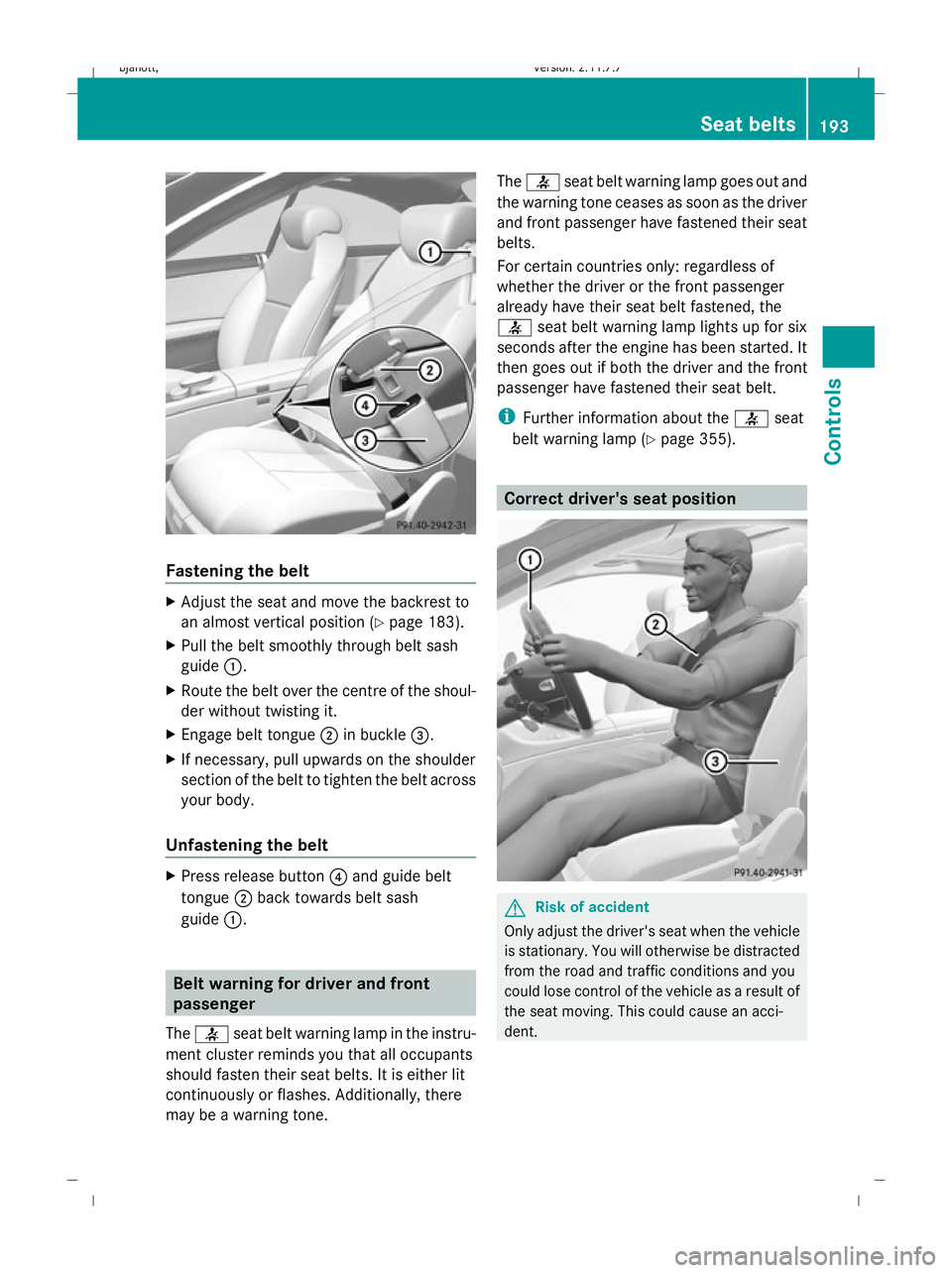
Fastening the belt
X
Adjust the seat and move the backrest to
an almost vertical position (Y page 183).
X Pull the belt smoothly through belt sash
guide :.
X Route the belt over the centre of the shoul-
der without twisting it.
X Engage belt tongue ;in buckle =.
X If necessary, pull upwards on the shoulder
section of the belt to tighten the belt across
your body.
Unfastening the belt X
Press release button ?and guide belt
tongue ;back towards belt sash
guide :. Belt warning for driver and front
passenger
The 7 seat belt warning lamp in the instru-
ment cluster reminds you that all occupants
should fasten their seat belts. It is either lit
continuously or flashes. Additionally, there
may be a warning tone. The
7 seat belt warning lamp goes out and
the warning tone ceases as soon as the driver
and front passenger have fastened their seat
belts.
For certain countries only: regardless of
whether the driver or the front passenger
already have their seat belt fastened, the
7 seat belt warning lamp lights up for six
seconds after the engine has been started. It
then goes out if both the driver and the front
passenger have fastened their seat belt.
i Further information about the 7seat
belt warning lamp (Y page 355). Correct driver's seat position
G
Risk of accident
Only adjust the driver's seat when the vehicle
is stationary. You will otherwise be distracted
from the road and traffic conditions and you
could lose control of the vehicle as a result of
the seat moving. This could cause an acci-
dent. Seat belts
193Controls
216_AKB; 2; 3, en-GB
bjanott, Version: 2.11.7.7 2009-02-27T14:54:17+01:00 - Seite 193 Z
Dateiname: 6515230602_buchblock.pdf; erzeugt am 04. Mar 2009 11:15:43; WK