wheel MERCEDES-BENZ CL COUPE 2009 Owner's Manual
[x] Cancel search | Manufacturer: MERCEDES-BENZ, Model Year: 2009, Model line: CL COUPE, Model: MERCEDES-BENZ CL COUPE 2009Pages: 421, PDF Size: 10.78 MB
Page 66 of 421
i
When the audio output is switched off, the
status line will show the 8symbol. If
you switch the audio or video source, the
audio output is automatically activated.
You will still hear traffic announcements
and navigation system announcements*,
even if the sound is muted.
Muting traffic and navigation announce-
ments*
X RDS: press and hold the 8button on
the multi-function steering wheel until the
TA display switches off.
X Navigation announcements: during an
announcement, press the 8button on
the multi-function steering wheel.
i The announcements remain switched
off even if you start a new route guidance
or if COMAND is switched off and on with
the u button. They will be switched on
again under the following conditions: if you
switch COMAND off by removing the key
from the ignition lock and then switch the
ignition back on after more than 3 minutes.
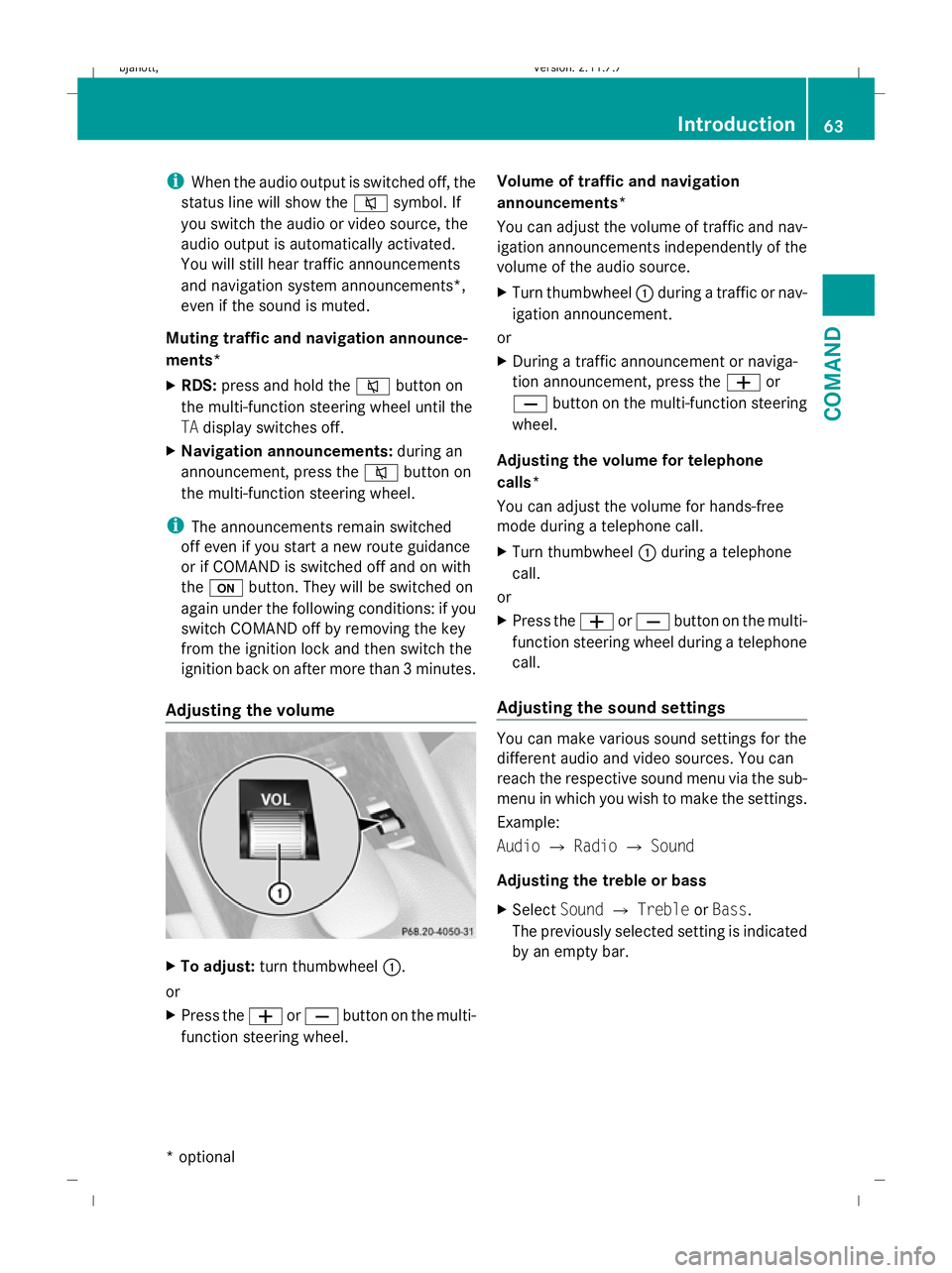
Adjusting the volume X
To adjust: turn thumbwheel :.
or
X Press the WorX button on the multi-
function steering wheel. Volume of traffic and navigation
announcements*
You can adjust the volume of traffic and nav-
igation announcements independently of the
volume of the audio source.
X
Turn thumbwheel :during a traffic or nav-
igation announcement.
or
X During a traffic announcement or naviga-
tion announcement, press the Wor
X button on the multi-function steering
wheel.
Adjusting the volume for telephone
calls*
You can adjust the volume for hands-free
mode during a telephone call.
X Turn thumbwheel :during a telephone
call.
or
X Press the WorX button on the multi-
function steering wheel during a telephone
call.
Adjusting the sound settings You can make various sound settings for the
different audio and video sources. You can
reach the respective sound menu via the sub-
menu in which you wish to make the settings.
Example:
Audio
QRadio QSound
Adjusting the treble or bass
X Select SoundQTreble orBass.
The previously selected setting is indicated
by an empty bar. Introduction
63COMAND
* optional
216_AKB; 2; 3, en-GB
bjanott,
Version: 2.11.7.7 2009-02-27T14:54:17+01:00 - Seite 63 Z
Dateiname: 6515230602_buchblock.pdf; erzeugt am 04. Mar 2009 11:14:54; WK
Page 72 of 421
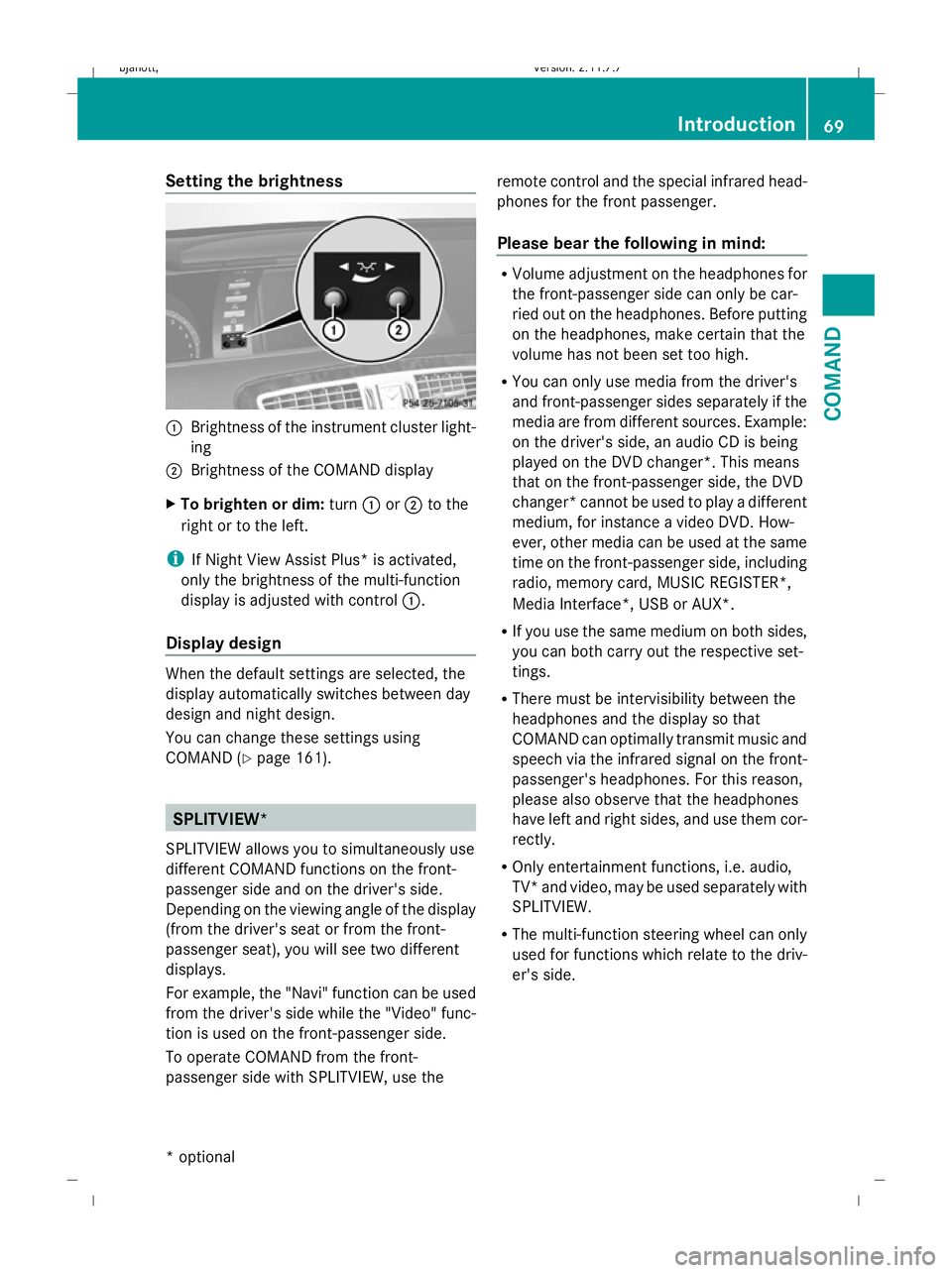
Setting the brightness
:
Brightness of the instrument cluster light-
ing
; Brightness of the COMAND display
X To brighten or dim: turn:or; to the
right or to the left.
i If Night View Assist Plus* is activated,
only the brightness of the multi-function
display is adjusted with control :.
Display design When the default settings are selected, the
display automatically switches between day
design and night design.
You can change these settings using
COMAND (Y
page 161). SPLITVIEW*
SPLITVIEW allows you to simultaneously use
different COMAND functions on the front-
passenger side and on the driver's side.
Depending on the viewing angle of the display
(from the driver's seat or from the front-
passenger seat), you will see two different
displays.
For example, the "Navi" function can be used
from the driver's side while the "Video" func-
tion is used on the front-passenger side.
To operate COMAND from the front-
passenger side with SPLITVIEW, use the remote control and the special infrared head-
phones for the front passenger.
Please bear the following in mind: R
Volume adjustment on the headphones for
the front-passenger side can only be car-
ried out on the headphones. Before putting
on the headphones, make certain that the
volume has not been set too high.
R You can only use media from the driver's
and front-passenger sides separately if the
media are from different sources. Example:
on the driver's side, an audio CD is being
played on the DVD changer*. This means
that on the front-passenger side, the DVD
changer* cannot be used to play a different
medium, for instance a video DVD. How-
ever, other media can be used at the same
time on the front-passenger side, including
radio, memory card, MUSIC REGISTER*,
Media Interface*, USB or AUX*.
R If you use the same medium on both sides,
you can both carry out the respective set-
tings.
R There must be intervisibility between the
headphones and the display so that
COMAND can optimally transmit music and
speech via the infrared signal on the front-
passenger's headphones. For this reason,
please also observe that the headphones
have left and right sides, and use them cor-
rectly.
R Only entertainment functions, i.e. audio,
TV* and video, may be used separately with
SPLITVIEW.
R The multi-function steering wheel can only
used for functions which relate to the driv-
er's side. Introduction
69COMAND
* optional
216_AKB; 2; 3, en-GB
bjanott,V
ersion: 2.11.7.7
2009-02-27T14:54:17+01:00 - Seite 69 Z
Dateiname: 6515230602_buchblock.pdf; erzeugt am 04. Mar 2009 11:14:56; WK
Page 74 of 421
Switching to radio mode
X Select AudioQRadio.
or
X Press the Rfunction button once or
twice.
The radio display appears once the system
has switched to radio mode. You will hear
the last station played on the last wave-
band.
The number of times you have to press the
function button depends on the operating
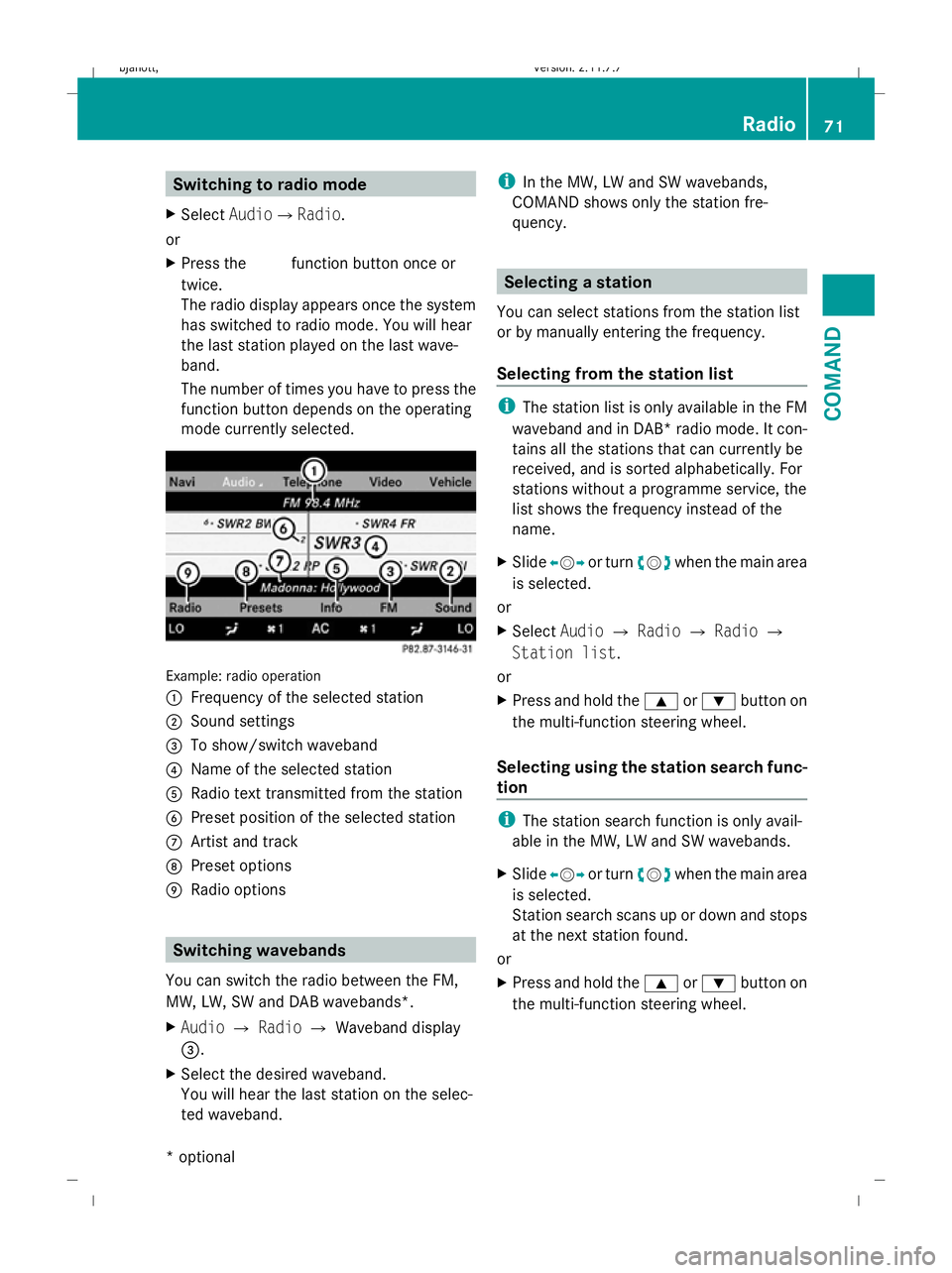
mode currently selected. Example: radio operation
:
Frequency of the selected station
; Sound settings
= To show/switch waveband
? Name of the selected station
A Radio text transmitted from the station
B Preset position of the selected station
C Artist and track
D Preset options
E Radio options Switching wavebands
You can switch the radio between the FM,
MW, LW, SW and DAB wavebands*.
X Audio QRadio QWaveband display
=.
X Select the desired waveband.
You will hear the last station on the selec-
ted waveband. i
In the MW, LW and SW wavebands,
COMAND shows only the station fre-
quency. Selecting a station
You can select stations from the station list
or by manually entering the frequency.
Selecting from the station list i
The station list is only available in the FM
waveband and in DAB* radio mode. It con-
tains all the stations that can currently be
received, and is sorted alphabetically. For
stations without a programme service, the
list shows the frequency instead of the
name.
X Slide XVY or turn cVdwhen the main area
is selected.
or
X Select AudioQRadio QRadio Q
Station list.
or
X Press and hold the 9or: button on
the multi-function steering wheel.
Selecting using the station search func-
tion i
The station search function is only avail-
able in the MW, LW and SW wavebands.
X Slide XVY or turn cVdwhen the main area
is selected.
Station search scans up or down and stops
at the next station found.
or
X Press and hold the 9or: button on
the multi-function steering wheel. Radio
71COMAND
* optional
216_AKB; 2; 3, en-GB
bjanott,V
ersion: 2.11.7.7
2009-02-27T14:54:17+01:00 - Seite 71 Z
Dateiname: 6515230602_buchblock.pdf; erzeugt am 04. Mar 2009 11:14:57; WK
Page 75 of 421
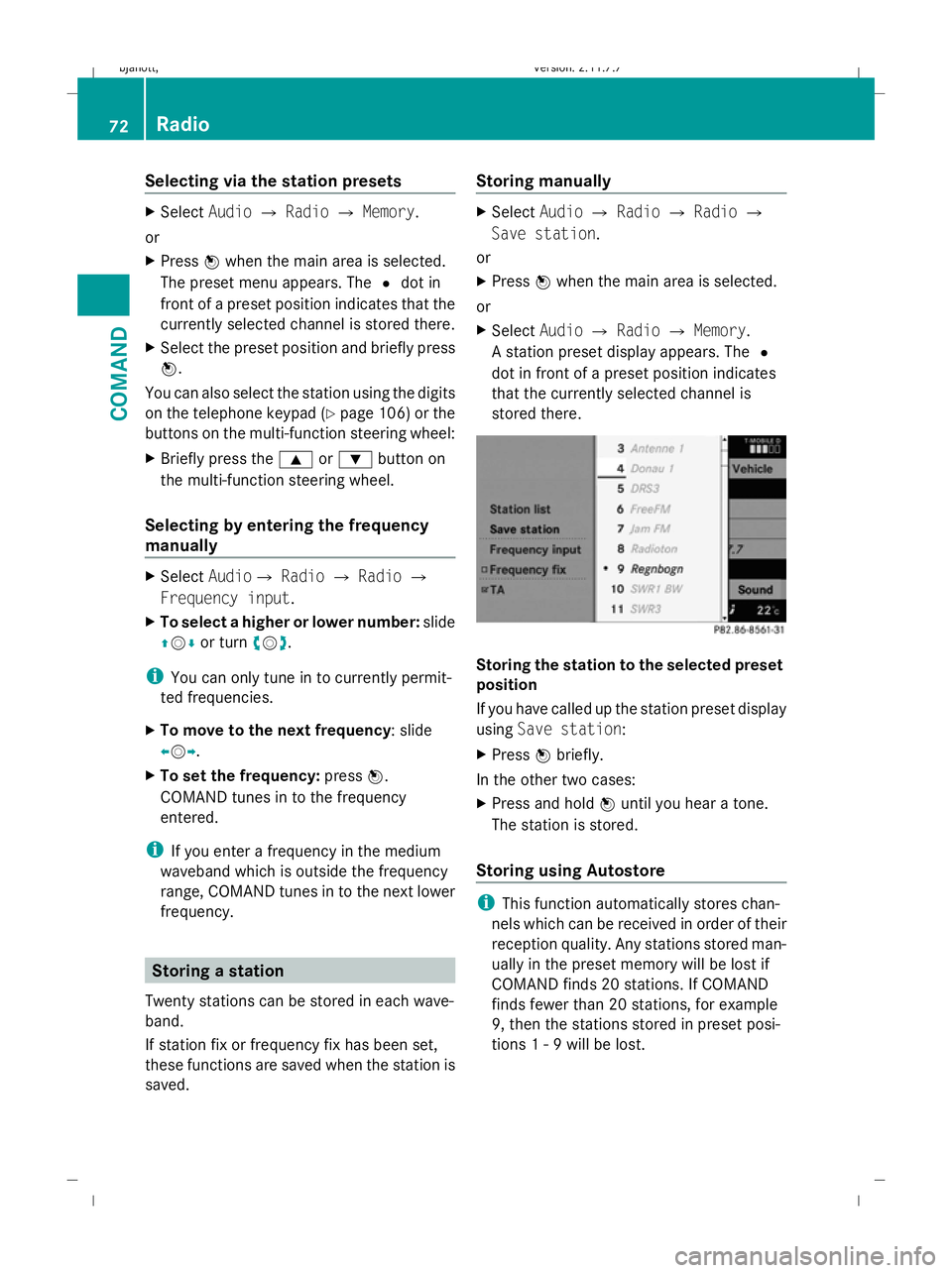
Selecting via the station presets
X
Select AudioQRadio QMemory.
or
X Press Wwhen the main area is selected.
The preset menu appears. The #dot in
front of a preset position indicates that the
currently selected channel is stored there.
X Select the preset position and briefly press
W.
You can also select the station using the digits
on the telephone keypad (Y page 106) or the
buttons on the multi-function steering wheel:
X Briefly press the 9or: button on
the multi-function steering wheel.
Selecting by entering the frequency
manually X
Select AudioQ RadioQRadio Q
Frequency input.
X To select a higher or lower number: slide
ZVÆ or turn cVd.
i You can only tune in to currently permit-
ted frequencies.
X To move to the next frequency: slide
XVY.
X To set the frequency: pressW.
COMAND tunes in to the frequency
entered.
i If you enter a frequency in the medium
waveband which is outside the frequency
range, COMAND tunes in to the next lower
frequency. Storing a station
Twenty stations can be stored in each wave-
band.
If station fix or frequency fix has been set,
these functions are saved when the station is
saved. Storing manually X
Select AudioQRadio QRadio Q
Save station.
or
X Press Wwhen the main area is selected.
or
X Select AudioQRadio QMemory.
A station preset display appears. The #
dot in front of a preset position indicates
that the currently selected channel is
stored there. Storing the station to the selected preset
position
If you have called up the station preset display
using Save station:
X Press Wbriefly.
In the other two cases:
X Press and hold Wuntil you hear a tone.
The station is stored.
Storing using Autostore i
This function automatically stores chan-
nels which can be received in order of their
reception quality. Any stations stored man-
ually in the preset memory will be lost if
COMAND finds 20 stations. If COMAND
finds fewer than 20 stations, for example
9, then the stations stored in preset posi-
tions 1 - 9 will be lost. 72
RadioCOMAND
216_AKB; 2; 3, en-GB
bjanott,
Version: 2.11.7.7 2009-02-27T14:54:17+01:00 - Seite 72
Dateiname: 6515230602_buchblock.pdf; erzeugt am 04. Mar 2009 11:14:57; WK
Page 76 of 421
X
Press Wwhen the main area is selected.
X Select Autostore .
or
X Select AudioQRadio QMemory Q
Autostore .
or
X Select AudioQRadio QRadio Q
Save station QAutostore .
COMAND searches for stations with ade-
quate reception. The available stations are
automatically stored in the preset posi-
tions. RDS frequency diversity
COMAND is equipped with an RDS frequency
diversity system in the FM waveband. The
system consists of a listening receiver and a
monitoring receiver.
i The frequency diversity system only func-
tions for stations which transmit RDS data.
The monitoring receiver constantly scans the
FM waveband and collects data from all the
stations which can be received, e.g. reception
quality and RDS data. COMAND stores the
data and constantly updates it. The listening
receiver is therefore able to switch instanta-
neously to an alternative frequency with a
better signal.
The Frequency fix function prevents
COMAND from switching between the alter-
native frequencies of a station. This is useful,
for example, when there is a noticeable time
offset between the frequencies or if there is
interference on a frequency.
X To switch on or off: selectAudio Q
Radio QRadio.
The tick next to Frequency fix indicates
that this function is activated. X
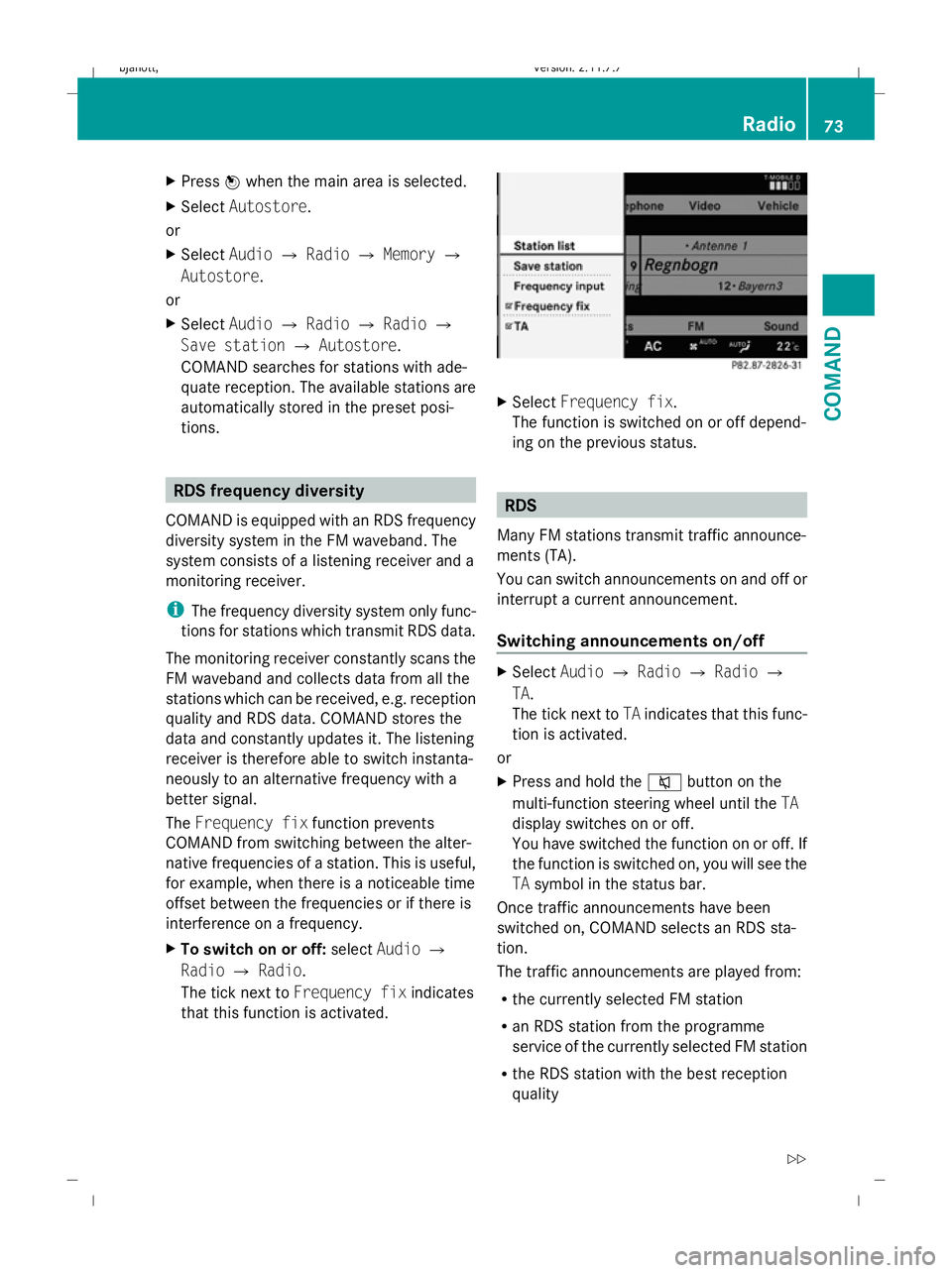
Select Frequency fix.
The function is switched on or off depend-
ing on the previous status. RDS
Many FM stations transmit traffic announce-
ments (TA).
You can switch announcements on and off or
interrupt a current announcement.
Switching announcements on/off X
Select AudioQRadio QRadio Q
TA.
The tick next to TAindicates that this func-
tion is activated.
or
X Press and hold the 8button on the
multi-function steering wheel until the TA
display switches on or off.
You have switched the function on or off. If
the function is switched on, you will see the
TA symbol in the status bar.
Once traffic announcements have been
switched on, COMAND selects an RDS sta-
tion.
The traffic announcements are played from:
R the currently selected FM station
R an RDS station from the programme
service of the currently selected FM station
R the RDS station with the best reception
quality Radio
73COMAND
216_AKB; 2; 3, en-GB
bjanott, Version: 2.11.7.7 2009-02-27T14:54:17+01:00 - Seite 73 Z
Dateiname: 6515230602_buchblock.pdf; erzeugt am 04. Mar 2009 11:14:57; WK
Page 77 of 421
When traffic announcements are switched
on, a traffic announcement will interrupt the
audio signal from the currently activated
audio or video source.
i Telephone conversations and navigation
announcements are not interrupted.
A display message appears in the display in
all audio operating modes.
Interrupting a traffic announcement X
During a traffic announcement, briefly
press the 8button on the multi-func-
tion steering wheel.
COMAND switches back to the audio
source that was selected before the
announcement. Subsequent announce-
ments will interrupt the audio source again.
Switching off RDS X
Press and hold the 8button on the
multi-function steering wheel until the TA
display switches off. DAB*
DAB radio mode
i Information about the components and
operating principles of COMAND can be
found on (Y page 58).
DAB 6
(Digital Audio Broadcasting) is an opti-
mised digital transmission standard designed
for the mobile reception of radio transmis-
sions. Several programmes are combined
into so-called ensembles and transmitted on
one single frequency. Digital radio stations
can be transmitted nationally, regionally or
locally.
Digital stations are selected and saved in the
same way as analogue stations. The following
section therefore lists only those features
specific to DAB. Some stations only transmit programmes at
certain times. If you have selected a station
that is subsequently removed from the
ensemble, it will no longer be received. You
will continue to receive the other pro-
grammes in the ensemble. Select either a dif-
ferent programme or a different ensemble. Switching to DAB radio mode
X Select AudioQRadioQ DAB. :
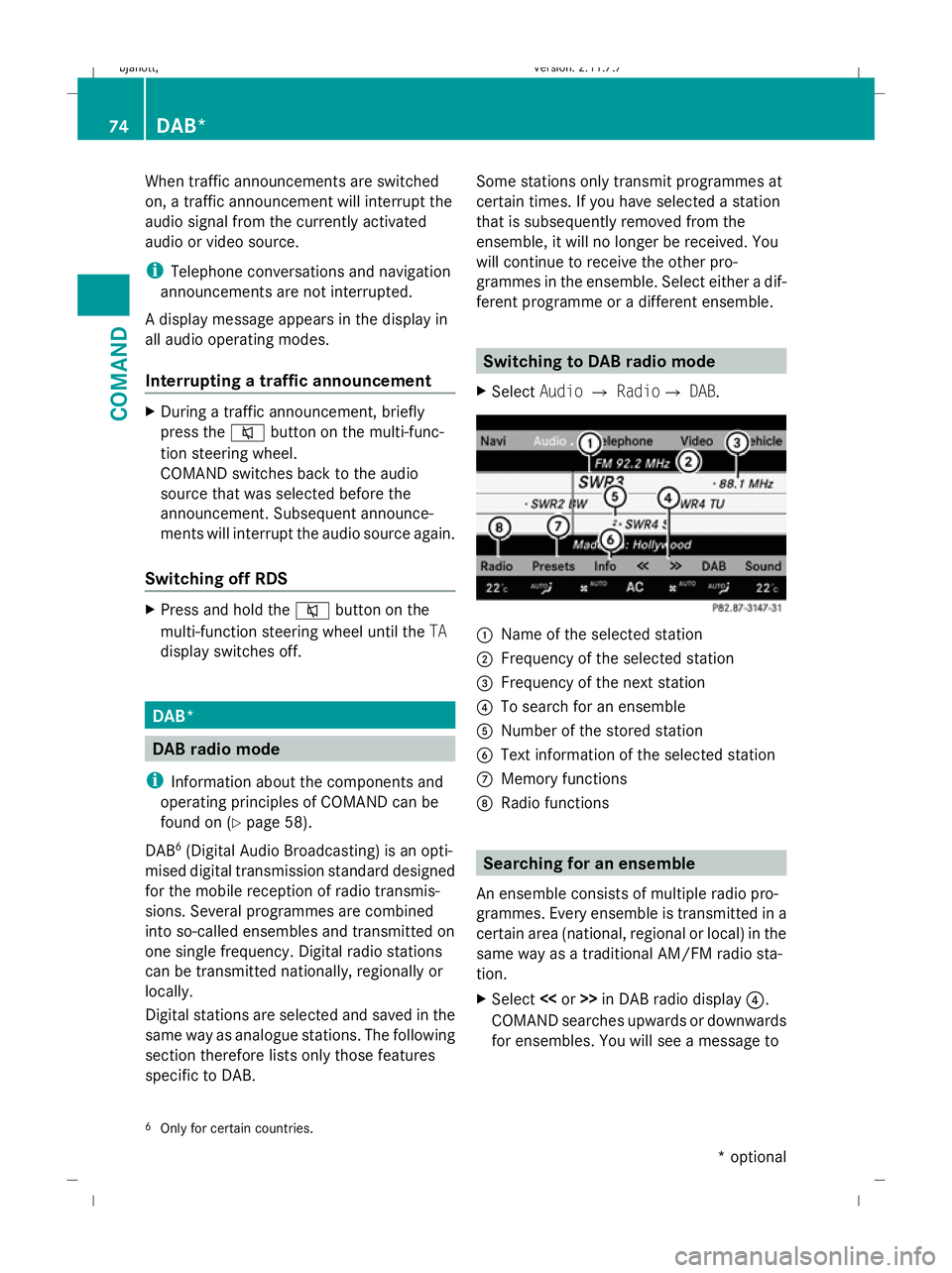
Name of the selected station
; Frequency of the selected station
= Frequency of the next station
? To search for an ensemble
A Number of the stored station
B Text information of the selected station
C Memory functions
D Radio functions Searching for an ensemble
An ensemble consists of multiple radio pro-
grammes. Every ensemble is transmitted in a
certain area (national, regional or local) in the
same way as a traditional AM/FM radio sta-
tion.
X Select <
COMAND searches upwards or downwards
for ensembles. You will see a message to
6 Only for certain countries. 74
DAB*COMAND
* optional
216_AKB; 2; 3, en-GB
bjanott,
Version: 2.11.7.7 2009-02-27T14:54:17+01:00 - Seite 74
Dateiname: 6515230602_buchblock.pdf; erzeugt am 04. Mar 2009 11:14:57; WK
Page 84 of 421
C
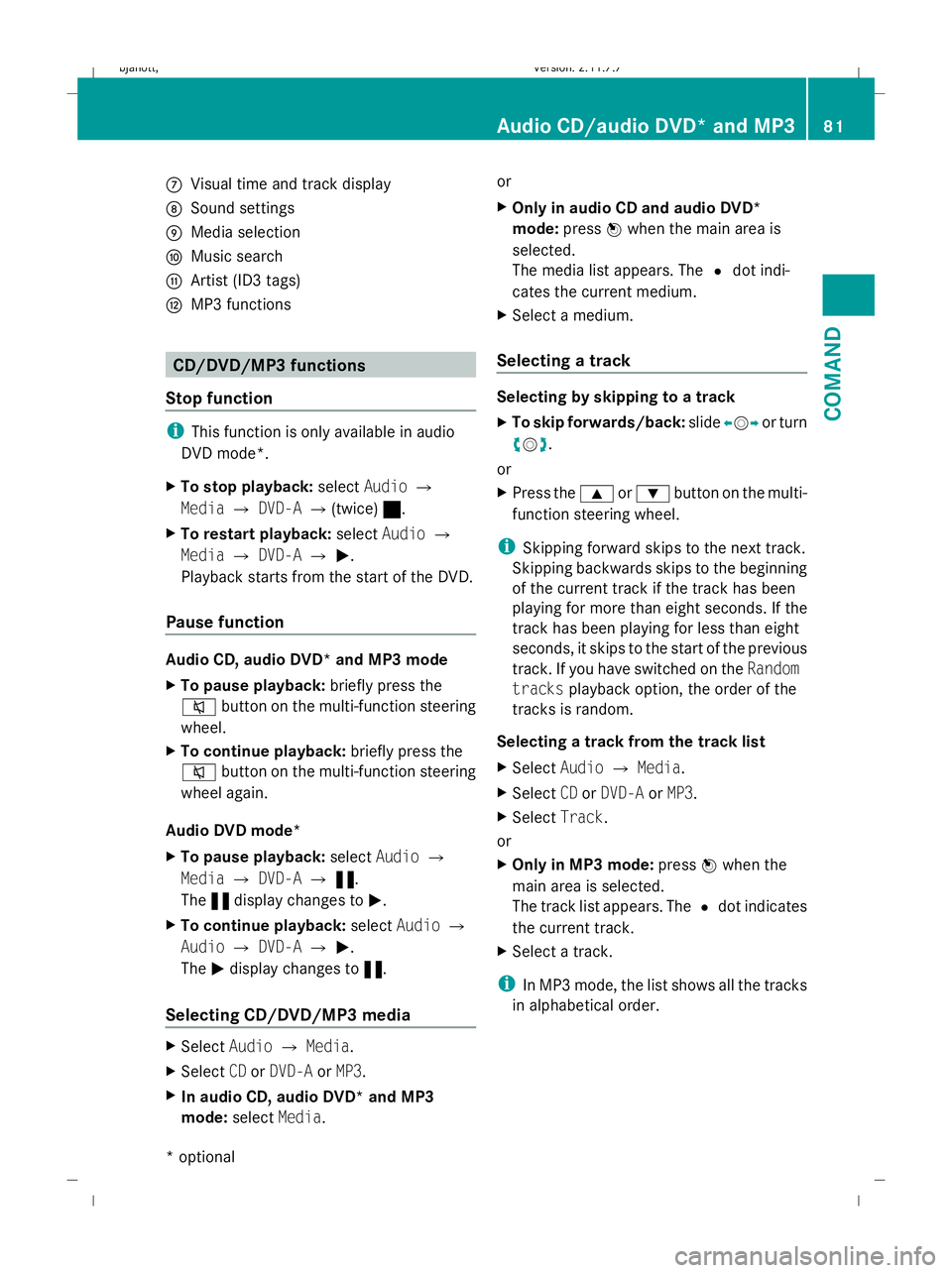
Visual time and track display
D Sound settings
E Media selection
F Music search
G Artist (ID3 tags)
H MP3 functions CD/DVD/MP3 functions
Stop function i
This function is only available in audio
DVD mode*.
X To stop playback: selectAudio Q
Media QDVD-A Q(twice) ±.
X To restart playback: selectAudio Q
Media QDVD-A QM.
Playback starts from the start of the DVD.
Pause function Audio CD, audio DVD* and MP3 mode
X
To pause playback: briefly press the
8 button on the multi-function steering
wheel.
X To continue playback: briefly press the
8 button on the multi-function steering
wheel again.
Audio DVD mode*
X To pause playback: selectAudio Q
Media QDVD-A Q«.
The «display changes to M.
X To continue playback: selectAudio Q
Audio QDVD-A QM.
The Mdisplay changes to «.
Selecting CD/DVD/MP3 media X
Select AudioQMedia.
X Select CDorDVD-A orMP3.
X In audio CD, audio DVD* and MP3
mode: selectMedia. or
X
Only in audio CD and audio DVD*
mode: pressWwhen the main area is
selected.
The media list appears. The #dot indi-
cates the current medium.
X Select a medium.
Selecting a track Selecting by skipping to a track
X
To skip forwards/back: slideXVY or turn
cVd.
or
X Press the 9or: button on the multi-
function steering wheel.
i Skipping forward skips to the next track.
Skipping backwards skips to the beginning
of the current track if the track has been
playing for more than eight seconds. If the
track has been playing for less than eight
seconds, it skips to the start of the previous
track. If you have switched on the Random
tracks playback option, the order of the
tracks is random.
Selecting a track from the track list
X Select AudioQMedia.
X Select CDorDVD-A orMP3.
X Select Track.
or
X Only in MP3 mode: pressWwhen the
main area is selected.
The track list appears. The #dot indicates
the current track.
X Select a track.
i In MP3 mode, the list shows all the tracks
in alphabetical order. Audio CD/audio DVD* and MP3
81COMAND
* optional
216_AKB; 2; 3, en-GB
bjanott,
Version: 2.11.7.7 2009-02-27T14:54:17+01:00 - Seite 81 Z
Dateiname: 6515230602_buchblock.pdf; erzeugt am 04. Mar 2009 11:14:59; WK
Page 89 of 421
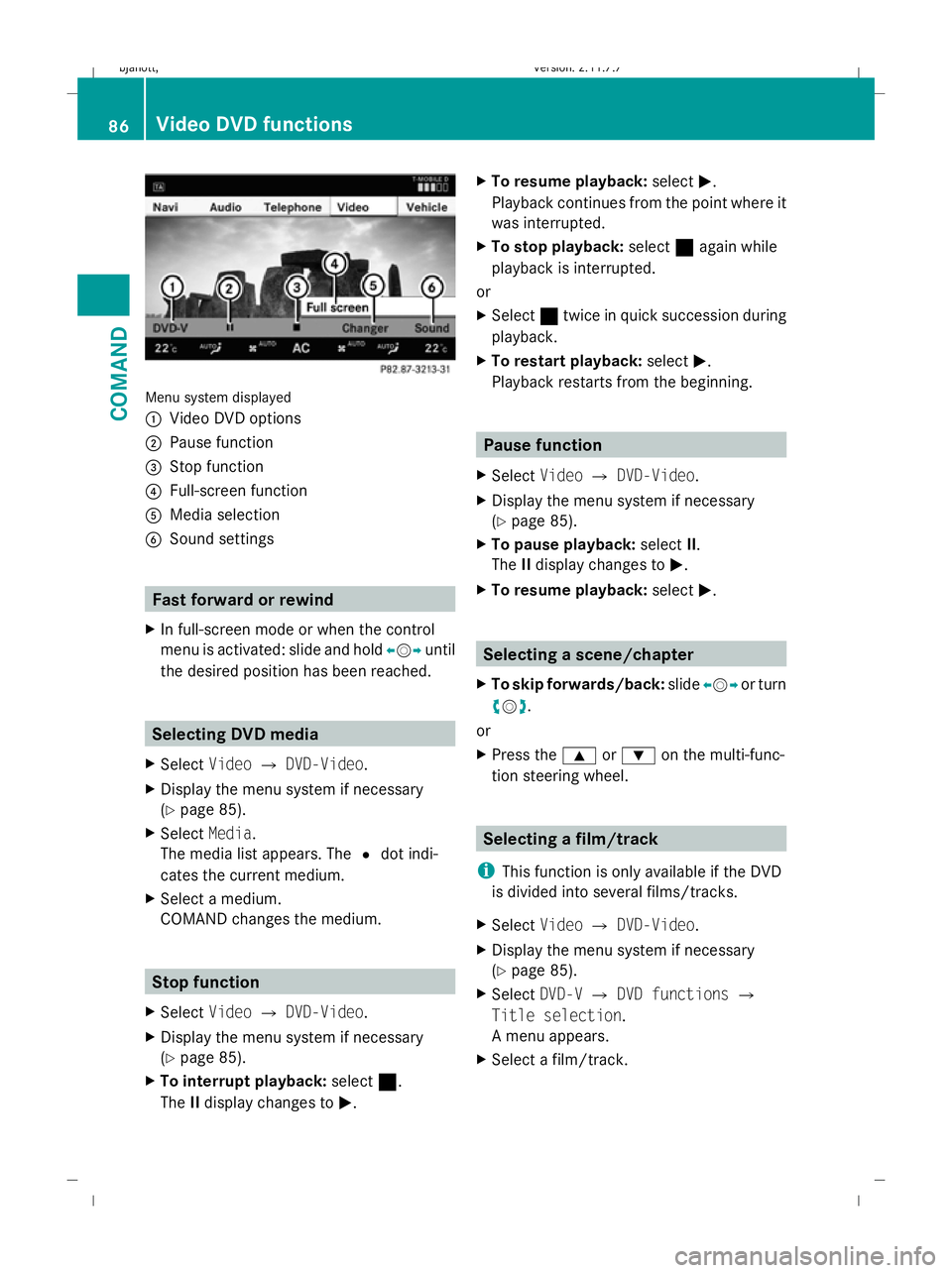
Menu system displayed
:
Video DVD options
; Pause function
= Stop function
? Full-screen function
A Media selection
B Sound settings Fast forward or rewind
X In full-screen mode or when the control
menu is activated: slide and hold XVYuntil
the desired position has been reached. Selecting DVD media
X Select VideoQDVD-Video.
X Display the menu system if necessary
(Y page 85).
X Select Media.
The media list appears. The #dot indi-
cates the current medium.
X Select a medium.
COMAND changes the medium. Stop function
X Select VideoQDVD-Video.
X Display the menu system if necessary
(Y page 85).
X To interrupt playback: select¯.
The IIdisplay changes to M. X
To resume playback: selectM.
Playback continues from the point where it
was interrupted.
X To stop playback: select¯again while
playback is interrupted.
or
X Select ¯twice in quick succession during
playback.
X To restart playback: selectM.
Playback restarts from the beginning. Pause function
X Select VideoQDVD-Video.
X Display the menu system if necessary
(Y page 85).
X To pause playback: selectII.
The IIdisplay changes to M.
X To resume playback: selectM. Selecting a scene/chapter
X To skip forwards/back: slideXVY or turn
cVd.
or
X Press the 9or: on the multi-func-
tion steering wheel. Selecting a film/track
i This function is only available if the DVD
is divided into several films/tracks.
X Select VideoQDVD-Video.
X Display the menu system if necessary
(Y page 85).
X Select DVD-VQDVD functions Q
Title selection.
A menu appears.
X Select a film/track. 86
Video DVD functionsCOMAND
216_AKB; 2; 3, en-GB
bjanott,V
ersion: 2.11.7.7
2009-02-27T14:54:17+01:00 - Seite 86
Dateiname: 6515230602_buchblock.pdf; erzeugt am 04. Mar 2009 11:15:01; WK
Page 93 of 421
A
To show the menu system
B Current programme on the previous TV
channel in the list (digital TV receiver only)
C Previous TV channel in the list Hiding/showing the menu system
X To show: pressW.
X To hide: pressWwhen the main area is
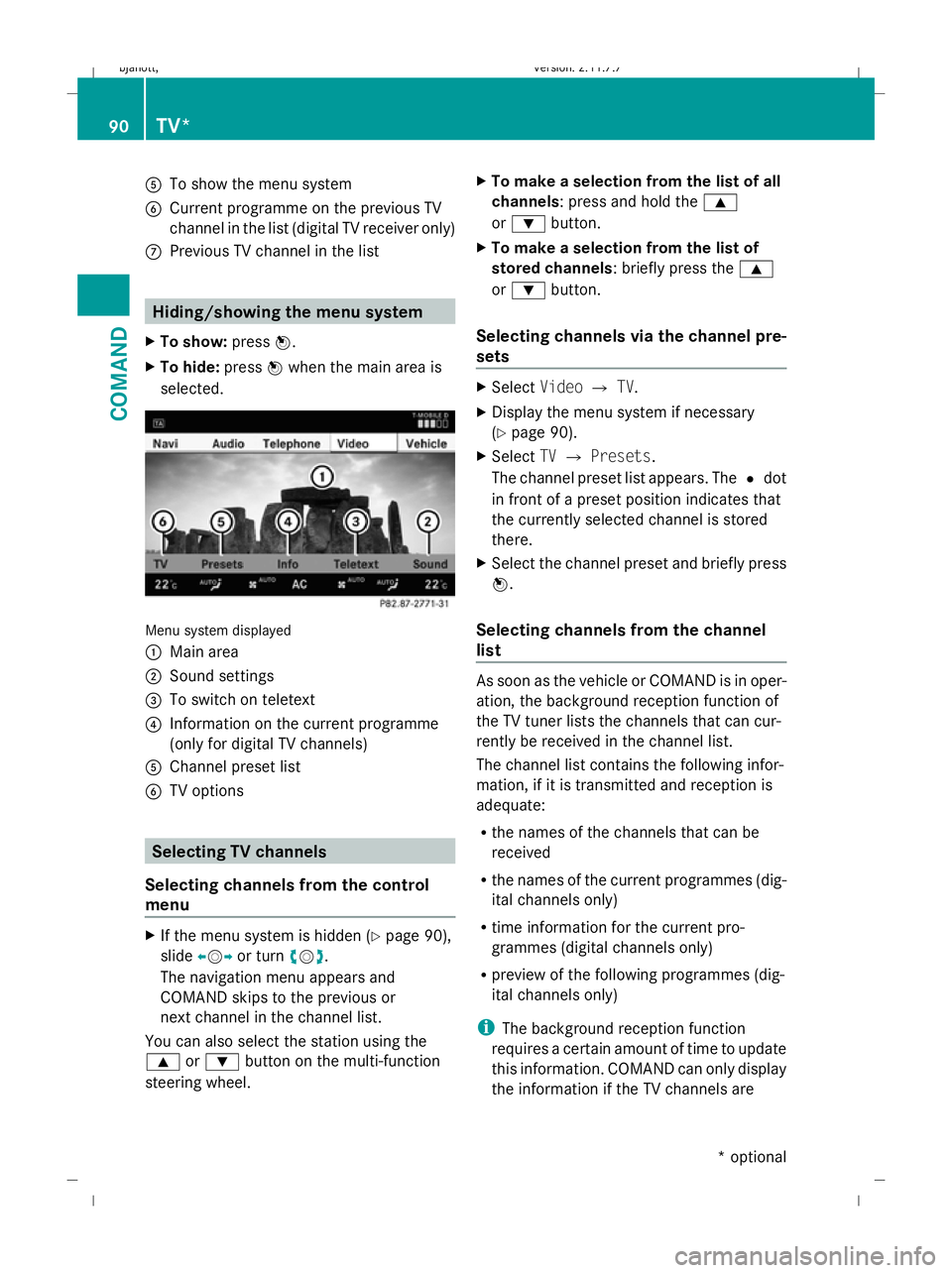
selected. Menu system displayed
:
Main area
; Sound settings
= To switch on teletext
? Information on the current programme
(only for digital TV channels)
A Channel preset list
B TV options Selecting TV channels
Selecting channels from the control
menu X
If the menu system is hidden (Y page 90),
slide XVY or turn cVd.
The navigation menu appears and
COMAND skips to the previous or
next channel in the channel list.
You can also select the station using the
9 or: button on the multi-function
steering wheel. X
To make a selection from the list of all
channels: press and hold the 9
or : button.
X To make a selection from the list of
stored channels: briefly press the 9
or : button.
Selecting channels via the channel pre-
sets X
Select VideoQTV.
X Display the menu system if necessary
(Y page 90).
X Select TVQ Presets.
The channel preset list appears. The #dot
in front of a preset position indicates that
the currently selected channel is stored
there.
X Select the channel preset and briefly press
W.
Selecting channels from the channel
list As soon as the vehicle or COMAND is in oper-
ation, the background reception function of
the TV tuner lists the channels that can cur-
rently be received in the channel list.
The channel list contains the following infor-
mation, if it is transmitted and reception is
adequate:
R
the names of the channels that can be
received
R the names of the current programmes (dig-
ital channels only)
R time information for the current pro-
grammes (digital channels only)
R preview of the following programmes (dig-
ital channels only)
i The background reception function
requires a certain amount of time to update
this information. COMAND can only display
the information if the TV channels are 90
TV*COMAND
* optional
216_AKB; 2; 3, en-GB
bjanott,
Version: 2.11.7.7 2009-02-27T14:54:17+01:00 - Seite 90
Dateiname: 6515230602_buchblock.pdf; erzeugt am 04. Mar 2009 11:15:02; WK
Page 103 of 421
X
Confirm your entry with W.
COMAND activates the connected device.
You will see a message to this effect. The
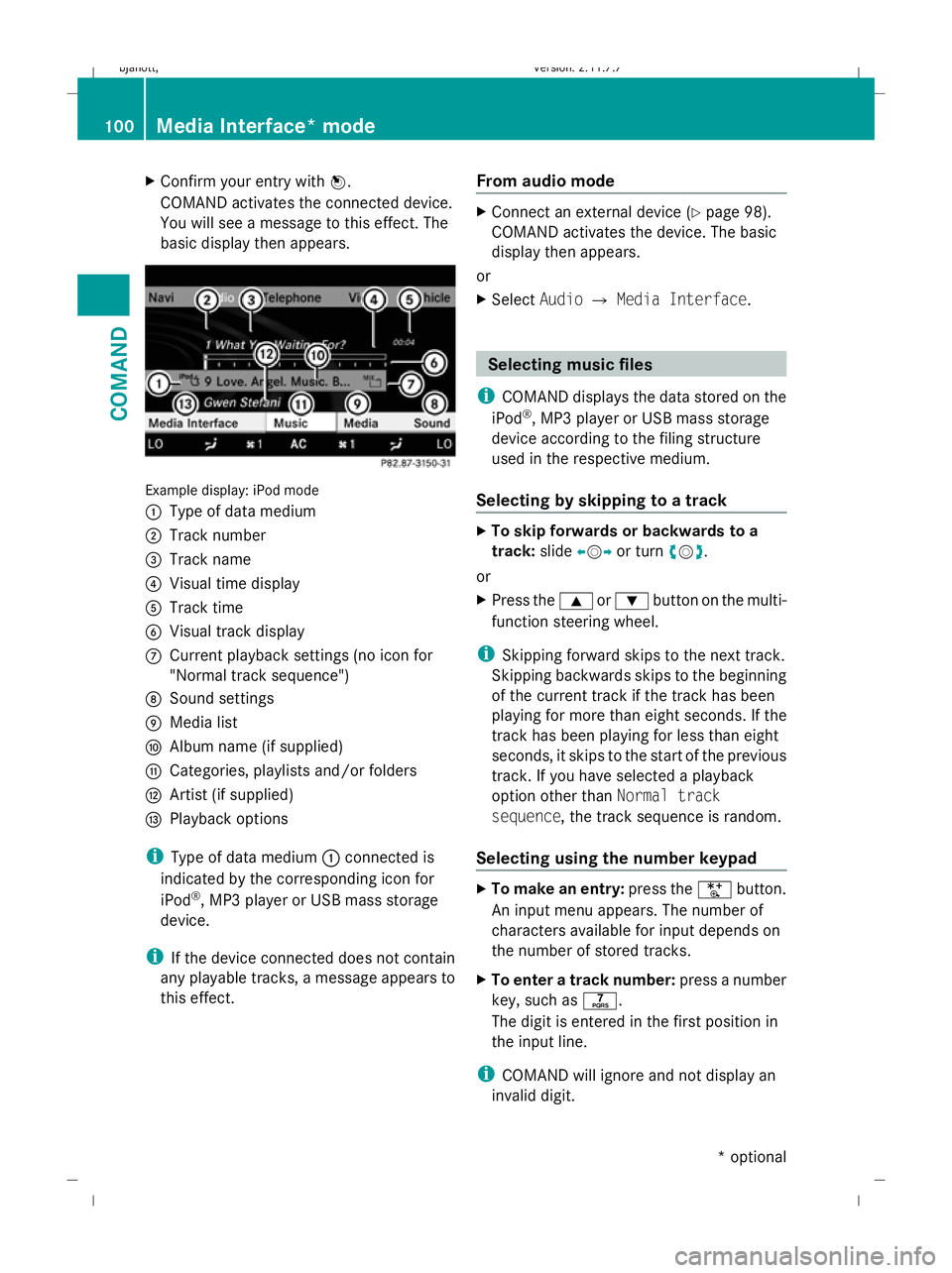
basic display then appears. Example display: iPod mode
:
Type of data medium
; Track number
= Track name
? Visual time display
A Track time
B Visual track display
C Current playback settings (no icon for
"Normal track sequence")
D Sound settings
E Media list
F Album name (if supplied)
G Categories, playlists and/or folders
H Artist (if supplied)
I Playback options
i Type of data medium :connected is
indicated by the corresponding icon for
iPod ®
, MP3 player or USB mass storage
device.
i If the device connected does not contain
any playable tracks, a message appears to
this effect. From audio mode X
Connect an external device (Y page 98).
COMAND activates the device. The basic
display then appears.
or
X Select AudioQMedia Interface . Selecting
music files
i COMAND displays the data stored on the
iPod ®
, MP3 player or USB mass storage
device according to the filing structure
used in the respective medium.
Selecting by skipping to a track X
To skip forwards or backwards to a
track: slideXVY or turn cVd.
or
X Press the 9or: button on the multi-
function steering wheel.
i Skipping forward skips to the next track.
Skipping backwards skips to the beginning
of the current track if the track has been
playing for more than eight seconds. If the
track has been playing for less than eight
seconds, it skips to the start of the previous
track. If you have selected a playback
option other than Normal track
sequence, the track sequence is random.
Selecting using the number keypad X
To make an entry: press theUbutton.
An input menu appears. The number of
characters available for input depends on
the number of stored tracks.
X To enter a track number: press a number
key, such as q.
The digit is entered in the first position in
the input line.
i COMAND will ignore and not display an
invalid digit. 100
Media Interface* modeCOMAND
* optional
216_AKB; 2; 3, en-GB
bjanott
,V ersion: 2.11.7.7
2009-02-27T14:54:17+01:00 - Seite 100
Dateiname: 6515230602_buchblock.pdf; erzeugt am 04. Mar 2009 11:15:05; WK