lock MERCEDES-BENZ CL COUPE 2009 Workshop Manual
[x] Cancel search | Manufacturer: MERCEDES-BENZ, Model Year: 2009, Model line: CL COUPE, Model: MERCEDES-BENZ CL COUPE 2009Pages: 421, PDF Size: 10.78 MB
Page 54 of 421
R
Under no circumstances should you deac-
tivate ESP ®
.
R When pulling away, only depress the accel-
erator pedal as far as is necessary.
R Adapt your driving style to the prevailing
road and weather conditions.
The vehicle may otherwise begin to skid.
If you drive too fast, ESP ®
cannot reduce the
risk of an accident. ESP ®
cannot override the
laws of physics.
! If the vehicle is to be towed with the front
or rear axle raised, the ignition must be
switched off (key in position 0or 1in the
ignition lock). Application of the brakes by
ESP ®
could otherwise destroy the brake
system on the front or rear axle.
! Vehicles with 4MATIC* may not be towed
with the front or rear axle raised.
i Only use wheels with the recommended
tyre sizes. Only then will ESP ®
function
properly.
ETS (Electronic Traction Support) Traction control is part of ESP
®
.
Traction control brakes the drive wheels indi-
vidually if they spin. This enables you to pull
away and accelerate on slippery surfaces, for
example, if the road surface is slippery on one
side.
Traction control remains active when you
deactivate ESP ®
. G
Risk of accident
Traction control cannot reduce the risk of an
accident if you drive too fast. Traction control
cannot override the laws of physics.
Activating/deactivating ESP ®ESP
®
is activated automatically when the
engine is running. It may be best to deactivate ESP
®
in the fol-
lowing situations:
R when using snow chains
R in deep snow
R on sand or gravel G
Risk of accident
Activate ESP ®
as soon as the situations
described above no longer apply. ESP ®
will
otherwise not be able to stabilise the vehicle
if the vehicle starts to skid or a wheel starts
to spin.
If you deactivate ESP ®
:
R ESP ®
no longer improves driving stability.
R engine torque is not limited and the drive
wheels are able to spin. The spinning
wheels produce a cutting effect for better
traction.
R traction control is still activated.
R ESP ®
still provides support when you
brake.
i If ESP ®
is deactivated and one or more
wheels start to spin, the ÷warning lamp
in the instrument cluster flashes. In such
situations, ESP ®
will not stabilise the vehi-
cle.
X To deactivate: (Ypage 224).
The å warning lamp in the instrument
cluster lights up. G
Risk of accident
If the å warning lamp in the instrument
cluster lights up when the engine is running,
ESP ®
is deactivated or is unavailable due to a
malfunction. The risk that your vehicle may
start to skid then increases in certain situa-
tions.
Always adapt your driving style to the prevail-
ing road and weather conditions. Driving safety systems
51Safety
* optional
216_AKB; 2; 3, en-GB
bjanott,
Version: 2.11.7.7 2009-02-27T14:54:17+01:00 - Seite 51 Z
Dateiname: 6515230602_buchblock.pdf; erzeugt am 04. Mar 2009 11:14:50; WK
Page 55 of 421
X
To deactivate: (Ypage 224).
The å warning lamp in the instrument
cluster goes out. EBV (electronic brake force distribu-
tion)
EBV monitors and controls the brake pres-
sure on the rear wheels to improve driving
stability when braking. G
Risk of accident
If EBV is malfunctioning, the brake system is
still available with full brake boosting effect.
However, the rear wheels can still lock, e.g.
under full braking. This could cause you to
lose control of your vehicle and cause an acci-
dent. You should therefore adapt your driving
style to the different handling characteristics. ADAPTIVE BRAKE
ADAPTIVE BRAKE offers exceptional braking
comfort and a higher level of braking safety.
In addition to the braking function, ADAPTIVE
BRAKE also has the HOLD convenience func-
tion (Y page 245) and hill start assist
(Y page 204). For further information, see
Driving tips (Y page 304). Distance warning function* (vehicles
with Distronic*)
This function will issue a warning at speeds of
around 30 km/h or more if:
R for a period of several seconds, the dis-
tance to the vehicle in front is too short for
the speed at which you are travelling. The
· distance warning lamp in the instru-
ment cluster will light up.
R you are approaching the vehicle in front too
rapidly. An intermittent warning tone will
then sound and the ·distance warning
lamp will light up in the instrument cluster. In order to maintain the appropriate distance
to the vehicle in front and thus prevent a
crash, you must apply the brakes yourself. G
Risk of accident
Pay particular attention to the traffic condi-
tions if the distance warning lamp ·in the
instrument cluster lights up or an intermittent
warning tone sounds.
If necessary, brake or manoeuvre to avoid an
obstacle.
X To activate/deactivate: activate or deac-
tivate the distance warning function in the
on-board computer (Y page 223).
After activating, the Äsymbol is dis-
played in the left-hand section of the multi-
function display.
For more information on the distance warning
function, see the Distronic section*
(Y page 229). PRE-SAFE
®
Brake* (vehicles with Dis-
tronic Plus*)
PRE-SAFE ®
Brake can help you to minimise
the risk of a frontal collision with a vehicle in
front or reduce the effects of such a collision.
This function will issue a warning at speeds of
around 30 km/h or more if:
R for a period of several seconds, the dis-
tance to the vehicle in front is too short for
the speed at which you are travelling. The
· distance warning lamp in the instru-
ment cluster will light up.
R you are approaching the vehicle in front too
rapidly. An intermittent warning tone will
then sound and the ·distance warning
lamp will light up in the instrument cluster.
Due to the nature of the system, particularly
complicated driving conditions may cause the
system to display an unnecessary warning. 52
Driving safety systemsSafety
* optional
216_AKB; 2; 3, en-GB
bjanott,
Version: 2.11.7.7 2009-02-27T14:54:17+01:00 - Seite 52
Dateiname: 6515230602_buchblock.pdf; erzeugt am 04. Mar 2009 11:14:50; WK
Page 56 of 421
G
Risk of accident
Pay particular attention to the traffic condi-
tions if the distance warning lamp ·in the
instrument cluster lights up or an intermittent
warning tone sounds. If necessary, brake or
manoeuvre to avoid an obstacle.
In addition, at speeds of around 30 km/h or
more, PRE-SAFE ®
Brake can:
R brake the vehicle gently and automatically
within a speed range of up to around
180 km/h
R trigger preventative passenger protection
measures (PRE-SAFE ®
) G
Risk of accident
PRE-SAFE ®
Brake is only an aid to assist you
when driving. You are responsible for main-
taining a safe distance from other vehicles,
the vehicle's speed and for braking in good
time. Always pay attention to the traffic con-
ditions. Otherwise, you may recognise dan-
gers too late, cause an accident and injure
yourself and others.
With the help of the radar sensor system,
PRE-SAFE ®
Brake can detect obstacles that
are in front of your vehicle for an extended
period of time. If you approach an obstacle
and PRE-SAFE ®
Brake detects a risk of a col-
lision, the system will initially alert you both
visually and acoustically. If you do not brake
or steer, the vehicle will automatically brake
slightly. In the event of an increased risk of a
collision, PRE-SAFE ®
is activated
(Y page 42). G
Risk of accident
Only clearly detected obstacles will trigger a
warning and initiate braking assistance by
PRE-SAFE ®
Brake. In particular, the detection of obstacles may
be restricted if there is:
R
dirt on the sensors or the sensors are cov-
ered
R snow or heavy rain
R interference from other radar sources
R strong radar reflections, for example in
multi-storey car parks
PRE-SAFE ®
Brake does not react to persons,
animals, oncoming vehicles and crossing traf-
fic.
PRE-SAFE ®
Brake may not detect narrow
vehicles such as motorcycles or vehicles driv-
ing on a different line. G
Risk of accident
Depending on the vehicle's speed, PRE-
SAFE ®
Brake will brake your vehicle up to
maximum of 4 m/s 2
. This is equivalent to
approximately 40 % of the maximum braking
power of the vehicle. You must also apply the
brakes yourself to avoid a collision.
In order to maintain the appropriate distance
to the vehicle in front and thus prevent a
crash, you must apply the brakes yourself.
At speeds up to approximately 70 km/h,
PRE-SAFE ®
Brake can also detect stationary
obstacles, for example stopped or parked
vehicles. G
Risk of accident
If, in a critical driving situation, you do not
receive a visual and acoustic warning:
R PRE-SAFE ®
Brake did not detect the risk of
a collision
R PRE-SAFE ®
Brake is deactivated
R PRE-SAFE ®
Brake has failed
You must then brake to avoid a collision. Driving safety systems
53Safety
216_AKB; 2; 3, en-GB
bjanott, Version: 2.11.7.7 2009-02-27T14:54:17+01:00 - Seite 53 Z
Dateiname: 6515230602_buchblock.pdf; erzeugt am 04. Mar 2009 11:14:50; WK
Page 57 of 421
X
To activate/deactivate: activate or deac-
tivate PRE-SAFE ®
Brake in the on-board
computer (Y page 224).
After activation, the Äsymbol is dis-
played on the left in the driver display.
Vehicles with COMAND and a navigation sys-
tem*: the radar sensor system is switched off
automatically in the vicinity of radio telescope
facilities (Y page 411).
For PRE-SAFE ®
Brake to assist you when driv-
ing, the radar sensor system must be
switched on and operational.
PRE-SAFE ®
Brake does not always clearly
identify complex traffic situations properly.
You can terminate the intervention of PRE-
SAFE ®
Brake in a non-critical driving situation
at any time if:
R an acoustic and visual warning occurs
R the vehicle brakes gently
To end this you can either depress the accel-
erator pedal further, activate kickdown or
release the brake pedal.
The braking intervention of PRE-SAFE ®
Brake
is ended automatically if:
R you manoeuvre to avoid the obstacle.
R you drive slower than approximately
15 km/h.
R there is no longer an obstacle detected in
front of your vehicle.
R there is no longer any danger of a collision.
i While Distronic Plus is activated, PRE-
SAFE ®
Brake remains passive.
Following a collision or crash-related damage
to the front end of the vehicle, have the con-
figuration and operation of the radar sensors
checked. Choose a qualified specialist work-
shop for this which has the necessary spe-
cialist knowledge and tools for the work
required. Mercedes-Benz recommends that
you use a Mercedes-Benz Service Centre for
this purpose. Anti-theft systems
Immobiliser
The immobiliser prevents your vehicle from
being started without the correct key.
Activating the immobiliser X
With the key: remove the key from the
ignition lock.
X With KEYLESS GO*: press the start/stop
button on the dashboard.
The engine switches off.
Deactivating the immobiliser X
With the key: turn the key to position 2in
the ignition lock.
X With KEYLESS GO*: press the start/stop
button on the dashboard twice without
depressing the brake.
i The immobiliser is always deactivated
when you start the engine. ATA* (anti-theft alarm system)
A visual and audible alarm is triggered when
the alarm system is primed and you open:
R a door
R a door using the emergency key element
R the boot lid
R the bonnet
The alarm is not switched off even if you close
an open door again. 54
Anti-theft systemsSafety
* optional
216_AKB; 2; 3, en-GB
bjanott,
Version: 2.11.7.7 2009-02-27T14:54:17+01:00 - Seite 54
Dateiname: 6515230602_buchblock.pdf; erzeugt am 04. Mar 2009 11:14:50; WK
Page 58 of 421
X
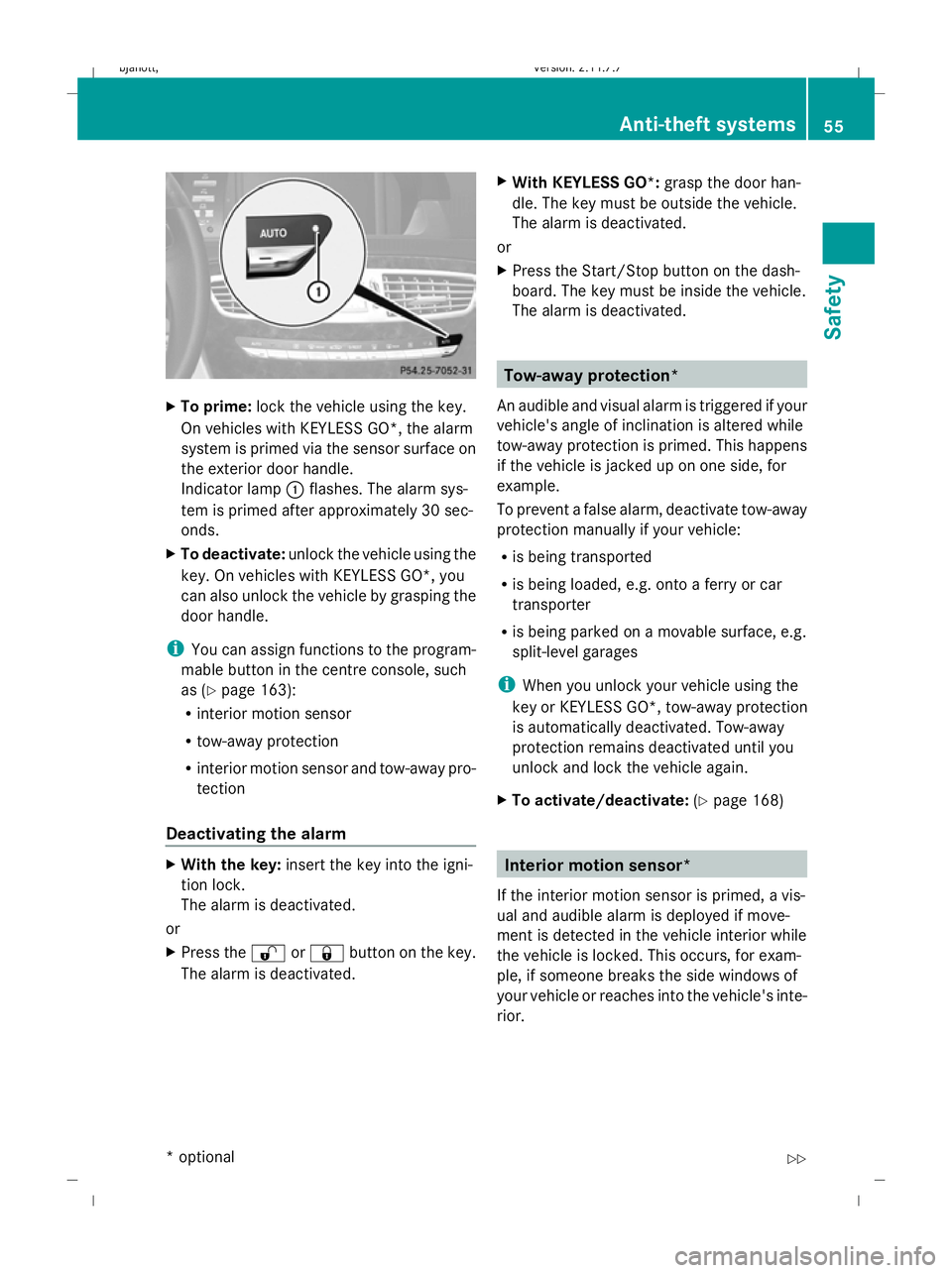
To prime: lock the vehicle using the key.
On vehicles with KEYLESS GO*, the alarm
system is primed via the sensor surface on
the exterior door handle.
Indicator lamp :flashes. The alarm sys-
tem is primed after approximately 30 sec-
onds.
X To deactivate: unlock the vehicle using the
key. On vehicles with KEYLESS GO*, you
can also unlock the vehicle by grasping the
door handle.
i You can assign functions to the program-
mable button in the centre console, such
as (Y page 163):
R interior motion sensor
R tow-away protection
R interior motion sensor and tow-away pro-
tection
Deactivating the alarm X
With the key: insert the key into the igni-
tion lock.
The alarm is deactivated.
or
X Press the %or& button on the key.
The alarm is deactivated. X
With KEYLESS GO*: grasp the door han-
dle. The key must be outside the vehicle.
The alarm is deactivated.
or
X Press the Start/Stop button on the dash-
board. The key must be inside the vehicle.
The alarm is deactivated. Tow-away protection*
An audible and visual alarm is triggered if your
vehicle's angle of inclination is altered while
tow-away protection is primed. This happens
if the vehicle is jacked up on one side, for
example.
To prevent a false alarm, deactivate tow-away
protection manually if your vehicle:
R is being transported
R is being loaded, e.g. onto a ferry or car
transporter
R is being parked on a movable surface, e.g.
split-level garages
i When you unlock your vehicle using the
key or KEYLESS GO*, tow-away protection
is automatically deactivated. Tow-away
protection remains deactivated until you
unlock and lock the vehicle again.
X To activate/deactivate: (Ypage 168) Interior motion sensor*
If the interior motion sensor is primed, a vis-
ual and audible alarm is deployed if move-
ment is detected in the vehicle interior while
the vehicle is locked. This occurs, for exam-
ple, if someone breaks the side windows of
your vehicle or reaches into the vehicle's inte-
rior. Anti-theft systems
55Safety
* optional
216_AKB; 2; 3, en-GB
bjanott,
Version: 2.11.7.7 2009-02-27T14:54:17+01:00 - Seite 55 Z
Dateiname: 6515230602_buchblock.pdf; erzeugt am 04. Mar 2009 11:14:51; WK
Page 59 of 421
To prevent a false alarm, deactivate the inte-
rior motion sensor if you lock your vehicle and
R people or animals remain in the vehicle
R the side windows remain open
R the sliding/tilting sunroof remains open
X Make sure that:
R
the side windows are closed.
R the sliding/tilting sunroof is closed.
R there are no objects, e.g. mascots, hang-
ing on the rear-view mirror or on the
grasp handles on the roof trim.
This will prevent false alarms.
X To activate/deactivate: (Ypage 167).
i The interior motion sensor remains deac-
tivated until you unlock and lock the vehicle
again. 56
Anti-theft systemsSafety
216_AKB; 2; 3, en-GB
bjanott,
Version: 2.11.7.7 2009-02-27T14:54:17+01:00 - Seite 56
Dateiname: 6515230602_buchblock.pdf; erzeugt am 04. Mar 2009 11:14:51; WK
Page 60 of 421
Introduction
......................................... 58
Radio .................................................... 70
DAB* ..................................................... 74
Audio CD/audio DVD* and MP3 ........75
Video DVD functions ...........................84
TV* ........................................................ 89
MUSIC REGISTER* ............................... 94
Media Interface* mode .......................98
Telephone* ........................................ 103
Navigation system* (introduction) .125
Navigation system* (entering a
destination) ....................................... 135
Navigation system* (entering spe-
cial destinations) .............................. 147
Navigation system* (route guid-
ance) .................................................. 148
Navigation* (route guidance with
RDS-TMC) ........................................... 155
Navigation system* (destination
memory) ............................................ 157
Navigation system* (previous des-
tinations) ........................................... 160
System ............................................... 160
Vehicle ............................................... 164
Automatic air conditioning ..............168
Seats .................................................. 173 57COMAND
216_AKB; 2; 3, en-GB
bjanott,
Version: 2.11.7.7 2009-02-27T14:54:17+01:00 - Seite 57
Dateiname: 6515230602_buchblock.pdf; erzeugt am 04. Mar 2009 11:14:52; WK
Page 61 of 421
Introduction
Operating safety
G
Risk of accident
Your attention must always be focused on the
traffic conditions.
Only use COMAND or the telephone* when
the road and traffic conditions permit.
Bear in mind that, at a speed of only
50 km/h, your vehicle covers a distance of
nearly 14 m per second. The navigation sys-
tem* will not provide you with information
about stop signs, give-way signs, traffic regu-
lations or road safety features. It is up to you
to pay attention to these while driving the
vehicle. Only enter a new destination when
the vehicle is stationary. G
Risk of accident and injury
Vehicles with BlueHYBRID *: make sure that
you read the "BlueHYBRID" supplement. You
may otherwise fail to detect dangers.
Dear radio user,
This radio can be operated by anyone in
accordance with the relevant EC directive.
The equipment corresponds to current Euro-
pean and harmonised national standards.
This guarantees that the equipment conforms
to the relevant specifications regarding elec-
tromagnetic compatibility.
As a result, interference caused by your
equipment to other electrical/electronic
equipment and interference to your equip-
ment caused by other electrical/electronic
equipment can be largely prevented.
The equipment is approved by the vehicle
manufacturer in accordance with European
Automotive EMC Directive 95/54/EC.
This means that the equipment in your vehicle
is authorised for use according to the given
regulations. The equipment does not require
certification and conforms to the relevant
equipment-specific EMC specifications in accordance with European standards
EN 55013 and EN 55020. Function restrictions when the vehi-
cle is being driven
For safety reasons, some COMAND functions
are restricted or unavailable while the vehicle
is in motion. This will be indicated by
COMAND displaying a message to this effect. Components
You can use COMAND to operate the follow-
ing in your vehicle:
R the audio functions
R the navigation system*
R the telephone* and communication func-
tions (text messages*)
R video DVD and TV*
R various vehicle settings
COMAND consists of:
R the COMAND display/SPLITVIEW*
R the COMAND controller
R the COMAND function buttons
R the telephone keypad
R connections in the glove compartment
(USB, additional USB*, jack plug* and
iPod ®
connection*)
The entertainment system* comprises:
R a remote control* for the front passenger
R wireless headphones* for the front
passenger 58
IntroductionCOMAND
* optional
216_AKB; 2; 3, en-GB
bjanott,
Version: 2.11.7.7 2009-02-27T14:54:17+01:00 - Seite 58
Dateiname: 6515230602_buchblock.pdf; erzeugt am 04. Mar 2009 11:14:52; WK
Page 62 of 421
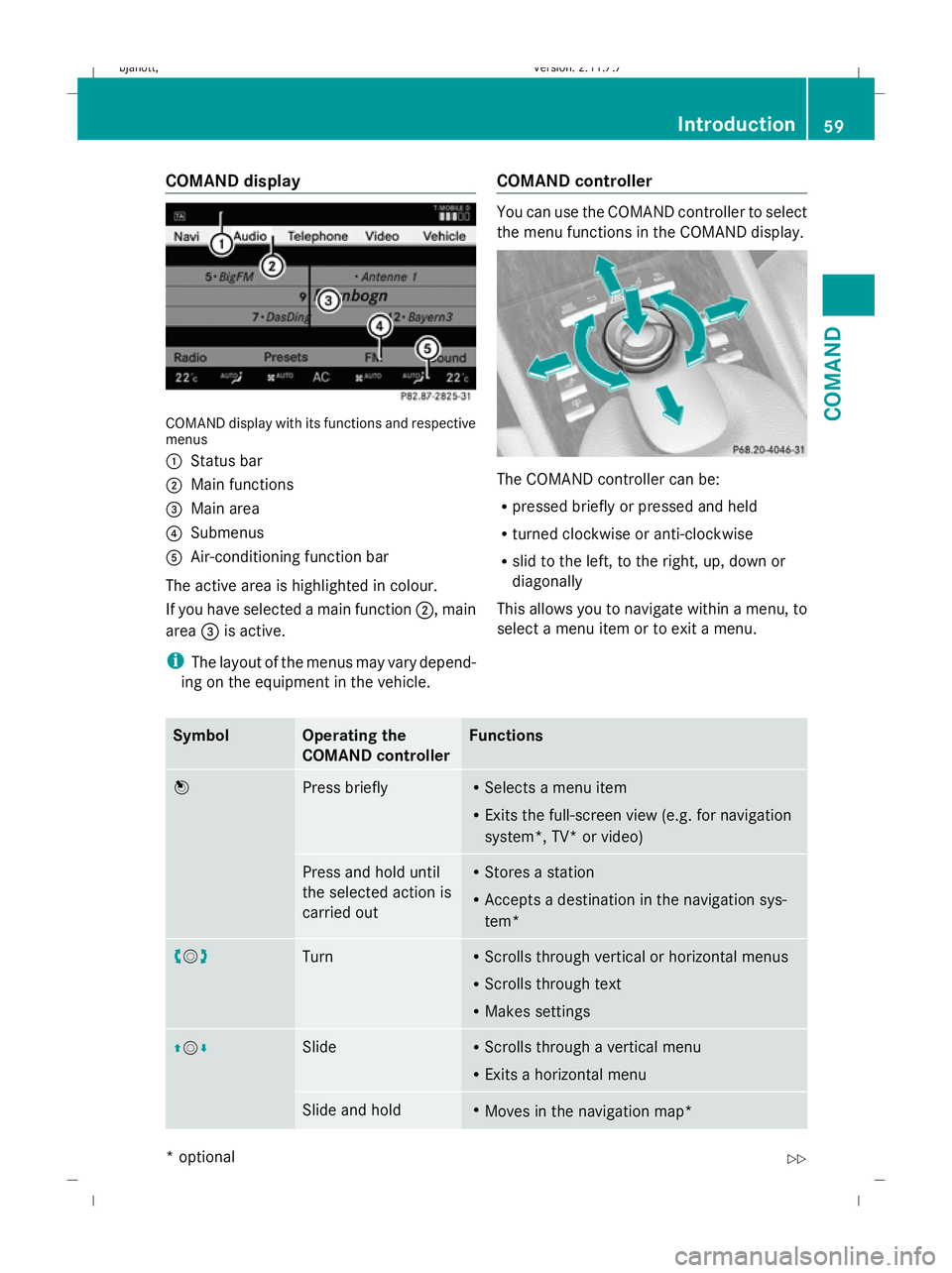
COMAND display
COMAND display with its functions and respective
menus
:
Status bar
; Main functions
= Main area
? Submenus
A Air-conditioning function bar
The active area is highlighted in colour.
If you have selected a main function ;, main
area =is active.
i The layout of the menus may vary depend-
ing on the equipment in the vehicle. COMAND controller You can use the COMAND controller to select
the menu functions in the COMAND display.
The COMAND controller can be:
R
pressed briefly or pressed and held
R turned clockwise or anti-clockwise
R slid to the left, to the right, up, down or
diagonally
This allows you to navigate within a menu, to
select a menu item or to exit a menu. Symbol Operating the
COMAND controller Functions
W
Press briefly R
Selects a menu item
R Exits the full-screen view (e.g. for navigation
system*, TV* or video) Press and hold until
the selected action is
carried out R
Stores a station
R Accepts a destination in the navigation sys-
tem* cVd
Turn R
Scrolls through vertical or horizontal menus
R Scrolls through text
R Makes settings ZVÆ Slide R
Scrolls through a vertical menu
R Exits a horizontal menu Slide and hold R
Moves in the navigation map* Introduction
59COMAND
* optional
216_AKB; 2; 3, en-GB
bjanott
,V ersion: 2.11.7.7
2009-02-27T14:54:17+01:00 - Seite 59 Z
Dateiname: 6515230602_buchblock.pdf; erzeugt am 04. Mar 2009 11:14:52; WK
Page 63 of 421
Symbol Operating the
COMAND controller Functions
XVY
Slide R
Scrolls through a horizontal menu
R Exits a vertical menu Slide and hold R
Quicker fast-forward or rewind during CD or
DVD playback
R Moves in the navigation map* aVb
Slide and hold R
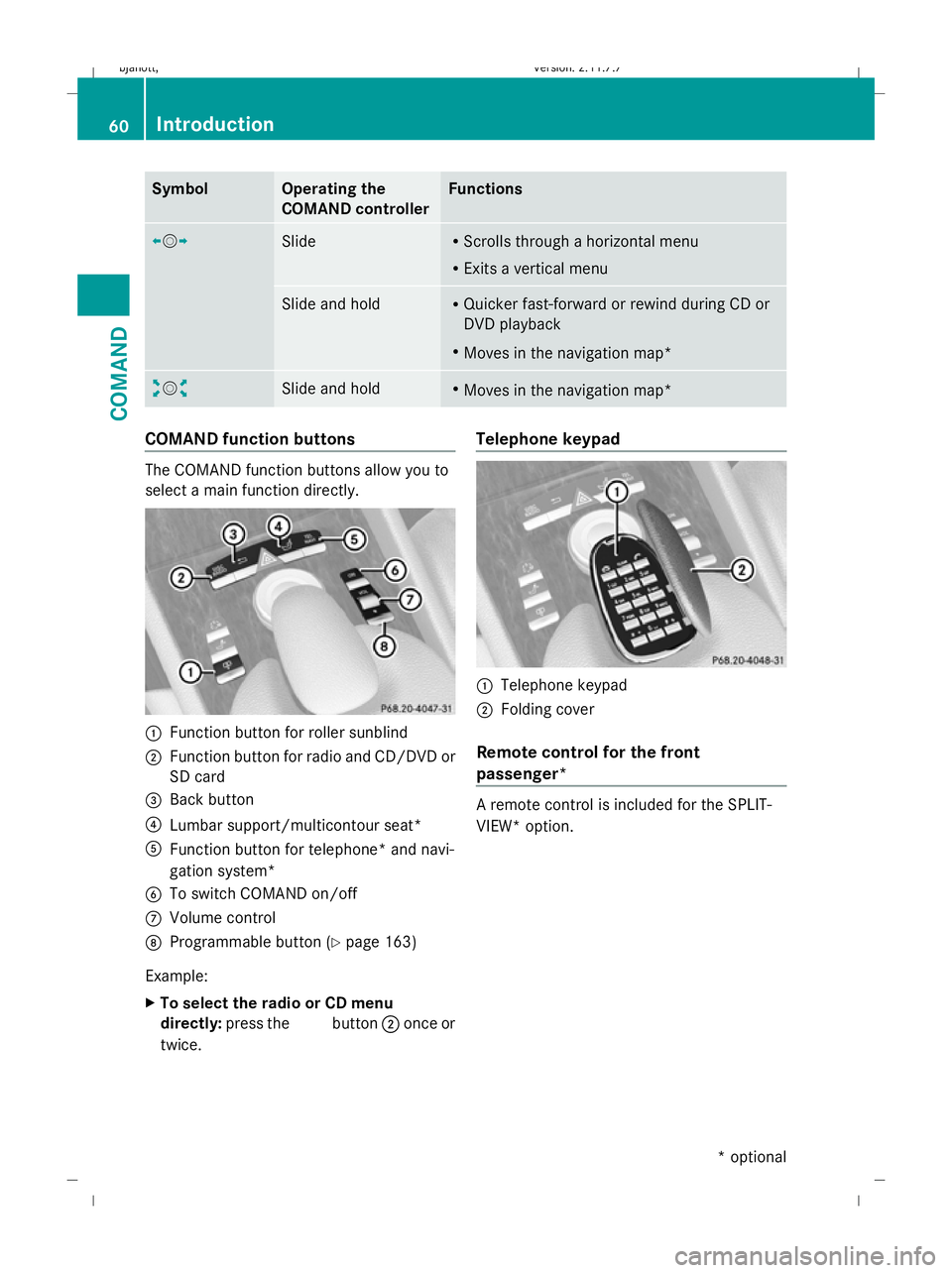
Moves in the navigation map* COMAND function buttons
The COMAND function buttons allow you to
select a main function directly. :
Function button for roller sunblind
; Function button for radio and CD/DVD or
SD card
= Back button
? Lumbar support/multicontour seat*
A Function button for telephone* and navi-
gation system*
B To switch COMAND on/off
C Volume control
D Programmable button (Y page 163)
Example:
X To select the radio or CD menu
directly: press the Rbutton ;once or
twice. Telephone keypad
:
Telephone keypad
; Folding cover
Remote control for the front
passenger* A remote control is included for the SPLIT-
VIEW* option. 60
IntroductionCOMAND
* optional
216_AKB; 2; 3, en-GB
bjanott,
Version: 2.11.7.7
2009-02-27T14:54:17+01:00 - Seite 60
Dateiname: 6515230602_buchblock.pdf; erzeugt am 04. Mar 2009 11:14:53; WK