navigation MERCEDES-BENZ CL COUPE 2009 Workshop Manual
[x] Cancel search | Manufacturer: MERCEDES-BENZ, Model Year: 2009, Model line: CL COUPE, Model: MERCEDES-BENZ CL COUPE 2009Pages: 421, PDF Size: 10.78 MB
Page 159 of 421
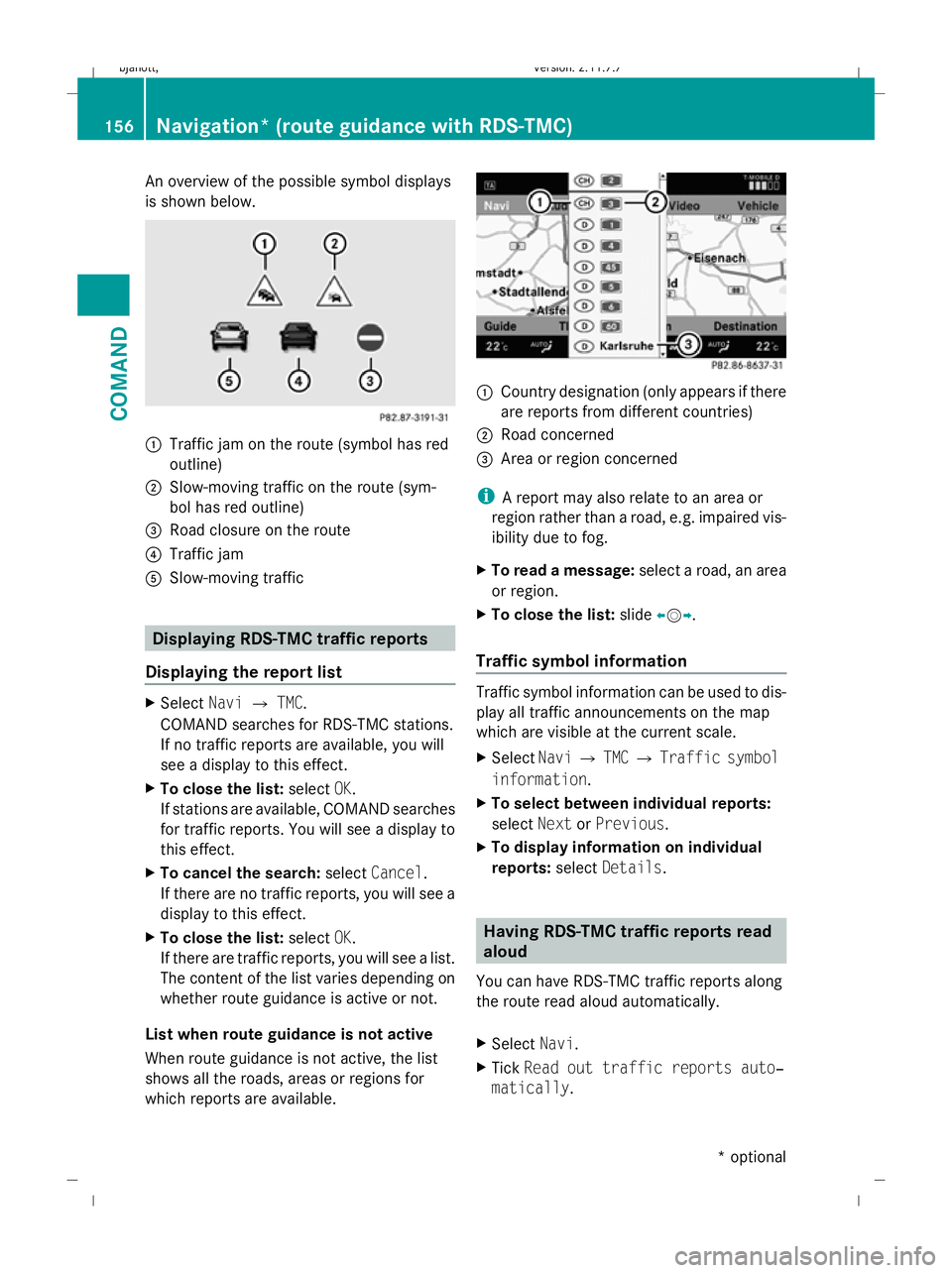
An overview of the possible symbol displays
is shown below. :
Traffic jam on the route (symbol has red
outline)
; Slow-moving traffic on the route (sym-
bol has red outline)
= Road closure on the route
? Traffic jam
A Slow-moving traffic Displaying RDS-TMC traffic reports
Displaying the report list X
Select NaviQTMC.
COMAND searches for RDS-TMC stations.
If no traffic reports are available, you will
see a display to this effect.
X To close the list: selectOK.
If stations are available, COMAND searches
for traffic reports. You will see a display to
this effect.
X To cancel the search: selectCancel .
If there are no traffic reports, you will see a
display to this effect.
X To close the list: selectOK.
If there are traffic reports, you will see a list.
The content of the list varies depending on
whether route guidance is active or not.
List when route guidance is not active
When route guidance is not active, the list
shows all the roads, areas or regions for
which reports are available. :
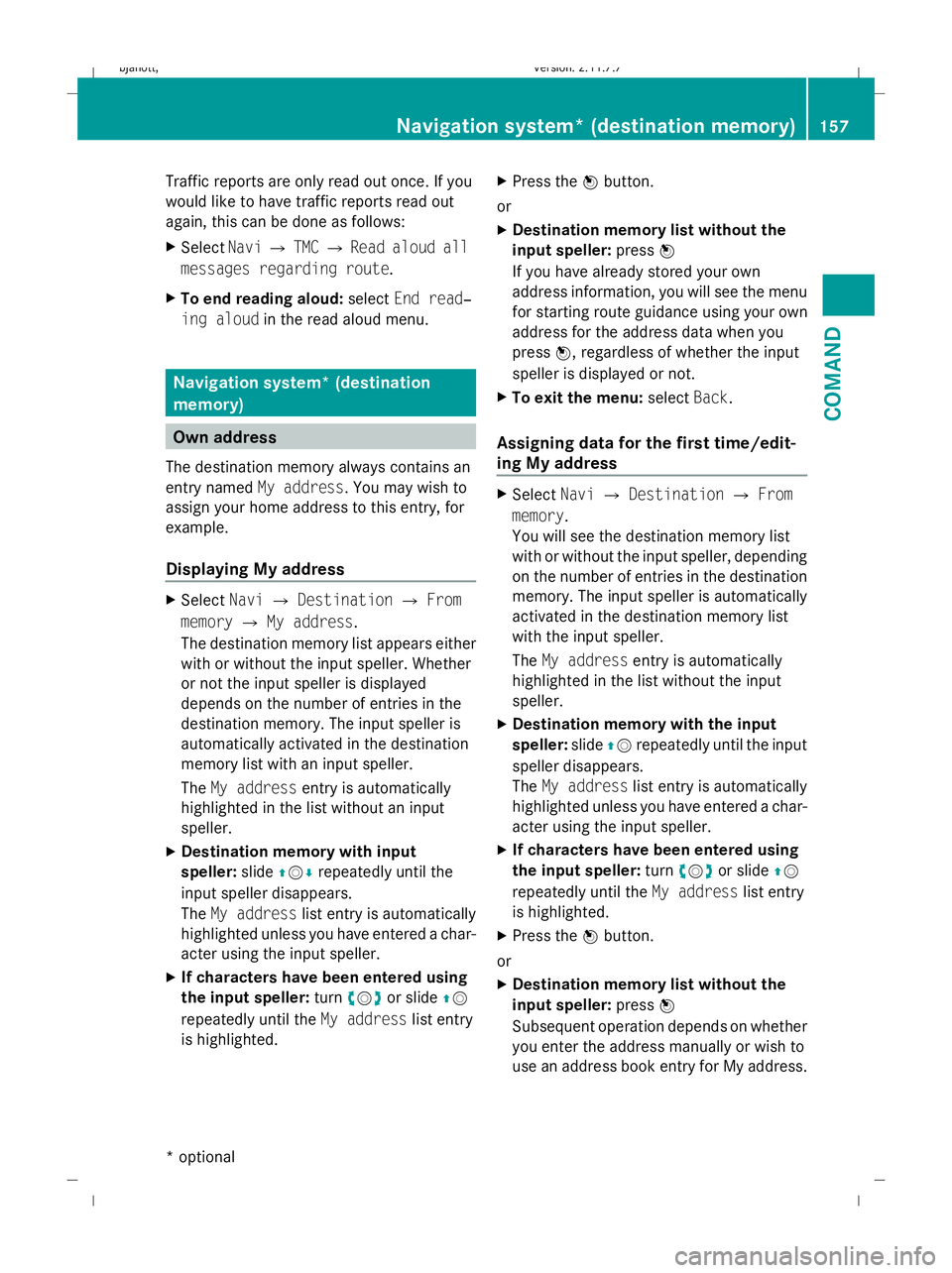
Country designation (only appears if there
are reports from different countries)
; Road concerned
= Area or region concerned
i A report may also relate to an area or
region rather than a road, e.g. impaired vis-
ibility due to fog.
X To read a message: select a road, an area
or region.
X To close the list: slideXVY.
Traffic symbol information Traffic symbol information can be used to dis-
play all traffic announcements on the map
which are visible at the current scale.
X
Select NaviQTMC QTraffic symbol
information.
X To select between individual reports:
select NextorPrevious.
X To display information on individual
reports: selectDetails. Having RDS-TMC traffic reports read
aloud
You can have RDS-TMC traffic reports along
the route read aloud automatically.
X Select Navi.
X Tick Read out traffic reports auto‐
matically . 156
Navigation* (route guidance with RDS-TMC)COMAND
* optional
216_AKB; 2; 3, en-GB
bjanott,
Version: 2.11.7.7 2009-02-27T14:54:17+01:00 - Seite 156
Dateiname: 6515230602_buchblock.pdf; erzeugt am 04. Mar 2009 11:15:24; WK
Page 160 of 421
Traffic reports are only read out once. If you
would like to have traffic reports read out
again, this can be done as follows:
X Select NaviQTMC QRead aloud all
messages regarding route.
X To end reading aloud: selectEnd read‐
ing aloud in the read aloud menu. Navigation system* (destination
memory)
Own address
The destination memory always contains an
entry named My address. You may wish to
assign your home address to this entry, for
example.
Displaying My address X
Select NaviQDestination QFrom
memory QMy address.
The destination memory list appears either
with or without the input speller. Whether
or not the input speller is displayed
depends on the number of entries in the
destination memory. The input speller is
automatically activated in the destination
memory list with an input speller.
The My address entry is automatically
highlighted in the list without an input
speller.
X Destination memory with input
speller: slideZVÆ repeatedly until the
input speller disappears.
The My address list entry is automatically
highlighted unless you have entered a char-
acter using the input speller.
X If characters have been entered using
the input speller: turncVd or slide ZV
repeatedly until the My addresslist entry
is highlighted. X
Press the Wbutton.
or
X Destination memory list without the
input speller: pressW
If you have already stored your own
address information, you will see the menu
for starting route guidance using your own
address for the address data when you
press W, regardless of whether the input
speller is displayed or not.
X To exit the menu: selectBack.
Assigning data for the first time/edit-
ing My address X
Select NaviQDestination QFrom
memory.
You will see the destination memory list
with or without the input speller, depending
on the number of entries in the destination
memory. The input speller is automatically
activated in the destination memory list
with the input speller.
The My address entry is automatically
highlighted in the list without the input
speller.
X Destination memory with the input
speller: slideZVrepeatedly until the input
speller disappears.
The My address list entry is automatically
highlighted unless you have entered a char-
acter using the input speller.
X If characters have been entered using
the input speller: turncVd or slide ZV
repeatedly until the My addresslist entry
is highlighted.
X Press the Wbutton.
or
X Destination memory list without the
input speller: pressW
Subsequent operation depends on whether
you enter the address manually or wish to
use an address book entry for My address. Navigation system* (destination memory)
157COMAND
* optional
216_AKB; 2; 3, en-GB
bjanott,
Version: 2.11.7.7 2009-02-27T14:54:17+01:00 - Seite 157 Z
Dateiname: 6515230602_buchblock.pdf; erzeugt am 04. Mar 2009 11:15:24; WK
Page 161 of 421
Entering an address manually
X
To assign data to My address for the
first time: selectSave with name.
or
X To edit My address: selectEditQ
Save with name.
In both cases, the address input menu
appears.
X Enter the address. Proceed in the same way
as you would enter a destination as descri-
bed in the "Entering a destination by
address" section (Y page 135).
X Select Saveafter you have entered the
address.
Your address is stored.
Using an address book entry for My
address
X To assign data to My address for the
first time: selectAssign address book
entry.
or
X To edit My address: selectChange Q
Assign to address book entry.
In both cases, the menu for searching for
an address book entry appears.
X Select the desired address book entry. Pro-
ceed as described in the "Calling up con-
tacts/details" section (Y page 120).
i The name of the town and of the street in
the address book entry must be spelled in
the same way as in the destination entry so
that the information matches the data on
the digital map. The country in the address
book can be written as follows so that it
matches the data on the digital map:
R Country name spelled in the language of
that country
R Country name spelled in the language set
as the system language
R Country name as an international coun-
try abbreviation for vehicles (e.g. D for Germany, E for Spain, F for France, I for
Italy, etc.)
X COMAND stores the entry as My address
in the destination memory if the address
data is complete and matches the digital
map data.
If address data is missing or if it does not
match the data on the digital map, a mes-
sage will be displayed informing you that
the address is incomplete.
X To close the message: selectOK.
Depending on which data is missing or does
not correspond with the digital map data, you
must now:
R select a country (Y page 136)
R enter a town (Y page 136)
R enter a street (Y page 138)
R enter a house number (Y page 140)
If the data is complete and it matches the
digital map data, COMAND stores the entry. Storing a destination in the destina-
tion memory
This function also stores the destination in
the address book. COMAND creates an
address book entry that contains the com-
plete, navigable address data. You can then
select this entry in the address book and start
route guidance to the address from there.
After the address has been entered X
Select Saveafter you have entered the
address ( Ypage 135).
During route guidance X
Select Destination QSave destina‐
tion during route guidance.
You can now select storage options. 158
Navigation system* (destination memory)COMAND
* optional
216_AKB; 2; 3, en-GB
bjanott,
Version: 2.11.7.7 2009-02-27T14:54:17+01:00 - Seite 158
Dateiname: 6515230602_buchblock.pdf; erzeugt am 04. Mar 2009 11:15:24; WK
Page 162 of 421
From the list of previous destinations
X
Select NaviQDestination QFrom
last destinations .
The list of previous destinations appears.
X Select the desired destination.
The address of the destination is displayed.
X Select Save.
You can now select storage options.
Selecting storage options Saving a destination with no name
X Select Save without name.
COMAND stores the destination in the des-
tination memory and uses the address as
the destination name.
or
X Select Save as My address.
COMAND stores the destination in the des-
tination memory as My address.
Storing a destination with a name
X Select Save with name.
X Select the category desired, e.g. Home.
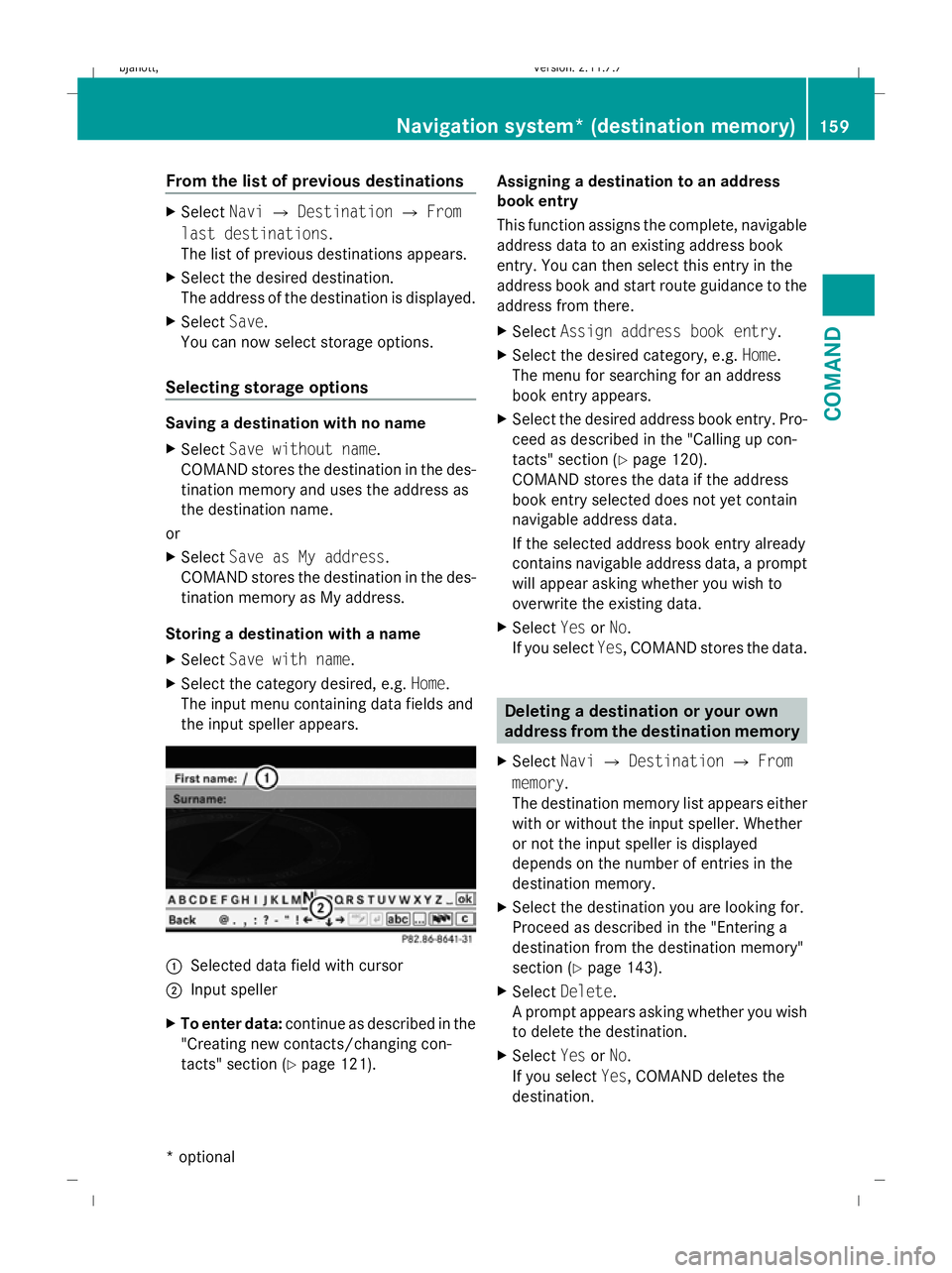
The input menu containing data fields and
the input speller appears. :
Selected data field with cursor
; Input speller
X To enter data: continue as described in the
"Creating new contacts/changing con-
tacts" section (Y page 121). Assigning a destination to an address
book entry
This function assigns the complete, navigable
address data to an existing address book
entry. You can then select this entry in the
address book and start route guidance to the
address from there.
X
Select Assign address book entry.
X Select the desired category, e.g. Home.
The menu for searching for an address
book entry appears.
X Select the desired address book entry. Pro-
ceed as described in the "Calling up con-
tacts" section (Y page 120).
COMAND stores the data if the address
book entry selected does not yet contain
navigable address data.
If the selected address book entry already
contains navigable address data, a prompt
will appear asking whether you wish to
overwrite the existing data.
X Select YesorNo.
If you select Yes, COMAND stores the data. Deleting a destination or your own
address from the destination memory
X Select NaviQDestination QFrom
memory .
The destination memory list appears either
with or without the input speller. Whether
or not the input speller is displayed
depends on the number of entries in the
destination memory.
X Select the destination you are looking for.
Proceed as described in the "Entering a
destination from the destination memory"
section (Y page 143).
X Select Delete .
A prompt appears asking whether you wish
to delete the destination.
X Select YesorNo.
If you select Yes, COMAND deletes the
destination. Navigation system* (destination memory)
159COMAND
* optional
216_AKB; 2; 3, en-GB
bjanott
,V ersion: 2.11.7.7
2009-02-27T14:54:17+01:00 - Seite 159 Z
Dateiname: 6515230602_buchblock.pdf; erzeugt am 04. Mar 2009 11:15:25; WK
Page 163 of 421
i
If the navigable address data for the des-
tination being deleted is also assigned to
an address book entry, COMAND will also
delete this data from there. If the corre-
sponding address book entry does not con-
tain any further data, such as telephone
numbers, COMAND deletes the entire
address book entry. Navigation system* (previous desti-
nations) General notes
COMAND automatically stores the previous
destinations for which the route calculation
was launched. If the memory is full, COMAND
deletes the oldest destination.
You can also store one destination from the
list of previous destinations in the destination
memory. It will be stored there permanently. Storing a destination permanently in
the destination memory
X Proceed as described in the "From the list
of previous destinations" section
(Y page 159) Storing the vehicle position in the list
of previous destinations
X To set the map to the vehicle position:
select NaviQPosition QVehicle
position map.
X To save: selectNaviQPosition Q
Save crosshair position. Storing the crosshair position in the
list of previous destinations
i A crosshair appears on the map if you
have moved the map manually. You can
store the crosshair position as a destina-
tion in the list of previous destinations. X
If necessary, display the menu system:
press W.
X Select PositionQSave crosshair
position. Deleting a previous destination
X Select NaviQDestination QFrom
last destinations .
The list of previous destinations appears.
X Select the desired destination.
The address of the destination appears.
X Select Delete. System
Menu overview
You will not be able to use the system settings
in the following menus:
R Display QDay design, Night design, Auto-
matic
R Time QClock, Date, Format, Time zone
R LINGUATRONIC* QHelp window, New
individualisation, Delete individualisation
R Language QLanguage selection
R Favourites button QAssign programma-
ble button
R Reset QReset COMAND to factory set-
tings
R Text reader QSet read-aloud speed
R Bluetooth ®
Q Search for Bluetooth ®
devi-
ces, activate Bluetooth ®
R Data upload/download QCopy data to
storage medium, import data from storage
medium 160
SystemCOMAND
* optional
216_AKB; 2; 3, en-GB
bjanott,
Version: 2.11.7.7 2009-02-27T14:54:17+01:00 - Seite 160
Dateiname: 6515230602_buchblock.pdf; erzeugt am 04. Mar 2009 11:15:25; WK
Page 164 of 421
Display settings
Switching the display on or off X
To switch off: selectVehicle QDis‐
play off .
X To switch back on again: turncVd , slide
ZVÆ , slide XVYor press W.
or
X Press the ubutton.
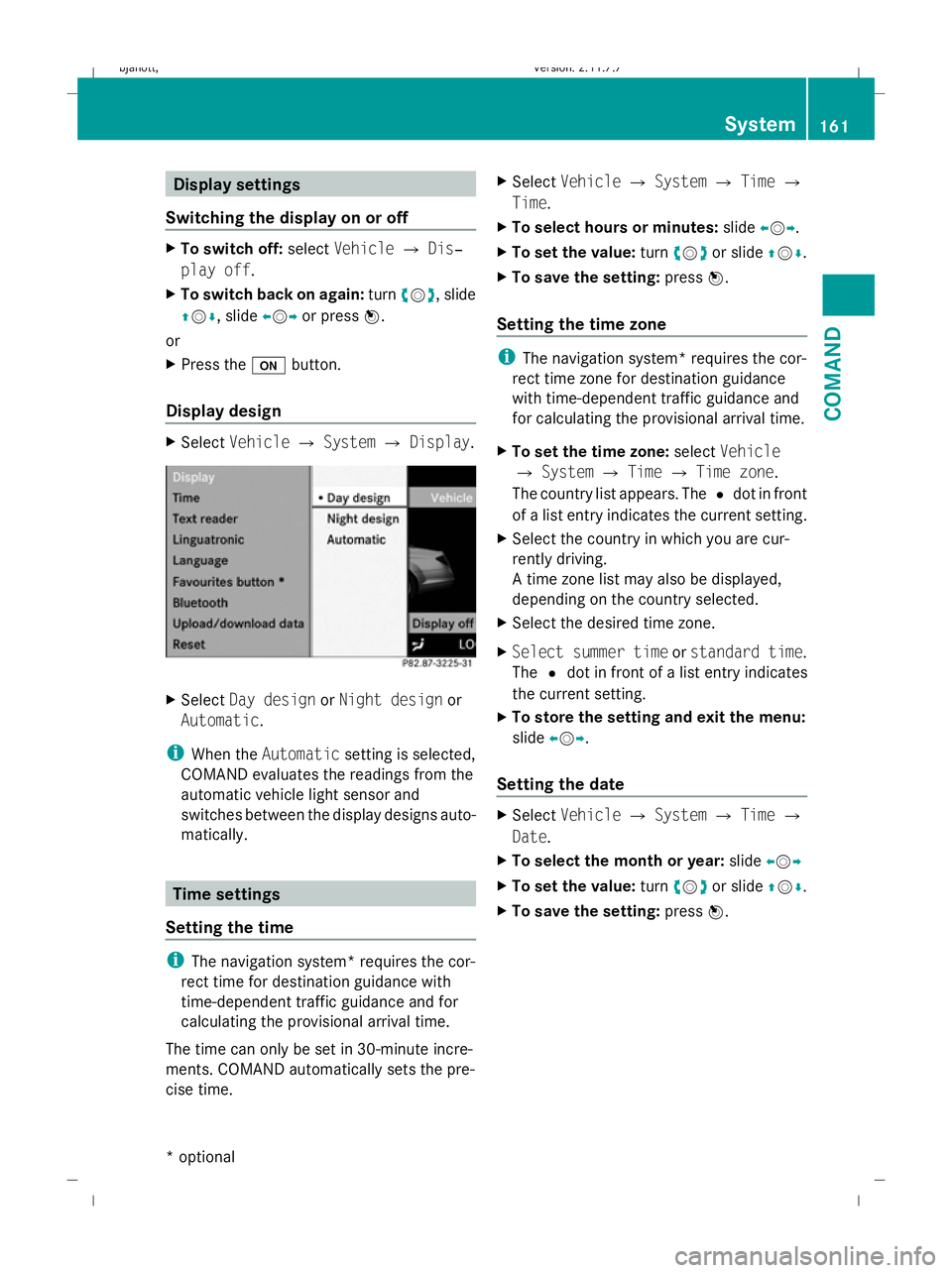
Display design X
Select Vehicle QSystem QDisplay. X
Select Day design orNight design or
Automatic .
i When the Automatic setting is selected,
COMAND evaluates the readings from the
automatic vehicle light sensor and
switches between the display designs auto-
matically. Time settings
Setting the time i
The navigation system* requires the cor-
rect time for destination guidance with
time-dependent traffic guidance and for
calculating the provisional arrival time.
The time can only be set in 30-minute incre-
ments. COMAND automatically sets the pre-
cise time. X
Select Vehicle QSystem QTime Q
Time.
X To select hours or minutes: slideXVY.
X To set the value: turncVd or slide ZVÆ.
X To save the setting: pressW.
Setting the time zone i
The navigation system* requires the cor-
rect time zone for destination guidance
with time-dependent traffic guidance and
for calculating the provisional arrival time.
X To set the time zone: selectVehicle
Q System QTime QTime zone.
The country list appears. The #dot in front
of a list entry indicates the current setting.
X Select the country in which you are cur-
rently driving.
A time zone list may also be displayed,
depending on the country selected.
X Select the desired time zone.
X Select summer time orstandard time .
The #dot in front of a list entry indicates
the current setting.
X To store the setting and exit the menu:
slide XVY.
Setting the date X
Select Vehicle QSystem QTime Q
Date.
X To select the month or year: slideXVY
X To set the value: turncVd or slide ZVÆ.
X To save the setting: pressW. System
161COMAND
* optional
216_AKB; 2; 3, en-GB
bjanott
,V ersion: 2.11.7.7
2009-02-27T14:54:17+01:00 - Seite 161 Z
Dateiname: 6515230602_buchblock.pdf; erzeugt am 04. Mar 2009 11:15:25; WK
Page 166 of 421
Deleting existing individualisation data
X
Select Vehicle QSystem QLingua‐
tronic QDelete individualisation .
A prompt appears asking whether you
really wish to delete.
X Select YesorNo.
The individualisation data will either be
deleted or not, depending on your selec-
tion. Language settings
X Select Vehicle QSystem QLan‐
guage.
The language list appears. The #dot indi-
cates the current setting.
X To change the setting: select the desired
language. Assigning the programmable button
(favourites)
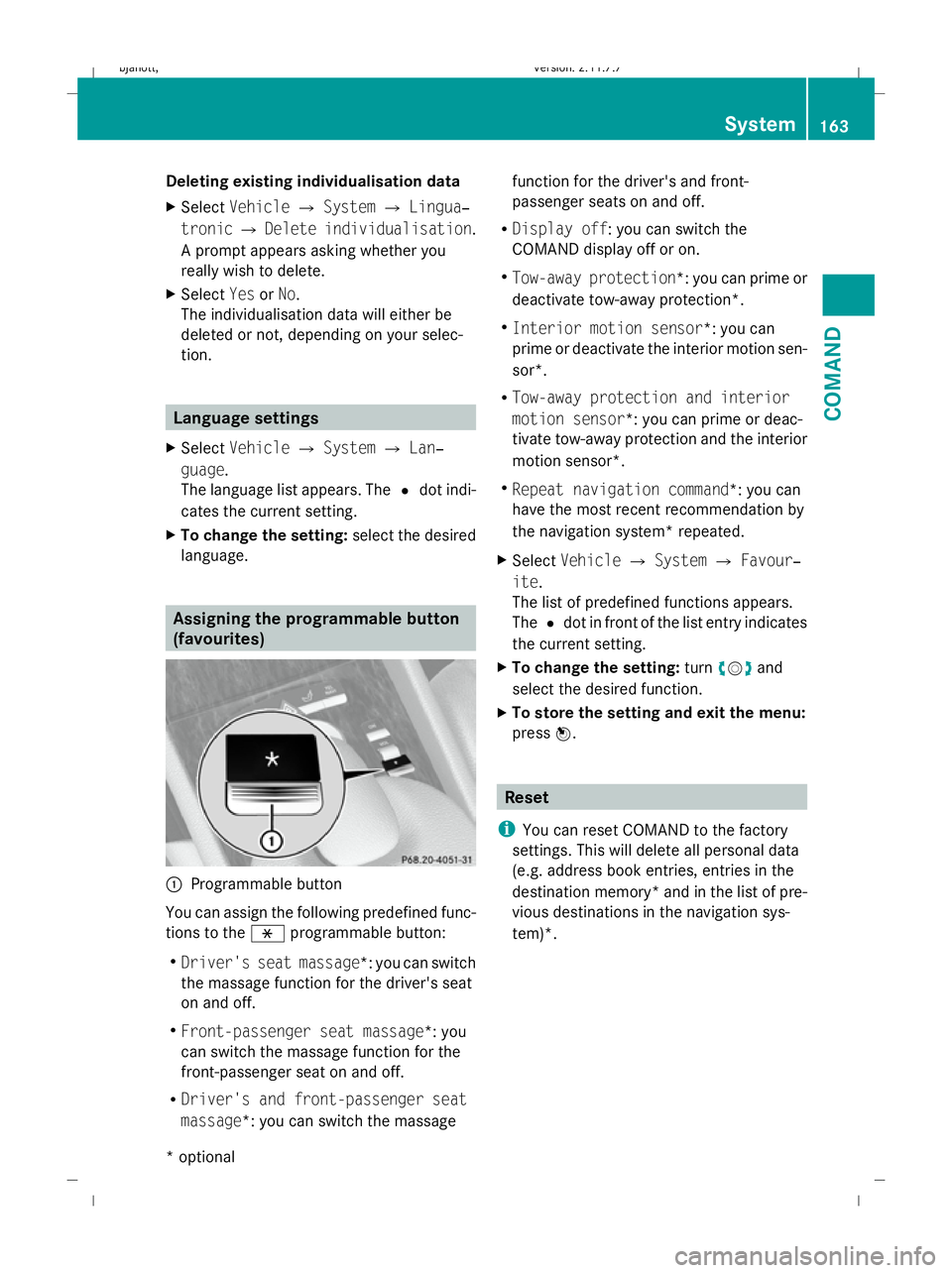
:
Programmable button
You can assign the following predefined func-
tions to the hprogrammable button:
R Driver's seat massage*: you can switch
the massage function for the driver's seat
on and off.
R Front-passenger seat massage*: you
can switch the massage function for the
front-passenger seat on and off.
R Driver's and front-passenger seat
massage*: you can switch the massage function for the driver's and front-
passenger seats on and off.
R Display off : you can switch the
COMAND display off or on.
R Tow-away protection *: you can prime or
deactivate tow-away protection*.
R Interior motion sensor *: you can
prime or deactivate the interior motion sen-
sor*.
R Tow-away protection and interior
motion sensor *: you can prime or deac-
tivate tow-away protection and the interior
motion sensor*.
R Repeat navigation command*: you can
have the most recent recommendation by
the navigation system* repeated.
X Select Vehicle QSystem QFavour‐
ite .
The list of predefined functions appears.
The #dot in front of the list entry indicates
the current setting.
X To change the setting: turncVd and
select the desired function.
X To store the setting and exit the menu:
press W. Reset
i You can reset COMAND to the factory
settings. This will delete all personal data
(e.g. address book entries, entries in the
destination memory* and in the list of pre-
vious destinations in the navigation sys-
tem)*. System
163COMAND
* optional
216_AKB; 2; 3, en-GB
bjanott
,V ersion: 2.11.7.7
2009-02-27T14:54:17+01:00 - Seite 163 Z
Dateiname: 6515230602_buchblock.pdf; erzeugt am 04. Mar 2009 11:15:26; WK
Page 218 of 421
Function
:
Trip
menu (Y page 215) ;
Navi
* menu (navigation details)
(Y page 217) =
Audio
menu (Y page 218) ?
AMG* menu (Y
page 220) A
Tel* menu (Y
page 222) B
Assistance
(Ypage 223) menu C
Service
menu (Ypage 225)
R Calls up display messages
(Y page 316)
R Restarts the tyre pressure loss
warning system (Y page 299) or
checks the tyre pressure electroni-
cally* (Y page 300)
R Calls up when a service is due
(Y page 307)
R Checks the engine oil level
(Y page 293) D
Settings
menu (Ypage 225) The number of menus shown depends on the
optional equipment in the vehicle. Trip menu
i Reset the trip meter or trip computer
(Y page 216).
Use the buttons on the multi-function steer-
ing wheel. Standard display X
Press and hold the %button until the
Trip menu with total distance :and trip
distance ;appear.
Trip computer "From start" or "From
reset" The values in the
After starttrip meter are
calculated from the start of a journey whilst
the values in the After resettrip meter are
calculated from the last time the submenu
was reset.
X Press the =or; button to select the
Trip menu.
X Press 9or: to select After
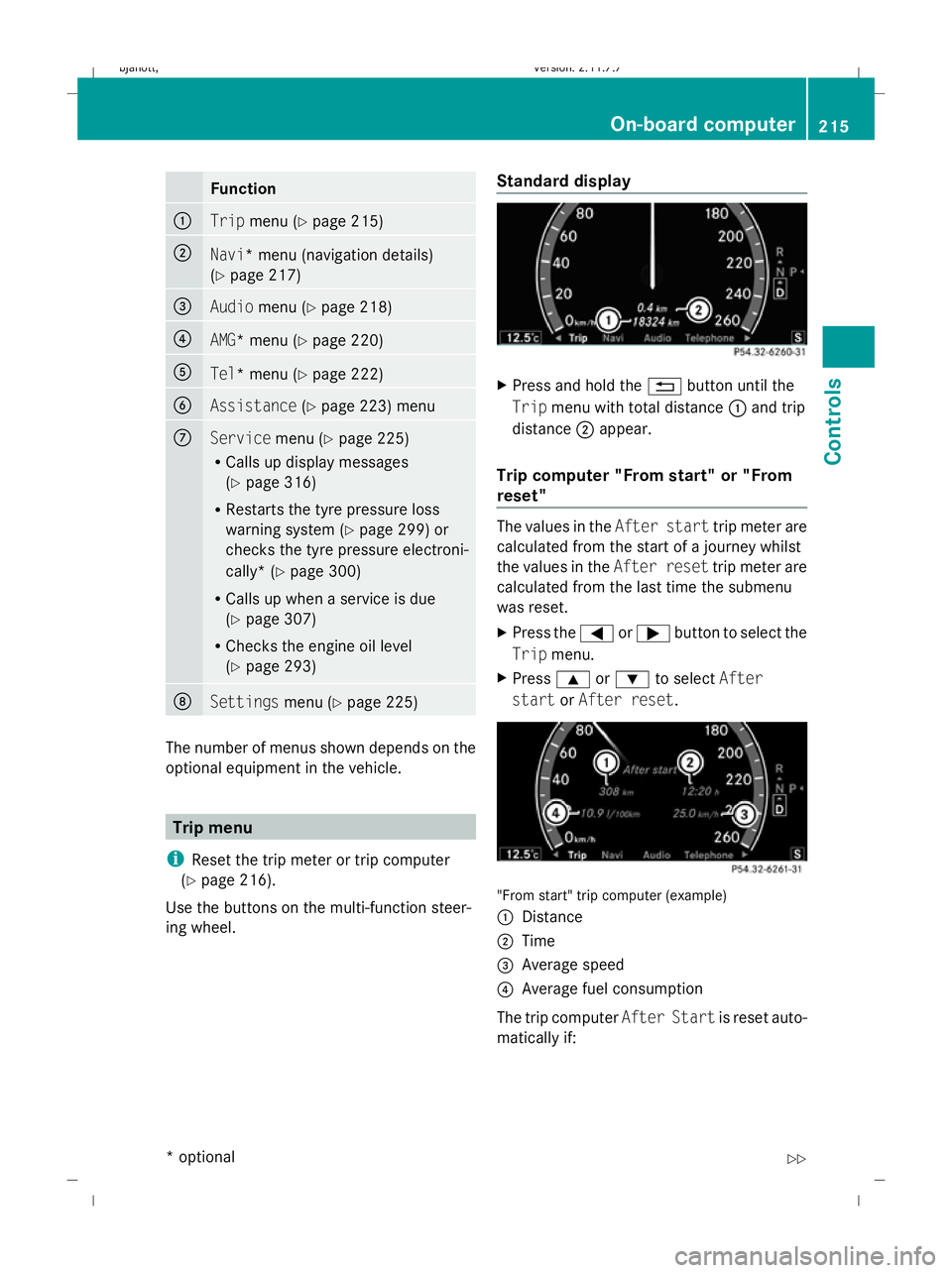
start orAfter reset. "From start" trip computer (example)
:
Distance
; Time
= Average speed
? Average fuel consumption
The trip computer After Startis reset auto-
matically if: On-board computer
215Controls
* optional
216_AKB; 2; 3, en-GB
bjanott
,V ersion: 2.11.7.7
2009-02-27T14:54:17+01:00 - Seite 215 Z
Dateiname: 6515230602_buchblock.pdf; erzeugt am 04. Mar 2009 11:15:51; WK
Page 220 of 421
Navigation* menu
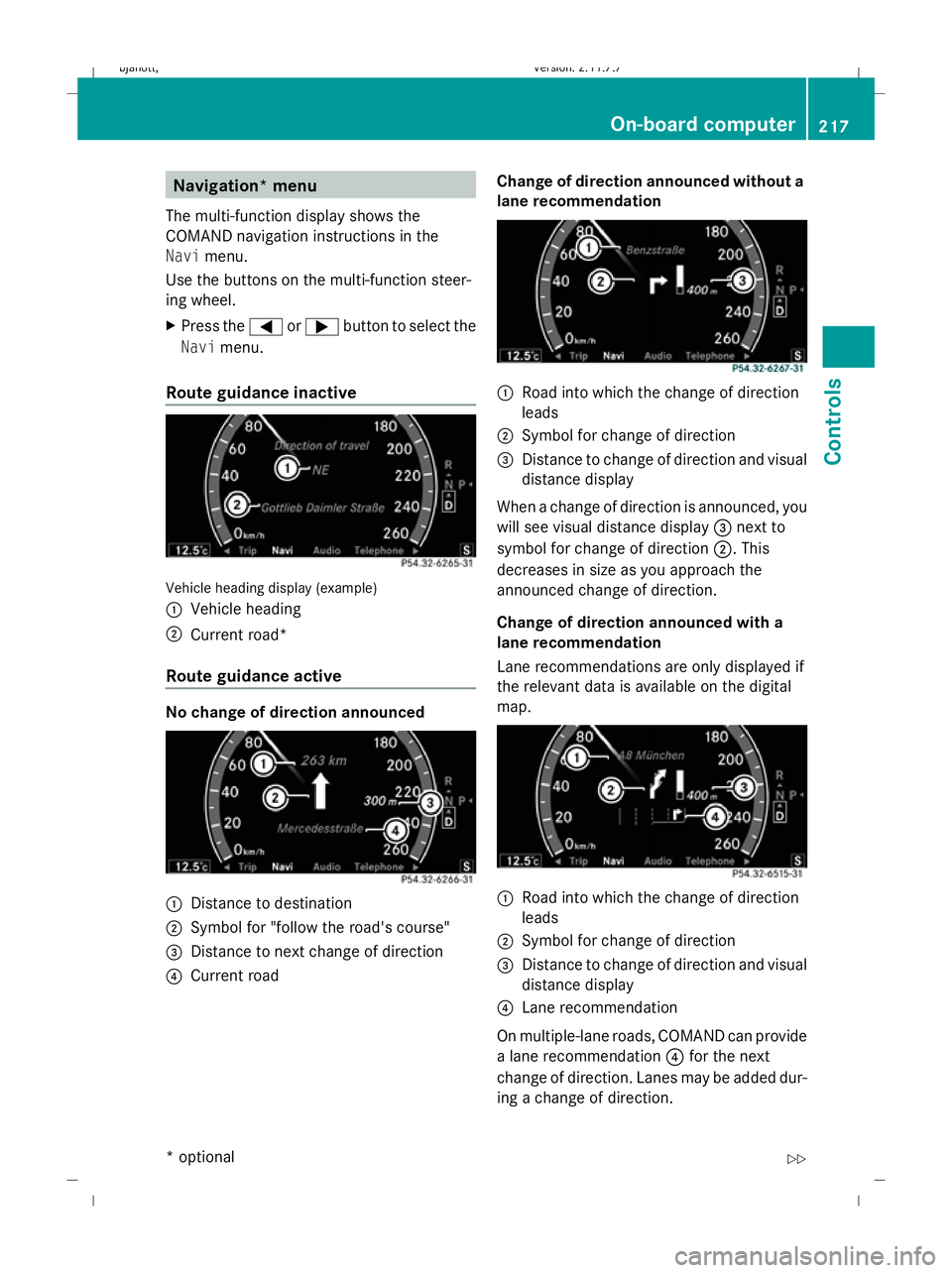
The multi-function display shows the
COMAND navigation instructions in the
Navi menu.
Use the buttons on the multi-function steer-
ing wheel.
X Press the =or; button to select the
Navi menu.
Route guidance inactive Vehicle heading display (example)
:
Vehicle heading
; Current road*
Route guidance active No change of direction announced
:
Distance to destination
; Symbol for "follow the road's course"
= Distance to next change of direction
? Current road Change of direction announced without a
lane recommendation :
Road into which the change of direction
leads
; Symbol for change of direction
= Distance to change of direction and visual
distance display
When a change of direction is announced, you
will see visual distance display =next to
symbol for change of direction ;. This
decreases in size as you approach the
announced change of direction.
Change of direction announced with a
lane recommendation
Lane recommendations are only displayed if
the relevant data is available on the digital
map. :
Road into which the change of direction
leads
; Symbol for change of direction
= Distance to change of direction and visual
distance display
? Lane recommendation
On multiple-lane roads, COMAND can provide
a lane recommendation ?for the next
change of direction. Lanes may be added dur-
ing a change of direction. On-board
computer
217Controls
* optional
216_AKB; 2; 3, en-GB
bjanott,
Version: 2.11.7.7 2009-02-27T14:54:17+01:00 - Seite 217 Z
Dateiname: 6515230602_buchblock.pdf; erzeugt am 04. Mar 2009 11:15:52; WK
Page 221 of 421
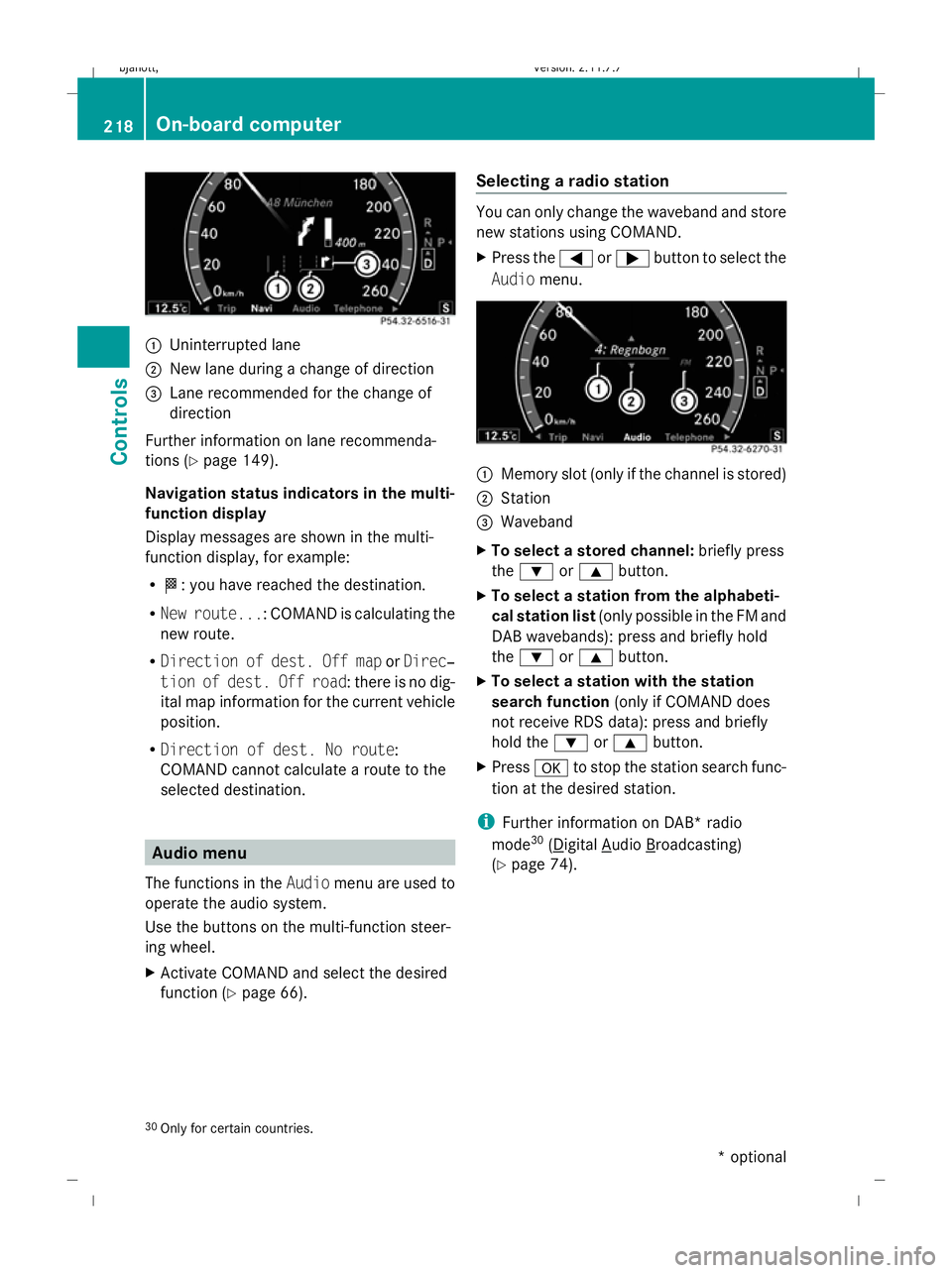
:
Uninterrupted lane
; New lane during a change of direction
= Lane recommended for the change of
direction
Further information on lane recommenda-
tions (Y page 149).
Navigation status indicators in the multi-
function display
Display messages are shown in the multi-
function display, for example:
R O: you have reached the destination.
R New route...: COMAND is calculating the
new route.
R Direction of dest. Off map orDirec‐
tion of dest. Off road: there is no dig-
ital map information for the current vehicle
position.
R Direction of dest. No route:
COMAND cannot calculate a route to the
selected destination. Audio menu
The functions in the Audiomenu are used to
operate the audio system.
Use the buttons on the multi-function steer-
ing wheel.
X Activate COMAND and select the desired
function (Y page 66). Selecting a radio station You can only change the waveband and store
new stations using COMAND.
X
Press the =or; button to select the
Audio menu. :
Memory slot (only if the channel is stored)
; Station
= Waveband
X To select a stored channel: briefly press
the : or9 button.
X To select a station from the alphabeti-
cal station list (only possible in the FM and
DAB wavebands): press and briefly hold
the : or9 button.
X To select a station with the station
search function (only if COMAND does
not receive RDS data): press and briefly
hold the :or9 button.
X Press ato stop the station search func-
tion at the desired station.
i Further information on DAB* radio
mode 30
( Digital Audio Broadcasting)
(Y page 74).
30 Only for certain countries. 218
On-board computerControls
* optional
216_AKB; 2; 3, en-GB
bjanott,
Version: 2.11.7.7 2009-02-27T14:54:17+01:00 - Seite 218
Dateiname: 6515230602_buchblock.pdf; erzeugt am 04. Mar 2009 11:15:52; WK