navigation MERCEDES-BENZ CL COUPE 2009 Repair Manual
[x] Cancel search | Manufacturer: MERCEDES-BENZ, Model Year: 2009, Model line: CL COUPE, Model: MERCEDES-BENZ CL COUPE 2009Pages: 421, PDF Size: 10.78 MB
Page 229 of 421
cal beam is activated, the edge of the carria-
geway is no longer illuminated as wide and
high. Note that not all light functions are avail-
able when tourist mode is activated.
When you again drive on the same side of the
road as in the country of registration, have
tourist mode deactivated at a qualified spe-
cialist workshop, e.g. a Mercedes-Benz
service centre, as soon as possible after
crossing the border.
Showing/hiding the additional speed-
ometer The additional speedometer can be shown in
the multi-function display.
Vehicles with a kilometre speedometer: the
additional speedometer has mph units.
Vehicles with a miles speedometer: the addi-
tional speedometer has km/h units.
X Press the =or; button to select the
Settings menu.
X Press 9or: to select Dig.
speedo.
X Press the abutton.
X To activate/deactivate: pressa
again.
Selecting the units for speed/distance The
Display unit Speed-/odometer:
function allows you to choose whether the
multi-function display shows km/h or mph in
certain cases.
The selected units apply to:
R the analogue speedometer
R the total distance recorder and the trip
meter
R the trip computer
R the digital speedometer in the Tripmenu
R the distance values in the navigation sys-
tem*
R cruise control R
Speedtronic
R Distronic*
R Distronic Plus*
R the ASSYST PLUS service interval display
The digital speedometer shows alternative
speed units (Y page 226).
X Press the =or; button to select the
Settings menu.
X Press 9or: to select Units.
X Press the abutton.
X To select a different display unit: press
a again.
The unit switches km/handmph.
Activating/deactivating the radar sen-
sor system* !
You must deactivate the radar sensor sys-
tem in certain countries and near radio
telescope facilities. Further information
can be found in the index under "Radar
sensor system".
Vehicles with a navigation system*: the radar
sensor system is deactivated automatically if
you are close to radio telescope facilities.
The following systems are switched off when
the radar sensor system is deactivated:
R Distronic Plus* (Y page 235)
R BAS PLUS* (Y page 49)
R Park Assist* (Y page 251) and Parking
Guidance*(Y page 254)
R PRE-SAFE ®
Brake* (Y page 52)
R Blind Spot Assist* (Y page 260)
X Press the =or; button to select the
Settings menu.
X Press 9or: to select Radar sen‐
sor system. 226
On-board computerControls
* optional
216_AKB; 2; 3, en-GB
bjanott,
Version: 2.11.7.7 2009-02-27T14:54:17+01:00 - Seite 226
Dateiname: 6515230602_buchblock.pdf; erzeugt am 04. Mar 2009 11:15:54; WK
Page 239 of 421
G
Risk of accident
Distronic Plus cannot take account of road
and traffic conditions. If Distronic does not
recognise or no longer recognises the vehicle
in front, do not activate Distronic or, if it is
already active, deactivate it. This is especially
the case:
R before corners
R in filter lanes
R when changing to a lane with faster moving
traffic
R in complex driving situations or where the
lanes are diverted, e.g. at roadworks on a
motorway
Otherwise, Distronic Plus maintains the cur-
rent speed or accelerates up to the set speed.
Distronic Plus cannot take account of weather
conditions. Deactivate, or do not activate,
Distronic Plus:
R if the roads are slippery, snow-covered or
icy. The wheels could lose their grip when
braking or accelerating. The vehicle could
start to skid.
R if the sensors are dirty or there is poor vis-
ibility, e.g. due to snow, rain or fog. Dis-
tance control may be impaired.
Always pay attention to traffic conditions
even when Distronic Plus is activated. Other-
wise, you may fail to recognise dangers in
time, could cause an accident and injure your-
self and others.
! You must deactivate the radar sensor sys-
tem in certain countries and near radio
telescope facilities. Further information
can be found in the index under "Radar
sensor system".
Vehicles with COMAND and navigation sys-
tem*: you must deactivate the radar sensor
system near radio telescope facilities
(Y page 411). If you want Distronic Plus to assist you, the
radar sensor system must be activated and
operational.
If no car is driving in front of you, Distronic
Plus works like cruise control in the speed
range between 30 km/h and 200 km/h. If a
vehicle is driving in front of you, Distronic Plus
works in the speed range between 0 km/h
and 200 km/h.
Do not use Distronic Plus while driving on
roads with steep gradients.
G
Risk of accident
Distronic Plus brakes your vehicle at a maxi-
mum of 4m/s2
depending on its speed. This
corresponds to approximately 40% of your
vehicle's maximum brake force. You must
also apply the brakes yourself if this braking
power is not sufficient.
If Distronic Plus detects a risk of collision with
a vehicle in front, an intermittent warning tone
sounds. In addition, the ·distance warn-
ing lamp in the instrument cluster lights up.
Brake to avoid a collision.
Cruise control lever With the cruise control lever you can operate
Distronic Plus and variable Speedtronic.
The LIM indicator lamp on the cruise control
lever indicates which system you have selec-
ted:
R
LIM indicator lamp off:
Distronic Plus is selected.
R LIM indicator lamp lit:
Variable Speedtronic is selected. 236
Driving systemsControls
* optional
216_AKB; 2; 3, en-GB
bjanott,
Version: 2.11.7.7 2009-02-27T14:54:17+01:00 - Seite 236
Dateiname: 6515230602_buchblock.pdf; erzeugt am 04. Mar 2009 11:15:58; WK
Page 255 of 421
!
You must deactivate the radar sensor sys-
tem in certain countries and near radio
telescope facilities. Further information
can be found in the index under "Radar
sensor system".
Vehicles with COMAND and navigation sys-
tem*: the radar sensor system is automati-
cally deactivated near radio telescope facili-
ties (Y page 411).
If you want Park Assist to assist you, the radar
sensor system must be activated and opera-
tional.
Park Assist is an electronic parking aid with
radar sensors. It assists you when parking by
displaying the distance between your vehicle
and an obstacle, and by emitting a warning
tone when you approach an obstacle.
Park Assist is automatically activated when
you shift the automatic transmission to D,R
or Nwhile the engine is running.
Park Assist is deactivated at speeds above
18 km/h. It is reactivated at lower speeds.
Park Assist is also deactivated when you shift
the automatic transmission to Por switch off
the engine.
Park Assist is deactivated when the transmis-
sion is in position Nif you use the electric
parking brake to secure the vehicle.
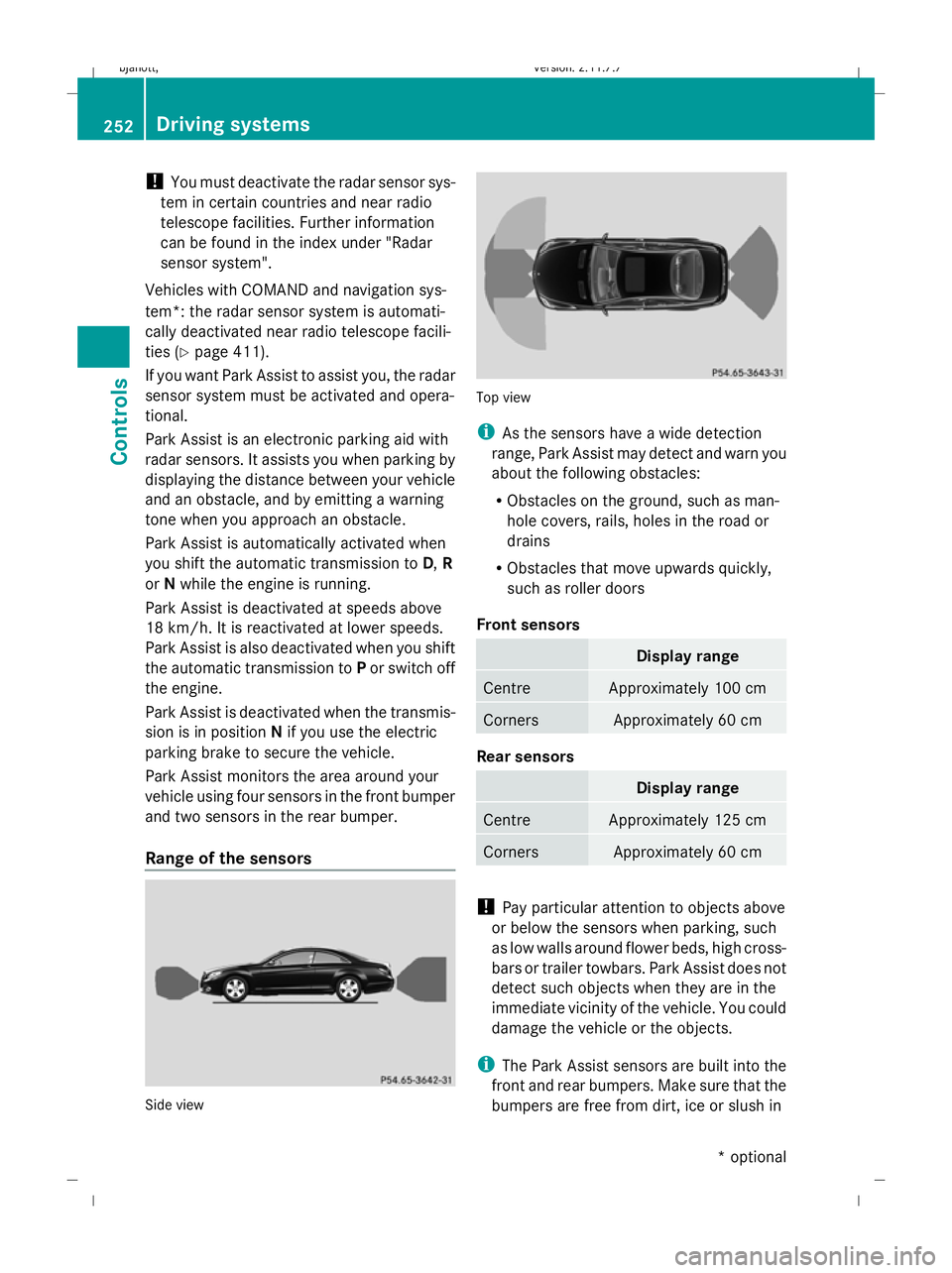
Park Assist monitors the area around your
vehicle using four sensors in the front bumper
and two sensors in the rear bumper.
Range of the sensors Side view Top view
i
As the sensors have a wide detection
range, Park Assist may detect and warn you
about the following obstacles:
R Obstacles on the ground, such as man-
hole covers, rails, holes in the road or
drains
R Obstacles that move upwards quickly,
such as roller doors
Front sensors Display range
Centre Approximately 100 cm
Corners Approximately 60 cm
Rear sensors
Display range
Centre Approximately 125 cm
Corners Approximately 60 cm
!
Pay particular attention to objects above
or below the sensors when parking, such
as low walls around flower beds, high cross-
bars or trailer towbars. Park Assist does not
detect such objects when they are in the
immediate vicinity of the vehicle. You could
damage the vehicle or the objects.
i The Park Assist sensors are built into the
front and rear bumpers. Make sure that the
bumpers are free from dirt, ice or slush in 252
Driving systemsControls
* optional
216_AKB; 2; 3, en-GB
bjanott,
Version: 2.11.7.7 2009-02-27T14:54:17+01:00 - Seite 252
Dateiname: 6515230602_buchblock.pdf; erzeugt am 04. Mar 2009 11:16:04; WK
Page 257 of 421
Parking Guidance*
Parking Guidance is an electronic parking aid
with radar sensors. The radar sensors are
used to measure the road on both sides of the
vehicle. It indicates suitable parking spaces
and provides steering instructions to help you
park in the indicated spaces. G
Risk of accident
Parking Guidance is only an aid. Parking
spaces detected may not be suitable for park-
ing due to, for example, parking prohibitions,
driveways, or unsuitable surfaces, etc.
The Parking Guidance display in the instru-
ment cluster is only a symbolic display of the
parking space as measured when first driving
past it. Later changes to the parking space are
not taken into account, e.g. if the vehicle
parked in front of or behind the space has
changed its position, or if obstacles are
moved into the parking space. Moving
objects, such as pedestrians and passing
vehicles, are not displayed.
Parking Guidance does not relieve you of the
responsibility to pay attention. If you rely
solely on Parking Guidance, you could cause
an accident and injure yourself and others.
You are always responsible for safety and
must continue to pay attention to your imme-
diate surroundings when parking and
manoeuvring. G
Risk of injury
Make sure that no persons or animals are in
the manoeuvring range. Otherwise, they
could be injured.
! You must deactivate the radar sensor sys-
tem in certain countries and near radio
telescope facilities. Further information
can be found in the index under "Radar
sensor system".
Vehicles with COMAND and navigation sys-
tem*: the radar sensor system is automati-
cally deactivated near radio telescope facili-
ties (Y page 411). If you want Parking Guidance to assist you,
the radar sensor system must be activated
and operational.
Use Parking Guidance for parking spaces:
R
that are parallel to the direction of travel
R that are on straight roads, not bends
R that are on the same level as the road, i.e.
not on the pavement, for example. Parking
Guidance may not detect flat kerbs.
Parking tips:
R on narrow roads, drive as close to the park-
ing space as possible.
R parking spaces which are littered, over-
grown or in front of trailers might not be
identified properly.
R pay attention to the Park Assist warning
messages when using Parking Guidance
(Y page 251).
R The position of your vehicle in the parking
space after using Parking Guidance
depends on the position and shape of the
vehicles parked in front and behind, and on
the conditions of the space. In some cases,
Parking Guidance may guide you too far
into a parking space, or not far enough into
it. In this case, you should cancel Parking
Guidance and correct the vehicle's posi-
tion.
Detecting parking spaces Parking Guidance is automatically activated
when you drive forwards. The system is
operational at speeds of up to approximately
40 km/h. While in operation, the system inde-
pendently locates and measures existing
parking spaces to both sides of the vehicle.
When driving at speeds below 16 km/h, you
will see the white parking space symbol as a
status indicator in the instrument cluster. If a
parking space is detected, the parking space
symbol changes colour to blue.254
Driving systemsControls
* optional
216_AKB; 2; 3, en-GB
bjanott,V
ersion: 2.11.7.7
2009-02-27T14:54:17+01:00 - Seite 254
Dateiname: 6515230602_buchblock.pdf; erzeugt am 04. Mar 2009 11:16:04; WK
Page 263 of 421
and cannot check whether Night View
Assist is working.
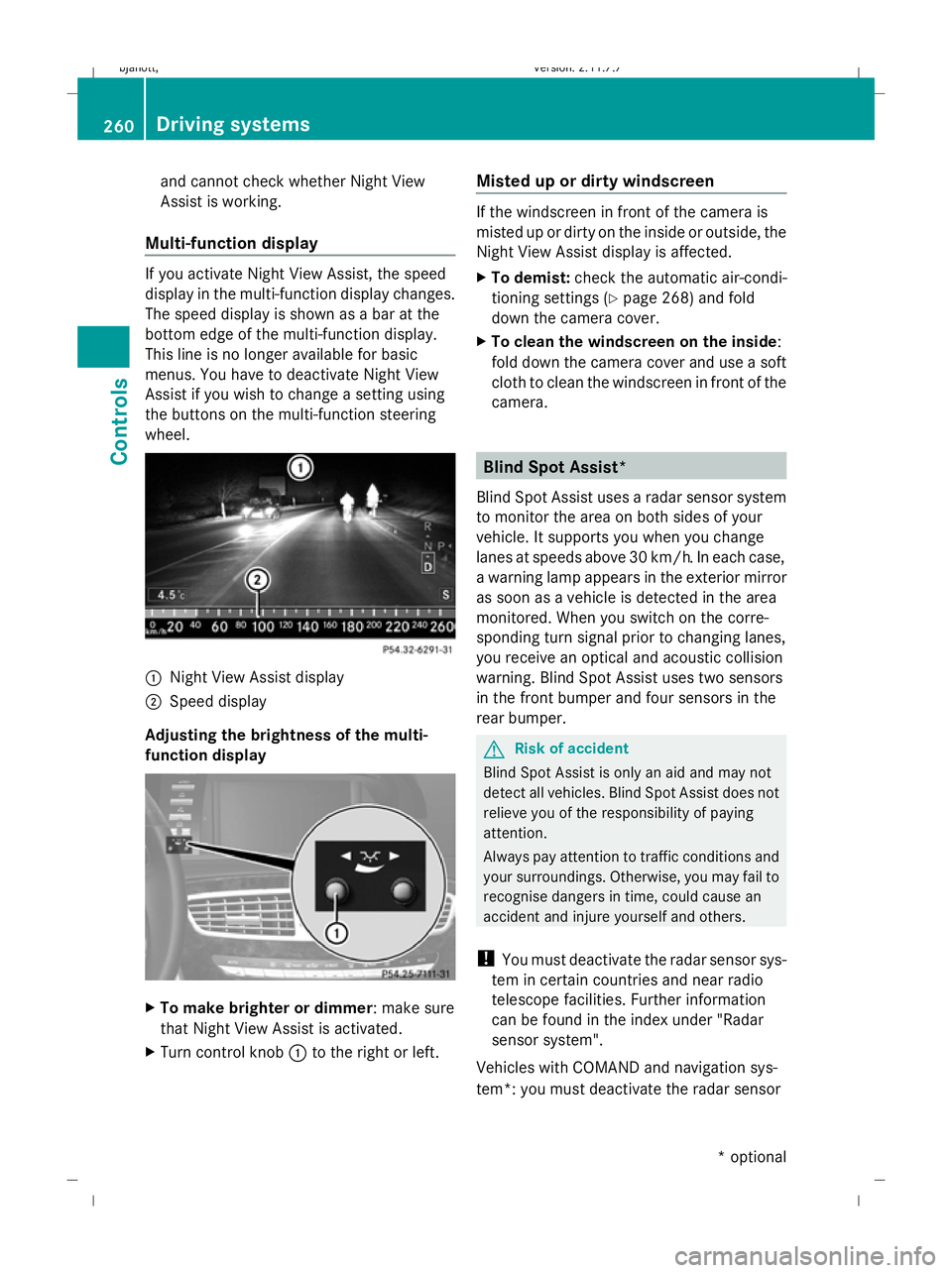
Multi-function display If you activate Night View Assist, the speed
display in the multi-function display changes.
The speed display is shown as a bar at the
bottom edge of the multi-function display.
This line is no longer available for basic
menus. You have to deactivate Night View
Assist if you wish to change a setting using
the buttons on the multi-function steering
wheel. :
Night View Assist display
; Speed display
Adjusting the brightness of the multi-
function display X
To make brighter or dimmer : make sure
that Night View Assist is activated.
X Turn control knob :to the right or left. Misted up or dirty windscreen If the windscreen in front of the camera is
misted up or dirty on the inside or outside, the
Night View Assist display is affected.
X
To demist: check the automatic air-condi-
tioning settings (Y page 268) and fold
down the camera cover.
X To clean the windscreen on the inside:
fold down the camera cover and use a soft
cloth to clean the windscreen in front of the
camera. Blind Spot Assist*
Blind Spot Assist uses a radar sensor system
to monitor the area on both sides of your
vehicle. It supports you when you change
lanes at speeds above 30 km/h. In each case,
a warning lamp appears in the exterior mirror
as soon as a vehicle is detected in the area
monitored. When you switch on the corre-
sponding turn signal prior to changing lanes,
you receive an optical and acoustic collision
warning. Blind Spot Assist uses two sensors
in the front bumper and four sensors in the
rear bumper. G
Risk of accident
Blind Spot Assist is only an aid and may not
detect all vehicles. Blind Spot Assist does not
relieve you of the responsibility of paying
attention.
Always pay attention to traffic conditions and
your surroundings. Otherwise, you may fail to
recognise dangers in time, could cause an
accident and injure yourself and others.
! You must deactivate the radar sensor sys-
tem in certain countries and near radio
telescope facilities. Further information
can be found in the index under "Radar
sensor system".
Vehicles with COMAND and navigation sys-
tem*: you must deactivate the radar sensor 260
Driving systemsCont
rols
* option al
216_AKB; 2; 3, en-GB
bjanott
,V ersion: 2.11.7.7
2009-02-27T14:54:17+01:00 - Seite 260
Dateiname: 6515230602_buchblock.pdf; erzeugt am 04. Mar 2009 11:16:08; WK
Page 323 of 421
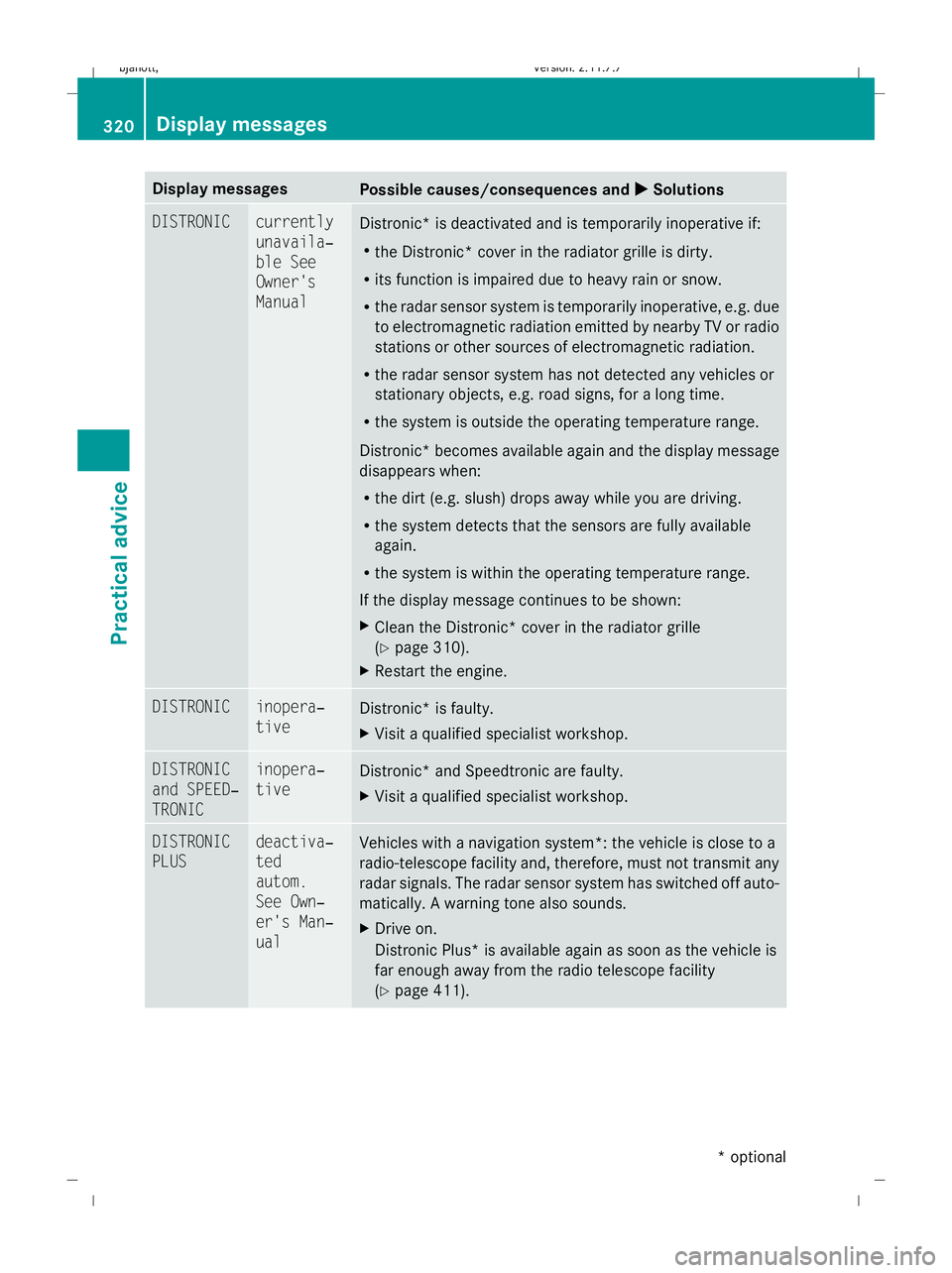
Display messages
Possible causes/consequences and
X
X Solutions DISTRONIC currently
unavaila‐
ble See
Owner's
Manual
Distronic* is deactivated and is temporarily inoperative if:
R
the Distronic* cover in the radiator grille is dirty.
R its function is impaired due to heavy rain or snow.
R the radar sensor system is temporarily inoperative, e.g. due
to electromagnetic radiation emitted by nearby TV or radio
stations or other sources of electromagnetic radiation.
R the radar sensor system has not detected any vehicles or
stationary objects, e.g. road signs, for a long time.
R the system is outside the operating temperature range.
Distronic* becomes available again and the display message
disappears when:
R the dirt (e.g. slush) drops away while you are driving.
R the system detects that the sensors are fully available
again.
R the system is within the operating temperature range.
If the display message continues to be shown:
X Clean the Distronic* cover in the radiator grille
(Y page 310).
X Restart the engine. DISTRONIC inopera‐
tive
Distronic* is faulty.
X
Visit a qualified specialist workshop. DISTRONIC
and SPEED‐
TRONIC inopera‐
tive
Distronic* and Speedtronic are faulty.
X
Visit a qualified specialist workshop. DISTRONIC
PLUS deactiva‐
ted
autom.
See Own‐
er's Man‐
ual
Vehicles with a navigation system*: the vehicle is close to a
radio-telescope facility and, therefore, must not transmit any
radar signals. The radar sensor system has switched off auto-
matically. A warning tone also sounds.
X
Drive on.
Distronic Plus* is available again as soon as the vehicle is
far enough away from the radio telescope facility
(Y page 411). 320
Display
messagesPractical advice
* optional
216_AKB; 2; 3, en-GB
bjanott
,V ersion: 2.11.7.7
2009-02-27T14:54:17+01:00 - Seite 320
Dateiname: 6515230602_buchblock.pdf; erzeugt am 04. Mar 2009 11:16:35; WK
Page 326 of 421
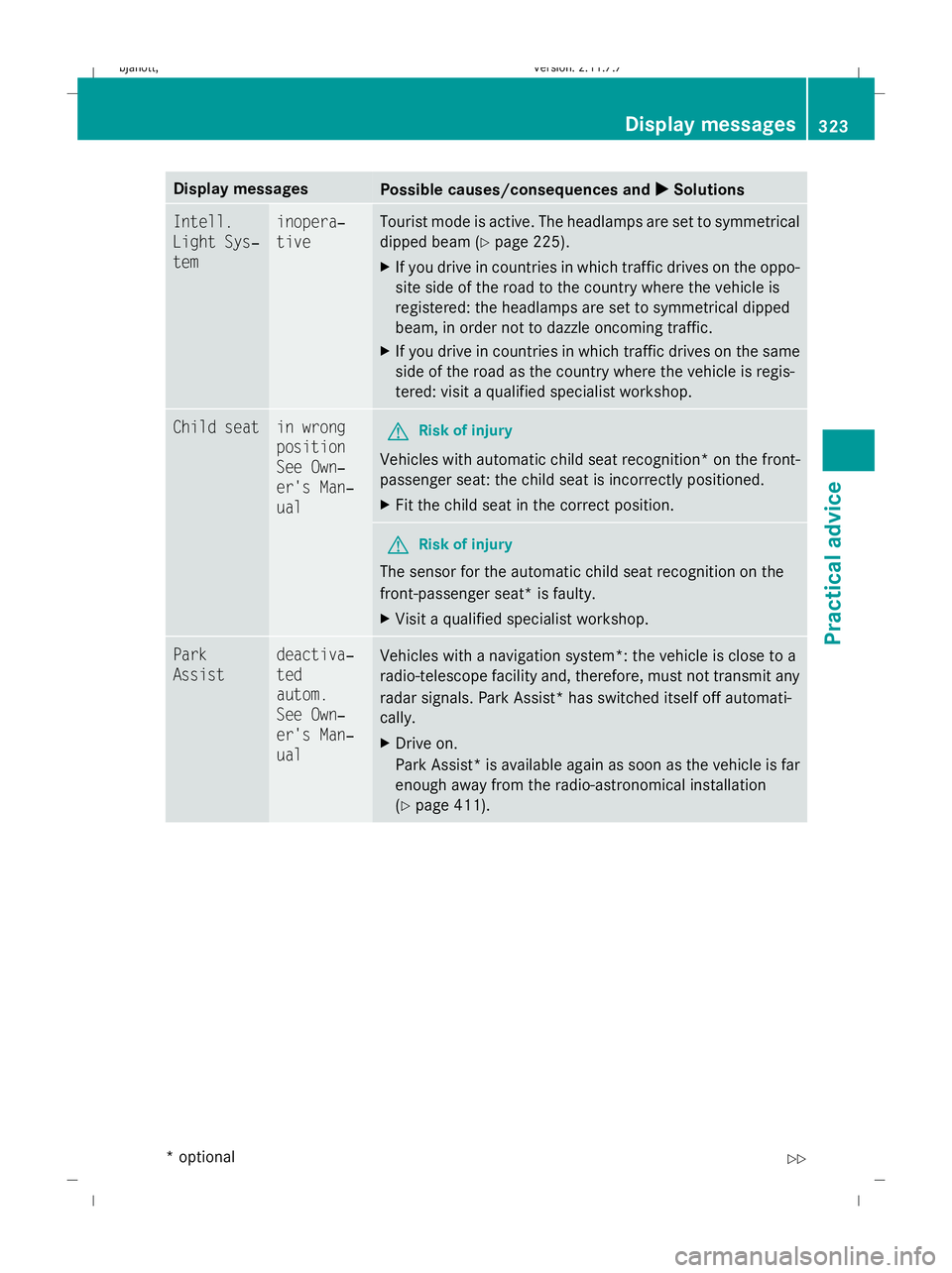
Display messages
Possible causes/consequences and
X
X Solutions Intell.
Light Sys‐
tem inopera‐
tive Tourist mode is active. The headlamps are set to symmetrical
dipped beam (
Ypage 225).
X If you drive in countries in which traffic drives on the oppo-
site side of the road to the country where the vehicle is
registered: the headlamps are set to symmetrical dipped
beam, in order not to dazzle oncoming traffic.
X If you drive in countries in which traffic drives on the same
side of the road as the country where the vehicle is regis-
tered: visit a qualified specialist workshop. Child seat in wrong
position
See Own‐
er's Man‐
ual
G
Risk of injury
Vehicles with automatic child seat recognition *on the front-
passenger seat: the child seat is incorrectly positioned.
X Fit the child seat in the correct position. G
Risk of injury
The sensor for the automatic child seat recognition on the
front-passenger seat* is faulty.
X Visit a qualified specialist workshop. Park
Assist deactiva‐
ted
autom.
See Own‐
er's Man‐
ual
Vehicles with a navigation system*: the vehicle is close to a
radio-telescope facility and, therefore, must not transmit any
radar signals. Park Assist* has switched itself off automati-
cally.
X
Drive on.
Park Assist *is available again as soon as the vehicle is far
enough away from the radio-astronomical installation
(Y page 411). Display messages
323Practical advice
* optional
216_AKB; 2; 3, en-GB
bjanott,
Version: 2.11.7.7 2009-02-27T14:54:17+01:00 - Seite 323 Z
Dateiname: 6515230602_buchblock.pdf; erzeugt am 04. Mar 2009 11:16:35; WK
Page 327 of 421

Display messages
Possible causes/consequences and
X
X Solutions Park
Assist currently
unavaila‐
ble See
Owner's
Manual
Park Assist* is temporarily deactivated if:
R
the radar sensor system is inoperative, e.g. because of
electromagnetic radiation near television and radio trans-
mitters.
R the sensors in the bumpers are dirty.
R the on-board voltage is insufficient.
Park Assist* is operational again and the display message
disappears when:
R the dirt drops away while you are driving.
R the system detects that the sensors are fully available
again.
If the display message continues to be shown:
X Clean the bumpers (Y page 310).
X Restart the engine.
X Wait until the battery is charged sufficiently. Park
Assist inopera‐
tive
Park Assist* is faulty.
X
Visit a qualified specialist workshop. Parking
Guidance deactiva‐
ted
autom.
See Own‐
er's Man‐
ual
Vehicles with a navigation system*: the vehicle is close to a
radio-telescope facility and, therefore, must not transmit any
radar signals. Parking Guidance* has switched itself off auto-
matically.
X
Drive on.
Parking Guidance* is available again as soon as the vehicle
is far enough away from the radio-astronomical installation
(Y page 411). Parking
Guidance inopera‐
tive
Parking Guidance* is faulty.
X
Visit a qualified specialist workshop. 324
Display
messagesPractical advice
* optional
216_AKB; 2; 3, en-GB
bjanott
,V ersion: 2.11.7.7
2009-02-27T14:54:17+01:00 - Seite 324
Dateiname: 6515230602_buchblock.pdf; erzeugt am 04. Mar 2009 11:16:35; WK
Page 330 of 421
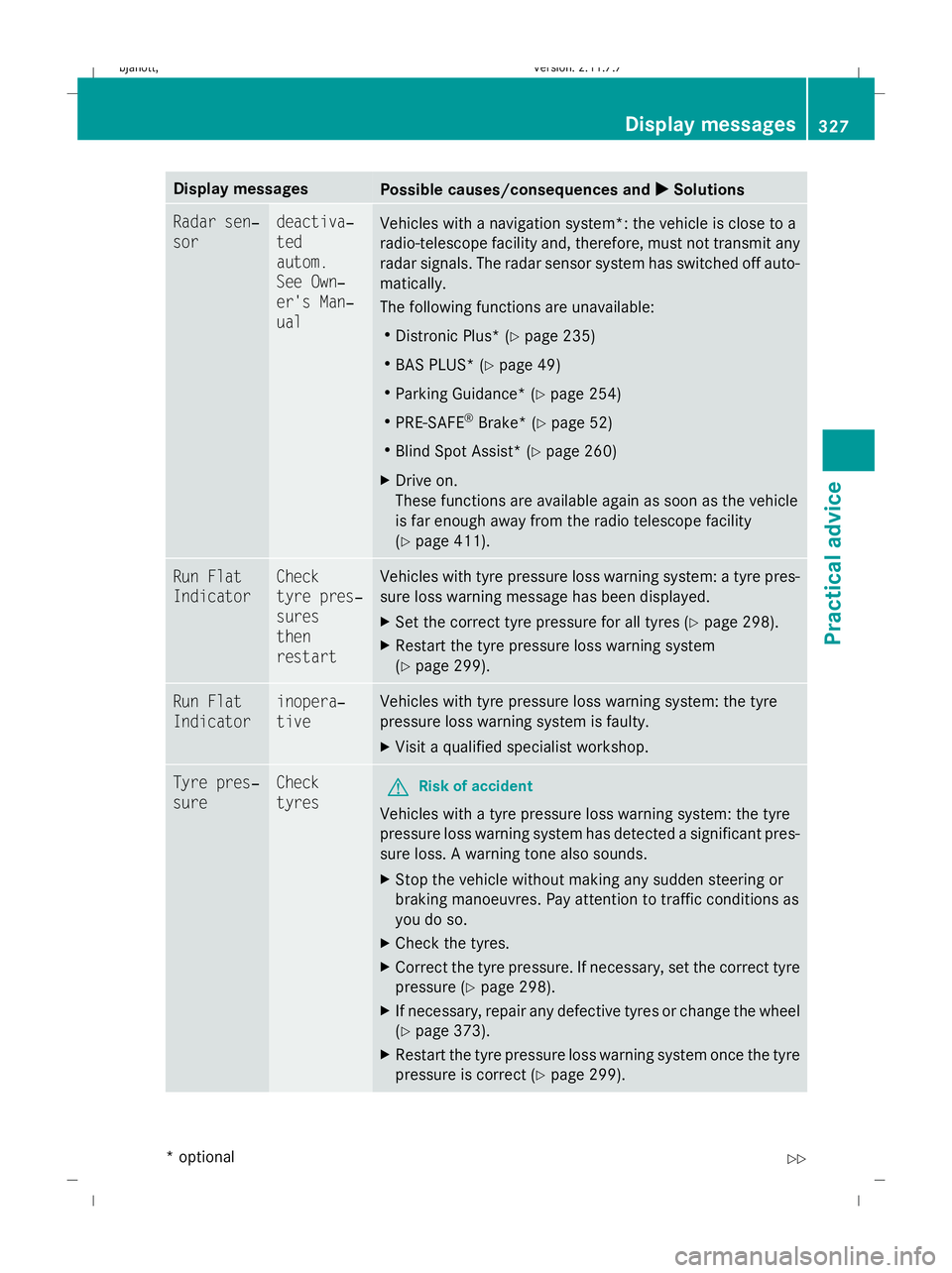
Display messages
Possible causes/consequences and
X
X Solutions Radar sen‐
sor deactiva‐
ted
autom.
See Own‐
er's Man‐
ual
Vehicles with a navigation system*: the vehicle is close to a
radio-telescope facility and, therefore, must not transmit any
radar signals. The radar sensor system has switched off auto-
matically.
The following functions are unavailable:
R Distronic Plus* (Y page 235)
R BAS PLUS* (Y page 49)
R Parking Guidance* (Y page 254)
R PRE-SAFE ®
Brake* (Y page 52)
R Blind Spot Assist* (Y page 260)
X Drive on.
These functions are available again as soon as the vehicle
is far enough away from the radio telescope facility
(Y page 411). Run Flat
Indicator Check
tyre pres‐
sures
then
restart Vehicles with tyre pressure loss warning system: a tyre pres-
sure loss warning message has been displayed.
X
Set the correct tyre pressure for all tyres (Y page 298).
X Restart the tyre pressure loss warning system
(Y page 299). Run Flat
Indicator inopera‐
tive Vehicles with tyre pressure loss warning system: the tyre
pressure loss warning system is faulty.
X
Visit a qualified specialist workshop. Tyre pres‐
sure Check
tyres
G
Risk of accident
Vehicles with a tyre pressure loss warning system: the tyre
pressure loss warning system has detected a significant pres-
sure loss. A warning tone also sounds.
X Stop the vehicle without making any sudden steering or
braking manoeuvres. Pay attention to traffic conditions as
you do so.
X Check the tyres.
X Correct the tyre pressure. If necessary, set the correct tyre
pressure ( Ypage 298).
X If necessary, repair any defective tyres or change the wheel
(Y page 373).
X Restart the tyre pressure loss warning system once the tyre
pressure is correct (Y page 299). Display
messages
327Practical advice
* optional
216_AKB; 2; 3, en-GB
bjanott
,V ersion: 2.11.7.7
2009-02-27T14:54:17+01:00 - Seite 327 Z
Dateiname: 6515230602_buchblock.pdf; erzeugt am 04. Mar 2009 11:16:36; WK
Page 414 of 421
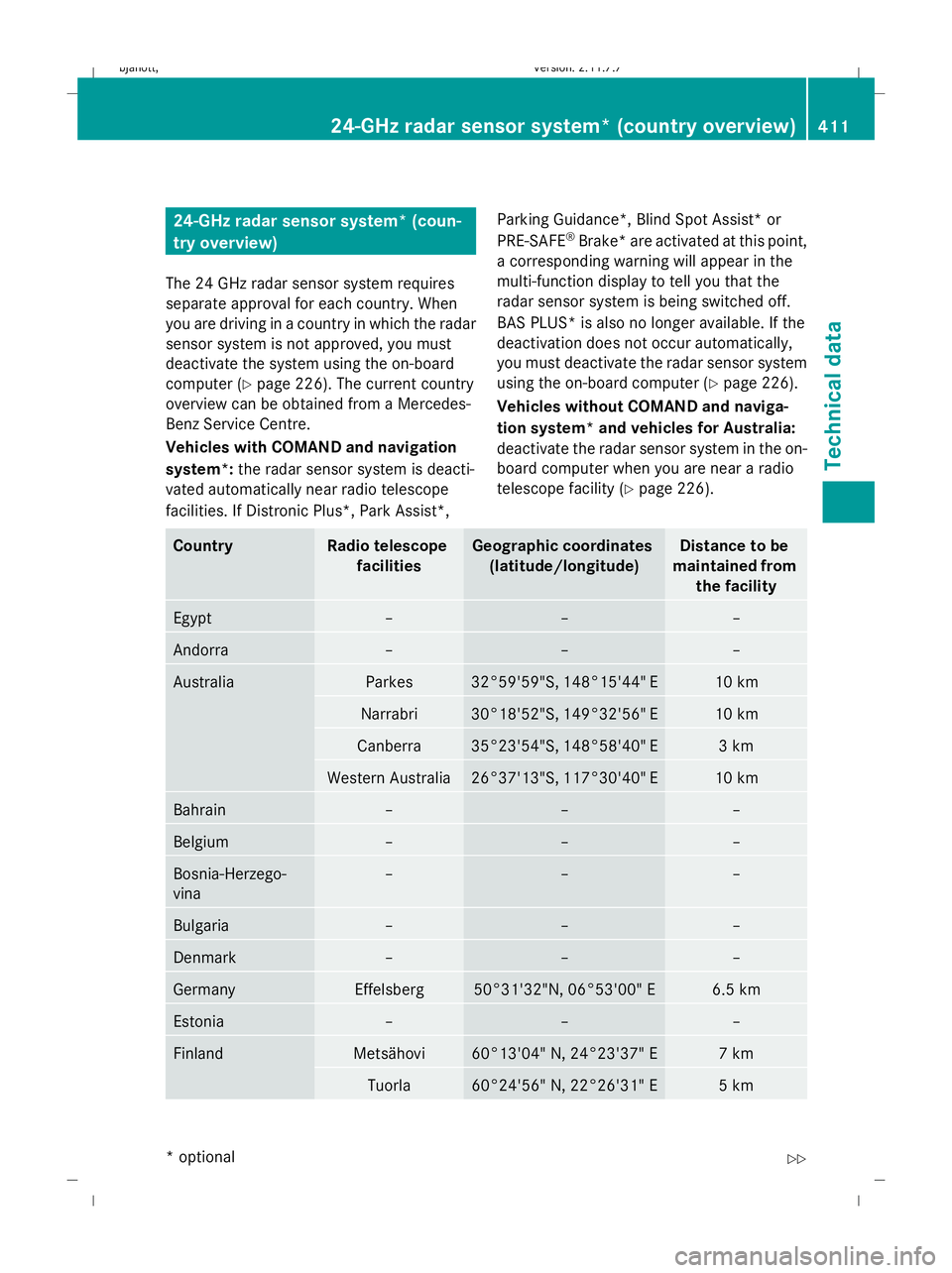
24-GHz radar sensor system* (coun-
try overview)
The 24 GHz radar sensor system requires
separate approval for each country. When
you are driving in a country in which the radar
sensor system is not approved, you must
deactivate the system using the on-board
computer (Y page 226). The current country
overview can be obtained from a Mercedes-
Benz Service Centre.
Vehicles with COMAND and navigation
system*: the radar sensor system is deacti-
vated automatically near radio telescope
facilities. If Distronic Plus*, Park Assist*, Parking Guidance*, Blind Spot Assist* or
PRE-SAFE
®
Brake* are activated at this point,
a corresponding warning will appear in the
multi-function display to tell you that the
radar sensor system is being switched off.
BAS PLUS* is also no longer available. If the
deactivation does not occur automatically,
you must deactivate the radar sensor system
using the on-board computer (Y page 226).
Vehicles without COMAND and naviga-
tion system* and vehicles for Australia:
deactivate the radar sensor system in the on-
board computer when you are near a radio
telescope facility (Y page 226). Country Radio telescope
facilities Geographic coordinates
(latitude/longitude) Distance to be
maintained from the facility Egypt – – –
Andorra – – –
Australia Parkes 32°59'59"S, 148°15'44" E 10 km
Narrabri 30°18'52"S, 149°32'56" E 10 km
Canberra 35°23'54"S, 148°58'40" E 3 km
Western Australia 26°37'13"S, 117°30'40" E 10 km
Bahrain – – –
Belgium – – –
Bosnia-Herzego-
vina – – –
Bulgaria – – –
Denmark – – –
Germany Effelsberg 50°31'32"N, 06°53'00" E 6.5 km
Estonia – – –
Finland Metsähovi 60°13'04" N, 24°23'37" E 7 km
Tuorla 60°24'56" N, 22°26'31" E 5 km24-GHz radar sensor system* (country overview)
411Technical data
* optional
216_AKB; 2; 3, en-GB
bjanott
,V ersion: 2.11.7.7
2009-02-27T14:54:17+01:00 - Seite 411 Z
Dateiname: 6515230602_buchblock.pdf; erzeugt am 04. Mar 2009 11:17:00; WK