ignition MERCEDES-BENZ CL COUPE 2009 Repair Manual
[x] Cancel search | Manufacturer: MERCEDES-BENZ, Model Year: 2009, Model line: CL COUPE, Model: MERCEDES-BENZ CL COUPE 2009Pages: 421, PDF Size: 10.78 MB
Page 303 of 421
X
Press the 9or: button to select
Tyre pressure.
X Press the abutton.
The following message appears in the
multi-function display:
Run Flat Indicator active Restart
with OK
If you wish to confirm the restart:
X Press the abutton.
The following message appears in the
multi-function display:
Tyre press. now OK?
X Press the 9or: button to select
Yes.
X Press the abutton.
You will see the following message in the
multi-function display:
Run Flat Indicator restarted
After a teach-in period, the tyre pressure
loss warning system will monitor the set
tyre pressures of all four tyres.
If you wish to cancel the restart:
X Press the %button.
or
X When the Tyre press. now OK? message
appears, press 9or: to select
Cancel.
X Press the abutton.
The tyre pressure values stored at the last
restart will continue to be monitored. Tyre pressure monitor*
If a tyre pressure monitor system is fitted, the
vehicle's wheels have sensors fitted that
monitor the tyre pressures in all four tyres.
The tyre pressure monitor warns you when
the pressure drops in one or more of the
tyres. The tyre pressure monitor only func-
tions if the correct wheel electronics units are
fitted to all wheels. G
Risk of accident
The tyre pressure monitor does not warn you
of an incorrectly set tyre pressure. The table
on the inside of the fuel filler flap will help you
decide whether the tyre pressures should be
corrected.
The tyre pressure monitor is not able to warn
you of a sudden loss of pressure, e.g. if the
tyre is penetrated by a foreign body. In the
event of a sudden loss of pressure, bring the
vehicle to a halt by braking carefully. Do not
make any sudden steering movements when
doing so.
i The operation of the tyre pressure moni-
tor can be affected by interference from
radio transmitting equipment (e.g. radio
headphones, two-way radios) that may be
being operated in or near the vehicle.
Checking tyre pressure electronically X
Make sure that the key is in posi-
tion 2(Y page 182) in the ignition lock.
X Press the =or; button to select the
Service menu.
X Press the 9or: button to select
Tyre pressure.
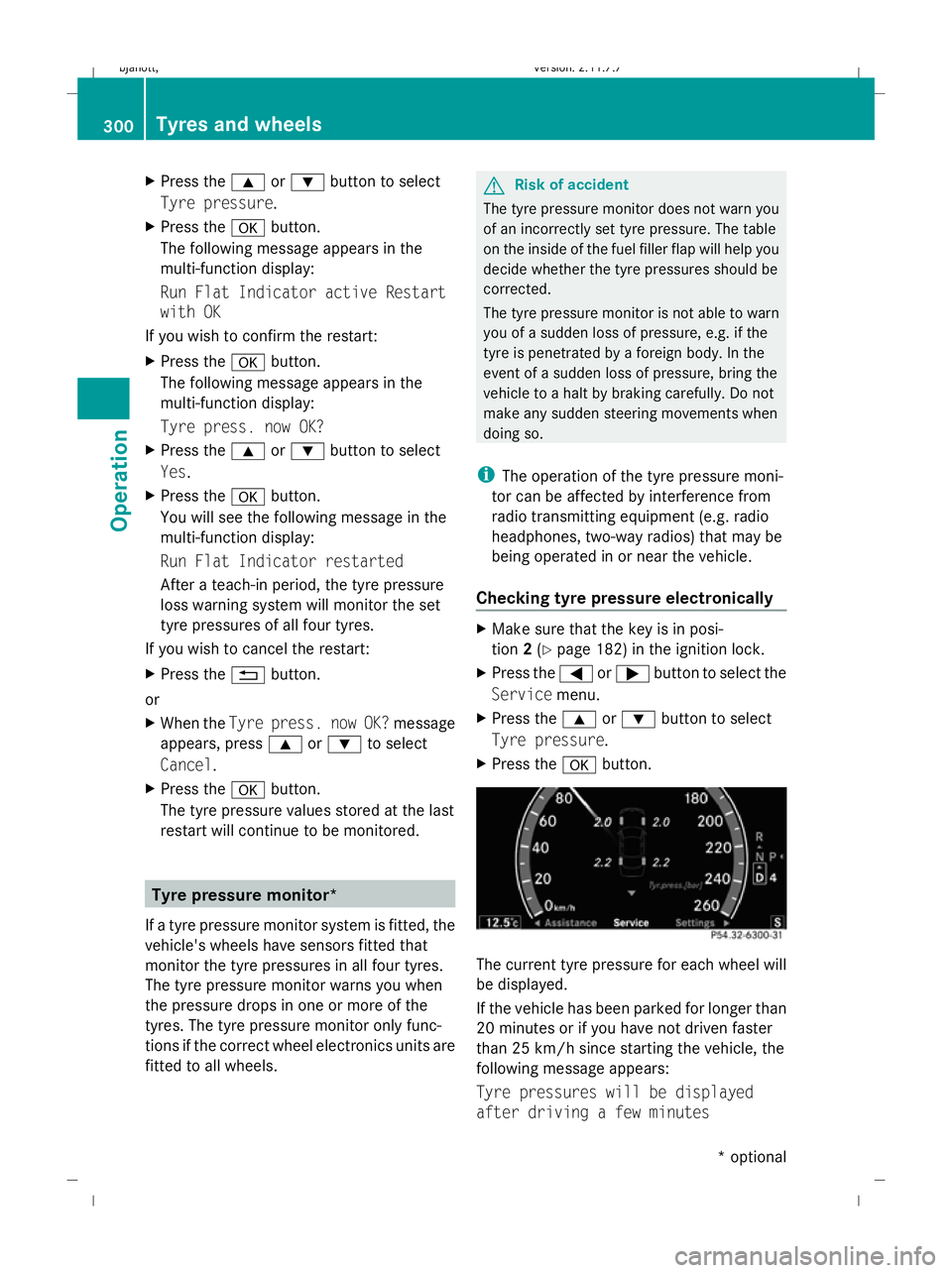
X Press the abutton. The current tyre pressure for each wheel will
be displayed.
If the vehicle has been parked for longer than
20 minutes or if you have not driven faster
than 25 km/h since starting the vehicle, the
following message appears:
Tyre pressures will be displayed
after driving a few minutes 300
Tyres and wheelsOperation
* optional
216_AKB; 2; 3, en-GB
bjanott,
Version: 2.11.7.7 2009-02-27T14:54:17+01:00 - Seite 300
Dateiname: 6515230602_buchblock.pdf; erzeugt am 04. Mar 2009 11:16:28; WK
Page 304 of 421
i
The tyre pressure values indicated by the
on-board computer may differ from those
measured at a filling station with a pressure
gauge. The tyre pressures shown by the on-
board computer refer to those measured at
sea level. The tyre pressure values indica-
ted by a pressure gauge when the vehicle
is at high altitude are higher than those
shown by the on-board computer. In this
case, do not reduce the tyre pressures.
i After a teach-in period, the tyre pressure
monitor automatically recognises new
wheels or new sensors. As long as a clear
allocation of the tyre pressure values to the
individual wheels is not possible, the dis-
play message Tyre Pressure Monitor
Active is shown instead of the tyre pres-
sure display. The tyre pressures are already
being monitored.
Restarting the tyre pressure monitor When you restart the tyre pressure monitor,
all existing warning messages are deleted and
the warning lamps go out. The monitor uses
the currently set tyre pressures as the speci-
fied values for monitoring.
In most cases, the tyre pressure monitor will
automatically detect the new reference val-
ues, e.g. if you have:
R changed the tyre pressure
R changed the wheels or tyres
R fitted new wheels or tyres
i You will find the menu overview on
(Y page 214).
If you wish to define the new reference values
manually:
X Use the table on the inside of the fuel filler
flap to ensure that the tyre pressure is set
correctly in all four tyres for the current
operating conditions. Also observe the notes in the section on
tyre pressures (Y
page 298).
X Make sure that the key is in position 2in
the ignition lock.
X Press the =or; button to select the
Service menu.
X Press the 9or: button to select
Tyre pressure.
X Press the abutton.
The current pressure in each individual tyre
is displayed, or the following message
appears:
Tyre pressures displayed after
driving a few minutes
X Press the :button.
The following message appears in the
multi-function display:
Use current pressure values as new
reference values
X Press the abutton.
The following message appears in the
multi-function display:
Tyre pressure monitor restarted
After a few minutes of driving, the current
pressures are adopted as the new monitor-
ing values.
Cancelling the restart X
Press the %button.
or
X Press the 9button to leave the menu.
Other messages in the multi-function
display If in multi-function display the following mes-
sages appear:
Please correct the tyre pressure
X
Check the tyre pressure on all four wheels
and correct it if necessary.
i If the wheel positions on the vehicle are
interchanged, the tyre pressures may be
displayed for the wrong positions for a Tyres and wheels
301Operation
216_AKB; 2; 3, en-GB
bjanott, Version: 2.11.7.7 2009-02-27T14:54:17+01:00 - Seite 301 Z
Dateiname: 6515230602_buchblock.pdf; erzeugt am 04. Mar 2009 11:16:28; WK
Page 310 of 421
Service A .. km overdue
i
If you fail to have the service performed
by the specified date, you may be violating
applicable laws. Your warranty may be inva-
lidated and goodwill settlements may be
refused. Calling up the service due date
Use the buttons on the multi-function steer-
ing wheel.
X Switch on the ignition.
X Press the =or; button to select the
Service menu.
X Press the 9or: button to select
ASSYST PLUS.
X Press a.
The multi-function display shows the
service due date. Care
Care and cleaning products
Regular care of your vehicle is a condition for
retaining the quality in the long term.
To care for your vehicle, use the care and
cleaning products recommended and
approved by Mercedes-Benz.
! For cleaning your vehicle, do not use any
of the following:
R dry, coarse or rough cloths
R abrasive cleaning agents
R solvents
R cleaning agents containing solvents
and do not scour.
Do not touch the surfaces or protective
films with hard objects, e.g. rings or ice
scrapers. You can otherwise scratch or
damage the surfaces or protective films. H
Environmental note
Dispose of empty packaging, cleaning cloths
and polishing wads in an environmentally
responsible manner.
! Do not park the vehicle for a long period
of time directly after cleaning, especially if
the wheels have just been cleaned with a
wheel cleaner. Wheel cleaners could cause
rapid corrosion of the brake discs and
brake pads/linings. After cleaning, park
the vehicle when it is at normal operating
temperature. Exterior care
Automatic car wash G
Risk of accident
The vehicle is braked when Hold or Distronic
Plus* is activated. Therefore, deactivate Hold
and Distronic Plus before the vehicle is
washed in an automatic car wash.
You can wash the vehicle in an automatic car
wash from the beginning.
! We recommend automatic car washes
with an adjustable 36
high-pressure pre-
cleaning program. In car washes that use
high water pressures, there is a danger that
a small quantity of water may leak into the
vehicle.
If the vehicle is very dirty, pre-wash it before
cleaning it in an automatic car wash.
! Make sure that the automatic car wash is
suitable for the size of the vehicle. Fold in
the exterior mirrors before the vehicle is
washed. There is otherwise a risk of dam-
age to the exterior mirrors.
! When washing your vehicle in a tow-
through car wash, make sure that the auto-
matic transmission is in position N, other-
wise the vehicle could be damaged.
36 In accordance with the specifications for cabriolet programs. Care
307Operation
* optional
216_AKB; 2; 3, en-GB
bjanott,
Version: 2.11.7.7 2009-02-27T14:54:17+01:00 - Seite 307 Z
Dateiname: 6515230602_buchblock.pdf; erzeugt am 04. Mar 2009 11:16:30; WK
Page 311 of 421
R
Vehicles with a key:
Do not remove the key from the ignition
lock. Do not open the driver's or front-
passenger door when the engine is
switched off, as this automatically shifts
the automatic transmission to park posi-
tion Pand locks the wheels, unless you
have previously shifted the automatic
transmission to N.
R Vehicles with KEYLESS GO*:
Do not open the driver's or front-
passenger door when the engine is
switched off, as this shifts the automatic
transmission to park position Pand locks
the wheels.
! Make sure that the side windows are com-
pletely closed, that the ventilation/heater
blower is turned off and that the wind-
screen wiper switch is set to 0. Otherwise,
the rain/light sensor may be activated, trig-
gering unintended wiper movements. This
could cause damage to the vehicle.
After using an automatic car wash, wipe off
wax and drying agents from the windscreen
and the wiper blades. This will prevent smears
and reduce wiping noises caused by residue
on the windscreen.
High-pressure cleaners G
Risk of accident
Do not use high-pressure cleaners with circu-
lar-jet nozzles (dirt grinders) to clean your
vehicle, in particular the tyres. You could oth-
erwise damage the tyres and cause an acci-
dent.
! Observe the instructions issued by the
equipment manufacturer concerning the
distance to be maintained between the
nozzle of the high-pressure cleaner and the
vehicle (at least 30 cm).
Move the high-pressure cleaner nozzle
around when cleaning your vehicle. Do not aim directly at any of the following:
R
tyres
R door joint
R electrical components
R battery
R connectors
R lights
R seals
R trim elements
Damaged seals or electrical components
can lead to failures or leaks.
Matt finish care* Your vehicle has a clear matt finish. For this
reason, you should make sure that you
adhere to the following instructions to avoid
damage to paintwork due to improper treat-
ment.
! Under no circumstances should you pol-
ish the vehicle. Polishing will make the
paintwork shine.
! When caring for your paintwork, do not
use paint cleaner, grinding or polishing
products, or gloss preservers such as wax.
These products are only suitable for high-
gloss finishes. Using them on a vehicle with
a matt finish results in serious damage to
the surface (gleaming, spotted areas).
Always have paintwork repairs carried out
at a qualified specialist workshop, e.g. a
Mercedes-Benz Service Centre.
i From the range of available Mercedes-
Benz care products, use only the insect
remover and the car shampoo.
Cleaning the paintwork Scratches, corrosive deposits, areas affected
by corrosion and damage caused by inade-
quate care cannot always be completely
repaired. In such cases, visit a qualified spe-308
CareOperation
* optional
216_AKB; 2; 3, en-GB
bjanott,
Version: 2.11.7.7 2009-02-27T14:54:17+01:00 - Seite 308
Dateiname: 6515230602_buchblock.pdf; erzeugt am 04. Mar 2009 11:16:30; WK
Page 312 of 421
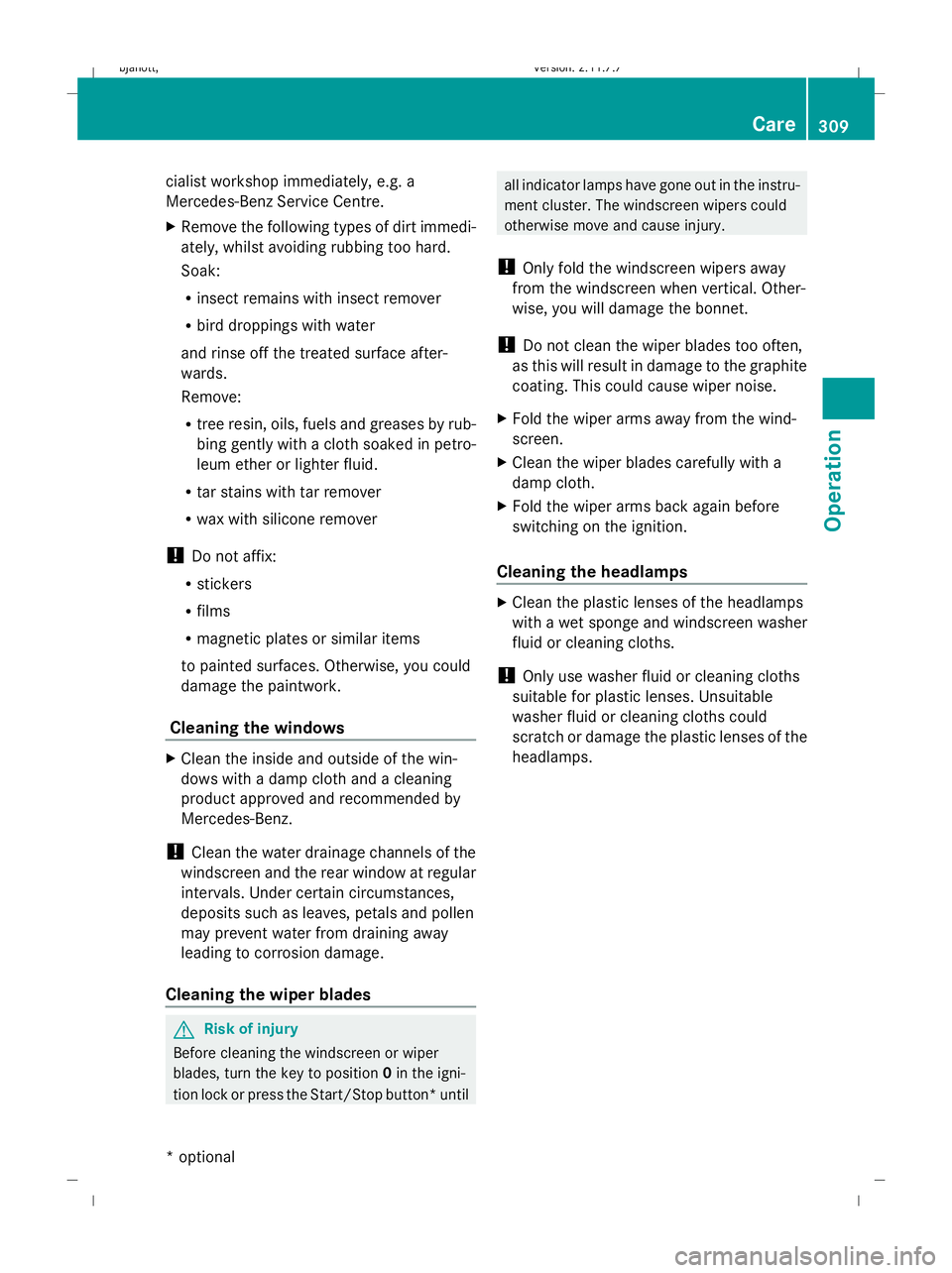
cialist workshop immediately, e.g. a
Mercedes-Benz Service Centre.
X
Remove the following types of dirt immedi-
ately, whilst avoiding rubbing too hard.
Soak:
R
insect remains with insect remover
R bird droppings with water
and rinse off the treated surface after-
wards.
Remove:
R tree resin, oils, fuels and greases by rub-
bing gently with a cloth soaked in petro-
leum ether or lighter fluid.
R tar stains with tar remover
R wax with silicone remover
! Do not affix:
R stickers
R films
R magnetic plates or similar items
to painted surfaces. Otherwise, you could
damage the paintwork.
Cleaning the windows X
Clean the inside and outside of the win-
dows with a damp cloth and a cleaning
product approved and recommended by
Mercedes-Benz.
! Clean the water drainage channels of the
windscreen and the rear window at regular
intervals. Under certain circumstances,
deposits such as leaves, petals and pollen
may prevent water from draining away
leading to corrosion damage.
Cleaning the wiper blades G
Risk of injury
Before cleaning the windscreen or wiper
blades, turn the key to position 0in the igni-
tion lock or press the Start/Stop button* until all indicator lamps have gone out in the instru-
ment cluster. The windscreen wipers could
otherwise move and cause injury.
! Only fold the windscreen wipers away
from the windscreen when vertical. Other-
wise, you will damage the bonnet.
! Do not clean the wiper blades too often,
as this will result in damage to the graphite
coating. This could cause wiper noise.
X Fold the wiper arms away from the wind-
screen.
X Clean the wiper blades carefully with a
damp cloth.
X Fold the wiper arms back again before
switching on the ignition.
Cleaning the headlamps X
Clean the plastic lenses of the headlamps
with a wet sponge and windscreen washer
fluid or cleaning cloths.
! Only use washer fluid or cleaning cloths
suitable for plastic lenses. Unsuitable
washer fluid or cleaning cloths could
scratch or damage the plastic lenses of the
headlamps. Care
309Operation
* optional
216_AKB; 2; 3, en-GB
bjanott,
Version: 2.11.7.7 2009-02-27T14:54:17+01:00 - Seite 309 Z
Dateiname: 6515230602_buchblock.pdf; erzeugt am 04. Mar 2009 11:16:30; WK
Page 338 of 421
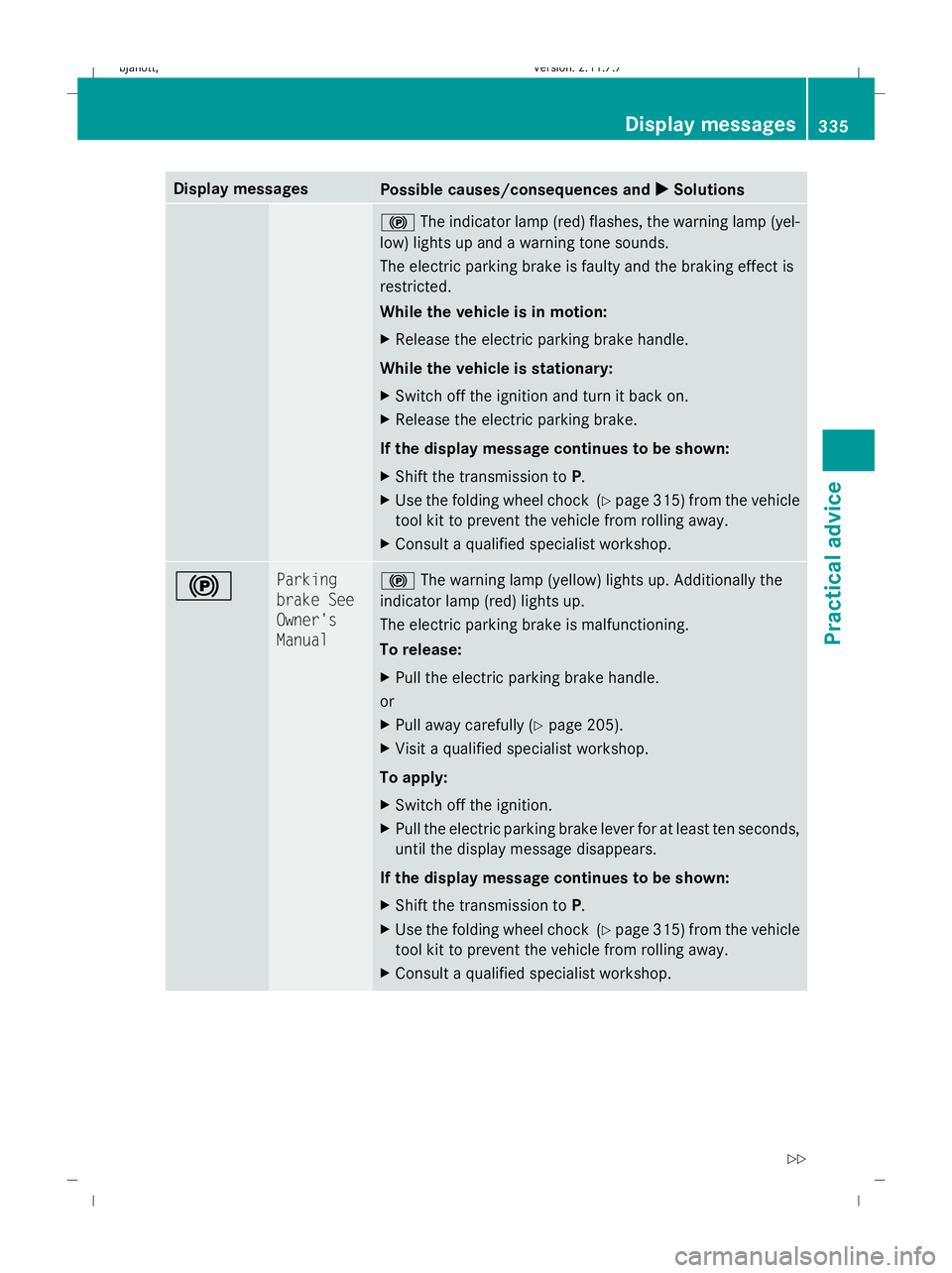
Display messages
Possible causes/consequences and
X
X Solutions !
The indicator lamp (red) flashes, the warning lamp (yel-
low) lights up and a warning tone sounds.
The electric parking brake is faulty and the braking effect is
restricted.
While the vehicle is in motion:
X Release the electric parking brake handle.
While the vehicle is stationary:
X Switch off the ignition and turn it back on.
X Release the electric parking brake.
If the display message continues to be shown:
X Shift the transmission to P.
X Use the folding wheel chock (Y page 315) from the vehicle
tool kit to prevent the vehicle from rolling away.
X Consult a qualified specialist workshop. ! Parking
brake See
Owner's
Manual !
The warning lamp (yellow) lights up. Additionally the
indicator lamp (red) lights up.
The electric parking brake is malfunctioning.
To release:
X Pull the electric parking brake handle.
or
X Pull away carefully (Y page 205).
X Visit a qualified specialist workshop.
To apply:
X Switch off the ignition.
X Pull the electric parking brake lever for at least ten seconds,
until the display message disappears.
If the display message continues to be shown:
X Shift the transmission to P.
X Use the folding wheel chock (Y page 315) from the vehicle
tool kit to prevent the vehicle from rolling away.
X Consult a qualified specialist workshop. Display
messages
335Practical advice
216_AKB; 2; 3, en-GB
bjanott ,V ersion: 2.11.7.7
2009-02-27T14:54:17+01:00 - Seite 335 Z
Dateiname: 6515230602_buchblock.pdf; erzeugt am 04. Mar 2009 11:16:37; WK
Page 339 of 421
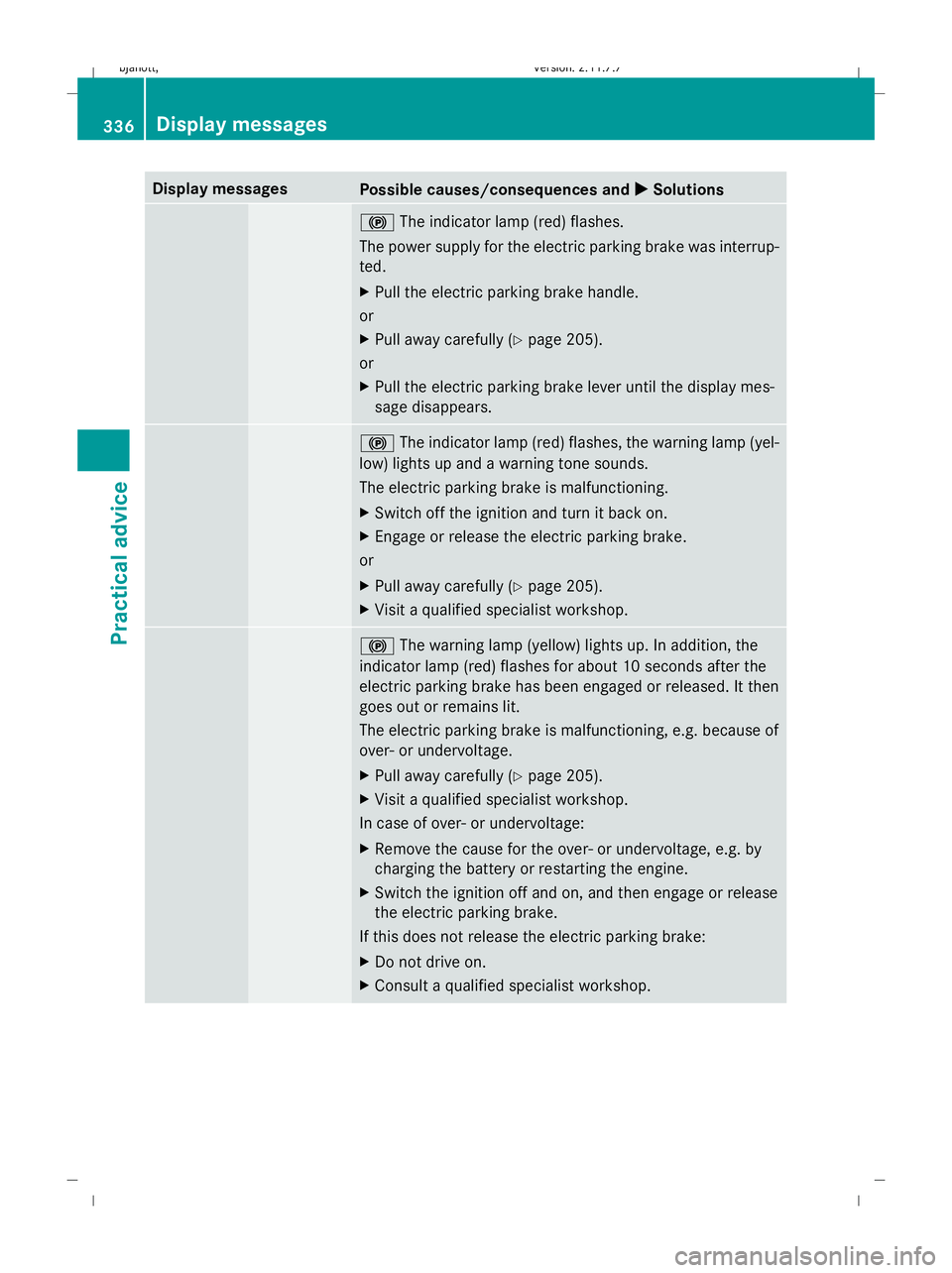
Display messages
Possible causes/consequences and
X
X Solutions !
The indicator lamp (red) flashes.
The power supply for the electric parking brake was interrup-
ted.
X Pull the electric parking brake handle.
or
X Pull away carefully (Y page 205).
or
X Pull the electric parking brake lever until the display mes-
sage disappears. !
The indicator lamp (red) flashes, the warning lamp (yel-
low) lights up and a warning tone sounds.
The electric parking brake is malfunctioning.
X Switch off the ignition and turn it back on.
X Engage or release the electric parking brake.
or
X Pull away carefully (Y page 205).
X Visit a qualified specialist workshop. !
The warning lamp (yellow) lights up. In addition, the
indicator lamp (red) flashes for about 10 seconds after the
electric parking brake has been engaged or released. It then
goes out or remains lit.
The electric parking brake is malfunctioning, e.g. because of
over- or undervoltage.
X Pull away carefully (Y page 205).
X Visit a qualified specialist workshop.
In case of over- or undervoltage:
X Remove the cause for the over- or undervoltage, e.g. by
charging the battery or restarting the engine.
X Switch the ignition off and on, and then engage or release
the electric parking brake.
If this does not release the electric parking brake:
X Do not drive on.
X Consult a qualified specialist workshop. 336
Display
messagesPractical advice
216_AKB; 2; 3, en-GB
bjanott ,V ersion: 2.11.7.7
2009-02-27T14:54:17+01:00 - Seite 336
Dateiname: 6515230602_buchblock.pdf; erzeugt am 04. Mar 2009 11:16:37; WK
Page 340 of 421
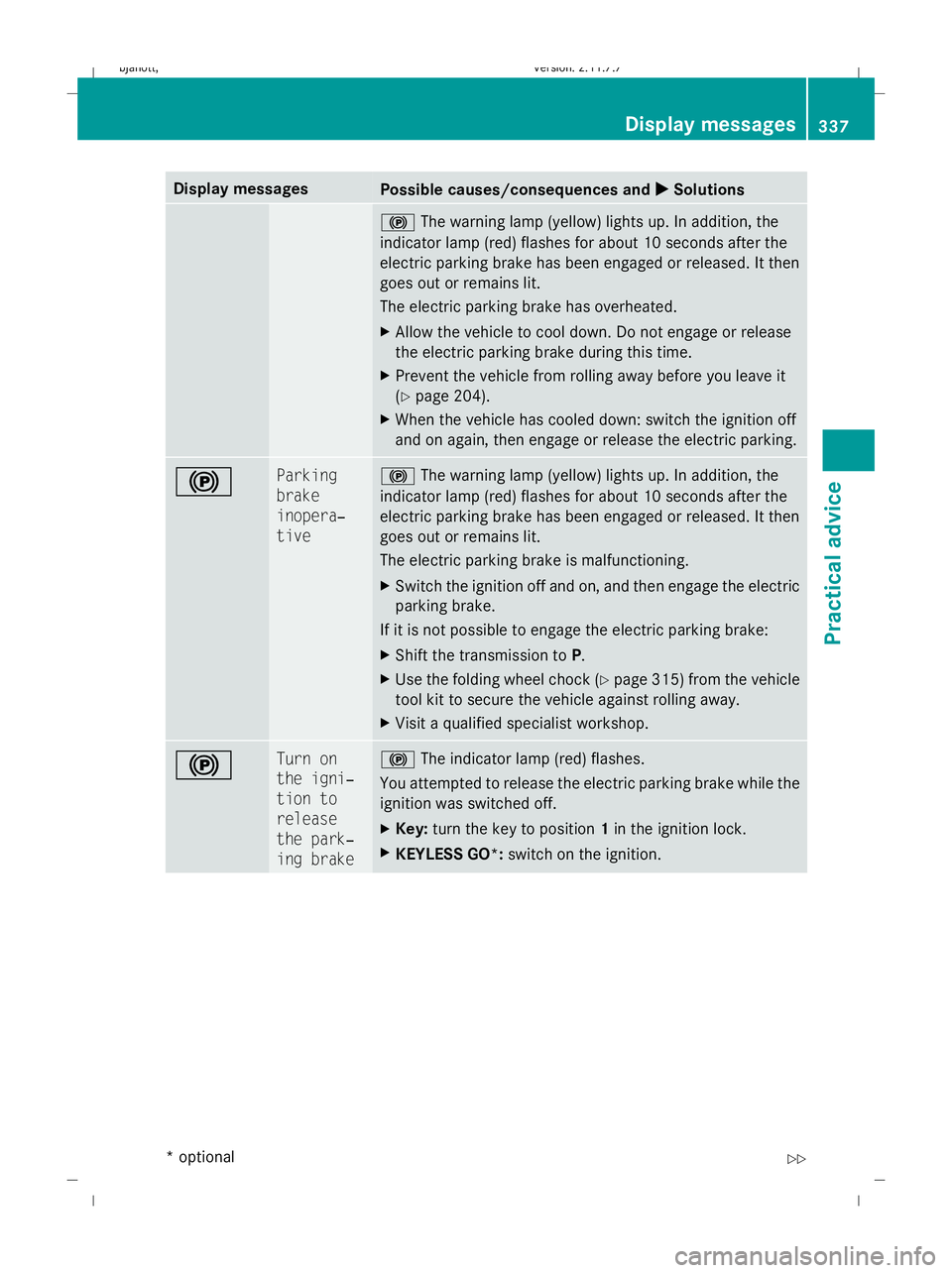
Display messages
Possible causes/consequences and
X
X Solutions !
The warning lamp (yellow) lights up. In addition, the
indicator lamp (red) flashes for about 10 seconds after the
electric parking brake has been engaged or released. It then
goes out or remains lit.
The electric parking brake has overheated.
X Allow the vehicle to cool down. Do not engage or release
the electric parking brake during this time.
X Prevent the vehicle from rolling away before you leave it
(Y page 204).
X When the vehicle has cooled down: switch the ignition off
and on again, then engage or release the electric parking. ! Parking
brake
inopera‐
tive !
The warning lamp (yellow) lights up. In addition, the
indicator lamp (red) flashes for about 10 seconds after the
electric parking brake has been engaged or released. It then
goes out or remains lit.
The electric parking brake is malfunctioning.
X Switch the ignition off and on, and then engage the electric
parking brake.
If it is not possible to engage the electric parking brake:
X Shift the transmission to P.
X Use the folding wheel chock (Y page 315) from the vehicle
tool kit to secure the vehicle against rolling away.
X Visit a qualified specialist workshop. ! Turn on
the igni‐
tion to
release
the park‐
ing brake !
The indicator lamp (red) flashes.
You attempted to release the electric parking brake while the
ignition was switched off.
X Key: turn the key to position 1in the ignition lock.
X KEYLESS GO*: switch on the ignition. Display
messages
337Practical advice
* optional
216_AKB; 2; 3, en-GB
bjanott
,V ersion: 2.11.7.7
2009-02-27T14:54:17+01:00 - Seite 337 Z
Dateiname: 6515230602_buchblock.pdf; erzeugt am 04. Mar 2009 11:16:38; WK
Page 343 of 421
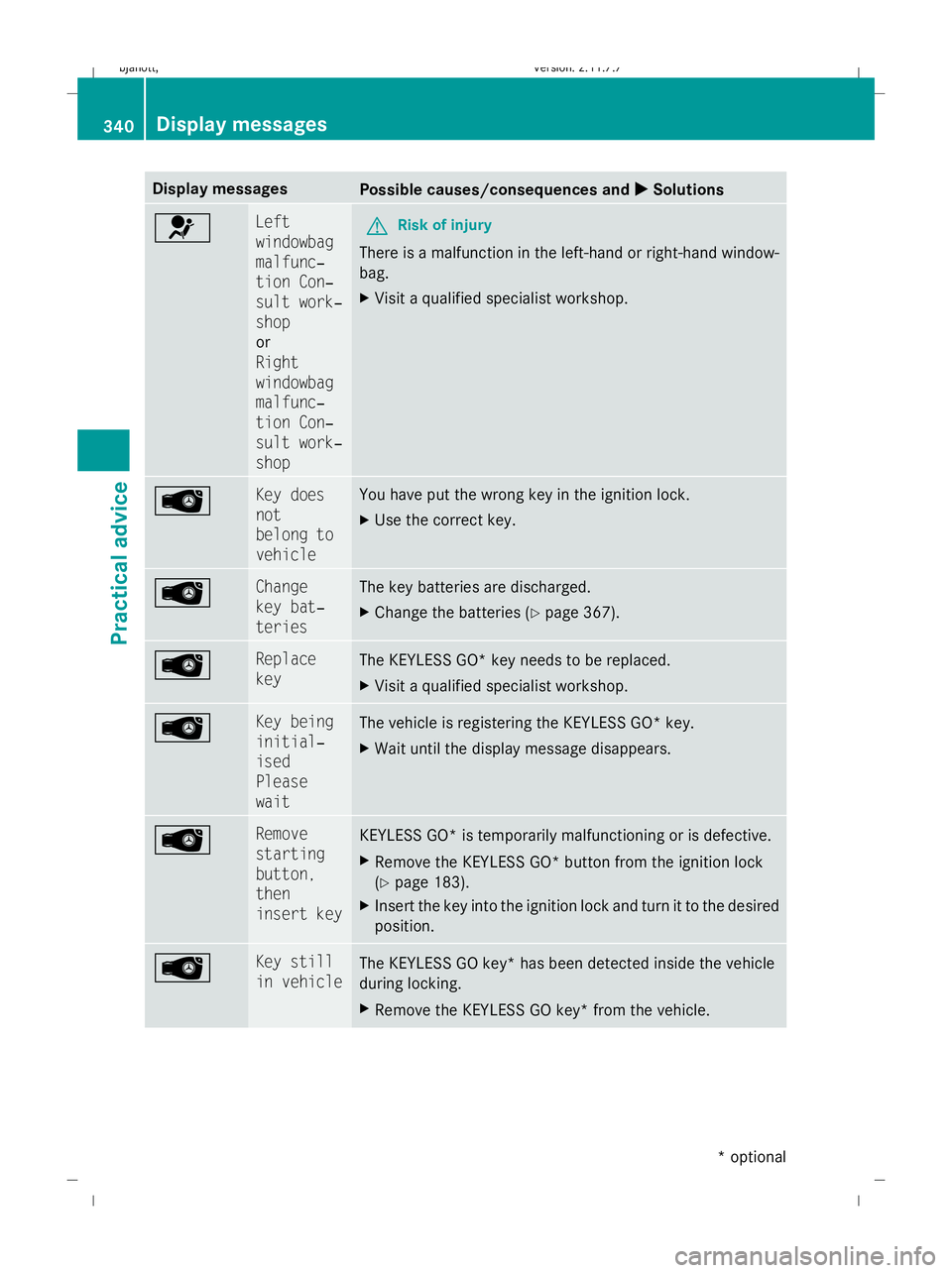
Display messages
Possible causes/consequences and
X
X Solutions 6 Left
windowbag
malfunc‐
tion Con‐
sult work‐
shop
or
Right
windowbag
malfunc‐
tion Con‐
sult work‐
shop
G
Risk of injury
There is a malfunction in the left-hand or right-hand window-
bag.
X Visit a qualified specialist workshop. Â Key does
not
belong to
vehicle You have put the wrong key in the ignition lock.
X
Use the correct key. Â Change
key bat‐
teries The key batteries are discharged.
X
Change the batteries (Y page 367). Replace
key
The KEYLESS GO* key needs to be replaced.
X
Visit a qualified specialist workshop. Â Key being
initial‐
ised
Please
wait
The vehicle is registering the KEYLESS GO* key.
X
Wait until the display message disappears. Â Remove
starting
button,
then
insert key
KEYLESS GO* is temporarily malfunctioning or is defective.
X
Remove the KEYLESS GO* button from the ignition lock
(Y page 183).
X Insert the key into the ignition lock and turn it to the desired
position. Â Key still
in vehicle
The KEYLESS GO key* has been detected inside the vehicle
during locking.
X
Remove the KEYLESS GO key* from the vehicle. 340
Display
messagesPractical advice
* optional
216_AKB; 2; 3, en-GB
bjanott
,V ersion: 2.11.7.7
2009-02-27T14:54:17+01:00 - Seite 340
Dateiname: 6515230602_buchblock.pdf; erzeugt am 04. Mar 2009 11:16:38; WK
Page 344 of 421
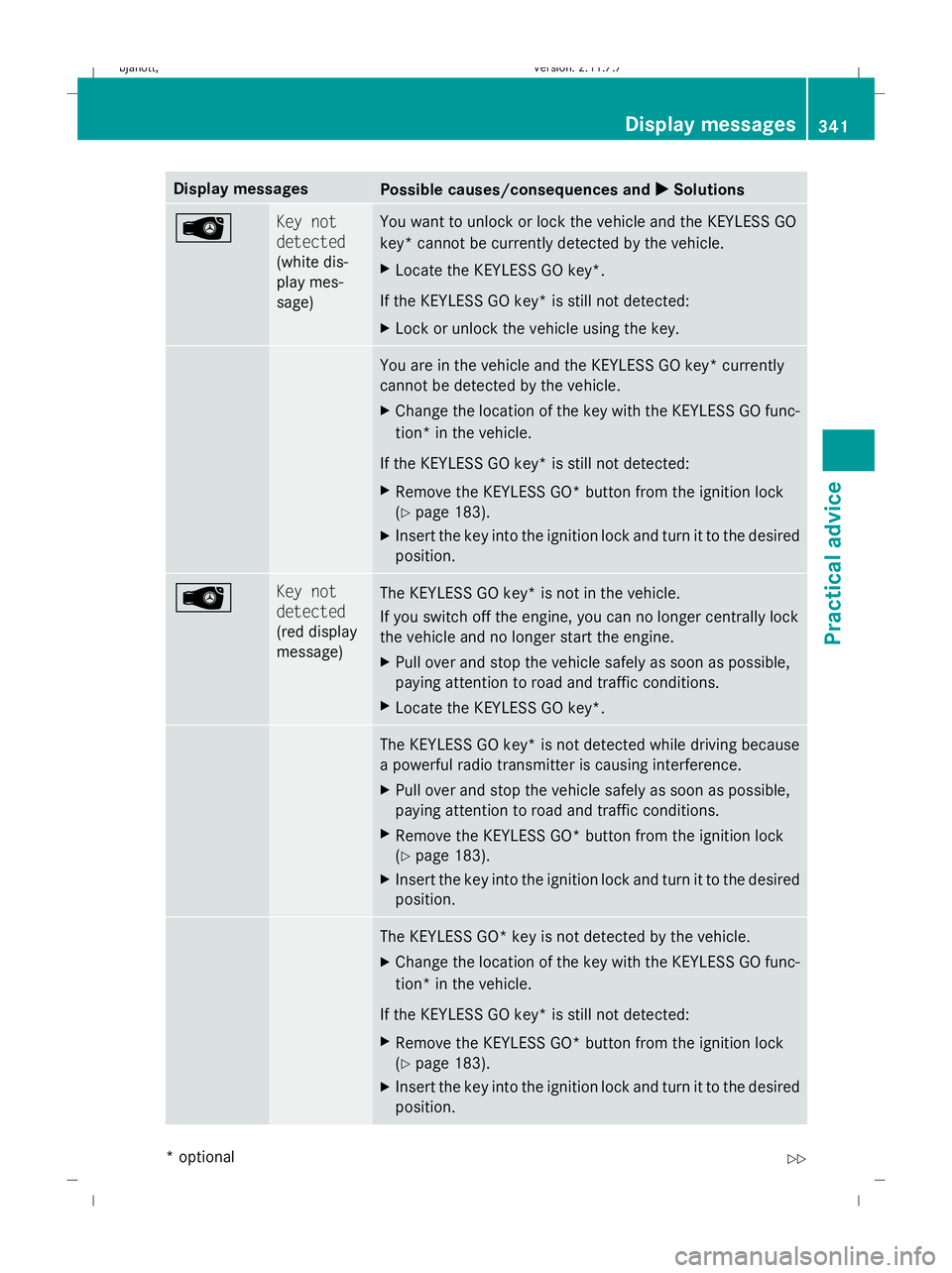
Display messages
Possible causes/consequences and
X
X Solutions  Key not
detected
(white dis-
play mes-
sage) You want to unlock or lock the vehicle and the KEYLESS GO
key* cannot be currently detected by the vehicle.
X
Locate the KEYLESS GO key*.
If the KEYLESS GO key* is still not detected:
X Lock or unlock the vehicle using the key. You are in the vehicle and the KEYLESS GO key* currently
cannot be detected by the vehicle.
X
Change the location of the key with the KEYLESS GO func-
tion* in the vehicle.
If the KEYLESS GO key* is still not detected:
X Remove the KEYLESS GO* button from the ignition lock
(Y page 183).
X Insert the key into the ignition lock and turn it to the desired
position. Â Key not
detected
(red display
message)
The KEYLESS GO key* is not in the vehicle.
If you switch off the engine, you can no longer centrally lock
the vehicle and no longer start the engine.
X
Pull over and stop the vehicle safely as soon as possible,
paying attention to road and traffic conditions.
X Locate the KEYLESS GO key*. The KEYLESS GO key* is not detected while driving because
a powerful radio transmitter is causing interference.
X
Pull over and stop the vehicle safely as soon as possible,
paying attention to road and traffic conditions.
X Remove the KEYLESS GO* button from the ignition lock
(Y page 183).
X Insert the key into the ignition lock and turn it to the desired
position. The KEYLESS GO* key is not detected by the vehicle.
X
Change the location of the key with the KEYLESS GO func-
tion* in the vehicle.
If the KEYLESS GO key* is still not detected:
X Remove the KEYLESS GO* button from the ignition lock
(Y page 183).
X Insert the key into the ignition lock and turn it to the desired
position. Display
messages
341Practical advice
* optional
216_AKB; 2; 3, en-GB
bjanott
,V ersion: 2.11.7.7
2009-02-27T14:54:17+01:00 - Seite 341 Z
Dateiname: 6515230602_buchblock.pdf; erzeugt am 04. Mar 2009 11:16:38; WK