ignition MERCEDES-BENZ CL COUPE 2009 Manual PDF
[x] Cancel search | Manufacturer: MERCEDES-BENZ, Model Year: 2009, Model line: CL COUPE, Model: MERCEDES-BENZ CL COUPE 2009Pages: 421, PDF Size: 10.78 MB
Page 357 of 421
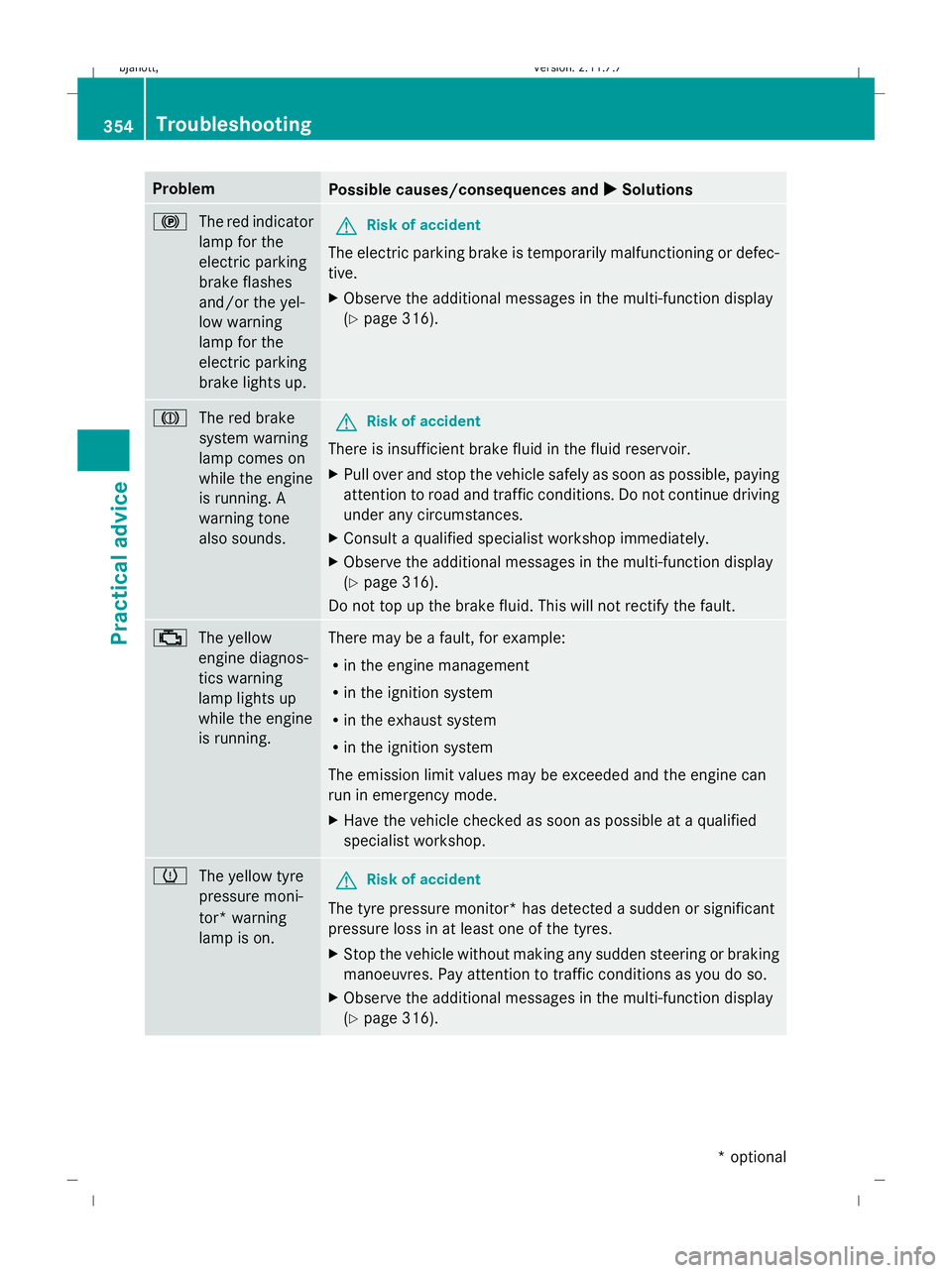
Problem
Possible causes/consequences and
X XSolutions !
The red indicator
lamp for the
electric parking
brake flashes
and/or the yel-
low warning
lamp for the
electric parking
brake lights up. G
Risk of accident
The electric parking brake is temporarily malfunctioning or defec-
tive.
X Observe the additional messages in the multi-function display
(Y page 316). J
The red brake
system warning
lamp comes on
while the engine
is running. A
warning tone
also sounds. G
Risk of accident
There is insufficient brake fluid in the fluid reservoir.
X Pull over and stop the vehicle safely as soon as possible, paying
attention to road and traffic conditions. Do not continue driving
under any circumstances.
X Consult a qualified specialist workshop immediately.
X Observe the additional messages in the multi-function display
(Y page 316).
Do not top up the brake fluid. This will not rectify the fault. ;
The yellow
engine diagnos-
tics warning
lamp lights up
while the engine
is running. There may be a fault, for example:
R
in the engine management
R in the ignition system
R in the exhaust system
R in the ignition system
The emission limit values may be exceeded and the engine can
run in emergency mode.
X Have the vehicle checked as soon as possible at a qualified
specialist workshop. h
The yellow tyre
pressure moni-
tor* warning
lamp is on. G
Risk of accident
The tyre pressure monitor* has detected a sudden or significant
pressure loss in at least one of the tyres.
X Stop the vehicle without making any sudden steering or braking
manoeuvres. Pay attention to traffic conditions as you do so.
X Observe the additional messages in the multi-function display
(Y page 316). 354
TroubleshootingPractical advice
* optional
216_AKB; 2; 3, en-GB
bjanott,
Version: 2.11.7.7 2009-02-27T14:54:17+01:00 - Seite 354
Dateiname: 6515230602_buchblock.pdf; erzeugt am 04. Mar 2009 11:16:41; WK
Page 360 of 421
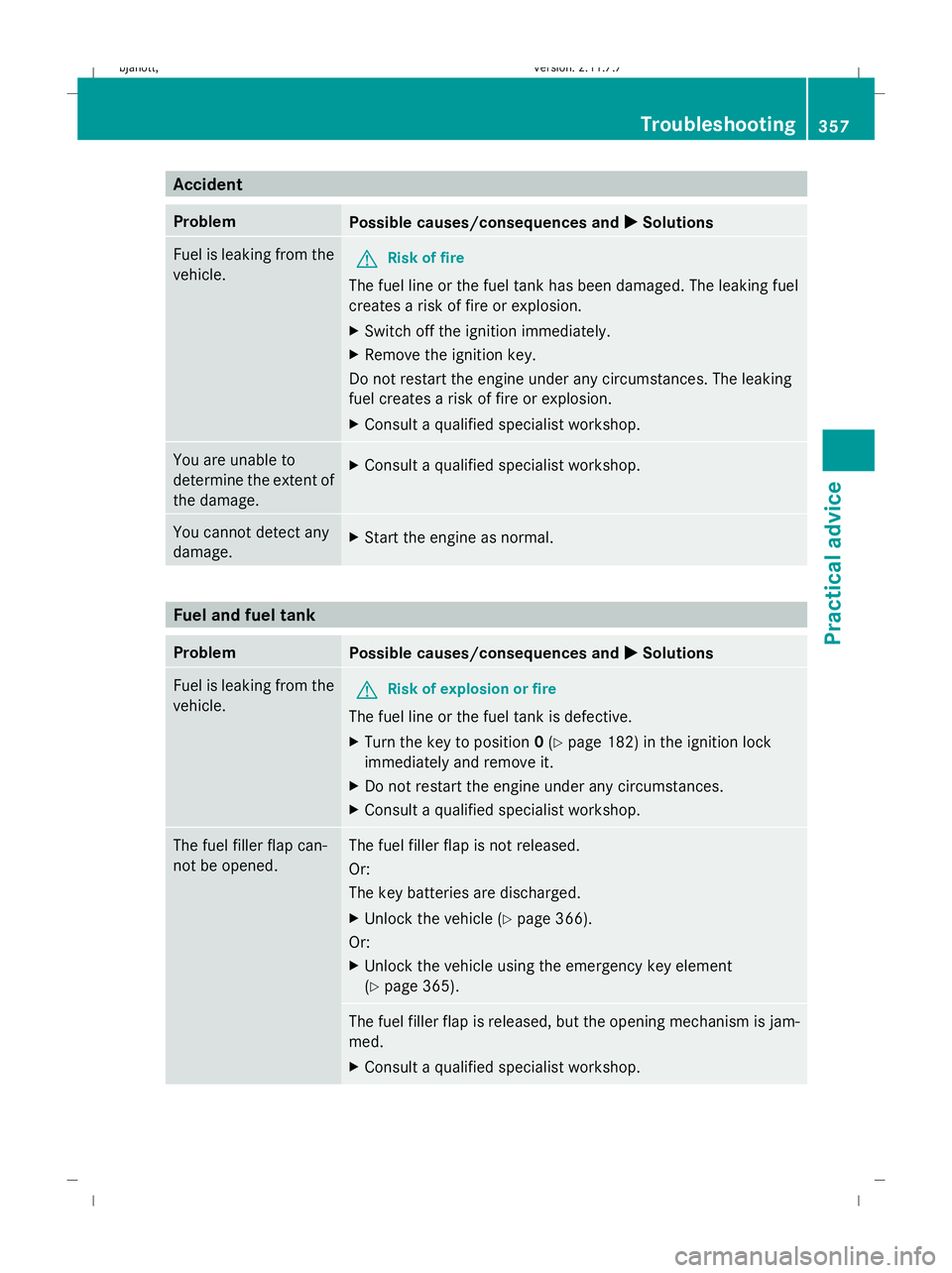
Accident
Problem
Possible causes/consequences and
X
X Solutions Fuel is leaking from the
vehicle.
G
Risk of fire
The fuel line or the fuel tank has been damaged. The leaking fuel
creates a risk of fire or explosion.
X Switch off the ignition immediately.
X Remove the ignition key.
Do not restart the engine under any circumstances. The leaking
fuel creates a risk of fire or explosion.
X Consult a qualified specialist workshop. You are unable to
determine the extent of
the damage.
X
Consult a qualified specialist workshop. You cannot detect any
damage.
X
Start the engine as normal. Fuel and fuel tank
Problem
Possible causes/consequences and
X
X Solutions Fuel is leaking from the
vehicle.
G
Risk of explosion or fire
The fuel line or the fuel tank is defective.
X Turn the key to position 0(Y page 182) in the ignition lock
immediately and remove it.
X Do not restart the engine under any circumstances.
X Consult a qualified specialist workshop. The fuel filler flap can-
not be opened. The fuel filler flap is not released.
Or:
The key batteries are discharged.
X
Unlock the vehicle (Y page 366).
Or:
X Unlock the vehicle using the emergency key element
(Y page 365). The fuel filler flap is released, but the opening mechanism is jam-
med.
X
Consult a qualified specialist workshop. Troubleshooting
357Practical advice
216_AKB; 2; 3, en-GB
bjanott,V ersion: 2.11.7.7
2009-02-27T14:54:17+01:00 - Seite 357 Z
Dateiname: 6515230602_buchblock.pdf; erzeugt am 04. Mar 2009 11:16:41; WK
Page 361 of 421
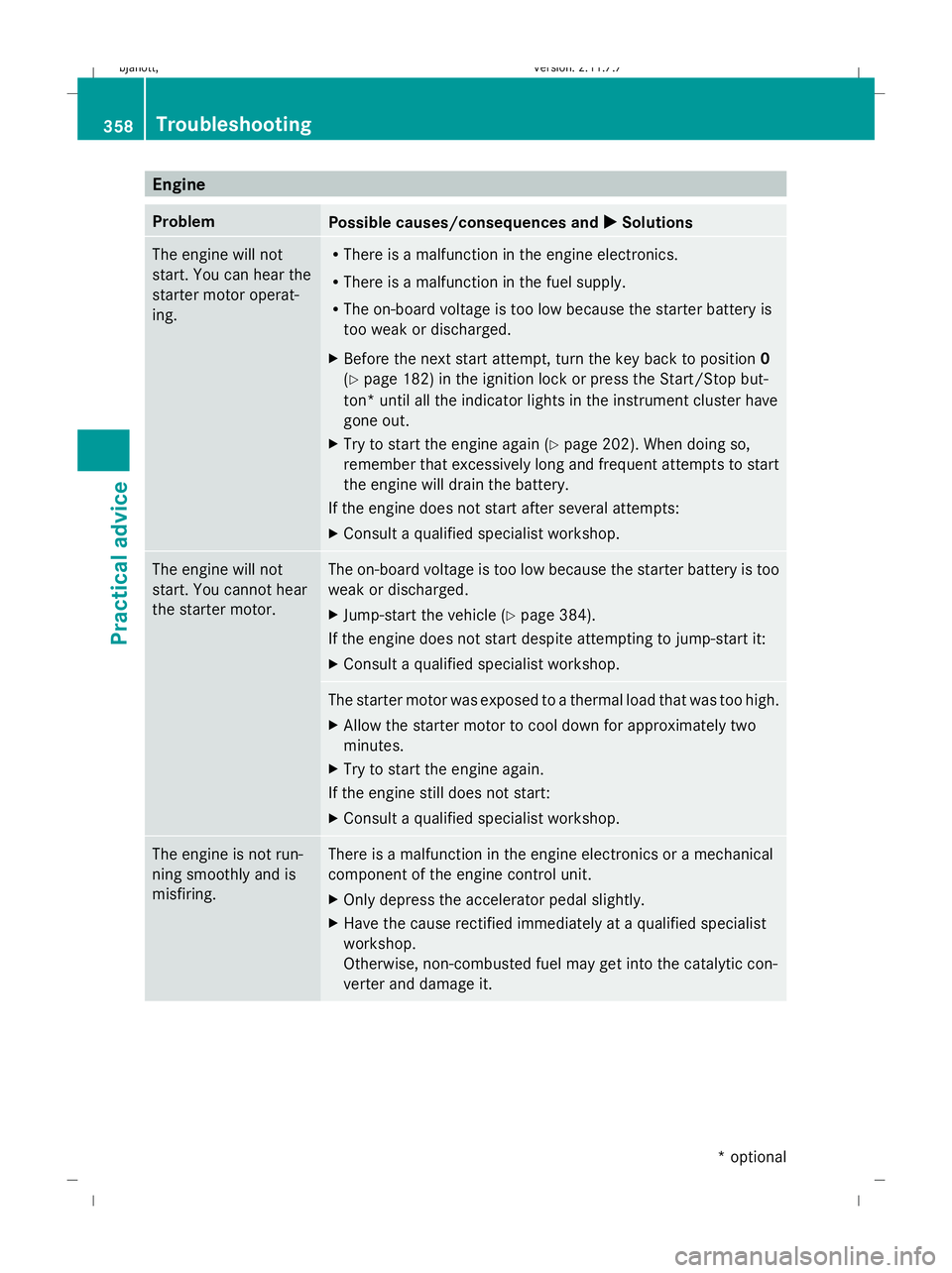
Engine
Problem
Possible causes/consequences and
X XSolutions The engine will not
start. You can hear the
starter motor operat-
ing. R
There is a malfunction in the engine electronics.
R There is a malfunction in the fuel supply.
R The on-board voltage is too low because the starter battery is
too weak or discharged.
X Before the next start attempt, turn the key back to position 0
(Y page 182) in the ignition lock or press the Start/Stop but-
ton* until all the indicator lights in the instrument cluster have
gone out.
X Try to start the engine again (Y page 202). When doing so,
remember that excessively long and frequent attempts to start
the engine will drain the battery.
If the engine does not start after several attempts:
X Consult a qualified specialist workshop. The engine will not
start. You cannot hear
the starter motor. The on-board voltage is too low because the starter battery is too
weak or discharged.
X
Jump-start the vehicle (Y page 384).
If the engine does not start despite attempting to jump-start it:
X Consult a qualified specialist workshop. The starter motor was exposed to a thermal load that was too high.
X
Allow the starter motor to cool down for approximately two
minutes.
X Try to start the engine again.
If the engine still does not start:
X Consult a qualified specialist workshop. The engine is not run-
ning smoothly and is
misfiring. There is a malfunction in the engine electronics or a mechanical
component of the engine control unit.
X
Only depress the accelerator pedal slightly.
X Have the cause rectified immediately at a qualified specialist
workshop.
Otherwise, non-combusted fuel may get into the catalytic con-
verter and damage it. 358
TroubleshootingPractical advice
* optional
216_AKB; 2; 3, en-GB
bjanott,
Version: 2.11.7.7 2009-02-27T14:54:17+01:00 - Seite 358
Dateiname: 6515230602_buchblock.pdf; erzeugt am 04. Mar 2009 11:16:42; WK
Page 362 of 421
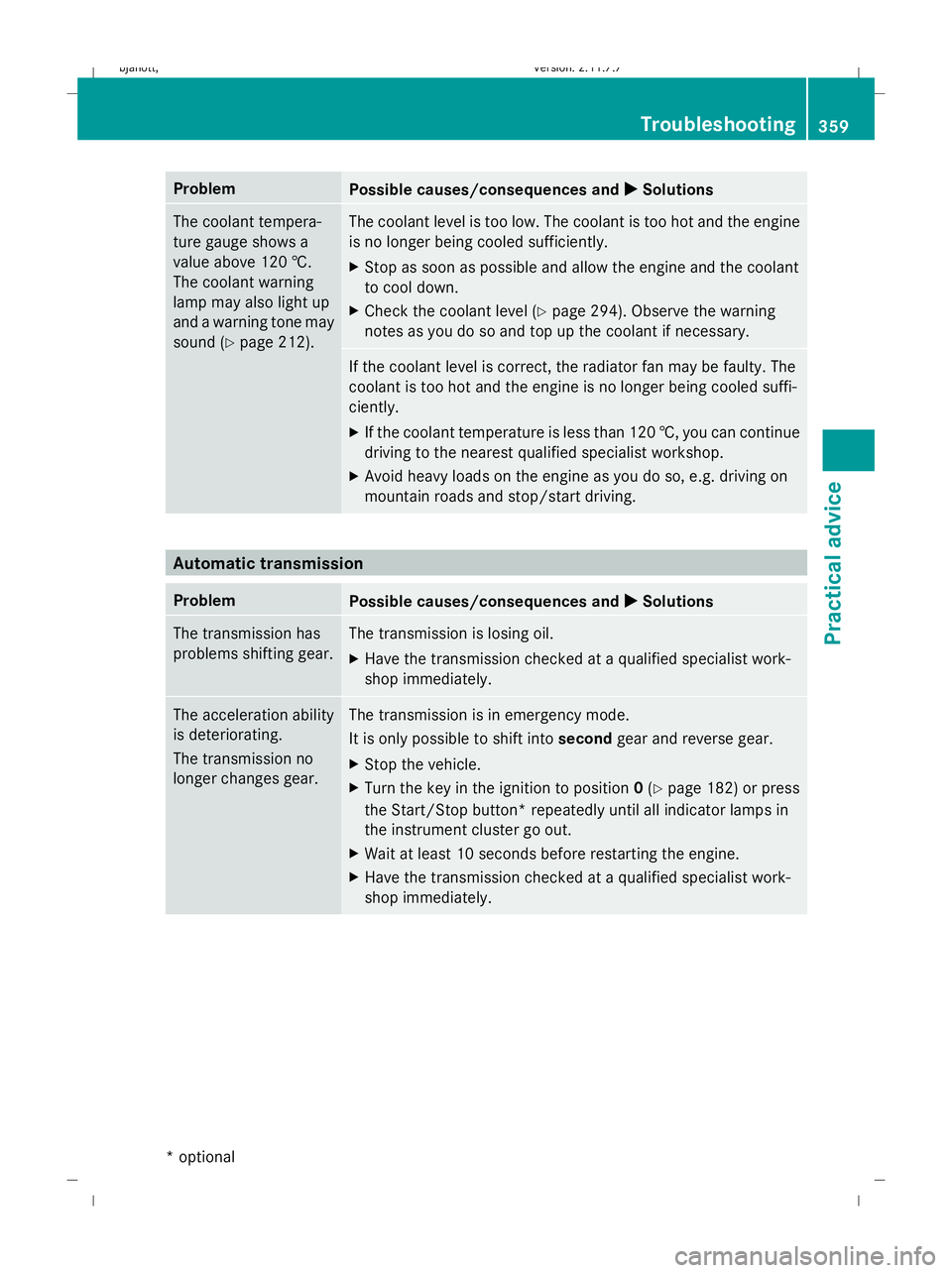
Problem
Possible causes/consequences and
X
X Solutions The coolant tempera-
ture gauge shows a
value above 120 †.
The coolant warning
lamp may also light up
and a warning tone may
sound (Y
page 212). The coolant level is too low. The coolant is too hot and the engine
is no longer being cooled sufficiently.
X
Stop as soon as possible and allow the engine and the coolant
to cool down.
X Check the coolant level (Y page 294). Observe the warning
notes as you do so and top up the coolant if necessary. If the coolant level is correct, the radiator fan may be faulty. The
coolant is too hot and the engine is no longer being cooled suffi-
ciently.
X
If the coolant temperature is less than 120 †, you can continue
driving to the nearest qualified specialist workshop.
X Avoid heavy loads on the engine as you do so, e.g. driving on
mountain roads and stop/start driving. Automatic transmission
Problem
Possible causes/consequences and
X
X Solutions The transmission has
problems shifting gear. The transmission is losing oil.
X
Have the transmission checked at a qualified specialist work-
shop immediately. The acceleration ability
is deteriorating.
The transmission no
longer changes gear. The transmission is in emergency mode.
It is only possible to shift into
secondgear and reverse gear.
X Stop the vehicle.
X Turn the key in the ignition to position 0(Y page 182) or press
the Start/Stop button* repeatedly until all indicator lamps in
the instrument cluster go out.
X Wait at least 10 seconds before restarting the engine.
X Have the transmission checked at a qualified specialist work-
shop immediately. Troubleshooting
359Practical advice
* optional
216_AKB; 2; 3, en-GB
bjanott,
Version: 2.11.7.7 2009-02-27T14:54:17+01:00 - Seite 359 Z
Dateiname: 6515230602_buchblock.pdf; erzeugt am 04. Mar 2009 11:16:42; WK
Page 363 of 421
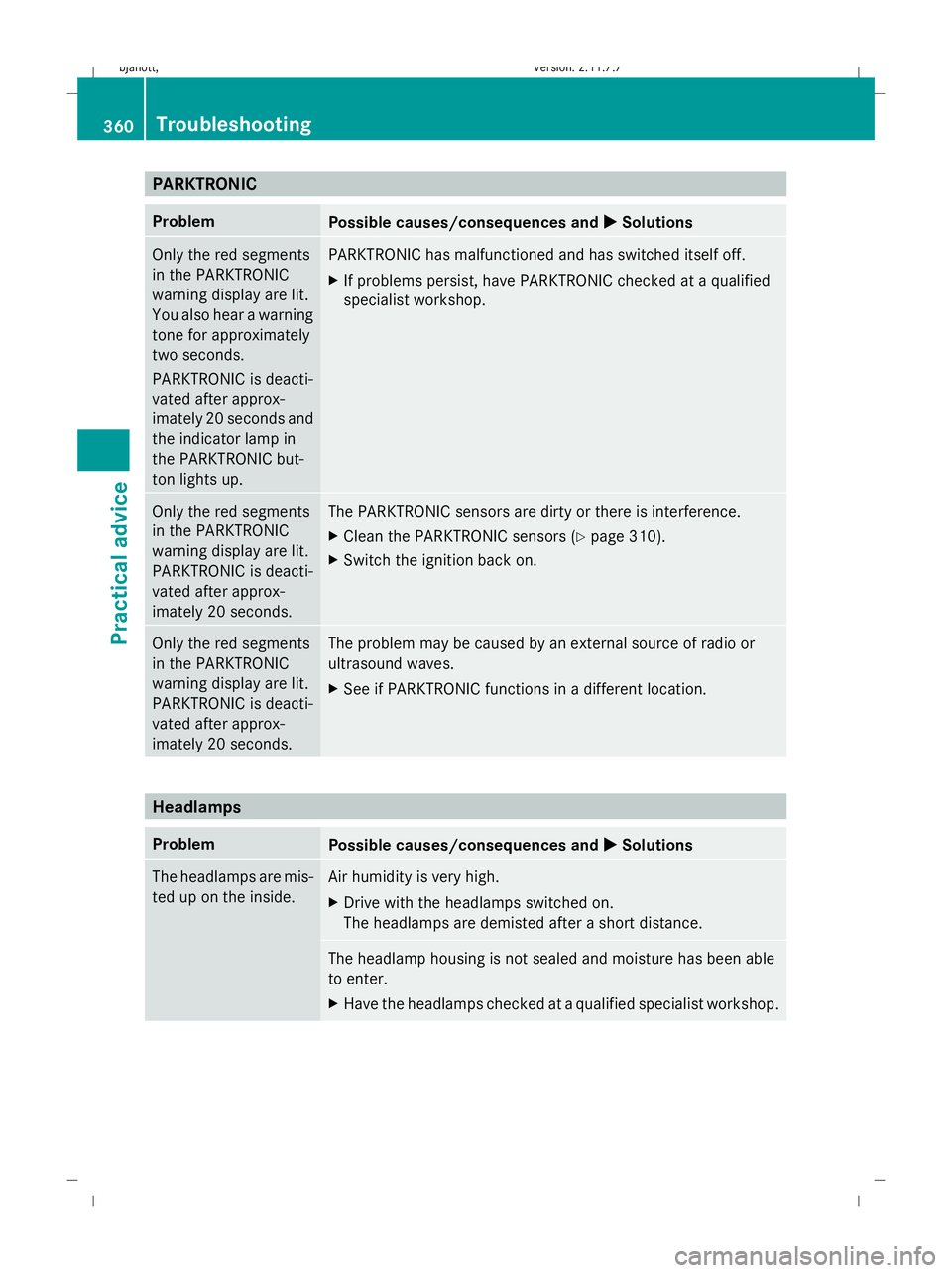
PARKTRONIC
Problem
Possible causes/consequences and
X XSolutions Only the red segments
in the PARKTRONIC
warning display are lit.
You also hear a warning
tone for approximately
two seconds.
PARKTRONIC is deacti-
vated after approx-
imately 20 seconds and
the indicator lamp in
the PARKTRONIC but-
ton lights up. PARKTRONIC has malfunctioned and has switched itself off.
X
If problems persist, have PARKTRONIC checked at a qualified
specialist workshop. Only the red segments
in the PARKTRONIC
warning display are lit.
PARKTRONIC is deacti-
vated after approx-
imately 20 seconds. The PARKTRONIC sensors are dirty or there is interference.
X
Clean the PARKTRONIC sensors (Y page 310).
X Switch the ignition back on. Only the red segments
in the PARKTRONIC
warning display are lit.
PARKTRONIC is deacti-
vated after approx-
imately 20 seconds. The problem may be caused by an external source of radio or
ultrasound waves.
X
See if PARKTRONIC functions in a different location. Headlamps
Problem
Possible causes/consequences and
X XSolutions The headlamps are mis-
ted up on the inside. Air humidity is very high.
X
Drive with the headlamps switched on.
The headlamps are demisted after a short distance. The headlamp housing is not sealed and moisture has been able
to enter.
X
Have the headlamps checked at a qualified specialist workshop. 360
TroubleshootingPractical advice
216_AKB; 2; 3, en-GB
bjanott,
Version: 2.11.7.7 2009-02-27T14:54:17+01:00 - Seite 360
Dateiname: 6515230602_buchblock.pdf; erzeugt am 04. Mar 2009 11:16:42; WK
Page 364 of 421
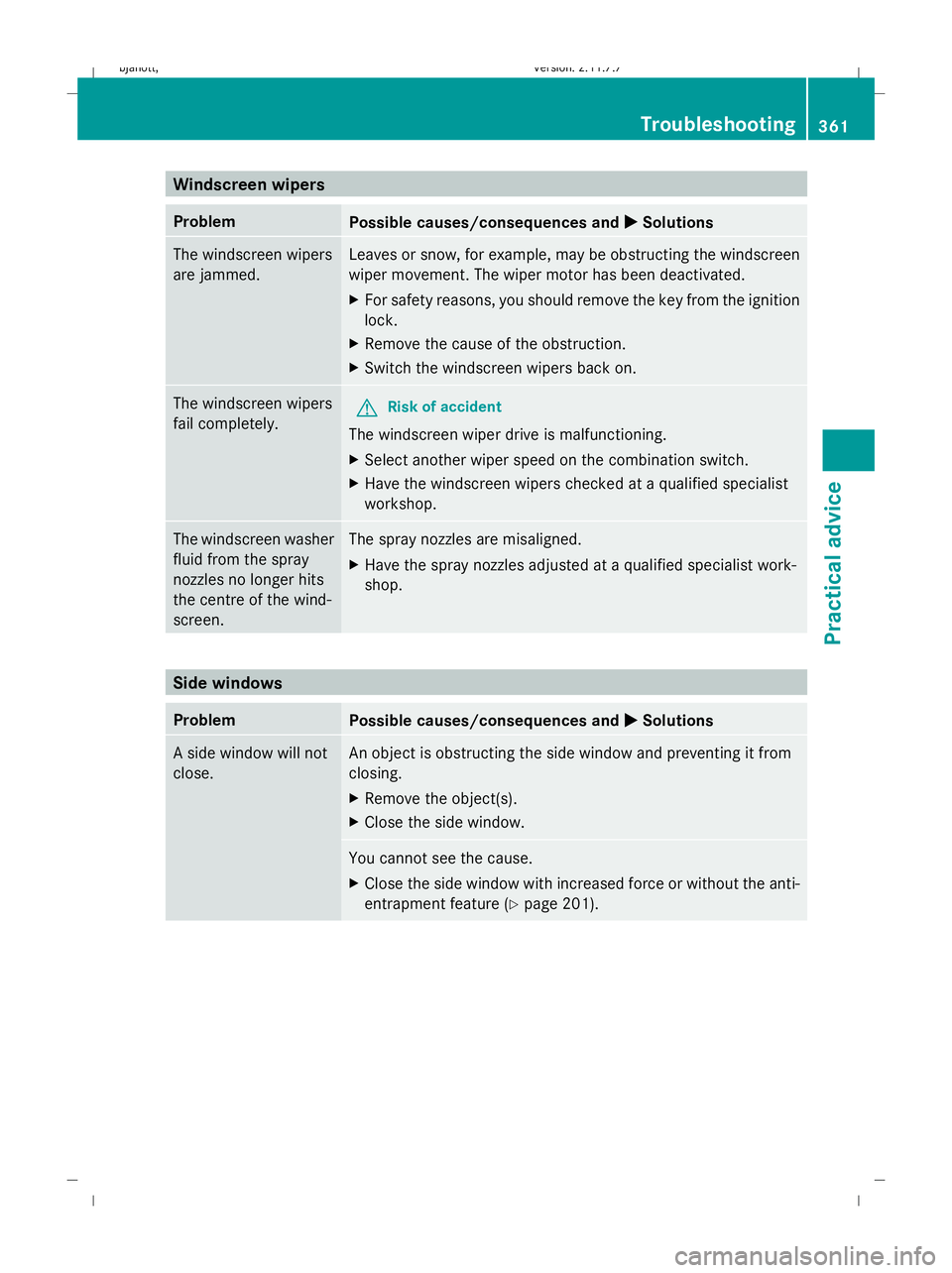
Windscreen wipers
Problem
Possible causes/consequences and
X
X Solutions The windscreen wipers
are jammed. Leaves or snow, for example, may be obstructing the windscreen
wiper movement. The wiper motor has been deactivated.
X For safety reasons, you should remove the key from the ignition
lock.
X Remove the cause of the obstruction.
X Switch the windscreen wipers back on. The windscreen wipers
fail completely.
G
Risk of accident
The windscreen wiper drive is malfunctioning.
X Select another wiper speed on the combination switch.
X Have the windscreen wipers checked at a qualified specialist
workshop. The windscreen washer
fluid from the spray
nozzles no longer hits
the centre of the wind-
screen. The spray nozzles are misaligned.
X
Have the spray nozzles adjusted at a qualified specialist work-
shop. Side windows
Problem
Possible causes/consequences and
X
X Solutions A side window will not
close. An object is obstructing the side window and preventing it from
closing.
X
Remove the object(s).
X Close the side window. You cannot see the cause.
X
Close the side window with increased force or without the anti-
entrapment feature (Y page 201). Troubleshooting
361Practical advice
216_AKB; 2; 3, en-GB
bjanott, Version: 2.11.7.7 2009-02-27T14:54:17+01:00 - Seite 361 Z
Dateiname: 6515230602_buchblock.pdf; erzeugt am 04. Mar 2009 11:16:42; WK
Page 366 of 421
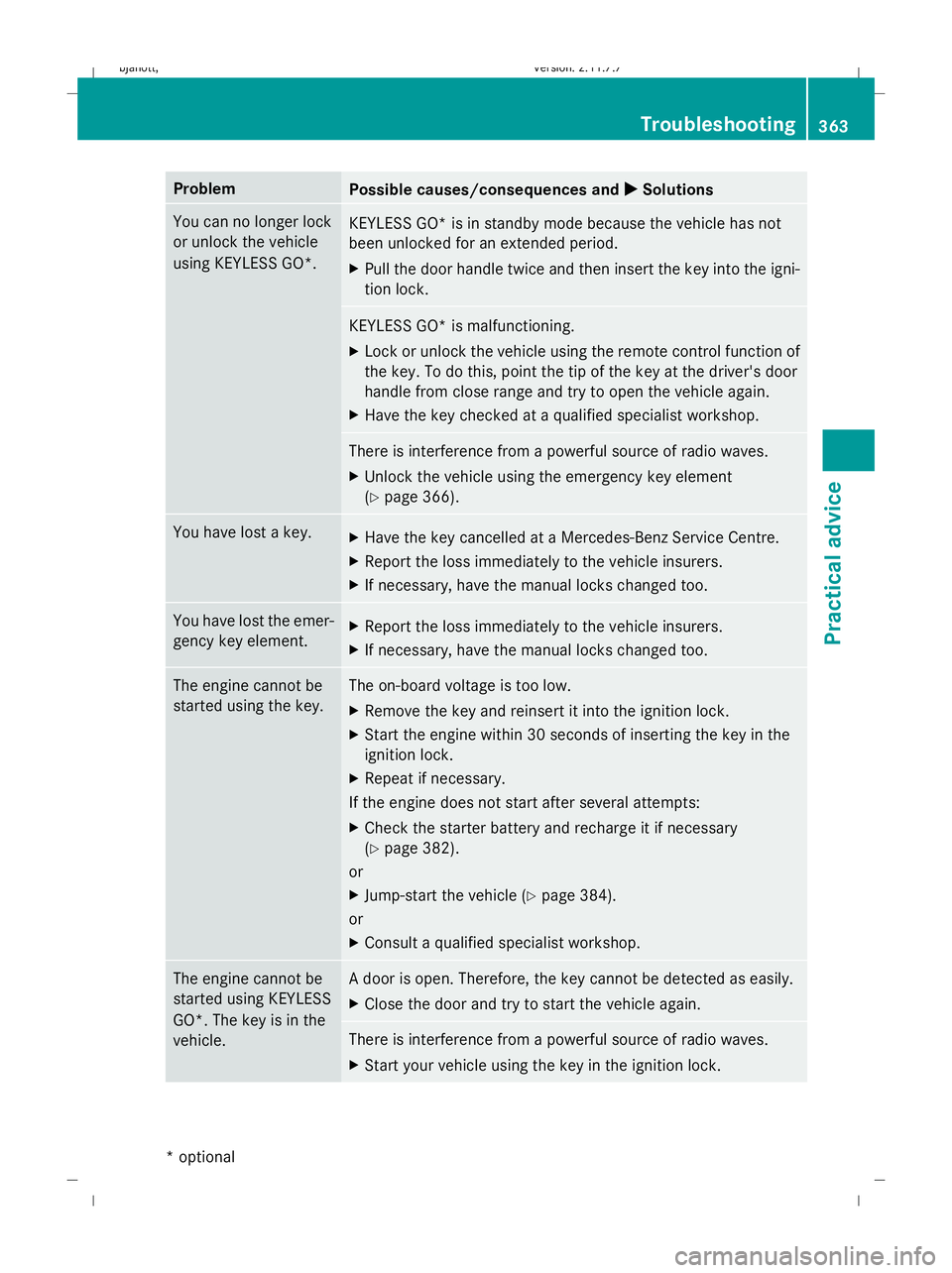
Problem
Possible causes/consequences and
X
X Solutions You can no longer lock
or unlock the vehicle
using KEYLESS GO*.
KEYLESS GO* is in standby mode because the vehicle has not
been unlocked for an extended period.
X
Pull the door handle twice and then insert the key into the igni-
tion lock. KEYLESS GO* is malfunctioning.
X
Lock or unlock the vehicle using the remote control function of
the key. To do this, point the tip of the key at the driver's door
handle from close range and try to open the vehicle again.
X Have the key checked at a qualified specialist workshop. There is interference from a powerful source of radio waves.
X
Unlock the vehicle using the emergency key element
(Y page 366). You have lost a key.
X
Have the key cancelled at a Mercedes-Benz Service Centre.
X Report the loss immediately to the vehicle insurers.
X If necessary, have the manual locks changed too. You have lost the emer-
gency key element.
X
Report the loss immediately to the vehicle insurers.
X If necessary, have the manual locks changed too. The engine cannot be
started using the key. The on-board voltage is too low.
X Remove the key and reinsert it into the ignition lock.
X Start the engine within 30 seconds of inserting the key in the
ignition lock.
X Repeat if necessary.
If the engine does not start after several attempts:
X Check the starter battery and recharge it if necessary
(Y page 382).
or
X Jump-start the vehicle (Y page 384).
or
X Consult a qualified specialist workshop. The engine cannot be
started using KEYLESS
GO*. The key is in the
vehicle. A door is open. Therefore, the key cannot be detected as easily.
X
Close the door and try to start the vehicle again. There is interference from a powerful source of radio waves.
X
Start your vehicle using the key in the ignition lock. Troubleshooting
363Practical advice
* optional
216_AKB; 2; 3, en-GB
bjanott,
Version: 2.11.7.7 2009-02-27T14:54:17+01:00 - Seite 363 Z
Dateiname: 6515230602_buchblock.pdf; erzeugt am 04. Mar 2009 11:16:42; WK
Page 368 of 421
Problem
Possible causes/consequences and
X
X Solutions There is dirt on the inside of the windscreen.
X
Clean the inside of the windscreen . Parking up the vehicle
Problem
Possible causes/consequences and
X
X Solutions The vehicle is to be left
parked up for longer
than four weeks. The battery can be damaged through exhaustive discharge.
X
Disconnect the battery (Y page 385) or connect to a trickle
charger.
i Have the battery checked at a qualified specialist workshop,
e.g. a Mercedes-Benz Service Centre. The vehicle is to be left
parked up for longer
than six weeks. Damage resulting from non-use may occur if the vehicle is parked
up for long periods.
X
Visit a qualified specialist workshop and seek advice. Locking/unlocking in an emergency
Emergency key element
If you use the emergency key element to
unlock and open the driver's door or the boot
lid, the anti-theft alarm system* will be trig-
gered (Y page 54).
There are several ways to turn off the alarm:
X Press the %or& button on the key.
or
X Insert the key into the ignition lock.
or
X Press the Start/Stop button* in the ignition
lock. The key must be in the vehicle.
or
X Lock or unlock the vehicle using KEYLESS
GO*. The key must be outside the vehicle. Removing the emergency key element
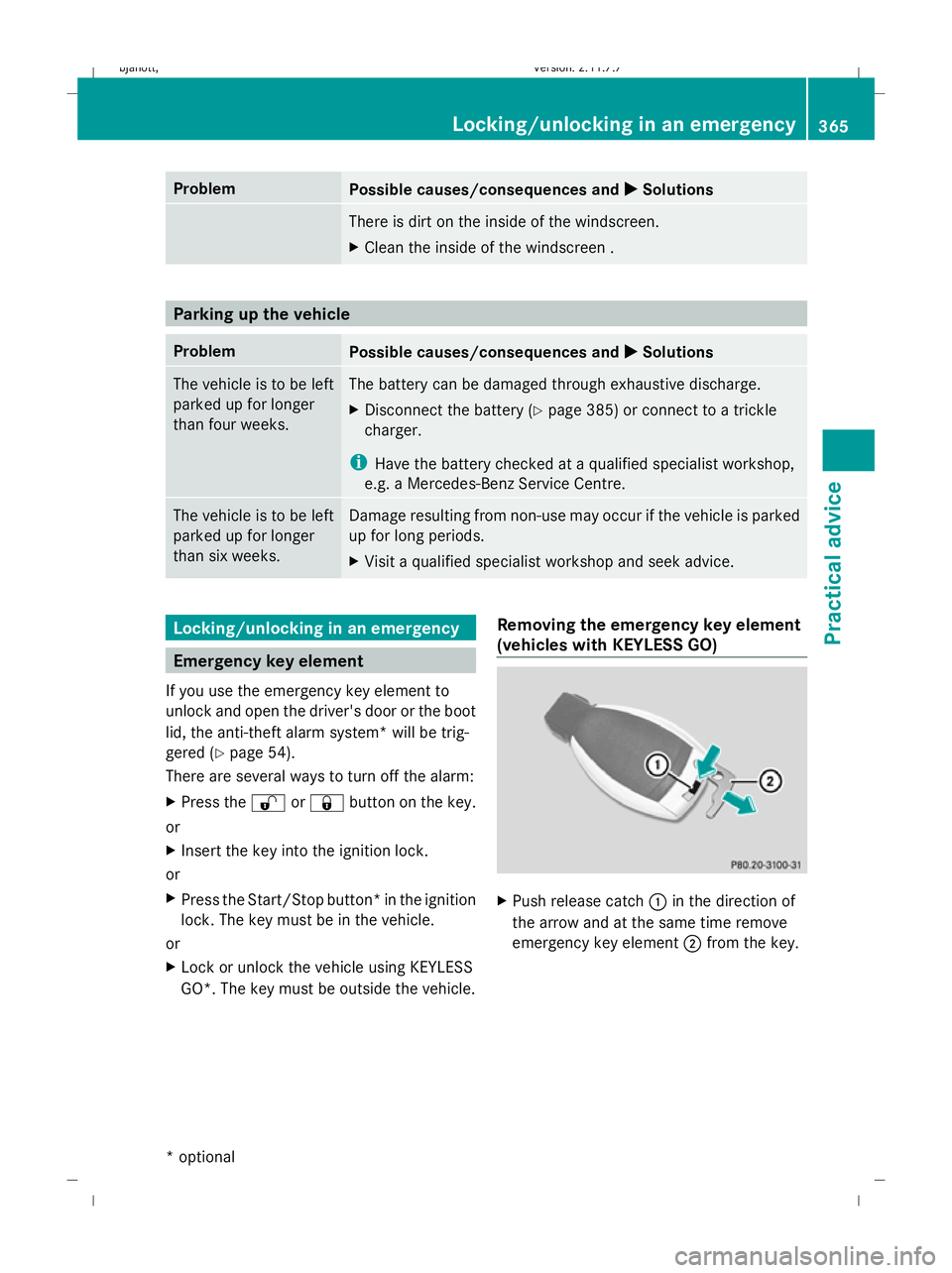
(vehicles with KEYLESS GO) X
Push release catch :in the direction of
the arrow and at the same time remove
emergency key element ;from the key. Locking/unlocking in an emergency
365Practical advice
* optional
216_AKB; 2; 3, en-GB
bjanott,
Version: 2.11.7.7 2009-02-27T14:54:17+01:00 - Seite 365 Z
Dateiname: 6515230602_buchblock.pdf; erzeugt am 04. Mar 2009 11:16:43; WK
Page 375 of 421
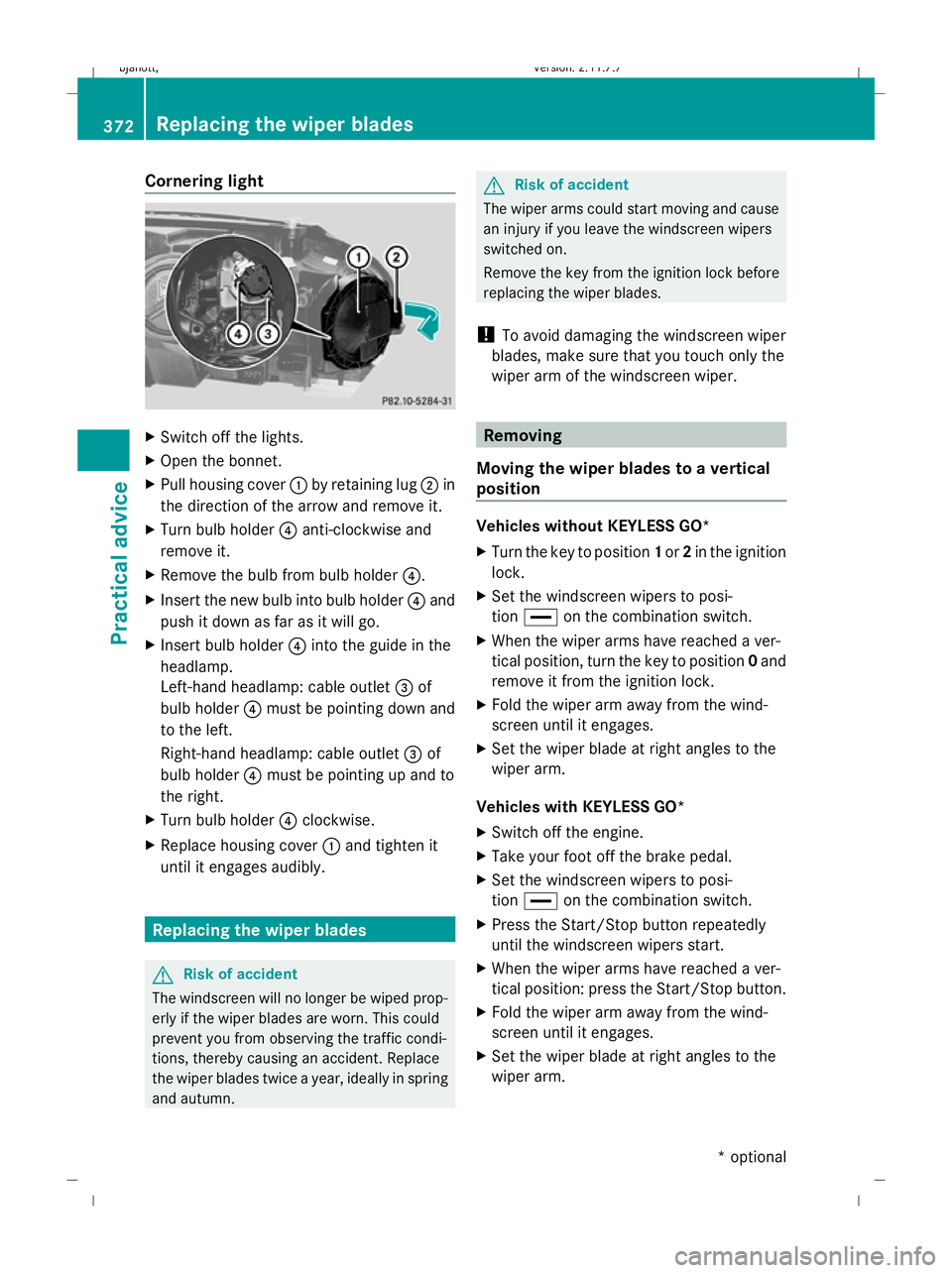
Cornering light
X
Switch off the lights.
X Open the bonnet.
X Pull housing cover :by retaining lug ;in
the direction of the arrow and remove it.
X Turn bulb holder ?anti-clockwise and
remove it.
X Remove the bulb from bulb holder ?.
X Insert the new bulb into bulb holder ?and
push it down as far as it will go.
X Insert bulb holder ?into the guide in the
headlamp.
Left-hand headlamp: cable outlet =of
bulb holder ?must be pointing down and
to the left.
Right-hand headlamp: cable outlet =of
bulb holder ?must be pointing up and to
the right.
X Turn bulb holder ?clockwise.
X Replace housing cover :and tighten it
until it engages audibly. Replacing the wiper blades
G
Risk of accident
The windscreen will no longer be wiped prop-
erly if the wiper blades are worn. This could
prevent you from observing the traffic condi-
tions, thereby causing an accident. Replace
the wiper blades twice a year, ideally in spring
and autumn. G
Risk of accident
The wiper arms could start moving and cause
an injury if you leave the windscreen wipers
switched on.
Remove the key from the ignition lock before
replacing the wiper blades.
! To avoid damaging the windscreen wiper
blades, make sure that you touch only the
wiper arm of the windscreen wiper. Removing
Moving the wiper blades to a vertical
position Vehicles without KEYLESS GO*
X
Turn the key to position 1or 2in the ignition
lock.
X Set the windscreen wipers to posi-
tion ° on the combination switch.
X When the wiper arms have reached a ver-
tical position, turn the key to position 0and
remove it from the ignition lock.
X Fold the wiper arm away from the wind-
screen until it engages.
X Set the wiper blade at right angles to the
wiper arm.
Vehicles with KEYLESS GO*
X Switch off the engine.
X Take your foot off the brake pedal.
X Set the windscreen wipers to posi-
tion ° on the combination switch.
X Press the Start/Stop button repeatedly
until the windscreen wipers start.
X When the wiper arms have reached a ver-
tical position: press the Start/Stop button.
X Fold the wiper arm away from the wind-
screen until it engages.
X Set the wiper blade at right angles to the
wiper arm. 372
Replacing the wiper bladesPractical advice
* optional
216_AKB; 2; 3, en-GB
bjanott
,V ersion: 2.11.7.7
2009-02-27T14:54:17+01:00 - Seite 372
Dateiname: 6515230602_buchblock.pdf; erzeugt am 04. Mar 2009 11:16:46; WK
Page 376 of 421

Removing the wiper blades
X
Remove the wiper blade from the retainer
on the wiper arm in the direction of the
arrow. Fitting
X Slide the new wiper blade into the retainer
on the wiper arm in the opposite direction
to the arrow.
X Turn the wiper blade parallel to the wiper
arm.
X Fold the wiper arm back onto the wind-
screen. Flat tyre
Flat tyre equipment variants
Your vehicle may be equipped with:
R a TIREFIT kit (Y page 315)
R a "Minispare" emergency spare
wheel* (Y page 315)
R a spare wheel* (Y page 316)
R the MOExtended run-flat sys-
tem* (Y page 381) Preparing the vehicle
i Vehicle preparation is not necessary on
vehicles with MOE tyres*. X
Stop the vehicle as far away as possible
from traffic on solid, non-slippery and level
ground.
X Switch on the hazard warning lamps.
X Engage the electric parking brake manually
(Y page 205).
X Move the DIRECT SELECT selector lever to
P.
X All occupants must get out of the vehicle.
Make sure that they are not endangered as
they get out of the vehicle.
X Make sure that no one is near the danger
area whilst a wheel is being changed. Any-
one who is not directly assisting in the
wheel change should, for example, stand
behind the barrier.
X Switch off the engine.
X Remove the key from the ignition lock.
X Get out of the vehicle.
X Close the driver’s door.
X Place the warning triangle (Y page 314) at
a suitable distance. Observe legal require-
ments. Using the TIREFIT kit
You can use the TIREFIT kit to seal small
punctures, particularly those in the tyre tread.
You can use TIREFIT at outside temperatures
down to -20 †. G
Risk of accident
In the following situations, your safety is at
particular risk and tyre sealant is unable to
provide breakdown assistance if:
R there are cuts or punctures in the tyre
greater than 4 mm
R the wheel rim is damaged
R you have driven at very low tyre pressures
or on a flat tyre
Do not drive any further. Consult a qualified
specialist workshop which has the necessary Flat tyre
373Practical advice
* optional
216_AKB; 2; 3, en-GB
bjanott,
Version: 2.11.7.7 2009-02-27T14:54:17+01:00 - Seite 373 Z
Dateiname: 6515230602_buchblock.pdf; erzeugt am 04. Mar 2009 11:16:47; WK