ESP MERCEDES-BENZ CL COUPE 2009 Manual Online
[x] Cancel search | Manufacturer: MERCEDES-BENZ, Model Year: 2009, Model line: CL COUPE, Model: MERCEDES-BENZ CL COUPE 2009Pages: 421, PDF Size: 10.78 MB
Page 257 of 421
Parking Guidance*
Parking Guidance is an electronic parking aid
with radar sensors. The radar sensors are
used to measure the road on both sides of the
vehicle. It indicates suitable parking spaces
and provides steering instructions to help you
park in the indicated spaces. G
Risk of accident
Parking Guidance is only an aid. Parking
spaces detected may not be suitable for park-
ing due to, for example, parking prohibitions,
driveways, or unsuitable surfaces, etc.
The Parking Guidance display in the instru-
ment cluster is only a symbolic display of the
parking space as measured when first driving
past it. Later changes to the parking space are
not taken into account, e.g. if the vehicle
parked in front of or behind the space has
changed its position, or if obstacles are
moved into the parking space. Moving
objects, such as pedestrians and passing
vehicles, are not displayed.
Parking Guidance does not relieve you of the
responsibility to pay attention. If you rely
solely on Parking Guidance, you could cause
an accident and injure yourself and others.
You are always responsible for safety and
must continue to pay attention to your imme-
diate surroundings when parking and
manoeuvring. G
Risk of injury
Make sure that no persons or animals are in
the manoeuvring range. Otherwise, they
could be injured.
! You must deactivate the radar sensor sys-
tem in certain countries and near radio
telescope facilities. Further information
can be found in the index under "Radar
sensor system".
Vehicles with COMAND and navigation sys-
tem*: the radar sensor system is automati-
cally deactivated near radio telescope facili-
ties (Y page 411). If you want Parking Guidance to assist you,
the radar sensor system must be activated
and operational.
Use Parking Guidance for parking spaces:
R
that are parallel to the direction of travel
R that are on straight roads, not bends
R that are on the same level as the road, i.e.
not on the pavement, for example. Parking
Guidance may not detect flat kerbs.
Parking tips:
R on narrow roads, drive as close to the park-
ing space as possible.
R parking spaces which are littered, over-
grown or in front of trailers might not be
identified properly.
R pay attention to the Park Assist warning
messages when using Parking Guidance
(Y page 251).
R The position of your vehicle in the parking
space after using Parking Guidance
depends on the position and shape of the
vehicles parked in front and behind, and on
the conditions of the space. In some cases,
Parking Guidance may guide you too far
into a parking space, or not far enough into
it. In this case, you should cancel Parking
Guidance and correct the vehicle's posi-
tion.
Detecting parking spaces Parking Guidance is automatically activated
when you drive forwards. The system is
operational at speeds of up to approximately
40 km/h. While in operation, the system inde-
pendently locates and measures existing
parking spaces to both sides of the vehicle.
When driving at speeds below 16 km/h, you
will see the white parking space symbol as a
status indicator in the instrument cluster. If a
parking space is detected, the parking space
symbol changes colour to blue.254
Driving systemsControls
* optional
216_AKB; 2; 3, en-GB
bjanott,V
ersion: 2.11.7.7
2009-02-27T14:54:17+01:00 - Seite 254
Dateiname: 6515230602_buchblock.pdf; erzeugt am 04. Mar 2009 11:16:04; WK
Page 258 of 421
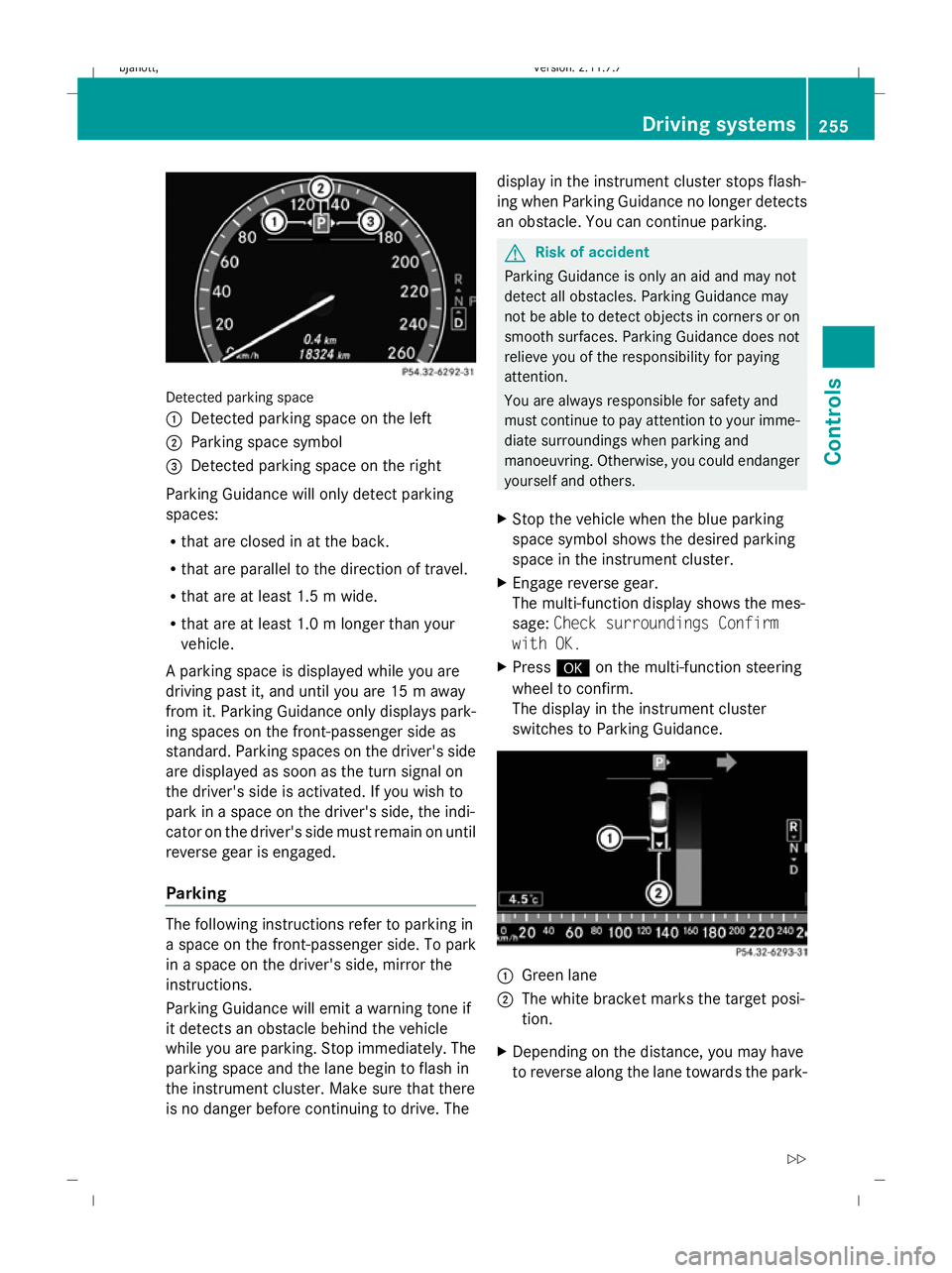
Detected parking space
1
Detected parking space on the left
2 Parking space symbol
3 Detected parking space on the right
Parking Guidance will only detect parking
spaces:
R that are closed in at the back.
R that are parallel to the direction of travel.
R that are at least 1.5 m wide.
R that are at least 1.0 m longer than your
vehicle.
A parking space is displayed while you are
driving past it, and until you are 15 m away
from it. Parking Guidance only displays park-
ing spaces on the front-passenger side as
standard. Parking spaces on the driver's side
are displayed as soon as the turn signal on
the driver's side is activated. If you wish to
park in a space on the driver's side, the indi-
cator on the driver's side must remain on until
reverse gear is engaged.
Parking The following instructions refer to parking in
a space on the front-passenger side. To park
in a space on the driver's side, mirror the
instructions.
Parking Guidance will emit a warning tone if
it detects an obstacle behind the vehicle
while you are parking. Stop immediately. The
parking space and the lane begin to flash in
the instrument cluster. Make sure that there
is no danger before continuing to drive. The display in the instrument cluster stops flash-
ing when Parking Guidance no longer detects
an obstacle. You can continue parking. G
Risk of accident
Parking Guidance is only an aid and may not
detect all obstacles. Parking Guidance may
not be able to detect objects in corners or on
smooth surfaces. Parking Guidance does not
relieve you of the responsibility for paying
attention.
You are always responsible for safety and
must continue to pay attention to your imme-
diate surroundings when parking and
manoeuvring. Otherwise, you could endanger
yourself and others.
X Stop the vehicle when the blue parking
space symbol shows the desired parking
space in the instrument cluster.
X Engage reverse gear.
The multi-function display shows the mes-
sage: Check surroundings Confirm
with OK.
X Press #on the multi-function steering
wheel to confirm.
The display in the instrument cluster
switches to Parking Guidance. 1
Green lane
2 The white bracket marks the target posi-
tion.
X Depending on the distance, you may have
to reverse along the lane towards the park- Driving systems
255Controls
216_AKB; 2; 3, en-GB
bjanott, Version: 2.11.7.7 2009-02-27T14:54:17+01:00 - Seite 255 Z
Dateiname: 6515230602_buchblock.pdf; erzeugt am 04. Mar 2009 11:16:05; WK
Page 261 of 421
G
Risk of accident
The reversing camera is only an aid and may
display obstacles in a distorted or incorrect
manner, or may not even display them at all.
The reversing camera does not relieve you of
the responsibility to pay attention. The cam-
era cannot show objects:
R very near to the rear bumper
R below the rear bumper
R in the area immediately above the boot lid
handle
You are always responsible for safety and
must continue to pay attention to your imme-
diate surroundings when parking and
manoeuvring. This applies to the areas
behind, in front of and next to the vehicle. You
could otherwise endanger yourself and oth-
ers. G
Risk of accident
Under the following circumstances, the
reversing camera will not function, or function
in a limited manner:
R if the boot lid is open
R in heavy rain, snow or fog
R at night or in very dark places
R if the camera is exposed to very bright light
R if the area is lit by fluorescent light (the dis-
play may flicker)
R if there is a sudden change in temperature,
e.g. when driving into a heated garage in
winter
R if the camera lens is dirty or obstructed
R if the rear of your vehicle is damaged. In this
event have the camera position and setting
checked at a qualified specialist workshop.
Mercedes-Benz recommends that you use
a Mercedes-Benz Service Centre for this
purpose.
Do not use the reversing camera in these
types of situation. You could otherwise injure others or damage objects and your vehicle
while you are parking.
Activating the reversing camera X
Make sure that the key is in position 2in
the ignition lock.
X Engage reverse gear.
The area behind the vehicle is shown in the
COMAND display with guide lines. G
Risk of accident
Please note that objects not on ground level
may appear to be further away than they
actually are. These include:
R the bumper of the vehicle parked behind
R trailer tow bars
R the tail-end of a lorry
R slanted posts
The lines are only guides, not accurate meas-
urements of the distance to an obstacle.
Therefore, you should never pass the red line
when approaching an obstacle. You could oth-
erwise cause an accident and injure yourself
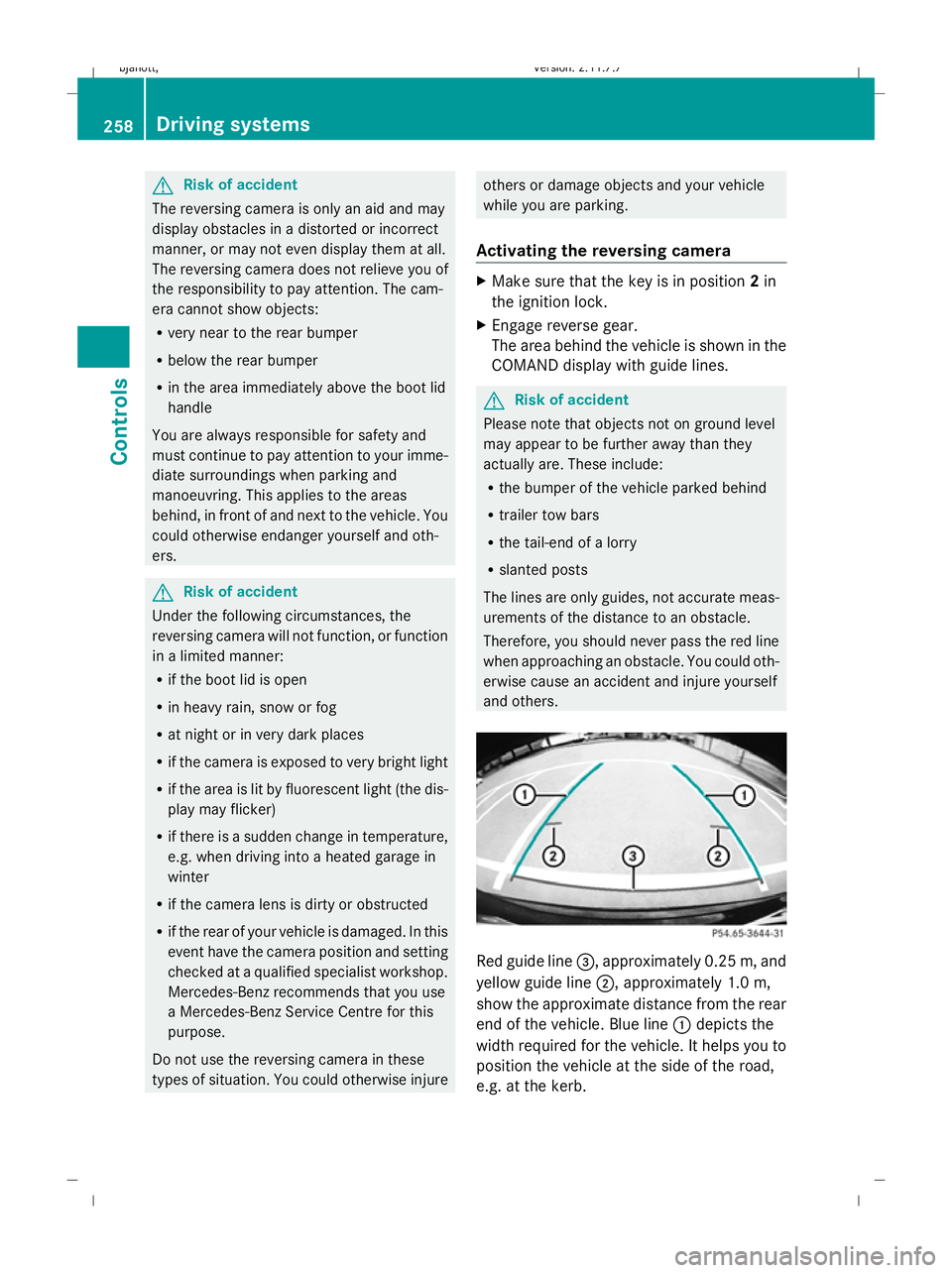
and others. Red guide line
=, approximately 0.25 m, and
yellow guide line ;, approximately 1.0 m,
show the approximate distance from the rear
end of the vehicle. Blue line :depicts the
width required for the vehicle. It helps you to
position the vehicle at the side of the road,
e.g. at the kerb. 258
Driving systemsControls
216_AKB; 2; 3, en-GB
bjanott,
Version: 2.11.7.7 2009-02-27T14:54:17+01:00 - Seite 258
Dateiname: 6515230602_buchblock.pdf; erzeugt am 04. Mar 2009 11:16:07; WK
Page 262 of 421
Night View Assist*
Night View Assist uses infrared as well as the
normal headlamps to light up the road. A
camera at the top of the windscreen picks up
the infrared light and displays a black and
white image in the multi-function display. The
image shown in the multi-function display
corresponds to a road lit up by main-beam
headlamps. This enables you to see the road's
course and any obstacles in good time. G
Risk of accident
Night View Assist is only an aid designed to
assist driving and does not relieve you of the
responsibility to pay attention. Continue to
look through the windscreen instead of rely-
ing on the Night View Assist display. You are
responsible for safety and must drive in
accordance with traffic conditions. You could
otherwise endanger yourself and others.
The system may be impaired or may not func-
tion if:
R there is poor visibility, e.g. due to snow,
rain, fog or spray.
R the windscreen is dirty, misted up or cov-
ered, for instance by a sticker, in the vicinity
of the camera.
R you drive around a bend or up or down an
incline.
Light from the headlamps of oncoming vehi-
cles does not affect the Night View Assist dis-
play. This is also the case if you cannot switch
on the main-beam headlamps because of
oncoming traffic. G
Risk of accident
Night View Assist does not detect objects in
the immediate vicinity of the vehicle. Look
through the windscreen when manoeuvring.
Make sure that there are no people or animals
in the area in which you are manoeuvring.
i Infrared light cannot be seen by the
human eye and therefore does not dazzle. Night View Assist can always remain on,
even if there is oncoming traffic.
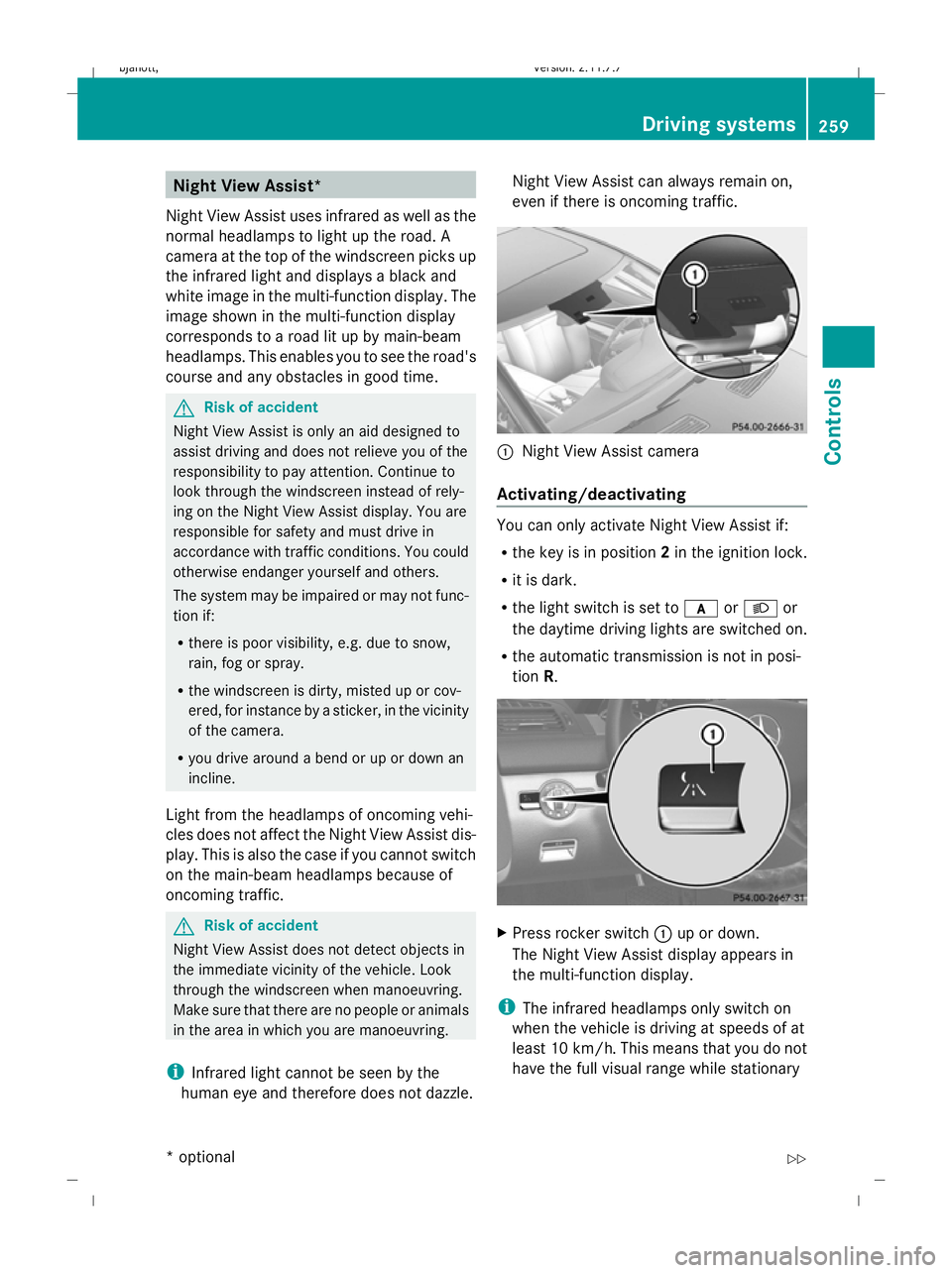
:
Night View Assist camera
Activating/deactivating You can only activate Night View Assist if:
R
the key is in position 2in the ignition lock.
R it is dark.
R the light switch is set to corL or
the daytime driving lights are switched on.
R the automatic transmission is not in posi-
tion R. X
Press rocker switch :up or down.
The Night View Assist display appears in
the multi-function display.
i The infrared headlamps only switch on
when the vehicle is driving at speeds of at
least 10 km/h. This means that you do not
have the full visual range while stationary Driving systems
259Controls
* option al
216_AKB; 2; 3, en-GB
bjanott
,V ersion: 2.11.7.7
2009-02-27T14:54:17+01:00 - Seite 259 Z
Dateiname: 6515230602_buchblock.pdf; erzeugt am 04. Mar 2009 11:16:08; WK
Page 263 of 421
and cannot check whether Night View
Assist is working.
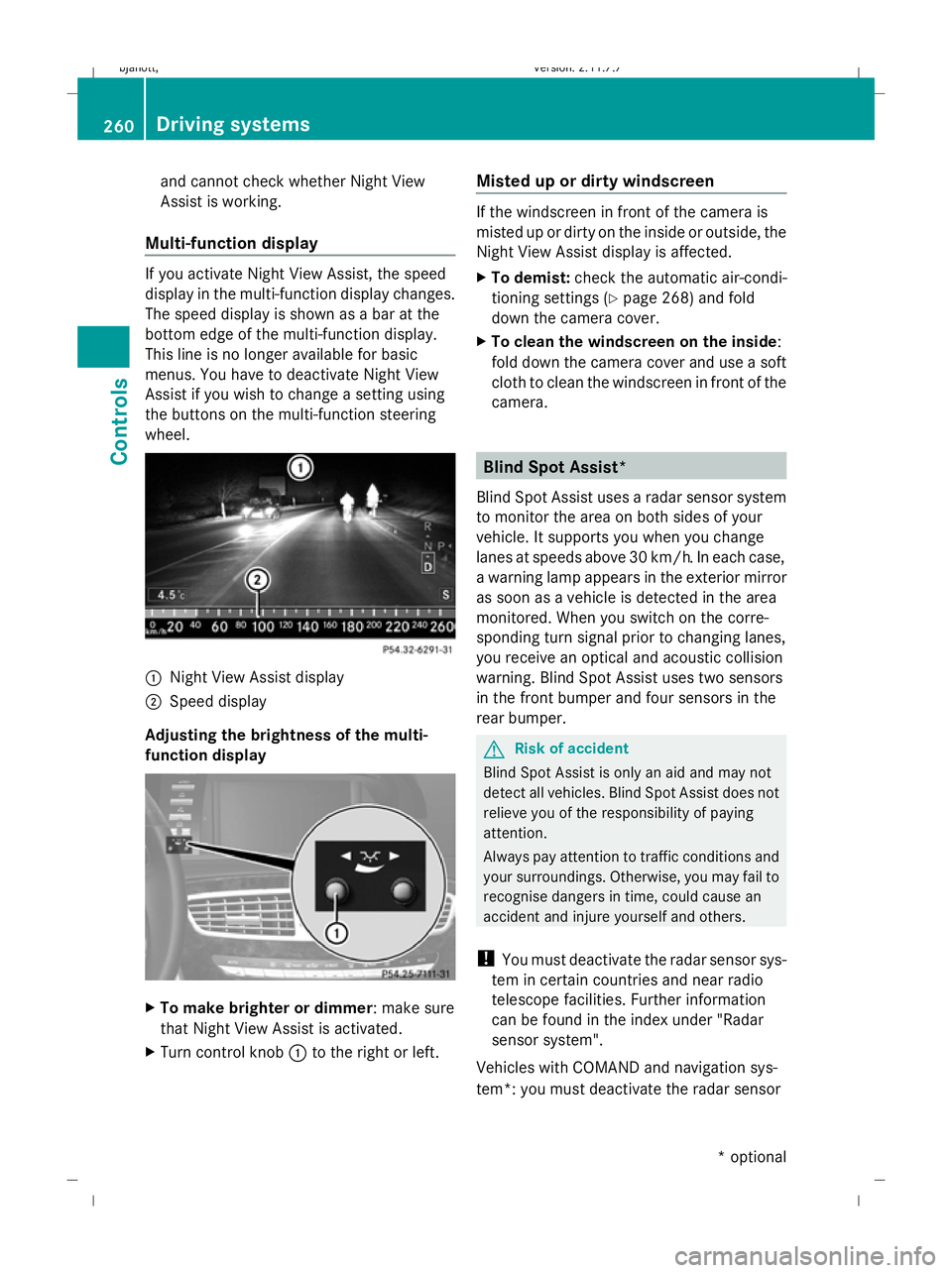
Multi-function display If you activate Night View Assist, the speed
display in the multi-function display changes.
The speed display is shown as a bar at the
bottom edge of the multi-function display.
This line is no longer available for basic
menus. You have to deactivate Night View
Assist if you wish to change a setting using
the buttons on the multi-function steering
wheel. :
Night View Assist display
; Speed display
Adjusting the brightness of the multi-
function display X
To make brighter or dimmer : make sure
that Night View Assist is activated.
X Turn control knob :to the right or left. Misted up or dirty windscreen If the windscreen in front of the camera is
misted up or dirty on the inside or outside, the
Night View Assist display is affected.
X
To demist: check the automatic air-condi-
tioning settings (Y page 268) and fold
down the camera cover.
X To clean the windscreen on the inside:
fold down the camera cover and use a soft
cloth to clean the windscreen in front of the
camera. Blind Spot Assist*
Blind Spot Assist uses a radar sensor system
to monitor the area on both sides of your
vehicle. It supports you when you change
lanes at speeds above 30 km/h. In each case,
a warning lamp appears in the exterior mirror
as soon as a vehicle is detected in the area
monitored. When you switch on the corre-
sponding turn signal prior to changing lanes,
you receive an optical and acoustic collision
warning. Blind Spot Assist uses two sensors
in the front bumper and four sensors in the
rear bumper. G
Risk of accident
Blind Spot Assist is only an aid and may not
detect all vehicles. Blind Spot Assist does not
relieve you of the responsibility of paying
attention.
Always pay attention to traffic conditions and
your surroundings. Otherwise, you may fail to
recognise dangers in time, could cause an
accident and injure yourself and others.
! You must deactivate the radar sensor sys-
tem in certain countries and near radio
telescope facilities. Further information
can be found in the index under "Radar
sensor system".
Vehicles with COMAND and navigation sys-
tem*: you must deactivate the radar sensor 260
Driving systemsCont
rols
* option al
216_AKB; 2; 3, en-GB
bjanott
,V ersion: 2.11.7.7
2009-02-27T14:54:17+01:00 - Seite 260
Dateiname: 6515230602_buchblock.pdf; erzeugt am 04. Mar 2009 11:16:08; WK
Page 264 of 421

system near radio telescope facilities
(Y
page 411).
For Blind Spot Assist to help you when driving,
the radar sensor system must be switched on
and operational. G
Risk of accident
Blind Spot Assist cannot detect road and traf-
fic conditions.
Blind Spot Assist may not detect narrow vehi-
cles, such as motorcycles or bicycles, or only
detect them too late.
Monitoring may be affected by dirty sensors,
strong spray or poor visibility caused by snow,
rain or mist, for example. In this case, vehicles
are detected late or not at all.
Always pay attention to traffic conditions and
your surroundings. Otherwise, you may fail to
recognise dangers in time, could cause an
accident and injure yourself and others.
Monitoring range of the sensors Blind Spot Assist monitors the area up to
three metres behind your vehicle and directly
next to your vehicle as shown in the diagram. G
Risk of accident
Blind Spot Assist monitors certain areas in the
immediate vicinity of your vehicle. Vehicles
that approach and drive past at high speeds are not detected. There is no display and no
warning.
If the lanes are very wide, it may not be pos-
sible to monitor the complete width of the
neighbouring lane. For this reason, vehicles in
the next lane may not be detected, especially
if they are driving in a staggered formation in
different lanes. This may be the case if vehi-
cles are driving at the edge of their lane that
is furthest away from your vehicle.
Always pay attention to traffic conditions and
your surroundings. Otherwise, you may fail to
recognise dangers in time, could cause an
accident and injure yourself and others.
If the lanes are narrow, the system may be
unable to distinguish the neighbouring lane
from the one beyond it. For this reason, vehi-
cles in the farther lane may be indicated,
especially if the vehicles are driving in a stag-
gered formation in different lanes. This may
be the case if vehicles are driving at the edge
of the lane that is nearest your vehicle.
The Blind Spot Assist sensors are integrated
into the front and rear bumpers. Make sure
that the bumpers are free from dirt, ice or
slush around the sensors. The radar sensors
must not be covered, for example by cycle
racks or overhanging loads. Following a
severe impact or in the event of damage to
the bumpers, have the function of the radar
sensors checked at a qualified specialist
workshop, e.g. a Mercedes-Benz Service
Centre. Otherwise, Blind Spot Assist may not
work properly. Driving systems
261Controls
216_AKB; 2; 3, en-GB
bjanott, Version: 2.11.7.7 2009-02-27T14:54:17+01:00 - Seite 261 Z
Dateiname: 6515230602_buchblock.pdf; erzeugt am 04. Mar 2009 11:16:09; WK
Page 277 of 421
X
Start the engine.
X To switch on: briefly press&rocker
switch :up or down.
Red indicator lamp in &rocker
switch :lights up.
X To switch off: briefly press&rocker
switch :up or down.
Red indicator lamp in &rocker
switch :goes out. Sliding sunroof
General notes
G
Risk of injury
Make sure that nobody can become trapped
when closing the sliding sunroof. If there is a
risk of entrapment, release the switch and
push it briefly in any direction to stop the slid-
ing sunroof. G
Risk of injury
Children could injure themselves if they oper-
ate the sliding sunroof.
Never leave children unsupervised in the vehi-
cle. Always take the key with you when leaving
the vehicle, even if you are only leaving it for
a short time. G
Risk of injury
The glass in the panorama sunroof could
break in an accident. If you are not wearing a
seat belt, there is a risk that you could be
thrown through the opening in the event of the
vehicle overturning. Therefore, always wear a
seat belt to reduce the risk of injuries.
! Only open the panorama sliding sunroof
if it is free of snow and ice. Otherwise, mal-
functions may occur.
Do not allow anything to protrude from the
sliding sunroof. The seals could otherwise
be damaged. i
When the sliding sunroof is open, apart
from the normal airflow noises resonance
noises may also occur. They are caused by
minor pressure fluctuations in the vehicle
interior. Change the position of the sliding
sunroof or open a side window slightly to
reduce or eliminate these noises.
i Related topics:
R convenience opening from the out-
side (Y page 201) or from the inside
(Y page 269)
R convenience closing from the out-
side (Y page 201) or from the inside
(Y page 269)
R automatic closing of the sliding sunroof
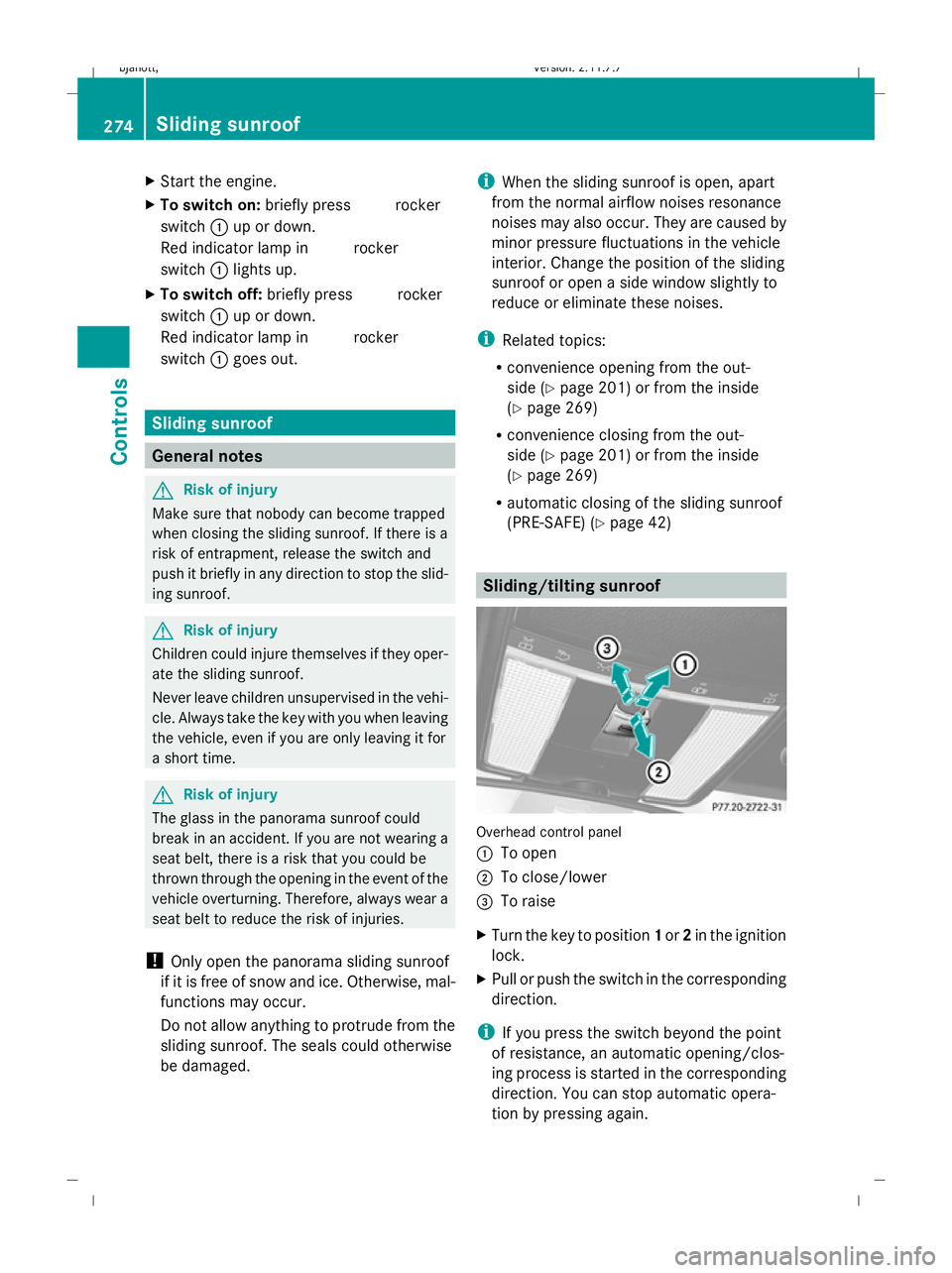
(PRE-SAFE) (Y page 42) Sliding/tilting sunroof
Overhead control panel
:
To open
; To close/lower
= To raise
X Turn the key to position 1or 2in the ignition
lock.
X Pull or push the switch in the corresponding
direction.
i If you press the switch beyond the point
of resistance, an automatic opening/clos-
ing process is started in the corresponding
direction. You can stop automatic opera-
tion by pressing again. 274
Sliding sunroofControls
216_AKB; 2; 3, en-GB
bjanott,
Version: 2.11.7.7 2009-02-27T14:54:17+01:00 - Seite 274
Dateiname: 6515230602_buchblock.pdf; erzeugt am 04. Mar 2009 11:16:14; WK
Page 286 of 421
Coolbox*
G
Risk of fire
Do not cover the ventilation grille of the cool-
box in the boot and do not transport highly
flammable materials in the boot. Otherwise,
there is a risk of fire.
The cooling output of the coolbox depends on
the ambient temperature and the selected
cooling level.
Should numerous electrical consumers be
switched on or the battery not be sufficiently
charged, the coolbox will reduce its cooling
output or switch off. This is indicated by the
flashing indicator lamp in the switch. The
cooling function will automatically switch
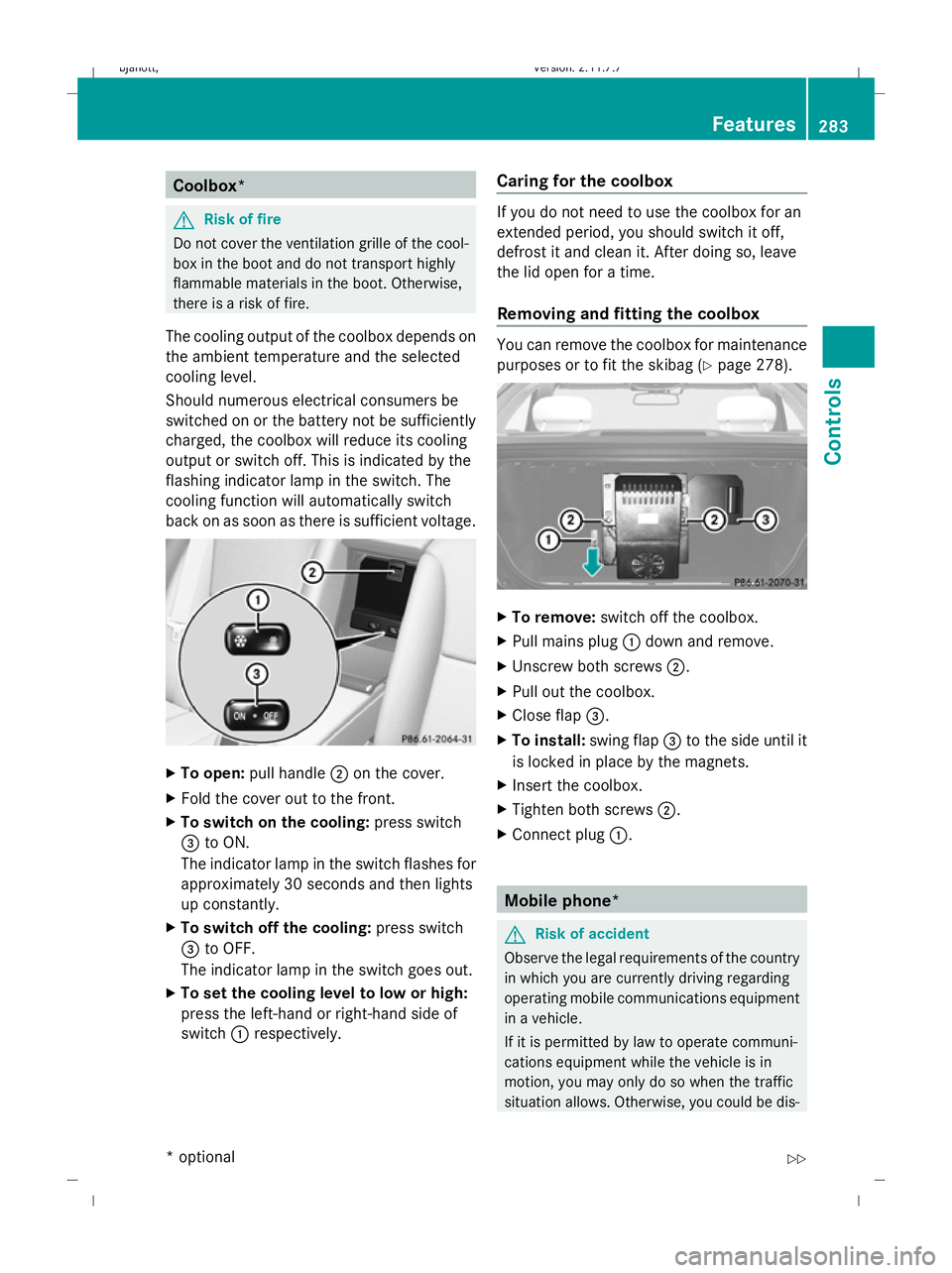
back on as soon as there is sufficient voltage. X
To open: pull handle ;on the cover.
X Fold the cover out to the front.
X To switch on the cooling: press switch
= to ON.
The indicator lamp in the switch flashes for
approximately 30 seconds and then lights
up constantly.
X To switch off the cooling: press switch
= to OFF.
The indicator lamp in the switch goes out.
X To set the cooling level to low or high:
press the left-hand or right-hand side of
switch :respectively. Caring for the coolbox If you do not need to use the coolbox for an
extended period, you should switch it off,
defrost it and clean it. After doing so, leave
the lid open for a time.
Removing and fitting the coolbox You can remove the coolbox for maintenance
purposes or to fit the skibag (Y
page 278). X
To remove: switch off the coolbox.
X Pull mains plug :down and remove.
X Unscrew both screws ;.
X Pull out the coolbox.
X Close flap =.
X To install: swing flap=to the side until it
is locked in place by the magnets.
X Insert the coolbox.
X Tighten both screws ;.
X Connect plug :. Mobile phone*
G
Risk of accident
Observe the legal requirements of the country
in which you are currently driving regarding
operating mobile communications equipment
in a vehicle.
If it is permitted by law to operate communi-
cations equipment while the vehicle is in
motion, you may only do so when the traffic
situation allows. Otherwise, you could be dis- Features
283Controls
* optional
216_AKB; 2; 3, en-GB
bjanott,
Version: 2.11.7.7 2009-02-27T14:54:17+01:00 - Seite 283 Z
Dateiname: 6515230602_buchblock.pdf; erzeugt am 04. Mar 2009 11:16:22; WK
Page 299 of 421
Tyres and wheels
Points to remember
! For safety reasons, Mercedes-Benz rec-
ommends that you only use tyres and
wheels which have been approved by
Mercedes-Benz specifically for your vehi-
cle. These tyres have been specially adap-
ted for use with the control systems, such
as ABS or ESP ®
, and are marked as follows:
R MO = Mercedes-Benz Original
R MOE = Mercedes-Benz Original Exten-
ded* (with run-flat characteristics)
Mercedes-Benz Original Extended tyres*
should only be used on wheels that have
been specifically approved by Mercedes-
Benz.
If you use other tyres, wheels or accesso-
ries Mercedes-Benz cannot accept any
responsibility for damage that may result.
Further information about tyres, wheels
and approved combinations can be
obtained from any Mercedes-Benz Service
Centre.
If you use tyres other than those tested and
recommended for Mercedes-Benz vehi-
cles, characteristics such as handling, vehi-
cle noise emissions and fuel consumption
may be adversely affected. In addition, the
wheels may come into contact with the
body or axle components when heavily loa-
ded or when driving with snow chains. This
could result in damage to the tyres or the
vehicle.
! Retreaded tyres are neither tested nor
recommended by Mercedes-Benz, since
previous damage cannot always be detec-
ted on retreaded tyres. As a result,
Mercedes-Benz cannot guarantee vehicle
safety if retreaded tyres are fitted. Do not
fit used tyres if you have no information
about their previous usage. G
Risk of accident
Tyres, wheels or accessories which have not
been approved by Mercedes-Benz for your
vehicle or are not used as they should be, can
impair driving safety. As a result, you could
cause an accident. Before purchasing and
using them, enquire about their suitability,
legal stipulations and factory recommenda-
tions at a Mercedes-Benz Service Centre.
Modification work on the brake system and
wheels is not permitted, nor is the use of
spacer plates or brake dust shields. This inva-
lidates the General Operating Permit for the
vehicle.
Notes on selecting, fitting and replac-
ing tyres R
Only fit tyres and wheels of the same type
and make.
R Only fit tyres of the correct size onto the
wheels.
R After fitting new tyres, run them in at mod-
erate speeds for the first 100 km as they
only reach their full performance after this
distance.
R Fit new tyres on the front wheels first if
tyres of the same size are required on the
front and rear wheels.
R Replace the tyres after six years at the lat-
est, regardless of wear. This also applies to
the spare wheel*.
R Do not drive with tyres which have too little
tread depth, as this significantly reduces
the traction on wet roads (aquaplaning).
! Store tyres that are not being used in a
cool, dry and preferably dark place. Protect
the tyres against oil, grease, petrol and die-
sel.
Notes on regularly inspecting wheels
and tyres R
Regularly check the wheels and tyres of
your vehicle for damage (e.g. cuts, punctu- 296
Tyres and wheelsOperation
* optional
216_AKB; 2; 3, en-GB
bjanott,
Version: 2.11.7.7 2009-02-27T14:54:17+01:00 - Seite 296
Dateiname: 6515230602_buchblock.pdf; erzeugt am 04. Mar 2009 11:16:27; WK
Page 302 of 421
will not adversely affect the running of the
vehicle.
Also check the tyre pressure of the spare
wheel*. H
Environmental note
Check the tyre pressure regularly, at least
every 14 days. Tyre pressure loss warning
While the vehicle is in motion, the tyre pres-
sure loss warning system monitors the set
tyre pressure using the rotational speed of
the wheels. This enables the system to detect
significant pressure loss in a tyre. If the speed
of rotation of a wheel changes as a result of
a loss of pressure, a corresponding warning
message will appear in the multi-function dis-
play. G
Risk of accident
The tyre pressure loss warning system does
not warn you of an incorrectly set tyre pres-
sure. The table on the inside of the fuel filler
flap will help you decide whether the tyre
pressures should be corrected.
The tyre pressure loss warning system does
not replace the need to regularly check your
vehicle's tyre pressures, since an even loss of
pressure on several tyres at the same time
cannot be detected by the tyre pressure loss
warning system.
The tyre pressure monitor is not able to warn
you of a sudden loss of pressure, e.g. if the
tyre is penetrated by a foreign object.
In the event of a sudden loss of pressure, bring
the vehicle to a halt by braking carefully. Do
not make any sudden steering movements
when doing so.
The function of the tyre pressure loss warning
system is limited or delayed if: R
snow chains are fitted to your vehicle's
tyres.
R road conditions are wintry.
R you are driving on sand or gravel.
R you adopt a very sporty driving style (cor-
nering at high speeds or driving with high
rates of acceleration).
R you are driving with a heavy load (in the
vehicle or on the roof).
Restarting the tyre pressure loss warn-
ing system Restart the tyre pressure loss warning system
if you have:
R
changed the tyre pressure
R changed the wheels or tyres
R fitted new wheels or tyres
X Before restarting, consult the table of tyre
pressures on the inside of the fuel filler flap
to ensure that the tyre pressure in all four
tyres is set correctly for the operating con-
ditions concerned.
X Also observe the notes in the section on
tyre pressures ( Ypage 298). G
Risk of accident
The tyre pressure loss warning system can
only give reliable warnings if you have set the
correct tyre pressure.
If an incorrect tyre pressure is set, these
incorrect values will be monitored.
A tyre with insufficient pressure results in
vehicle instability when driving, thus increas-
ing the risk of an accident.
X Make sure that the key is in position 2in
the ignition lock.
In the multi-function display you will see the
standard display (Y page 214)
X Press the =or; button to select the
Service menu. Tyres and wheels
299Operation
* optional
216_AKB; 2; 3, en-GB
bjanott
,V ersion: 2.11.7.7
2009-02-27T14:54:17+01:00 - Seite 299 Z
Dateiname: 6515230602_buchblock.pdf; erzeugt am 04. Mar 2009 11:16:28; WK