ESP MERCEDES-BENZ CL COUPE 2009 Manual PDF
[x] Cancel search | Manufacturer: MERCEDES-BENZ, Model Year: 2009, Model line: CL COUPE, Model: MERCEDES-BENZ CL COUPE 2009Pages: 421, PDF Size: 10.78 MB
Page 238 of 421
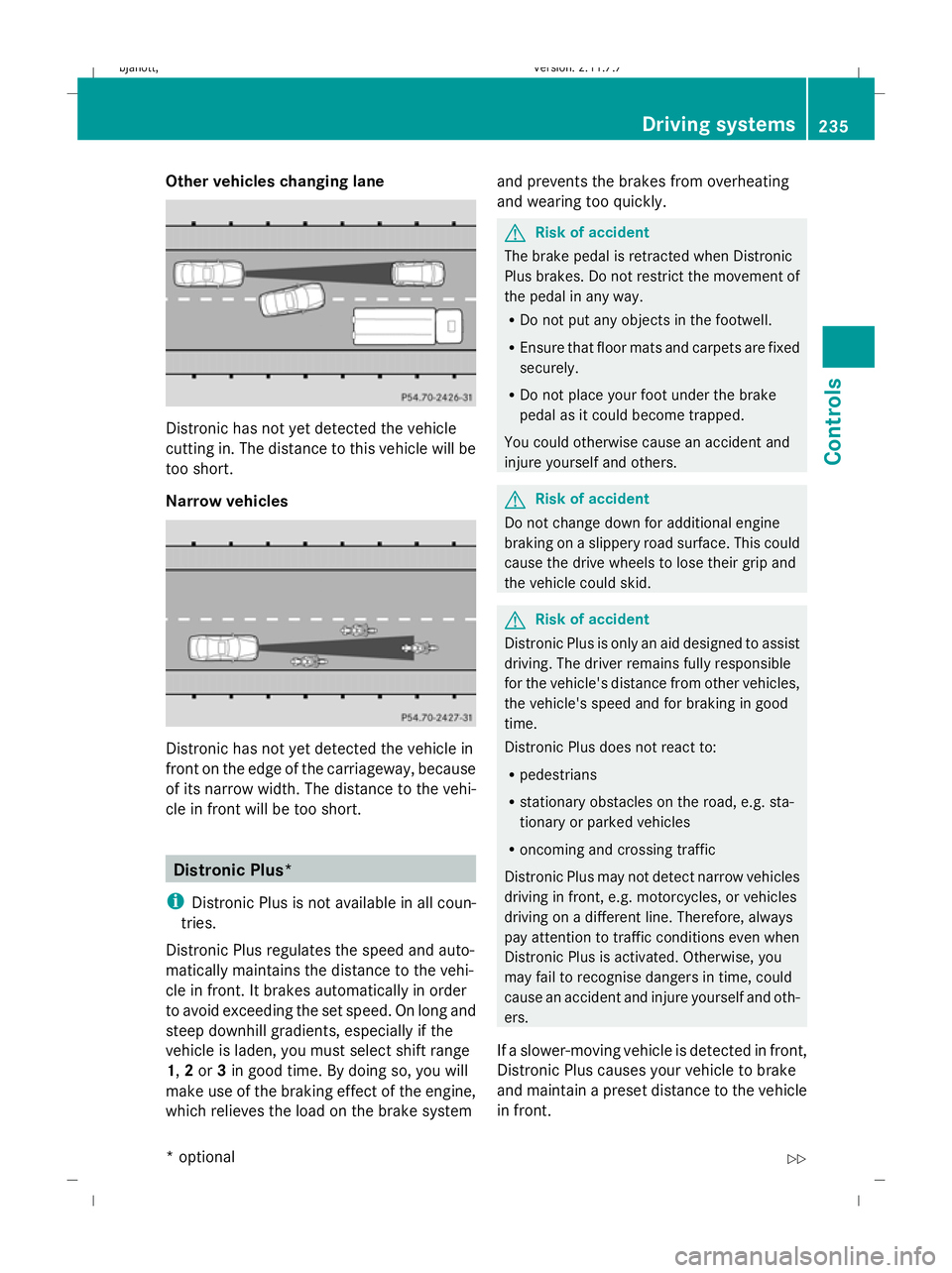
Other vehicles changing lane
Distronic has not yet detected the vehicle
cutting in. The distance to this vehicle will be
too short.
Narrow vehicles
Distronic has not yet detected the vehicle in
front on the edge of the carriageway, because
of its narrow width. The distance to the vehi-
cle in front will be too short. Distronic Plus*
i Distronic Plus is not available in all coun-
tries.
Distronic Plus regulates the speed and auto-
matically maintains the distance to the vehi-
cle in front. It brakes automatically in order
to avoid exceeding the set speed. On long and
steep downhill gradients, especially if the
vehicle is laden, you must select shift range
1, 2or 3in good time. By doing so, you will
make use of the braking effect of the engine,
which relieves the load on the brake system and prevents the brakes from overheating
and wearing too quickly. G
Risk of accident
The brake pedal is retracted when Distronic
Plus brakes. Do not restrict the movement of
the pedal in any way.
R Do not put any objects in the footwell.
R Ensure that floor mats and carpets are fixed
securely.
R Do not place your foot under the brake
pedal as it could become trapped.
You could otherwise cause an accident and
injure yourself and others. G
Risk of accident
Do not change down for additional engine
braking on a slippery road surface. This could
cause the drive wheels to lose their grip and
the vehicle could skid. G
Risk of accident
Distronic Plus is only an aid designed to assist
driving. The driver remains fully responsible
for the vehicle's distance from other vehicles,
the vehicle's speed and for braking in good
time.
Distronic Plus does not react to:
R pedestrians
R stationary obstacles on the road, e.g. sta-
tionary or parked vehicles
R oncoming and crossing traffic
Distronic Plus may not detect narrow vehicles
driving in front, e.g. motorcycles, or vehicles
driving on a different line. Therefore, always
pay attention to traffic conditions even when
Distronic Plus is activated. Otherwise, you
may fail to recognise dangers in time, could
cause an accident and injure yourself and oth-
ers.
If a slower-moving vehicle is detected in front,
Distronic Plus causes your vehicle to brake
and maintain a preset distance to the vehicle
in front. Driving systems
235Controls
* optional
216_AKB; 2; 3, en-GB
bjanott
,V ersion: 2.11.7.7
2009-02-27T14:54:17+01:00 - Seite 235 Z
Dateiname: 6515230602_buchblock.pdf; erzeugt am 04. Mar 2009 11:15:58; WK
Page 239 of 421
G
Risk of accident
Distronic Plus cannot take account of road
and traffic conditions. If Distronic does not
recognise or no longer recognises the vehicle
in front, do not activate Distronic or, if it is
already active, deactivate it. This is especially
the case:
R before corners
R in filter lanes
R when changing to a lane with faster moving
traffic
R in complex driving situations or where the
lanes are diverted, e.g. at roadworks on a
motorway
Otherwise, Distronic Plus maintains the cur-
rent speed or accelerates up to the set speed.
Distronic Plus cannot take account of weather
conditions. Deactivate, or do not activate,
Distronic Plus:
R if the roads are slippery, snow-covered or
icy. The wheels could lose their grip when
braking or accelerating. The vehicle could
start to skid.
R if the sensors are dirty or there is poor vis-
ibility, e.g. due to snow, rain or fog. Dis-
tance control may be impaired.
Always pay attention to traffic conditions
even when Distronic Plus is activated. Other-
wise, you may fail to recognise dangers in
time, could cause an accident and injure your-
self and others.
! You must deactivate the radar sensor sys-
tem in certain countries and near radio
telescope facilities. Further information
can be found in the index under "Radar
sensor system".
Vehicles with COMAND and navigation sys-
tem*: you must deactivate the radar sensor
system near radio telescope facilities
(Y page 411). If you want Distronic Plus to assist you, the
radar sensor system must be activated and
operational.
If no car is driving in front of you, Distronic
Plus works like cruise control in the speed
range between 30 km/h and 200 km/h. If a
vehicle is driving in front of you, Distronic Plus
works in the speed range between 0 km/h
and 200 km/h.
Do not use Distronic Plus while driving on
roads with steep gradients.
G
Risk of accident
Distronic Plus brakes your vehicle at a maxi-
mum of 4m/s2
depending on its speed. This
corresponds to approximately 40% of your
vehicle's maximum brake force. You must
also apply the brakes yourself if this braking
power is not sufficient.
If Distronic Plus detects a risk of collision with
a vehicle in front, an intermittent warning tone
sounds. In addition, the ·distance warn-
ing lamp in the instrument cluster lights up.
Brake to avoid a collision.
Cruise control lever With the cruise control lever you can operate
Distronic Plus and variable Speedtronic.
The LIM indicator lamp on the cruise control
lever indicates which system you have selec-
ted:
R
LIM indicator lamp off:
Distronic Plus is selected.
R LIM indicator lamp lit:
Variable Speedtronic is selected. 236
Driving systemsControls
* optional
216_AKB; 2; 3, en-GB
bjanott,
Version: 2.11.7.7 2009-02-27T14:54:17+01:00 - Seite 236
Dateiname: 6515230602_buchblock.pdf; erzeugt am 04. Mar 2009 11:15:58; WK
Page 240 of 421
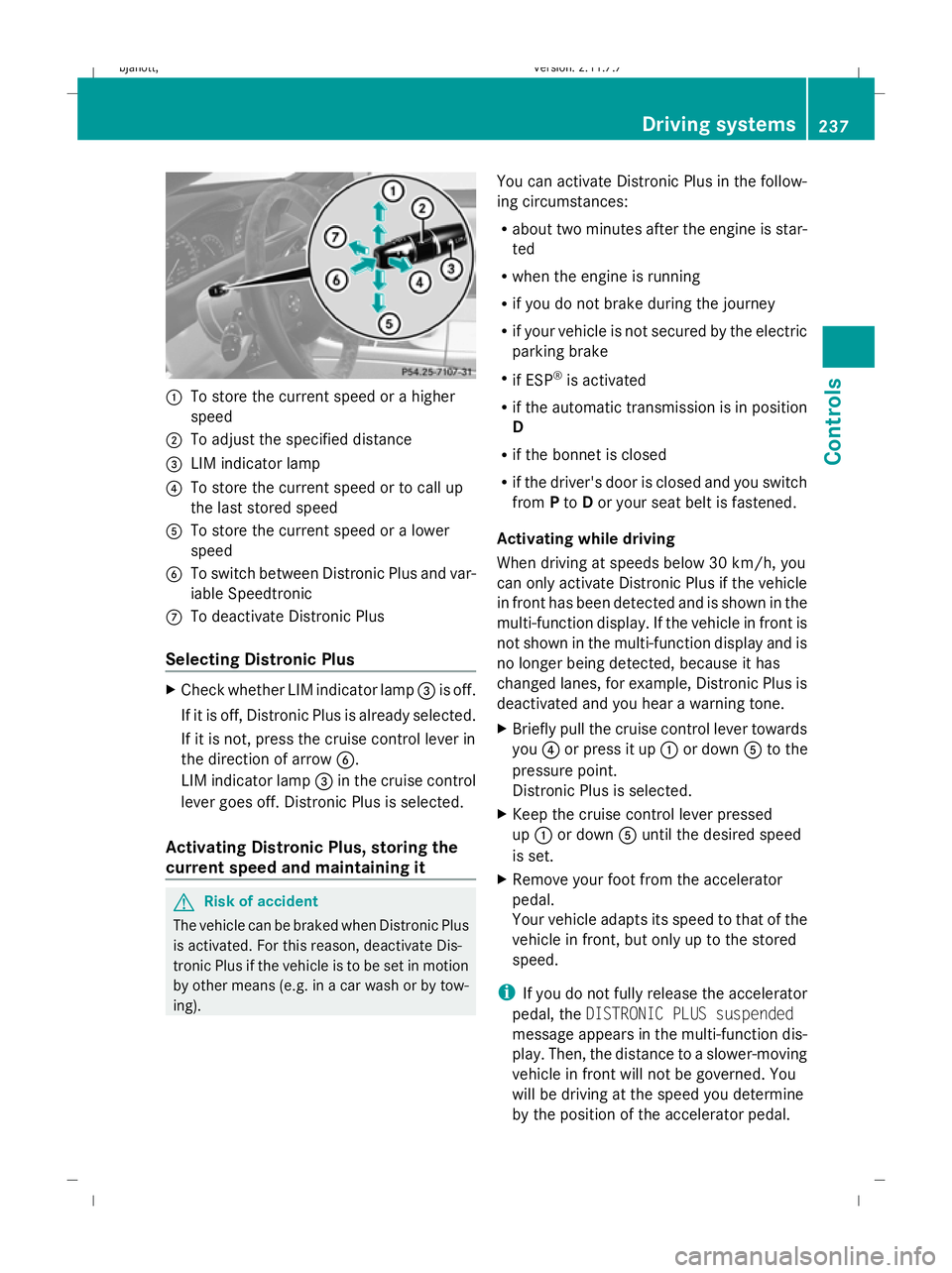
:
To store the current speed or a higher
speed
; To adjust the specified distance
= LIM indicator lamp
? To store the current speed or to call up
the last stored speed
A To store the current speed or a lower
speed
B To switch between Distronic Plus and var-
iable Speedtronic
C To deactivate Distronic Plus
Selecting Distronic Plus X
Check whether LIM indicator lamp =is off.
If it is off, Distronic Plus is already selected.
If it is not, press the cruise control lever in
the direction of arrow B.
LIM indicator lamp =in the cruise control
lever goes off. Distronic Plus is selected.
Activating Distronic Plus, storing the
current speed and maintaining it G
Risk of accident
The vehicle can be braked when Distronic Plus
is activated. For this reason, deactivate Dis-
tronic Plus if the vehicle is to be set in motion
by other means (e.g. in a car wash or by tow-
ing). You can activate Distronic Plus in the follow-
ing circumstances:
R
about two minutes after the engine is star-
ted
R when the engine is running
R if you do not brake during the journey
R if your vehicle is not secured by the electric
parking brake
R if ESP ®
is activated
R if the automatic transmission is in position
D
R if the bonnet is closed
R if the driver's door is closed and you switch
from Pto Dor your seat belt is fastened.
Activating while driving
When driving at speeds below 30 km/h, you
can only activate Distronic Plus if the vehicle
in front has been detected and is shown in the
multi-function display. If the vehicle in front is
not shown in the multi-function display and is
no longer being detected, because it has
changed lanes, for example, Distronic Plus is
deactivated and you hear a warning tone.
X Briefly pull the cruise control lever towards
you ?or press it up :or down Ato the
pressure point.
Distronic Plus is selected.
X Keep the cruise control lever pressed
up : or down Auntil the desired speed
is set.
X Remove your foot from the accelerator
pedal.
Your vehicle adapts its speed to that of the
vehicle in front, but only up to the stored
speed.
i If you do not fully release the accelerator
pedal, the DISTRONIC PLUS suspended
message appears in the multi-function dis-
play. Then, the distance to a slower-moving
vehicle in front will not be governed. You
will be driving at the speed you determine
by the position of the accelerator pedal. Driving systems
237Controls
216_AKB; 2; 3, en-GB
bjanott, Version: 2.11.7.7 2009-02-27T14:54:17+01:00 - Seite 237 Z
Dateiname: 6515230602_buchblock.pdf; erzeugt am 04. Mar 2009 11:15:58; WK
Page 241 of 421
Activating when driving towards a sta-
tionary vehicle
If the vehicle in front of you is stationary, you
can only activate Distronic Plus once your
vehicle is stationary as well.
X Briefly pull the cruise control lever towards
you ?.
Distronic Plus is selected.
i Distronic Plus can only be activated at
under 30 km/h if a vehicle in front has been
detected. Therefore, the Distronic Plus dis-
tance display in the instrument cluster
should be activated.
X Keep the cruise control lever pressed
up : or down Auntil the desired speed
is set.
i You can use the cruise control lever to set
the stored speed and the thumbwheel on
the cruise control lever to set the specified
minimum distance (Y page 239).
Pulling away
X If the vehicle in front pulls away: remove
your foot from the brake pedal.
X Briefly pull the cruise control lever towards
you ?.
or
X Accelerate briefly.
Your vehicle pulls away and adapts its
speed to that of the vehicle in front.
Driving
If there is no vehicle in front, Distronic Plus
operates in the same way as cruise control.
If a slower-moving vehicle is detected in front,
Distronic Plus causes your vehicle to brake
and maintain a preset distance to the vehicle
in front.
If Distronic Plus detects a faster-moving vehi-
cle in front, it increases the driving speed, but
only up to the stored speed. G
Risk of accident
If you depress the brake, Distronic Plus is
deactivated unless your vehicle is stationary.
Distronic Plus then no longer brakes your
vehicle. The driver remains fully responsible
for the vehicle's distance from other vehicles,
its speed and for braking in good time.
Stopping G
Risk of accident
The Distronic Plus braking effect is cancelled
and the vehicle could roll away if:
R Distronic Plus is deactivated using the
cruise control lever.
R you accelerate.
R the system or the power supply is disrup-
ted, e.g. due to battery failure.
R the electrical system in the engine com-
partment or the fuses have been tampered
with.
R the battery is disconnected. G
Risk of accident
Never get out of the vehicle when Distronic
Plus is activated.
Distronic Plus must never be operated or
deactivated by a passenger or from outside
the vehicle.
Distronic Plus does not replace the electric
parking brake and must not be used for park-
ing.
If you wish to leave the vehicle or park it,
deactivate Distronic Plus and secure the vehi-
cle against rolling away.
If Distronic Plus detects that the vehicle in
front is stopping, it brakes your vehicle until
it is stationary.
Once your vehicle is stationary, it remains
stationary and you do not need to depress the
brake.
i After a time, the electric parking brake
secures the vehicle and relieves the service
brake. 238
Driving syste
msControls
216_AKB; 2; 3, en-GB
bjanott, Version: 2.11.7.7 2009-02-27T14:54:17+01:00 - Seite 238
Dateiname: 6515230602_buchblock.pdf; erzeugt am 04. Mar 2009 11:15:58; WK
Page 244 of 421
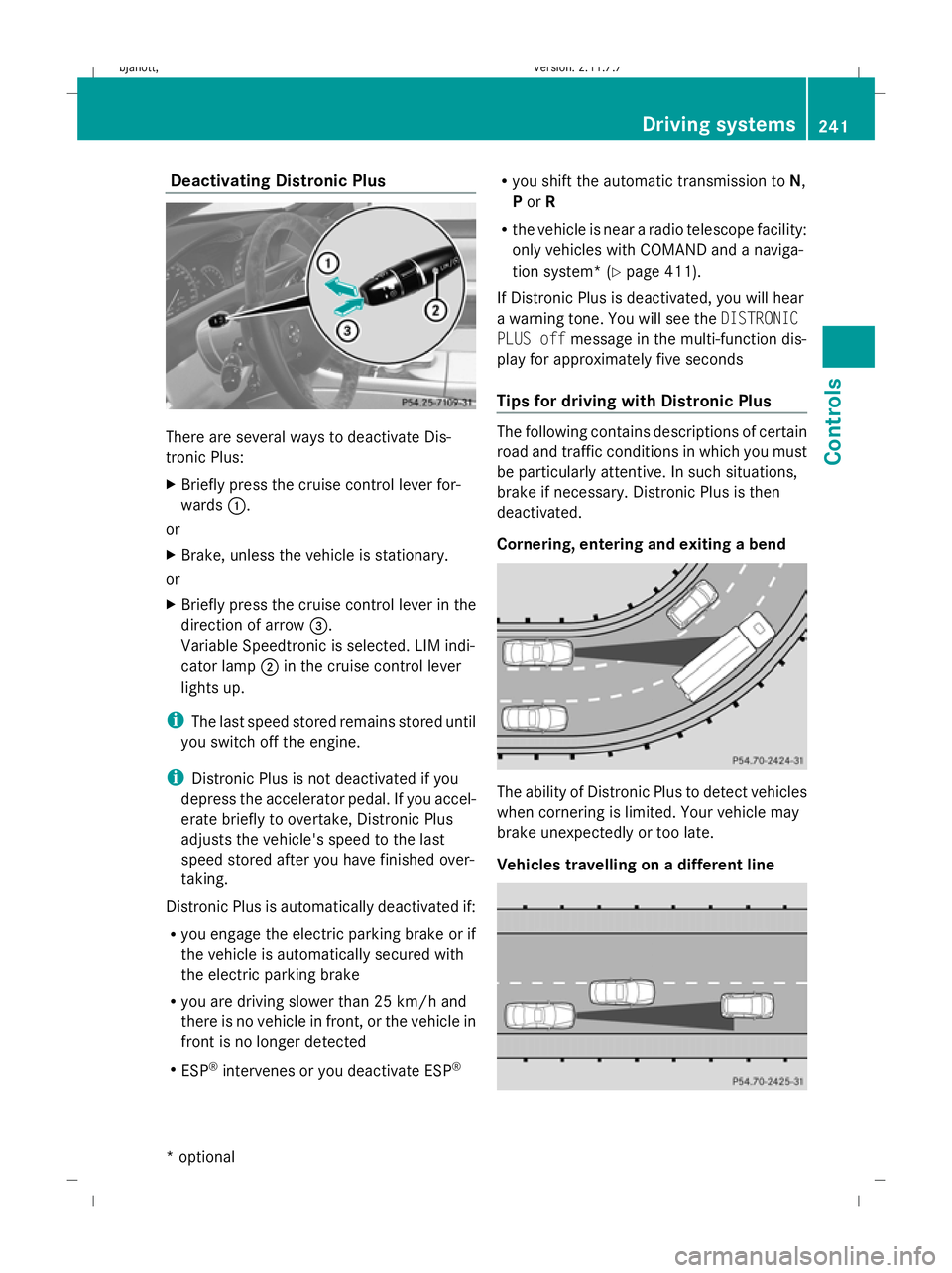
Deactivating Distronic Plus
There are several ways to deactivate Dis-
tronic Plus:
X
Briefly press the cruise control lever for-
wards :.
or
X Brake, unless the vehicle is stationary.
or
X Briefly press the cruise control lever in the
direction of arrow =.
Variable Speedtronic is selected. LIM indi-
cator lamp ;in the cruise control lever
lights up.
i The last speed stored remains stored until
you switch off the engine.
i Distronic Plus is not deactivated if you
depress the accelerator pedal. If you accel-
erate briefly to overtake, Distronic Plus
adjusts the vehicle's speed to the last
speed stored after you have finished over-
taking.
Distronic Plus is automatically deactivated if:
R you engage the electric parking brake or if
the vehicle is automatically secured with
the electric parking brake
R you are driving slower than 25 km/h and
there is no vehicle in front, or the vehicle in
front is no longer detected
R ESP ®
intervenes or you deactivate ESP ®R
you shift the automatic transmission to N,
P or R
R the vehicle is near a radio telescope facility:
only vehicles with COMAND and a naviga-
tion system* (Y page 411).
If Distronic Plus is deactivated, you will hear
a warning tone. You will see the DISTRONIC
PLUS off message in the multi-function dis-
play for approximately five seconds
Tips for driving with Distronic Plus The following contains descriptions of certain
road and traffic conditions in which you must
be particularly attentive. In such situations,
brake if necessary. Distronic Plus is then
deactivated.
Cornering, entering and exiting a bend The ability of Distronic Plus to detect vehicles
when cornering is limited. Your vehicle may
brake unexpectedly or too late.
Vehicles travelling on a different line Driving syste
ms
241Controls
* option al
216_AKB; 2; 3, en-GB
bjanott
,V ersion: 2.11.7.7
2009-02-27T14:54:17+01:00 - Seite 241 Z
Dateiname: 6515230602_buchblock.pdf; erzeugt am 04. Mar 2009 11:16:00; WK
Page 245 of 421
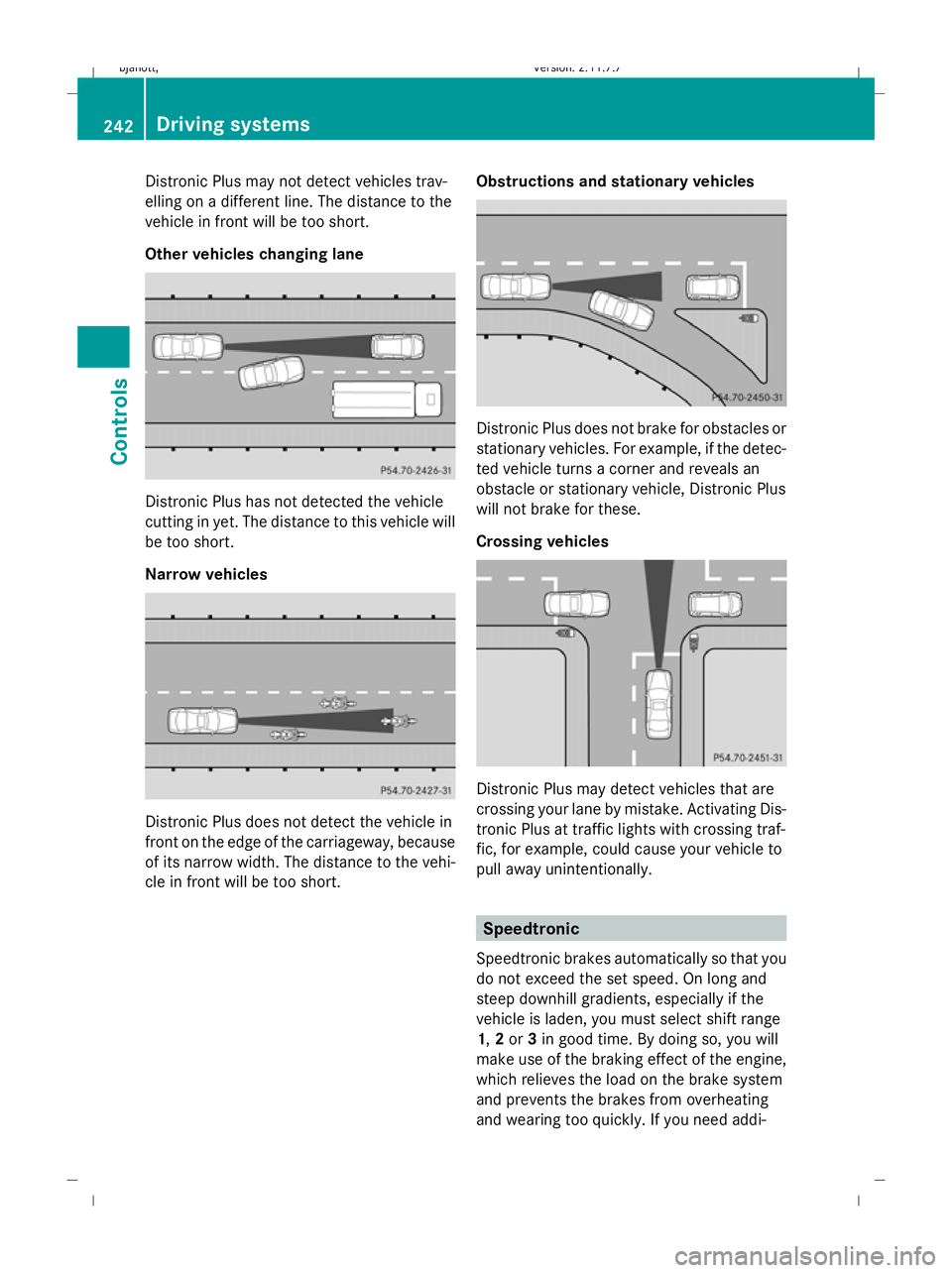
Distronic Plus may not detect vehicles trav-
elling on a different line. The distance to the
vehicle in front will be too short.
Other vehicles changing lane Distronic Plus has not detected the vehicle
cutting in yet. The distance to this vehicle will
be too short.
Narrow vehicles Distronic Plus does not detect the vehicle in
front on the edge of the carriageway, because
of its narrow width. The distance to the vehi-
cle in front will be too short. Obstructions and stationary vehicles Distronic Plus does not brake for obstacles or
stationary vehicles. For example, if the detec-
ted vehicle turns a corner and reveals an
obstacle or stationary vehicle, Distronic Plus
will not brake for these.
Crossing vehicles Distronic Plus may detect vehicles that are
crossing your lane by mistake. Activating Dis-
tronic Plus at traffic lights with crossing traf-
fic, for example, could cause your vehicle to
pull away unintentionally.
Speedtronic
Speedtronic brakes automatically so that you
do not exceed the set speed. On long and
steep downhill gradients, especially if the
vehicle is laden, you must select shift range
1, 2or 3in good time. By doing so, you will
make use of the braking effect of the engine,
which relieves the load on the brake system
and prevents the brakes from overheating
and wearing too quickly. If you need addi- 242
Driving systemsControls
216_AKB; 2; 3, en-GB
bjanott,
Version: 2.11.7.7 2009-02-27T14:54:17+01:00 - Seite 242
Dateiname: 6515230602_buchblock.pdf; erzeugt am 04. Mar 2009 11:16:00; WK
Page 246 of 421
tional braking, depress the brake pedal
repeatedly rather than continuously.
G
Risk of accident
Never depress the brake pedal continuously
while the vehicle is in motion, e.g. never cause
the brakes to rub by applying constant slight
pedal pressure. This causes the brake system
to overheat, increases the braking distance
and can lead to the brakes failing completely. G
Risk of accident
Do not change down for additional engine
braking on a slippery road surface. This could
cause the drive wheels to lose their grip and
the vehicle could skid.
You can set a variable or permanent limit
speed:
R variable for speed limits, e.g. in built-up
areas
R permanent for long-term speed restric-
tions, e.g. for driving on winter tyres
(Y page 245) G
Risk of accident
Speedtronic is only an aid designed to assist
driving. You are responsible for the vehicle's
speed and for braking in good time.
i The speed indicated in the speedometer
may differ slightly from the limit speed
stored.
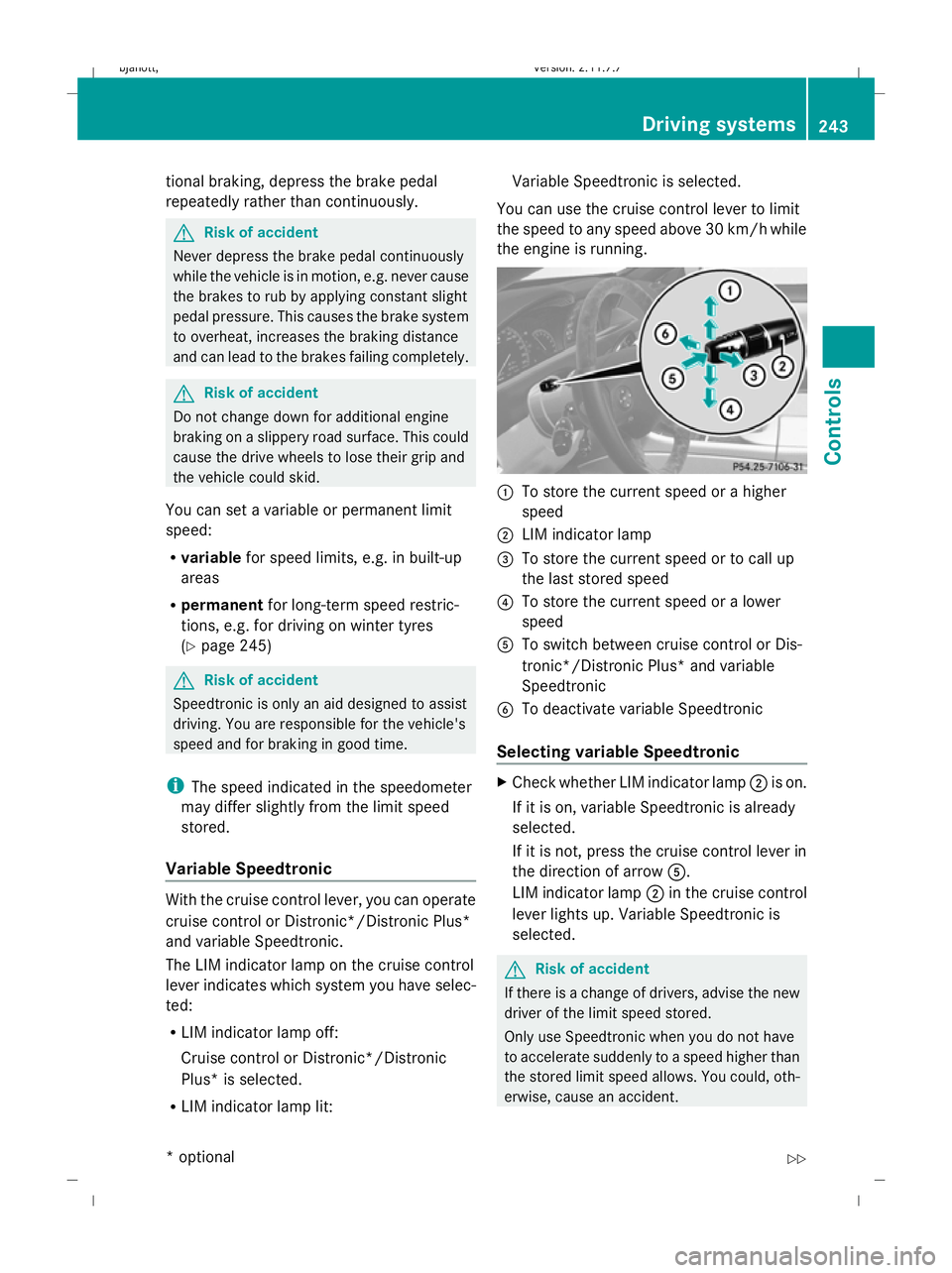
Variable Speedtronic With the cruise control lever, you can operate
cruise control or Distronic*/Distronic Plus*
and variable Speedtronic.
The LIM indicator lamp on the cruise control
lever indicates which system you have selec-
ted:
R LIM indicator lamp off:
Cruise control or Distronic*/Distronic
Plus* is selected.
R LIM indicator lamp lit: Variable Speedtronic is selected.
You can use the cruise control lever to limit
the speed to any speed above 30 km/h while
the engine is running. :
To store the current speed or a higher
speed
; LIM indicator lamp
= To store the current speed or to call up
the last stored speed
? To store the current speed or a lower
speed
A To switch between cruise control or Dis-
tronic*/Distronic Plus* and variable
Speedtronic
B To deactivate variable Speedtronic
Selecting variable Speedtronic X
Check whether LIM indicator lamp ;is on.
If it is on, variable Speedtronic is already
selected.
If it is not, press the cruise control lever in
the direction of arrow A.
LIM indicator lamp ;in the cruise control
lever lights up. Variable Speedtronic is
selected. G
Risk of accident
If there is a change of drivers, advise the new
driver of the limit speed stored.
Only use Speedtronic when you do not have
to accelerate suddenly to a speed higher than
the stored limit speed allows. You could, oth-
erwise, cause an accident. Driving systems
243Controls
* optional
216_AKB; 2; 3, en-GB
bjanott,
Version: 2.11.7.7 2009-02-27T14:54:17+01:00 - Seite 243 Z
Dateiname: 6515230602_buchblock.pdf; erzeugt am 04. Mar 2009 11:16:01; WK
Page 248 of 421
more than 20 km/h from the stored speed.
You will hear a warning tone if this is the case.
G
Risk of accident
It is not possible to deactivate variable Speed-
tronic by braking.
i The last speed stored is cleared when you
switch off the engine.
Permanent Speedtronic i
Permanent Speedtronic is only available
in certain countries.
You can use the on-board computer to limit
the speed permanently to a value between
160 km/h (e.g. for driving with winter tyres)
and the maximum speed.
Just before the stored speed is reached, it
appears in the multi-function display.
Permanent Speedtronic remains active, even
if variable Speedtronic is deactivated.
You cannot exceed the stored limit speed,
even if you depress the accelerator pedal
beyond the pressure point (kickdown).
Setting permanent Speedtronic
X Press the =or; button to select the
Settings menu.
X Press the :or9 button to select
SPEEDTRONIC.
X To change this, press a. X
Press the abutton again.
X Press the :or9 button to set per-
manent Speedtronic in increments of ten
(240 km/h to 160 km/h). Permanent Speedtronic is deactivated with the
off
setting.
X Press ato save the entry. HOLD
HOLD assists the driver in the following sit-
uations:
R when pulling away, especially on steep
slopes
R when manoeuvring on steep slopes
R when waiting in traffic
The vehicle is kept stationary without the
driver having to depress the brake pedal.
The braking effect is cancelled and HOLD
deactivated when you depress the accelera-
tor pedal to pull away.
Activation conditions You can activate HOLD if:
R
the vehicle is stationary.
R the engine is running.
R the driver's door is closed or your seat belt
is fastened.
R the electric parking brake is released.
R the bonnet is closed.
R the automatic transmission is in position
R, Nor D. If the automatic transmission is
in position R, the boot lid must be closed.
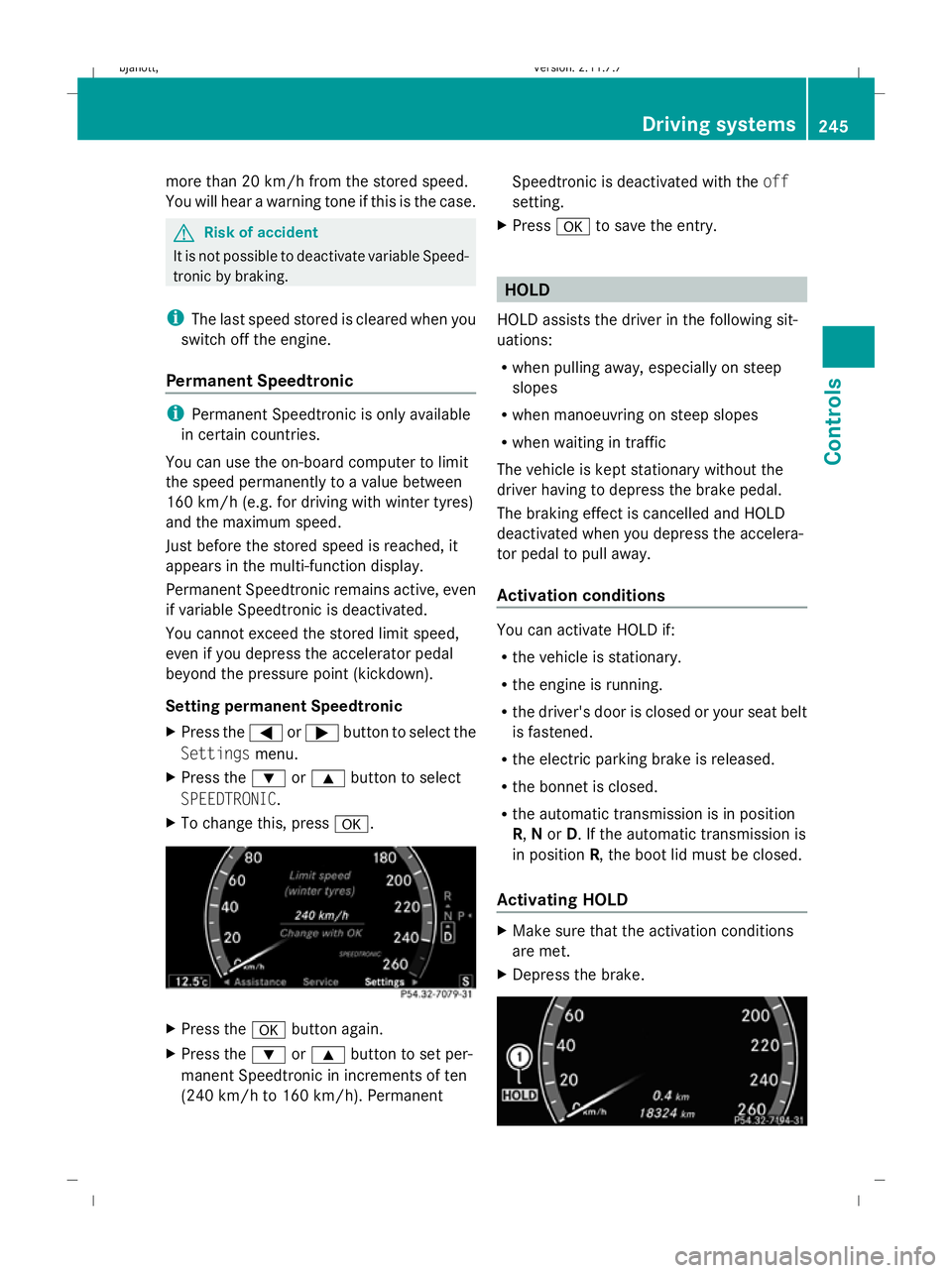
Activating HOLD X
Make sure that the activation conditions
are met.
X Depress the brake. Driving systems
245Controls
216_AKB; 2; 3, en-GB
bjanott, Version: 2.11.7.7 2009-02-27T14:54:17+01:00 - Seite 245 Z
Dateiname: 6515230602_buchblock.pdf; erzeugt am 04. Mar 2009 11:16:01; WK
Page 252 of 421
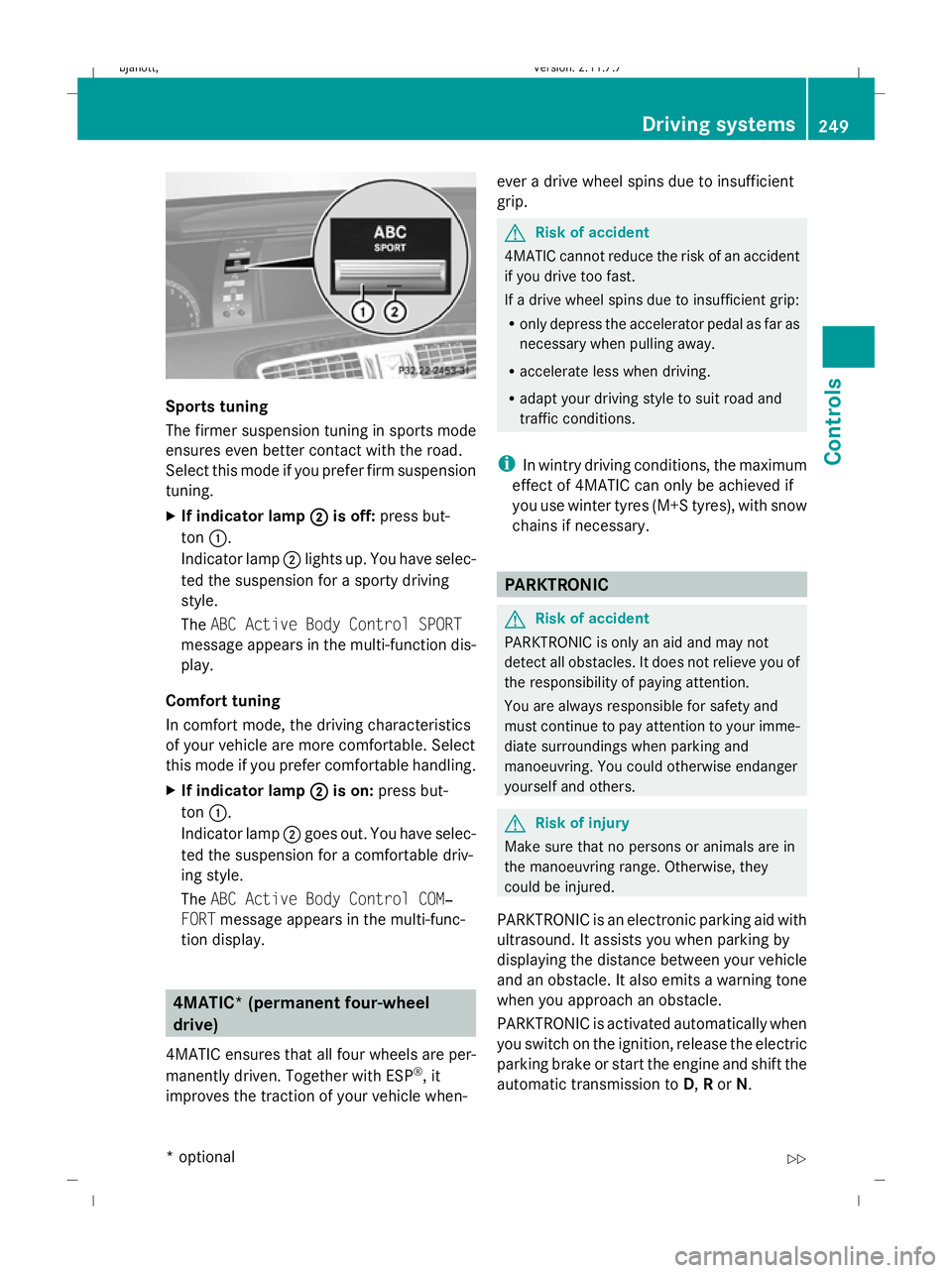
Sports tuning
The firmer suspension tuning in sports mode
ensures even better contact with the road.
Select this mode if you prefer firm suspension
tuning.
X
If indicator lamp ;
; is off: press but-
ton :.
Indicator lamp ;lights up. You have selec-
ted the suspension for a sporty driving
style.
The ABC Active Body Control SPORT
message appears in the multi-function dis-
play.
Comfort tuning
In comfort mode, the driving characteristics
of your vehicle are more comfortable. Select
this mode if you prefer comfortable handling.
X If indicator lamp ; ;is on: press but-
ton :.
Indicator lamp ;goes out. You have selec-
ted the suspension for a comfortable driv-
ing style.
The ABC Active Body Control COM‐
FORT message appears in the multi-func-
tion display. 4MATIC* (permanent four-wheel
drive)
4MATIC ensures that all four wheels are per-
manently driven. Together with ESP ®
, it
improves the traction of your vehicle when- ever a drive wheel spins due to insufficient
grip. G
Risk of accident
4MATIC cannot reduce the risk of an accident
if you drive too fast.
If a drive wheel spins due to insufficient grip:
R only depress the accelerator pedal as far as
necessary when pulling away.
R accelerate less when driving.
R adapt your driving style to suit road and
traffic conditions.
i In wintry driving conditions, the maximum
effect of 4MATIC can only be achieved if
you use winter tyres (M+S tyres), with snow
chains if necessary. PARKTRONIC
G
Risk of accident
PARKTRONIC is only an aid and may not
detect all obstacles. It does not relieve you of
the responsibility of paying attention.
You are always responsible for safety and
must continue to pay attention to your imme-
diate surroundings when parking and
manoeuvring. You could otherwise endanger
yourself and others. G
Risk of injury
Make sure that no persons or animals are in
the manoeuvring range. Otherwise, they
could be injured.
PARKTRONIC is an electronic parking aid with
ultrasound. It assists you when parking by
displaying the distance between your vehicle
and an obstacle. It also emits a warning tone
when you approach an obstacle.
PARKTRONIC is activated automatically when
you switch on the ignition, release the electric
parking brake or start the engine and shift the
automatic transmission to D,Ror N. Driving systems
249Controls
* optional
216_AKB; 2; 3, en-GB
bjanott,
Version: 2.11.7.7 2009-02-27T14:54:17+01:00 - Seite 249 Z
Dateiname: 6515230602_buchblock.pdf; erzeugt am 04. Mar 2009 11:16:02; WK
Page 254 of 421
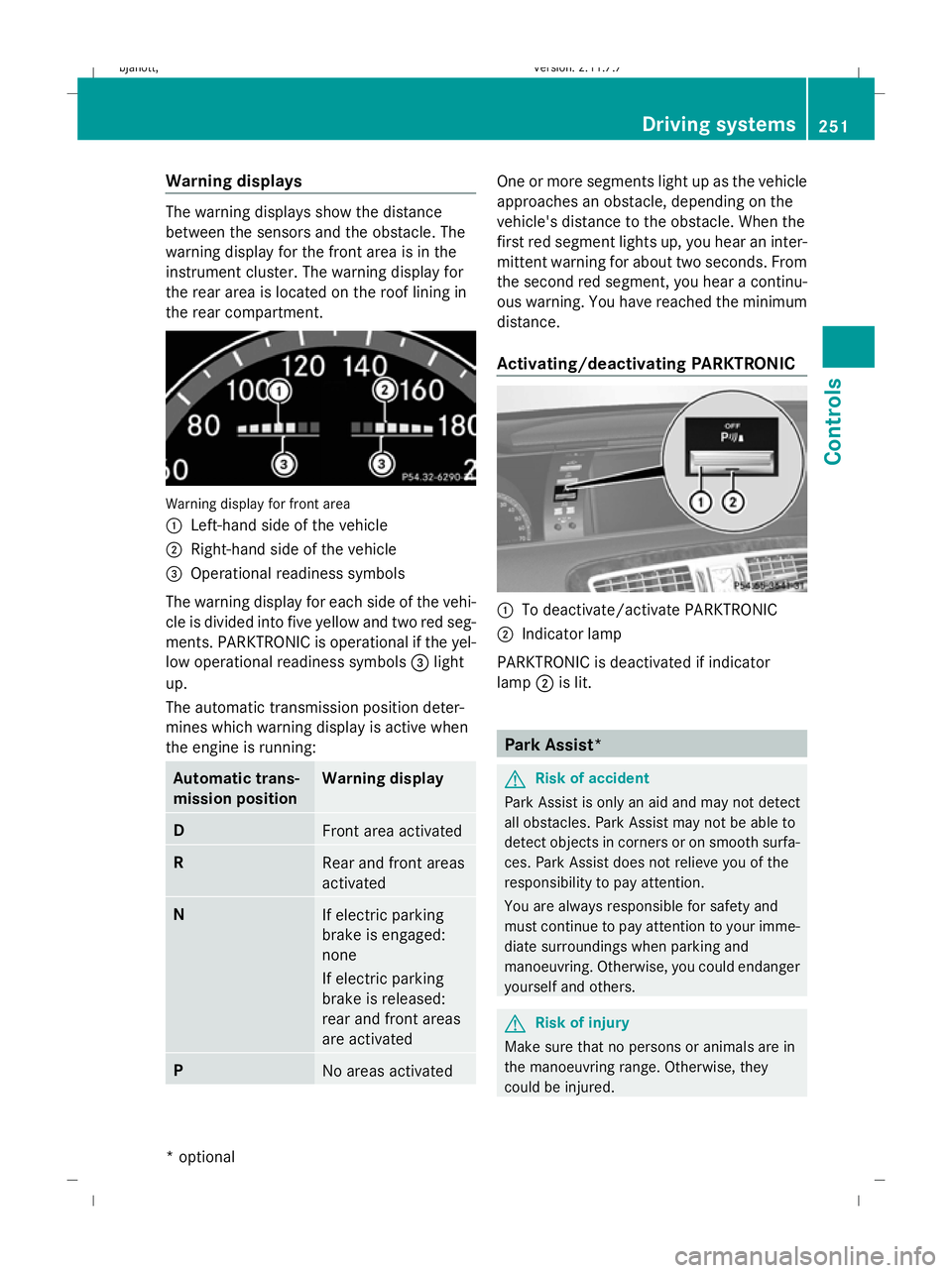
Warning displays
The warning displays show the distance
between the sensors and the obstacle. The
warning display for the front area is in the
instrument cluster. The warning display for
the rear area is located on the roof lining in
the rear compartment.
Warning display for front area
:
Left-hand side of the vehicle
; Right-hand side of the vehicle
= Operational readiness symbols
The warning display for each side of the vehi-
cle is divided into five yellow and two red seg-
ments. PARKTRONIC is operational if the yel-
low operational readiness symbols =light
up.
The automatic transmission position deter-
mines which warning display is active when
the engine is running: Automatic trans-
mission position Warning display
D
Front area activated
R
Rear and front areas
activated
N
If electric parking
brake is engaged:
none
If electric parking
brake is released:
rear and front areas
are activated
P
No areas activated One or more segments light up as the vehicle
approaches an obstacle, depending on the
vehicle's distance to the obstacle. When the
first red segment lights up, you hear an inter-
mittent warning for about two seconds. From
the second red segment, you hear a continu-
ous warning. You have reached the minimum
distance.
Activating/deactivating PARKTRONIC
:
To deactivate/activate PARKTRONIC
; Indicator lamp
PARKTRONIC is deactivated if indicator
lamp ;is lit. Park Assist*
G
Risk of accident
Park Assist is only an aid and may not detect
all obstacles. Park Assist may not be able to
detect objects in corners or on smooth surfa-
ces. Park Assist does not relieve you of the
responsibility to pay attention.
You are always responsible for safety and
must continue to pay attention to your imme-
diate surroundings when parking and
manoeuvring. Otherwise, you could endanger
yourself and others. G
Risk of injury
Make sure that no persons or animals are in
the manoeuvring range. Otherwise, they
could be injured. Driving systems
251Controls
* optional
216_AKB; 2; 3, en-GB
bjanott,
Version: 2.11.7.7 2009-02-27T14:54:17+01:00 - Seite 251 Z
Dateiname: 6515230602_buchblock.pdf; erzeugt am 04. Mar 2009 11:16:03; WK