interior lights MERCEDES-BENZ CL COUPE 2009 Owners Manual
[x] Cancel search | Manufacturer: MERCEDES-BENZ, Model Year: 2009, Model line: CL COUPE, Model: MERCEDES-BENZ CL COUPE 2009Pages: 421, PDF Size: 10.78 MB
Page 10 of 421
COMAND
Back button . . . . . . . . . . . . . . . . . . .68
Basic functions . . . . . . . . . . . . . . . . .62
Components . . . . . . . . . . . . . . . . . . .58
Controller . . . . . . . . . . . . . . . . . . . . .59
DAB . . . . . . . . . . . . . . . . . . . . . . . . .74
Display . . . . . . . . . . . . . . . . . . . . . . .59
Function buttons . . . . . . . . . . . . . . .60
Linguatronic settings . . . . . . . . . . .162
Menu overview . . . . . . . . . . . . . . . . .66
Navigation . . . . . . . . . . . . . . . . . . .125
Operation . . . . . . . . . . . . . . . . . . . . .66
Overview . . . . . . . . . . . . . . . . . . . . .30
Radio . . . . . . . . . . . . . . . . . . . . . . . .70
TV . . . . . . . . . . . . . . . . . . . . . . . . . . .89
Video . . . . . . . . . . . . . . . . . . . . . . . .84
COMAND controller . . . . . . . . . . . . . ..59
Operation . . . . . . . . . . . . . . . . . . . . .59
COMAND display . . . . . . . . . . . . . . . . .59
Adjusting . . . . . . . . . . . . . . . . . . . . .68
Cleaning . . . . . . . . . . . . . . . . . . . . .310
COMAND menu
Automatic air conditioning . . . . . . .168
Navigation . . . . . . . . . . . . . . . . . . .129
Overview . . . . . . . . . . . . . . . . . . . . .66
TV . . . . . . . . . . . . . . . . . . . . . . . . . . .89
Vehicle . . . . . . . . . . . . . . . . . . . . . .164
Video . . . . . . . . . . . . . . . . . . . . . . . .84
Conference connection . . . . . . . . . ..115
Constant headlamp mode see Daytime driving lights . . . . . . .225
Consumption statistics (on-board
computer) . . . . . . . . . . . . . . . . . . . . . .215
Convenience closing . . . . . . . . . . . ..201
Convenience opening . . . . . . . . . . ..201
Convenience telephony . . . . . . . . ..110
Coolant Checking the level . . . . . . . . . . . . .294
Display message . . . . . . . . . .331, 342
Mixture ratio . . . . . . . . . . . . . . . . .399
Temperature gauge . . . . . . . . . . . .212
Coolbox . . . . . . . . . . . . . . . . . . . . . . . .283
Cornering lights Display message . . . . . . . . . . . . . .343
Cruise control . . . . . . . . . . . . . . . . . .227
Display message . . . . . . . . . . . . . .329
Cup holder . . . . . . . . . . . . . . . . . . . . .277 Current fuel consumption (on-
board computer)
. . . . . . . . . . . . . . . .216 D
DAB . . . . . . . . . . . . . . . . . . . . . . . . . . . .74
Ensembl e.. . . . . . . . . . . . . . . . . . . .74
Sub-programme . . . . . . . . . . . . . . . .75
Dashboard
Cleanin g.. . . . . . . . . . . . . . . . . . . .310
see Instrument cluster . . . . . . . . . .212
see Cockpit
Data carrier
Music Register . . . . . . . . . . . . . . . . .94
Date
Setting (COMAND ).. . . . . . . . . . . .161
Daytime driving lights . . . . . . . . . . ..195
Switching on/off (on-board com-
puter) . . . . . . . . . . . . . . . . . . . . . . .225
Delayed switch-off
Exterior lighting (COMAND) . . . . . .166
Interior lighting (COMAND) . . . . . .166
Destination input . . . . . . . . . . . . . . ..135
destination memory . . . . . . . . . . . ..157
Digital speedometer (on-board
computer) . . . . . . . . . . . . . . . . .216, 226
Digital TV . . . . . . . . . . . . . . . . . . . . . . .92
Dipped-beam headlamps Display message . . . . . . . . . . . . . .343
Symmetrical . . . . . . . . . . . . . . . . . .306
DIRECT SELECT lever
see Automatic transmission
Display
Adjusting (COMAND) . . . . . . . . . . . .68
Display message
Symbol messages . . . . . . . . .330, 364
Display messages . . . . . . . . . . . . . ..316
Service interval displa y.. . . . . . ..306
Text messages . . . . . . . . . . . . . . . .317
Up (AMG menu) . . . . . . . . . . . . . . .220
Distance display
Displaying (on-board computer) . . .223
Distance warning function (vehi-
cles with Distronic) . . . . . . . . . . . . . ..52
Activating/deactivating (on-
board computer) . . . . . . . . . . . . . .224
Distance warning lamp . . . . . . . . . ..351 Index
7 216_AKB; 2; 3, en-GB
bjanott,
Version: 2.11.7.7 2009-02-27T14:54:17+01:00 - Seite 7Dateiname: 6515230602_buchblock.pdf; erzeugt am 04. Mar 2009 11:14:34; WK
Page 40 of 421
You must not tamper with electronic compo-
nents or their software.
SRS (Supplemental Restraint System)
The SRS reduces the risk of occupants com-
ing into contact with the vehicle's interior in
the event of an accident. It can also reduce
the forces to which occupants are subjected
during an accident.
The SRS consists of:
R The 6 SRS warning lamp
R belt tensioners
R belt force limiters
R airbags
The 6 6 SRS warning lamp SRS functions are checked regularly when
you turn on the ignition and when the engine
is running. Therefore, malfunctions can be
detected in good time.
The 6 SRS warning lamp in the instrument
cluster lights up when the ignition is switched
on. It goes out no later than a few seconds
after the engine is started. G
Risk of injury
If SRS is malfunctioning, individual systems
may be activated unintentionally or not be
deployed in the event of an accident with
heavy braking.
A malfunction has occurred if the 6SRS
warning lamp:
R does not light up when you switch on the
ignition
R does not go out after the engine has been
running for a few seconds
R lights up again once the engine is running
In this case, have SRS checked immediately
at a qualified specialist workshop. Triggering of belt tensioners, belt force
limiters and airbags In the event of a collision, the sensor in the
airbag control unit evaluates important phys-
ical data such as duration, direction and force
of the vehicle deceleration or acceleration.
Based on the evaluation of this data and
depending on the vehicle's rate of longitudi-
nal deceleration in a collision, in the first
stage the airbag control unit pre-emptively
triggers the belt tensioners.
i
The front belt tensioners can only be trig-
gered if the belt tongue is correctly
engaged in the seat belt buckle.
The front airbags are only deployed if there is
an even higher rate of vehicle deceleration in
a longitudinal direction.
Your vehicle has adaptive, dual stage front
airbags. When the first activation threshold is
reached, the front airbag is filled with enough
propellant gas to reduce the risk of injuries.
The front airbag is only fully inflated if a sec-
ond threshold is reached within a few milli-
seconds, due to the control unit having detec-
ted further deceleration.
Criteria for triggering belt tensioners and
airbags
In the first stage of a collision, the airbag con-
trol unit evaluates the duration and direction
of vehicle acceleration or deceleration in
order to determine whether it is necessary to
trigger the belt tensioner and/or airbag.
The belt tensioner and airbag triggering
thresholds are variable and are adapted to the
rate of deceleration of the vehicle. This proc-
ess is pre-emptive in nature as the airbag
must be deployed during – and not at the end
of – the collision.
i Airbags are not deployed in all types of
accidents. They are controlled by complex
sensor technology and evaluation logic.
This process is pre-emptive in nature as
airbag deployment must take place during
the impact and must be adapted to provide Occupant safety
37Safety
216_AKB; 2; 3, en-GB
bjanott,V ersion: 2.11.7.7
2009-02-27T14:54:17+01:00 - Seite 37 Z
Dateiname: 6515230602_buchblock.pdf; erzeugt am 04. Mar 2009 11:14:46; WK
Page 169 of 421
X
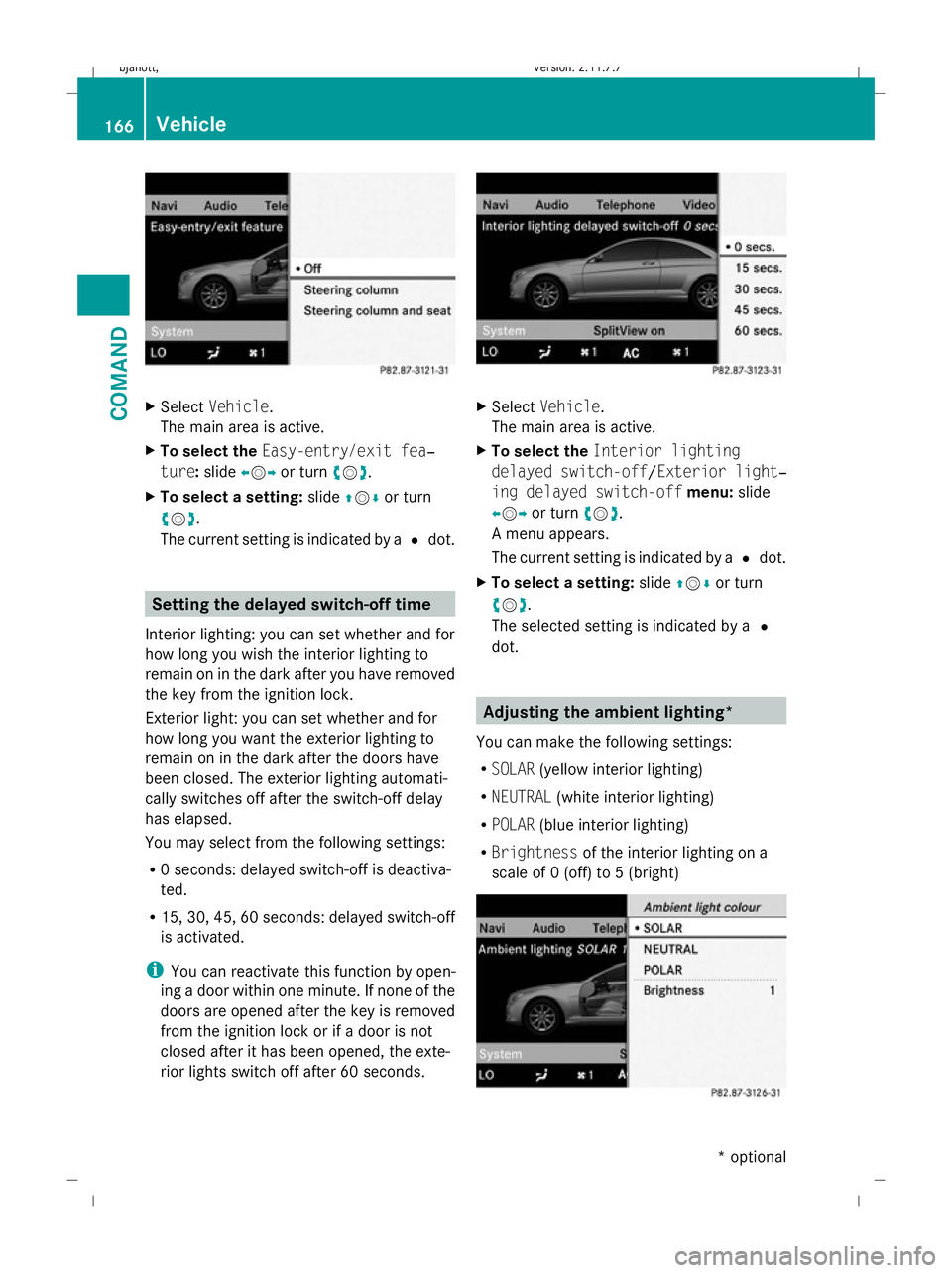
Select Vehicle.
The main area is active.
X To select the Easy-entry/exit fea‐
ture: slideXVY or turn cVd.
X To select a setting: slideZVÆ or turn
cVd .
The current setting is indicated by a #dot. Setting the delayed switch-off time
Interior lighting: you can set whether and for
how long you wish the interior lighting to
remain on in the dark after you have removed
the key from the ignition lock.
Exterior light: you can set whether and for
how long you want the exterior lighting to
remain on in the dark after the doors have
been closed. The exterior lighting automati-
cally switches off after the switch-off delay
has elapsed.
You may select from the following settings:
R 0 seconds: delayed switch-off is deactiva-
ted.
R 15, 30, 45, 60 seconds: delayed switch-off
is activated.
i You can reactivate this function by open-
ing a door within one minute. If none of the
doors are opened after the key is removed
from the ignition lock or if a door is not
closed after it has been opened, the exte-
rior lights switch off after 60 seconds. X
Select Vehicle.
The main area is active.
X To select the Interior lighting
delayed switch-off /Exterior light‐
ing delayed switch-off menu:slide
XVY or turn cVd.
A menu appears.
The current setting is indicated by a #dot.
X To select a setting: slideZVÆ or turn
cVd .
The selected setting is indicated by a #
dot. Adjusting the ambient lighting*
You can make the following settings:
R SOLAR (yellow interior lighting)
R NEUTRAL (white interior lighting)
R POLAR (blue interior lighting)
R Brightness of the interior lighting on a
scale of 0 (off) to 5 (bright) 166
VehicleCOMAND
* optional
216_AKB; 2; 3, en-GB
bjanott,
Version: 2.11.7.7 2009-02-27T14:54:17+01:00 - Seite 166
Dateiname: 6515230602_buchblock.pdf; erzeugt am 04. Mar 2009 11:15:28; WK
Page 175 of 421
If the vehicle has become very warm and the
automatic air-conditioning system is cooling
the interior, the blower settings are briefly
suspended.
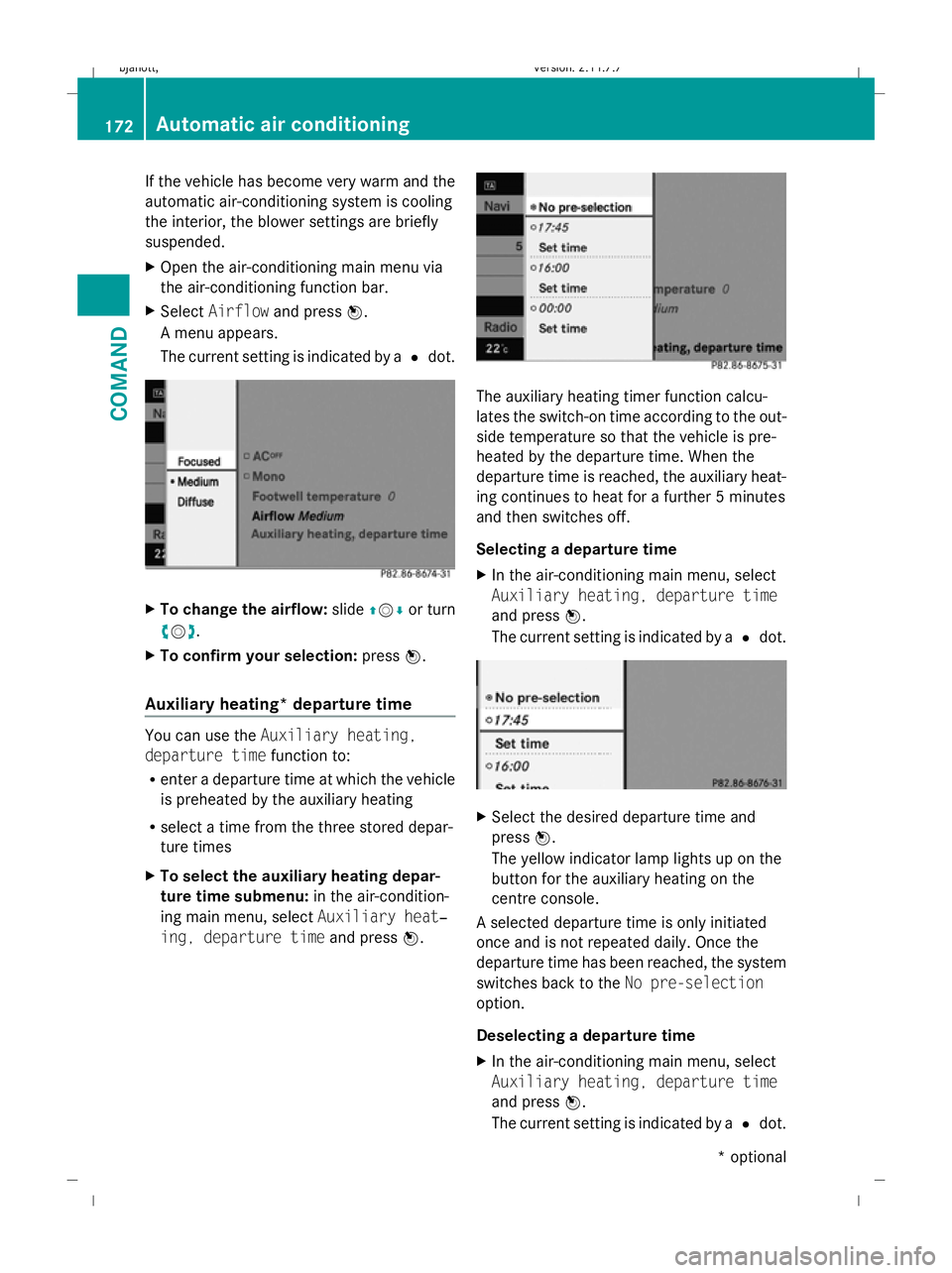
X Open the air-conditioning main menu via
the air-conditioning function bar.
X Select Airflow and press W.
A menu appears.
The current setting is indicated by a #dot. X
To change the airflow: slideZVÆ or turn
cVd.
X To confirm your selection: pressW.
Auxiliary heating* departure time You can use the
Auxiliary heating,
departure time function to:
R enter a departure time at which the vehicle
is preheated by the auxiliary heating
R select a time from the three stored depar-
ture times
X To select the auxiliary heating depar-
ture time submenu: in the air-condition-
ing main menu, select Auxiliary heat‐
ing, departure time and pressW. The auxiliary heating timer function calcu-
lates the switch-on time according to the out-
side temperature so that the vehicle is pre-
heated by the departure time. When the
departure time is reached, the auxiliary heat-
ing continues to heat for a further 5 minutes
and then switches off.
Selecting a departure time
X In the air-conditioning main menu, select
Auxiliary heating, departure time
and press W.
The current setting is indicated by a #dot. X
Select the desired departure time and
press W.
The yellow indicator lamp lights up on the
button for the auxiliary heating on the
centre console.
A selected departure time is only initiated
once and is not repeated daily. Once the
departure time has been reached, the system
switches back to the No pre-selection
option.
Deselecting a departure time
X In the air-conditioning main menu, select
Auxiliary heating, departure time
and press W.
The current setting is indicated by a #dot. 172
Automatic air conditioningCOMAND
* optional
216_AKB; 2; 3, en-GB
bjanott,
Version: 2.11.7.7 2009-02-27T14:54:17+01:00 - Seite 172
Dateiname: 6515230602_buchblock.pdf; erzeugt am 04. Mar 2009 11:15:32; WK
Page 201 of 421
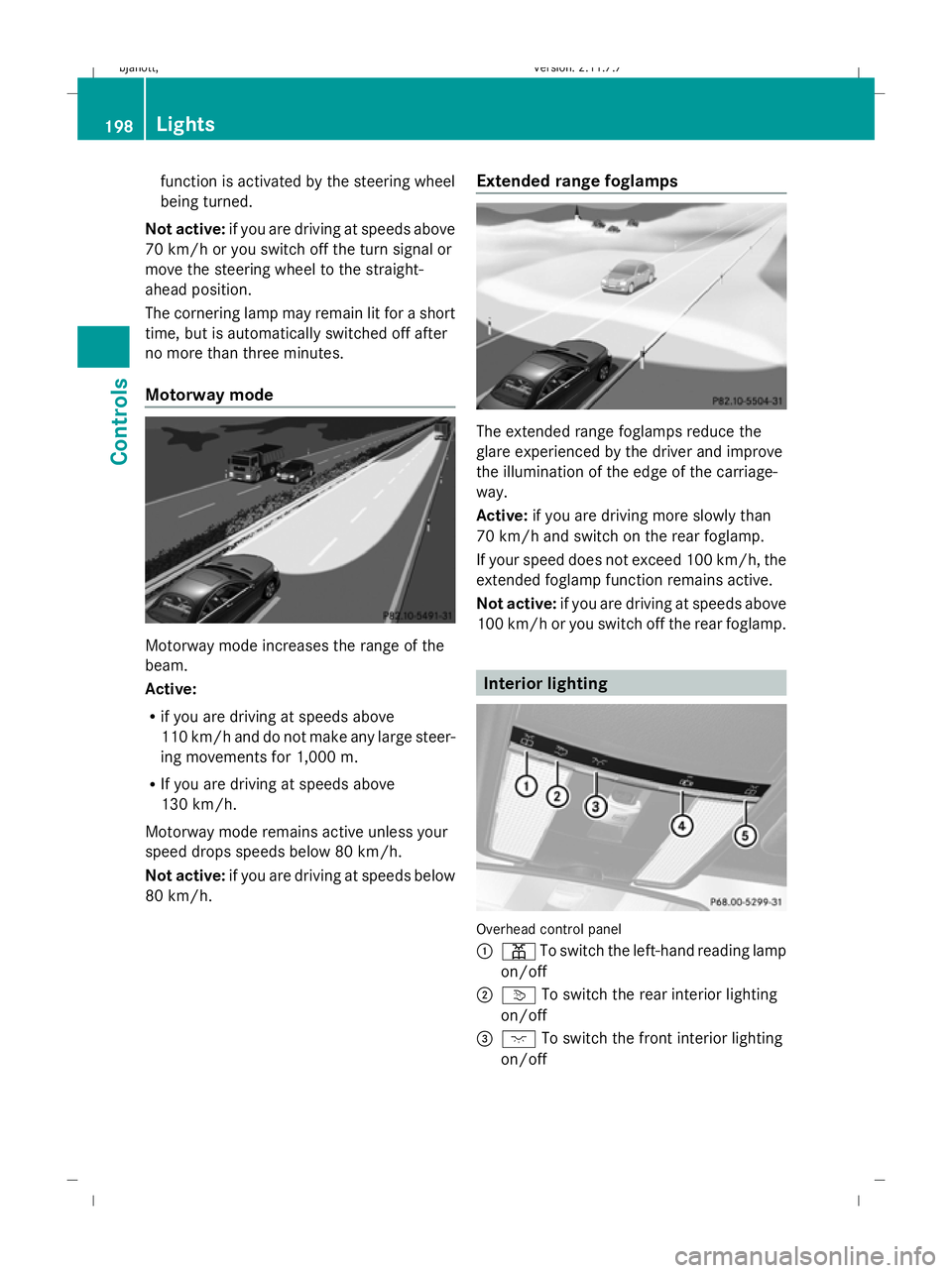
function is activated by the steering wheel
being turned.
Not active: if you are driving at speeds above
70 km/h or you switch off the turn signal or
move the steering wheel to the straight-
ahead position.
The cornering lamp may remain lit for a short
time, but is automatically switched off after
no more than three minutes.
Motorway mode Motorway mode increases the range of the
beam.
Active:
R if you are driving at speeds above
110 km/h and do not make any large steer-
ing movements for 1,000 m.
R If you are driving at speeds above
130 km/h.
Motorway mode remains active unless your
speed drops speeds below 80 km/h.
Not active: if you are driving at speeds below
80 km/h. Extended range foglamps The extended range foglamps reduce the
glare experienced by the driver and improve
the illumination of the edge of the carriage-
way.
Active:
if you are driving more slowly than
70 km/h and switch on the rear foglamp.
If your speed does not exceed 100 km/h, the
extended foglamp function remains active.
Not active: if you are driving at speeds above
100 km/h or you switch off the rear foglamp. Interior lighting
Overhead control panel
:
p To switch the left-hand reading lamp
on/off
; v To switch the rear interior lighting
on/off
= c To switch the front interior lighting
on/off 198
LightsControls
216_AKB; 2; 3, en-GB
bjanott,
Version: 2.11.7.7 2009-02-27T14:54:17+01:00 - Seite 198
Dateiname: 6515230602_buchblock.pdf; erzeugt am 04. Mar 2009 11:15:45; WK
Page 202 of 421
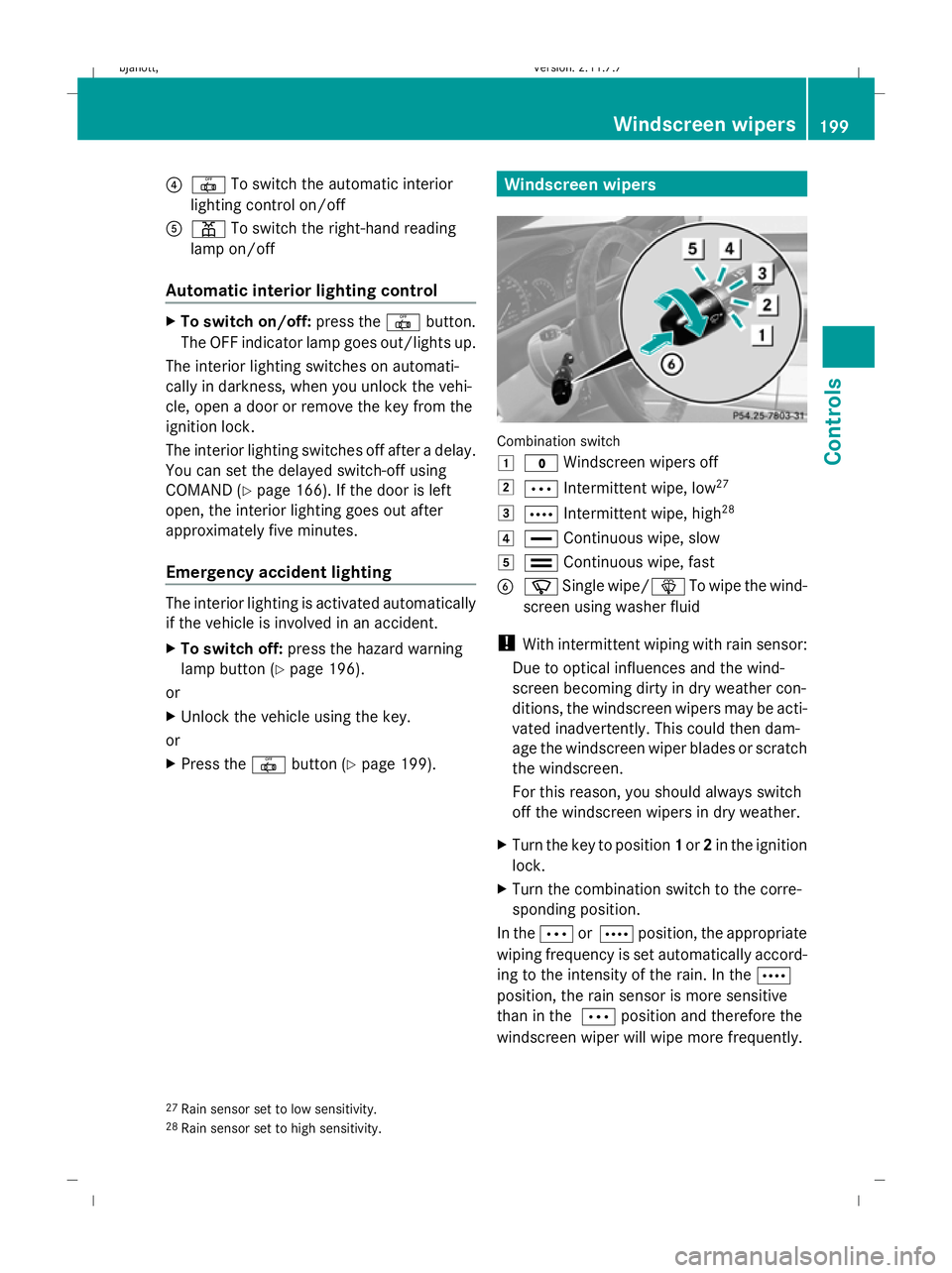
?
| To switch the automatic interior
lighting control on/off
A p To switch the right-hand reading
lamp on/off
Automatic interior lighting control X
To switch on/off: press the|button.
The OFF indicator lamp goes out/lights up.
The interior lighting switches on automati-
cally in darkness, when you unlock the vehi-
cle, open a door or remove the key from the
ignition lock.
The interior lighting switches off after a delay.
You can set the delayed switch-off using
COMAND (Y page 166). If the door is left
open, the interior lighting goes out after
approximately five minutes.
Emergency accident lighting The interior lighting is activated automatically
if the vehicle is involved in an accident.
X To switch off: press the hazard warning
lamp button (Y page 196).
or
X Unlock the vehicle using the key.
or
X Press the |button (Y page 199). Windscreen wipers
Combination switch
1
$ Windscreen wipers off
2 Ä Intermittent wipe, low 27
3 Å Intermittent wipe, high 28
4 ° Continuous wipe, slow
5 ¯ Continuous wipe, fast
B í Single wipe/î To wipe the wind-
screen using washer fluid
! With intermittent wiping with rain sensor:
Due to optical influences and the wind-
screen becoming dirty in dry weather con-
ditions, the windscreen wipers may be acti-
vated inadvertently. This could then dam-
age the windscreen wiper blades or scratch
the windscreen.
For this reason, you should always switch
off the windscreen wipers in dry weather.
X Turn the key to position 1or 2in the ignition
lock.
X Turn the combination switch to the corre-
sponding position.
In the ÄorÅ position, the appropriate
wiping frequency is set automatically accord-
ing to the intensity of the rain. In the Å
position, the rain sensor is more sensitive
than in the Äposition and therefore the
windscreen wiper will wipe more frequently.
27 Rain sensor set to low sensitivity.
28 Rain sensor set to high sensitivity. Windscreen wipers
199Controls
216_AKB; 2; 3, en-GB
bjanott, Version: 2.11.7.7 2009-02-27T14:54:17+01:00 - Seite 199 Z
Dateiname: 6515230602_buchblock.pdf; erzeugt am 04. Mar 2009 11:15:46; WK
Page 265 of 421
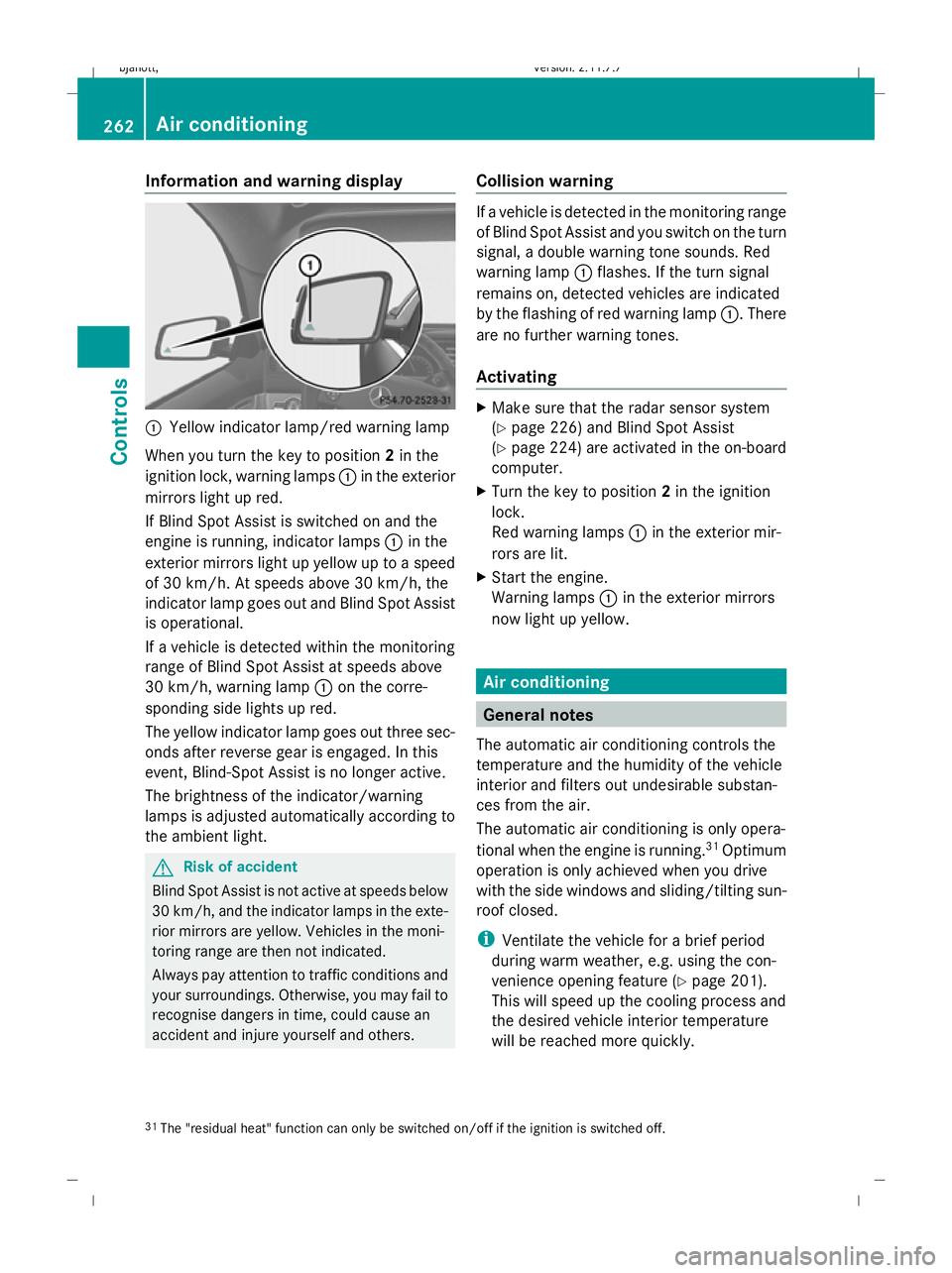
Information and warning display
:
Yellow indicator lamp/red warning lamp
When you turn the key to position 2in the
ignition lock, warning lamps :in the exterior
mirrors light up red.
If Blind Spot Assist is switched on and the
engine is running, indicator lamps :in the
exterior mirrors light up yellow up to a speed
of 30 km/h. At speeds above 30 km/h, the
indicator lamp goes out and Blind Spot Assist
is operational.
If a vehicle is detected within the monitoring
range of Blind Spot Assist at speeds above
30 km/h, warning lamp :on the corre-
sponding side lights up red.
The yellow indicator lamp goes out three sec-
onds after reverse gear is engaged. In this
event, Blind-Spot Assist is no longer active.
The brightness of the indicator/warning
lamps is adjusted automatically according to
the ambient light. G
Risk of accident
Blind Spot Assist is not active at speeds below
30 km/h, and the indicator lamps in the exte-
rior mirrors are yellow. Vehicles in the moni-
toring range are then not indicated.
Always pay attention to traffic conditions and
your surroundings. Otherwise, you may fail to
recognise dangers in time, could cause an
accident and injure yourself and others. Collision warning If a vehicle is detected in the monitoring range
of Blind Spot Assist and you switch on the turn
signal, a double warning tone sounds. Red
warning lamp
:flashes. If the turn signal
remains on, detected vehicles are indicated
by the flashing of red warning lamp :. There
are no further warning tones.
Activating X
Make sure that the radar sensor system
(Y page 226) and Blind Spot Assist
(Y page 224) are activated in the on-board
computer.
X Turn the key to position 2in the ignition
lock.
Red warning lamps :in the exterior mir-
rors are lit.
X Start the engine.
Warning lamps :in the exterior mirrors
now light up yellow. Air conditioning
General notes
The automatic air conditioning controls the
temperature and the humidity of the vehicle
interior and filters out undesirable substan-
ces from the air.
The automatic air conditioning is only opera-
tional when the engine is running. 31
Optimum
operation is only achieved when you drive
with the side windows and sliding/tilting sun-
roof closed.
i Ventilate the vehicle for a brief period
during warm weather, e.g. using the con-
venience opening feature (Y page 201).
This will speed up the cooling process and
the desired vehicle interior temperature
will be reached more quickly.
31 The "residual heat" function can only be switched on/off if the ignition is switched off. 262
Air conditioningCont
rols
216_AKB; 2; 3, en-GB
bjanott, Version: 2.11.7.7 2009-02-27T14:54:17+01:00 - Seite 262
Dateiname: 6515230602_buchblock.pdf; erzeugt am 04. Mar 2009 11:16:09; WK
Page 273 of 421
Switching the auxiliary heating/ven-
tilation* on/off
Notes on the auxiliary heating/ventila-
tion system G
Risk of poisoning
Exhaust fumes are produced when the auxili-
ary heating is in operation. Inhaling these
exhaust fumes can be poisonous. You should
therefore switch off the auxiliary heating in
confined spaces without an extraction sys-
tem, e.g. a garage. G
Risk of fire
When operating the auxiliary heating, parts of
the vehicle may become very hot, and highly
inflammable material such as fuels could be
ignited. Operating the auxiliary heating is thus
prohibited at filling stations or when your vehi-
cle is being refuelled. You must therefore
switch off the auxiliary heating at filling sta-
tions.
i Switch the auxiliary heating on regularly
once a month for about ten minutes.
The auxiliary heating heats the air in the vehi-
cle interior to the set temperature without
using the heat of the running engine. The aux-
iliary heating is operated using the vehicle's
fuel. For this reason, the tank content must
be at least at reserve fuel level to ensure that
the auxiliary heating functions.
The auxiliary heating/ventilation automati-
cally adjusts to changes in temperature and
weather conditions. For this reason, the aux-
iliary heating could switch from ventilation
mode to heating mode or from heating mode
to ventilation mode.
You cannot use the auxiliary ventilation to
cool the vehicle interior to a temperature
lower than the outside temperature. Before activating X
Turn the key to position 2in the ignition
lock.
X Set the temperature.
The auxiliary heating/ventilation can be acti-
vated even when the air conditioning is being
controlled manually. Optimum comfort can
be attained when the system is set to auto-
matic mode. set the temperature to 22 †.
The auxiliary heating/ventilation can be acti-
vated or deactivated using the remote control
or the rocker switch on the centre console.
You can use COMAND (Y page 172) or the
remote control to specify up to three depar-
ture times, one of which may be preselected.
Switching the auxiliary heating/venti-
lation on/off using the centre console
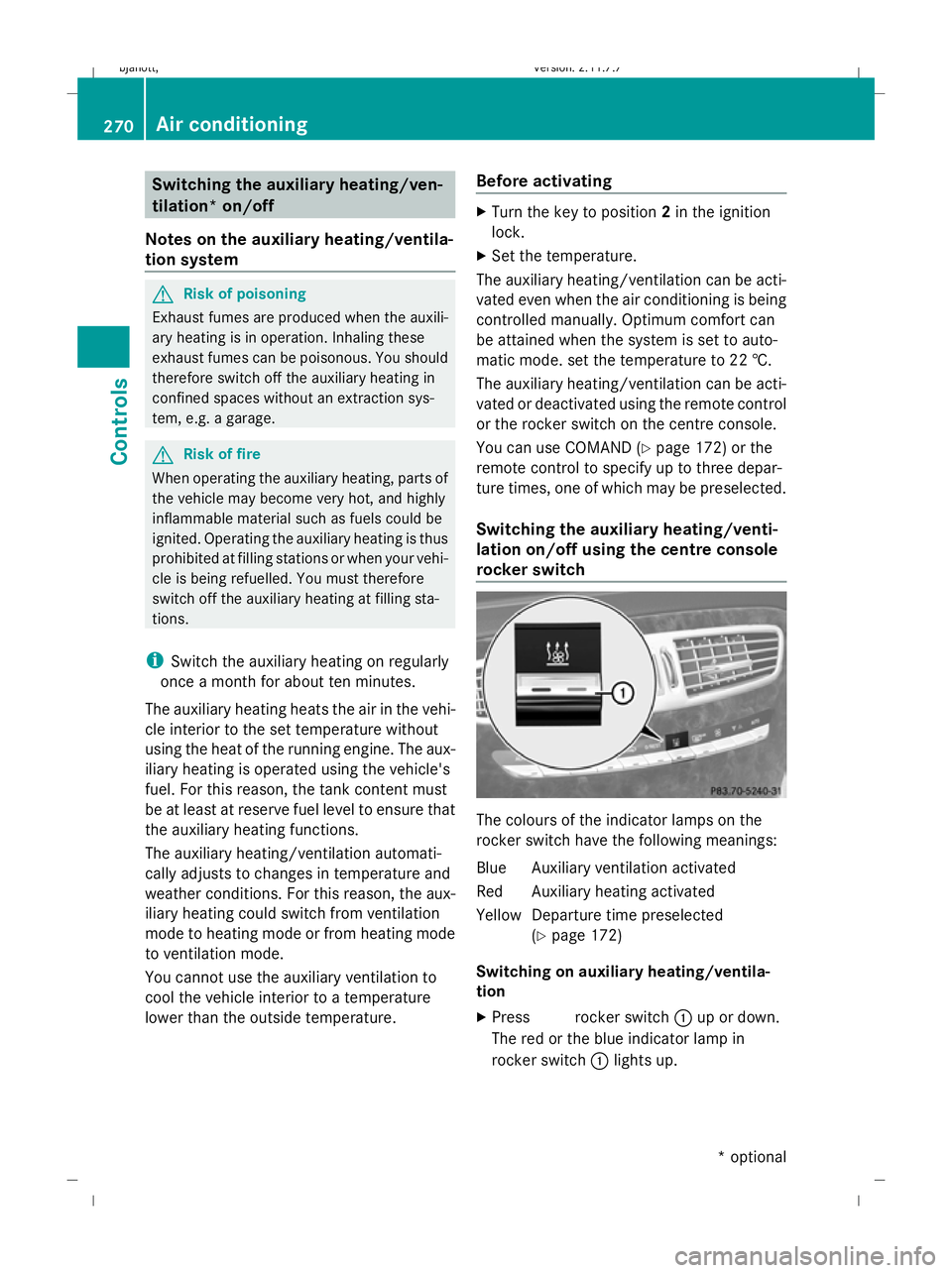
rocker switch The colours of the indicator lamps on the
rocker switch have the following meanings:
Blue Auxiliary ventilation activated
Red Auxiliary heating activated
Yellow Departure time preselected
(Ypage 172)
Switching on auxiliary heating/ventila-
tion
X Press &rocker switch :up or down.
The red or the blue indicator lamp in &
rocker switch :lights up. 270
Air conditioningControls
* optional
216_AKB; 2; 3, en-GB
bjanott,
Version: 2.11.7.7 2009-02-27T14:54:17+01:00 - Seite 270
Dateiname: 6515230602_buchblock.pdf; erzeugt am 04. Mar 2009 11:16:13; WK
Page 277 of 421
X
Start the engine.
X To switch on: briefly press&rocker
switch :up or down.
Red indicator lamp in &rocker
switch :lights up.
X To switch off: briefly press&rocker
switch :up or down.
Red indicator lamp in &rocker
switch :goes out. Sliding sunroof
General notes
G
Risk of injury
Make sure that nobody can become trapped
when closing the sliding sunroof. If there is a
risk of entrapment, release the switch and
push it briefly in any direction to stop the slid-
ing sunroof. G
Risk of injury
Children could injure themselves if they oper-
ate the sliding sunroof.
Never leave children unsupervised in the vehi-
cle. Always take the key with you when leaving
the vehicle, even if you are only leaving it for
a short time. G
Risk of injury
The glass in the panorama sunroof could
break in an accident. If you are not wearing a
seat belt, there is a risk that you could be
thrown through the opening in the event of the
vehicle overturning. Therefore, always wear a
seat belt to reduce the risk of injuries.
! Only open the panorama sliding sunroof
if it is free of snow and ice. Otherwise, mal-
functions may occur.
Do not allow anything to protrude from the
sliding sunroof. The seals could otherwise
be damaged. i
When the sliding sunroof is open, apart
from the normal airflow noises resonance
noises may also occur. They are caused by
minor pressure fluctuations in the vehicle
interior. Change the position of the sliding
sunroof or open a side window slightly to
reduce or eliminate these noises.
i Related topics:
R convenience opening from the out-
side (Y page 201) or from the inside
(Y page 269)
R convenience closing from the out-
side (Y page 201) or from the inside
(Y page 269)
R automatic closing of the sliding sunroof
(PRE-SAFE) (Y page 42) Sliding/tilting sunroof
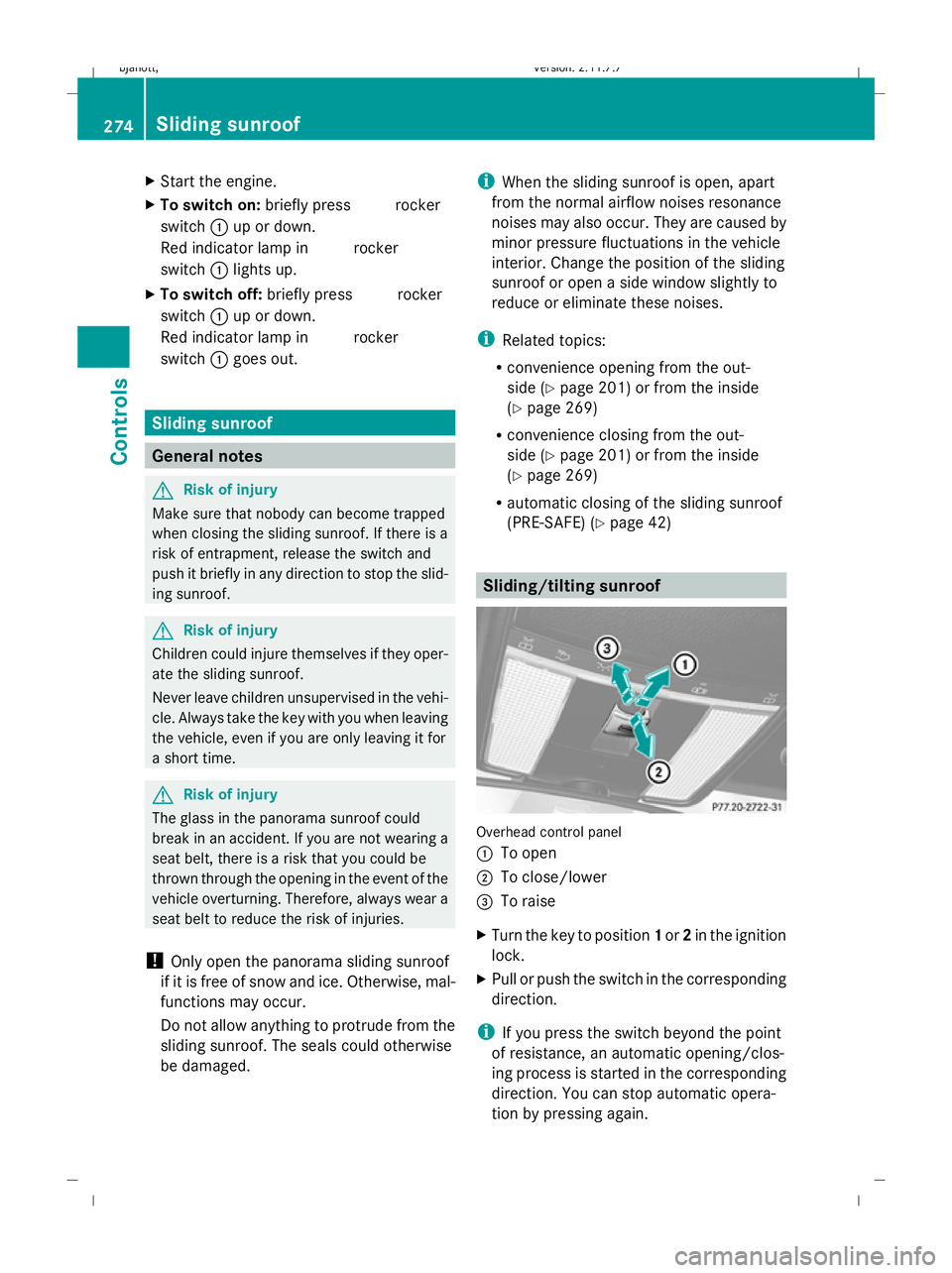
Overhead control panel
:
To open
; To close/lower
= To raise
X Turn the key to position 1or 2in the ignition
lock.
X Pull or push the switch in the corresponding
direction.
i If you press the switch beyond the point
of resistance, an automatic opening/clos-
ing process is started in the corresponding
direction. You can stop automatic opera-
tion by pressing again. 274
Sliding sunroofControls
216_AKB; 2; 3, en-GB
bjanott,
Version: 2.11.7.7 2009-02-27T14:54:17+01:00 - Seite 274
Dateiname: 6515230602_buchblock.pdf; erzeugt am 04. Mar 2009 11:16:14; WK