mirror controls MERCEDES-BENZ CL COUPE 2009 Owners Manual
[x] Cancel search | Manufacturer: MERCEDES-BENZ, Model Year: 2009, Model line: CL COUPE, Model: MERCEDES-BENZ CL COUPE 2009Pages: 421, PDF Size: 10.78 MB
Page 180 of 421
Opening and closing
.........................178
Boot .................................................... 180
Key positions .................................... 182
Seats .................................................. 183
Steering wheel .................................. 187
Mirrors ............................................... 189
Memory function .............................. 190
Seat belts ........................................... 191
Lights ................................................. 194
Windscreen wipers ...........................199
Side windows .................................... 200
Driving and parking ..........................202
Automatic transmission ...................206
Instrument cluster ............................212
On-board computer ..........................213
Driving systems ................................ 227
Air conditioning ................................. 262
Sliding sunroof .................................. 274
Loading and stowing ........................275
Features ............................................. 280 177Controls
216_AKB; 2; 3, en-GB
bjanott,
Version: 2.11.7.7 2009-02-27T14:54:17+01:00 - Seite 177
Dateiname: 6515230602_buchblock.pdf; erzeugt am 04. Mar 2009 11:15:35; WK
Page 192 of 421

i
The crash-responsive EASY-EXIT fea-
ture* can only be activated after an acci-
dent if the EASY-ENTRY/EXIT feature is
activated in the on-board computer.
When the crash-responsive EASY-EXIT fea-
ture is triggered in an accident, the steering
wheel column will move upwards irrespec-
tive of the position of the key in the ignition
lock. This makes it easier to exit the vehicle
or rescue the occupants. Mirrors
Exterior mirrors
G
Risk of accident
The exterior mirrors reduce the size of the
image. Objects are actually closer than they
appear. You could misjudge the distance from
vehicles driving behind and cause an acci-
dent, e.g. when changing lane. For this rea-
son, make sure of the actual distance from the
vehicle driving behind by glancing over your
shoulder.
The convex exterior mirrors provide a larger
field of vision.
At low outside temperatures the exterior mir-
rors are heated automatically. Adjusting the exterior mirrors
X
Make sure that the key is in position 1or
2 in the ignition lock.
X Press button 2for the right-hand exterior
mirror or button 4for the left-hand exte-
rior mirror.
The indicator lamp lights up in the button
that has been pressed.
X Press adjustment button 1up, down, to
the right or to the left until the exterior mir-
ror is set in a way which provides you with
a good overview of traffic conditions.
See the "Storing settings" section for more
information (Y page 190).
Folding the exterior mirrors in or out
electrically X
Make sure that the key is in position 1or
2 in the ignition lock.
X Briefly press button 3.
Both exterior mirrors fold in or out.
Folding the exterior mirrors in or out
automatically If the corresponding function is activated in
COMAND (Y
page 165):
R the exterior mirrors fold in automatically as
soon as you lock the vehicle from the out-
side
R the exterior mirrors fold out again automat-
ically as soon as you unlock the vehicle and
then open the driver's or front-passenger
door
i The mirrors do not fold out if they were
folded in manually. Automatic anti-dazzle mirrors
The rear-view mirror and the exterior mirror
on the driver's side automatically go into anti-
dazzle mode if the ignition is switched on and
incident light from headlamps strikes the sen-
sor in the rear-view mirror. Mirrors
189Controls
* optional
216_AKB; 2; 3, en-GB
bjanott,
Version: 2.11.7.7 2009-02-27T14:54:17+01:00 - Seite 189 Z
Dateiname: 6515230602_buchblock.pdf; erzeugt am 04. Mar 2009 11:15:41; WK
Page 193 of 421

The mirrors do not go into anti-dazzle mode if
reverse gear is engaged or the interior lighting
is switched on. G
Risk of accident
If the incident light from headlamps cannot
strike the sensor in the rear-view mirror, for
instance, when the rear window blind* is
extended, the mirror's automatic anti-dazzle
function will not operate.
Incident light could then dazzle you. This may
distract you from the traffic conditions, and
you may, thereby, cause an accident. In this
case, adjust the rear-view mirror manually. Memory function
Storing settings
Using the memory button you can store up to
three different settings, e. g. for three differ-
ent people.
The following settings are stored as a single
memory preset:
R seat, backrest, head restraint position and
contour of the backrest in the lumbar
region
R active multicontour seat*: activated/deac-
tivated
R multicontour seat*: the side bolsters of the
seat cushion and the backrest as well as
the contour of the backrest in the lumbar
and shoulder regions
R driver's side: steering wheel position
R driver's side: position of the exterior mir-
rors on the driver's and front-passenger
sides G
Risk of injury
The memory function can still be used when
the key has been removed. For this reason,
children should never be left unsupervised in
the vehicle. Otherwise, they could become
trapped when moving the seat or the steering
wheel. G
Risk of accident
Only use the memory function on the driver’s
side when the vehicle is stationary. Other-
wise, you could be distracted from the traffic
conditions by the steering wheel and seat
moving of their own accord, and as a result
cause an accident. X
Adjust the seat (Y page 183).
X On the driver's side, also adjust the steer-
ing wheel ( Ypage 187) and the mirrors
(Y page 189).
X Press memory button Mand press storage
position switch 1,2or 3within three sec-
onds until you hear an acknowledgement
tone.
The settings are stored in the selected stor-
age position. Calling up a stored setting
X Press and hold the relevant storage posi-
tion button 1,2or 3, until the seat, steering
wheel and exterior mirrors are in the stored
position.
i If you release the storage position switch,
the seat, steering wheel and mirror setting
functions stop immediately. The multicon-
tour seat* setting or the lumbar support
adjustment are still carried out. 190
Memory functionControls
* optional
216_AKB; 2; 3, en-GB
bjanott,
Version: 2.11.7.7 2009-02-27T14:54:17+01:00 - Seite 190
Dateiname: 6515230602_buchblock.pdf; erzeugt am 04. Mar 2009 11:15:41; WK
Page 194 of 421
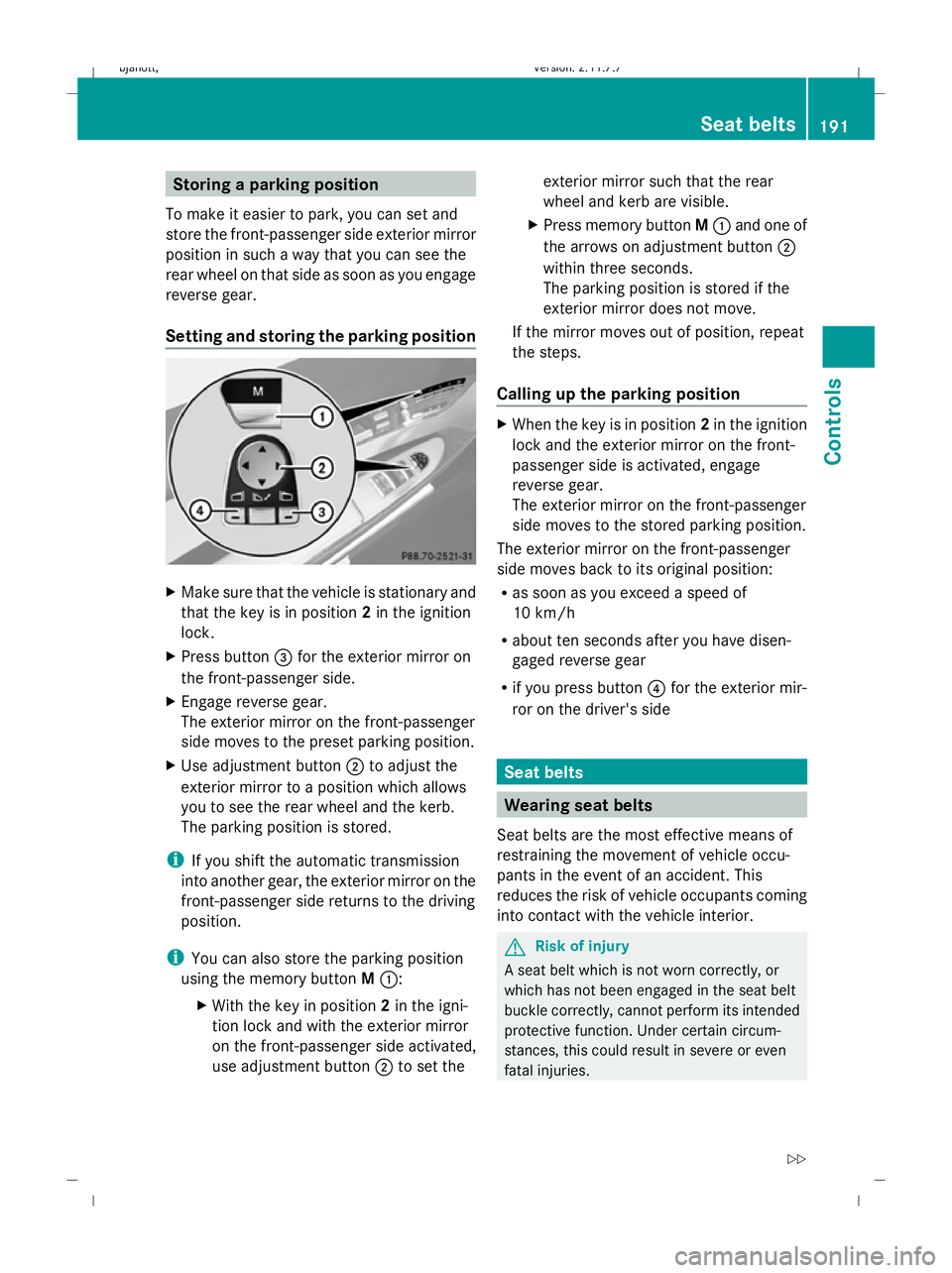
Storing a parking position
To make it easier to park, you can set and
store the front-passenger side exterior mirror
position in such a way that you can see the
rear wheel on that side as soon as you engage
reverse gear.
Setting and storing the parking position X
Make sure that the vehicle is stationary and
that the key is in position 2in the ignition
lock.
X Press button =for the exterior mirror on
the front-passenger side.
X Engage reverse gear.
The exterior mirror on the front-passenger
side moves to the preset parking position.
X Use adjustment button ;to adjust the
exterior mirror to a position which allows
you to see the rear wheel and the kerb.
The parking position is stored.
i If you shift the automatic transmission
into another gear, the exterior mirror on the
front-passenger side returns to the driving
position.
i You can also store the parking position
using the memory button M::
X With the key in position 2in the igni-
tion lock and with the exterior mirror
on the front-passenger side activated,
use adjustment button ;to set the exterior mirror such that the rear
wheel and kerb are visible.
X Press memory button M: and one of
the arrows on adjustment button ;
within three seconds.
The parking position is stored if the
exterior mirror does not move.
If the mirror moves out of position, repeat
the steps.
Calling up the parking position X
When the key is in position 2in the ignition
lock and the exterior mirror on the front-
passenger side is activated, engage
reverse gear.
The exterior mirror on the front-passenger
side moves to the stored parking position.
The exterior mirror on the front-passenger
side moves back to its original position:
R as soon as you exceed a speed of
10 km/h
R about ten seconds after you have disen-
gaged reverse gear
R if you press button ?for the exterior mir-
ror on the driver's side Seat belts
Wearing seat belts
Seat belts are the most effective means of
restraining the movement of vehicle occu-
pants in the event of an accident. This
reduces the risk of vehicle occupants coming
into contact with the vehicle interior. G
Risk of injury
A seat belt which is not worn correctly, or
which has not been engaged in the seat belt
buckle correctly, cannot perform its intended
protective function. Under certain circum-
stances, this could result in severe or even
fatal injuries. Seat belts
191Controls
216_AKB; 2; 3, en-GB
bjanott,V ersion: 2.11.7.7
2009-02-27T14:54:17+01:00 - Seite 191 Z
Dateiname: 6515230602_buchblock.pdf; erzeugt am 04. Mar 2009 11:15:42; WK
Page 258 of 421
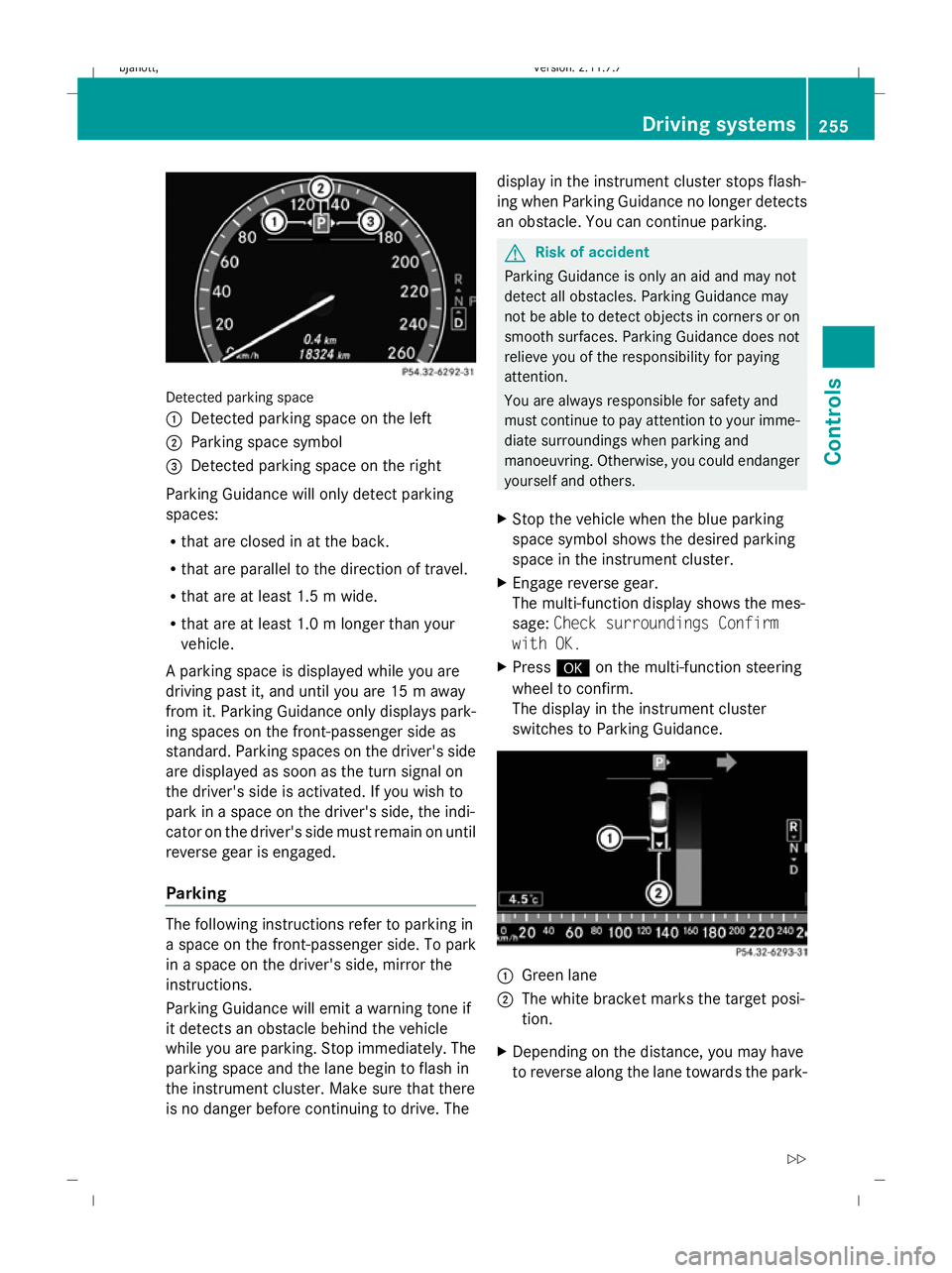
Detected parking space
1
Detected parking space on the left
2 Parking space symbol
3 Detected parking space on the right
Parking Guidance will only detect parking
spaces:
R that are closed in at the back.
R that are parallel to the direction of travel.
R that are at least 1.5 m wide.
R that are at least 1.0 m longer than your
vehicle.
A parking space is displayed while you are
driving past it, and until you are 15 m away
from it. Parking Guidance only displays park-
ing spaces on the front-passenger side as
standard. Parking spaces on the driver's side
are displayed as soon as the turn signal on
the driver's side is activated. If you wish to
park in a space on the driver's side, the indi-
cator on the driver's side must remain on until
reverse gear is engaged.
Parking The following instructions refer to parking in
a space on the front-passenger side. To park
in a space on the driver's side, mirror the
instructions.
Parking Guidance will emit a warning tone if
it detects an obstacle behind the vehicle
while you are parking. Stop immediately. The
parking space and the lane begin to flash in
the instrument cluster. Make sure that there
is no danger before continuing to drive. The display in the instrument cluster stops flash-
ing when Parking Guidance no longer detects
an obstacle. You can continue parking. G
Risk of accident
Parking Guidance is only an aid and may not
detect all obstacles. Parking Guidance may
not be able to detect objects in corners or on
smooth surfaces. Parking Guidance does not
relieve you of the responsibility for paying
attention.
You are always responsible for safety and
must continue to pay attention to your imme-
diate surroundings when parking and
manoeuvring. Otherwise, you could endanger
yourself and others.
X Stop the vehicle when the blue parking
space symbol shows the desired parking
space in the instrument cluster.
X Engage reverse gear.
The multi-function display shows the mes-
sage: Check surroundings Confirm
with OK.
X Press #on the multi-function steering
wheel to confirm.
The display in the instrument cluster
switches to Parking Guidance. 1
Green lane
2 The white bracket marks the target posi-
tion.
X Depending on the distance, you may have
to reverse along the lane towards the park- Driving systems
255Controls
216_AKB; 2; 3, en-GB
bjanott, Version: 2.11.7.7 2009-02-27T14:54:17+01:00 - Seite 255 Z
Dateiname: 6515230602_buchblock.pdf; erzeugt am 04. Mar 2009 11:16:05; WK
Page 260 of 421
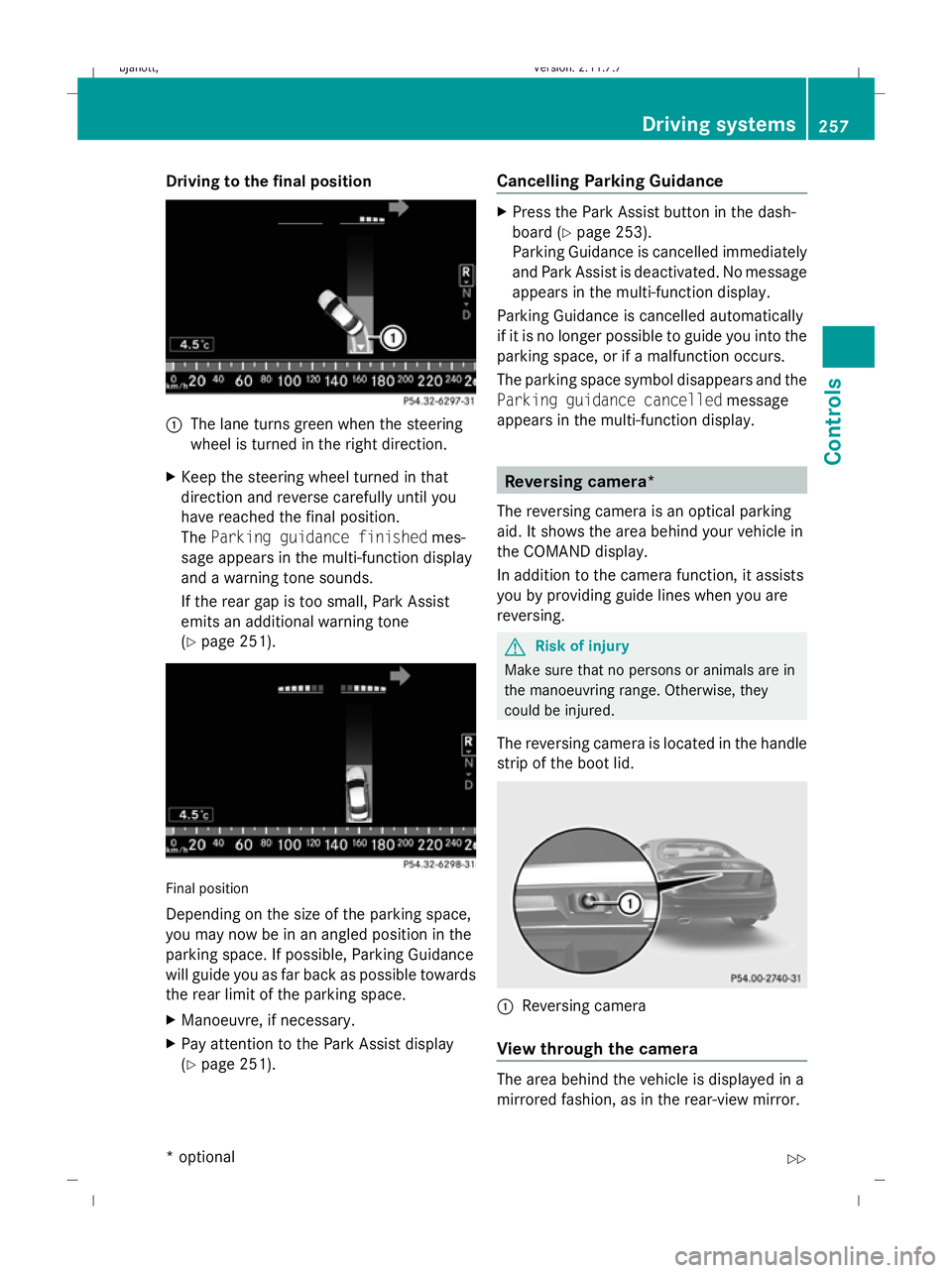
Driving to the final position
1
The lane turns green when the steering
wheel is turned in the right direction.
X Keep the steering wheel turned in that
direction and reverse carefully until you
have reached the final position.
The Parking guidance finished mes-
sage appears in the multi-function display
and a warning tone sounds.
If the rear gap is too small, Park Assist
emits an additional warning tone
(Y page 251). Final position
Depending on the size of the parking space,
you may now be in an angled position in the
parking space. If possible, Parking Guidance
will guide you as far back as possible towards
the rear limit of the parking space.
X
Manoeuvre, if necessary.
X Pay attention to the Park Assist display
(Y page 251). Cancelling Parking Guidance X
Press the Park Assist button in the dash-
board ( Ypage 253).
Parking Guidance is cancelled immediately
and Park Assist is deactivated. No message
appears in the multi-function display.
Parking Guidance is cancelled automatically
if it is no longer possible to guide you into the
parking space, or if a malfunction occurs.
The parking space symbol disappears and the
Parking guidance cancelled message
appears in the multi-function display. Reversing camera*
The reversing camera is an optical parking
aid. It shows the area behind your vehicle in
the COMAND display.
In addition to the camera function, it assists
you by providing guide lines when you are
reversing. G
Risk of injury
Make sure that no persons or animals are in
the manoeuvring range. Otherwise, they
could be injured.
The reversing camera is located in the handle
strip of the boot lid. :
Reversing camera
View through the camera The area behind the vehicle is displayed in a
mirrored fashion, as in the rear-view mirror. Driving syste
ms
257Controls
* option al
216_AKB; 2; 3, en-GB
bjanott
,V ersion: 2.11.7.7
2009-02-27T14:54:17+01:00 - Seite 257 Z
Dateiname: 6515230602_buchblock.pdf; erzeugt am 04. Mar 2009 11:16:06; WK
Page 265 of 421
Information and warning display
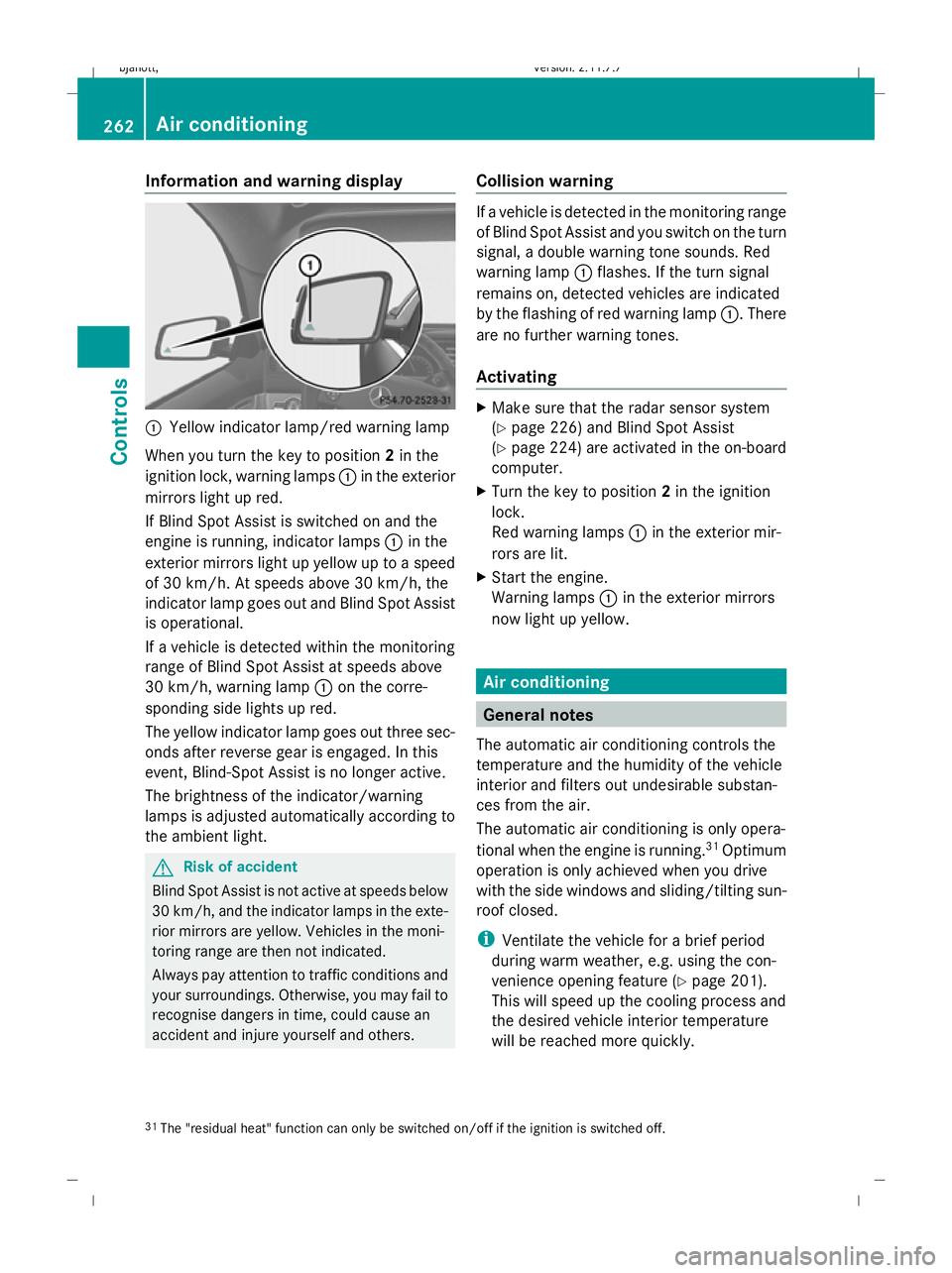
:
Yellow indicator lamp/red warning lamp
When you turn the key to position 2in the
ignition lock, warning lamps :in the exterior
mirrors light up red.
If Blind Spot Assist is switched on and the
engine is running, indicator lamps :in the
exterior mirrors light up yellow up to a speed
of 30 km/h. At speeds above 30 km/h, the
indicator lamp goes out and Blind Spot Assist
is operational.
If a vehicle is detected within the monitoring
range of Blind Spot Assist at speeds above
30 km/h, warning lamp :on the corre-
sponding side lights up red.
The yellow indicator lamp goes out three sec-
onds after reverse gear is engaged. In this
event, Blind-Spot Assist is no longer active.
The brightness of the indicator/warning
lamps is adjusted automatically according to
the ambient light. G
Risk of accident
Blind Spot Assist is not active at speeds below
30 km/h, and the indicator lamps in the exte-
rior mirrors are yellow. Vehicles in the moni-
toring range are then not indicated.
Always pay attention to traffic conditions and
your surroundings. Otherwise, you may fail to
recognise dangers in time, could cause an
accident and injure yourself and others. Collision warning If a vehicle is detected in the monitoring range
of Blind Spot Assist and you switch on the turn
signal, a double warning tone sounds. Red
warning lamp
:flashes. If the turn signal
remains on, detected vehicles are indicated
by the flashing of red warning lamp :. There
are no further warning tones.
Activating X
Make sure that the radar sensor system
(Y page 226) and Blind Spot Assist
(Y page 224) are activated in the on-board
computer.
X Turn the key to position 2in the ignition
lock.
Red warning lamps :in the exterior mir-
rors are lit.
X Start the engine.
Warning lamps :in the exterior mirrors
now light up yellow. Air conditioning
General notes
The automatic air conditioning controls the
temperature and the humidity of the vehicle
interior and filters out undesirable substan-
ces from the air.
The automatic air conditioning is only opera-
tional when the engine is running. 31
Optimum
operation is only achieved when you drive
with the side windows and sliding/tilting sun-
roof closed.
i Ventilate the vehicle for a brief period
during warm weather, e.g. using the con-
venience opening feature (Y page 201).
This will speed up the cooling process and
the desired vehicle interior temperature
will be reached more quickly.
31 The "residual heat" function can only be switched on/off if the ignition is switched off. 262
Air conditioningCont
rols
216_AKB; 2; 3, en-GB
bjanott, Version: 2.11.7.7 2009-02-27T14:54:17+01:00 - Seite 262
Dateiname: 6515230602_buchblock.pdf; erzeugt am 04. Mar 2009 11:16:09; WK
Page 284 of 421
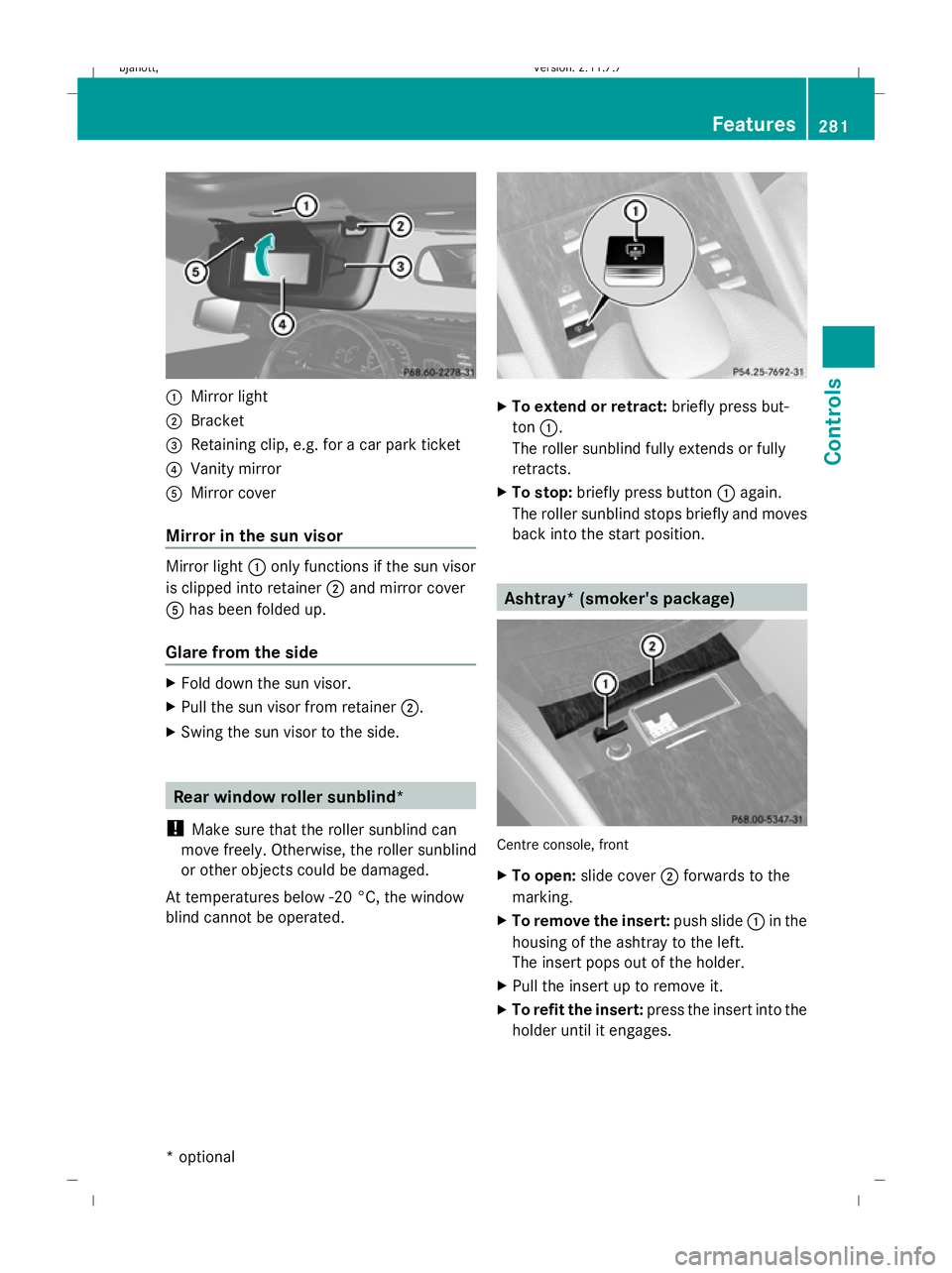
:
Mirror light
; Bracket
= Retaining clip, e.g. for a car park ticket
? Vanity mirror
A Mirror cover
Mirror in the sun visor Mirror light
:only functions if the sun visor
is clipped into retainer ;and mirror cover
A has been folded up.
Glare from the side X
Fold down the sun visor.
X Pull the sun visor from retainer ;.
X Swing the sun visor to the side. Rear window roller sunblind*
! Make sure that the roller sunblind can
move freely. Otherwise, the roller sunblind
or other objects could be damaged.
At temperatures below -20 °C, the window
blind cannot be operated. X
To extend or retract: briefly press but-
ton :.
The roller sunblind fully extends or fully
retracts.
X To stop: briefly press button :again.
The roller sunblind stops briefly and moves
back into the start position. Ashtray* (smoker's package)
Centre console, front
X
To open: slide cover ;forwards to the
marking.
X To remove the insert: push slide:in the
housing of the ashtray to the left.
The insert pops out of the holder.
X Pull the insert up to remove it.
X To refit the insert: press the insert into the
holder until it engages. Features
281Controls
* optional
216_AKB; 2; 3, en-GB
bjanott,V
ersion: 2.11.7.7
2009-02-27T14:54:17+01:00 - Seite 281 Z
Dateiname: 6515230602_buchblock.pdf; erzeugt am 04. Mar 2009 11:16:20; WK
Page 288 of 421
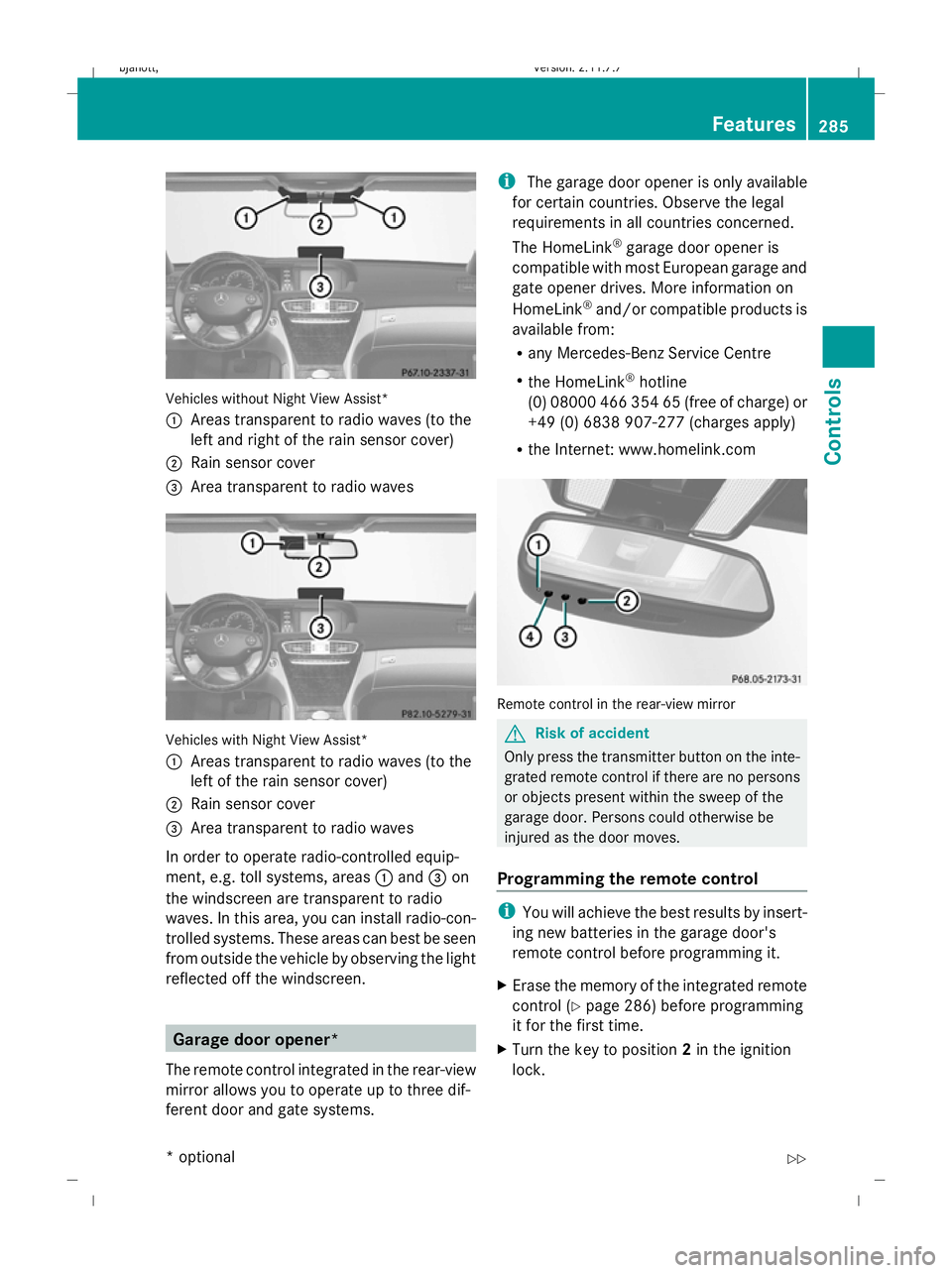
Vehicles without Night View Assist*
:
Areas transparent to radio waves (to the
left and right of the rain sensor cover)
; Rain sensor cover
= Area transparent to radio waves Vehicles with Night View Assist*
:
Areas transparent to radio waves (to the
left of the rain sensor cover)
; Rain sensor cover
= Area transparent to radio waves
In order to operate radio-controlled equip-
ment, e.g. toll systems, areas :and =on
the windscreen are transparent to radio
waves. In this area, you can install radio-con-
trolled systems. These areas can best be seen
from outside the vehicle by observing the light
reflected off the windscreen. Garage door opener*
The remote control integrated in the rear-view
mirror allows you to operate up to three dif-
ferent door and gate systems. i
The garage door opener is only available
for certain countries. Observe the legal
requirements in all countries concerned.
The HomeLink ®
garage door opener is
compatible with most European garage and
gate opener drives. More information on
HomeLink ®
and/or compatible products is
available from:
R any Mercedes-Benz Service Centre
R the HomeLink ®
hotline
(0) 08000 466 354 65 (free of charge) or
+49 (0) 6838 907-277 (charges apply)
R the Internet: www.homelink.com Remote control in the rear-view mirror
G
Risk of accident
Only press the transmitter button on the inte-
grated remote control if there are no persons
or objects present within the sweep of the
garage door. Persons could otherwise be
injured as the door moves.
Programming the remote control i
You will achieve the best results by insert-
ing new batteries in the garage door's
remote control before programming it.
X Erase the memory of the integrated remote
control (Y page 286) before programming
it for the first time.
X Turn the key to position 2in the ignition
lock. Features
285Controls
* optional
216_AKB; 2; 3, en-GB
bjanott,
Version: 2.11.7.7 2009-02-27T14:54:17+01:00 - Seite 285 Z
Dateiname: 6515230602_buchblock.pdf; erzeugt am 04. Mar 2009 11:16:23; WK
Page 289 of 421
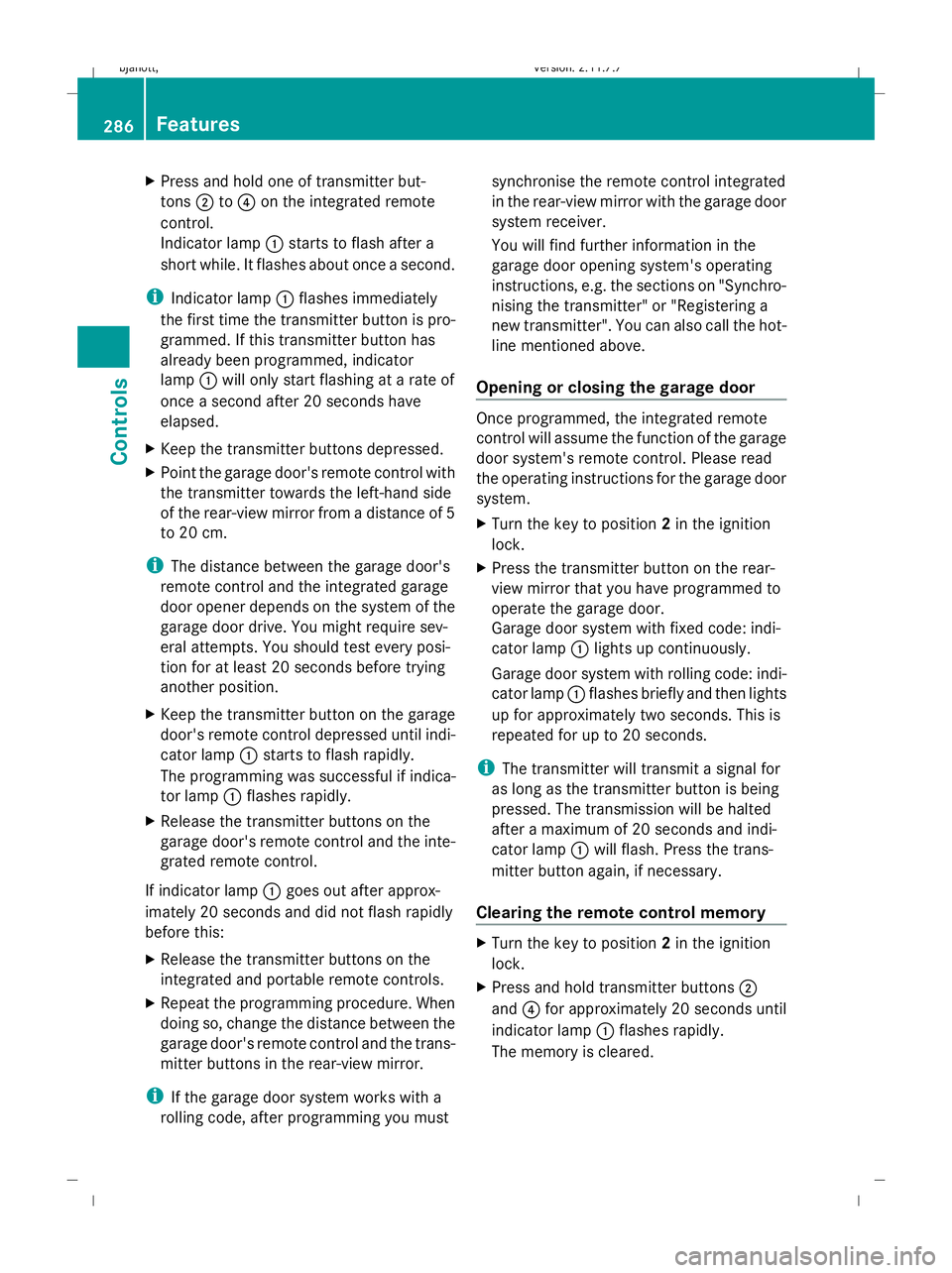
X
Press and hold one of transmitter but-
tons ;to? on the integrated remote
control.
Indicator lamp :starts to flash after a
short while. It flashes about once a second.
i Indicator lamp :flashes immediately
the first time the transmitter button is pro-
grammed. If this transmitter button has
already been programmed, indicator
lamp :will only start flashing at a rate of
once a second after 20 seconds have
elapsed.
X Keep the transmitter buttons depressed.
X Point the garage door's remote control with
the transmitter towards the left-hand side
of the rear-view mirror from a distance of 5
to 20 cm.
i The distance between the garage door's
remote control and the integrated garage
door opener depends on the system of the
garage door drive. You might require sev-
eral attempts. You should test every posi-
tion for at least 20 seconds before trying
another position.
X Keep the transmitter button on the garage
door's remote control depressed until indi-
cator lamp :starts to flash rapidly.
The programming was successful if indica-
tor lamp :flashes rapidly.
X Release the transmitter buttons on the
garage door's remote control and the inte-
grated remote control.
If indicator lamp :goes out after approx-
imately 20 seconds and did not flash rapidly
before this:
X Release the transmitter buttons on the
integrated and portable remote controls.
X Repeat the programming procedure. When
doing so, change the distance between the
garage door's remote control and the trans-
mitter buttons in the rear-view mirror.
i If the garage door system works with a
rolling code, after programming you must synchronise the remote control integrated
in the rear-view mirror with the garage door
system receiver.
You will find further information in the
garage door opening system's operating
instructions, e.g. the sections on "Synchro-
nising the transmitter" or "Registering a
new transmitter". You can also call the hot-
line mentioned above.
Opening or closing the garage door Once programmed, the integrated remote
control will assume the function of the garage
door system's remote control. Please read
the operating instructions for the garage door
system.
X Turn the key to position 2in the ignition
lock.
X Press the transmitter button on the rear-
view mirror that you have programmed to
operate the garage door.
Garage door system with fixed code: indi-
cator lamp :lights up continuously.
Garage door system with rolling code: indi-
cator lamp :flashes briefly and then lights
up for approximately two seconds. This is
repeated for up to 20 seconds.
i The transmitter will transmit a signal for
as long as the transmitter button is being
pressed. The transmission will be halted
after a maximum of 20 seconds and indi-
cator lamp :will flash. Press the trans-
mitter button again, if necessary.
Clearing the remote control memory X
Turn the key to position 2in the ignition
lock.
X Press and hold transmitter buttons ;
and ?for approximately 20 seconds until
indicator lamp :flashes rapidly.
The memory is cleared. 286
FeaturesControls
216_AKB; 2; 3, en-GB
bjanott,
Version: 2.11.7.7 2009-02-27T14:54:17+01:00 - Seite 286
Dateiname: 6515230602_buchblock.pdf; erzeugt am 04. Mar 2009 11:16:23; WK