towing MERCEDES-BENZ CL COUPE 2009 Owners Manual
[x] Cancel search | Manufacturer: MERCEDES-BENZ, Model Year: 2009, Model line: CL COUPE, Model: MERCEDES-BENZ CL COUPE 2009Pages: 421, PDF Size: 10.78 MB
Page 19 of 421
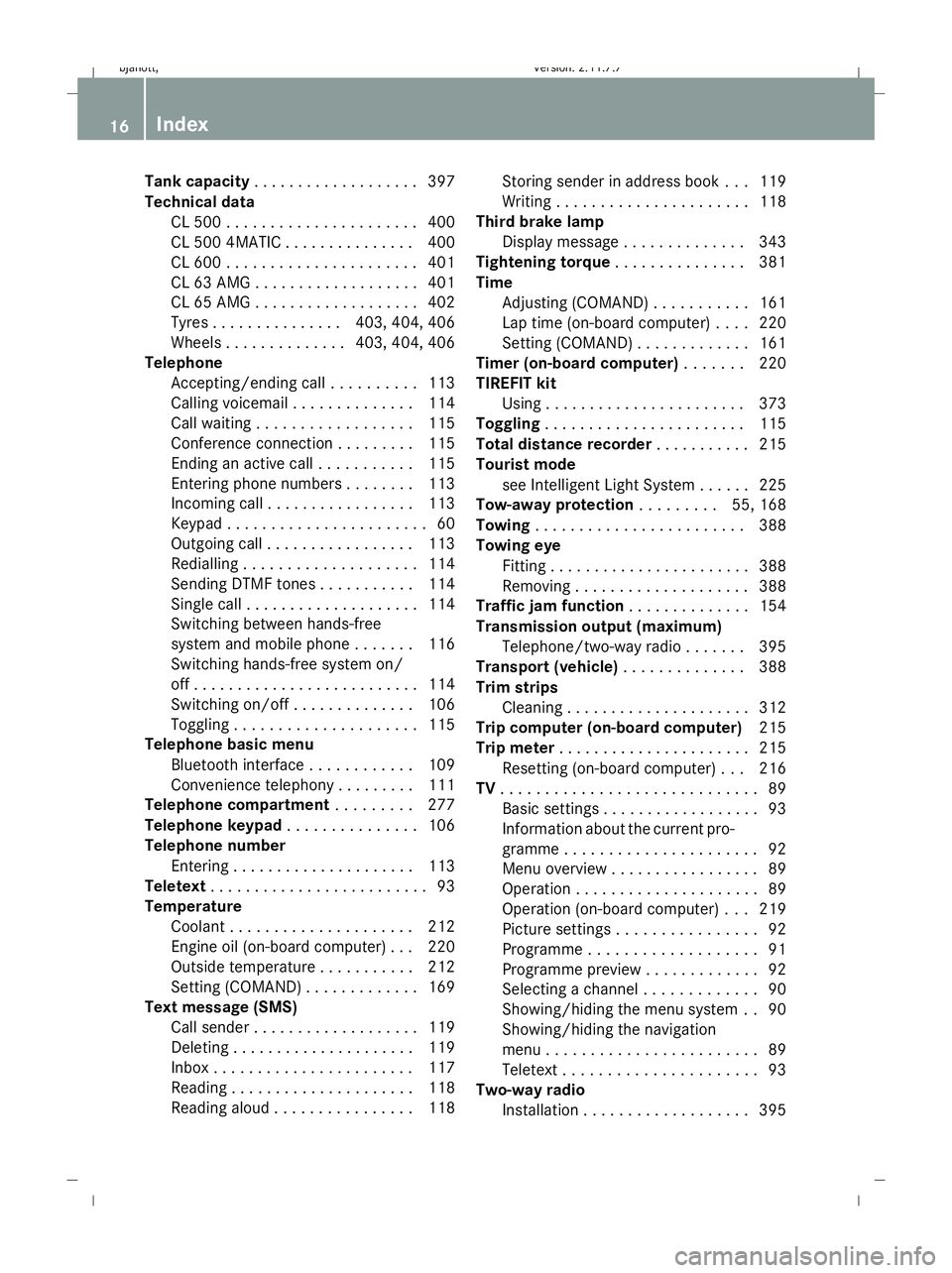
Tank capacity
. . . . . . . . . . . . . . . . . . .397
Technical data CL 500 . . . . . . . . . . . . . . . . . . . . . .400
CL 500 4MATIC . . . . . . . . . . . . . . .400
CL 600 . . . . . . . . . . . . . . . . . . . . . .401
CL 63 AMG . . . . . . . . . . . . . . . . . . .401
CL 65 AMG . . . . . . . . . . . . . . . . . . .402
Tyres . . . . . . . . . . . . . . .403, 404, 406
Wheels . . . . . . . . . . . . . .403, 404, 406
Telephone
Accepting/ending call . . . . . . . . . .113
Calling voicemai l.. . . . . . . . . . . . .114
Call waiting . . . . . . . . . . . . . . . . . .115
Conference connection . . . . . . . . .115
Ending an active call . . . . . . . . . . .115
Entering phone numbers . . . . . . . .113
Incoming call . . . . . . . . . . . . . . . . .113
Keypad . . . . . . . . . . . . . . . . . . . . . . .60
Outgoing call . . . . . . . . . . . . . . . . .113
Redialling . . . . . . . . . . . . . . . . . . . .114
Sending DTMF tones . . . . . . . . . . .114
Single call . . . . . . . . . . . . . . . . . . . .114
Switching between hands-free
system and mobile phone . . . . . . .116
Switching hands-free system on/
off . . . . . . . . . . . . . . . . . . . . . . . . . .114
Switching on/off . . . . . . . . . . . . . .106
Toggling . . . . . . . . . . . . . . . . . . . . .115
Telephone basic menu
Bluetooth interface . . . . . . . . . . . .109
Convenience telephony . . . . . . . . .111
Telephone compartment . . . . . . . ..277
Telephone keypad . . . . . . . . . . . . . ..106
Telephone number Entering . . . . . . . . . . . . . . . . . . . . .113
Teletext . . . . . . . . . . . . . . . . . . . . . . . . .93
Temperature Coolant . . . . . . . . . . . . . . . . . . . . .212
Engine oil (on-board computer) . . .220
Outside temperature . . . . . . . . . . .212
Setting (COMAND) . . . . . . . . . . . . .169
Text message (SMS)
Call sende r.. . . . . . . . . . . . . . . . . .119
Deleting . . . . . . . . . . . . . . . . . . . . .119
Inbox . . . . . . . . . . . . . . . . . . . . . . .117
Reading . . . . . . . . . . . . . . . . . . . . .118
Reading aloud . . . . . . . . . . . . . . . .118 Storing sender in address book . .
.119
Writing . . . . . . . . . . . . . . . . . . . . . .118
Third brake lamp
Display message . . . . . . . . . . . . . .343
Tightening torque . . . . . . . . . . . . . ..381
Time Adjusting (COMAND) . . . . . . . . . . .161
Lap time (on-board computer) . . . .220
Setting (COMAND) . . . . . . . . . . . . .161
Timer (on-board computer) . . . . . ..220
TIREFIT kit Using . . . . . . . . . . . . . . . . . . . . . . .373
Toggling . . . . . . . . . . . . . . . . . . . . . . .115
Total distance recorder . . . . . . . . . ..215
Tourist mode see Intelligent Light System . . . . . .225
Tow-away protection . . . . . . . ..55, 168
Towing . . . . . . . . . . . . . . . . . . . . . . . .388
Towing eye Fitting . . . . . . . . . . . . . . . . . . . . . . .388
Removing . . . . . . . . . . . . . . . . . . . .388
Traffic jam function . . . . . . . . . . . . ..154
Transmission output (maximum) Telephone/two-way radio . . . . . . .395
Transport (vehicle) . . . . . . . . . . . . ..388
Trim strips Cleaning . . . . . . . . . . . . . . . . . . . . .312
Trip computer (on-board computer) 215
Trip meter . . . . . . . . . . . . . . . . . . . . . .215
Resetting (on-board computer) . . .216
TV . . . . . . . . . . . . . . . . . . . . . . . . . . . . .89
Basic settings . . . . . . . . . . . . . . . . . .93
Information about the current pro-
gramme . . . . . . . . . . . . . . . . . . . . . .92
Menu overview . . . . . . . . . . . . . . . . .89
Operation . . . . . . . . . . . . . . . . . . . . .89
Operation (on-board computer) . . .219
Picture settings . . . . . . . . . . . . . . . .92
Programme . . . . . . . . . . . . . . . . . . .91
Programme preview . . . . . . . . . . . . .92
Selecting a channel . . . . . . . . . . . . .90
Showing/hiding the menu system . .90
Showing/hiding the navigation
menu . . . . . . . . . . . . . . . . . . . . . . . .89
Teletext . . . . . . . . . . . . . . . . . . . . . .93
Two-way radio
Installation . . . . . . . . . . . . . . . . . . .395 16
Index 216_AKB; 2; 3, en-GB
bjanott,
Version: 2.11.7.7 2009-02-27T14:54:17+01:00 - Seite 16Dateiname: 6515230602_buchblock.pdf; erzeugt am 04. Mar 2009 11:14:36; WK
Page 20 of 421
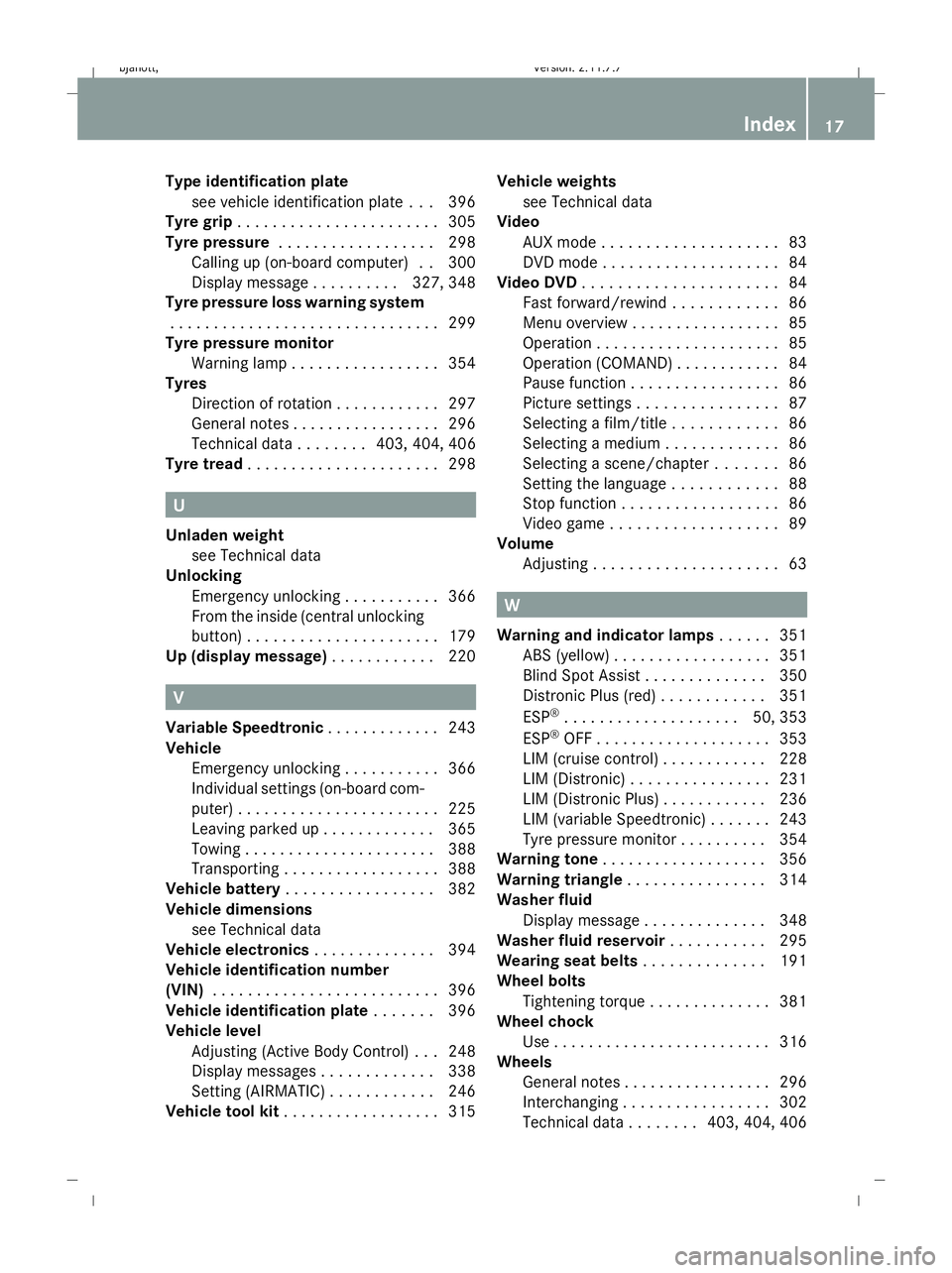
Type identification plate
see vehicle identification plate . . .396
Tyre grip . . . . . . . . . . . . . . . . . . . . . . .305
Tyre pressure . . . . . . . . . . . . . . . . . .298
Calling up (on-board computer) . .300
Display message . . . . . . . . . .327, 348
Tyre pressure loss warning system
. . . . . . . . . . . . . . . . . . . . . . . . . . . . . . .299
Tyre pressure monitor
Warning lamp . . . . . . . . . . . . . . . . .354
Tyres
Direction of rotatio n.. . . . . . . . . . .297
General notes . . . . . . . . . . . . . . . . .296
Technical data . . . . . . . .403, 404, 406
Tyre tread . . . . . . . . . . . . . . . . . . . . . .298 U
Unladen weight see Technical data
Unlocking
Emergency unlocking . . . . . . . . . . .366
From the inside (central unlocking
button) . . . . . . . . . . . . . . . . . . . . . .179
Up (display message) . . . . . . . . . . ..220 V
Variable Speedtronic . . . . . . . . . . . ..243
Vehicle Emergency unlocking . . . . . . . . . . .366
Individual settings (on-board com-
puter) . . . . . . . . . . . . . . . . . . . . . . .225
Leaving parked up . . . . . . . . . . . . .365
Towing . . . . . . . . . . . . . . . . . . . . . .388
Transporting . . . . . . . . . . . . . . . . . .388
Vehicle battery . . . . . . . . . . . . . . . . .382
Vehicle dimensions see Technical data
Vehicle electronics . . . . . . . . . . . . ..394
Vehicle identification number
(VIN) . . . . . . . . . . . . . . . . . . . . . . . . . .396
Vehicle identification plate . . . . . ..396
Vehicle level Adjusting (Active Body Control )...2 48
Display messages . . . . . . . . . . . . .338
Setting (AIRMATIC) . . . . . . . . . . . .246
Vehicle tool kit . . . . . . . . . . . . . . . . . .315 Vehicle weights
see Technical data
Video
AUX mode . . . . . . . . . . . . . . . . . . . .83
DVD mod e.. . . . . . . . . . . . . . . . . . .84
Video DVD . . . . . . . . . . . . . . . . . . . . . .84
Fast forward/rewind . . . . . . . . . . . .86
Menu overview . . . . . . . . . . . . . . . . .85
Operation . . . . . . . . . . . . . . . . . . . . .85
Operation (COMAND) . . . . . . . . . . . .84
Pause function . . . . . . . . . . . . . . . . .86
Picture settings . . . . . . . . . . . . . . . .87
Selecting a film/titl e.. . . . . . . . . ..86
Selecting a mediu m.. . . . . . . . . . . .86
Selecting a scene/chapter . . . . . . .86
Setting the languag e.. . . . . . . . . ..88
Stop function . . . . . . . . . . . . . . . . . .86
Video game . . . . . . . . . . . . . . . . . . .89
Volume
Adjusting . . . . . . . . . . . . . . . . . . . . .63 W
Warning and indicator lamps . . . . ..351
ABS (yellow) . . . . . . . . . . . . . . . . . .351
Blind Spot Assist . . . . . . . . . . . . . .350
Distronic Plus (red ).. . . . . . . . . ..351
ESP ®
. . . . . . . . . . . . . . . . . . . .50, 353
ESP ®
OFF . . . . . . . . . . . . . . . . . . . .353
LIM (cruise control) . . . . . . . . . . . .228
LIM (Distronic) . . . . . . . . . . . . . . . .231
LIM (Distronic Plus) . . . . . . . . . . . .236
LIM (variable Speedtronic) . . . . . . .243
Tyre pressure monitor . . . . . . . . . .354
Warning tone . . . . . . . . . . . . . . . . . . .356
Warning triangle . . . . . . . . . . . . . . . .314
Washer fluid Display message . . . . . . . . . . . . . .348
Washer fluid reservoir . . . . . . . . . ..295
Wearing seat belts . . . . . . . . . . . . ..191
Wheel bolts Tightening torqu e.. . . . . . . . . . . . .381
Wheel chock
Use . . . . . . . . . . . . . . . . . . . . . . . . .316
Wheels
General notes . . . . . . . . . . . . . . . . .296
Interchanging . . . . . . . . . . . . . . . . .302
Technical data . . . . . . . .403, 404, 406 Index
17 216_AKB; 2; 3, en-GB
bjanott,
Version: 2.11.7.7 2009-02-27T14:54:17+01:00 - Seite 17Dateiname: 6515230602_buchblock.pdf; erzeugt am 04. Mar 2009 11:14:36; WK
Page 27 of 421
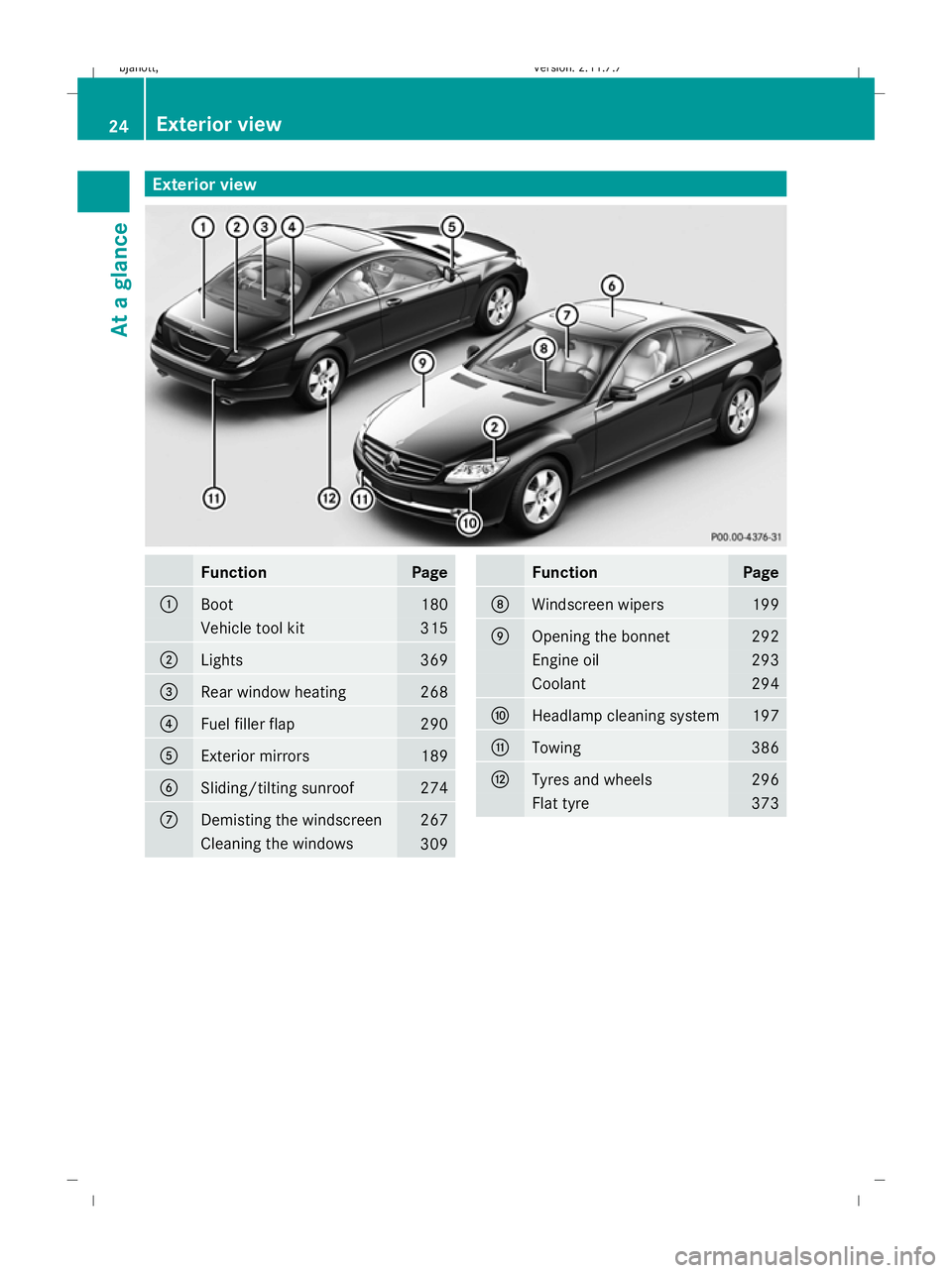
Exterior view
Function Page
:
Boot 180
Vehicle tool kit 315
;
Lights 369
=
Rear window heating 268
?
Fuel filler flap 290
A
Exterior mirrors 189
B
Sliding/tilting sunroof 274
C
Demisting the windscreen 267
Cleaning the windows
309 Function Page
D
Windscreen wipers 199
E
Opening the bonnet 292
Engine oil 293
Coolant 294
F
Headlamp cleaning system 197
G
Towing 386
H
Tyres and wheels 296
Flat tyre 37324
Exterior viewAt a glance
216_AKB; 2; 3, en-GB
bjanott
,V ersion: 2.11.7.7
2009-02-27T14:54:17+01:00 - Seite 24
Dateiname: 6515230602_buchblock.pdf; erzeugt am 04. Mar 2009 11:14:38; WK
Page 129 of 421
X
To install software: (Ypage 132).
i Do not cancel the installation process. If
you cancel the installation process, the
navigation system will not be operational.
GPS reception Amongst other things, correct functioning of
the navigation system depends on GPS recep-
tion. In certain situations, GPS reception may
be impaired, there may be interference or
there may be no reception at all, e.g. in tun-
nels, in multi-storey car parks or due to snow
on the GPS aerial. Remove any snow from the
GPS aerial. The GPS aerial is on the roof at
the rear.
Route guidance after vehicle transpor-
tation or exiting a multi-storey car park COMAND has to redetermine the position of
the vehicle if the vehicle has been transpor-
ted, e.g.:
R by ferry
R by motorail
R after towing
COMAND may also have to redetermine the
vehicle's position after exiting a multi-storey
car park.
Positioning takes place automatically even
when COMAND is switched off. The duration
will vary from one situation to another.
Route guidance may be restricted as follows
during vehicle positioning:
R navigation announcements, route guid-
ance displays and displayed street names
are not consistent with the actual location
of the vehicle.
R COMAND does not generate navigation
announcements.
R instead of the route guidance display, you
see the Street unknown. display and a
directional arrow. The directional arrow shows the compass heading to the desti-
nation.
When positioning is complete, route guidance
is resumed with navigation announcements
and route guidance displays.
Interrupting the journey during route
guidance i
Interrupting the journey means parking
the vehicle and switching off COMAND.
Continuing the journey means switching
COMAND on again and driving on.
The following applies if you interrupt the jour-
ney during route guidance and continue the
journey later on:
R COMAND resumes route guidance auto-
matically if you continue the journey within
2 hours.
R Route guidance is cancelled if you continue
the journey after more than 2 hours. It will
be necessary to resume the cancelled
route guidance manually.
Hard disk errors COMAND has an integrated hard disk on
which the map software is stored.
If an area of the hard disk has a fault,
COMAND can no longer access the map data
in this area, for example when calculating a
route.
The message: Navigation unavailable.
Please observe the Owner's Manual.
appears.
X To delete the message: switch COMAND
off and then on again.
If you switch the navigation system off/on, it
will be operational again until it has to access
the faulty area of the hard disk again.
The message will then appear again. Consult
a Mercedes-Benz Service Centre. 126
Navigation system* (introduction)COMAND
* optional
216_AKB; 2; 3, en-GB
bjanott,
Version: 2.11.7.7 2009-02-27T14:54:17+01:00 - Seite 126
Dateiname: 6515230602_buchblock.pdf; erzeugt am 04. Mar 2009 11:15:11; WK
Page 180 of 421
Opening and closing
.........................178
Boot .................................................... 180
Key positions .................................... 182
Seats .................................................. 183
Steering wheel .................................. 187
Mirrors ............................................... 189
Memory function .............................. 190
Seat belts ........................................... 191
Lights ................................................. 194
Windscreen wipers ...........................199
Side windows .................................... 200
Driving and parking ..........................202
Automatic transmission ...................206
Instrument cluster ............................212
On-board computer ..........................213
Driving systems ................................ 227
Air conditioning ................................. 262
Sliding sunroof .................................. 274
Loading and stowing ........................275
Features ............................................. 280 177Controls
216_AKB; 2; 3, en-GB
bjanott,
Version: 2.11.7.7 2009-02-27T14:54:17+01:00 - Seite 177
Dateiname: 6515230602_buchblock.pdf; erzeugt am 04. Mar 2009 11:15:35; WK
Page 249 of 421
X
Rapidly continue to depress the brake until
HOLD :appears in the instrument cluster.
HOLD is activated. You can release the
brake pedal.
i You cannot activate HOLD when Distronic
Plus* is activated.
i The brake pedal does not return com-
pletely to the rest position while HOLD is
activated.
i If HOLD is not activated when you
depress the brake pedal, wait for a short
time and then try again. G
Risk of accident
The vehicle's brakes are applied when HOLD
is activated. For this reason, deactivate HOLD
if the vehicle is to be set in motion by other
means (e.g. in a car wash or by towing).
Deactivating HOLD HOLD is deactivated if:
R
you depress the accelerator pedal with the
transmission in position Dor R.
R you shift the automatic transmission to P.
R you release the brakes fully and apply them
again with a certain amount of pressure
until HOLD goes out in the instrument clus-
ter.
R you secure the vehicle using the electric
parking brake.
R you activate Distronic Plus*.
i After a time, the electric parking brake
secures the vehicle and relieves the service
brake. G
Risk of accident
Never get out of the vehicle when HOLD is
activated.
HOLD must never be operated or deactivated
by a passenger or from outside the vehicle. HOLD does not replace the electric parking
brake and must not be used for parking.
The HOLD braking effect is cancelled and the
vehicle can start moving if:
R HOLD is deactivated by depressing the
accelerator pedal or the brake pedal.
R there is a malfunction in the system or an
interruption in the power supply, e.g. bat-
tery failure.
R the electrical system in the engine com-
partment, the battery or the fuses are tam-
pered with.
R the battery is disconnected. G
Risk of accident
If you wish to leave the vehicle or park it,
deactivate HOLD and secure the vehicle
against rolling away. AIRMATIC*
Vehicle level Your vehicle automatically adjusts its ride
height to reduce petrol consumption and
improve driving safety.
The "Normal" and "Raised" vehicle levels can
be set.
Depending on the vehicle height that has
been set, the vehicle automatically adjusts its
height dependent on the current speed. The
vehicle is lowered by up to 10 mm as the
speed increases. As the speed is reduced, the
vehicle is raised up to the set vehicle height.
Setting the vehicle level manually
Select the "Normal" setting for normal road
surfaces and "Raised" for driving with snow
chains or on particularly poor road surfaces.
G
Risk of injury
Make sure that nobody is in the vicinity of the
wheel housing or under the vehicle while low-
ering the vehicle when it is stationary. Other-
wise, limbs could become trapped. 246
Driving sys
temsControls
* optional
216_AKB; 2; 3, en-GB
bjanott,
Version: 2.11.7.7 2009-02-27T14:54:17+01:00 - Seite 246
Dateiname: 6515230602_buchblock.pdf; erzeugt am 04. Mar 2009 11:16:01; WK
Page 278 of 421
The sun protection cover automatically opens
along with the sliding/tilting sunroof. Once
you have closed the sliding/tilting sunroof,
you can close the cover by hand.
Closing with increased force and with-
out the anti-entrapment feature G
Risk of injury
You could be severely or even fatally injured
when closing the sliding/tilting sunroof with
increased force or without the anti-entrap-
ment feature. Make sure that nobody can
become trapped when closing the sliding/tilt-
ing sunroof.
If the sliding/tilting sunroof locks up during
closing:
X Immediately after it locks up, pull the
switch again to the pressure point in the
direction of arrow ;until the sliding/tilt-
ing sunroof is closed.
The sliding/tilting sunroof is closed with
more force.
If the sliding/tilting sunroof locks up during
closing again:
X Immediately after it locks up, pull the
switch again to the pressure point in the
direction of arrow ;until the sliding/tilt-
ing sunroof is closed.
The sliding/tilting sunroof is closed without
the anti-entrapment feature.
Rain closing feature* If the ignition key is removed and the vehicle
is locked, the sliding/tilting sunroof closes
automatically:
R if it starts to rain
R at extreme outside temperatures
R after six hours
R if there is a malfunction in the power supply
The rear of the sliding/tilting sunroof is then
raised in order to ventilate the interior of the
vehicle. i
The sliding/tilting sunroof is opened
slightly again if it is obstructed while being
closed by the rain closing feature. The rain
closing feature is then deactivated.
i The sliding/tilting sunroof does not close
if:
R it is raised at the rear.
R it is blocked.
R no rain is falling on the windscreen (e.g.
because the vehicle is under a bridge or
in a carport).
Resetting Reset the sliding/tilting sunroof if it does not
open smoothly.
X
Turn the key to position 2in the ignition
lock.
X The sliding/tilting sunroof is raised fully at
the rear.
X Keep the switch pressed for an additional
second.
X Make sure that the sliding/tilting sunroof
can be opened or closed fully again
(Y page 274).
X If this is not the case, consult a qualified
specialist workshop. Loading and stowing
Stowage compartments
G
Risk of injury
The stowage compartments must be closed
when items are stored in them. Luggage nets
are not designed to secure heavy items of
luggage.
You or other vehicle occupants could be
injured by objects being thrown around if you:
R brake sharply
R change direction suddenly
R have an accident Loading and stowing
275Controls
* optional
216_AKB; 2; 3, en-GB
bjanott,
Version: 2.11.7.7 2009-02-27T14:54:17+01:00 - Seite 275 Z
Dateiname: 6515230602_buchblock.pdf; erzeugt am 04. Mar 2009 11:16:14; WK
Page 279 of 421
Sharp-edged and fragile objects must not be
carried in the luggage net.
Do not carry hard objects in the ruffled pock-
ets. Objects must not protrude over the top
of the ruffled pockets.
Glove compartment i
Depending on the vehicle's equipment,
you will find the following installed in the
glove compartment: an audio and video
AUX jack, a USB socket or Media Inter-
face*, a universal interface for mobile
audio equipment, e.g. for an iPod, USB devi-
ces, and a bracket for a remote control *.
The glove compartment can be cooled
(Y page 266). X
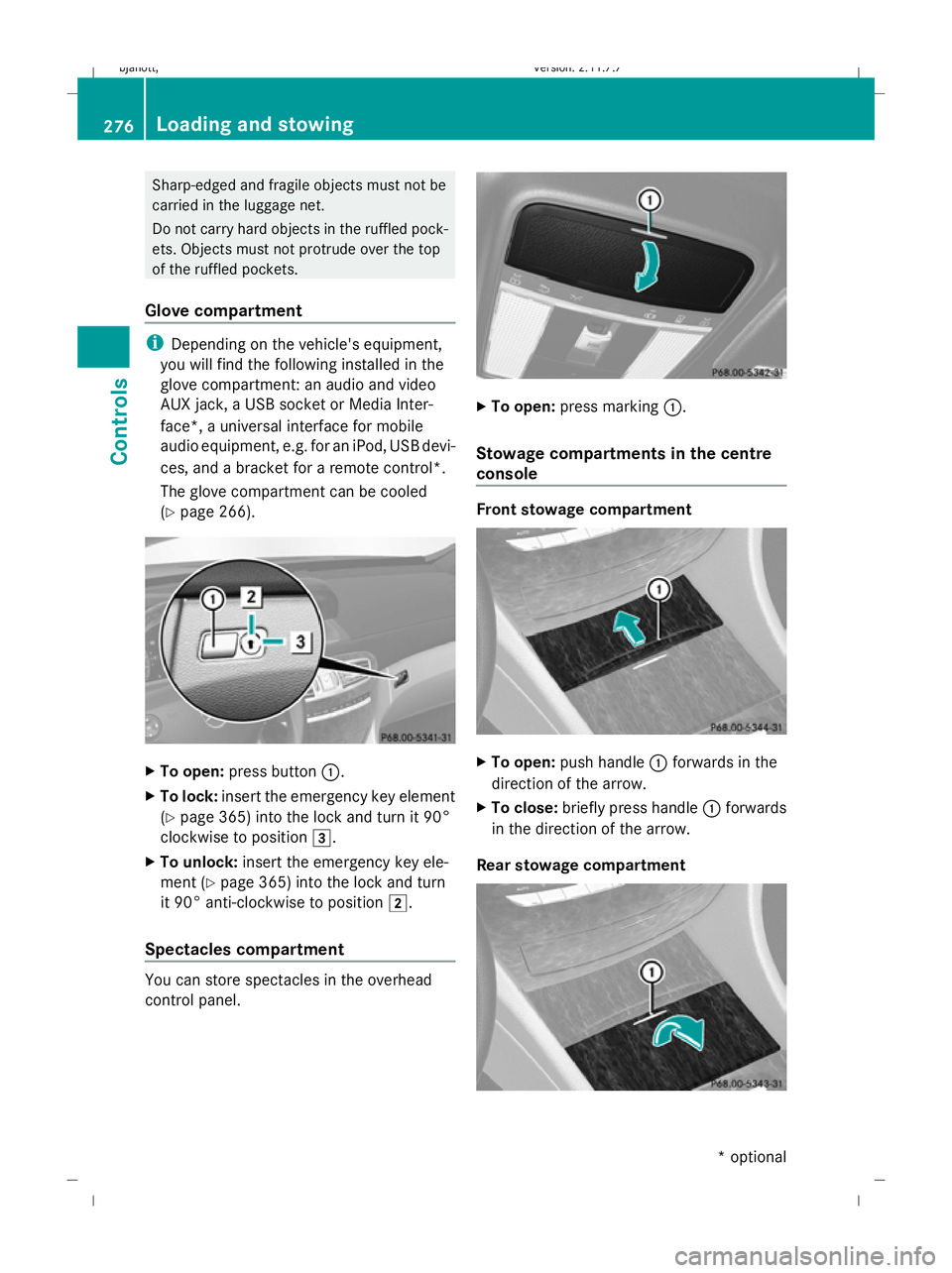
To open: press button :.
X To lock: insert the emergency key element
(Y page 365) into the lock and turn it 90°
clockwise to position 3.
X To unlock: insert the emergency key ele-
ment ( Ypage 365) into the lock and turn
it 90° anti-clockwise to position 2.
Spectacles compartment You can store spectacles in the overhead
control panel. X
To open: press marking :.
Stowage compartments in the centre
console Front stowage compartment
X
To open: push handle :forwards in the
direction of the arrow.
X To close: briefly press handle :forwards
in the direction of the arrow.
Rear stowage compartment 276
Loading and stowingControls
* optional
216_AKB; 2; 3, en-GB
bjanott,
Version: 2.11.7.7 2009-02-27T14:54:17+01:00 - Seite 276
Dateiname: 6515230602_buchblock.pdf; erzeugt am 04. Mar 2009 11:16:15; WK
Page 280 of 421
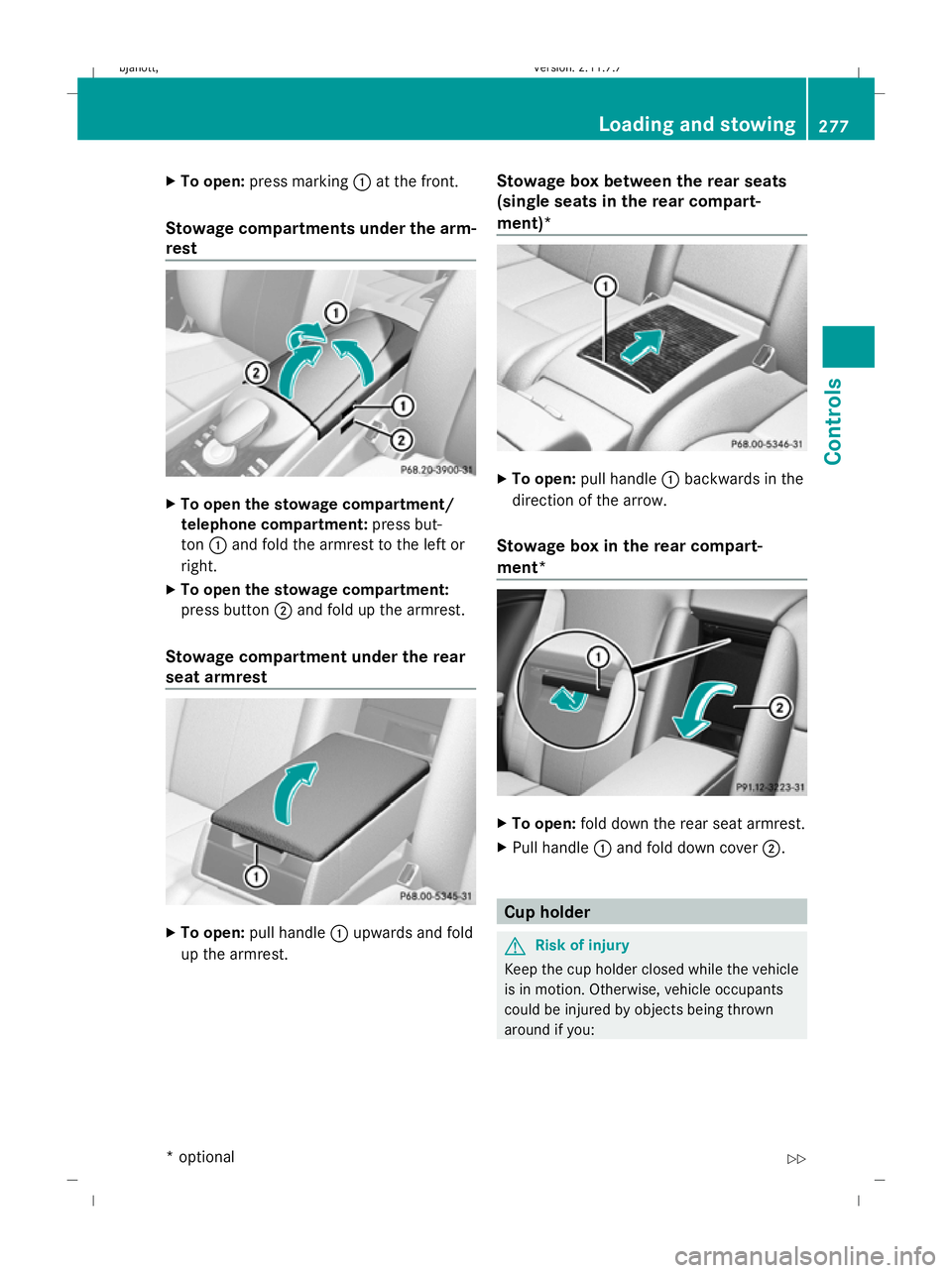
X
To open: press marking :at the front.
Stowage compartments under the arm-
rest X
To open the stowage compartment/
telephone compartment: press but-
ton :and fold the armrest to the left or
right.
X To open the stowage compartment:
press button ;and fold up the armrest.
Stowage compartment under the rear
seat armrest X
To open: pull handle :upwards and fold
up the armrest. Stowage box between the rear seats
(single seats in the rear compart-
ment)* X
To open: pull handle :backwards in the
direction of the arrow.
Stowage box in the rear compart-
ment* X
To open: fold down the rear seat armrest.
X Pull handle :and fold down cover ;. Cup holder
G
Risk of injury
Keep the cup holder closed while the vehicle
is in motion. Otherwise, vehicle occupants
could be injured by objects being thrown
around if you: Loading and stowing
277Controls
* optional
216_AKB; 2; 3, en-GB
bjanott,
Version: 2.11.7.7 2009-02-27T14:54:17+01:00 - Seite 277 Z
Dateiname: 6515230602_buchblock.pdf; erzeugt am 04. Mar 2009 11:16:17; WK
Page 281 of 421
R
brake sharply
R change direction suddenly
R are involved in an accident
Only use the cup holders for containers of a
suitable size and which have lids. Otherwise,
the drinks could spill.
Cup holders should not be used for hot drinks.
Otherwise, you may scald yourself.
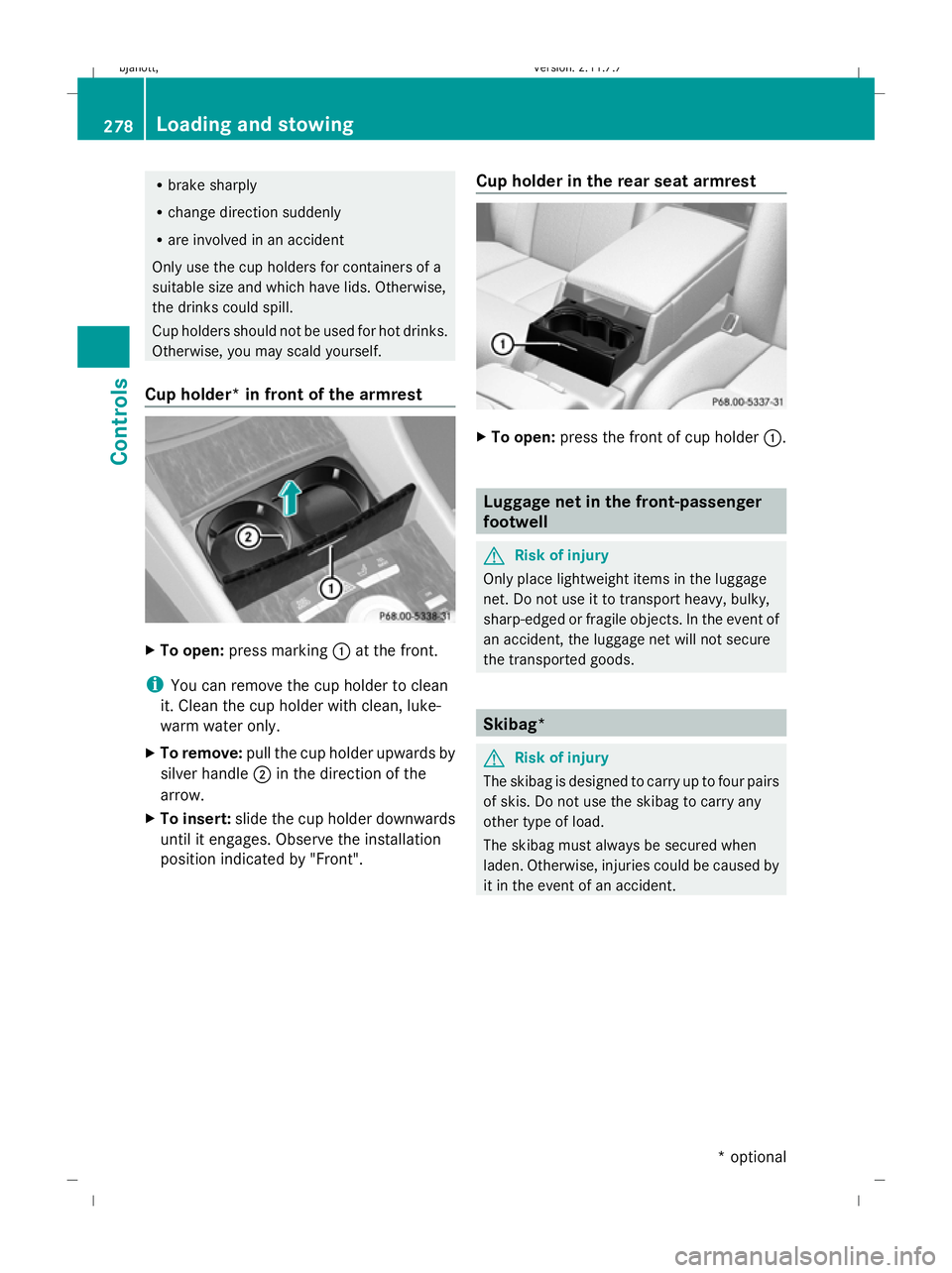
Cup holder* in front of the armrest X
To open: press marking :at the front.
i You can remove the cup holder to clean
it. Clean the cup holder with clean, luke-
warm water only.
X To remove: pull the cup holder upwards by
silver handle ;in the direction of the
arrow.
X To insert: slide the cup holder downwards
until it engages. Observe the installation
position indicated by "Front". Cup holder in the rear seat armrest X
To open: press the front of cup holder :. Luggage net in the front-passenger
footwell
G
Risk of injury
Only place lightweight items in the luggage
net. Do not use it to transport heavy, bulky,
sharp-edged or fragile objects. In the event of
an accident, the luggage net will not secure
the transported goods. Skibag*
G
Risk of injury
The skibag is designed to carry up to four pairs
of skis. Do not use the skibag to carry any
other type of load.
The skibag must always be secured when
laden. Otherwise, injuries could be caused by
it in the event of an accident. 278
Loading and stowingControls
* optional
216_AKB; 2; 3, en-GB
bjanott,
Version: 2.11.7.7 2009-02-27T14:54:17+01:00 - Seite 278
Dateiname: 6515230602_buchblock.pdf; erzeugt am 04. Mar 2009 11:16:17; WK