ABS MERCEDES-BENZ CLA 2018 User Guide
[x] Cancel search | Manufacturer: MERCEDES-BENZ, Model Year: 2018, Model line: CLA, Model: MERCEDES-BENZ CLA 2018Pages: 326, PDF Size: 7.97 MB
Page 163 of 326
Selecting Sport mode The firmer settin goft he suspension tuning in
the Sport drive program ensures even better
contact with the road. Select this drive program
when employing as porty driving style, e.g. on
winding countr yr oads.X
Press DYNAMI CS ELECT button ( Y
page 128)
as many times as necessary until the Sport
drive program is selected.
Parking Assist PARKTRONIC
Important safety notes Parking Assist PARKTRONIC is an electronic
parking aid with ultrasound. It monitor st he area
around your vehicle using six sensors in the
front bumper and six sensors in the rear
bumper. Parking Assist PARKTRONIC visually
and audibly indicates the distance between your
vehicle and an object.
Parking Assist PARKTRONIC is only an aid. It is
not ar eplacement for your attention to your
immediate surroundings. You are always
responsible for safe maneuvering, parking and
exiting ap arking space. Make sure that there
are no persons, animals or object sint he maneu-
vering area while maneuvering and parking in/
leaving parking spaces.
! When parking, pay particular attention to
object sa bove or below the sensors, such as
flower pots or trailer drawbars. Parking Assist
PARKTRONIC does not detect such objects
when they are in the immediate vicinity of the
vehicle. You could damage the vehicle or the
objects.
The sensors may not detect snow and other
object st hat absorb ultrasonic waves.
Ultrasonic sources such as an automatic car
wash, the compressed-air brakes of at ruck or
ap neumatic drill could cause Parking Assist
PARKTRONIC to malfunction.
Parking Assist PARKTRONIC may not function
correctly on uneven terrain.
Parking Assist PARKTRONIC is activated auto-
matically when you: R
switch on the ignition R
shift the transmission to position [ , ^ or
\\ R
release the electric parking brake Parking Assist PARKTRONIC is deactivated at
speeds above 11 mph (18 km/h). It is reactiva-
ted at lower speeds.
Range of the sensors General notes Parking Assist PARKTRONIC does not take into
account obstacles located: R
below the detection range, e.g. people, ani-
mals or objects. R
above the detection range, e.g. overhanging
loads, tail section sorl oading ramps of trucks.
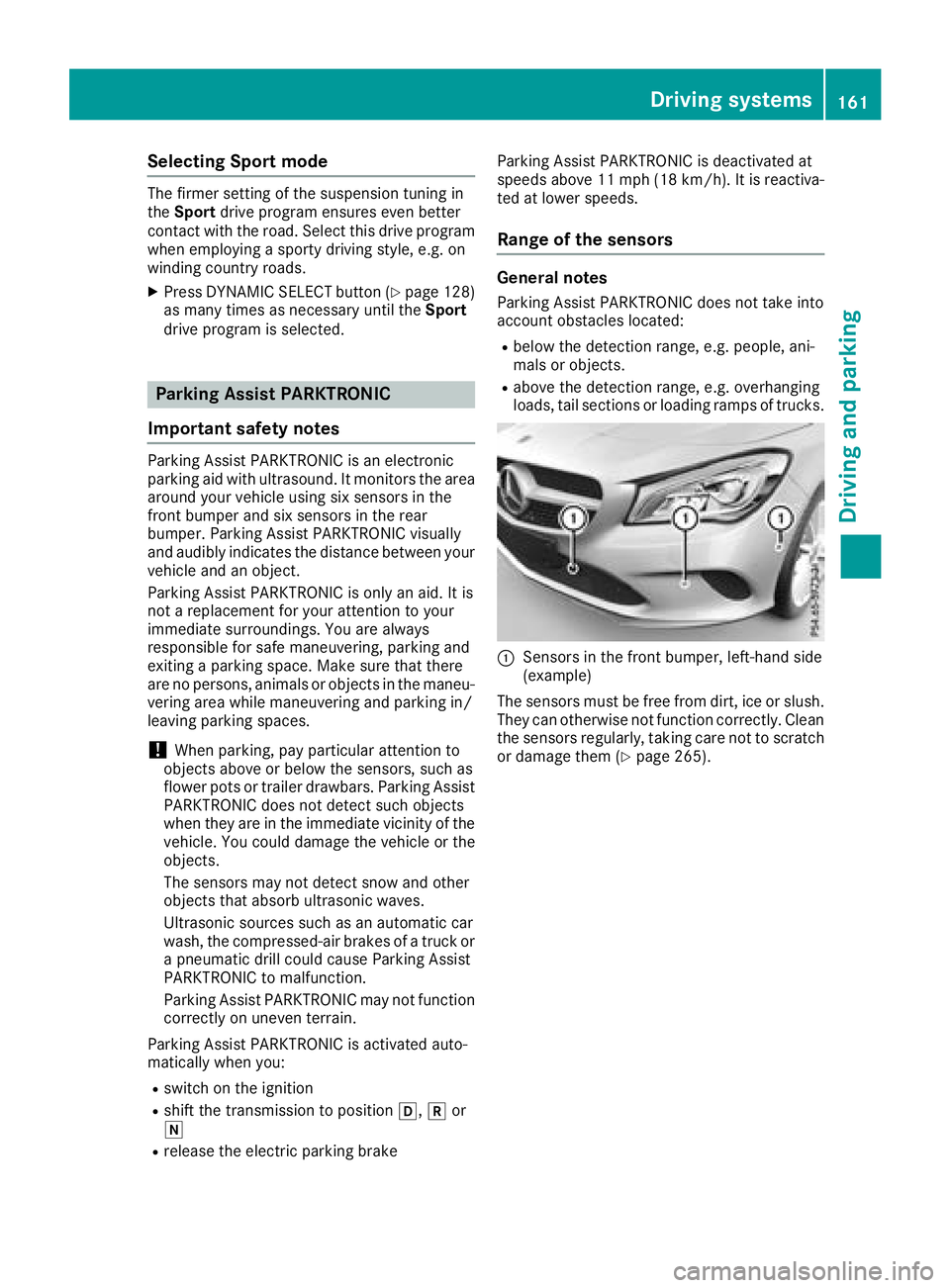
C
Sensors in the front bumper, left-hand side
(example)
The sensors must be free from dirt, ice or slush.
They can otherwise not function correctly. Clean
the sensors regularly ,t aking care not to scratch
or damage them ( Y
page 265).Driving systems 161
Driving and parking Z
Page 177 of 326
in green ( Y
page 185). Lane Keepin gA ssist is
ready for use.
If Standard is selected, no warnin gv ibration
occurs if: R
you have switched on the turn signal. In this
event, the warnings are suppressed for ac er-
tain period of time. R
ad rivin gs afet ys ystem intervenes ,e .g. ABS,
BA SorE SP ®
.
When Adaptive
is selected, no warnin gv ibra-
tion occurs if: R
you have switched on the turn signal. In this
event, the warnings are suppressed for ac er-
tain period of time. R
ad rivin gs afet ys ystem intervenes ,e .g. ABS,
BA SorE SP ®
.R
you accelerat eh ard, e.g. kickdown.R
you brak eh ard.R
you steer actively, e.g. swerv etoa void an
obstacle or change lanes quickly. R
you cut the corner on as harp bend.
In order that you are warne do nly when neces-
sary and in good tim eify ou cross the lane mark-
ing, the system detect sc ertain condition sa nd
warns you accordingly.
The warnin gv ibration occurs earlier if:R
you approac ht he outer lane marking on a
bend R
the road has very wide lanes, e.g. af reewayR
the system detect ss olid lane markings
The warnin gv ibration occurs later if:R
the road has narrow lanes. R
you cut the corner on ab end Driving systems 175
Driving and parking Z
Page 222 of 326
Warning/
indicator
lamp Q Signal type
Possibl ec auses/consequences and P Solutions
%
Q The yellow ABS warning lamp is lit while the engine is running.
ABS (Anti-lock Braking System) is deactivated due to am alfunction. Therefore,
BAS (Brake Assist), Active Brake Assist, ESP ®
(Electronic Stability Program), the
HOLD function and hil ls tart assist, for example, are als od eactivated.
ATTENTION ASSIST is deactivated.
G WARNING
The brake system continues to function normally, but without the functions listed
above. The wheels coul dt herefore lock if you brake hard ,f or example.
The steerability and braking characteristics may be severely affected. The braking
distance in an emergency braking situation can increase.
If ESP ®
is not operational ,E SP ®
is unable to stabilize the vehicle.
There is an increased risk of skidding and an accident. X
Observe the additiona ld isplay messages in the multifunction display.X
Drive on carefully. X
Visi taq ualified specialist worksho pi mmediately.
If the ABS control unit is faulty, there is als oap ossibility that other systems ,s uch
as the navigation system or the automatic transmission, wil ln ot be available.
%
Q The yellow ABS warning lamp is lit while the engine is running.
ABS is temporarily unavailable .T herefore, BAS, Active Brake Assist, ESP ®
,E BD
(electronic brake force distribution), the HOLD function and hil ls tart assist, for
example, are als od eactivated.
Possible causes are: R
Self-diagnosi sisn ot yet complete.R
The on-board voltag em ay be insufficient.
ATTENTION ASSIST is deactivated.
G WARNING
The brake system continues to function normally, but without the functions listed
above. The front and rear wheels coul dt herefore lock if you brake hard ,f or exam-
ple.
The steerability and braking characteristics may be severely affected. The braking
distance in an emergency braking situation can increase.
If ESP ®
is not operational ,E SP ®
is unable to stabilize the vehicle.
There is ar isk of an accident.X
Carefully drive as uitable distance, making slight steering movements at as peed
above 12 mph (20 km/h).
The functions mentioned above are available again when the warning lamp goes
out.
If the warning lamp is still on: X
Observe the additiona ld isplay messages in the multifunction display.X
Drive on carefully. X
Visi taq ualified specialist worksho pi mmediately.220
Warning and indicator lamps in the instrument cluster
On-board computer and displays
Page 223 of 326
Warning/
indicator
lamp Q Signal type
Possibl ec auses/consequences and P Solutions
%
Q The yellow ABS warning lamp is lit while the engine is running. Aw arning tone
als os ounds.
EBD is malfunctioning. Therefore, ABS, BAS, Active Brake Assist, ESP ®
,t he HOLD
function and hil ls tart assist, for example, are not available either.
ATTENTION ASSIST is deactivated.
G WARNING
The brake system continues to function normally, but without the functions listed
above. The front and rear wheels coul dt herefore lock if you brake hard ,f or exam-
ple.
The steerability and braking characteristics may be severely affected. The braking
distance in an emergency braking situation can increase.
If ESP ®
is not operational ,E SP ®
is unable to stabilize the vehicle.
There is an increased risk of skidding and an accident. X
Observe the additiona ld isplay messages in the multifunction display.X
Drive on carefully. X
Visi taq ualified specialist worksho pi mmediately.
%
Page 277 of 326
If at ire pressure of 200 kPa (2.0 bar/29 psi) has
been attained after ten minutes: X
Switch off the tire inflation compressor. X
Unscrew the fille rh ose from the valve of the
faulty tire.
Note that tire sealant may escape when you
unscrew the fille rh ose.X
USA only: Stow the tire sealant bottle and the
tire inflation compressor. X
Pull away immediately .X
Stop after driving for approximately ten
minutes and check the tire pressure with the
tire inflation compressor.
The tire pressure must now be at least
130 kPa (1.3 bar/19 psi).
G WARNING
If the required tire pressure is not reached
after driving for as hort period ,t he tire is too
badl yd amaged. The tire sealant cannot repair
the tire in this instance. Damaged tires and a
tire pressure that is too low can significantly
impair the vehicle's braking and driving char-
acteristics. There is ar isk of accident.
Do not continue driving. Contact aq ualified
specialist workshop.
i USA only: In cases such as the one men-
tioned above ,c ontact an authorized
Mercedes-Benz Center. Or call
1-800-FOR-MERCedes (in the USA) or
1-800-387-0100 (in Canada). X
USA only: Correct the tire pressure if it is still
at least 130 kPa (1.3 bar/19 psi). See the Tire
and Loading Information placard on the driv-
er's side B-pilla rort he tire pressure table in
the fuel fille rf lap for values.X
To increase the tire pressure: switch on the
tire inflation compressor. X
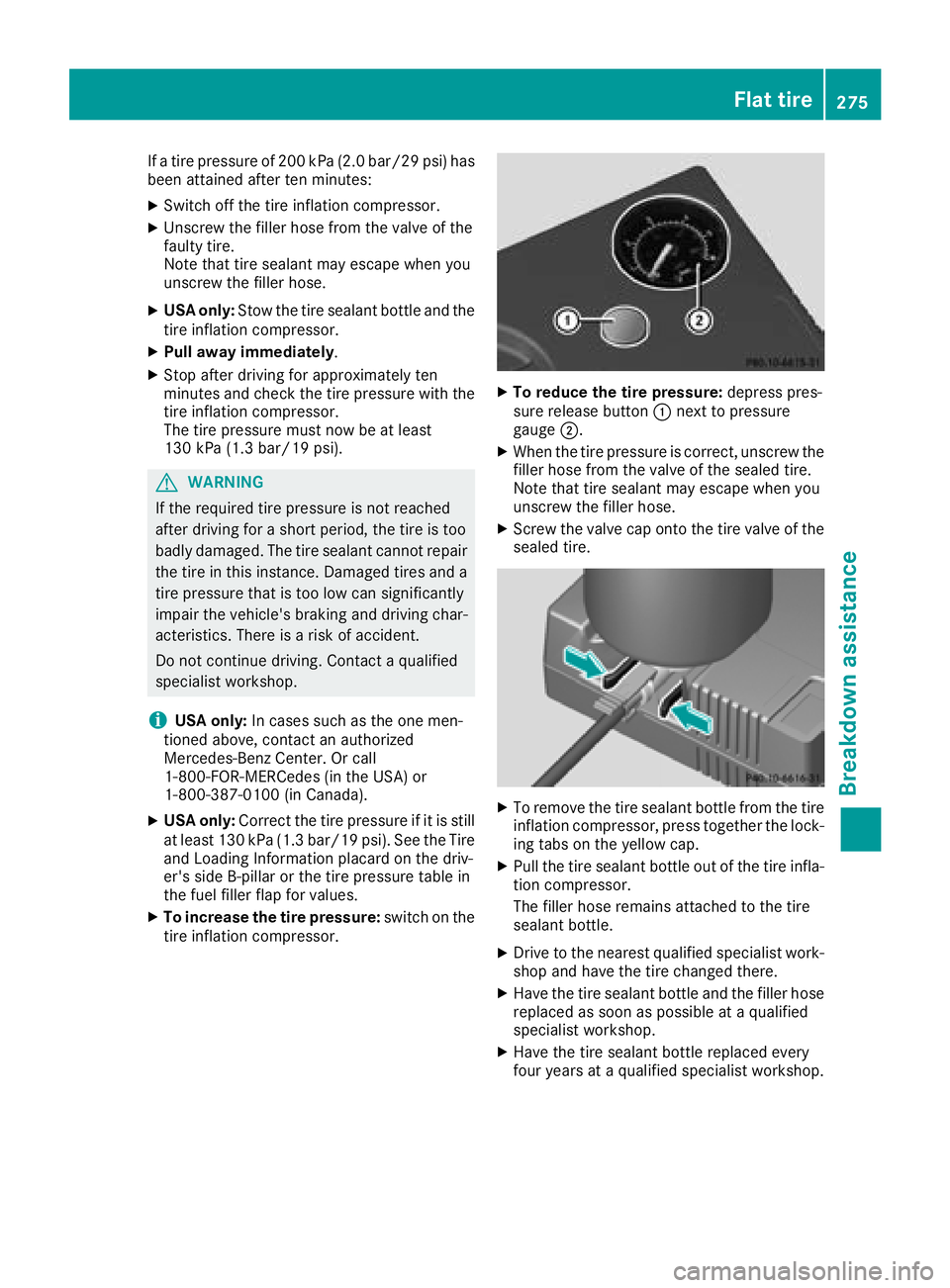
To reduce the tire pressure: depres sp res-
sure release button C next to pressure
gauge D . X
When the tire pressure is correct, unscrew the
fille rh ose from the valve of the sealed tire.
Note that tire sealant may escape when you
unscrew the fille rh ose.X
Screw the valve cap onto the tire valve of the
sealed tire.
X
To remove the tire sealant bottle from the tire
inflation compressor, press together the lock-
ing tabs on the yellow cap. X
Pul lt he tire sealant bottle out of the tire infla-
tion compressor.
The fille rh ose remains attached to the tire
sealant bottle. X
Drive to the nearest qualifie ds pecialist work-
shop and have the tire changed there. X
Have the tire sealant bottle and the fille rh ose
replaced as soon as possible at aq ualified
specialist workshop. X
Have the tire sealant bottle replaced every
four years at aq ualifie ds pecialist workshop.Flat tire 275
Breakdow na ssistance Z
Page 278 of 326
Battery (vehicle)
Important safety notes Specia lt ool sa nd expert knowledg ea re required
when working on the battery ,e .g .r emova la nd
installation. Yo us houl dt herefore have al lw or k
involving the battery carrie do ut at aq uali fied
specialist workshop.
G WARNING
Wor kc arrie do ut incorrectly on the battery
can lead ,f or example, to as hort circui ta nd
thu sd amag et he vehicl ee le ctronics .T hi sc an
lead to functio nr estrictions applying to
safety-relevant systems, e.g the lighting sys-
tem, the ABS (anti-lock braking system )ort he
ESP ®
(Electronic Stability Program). The oper-
ating safety of your vehicl em ay be restricted.
Yo uc ould lose contro loft he vehicle, for
example: R
when braking R
in the event of abrupt steering maneuvers
and/or when the vehicle's speed is not
adapted to the roa dc onditions
There is ar is kofana ccident.
In the event of as hort circui tora similar inci-
dent, contact aq uali fied specialist workshop
immediately. Do not drive any further .Y ou
shoul dh av ea ll work involving the battery car-
rie do ut at aq uali fied specialist workshop.
For further informatio na bout ABS and ESP ®
,
see ( Y
page 61 )a nd ( Y
page 64).
G WARNING
Electrostati cb uild -u pc an lead to the creation
of sparks, which could ignite the highl ye xplo-
sive gases of ab at tery .T here is ar is kofa n
explosion.
Before handling the battery ,t ouch the vehicle
body to remove any existing electrostatic
build-up.
The highl yf lammabl eg as mixture form sw he n
charging the battery as well as when jump-start-
ing. Alway sm ak es ur et ha tn either yo un or the bat-
tery is electrostaticall yc harged. Ab uild -u po f
electrostatic charge can be caused ,f or exam-
ple: R
by wearing clothing made from synthetic
fibers R
du etof rictio nb et ween clothing and seatsR
if yo up us horp ul lt he battery across the car-
pe toro the rs yn theti cm at erialsR
if yo ur ub the battery with ac loth
G WARNING
During the charging process ,ab at tery produ-
ces hydrogen gas. If as hort circui to ccurs or
sparks are created ,t he hydrogen ga sc an
ignite .T here is ar is kofane xplosion.R
Make sure tha tt he positive terminal of a
connected battery does not come into con-
tact with vehicl ep ar ts.R
Never place meta lo bj ects or tool sonab at -
tery. R
It is important tha ty ou observe the descri-
be do rder of the battery terminal sw he n
connecting and disconnecting ab at tery.R
Whe nj ump-starting ,m ak es ur et ha tt he
battery pole sw it hi de ntical polarity are
connected. R
It is particularly important to observe the
describe do rder when connecting and dis-
connecting the jumper cables. R
Never connect or disconnect the battery
terminal sw hile the engine is running.
G WARNING
Battery aci disc austic .T here is ar is kofi njury.
Avoi dc ontact with skin, eyes or clothing. Do
not inhal ea ny battery gases .Don ot lean over
the battery .K ee pc hildren away from batter-
ies. Wash away battery aci di mmediatel yw it h
plenty of clean water and see km edica la tten-
tion.
H Environmental note
Batterie sc ontain dangerous
substances. It is against the
la wtod is pose of them with276
Battery (vehicle)
Breakdo wn assis tance
Page 314 of 326
Whee la nd tire combinations
General notes You can ask for information regarding permitted
wheel/tire combinations at an authorized
Mercedes-Benz Center.
You should regularl yc heck the pressure of the
emergency spare wheel, particularly prio rt o
long trips, and correct the pressure as neces-
sary ( Y
pag e2 90). The valu eont he wheel is
valid.
! For safety reasons, Mercedes-Benz recom-
mends that you only use tires and wheels
which have been approved by Mercedes-Benz
specifically for you rv ehicle.
These tires have been speciall ya dapted for
use with the control systems, such as ABS or
ESP ®
,a nd are marked as follows:R
MO = M ercedes-Benz OriginalR
MOE = M ercedes-Benz Original Extended
(tires featuring run-fla tc haracteristics)R
MO1 = M ercedes-Benz Original (only cer-
tain AMG tires)
Mercedes-Benz Original Extended tires may
only be use donw heels that have been spe-
cifically approved by Mercedes-Benz.
Only use tires, wheels or accessories tested
and approved by Mercedes-Benz. Certain
characteristics, e.g. handling, vehicl en oise
emissions or fuel consumption, may other-
wis ebea dversely affected .Ina ddition, when
driving with al oad, tire dimension variations
coul dc aus et he tires to come into contact
with the bodywork and axle components. This
coul dr esult in damage to the tires or the vehi-
cle.
Mercedes-Benz accepts no liability for dam-
age resulting from the use of tires, wheels or
accessories other than those tested and
approved.
Informatio nont ires, wheels and approved
combinations can be obtained from any quali-
fied specialist workshop.
! Retreaded tires are neither tested nor rec-
ommende dbyM ercedes-Benz, since previ-
ous damage cannot alway sbed etected on
retreaded tires. As ar esult, Mercedes-Benz
cannot guarantee vehicl es afety if retreaded
tires are mounted .Don ot mount use dt ires if
you have no information abo ut thei r previous
u
sage. The recommende dp ressures for various oper-
ating conditions can be found: R
on the Tire and Loading Informatio np lacard
on the B-pillar on the driver's side R
in the tire pressure tabl eint he fuel filler flap
Observe the notes on recommende dt ire pres-
sure su nder various operating conditions
( Y
pag e2 90).
Check tire pressures regularly ,a nd only when
the tires are cold. Comply with the maintenance
recommendations of the tire manufacturer in
the vehicl ed ocument wallet.
Notes on the vehicl ee quipment –a lway se quip
the vehicle: R
with tires of the same size on ag ive na xle (left
and right) R
with the same type of tire (summer tires,
MOExtended tires, winter tires)
Exception: it is permissible to instal lad iffer-
ent type or make in the event of af lat tire.
Observe the "MOExtended tires (tires with
run-fla tc haracteristics" section ( Y
pag e2 71).
Vehicles equipped with MOExtended tires are
not equipped with aT IREFIT kit at the factory .I t
is therefore recommende dt hat you additionally
equip you rv ehicl ew ith aT IREFIT kit if you mount
tires that do not feature run-fla tp roperties, e.g.
winter tires. AT IREFIT kit may be obtained from
aq ualified specialist workshop.312
Whee la nd tire combinations
Wheels and tires
Page 320 of 326
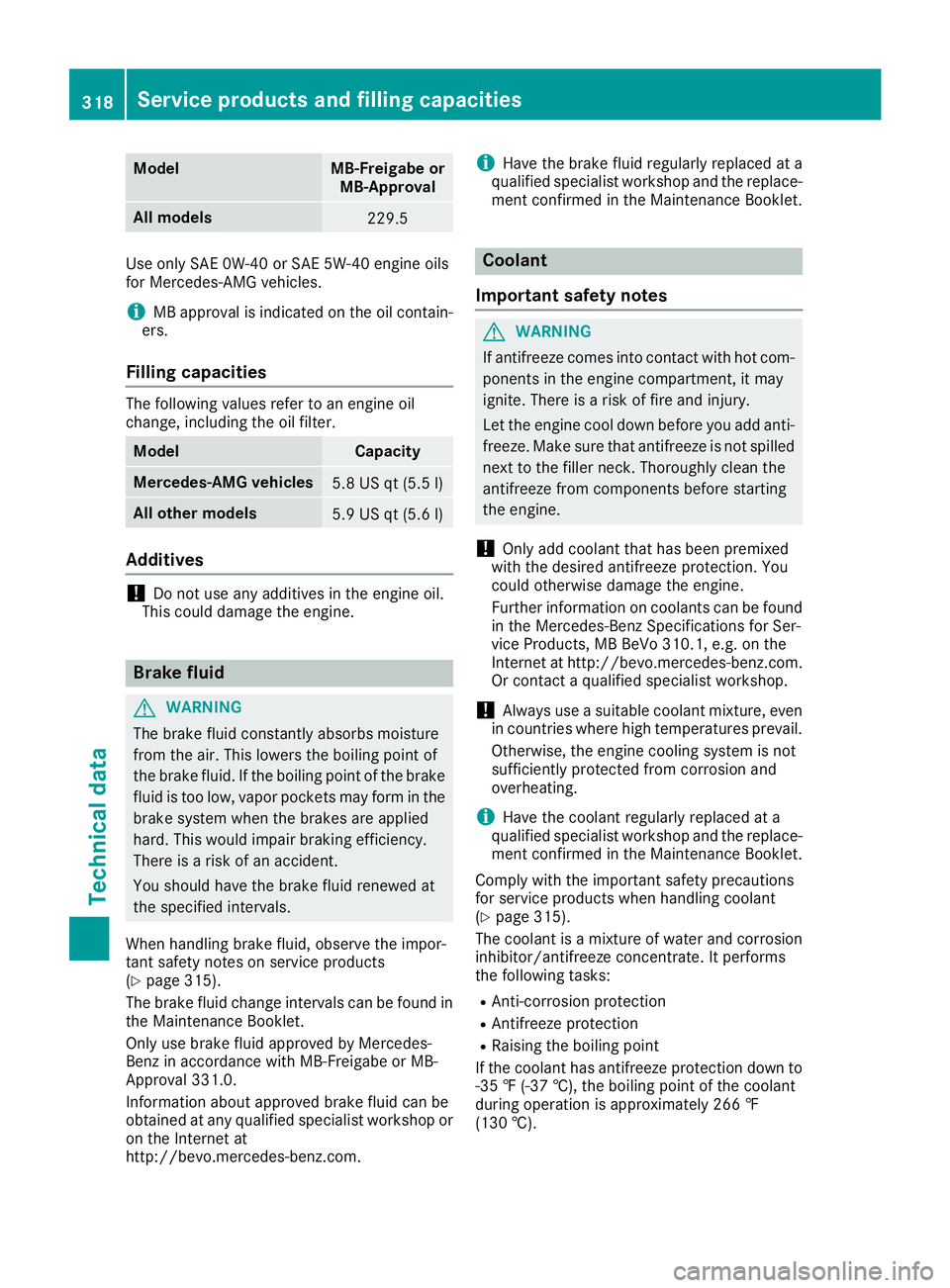
Model MB-Freigabe or
MB-Approval
All models
229.5
Use only SAE 0W-40 or SAE 5W-40 engine oils
for Mercedes-AMG vehicles.
i MB approval is indicated on the oil contain-
ers.
Fillin gc apacitiesThe following values refer to an engine oil
change, including the oil filter.
Model Capacity
Mercedes ‑ AM Gv ehicles
5.8 US qt (5.5 l)
All other models
5.9 US qt (5.6 l)
Additives
! Do not use any additives in the engine oil.
This could damage the engine.
Brake fluid
G WARNING
The brake flui dc onstantly absorbs moisture
from the air. This lowers the boiling point of
the brake fluid. If the boiling point of the brake
flui dist oo low ,v apo rp ockets may form in the
brake system when the brakes are applied
hard. This would impair braking efficiency.
There is ar isk of an accident.
You should have the brake flui dr enewe da t
the specified intervals.
When handling brake fluid, observe the impor-
tant safety notes on service products
( Y
pag e3 15).
The brake flui dc hange interval sc an be found in
the Maintenance Booklet.
Only use brake flui da pproved by Mercedes-
Benz in accordance with MB-Freigabe or MB-
Approva l3 31.0.
Information about approved brake flui dc an be
obtained at any qualified specialist workshop or
on the Internet at
http://bevo.mercedes-benz.com. i Have the brake flui dr egularl yr eplaced at a
qualified specialist workshop and the replace-
ment confirmed in the Maintenance Booklet.
Coolant
Important safety notes
G WARNING
If antifreeze comes into contact with hot com-
ponents in the engine compartment, it may
ignite. There is ar isk of fire and injury.
Let the engine cool down before you add anti-
freeze. Make sure that antifreeze is not spilled
next to the filler neck. Thoroughly clea nt he
antifreeze from components before starting
the engine.
! Only add coolant that has been premixed
with the desired antifreeze protection. You
coul do therwise damage the engine.
Further information on coolants can be found
in the Mercedes-Benz Specifications for Ser-
vice Products, MB BeVo 310.1, e.g. on the
Internet at http://bevo.mercedes-benz.com.
Or contact aq ualified specialist workshop.
! Always use as uitable coolant mixture, even
in countries where high temperatures prevail.
Otherwise, the engine cooling system is not
sufficiently protected from corrosio na nd
overheating.
i Have the coolant regularl yr eplaced at a
qualified specialist workshop and the replace-
ment confirmed in the Maintenance Booklet.
Comply with the important safety precautions
for service products when handling coolant
( Y
pag e3 15).
The coolant is am ixture of water and corrosion
inhibitor/antifreeze concentrate. It performs
the following tasks: R
Anti-corrosion protection R
Antifreeze protection R
Raising the boiling point
If the coolant has antifreeze protection down to
-35 ‡( -37 †), the boiling point of the coolant
during operation is approximatel y2 66 ‡
(130 †).318
Servic ep roducts and filling capacities
Technical data