automatic transmission MERCEDES-BENZ CLA 2018 Owners Manual
[x] Cancel search | Manufacturer: MERCEDES-BENZ, Model Year: 2018, Model line: CLA, Model: MERCEDES-BENZ CLA 2018Pages: 326, PDF Size: 7.97 MB
Page 7 of 326
Information abou tS ervice ............ .2 61
Resetting the service interva ld is-
pla y. ............................................... 261
Service message ............................ 261
Specia ls ervice requirements ......... 261
ATA (Anti-Theft Alarm system)
Activating/deactivating ................... 68
Function .......................................... .6 8
Switching off the alarm .................... 68
ATTENTIO NA SSIS T
Activating/deactivating ................. 185
Displa ym essage ............................ 207
Function/note s. ............................ 171
Audi om en u( on -board computer) .... 182
Audi os ystem
see separate operating instructions
Authorized Mercedes-Benz Center
see Qualifie ds pecialist workshop
Authorized workshop
see Qualifie ds pecialist workshop
AUTO lights
Displa ym essage ............................ 204
see Lights
Automatic car was h( ca re) ............... 262
Automatic engine start (ECO start/
sto pf unction) .................................... 126
Automatic engine switch-off (ECO
start/sto pf unction) .......................... 126
Automatic headlamp mode .............. 100
Automatic transmission
Accelerator peda lp osition ............. 133
Changing gea r. .............................. 133
DIREC TS ELECT lever ..................... 130
Drive progra m. ............................... 134
Drive progra md is play .................... 130
Driving tip s. ................................... 133
DYNAMIC SELECT button (all vehi-
cle se xcept Mercedes-AM Gv ehi-
cles) ............................................... 128
DYNAMIC SELECT controller
(Mercedes-AM Gv ehicles) .............. 129
Emergency running mod e. ............. 138
Engaging drive position .................. 132
Engaging neutral ............................ 131
Engaging park position
(Mercedes-AM Gv ehicles) .............. 132 Engaging park position automati-
cally ............................................... 131
Engaging reverse gea r. .................. 131
Engaging the park position ............ 130
Holding the ve hi cl es tationary on
uphill gradients .............................. 134
Kickdow n. ...................................... 134
Manua ls hifting .............................. 136
Oil temperature (on-board com-
puter, Mercedes-AM Gv ehicles) ..... 188
Overview ........................................ 130
Problem (malfunction) ................... 138
Pulling away ................................... 125
Selector lever ................................ 132
Starting the engine ........................ 124
Steering whee lp addl es hifters ...... 136
Transmission position display ........ 132
Transmission position display
(DIRECT SELECT lever) ................... 130
Transmission positions .................. 133
Automatic transmissio ne mer-
genc ym ode ....................................... 138
B
Back button ....................................... 230
Backup lamp
Displa ym essage ............................ 203
BAS (Brake Assist System) ................. 61
Battery (SmartKey)
Checking .......................................... 73
Important safety notes .................... 73
Replacing ......................................... 73
Battery (vehicle)
Charging ........................................ 278
Displa ym essage ............................ 206
Important safety notes .................. 276
Jump starting ................................. 278
Belt
see Sea tb el ts
Bel tw arning ......................................... 44
Blind Spo tA ssis t
Activating/deactivating (on-
board computer) ............................ 186
Displa ym essage ............................ 208
Notes/function .............................. 172
Bluetooth ®
Searching for am obil ep hone ........ 233Index 5
Page 15 of 326
Downloading destinations
(COMAND) .................................... .2 48
Downloading route s. ...................... 251
Emergency call .............................. 246
General notes ................................ 245
Geo fencing ................................... 251
Locating as tole nv ehicle .............. .2 50
MB info call button ........................ 247
Remote fault diagnosi s. ................. 250
Remote vehicl el oc king .................. 250
Roadsid ea ss istance button ........... 247
Search &S end ............................... 249
Self-test ......................................... 245
Speed alert .................................... 251
System .......................................... 245
Triggering the vehicl ea la rm ........... 252
Vehicl er emote unlocking .............. 249
Mechanical key
Function/note s. ............................... 72
Inserting .......................................... 72
Locking vehicl e. ............................... 77
Removing ......................................... 72
Unlocking the driver' sd oo r. ............. 77
Memory card (audio) ......................... 183
Memory function ................................. 98
Messag em emory (on-board com-
puter) .................................................. 191
Messages
see Displa ym essages
Mirro rt urn signal
Cleaning ......................................... 265
Mirrors
see Exterior mirrors
see Rear-vie wm irror
see Vanity mirror (i nt he su nv isor)
Mobil ep hone
Connecting (Bluetooth ®
inter-
face ). ............................................. 233
Connecting (device manager ). ....... 234
Frequencie s. .................................. 313
Installation ..................................... 313
Menu (on-board computer) ............ 183
Transmission outpu t( maximum) .... 313
Modifying the programming
(SmartKey) ........................................... 72
MOExtende dt ires .............................. 271 Mounting wheels
Lowering the vehicl e. ..................... 311
Mounting an ew whee l. .................. 310
Preparing the vehicl e. .................... 308
Raising the vehicl e. ........................ 309
Removing aw heel .......................... 310
Securing the vehicl ea gains tr oll-
ing away ........................................ 309
MP3
Operation ....................................... 183
se e also Digital Operator's Man-
ua l. ................................................. 229
Multifunctio nd isplay
Function/note s. ............................ 179
Permanent display ......................... 187
Multifunctio ns teering wheel
Operating the on-board compute r. .1 77
Overview .......................................... 34
Multimedia system
Switching on and off ..................... .2 30
Music files
see also Digita lO perator's Man-
ua l. ................................................ .2 29
N
Navigation
Entering ad estination .................... 231
Menu (on-board computer) ............ 181
see also Digita lO perator's Man-
ua l. ................................................ .2 29
Notes on breaking-i nan ew vehi-
cle ....................................................... 121
O
Occupant Classification System
(OCS)
Conditions ....................................... 48
Faults ............................................... 51
Operation ......................................... 48
System self-test ............................... 50
Occupant safety
Air bag s. ......................................... .4 5
Automatic measures after an acci-
dent ................................................. 54
Bel tw ar ning ..................................... 44
Childre nint he vehicl e. .................... 54
Important safety note s. ................... 40Index 13
Page 17 of 326
Warning lamp ................................. 224
Parking lamps
Switching on/off ........................... 101
Parking Pilot
Canceling ....................................... 167
Detecting parking spaces .............. 164
Display Message ........................... .2 08
Exiting ap arking space .................. 166
Function/notes ............................ .1 64
Important safety notes .................. 164
Parking .......................................... 165
PASSENGE RA IR BAG
Display message ............................ 200
Indicator lamps ................................ 41
Problem (malfunction) ................... 200
Pets in the vehicle ............................... 60
Phon eb ook
see also Digita lO perator's Man-
ua l. ................................................ .2 29
Plastic trim (cleaning instruc-
tions) ................................................. .2 66
Power washers .................................. 263
Power windows
see Side windows
Protection against theft
ATA (Anti-Theft Alarm system) ......... 68
Immobilize r. ..................................... 68
Protection of the environment
General notes .................................. 24
Pulling away
Automatic transmission ................. 125
General notes ................................ 125
Hill start assist ............................... 125
Q
QR code
Mercedes-Benz Guide App ................. 1
Rescue card ..................................... 29
Qualifie ds pecialist workshop ........... 28
R
RAC ES TART
Important safety notes .................. 158
RAC ES TART (Mercedes-AMG vehi-
cles) .................................................... 158 RAC ET IMER (on-board computer,
Mercedes-AMG vehicles) .................. 189
Radio
Selecting as tatio n. ........................ 182
see separate operating instructions
Radio mode
see also Digita lO perator's Man-
ua l. ................................................ .2 29
Radio-wave reception/transmis-
sio nint he vehicle
Declaratio nofc onformity ................ 27
Rain closing feature (panorama
roof with power tilt/sliding panel) .... 87
Readin gl amp ..................................... 103
Rear compartment
Setting the ai rv ents ..................... .1 20
Rear fog lamp
Display message ............................ 203
Replacing bulbs ............................ .1 06
Switching on/off ........................... 101
Rear lamps
see Lights
Rear seats
Folding the backres tf orwards/
back ............................................... 240
Rear vie wc amera
"Reverse parking" function ............ 169
Cleaning instructions ..................... 265
Display in the multimedi as ystem .. 168
Function/notes ............................ .1 67
General notes ................................ 167
Switching on/off ........................... 168
Rear window defroster
Problem (malfunction) ................... 119
Switching on/off ........................... 119
Rear-vie wm irror
Anti-glare (manual ). ......................... 96
Dipping (automatic) ......................... 97
Reflectiv es afety jacket .................... 269
Refrigerant (air-conditioning sys-
tem)
Important safety notes .................. 319
Refueling
Fuel gauge ....................................... 33
Important safety notes .................. 138
Refueling proces s. ......................... 139
see Fuel Index 15
Page 22 of 326
Traction (definition ). ...................... 307
Tread wear .................................... .3 01
Uniform Tire Quality Grading
Standard s. ..................................... 301
Uniform Tire Quality Grading
Standard s( definition) .................... 306
Wea ri ndicator (definition) ............. 307
Whee lr im (definition) .................... 306
see Flat tire
Top Tether ............................................ 57
Tow-starting
Emergency engine starting ............ 284
Important safety notes .................. 281
Installing the towing ey e. ............... 282
Removing the towing ey e. ............. .2 82
Towing at railer
ESP ®
(Electroni cS tability Pro-
gram) ............................................... 67
Towing away
Important safety guidelines ........... 281
Installing the towing ey e. ............... 282
Notes for 4MATIC vehicles ............ 284
Removing the towing ey e. ............. .2 82
Transporting the vehicle ................ 283
With both axle sont he ground ....... 283
With front axle raised ..................... 282
Towing eye ......................................... 270
Traffic reports
see also Digita lO perator's Man-
ua l. ................................................ .2 29
Transmission
see Automatic transmission
Transmission position display
(DIRECT SELEC Tl ever) ..................... .1 30
Transporting the vehicle .................. 283
Trim pieces (cleaning instruc-
tions) ................................................. .2 67
Trip computer (on-board com-
puter) ................................................. .1 80
Trip odometer
Calling up ....................................... 180
Resetting (on-board computer) ...... 181
Trunk
Emergency release .......................... 81
Emergency release button .............. .8 1
Important safety notes .................... 78 Opening (automaticall yf rom out-
side) ................................................ .7 9
Opening (from outside the vehi-
cle, HANDS-F REE ACCESS) ... ...........
79
Opening automaticall yf rom
inside ............................................... 80
Opening/closing (manually from
outside) ............................................ 78
Trunk lid
Display message ........................... .2 15
Opening dimensions ..................... .3 20
Trunk load (maximum) ..................... .3 20
Turn signals
Display message ............................ 202
Replacing bulbs (front) ................... 106
Switching on/off ........................... 101
Two-way radio
Frequencies ................................... 313
Installatio n. .................................... 313
Transmissio no utput (maximum ). ... 313
Type identification plate
see Vehicle identification plate
U Unlocking
Emergency unlocking ....................... 77
From insid et he vehicle (central
unlocking button) ............................ .7 6
Upshif ti ndicator (on-boar dc om-
puter, Mercedes-AMG vehicles) ...... .1 88
USB devices
Connecting to the Medi aI nter-
face ............................................... 236
V
Vanity mirror (in the sun visor) ....... .2 44
Vehicle
Correct use ...................................... 28
Data acquisition ............................... 29
Display message ............................ 213
Equipment ....................................... 25
Individua ls ettings .......................... 186
Limited Warranty ............................ .2 9
Loading .......................................... 298
Locking (in an emergency) ............... 77
Locking (SmartKey) .......................... 7020
Index
Page 57 of 326
G WARNING
If you leave children unsupervised in the vehi-
cle, they coul ds et it in motion by, for example:R
release the parking brake. R
shift the automatic transmission out of the
parking position P .R
start the engine.
In addition, they may operate vehicl ee quip-
ment and become trapped. There is ar isk of
an accident and injury.
When leaving the vehicle, alway st ake the
SmartKey with you and lock the vehicle. Never
leave children unsupervised in the vehicle.
G WARNING
If persons, particularl yc hildren are subjected
to prolonged exposure to extreme hea to r
cold, there is ar isk of injury ,p ossibly even
fatal .N ever leave children unattended in the
vehicle.
G WARNING
If the child restraint system is subjected to
direct sunlight, parts may get very hot. Chil-
dren may burn themselves on these parts,
particularl yont he metal parts of the child
restraint system. There is ar isk of injury.
If you leave the vehicle, taking the child with
you ,a lway se nsure that the child restraint
system is not expose dtod irect sunlight. Pro-
tect it with ab lanket, for example. If the child
restraint system has been expose dtod irect
sunlight, let it cool dow nb efore securing the
child in it. Never leave children unattended in
the vehicle.
Always ensure that all vehicl eo ccupants have
their seat belts fastened correctly and are sitting
properly .P articular attention must be pai dt o
children.
Observe the safety notes on the seat belt
( Y
pag e4 2) and the notes on correct use of seat
belts ( Y
pag e4 3).
Ab ooster seat may be necessary to achieve
prope rs eat bel tp ositioning for children over
41 lbs (18 kg )u ntil they reach ah eight where a three-point seat bel tc an be properly fastened
without ab ooster seat.
Special seatbelt retractor
G WARNING
If the seat bel tisr eleased while driving, the
child restraint system wil lnol onger be
secure dp roperly .T he special seat bel tr etrac-
tor is disable da nd the inertia real draw sina
portion of the seat belt. The seat bel tc annot
be immediatel yr efastened. There is an
increased risk of injury ,p ossibly even fatal.
Stop the vehicl ei mmediately, paying atten-
tion to road and traffic conditions. Reactivate
the special seat bel tr etractor and secure the
child restraint system properly.
All seat belts in the vehicle, except the driver's
seat belt, are equipped with as pecial seat belt
retractor. When activated, the special seat belt
retractor ensure st hat the seat bel tc annot
slacken once the child seat is secured.
Installing ac hild restraint system: X
Make sure you observe the child restraint
system manufacturer's installation instruc-
tions. X
Pul lt he seat bel ts moothly from the bel to ut-
let. X
Engage seat bel tt ongue in bel tb uckle.
Activating the special seat bel tr etractor:X
Pul lt he seat bel to ut full ya nd let the inertia
reel retract it again.
Whil et he seat bel tisr etracting, you should
hear ar atcheting sound .T he special seat belt
retractor is enabled. X
Push the child restraint system dow nsot hat
the seat bel tist ight and does not loosen.
Removing the child restraint system and deac-
tivating the special seat bel tr etractor:X
Make sure you observe the child restraint
system manufacturer's installation instruc-
tions. X
Press the release button of the seat belt
buckle and guide the seat bel tt ongue back
toward st he bel ts ash guide.
The special seat bel tr etractor is deactivated.Children in the vehicle 55
Safety Z
Page 72 of 326
SmartKey
Important safety notes
G WARNING
If children are left unsupervised in the vehicle,
they could: R
open the doors, thus endangering other
people or road users. R
get out and disrupt traffic. R
operate the vehicle's equipment.
Additionally, children could set the vehicle in
motion if, for example, they: R
release the parking brake. R
shifting the automatic transmission out of
park position PR
Start the engine.
There is ar isk of an accident and injury.
When leaving the vehicle, always take the
SmartKey with you and lock the vehicle. Never
leave children or animals unattended in the
vehicle. Always keep the SmartKey out of
reach of children.
G WARNING
If you attach heavy or large object stot he
SmartKey, the SmartKey could be uninten-
tionally turned in the ignition lock. This could
cause the engine to be switched off. There is a
risk of an accident.
Do not attach any heavy or large object stot he
SmartKey. Remove any bulky key rings before
insertin gt he SmartKey into the ignition lock.
! Keep the SmartKey away from stron gm ag-
netic fields. Otherwise, the remote control
function could be affected.
Strong magnetic fields can occur in the vicin-
ity of powerful electrical installations.
Do not keep the SmartKey: R
with electronic devices, e.g. am obile phone
or another SmartKey. R
with metallic objects, e.g. coins or metal foil. R
inside metallic objects, e.g. am etal case
Vehicles with KEYLESS-GO star tf unction: do
not keep the SmartKey in the trunk .O therwise, the SmartKey may not be detected, e.g. when
startin gt he engine using the Start/Stop button.
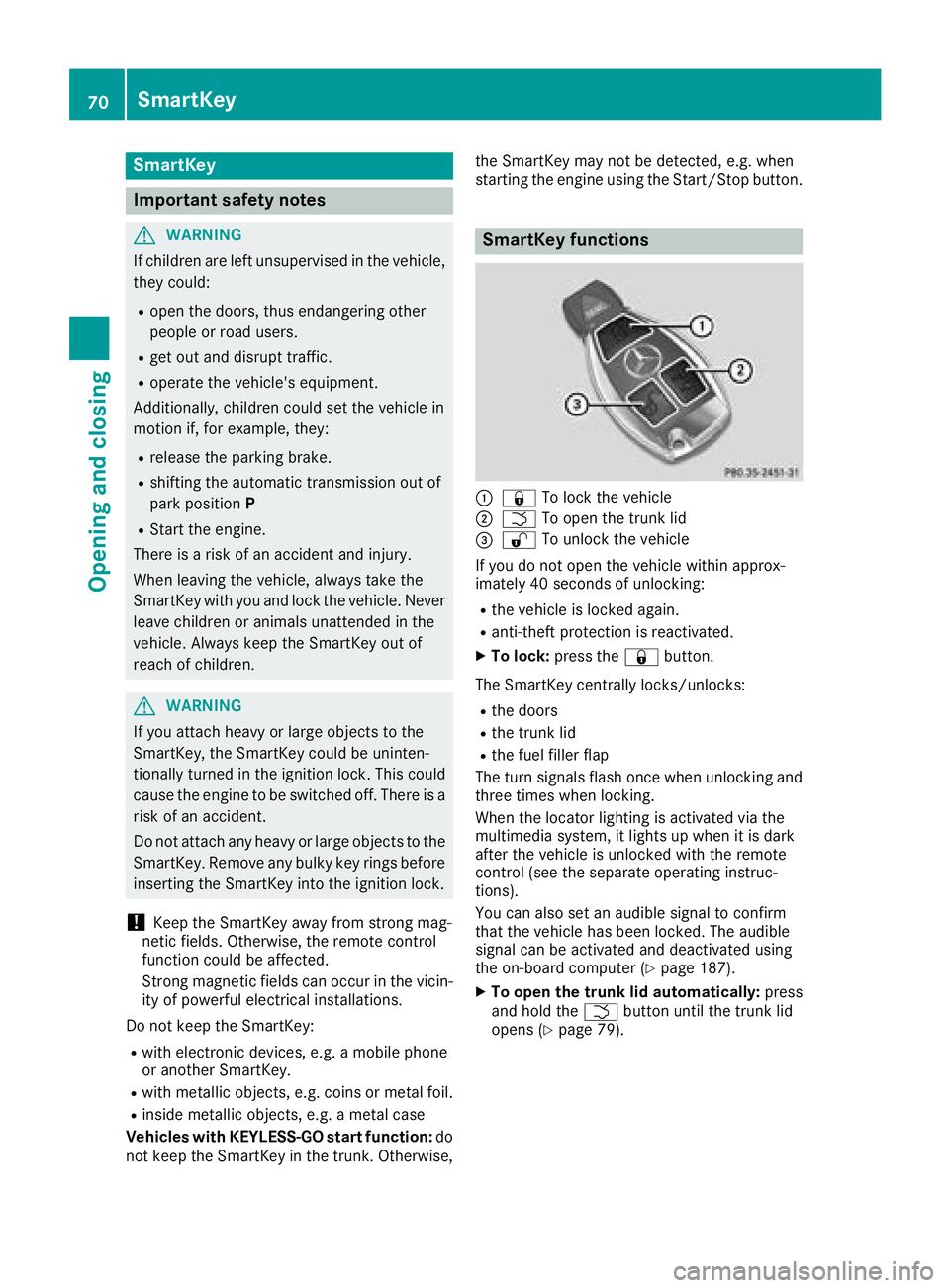
SmartKey functions
C
7 To lock the vehicleD
T To open the trunk lid
Page 124 of 326
! Do not warm up the engine with the vehicle
stationary. Drive off immediately .A void high
engine speeds and driving at full throttle until
the engine has reached its operating temper-
ature.
Only shift the automatic transmission to the
desired drive position when the vehicle is sta-
tionary.
Where possible ,a void spinning the drive
wheels when pulling awa yons lippery roads.
You could otherwise damage the drive train.
! Mercedes-AMG vehicles: avoid full-load
operation and engine speeds greater than
5000 rpm when the engine is cold. This helps
to protect the engine and avoids uncomfort-
able driving.
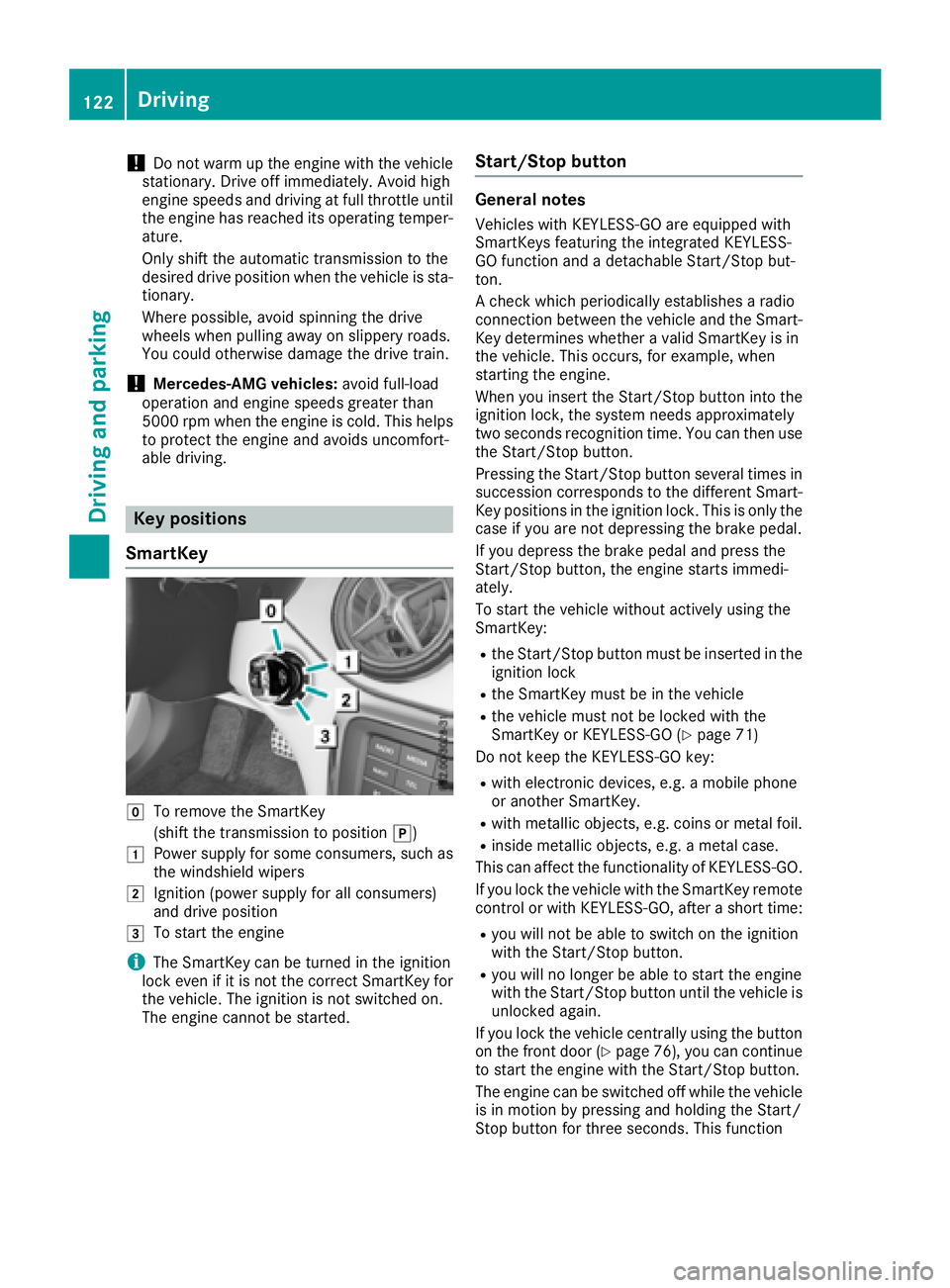
Key positions
SmartKey
Z
To remove the SmartKey
(shift the transmission to position ] )G
Power suppl yf or some consumers, such as
the windshiel dw ipersH
Ignition (power suppl yf or all consumers)
and drive position
I
To start the engine
i The SmartKey can be turned in the ignition
lock even if it is not the correct SmartKey for
the vehicle. The ignition is not switched on.
The engine cannot be started. Start/Stop button General notes Vehicles with KEYLESS-GO are equipped with
SmartKeys featuring the integrated KEYLESS-
GO function and ad etachable Start/Stop but-
ton.
Ac heck which periodically establishes ar adio
connection between the vehicle and the Smart-
Key determines whether av alid SmartKey is in
the vehicle. This occurs, for example, when
starting the engine.
When you insert the Start/Stop button into the
ignition lock, the system needs approximately
two seconds recognition time. You can then use
the Start/Stop button.
Pressing the Start/Stop button several times in
succession corresponds to the different Smart-
Key positions in the ignition lock. This is only the
case if you are not depressing the brake pedal.
If you depress the brake pedal and press the
Start/Stop button, the engine starts immedi-
ately.
To start the vehicle without actively using the
SmartKey: R
the Start/Stop button must be inserted in the
ignition lock R
the SmartKey must be in the vehicle R
the vehicle must not be locked with the
SmartKey or KEYLESS-GO ( Y
page 71)
Do not keep the KEYLESS-GO key: R
with electronic devices, e.g. am obile phone
or another SmartKey. R
with metallic objects, e.g. coins or metal foil. R
inside metallic objects, e.g. am etal case.
This can affect the functionality of KEYLESS-GO.
If you lock the vehicle with the SmartKey remote
control or with KEYLESS-GO, after as hort time:R
you will not be able to switch on the ignition
with the Start/Stop button. R
you will no longer be able to start the engine
with the Start/Stop button until the vehicle is
unlocked again.
If you lock the vehicle centrally using the button
on the front door ( Y
page 76), you can continue
to start the engine with the Start/Stop button.
The engine can be switched off while the vehicle
is in motion by pressing and holding the Start/
Stop button for three seconds. This function122
Driving
Driving and parking
Page 125 of 326
operates independently of the ECO start/stop
automatic engine switch-off function.
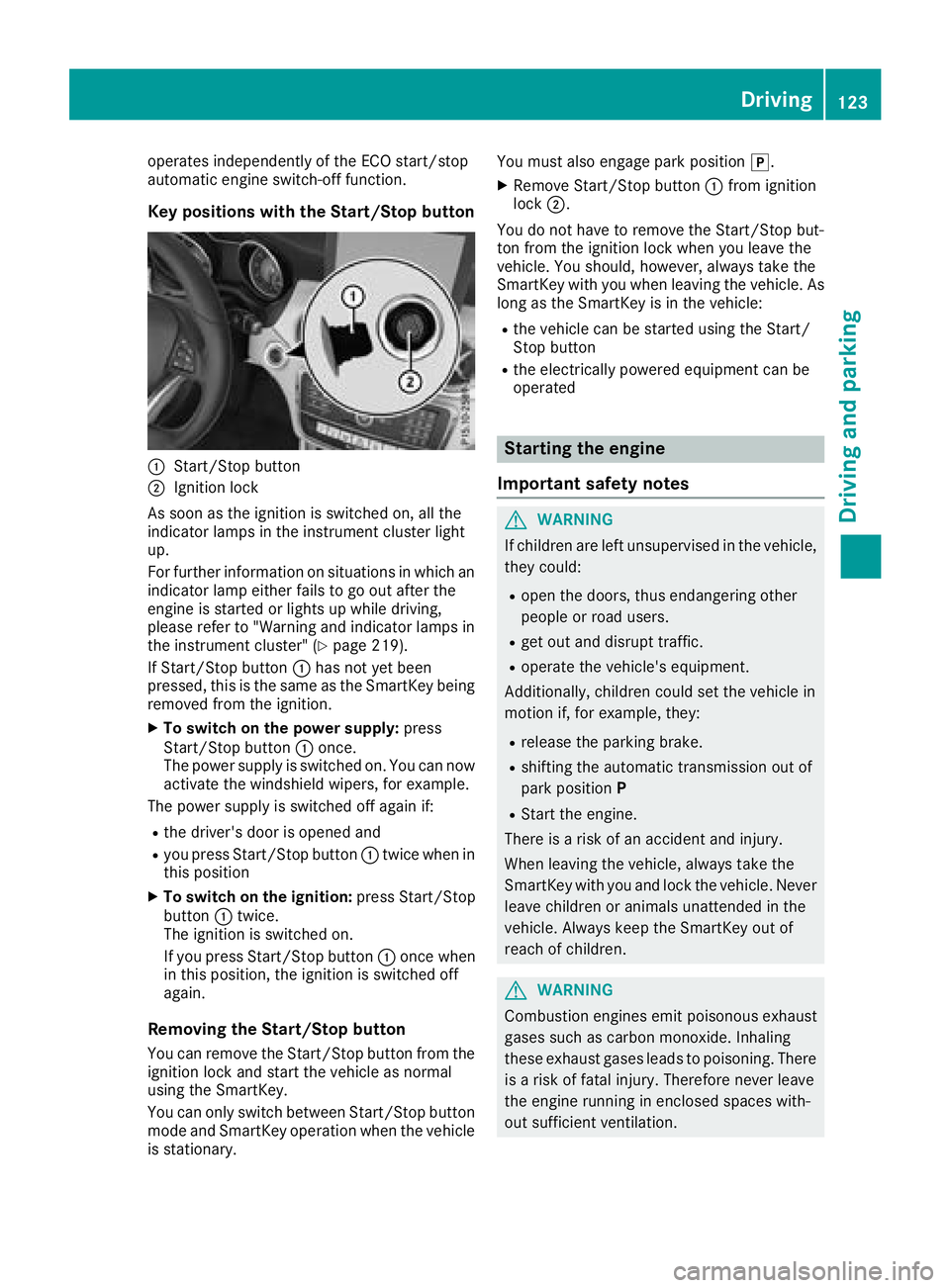
Key positions with the Start/Stop button
C
Start/Stop buttonD
Ignition lock
As soon as the ignition is switched on, all the
indicator lamps in the instrument cluster light
up.
For further information on situations in which an
indicator lamp either fails to go out after the
engine is started or lights up while driving,
please refer to "Warning and indicator lamps in
the instrument cluster" ( Y
page 219).
If Start/Stop button C has not yet been
pressed, this is the same as the SmartKey being
removed from the ignition. X
To switch on the power supply: press
Start/Stop button C once.
The power supply is switched on. You can now
activate the windshield wipers, for example.
The power supply is switched off again if: R
the driver's door is opened and R
you press Start/Stop button C twice when in
this position X
To switch on the ignition: press Start/Stop
button C twice.
The ignition is switched on.
If you press Start/Stop button C once when
in this position, the ignition is switched off
again.
Removing the Start/Stop button
You can remove the Start/Stop button from the
ignition lock and start the vehicle as normal
using the SmartKey.
You can only switch between Start/Stop button
mode and SmartKey operation when the vehicle
is stationary. You must also engage park position ] .X
Remove Start/Stop button C from ignition
lock D .
You do not have to remove the Start/Stop but-
ton from the ignition lock when you leave the
vehicle. You should, however, alway st ake the
SmartKey with you when leaving the vehicle. As
long as the SmartKey is in the vehicle: R
the vehicle can be started using the Start/
Stop button R
the electrically powered equipment can be
operated
Starting the engine
Important safety notes
G WARNING
If children are left unsupervised in the vehicle,
they could: R
open the doors, thus endangering other
people or road users. R
get out and disrupt traffic. R
operate the vehicle's equipment.
Additionally, children could set the vehicle in
motion if, for example, they: R
release the parking brake. R
shifting the automatic transmission out of
park position P R
Start the engine.
There is ar isk of an accident and injury.
When leaving the vehicle, alway st ake the
SmartKey with you and lock the vehicle. Never
leave children or animals unattended in the
vehicle. Always keep the SmartKey out of
reach of children.
G WARNING
Combustion engines emit poisonous exhaust
gases such as carbon monoxide. Inhaling
these exhaust gases leads to poisoning. There
is ar isk of fatal injury. Therefore never leave
the engine runnin gine nclosed spaces with-
out sufficient ventilation. Driving 123
Driving and parking Z
Page 126 of 326
G WARNING
Flammable materials introduced through
environmental influence or by animals can
ignite if in contact with the exhaust system or
parts of the engine that hea tu p. There is ar isk
of fire.
Carry out regular checks to make sure that
there are no flammable foreig nm aterials in
the engine compartment or in the exhaust
system.
General notes During ac old start, the engine runs at higher
speeds to enabl et he catalytic converter to
reach its operating temperature. The sound of
the engine may change during this time.
Automatic transmission X
Shift the transmission to position ]
( Y
pag e1 30).
The transmission position display in the mul-
tifunction display shows P ( Y
pag e1 30).
i You can start the engine in transmission
position ] and \\ .
Starting procedure with the SmartKey To start the engine using the SmartKey instead
of the Start/Stop button, pul lt he Start/Stop
button out of the ignitio nl ock.X
Turn the SmartKey to position I in the igni-
tion lock ( Y
pag e1 22) and release it as soon
as the engine is running.
Starting procedure with the Start/Stop
button The Start/Stop button can be used to start the
vehicl em anually without inserting the SmartKey
into the ignitio nl ock. The Start/Stop button
must be inserted in the ignitio nl ock and the
SmartKey must be in the vehicle. This mode for
starting the engine operates independently of
the ECO start/stop automatic engine start func-
tion.
You can start the engine if av ali dS martKey is in
the vehicle. Switch off the engine and always
take the SmartKey with you when leaving the vehicle, even if you only leave it for as hort time.
Pay attention to the important safety notes. X
Depress the brake peda la nd keep it
depressed. X
Press the Start/Stop button once
( Y
pag e1 22).
The engine starts.
Starting procedure via smartphone Observe the important safety notes on starting
the engine ( Y
pag e1 23).
You can als os tart you re ngine via you rs mart-
phone from outside the vehicle. In this case, the
previousl ys elected climate control setting is
activated. In this way you can cool or heat the
interior of the vehicl eb efore starting the jour-
ney.
Only start the engine via you rs martphone if it is
safe to start and run the engine where you rv ehi-
cle is parked.
Observe the lega ls tipulations in the area where
you rv ehicl eisp arked .E ngine start via smart-
phone may be limited to certain countries or
regions.
You can execute am aximu moft wo consecutive
starting attempts via you rs martphone. If you
insert the SmartKey into the ignitio nl ock, you
can carry out two more starting attempts.
Once you have started the engine, you can
switch the engine off via you rs martphone at any
time.
You can only start the engine via you rs mart-
phone if: R
the SmartKey is in the ignitio nl ockR
park position ] is selectedR
the accelerator peda lisn ot depressedR
the anti-theft alarm system is not activated R
the pani ca larm is not activated R
the hazard warning lamp sa re switched offR
the hood is closed R
the doors are closed and locked R
the windows and sliding sunroof are closed
Also make sure that: R
the fuel tank is sufficiently filled R
the starter battery is sufficiently charged
G WARNING
Limbs coul dbec rushe dort rappe dift he
engine is started unintentionally during ser-124
Driving
Driving and parking
Page 127 of 326
vice or maintenance work. There is ar isk of
injury.
Always secure the engine against uninten-
tional starting before carrying out mainte-
nance or repair work.
Make sure that the engine cannot be started via
you rs martphone before carrying out mainte-
nance or repairs. You can prevent an engine
start via you rs martphone, for example, if you:R
switch on the hazard warning lamps R
do not lock the doors R
open the hood
Pulling away
General notes
G WARNING
If the engine spee disa bove the idling speed
and you engage transmission position D or R ,
the vehicl ec ould pul la wa ys uddenly .T here is
ar isk of an accident.
When engaging transmission position D or R ,
alway sf irmly depress the brake peda la nd do
not simultaneously accelerate.
Depress the accelerator carefully when pulling
away.
The vehicl el ocks centrally once you have pulled
away. The locking knobs in the doors drop down.
You can open the doors from the insid eata ny
time.
You can als od eactivate the automatic locking
feature ( Y
pag e1 87).
It is possible to shift the transmission from posi-
tion ] to the desired position only if you
depress the brake pedal. Only then can the
parking lock be deactivated.
All vehicles (except Mercedes-AMG vehi-
cles): if you do not depress the brake pedal, the
DIRECT SELECT lever can still be moved but the
parking lock remains engaged.
Mercedes-AMG vehicles: if you do not depress
the brake pedal, the selector lever can still be
moved but the parking lock remains engaged.
At transmission flui dt emperatures below