start stop button MERCEDES-BENZ CLA 2019 User Guide
[x] Cancel search | Manufacturer: MERCEDES-BENZ, Model Year: 2019, Model line: CLA, Model: MERCEDES-BENZ CLA 2019Pages: 330, PDF Size: 23.57 MB
Page 74 of 330
Changing the settings of the locking
system
You can change the settings of the locking sys-tem. This means that only the driver's door andthe fuel filler flap are unlocked when the vehicleis unlocked. This is useful if you frequently travelon your own.
XTo change the setting:press and hold the6and7buttons simultaneously forapproximately six seconds until the batteryindicator lamp flashes twice (Ypage 73).
If the setting of the locking system is changedwithin the signal range of the vehicle, pressingthe7or6button:
Rlocks or
Runlocks the vehicle
The SmartKey now functions as follows:
XTo unlock:press the6button once.
XTo unlock centrally:press the6buttontwice.
XTo lock centrally:press the7button.
The KEYLESS-GO function is changed as fol-lows:
XTo unlock the driver's door:touch the innersurface of the door handle on the driver'sdoor.
XTo unlock centrally:touch the inner surfaceof the door handle on the front-passengerdoor or the rear door.
XTo lock centrally:touch the outer sensorsurface on one of the door handles.
XTo restore the factory settings:press andhold the6and7buttons simultane-ously for approximately six seconds until thebattery check lamp flashes twice(Ypage 73).
Mechanical key
General notes
If the vehicle can no longer be locked orunlocked with the SmartKey or KEYLESS-GO,use the mechanical key.
If you use the mechanical key to unlock andopen the driver's door or the trunk lid, the anti-theft alarm system will be triggered (Ypage 68).
There are several ways to turn off the alarm:
XTo deactivate the alarm with the key:pressthe6or7button on the key.
or
XInsert the SmartKey into the ignition lock.
or
XTo deactivate the alarm with KEYLESS-GO:press the Start/Stop button in the ignitionlock. The SmartKey must be in the vehicle.
or
XLock or unlock the vehicle using KEYLESS-GO. The SmartKey must be outside the vehi-cle.
If you unlock the vehicle using the mechanicalkey, the fuel filler flap will not be unlocked auto-matically.
XTo unlock the fuel filler flap:insert theSmartKey into the ignition lock.
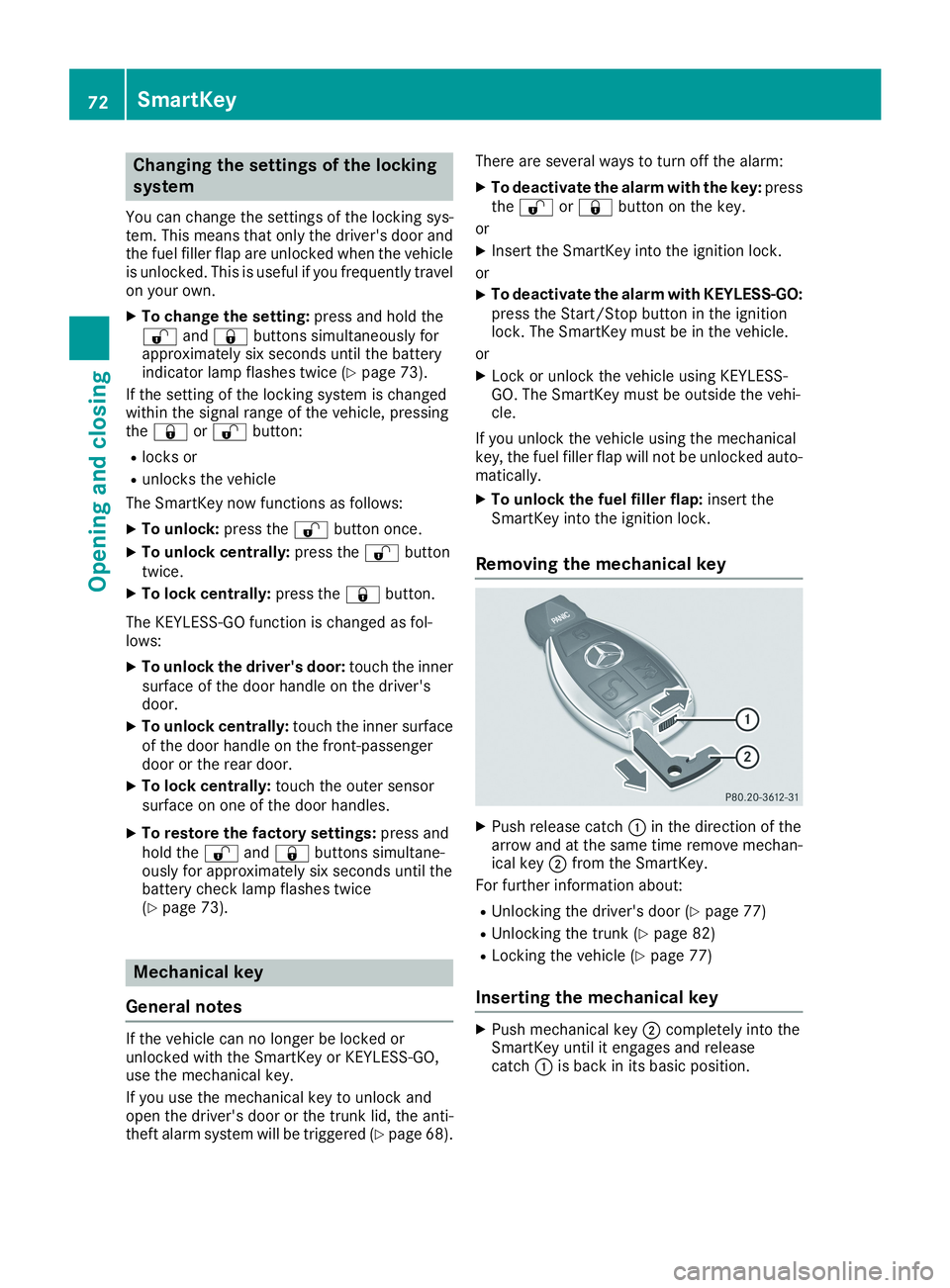
Removing the mechanical key
XPush release catchCin the direction of thearrow and at the same time remove mechan-ical keyDfrom the SmartKey.
For further information about:
RUnlocking the driver's door (Ypage 77)
RUnlocking the trunk (Ypage 82)
RLocking the vehicle (Ypage 77)
Inserting the mechanical key
XPush mechanical keyDcompletely into theSmartKey until it engages and releasecatchCis back in its basic position.
72SmartKey
Opening and closing
Page 77 of 330
ProblemPossible causes/consequences andPPSolutions
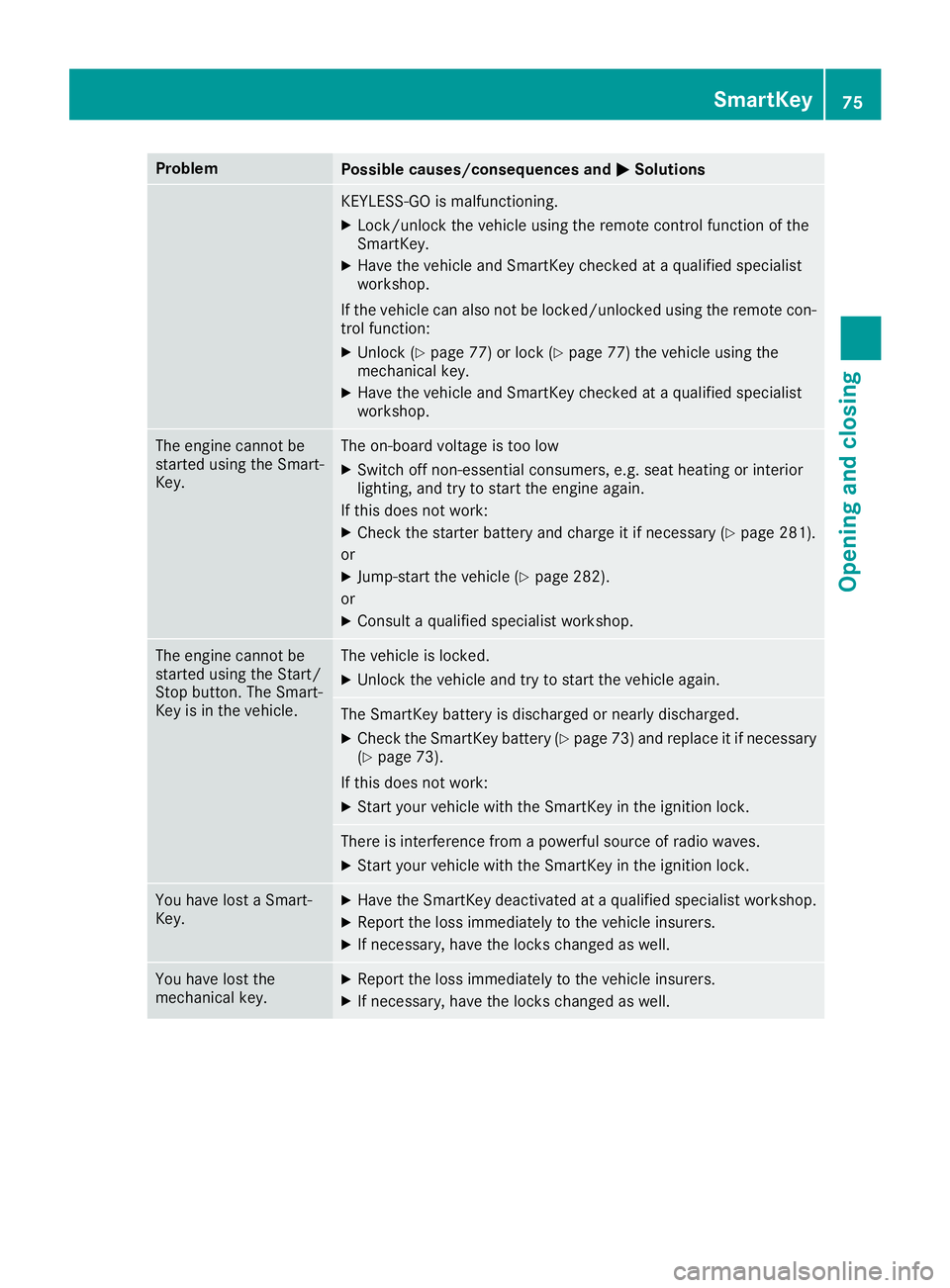
KEYLESS-GO is malfunctioning.
XLock/unlock the vehicle using the remote control function of theSmartKey.
XHave the vehicle and SmartKey checked at a qualified specialistworkshop.
If the vehicle can also not be locked/unlocked using the remote con-trol function:
XUnlock (Ypage 77) or lock (Ypage 77) the vehicle using themechanical key.
XHave the vehicle and SmartKey checked at a qualified specialistworkshop.
The engine cannot bestarted using the Smart-Key.
The on-board voltage is too low
XSwitch off non-essential consumers, e.g. seat heating or interiorlighting, and try to start the engine again.
If this does not work:
XCheck the starter battery and charge it if necessary (Ypage 281).
or
XJump-start the vehicle (Ypage 282).
or
XConsult a qualified specialist workshop.
The engine cannot bestarted using the Start/Stop button. The Smart-Key is in the vehicle.
The vehicle is locked.
XUnlock the vehicle and try to start the vehicle again.
The SmartKey battery is discharged or nearly discharged.
XCheck the SmartKey battery (Ypage 73) and replace it if necessary(Ypage 73).
If this does not work:
XStart your vehicle with the SmartKey in the ignition lock.
There is interference from a powerful source of radio waves.
XStart your vehicle with the SmartKey in the ignition lock.
You have lost a Smart-Key.XHave the SmartKey deactivated at a qualified specialist workshop.
XReport the loss immediately to the vehicle insurers.
XIf necessary, have the locks changed as well.
You have lost themechanical key.XReport the loss immediately to the vehicle insurers.
XIf necessary, have the locks changed as well.
SmartKey75
Opening and closing
Z
Page 89 of 330
Do not allow anything to protrude from thesliding sunroof. Otherwise, the seals could bedamaged.
!The weather can change abruptly. It couldstart to rain or snow. Make sure that the slid-ing sunroof is closed when you leave the vehi-cle. The vehicle electronics can be damaged ifwater enters the vehicle interior.
iResonance noises can occur in addition tothe usual airflow noises when the sliding sun-roof is open. They are caused by minor pres-sure fluctuations in the vehicle interior.Change the position of the sliding sunroof oropen a side window slightly to reduce or elim-inate these noises.
Sliding sunroof reversing feature
In the following section, the term "sliding sun-roof" refers to the panorama roof with powertilt/sliding panel.
The sliding sunroof is equipped with an auto-matic reversing feature. If a solid object blocksor restricts the sliding sunroof during the closingprocess, the sliding sunroof opens again auto-matically. However, the automatic reversingfeature is only an aid and does not relieve you ofthe responsibility of paying attention when clos-ing the sliding sunroof.
GWARNING
The reversing feature does not react:
Rto soft, light and thin objects, e.g. small fin-
gers
Rover the last 1/6 in (4 mm) of the closing
movement
Rduring resetting
Rwhen closing the sliding sunroof again man-
ually immediately after automatic reversing
This means that the reversing feature cannot
prevent someone being trapped in these sit-
uations. There is a risk of injury.
Make sure that no body parts are in close
proximity during the closing procedure.
If somebody becomes trapped:
Rrelease the switch immediately, or
Rpress the switch in any direction during the
automatic closing process
The closing process is stopped.
GWARNING
If you close the sliding sunroof again immedi-
ately after it has been blocked or reset, the
sliding sunroof closes with increased force.
Parts of the body could be trapped in the clos-
ing area in the process. There is a risk of injury
or becoming trapped.
Make sure that no parts of the body are in the
closing area.
If somebody becomes trapped:
Rrelease the button immediately, or
Rbriefly push the button in any direction dur-
ing automatic closing.
The closing process is stopped.
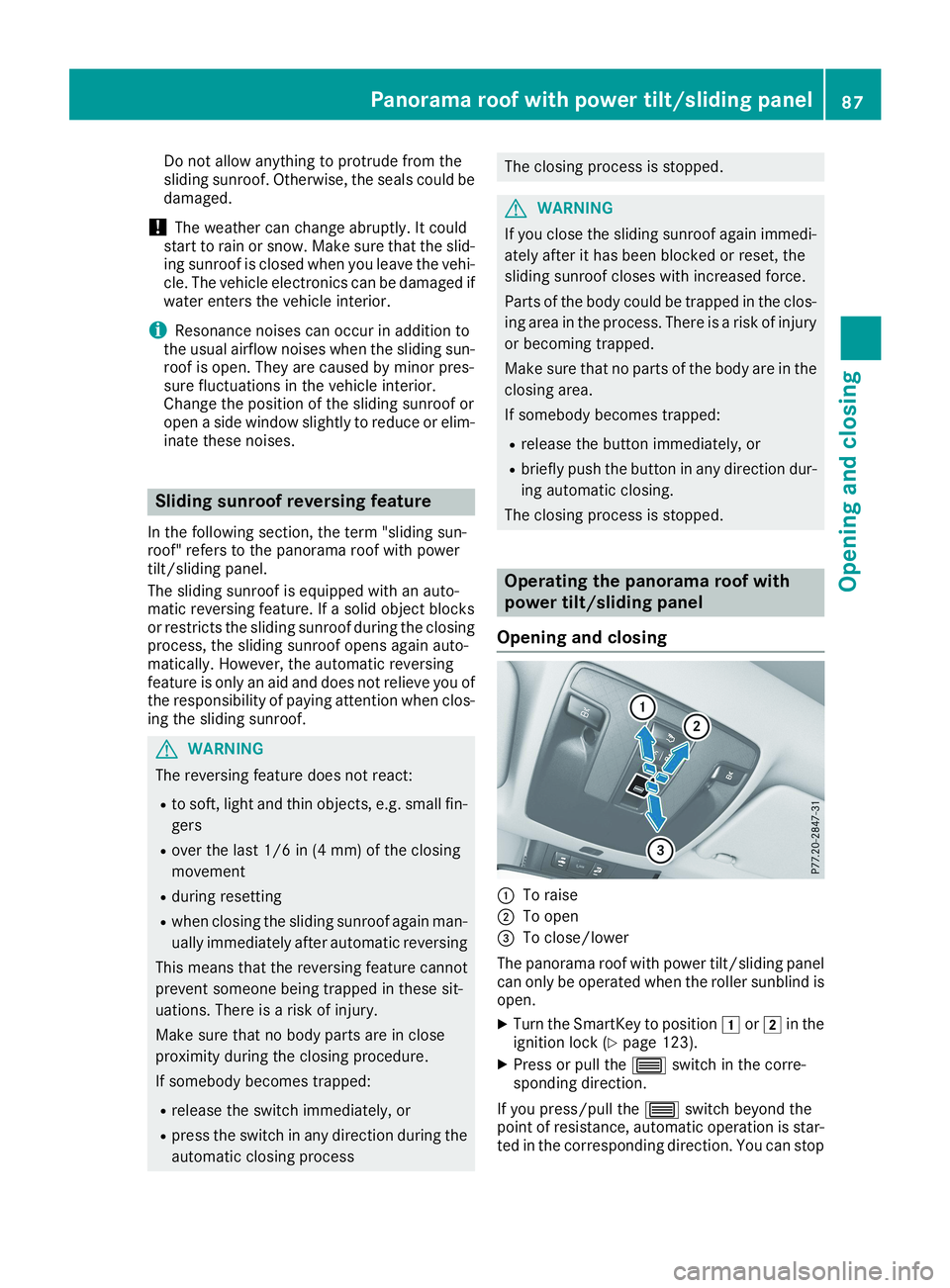
Operating the panorama roof with
power tilt/sliding panel
Opening and closing
CTo raise
DTo open
Page 118 of 330
ual. You will see the current settings of thevarious climate control functions.
DYNAMIC SELECT button (except
Mercedes-AMG vehicles)
You can choose between various drive programswith the DYNAMIC SELECT button(Ypage 129).
If you have selected drive programE:
Rwhen heating, the electrical heater booster isdeactivated and in the warming-up phaseheat output is reduced
Rthe rear window defroster running time isreduced
Depending on the configuration, climate set-tings may also be influenced in the drive pro-gramI.
If you have selected drive programCorS, cli-mate settings are not influenced.
ECO start/stop function
During automatic engine switch-off, the climatecontrol system only operates at a reduced capa-city. If you require the full climate control output,you can switch off the ECO start/stop functionby pressing the ECO button (Ypage 128).
Operating the climate control sys-
tems
Activating/deactivating climate con-
trol
General notes
When the climate control is switched off, the airsupply and air circulation are also switched off.The windows could fog up. Therefore, switch offclimate control only briefly
Air-conditioning system
XTurn the SmartKey to positionHin the igni-tion lock (Ypage 123).
XTo switch on:turn control
Page 125 of 330
!Do not warm up the engine while stationary.Pull away immediately. Avoid high enginespeeds and full throttle until the engine hasreached its operating temperature.
In vehicles with automatic transmission,engage positions P and R only when the vehi-cle is stationary.
Where possible, avoid spinning the drivewheels when pulling away on slippery roads.You could otherwise damage the drive train.
!Mercedes-AMG vehicles:avoid full-loadoperation and engine speeds greater than5000 rpm when the engine is cold. This helpsto protect the engine and avoids uncomfort-able driving.
Key positions
SmartKey
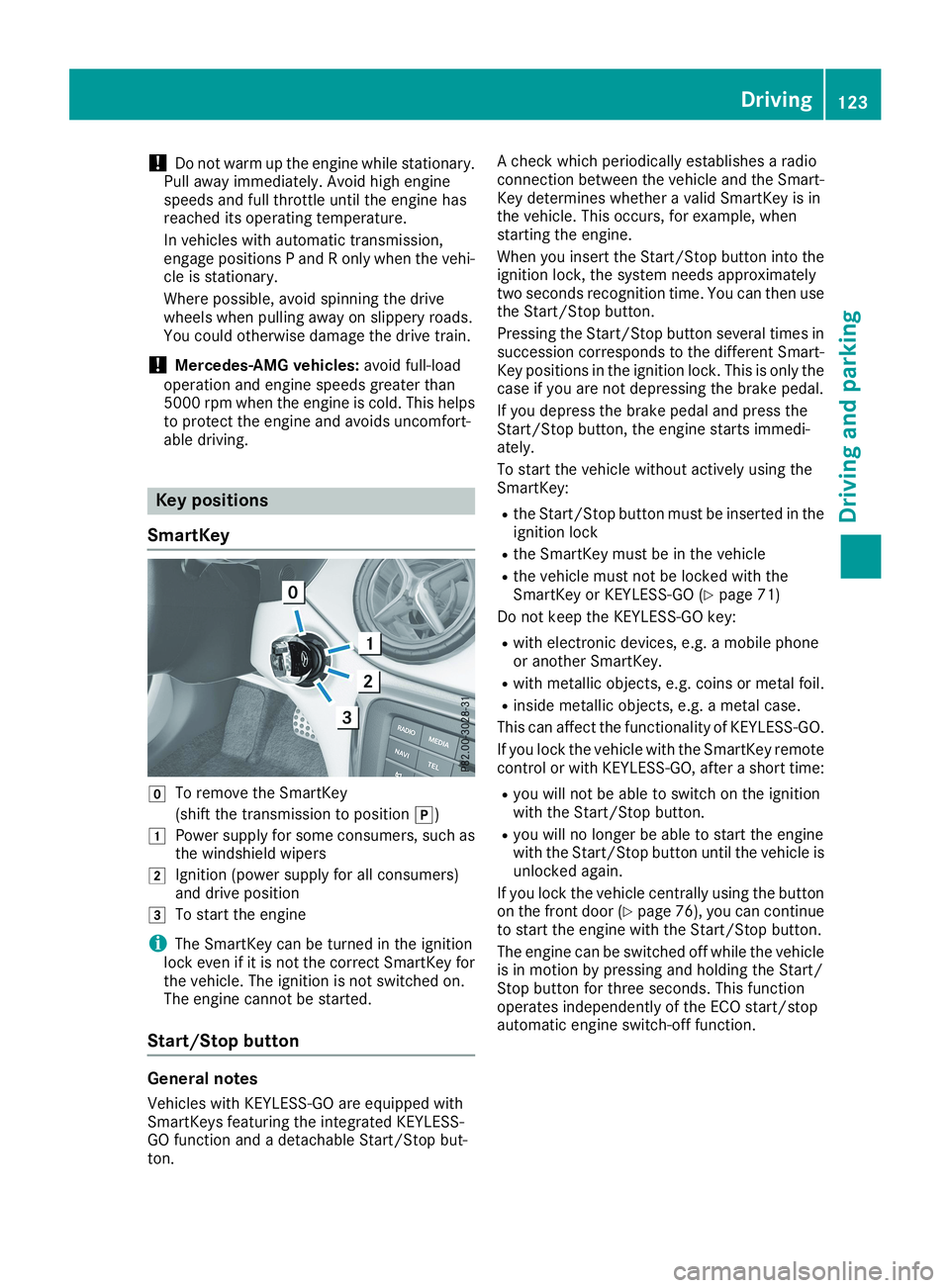
ZTo remove the SmartKey
(shift the transmission to position])
GPower supply for some consumers, such asthe windshield wipers
HIgnition (power supply for all consumers)and drive position
ITo start the engine
iThe SmartKey can be turned in the ignitionlock even if it is not the correct SmartKey forthe vehicle. The ignition is not switched on.The engine cannot be started.
Start/Stop button
General notes
Vehicles with KEYLESS-GO are equipped withSmartKeys featuring the integrated KEYLESS-GO function and a detachable Start/Stop but-ton.
A check which periodically establishes a radioconnection between the vehicle and the Smart-Key determines whether a valid SmartKey is inthe vehicle. This occurs, for example, whenstarting the engine.
When you insert the Start/Stop button into theignition lock, the system needs approximatelytwo seconds recognition time. You can then usethe Start/Stop button.
Pressing the Start/Stop button several times insuccession corresponds to the different Smart-Key positions in the ignition lock. This is only thecase if you are not depressing the brake pedal.
If you depress the brake pedal and press theStart/Stop button, the engine starts immedi-ately.
To start the vehicle without actively using theSmartKey:
Rthe Start/Stop button must be inserted in theignition lock
Rthe SmartKey must be in the vehicle
Rthe vehicle must not be locked with theSmartKey or KEYLESS-GO (Ypage 71)
Do not keep the KEYLESS-GO key:
Rwith electronic devices, e.g. a mobile phoneor another SmartKey.
Rwith metallic objects, e.g. coins or metal foil.
Rinside metallic objects, e.g. a metal case.
This can affect the functionality of KEYLESS-GO.
If you lock the vehicle with the SmartKey remotecontrol or with KEYLESS-GO, after a short time:
Ryou will not be able to switch on the ignitionwith the Start/Stop button.
Ryou will no longer be able to start the enginewith the Start/Stop button until the vehicle isunlocked again.
If you lock the vehicle centrally using the buttonon the front door (Ypage 76), you can continueto start the engine with the Start/Stop button.
The engine can be switched off while the vehicleis in motion by pressing and holding the Start/Stop button for three seconds. This functionoperates independently of the ECO start/stopautomatic engine switch-off function.
Driving123
Driving and parking
Z
Page 126 of 330
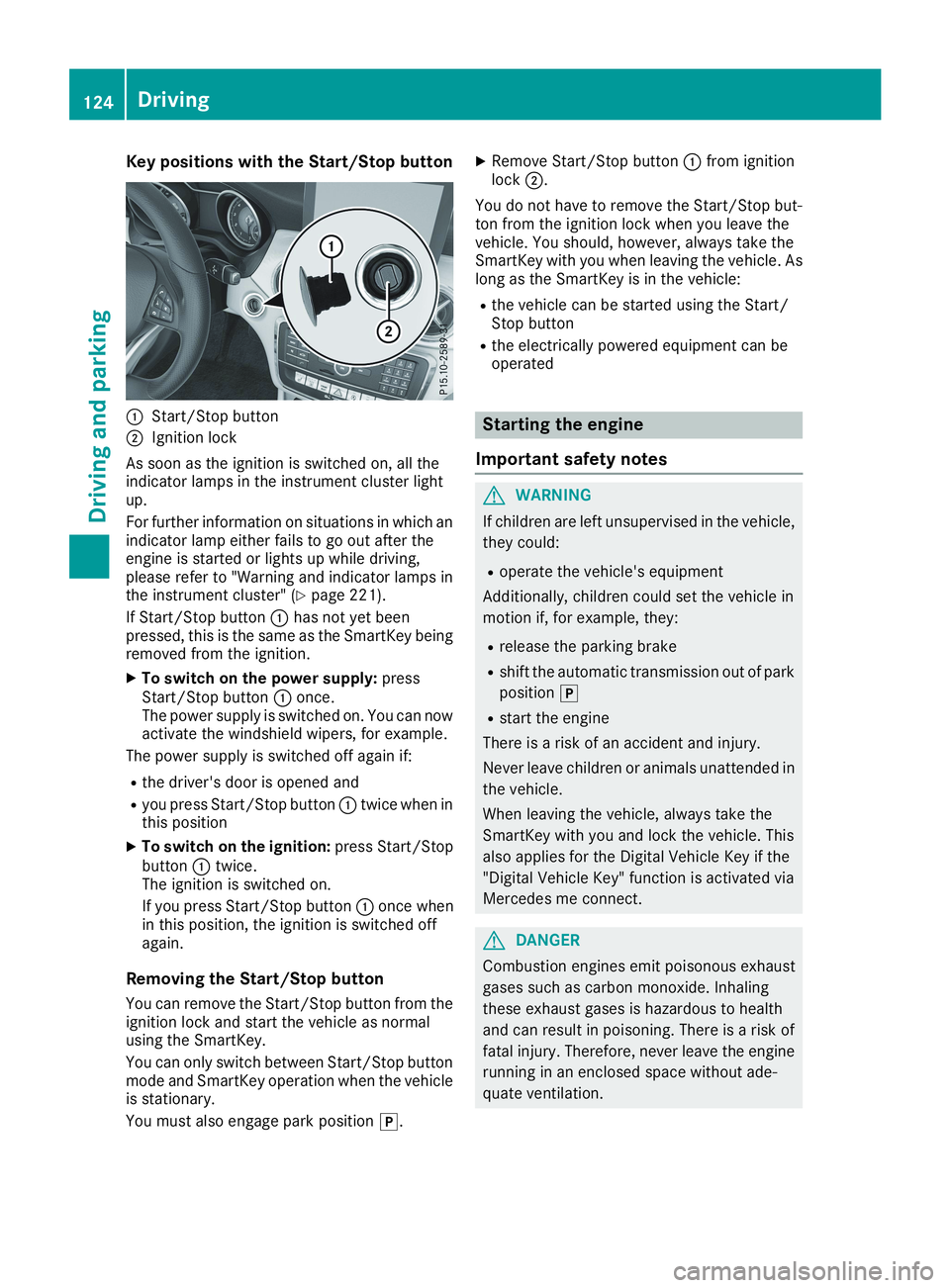
Key positions with the Start/Stop button
CStart/Stop button
DIgnition lock
As soon as the ignition is switched on, all theindicator lamps in the instrument cluster lightup.
For further information on situations in which anindicator lamp either fails to go out after theengine is started or lights up while driving,please refer to "Warning and indicator lamps inthe instrument cluster" (Ypage 221).
If Start/Stop buttonChas not yet beenpressed, this is the same as the SmartKey beingremoved from the ignition.
XTo switch on the power supply:pressStart/Stop buttonConce.The power supply is switched on. You can nowactivate the windshield wipers, for example.
The power supply is switched off again if:
Rthe driver's door is opened and
Ryou press Start/Stop buttonCtwice when inthis position
XTo switch on the ignition:press Start/StopbuttonCtwice.The ignition is switched on.
If you press Start/Stop buttonConce whenin this position, the ignition is switched offagain.
Removing the Start/Stop button
You can remove the Start/Stop button from theignition lock and start the vehicle as normalusing the SmartKey.
You can only switch between Start/Stop buttonmode and SmartKey operation when the vehicleis stationary.
You must also engage park position].
XRemove Start/Stop buttonCfrom ignitionlockD.
You do not have to remove the Start/Stop but-ton from the ignition lock when you leave thevehicle. You should, however, always take theSmartKey with you when leaving the vehicle. Aslong as the SmartKey is in the vehicle:
Rthe vehicle can be started using the Start/Stop button
Rthe electrically powered equipment can beoperated
Starting the engine
Important safety notes
GWARNING
If children are left unsupervised in the vehicle,
they could:
Roperate the vehicle's equipment
Additionally, children could set the vehicle in
motion if, for example, they:
Rrelease the parking brake
Rshift the automatic transmission out of park
position]
Rstart the engine
There is a risk of an accident and injury.
Never leave children or animals unattended in
the vehicle.
When leaving the vehicle, always take the
SmartKey with you and lock the vehicle. This
also applies for the Digital Vehicle Key if the
"Digital Vehicle Key" function is activated via
Mercedes me connect.
GDANGER
Combustion engines emit poisonous exhaust
gases such as carbon monoxide. Inhaling
these exhaust gases is hazardous to health
and can result in poisoning. There is a risk of
fatal injury. Therefore, never leave the engine
running in an enclosed space without ade-
quate ventilation.
124Driving
Driving and pa rking
Page 127 of 330
GWARNING
Flammable materials introduced through
environmental influence or by animals can
ignite if in contact with the exhaust system or
parts of the engine that heat up. There is a risk
of fire.
Carry out regular checks to make sure that
there are no flammable foreign materials in
the engine compartment or in the exhaust
system.
General notes
During a cold start, the engine runs at higherspeeds to enable the catalytic converter toreach its operating temperature. The sound ofthe engine may change during this time.
Automatic transmission
XShift the transmission to position](Ypage 132).The transmission position indicator on themultifunction display shows](Ypage 131).
iYou can start the engine in transmissionpositions]and\\.
Starting procedure with the SmartKey
To start the engine using the SmartKey insteadof the Start/Stop button, pull the Start/Stopbutton out of the ignition lock.
XTurn the SmartKey to positionIin the igni-tion lock (Ypage 123) and release it as soonas the engine is running.
Starting procedure with the Start/Stop
button
The Start/Stop button can be used to start thevehicle manually without inserting the SmartKeyinto the ignition lock. The Start/Stop buttonmust be inserted in the ignition lock and theSmartKey must be in the vehicle. This mode forstarting the engine operates independently ofthe ECO start/stop automatic engine start func-tion.
You can start the engine if a valid SmartKey is inthe vehicle. Switch off the engine and alwaystake the SmartKey with you when leaving the
vehicle, even if you only leave it for a short time.Pay attention to the important safety notes.
XDepress the brake pedal and keep itdepressed.
XPress the Start/Stop button once(Ypage 123).The engine starts.
Starting procedure via smartphone
Observe the important safety notes on startingthe engine (Ypage 124).
You can also start your engine via your smart-phone from outside the vehicle. In this case, thepreviously selected climate control setting isactivated. In this way you can cool or heat theinterior of the vehicle before starting the jour-ney.
Only start the engine via your smartphone if it issafe to start and run the engine where your vehi-cle is parked.
Observe the legal stipulations in the area whereyour vehicle is parked. Engine start via smart-phone may be limited to certain countries orregions.
You can execute a maximum of two consecutivestarting attempts via your smartphone. If youinsert the SmartKey into the ignition lock, youcan carry out two more starting attempts.
Once you have started the engine, you canswitch the engine off via your smartphone at anytime.
You can only start the engine via your smart-phone if:
Rthe SmartKey is in the ignition lock
Rpark position]is selected
Rthe accelerator pedal is not depressed
Rthe alarm for the anti-theft alarm system isnot set
Rthe panic alarm is not activated
Rthe hazard warning lamps are switched off
Rthe hood is closed
Rthe doors are closed and locked
Rthe windows and sliding sunroof are closed
Also make sure that:
Rthe fuel tank is sufficiently filled
Rthe starter battery has been sufficientlycharged
Driving125
Driving and parking
Z
Page 129 of 330
The engine starts automatically when the driverwants to pull away again. The ECO start/stopfunction thereby helps you to reduce the fuelconsumption and emissions of your vehicle.
Important safety notes
GWARNING
If the engine is switched off automatically and
you exit the vehicle, the engine is restarted
automatically. The vehicle may begin moving.
There is a risk of accident and injury.
If you wish to exit the vehicle, always turn off
the ignition and secure the vehicle against
rolling away.
General notes
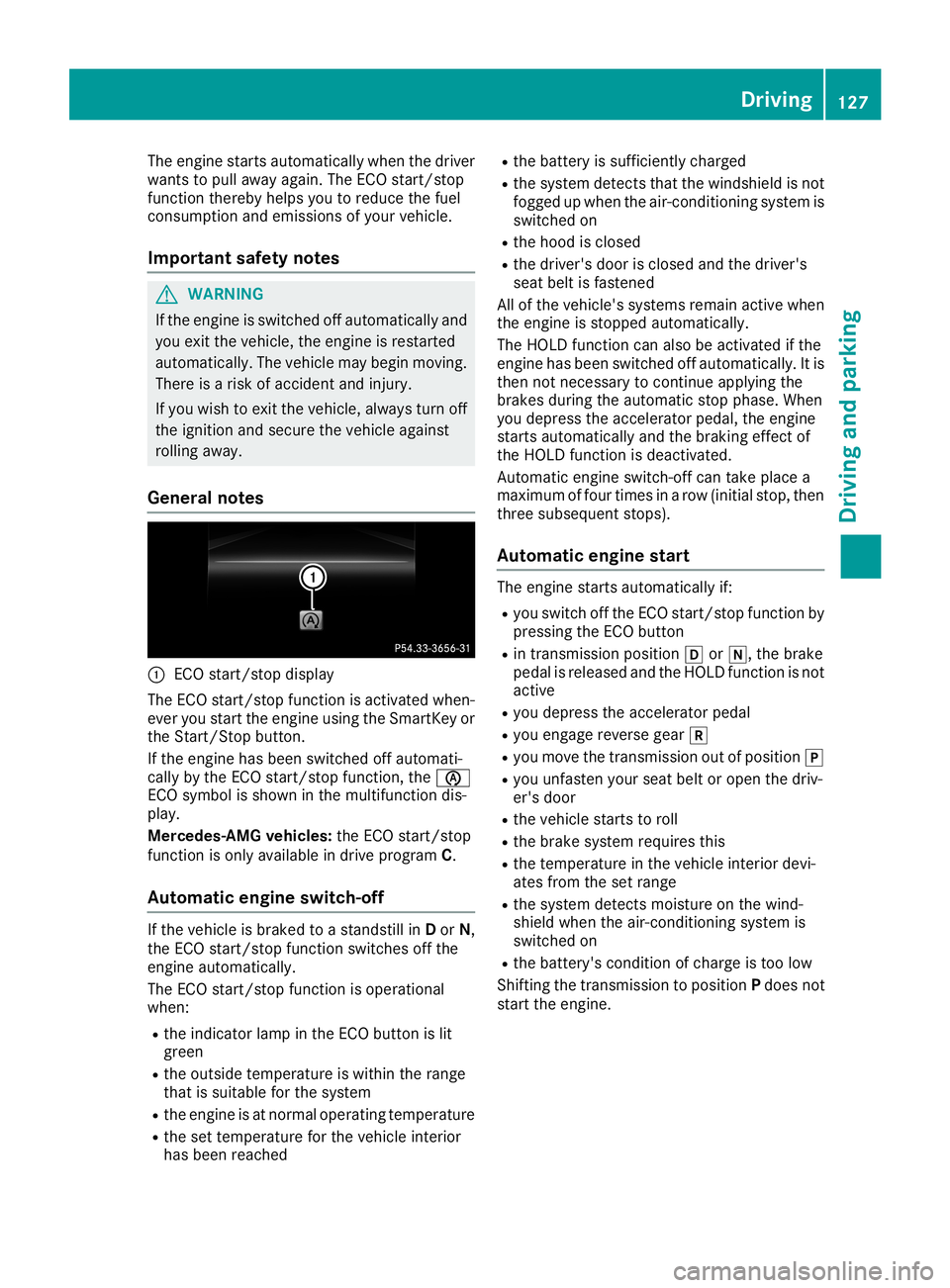
CECO start/stop display
The ECO start/stop function is activated when-ever you start the engine using the SmartKey orthe Start/Stop button.
If the engine has been switched off automati-cally by the ECO start/stop function, the
Page 130 of 330
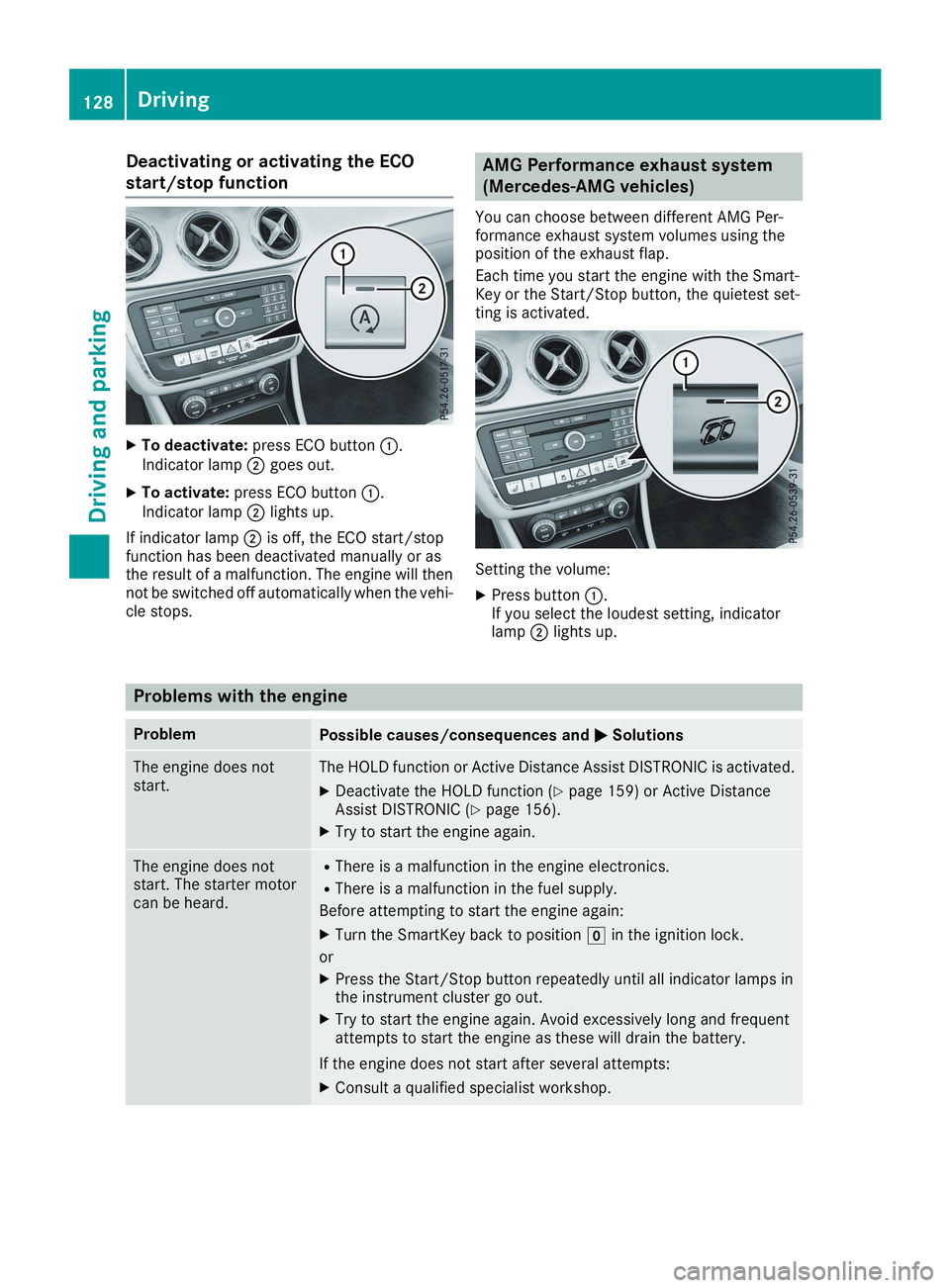
Deactivating or activating the ECO
start/stop function
XTo deactivate:press ECO buttonC.Indicator lampDgoes out.
XTo activate:press ECO buttonC.Indicator lampDlights up.
If indicator lampDis off, the ECO start/stopfunction has been deactivated manually or asthe result of a malfunction. The engine will thennot be switched off automatically when the vehi-cle stops.
AMG Performance exhaust system
(Mercedes-AMG vehicles)
You can choose between different AMG Per-formance exhaust system volumes using theposition of the exhaust flap.
Each time you start the engine with the Smart-Key or the Start/Stop button, the quietest set-ting is activated.
Setting the volume:
XPress buttonC.If you select the loudest setting, indicatorlampDlights up.
Problems with the engine
ProblemPossible causes/consequences andPPSolutions
The engine does notstart.The HOLD function or Active Distance Assist DISTRONIC is activated.
XDeactivate the HOLD function (Ypage 159) or Active DistanceAssist DISTRONIC (Ypage 156).
XTry to start the engine again.
The engine does notstart. The starter motorcan be heard.
RThere is a malfunction in the engine electronics.
RThere is a malfunction in the fuel supply.
Before attempting to start the engine again:
XTurn the SmartKey back to positionZin the ignition lock.
or
XPress the Start/Stop button repeatedly until all indicator lamps inthe instrument cluster go out.
XTry to start the engine again. Avoid excessively long and frequentattempts to start the engine as these will drain the battery.
If the engine does not start after several attempts:
XConsult a qualified specialist workshop.
128Driving
Driving and pa rking
Page 131 of 330
ProblemPossible causes/consequences andPPSolutions
The engine does notstart. You cannot hearthe starter motor.
The on-board voltage is too low because the battery is too weak ordischarged.
XJump-start the vehicle (Ypage 282).
If the engine does not start despite attempts to jump-start it:
XConsult a qualified specialist workshop.
The starter motor was exposed to a thermal load that was too high.
XAllow the starter motor to cool down for approximately two minutes.
XTry to start the engine again.
If the engine still does not start:
XConsult a qualified specialist workshop.
The engine is not runningsmoothly and is misfir-ing.
There is a malfunction in the engine electronics or in a mechanicalcomponent of the engine management system.
XOnly depress the accelerator pedal slightly.Otherwise, non-combusted fuel may get into the catalytic converterand damage it.
XHave the cause rectified immediately at a qualified specialist work-shop.
The coolant temperaturegauge shows a valueabove 248 ‡ (120 †).The coolant warninglamp may also be on anda warning tone maysound.
The coolant level is too low. The coolant is too hot and the engine is nolonger being cooled sufficiently.
XStop as soon as possible and allow the engine and the coolant tocool down.
XCheck the coolant level (Ypage 263). Observe the warning notesas you do so and add coolant if necessary.
Notes on towing vehicles
The vehicle is not suitable for attaching tow barsystems, such as those used for flat towing ordinghy towing.
Attaching or using tow bar systems may result indamage to the vehicle.
When towing a vehicle with tow bar systems,safe driving characteristics cannot be guaran-teed for the towing vehicle or the towed vehicle.
The vehicle/trailer combination may swerve.
Observe the permissible towing methods(Ypage 287) and the notes on towing with bothaxles on the ground (Ypage 286).
DYNAMIC SELECT button (all vehicles
except Mercedes-AMG vehicles)
Use the DYNAMIC SELECT button to change thedrive program. Depending on the drive programselected the following vehicle characteristicswill change:
Rthe drive (engine and transmission manage-ment)
Rthe suspension (vehicles with damping sys-tem or AMG adaptive sport suspension sys-tem)
Rthe sound of the exhaust system (vehicleswith sports exhaust system)
Rthe steering
Rthe availability of the ECO start/stop function
Rthe climate control
Each time you start the engine with the Smart-Key or the Start/Stop button, drive programCis
DYNAMIC SELECT button (all vehicles except Mercedes-AMG vehicles)129
Driving and parking
Z