lock MERCEDES-BENZ CLA 2019 Manual PDF
[x] Cancel search | Manufacturer: MERCEDES-BENZ, Model Year: 2019, Model line: CLA, Model: MERCEDES-BENZ CLA 2019Pages: 330, PDF Size: 23.57 MB
Page 152 of 330
For this reason, in the event of heavy rain or inconditions in which hydroplaning may occur,you must drive in the following manner:
Rlower your speed
Ravoid ruts
Ravoid sudden steering movements
Rbrake carefully
Driving on flooded roads
!Do not drive through flooded areas. Checkthe depth of any water before driving throughit. Drive slowly through standing water. Oth-erwise, water could enter the vehicle interioror engine compartment. It can then damagethe engine's or automatic transmission'selectronic components. It can also be suckedin by the engine's air intake connection andcause engine damage.
Winter driving
GWARNING
If you shift down on a slippery road surface in
an attempt to increase the engine's braking
effect, the drive wheels could lose their grip.
There is an increased danger of skidding and
accidents.
Do not shift down for additional engine brak-
ing on a slippery road surface.
GDANGER
If the exhaust pipe is blocked or adequate
ventilation is not possible, poisonous gases
such as carbon monoxide (CO) may enter the
vehicle. This is the case, e.g. if the vehicle
becomes trapped in snow. There is a risk of
fatal injury.
If you leave the engine or the auxiliary heating
running, make sure the exhaust pipe and area
around the vehicle are clear of snow. To
ensure an adequate supply of fresh air, open a
window on the side of the vehicle that is not
facing into the wind.
Have your vehicle winter-proofed at a qualifiedspecialist workshop at the onset of winter.
Drive particularly carefully on slippery road sur-faces. Avoid sudden acceleration, steering andbraking maneuvers. Do not use cruise control orActive Distance Assist DISTRONIC.
If the vehicle threatens to skid or cannot bestopped when moving at low speed:
XShift the transmission to position\\.
XTry to bring the vehicle under control usingcorrective steering.
The outside temperature indicator is notdesigned to serve as an ice-warning device andis therefore unsuitable for that purpose.Changes in the outside temperature are dis-played after a short delay.
Indicated temperatures just above the freezingpoint do not guarantee that the road surface isfree of ice. The road may still be icy, especially inwooded areas or on bridges.
You should pay special attention to road condi-tions when temperatures are around freezingpoint.
For more information on driving with snowchains, see (Ypage 293).
For more information on driving with summertires, see (Ypage 292).
Observe the notes in the "Winter operation" sec-tion (Ypage 292).
Driving systems
Cruise control
General notes
Cruise control maintains a constant road speedfor you. It brakes automatically in order to avoidexceeding the set speed. On long and steepdownhill gradients, especially if the vehicle isladen, you must select a low gear in good time.You need to shift manually using the steeringwheel paddle shifters beforehand. By doing so,you will make use of the braking effect of theengine. This relieves the load on the brake sys-tem and prevents the brakes from overheatingand wearing too quickly.
When the engine is running, you can use thecruise control lever to limit the speed to anyspeed between 20 mph (30 km/h) and the tech-nically permitted maximum speed of the vehicle.
Use cruise control if road and traffic conditionsmake it appropriate to maintain a steady speedfor a prolonged period.
150Driving systems
Driving and parking
Page 168 of 330
Parking tips:
ROn narrow roads, drive as close to the parkingspace as possible
RParking spaces that are littered or overgrownmight be identified or measured incorrectly
RParking spaces that are partially occupied bytrailer drawbars might not be identified assuch or be measured incorrectly
RSnowfall or heavy rain may lead to a parkingspace being measured inaccurately
RPay attention to the warning messages ofParking Assist PARKTRONIC during the park-ing procedure (Ypage 164).
RYou can intervene in the steering procedureto correct it at any time. Active Parking Assistwill then be canceled
RWhen transporting a load which protrudesfrom your vehicle, you should not use ActiveParking Assist
RNever use Active Parking Assist when snowchains are installed
RMake sure that the tire pressures are alwayscorrect. This has a direct influence on theparking characteristics of the vehicle.
Use Active Parking Assist for parking spaces:
Rthat are parallel or at right-angles to the direc-tion of travel
Ron straight roads, not bends
Ron the same level as the road, e.g. not on thepavement
Detecting parking spaces
Objects located above the detection range ofActive Parking Assist will not be detected whenthe parking space is measured. These are nottaken into account when the parking procedureis calculated, e.g. overhanging loads, truck over-hangs or loading ramps. Active Parking Assistmay therefore guide you into the parking spacetoo early.
Active Parking Assist does not support you park-ing in spaces at right angles to the direction oftravel if:
Rtwo parking spaces are located directly nextto one another
Rthe parking space is directly next to a lowobstacle such as a low curb
Ryou park forwards
Active Parking Assist does not support you park-ing in spaces that are parallel or at right anglesto the direction of travel if:
Rthe parking space is on a curb
Rthe system reads the parking space as beingblocked, for example by foliage or grass pav-ing blocks
Rthe area is too small for the vehicle to maneu-ver into
Rthe parking space is bordered by an obstacle,e.g. a tree, a post or a trailer
Further information about the detection range(Ypage 163).
GWARNING
If there are objects above the detection range:
Rthe Parking Package with rear view camera
may steer too early
Rthe vehicle may not stop in front of these
objects
This could cause a collision. There is a risk of
an accident.
If objects are located above the detection
range, stop and deactivate the Parking Pack-
age with rear view camera.
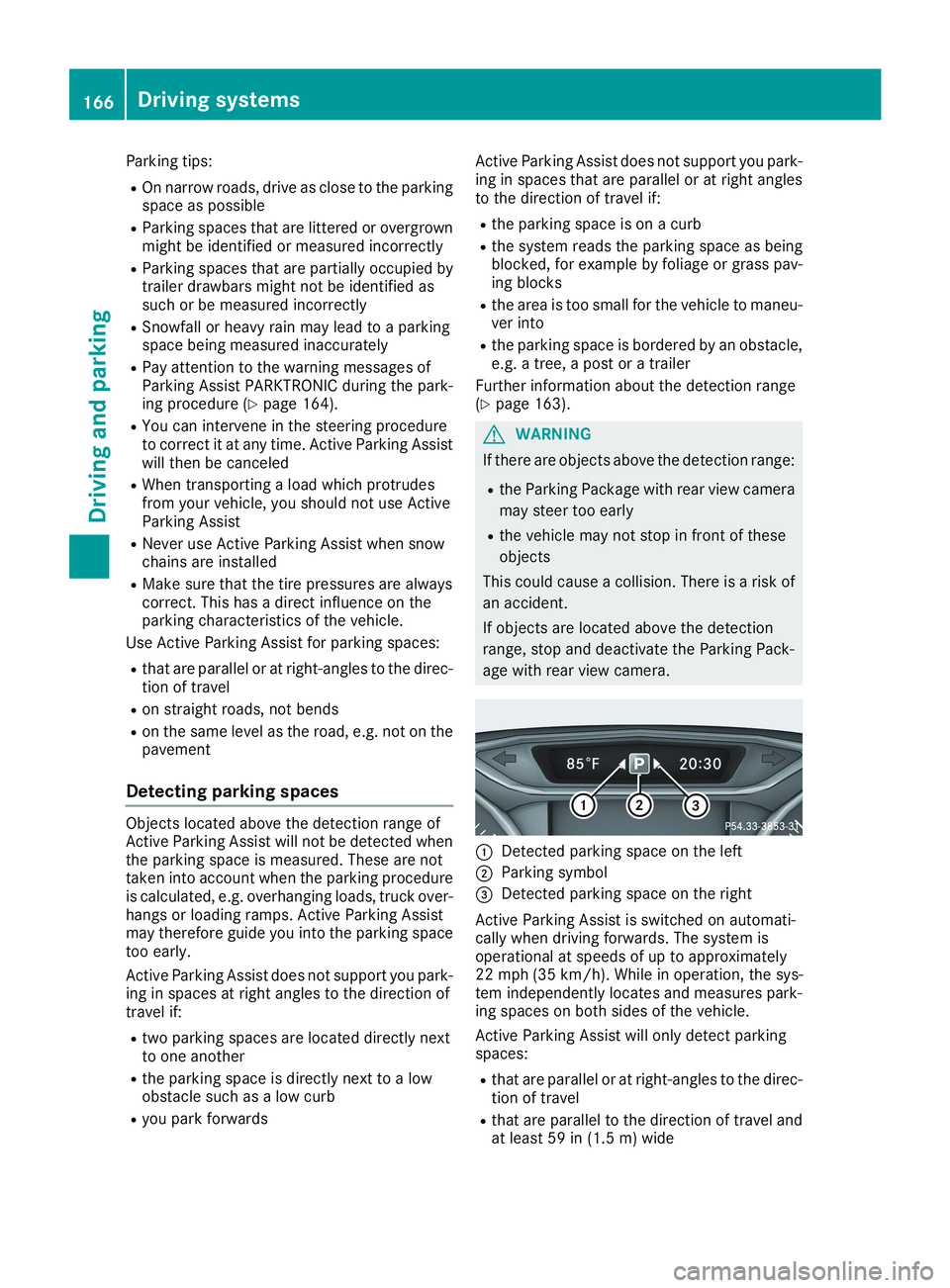
CDetected parking space on the left
DParking symbol
Page 172 of 330
Rif the camera lens is dirty or obstructed.Observe the notes on cleaning(Ypage 269)
Rif the rear of your vehicle is damaged. In thiscase, have the camera position and settingchecked at a qualified specialist workshop.
The field of vision and other functions of the rearview camera may be restricted due to additionalaccessories on the rear of the vehicle (e.g.license plate holder, rear bicycle rack).
iThe contrast of the display may be affectedby the sudden presence of sunlight or otherlight sources, e.g. when exiting a garage. Payparticular attention in this situation.
iIf usability is severely restricted, e.g. due topixel errors, have the display repaired orreplaced.
Activating/deactivating the rear view
camera
XTo activate:make sure that the SmartKey isin positionHin the ignition lock.
XMake sure that theActivation by R gearActivation by R gearfunction is selected in the multimedia system;see the Digital Operator's Manual.
XEngage reverse gear.The area behind the vehicle is shown withguide lines in the multimedia system display.
The image from the rear view camera is avail-able throughout the maneuvering process.
To deactivate:the rear view camera deacti-vates if you shift the transmission to]or afterdriving forwards a short distance.
The inner segments of the warning indicator aredisplayed in red if there is a complete systemfailure. The indicator lamp in the PARKTRONICbutton lights up.
If the system fails at the rear of the vehicle:
Rthe rear segments are shown in red whenbacking up.
Rthe rear segments are hidden when drivingforwards.
Messages in the multimedia system dis-
play
The rear view camera may show a distorted viewof obstacles, show them incorrectly or not at all.The rear view camera does not show objects inthe following positions:
Rvery close to the rear bumper
Runder the rear bumper
Rin close range above the handle on the trunklid
!Objects not at ground level may appear tobe further away than they actually are, e.g.:
Rthe bumper of a parked vehicle
Rthe drawbar of a trailer
Rthe ball coupling of a trailer tow hitch
Rthe rear section of an HGV
Ra slanted post
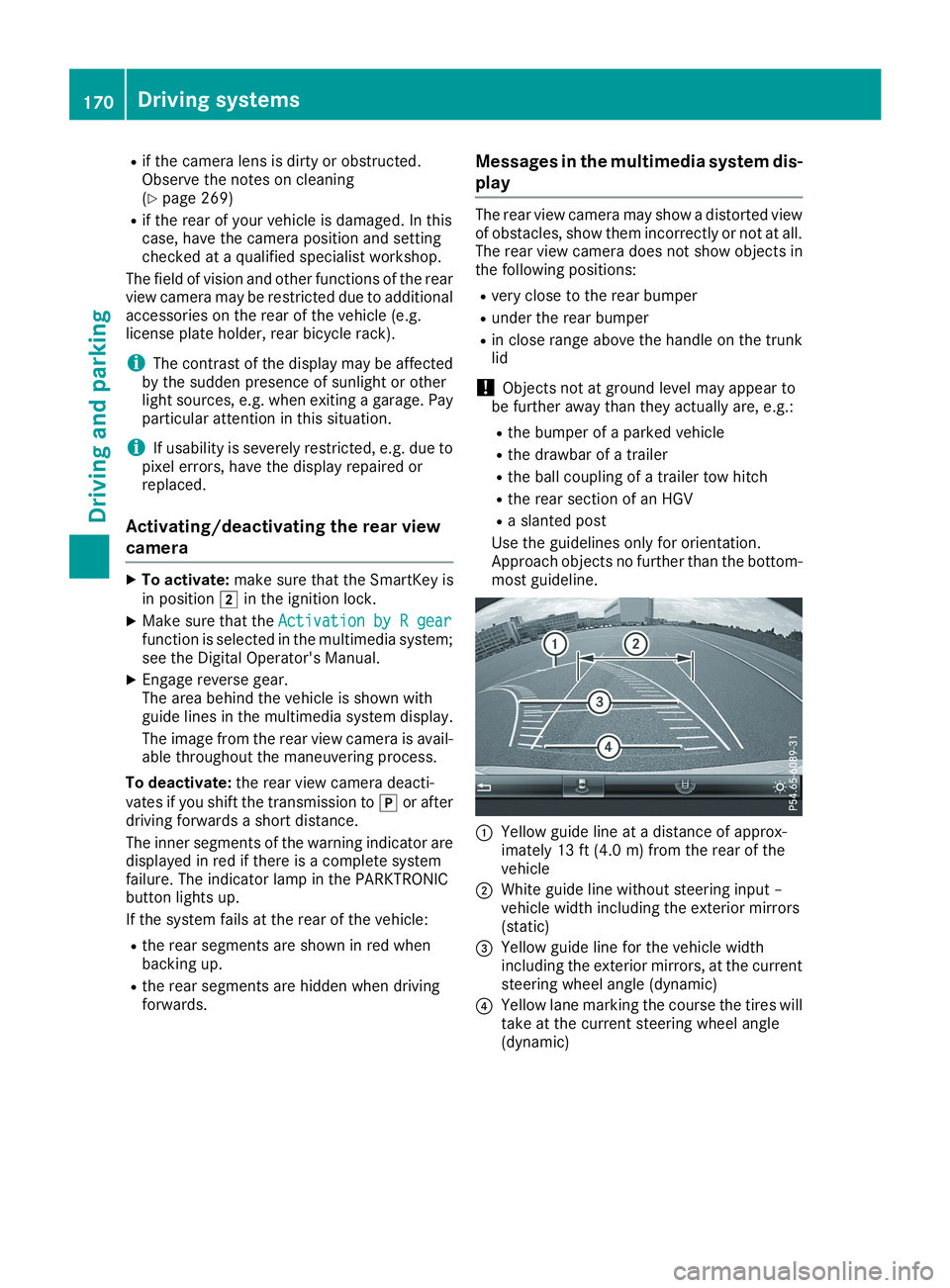
Use the guidelines only for orientation.Approach objects no further than the bottom-most guideline.
CYellow guide line at a distance of approx-imately 13 ft (4.0 m) from the rear of thevehicle
DWhite guide line without steering input –vehicle width including the exterior mirrors(static)
Page 178 of 330
Switching on Blind Spot Assist
XMake sure that Blind Spot Assist is activatedin the on-board computer (Ypage 188).
XTurn the SmartKey to positionHin the igni-tion lock.Warning lampsCin the exterior mirrors lightup red for approximately 1.5 seconds andthen turn yellow.
Lane Keeping Assist
General notes
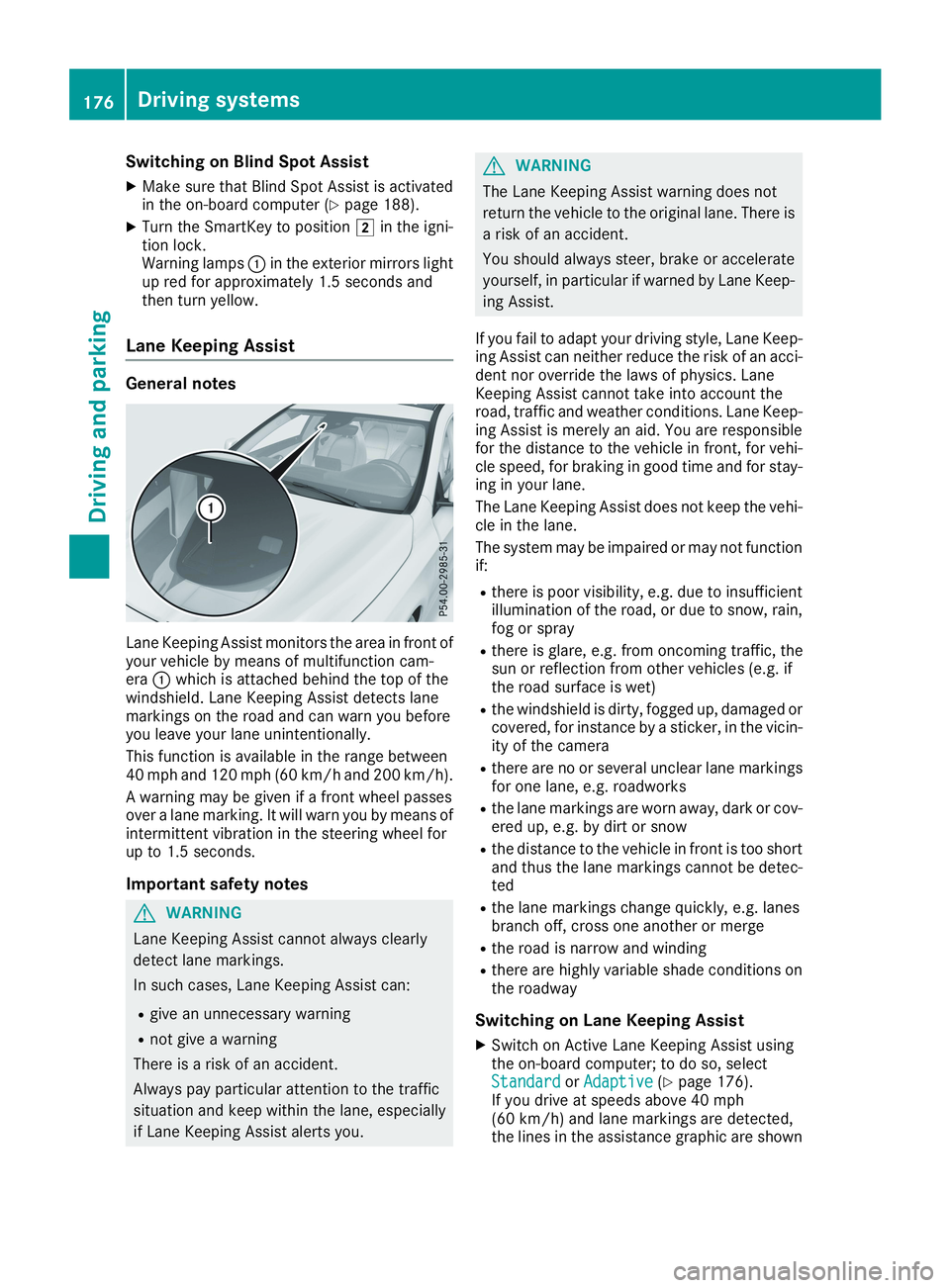
Lane Keeping Assist monitors the area in front ofyour vehicle by means of multifunction cam-eraCwhich is attached behind the top of thewindshield. Lane Keeping Assist detects lanemarkings on the road and can warn you beforeyou leave your lane unintentionally.
This function is available in the range between40 mph and 120 mph (60 km/h and 200 km/h).
A warning may be given if a front wheel passesover a lane marking. It will warn you by means ofintermittent vibration in the steering wheel forup to 1.5 seconds.
Important safety notes
GWARNING
Lane Keeping Assist cannot always clearly
detect lane markings.
In such cases, Lane Keeping Assist can:
Rgive an unnecessary warning
Rnot give a warning
There is a risk of an accident.
Always pay particular attention to the traffic
situation and keep within the lane, especially
if Lane Keeping Assist alerts you.
GWARNING
The Lane Keeping Assist warning does not
return the vehicle to the original lane. There is
a risk of an accident.
You should always steer, brake or accelerate
yourself, in particular if warned by Lane Keep-
ing Assist.
If you fail to adapt your driving style, Lane Keep-ing Assist can neither reduce the risk of an acci-dent nor override the laws of physics. LaneKeeping Assist cannot take into account theroad, traffic and weather conditions. Lane Keep-ing Assist is merely an aid. You are responsiblefor the distance to the vehicle in front, for vehi-cle speed, for braking in good time and for stay-ing in your lane.
The Lane Keeping Assist does not keep the vehi-cle in the lane.
The system may be impaired or may not functionif:
Rthere is poor visibility, e.g. due to insufficientillumination of the road, or due to snow, rain,fog or spray
Rthere is glare, e.g. from oncoming traffic, thesun or reflection from other vehicles (e.g. ifthe road surface is wet)
Rthe windshield is dirty, fogged up, damaged orcovered, for instance by a sticker, in the vicin-ity of the camera
Rthere are no or several unclear lane markingsfor one lane, e.g. roadworks
Rthe lane markings are worn away, dark or cov-ered up, e.g. by dirt or snow
Rthe distance to the vehicle in front is too shortand thus the lane markings cannot be detec-ted
Rthe lane markings change quickly, e.g. lanesbranch off, cross one another or merge
Rthe road is narrow and winding
Rthere are highly variable shade conditions onthe roadway
Switching on Lane Keeping Assist
XSwitch on Active Lane Keeping Assist usingthe on-board computer; to do so, selectStandardStandardorAdaptiveAdaptive(Ypage 176).If you drive at speeds above 40 mph(60 km/h) and lane markings are detected,the lines in the assistance graphic are shown
176Driving systems
Driving and parking
Page 180 of 330
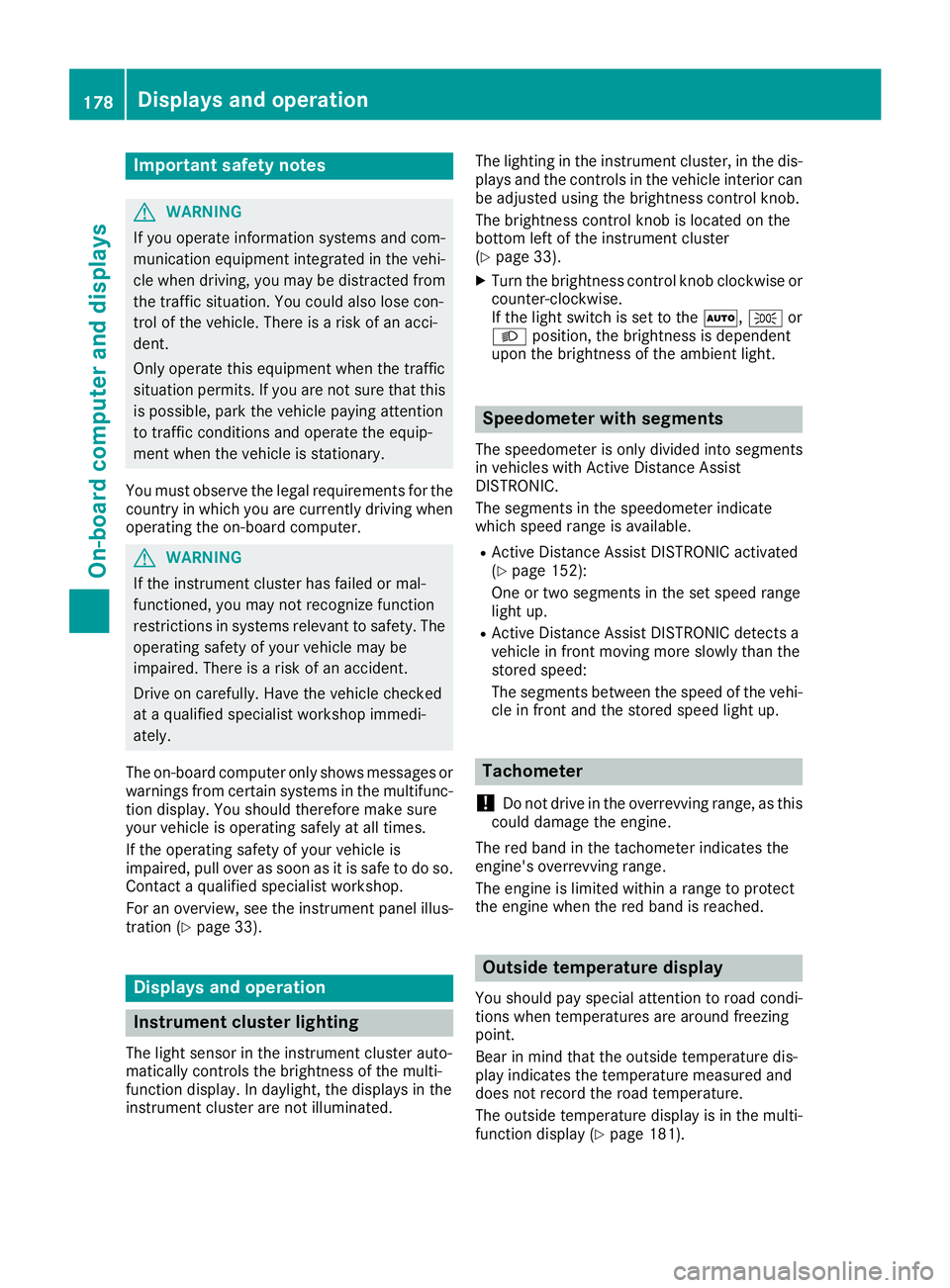
Important safety notes
GWARNING
If you operate information systems and com-
munication equipment integrated in the vehi-
cle when driving, you may be distracted from
the traffic situation. You could also lose con-
trol of the vehicle. There is a risk of an acci-
dent.
Only operate this equipment when the traffic
situation permits. If you are not sure that this
is possible, park the vehicle paying attention
to traffic conditions and operate the equip-
ment when the vehicle is stationary.
You must observe the legal requirements for thecountry in which you are currently driving whenoperating the on-board computer.
GWARNING
If the instrument cluster has failed or mal-
functioned, you may not recognize function
restrictions in systems relevant to safety. The
operating safety of your vehicle may be
impaired. There is a risk of an accident.
Drive on carefully. Have the vehicle checked
at a qualified specialist workshop immedi-
ately.
The on-board computer only shows messages orwarnings from certain systems in the multifunc-tion display. You should therefore make sureyour vehicle is operating safely at all times.
If the operating safety of your vehicle isimpaired, pull over as soon as it is safe to do so.Contact a qualified specialist workshop.
For an overview, see the instrument panel illus-tration (Ypage 33).
Displays and operation
Instrument cluster lighting
The light sensor in the instrument cluster auto-matically controls the brightness of the multi-function display. In daylight, the displays in theinstrument cluster are not illuminated.
The lighting in the instrument cluster, in the dis-plays and the controls in the vehicle interior canbe adjusted using the brightness control knob.
The brightness control knob is located on thebottom left of the instrument cluster(Ypage 33).
XTurn the brightness control knob clockwise orcounter-clockwise.If the light switch is set to theX,`orXposition, the brightness is dependentupon the brightness of the ambient light.
Speedometer with segments
The speedometer is only divided into segmentsin vehicles with Active Distance AssistDISTRONIC.
The segments in the speedometer indicatewhich speed range is available.
RActive Distance Assist DISTRONIC activated(Ypage 152):
One or two segments in the set speed rangelight up.
RActive Distance Assist DISTRONIC detects avehicle in front moving more slowly than thestored speed:
The segments between the speed of the vehi-cle in front and the stored speed light up.
Tachometer
!Do not drive in the overrevving range, as thiscould damage the engine.
The red band in the tachometer indicates theengine's overrevving range.
The engine is limited within a range to protectthe engine when the red band is reached.
Outside temperature display
You should pay special attention to road condi-tions when temperatures are around freezingpoint.
Bear in mind that the outside temperature dis-play indicates the temperature measured anddoes not record the road temperature.
The outside temperature display is in the multi-function display (Ypage 181).
178Displays and operation
On-board computer and displays
Page 192 of 330
Activating/deactivating the acoustic
locking verification signal
If you switch on theAcousticAcousticLockLockfunction, anacoustic signal sounds when you lock the vehi-cle.
XPress theYorebutton on the steeringwheel to select theSett.Sett.menu.
XPress thedorcbutton to select theVehicleVehiclesubmenu.
XPressvto confirm.
XPress thedorcbutton to select theAcoustic LockAcoustic Lockfunction.If theAcoustic LockAcoustic Lockfunction is activated,the multifunction display shows the7symbol in orange.
XPress thevbutton to save the setting.
Comfort
Switching the fold-in mirrors when lock-
ing feature on/off
This function is only available in Canada.
This function is only available when the vehicle isequipped with the electrical fold-in function.
When you activate theAuto.Auto.MirrorMirrorFoldingFoldingfunction, the exterior mirrors are folded in whenthe vehicle is locked. If you unlock the vehicleand then open the driver's or front-passengerdoor, the exterior mirrors fold out again.
If you have switched on theAuto. MirrorAuto. MirrorFoldingFoldingfunction and you fold in the exteriormirrors using the button on the door(Ypage 98), they will not fold out automatically.The exterior mirrors can then only be folded outusing the button on the door.
XPress theYorebutton on the steeringwheel to select theSett.Sett.menu.
XPress thedorcbutton to select theConvenienceConveniencesubmenu.
XPressvto confirm.
XPress thedorcbutton to select theAuto. Mirror FoldingAuto. Mirror Foldingfunction.If theAuto. Mirror FoldingAuto. Mirror Foldingfunction isswitched on, the multifunction display showsthe exterior mirror in orange.
XPress thevbutton to save the setting.
Restoring the factory settings
XPress theYorebutton on the steeringwheel to select theSett.Sett.menu.
XPress thedorcbutton to select theFactory SettingFactory Settingsubmenu.
XPressvto confirm.TheReset All Settings?Reset All Settings?functionappears.
XPress thedorcbutton to selectNoNoorYesYes.
XPress thevbutton to confirm the selec-tion.If you have selectedYesYes, the multifunctiondisplay shows a confirmation message.
For safety reasons, theDaytime RunningDaytime RunningLightsLightsfunction in theLightLightsubmenu is onlyreset if the vehicle is stationary.
AMG menu (Mercedes-AMG vehicles)
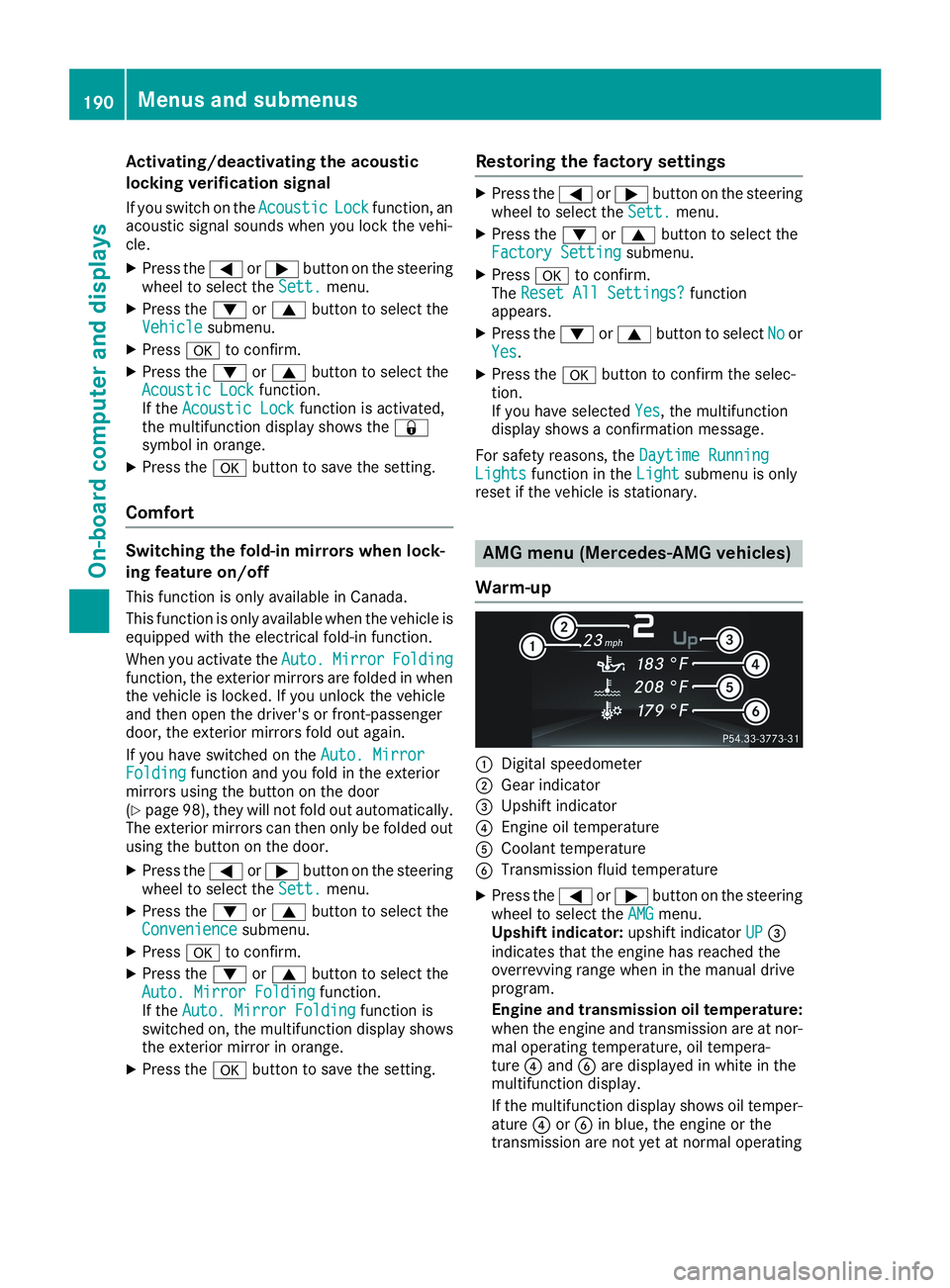
Warm-up
CDigital speedometer
DGear indicator
Page 194 of 330
XPress the8button on the steering wheel.
XConfirmYesYeswithv.
The RACE TIMER interrupts timing if you stop thevehicle and turn the SmartKey to positionGinthe ignition lock. If you turn the SmartKey topositionIand then pressvStartStartto con-firm, timing is continued.
Resetting the current lap
XStop the RACE TIMER.
XPress theYorebutton to selectReset LapReset Lap.
XPressvto reset the lap time to "0".
Deleting all laps
If you switch off the engine, the RACE TIMER isreset to "0" after 30 seconds. All laps aredeleted.
You cannot delete individual stored laps. If youhave stopped 16 laps, the current lap does nothave to be reset.
XReset the current lap.
XPressvto confirmResetReset.Reset Race-Timer?Reset Race-Timer?appears in the multi-function display.
XPress thedbutton to selectYesYesand pressthevbutton to confirm.All laps are deleted.
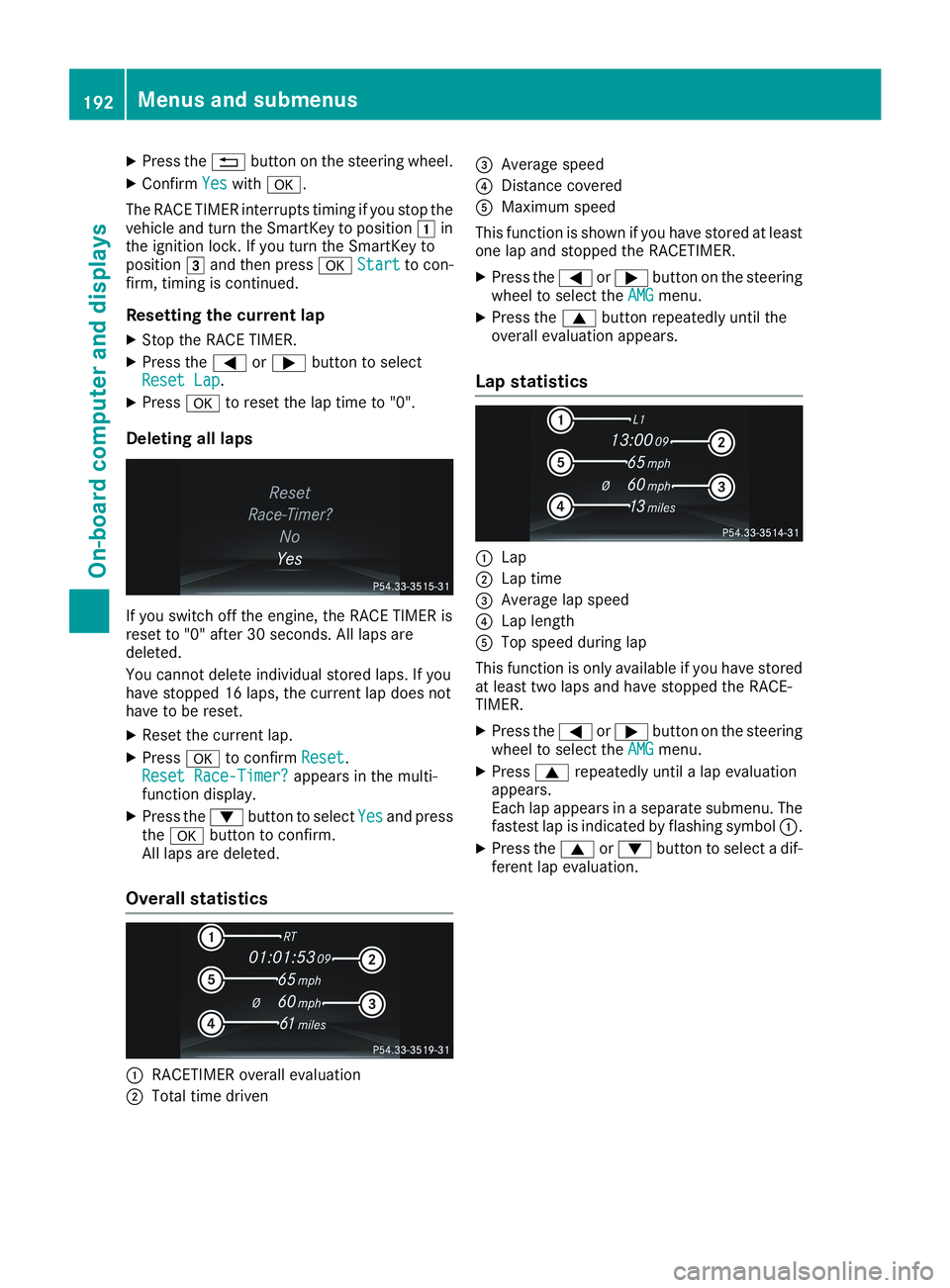
Overall statistics
CRACETIMER overall evaluation
DTotal time driven
Page 217 of 330
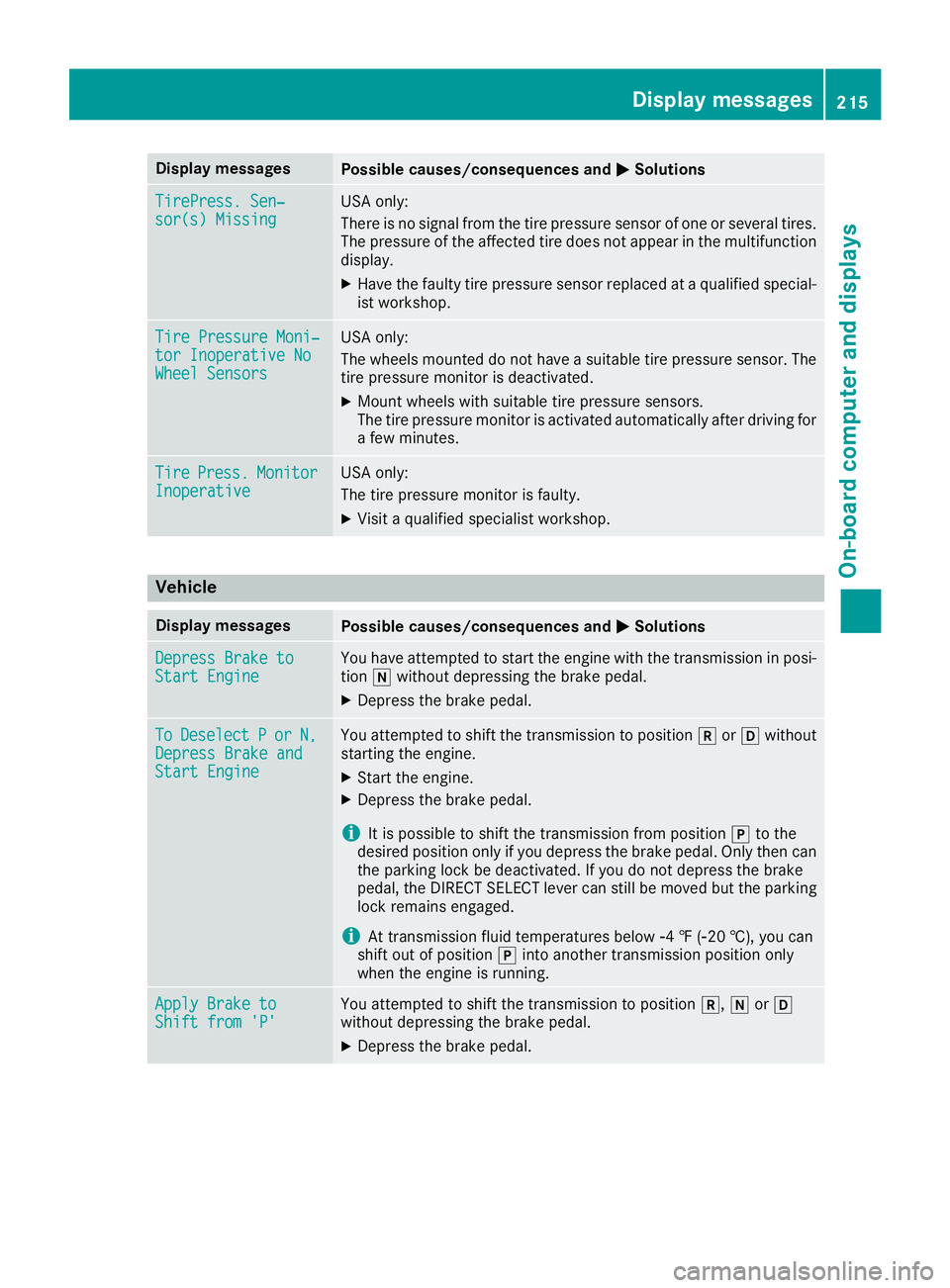
Display messagesPossible causes/consequences andPPSolutions
TirePress. Sen‐TirePress. Sen‐sor(s) Missingsor(s) MissingUSA only:
There is no signal from the tire pressure sensor of one or several tires.The pressure of the affected tire does not appear in the multifunctiondisplay.
XHave the faulty tire pressure sensor replaced at a qualified special-ist workshop.
Tire Pressure Moni‐Tire Pressure Moni‐tor Inoperative Notor Inoperative NoWheel SensorsWheel Sensors
USA only:
The wheels mounted do not have a suitable tire pressure sensor. Thetire pressure monitor is deactivated.
XMount wheels with suitable tire pressure sensors.The tire pressure monitor is activated automatically after driving fora few minutes.
TireTirePress.Press.MonitorMonitorInoperativeInoperativeUSA only:
The tire pressure monitor is faulty.
XVisit a qualified specialist workshop.
Vehicle
Display messagesPossible causes/consequences andPPSolutions
Depress Brake toDepress Brake toStart EngineStart EngineYou have attempted to start the engine with the transmission in posi-tion\\without depressing the brake pedal.
XDepress the brake pedal.
ToToDeselectDeselectPPororN,N,Depress Brake andDepress Brake andStart EngineStart Engine
You attempted to shift the transmission to position^or[withoutstarting the engine.
XStart the engine.
XDepress the brake pedal.
iIt is possible to shift the transmission from position]to thedesired position only if you depress the brake pedal. Only then canthe parking lock be deactivated. If you do not depress the brakepedal, the DIRECT SELECT lever can still be moved but the parkinglock remains engaged.
iAt transmission fluid temperatures below
Page 224 of 330
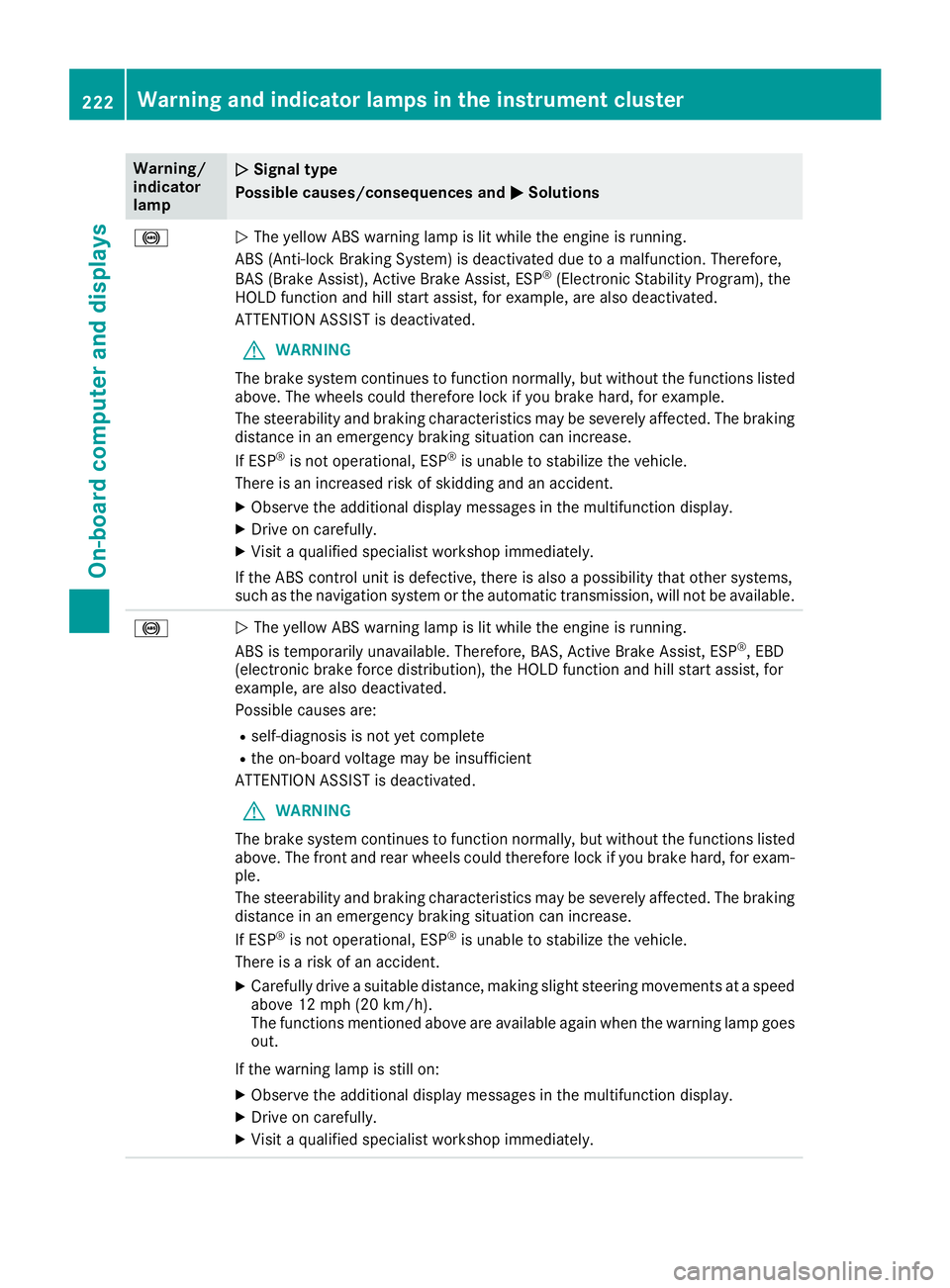
Warning/indicatorlamp
QQSignal type
Possible causes/consequences andPPSolutions
%QThe yellow ABS warning lamp is lit while the engine is running.
ABS (Anti-lock Braking System) is deactivated due to a malfunction. Therefore,
BAS (Brake Assist), Active Brake Assist, ESP®(Electronic Stability Program), theHOLD function and hill start assist, for example, are also deactivated.
ATTENTION ASSIST is deactivated.
GWARNING
The brake system continues to function normally, but without the functions listedabove. The wheels could therefore lock if you brake hard, for example.
The steerability and braking characteristics may be severely affected. The brakingdistance in an emergency braking situation can increase.
If ESP®is not operational, ESP®is unable to stabilize the vehicle.
There is an increased risk of skidding and an accident.
XObserve the additional display messages in the multifunction display.
XDrive on carefully.
XVisit a qualified specialist workshop immediately.
If the ABS control unit is defective, there is also a possibility that other systems,such as the navigation system or the automatic transmission, will not be available.
%QThe yellow ABS warning lamp is lit while the engine is running.
ABS is temporarily unavailable. Therefore, BAS, Active Brake Assist, ESP®, EBD(electronic brake force distribution), the HOLD function and hill start assist, forexample, are also deactivated.
Possible causes are:
Rself-diagnosis is not yet complete
Rthe on-board voltage may be insufficient
ATTENTION ASSIST is deactivated.
GWARNING
The brake system continues to function normally, but without the functions listedabove. The front and rear wheels could therefore lock if you brake hard, for exam-ple.
The steerability and braking characteristics may be severely affected. The brakingdistance in an emergency braking situation can increase.
If ESP®is not operational, ESP®is unable to stabilize the vehicle.
There is a risk of an accident.
XCarefully drive a suitable distance, making slight steering movements at a speedabove 12 mph (20 km/h).The functions mentioned above are available again when the warning lamp goesout.
If the warning lamp is still on:
XObserve the additional display messages in the multifunction display.
XDrive on carefully.
XVisit a qualified specialist workshop immediately.
222Warning and indicator lamps in the instrument cluster
On-board computer and displays
Page 225 of 330
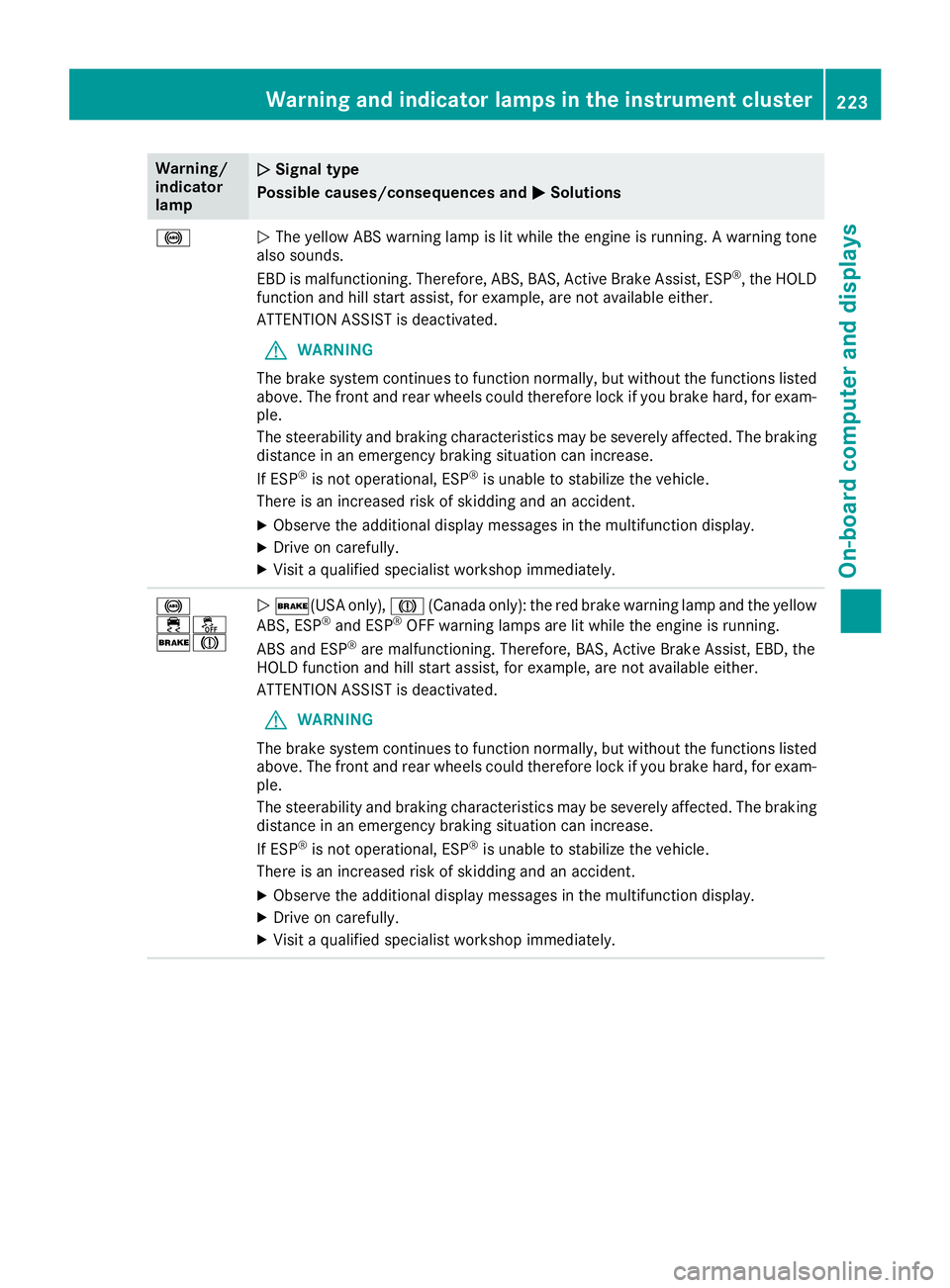
Warning/indicatorlamp
QQSignal type
Possible causes/consequences andPPSolutions
%QThe yellow ABS warning lamp is lit while the engine is running. A warning tonealso sounds.
EBD is malfunctioning. Therefore, ABS, BAS, Active Brake Assist, ESP®, the HOLDfunction and hill start assist, for example, are not available either.
ATTENTION ASSIST is deactivated.
GWARNING
The brake system continues to function normally, but without the functions listedabove. The front and rear wheels could therefore lock if you brake hard, for exam-ple.
The steerability and braking characteristics may be severely affected. The brakingdistance in an emergency braking situation can increase.
If ESP®is not operational, ESP®is unable to stabilize the vehicle.
There is an increased risk of skidding and an accident.
XObserve the additional display messages in the multifunction display.
XDrive on carefully.
XVisit a qualified specialist workshop immediately.
%