steering MERCEDES-BENZ CLA-Class 2016 C117 User Guide
[x] Cancel search | Manufacturer: MERCEDES-BENZ, Model Year: 2016, Model line: CLA-Class, Model: MERCEDES-BENZ CLA-Class 2016 C117Pages: 374, PDF Size: 8.19 MB
Page 36 of 374
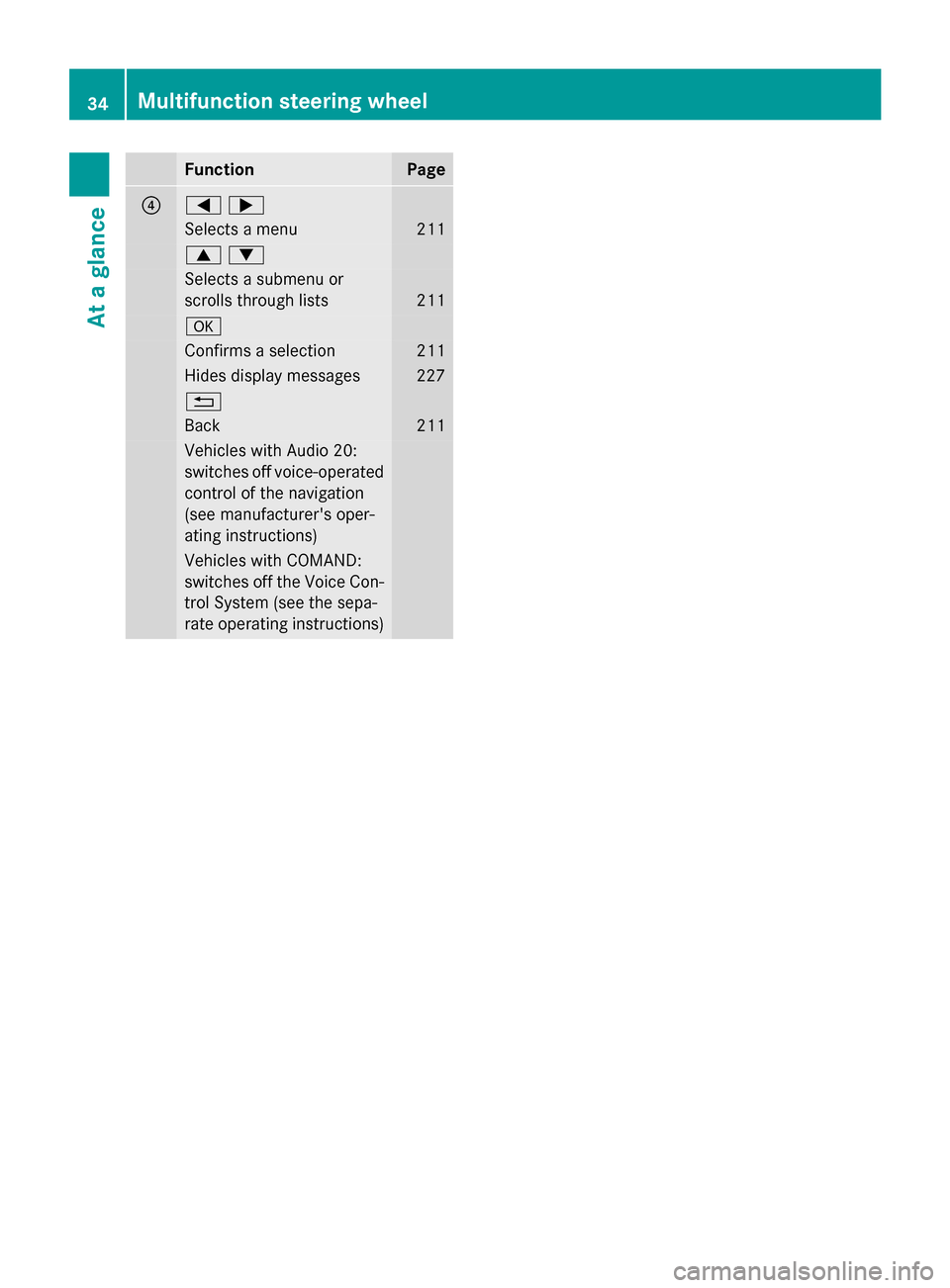
FunctionPage
?=;
Selects a menu211
9:
Selects a submenu or
scrolls through lists
211
a
Confirms a selection211
Hides display messages227
%
Back211
Vehicles with Audio 20:
switches off voice-operated
control of the navigation
(see manufacturer's oper-
ating instructions)
Vehicles with COMAND:
switches off the Voice Con-
trol System (see the sepa-
rate operating instructions)
34Multifunction steering wheel
At a glance
Page 44 of 374
Useful information
i
This Operator's Manual describes all
models and all standard and optional equip-
ment of your vehicle available at the time of
publication of the Operator's Manual.
Country-specific differences are possible.
Please note that your vehicle may not be
equipped with all features described. This
also applies to safety-related systems and
functions.
iRead the information on qualified special-
ist workshops (
Ypage 25).
Panic alarm
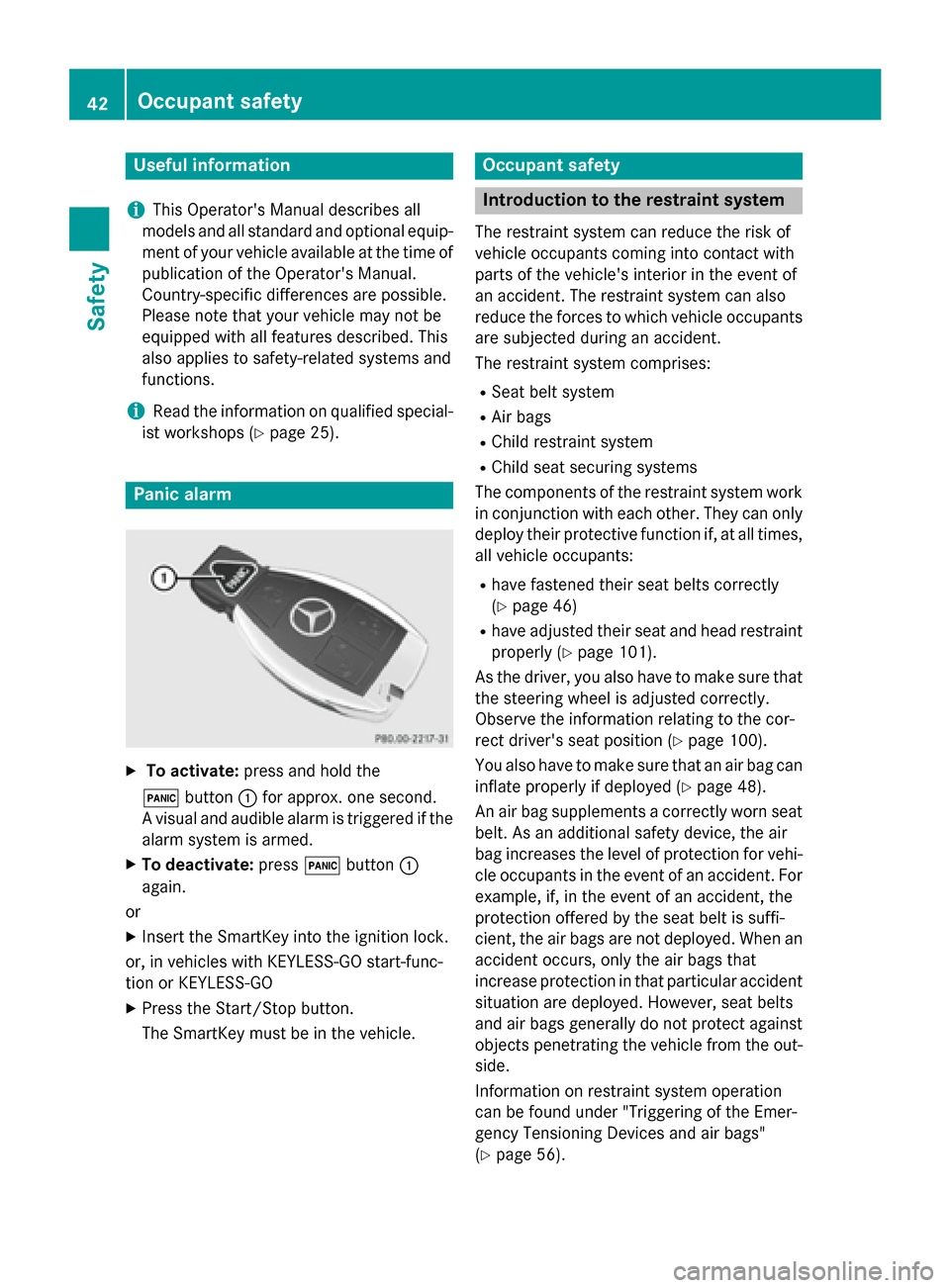
XTo activate: press and hold the
! button :for approx. one second.
A visual and audible alarm is triggered if the
alarm system is armed.
XTo deactivate: press!button :
again.
or
XInsert the SmartKey into the ignition lock.
or, in vehicles with KEYLESS-GO start-func-
tion or KEYLESS ‑GO
XPress the Start/Stop button.
The SmartKey must be in the vehicle.
Occupant safety
Introduction to the restraint system
The restraint system can reduce the risk of
vehicle occupants coming into contact with
parts of the vehicle's interior in the event of
an accident. The restraint system can also
reduce the forces to which vehicle occupants
are subjected during an accident.
The restraint system comprises:
RSeat belt system
RAir bags
RChild restraint system
RChild seat securing systems
The components of the restraint system work in conjunction with each other. They can only
deploy their protective function if, at all times,
all vehicle occupants:
Rhave fastened their seat belts correctly
(
Ypage 46)
Rhave adjusted their seat and head restraint
properly (
Ypage 101).
As the driver, you also have to make sure that
the steering wheel is adjusted correctly.
Observe the information relating to the cor-
rect driver's seat position (
Ypage 100).
You also have to make sure that an air bag can inflate properly if deployed (
Ypage 48).
An air bag supplements a correctly worn seat
belt. As an additional safety device, the air
bag increases the level of protection for vehi-
cle occupants in the event of an accident. For
example, if, in the event of an accident, the
protection offered by the seat belt is suffi-
cient, the air bags are not deployed. When an
accident occurs, only the air bags that
increase protection in that particular accident
situation are deployed. However, seat belts
and air bags generally do not protect against objects penetrating the vehicle from the out-
side.
Information on restraint system operation
can be found under "Triggering of the Emer-
gency Tensioning Devices and air bags"
(
Ypage 56).
42Occupant safety
Safety
Page 50 of 374
passenger seat belts are not fastened, a
warning tone sounds. A warning tone also
sounds with increasing intensity for
60 seconds or until the driver or front
passenger have fastened their seat belts.
If the driver or front passenger unfasten their
seat belts during the journey, the seat belt
warning is activated again.
iFor more information on the7seat
belt warning lamp, see "Warning and indi-
cator lamps in the instrument cluster, seat
belts" (
Ypage 258).
Air bags
Introduction
The installation point of an air bag can be rec-
ognized by the AIR BAG symbol.
An air bag complements the correctly fas-
tened seat belt. It is no substitute for the seat
belt. The air bag provides additional protec-
tion in applicable accident situations.
Not all air bags are deployed in an accident.
The different air bag systems function inde-
pendently from one another (
Ypage 56).
However, no system available today can com-
pletely eliminate injuries and fatalities.
It is also not possible to rule out a risk of injury
caused by an air bag due to the high speed at
which the air bag must be deployed.
Important safety notes
GWARNING
If you do not sit in the correct seat position,
the air bag cannot protect as intended and
could even cause additional injury when
deployed. This poses an increased risk of
injury or even fatal injury.
To avoid hazardous situations, always make
sure that all of the vehicle's occupants:
Rhave fastened their seat belts correctly,
including pregnant women
Rare sitting correctly and maintain the great-
est possible distance to the air bags
Rfollow the following instructions
Always make sure that there are no objects
between the air bag and the vehicle's occu-
pants.
RAdjust the seats properly before beginning
your journey. Always make sure that the
seat is in an almost upright position. The
center of the head restraint must support
the head at about eye level.
RMove the driver's and front-passenger
seats as far back as possible. The driver's
seat position must allow the vehicle to be
driven safely.
ROnly hold the steering wheel on the out-
side. This allows the air bag to be fully
deployed.
RAlways lean against the backrest while driv-
ing. Do not lean forwards or lean against
the door or side window. You may other-
wise be in the deployment area of the air
bags.
RAlways keep your feet in the footwell in
front of the seat. Do not put your feet on the
dashboard, for example. Your feet may oth- erwise be in the deployment area of the air
bag.
RFor this reason, always secure persons less
than 5 ft (1.50 m) tall in suitable restraint
systems. Up to this height, the seat belt
cannot be worn correctly.
If a child is traveling in your vehicle, also
observe the following notes:
RAlways secure children under twelve years
of age and less than 5 ft (1.50 m)tall in
suitable child restraint systems.
RChild restraint systems should be installed on the rear seats.
48Occupant safety
Safety
Page 51 of 374
ROnly secure a child in a rearward-facing
child restraint system on the front-
passenger seat when the front-passenger
front air bag is deactivated. If the
PASSENGER AIR BAG OFF indicator lamp ispermanently lit, the front-passenger front
air bag is deactivated (
Ypage 43).
RAlways observe the instructions and safety
notes on the "Occupant Classification Sys-
tem (OCS)" (
Ypage 51) and on "Children
in the vehicle" (
Ypage 58) in addition to
the child restraint system manufacturer's
installation instructions.
Objects in the vehicle interior may pre-
vent an air bag from functioning correctly.
Before starting your journey and to avoid risks
resulting from the speed of the air bag as it
deploys, make sure that:
Rthere are no people, animals or objects
between the vehicle occupants and an air
bag.
Rthere are no objects between the seat, door
and B-pillar.
Rno hard objects, e.g. coat hangers, hang on the grab handles or coat hooks.
Rno accessories, such as cup holders, are
attached to the vehicle within the deploy-
ment area of an air bag, e.g. to doors, side
windows, rear side trim or side walls.
Rno heavy, sharp-edged or fragile objects
are in the pockets of your clothing. Store
such objects in a suitable place.
GWARNING
If you modify the air bag cover or affix objects
such as stickers to it, the air bag can no longer
function correctly. There is an increased risk
of injury.
Never modify an air bag cover or affix objects
to it.
GWARNING
Sensors to control the air bags are located in
the doors. Modifications or work not per-
formed correctly to the doors or door panel-
ing, as well as damaged doors, can lead to the
function of the sensors being impaired. The air
bags might therefore not function properly
anymore. Consequently, the air bags cannot
protect vehicle occupants as they are
designed to do. There is an increased risk of
injury.
Never modify the doors or parts of the doors.
Always have work on the doors or door pan-
eling carried out at a qualified specialist work-
shop.
Front air bags
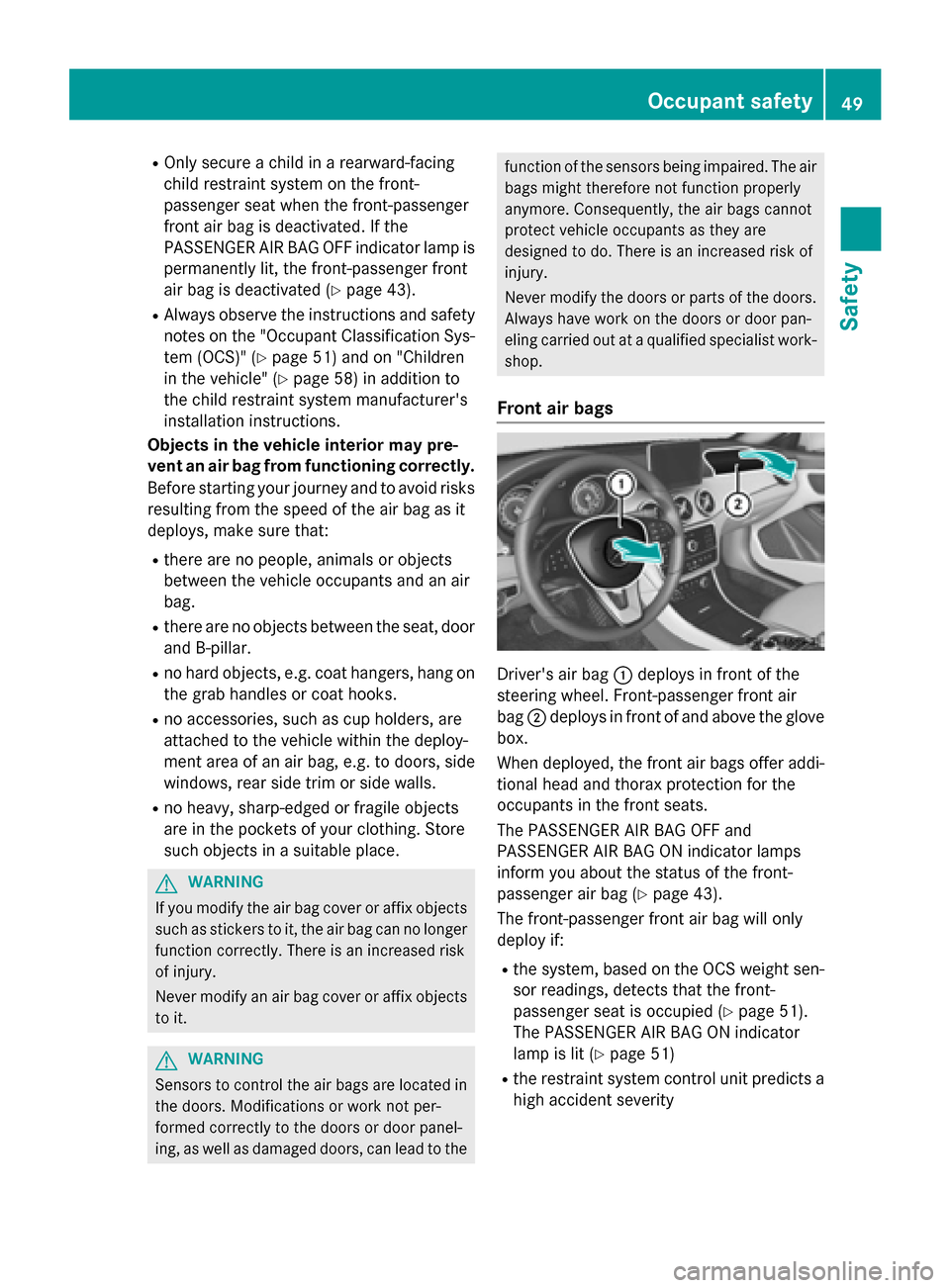
Driver's air bag :deploys in front of the
steering wheel. Front-passenger front air
bag ;deploys in front of and above the glove
box.
When deployed, the front air bags offer addi-
tional head and thorax protection for the
occupants in the front seats.
The PASSENGER AIR BAG OFF and
PASSENGER AIR BAG ON indicator lamps
inform you about the status of the front-
passenger air bag (
Ypage 43).
The front-passenger front air bag will only
deploy if:
Rthe system, based on the OCS weight sen-
sor readings, detects that the front-
passenger seat is occupied (
Ypage 51).
The PASSENGER AIR BAG ON indicator
lamp is lit (
Ypage 51)
Rthe restraint system control unit predicts a
high accident severity
Occupant safety49
Safety
Z
Page 66 of 374
GWARNING
If the child restraint system is subjected to
direct sunlight, parts may get very hot. Chil-
dren may burn themselves on these parts,
particularly on the metal parts of the child
restraint system. There is a risk of injury.
If you leave the vehicle, taking the child with
you, always ensure that the child restraint
system is not exposed to direct sunlight. Pro- tect it with a blanket, for example. If the child
restraint system has been exposed to direct
sunlight, let it cool down before securing the
child in it. Never leave children unattended in
the vehicle.
Child-proof locks for the rear doors
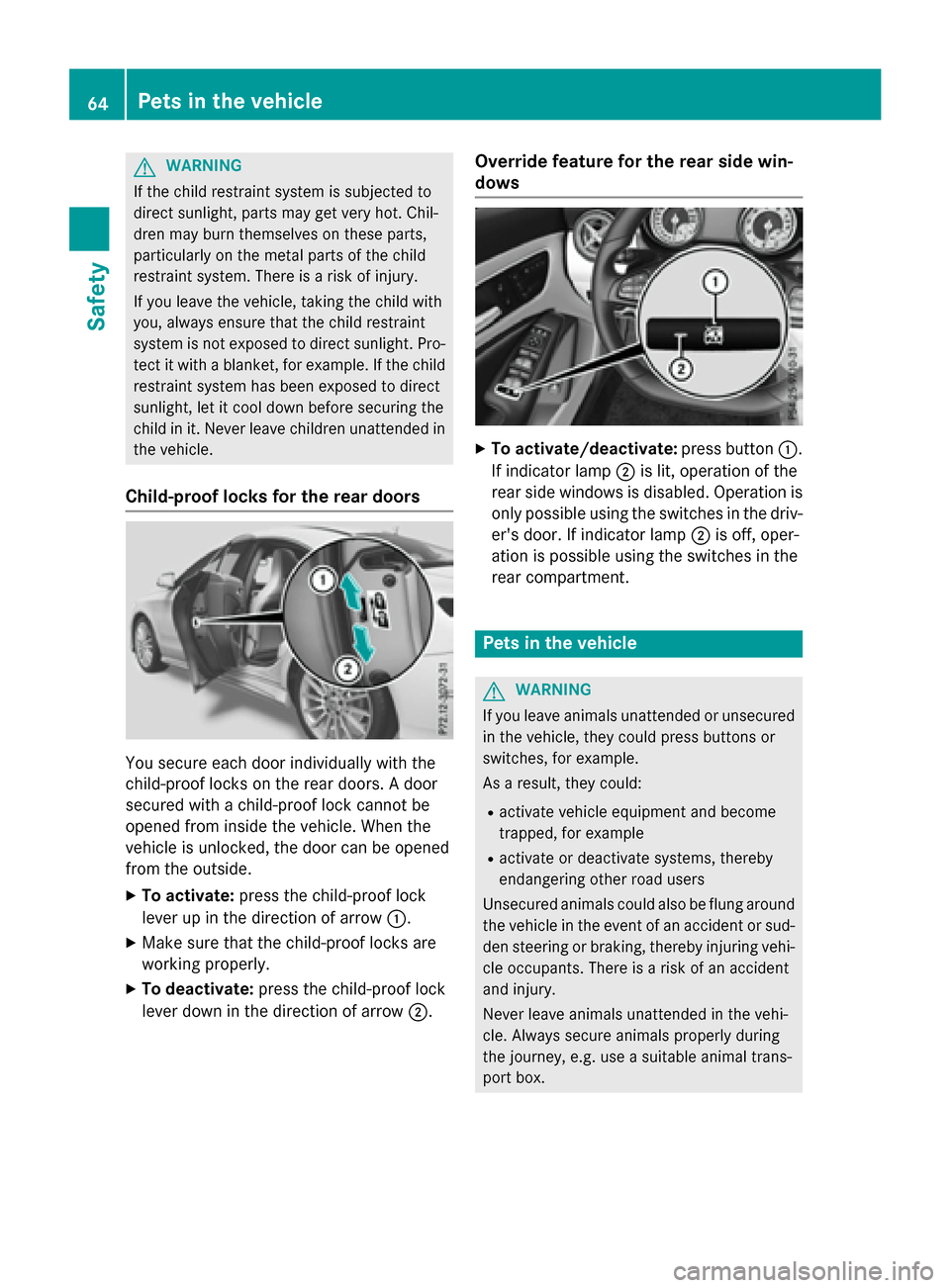
You secure each door individually with the
child-proof locks on the rear doors. A door
secured with a child-proof lock cannot be
opened from inside the vehicle. When the
vehicle is unlocked, the door can be opened
from the outside.
XTo activate: press the child-proof lock
lever up in the direction of arrow :.
XMake sure that the child-proof locks are
working properly.
XTo deactivate:press the child-proof lock
lever down in the direction of arrow ;.
Override feature for the rear side win-
dows
XTo activate/deactivate:press button:.
If indicator lamp ;is lit, operation of the
rear side windows is disabled. Operation is
only possible using the switches in the driv-
er's door. If indicator lamp ;is off, oper-
ation is possible using the switches in the
rear compartment.
Pets in the vehicle
GWARNING
If you leave animals unattended or unsecured
in the vehicle, they could press buttons or
switches, for example.
As a result, they could:
Ractivate vehicle equipment and become
trapped, for example
Ractivate or deactivate systems, thereby
endangering other road users
Unsecured animals could also be flung around
the vehicle in the event of an accident or sud-
den steering or braking, thereby injuring vehi-
cle occupants. There is a risk of an accident
and injury.
Never leave animals unattended in the vehi-
cle. Always secure animals properly during
the journey, e.g. use a suitable animal trans-
port box.
64Pets in the vehicle
Safety
Page 73 of 374
In the following situations, it may be better to
activate SPORT handling mode or deactivate
ESP
®:
Rwhen using snow chains
Rin deep snow
Ron sand or gravel
Ron specially designated roads when the
vehicle's own oversteering and understeer- ing characteristics are desired
Driving in SPORT handling mode or without
ESP
®requires an extremely qualified and
experienced driver.
iActivate ESP®as soon as the situations
described above no longer apply. ESP®will
otherwise not be able to stabilize the vehi-
cle if the vehicle starts to skid or a wheel
starts to spin.
!Avoid spinning the driven wheels for an
extended period with ESP®deactivated.
You could otherwise damage the drivetrain.
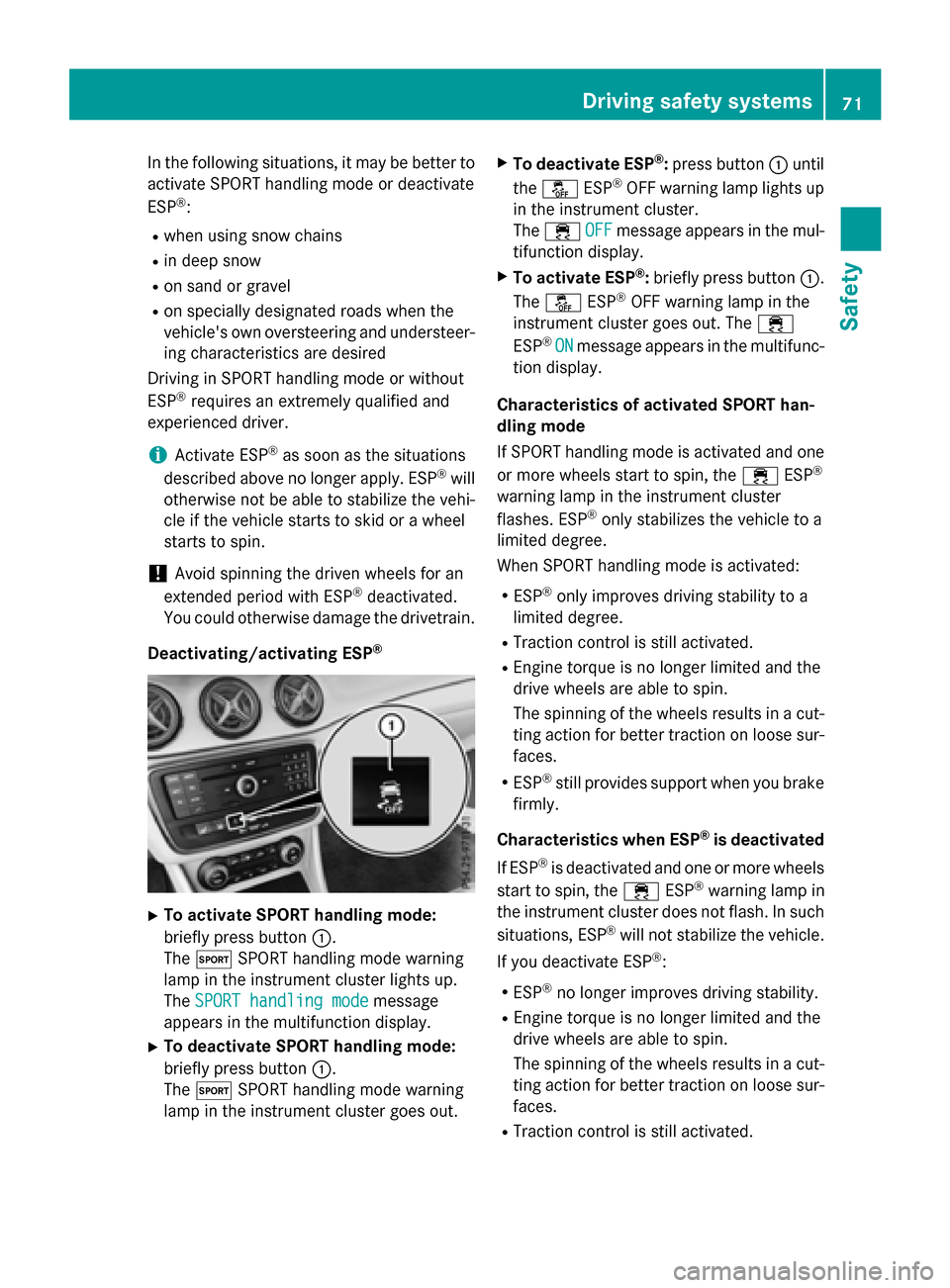
Deactivating/activating ESP
®
XTo activate SPORT handling mode:
briefly press button :.
The M SPORT handling mode warning
lamp in the instrument cluster lights up.
The SPORT handling mode
message
appears in the multifunction display.
XTo deactivate SPORT handling mode:
briefly press button :.
The M SPORT handling mode warning
lamp in the instrument cluster goes out.
XTo deactivate ESP®: press button :until
the å ESP®OFF warning lamp lights up
in the instrument cluster.
The ÷ OFF
message appears in the mul-
tifunction display.
XTo activate ESP®: briefly press button :.
The å ESP®OFF warning lamp in the
instrument cluster goes out. The ÷
ESP
®ONmessage appears in the multifunc-
tion display.
Characteristics of activated SPORT han-
dling mode
If SPORT handling mode is activated and one
or more wheels start to spin, the ÷ESP
®
warning lamp in the instrument cluster
flashes. ESP®only stabilizes the vehicle to a
limited degree.
When SPORT handling mode is activated:
RESP®only improves driving stability to a
limited degree.
RTraction control is still activated.
REngine torque is no longer limited and the
drive wheels are able to spin.
The spinning of the wheels results in a cut-
ting action for better traction on loose sur-
faces.
RESP®still provides support when you brake
firmly.
Characteristics when ESP
®is deactivated
If ESP
®is deactivated and one or more wheels
start to spin, the ÷ESP®warning lamp in
the instrument cluster does not flash. In such
situations, ESP
®will not stabilize the vehicle.
If you deactivate ESP
®:
RESP®no longer improves driving stability.
REngine torque is no longer limited and the
drive wheels are able to spin.
The spinning of the wheels results in a cut-
ting action for better traction on loose sur-
faces.
RTraction control is still activated.
Driving safety systems71
Safety
Z
Page 74 of 374
RCOLLISION PREVENTION AS SIST isno lon-
ger available; nor is itactivated ifyou brake
firmly with assistance from ESP
®.
RESP®still provides support when you brake
firmly.
ESP®trailer stabilization
General info rmation
If your veh icle/trailer combination begins to
swerve, ESP
®assists you inthis situation.
ESP®slows the vehicle down bybraking and
limit ing the engine output unt ilthe vehicle/
trailer co mbination has stabilized.
Import ant safety notes
GWARNIN G
If road and weather condition sare poor ,
trailer stabilization will no tbe able to preven t
th evehicle/traile rcombination from swerv-
ing .Trailers wit h ahigh cente rof gravity can
tip ove rbefore ES P
®can detect this. Ther eis
a ris kof an accident.
Always adapt your driving style to th eprevail-
ing road and weather conditions.
If your veh icle with trailer (vehicle/trailer
co mbin ation) begins to lurch, you can only
stabiliz e the vehicle /trailer combination by
depr essing the brake firmly.
ESP
®trailer stabiliz ation is active above
speeds of about 65 km/h.
ESP
®trailer stabilization does not work if
ESP®is deactivated or disabled because of a
malfunction.
EBD (electronic brake force distribu-
tion)
General information
EBD mon itors and controls the brake pres-
sure on the rear wheels to improve driving
stabilit ywhile braking.
Important safety notes
iObserve the "Important safety notes" sec-
tion (
Ypage 65).
GWARNIN G
If EB Dis malfunctioning, th erear wheels can
lock, e.g. under full braking .This increases th e
ris kof skiddin gand an accident.
You should therefor eadapt your driving style
to th edifferent handlin gcharacteristics. Hav e
th ebrak esystem checked at aqualified spe-
cialist workshop.
Observe information regarding indicator and
warning lamps (
Ypage 261) as wellas dis-
play messages (
Ypage 230).
ADAPTIVE BRAKE
ADAPTIVE BRAKE enhances braking safety
and offers increased braking comfort. Inaddi-
tion to the braking function, ADAPTIVE BRAKE
also has the HOLD function (
Ypage 187) and
hill start assist (
Ypage 151).
STEER CONTROL
General information
ST EER CONTROL helps you bytransmitting a
noticea blesteering force to the steering
wheel inthe direction required for vehicle
stabiliz ation.
This steering assistance ispro vide din partic-
ular if:
Rboth right wheels or both left wheels are on
a wet or slippery road surface when you
brake.
Rthe veh iclestarts to skid.
Important safety notes
iObserve the "Important safety notes" sec-
tion (
Ypage 65).
72Driving safety systems
Safety
Page 75 of 374
No steering assistance is provided from
STEER CONTROL, if:
RESP®is malfunctioning.
Rthe lighting is faulty.
If ESP
®is malfunctioning, you will be assisted
further by the electrical power steering.
Protection against theft
Immobilizer
The immobilizer prevents your vehicle from
being started without the correct SmartKey.
XTo activate with the SmartKey: remove
the SmartKey from the ignition lock.
XTo activate with KEYLESS-GO start-
function or KEYLESS-GO: switch the igni-
tion off and open the driver's door.
XTo deactivate: switch on the ignition.
When leaving the vehicle, always take the
SmartKey with you and lock the vehicle. Any-
one can start the engine if a valid SmartKey
has been left inside the vehicle.
iThe immobilizer is always deactivated
when you start the engine.
In the event that the engine cannot be star-
ted (yet the vehicle's battery is charged),
the system is not operational. Contact an
authorized Mercedes-Benz Center or call
1-800-FOR-MERCedes (in the USA) or
1-800-387-0100 (in Canada).
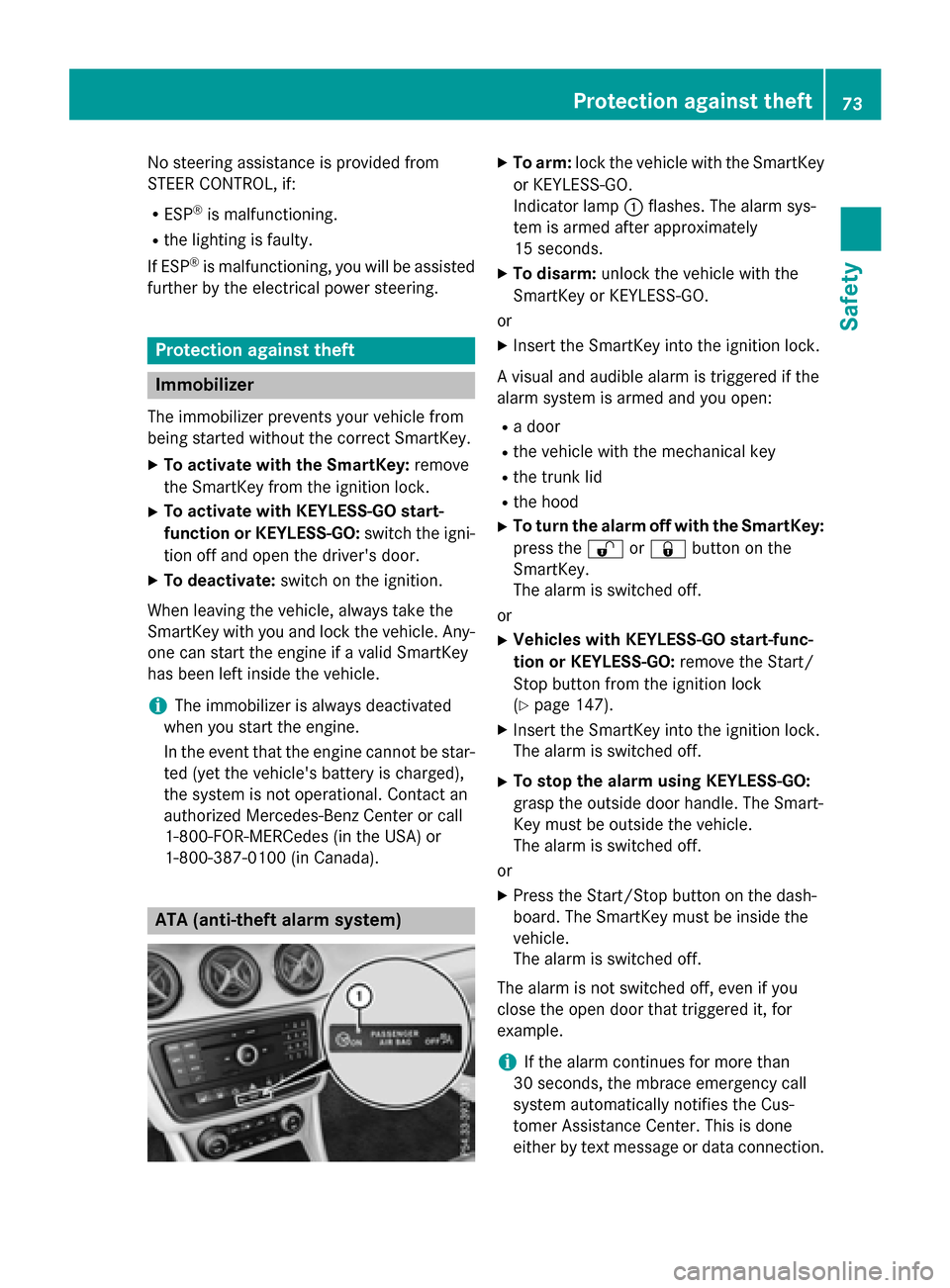
ATA (anti-theft alarm system)
XTo arm: lock the vehicle with the SmartKey
or KEYLESS-GO.
Indicator lamp :flashes. The alarm sys-
tem is armed after approximately
15 seconds.
XTo disarm: unlock the vehicle with the
SmartKey or KEYLESS-GO.
or
XInsert the SmartKey into the ignition lock.
A visual and audible alarm is triggered if the
alarm system is armed and you open:
Ra door
Rthe vehicle with the mechanical key
Rthe trunk lid
Rthe hood
XTo turn the alarm off with the SmartKey:
press the %or& button on the
SmartKey.
The alarm is switched off.
or
XVehicles with KEYLESS-GO start-func-
tion or KEYLESS-GO: remove the Start/
Stop button from the ignition lock
(
Ypage 147).
XInsert the SmartKey into the ignition lock.
The alarm is switched off.
XTo stop the alarm using KEYLESS-GO:
grasp the outside door handle. The Smart-
Key must be outside the vehicle.
The alarm is switched off.
or
XPress the Start/Stop button on the dash-
board. The SmartKey must be inside the
vehicle.
The alarm is switched off.
The alarm is not switched off, even if you
close the open door that triggered it, for
example.
iIf the alarm continues for more than
30 seconds, the mbrace emergency call
system automatically notifies the Cus-
tomer Assistance Center. This is done
either by text message or data connection.
Protection against theft73
Safety
Z
Page 101 of 374
Useful information............................100
Correct driver's seat position ..........100
Seats .................................................. 101
Steering wheel .................................. 106
Mirrors ............................................... 107
Memory function ............................... 110
99
Seats, steering wheel and mirrors
Page 102 of 374
Useful information
i
This Operator's Manual describes all
models and all standard and optional equip-
ment of your vehicle available at the time of
publication of the Operator's Manual.
Country-specific differences are possible.
Please note that your vehicle may not be
equipped with all features described. This
also applies to safety-related systems and
functions.
iRead the information on qualified special-
ist workshops (
Ypage 25).
Correct driver's seat position
GWARNING
You could lose control of your vehicle if you do the following while driving:
Radjust the driver's seat, head restraint,
steering wheel or mirrors
Rfasten the seat belt
There is a risk of an accident.
Adjust the driver's seat, head restraint, steer-
ing wheel and mirror and fasten your seat belt before starting the engine.
XObserve the safety guidelines on seat
adjustment (
Ypage 101).
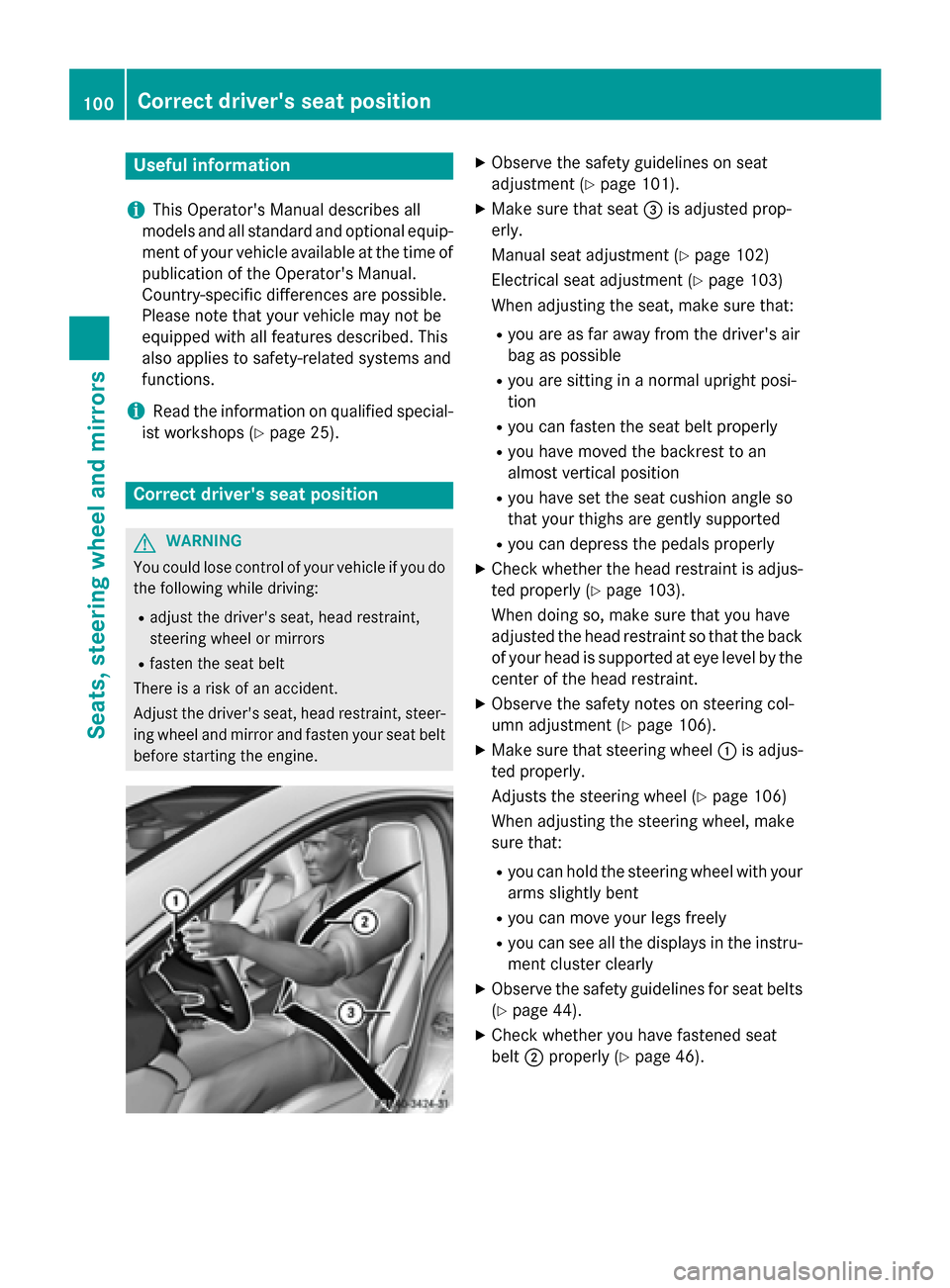
XMake sure that seat =is adjusted prop-
erly.
Manual seat adjustment (
Ypage 102)
Electrical seat adjustment (
Ypage 103)
When adjusting the seat, make sure that:
Ryou are as far away from the driver's air
bag as possible
Ryou are sitting in a normal upright posi-
tion
Ryou can fasten the seat belt properly
Ryou have moved the backrest to an
almost vertical position
Ryou have set the seat cushion angle so
that your thighs are gently supported
Ryou can depress the pedals properly
XCheck whether the head restraint is adjus-
ted properly (
Ypage 103).
When doing so, make sure that you have
adjusted the head restraint so that the back
of your head is supported at eye level by the
center of the head restraint.
XObserve the safety notes on steering col-
umn adjustment (
Ypage 106).
XMake sure that steering wheel :is adjus-
ted properly.
Adjusts the steering wheel (
Ypage 106)
When adjusting the steering wheel, make
sure that:
Ryou can hold the steering wheel with your
arms slightly bent
Ryou can move your legs freely
Ryou can see all the displays in the instru-
ment cluster clearly
XObserve the safety guidelines for seat belts
(
Ypage 44).
XCheck whether you have fastened seat
belt ;properly (
Ypage 46).
100Correct driver's seat position
Seats, steering wheel and mirrors