steering MERCEDES-BENZ CLA-Class 2016 C117 Service Manual
[x] Cancel search | Manufacturer: MERCEDES-BENZ, Model Year: 2016, Model line: CLA-Class, Model: MERCEDES-BENZ CLA-Class 2016 C117Pages: 374, PDF Size: 8.19 MB
Page 175 of 374
with limitations, or not at all. This could affect,for example, the power steering and the brake
boosting effect. You will require considerably
more effort to steer and brake. There is a risk
of an accident.
Do not switch off the ignition while driving.
GWARNING
If you operate mobile communication equip-
ment while driving, you will be distracted from traffic conditions. You could also lose control
of the vehicle. There is a risk of an accident.
Only operate this equipment when the vehicle
is stationary.
Observe the legal requirements for the coun-
try in which you are driving. Some jurisdic-
tions prohibit the driver from using a mobile
phone while driving a vehicle.
If you make a call while driving, always use
hands-free mode. Only operate the telephone
when the traffic situation permits. If you are
unsure, pull over to a safe location and stop
before operating the telephone.
Bear in mind that at a speed of only 30 mph
(approximately 50 km/h), the vehicle covers
a distance of 44 ft (approximately 14 m) per
second.
Drive sensibly – save fuel
Observe the following tips to save fuel:
RThe tires should always be inflated to the
recommended tire pressure.
RRemove unnecessary loads.
RRemove roof racks when they are not nee-
ded.
RWarm up the engine at low engine speeds.
RAvoid frequent acceleration or braking.
RHave all maintenance work carried out as
indicated by the service intervals in the
Maintenance Booklet or by the service
interval display.
Fuel consumption also increases when driv-
ing in cold weather, in stop-start traffic and in
hilly terrain.
Drinking and driving
GWARNING
Drinking and driving and/or taking drugs and driving are very dangerous combinations.
Even a small amount of alcohol or drugs can
affect your reflexes, perceptions and judg-
ment.
The possibility of a serious or even fatal acci-
dent is greatly increased when you drink or
take drugs and drive.
Do not drink or take drugs and drive or allow
anyone to drive who has been drinking or tak-
ing drugs.
Emission control
GWARNING
Combustion engines emit poisonous exhaust
gases such as carbon monoxide. Inhaling
these exhaust gases leads to poisoning. There
is a risk of fatal injury. Therefore never leave
the engine running in enclosed spaces with-
out sufficient ventilation.
Certain engine systems are designed to keep
the level of poisonous components in exhaust
fumes within legal limits.
These systems only work at peak efficiency if
they are serviced exactly in accordance with
the manufacturer's specifications. Always
have work on the engine carried out at a
qualified specialist workshop. Mercedes-
Benz recommends that you use an authorized
Mercedes-Benz Center for this purpose. In
particular, work relevant to safety or on
safety-related systems must be carried out at
a qualified specialist workshop.
The engine settings must not be changed
under any circumstances. Furthermore, all
specific service work must be carried out at
regular intervals and in accordance with the
Mercedes-Benz service requirements. Details
can be found in the Maintenance Booklet.
Driving tips173
Driving and parking
Z
Page 180 of 374
becomes trapped in snow. There is a risk of
fatal injury.
If you leave the engine or the auxiliary heatingrunning, make sure the exhaust pipe and area
around the vehicle are clear of snow. To
ensure an adequate supply of fresh air, open a
window on the side of the vehicle that is not
facing into the wind.
Have your vehicle winter-proofed at a quali-
fied specialist workshop at the onset of win-
ter.
Drive particularly carefully on slippery road
surfaces. Avoid sudden acceleration, steering
and braking maneuvers. Do not use the cruise
control or DISTRONIC PLUS.
If the vehicle threatens to skid or cannot be
stopped when moving at low speed:
XShift the transmission to position N.
XTry to bring the vehicle under control using
corrective steering.
The outside temperature indicator is not
designed to serve as an ice-warning device
and is therefore unsuitable for that purpose.
Changes in the outside temperature are dis-
played after a short delay.
Indicated temperatures just above the freez-
ing point do not guarantee that the road sur-
face is free of ice. The road may still be icy,
especially in wooded areas or on bridges.
You should pay special attention to road con-
ditions when temperatures are around freez-
ing point.
For more information on driving with snow
chains, see (
Ypage 331).
For more information on driving with summer
tires, see (
Ypage 330).
Observe the notes in the "Winter operation"
section (
Ypage 330).
Driving systems
Cruise Control
General notes
Cruise control maintains a constant road
speed for you. It brakes automatically in order to avoid exceeding the set speed. On long and
steep downhill gradients, especially if the
vehicle is laden, you must select a low gear in
good time. You need to have previously selec-
ted manual gearshifting M(
Ypage 164). By
doing so, you will make use of the braking
effect of the engine. This relieves the load on
the brake system and prevents the brakes
from overheating and wearing too quickly.
Use cruise control only if road and traffic con-
ditions make it appropriate to maintain a
steady speed for a prolonged period. You can
store any road speed above 20 mph
(30 km/h).
The speed indicated in the speedometer may
differ slightly from the speed stored.
Important safety notes
If you fail to adapt your driving style, cruise
control can neither reduce the risk of an acci-
dent nor override the laws of physics. Cruise
control cannot take into account the road,
traffic and weather conditions. Cruise control
is only an aid. You are responsible for the dis-
tance to the vehicle in front, for vehicle speed,
for braking in good time and for staying in
your lane.
Do not use cruise control:
Rin road and traffic conditions which do not
allow you to maintain a constant speed e.g. in heavy traffic or on winding roads
Ron slippery road surfaces. Braking or accel-
erating could cause the drive wheels to lose
traction and the vehicle could then skid
Rwhen there is poor visibility, e.g. due to fog,
heavy rain or snow
If there is a change of drivers, advise the new
driver of the speed stored.
178Driving systems
Driving and parking
Page 191 of 374
When the HOLD function is activated, the
transmission is shifted automatically to posi-
tionPif:
Rthe driver's seat belt is not fastened and the
driver's door is open.
Rthe engine is switched off, unless it is auto-
matically switched off by the ECO start/
stop function.
The electric parking brake secures the vehicle automatically if the HOLD function is activa-
ted when the vehicle is stationary and:
Ra system malfunction occurs.
Rthe power supply is not sufficient.
Start-off assist (except Mercedes-
AMG vehicles)
Important safety notes
GWARNING
If you use start-off assist, individual wheels
may start to spin and the vehicle may skid. If
ESP
®is deactivated, there is a greater danger
of skidding and having an accident. Make sure
that no persons or obstacles are in the vicinity
of the vehicle.
Start-off assist enables optimum acceleration from a standstill. For this, a suitably high-grip
road surface is required, along with the tires
and vehicle being in proper operating condi-
tion.
Do not activate start-off assist on public
roads.
Observe the safety notes on driving safety
systems (
Ypage 65).
Be sure to read the safety notes and informa-
tion on ESP
®(Ypage 69).
Activating start-off assist
XDeactivate ESP®(Ypage 219).
XTurn the steering wheel to the straight-
ahead position.
XDepress the brake pedal firmly with your
left foot and keep the brake pedal
depressed.
XShift the transmission to position D.
XUse the DYNAMIC SELECT button to select
the Sdrive program (
Ypage 155).
XQuickly depress the accelerator pedal fully.
XTake your foot off the brake, but keep the
accelerator pedal depressed.
The vehicle pulls away at maximum accel-
eration.
iActivate ESP®as soon as the acceleration
process has ended. ESP®will otherwise not
be able to stabilize the vehicle if the vehicle
starts to skid or a wheel starts to spin.
Canceling start-off assist
XRemove your foot from the accelerator
pedal.
XReactivate ESP.
RACE START (AMG vehicles)
Important safety notes
iRACE START must not be used on normal
roads. RACE START must only be activated and used on dedicated road circuits, out-
side of public road use.
iRACE START is only available in
Mercedes‑AMG vehicles.
GWARNING
If you use RACE START, individual tires may
start to spin and the vehicle could skid.
Depending on the selected ESP
®mode, there
is an increased risk of skidding and having an accident. Make sure that no persons, animals
or obstacles are within range of the vehicle.
RACE START enables optimal acceleration
from a standing start. For this, a suitably high-
grip road surface is required, along with the
tires and vehicle being in proper operating
condition.
Driving systems189
Driving and parking
Z
Page 192 of 374
iObserve the safety notes on driving safety
systems (
Ypage 65).
Be sure to read the safety notes and infor-
mation on ESP
®(Ypage 69).
Conditions for activation
You can activate RACE START if:
Rthe doors, hood and the trunk lid are
closed.
Rthe engine is running and the transmission,
all-wheel drive clutch and the engine are at operating temperature.
Rthe steering wheel is in the straight-ahead
position.
Rthe vehicle is stationary and the brake
pedal is depressed (left foot).
Rthe transmission is in position D.
Rdrive programS,S+ orRACE is selected
(
Ypage 156).
Activating RACE START
XDepress the brake pedal with your left foot
and keep it depressed.
XPull and hold both steering wheel paddle
shifters.
XThe RACE START Confirm: Paddle UP
Cancel: Paddle DOWNmessage appears
in the multifunction display.
XRelease both steering wheel paddle shift-
ers.
iIf the activation conditions are no longer
fulfilled, RACE START is canceled. The
RACE START Not Possible See Opera‐
tor's Manualmessage appears in the
multifunction display.
XTo cancel: pull the left steering wheel pad-
dle shifter (
Ypage 164).
or
XTo confirm: pull the right steering wheel
paddle shifter (
Ypage 164).
The RACE START Available Depress
gas pedalmessage appears in the multi-
function display.
iIf you do not depress the accelerator
pedal within a few seconds, RACE START is
canceled. The multifunction display shows
the RACE START Canceled
message.
XFully depress the accelerator pedal.
The engine speed is increased.
The RACE START Release brake to
startmessage appears in the multifunc-
tion display.
iIf you do not release the brake pedal
within a short time, RACE START will be
canceled. The multifunction display shows
the RACE START Canceled
message.
XTake your foot off the brake, but keep the
accelerator pedal depressed.
The vehicle pulls away at maximum accel-
eration.
The RACE
STARTActivemessage appears
in the multifunction display.
RACE START is deactivated when the vehicle
reaches a speed of approximately 50 km/h.
RACE START is deactivated immediately if
you release the accelerator pedal during
RACE START or if any of the activation condi-
tions are no longer fulfilled. The RACE
START
Not PossibleorRACE START Canceled
message appears in the multifunction dis-
play.
iIf RACE START is used repeatedly within a
short period of time, it is only available
again after the vehicle has been driven a
certain distance.
AMG adaptive sport suspension sys-
tem
General notes
The electronically controlled damping system works continuously. This improves driving
safety and ride comfort.
190Driving systems
Driving and parking
Page 197 of 374
Problems with PARKTRONIC
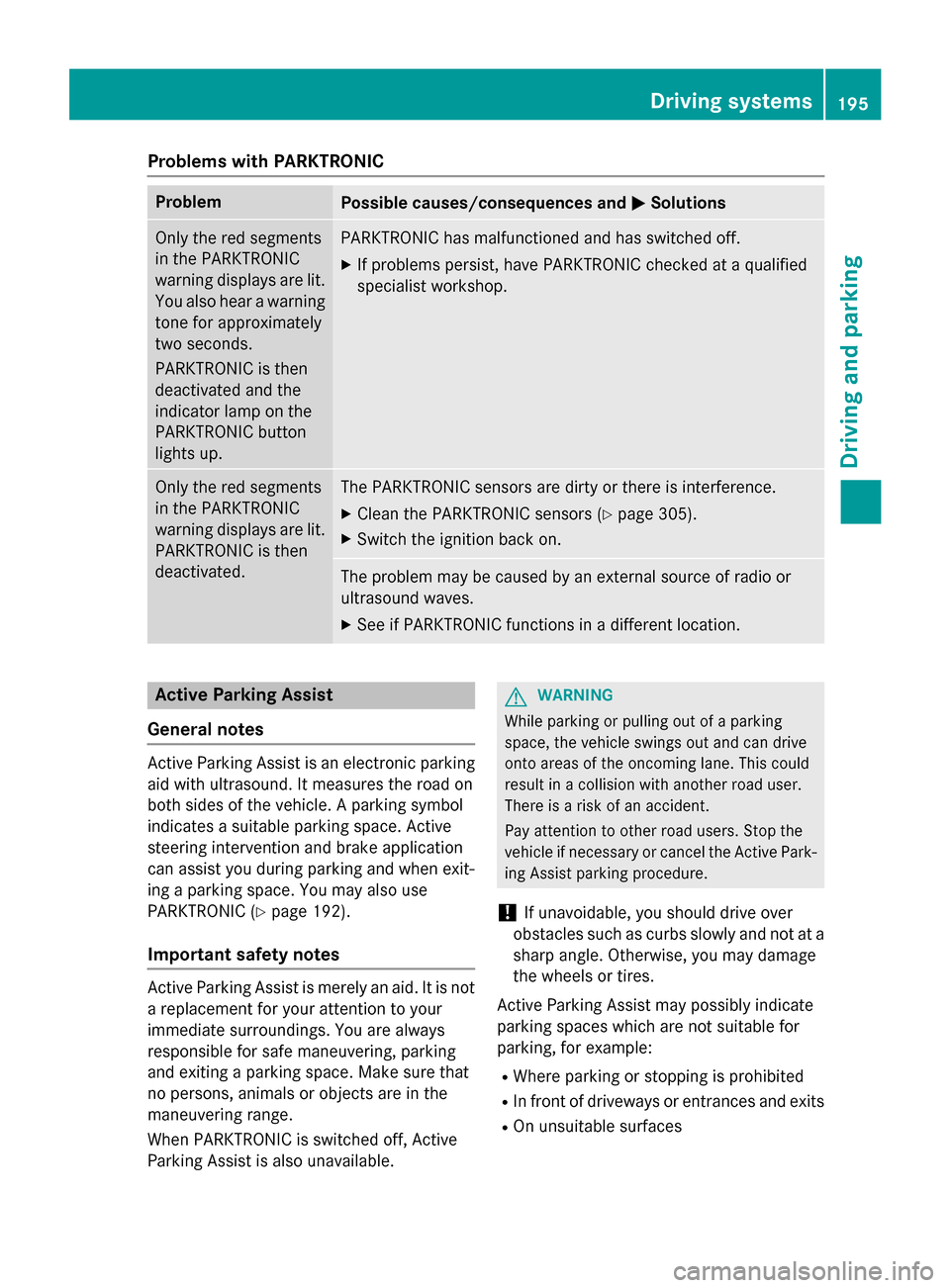
ProblemPossible causes/consequences andMSolutions
Only the red segments
in the PARKTRONIC
warning displays are lit.
You also hear a warning
tone for approximately
two seconds.
PARKTRONIC is then
deactivated and the
indicator lamp on the
PARKTRONIC button
lights up.PARKTRONIC has malfunctioned and has switched off.
XIf problems persist, have PARKTRONIC checked at a qualified
specialist workshop.
Only the red segments
in the PARKTRONIC
warning displays are lit.
PARKTRONIC is then
deactivated.The PARKTRONIC sensors are dirty or there is interference.
XClean the PARKTRONIC sensors (Ypage 305).
XSwitch the ignition back on.
The problem may be caused by an external source of radio or
ultrasound waves.
XSee if PARKTRONIC functions in a different location.
Active Parking Assist
General notes
Active Parking Assist is an electronic parking
aid with ultrasound. It measures the road on
both sides of the vehicle. A parking symbol
indicates a suitable parking space. Active
steering intervention and brake application
can assist you during parking and when exit-
ing a parking space. You may also use
PARKTRONIC (
Ypage 192).
Important safety notes
Active Parking Assist is merely an aid. It is not
a replacement for your attention to your
immediate surroundings. You are always
responsible for safe maneuvering, parking
and exiting a parking space. Make sure that
no persons, animals or objects are in the
maneuvering range.
When PARKTRONIC is switched off, Active
Parking Assist is also unavailable.
GWARNING
While parking or pulling out of a parking
space, the vehicle swings out and can drive
onto areas of the oncoming lane. This could
result in a collision with another road user.
There is a risk of an accident.
Pay attention to other road users. Stop the
vehicle if necessary or cancel the Active Park- ing Assist parking procedure.
!If unavoidable, you should drive over
obstacles such as curbs slowly and not at a
sharp angle. Otherwise, you may damage
the wheels or tires.
Active Parking Assist may possibly indicate
parking spaces which are not suitable for
parking, for example:
RWhere parking or stopping is prohibited
RIn front of driveways or entrances and exits
ROn unsuitable surfaces
Driving systems195
Driving and parking
Z
Page 198 of 374
Parking tips:
ROn narrow roads, drive as close to the park-
ing space as possible.
RParking spaces that are littered or over-
grown might be identified or measured
incorrectly.
RParking spaces that are partially occupied
by trailer drawbars might not be identified
as such or be measured incorrectly.
RSnowfall or heavy rain may lead to a parking
space being measured inaccurately.
RPay attention to the PARKTRONIC
(
Ypage 193) warning messages during the
parking procedure.
RYou can intervene in the steering procedure
to correct it at any time. Active Parking
Assist will then be canceled.
RWhen transporting a load which protrudes
from your vehicle, you should not use
Active Parking Assist.
RNever use Active Parking Assist when snow
chains are installed.
RMake sure that the tire pressures are
always correct. This has a direct influence
on the parking characteristics of the vehi-
cle.
Use Active Parking Assist for parking spaces:
Rthat are parallel or at right-angles to the
direction of travel
Rthat are on straight roads, not bends
Rthat are on the same level as the road, e.g. not on the pavement
Detecting parking spaces
Objects located above the height range of
Active Parking Assist will not be detected
when the parking space is measured. These
are not taken into account when the parking
procedure is calculated, e.g. overhanging
loads, tail sections or loading ramps of goodsvehicles.
GWARNING
If there are objects above the detection range:
RActive Park Assist may steer too early
Rthe vehicle may not stop in front of these
objects
You may cause a collision as a result. There is
a risk of an accident.
If objects are located above the detection
range, stop and deactivate Active Parking
Assist.
For further information on the detection
range (
Ypage 192).
Active Parking Assist does not assist you
parking in spaces at right angles to the direc-
tion of travel if:
Rtwo parking spaces are located directly
next to one another
Rthe parking space is directly next to a low
obstacle such as a low curb
Ryou park forwards
Active Parking Assist does not assist you
parking in spaces that are parallel or at right
angles to the direction of travel if:
Rthe parking space is on a curb
Rthe system reads the parking space as
being blocked, for example by foliage or
grass paving blocks
Rthe area is too small for the vehicle to
maneuver into
Rthe parking space is bordered by an obsta- cle, e.g. a tree, a post or a trailer
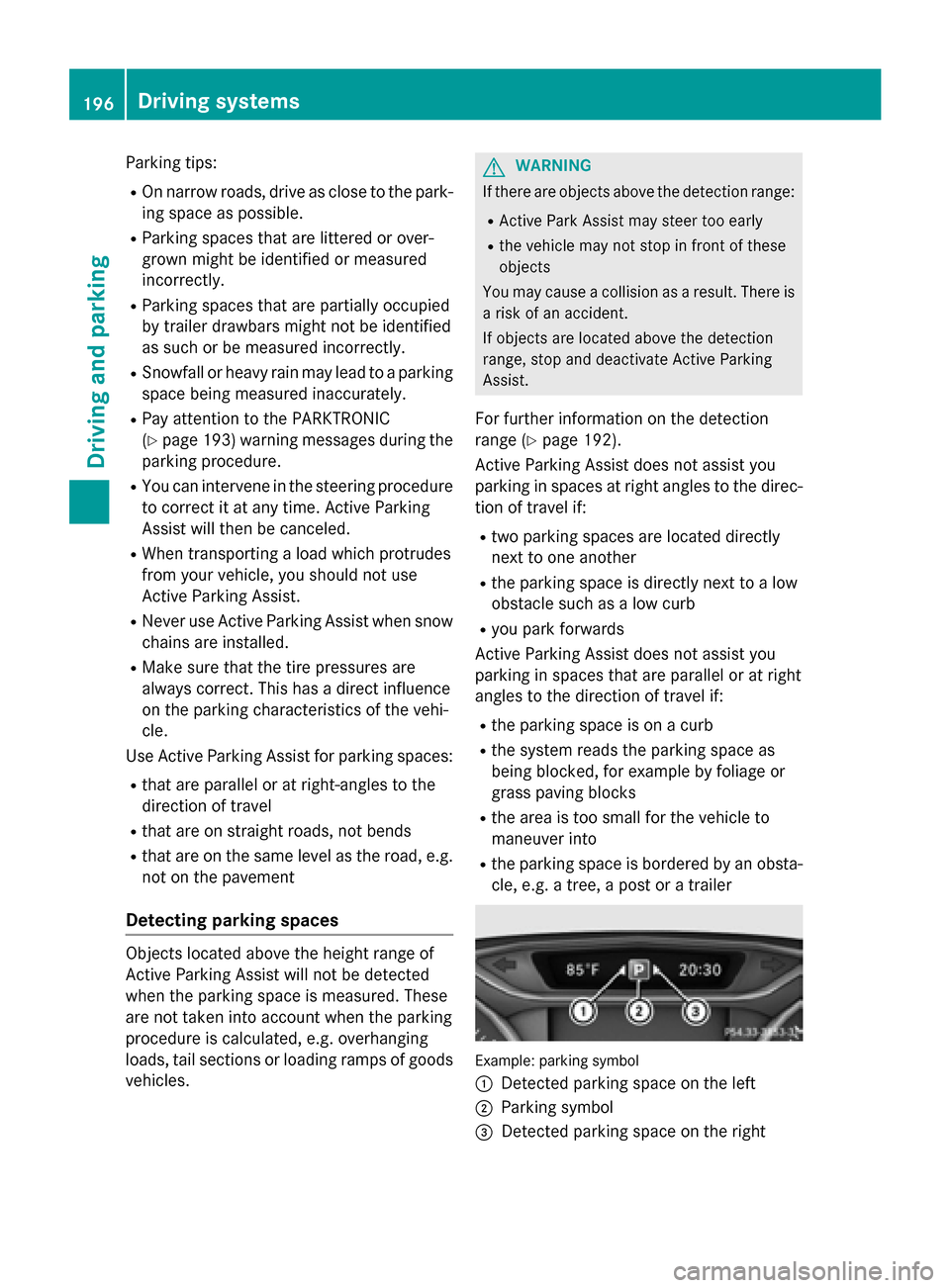
Example: parking symbol
:
Detected parking space on the left
;Parking symbol
=Detected parking space on the right
196Driving systems
Driving and parking
Page 199 of 374
Active Parking Assist is switched on automat-
ically when driving forwards. The system is
operational at speeds of up to approximately
22 mph (35 km/h). While in operation, the
system independently locates and measures
parking spaces on both sides of the vehicle.
Active Parking Assist will only detect parking
spaces:
Rthat are parallel or at right-angles to the
direction of travel
Rthat are parallel to the direction of travel
and at least 59 in (1.5m) wide
Rthat are parallel to the direction of travel
and at least 39.5 in (1.0 m) longer than your
vehicle
Rthat are at right angles to the direction of
travel and at least 39.5 in (1.0 m) wider
than your vehicle
iNote that Active Parking Assist cannot
measure the length of a parking space if it
is at right angles to the direction of travel.
You will need to judge whether your vehicle
will fit into the parking space.
When driving at speeds below 19 mph
(30 km/h), you will see parking symbol ;as
a status indicator in the instrument cluster.
When a parking space has been detected, an
arrow towards the right or the left also
appears. By default, Active Parking Assist
onl y d
isplays parking spaces on the front-
passenger side. Parking spaces on the driv-
er's side are displayed as soon as the turn
signal on the driver's side is activated. When
parking on the driver's side, this must remain
activated until you confirm the use of Active
Parking Assist by pressing the abutton on
the multifunction steering wheel. The system
automatically determines whether the park-
ing space is parallel or at right-angles to the
direction of travel.
A parking space is displayed while you are
driving past it, and until you are approx-
imately 50 ft (15 m) away from it.
Parking
GWARNING
If you leave the vehicle when it is only being
braked by Active Parking Assist it could roll
away if:
Rthere is a malfunction in the system or in
the voltage supply.
Rthe electrical system in the engine com-
partment, the battery or the fuses have
been tampered with.
Rthe battery is disconnected.
Rthe accelerator pedal has been depressed,
e.g. by a vehicle occupant.
There is a risk of an accident.
Before leaving the vehicle, always secure it
against rolling away.
iWhen PARKTRONIC detects obstacles,
Active Parking Assist brakes automatically
during the parking process. You are respon-
sible for braking in good time.
XStop the vehicle when the parking space
symbol shows the desired parking space in
the instrument cluster.
XShift the transmission to position R.
The Start Park Assist?
Yes: OKNo:
% message appears in the multifunction
display.
XTo cancel the procedure: press the%
button on the multifunction steering wheel or pull away.
or
XTo park using Active Parking Assist:
press the abutton on the multifunction
steering wheel.
The Park Assist Active Accelerate
and BrakeObserve Surroundingsmes-
sage appears in the multifunction display.
XLet go of the multifunction steering wheel.
XBack up the vehicle, being ready to brake at
all times. When backing up, drive at a speed
below approximately 6 mph (10 km/h).
Driving system s197
Driving an d parking
Z
Page 200 of 374
Otherwise Active Parking Assist will be can-
celed.
Active Parking Assist brakes the vehicle to
a standstill when the vehicle approaches
the rear border of the parking space.
Maneuvering may be required in tight park-ing spaces.
The Park Assist Active Select D
ObserveSurroundingsmessage appears in
the multifunction display.
XShift the transmission to position Dwhile
the vehicle is stationary.
Active Parking Assist immediately steers in
the other direction.
The Park Assist Active Accelerate
and BrakeObserve Surroundingsmes-
sage appears in the multifunction display.
iYou will achieve the best results by wait-
ing for the steering procedure to complete
before pulling away.
XDrive forwards and be ready to brake at all
times.
Active Parking Assist brakes the vehicle to
a standstill when the vehicle approaches
the front border of the parking space.
Maneuvering may be required in tight park-
ing spaces.
The Park Assist Active Select R
ObserveSurroundingsmessage appears in
the multifunction display.
As soon as the parking procedure is com-
plete, the Park
AssistSwitchedOffmes-
sage appears and a warning tone sounds. The
vehicle is now parked.
The vehicle is kept stationary without the
driver having to depress the brake pedal. The
braking effect is canceled when you depress
the accelerator pedal.
Active Parking Assist no longer supports you
with steering interventions and brake appli-
cations. When Active Parking Assist is fin-
ished, you must steer and brake again your-
self. PARKTRONIC is still available. Parking tips:
RThe way your vehicle is positioned in the
parking space after parking is dependent
on various factors. These include the posi-
tion and shape of the vehicles parked in
front and behind it and the conditions of the
location. It may be the case that Active
Parking Assist guides you too far into a
parking space, or not far enough into it. In
some cases, it may also lead you across or
onto the curb. If necessary, you should can-
cel the parking procedure with Active Park-
ing Assist.
RYou can also select preselect transmission
position
D. The vehicle redirects and does
not drive as far into the parking space.
Should the transmission change take place
too early, the parking procedure will be
canceled. A sensible parking position can
no longer be achieved from this position.
Exiting a parking space
In order that Active Parking Assist can sup-
port you when you exit the parking space:
Ryou need to have parked using Active Park-
ing Assist.
Rthe border of the parking space must be
high enough at the front and the rear. A
curb is too small, for example.
Rthe border of the parking space must not be
too wide, as the position of the vehicle must
not exceed an angle of 45° to the starting
position as it is maneuvering into the park- ing space.
Ra maneuvering distance of at least 3.3 ft
(1.0 m) must be available.
Active Parking Assist can only assist you with
exiting a parking space if you have parked the
vehicle parallel to the direction of travel using
Active Parking Assist.
iIf PARKTRONIC detects obstacles, Active
Parking Assist brakes automatically whilst
the vehicle exits the parking space. You are
responsible for braking in good time.
198Driving systems
Driving and parking
Page 201 of 374
XStart the engine.
XRelease the electric parking brake.
XSwitch on the turn signal in the direction
you will drive out of the parking space.
XShift the transmission to positionDor R.
The Start Park Assist? Yes: OK No:
message appears in the multifunction dis-
play %.
XTo cancel the procedure: press the%
button on the multifunction steering wheel or pull away.
or
XTo exit a parking space using Active
Parking Assist: press theabutton on
the multifunction steering wheel.
The Park Assist Active Accelerate
andBrakeObserveSurroundingsmes-
sage appears in the multifunction display.
XLet go of the multifunction steering wheel.
XPull away, being ready to brake at all times.
Do not exceed a maximum speed of
approximately 6 mph (10 km/h) when exit-
ing a parking space. Otherwise Active Park-
ing Assist will be canceled.
XDepending on the message or as required, shift the transmission to position Dor R.
Active Parking Assist immediately steers in
the other direction. The Park Assist
Active Accelerate and Brake
ObserveSurroundingsmessage appears
in the multifunction display.
iYou will achieve the best results by wait-
ing for the steering procedure to complete
before pulling away.
If you back up after activation, the steering
wheel is moved to the straight-ahead posi-
tion.
XDrive forwards and back up as prompted by
the PARKTRONIC warning displays, several
times if necessary.
Once you have exited the parking space com-
pletely, the steering wheel is moved to the
straight-ahead position. You hear a tone and
the Park Assist Finished
message
appears in the multifunction display. You will then have to steer and merge into traffic on
your own. PARKTRONIC is still available. You
can take over the steering, before the vehicle
has exited the parking space completely. This
is useful, for example when you recognize
that it is already possible to pull out of the
parking space.
Canceling Active Parking Assist
XStop the movement of the multifunction
steering wheel or steer yourself.
Active Parking Assist will be canceled at
once. The Park Assist Canceled
mes-
sage appears in the multifunction display.
or
XPress the PARKTRONIC button
(
Ypage 194).
PARKTRONIC is switched off and Active
Parking Assist is immediately canceled.
The Park Assist Canceled
message
appears in the multifunction display.
Active Parking Assist is canceled automati-
cally if:
Rthe electric parking brake is engaged
Rtransmission position Pis selected
Rparking using Active Parking Assist is no
longer possible
Ryou are driving faster than 6 mph (10 km/h)
Ra wheel spins, ESP®intervenes or fails. The
÷ warning lamp lights up in the instru-
ment cluster
A warning tone sounds. The parking symbol
disappears and the multifunction display
shows the Park Assist Canceled
mes-
sage.
When Active Parking Assist is canceled, you
must steer and brake again yourself.
If a system malfunction occurs, the vehicle is
braked to a standstill. To drive on, depress the accelerator again.
Driving systems199
Driving and parking
Z
Page 203 of 374
!Objects not at ground level may appear to
be further away than they actually are, e.g.:
Rthe bumper of a parked vehicle
Rthe drawbar of a trailer
Rthe ball coupling of a trailer tow hitch
Rthe rear section of an HGV
Ra slanted post
Use the guidelines only for orientation.
Approach objects no further than the bot-
tom-most guideline.
:Yellow guide line at a distance of approx-
imately 13 ft (4.0 m) from the rear of the
vehicle
;White guide line without turning the steer-
ing wheel, vehicle width including the
exterior mirrors (static)
=Yellow guide line for the vehicle width
including the exterior mirrors, for current
steering wheel angle (dynamic)
?Yellow lane marking tires at current steer-
ing wheel angle (dynamic)
AYellow guide line at a distance of approx-
imately 3 ft (1.0 m) from the rear of the
vehicle
BVehicle center axle (marker assistance)
CBumper
DRed guide line at a distance of approx-
imately 12 in (0.30 m) from the rear of the
vehicle
:Front warning display
;Additional PARKTRONIC measurement
operational readiness indicator
=Rear warning display
Vehicles with PARKTRONIC: when
PARKTRONIC is operational (
Ypage 193),
additional measurement operational readi-
ness indicator ;appears in the Audio 20/
COMAND display. If the PARKTRONIC warn-
ing displays are active or light up, warning
displays :and =are also active or light up
correspondingly in the Audio 20/COMAND
display.
Driving systems201
Driving and parking
Z