transmission MERCEDES-BENZ CLA-Class 2016 C117 Service Manual
[x] Cancel search | Manufacturer: MERCEDES-BENZ, Model Year: 2016, Model line: CLA-Class, Model: MERCEDES-BENZ CLA-Class 2016 C117Pages: 374, PDF Size: 8.19 MB
Page 184 of 374
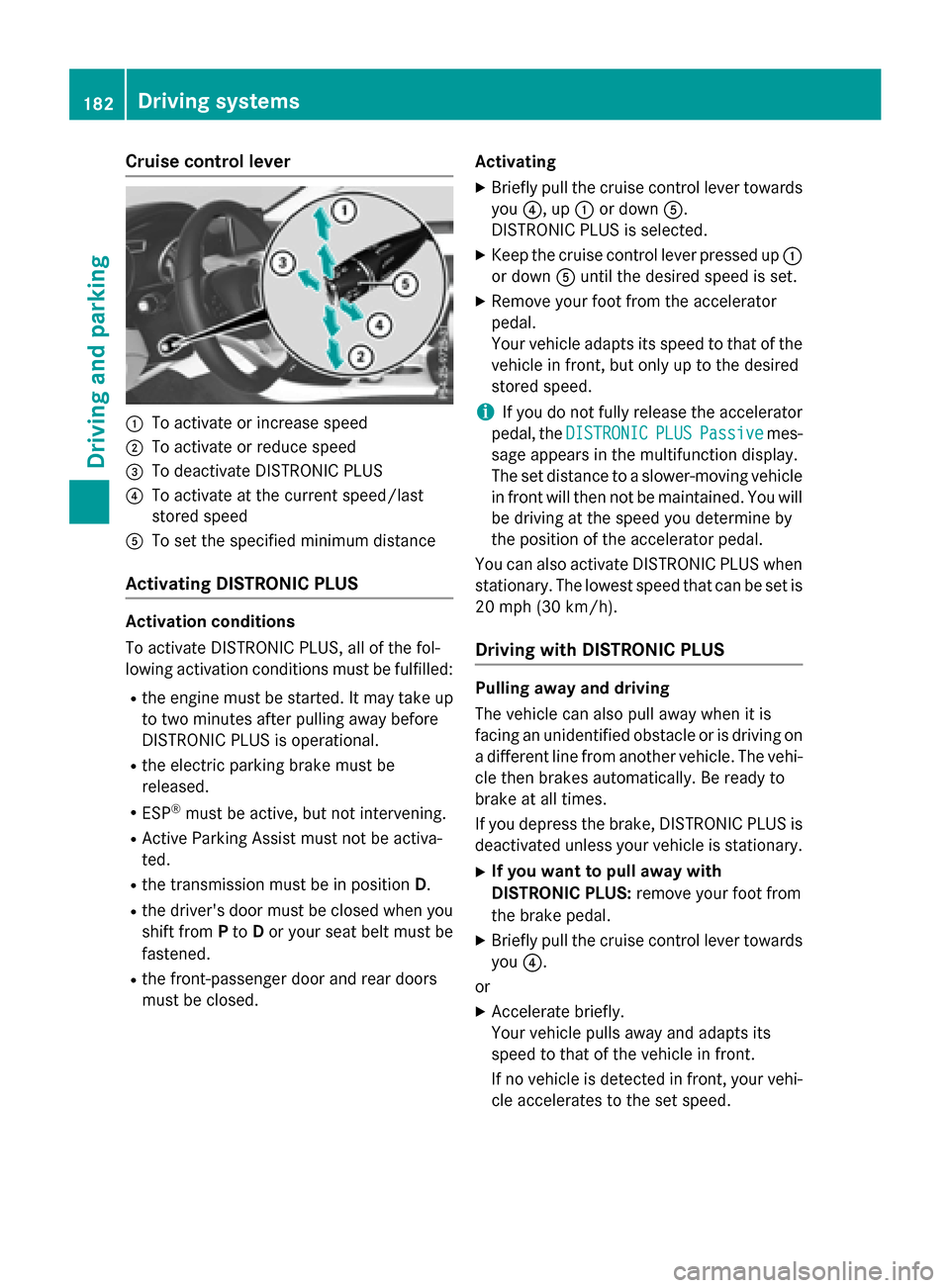
Cruise control lever
:To activate or increase speed
;To activate or reduce speed
=To deactivate DISTRONIC PLUS
?To activate at the current speed/last
stored speed
ATo set the specified minimum distance
Activating DISTRONIC PLUS
Activation conditions
To activate DISTRONIC PLUS, all of the fol-
lowing activation conditions must be fulfilled:
Rthe engine must be started. It may take up
to two minutes after pulling away before
DISTRONIC PLUS is operational.
Rthe electric parking brake must be
released.
RESP®must be active, but not intervening.
RActive Parking Assist must not be activa-
ted.
Rthe transmission must be in position D.
Rthe driver's door must be closed when you
shift fromPto Dor your seat belt must be
fastened.
Rthe front-passenger door and rear doors
must be closed. Activating
XBriefly pull the cruise control lever towards
you
?, up :or down A.
DISTRONIC PLUS is selected.
XKeep the cruise control lever pressed up :
or down Auntil the desired speed is set.
XRemove your foot from the accelerator
pedal.
Your vehicle adapts its speed to that of the
vehicle in front, but only up to the desired
stored speed.
iIf you do not fully release the accelerator
pedal, the DISTRONIC
PLUSPassivemes-
sage appears in the multifunction display.
The set distance to a slower-moving vehicle
in front will then not be maintained. You will
be driving at the speed you determine by
the position of the accelerator pedal.
You can also activate DISTRONIC PLUS when
stationary. The lowest speed that can be set is
20 mph (30 km/h).
Driving with DISTRONIC PLUS
Pulling away and driving
The vehicle can also pull away when it is
facing an unidentified obstacle or is driving on a different line from another vehicle. The vehi-
cle then brakes automatically. Be ready to
brake at all times.
If you depress the brake, DISTRONIC PLUS is
deactivated unless your vehicle is stationary.
XIf you want to pull away with
DISTRONIC PLUS: remove your foot from
the brake pedal.
XBriefly pull the cruise control lever towards
you ?.
or
XAccelerate briefly.
Your vehicle pulls away and adapts its
speed to that of the vehicle in front.
If no vehicle is detected in front, your vehi-
cle accelerates to the set speed.
182Driving systems
Driving and parking
Page 186 of 374
When DISTRONIC PLUS is activated, the
transmission is shifted automatically to posi-
tionPif:
Rthe driver's seat belt is not fastened and the
driver's door is open.
Rthe engine is switched off, unless it is auto-
matically switched off by the ECO start/
stop function.
The electric parking brake secures the vehicle automatically if DISTRONIC PLUS is activated
when the vehicle is stationary and:
Ra system malfunction occurs.
Rthe power supply is not sufficient.
If a malfunction in the electric parking brake
occurs, then the transmission may also be
shifted into position Pautomatically.
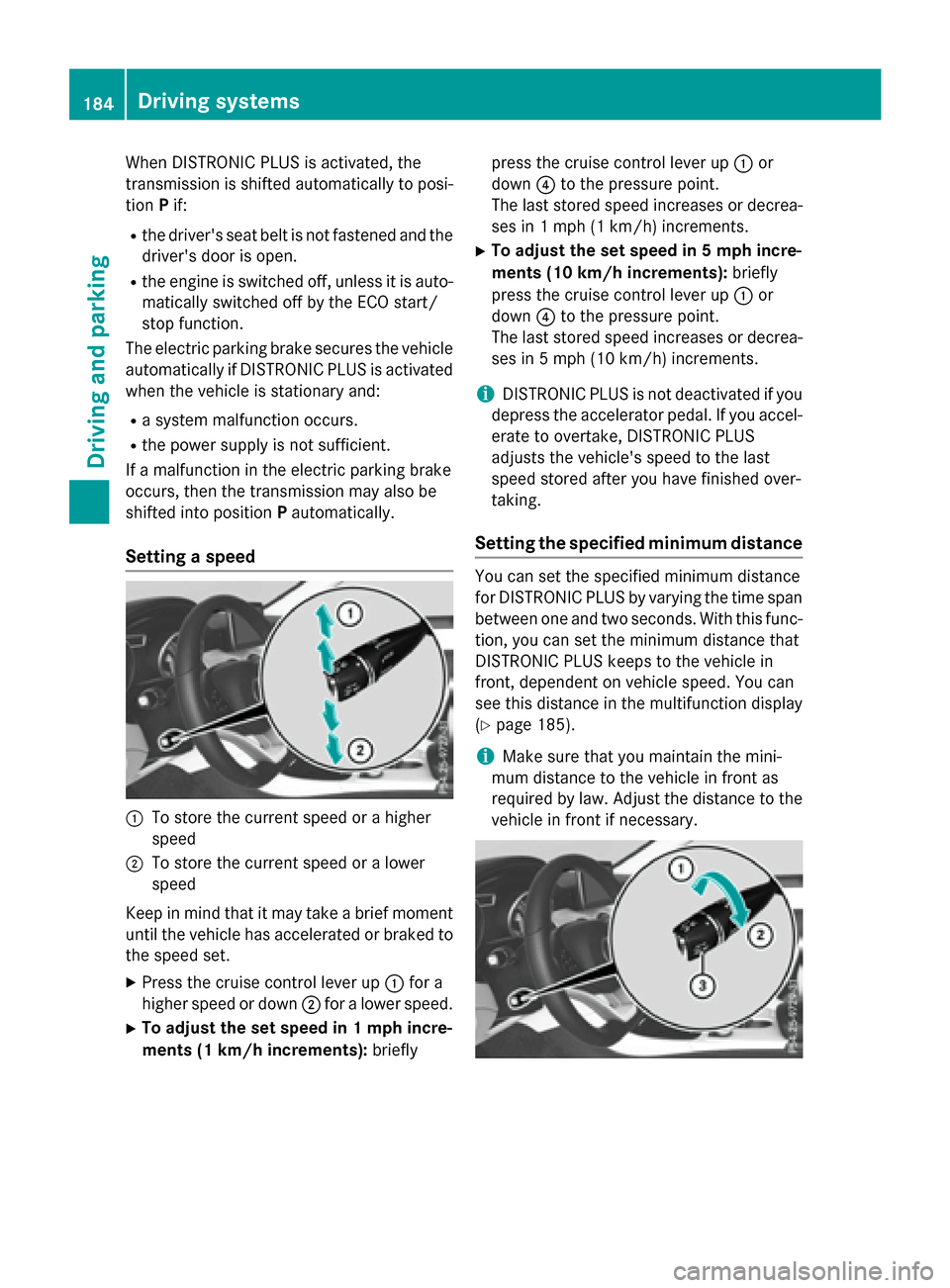
Setting a speed
:To store the current speed or a higher
speed
;To store the current speed or a lower
speed
Keep in mind that it may take a brief moment
until the vehicle has accelerated or braked to
the speed set.
XPress the cruise control lever up :for a
higher speed or down ;for a lower speed.
XTo adjust the set speed in 1 mph incre-
ments (1 km/h increments): brieflypress the cruise control lever up
:or
down ?to the pressure point.
The last stored speed increases or decrea-
ses in 1 mph (1 km/ h)increments.
XTo adjust the set speed in 5 mph incre-
ments (10 km/h increments): briefly
press the cruise control lever up :or
down ?to the pressure point.
The last stored speed increases or decrea-
ses in 5 mph (10 km/h) increments.
iDISTRONIC PLUS is not deactivated if you
depress the accelerator pedal. If you accel-
erate to overtake, DISTRONIC PLUS
adjusts the vehicle's speed to the last
speed stored after you have finished over-
taking.
Setting the specified minimum distance
You can set the specified minimum distance
for DISTRONIC PLUS by varying the time span
between one and two seconds. With this func-
tion, you can set the minimum distance that
DISTRONIC PLUS keeps to the vehicle in
front, dependent on vehicle speed. You can
see this distance in the multifunction display
(
Ypage 185).
iMake sure that you maintain the mini-
mum distance to the vehicle in front as
required by law. Adjust the distance to the vehicle in front if necessary.
184Driving systems
Driving and parking
Page 187 of 374
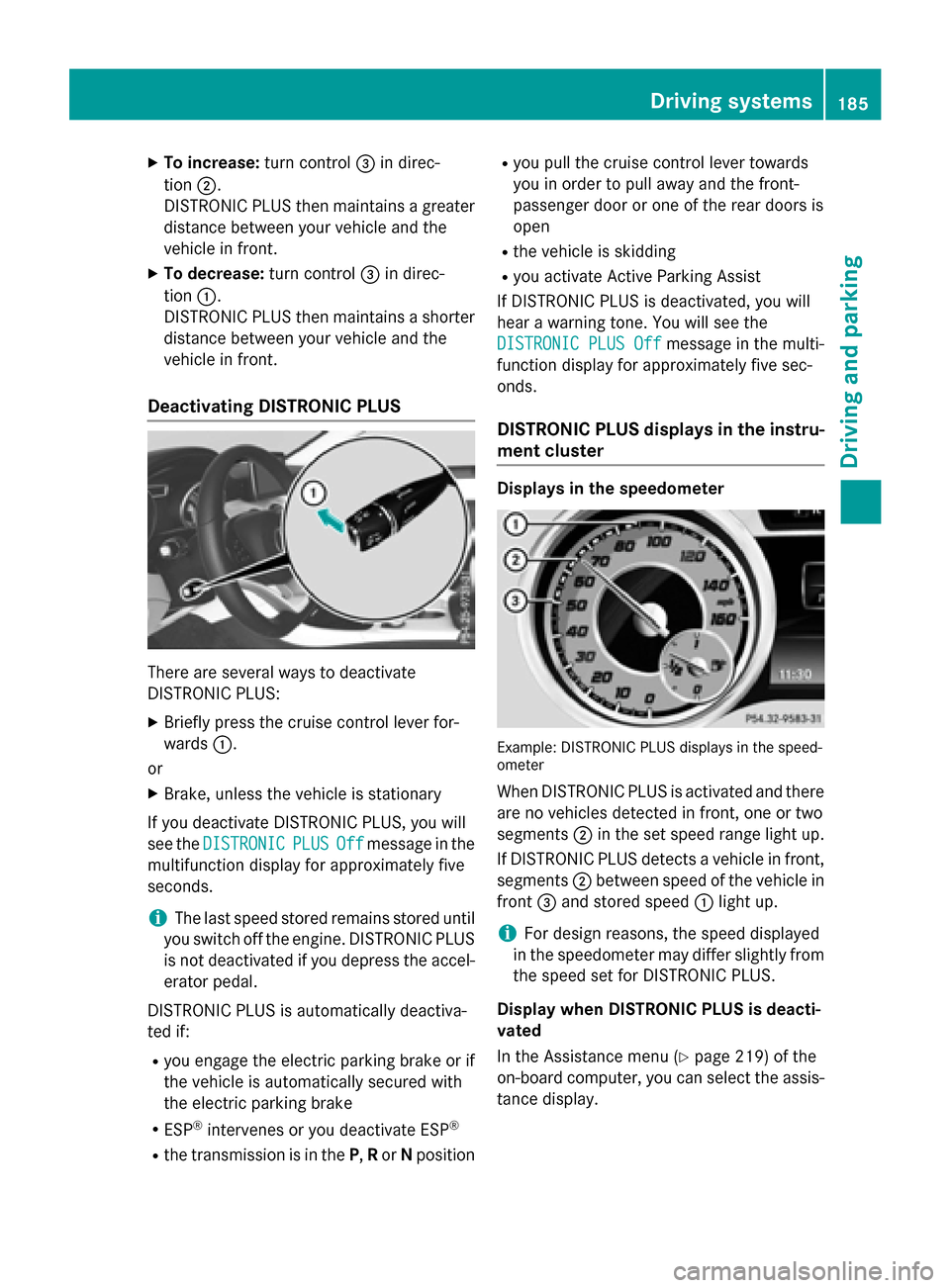
XTo increase:turn control=in direc-
tion ;.
DISTRONIC PLUS then maintains a greater
distance between your vehicle and the
vehicle in front.
XTo decrease: turn control=in direc-
tion :.
DISTRONIC PLUS then maintains a shorter
distance between your vehicle and the
vehicle in front.
Deactivating DISTRONIC PLUS
There are several ways to deactivate
DISTRONIC PLUS:
XBriefly press the cruise control lever for-
wards :.
or
XBrake, unless the vehicle is stationary
If you deactivate DISTRONIC PLUS, you will
see the DISTRONIC
PLUSOffmessage in the
multifunction display for approximately five
seconds.
iThe last speed stored remains stored until
you switch off the engine. DISTRONIC PLUS
is not deactivated if you depress the accel-
erator pedal.
DISTRONIC PLUS is automatically deactiva-
ted if:
Ryou engage the electric parking brake or if
the vehicle is automatically secured with
the electric parking brake
RESP®intervenes or you deactivate ESP®
Rthe transmission is in the P,Ror Nposition
Ryou pull the cruise control lever towards
you in order to pull away and the front-
passenger door or one of the rear doors is
open
Rthe vehicle is skidding
Ryou activate Active Parking Assist
If DISTRONIC PLUS is deactivated, you will
hear a warning tone. You will see the
DISTRONIC PLUS Off
message in the multi-
function display for approximately five sec-
onds.
DISTRONIC PLUS displays in the instru-
ment cluster
Displays in the speedometer
Example: DISTRONIC PLUS displays in the speed-
ometer
When DISTRONIC PLUS is activated and there
are no vehicles detected in front, one or two
segments ;in the set speed range light up.
If DISTRONIC PLUS detects a vehicle in front,
segments ;between speed of the vehicle in
front =and stored speed :light up.
iFor design reasons, the speed displayed
in the speedometer may differ slightly from
the speed set for DISTRONIC PLUS.
Display when DISTRONIC PLUS is deacti-
vated
In the Assistance menu (
Ypage 219) of the
on-board computer, you can select the assis- tance display.
Driving systems185
Driving an d parking
Z
Page 190 of 374
Important safety notes
GWARNING
When leaving th evehicle, it can still rol laway
despit ebein gbraked by th eHOLD function if:
Rthere is amalfunction in th esystem or in
th evoltag esupply.
Rth eHOLD function has been deactivated by
pressin gth eaccelerato rpedal or th ebrak e
pedal ,e.g. by avehicl eoccupant .
Rtheelectrical system in th eengin ecom-
partment, th ebattery or th efuses have
been tampered with.
Rth ebattery is disconnected
Ther eis aris kof an accident.
If you wish to exit th evehicle, always tur noff
th eHOLD function and secure th evehicl e
against rollin gaway.
!If DI ST RONIC PLUS or the HOLD function
is activated, the vehicle brakes automat i-
cally incertain situations.
To prevent damage to the vehicle, deacti-
vate DI STRONIC PLUS and the HOLD func-
tion inthe fol lowing or other similar situa-
tions:
Rwhen to wing the vehicle
Rinthe car wash
Deactivating the HOLD function
(
Ypage 188).
Activation conditions
You can activate the HOLD function if:
Rthe vehicle isstationary
Rthe engine isrunning or if ithas been auto-
matical ly switched off bythe ECO start/
stop function
Rthe driver's door isclosed or your seat belt
is fastened
Rthe electr icparking brake is released
RDIST RONIC PLUS isdeactivated
Rthe transmission isin position D,Ror Non
vehicles with automatic transmission
Activating the HOLD function
XMake sure that the act ivation cond itions
are met.
XDepress the brake pedal.
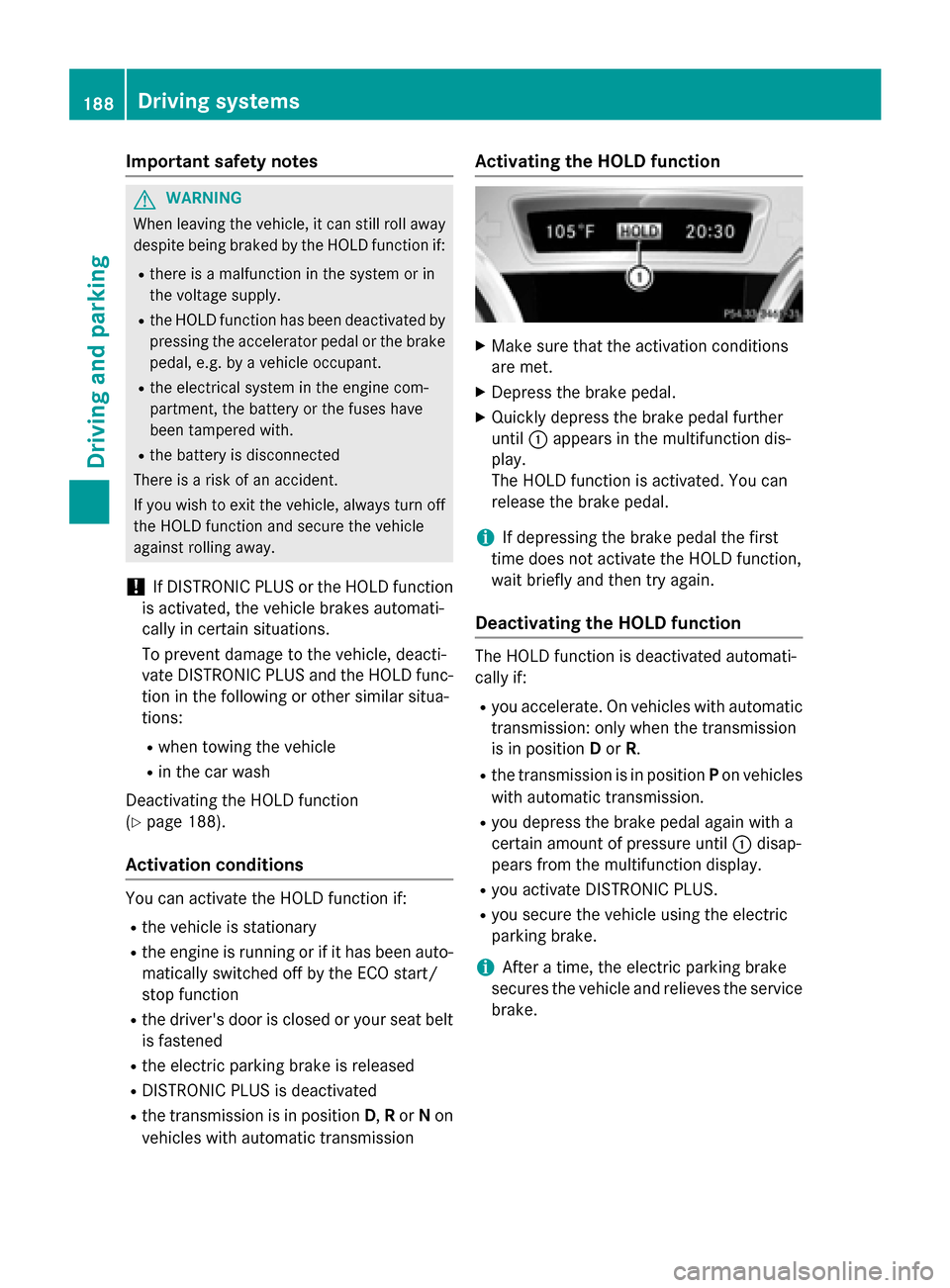
XQuickly depress the brake pedal further
unt il: appears inthe multifunction dis-
play.
The HOLD function isact ivat ed. You can
release the brake pedal.
iIf depr essing the brake pedal the first
time does not activate the HOLD function,
wait brie fly and then try again.
Deactivating the HOLD function
The HOLD function isdeactivated automat i-
cally if:
Ryou accelerate. On vehicles with automat ic
transmission: only when the transmission
is in posit ionDor R.
Rthe transmission is inposit ionPon vehicles
wit h automat ictransmission.
Ryou depress the brake pedal again with a
certain amount of pressure unt il: disap-
pears from the multifunction display.
Ryou act ivate DI STRONIC PLU S.
Ryou secure the vehicle using the electr ic
parking brake.
iAfter a time, the electr icparking brake
secures the vehicle and relieves the servic e
brake.
188Driving systems
Driving and parking
Page 191 of 374
When the HOLD function is activated, the
transmission is shifted automatically to posi-
tionPif:
Rthe driver's seat belt is not fastened and the
driver's door is open.
Rthe engine is switched off, unless it is auto-
matically switched off by the ECO start/
stop function.
The electric parking brake secures the vehicle automatically if the HOLD function is activa-
ted when the vehicle is stationary and:
Ra system malfunction occurs.
Rthe power supply is not sufficient.
Start-off assist (except Mercedes-
AMG vehicles)
Important safety notes
GWARNING
If you use start-off assist, individual wheels
may start to spin and the vehicle may skid. If
ESP
®is deactivated, there is a greater danger
of skidding and having an accident. Make sure
that no persons or obstacles are in the vicinity
of the vehicle.
Start-off assist enables optimum acceleration from a standstill. For this, a suitably high-grip
road surface is required, along with the tires
and vehicle being in proper operating condi-
tion.
Do not activate start-off assist on public
roads.
Observe the safety notes on driving safety
systems (
Ypage 65).
Be sure to read the safety notes and informa-
tion on ESP
®(Ypage 69).
Activating start-off assist
XDeactivate ESP®(Ypage 219).
XTurn the steering wheel to the straight-
ahead position.
XDepress the brake pedal firmly with your
left foot and keep the brake pedal
depressed.
XShift the transmission to position D.
XUse the DYNAMIC SELECT button to select
the Sdrive program (
Ypage 155).
XQuickly depress the accelerator pedal fully.
XTake your foot off the brake, but keep the
accelerator pedal depressed.
The vehicle pulls away at maximum accel-
eration.
iActivate ESP®as soon as the acceleration
process has ended. ESP®will otherwise not
be able to stabilize the vehicle if the vehicle
starts to skid or a wheel starts to spin.
Canceling start-off assist
XRemove your foot from the accelerator
pedal.
XReactivate ESP.
RACE START (AMG vehicles)
Important safety notes
iRACE START must not be used on normal
roads. RACE START must only be activated and used on dedicated road circuits, out-
side of public road use.
iRACE START is only available in
Mercedes‑AMG vehicles.
GWARNING
If you use RACE START, individual tires may
start to spin and the vehicle could skid.
Depending on the selected ESP
®mode, there
is an increased risk of skidding and having an accident. Make sure that no persons, animals
or obstacles are within range of the vehicle.
RACE START enables optimal acceleration
from a standing start. For this, a suitably high-
grip road surface is required, along with the
tires and vehicle being in proper operating
condition.
Driving systems189
Driving and parking
Z
Page 192 of 374
iObserve the safety notes on driving safety
systems (
Ypage 65).
Be sure to read the safety notes and infor-
mation on ESP
®(Ypage 69).
Conditions for activation
You can activate RACE START if:
Rthe doors, hood and the trunk lid are
closed.
Rthe engine is running and the transmission,
all-wheel drive clutch and the engine are at operating temperature.
Rthe steering wheel is in the straight-ahead
position.
Rthe vehicle is stationary and the brake
pedal is depressed (left foot).
Rthe transmission is in position D.
Rdrive programS,S+ orRACE is selected
(
Ypage 156).
Activating RACE START
XDepress the brake pedal with your left foot
and keep it depressed.
XPull and hold both steering wheel paddle
shifters.
XThe RACE START Confirm: Paddle UP
Cancel: Paddle DOWNmessage appears
in the multifunction display.
XRelease both steering wheel paddle shift-
ers.
iIf the activation conditions are no longer
fulfilled, RACE START is canceled. The
RACE START Not Possible See Opera‐
tor's Manualmessage appears in the
multifunction display.
XTo cancel: pull the left steering wheel pad-
dle shifter (
Ypage 164).
or
XTo confirm: pull the right steering wheel
paddle shifter (
Ypage 164).
The RACE START Available Depress
gas pedalmessage appears in the multi-
function display.
iIf you do not depress the accelerator
pedal within a few seconds, RACE START is
canceled. The multifunction display shows
the RACE START Canceled
message.
XFully depress the accelerator pedal.
The engine speed is increased.
The RACE START Release brake to
startmessage appears in the multifunc-
tion display.
iIf you do not release the brake pedal
within a short time, RACE START will be
canceled. The multifunction display shows
the RACE START Canceled
message.
XTake your foot off the brake, but keep the
accelerator pedal depressed.
The vehicle pulls away at maximum accel-
eration.
The RACE
STARTActivemessage appears
in the multifunction display.
RACE START is deactivated when the vehicle
reaches a speed of approximately 50 km/h.
RACE START is deactivated immediately if
you release the accelerator pedal during
RACE START or if any of the activation condi-
tions are no longer fulfilled. The RACE
START
Not PossibleorRACE START Canceled
message appears in the multifunction dis-
play.
iIf RACE START is used repeatedly within a
short period of time, it is only available
again after the vehicle has been driven a
certain distance.
AMG adaptive sport suspension sys-
tem
General notes
The electronically controlled damping system works continuously. This improves driving
safety and ride comfort.
190Driving systems
Driving and parking
Page 194 of 374
dampers. The damping characteristics adapt
to the current operating and driving situation.
The damping is tuned individually to each
wheel and depends on:
Ryour driving style, e.g. sporty
Rthe road surface conditions
Rthe drive program selected
Rthe vehicle level setting
The drive program can be set using the
DYNAMIC SELECT button (
Ypage 155).
Selecting Comfort mode
In the Comfort drive program, the driving
characteristics of your vehicle are more com-
fortable. Therefore, select this mode if you
favor a more comfortable driving style. Also
select the Comfortdrive program when driv-
ing fast on straight roads, e.g. on straight
stretches of highway.
XPress DYNAMIC SELECT button :
(
Ypage 155) as many times as necessary
until the Comfort drive program is selec-
ted.
Selecting Sport mode
The firmer setting of the suspension tuning in
the Sport drive program ensures even better
contact with the road. Select this drive pro-
gram when employing a sporty driving style,
e.g. on winding country roads.
XPress DYNAMIC SELECT button :
(
Ypage 155) as many times as necessary
until the Sportdrive program is selected.
PARKTRONIC
Important safety notes
PARKTRONIC is an electronic parking aid with
ultrasonic sensors. It monitors the area
around your vehicle using six sensors in the
front bumper and six sensors in the rear
bumper. PARKTRONIC indicates visually and audibly the distance between your vehicle
and an object.
PARKTRONIC is only an aid. It is not a replace-
ment for your attention to your immediate
surroundings. You are always responsible for
safe maneuvering, parking and exiting a park-
ing space. When maneuvering, parking or
pulling out of a parking space, make sure that
there are no persons, animals or objects in
the area in which you are maneuvering.
!When parking, pay particular attention to
objects above or below the sensors, such
as flower pots or trailer drawbars.
PARKTRONIC does not detect such objects
when they are in the immediate vicinity of
the vehicle. You could damage the vehicle
or the objects.
The sensors may not detect snow and other
objects that absorb ultrasonic waves.
Ultrasonic sources such as an automatic
car wash, the compressed-air brakes on a
truck or a pneumatic drill could cause
PARKTRONIC to malfunction.
PARKTRONIC may not function correctly on
uneven terrain.
PARKTRONIC is activated automatically when
you:
Rswitch on the ignition
Rshift the transmission to position D,Ror N
Rrelease the electric parking brake
Range of the sensors
General notes
PARKTRONIC does not take objects into con-
sideration that are:
Rbelow the detection range, e.g. people, ani-
mals or objects.
Rabove the detection range, e.g. overhang-
ing loads, truck overhangs or loading
ramps.
192Driving systems
Driving and parking
Page 196 of 374
ments. PARKTRONIC is operational if yellow
segments showing operational readiness=
light up.
Transmission
positionWarning display
DFront area activated
R, Nor the vehicle
is rolling back-
wardsRear and front areas
activated
PNo areas activated
One or more segments light up as the vehicle
approaches an obstacle, depending on the
vehicle's distance from the obstacle.
From the:
Rsixth segment onwards, you will hear an
intermittent warning tone for approx-
imately two seconds.
Rseventh segment onwards, you will hear a
warning tone for approximately two sec-
onds. This indicates that you have now
reached the minimum distance.
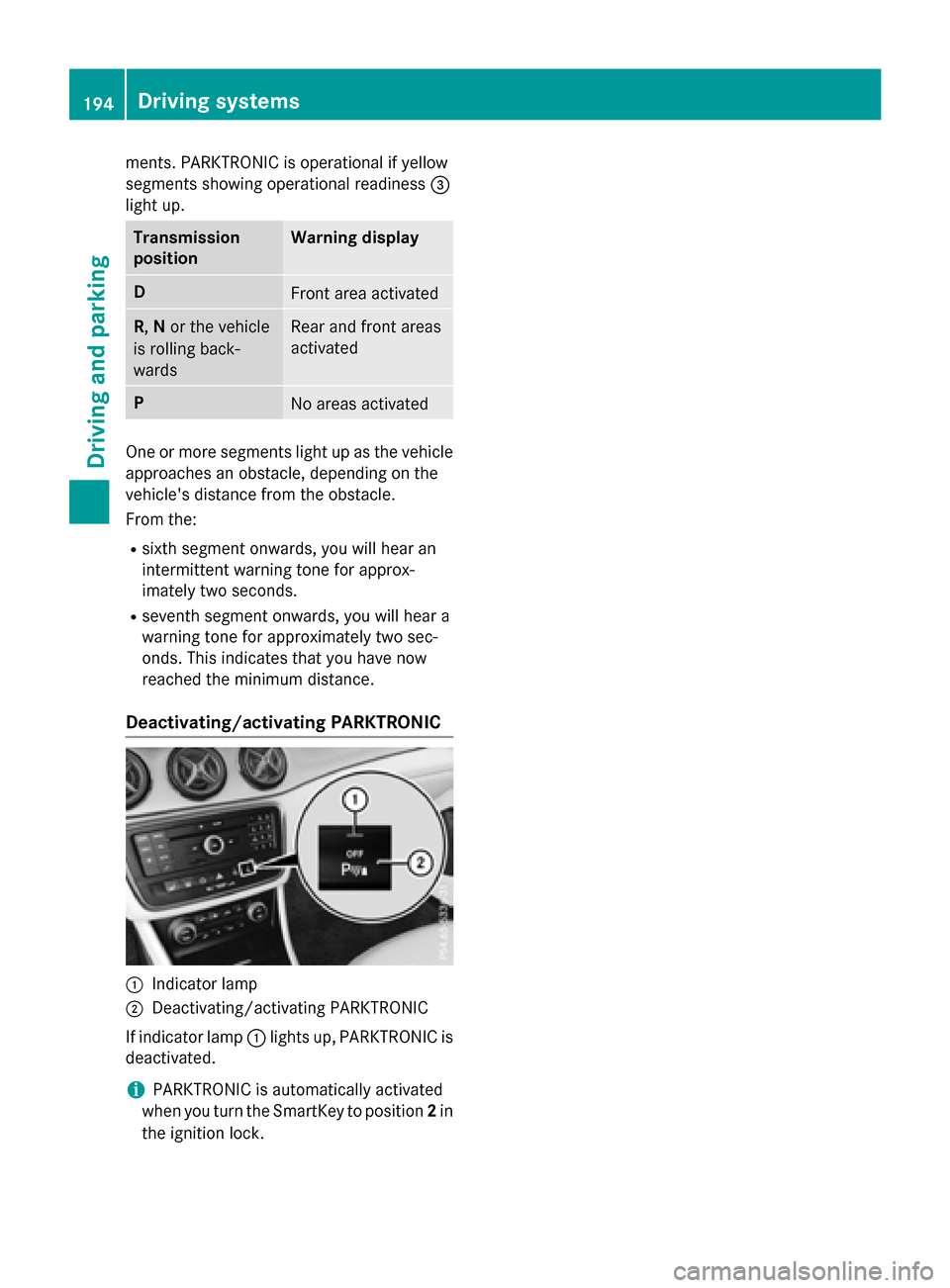
Deactivating/activating PARKTRONIC
:Indicator lamp
;Deactivating/activating PARKTRONIC
If indicator lamp :lights up, PARKTRONIC is
deactivated.
iPARKTRONIC is automatically activated
when you turn the SmartKey to position 2in
the ignition lock.
194Driving systems
Driving and parking
Page 199 of 374
Active Parking Assist is switched on automat-
ically when driving forwards. The system is
operational at speeds of up to approximately
22 mph (35 km/h). While in operation, the
system independently locates and measures
parking spaces on both sides of the vehicle.
Active Parking Assist will only detect parking
spaces:
Rthat are parallel or at right-angles to the
direction of travel
Rthat are parallel to the direction of travel
and at least 59 in (1.5m) wide
Rthat are parallel to the direction of travel
and at least 39.5 in (1.0 m) longer than your
vehicle
Rthat are at right angles to the direction of
travel and at least 39.5 in (1.0 m) wider
than your vehicle
iNote that Active Parking Assist cannot
measure the length of a parking space if it
is at right angles to the direction of travel.
You will need to judge whether your vehicle
will fit into the parking space.
When driving at speeds below 19 mph
(30 km/h), you will see parking symbol ;as
a status indicator in the instrument cluster.
When a parking space has been detected, an
arrow towards the right or the left also
appears. By default, Active Parking Assist
onl y d
isplays parking spaces on the front-
passenger side. Parking spaces on the driv-
er's side are displayed as soon as the turn
signal on the driver's side is activated. When
parking on the driver's side, this must remain
activated until you confirm the use of Active
Parking Assist by pressing the abutton on
the multifunction steering wheel. The system
automatically determines whether the park-
ing space is parallel or at right-angles to the
direction of travel.
A parking space is displayed while you are
driving past it, and until you are approx-
imately 50 ft (15 m) away from it.
Parking
GWARNING
If you leave the vehicle when it is only being
braked by Active Parking Assist it could roll
away if:
Rthere is a malfunction in the system or in
the voltage supply.
Rthe electrical system in the engine com-
partment, the battery or the fuses have
been tampered with.
Rthe battery is disconnected.
Rthe accelerator pedal has been depressed,
e.g. by a vehicle occupant.
There is a risk of an accident.
Before leaving the vehicle, always secure it
against rolling away.
iWhen PARKTRONIC detects obstacles,
Active Parking Assist brakes automatically
during the parking process. You are respon-
sible for braking in good time.
XStop the vehicle when the parking space
symbol shows the desired parking space in
the instrument cluster.
XShift the transmission to position R.
The Start Park Assist?
Yes: OKNo:
% message appears in the multifunction
display.
XTo cancel the procedure: press the%
button on the multifunction steering wheel or pull away.
or
XTo park using Active Parking Assist:
press the abutton on the multifunction
steering wheel.
The Park Assist Active Accelerate
and BrakeObserve Surroundingsmes-
sage appears in the multifunction display.
XLet go of the multifunction steering wheel.
XBack up the vehicle, being ready to brake at
all times. When backing up, drive at a speed
below approximately 6 mph (10 km/h).
Driving system s197
Driving an d parking
Z
Page 200 of 374
Otherwise Active Parking Assist will be can-
celed.
Active Parking Assist brakes the vehicle to
a standstill when the vehicle approaches
the rear border of the parking space.
Maneuvering may be required in tight park-ing spaces.
The Park Assist Active Select D
ObserveSurroundingsmessage appears in
the multifunction display.
XShift the transmission to position Dwhile
the vehicle is stationary.
Active Parking Assist immediately steers in
the other direction.
The Park Assist Active Accelerate
and BrakeObserve Surroundingsmes-
sage appears in the multifunction display.
iYou will achieve the best results by wait-
ing for the steering procedure to complete
before pulling away.
XDrive forwards and be ready to brake at all
times.
Active Parking Assist brakes the vehicle to
a standstill when the vehicle approaches
the front border of the parking space.
Maneuvering may be required in tight park-
ing spaces.
The Park Assist Active Select R
ObserveSurroundingsmessage appears in
the multifunction display.
As soon as the parking procedure is com-
plete, the Park
AssistSwitchedOffmes-
sage appears and a warning tone sounds. The
vehicle is now parked.
The vehicle is kept stationary without the
driver having to depress the brake pedal. The
braking effect is canceled when you depress
the accelerator pedal.
Active Parking Assist no longer supports you
with steering interventions and brake appli-
cations. When Active Parking Assist is fin-
ished, you must steer and brake again your-
self. PARKTRONIC is still available. Parking tips:
RThe way your vehicle is positioned in the
parking space after parking is dependent
on various factors. These include the posi-
tion and shape of the vehicles parked in
front and behind it and the conditions of the
location. It may be the case that Active
Parking Assist guides you too far into a
parking space, or not far enough into it. In
some cases, it may also lead you across or
onto the curb. If necessary, you should can-
cel the parking procedure with Active Park-
ing Assist.
RYou can also select preselect transmission
position
D. The vehicle redirects and does
not drive as far into the parking space.
Should the transmission change take place
too early, the parking procedure will be
canceled. A sensible parking position can
no longer be achieved from this position.
Exiting a parking space
In order that Active Parking Assist can sup-
port you when you exit the parking space:
Ryou need to have parked using Active Park-
ing Assist.
Rthe border of the parking space must be
high enough at the front and the rear. A
curb is too small, for example.
Rthe border of the parking space must not be
too wide, as the position of the vehicle must
not exceed an angle of 45° to the starting
position as it is maneuvering into the park- ing space.
Ra maneuvering distance of at least 3.3 ft
(1.0 m) must be available.
Active Parking Assist can only assist you with
exiting a parking space if you have parked the
vehicle parallel to the direction of travel using
Active Parking Assist.
iIf PARKTRONIC detects obstacles, Active
Parking Assist brakes automatically whilst
the vehicle exits the parking space. You are
responsible for braking in good time.
198Driving systems
Driving and parking