display MERCEDES-BENZ CLA COUPE 2013 Owner's Manual
[x] Cancel search | Manufacturer: MERCEDES-BENZ, Model Year: 2013, Model line: CLA COUPE, Model: MERCEDES-BENZ CLA COUPE 2013Pages: 373, PDF Size: 11.47 MB
Page 36 of 373
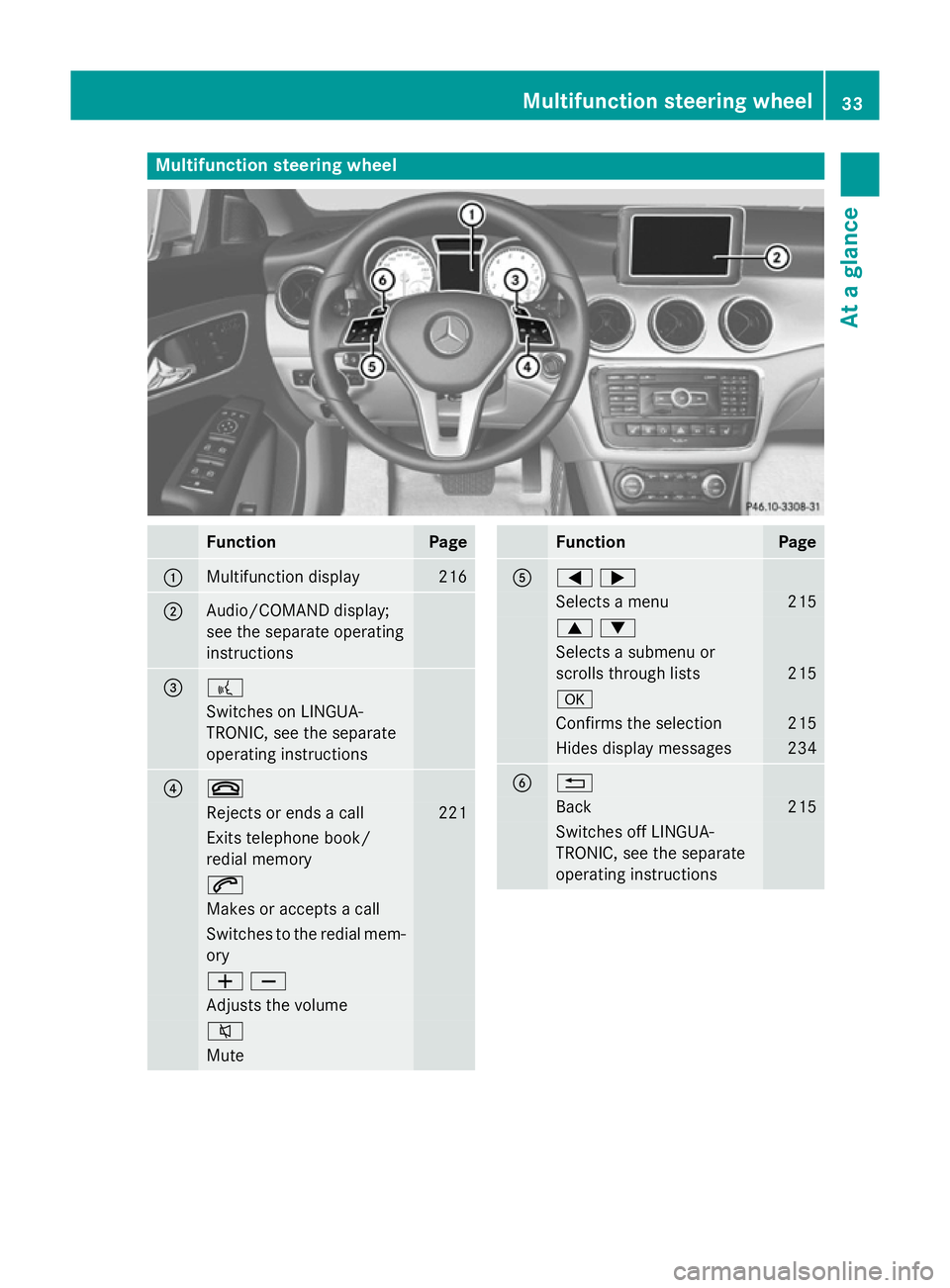
Multifunction steering wheel
Function Page
:
Multifunction display 216
;
Audio/COMAND display;
see the separate operating
instructions = ?
Switches on LINGUA-
TRONIC, see the separate
operating instructions ? ~
Rejects or ends a call 221
Exits telephone book/
redial memory
6
Makes or accepts a call
Switches to the redial mem-
ory WX
Adjusts the volume
8
Mute Function Page
A
=;
Selects a menu 215
9:
Selects a submenu or
scrolls through lists
215
a
Confirms the selection 215
Hides display messages 234
B %
Back 215
Switches off LINGUA-
TRONIC, see the separate
operating instructions Multifunction steering wheel
33At a glance
Page 52 of 373
X
To raise: slide the belt guide upwards.
The belt guide will engage in various posi-
tions.
X To lower: hold belt guide release :and
slide the belt guide downwards.
X Let go of belt guide release :in the
desired position and make sure that the
belt guide engages.
Releasing the seat belts !
Make sure that the seat belt is fully rolled
up. Otherwise, the seat belt or belt tongue
will be trapped in the door or in the seat
mechanism. This could damage the door,
the door trim panel and the seat belt. Dam- aged seat belts can no longer fulfil their
protective function and must be replaced.
Visit a qualified specialist workshop. X
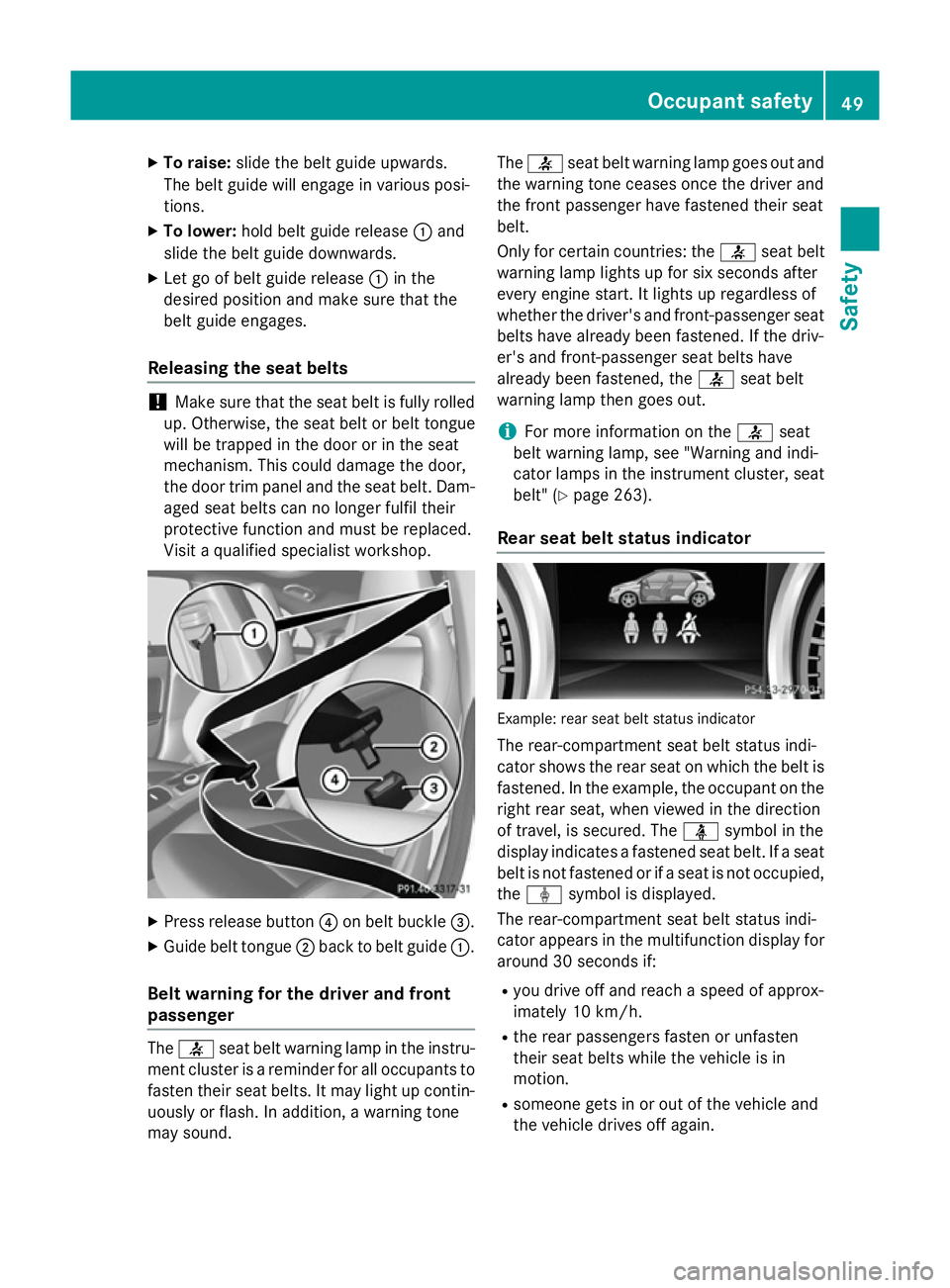
Press release button ?on belt buckle =.
X Guide belt tongue ;back to belt guide :.
Belt warning for the driver and front
passenger The
7 seat belt warning lamp in the instru-
ment cluster is a reminder for all occupants to
fasten their seat belts. It may light up contin-
uously or flash. In addition, a warning tone
may sound. The
7 seat belt warning lamp goes out and
the warning tone ceases once the driver and
the front passenger have fastened their seat
belt.
Only for certain countries: the 7seat belt
warning lamp lights up for six seconds after
every engine start. It lights up regardless of
whether the driver's and front-passenger seat
belts have already been fastened. If the driv-
er's and front-passenger seat belts have
already been fastened, the 7seat belt
warning lamp then goes out.
i For more information on the
7seat
belt warning lamp, see "Warning and indi-
cator lamps in the instrument cluster, seat
belt" (Y page 263).
Rear seat belt status indicator Example: rear seat belt status indicator
The rear-compartment seat belt status indi-
cator shows the rear seat on which the belt is fastened. In the example, the occupant on the
right rear seat, when viewed in the direction
of travel, is secured. The üsymbol in the
display indicates a fastened seat belt. If a seat belt is not fastened or if a seat is not occupied,
the ý symbol is displayed.
The rear-compartment seat belt status indi-
cator appears in the multifunction display for around 30 second s if:
R you drive of f and reach a speed of approx-
imately 10 km/h.
R the rear passengers fasten or unfasten
their seat belts while the vehicle is in
motion.
R someone gets in or out of the vehicle and
the vehicle drives off again. Occupant safety
49Safety Z
Page 67 of 373
Important safety notes
If you fail to adapt your driving style or if you
are inattentive, the driving safety systems can
neither reduce the risk of accident nor over-
ride the laws of physics. Driving safety sys-
tems are merely aids designed to assist driv- ing. You are responsible for the distance to
the vehicle in front, for vehicle speed and for braking in good time. Always adapt your driv- ing style to suit the prevailing road, weather
and traffic conditions and maintain a safe dis-
tance from the vehicle in front. Drive care-
fully.
i The driving safety systems described only
work as effectively as possible when there
is adequate contact between the tyres and
the road surface. Pay particular attention to the information regarding tyres, recom-
mended minimum tyre tread depths etc. inthe "Wheels and tyres" section
(Y page 326).
In wintry driving conditions, always use
winter tyres (M+S tyres) and, if necessary,
snow chains. Only in this way will the driv-
ing safety systems described in this section work as effectively as possible. ABS (Anti-lock Braking System)
General notes ABS regulates brake pressure in such a way
that the wheels do not lock when you brake.
This allows you to continue steering the vehi- cle when braking.
The ! ABS warning lamp in the instrument
cluster lights up when the ignition is switched on. It goes out when the engine is running.
Important safety notes i
Observe the "Important safety notes" sec-
tion for driving safety systems (Y page 64). G
WARNING
If ABS is faulty, the wheels could lock when
braking. The steerability and braking charac-
teristics may be severely impaired. Addition-
ally, further driving safety systems are deac-
tivated. There is an increased danger of skid- ding and accidents.
Drive on carefully. Have ABS checked imme-
diately at a qualified specialist workshop.
If ABS is malfunctioning, other systems,
including driving safety systems, will also
become inoperative. Observe the information on the ABS warning lamp (Y page 265) and
display messages which may be shown in the
instrument cluster (Y page 235).
ABS works from a speed of about
8 km/hupwards, regardless of road-surface
conditions. ABS works on slippery surfaces,
even when you only brake gently.
Brakes X
If ABS intervenes: continue to depress the
brake pedal with force until the braking sit- uation is over.
X To make a full brake application:
depress the brake pedal with full force.
If ABS intervenes when braking, you will feel a
pulsing in the brake pedal.
The pulsating brake pedal can be an indica-
tion of hazardous road conditions, and func-
tions as a reminder to take extra care while
driving. BAS (Brake Assist)
General notes BAS operates in emergency braking situa-
tions. If you depress the brake pedal quickly,
BAS automatically boosts the braking force,
thus shortening the stopping distance. 64
Driving safety systemsSafety
Page 68 of 373
Important safety notes
i
Observe the "Important safety notes" sec-
tion (Y page 64). G
WARNING
If BAS is malfunctioning, the braking distance
in an emergency braking situation is
increased. There is a risk of accident.
In an emergency braking situation, depress
the brake pedal with full force. ABS prevents
the wheels from locking.
Braking X
Keep the brake pedal depressed firmly until
the emergency braking situation is over.
ABS prevents the wheels from locking.
The brakes will function as usual once you
release the brake pedal. BAS is deactivated. COLLISION PREVENTION ASSIST
General notes COLLISION PREVENTION ASSIST consists of
the adaptive Brake Assist and the distance
warning signal, which are described in the
following.
Distance warning function Important safety notes
i Observe the "Important safety notes" sec-
tion (Y page 64). G
WARNING
The distance warning function does not react:
R to people or animals
R to oncoming vehicles
R to crossing traffic
R when cornering
Thus, the distance warning function cannot
provide a warning in all critical situations.
There is a risk of an accident.
Always pay careful attention to the traffic sit-
uation and be ready to brake. G
WARNING
The distance warning function cannot always
clearly identify objects and complex traffic
situations.
In such cases, the distance warning function
may:
R give an unnecessary warning
R not give a warning
There is a risk of an accident.
Always pay careful attention to the traffic sit-
uation; do not rely on the distance warning
function alone.
Function X To activate/deactivate: activate or deac-
tivate the distance warning function in the
on-board computer (Y page 224).
If the distance warning function is activated,
the Ä symbol appears in the assistance
graphics display.
The distance warning function can help you to
minimise the risk of a collision with a vehicle
ahead or reduce the effects of such a colli-
sion. If the distance warning function detects that there is a risk of a collision, you will be
warned visually and acoustically. Without
your intervention, the distance warning func-
tion cannot prevent a collision.
The distance warning function issues a warn- ing at speeds:
R of around 30 km/h or more, if, over several
seconds, the distance maintained to the
vehicle travelling in front is insufficient. The
· distance warning lamp then lights up
in the instrument cluster.
R of around 7 km/h or higher, if you very
quickly approach a vehicle in front. An
intermittent warning tone will then sound,
and the ·distance warning lamp will
light up in the instrument cluster. Driving safety systems
65Safety Z
Page 69 of 373
X
Brake immediately in order to increase the
distance from the vehicle in front.
or
X Take evasive action provided it is safe to do
so.
Due to the nature of the system, particularly
complicated but non-critical driving condi-
tions may also cause the system to display a
warning.
With the help of the radar sensor system, the distance warning function can detect obsta-
cles that are in the path of your vehicle for an
extended period of time.
Up to a speed of about 70 km/h, the distance warning function can also react to stationaryobstacles, such as stopped or parked vehi-
cles.
If you approach an obstacle and the distance
warning function detects a risk of a collision,
the system will alert you both visually and
acoustically.
In particular, the detection of obstacles can
be impaired in the case of:
R dirt on the sensors or obscured sensors
R snow or heavy rain
R interference by other radar sources
R strong radar reflections, for example, in
multi-storey car parks
R a narrow vehicle travelling in front, e.g. a
motorcycle
R a vehicle travelling in front on a different
line
R new vehicles or after a service on the COL-
LISION PREVENTION ASSIST PLUS system
Please observe the information in the sec-
tion on running-in the vehicle
(Y page 146).
Following damage to the front end of the vehi-
cle, have the configuration and operation of
the radar sensor checked at a qualified spe-
cialist workshop. This also applies to colli-
sions at slow speeds where there is no visible
damage to the front of the vehicle. Adaptive Brake Assist i
Observe the "Important safety notes" sec-
tion for driving safety systems (Y page 64). G
WARNING
Adaptive Brake Assist cannot always clearly
identify objects and complex traffic situa-
tions.
In such cases, Adaptive Brake Assist may:
R intervene unnecessarily
R not intervene
There is a risk of an accident.
Always pay careful attention to the traffic sit- uation and be ready to brake. Terminate the
intervention in a non-critical driving situation. G
WARNING
Adaptive Brake Assist does not react:
R to people or animals
R to oncoming vehicles
R to crossing traffic
R to stationary obstacles
R when cornering
As a result, Adaptive Brake Assist may not
intervene in all critical conditions. There is a
risk of an accident.
Always pay careful attention to the traffic sit- uation and be ready to brake.
Due to the nature of the system, particularly
complicated but non-critical driving condi-
tions may also cause Brake Assist to inter-
vene.
Adaptive Brake Assist aids you in braking dur-
ing hazardous situations at speeds above
7 km/h and uses the radar sensor system to
evaluate the traffic situation.
With the help of a sensor system, adaptive
Brake Assist can detect obstacles that are in the path of your vehicle for an extended
period of time.
If you approach an obstacle and adaptive
Brake Assist has detected a risk of collision,
adaptive Brake Assist calculates the braking 66
Driving safety systemsSafety
Page 70 of 373
force necessary to avoid a collision. If you
apply the brakes forcefully, adaptive Brake
Assist will automatically increase the braking force to a level suitable for the traffic condi-
tions.
X Keep the brake pedal depressed until the
emergency braking situation is over.
ABS prevents the wheels from locking.
The brakes will work normally again if: R you release the brake pedal
R there is no longer any danger of a collision
R no obstacle is detected in front of your
vehicle
Adaptive Brake Assist is then deactivated.
Vehicles with PRE-SAFE ®
:if adaptive Brake
Assist requires particularly high brake pres-
sure, preventive passenger protection meas-
ures (PRE-SAFE ®
) are deployed simultane-
ously.
Up to vehicle speeds of around 250 km/h,
adaptive Brake Assist is capable of reacting to
moving objects that have already been rec-
ognised as such at least once over the period
of observation. Adaptive Brake Assist does
not react to stationary obstacles.
If adaptive Brake Assist is not available due to a malfunction in the radar sensor system, thebrake system remains available with full
brake boosting effect and BAS.
In particular, the detection of obstacles can
be impaired if there is:
R dirt on the sensors or obscured sensors
R snow or heavy rain
R interference by other radar sources
R strong radar reflections, for example, in
multi-storey car parks
R a narrow vehicle travelling in front, e.g. a
motorcycle
R a vehicle travelling in front on a different
line
R new vehicles or after a service on the COL-
LISION PREVENTION ASSIST PLUS system Please observe the information in the sec-
tion on running-in the vehicle
(Y
page 146).
Following damage to the front end of the vehi-
cle, have the configuration and operation of
the radar sensor checked at a qualified spe-
cialist workshop. This also applies to colli-
sions at slow speeds where there is no visible
damage to the front of the vehicle.
COLLISION PREVENTION ASSIST PLUS General notes
COLLISION PREVENTION ASSIST PLUS is
only available on vehicles with DISTRONIC.
COLLISION PREVENTION ASSIST PLUS
extends the functionality of COLLISION PRE-
VENTION ASSIST with an automatic braking
function. COLLISION PREVENTION ASSIST
PLUS can help you to minimise the risk of a
front-end collision with a vehicle ahead or
reduce the effects of such a collision. If COL-
LISION PREVENTION ASSIST PLUS detects
that there is a risk of a collision, you will be
warned visually and acoustically. In critical
situations COLLISION PREVENTION ASSIST
PLUS also initiates automatic braking.
Function
X To activate/deactivate: activate or deac-
tivate COLLISION PREVENTION ASSIST
PLUS in the on-board computer
(Y page 224).
If COLLISION PREVENTION ASSIST PLUS is
activated, the Äsymbol appears in the
assistance graphics display.
If the driver's seat belt is fastened, COLLI-
SION PREVENTION ASSIST PLUS can brake
automatically within a speed range of
between 7 km/h and 200 km/h.
COLLISION PREVENTION ASSIST PLUS can
also react to stationary obstacles with auto-
matic braking within a speed range of
between 7 km/h and 30 km/h.
Vehicles with PRE-SAFE ®
:if the automatic
braking function of COLLISION PREVENTION Driving safety systems
67Safety Z
Page 72 of 373
!
When testing the electric parking brake
on a braking dynamometer, switch off the
ignition. Application of the brakes by ESP ®
may otherwise destroy the brake system.
! Vehicles with 4MATIC: switch off the igni-
tion when the electric parking brake is
being tested using a dynamometer.
Application of the brakes by ESP ®
may oth-
erwise destroy the brake system.
! Vehicles with 4MATIC: function or per-
formance tests may only be carried out on
a 2-axle dynamometer. Before operating
the vehicle on such a dynamometer, please
consult a qualified specialist workshop.
You could otherwise damage the drive train or the brake system.
! Do not tow vehicles with 4MATIC with the
front or rear axle raised.
Vehicles without 4MATIC: when towing your
vehicle with the front axle raised, it is impor-
tant that you observe the notes on ESP ®
(Y page 320).
Vehicles with 4MATIC: when towing your
vehicle with both axles on the ground, it is
important that you observe the notes on ESP ®
(Y page 321).
ESP ®
is deactivated if the åESP®
OFF
warning lamp in the instrument cluster lights
up continuously when the engine is running.
If the ÷ ESP®
warning lamp and the å
ESP ®
OFF warning lamp are lit continuously,
ESP ®
is not available due to a malfunction.
Observe the information on warning lamps
(Y page 267) and display messages which
may be shown in the instrument cluster
(Y page 235).
i Only use wheels with the recommended
tyre sizes. Only then will ESP ®
function
properly. Characteristics of ESP
® General notes
If the
÷ ESP warning lamp goes out before
beginning the journey, ESP ®
is automatically
active.
If ESP ®
intervenes, the ÷ESP®
warning
lamp flashes in the instrument cluster.
If ESP ®
intervenes:
X Do not deactivate ESP ®
under any circum-
stances.
X When pulling away, only depress the accel-
erator pedal as far as is necessary.
X Adapt your driving style to suit the prevail-
ing road and weather conditions.
ECO start/stop function
The ECO start/stop function switches the
engine off automatically if the vehicle stops
moving. When pulling away again, the engine
starts automatically. ESP ®
remains in its pre-
viously selected status. Example:if ESP®
was deactivated before the engine was
switched off, ESP ®
remains deactivated when
the engine is switched on again.
Deactivating/activating ESP ®
(except
AMG vehicles) Important safety notes
You can select between the following states
of ESP ®
:
R ESP ®
is activated.
R ESP ®
is deactivated. G
WARNING
If you deactivate ESP ®
, ESP ®
no longer sta-
bilises the vehicle. There is an increased risk
of skidding and an accident.
Only deactivate ESP ®
in the situations descri-
bed in the following. Driving safety systems
69Safety Z
Page 74 of 373
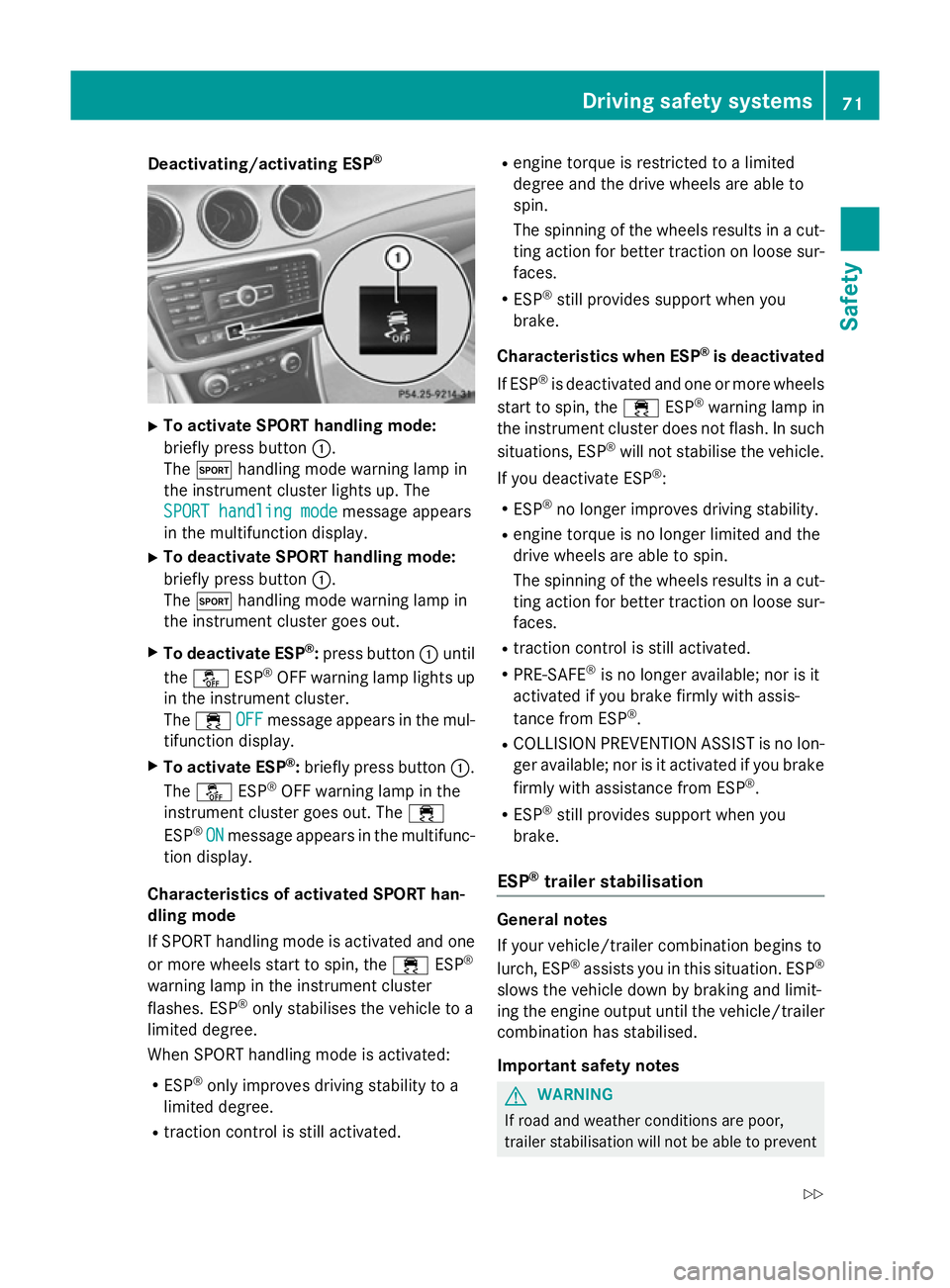
Deactivating/activating ESP
®X
To activate SPORT handling mode:
briefly press button :.
The M handling mode warning lamp in
the instrument cluster lights up. The
SPORT handling mode
SPORT handling mode message appears
in the multifunction display.
X To deactivate SPORT handling mode:
briefly press button :.
The M handling mode warning lamp in
the instrument cluster goes out.
X To deactivate ESP ®
:press button :until
the å ESP®
OFF warning lamp lights up
in the instrument cluster.
The ÷ OFF
OFF message appears in the mul-
tifunction display.
X To activate ESP ®
:briefly press button :.
The å ESP®
OFF warning lamp in the
instrument cluster goes out. The ÷
ESP ®
ON
ON message appears in the multifunc-
tion display.
Characteristics of activated SPORT han-
dling mode
If SPORT handling mode is activated and one or more wheels start to spin, the ÷ESP®
warning lamp in the instrument cluster
flashes. ESP ®
only stabilises the vehicle to a
limited degree.
When SPORT handling mode is activated:
R ESP ®
only improves driving stability to a
limited degree.
R traction control is still activated. R
engine torque is restricted to a limited
degree and the drive wheels are able to
spin.
The spinning of the wheels results in a cut-
ting action for better traction on loose sur- faces.
R ESP ®
still provides support when you
brake.
Characteristics when ESP ®
is deactivated
If ESP ®
is deactivated and one or more wheels
start to spin, the ÷ESP®
warning lamp in
the instrument cluster does not flash. In such
situations, ESP ®
will not stabilise the vehicle.
If you deactivate ESP ®
:
R ESP ®
no longer improves driving stability.
R engine torque is no longer limited and the
drive wheels are able to spin.
The spinning of the wheels results in a cut-
ting action for better traction on loose sur- faces.
R traction control is still activated.
R PRE-SAFE ®
is no longer available; nor is it
activated if you brake firmly with assis-
tance from ESP ®
.
R COLLISION PREVENTION ASSIST is no lon-
ger available; nor is it activated if you brake
firmly with assistance from ESP ®
.
R ESP ®
still provides support when you
brake.
ESP ®
trailer stabilisation General notes
If your vehicle/trailer combination begins to
lurch, ESP
®
assists you in this situation. ESP ®
slows the vehicle down by braking and limit-
ing the engine output until the vehicle/trailer
combination has stabilised.
Important safety notes G
WARNING
If road and weather conditions are poor,
trailer stabilisation will not be able to prevent Driving safety syste
ms
71Safety
Z
Page 101 of 373
Useful information
i This Owner's Manual describes all mod-
els, series and optional equipment for your
vehicle that were available at the time of
going to press. National variations are pos- sible. Note that your vehicle may not be
equipped with all of the functions descri-
bed. This is also the case for systems and
functions relevant to safety.
i Read the information on qualified special-
ist workshops: (Y page 24). Correct driver's seat position
G
WARNING
You could lose control of the vehicle while
driving if you:
R adjust the driver's seat, steering wheel or
mirrors
R fasten the seat belt
There is a risk of an accident.
Adjust the driver's seat, head restraint, steer-
ing wheel and mirrors and fasten your seat
belt before starting the engine. Observe the safety notes on seat adjustment
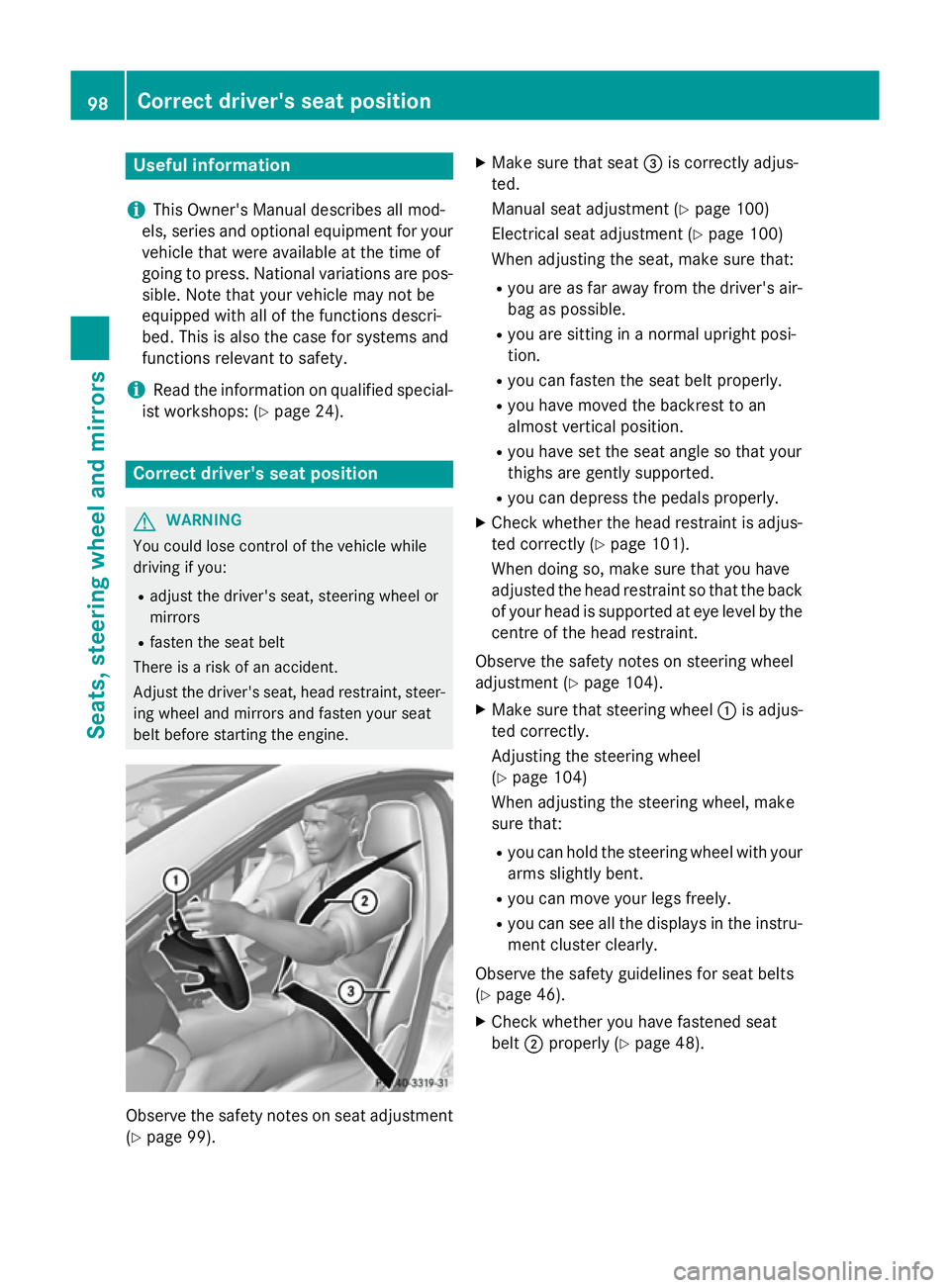
(Y page 99). X
Make sure that seat =is correctly adjus-
ted.
Manual seat adjustment (Y page 100)
Electrical seat adjustment (Y page 100)
When adjusting the seat, make sure that:
R you are as far away from the driver's air-
bag as possible.
R you are sitting in a normal upright posi-
tion.
R you can fasten the seat belt properly.
R you have moved the backrest to an
almost vertical position.
R you have set the seat angle so that your
thighs are gently supported.
R you can depress the pedals properly.
X Check whether the head restraint is adjus-
ted correctly (Y page 101).
When doing so, make sure that you have
adjusted the head restraint so that the back of your head is supported at eye level by the
centre of the head restraint.
Observe the safety notes on steering wheel
adjustment (Y page 104).
X Make sure that steering wheel :is adjus-
ted correctly.
Adjusting the steering wheel
(Y page 104)
When adjusting the steering wheel, make
sure that:
R you can hold the steering wheel with your
arms slightly bent.
R you can move your legs freely.
R you can see all the displays in the instru-
ment cluster clearly.
Observe the safety guidelines for seat belts
(Y page 46).
X Check whether you have fastened seat
belt ;properly (Y page 48). 98
Correct driver's seat positionSeats, steering wheel and mirrors
Page 119 of 373
Adaptive Highbeam Assist cannot take into
account road, weather or traffic conditions.
Adaptive Highbeam Assist is only an aid. You
are responsible for adjusting the vehicle's
lighting to the prevailing light, visibility and
traffic conditions.
In particular, the detection of obstacles can
be restricted if there is:
R poor visibility, e.g. due to fog, heavy rain or
snow
R dirt on the sensors or if the sensors are
obscured
Switching Adaptive Highbeam Assist
on/off X
To switch on: turn the light switch to Ã.
X Press the combination switch beyond the
pressure point in the direction of arrow :.
The _ indicator lamp in the multifunc-
tion display lights up when it is dark and the
light sensor activates the dipped-beam
headlamps.
If you are driving at speeds above 25 km/h:
The headlamp range is set automatically
depending on the distance between the
vehicle and other road users.
If you are driving at speeds above approx-
imately 30 km/h and no other road users
are recognised:
The main-beam headlamps are switched on automatically. The Kindicator lamp in
the instrument cluster also lights up.
If you are driving at speeds below 25 km/h
or other road users are recognised or the
roads are adequately lit:
The main-beam headlamps are switched off automatically. The Kindicator lamp in
the instrument cluster goes out. The _
indicator lamp in the multifunction display
remains lit.
X To switch off: move the combination
switch back to its normal position or move the light switch to another position.
The _ indicator lamp in the instrument
cluster goes out. Headlamps misted up on the inside
Under certain climatic and physical condi-
tions, moisture may form in the headlamp.
This moisture will not impair the function of
the headlamp. Interior lighting
Overview of interior lighting
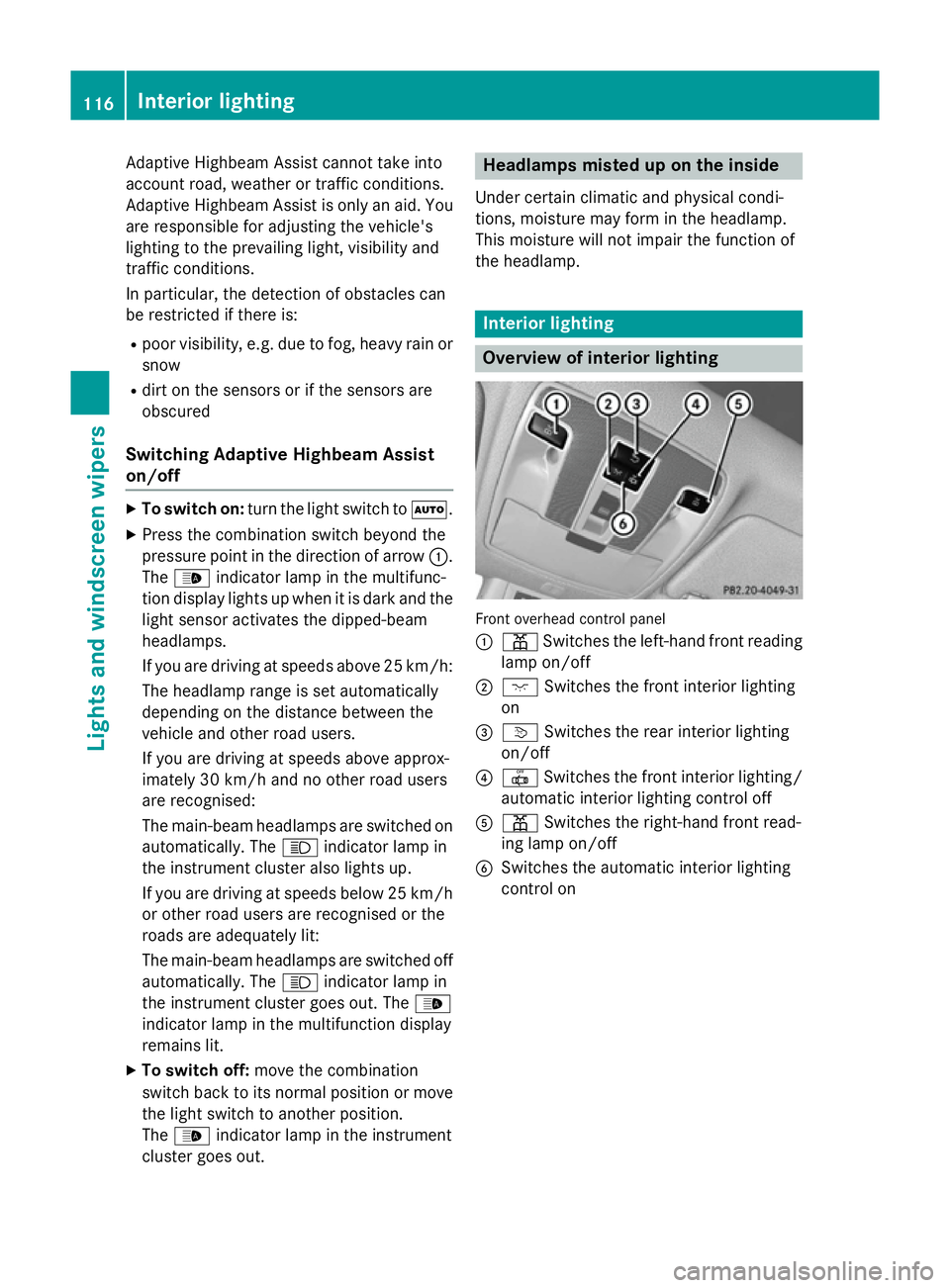
Front overhead control panel
:
p Switches the left-hand front reading
lamp on/off
; c Switches the front interior lighting
on
= v Switches the rear interior lighting
on/off
? | Switches the front interior lighting/
automatic interior lighting control off
A p Switches the right-hand front read-
ing lamp on/off
B Switches the automatic interior lighting
control on 116
Interior lightingLights and
windscreen wipers