engine MERCEDES-BENZ CLA COUPE 2018 Manual PDF
[x] Cancel search | Manufacturer: MERCEDES-BENZ, Model Year: 2018, Model line: CLA COUPE, Model: MERCEDES-BENZ CLA COUPE 2018Pages: 326, PDF Size: 5.59 MB
Page 151 of 326
If you leave the engine or the auxiliary heatingrunning, make sure the exhaust pipe and area
around the vehicle are clear of snow. To
ensure an adequate supply of fresh air, open a
window on the side of the vehicle that is not
facing into the wind.
Have you rvehicle winter-proofed at aqualified
specialist workshop at the onset of winter.
Drive particularly carefully on slippery road sur-
faces. Avoid sudden acceleration, steering and
braking maneuvers. Do not use cruise control or Distance PilotD ISTRONIC.
If the vehicle threatens to skid or cannot be
stopped when moving at low speed:
XShift the transmission to position N.
XTry to bring the vehicle under control using
corrective steering.
The outsidet emperature indicator is not
designed to serve as an ice-warning device and is therefore unsuitable for that purpose.
Changes in the outsidet emperature are dis-
played after ashort delay.
Indicated temperature sjust above the freezing
point do not guarantee that the road surface is
free of ice. The road may still be icy, especially in
woodeda reasoronb ridges.
You shoul dpay speciala ttention to road condi-
tions when temperature sare around freezing
point.
For more information on driving with snow
chains, see (
Ypage 290).
For more information on driving with summer
tires, see (
Ypage 289).
Observe the notes in the "Winter operation" sec-
tion (
Ypage 289).
Drivin gsystems
Cruise control
General notes
Cruise control maintains aconstant road speed
for you .Itbrakes automatically in order to avoid
exceeding the set speed.Onl ong and steep
downhill gradients, especially if the vehicle is
laden, you must select alow gear in good time.
You need to shift manually using the steering
wheel paddle shifters beforehand. By doing so,
you willm ake use of the braking effect of the engine. This relieves the load on the brake sys-
tem and prevents the brakes from overheating
and wearing too quickly.
When the engine is running, you can use the
cruise control lever to limitt
he speed to any
speed between20m ph (30 km/h)and the tech-
nicallyp ermitted maximum speed of the vehicle.
Use cruise control only if road and traffic con-
ditions make it appropriate to maintain asteady
speed for aprolongedp eriod.
The speed indicated in the speedometer may
differ slightly from the speed stored.
Important safety notes
If you fail to adapt you rdriving style, cruise con-
trol can neither reduce the risk of an accident
nor override the lawsofp hysics. Cruise control
cannot take into account the road, traffic and
weather conditions. Cruise control is only an
aid.Y ou are responsible for the distance to the
vehicle in front, for vehicle speed,f or braking in
good time and for staying in you rlane.
Do not use cruise control:
Rin road and traffic conditions which do not
allow you to maintain aconstant speed,e .g. in
heavy traffic or on winding roads
Ron slippery road surfaces .Braking or accel-
erating could cause the drive wheelstol ose
traction and the vehicle could then skid
Rin poor visibility, e.g. due to fog, heavy rain or
snow
If there is achange of drivers, advise the new
driver of the speed stored.
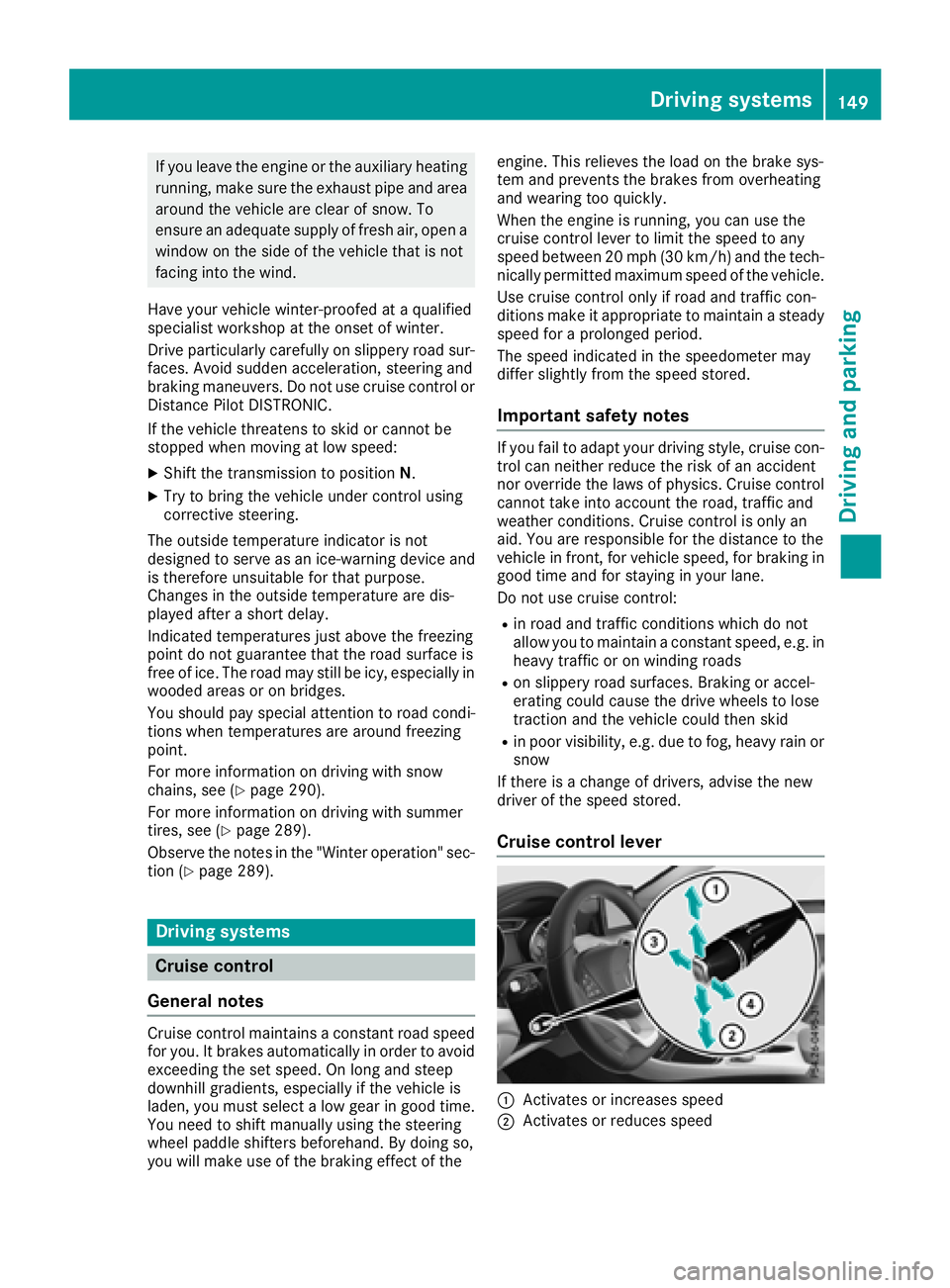
Cruise control lever
:Activates or increases speed
;Activates or reduces speed
Driving systems149
Driving and parking
Z
Page 153 of 326
iWhen you switch off the engine, the last
speed stored is cleared.
Distance Pilot DISTRONIC
General notes
Distance Pilot DISTRONIC regulates the speed
and automatically helps you maintain the dis-
tanc etot he vehicle detected in front. Vehicles
are detected with the aid of the radar sensor
system. Distance Pilot DISTRONIC brakes auto-
matically to avoid exceedingt he set speed or to
maintain the designated distanc efrom the vehi-
cle in front.
If Distance Pilot DISTRONIC detect sthat there is
ar isk of acollision, you will be warned visually
and acoustically. Without your intervention, Dis-
tanc ePilot DISTRONIC cannot prevent acolli-
sion. An intermittent warning ton ewill then
sound and the distanc ewarning lamp will light
up in the instrument cluster. Brake immediately
in order to increase the distanc etothe vehicle in
frontort ake evasive action provided it is safe to
do so.
Distance Pilot DISTRONIC operates in the range
between 0mph (0 km/h) and 120 mph
(200 km/h).
Change into alower gear in good time on long
and steep downhill gradients .This is especially
importan tifthe vehicle is laden. By doing so, you
will make use of the braking effect of the engine.
This relieves the load on the brake system and
preventst he brakes from overheatin gand wear-
ing too quickly.
Do not use Distance Pilot DISTRONIC on roads
with steep gradients.
For Distance Pilot DISTRONIC to assist you
when driving, the radar sensor system must be
operational.
Sinc eDistance Pilot DISTRONIC transmits radar
waves, it can resemble the radar detectors of
the responsible authorities. You can refer to the
relevant chapter in the Operator' sManual if
questions are asked about this.
iUSA only: This device has been approved by
the FCC as a"Vehicular Radar System". The
radar sensor is intended for use in an auto-
motive radar system only. Removal, tamper-
ing, or altering of the device will void any war-
ranties, and is not permitted by the FCC. Do not tamper with, alter, or use in any non-
approved way.
An
yu nauthorized modification to this device
could void the user's authority to operate the
equipment.
iCanada only: This device complies wit h
RSS-210 of Industry Canada. Operation is
subject to the following two conditions:
1. This device may not cause interference,
and
2. This device must accept any interference
received, including interference that may
cause undesired operation of the device.
Removal, tampering, or altering of the device
will void any warranties, and is not permitted. Do not tamper with, alter, or use in any non-
approved way.
An yu nauthorized modification to this device
could void the user's authority to operate the
equipment.
Important safety notes
GWARNING
Distance Pilot DISTRONIC does not react to:
Rpeople or animals
Rstationary object sonthe road, e.g. stopped
or parked vehicles
Roncoming vehicles and crossingt raffic
As aresult, Distance Pilot DISTRONIC may
neither give warnings nor intervene in such
situations. There is arisk of an accident.
Always pay careful attention to the traffic sit- uation and be ready to brake.
GWARNING
Distance Pilot DISTRONIC cannot always
clearly identif yother road users and complex
traffic situations.
In such cases, Distance Pilot DISTRONIC may:
Rgive an unnecessary warning and then
brake the vehicle
Rneither give awarning nor intervene
Raccelerateorb rake unexpectedly
There is arisk of an accident.
Driving systems151
Driving and parking
Z
Page 155 of 326
To activate Distance Pilot DISTRONIC, the fol-
lowing conditions must be fulfilled:
Rthe engine must be started. It may take up to
two minutes of driving before Distance Pilot
DISTRONIC is ready for use.
Rthe electric parking brake must be released.
RESP®must be active, but not intervening.
RParking Pilot must not be activated.
Rthe transmission must be in positionh.
Rthe driver's door must be closed when you
shift fromjtoh or your seat belt must be
fastened.
Rthe front-passenger door must be closed.
Rthe vehicle must not skid.
Activating
XBriefly pull the cruise control lever towards
you ?,u p: or down ;.
Distance Pilot DISTRONIC is activated.
XKeep the cruise control lever pressed up :or
down ;until the desired speed is set.
XRemove your foot from the accelerator pedal.
Your vehicle adapts its speed to that of the
vehicle in front,b ut only up to the desired
stored speed.
iIf you do not fully release the accelerator
pedal, the DistancePilotSuspendedmes-
sage appears in the multifunction display.T he
set distance to aslower-movingv ehicle in
front will then not be maintained. You will be
driving at the speed you determin ebythe
position of the accelerator pedal.
You can also activate Distance Pilot DISTRONIC
when stationary. The lowest speed that can be
set is 20 mph (3 0km/ h).
Drivin gwithD istance Pilo tDISTRONI C
Activating at th ecurrent speed/last
stored speed
GWARNING
If you cal lupthestored speed and it differs
from th ecurren tspeed, th evehicle acceler -
ates or decelerates. If you do no tknowt he
stored speed, th evehicle could accelerat eor
brake unexpectedly. There is ariskofana cci-
dent.
Pay attention to th eroada nd traffic condi-
tion sbefor ecallin gupt hestored speed. If you
do no tknowt he stored speed, stor ethe
desire dspeed again .
XBriefly pull th ecruise contro llever toward s
you ?.
XRemov eyour foot from th eaccelerator pedal.
The first time Distanc ePilotD ISTR ONIC is
activated, it stores th ecurren tspeed or reg -
ulates th espeed of th evehicle to th eprevi-
ousl ystore dspeed.
Pullin gawaya nd drivin g
XIf you wan ttopulla wa yw ithD istance
Pilo tDISTRONIC: removeyour foot from th e
brake pedal.
XBriefly pull th ecruise contro llever toward s
you ?.
or
XIf Distance Pilo tDISTRONI Cisactivated:
accelerat ebriefly.
Your vehicle pulls away and adapt sits speed
to that of th evehicle in front. If no vehicle is
detecte dinfront,your vehicle accelerates to
th es et speed.
The vehicle can also pull away when it is facin g
an unidentifie dobstacl eorisd rivingonad iffer-
en tlinef roma nother vehicle. The vehicle then
brake sautomatically. Be ready to brake at all
times .
If there is no vehicle in front, Distanc ePilot
DISTRONIC operates in th esam ew ay as cruise
control.
If Distanc ePilotD ISTR ONIC detects aslower -
movin gvehicle in front, it brake syour vehi
cle. In
this way, th edistanc eyou hav eselecte dismain-
tained.
If Distanc ePilotD ISTR ONIC detects afaster-
movin gvehicle in front, it increase sthe drivin g
speed. However, th evehicle is only accelerated
up to th espeed you hav estore d.
iDistanc ePilotD ISTR ONIC is deactivated
when you depress th ebrake ,excep twhen th e
vehicle is stationary.
Selecting th edrive program
Distanc ePilotD ISTR ONIC supports asport y
drivin gstyle when you selec tthe S+ drive pro -
gram (
Ypage 134) or th emanual drive program
(Ypage 136). Acceleration behin dthe vehicle in
fron tortot heset speed is then noticeably more
dynamic .Ifyou hav eselecte dthe E(Mercedes-
AM Gvehicles :C)d rive program, th evehicle
Driving systems153
Driving an dparking
Z
Page 156 of 326
acceleratesmoreg ently. This settin gisrecom-
mended in stop-and-start traffic.
Changing lanes
If when driving on multilane roads you wish to
chang etotheovertakin glane ,Distance Pilot
DISTRONIC support syou if:
Ryou are driving faster than 45 mph (70 km/h)
RDistance Pilo tDISTRONICi smaintaining the
distance to avehicl einf ront
Ryous witch on the appropriate tur nsignal
RDistance Pilo tDISTRONICd oesn ot currently
detect adangerofc ollision
If these conditions ar efulfilled ,you rv ehicl eis
accelerated .Acceleratio nwillbei nterrupte dif
changing lanes take stoo long or if the distance
between your vehicl eand the vehicl einfront
become stoo small.
Stopping
If Distance Pilo tDISTRONICd etects thatt he
vehicl einfront is stopping, it brakes your vehicle
unti litiss tationary.
Once your vehicl eisstationary, it remains sta-
tionar yand yo udon ot nee dtodepress the
brake.
iAfter atime ,the electri cparkin gb rake
secures the vehicl eand relieves the service
brake.
iDepending on the specifie dminimu mdis-
tance ,you rvehicl ewillc ome to astandstil lat
as ufficient distance behind the vehicl ein
front. The specifie dminimu mdistance is set
using the contro lonthe cruis ec
o
ntro llev er.
When Distance Pilo tDISTRONICi sactivated,
the transmission is shifted automaticall yto
position jif:
Rthe driver's sea tbeltisn ot fastened and the
driver's door is open.
Rthe engine is switched off ,unless it is auto-
maticall yswitched off by the ECO start/stop
function.
The electri cparkin gb rake secures the vehicle
automaticall yifDistance Pilo tDISTRONICi s
activated when the vehicl eisstationar yand:
Ras ystem malfunctio noccurs.
Rthe powe rsuppl yisi nsufficient.
If am alfunctio noccurs, the transmission may
also shift to position jautomatically.
Settin gaspeed
Keepinm indt hatitm aytake abrief moment
unti lthe vehicl ehasaccelerated or braked to
the spee dset.
XPress the cruis econtro llev er up :for a
highe rspeed or down ;for alower speed.
XTo adjustt he setspeed in 1mph incre-
ments (1 km/hi ncrements): brieflypress
the cruis econtro llev er up :or down ;to
the pressure point.
The last stored spee dincreases or decreases
in 1m ph (1 km/h )increments.
XTo adjustt he setspeed in 5mph incre-
ments (10k m/h increments): briefly press
the cruise control lever up :or down ;
beyond the pressure point.
The last stored speed increases or decreases in 5m ph (10 km/h) increments.
iDistance Pilot DISTRONIC is not deactivated
if you depress the accelerator pedal. If you
acceleratetoo vertake, Distance Pilot
DISTRONIC adjusts the vehicle's speed to the
last speed stored after you have finished over- taking.
Setting aspecified minimum distance
You can set the specified minimum distanc efor
Distance Pilot DISTRONIC by varying the time
span between one and two seconds. With this
function you can set the minimum distanc ethat
Distance Pilot DISTRONIC maintains to the vehi-
cle in front, dependen tonvehicle speed. You
can see this distanc einthe multifunction dis-
play (
Ypage 161).
The specified minimum distanc ecan be
changed while Distance Pilot DISTRONIC is
switched on or off.
iMake sure that you maintain the minimum
distanc etothe vehicle in frontasr equired by
law. Adjust the distanc etothe vehicle in front
if necessary.
154Driving systems
Driving and parking
Page 157 of 326
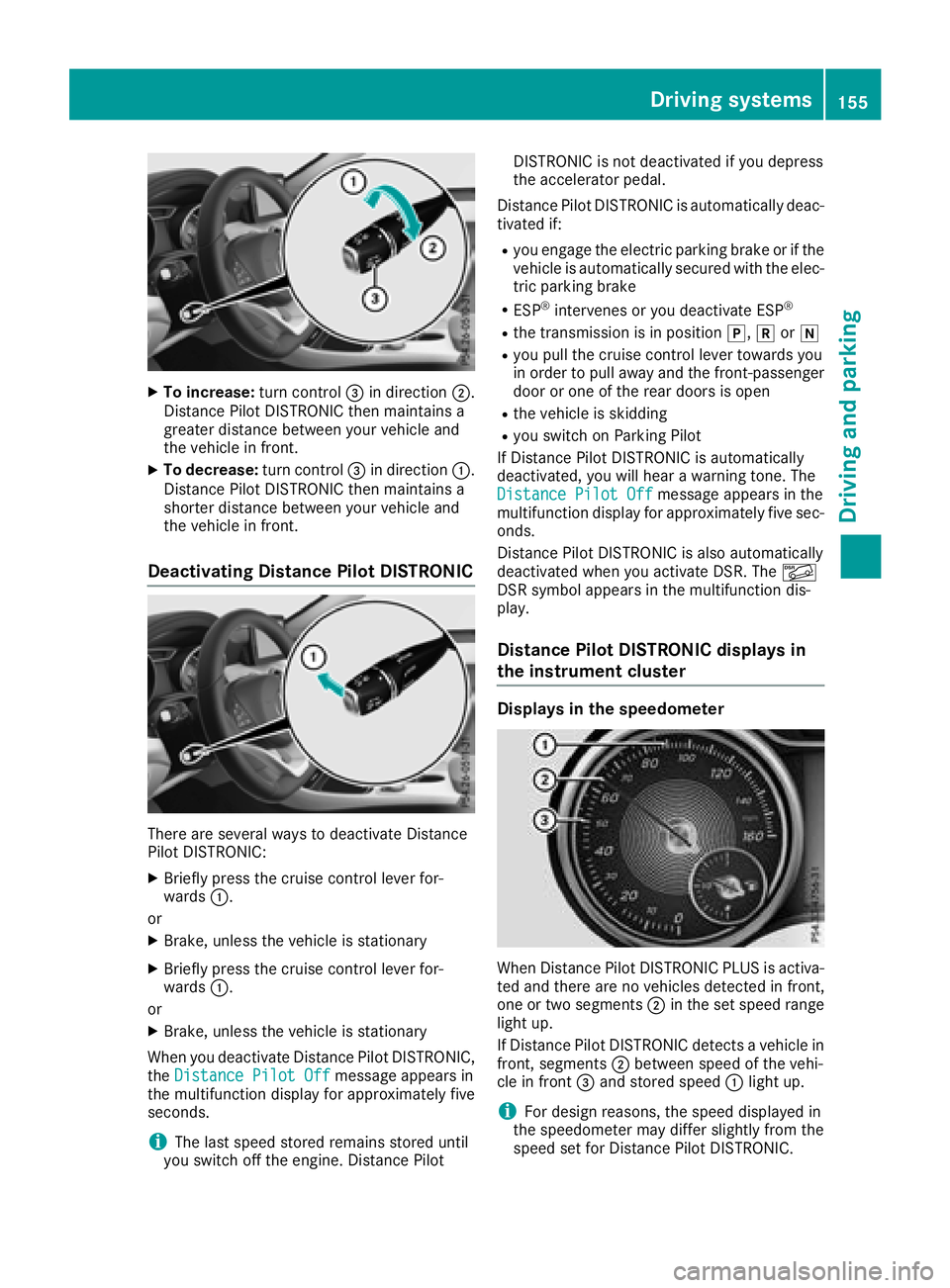
XTo increase:turn control=in direction ;.
Distance Pilo tDISTRONIC then maintains a
greate rdistance between your vehicl eand
the vehicl einfront.
XTo decrease: turn control=in direction :.
Distance Pilo tDISTRONIC then maintains a
shorter distance between your vehicl eand
the vehicl einfront.
Deactivating Distance Pilo tDISTRONIC
There are severa lwaystod eactivate Distance
Pilo tDISTRONIC:
XBriefly press the cruis econtroll ever for-
wards :.
or
XBrake, unless the vehicl eisstationary
XBriefly press the cruis econtroll ever for-
wards :.
or
XBrake, unless the vehicl eisstationary
Whe nyou deactivate Distance Pilo tDISTRONIC,
the Distance Pilot Off
message appears in
the multifunctio ndisplay for approximatelyf ive
seconds.
iThe last speed stored remains stored until
yo us witch off the engine. Distance Pilot DISTRONIC is not deactivate
difyoudepress
the accelerato rpedal.
Distance Pilo tDISTRONIC is automaticall ydeac-
tivated if:
Ryo ue ngage the electri cparking brake or if the
vehicl eisautomaticall ysecured with the elec-
tric parking brake
RESP®intervene soryoudeactivate ESP®
Rthe transmission is in position j,kori
Ryoup ullt he cruis econtroll ever toward syou
in order to pull away and the front-passenger
door or one of the reard oors is open
Rthe vehicl eisskidding
Ryous witch on Parking Pilot
If Distance Pilo tDISTRONIC is automatically
deactivated, yo uwillh earaw arning tone. The
Distance Pilot Off
message appears in the
multifunctio ndisplay for approximatelyf ives ec-
onds.
Distance Pilo tDISTRONIC is also automatically
deactivate dwheny ou activate DSR. The Ã
DSR symbo lappea rs in the multifunctio ndis-
play.
Distance Pilo tDISTRONICd isplaysin
the instrument cluster
Displays in the speedometer
Whe nDistance Pilo tDISTRONIC PLUSisa ctiva-
ted and ther eare no vehicles detectedinf ront,
one or two segments ;in the set speed range
light up.
If Distance Pilo tDISTRONIC detects avehicl ein
front, segments ;between speed of the vehi-
cle in front =and stored speed :light up.
iFor design reasons,t he speed displayed in
the speedometer mayd iffer slightlyf rom the
speed set for Distance Pilo tDISTRONIC.
Driving systems155
Driving an dparking
Z
Page 159 of 326
HOLD function
General notes
The HOLD function can assist the driverint he
following situations:
Rwhen pulling away, especially on steep slopes
Rwhen maneuvering on steep slopes
Rwhen waiting in traffic
The vehicleisk ept stationary without the driver
having to depress the brake pedal.
The braking effect is cancele dand the HOLD
function deactivated when you depress the
accelerator pedaltop ulla way.
Important safety notes
GWARNING
When leaving the vehicle, it can still roll away despite being braked by the HOLD function if:
Rthere is amalfunction in the system or in
the voltag esupply.
Rthe HOLD function has been deactivated by
pressing the accelerator pedalort he brake
pedal, e.g. by avehicleo ccupant.
Rthe electrical system in the engine com-
partment, the battery or the fuse shave
been tampere dwith.
Rthe battery is disconnected
There is arisk of an accident.
If you wis htoexit the vehicle, alway sturn off
the HOLD function and secure the vehicle
against rolling away.
!When Distance Pilot DISTRONIC or the
HOLD function is activated, the vehicle
brakes automatically in certain situations.
To avoi ddamage to the vehicle, deactivate
Distance Pilot DISTRONIC and the HOLD
function in the following or similar situations:
Rwhen towing the vehicle
Rin the car wash
Deactivating the HOLD function (
Ypage1 57).
Activation conditions
You can activate the HOLD function if:
Rthe vehicleiss tationary
Rthe engine is running or if it has been auto-
matically switched off by the ECO start/stop
function
Rthe driver's door is closed or you rseat belti s
fastened
Rthe electric parking brake is released
RDistance Pilot DISTRONIC is deactivated
Rthe transmission is in position h,kori
on vehicles with automatic transmission
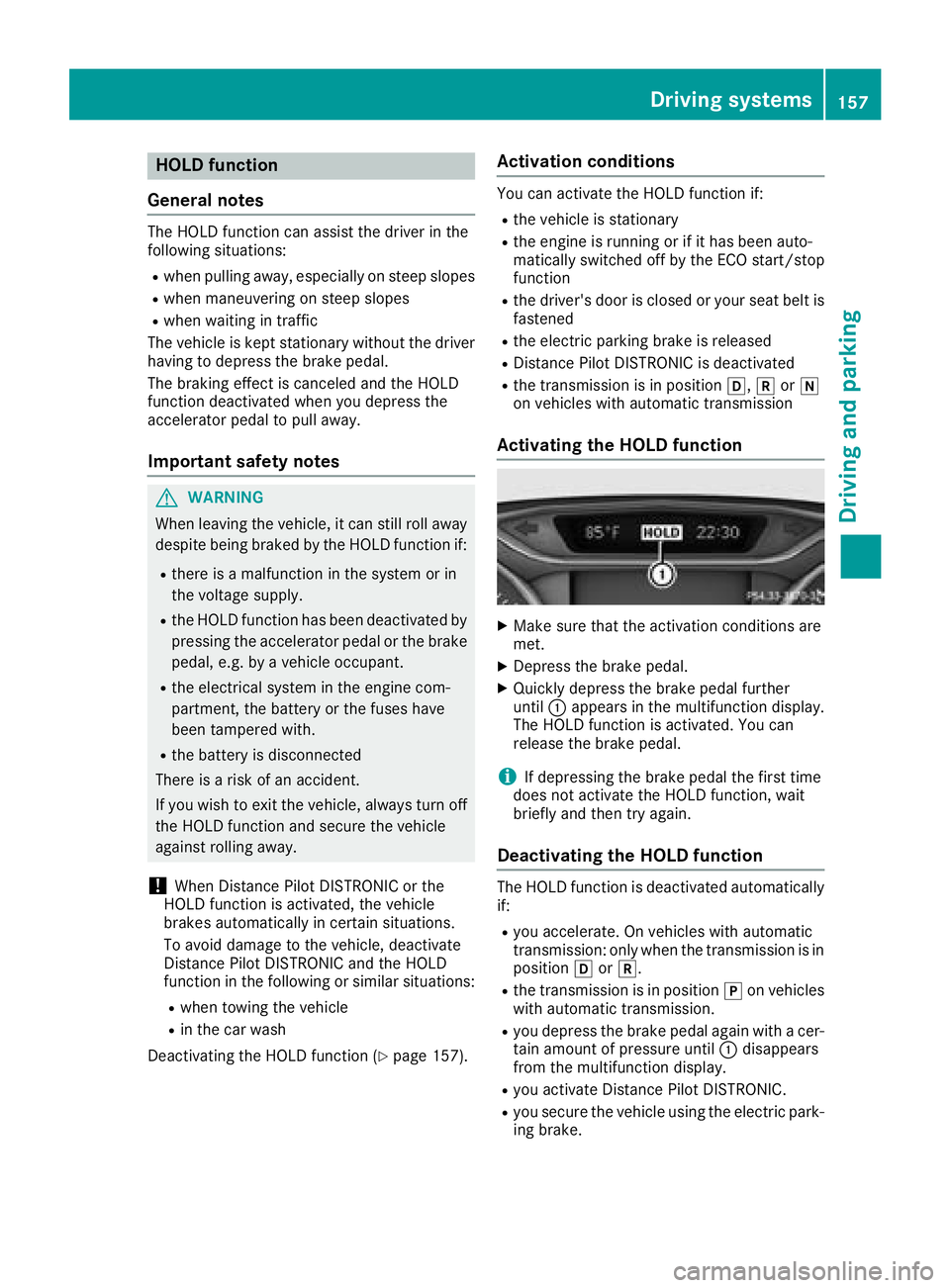
Activating the HOLD function
XMake sure that the activation conditions are
met.
XDepress the brake pedal.
XQuickly depress the brake pedalf urther
until :appears in the multifunction display.
The HOLD function is activated. You can
release the brake pedal.
iIf depressing the brake pedalt he first time
does not activate the HOLD function, wait
briefly and then try again.
Deactivatin gthe HOLD function
The HOLD function is deactivated automatically
if:
Ryou accelerate. On vehicles with automatic
transmission: only when the transmission is in
position hork.
Rthe transmission is in position jon vehicles
with automatic transmission.
Ryou depress the brake pedala gain withacer-
tain amount of pressure until :disappears
from the multifunction display.
Ryou activate Distance Pilot DISTRONIC.
Ryou secure the vehicleu sing the electric park-
ing brake.
Driving systems157
Driving and parking
Z
Page 160 of 326
iAfteratime ,the electri cparking brake
secures the vehicl eand relieves the service
brake.
Whe nthe HOLD functio nisa ctivated,t he trans-
mission is automaticall yshifted to position j
if:
Rthe driver's sea tbeltisn ot fasteneda nd the
driver's door is open.
Rthe engine is switched off, unless it is auto-
maticall yswitched off by the ECO start/stop
function.
The electri cparking brake secures the vehicle
automaticall yifthe HOLD functio nisa ctivated
when the vehicl eisstationar yand:
Ras ystem malfunctio noccurs.
Rthe powe rsuppl yisi nsufficient.
Start-off Assist (except Mercedes-
AMGvehicles)
Important safety notes
GWARNING
If yo uusestart-off assist, individual wheels
mays tart to spi nand the vehicl emayskid. If
ESP
®is deactivated,t hereisag reaterdanger
of skidding and having an accident. Make sure
thatnop ersons or obstacle sarein the vicinity
of the vehicle.
Start-off assist enables optimu macceleration
from astandstill .For this, asuitabl yhigh-grip
roads urface is required ,along with the tire sand
vehicl ebeing in prope roperating condition.
Do not activate start-off assist on public roads.
Observ ethe safety notes on driving safety sys-
tems (
Ypage 61).
Be sure to rea dthe safety notes and information
on ESP
®(Ypage 64).
Activatin gstart-off assist
XDeactivate ESP®(Ypage 185).
XTurn the steering whee ltothe straight-ahead
position.
XDepres sthe brake peda lhardw ithy ourleft
foo tand kee pitdepressed.
XShift the transmission to position D.
XUse the DYNAMIC SELECTb utton to select
the Sdrive program(Ypage 128).
XQuickly depress the accelerator peda lfully.
XTake your foo toff the brake, bu tkeept he
accelerator peda ldep ressed.
The vehicl epulls away at maximu macceler-
ation.
iActivate ESP®as soo nasthe acceleration
proces shasended .ESP®will otherwise not
be able to stabilize the vehicl eifthe vehicle
starts to skidoraw heelstarts to spin.
Canceling start-off assist
XRemove your foo tfrom the accelerator pedal.
XReactivate ESP®.
RAC ESTART (Mercedes-AM Gvehi-
cles)
Important safety notes
iRAC ESTARTm ustn ot be used on normal
roads. RAC ESTARTm usto nlybea ctivated
and used on dedicate droadc ircuits, outside
of public roadu se.
iRAC ESTARTiso nlyavailable in
Mercedes‑AM Gvehicles.
GWARNING
If yo uuseRAC ESTART, individual tire smay
start to spi nand the vehicl ecould skid.
Depending on the selecte dESP
®mode, there
is an increased ris kofskidding and having an
accident. Make sure thatnop ersons, animals
or obstacle sarewithinr ange of the vehicle.
RAC ESTARTe nables optima lacceleratio nfrom
as tanding start. For this, asuitabl yhigh-grip
roads urface is required and the vehicl eand tires
must be in goo dworking order.
iObserv ethe safety notes on driving safety
system s(Ypage 61).
Be sure to rea dthe safety notes and informa-
tio nonE SP
®(Ypage 64).
158Driving systems
Driving an dparking
Page 161 of 326
Conditions for activation
You can activateRACE START if:
Rthed oors, hood and th etrunk lid are closed.
Rthee ngineisr unningand th etransmission,
all-wheel driv eclutch and th eenginea re at
operatin gtem perature.
Rthes teering wheel is in th estraight-ahead
position.
Rth ev ehicle is stationar yand th ebrak epedal is
depressed (leftf oot).
Rthet ransmission is in position h.
Rdriveprogram S,S+ orRACE is selected
(Ypage 129)
Activating RACE START
XDepres sthe brak epedal withy our left foot
and keep it depressed.
XPull and hold boths teering wheel paddle shift-
ers.
XThe RACES TART Confirm: Paddle UPCancel:P addle DOWNmessage appearsi n
th em ultifunction display.
XRelease boths teering wheel paddle shifters.
iIf th eactivation conditionsa re no longer ful-
filled, RACE START is canceled. The RACE
START Not Possible See Operator'sManualmessage appearsinthemultifunction
display.
XTo cancel: pull theleft steering wheel paddle
shifte r(Ypage 136).
or
XTo confirm: pull therigh tsteering wheel pad-
dle shifte r(Ypage 136).
The RACESTARTAvailableDepressgaspedalmessage appearsint hemultifunction
display.
iIf you do no tdepress th eaccelerato rpedal
within afew seconds, RACE START is can-
celed. The multifunction display shows the
RACES TART Canceled
message.
XFully depress th eaccelerato rpedal.
The engines peedisincreased.
The RACE
STARTReleasebraketostartmessage appearsint hemultifunction display.
iIf you do no trelease th ebrak epedal within
as hort time, RACE START will be canceled. The multifunction display shows the
RACE
START Canceledmessage.
XTakeyour foo toff th ebrake, but keep the
accelerato rpedal depressed.
The vehicle pulls away at maximum acceler-
ation.
The RACE
STARTActivemessage appearsi n
th em ultifunction display.
RACE START is deactivate dwhen th evehicle
reaches aspeedofa pproximately 50 km/h.
RACE START is deactivate dimmediately if you
release th eaccelerato rpedal durin gRACE
START or if any of th eactivation conditionsa re
no longer fulfilled. The RACESTART Not Pos‐
sible See Operator'sM anualorRACESTART Canceledmessage appearsint hemul-
tifunctio ndisplay.
iIf RACE START is used repeatedly within a
short period of time, it is only available again
after th evehicle has been driven acertain
distance.
AMG adaptiv esport suspension sys-
tem
General notes
The electronicall ycontrolled damping system
work scontinuously. This improve sdriving
safety and ride comfort.
The damping is tuned individually to each wheel
and depends on:
Ryour driving style, e.g .sporty
Rther oad surface condition,e .g.b umps
Ryour individua lselectio nofSport orComfort
The suspension settin gisadjusted usingt he
correspondingb uttonint hecente rconsole.
iThe mod ecan also be set usingt heAMG
DYNAMIC SELECT controller (Ypage 129).
Eac htimey ou start th eenginew iththeSmart-
Key or th eStart/Sto pbutton, Comfort modeis
activated. For further informatio nabout starting
th ee ngine, see (
Ypage 125).
Driving systems159
Driving and parking
Z
Page 164 of 326
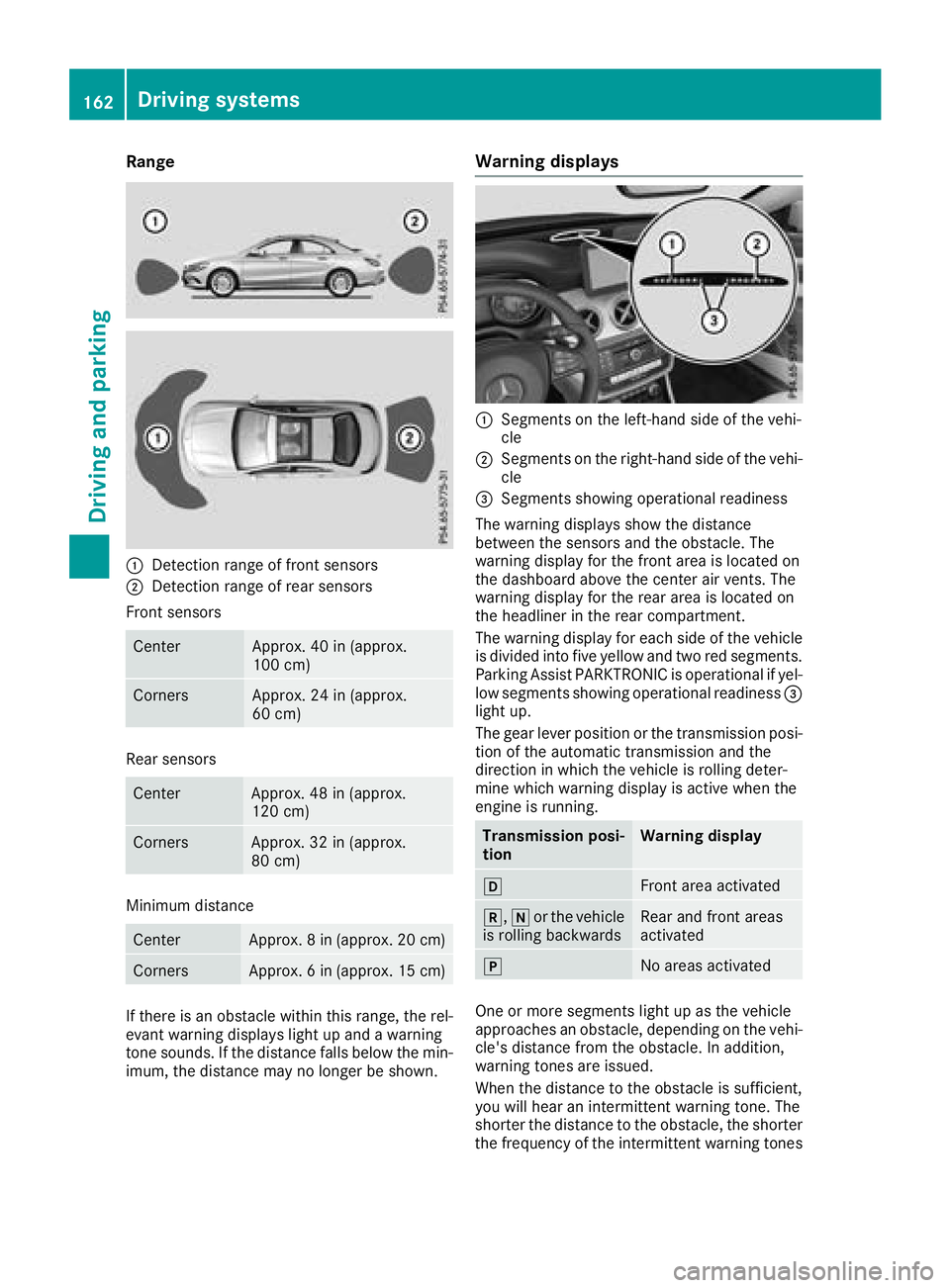
Range
:Detection rangeoffront sensors
;Detection rang eofrearsensors
Front sensors
CenterApprox. 40 in (approx.
100 cm)
CornersApprox. 24 in (approx.
60 cm)
Rear sensors
CenterApprox. 48 in (approx.
120 cm)
CornersApprox. 32 in (approx.
80 cm)
Minimum distance
CenterApprox. 8in(ap prox. 20 cm)
CornersApprox. 6in(ap prox. 15 cm)
If there is an obstacl ewithin this range, the rel-
evant warning display slight up and awarning
tone sounds. If the distance falls below the min-
imum, the distance may no longer be shown.
Warning displays
:Segments on the left-hand sid eofthe vehi-
cle
;Segments on the right-hand sid eofthe vehi-
cle
=Segments showing operationalr eadiness
The warning display sshowt he distance
between the sensors and the obstacle. The
warning display for the front are aislocated on
the dashboard above the center ai rvents. The
warning display for the reara reaisl ocated on
the headliner in the rearc ompartment.
The warning display for each sid eofthe vehicle
is divided into five yellow and two red segments.
Parking Assist PARKTRONIC is operationalify el-
low segments showing operationalr eadiness=
light up.
The gea rlev er position or the transmissio nposi-
tion of the automatic transmissio nand the
direction in which the vehicle is rolling deter-
mine which warning display is active whe nthe
engine is running.
Transmission posi-
tionWarning display
hFront are aactivated
k, ior the vehicle
is rolling backwardsRear and front areas
activated
jNo areas activated
One or more segments light up as the vehicle
approaches an obstacle, depending on the vehi-
cle's distance from the obstacle. In addition,
warning tones are issued.
Whent he distance to the obstacl eissufficient,
yo uw illh earani ntermittent warning tone. The
shorter the distance to the obstacle, the shorter
the frequency of the intermittent warning tones
162Drivings ystems
Drivingand parking
Page 168 of 326
XLet go of the multifunction steering wheel.
XBack up the vehicle,being ready to brake at all
times. When backing up, drive at aspeed
belowa pproximately 6mph (10 km/h). Oth-
erwise, Parking Pilotisc anceled immediately.
Parking Pilotb rakes the vehicle to astandstill
when the vehicle approaches the rear border
of the parking space.
Maneuvering may be required in tight parking
spaces.
The Parking Pilot Active Select D
Observe Surroundingsmessagea ppears in
the multifunction display.
XShift the transmission to position hwhile
the vehicle is stationary.
Parking Piloti mmediately steers in the other
direction.
The Parking Pilot Active Accelerate
and BrakeObserve Surroundingsmes-
sage appears in the multifunction display.
iYou willa chieve the best results by waiting
for the steering procedure to complete before
pulling away.
XDrive forward sand be ready to brake at all
times.
Parking Pilotb rakes the vehicle to astandstill
when the vehicle approaches the front border
of the parking space.
Maneuvering may be required in tight parking spaces.
The Parking Pilot Active Select R
Observe Surroundingsmessagea ppears in
the multifunction display.
As soon as the parking procedure is complete,
the Parking Pilot Finished
message
appears and awarning tone sounds. The vehicle
is now parked.
The vehicle is kept stationary withoutt he driver
having to depresst he brake pedal. The braking
effect is canceled when you depresst he accel-
erator pedal.
Parking Pilotnol onger supports you with steer-
ing interventions and brake applications. When
Parking Pilotisf inished,you must steer and
brake again yourself. Parking Assist
PARKTRONIC is still available.
Parking tips:
RThe way you rvehicle is positioned in the park-
ing space after parking is dependent on vari-
ous factors. These include the positiona nd
shape of the vehiclesp arked in front and behind it and the conditions of the location. It
may be the case that Parking Pilotg
uides you
too far into aparking space, or not far enough
into it. In some cases, it may also leady ou
across or onto the curb. If necessary ,you
shoul dcancel the parking procedure with
Parking Pilot.
RYou can also preselect transmission position
h.T he vehicle redirects and does not drive
as far into the parking space. Should the
transmission change take place too early, the parking procedure is canceled. Asensible
parking positionc an no longer be achieved
from this position.
Exitingap arking space
In order for Parking Pilottos upport you when
exiting the parking space:
Ryou need to have parked using Parking Pilot.
Rthe border of the parking space must be high enough at the front and the rear. Acurb stone
is too small,f or example.
Rthe border of the parking space must not be
too wide, as the positionoft he vehicle must
not exceed an angle of 45° to the starting
positionasitism aneuvered into the parking
space.
Ram aneuvering distance of at least 3.3 ft
(1.0 m) must be available.
Parking Pilotc an assist you with exiting apark-
ing space only if you have parked the vehicle
parallel to the direction of travel using Parking
Pilot.
iIf Parking Assist PARKTRONIC detects
obstacles, Parking Pilotb rakes automatically
whilst the vehicle is exiting the parking space.
You are responsible for braking in good time.
XStart the engine.
XRelease the electric parking brake.
XSwitch on the turn signal in the direction you
willd rive out of the parking space.
XShift the transmission to position hork.
The Start Parking Pilot?Yes: OKNo:% messagea ppears in the multifunction
display.
XTo cancel the procedure: press the%
button on the multifunction steering wheelo r
pulla way.
or
166Driving systems
Driving and parking