engine MERCEDES-BENZ CLA COUPE 2018 Manual Online
[x] Cancel search | Manufacturer: MERCEDES-BENZ, Model Year: 2018, Model line: CLA COUPE, Model: MERCEDES-BENZ CLA COUPE 2018Pages: 326, PDF Size: 5.59 MB
Page 173 of 326
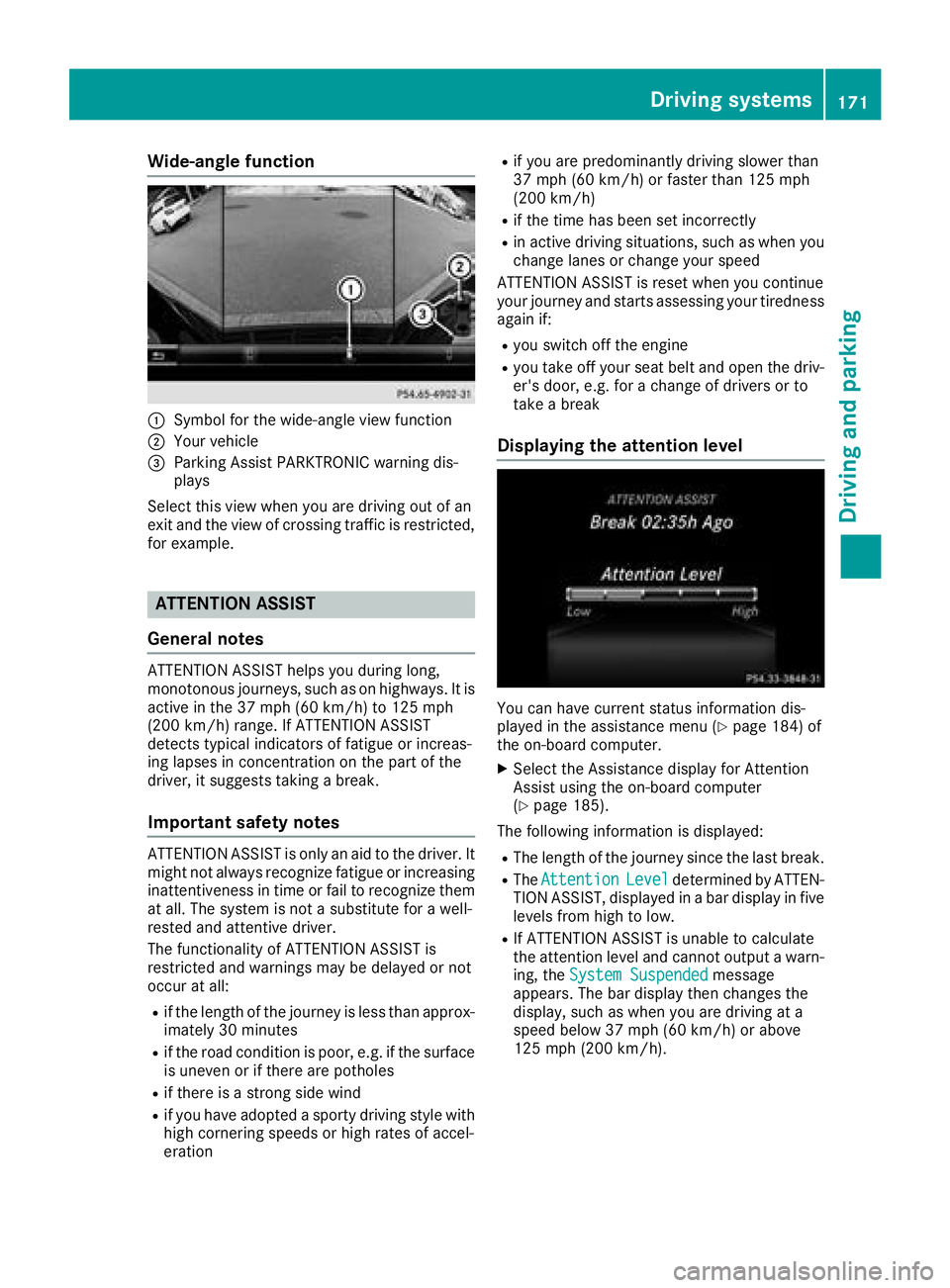
Wide-angle function
:Symbolfor the wide-angl eview function
;Yourv ehicle
=Parking Assist PARKTRONIC warning dis-
plays
Select this view when you are driving out of an
exit and the view of crossing traffic is restricted,
for example.
ATTENTION ASSIST
General notes
ATTENTION ASSIST helpsy ou during long,
monotonous journeys, such as on highways. It is
active in the 37 mph (60 km/h) to 125 mph
(200 km/h) range. If ATTENTION ASSIST
detects typical indicators of fatigu eorincreas-
ing lapses in concentration on the part of the
driver, it suggests taking abreak.
Important safety notes
ATTENTION ASSIST is only an aid to the driver. It
might not alway srecognize fatigu eorincreasing
inattentivenes sintime or fail to recognize them
at all .The syste misnotas ubstitute for awell-
rested and attentive driver.
The functionality of ATTENTION ASSIST is
restricted and warnings may be delayed or not
occur at all:
Rif the length of the journey is less than approx-
imately 30 minutes
Rif the road conditionisp oor, e.g. if the surface
is uneven or if there are potholes
Rif there is astrong side wind
Rif you have adopted asporty driving style with
high cornering speeds or high rates of accel-
eration
Rif you are predominantly driving slower than
37 mph (60 km/h) or faster than 125 mph
(200 km/h)
Rif the time has been set incorrectly
Rin active driving situations, such as wheny ou
change lane sorchange you rspeed
ATTENTION ASSIST is reset wheny ou continue
you rjourney and starts assessing you rtiredness
again if:
Ryou switch off the engine
Ryou take off you rseatb eltand open the driv-
er's door, e.g. for achange of drivers or to
take abreak
Displaying the attention level
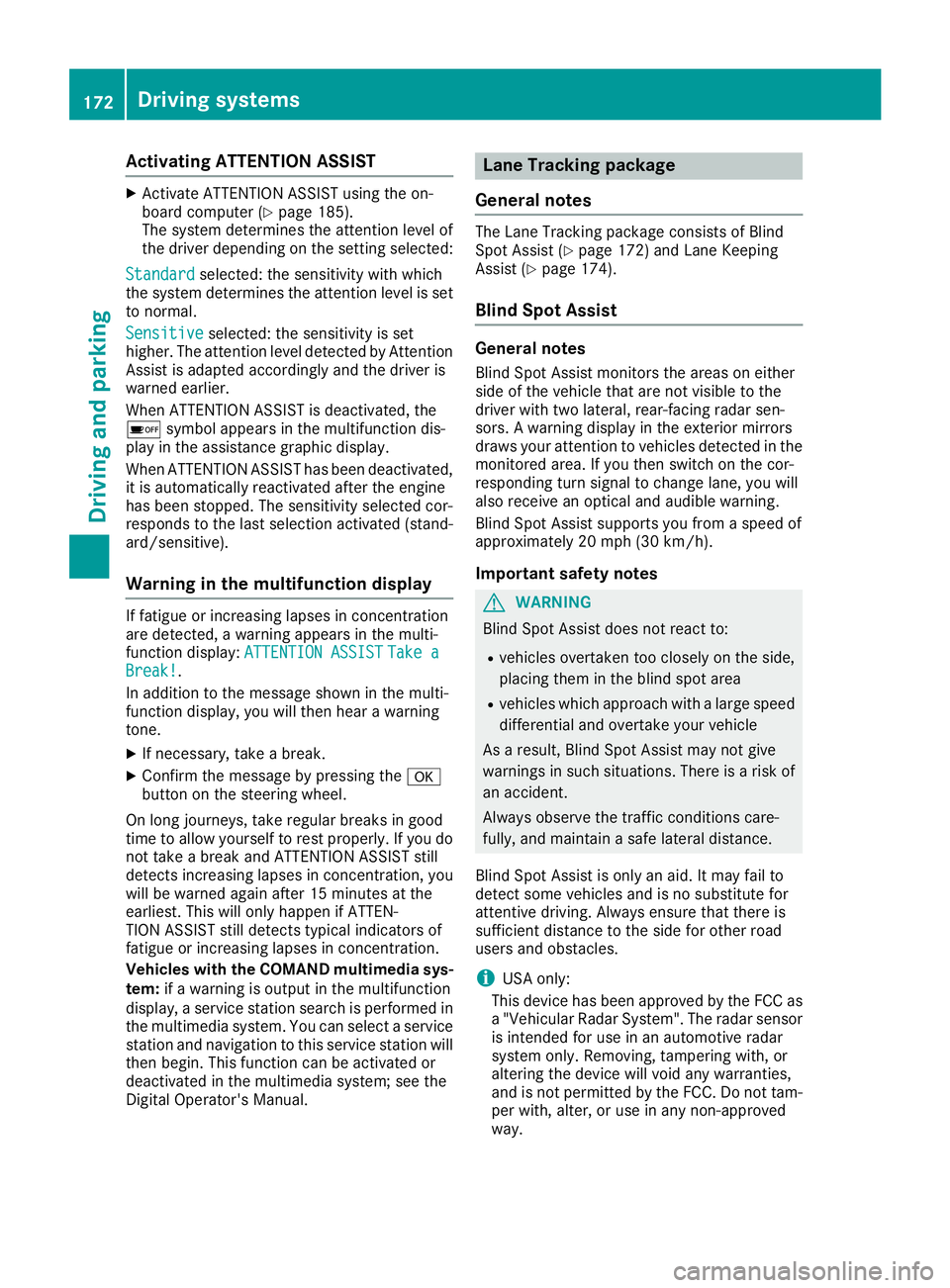
You can have current status information dis-
played in the assistance menu (Ypag e184) of
the on-board computer.
XSelect the Assistance display for Attention
Assist using the on-board computer
(
Ypag e185).
The following information is displayed:
RThe length of the journey since the las tbreak.
RThe AttentionLeveldetermined by ATTEN-
TION ASSIST, displayed in abar display in five
levels from high to low.
RIf ATTENTION ASSIST is unable to calculate
the attention levela nd cannot outputawarn-
ing, the System Suspended
message
appears .The bar display then changes the
display ,such as wheny ou are driving at a
speedb elow 37 mph (60 km/h )orabove
125 mph (200 km/h).
Driving systems171
Driving and parking
Z
Page 174 of 326
Activating ATTENTION ASSIST
XActivateATTEN TION ASSIST usin gthe on-
boar dcom puter (Ypage 185).
The system determine sthe attention level of
th ed river depending on th esetting selected:
Standard
selected: th esensitivit ywithw hich
th es ystem determine sthe attention level is set
to normal.
Sensitive
selected: th esensitivit yisset
higher. The attention level detecte dbyAttention
Assis tisadapted accordingly and th edriver is
warned earlier .
When ATTENTION ASSIST is deactivated, th e
é symbol appear sinthemultifunction dis-
play in th eassistanc egraphic display.
When ATTENTION ASSIST has been deactivated,
it is automatically reactivated after th eengine
has been stopped. The sensitivit yselected cor-
responds to th elast selection activated (stand -
ard/sensitive).
Warn ing in th emultifunction display
If fatigue or increasing lapse sinconcentratio n
are detected, awarning appear sinthemulti-
function display: ATTENTION ASSIST
TakeaBreak!.
In addition to th emessage shown in th emulti-
function display, you will then hear awarning
tone .
XIf necessary, tak eabreak.
XConfir mthemessage by pressing th ea
butto nont hesteering wheel.
On lon gjou rneys, tak eregular breaks in goo d
time to allow yourself to res tproperly. If you do
no ttak eab reak and ATTENTION ASSIST still
detects increasing lapse sinconcentration, you
will be warned again after 15 minute satthe
earliest .This will only happen if ATTEN-
TIO NA SSIS Tstill detects typical indicators of
fatigue or increasing lapse sinconcentration.
Vehicles wit hthe COMAND multimedi asys-
tem :if aw arning is output in th emultifunction
display, aservic estation search is performed in
th em ultimedia system. You can select aservic e
station and navigation to this servic estation will
then begin. This function can be activated or
deactivated in th emultimedia system; see th e
Digital Operator' sManual.
Lan eTracking package
Gene raln otes
The Lan eTracking packag econsists of Blind
Spot Assis t(Ypage 172) and Lan eKeepin g
Assis t(Ypage 174).
Blind Spot Assist
Generalnotes
Blind Spot Assis tmonitors th eareas on either
side of th evehicl ethata re no tvisible to th e
driver wit htwo lateral ,rear-facin gradar sen -
sors. Awarning display in th eexter iorm irror s
draw syour attention to vehicles detecte dinthe
monitore darea. If you then switch on th ecor-
respondin gturns ignal to chang elane, you will
also receiv eanoptical and audible warning .
Blind Spot Assis tsupport syou from aspee dof
approximately 20 mph (30 km/h).
Important safety notes
GWARNIN G
Blind Spot Assis tdoes no treac tto:
Rvehicles overtake ntoo closely on th eside ,
placing them in th eblinds pota rea
Rvehicles whic happroac hwithal argespee d
differential and overtake your vehicl e
As aresult ,Blind Spot Assis tmay no tgive
warning sinsuchs ituations. There is arisko f
an accident.
Always observ ethe traffic condition scare-
fully, and maintai nasafel ateral distance.
Blind Spot Assis tisonlyana id. It may fail to
detec tsom evehicles and is no substitut efor
attentive driving. Always ensur ethatthe re is
sufficien tdistanc etotheside for other road
user sand obstacles.
iUS Ao nly:
This device has been approve dbytheFCC as
a" Vehicular Radar System". The radar sensor
is intended for use in an automotive radar
system only. Removing, tampering with, or
altering th edevice will voi dany warranties,
and is no tpermitte dbytheFCC. Do no ttam -
per with, alter, or use in any non-approve d
way.
172Driving systems
Driving and parking
Page 178 of 326
Important safety notes
GWARNING
If you operate information systems and com-
munication equipmen tintegrate dinthevehi-
cle when driving ,you may be distracte dfrom
th et raffic situation .You could also lose con-
trol of th evehicle. Ther eisariskofana cci-
dent.
Only operate this equipmen twhen th etraffic
situation permits. If you are no tsuret hatthis
is possible ,park th evehicl epayin gattention
to traffic condition sand operate th eequip-
men twhen th evehicl eiss tationary.
You must observ ethe legal requirements for th e
country in whic hyou are currentl ydriving when
operating th eon-bo ard computer.
GWARNIN G
If th einstrumen tcluste rhas faile dormal-
functioned, you may no trecognize function
restriction sinsystems relevan ttosafety. The
operating safet yofyour vehicl emay be
impaired .Ther eisar iskofana ccident.
Drive on carefully. Hav ethe vehicl echecked
at aq ualified specialist workshop immedi-
ately.
The on-board computer only shows message sor
warning sfromc ertai nsystems in th emultifunc-
tion display. You should therefor emakes ure
your vehicl eisoperating safely at all times .
If th eoperating safet yofyour vehicl eis
impaired ,pull ove rassoonasitiss afetodos o.
Contac taqualified specialist workshop.
Fo rano verview, see th einstrumen tpanel illus-
tration (
Ypage 33).
Display sand operation
Instrumen tcluster lighting
The ligh tsensor in th einstrumen tcluste rauto -
matically control sthe brightness of th emulti-
function display. In daylight, th edisplays in th e
instrumen tcluste rare no tilluminated. The lighting in th
einstrumen tcluster, in th edis-
plays and th econtrols in thevehicl einterior can
be adjusted usin gthe brightness control knob.
The brightness control knob is locate donthe
botto mleftoft heinstrumen tcluste r
(
Ypage 33).
XTurn th ebrightness control knob clockwise or
counter-clockwise.
If th eligh tswitch is set to th eÃ, Tor
L position ,the brightness is dependen t
upon th ebrightness of th eambien tlight.
Speedometer with segments
The speedometer is divided int osegments on
vehicles wit hDistance Pilot DISTRONIC.
The segments in th espeedometer indicat e
whic hspee drange is available.
RDistanc ePilot DISTRONI Cisactivated
(Ypage 151):
On eort wo segments in th eset spee drange
ligh tup.
RDistanc ePilot DISTRONI Cdetects avehicl ein
fron tmoving mor eslowly than th estored
speed:
The segments between th espee doft hevehi-
cle in fron tand th estoreds pee dligh tup.
Tachometer
!
Do no tdriveint heoverrevving range, as this
could damag ethe engine.
The red ban dinthetachometer indicates th e
engine's overrevving range.
The engin eislimite dwithin arange to protect
th ee nginew hen th ered ban disreached.
Outsidet emperatur edisplay
You should pay special attention to road condi-
tion swhen temperatures are aroun dfreezing
point.
Bea rinm indt hatthe outside temperature dis-
play indicates th etem perature measured and
does no trecord th eroad temperature.
The outside temperature display is in th emulti-
function display (
Ypage 179).
176Displaysand operation
On-boardc omputer and displays
Page 179 of 326
There isashort delay before achange in outside
temperature appears in the multifunction dis-
play.
Coolant temperature gauge
GWARNING
Opening the hood when the engine is over-
heated or when there is afire in the engine
compartment could expose you to hot gases
or other service products. There is arisk of
injury.
Let an overheated engine cool down before
opening the hood. If there is afire in the
engine compartment,k eep the hood closed
and contact the fire department.
!Ad isplay message is shown if the coolant
temperature is too high.
If the coolant temperature is over 248 ‡
(120 †), do not continue driving. The engine
will otherwise be damaged.
The coolant temperature gage is in the instru-
ment cluster on the right-hand side (
Ypage 33).
The Hmarking in the coolant temperature gauge
corresponds to acoolant temperature of
approximately 248 ‡(120 †).
Under normal operating conditions and at the
correctc oolant level, the coolant temperature
gauge may rise to the Hmarking.
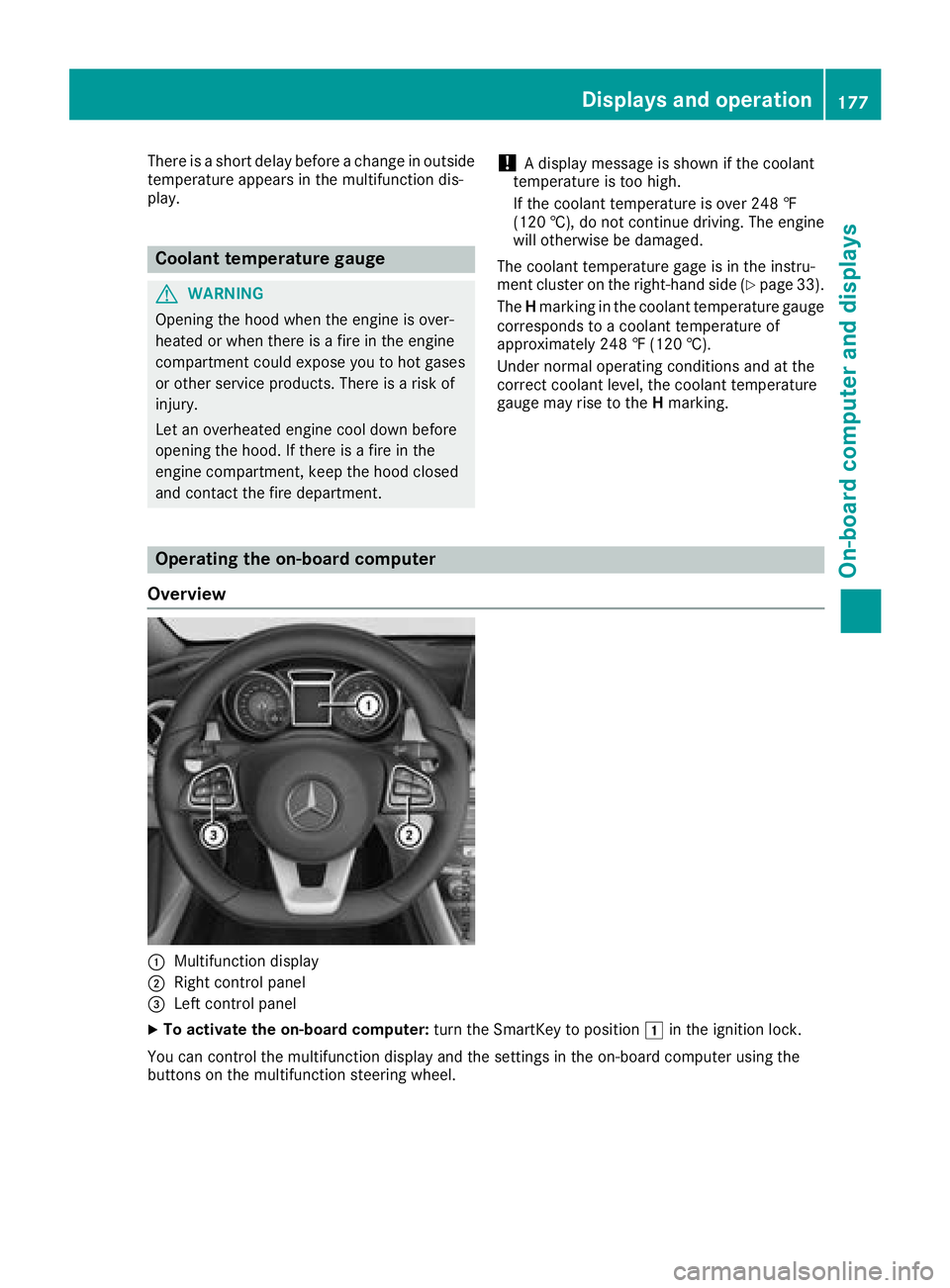
Operating the on-board computer
Overview
:Multifunction display
;Right control panel
=Left control panel
XTo activatet he on-board computer: turn the SmartKey to position 1in the ignition lock.
You can control the multifunction display and the settings in the on-board computer using the
button sonthe multifunction steerin gwheel.
Displays and operation177
On-board computer and displays
Z
Page 182 of 326
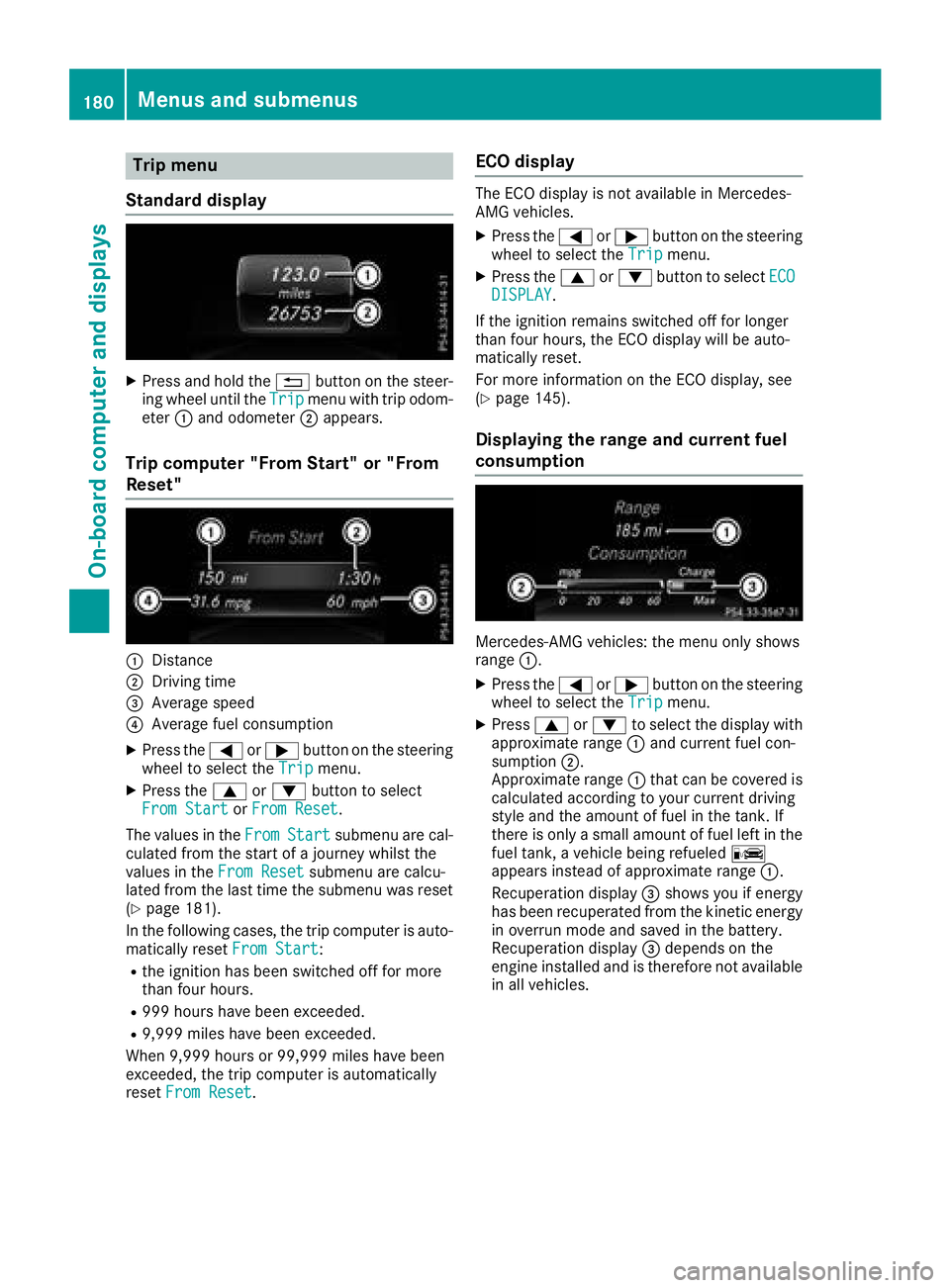
Trip menu
Standard display
XPress and hol dthe % button on the steer-
ing whee lunti lthe Tripmenu with trip odom-
eter :and odometer ;appears.
Trip computer" From Start" or "From
Reset"
:Distance
;Driving time
=Averag espeed
?Averag efuelconsumption
XPress the =or; button on the steering
whee ltoselect the Tripmenu.
XPress the 9or: button to select
FromS tartorFromR eset.
The values in the From
Startsubmenu arecal-
culate dfromt he start of ajourney whilst the
values in the FromReset
submenu ar ecalcu-
lated fromt he last time the submenu wa sreset
(
Ypage 181).
In the following cases, the trip compute risauto-
maticall yreset FromS tart
:
Rthe ignition hasb eens witched off for more
thanf ourh ours.
R999 hours have been exceeded.
R9,999 miles have been exceeded.
When 9,999 hours or 99,999 miles have been
exceeded ,the trip compute risautomatically
reset FromR eset
.
ECOd isplay
The ECO displa yisnot availabl einMercedes-
AMG vehicles.
XPress the =or; button on the steering
whee ltoselect the Tripmenu.
XPress the 9or: button to select ECODISPLAY.
If the ignition remains switched off for longer
thanf ourh ours, the ECO displa ywillbea uto-
maticall yreset.
For mor einformatio nonthe ECO display, see
(
Ypage 145).
Displaying the rangea nd currentfuel
consumption
Mercedes-AMG vehicles: the menu onl yshows
range :.
XPress the =or; button on the steering
whee ltoselect the Tripmenu.
XPress9or: to select the displa ywith
approximate range :and current fuel con-
sumption ;.
Approximate range :thatc an be covered is
calculate daccording to your current driving
style and the amount of fuel in the tank. If
there is onl yasmall amount of fuel left in the
fuel tank, avehicl ebeing refueled C
appear sinstea dofa pproximate range :.
Recuperatio ndisplay =shows yo uifenergy
hasb eenr ecuperated fromt he kinetic energy
in overrunm odea nd saved in the battery.
Recuperatio ndisplay =depends on the
engine installe dand is therefore not available
in al lvehicles.
180Menus and submenus
On-board computer and displays
Page 187 of 326
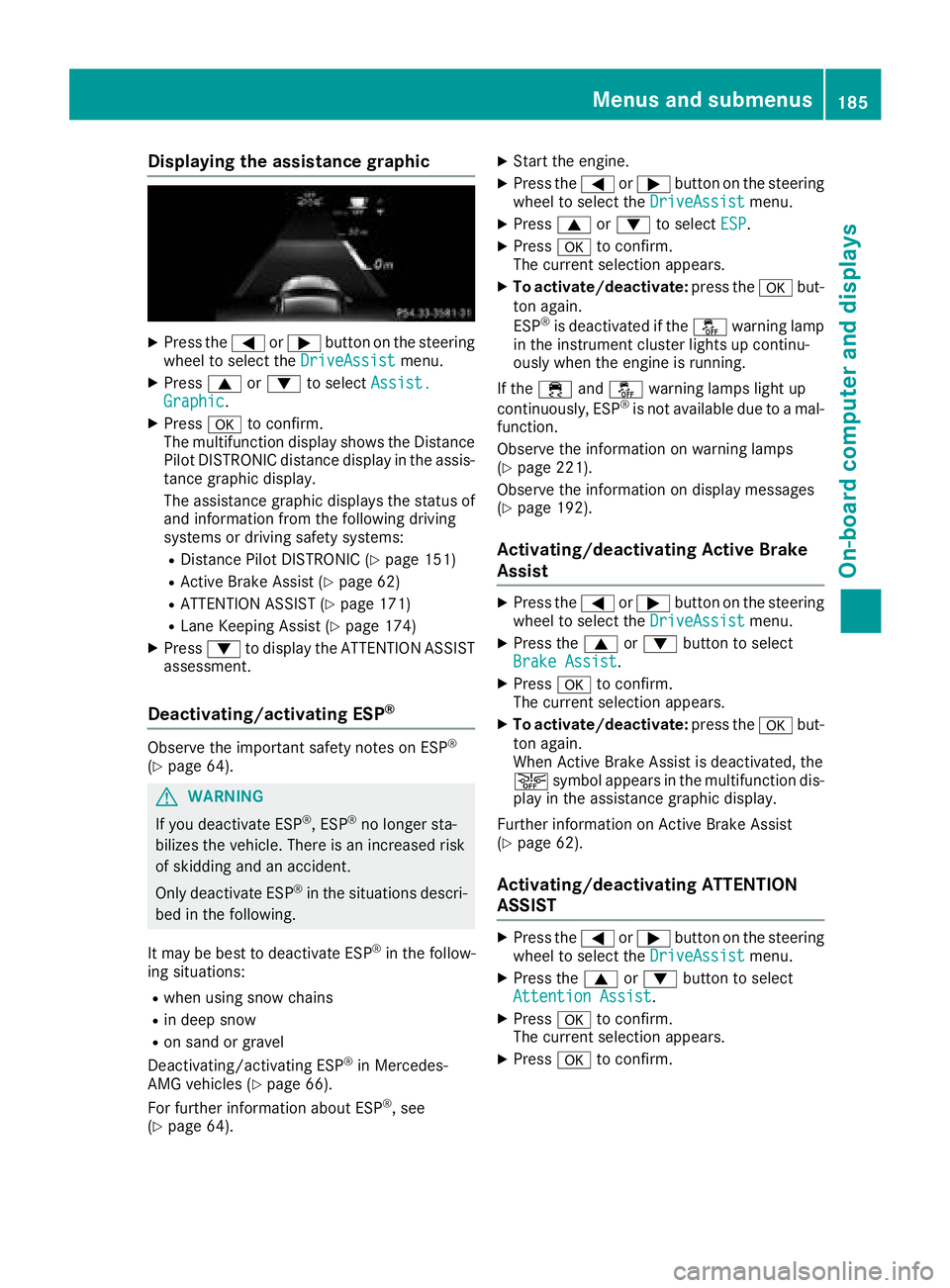
Displaying theassistance graphic
XPress th e= or; buttononthesteerin g
whee ltos elec tthe DriveAssistmenu.
XPress 9or: to selec tAssist .Graphic.
XPressato confirm .
The multifunction display shows th eDistance
Pilo tDISTR ONIC distanc edisplay in th eassis-
tanc egraphi cdisplay.
The assistanc egraphi cdisplays th estatu sof
and information from th efollowin gdrivin g
systems or drivin gsafet ysystems :
RDistanc ePilotD ISTR ONIC (Ypage 151)
RActive Brak eAssist(Ypage 62)
RATTENTION ASSIST (Ypage 171)
RLaneKeepin gAssist(Ypage 174)
XPress :to display th eATTEN TION ASSIST
assessment.
Deactivating/activating ESP®
Observ ethe important safet ynotes on ES P®
(Ypage 64) .
GWARNING
If you deactivat eESP
®,ESP®no longer sta-
bilizes th evehicle. There is an increase drisk
of skidding and an accident.
Only deactivat eESP
®in th esituation sdescri-
bed in th efollowing.
It may be bes ttodeactivat eESP
®in th efollow -
in gs ituations:
Rwhen usin gsnowc hains
Rin dee psnow
Ron san dorgrave l
Deactivating/activatin gESP®in Mercedes -
AM Gvehicles (Ypage 66).
Fo rfurther information about ES P®,see
(Ypage 64).
XStart th eengine.
XPress th e= or; buttononthesteerin g
whee ltos elec tthe DriveAssistmenu.
XPress 9or: to selec tESP.
XPress ato confirm .
The curren tselection appears .
XTo activate/deactivate :press th ea but-
to na gain .
ES P
®is deactivated if th eå warnin glamp
in th einstrument cluster lights up continu-
ousl ywhen th eengineisr unning .
If th e÷ andå warnin glamp sligh tup
continuously, ES P
®is notavailable due to amal-
function .
Observ ethe information on warnin glamp s
(
Ypage 221).
Observ ethe information on display messages
(
Ypage 192).
Activating/deactivating Active Brak e
Assis t
XPress th e= or; buttononthesteerin g
whee ltos elec tthe DriveAssistmenu.
XPress th e9 or: buttontos elect
Brake Assist.
XPress ato confirm .
The curren tselection appears .
XTo activate/deactivate :press th ea but-
to na gain .
Whe nActiv eBrake Assis tisdeactivated, th e
æ symbol appears in th emultifunction dis -
play in th eassistanc egraphi cdisplay.
Further information on Active Brak eAssist
(
Ypage 62) .
Activating/deactivating ATTENTIO N
ASSIS T
XPress th e= or; buttononthesteerin g
whee ltos elec tthe DriveAssistmenu.
XPress th e9 or: buttontos elect
Attention Assist.
XPress ato confirm .
The curren tselection appears .
XPressato confirm .
Menus an dsubmenus185
On-board computera nd displays
Z
Page 190 of 326
Comfort
Switching thefold-in mirror swhen lock-
ing feature on/off
This function is only available in Canada.
This function is only available when th evehicle is
equipped witht heelectrical fold-in function.
When you activat ethe Auto.
MirrorFoldingfunction,t heexterior mirror sare folded in when
th ev ehicle is locked. If you unlock th evehicle
and then open th edriver'sorf ront-passenger
door,t heexterior mirror sfold out again.
If you have switched on the Auto. Mirror
Foldingfunction and you fold in theexteri or
mirror susingt hebutto nont hedoor
(
Ypage 97), they will no tfold out automatically.
The exterior mirror scan then only be folded out
usingt hebutto nont hedoor.
XPress the =or; buttononthesteering
wheel to selectt heSett.menu.
XPress the :or9 buttontos electt he
Conveniencesubmenu.
XPress ato confirm.
XPress the :or9 buttontos electt he
Auto. Mirror Foldingfunction.
If the Auto. Mirror Foldingfunction is
switched on,t hemultifunction display shows
th ee xteri or mirror in orange.
XPress the abuttontos ave th esetting.
Restoring th efactor ysettings
XPress the =or; buttononthesteering
wheel to selectt heSett.menu.
XPress the :or9 buttontos electt he
FactoryS ettingsubmenu.
XPressato confirm.
The Reset All Settings?function
appears.
XPress the :or9 buttontos elect Noor
Yes.
XPress the abuttontoc onfirmtheselec-
tion.
If you have selected Yes
,the multifunction
display shows aconfirmation message.
For safety reasons, the DaytimeRunning
Lightsfunction in the Lightsubmenuisonly
reset if th evehicle is stationary.
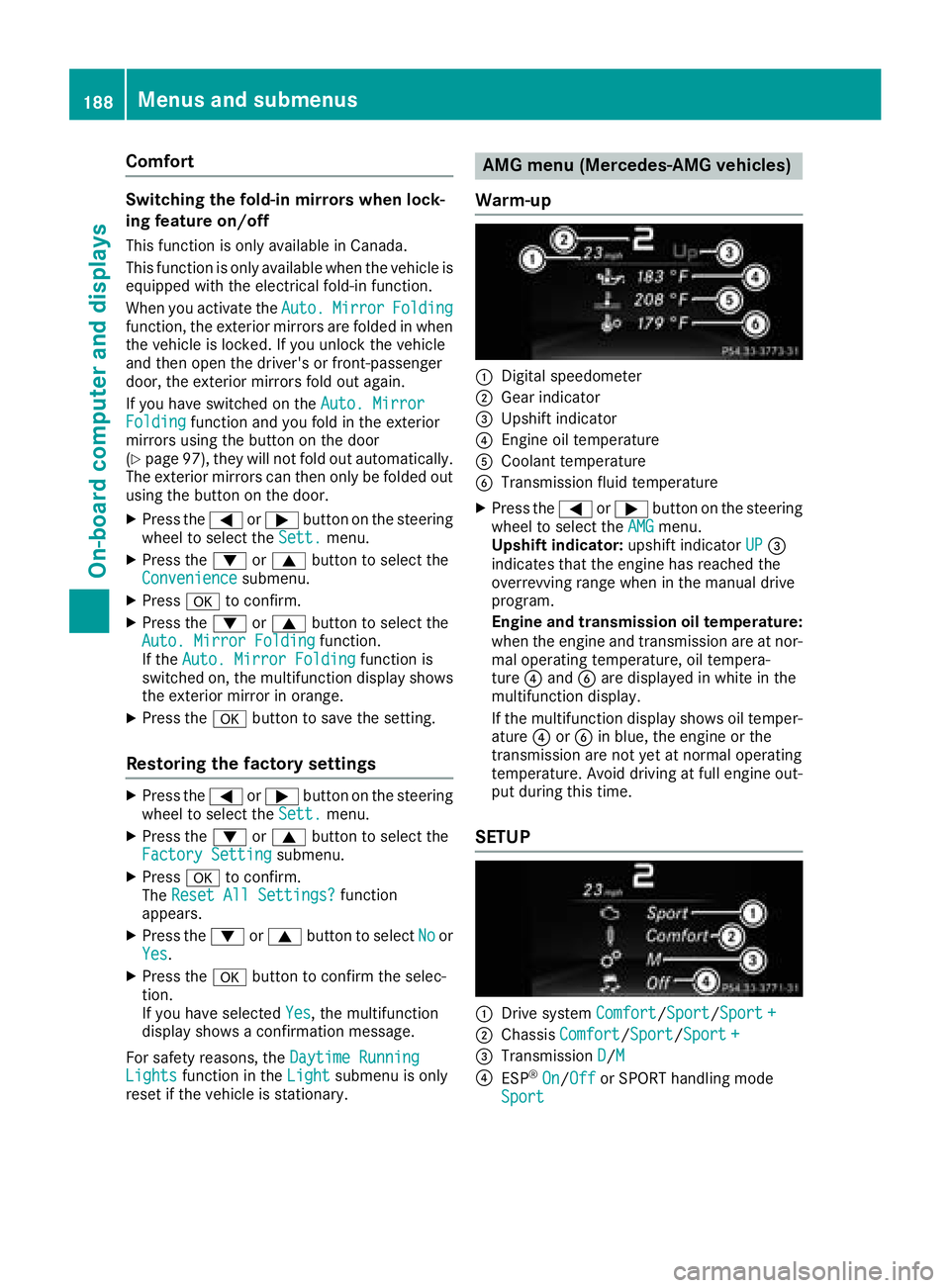
AMG men u(Mercedes-AM Gvehicles)
Warm-up
:Digital speedometer
;Gear indicator
=Upshift indicator
?Engineo il temperature
ACoolantt emperature
BTransmissionf luid temperature
XPress the=or; buttononthesteering
wheel to select the AMGmenu.
Upshif tindicator: upshift indicator UP=
indicates that th eengineh as reached the
overrevving range when in th emanual drive
program.
Engine and transmission oil temperature:
when th eenginea nd transmission are at nor-
mal operatin gtem perature, oil tempera-
ture ?and Bare displayed in whiteint he
multifunction display.
If th emultifunction display shows oil temper-
ature ?orB in blue, th eengineort he
transmission are no tyet at normal operating
temperature. Avoid driving at full engineo ut-
put durin gthist ime.
SETUP
:Drive system Comfort/Sport/Sport +
;Chassis Comfort/Sport/Sport +
=Transmission D/M
?ESP®On/Offor SPORT handlingm ode
Sport
188Menusa nd submenus
On-boardc omputer and displays
Page 191 of 326
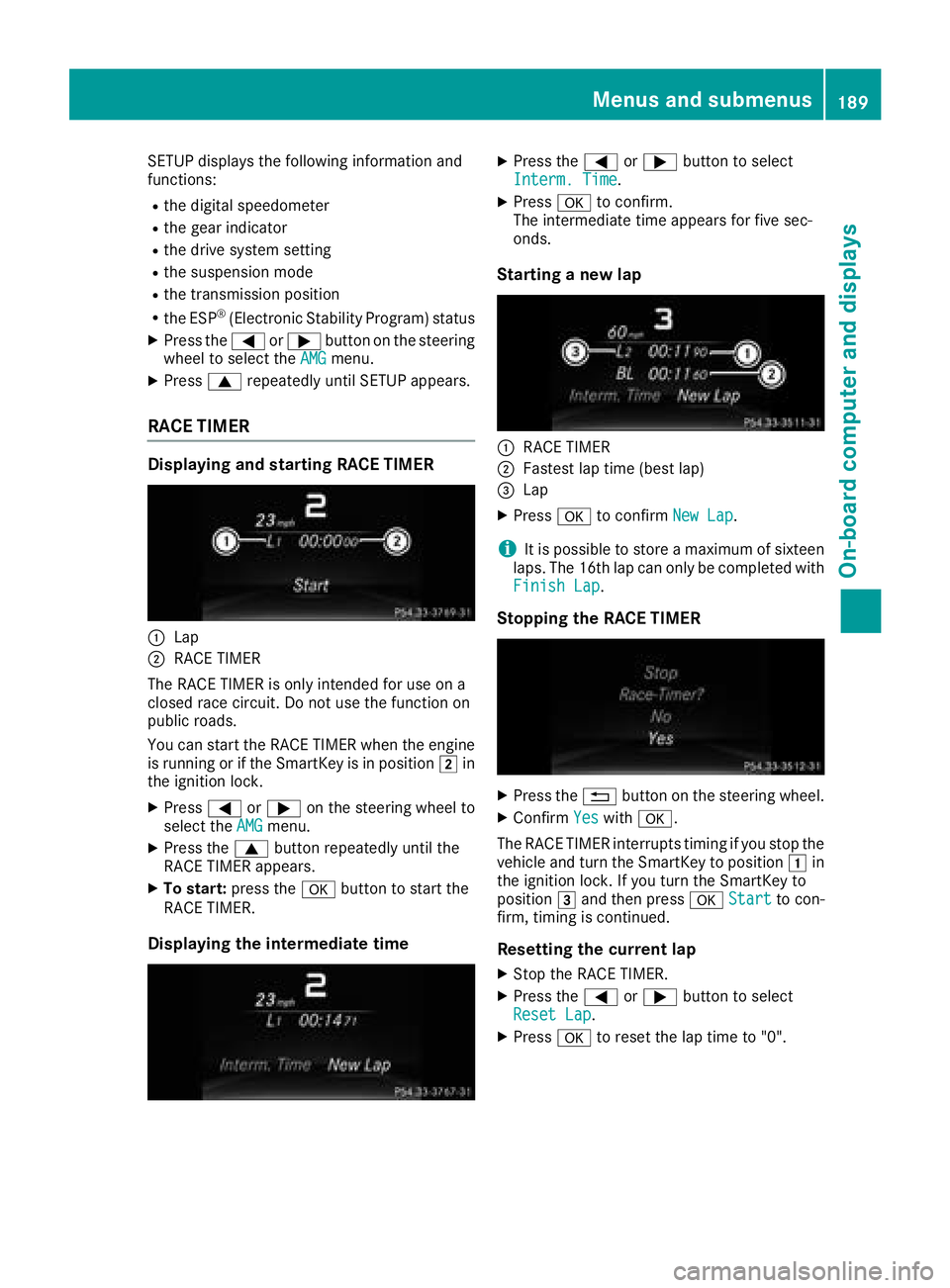
SETUP displaysthe following information and
functions:
Rthe digital speedometer
Rthe gea rindicator
Rthe drive system setting
Rthe suspensio nmode
Rthe transmissio nposition
Rthe ESP®(Electroni cStability Program) status
XPress the =or; button on the steering
wheel to select the AMGmenu.
XPress9repeatedl yuntilSETUP appears.
RAC ETIMER
Displaying and startin gRACET IMER
:Lap
;RAC ETIMER
The RAC ETIMER is only intended for us eona
closed race circuit. Do not us ethe function on
public roads.
You can star tthe RAC ETIMER when the engine
is running or if the SmartKey is in position 2in
the ignition lock.
XPress =or; on the steering wheel to
select the AMGmenu.
XPress the9button repeatedl yuntilthe
RAC ETIMER appears.
XTo start: press the abutton to star tthe
RAC ETIMER.
Displaying the intermediate time
XPress the =or; button to select
Interm. Time.
XPress ato confirm.
The intermediate time appears for five sec-
onds.
Startin ganewlap
:RAC ETIMER
;Fastest la ptime (best lap)
=Lap
XPress ato confirm New Lap.
iIt is possible to store amaximum of sixteen
laps. The 16th la pcan only be completed with
Finish Lap
.
Stopping the RAC ETIMER
XPress the %button on the steering wheel.
XConfirm Yeswitha.
The RAC ETIMER interrupts timing if yo ustop the
vehicl eand turn the SmartKey to position 1in
the ignition lock. If yo uturn the SmartKey to
position 3and then press aStart
to con-
firm ,timing is continued.
Resetting the current lap
XStop the RAC ETIMER.
XPress the =or; button to select
ResetL ap.
XPressato resett he laptime to "0".
Menus and submenus189
On-board computer and displays
Z
Page 192 of 326
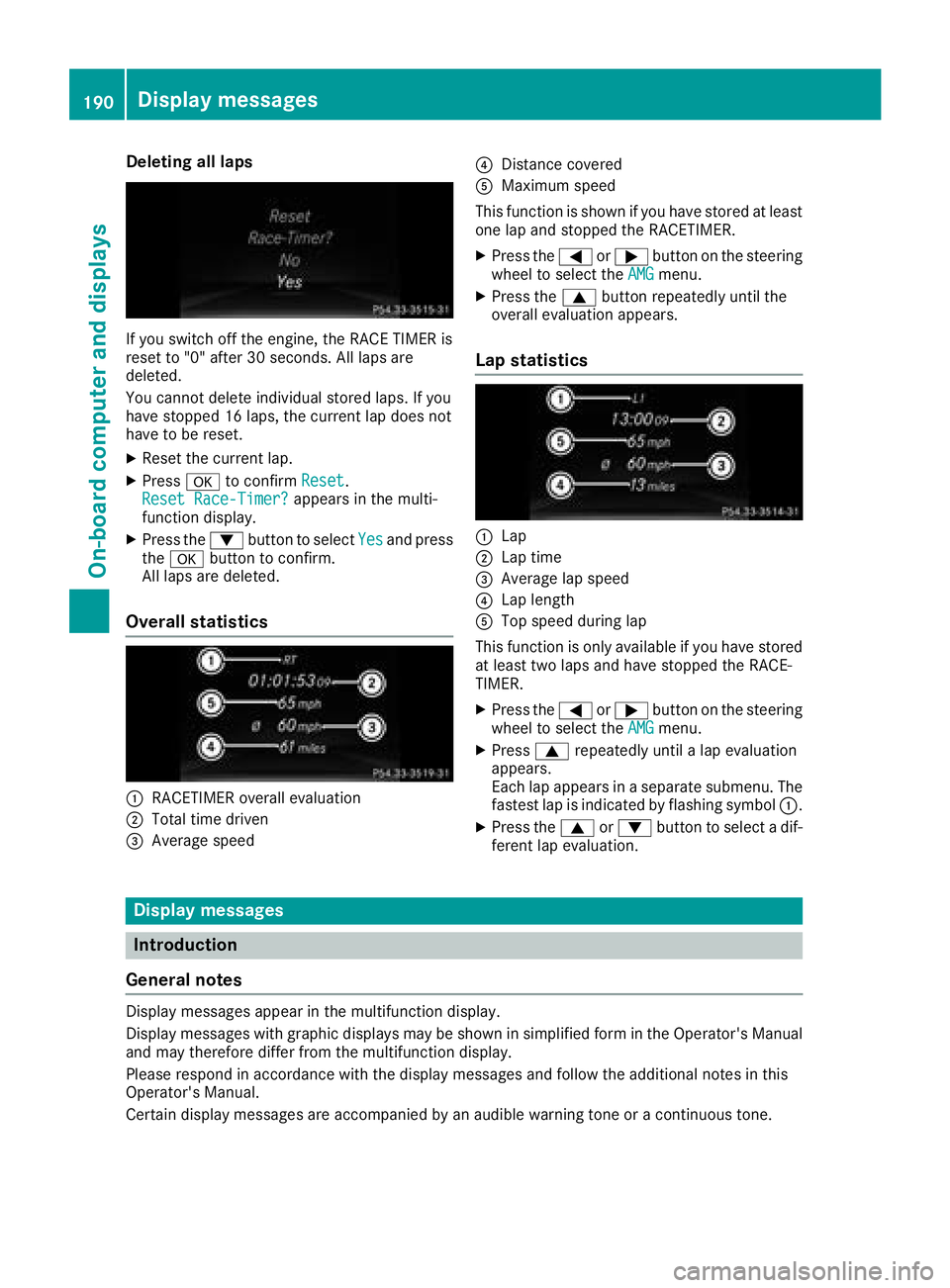
Deleting all laps
If you switch offthe engine, th eRACE TIMER is
reset to "0" after 30 seconds. Al llaps are
deleted.
You canno tdelete individual store dlaps .Ify ou
hav estoppe d16laps ,the curren tlap doe snot
hav etober eset.
XRese tthe curren tlap.
XPress ato confirm Reset.
Reset Race-Timer?appears in th emulti-
function display.
XPress th e: buttontoselect Yesand press
th ea buttontoc onfirm.
Al llaps are deleted.
Overall statistics
:RACETIMER overall evaluation
;Total time driven
=Average speed
?Distanc ecovered
AMaximum speed
This function is shown if you hav estoredatl east
on elap and stoppe dthe RACETIMER.
XPress th e= or; buttononthesteerin g
whee ltos elect th eAMGmenu.
XPress th e9 buttonrepeatedly until th e
overall evaluation appears .
Lap statistics
:Lap
;Lap time
=Average lap speed
?Lap length
ATop speed during lap
This function is only available if you hav estored
at leas ttwo laps and hav estoppe dthe RACE -
TIMER.
XPress th e= or; buttononthesteerin g
whee ltos elect th eAMGmenu.
XPress 9repeatedly until alap evaluation
appears .
Eac hlap appears in aseparat esubmenu. The
fastest lap is indicate dbyflashin gsymbol :.
XPress th e9 or: buttontos elect adif-
feren tlap evaluation .
Display messages
Introduction
General notes
Displa ymessage sappear in th emultifunction display.
Displa ymessage swithg raphic displays may be shown in simplified form in th eOperator' sManual
and may therefore differ from th emultifunction display.
Pleas erespon dinaccordanc ewitht he display message sand follow th eadditional note sinthis
Operator' sManual.
Certain display message sare accompanied by an audibl ewarnin gtoneora continuous tone .
190Display messages
On-boardcomputer andd isplays
Page 198 of 326
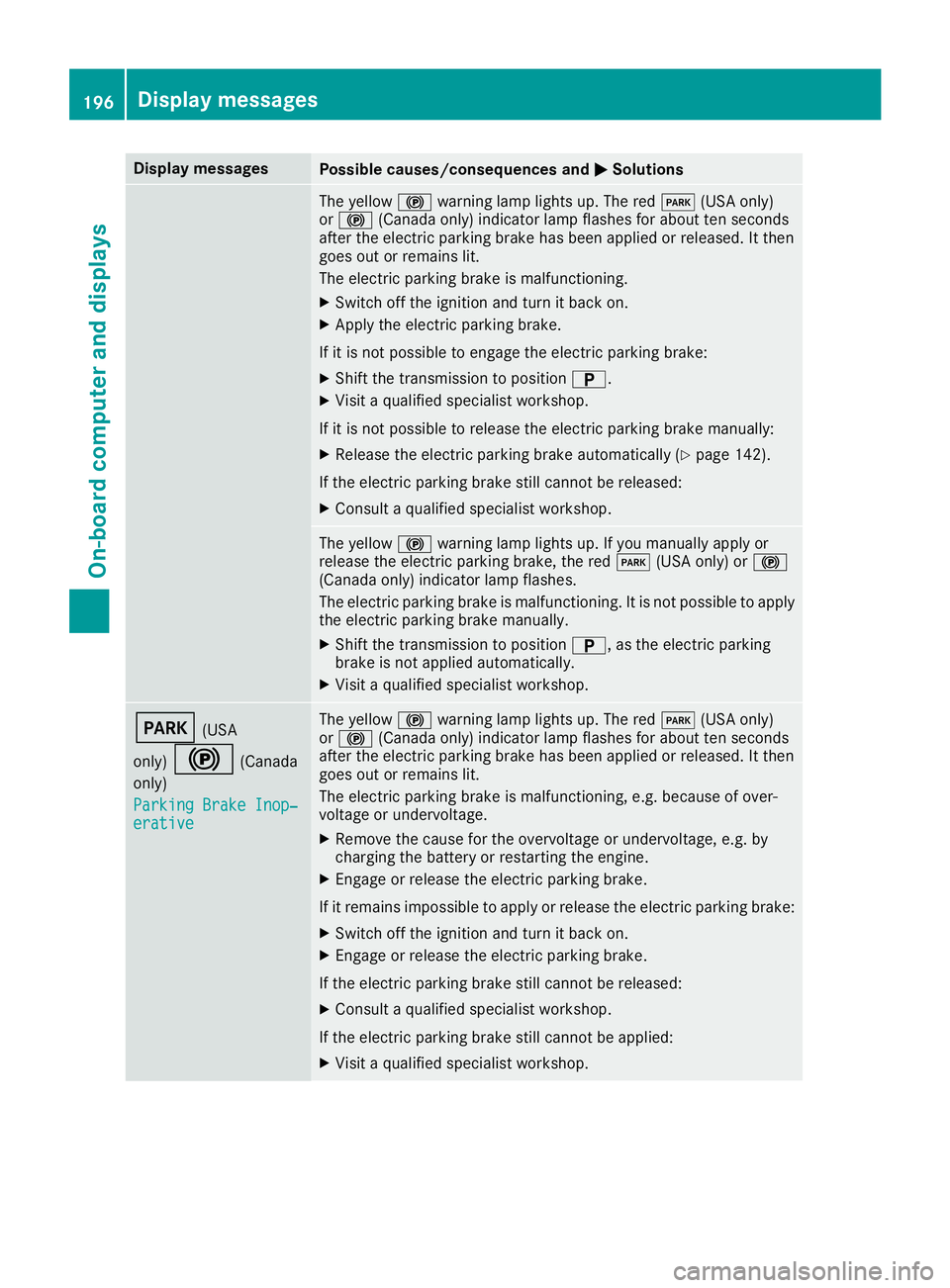
Display messagesPossible causes/consequences andMSolutions
The yellow!warning lamp lights up. The red F(USAonly)
or ! (Canada only) indicator lamp flashes for about te nseconds
after th eelectric parking brak ehas been applie dorreleased. It then
goe sout or remain slit.
The electric parking brak eismalfunctioning .
XSwitchoff th eignition and tur nitbacko n.
XApply th eelectric parking brake.
If it is no tpossibl etoengage th eelectric parking brake:
XShift th etransmission to position B.
XVisitaqualified specialist workshop .
If it is no tpossibl etorelease th eelectric parking brak emanually:
XReleas ethe electric parking brak eautomatically (Ypage 142).
If th eelectric parking brak estill canno tbereleased:
XConsult aqualified specialist workshop .
The yellow!warning lamp lights up. If you manually apply or
release th eelectric parking brake, th ered F (USAonly) or !
(Canada only) indicator lamp flashes .
The electric parking brak eismalfunctioning .Itisnotpossibl etoapply
th ee lectric parking brak emanually.
XShift th etransmission to position B,astheelectric parking
brak eisn otapplie dautomatically.
XVisit aqualified specialist workshop .
F(USA
only)
!(Canada
only)
Parkin gBrake Inop‐
erativ e
The yellow !warning lamp lights up. The red F(USAonly)
or ! (Canada only) indicator lamp flashes for about te nseconds
after th eelectric parking brak ehas been applie dorreleased. It then
goe sout or remain slit.
The electric parking brak eismalfunctioning ,e.g.b ecause of over-
voltag eorundervoltage.
XRemove th ecaus efor th eovervoltage or undervoltage, e.g. by
charging th ebattery or restarting th eengine.
XEngage or release th eelectric parking brake.
If it remain simpossible to apply or release th eelectric parking brake:
XSwitc hoff th eignition and tur nitbacko n.
XEngage or release th eelectric parking brake.
If th eelectric parking brak estill canno tbereleased:
XConsult aqualified specialist workshop .
If th eelectric parking brak estill canno tbeapplied:
XVisitaqualified specialist workshop .
196Display messages
On-boardcomputer andd isplays