service MERCEDES-BENZ CLS 2011 User Guide
[x] Cancel search | Manufacturer: MERCEDES-BENZ, Model Year: 2011, Model line: CLS, Model: MERCEDES-BENZ CLS 2011Pages: 308, PDF Size: 5.71 MB
Page 23 of 308
contacting you in a timely manner should the
need arise.
If you sell your Mercedes, please leave all
literature
with the vehicle to make it available
to the next operator.
If you bought this vehicle used, be sure to
send in the “Notice of Purchase of Used Car”
found in the Service and Warranty
Information Booklet, or call the Mercedes-
Benz Customer Assistance Center (in the
USA) at 1-800-FOR-MERCedes, or Customer
Service (in Canada) at 1-800-387-0100. Operating your vehicle outside the
USA or Canada
If you plan to operate your vehicle in foreign
countries, please be aware that:
R Service
facilities or replacement parts may
not be readily available.
R Unleaded gasoline for vehicles with
catalytic converters may not be available;
the use of leaded fuels will damage the
catalysts.
R Gasoline may have a considerably lower
octane rating, and improper fuel can cause
engine damage.
Certain Mercedes-Benz models are available
for delivery in Europe under our European
Delivery Program. For details, consult an
authorized Mercedes-Benz Center or write to:
In the USA:
Mercedes-Benz USA, LLC
European Delivery Department
One Mercedes Drive
Montvale, NJ 07645-0350
In Canada:
Mercedes-Benz Canada, Inc.
European Delivery Department
98 Vanderhoof Avenue
Toronto, Ontario M4G 4C9 Operating safety
G
Warning!
Work improperly carried out on electronic
components and associated software could
cause
them to cease functioning. Because the
vehicle’s electronic components are
interconnected, any modifications made may
produce an undesired effect on other
systems. Electronic malfunctions could
seriously impair the operating safety of your
vehicle.
Contact an authorized Mercedes-Benz Center
for repairs or modifications to electronic
components.
Other improper work or modifications on the
vehicle could also have a negative impact on
the operating safety of the vehicle.
Some safety systems only function while the
engine is running. You should therefore never
turn off the engine while driving. G
Warning!
Heavy blows against the vehicle underbody or
tires/wheels may cause serious damage and
impair the operating safety of your vehicle.
Such blows can be caused, for example, by
running over an obstacle, road debris or a
pothole. If you feel a sudden significant
vibration or ride disturbance, or you suspect
that damage to your vehicle as occurred:
R turn on your hazard warning flashers
R slow down carefully
R drive
with caution to an area which is a safe
distance from the road
Inspect the vehicle underbody and tires/
wheels for possible damage. If the vehicle
appears unsafe, have it towed to the nearest
authorized Mercedes-Benz Center or other
qualified maintenance or repair facility for
further inspection or repairs. Introduction
21219_AKB; 4; 54, en-US
d2ureepe,
Version: 2.11.8.1 2009-05-11T16:21:02+02:00 - Seite 21 Z
Page 25 of 308
This information helps, for example, to
diagnose
vehicle systems after a collision and
to continuously improve vehicle safety.
Daimler may access the information and
share it with others
R for safety research or vehicle diagnosis
purposes
R with the consent of the vehicle owner or
lessee
R in response to an official request by law
enforcement or other government agency
R for use in dispute resolution involving
Daimler, its affiliates or sales/service
organization and/or
R as otherwise required or permitted by law
Please check the Tele Aid subscription
service agreement for details regarding the
information that may be recorded or
transmitted via that system. Introduction
23219_AKB; 4; 54, en-US
d2ureepe,
Version: 2.11.8.1 2009-05-11T16:21:02+02:00 - Seite 23 Z
Page 40 of 308
adjusting the seat and steering wheel. If
you
have any difficulties, please contact an
authorized Mercedes-Benz Center.
R Do not lean your head or chest close to the
steering wheel or dashboard.
R Keep hands on the outside of the steering
wheel rim. Placing hands and arms inside
the rim can increase the risk and potential
severity of hand/arm injury when the driver
front air bag inflates.
R Adjust the front passenger seat as far as
possible rearward from the dashboard
when the seat is occupied.
R Occupants, especially children, should
never place their bodies or lean their heads
in the area of the door where the side
impact air bag inflates. This could result in
serious injuries or death should the side
impact air bag be deployed. Always sit as
upright as possible, wear the seat belt
properly and use an appropriately sized
infant restraint, toddler restraint, or
booster seat recommended for the size and
weight of the child.
Failure to follow these instructions can result
in severe injuries to you or other occupants.
If you sell your vehicle, it is important that you
make the buyer aware of this safety
information. Be sure to give the buyer this
Operator’s Manual. G
Warning!
Accident research shows that the safest place
for
children in an automobile is in a rear seat.
There is a possibility for a side impact air bag-
related injury if occupants, especially
children, are not properly seated or restrained
when next to a side impact air bag which
needs to deploy rapidly in a side impact in
order to do its job.
To help avoid the possibility of injury, please
follow these guidelines:
(1) Occupants, especially children, should
never place their bodies or lean their heads in the area of the
door
where the side impact air bag
inflates. This could result in
serious injuries or death should
the side impact air bag be
deployed.
(2) Always sit as upright as possible, wear
the seat belt properly and use
an appropriately sized infant
restraint, toddler restraint, or
booster seat recommended for the
size and weight of the child. and
for children 12 years old and
under, use an appropriately sized
infant restraint, toddler restraint,
or booster seat recommended for
the size and weight of the child.
(3) Always wear seat belts properly.
If you believe that, even with the use of these
guidelines,
it would be safer for your rear seat
occupants to have the rear mounted side
impact air bags deactivated, then
deactivation can be carried out upon your
written request at an authorized Mercedes-
Benz Center at an additional cost.
Please contact an authorized Mercedes-Benz
Center or call the Customer Assistance
Center (in the USA) at 1-800-FOR-MERCedes
(1-800-367-6372), or Customer Service (in
Canada) at 1-800-387-0100 for details.
Air bags are designed to deploy only in certain
R frontal impacts (front air bags and driver’s
side knee bag)
R side impacts (side impact and window
curtain air bags) if the system determines
the need for air bag deployment
R rollovers (window curtain air bags)
Only in the event of such a situation will they
provide their supplemental protection.
The driver and passengers should always
wear their seat belts. Otherwise it is not
possible for the air bags to provide their
supplemental protection. 38
Occupant safety
Safety and security
219_AKB; 4; 54, en-US
d2ureepe,
Version: 2.11.8.1 2009-05-11T16:21:02+02:00 - Seite 38
Page 44 of 308
weight category determined by weight sensor
readings from the front passenger seat.
The system does not deactivate
R
the front passenger side impact air bag
R the window curtain air bag
R the Emergency Tensioning Devices (ETDs)
To
be classified correctly, the front passenger
must sit
R with the seat belt properly fastened
R in a position that is as upright as possible
with the back against the seat backrest
R with the feet on the floor
If the occupant’s weight is transferred to
another object in the vehicle (e.g. by leaning
on armrests), the OCS may not be able to
properly approximate the occupant’s weight
category.
Furthermore, the occupant weight may
appear to increase or decrease due to the
following:
R objects hanging on the seat
R objects lodged underneath the seat
R objects stuffed between the seat and
middle console
R objects stuffed between the seat and door
R other passengers pushing on the seat
R objects applying pressure to the back of
the seat
Always make sure the seat has clearance
in all directions at all times.
If your seat, including the trim cover and
cushion, needs to be serviced in any way, take
the vehicle to an authorized Mercedes-Benz
Center.
Only seat accessories approved by
Mercedes-Benz may be used.
Both the driver and the front passenger
should always use the 04
indicator lamp as an indication of whether or
not the front passenger is properly
positioned. G
Warning!
If the 04 indicator lamp
illuminates when an adult or someone larger
than a small individual is in the front
passenger seat, have the front passenger
reposition himself or herself in the seat until
the 04 indicator lamp goes out,
or
check whether objects are caught under or
around the seat.
In the event of a collision, the air bag control
unit will not allow front passenger front air bag
deployment when the OCS has classified the
front passenger seat occupant as weighting
as much as or less than a typical 12-month-
old child in a standard child restraint or if the
front passenger seat is classified as being
empty.
When the OCS senses that the front
passenger seat occupant is classified as
being up to or less than the weight of a typical
12-month-old child in a standard child
restraint, the 04 indicator lamp
will illuminate when the engine is started and
remain illuminated, indicating that the front
passenger front air bag is deactivated.
When the OCS senses that the front
passenger seat is classified as being empty,
the 04 indicator lamp will
illuminate when the engine is started and
remain illuminated, indicating that the front
passenger front air bag is deactivated.
When the OCS senses that the front
passenger seat occupant is classified as
being heavier than the weight of a typical
12-month-old child seated in a standard child
restraint or as being a small individual (such
as a young teenager or a small adult), the
04 indicator lamp will illuminate
for approximately 6 seconds when the engine
is started and then, depending on occupant
weight sensor readings from the seat, remain
illuminated or go out. With the
04 indicator lamp illuminated,
the front passenger front air bag is
deactivated. With the 04 42
Occupant safety
Safety and security
219_AKB; 4; 54, en-US
d2ureepe,
Version: 2.11.8.1 2009-05-11T16:21:02+02:00 - Seite 42
Page 65 of 308
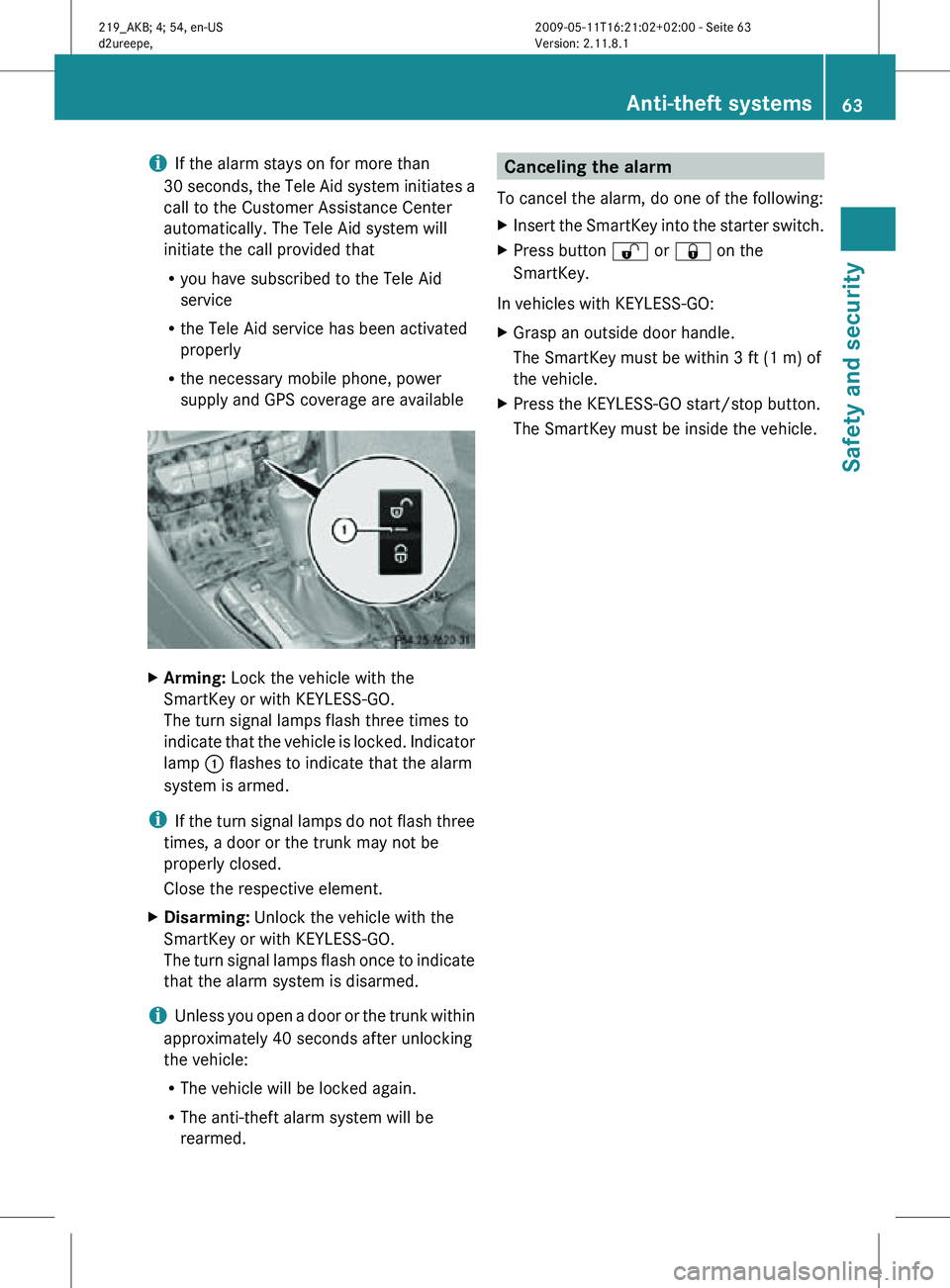
i
If the alarm stays on for more than
30 seconds, the Tele Aid system initiates a
call to the Customer Assistance Center
automatically. The Tele Aid system will
initiate the call provided that
R you have subscribed to the Tele Aid
service
R the Tele Aid service has been activated
properly
R the necessary mobile phone, power
supply and GPS coverage are available X
Arming: Lock the vehicle with the
SmartKey or with KEYLESS-GO.
The turn signal lamps flash three times to
indicate that the vehicle is locked. Indicator
lamp : flashes to indicate that the alarm
system is armed.
i If the turn signal lamps do not flash three
times, a door or the trunk may not be
properly closed.
Close the respective element.
X Disarming: Unlock the vehicle with the
SmartKey or with KEYLESS-GO.
The turn signal lamps flash once to indicate
that the alarm system is disarmed.
i Unless you open a door or the trunk within
approximately 40 seconds after unlocking
the vehicle:
R The vehicle will be locked again.
R The anti-theft alarm system will be
rearmed. Canceling the alarm
To cancel the alarm, do one of the following:
X Insert the SmartKey into the starter switch.
X Press button % or & on the
SmartKey.
In vehicles with KEYLESS-GO:
X Grasp an outside door handle.
The SmartKey must be within 3 ft (1 m) of
the vehicle.
X Press the KEYLESS-GO start/stop button.
The SmartKey must be inside the vehicle. Anti-theft systems
63Safety and security
219_AKB; 4; 54, en-US
d2ureepe, Version: 2.11.8.1 2009-05-11T16:21:02+02:00 - Seite 63 Z
Page 101 of 308
!
Do not run a cold engine at high engine
speeds. Running a cold engine at high
engine
speeds may shorten the service life
of the engine. This is not covered by the
Mercedes-Benz Limited Warranty.
CLS 63 AMG: At engine temperatures
below 68‡ (20†), the engine’s maximum
speed is restricted in order to protect it
from damage. Avoid driving your vehicle at
full speed when the engine is cold to
prevent premature engine wear and/or
diminished comfort.
! If an acoustic warning sounds and the
message Release Parking Brake
appears in the multifunction display when
driving off, you have forgotten to release
the parking brake.
Release the parking brake.
! Avoid spinning of a drive wheel. This may
cause serious damage to the drivetrain
which is not covered by the Mercedes-Benz
Limited Warranty.
! Simultaneously depressing the
accelerator pedal and applying the brakes
reduces engine performance and causes
premature brake and drivetrain wear which
is not covered by the Mercedes-Benz
Limited Warranty.
i Once the vehicle is in motion, the
automatic central locking function engages
and the locking knobs in the doors move
down.
The automatic central locking function can
be switched off ( Y page 123).
Automatic transmission G
Warning!
It is dangerous to shift the automatic
transmission
out of park position P or neutral
position N if the engine speed is higher than
idle speed. If your foot is not firmly on the
brake pedal, the vehicle could accelerate quickly forward or in reverse. You could lose
control of the vehicle and hit someone or
something. Only shift into gear when the
engine is idling normally and when your right
foot is firmly on the brake pedal.
! Only
shift the automatic transmission into
reverse gear R or park position P when the
vehicle is stopped. Otherwise the
automatic transmission could be damaged.
X Depress the brake pedal.
The gear selector lever lock is released.
X Shift the automatic transmission into drive
position D or reverse gear R.
i Shifting
the automatic transmission out of
park position P is only possible with the
brake pedal depressed.
Only depressing the brake pedal releases
the gear selector lever lock.
X Wait for the gear selection process to
complete before setting the vehicle in
motion.
X If engaged, release the parking brake.
X Release the brake pedal.
X Carefully depress the accelerator pedal.
After a cold start, the automatic transmission
shifts at a higher engine speed. This allows
the catalytic converter to reach its operating
temperature earlier.
For
more information on driving, see “Driving
instructions” ( Y page 210). Problems while driving
The
engine runs erratically and misfires R
An ignition cable may be damaged.
R The engine electronics may not be
operating properly.
R Unburned gasoline may have entered the
catalytic converter and damaged it. Driving and parking
99
Controls in detail
219_AKB; 4; 54, en-US
d2ureepe, Version: 2.11.8.1 2009-05-11T16:21:02+02:00 - Seite 99 Z
Page 112 of 308
Resetting trip odometer
X Make sure you are viewing the standard
display ( Y page 112) in the multifunction
display.
X Press and hold the reset button in the
instrument cluster (Y page 108) until the
trip odometer is reset. Tachometer
The red marking on the tachometer
(Y page 28) denotes excessive engine speed.
! Avoid driving at excessive engine speeds,
as it may result in serious engine damage
that is not covered by the Mercedes-Benz
Limited Warranty.
To help protect the engine, the fuel supply is
interrupted if the engine is operated within
the red marking. Control system
Introduction
The control system is activated as soon as the
starter switch is in position 1.
The control system enables you to call up
information about your vehicle and to change
vehicle settings.
For example, you can use the control system
to find out when your vehicle is next due for
maintenance service, to set the language for
messages in the instrument cluster display,
and much more. G
Warning!
A driver’s attention to the road and traffic
conditions must always be his/her primary
focus when driving.
For your safety and the safety of others,
selecting features through the multifunction
steering wheel should only be done by the driver when traffic and road conditions permit
it to be done safely.
Bear in mind that at a speed of just 30 mph
(approximately 50 km/h), your vehicle is
covering a distance of 44 feet (approximately
14 m) every second.
The control system relays information to the
multifunction display. Multifunction steering wheel
The displays in the multifunction display and
the settings in the control system are
controlled by using the buttons on the
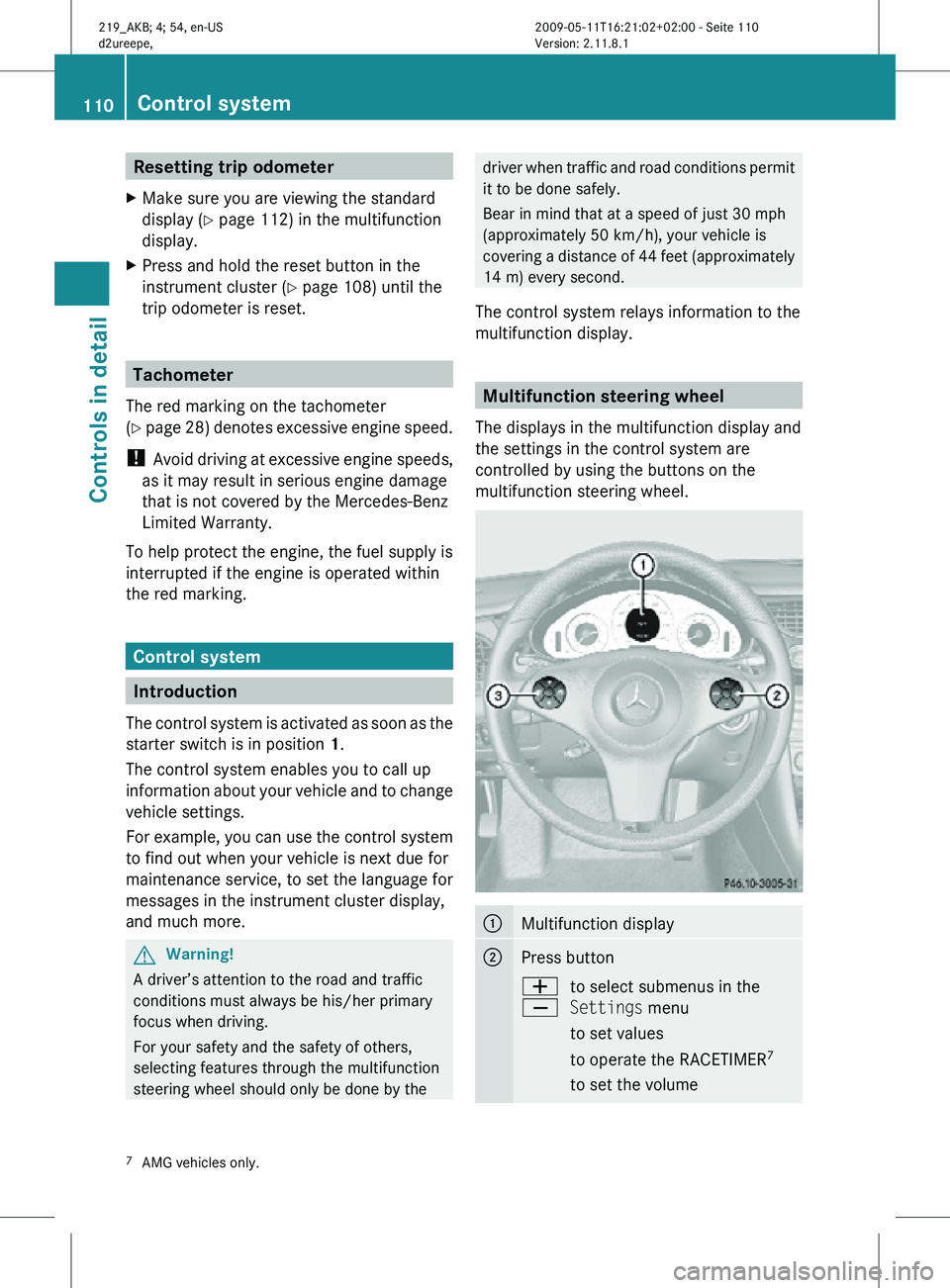
multifunction steering wheel. :
Multifunction display
;
Press button
W
X
to select submenus in the
Settings menu
to set values
to operate the RACETIMER
7
to set the volume 7
AMG vehicles only. 110
Control systemControls in detail
219_AKB; 4; 54, en-US
d2ureepe,
Version: 2.11.8.1 2009-05-11T16:21:02+02:00 - Seite 110
Page 115 of 308
X
If you see another display, press button
V or U repeatedly until the standard
display appears.
X Press button & or * to select the
functions in the Standard display menu.
The following functions are available:
R Restarting the tire pressure loss warning
system (Y page 187) (Canada only)
R Restarting the TPMS (Y page 189) (USA
only)
R Checking tire inflation pressure with the
Advanced TPMS (Y page 190) (Canada
only)
R Calling up digital speedometer or outside
temperature ( Y page 113)
R Calling up maintenance service indicator
display ( Y page 215)
Calling up digital speedometer or
outside temperature Depending on the chosen setting for the
standard display (Y page 120) you can call
up the other display here. G
Warning!
The outside temperature indicator is not
designed to serve as an ice-warning device
and is therefore unsuitable for that purpose.
Indicated temperatures just above the
freezing point do not guarantee that the road
surface is free of ice. The road may still be icy,
especially in wooded areas or on bridges.
X Press button & or * repeatedly until
the digital speedometer or the outside
temperature appears in the multifunction
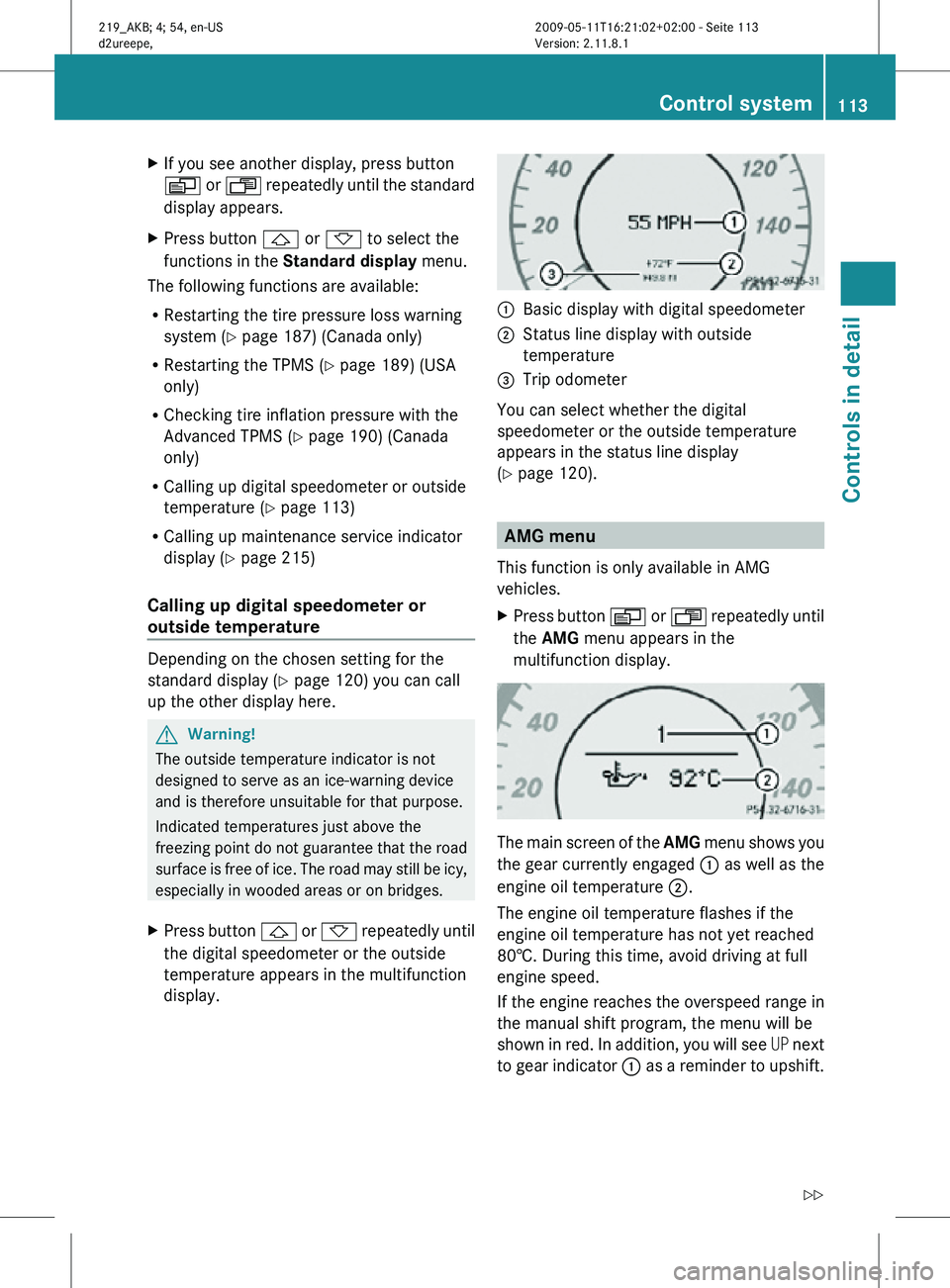
display. :
Basic display with digital speedometer
; Status line display with outside
temperature
= Trip odometer
You can select whether the digital
speedometer or the outside temperature
appears in the status line display
(Y page 120). AMG menu
This function is only available in AMG
vehicles.
X Press button V or U repeatedly until
the AMG menu appears in the
multifunction display. The main screen of the
AMG menu shows you
the gear currently engaged : as well as the
engine oil temperature ;.
The engine oil temperature flashes if the
engine oil temperature has not yet reached
80†. During this time, avoid driving at full
engine speed.
If the engine reaches the overspeed range in
the manual shift program, the menu will be
shown in red. In addition, you will see UP next
to gear indicator : as a reminder to upshift. Control system
113Controls in detail
219_AKB; 4; 54, en-US
d2ureepe, Version: 2.11.8.1 2009-05-11T16:21:02+02:00 - Seite 113 Z
Page 118 of 308
Audio/DVD menu
The functions in the Audio/DVD menu
operate the audio or video equipment which
you have currently switched on.
The following functions are available:
R Selecting radio station (Y page 116)
R Operating audio devices/audio media
(Y page 116)
R Operating video DVD (Y page 117)
If no audio equipment is currently switched
on, the message AUDIO Off appears in the
multifunction display.
Selecting radio station i
The SIRIUS XM Satellite Radio is treated
as a radio application.
Additional optional satellite radio
equipment and a subscription to a satellite
radio service provider are required for
satellite radio operation. Contact an
authorized Mercedes-Benz Center for
details and availability for your vehicle.
For more information, refer to separate
COMAND system operating instructions.
X Switch on the COMAND system and select
radio. Refer to separate COMAND system
operating instructions.
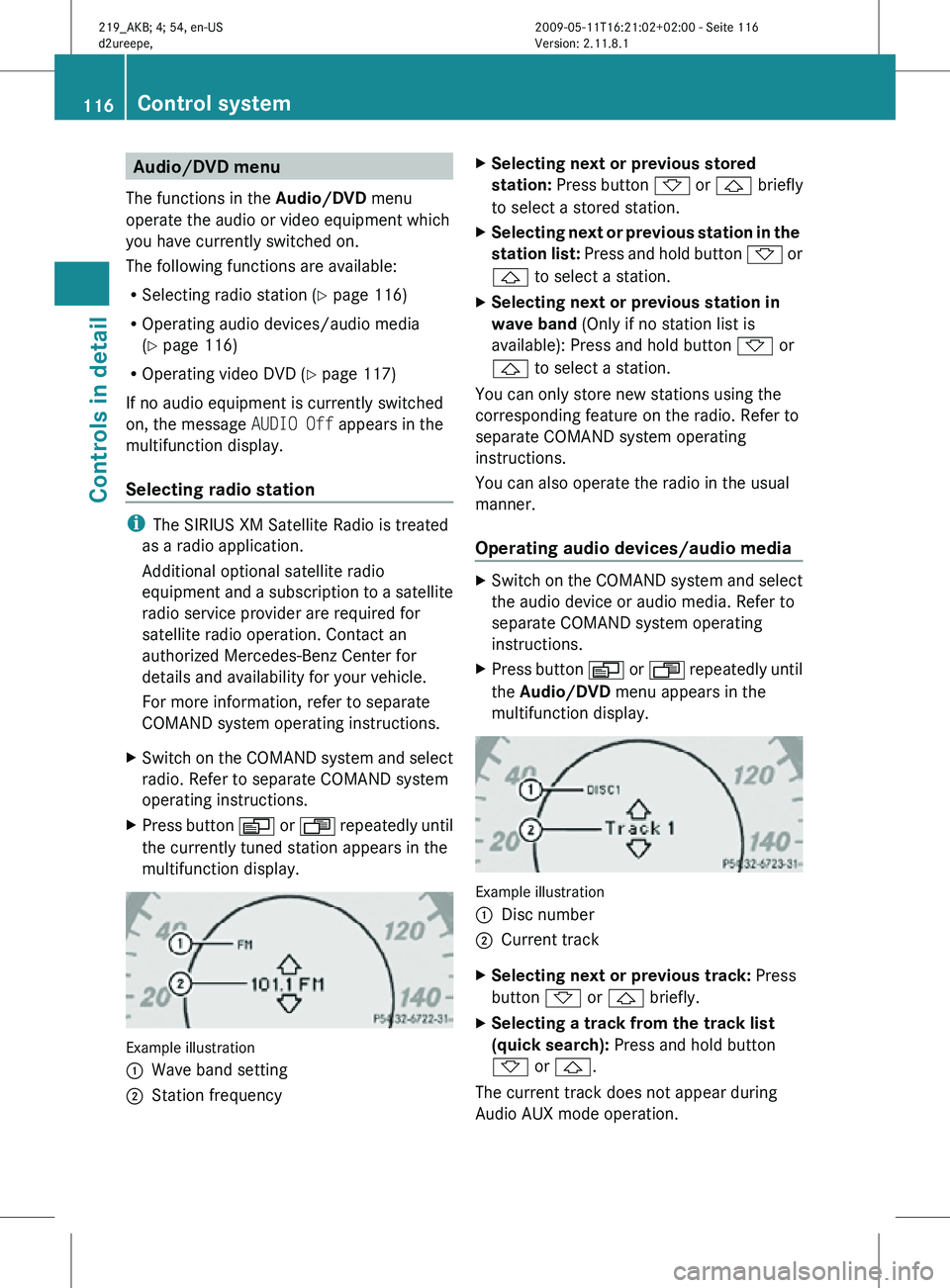
X Press button V or U repeatedly until
the currently tuned station appears in the
multifunction display. Example illustration
:
Wave band setting
; Station frequency X
Selecting next or previous stored
station: Press button * or & briefly
to select a stored station.
X Selecting next or previous station in the
station list: Press and hold button * or
& to select a station.
X Selecting next or previous station in
wave band (Only if no station list is
available): Press and hold button * or
& to select a station.
You can only store new stations using the
corresponding feature on the radio. Refer to
separate COMAND system operating
instructions.
You can also operate the radio in the usual
manner.
Operating audio devices/audio media X
Switch on the COMAND system and select
the audio device or audio media. Refer to
separate COMAND system operating
instructions.
X Press button V or U repeatedly until
the Audio/DVD menu appears in the
multifunction display. Example illustration
:
Disc number
; Current track
X Selecting next or previous track: Press
button * or & briefly.
X Selecting a track from the track list
(quick search): Press and hold button
* or &.
The current track does not appear during
Audio AUX mode operation. 116
Control systemControls in detail
219_AKB; 4; 54, en-US
d2ureepe,
Version: 2.11.8.1 2009-05-11T16:21:02+02:00 - Seite 116
Page 128 of 308
your safety and the safety of others, we
recommend that you pull over to a safe
location and stop before placing or taking a
telephone call. If you choose to use the
telephone while driving, please use the hands-
free device and only use the telephone when
weather, road and traffic conditions permit.
Some jurisdictions prohibit the driver from
using a mobile phone while driving a vehicle.
Bear in mind that at a speed of just 30 mph
(approximately 50 km/h), your vehicle is
covering a distance of 44 feet (approximately
14 m) every second.
You can connect your telephone to the
COMAND system via Bluetooth ®
, see
separate COMAND system operating
instructions.
X Switch on the COMAND system.
Refer to separate COMAND system
operating instructions.
X Press button U or V repeatedly until
the message TEL appears in the
multifunction display.
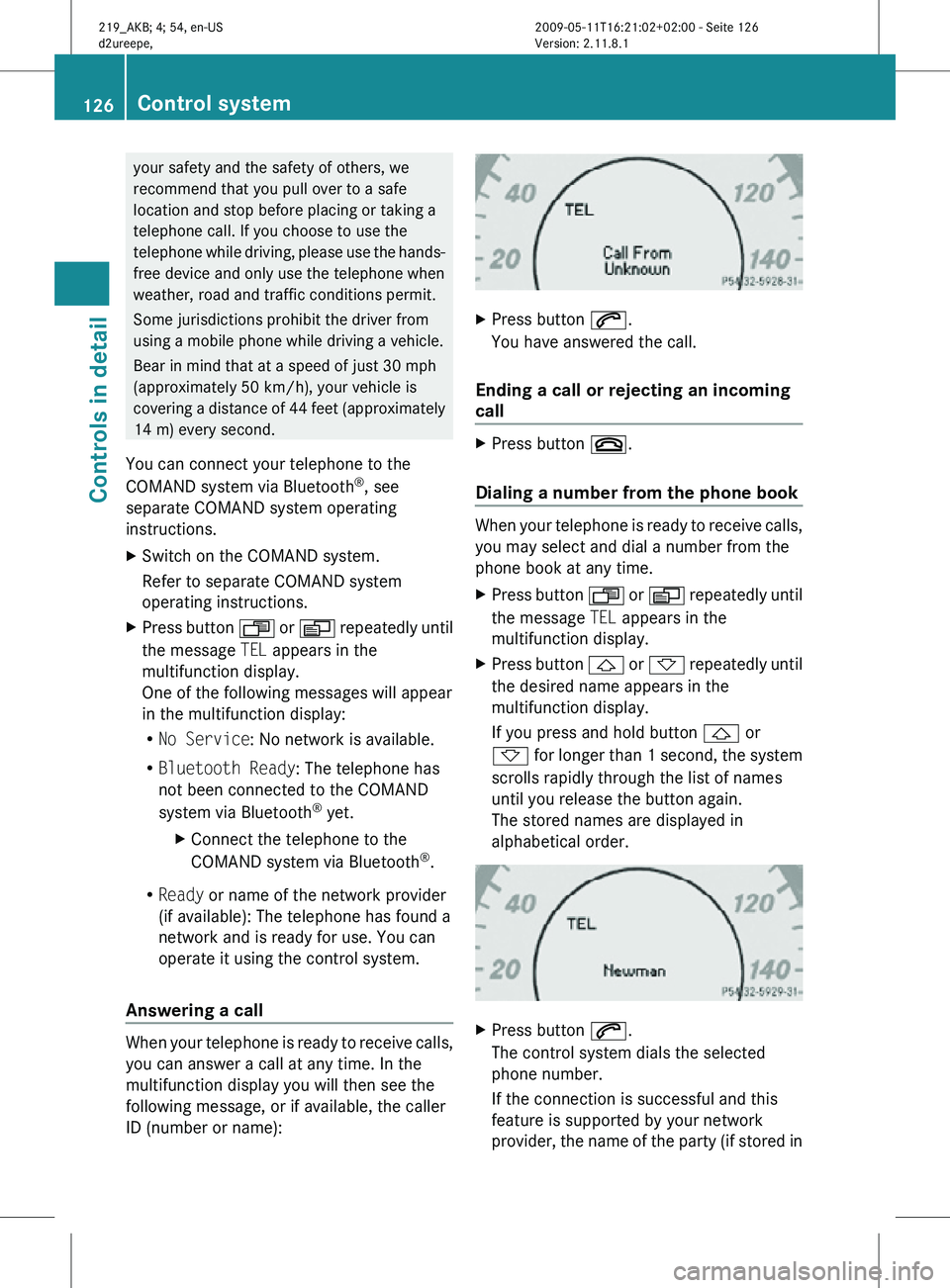
One of the following messages will appear
in the multifunction display:
R No Service: No network is available.
R Bluetooth Ready: The telephone has
not been connected to the COMAND
system via Bluetooth ®
yet.
X Connect the telephone to the
COMAND system via Bluetooth ®
.
R Ready or name of the network provider
(if available): The telephone has found a
network and is ready for use. You can
operate it using the control system.
Answering a call When your telephone is ready to receive calls,
you can answer a call at any time. In the
multifunction display you will then see the
following message, or if available, the caller
ID (number or name): X
Press button 6.
You have answered the call.
Ending a call or rejecting an incoming
call X
Press button ~.
Dialing a number from the phone book When your telephone is ready to receive calls,
you may select and dial a number from the
phone book at any time.
X
Press button U or V repeatedly until
the message TEL appears in the
multifunction display.
X Press button & or * repeatedly until
the desired name appears in the
multifunction display.
If you press and hold button & or
* for longer than 1 second, the system
scrolls rapidly through the list of names
until you release the button again.
The stored names are displayed in
alphabetical order. X
Press button 6.
The control system dials the selected
phone number.
If the connection is successful and this
feature is supported by your network
provider, the name of the party (if stored in 126
Control systemControls in detail
219_AKB; 4; 54, en-US
d2ureepe,
Version: 2.11.8.1 2009-05-11T16:21:02+02:00 - Seite 126