format MERCEDES-BENZ CLS-Class 2010 W164 Comand Manual
[x] Cancel search | Manufacturer: MERCEDES-BENZ, Model Year: 2010, Model line: CLS-Class, Model: MERCEDES-BENZ CLS-Class 2010 W164Pages: 224, PDF Size: 7 MB
Page 20 of 224
to provide reasonable protection against
harmful interference when the equipment
is operated in a commercial environment.
This equipment generates, uses and can
radiate radio frequency energy and, if not
installed and used in accordance with the
instruction manual, may cause harmful
interference to radio communications.GWarning
This equipment complies with FCC radiation
exposure limits set forth for uncontrolled
equipment and meets the FCC radio
frequency (RF) Exposure Guidelines in
Supplement C to OET65.
This equipment has very low levels of RF
energy that is deemed to comply without
maximum permissive exposure evaluation
(MPE). But it is desirable that it should be
installed and operated with at least 8 inches
(20 cm) and more between the radiator and a
person's body (excluding extremities: hands,
wrists, feet and legs.)
Declaration of Conformity Regarding
the Distribution of
Telecommunications Equipment
Daimler AG declares herewith that this device
conforms to the basic requirements and the
other relevant regulations of Directive
1999/5/EC (RTTE Directive).
Intended Purpose
Please bear the following information in mind
when using the COMAND:
R The safety instructions in this guide
R Road Traffic Regulations
i Tampering with electronic components or
systems (e.g. radio, DVD changer) and their
software may result in malfunctioning.
Systems which have not been changed may
be affected due to the connectivity of the
electronics. Malfunctions of the electronics
can seriously endanger the operational
safety of your vehicle.
i Always have all work or modifications to
electronic components carried out by a
qualified specialist workshop with the
necessary expertise and tools for any work
required. Daimler AG recommends a
Mercedes-Benz service center for this
purpose. Especially for safety-related
operations and operations on safety-
related systems, servicing by a qualified
specialist workshop is essential.
i This device is equipped with electronic
anti-theft protection. For more information
please refer to your Mercedes-Benz service
center.
Function Restrictions When Driving
the Vehicle
For safety reasons, some COMAND functions
are restricted or not available when the
vehicle is moving. This can be recognized, for
example, from the fact that certain menu
items cannot be selected or the COMAND
displays a corresponding message.
18Operating SafetyIntroduction
Page 25 of 224
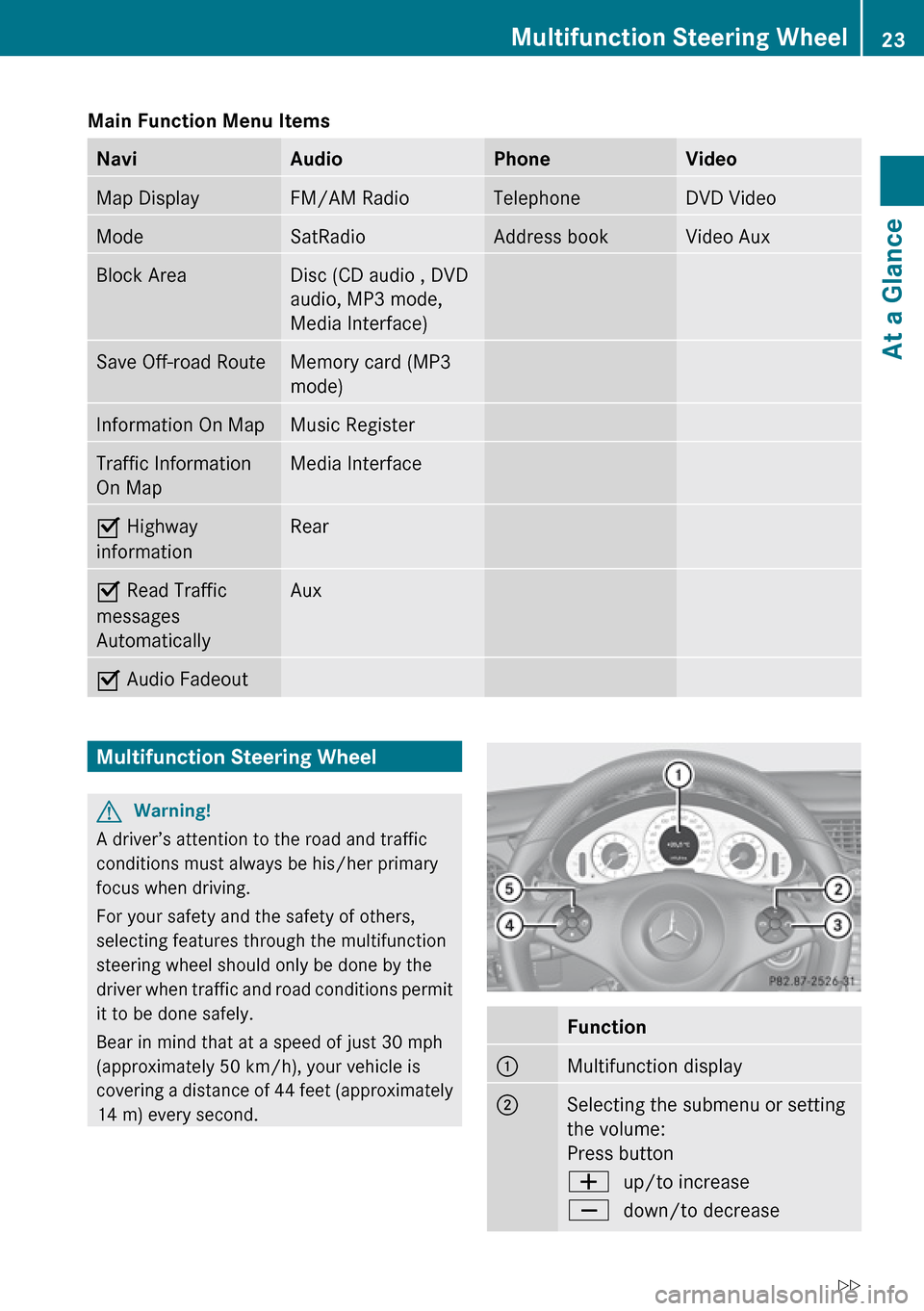
Main Function Menu Items NaviAudioPhoneVideoMap DisplayFM/AM RadioTelephoneDVD VideoModeSatRadioAddress bookVideo AuxBlock AreaDisc (CD audio , DVD
audio, MP3 mode,
Media Interface)Save Off-road RouteMemory card (MP3
mode)Information On MapMusic RegisterTraffic Information
On MapMedia InterfaceÇ Highway
informationRearÇ Read Traffic
messages
AutomaticallyAuxÇ Audio FadeoutMultifunction Steering WheelGWarning!
A driver’s attention to the road and traffic
conditions must always be his/her primary
focus when driving.
For your safety and the safety of others,
selecting features through the multifunction
steering wheel should only be done by the
driver when traffic and road conditions permit
it to be done safely.
Bear in mind that at a speed of just 30 mph
(approximately 50 km/h), your vehicle is
covering a distance of 44 feet (approximately
14 m) every second.
Function1Multifunction display2Selecting the submenu or setting
the volume:
Press buttonWup/to increaseXdown/to decreaseMultifunction Steering Wheel23At a GlanceZ
Page 26 of 224
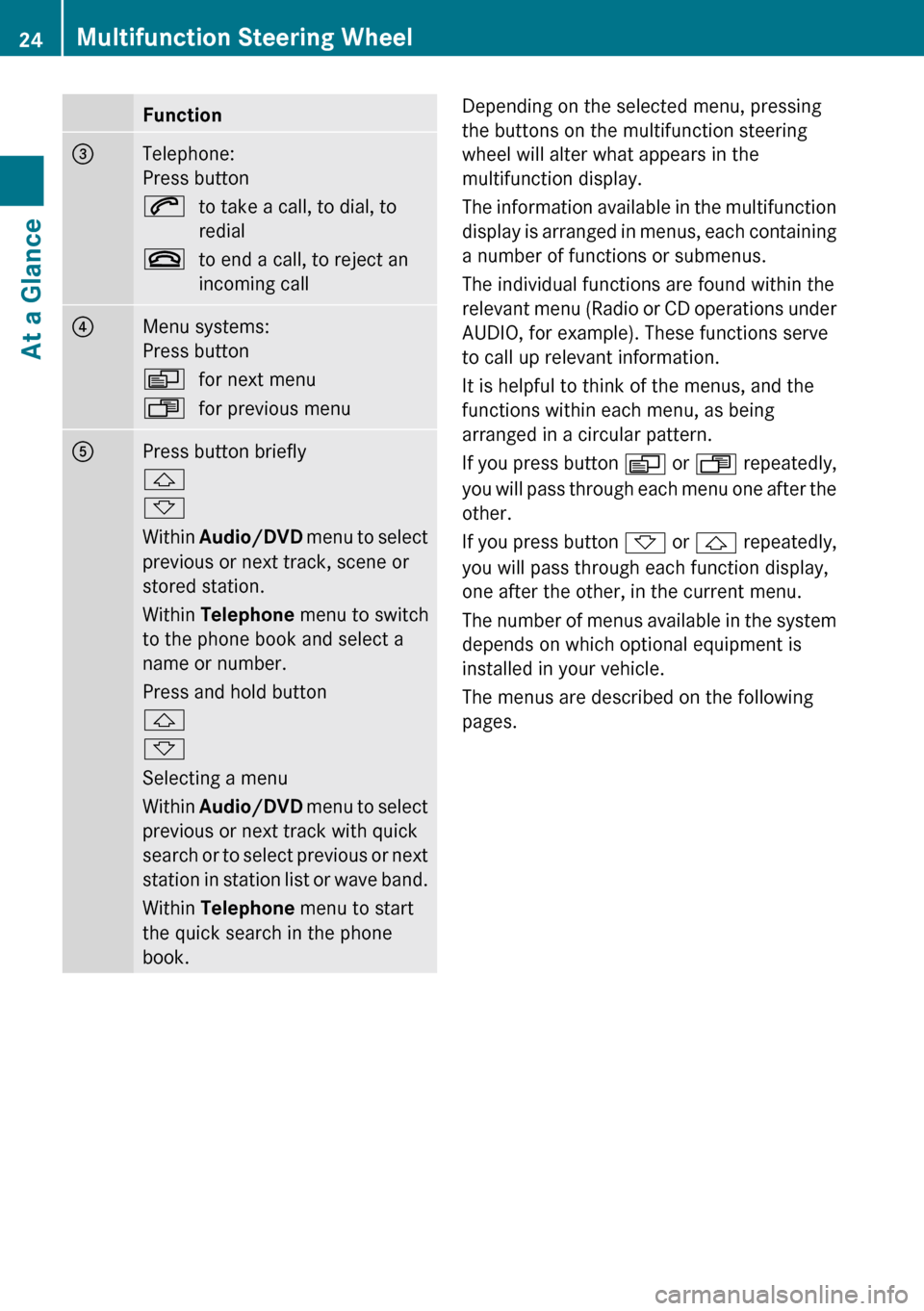
Function3Telephone:
Press button6to take a call, to dial, to
redial~to end a call, to reject an
incoming call4Menu systems:
Press buttonVfor next menuUfor previous menu5Press button briefly
&
*
Within Audio/DVD menu to select
previous or next track, scene or
stored station.
Within Telephone menu to switch
to the phone book and select a
name or number.
Press and hold button
&
*
Selecting a menu
Within Audio/DVD menu to select
previous or next track with quick
search or to select previous or next
station in station list or wave band.
Within Telephone menu to start
the quick search in the phone
book.Depending on the selected menu, pressing
the buttons on the multifunction steering
wheel will alter what appears in the
multifunction display.
The information available in the multifunction
display is arranged in menus, each containing
a number of functions or submenus.
The individual functions are found within the
relevant menu (Radio or CD operations under
AUDIO, for example). These functions serve
to call up relevant information.
It is helpful to think of the menus, and the
functions within each menu, as being
arranged in a circular pattern.
If you press button V or U repeatedly,
you will pass through each menu one after the
other.
If you press button * or & repeatedly,
you will pass through each function display,
one after the other, in the current menu.
The number of menus available in the system
depends on which optional equipment is
installed in your vehicle.
The menus are described on the following
pages.24Multifunction Steering WheelAt a Glance
Page 35 of 224
XTo change the setting: Press 9
or : until the desired treble and bass
levels are set.XTo save setting: Press 9.
The setting is stored and the menu is
exited.XTo exit the menu without changes: Press
the k ; or = button.
Setting Balance and Fader
The balance determines whether the sound
intensity is higher on the driver’s side or on
the front passenger’s side.
The fader determines whether the sound
intensity is higher in the front or in the rear of
the vehicle.
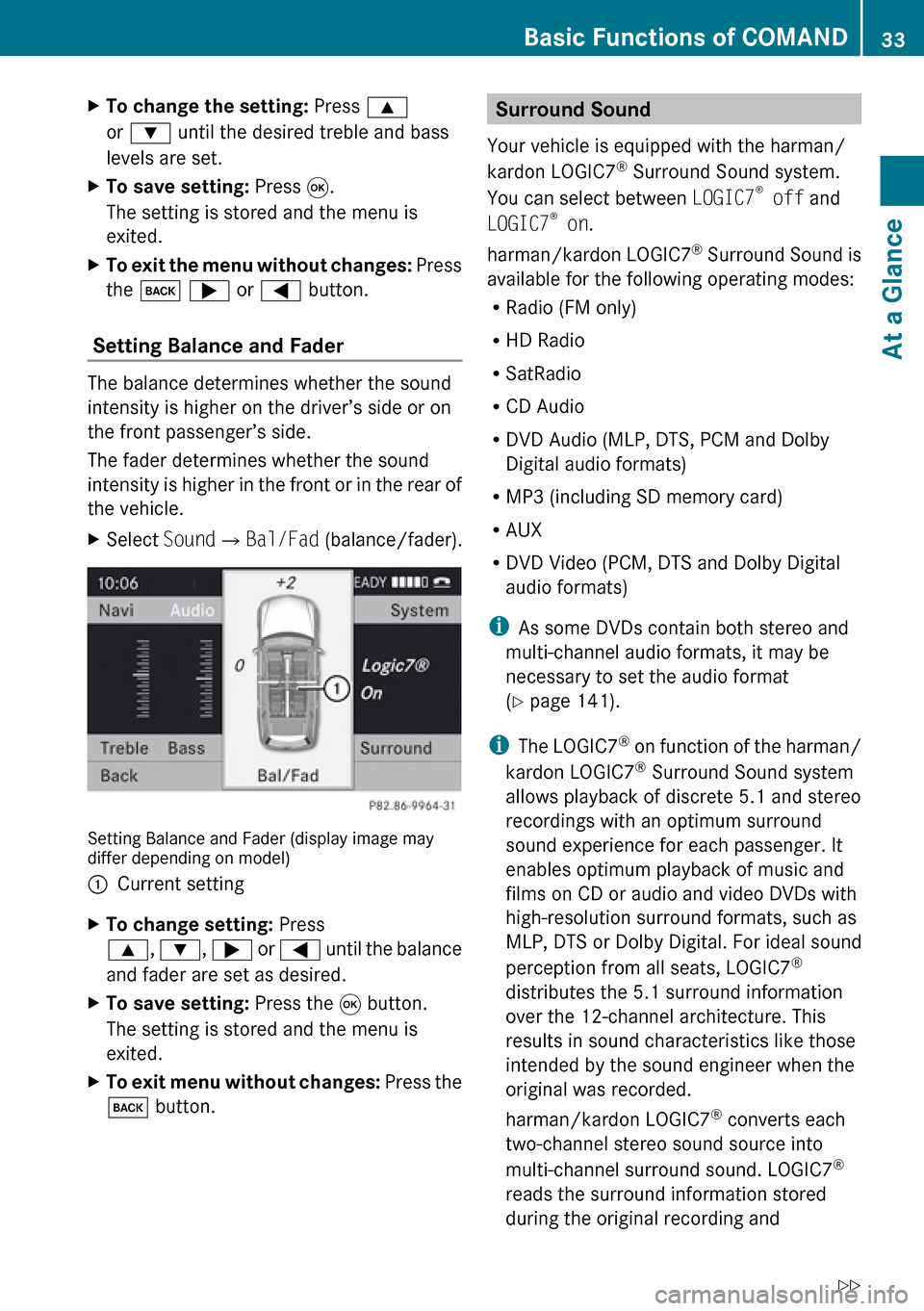
XSelect Sound£Bal/Fad (balance/fader).
Setting Balance and Fader (display image may
differ depending on model)
1Current settingXTo change setting: Press
9 , : , ; or = until the balance
and fader are set as desired.XTo save setting: Press the 9 button.
The setting is stored and the menu is
exited.XTo exit menu without changes: Press the
k button.Surround Sound
Your vehicle is equipped with the harman/
kardon LOGIC7 ®
Surround Sound system.
You can select between LOGIC7®
off and
LOGIC7 ®
on .
harman/kardon LOGIC7 ®
Surround Sound is
available for the following operating modes:
R Radio (FM only)
R HD Radio
R SatRadio
R CD Audio
R DVD Audio (MLP, DTS, PCM and Dolby
Digital audio formats)
R MP3 (including SD memory card)
R AUX
R DVD Video (PCM, DTS and Dolby Digital
audio formats)
i As some DVDs contain both stereo and
multi-channel audio formats, it may be
necessary to set the audio format
( Y page 141).
i The LOGIC7 ®
on function of the harman/
kardon LOGIC7 ®
Surround Sound system
allows playback of discrete 5.1 and stereo
recordings with an optimum surround
sound experience for each passenger. It
enables optimum playback of music and
films on CD or audio and video DVDs with
high-resolution surround formats, such as
MLP, DTS or Dolby Digital. For ideal sound
perception from all seats, LOGIC7 ®
distributes the 5.1 surround information
over the 12-channel architecture. This
results in sound characteristics like those
intended by the sound engineer when the
original was recorded.
harman/kardon LOGIC7 ®
converts each
two-channel stereo sound source into
multi-channel surround sound. LOGIC7 ®
reads the surround information stored
during the original recording andBasic Functions of COMAND33At a GlanceZ
Page 36 of 224
distributes it over the 12 channels. No
effects are created during the process,
anything that was always on the recording
is just made audible again. In addition,
harman/kardon LOGIC7 ®
moves the
perceived sound source away from the
loudspeakers and thereby generates a
natural 360° sound experience for every
passenger.
i If you select LOGIC7 ®
off, playback of all
recognized formats is as it is on the
medium. Due to the design of the
passenger compartment, an optimum
audio experience cannot be guaranteed for
all passengers.
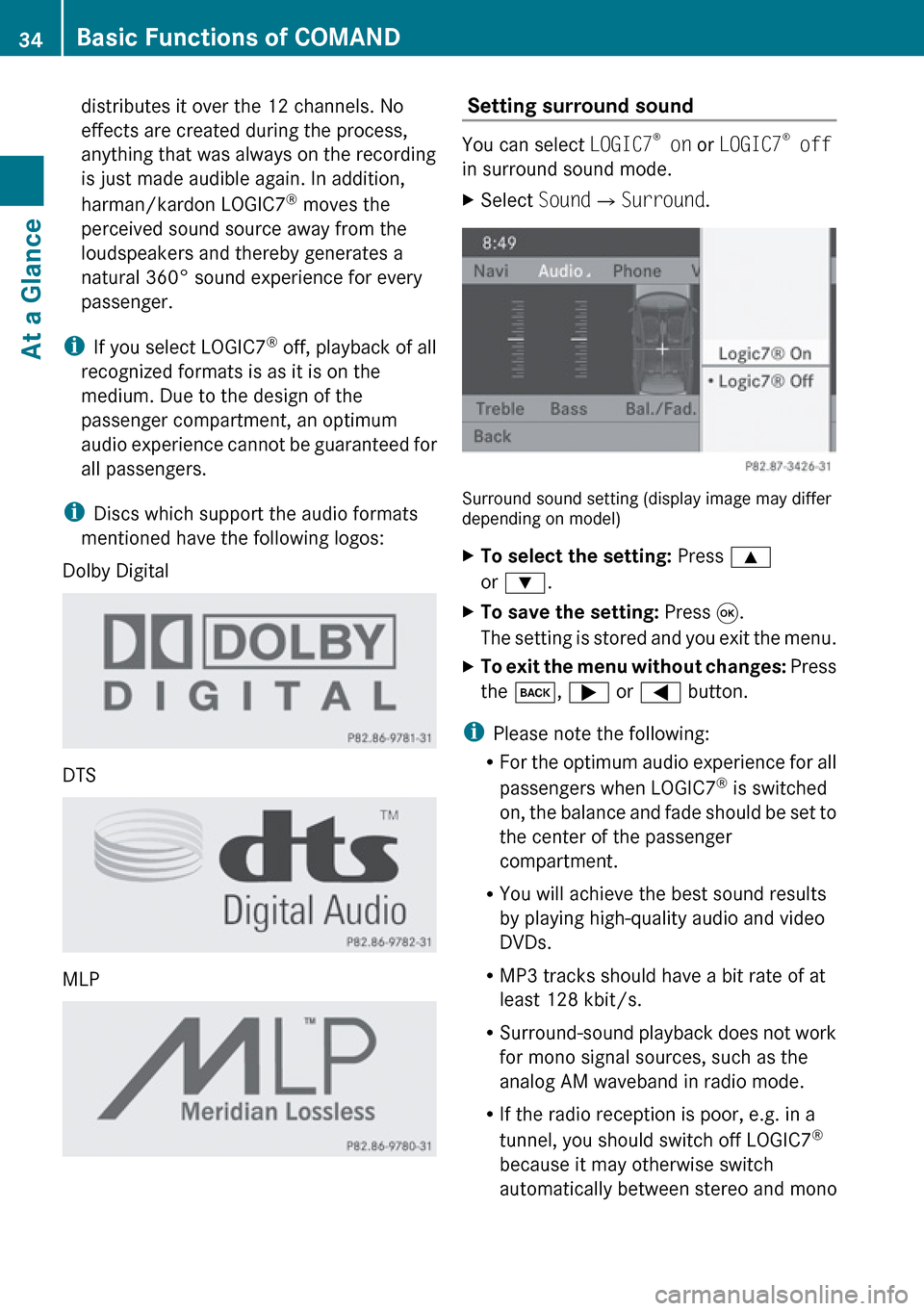
i Discs which support the audio formats
mentioned have the following logos:
Dolby Digital
DTS
MLP
Setting surround sound
You can select LOGIC7®
on or LOGIC7 ®
off
in surround sound mode.
XSelect Sound£Surround .
Surround sound setting (display image may differ
depending on model)
XTo select the setting: Press 9
or : .XTo save the setting: Press 9.
The setting is stored and you exit the menu.XTo exit the menu without changes: Press
the k , ; or = button.
i
Please note the following:
R For the optimum audio experience for all
passengers when LOGIC7 ®
is switched
on, the balance and fade should be set to
the center of the passenger
compartment.
R You will achieve the best sound results
by playing high-quality audio and video
DVDs.
R MP3 tracks should have a bit rate of at
least 128 kbit/s.
R Surround-sound playback does not work
for mono signal sources, such as the
analog AM waveband in radio mode.
R If the radio reception is poor, e.g. in a
tunnel, you should switch off LOGIC7 ®
because it may otherwise switch
automatically between stereo and mono
34Basic Functions of COMANDAt a Glance
Page 41 of 224
Switching the Display On/OffXTo switch the display off: Select System
£ Display Off .
The display is switched off.XTo switch on the display: Press the 9
button, the k button or one of the
= , ; , : or 9 buttons.
or
XPress the q button.
The system menu appears.
i You can also press one of the function
buttons, e.g. the h button. This turns on
the display and switches to the
corresponding function.
Time
Setting the Time
i The correct time must be set for the
following functions to operate correctly:
R Calculation of expected time of arrival
R Time stamps for calls received and calls
dialed
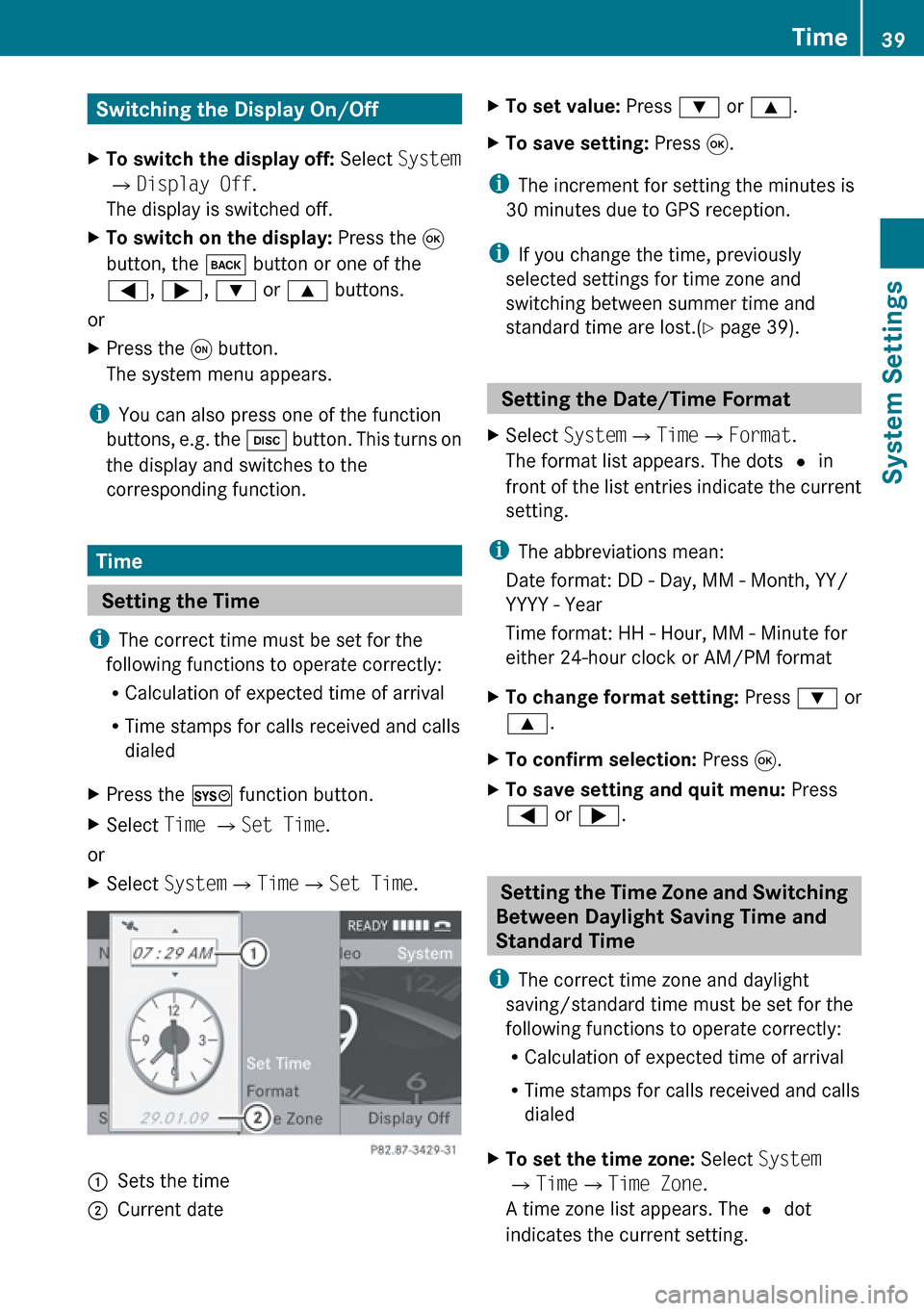
XPress the W function button.XSelect Time £ Set Time .
or
XSelect System £Time £Set Time .1Sets the time2Current dateXTo set value: Press : or 9 .XTo save setting: Press 9.
i
The increment for setting the minutes is
30 minutes due to GPS reception.
i If you change the time, previously
selected settings for time zone and
switching between summer time and
standard time are lost.( Y page 39).
Setting the Date/Time Format
XSelect System £Time £Format .
The format list appears. The dots R in
front of the list entries indicate the current
setting.
i The abbreviations mean:
Date format: DD - Day, MM - Month, YY/
YYYY - Year
Time format: HH - Hour, MM - Minute for
either 24-hour clock or AM/PM format
XTo change format setting: Press : or
9 .XTo confirm selection: Press 9.XTo save setting and quit menu: Press
= or ; .
Setting the Time Zone and Switching
Between Daylight Saving Time and
Standard Time
i The correct time zone and daylight
saving/standard time must be set for the
following functions to operate correctly:
R Calculation of expected time of arrival
R Time stamps for calls received and calls
dialed
XTo set the time zone: Select System
£ Time £Time Zone .
A time zone list appears. The R dot
indicates the current setting.Time39System SettingsZ
Page 43 of 224
Voice Control
Switching the Help Screen On or Off
XSelect System £Settings £Voice
Control .XSelect Help Window .
You have switched the help window on
Ç or off c.
i
In addition to the audible instructions, the
help screen displays other information
during the individualization process and the
later voice control mode.
Individualization Function
You can use the individualization function
option to adapt the Voice control system to
your own voice and therefore improve voice
recognition. This will affect the ability of the
system to recognize the voices of other users,
and for this reason it can be switched off
( Y page 42).
The individualization function comprises two
parts and lasts around five minutes. During
the process you will practice a few number
sequences and voice commands.
Starting New Individualization Process
i You can only start the individualization
function when the vehicle is stationary.
First switch off all interfering units/
functions. After starting, the system will
take you through the training by means of
audible instructions.
XSelect System £Settings £Voice
Control £Start New
Individualization .
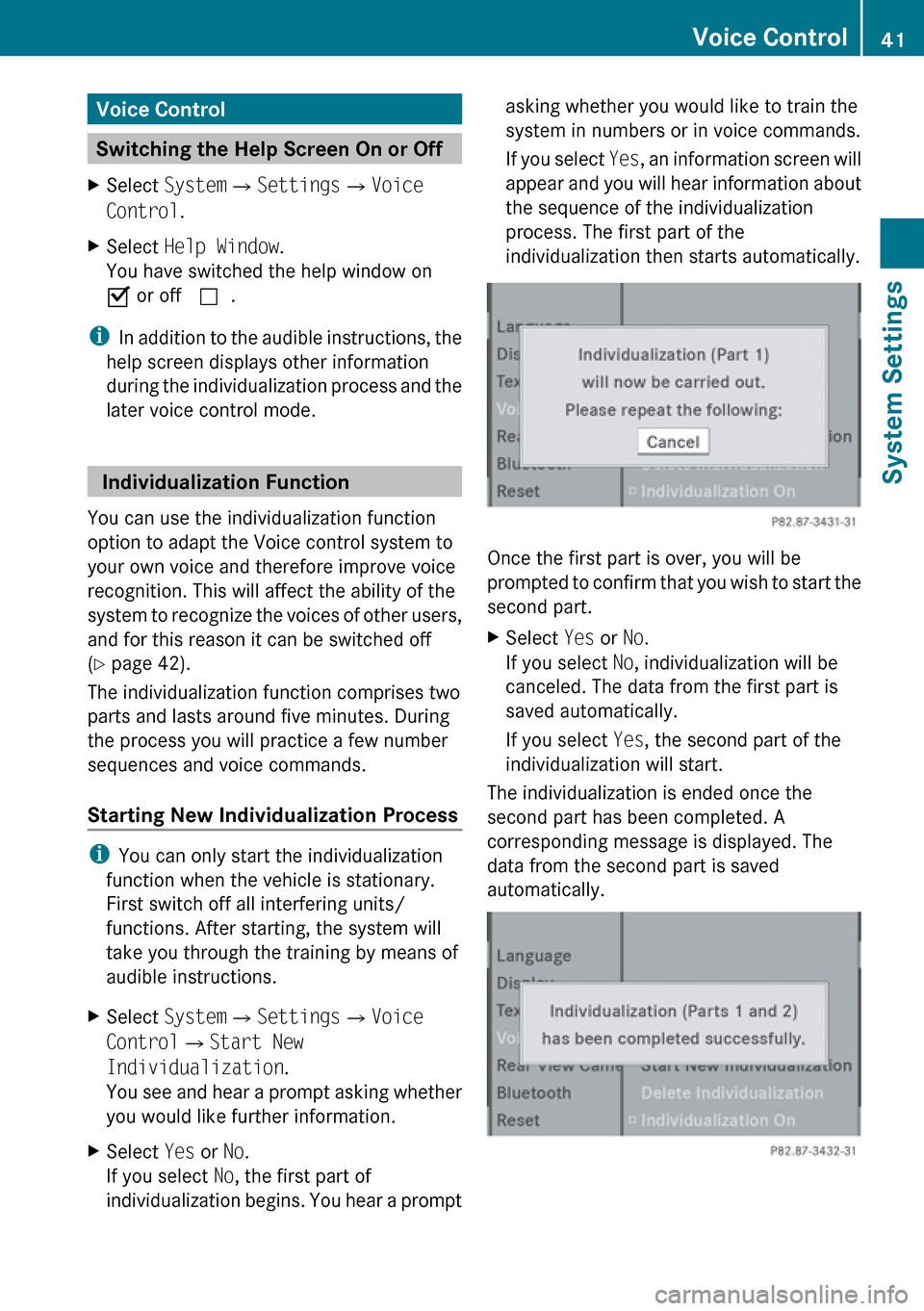
You see and hear a prompt asking whether
you would like further information.XSelect Yes or No.
If you select No, the first part of
individualization begins. You hear a promptasking whether you would like to train the
system in numbers or in voice commands.
If you select Yes, an information screen will
appear and you will hear information about
the sequence of the individualization
process. The first part of the
individualization then starts automatically.
Once the first part is over, you will be
prompted to confirm that you wish to start the
second part.
XSelect Yes or No.
If you select No, individualization will be
canceled. The data from the first part is
saved automatically.
If you select Yes, the second part of the
individualization will start.
The individualization is ended once the
second part has been completed. A
corresponding message is displayed. The
data from the second part is saved
automatically.
Voice Control41System SettingsZ
Page 44 of 224
Canceling the First or Second Part of
IndividualizationXSelect Cancel .
You will be prompted to confirm that you
really wish to cancel.XSelect Yes or No.
If you select Yes, individualization will be
canceled.The data from the canceled part
will be lost.
If you select No, the canceled part of the
individualization will restart.
Deleting Existing Individualization Data
XSelect System £Settings £Voice
Control £Delete
Individualization .
You will be prompted to confirm that you
really wish to delete it.XSelect Yes or No.
The individualization data will be deleted or
retained on the basis of the selection. A
corresponding message is displayed.
Switching Individualization On and Off
XSelect System £Settings £Voice
Control £ Individualization On .
This switches the individualization on Ç or
off c .
Rear View Camera
COMAND shows the camera picture on the
display when
R the function is switched on in the System
Settings menu and
R the vehicle is shifted into reverse gear
As soon as you shift out of reverse gear, the
previous display is shown.
Switching On/Off the Display of the
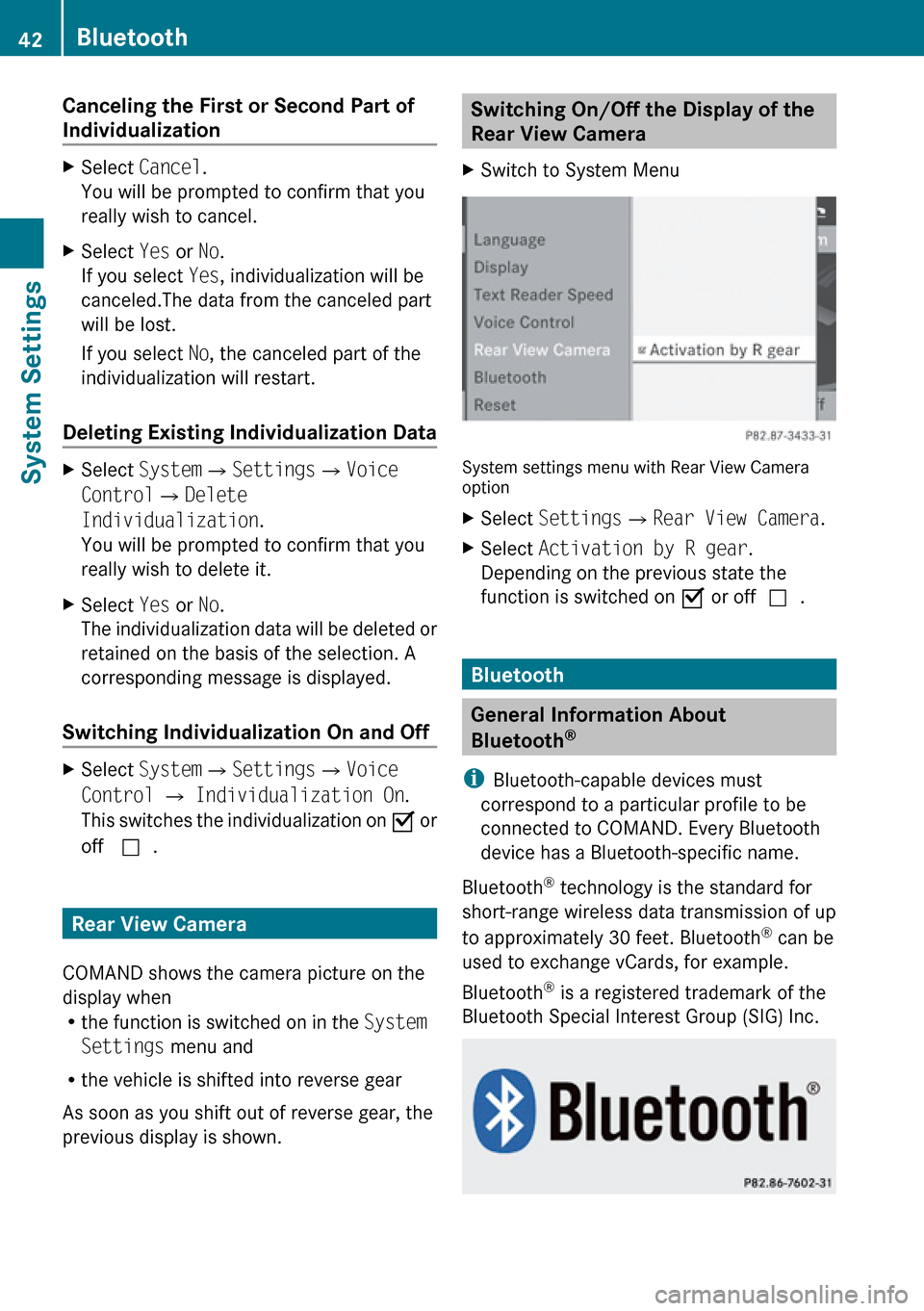
Rear View Camera XSwitch to System Menu
System settings menu with Rear View Camera
option
XSelect Settings £Rear View Camera .XSelect Activation by R gear .
Depending on the previous state the
function is switched on Ç or off c.
Bluetooth
General Information About
Bluetooth ®
i Bluetooth-capable devices must
correspond to a particular profile to be
connected to COMAND. Every Bluetooth
device has a Bluetooth-specific name.
Bluetooth ®
technology is the standard for
short-range wireless data transmission of up
to approximately 30 feet. Bluetooth ®
can be
used to exchange vCards, for example.
Bluetooth ®
is a registered trademark of the
Bluetooth Special Interest Group (SIG) Inc.
42BluetoothSystem Settings
Page 45 of 224
Switching Bluetooth®
On or Off XSelect System £Settings
£ Bluetooth £Activate Bluetooth .
Bluetooth is switched on Ç or off c.
Connecting Bluetooth Devices
i To connect a Bluetooth device, the
Bluetooth function must be switched on in
COMAND and on the particular device. The
Bluetooth device must also be “visible” to
COMAND in order for COMAND to find and
display it. For the setting procedures,
please see the operating instructions for
the Bluetooth device.
It is possible to establish a Bluetooth
connection between COMAND and the
following types of device:
R Mobile phone
i Bluetooth-enabled mobile phones must
correspond to particular profiles to be
connected to COMAND.
Further information on suitable mobile
phones and connecting Bluetooth-enabled
mobile phones to COMAND is available via
the Internet at www.mbusa-mobile.com . Or
call the Mercedes-Benz Customer
Assistance Center at 1-800-FOR-
MERCedes (1-800-367-6372) (US), or
Customer Relations at 1-800-387-0100
(Canada).
The volume of telephone conversations can
change after the phone has been
connected.
R Portable personal computer
You can connect up to ten devices to
COMAND.
The connection process includes searching
for the device and its subsequent
authorization.
Opening the Bluetooth Device List
and Searching for a Device
i You must first switch on Bluetooth to be
able to call up the list of Bluetooth devices
( Y page 43).XTo open the list: Select System
£ Settings £Bluetooth £
Bluetooth Device List .XTo start the search: Select Update .
COMAND starts the search for devices
within reception range. The device list
appears after a short time.
i If you open the device list again, it may
not display all devices as you may have
removed one from the car for a while, for
example. In this case, start a new search to
update the device list.
XTo cancel search: Select Cancel.
The device list can contain the following
devices:
R All (available) devices found, regardless of
whether they have been authorized or not.
R All authorized devices, regardless of
whether they have been found (are
available) or not.
The device list may show the following icons
immediately after manual updating:
Bluetooth43System SettingsZ
Page 50 of 224
Introduction
Vehicle Equipment
i This Operator’s Manual describes all
features, standard or optional, potentially
available for your vehicle at the time of
purchase. Please be aware that your
vehicle might not be equipped with all
features described in this manual.
Safety Instructions
GWarning
For safety reasons, only enter a destination
when the vehicle is stationary. When the
vehicle is in motion, a passenger should enter
the destination. Study manual and select
route before driving.
Bear in mind that at a speed of just 30 mph
(approximately 50 km/h), your vehicle is
covering a distance of 44 feet (approximately
14 m) every second.
COMAND calculates the route to the
destination without taking account of the
following:
R Traffic lights
R Stop and right-of-way-signs
R Lane merging
R Parking or stopping prohibited areas
R Other road and traffic rules and regulations
R Narrow bridges
GWarning
COMAND may give incorrect navigation
commands if the data in the digital map does
not correspond with the actual road/traffic
situation. Digital maps do not cover all areas
nor all routes within an area. For example, if
the traffic routing has been changed or the
direction of a one-way road has been
reversed.
For this reason, you must always observe
applicable road and traffic rules and
regulations during your journey. Road and
traffic rules and regulations always have
priority over the navigation commands
generated by the system.GWarning
Navigation announcements are intended to
direct you while driving without diverting your
attention from the road and driving.
Please always use this feature instead of
consulting the map display for directions.
Consulting the symbols or map display for
directions may cause you to divert your
attention from driving and increase your risk
of an accident.
Updating the Map Software
The digital data for the map software will
become obsolete, just like conventional road
maps. Optimum route guidance by the
navigation system is only achieved with up-
to-date map software. Information on new
map software versions is available from an
authorized Mercedes-Benz Center.
You can have the map software updated there
by means of a DVD or perform the update
process yourself.
Notes on DVD Discs
R Only touch the discs at the edges.
R Handle the discs with care in order to
prevent reading errors.
R Avoid scratching, leaving fingerprints and
dust on the discs.
R Use a commercially available cleaning cloth
to clean discs. Always wipe in a straight line
from the inside outwards, never in a circular
motion.
R After use, put the discs back into the box.
R Protect the discs from heat and direct
sunlight.
48IntroductionNavigation