format MERCEDES-BENZ CLS-Class 2010 W164 Comand Manual
[x] Cancel search | Manufacturer: MERCEDES-BENZ, Model Year: 2010, Model line: CLS-Class, Model: MERCEDES-BENZ CLS-Class 2010 W164Pages: 224, PDF Size: 7 MB
Page 52 of 224
Map Data Is Already Installed
The version release and a corresponding
message will be given on the display.XTo confirm message: Press 9.
COMAND ejects the DVD.
Map Data Is not yet Installed
The version release and a query as to whether
the update should be carried out will be given
on the display.
XSelect Yes or No.
If No is selected, COMAND ejects the DVD
automatically and the map data is not
updated.XRemove the DVD from the slot.
If Yes is selected, the map data is updated.
Updating the Map Data
While the update is in progress, a
corresponding message and a progress bar
are displayed. The progress bar fills from left
to right over the course of the update. The
navigation system is not functional until the
update is complete.
You cannot eject the DVD during the update.
If you switch COMAND off during the update,
this will interrupt the update and the update
will resume at the point of interruption when
the system is restarted.
While updating, COMAND may prompt you to
change the DVD. A corresponding message
is then displayed.
XPress the Eject button V.
The magazine menu appears. The magazine
compartment containing the current disc is
highlighted.XPress 9.
COMAND ejects the DVD.XRemove the DVD from the slot.XInsert the DVD requested by COMAND.
If the update has been completed
successfully, a corresponding message is
displayed.XTo confirm message: Press 9.
COMAND ejects the DVD.XRemove the DVD from the slot.
The update is complete.
If the update has not been completed
successfully, a message is displayed
indicating that the map update is not
possible.
XTo confirm message: Press 9.
COMAND ejects the DVD.XRemove the DVD from the slot.
An unseccussful update may be caused by
one of the following:
R DVD dirty or scratched.
XClean the DVD.
Please refer to the “Notes on DVD
discs” section ( Y page 48).XRestart the update.
R
Overheating as a result of excessively high
temperatures in the passenger
compartment.
XWait until the passenger compartment
has cooled down.XRestart the update.
General Information
Operational Readiness of the
Navigation System after the System
Software Update
Sometimes the installed map software is no
longer compatible following a system
software update by an authorized Mercedes-
Benz Center. In this case, the navigation
system is not operational.
XTo update map software: Proceed as
described in the “Update Process” section
( Y page 49). Use map software compatible
with the system software.
i Please note that in this case the update
must run through right to the end. If you
50IntroductionNavigation
Page 54 of 224
Menu Overview NaviSelecting map displaySetting route calculation modeSetting Block AreaSave Off-road RouteSelecting information on mapNaviSelecting traffic information on mapSwitching highway information on/offSwitching the automatic read function for
traffic messages on/offSwitching Audio Fadeout on/off
Navi Submenus
GuideTrafficRoute (with
active route
guidance)Position6 (with
active
route
guidance)DestinationSelecting
POI in
depicted
map
segment, if
availableDisplaying
Traffic
MessagesOpening
detour
function
Having
alternative
route
calculated
Opening
destination
information
Opening
route
browserSave vehicle
location or
crosshairs
position
i The
crosshairs
position
can be
saved if
the
crosshairs
are
displayed
on the
map, e.g. .
Display
vehicle
position
map
Display
destination
position
mapRepeating
current
navigation
announcem
entCancel route
guidance
Entering
destination
R via address
R from memory
R from “Last
destinations”
memory
R as POI
R via map
R as stopover
destination
Saving
destination52IntroductionNavigation
Page 56 of 224
Scrolling the Map
iYou can only scroll the map when the
menu system is hidden (map in full-screen
mode).
XHide menu system if applicable
( Y page 53).XPress 9, : , ; or = .
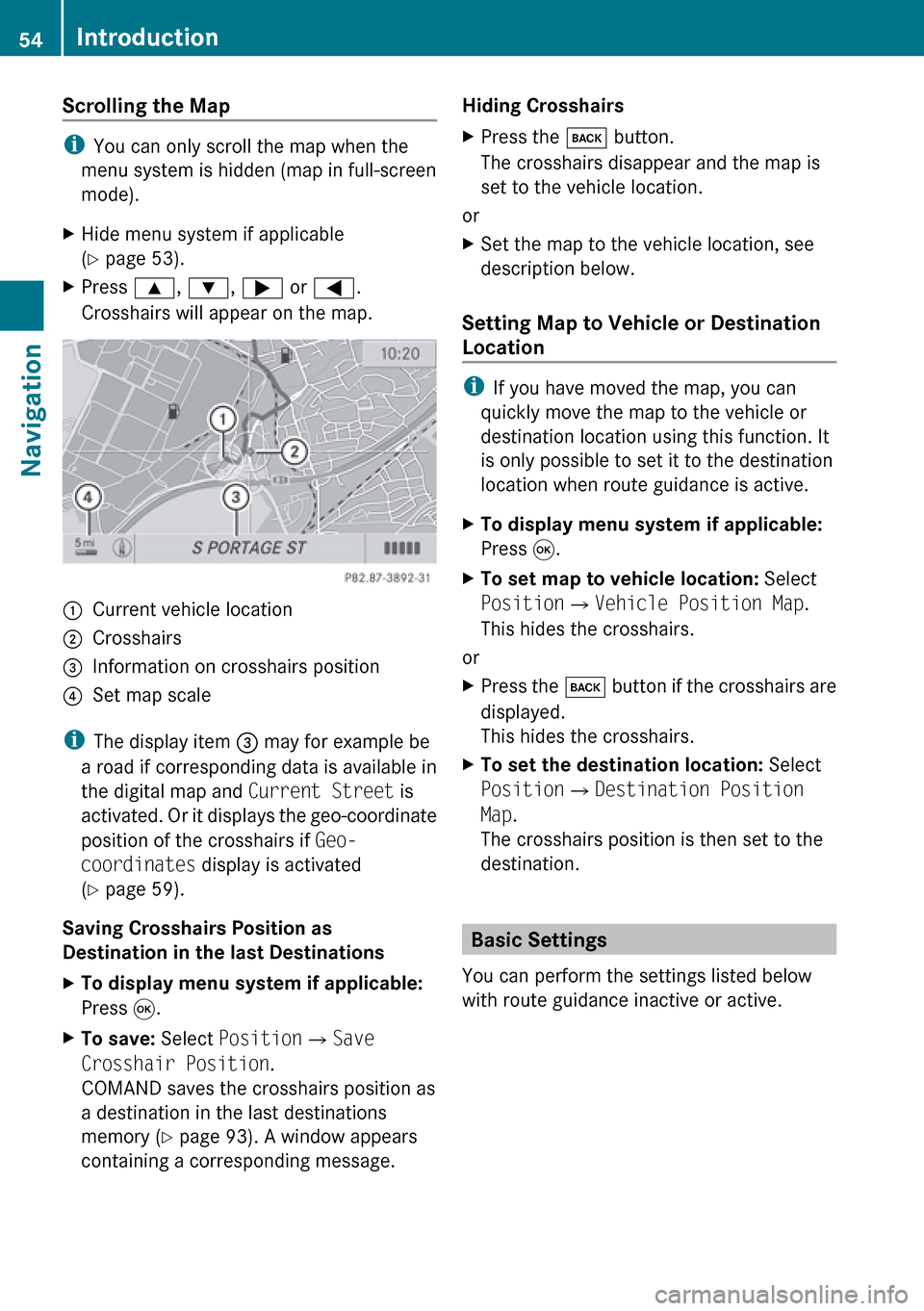
Crosshairs will appear on the map.1Current vehicle location2Crosshairs3Information on crosshairs position4Set map scale
i The display item 3 may for example be
a road if corresponding data is available in
the digital map and Current Street is
activated. Or it displays the geo-coordinate
position of the crosshairs if Geo-
coordinates display is activated
( Y page 59).
Saving Crosshairs Position as
Destination in the last Destinations
XTo display menu system if applicable:
Press 9.XTo save: Select Position £Save
Crosshair Position .
COMAND saves the crosshairs position as
a destination in the last destinations
memory ( Y page 93). A window appears
containing a corresponding message.Hiding Crosshairs XPress the k button.
The crosshairs disappear and the map is
set to the vehicle location.
or
XSet the map to the vehicle location, see
description below.
Setting Map to Vehicle or Destination
Location
i If you have moved the map, you can
quickly move the map to the vehicle or
destination location using this function. It
is only possible to set it to the destination
location when route guidance is active.
XTo display menu system if applicable:
Press 9.XTo set map to vehicle location: Select
Position £Vehicle Position Map .
This hides the crosshairs.
or
XPress the k button if the crosshairs are
displayed.
This hides the crosshairs.XTo set the destination location: Select
Position £Destination Position
Map .
The crosshairs position is then set to the
destination.
Basic Settings
You can perform the settings listed below
with route guidance inactive or active.
54IntroductionNavigation
Page 60 of 224
Deleting a Block AreaXTo select the area you want to delete:
Press 9 or : .XSelect Options £Delete .
You will be prompted to confirm that you
wish to delete the block area.XSelect Yes or No.
If you select Yes COMAND deletes the
entry. A message will be displayed.
Saving an Off-road Route
If this function is switched on, an Off-road
route is recorded and stored.
i The recording function works only if the
vehicle is located in an area away from
digitized roads.
Switching the Function On/Off
XShow the menu system, if necessary
( Y page 53).XSelect Navi£Save Off-road Route .XSelect Save Off-road Route in the
submenu.
Depending on the previous state, switch
the option on Ç or off c.
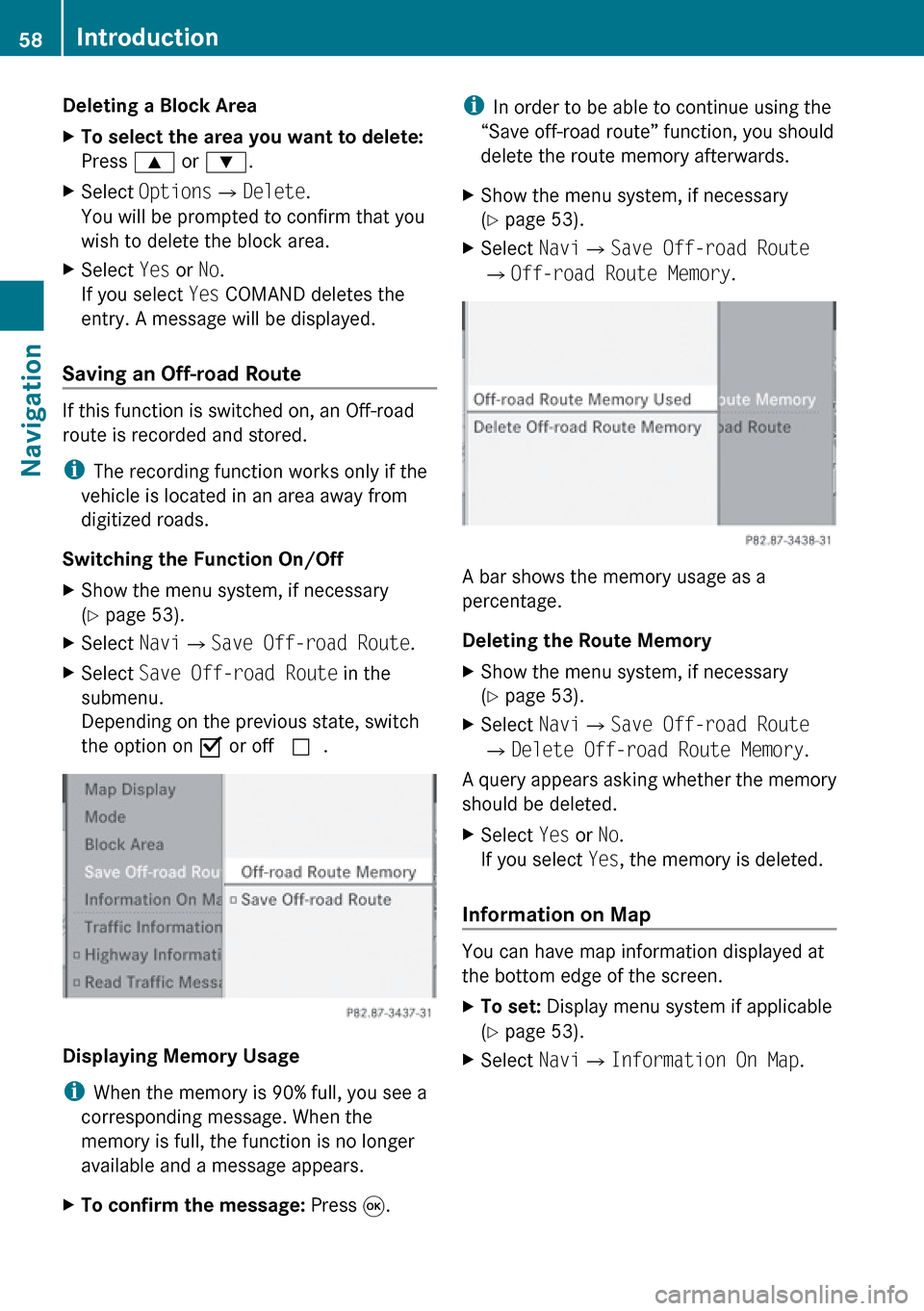
Displaying Memory Usage
i When the memory is 90% full, you see a
corresponding message. When the
memory is full, the function is no longer
available and a message appears.
XTo confirm the message: Press 9.i
In order to be able to continue using the
“Save off-road route” function, you should
delete the route memory afterwards.XShow the menu system, if necessary
( Y page 53).XSelect Navi£Save Off-road Route
£ Off-road Route Memory .
A bar shows the memory usage as a
percentage.
Deleting the Route Memory
XShow the menu system, if necessary
( Y page 53).XSelect Navi£Save Off-road Route
£ Delete Off-road Route Memory .
A query appears asking whether the memory
should be deleted.
XSelect Yes or No.
If you select Yes, the memory is deleted.
Information on Map
You can have map information displayed at
the bottom edge of the screen.
XTo set: Display menu system if applicable
( Y page 53).XSelect Navi£Information On Map .58IntroductionNavigation
Page 62 of 224
“None” Menu Option
Map with display switched off
1Currently set map orientation
iIn the Move Map function you will see
other data depending on crosshairs
position, for example a road name if the
digital map supports this data.
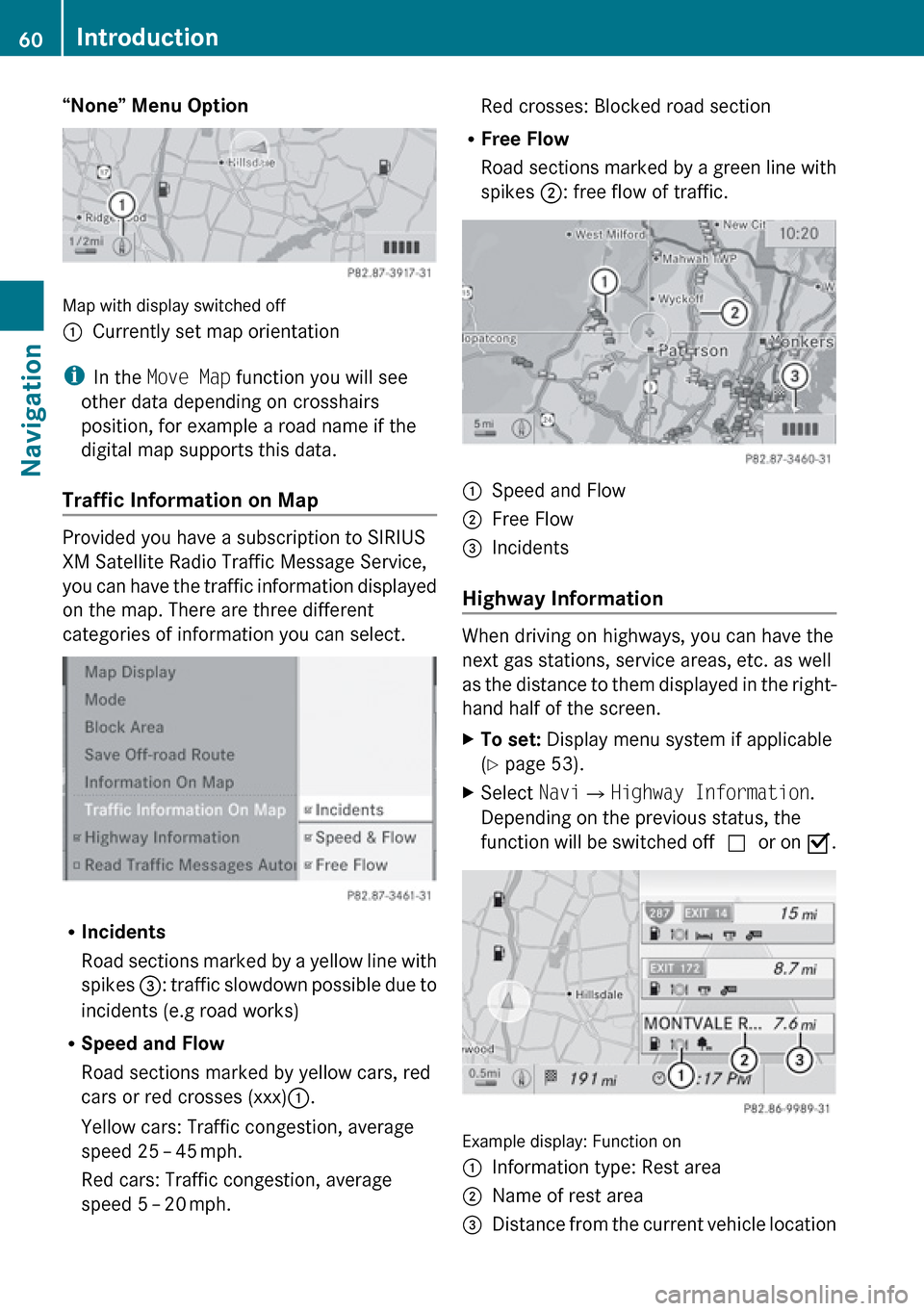
Traffic Information on Map
Provided you have a subscription to SIRIUS
XM Satellite Radio Traffic Message Service,
you can have the traffic information displayed
on the map. There are three different
categories of information you can select.
R Incidents
Road sections marked by a yellow line with
spikes =: traffic slowdown possible due to
incidents (e.g road works)
R Speed and Flow
Road sections marked by yellow cars, red
cars or red crosses (xxx) :.
Yellow cars: Traffic congestion, average
speed 25 – 45 mph.
Red cars: Traffic congestion, average
speed 5 – 20 mph.
Red crosses: Blocked road section
R Free Flow
Road sections marked by a green line with
spikes ;: free flow of traffic.1Speed and Flow2Free Flow3Incidents
Highway Information
When driving on highways, you can have the
next gas stations, service areas, etc. as well
as the distance to them displayed in the right-
hand half of the screen.
XTo set: Display menu system if applicable
( Y page 53).XSelect Navi£Highway Information .
Depending on the previous status, the
function will be switched off cor on Ç.
Example display: Function on
1Information type: Rest area2Name of rest area3Distance from the current vehicle location60IntroductionNavigation
Page 71 of 224
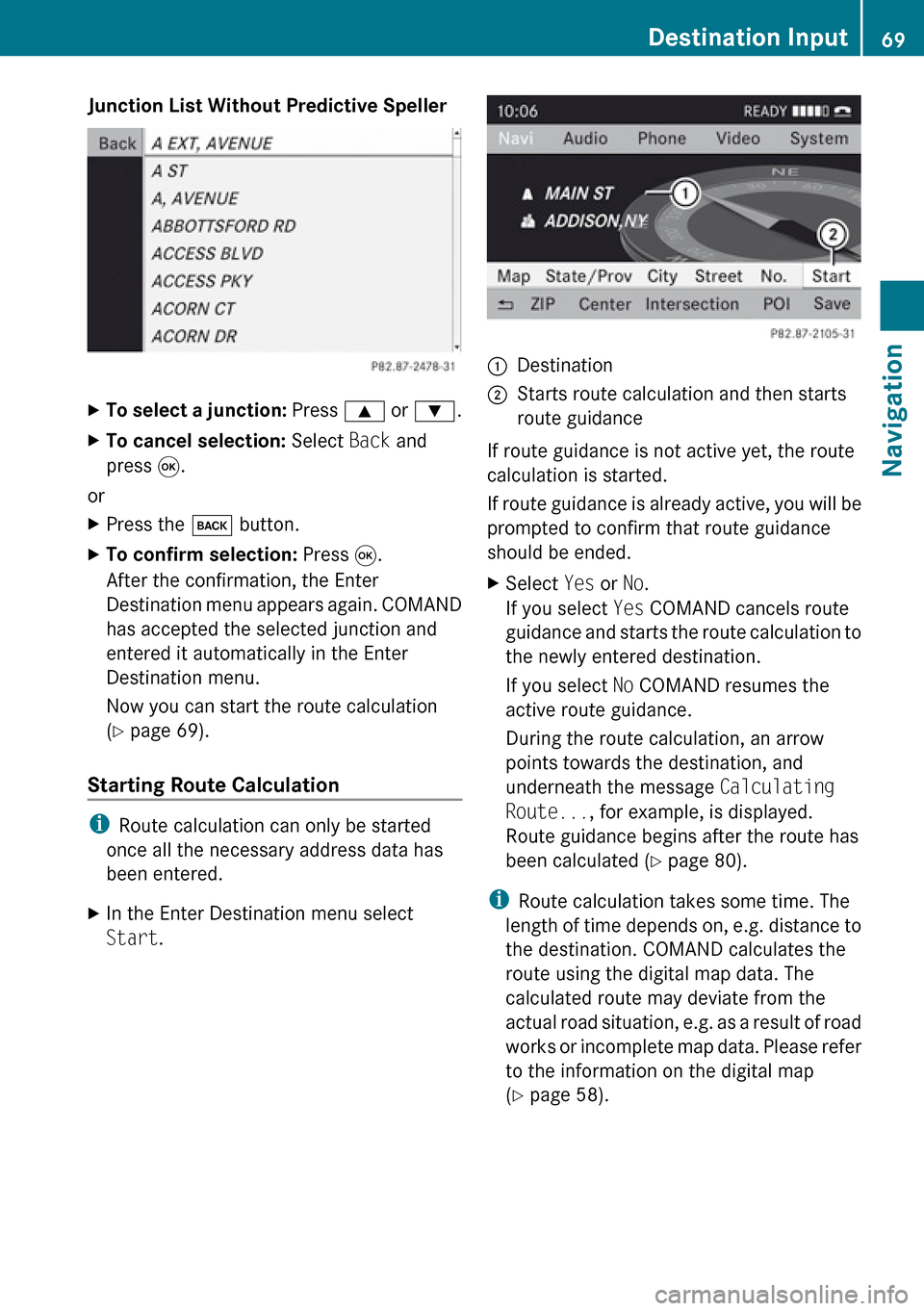
Junction List Without Predictive SpellerXTo select a junction: Press 9 or : .XTo cancel selection: Select Back and
press 9.
or
XPress the k button.XTo confirm selection: Press 9.
After the confirmation, the Enter
Destination menu appears again. COMAND
has accepted the selected junction and
entered it automatically in the Enter
Destination menu.
Now you can start the route calculation
( Y page 69).
Starting Route Calculation
i
Route calculation can only be started
once all the necessary address data has
been entered.
XIn the Enter Destination menu select
Start .1Destination2Starts route calculation and then starts
route guidance
If route guidance is not active yet, the route
calculation is started.
If route guidance is already active, you will be
prompted to confirm that route guidance
should be ended.
XSelect Yes or No.
If you select Yes COMAND cancels route
guidance and starts the route calculation to
the newly entered destination.
If you select No COMAND resumes the
active route guidance.
During the route calculation, an arrow
points towards the destination, and
underneath the message Calculating
Route... , for example, is displayed.
Route guidance begins after the route has
been calculated ( Y page 80).
i
Route calculation takes some time. The
length of time depends on, e.g. distance to
the destination. COMAND calculates the
route using the digital map data. The
calculated route may deviate from the
actual road situation, e.g. as a result of road
works or incomplete map data. Please refer
to the information on the digital map
( Y page 58).
Destination Input69NavigationZ
Page 73 of 224
Destination Memory List without
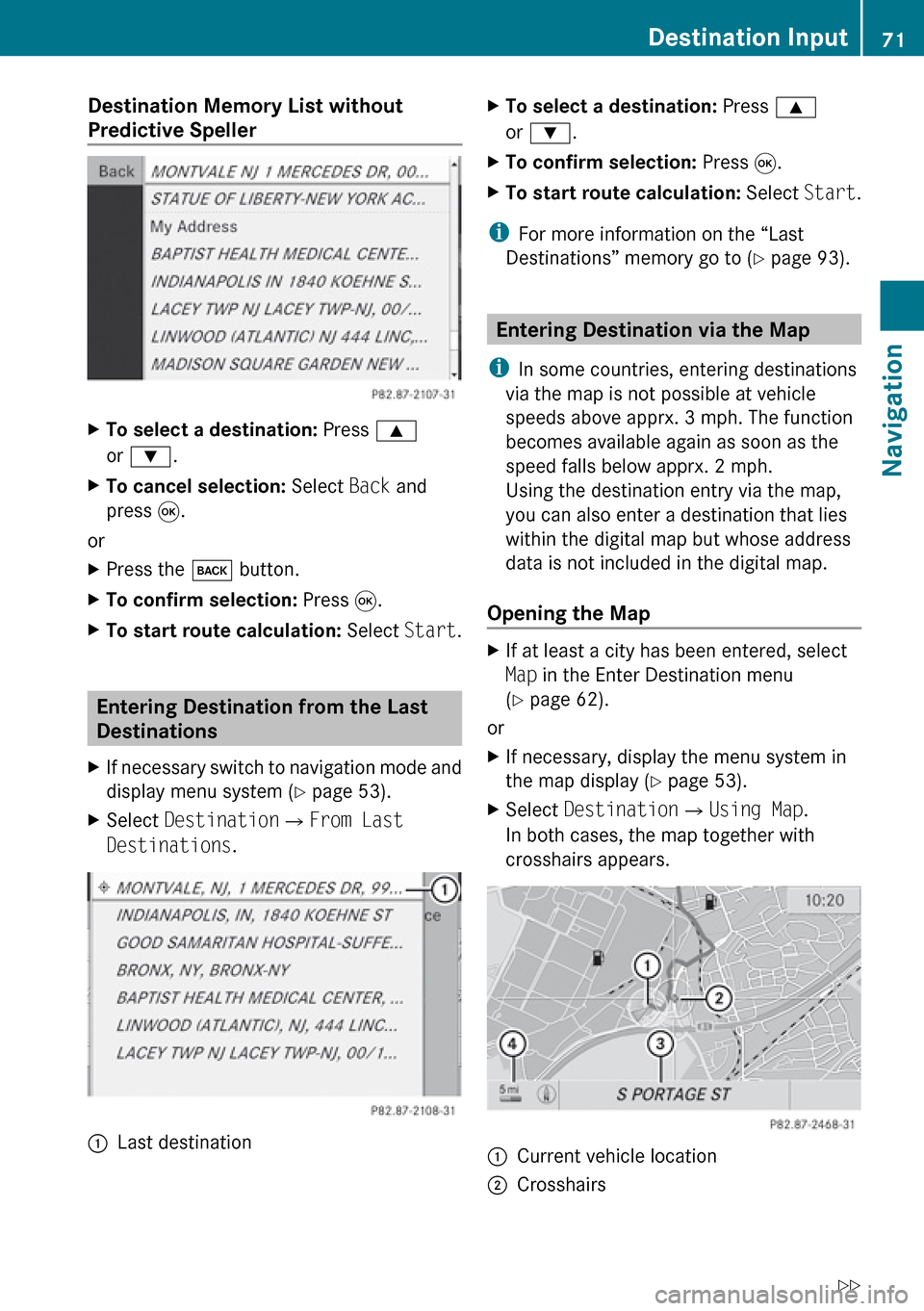
Predictive SpellerXTo select a destination: Press 9
or : .XTo cancel selection: Select Back and
press 9.
or
XPress the k button.XTo confirm selection: Press 9.XTo start route calculation: Select Start.
Entering Destination from the Last
Destinations
XIf necessary switch to navigation mode and
display menu system ( Y page 53).XSelect Destination £From Last
Destinations .1Last destinationXTo select a destination: Press 9
or : .XTo confirm selection: Press 9.XTo start route calculation: Select Start.
i
For more information on the “Last
Destinations” memory go to ( Y page 93).
Entering Destination via the Map
i In some countries, entering destinations
via the map is not possible at vehicle
speeds above apprx. 3 mph. The function
becomes available again as soon as the
speed falls below apprx. 2 mph.
Using the destination entry via the map,
you can also enter a destination that lies
within the digital map but whose address
data is not included in the digital map.
Opening the Map
XIf at least a city has been entered, select
Map in the Enter Destination menu
( Y page 62).
or
XIf necessary, display the menu system in
the map display ( Y page 53).XSelect Destination £Using Map .
In both cases, the map together with
crosshairs appears.1Current vehicle location2CrosshairsDestination Input71NavigationZ
Page 74 of 224
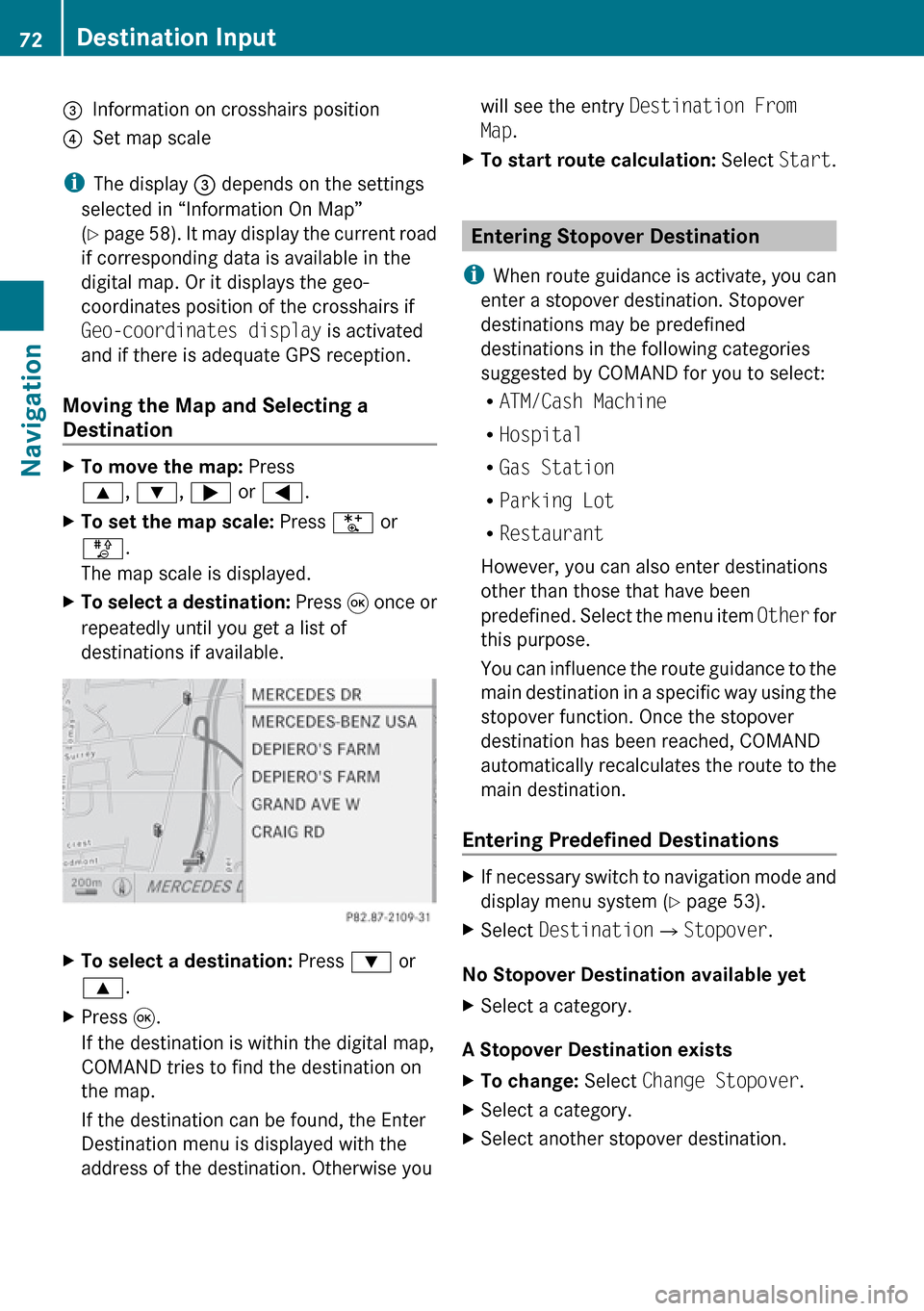
3Information on crosshairs position4Set map scale
iThe display 3 depends on the settings
selected in “Information On Map”
( Y page 58). It may display the current road
if corresponding data is available in the
digital map. Or it displays the geo-
coordinates position of the crosshairs if
Geo-coordinates display is activated
and if there is adequate GPS reception.
Moving the Map and Selecting a
Destination
XTo move the map: Press
9 , : , ; or = .XTo set the map scale: Press U or
T .
The map scale is displayed.XTo select a destination: Press 9 once or
repeatedly until you get a list of
destinations if available.XTo select a destination: Press : or
9 .XPress 9.
If the destination is within the digital map,
COMAND tries to find the destination on
the map.
If the destination can be found, the Enter
Destination menu is displayed with the
address of the destination. Otherwise youwill see the entry Destination From
Map .XTo start route calculation: Select Start.
Entering Stopover Destination
i When route guidance is activate, you can
enter a stopover destination. Stopover
destinations may be predefined
destinations in the following categories
suggested by COMAND for you to select:
R ATM/Cash Machine
R Hospital
R Gas Station
R Parking Lot
R Restaurant
However, you can also enter destinations
other than those that have been
predefined. Select the menu item Other for
this purpose.
You can influence the route guidance to the
main destination in a specific way using the
stopover function. Once the stopover
destination has been reached, COMAND
automatically recalculates the route to the
main destination.
Entering Predefined Destinations
XIf necessary switch to navigation mode and
display menu system ( Y page 53).XSelect Destination £Stopover .
No Stopover Destination available yet
XSelect a category.
A Stopover Destination exists
XTo change: Select Change Stopover .XSelect a category.XSelect another stopover destination.72Destination InputNavigation
Page 75 of 224
Selecting a Predefined Category
COMAND first searches for destinations
along the route within the selected category.
COMAND then searches for destinations in
the vicinity of the vehicle's location.
If COMAND is unable to find any destination,
a message to that effect will be displayed.XSelect OK.XIf necessary, select another category.
If COMAND finds destinations, a list is
displayed in the right-hand part of the
screen. Here you will find the stopover
destinations in the selected category,
sorted by distance from the current vehicle
location.
The list shows
R Name
R Information on the location of the stopover
destination in relation to the direction of
travel and the
R Current distance to the stopover
destination.
XTo choose a destination: Press 9
or : .XTo select a destination: Press 9.
The Enter Destination menu appears and
displays the address of the destination.XTo cancel a selection: Select Back.XTo start route calculation: Select Start.
Entering Another Destination as
Stopover Destination
XIf necessary, switch to navigation mode
and display menu system ( Y page 53).XSelect Destination £Stopover .XTo enter: Select OTHER.
Choose from:
R Address Entry
R From Memory
R From Last Destination
R From POIsXSelect a menu item.The rest of the destination entry will vary
depending on the selection made:
For the Address Entry option see:
Entering a destination via address
( Y page 62).
For the From Memory option see:
Entering a destination from the destination
memory ( Y page 70).
For the From Last Destination option see:
Entering a destination from the last
destinations ( Y page 71).
For the From POIs option see:
Entering a POI ( Y page 73).XTo start route calculation: Select Start.
Deleting Stopover Destination
An existing stopover destination can be
deleted.
XSwitch to navigation mode if necessary.XSelect Destination £Stopover
£ Delete Stopover .
COMAND deletes the stopover destination
and recalculates the route to the main
destination.
POI Input
Entering a POI in Local Area of
Destination
i It is only possible to enter a POI in the
local area of the destination when route
guidance is active.
XIn the map display with the menu system
displayed, select Destination£ From
POIs £Near Destination .XContinue by selecting the POI category
( Y page 74).POI Input73NavigationZ
Page 80 of 224
iIn the predictive speller 3 you can only
select characters that are currently
available. The set of characters that is
available depends on those already entered
and the data included in the digital map.
For the steps of
R Entering characters
R Deleting an entry
R Accepting first list entry
R Canceling an entry
proceed as described under “Main category
list with predictive speller” ( Y page 75).
Selecting a POI
To accept first list entry:XPress and hold 9 until the list appears
without speller.
or
If COMAND can match the characters
entered definitively to one entry, the address
entry appears automatically ( Y page 77).
You can display the full address of a POI at
any point while entering characters.
XPress 9 repeatedly until the list appears
without the speller.
or
XSelect ? and press 9.
The full address of the POI is displayed.XTo cancel selection: Press the k
button.
or
XSelect Back.
The POI list appears.XTo start route calculation: Select Start.
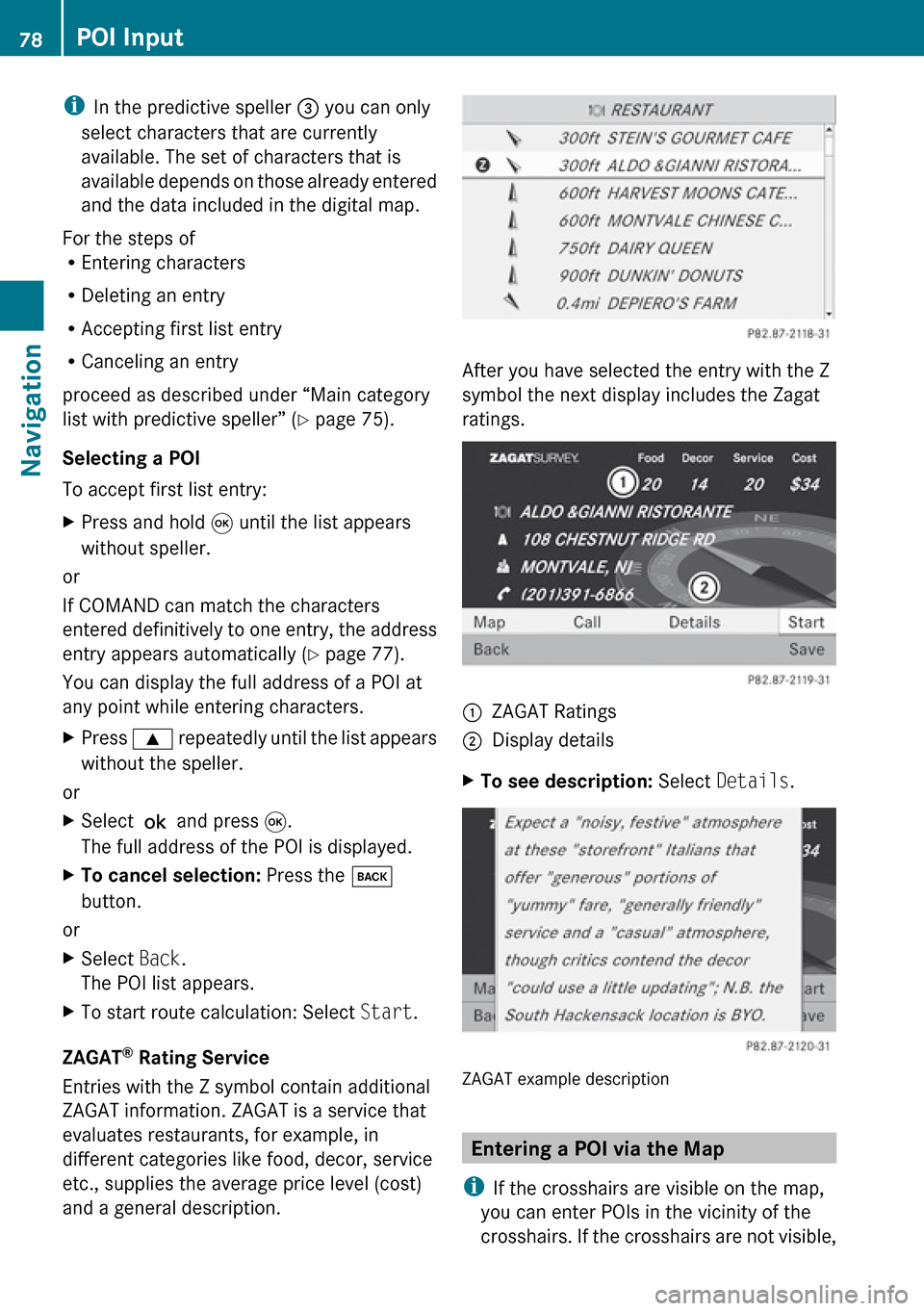
ZAGAT ®
Rating Service
Entries with the Z symbol contain additional
ZAGAT information. ZAGAT is a service that
evaluates restaurants, for example, in
different categories like food, decor, service
etc., supplies the average price level (cost)
and a general description.
After you have selected the entry with the Z
symbol the next display includes the Zagat
ratings.
1ZAGAT Ratings2Display detailsXTo see description: Select Details .
ZAGAT example description
Entering a POI via the Map
i If the crosshairs are visible on the map,
you can enter POIs in the vicinity of the
crosshairs. If the crosshairs are not visible,
78POI InputNavigation