Theme MERCEDES-BENZ CLS-Class 2012 W218 Comand Manual
[x] Cancel search | Manufacturer: MERCEDES-BENZ, Model Year: 2012, Model line: CLS-Class, Model: MERCEDES-BENZ CLS-Class 2012 W218Pages: 234, PDF Size: 6.74 MB
Page 19 of 234
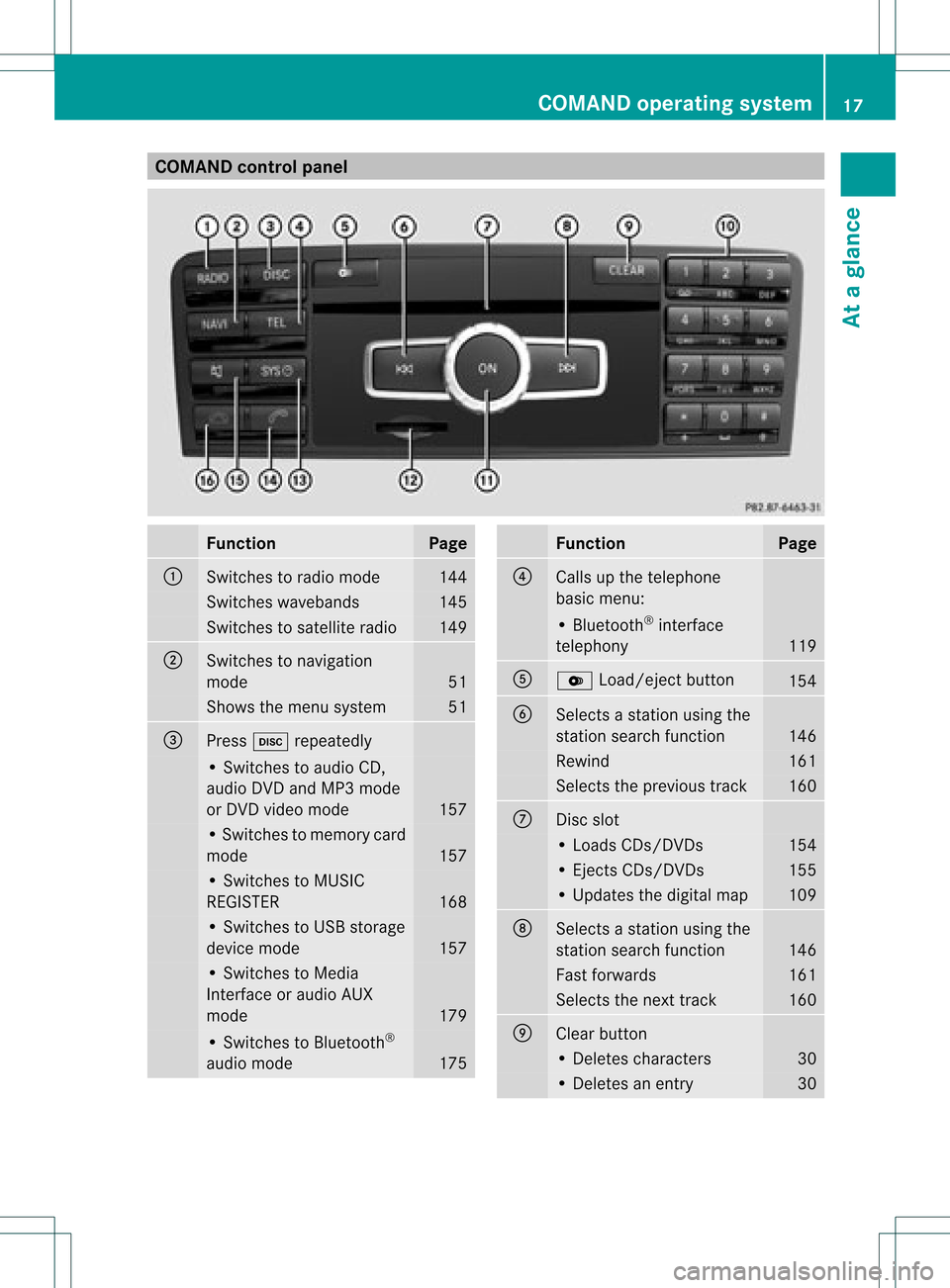
COMAN
Dcont rolpanel Funct
ion Pag
e :
Swit
ches toradio mode 14
4 Swit
ches waveb ands 14
5 Swit
ches tosat ellit eradio 14
9 ;
Swit
ches tonav igat ion
mod e 51
Sh
ows themen usyst em 51
=
Pre
ssh repeatedly •
Swit ches toaudio CD,
audio DVDa ndMP3 mode
or DVD video mod e 157
•
Swi tche sto mem orycard
mod e 157
•
Swi tche sto MUSI C
REG ISTER 168
•
Swi tche sto USB storage
de vic emod e 157
•
Swi tche sto Med ia
Inter face oraudio AUX
mod e 179
•
Swi tche sto Blu etoo th®
au dio mod e 175 Fu
nctio n Pag
e ?
Ca
lls up the telephone
ba sicm enu: •
Bluetoot h®
int erface
telephon y 119
A
V
Load/ej ectbutton 154
B
Select
sa stat ionusing the
stat ionsearch function 146
Rewind 161
Select
sthe previous track 160
C
Disc
slot •
Loads CDs/D VDs 154
•
Eject sCDs/D VDs 155
•
Updates thedigital map 109
D
Select
sa stat ionusing the
stat ionsearch function 146
Fast
forwards 161
Select
sthe nexttrac k 160
E
Clear
button •
Delet escharact ers 30
•
Delet esan ent ry 30COMAND
operatingsystem
17Ataglance
Page 21 of 234
In
the instructions, operatingsequ ences are
describe das follo ws:
X Press the$ button.
Ra dio mode isactivated.
X Select Radio by
slid ing VÆ andturning
cVd theCOMAND controller andpress
W toconfirm.
X Confirm Station List by
pressi ngW.
The station listapp ears. Butt
onsonthe COMA NDcontroller
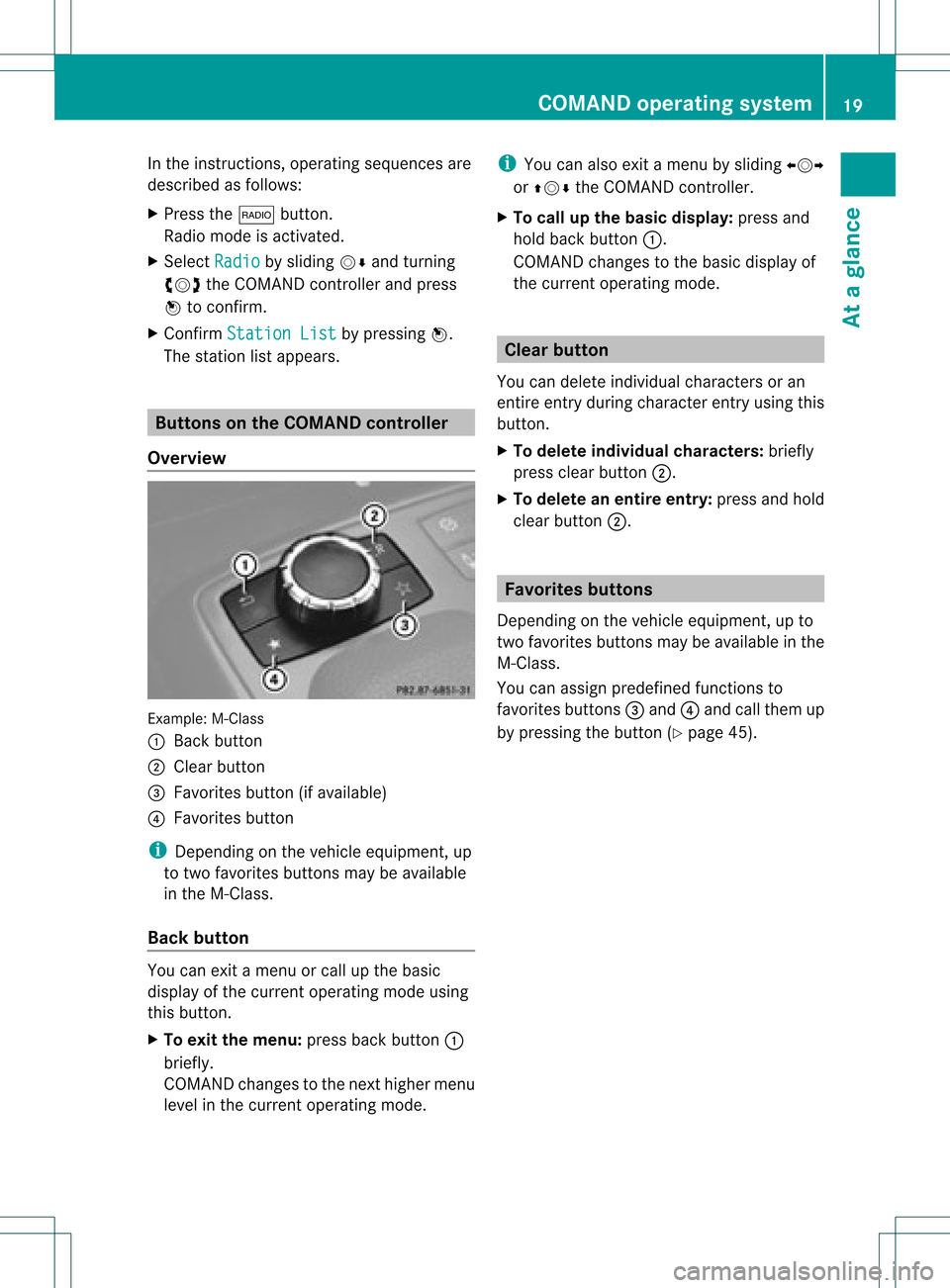
Overvie w Example:
M-Class
: Back button
; Clearbutton
= Favorites button(ifavai lable)
? Favorites button
i Depending onthe vehicle equipment, up
to two favorites buttonsmaybeavai lable
in the M-Cla ss.
Back button You
canexit amenu orcall upthe basi c
disp layofthe current operatingmode using
this button.
X To exit themenu: pressbackbutton :
briefl y.
COMAND changestothe next highe rmenu
level inthe curren toperatin gmode. i
You canalso exitamenu bysliding XVY
or ZVÆ theCOMAND controller.
X To call upthe basic displa y:press and
hold back button:.
COMAND changestothe basic display of
the curren toperatin gmode. Clear
button
You candelete individual charactersoran
ent ireent ryduring characterentryusing this
butt on.
X To delete individu alchar acter s:briefly
press clearbutton;.
X To delete anentir eentr y:press andhold
clear button;. Favorit
esbutt ons
Depen dingonthe vehicle equipment ,up to
two favorit esbutt ons may beavailable inthe
M-Class.
You canassign predefin edfunc tionsto
favorit esbutt ons =and ?and callthem up
by pressin gthe butt on(Ypage 45). COMAND
operatingsystem
19Ataglance
Page 25 of 234
Funct
ion Pag
e =
~
Rej
ectsor ends acall 12
0 6
Mak
esoracc eptsa call 12
1 Swit
ches tothered ial
mem ory 12
2 WX
Ad
jus tsthevolum e 33
8
Mut
es 33
?
=;
Sel
ect sa men u 12
2 9:
Sel
ect sa subm enuor
sc roll sth roug hlist s 12
2 a
Con
firms sele ction sand
fade sout mes sages 12
2 A
%
Bac
kor swit ches off voic e
co ntrol (see thesepar ate
oper atingins truct ions) Ope
ratin gth emu ltifu nct ion displa y G
WAR
NING
A driv er'satt entio nto theroad must always
be his/ herprim aryfocuswhen driving.For
your safety andthesafety ofothers, we
recommen dthat youpull over toasafe
location andstop before placing ortaking a
telephone call.Ifyou choose touse the
telephone whiledriving, pleaseusethehands-
free device andonly usethetelephone when
weather, roadandtraffic conditionspermit.
Some jurisdiction sprohibit thedriver from
using amobile phonewhiledriving avehicle.
Bear inmind thatataspeed ofjust 30mph
(approximately 50km/ h),your vehic leis cove
ringadistan ceof44 feet (approxim ately
14 m)every second.
X To select amenu: pressth e=
or ; button.
X To select asubm enuorscrol lth rou gh
th elist :pres sth e9 or: button.
X To select thenext menu up:pres sth e
% button.
X To call upsta nda rddisp lays:repeat edly
pres sth e% buttonunt ilth eto tal
dist ancerec orde rand thetrip met er
appear inthedisplay.
or
X Pres sand hold the% buttonunt ilth e
to tal dist ancerec orde rand thetrip met er
appear inthedisplay.
X To confir myour selecti on:pres sth e
a button.
X To confir mthemessag e:press the
a or% button. Menus
andsubmen us
The numbe rofm enus depends onthe vehicle
equipment. Menu Functions
andsubmenu s Navigation Navigation
systemdisplays Audio Select
sa stat ion
Operates theDVD changer ,
SD memory card,MUSIC
REGISTE R,USB device,
Bluetoot h®
audio andMedia
Int erface
Operates videoDVD Telephone Ac
cept s/rej ectsa call
Makes/ endsacall
Select sa phone bookentry
Redials Mult
ifunction steeringwheel
23Ataglance Z
Page 26 of 234
Navi
gationsyste mm enu
Rou teguid ance inactive The
display showstheroad onwhic hth e
veh icle iscur ren tlytravelin g,prov ided the
digit almap contain sit.
Rou teguid ance active The
display shows:
R thedist anceto thedest ination
R thedist anceto thenex tchange ofdirection
R current street
R the travel direction arrow
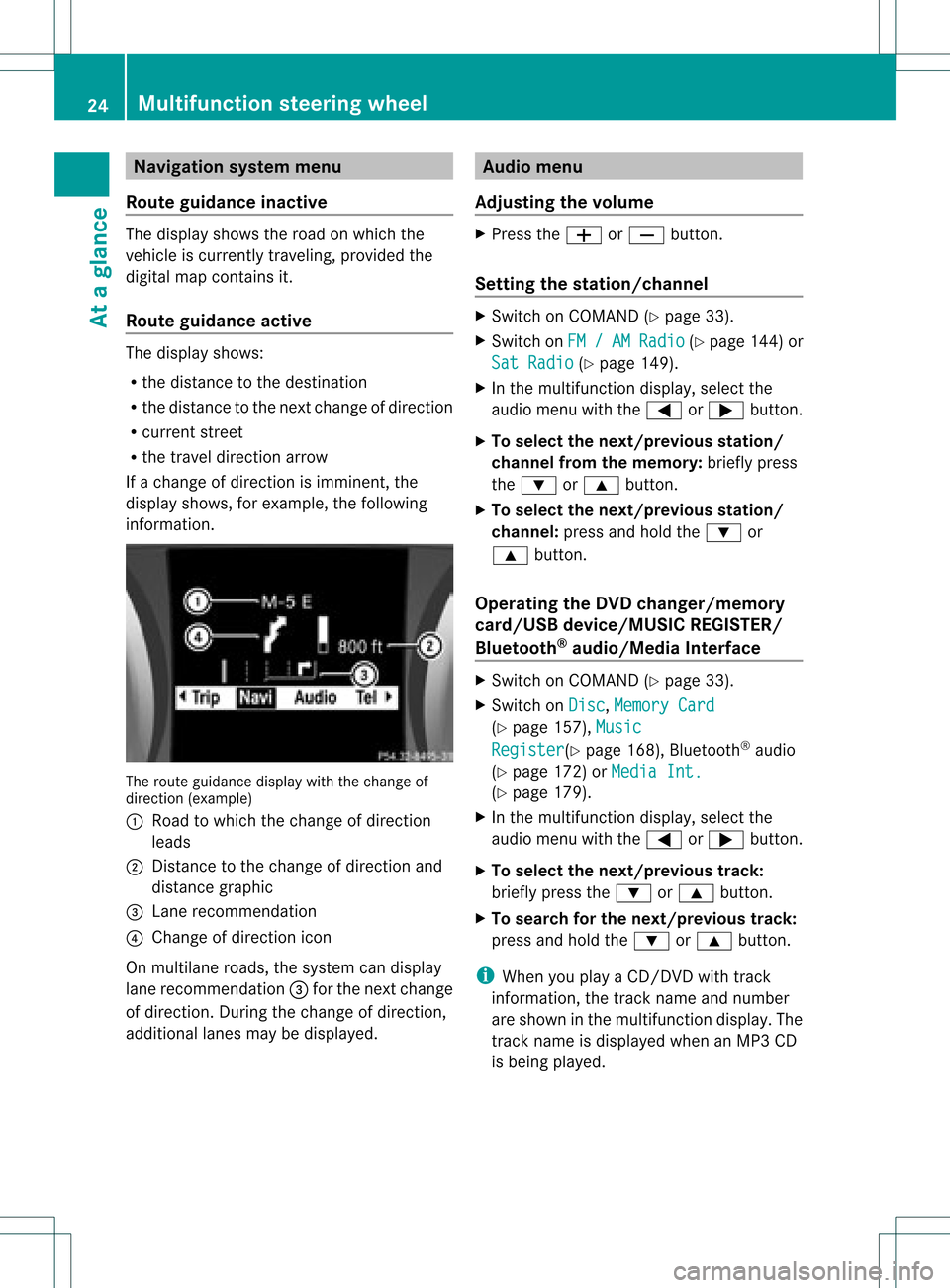
If achange ofdirection isimminent ,the
displa yshows, forexample, thefollowing
information . The
route guidance displaywiththechange of
direction (example)
: Road towhich thechange ofdirection
leads
; Distanc eto the change ofdirection and
distance graphic
= Lane recommen dation
? Change ofdirection icon
On multilane roads,thesystem candispla y
lane recommen dation=for the next change
of direction. Duringthechange ofdirection,
additional lanesmaybedispla yed. Audio
menu
Adjust ingthe volume X
Press theW orX button.
Setting thestat ion/c hannel X
Switch onCOMAND (Ypage 33).
X Switch onFM / AM Radio (Y
page 144)or
Sat Radio (Y
page 149).
X In the multifunction display,select the
audi omenu withthe= or; button.
X To selec tthe nex t/previo usstation /
chann elfrom thememory: brieflypress
the : or9 button.
X To selectthe nex t/previo usstation /
chann el:press andhold the: or
9 button.
Operating theDVD chang er/memo ry
card/US Bdevice/MU SICREG ISTER /
Blu etoot h®
au dio/M ediaInterface X
Swit chon COMA ND(Ypage 33).
X Swit chon Dis c ,
Mem ory Card (Y
page 157), Mus ic Reg
ister (Y
page 168), Bluet ooth®
audio
(Y page 172)or Med iaInt. (Y
page 179).
X In themult ifunction display, selectthe
audi omenu withthe= or; button.
X To selec tthe nex t/previo ustrack:
brie flypress the: or9 button.
X To searc hfor the next/previo ustrack:
press andhold the: or9 button.
i When youplaya CD/DVD withtrack
informa tion,thetrack name andnumbe r
are show nint he multifunction display.The
track name isdispla yedwhen anMP3 CD
is being played. 24
Multifunction
steeringwheelAtaglance
Page 28 of 234
The
number dialedisstored inthe
correspon dingcalllist.
i Ifthere areseveral numbers forthis
name, youseealist ofsub-ent ries.
X Press :or9 toselect the
phone number youwant.
X Press the6 or9 button againto
place thecall.
Redialing COMAND
savesthelast phone numbers or
names dialed.
X Press the=; buttonsto select the
Phone menu.
X Press the; button toopen thelistof
dialed numbers.
X Press the:9 buttonsto select the
desired nameorphone number.
X To connec tacall:press 6or9 onthe
mul tifunctio nstee ring wheel. Ope
ratin gCO MA ND Se
lecti ng am ainfunc tion
Ini tial situatio n You
wouldlike toswi tch from navigation
mode (addre ssentry menu) tothe system
settings, forexamp le.
X To switch onnavi gatio nmode: pressthe
Ø function button.
X To show themenu: pressW the COM AND
controll er.
X Sele ctDesti nation by
sliding VÆand
turning cVdtheCOM AND controll erand
pres sW toconfirm.
X Sele ctAddre ssEntry and
pres sW to
confirm.
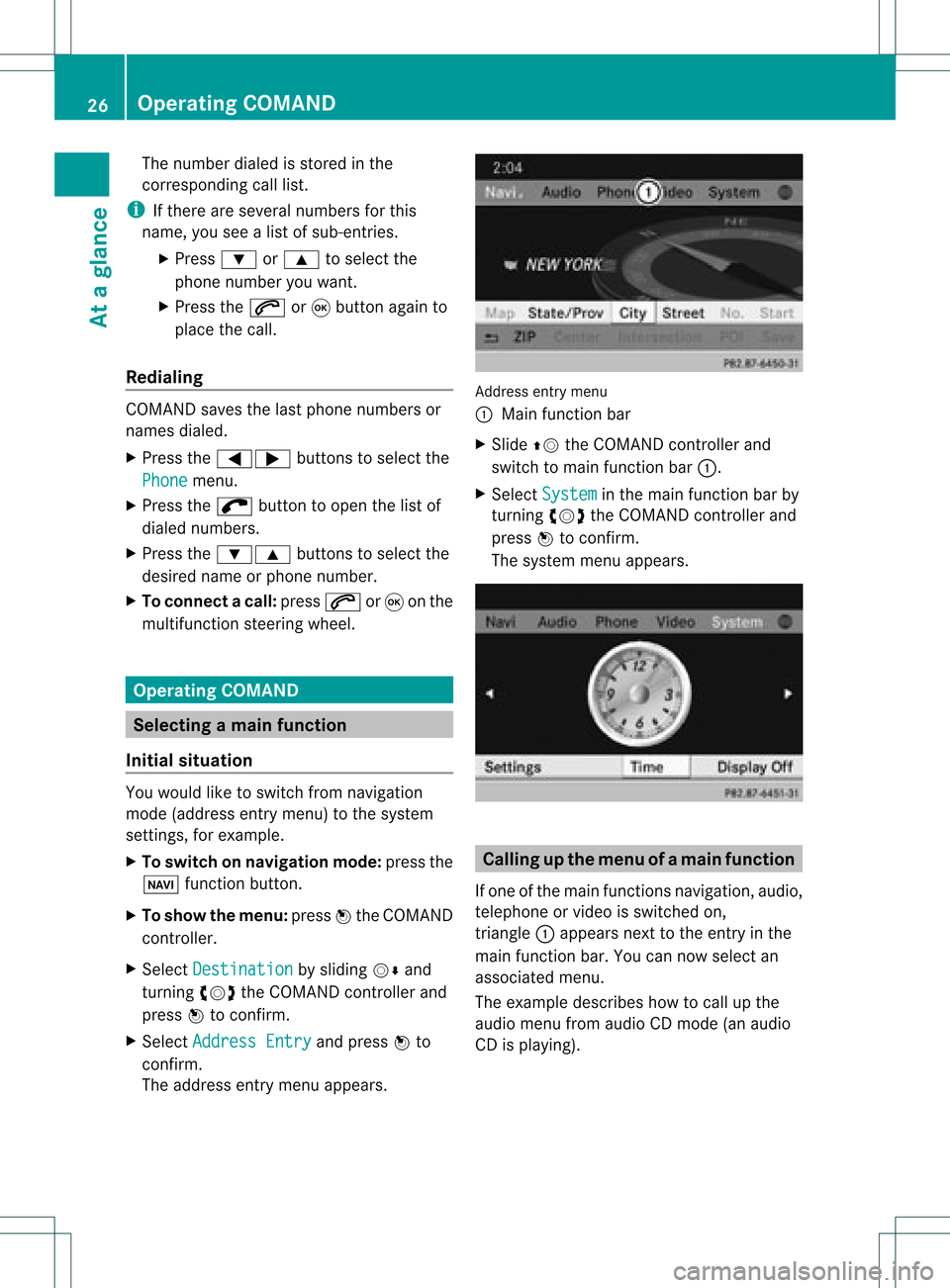
The address entry menu appears. Addre
ssentry menu
: Mai nfunc tion bar
X Sli de ZV theCOMA NDcontrol ler and
swit chtomain function bar :.
X Se lec tSys tem in
themain function bar by
tur nin gcVd theCOMA NDcontrol ler and
pre ssW toconfirm .
The systemmen uappear s. Calli
ngup themen uofam ainfunc tion
If one ofthe mainfunc tion snav igat ion,audio,
te leph oneor vide ois swit ched on,
tr iang le: appear sne xt to theen try in the
main function bar. Youcannowsele ctan
asso ciatedmen u.
The example describeshow tocall upthe
audio menufrom audio CDmod e(an audio
CD isplayin g). 26
Op
era ting COMAN DAtaglan ce
Page 36 of 234
Adj
usting thevolu meforphone calls You
canadjust thevol ume forhan ds-free
mod eduri ngate leph onecall .
X Turn theq control knob.
or
X Pre sstheW orX buttonon the
mult ifunction steer ing whee l. Adj
usting thesoun dsettings
Callin gup thesound menu You
canmak evari ous soun dset tings for the
diff eren taudio andvide osour ces.This mean s
th at itis poss ibletoset mor ebass forradio
mod eth an for audio CDmod e,for example .
You cancalluptheres pec tive soun dmen u
fr om themen uof thedesi redmod e.
The example describeshow tocall upthe
soun dmen uin radio mode.
X Pre ssthe$ function button.
The radio displayappear s.You willhear the
last stati on played onthelast waveb and. X
Se lec tSou nd by
slidi ngVÆ andturnin g
cVd theCOMA NDcontrol ler and press
W toconfirm .
You cannowset thetreble andbass orthe
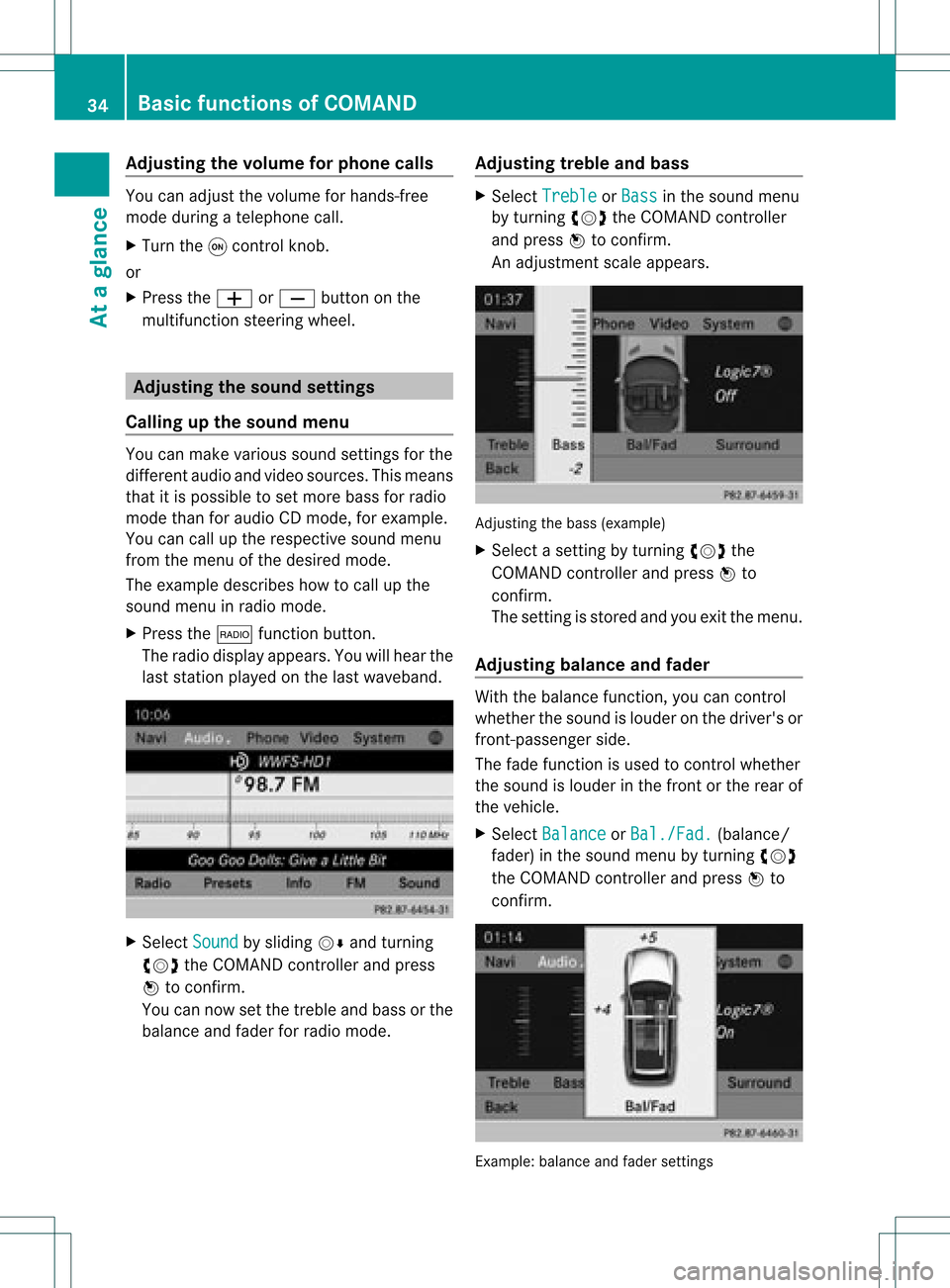
balan ceand fade rfor radio mode. Adjust
ingtreble andbass X
Select Treble or
Bass in
the sound menu
by turnin gcVd theCOMAND controller
and press Wtoconf irm.
An adjustmen tscal eap pea rs. Adju
sting thebass (exa mple)
X Sel ect asetti ngbyturni ngcVd the
CO MAND controllera nd pre ssW to
confi rm.
The setti ngisstor edand youexi tthe menu.
Adjust ingbalance andfader With
thebala nce funct ion,youcan cont rol
whether thesound islouder onthe driver's or
front -passenger side.
The fade funct ionisused tocont rolwhether
the sound islouder inthe front orthe rear of
the vehicle.
X Select Balance or
Bal./Fad. (bala
nce/
fader) inthe sound menubyturning cVd
the COMAND controller andpress Wto
confirm . Example:
balanceandfader settings 34
Basic
functions ofCOMANDAt aglance
Page 37 of 234
X
Sel ect aba lance setti ngbysliding XVY the
CO MAND controllera nd pre ssW to
confi rm.
X Sel ect afa de rs ett ing bysliding ZVÆthe
COMAND controller andpress Wto
con firm.
The settingisstor edand youexit themenu. Sur
round sound
General information If
your vehicle isequipped withtheharman/
kardon ®
Logic7 ®
surround soundsystem,
you can setthe optimum surround soundin
the vehicle interior.
The harman/ kardon®
Logic7 ®
surround
sound system isavailable forthe following
operatin gmodes:
R radio (FMonly)
R satellite radio
R audio CD
R audio DVD(MLP, dts,PCM andDolby
Digit alaudio format s)
R MP3 (including SDmemory cardandUSB
stor age device)
R Media Interface
R Bluetoot h®
audio mode
R video DVD(PCM, dtsand Dolby Digital
audio format s)
R AUX
Because someDVDscon tain both stereoand
multichan nelaudio format s,itmay be
nec essary toset the audio format
(Y page 163).
i The Logic7 ®
On func
tion creat esa
surround soundexperien cefor every
passenger whenplaying, forexample,
ster eorecor dings. Itenables optimum
playback ofmusic andfilms onCD, audio
DVD orvideo DVDwithmultichan nelaudio
format s,such asMLP, dtsorDolby Digital.
This results insound charact eristicslike those
intended bythe sound engineer
when theoriginal wasrecor ded.
i Ifyou select Logic7 ®
Off ,
all permissible
format sare played asstor edon the
medium. Duetothe design ofthe
passenger compartment,an optimum
audio experien cecann otbe guaranteed for
all passengers .
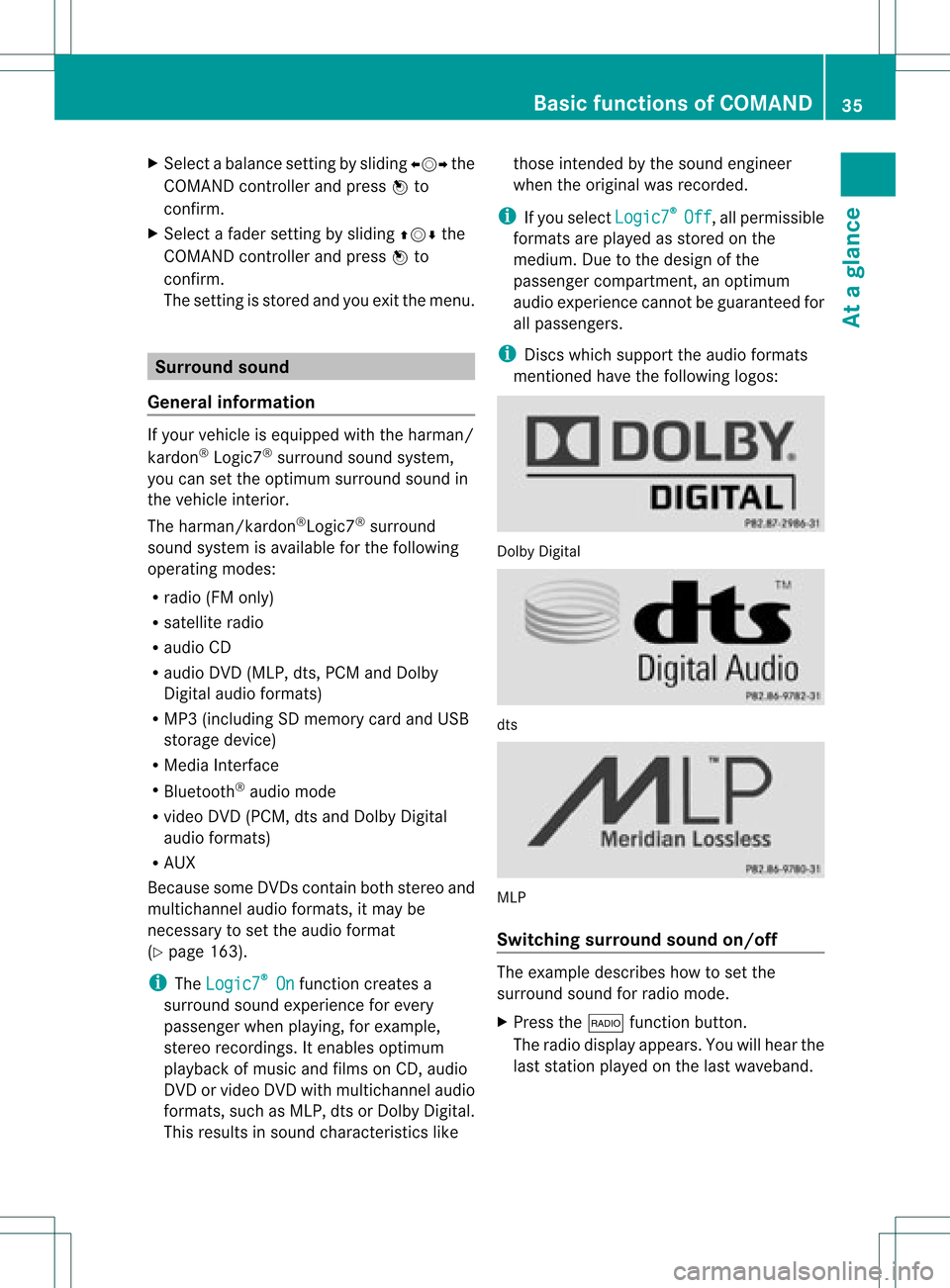
i Disc swhich support theaudio format s
ment ioned havethefollowing logos: Dolby
Digital dts
MLP
Switching surround sound on/off The
example describes howtoset the
surround soundforradio mode.
X Press the$ function button .
The radio display appears. Youwillhear the
last stationplayed onthe last waveband. Ba
sic functions ofCOMAND
35Ataglance Z
Page 38 of 234
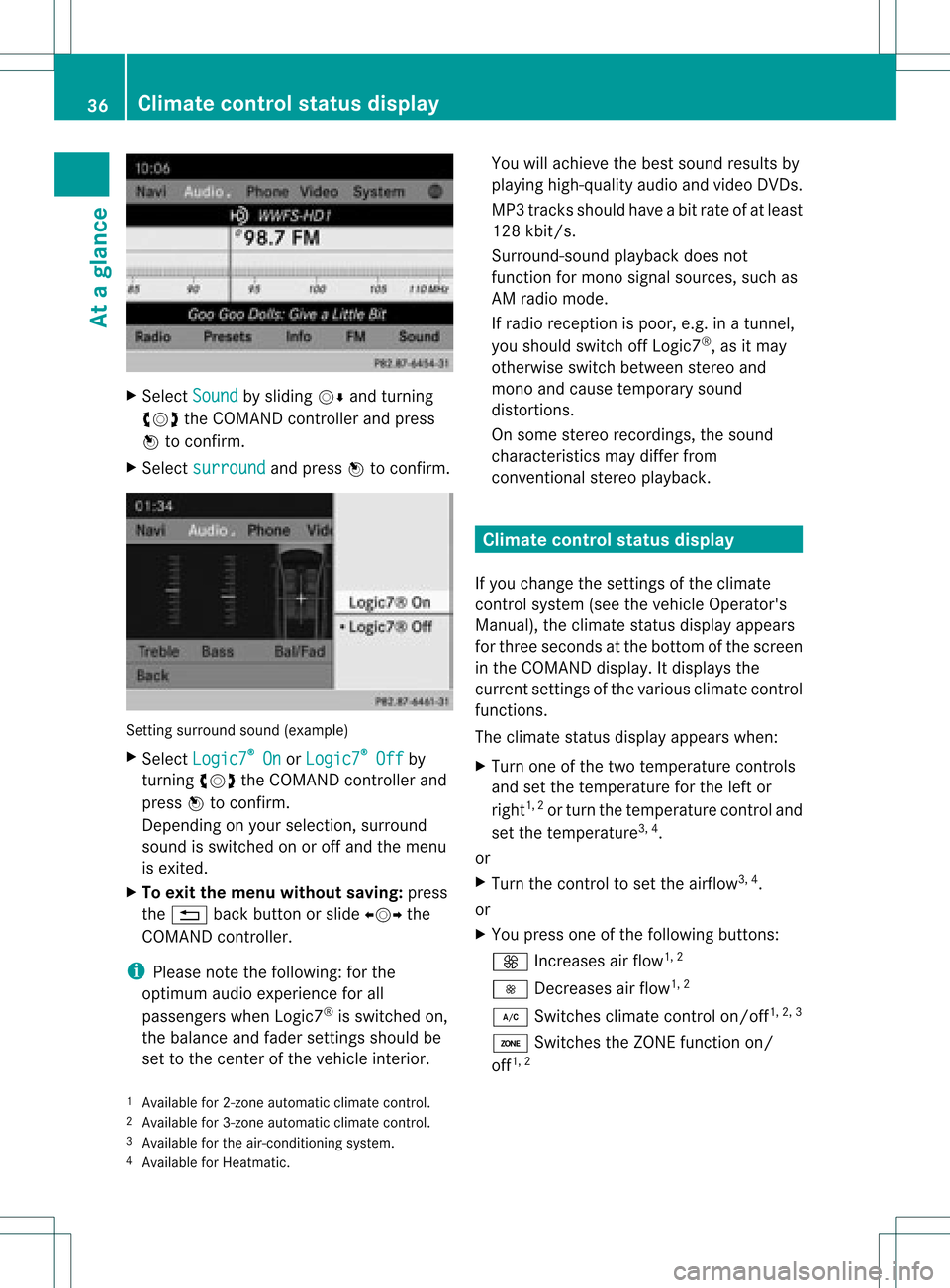
X
Sel ect Sound by
sliding VÆ andturni ng
cVd theCOMAND controllerand press
W toconfi rm.
X Sel ect surround and
pressW toconfi rm. Setting
surrou ndsou nd(examp le)
X Sel ect Logic7 ®
On or
Log ic7 ®
Off by
turni ngcVd theCOMAND controllerand
pre ssW toconfi rm.
Depe nding on your sel ecti on, surrou nd
sou ndissw itche don oroff and themenu
is exi ted.
X To exitthe men uwi thout saving:pre ss
the % back button orslide XVY the
CO MAND controller.
i Plea se note thefollowi ng: forthe
opti mum audio expe rience forall
pa sse nger swh en Log ic7®
is sw itche don,
the balance and fadersetti ngsshould be
set tothe center ofthe vehicleinter ior. Yo
uwi llach ieve the best sou ndresults by
pl ay ing high-q uality audio and video DVDs.
MP3 tracks shouldha ve ab itrat eof at least
128 kbit/s.
Surr ound- soundplayback doesnot
func tion formon osign alsourc es,such as
AM radio mode.
If radio receptio nispoor, e.g.inatunnel,
you should switchoffLogic7 ®
,as itmay
otherwise switchbetween stereoand
mono andcause temporary sound
distortions.
On some stereo recordings, thesound
characteristics maydiffer from
conven tionalstereo playback. Climate
controlstatusdisplay
If you change thesettings ofthe climate
cont rolsystem (seethevehicle Operator's
Manual ),the climate statusdisplayappea rs
for three seconds atthe bottom ofthe screen
in the COMAND display.Itdispla ysthe
current settings ofthe various climate control
function s.
The climate statusdisplayappea rswhen:
X Turn oneofthe two temperature controls
and setthe temperature forthe left or
right 1,
2
or turn thetemperature controland
set the temperature 3,
4
.
or
X Turn thecont roltoset the airflow 3,
4
.
or
X You press oneofthe followi ngbuttons:
K Increases airflow 1,
2
I Decreases airflow 1,
2
¿ Switches climatecontrolon/off 1,
2, 3
á Switches theZONE function on/
off 1,
2
1 Available for2-zon eautomatic climatecontrol.
2 Available for3-zon eautomatic climatecontrol.
3 Available forthe air-conditioning system.
4 Available forHeatmatic. 36
Cli
mat econ trol stat usdisplayAt aglanc e
Page 47 of 234
Acti
vating/d eactivating Blu eto oth ®
X Pre sstheW button.
The systemmen uappear s.
X Se lec tSet tin gs by
turnin gcVd the
COMA NDcontrol ler and pressW to
co nfirm .
X Se lec tAct iva teBluetooth and
press
W toconfirm .
This switches Blue tooth®
on O oroff ª. Set
ting thesys tem langua ge
This function allows youtodet erm inethe
lan guage forthemen udisp lays andthe
nav igat ionann oun cemen ts.T he navigation
announcemen tsare not availa bleinall
language s.Ifalanguage isnot availa ble,the
navigation announcemen tswill beinEnglish.
The selected language affectsthecharacters
availa bleforentr y.
When yousetthe system language ,the
language ofthe Voice Control System will
change accordingly. Ifthe selected language
is not supported bythe Voice Control System,
English willbeselected.
X Press theW button.
X Select Settings by
turning cVdthe
COMAND controller andpress Wto
confirm .
X Select Language and
press Wtoconfirm .
The listoflanguage sappea rs.The #dot
indicates thecurrent setting. X
Select thelanguage byturning cVdthe
COMAND controller andpress Wto
confirm .
COMAND loadstheselected language and
sets it. Assign
ingthe favorites button
This funct ionisavaila ble,e.g. forthe M-Class.
Depending onthe vehicle equipment, youcan
assign oneortwo favorites buttons.Theyare
located onthe left (one favorites button
installed) oron the left and right (twofavorites
buttons installed) besidetheCOMAND
cont roller (Ypage 19).
You canselect thefollowing predefined
funct ionsinamenu:
R Display On/Off :
you can switch the
displa yoff oron.
R Full Screen: 'Clock' :y
ou can show the
clock infull screen .
R Full Screen: 'Map' :y
ou can show the
map infull screen .
R Spoken Driving Tip :y
ou can callupthe
current drivingrecomm endation.
R Display Traffic Messages :y
ou can call
up traffic reports.
R Navigate Home :
you can start route
guidance toyour home address ifyou have
already enteredand saved theaddress
(Y page 57).
R Detour Menu :y
ou can callupthe Detour
menu andthen avoid asection ofthe route
and recalculate theroute (Ypage 82).
R Compass Screen :y
ou can callupthe
compass.
X To assign afavorite sbutton: pressthe
W button.
X Sele ctSettin gs by
sliding VÆandturning
cVd theCOM AND controll erand press
W toconfirm. As
sig nin gthe favorite sbutton
45Systemsettin gs
Page 53 of 234
fact
that certain menuitemsaregray edout
and cannot besele cted.
The followi ngentries arenot possi ble,for
examp le:
R entering thedesti nation cityand street
R entering adesti nation viathe map
R entering points ofinterest inthe vicini tyof
a city orvia aname search
R edi ting entries
R usi ng the numbe rkeyp adfor dire ctentry
Other entries arepossi ble,such asentering
poi nts ofinterest inthe vicini tyof the
desti nation orcurrent position.
Address escan beentered viathe Voice
Control System (seethesepa rateOpera ting
Instructions) whilethe vehi cleisin motion. Swi
tchin gto navig ation mode
Option 1
X Press theØ function button.
The map isdisp layed with themenu either
show norhidden .
Opt ion 2
X Selec tNavi in
the main function barby
slidin gZV andturnin gcVd theCOMA ND
con troller andpress Wtocon firm .
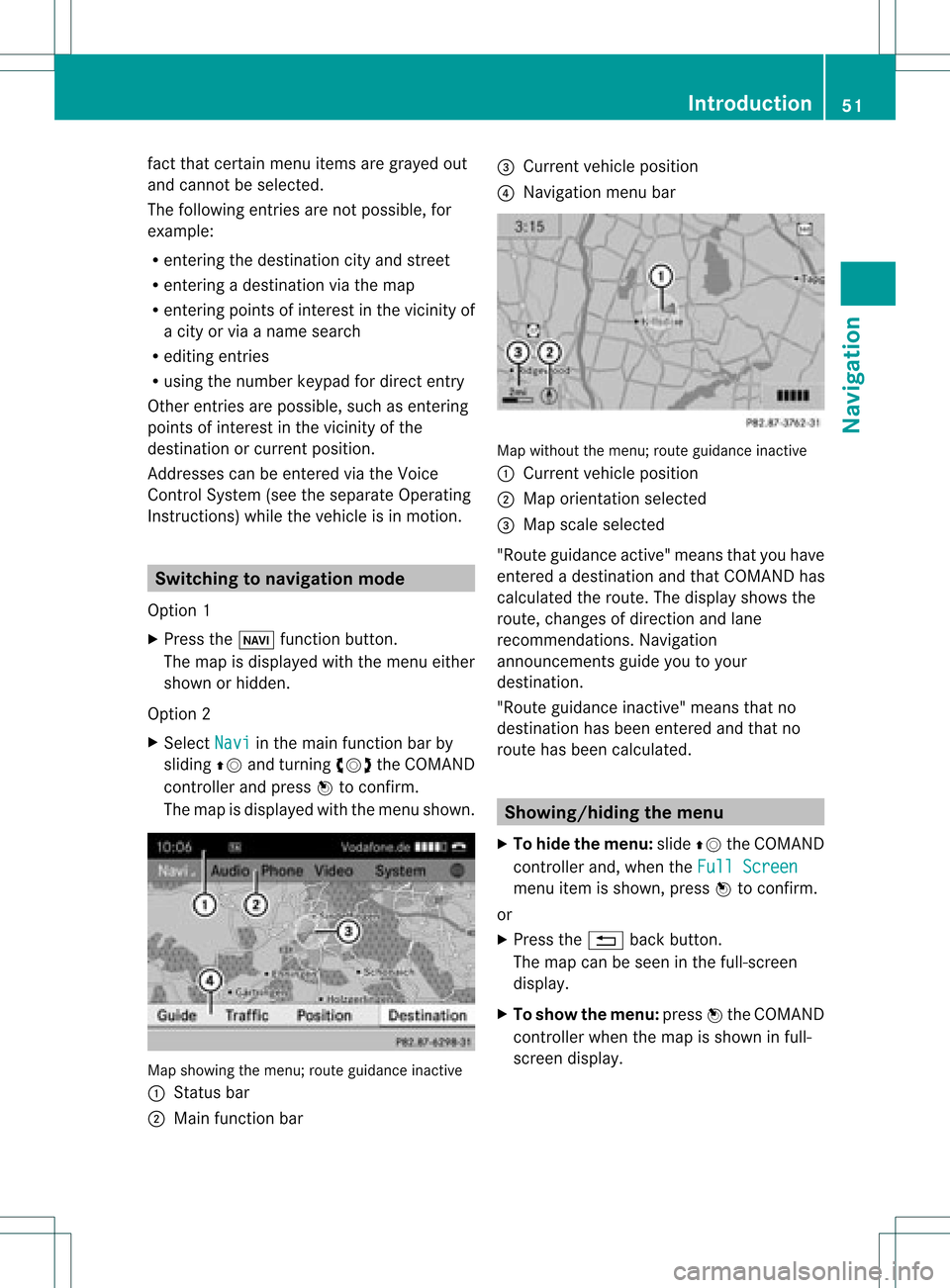
The map isdisplayed withthemen ushown . Map
showin gthe men u;rout eguidan ceinac tive
: Status bar
; Main function bar =
Curre ntveh icle posit ion
? Navi gation men ubar Map
withoutthemen u;rout eguidan ceinac tive
: Curre ntveh icle posit ion
; Map orientatio nselected
= Map scale select ed
"Route guidance active"meansthatyouhave
ent ered adestin ationandthat COMAND has
calculated theroute. Thedisplay showsthe
route, changes ofdirect ionand lane
recom mendat ions.Navigation
announ cementsguide youtoyour
destin ation.
"Route guidance inactive"means thatno
destin ationhasbeen entered andthat no
route hasbeen calculated. Showing/hiding
themenu
X To hide themenu: slideZVtheCOMAND
con troller and,when theFull Screen menu
itemisshown, pressWtocon firm.
or
X Press the% backbutton .
The map canbeseen inthe full-scr een
display.
X To show themenu: pressWthe COMAND
con troller whenthemap isshown infull-
screen display. Introd
uction
51Navigation Z