Theme MERCEDES-BENZ CLS-Class 2012 W218 Comand Manual
[x] Cancel search | Manufacturer: MERCEDES-BENZ, Model Year: 2012, Model line: CLS-Class, Model: MERCEDES-BENZ CLS-Class 2012 W218Pages: 234, PDF Size: 6.74 MB
Page 54 of 234
Basi
cse ttin gs Route
settin gs
Se ttin groute typeandroute options Yo
ucan select the followi ng rou tetyp es:
R Fas tRou te :C
OMAND calculatesaroute
with theshortest (minimized) journeytime.
R Dynamic TrafficRoute :
same route
type asFast Route .I
na ddition ,COMAND
tak esany trafficreport sreceiv edwith
regard tothe route intoaccoun tduring
route guidance. Thenavigat ionsystem can
help youavoid atraf ficjam, forexample, by
recalc ulating theroute.
R Dynami cTRF. Route AfterRequest :
same routetypeasDynami cTraffi c Route .
Aft errecalc ulating theroute,
COMAND asksyouwhether youwish to
adopt thenew route orwhether youwould
prefer tocon tinue along theoriginal route.
R Eco Route :
the Eco Route (econ
omic
route) isavariant ofthe Fast Route route
type. COMAND willattempt tominimiz ethe
journ eydistan ceatthe expen seofaslightly
incr eased journeytime.
R Short Route :C
OMAND calculatesaroute
with theshortest possible(minimized)
route distance.
i Onvery long routes, the"Eco Route" more
or less corresponds tothe "Fast Route"
route type.
X To call upthe route settings menu:press
the Ø function button.
X Select Navi in
the main function barby
slidi ngZV andturning cVdtheCOMAND
cont roller andpress Wtoconfirm.
X Select Route Settings and
press Wto
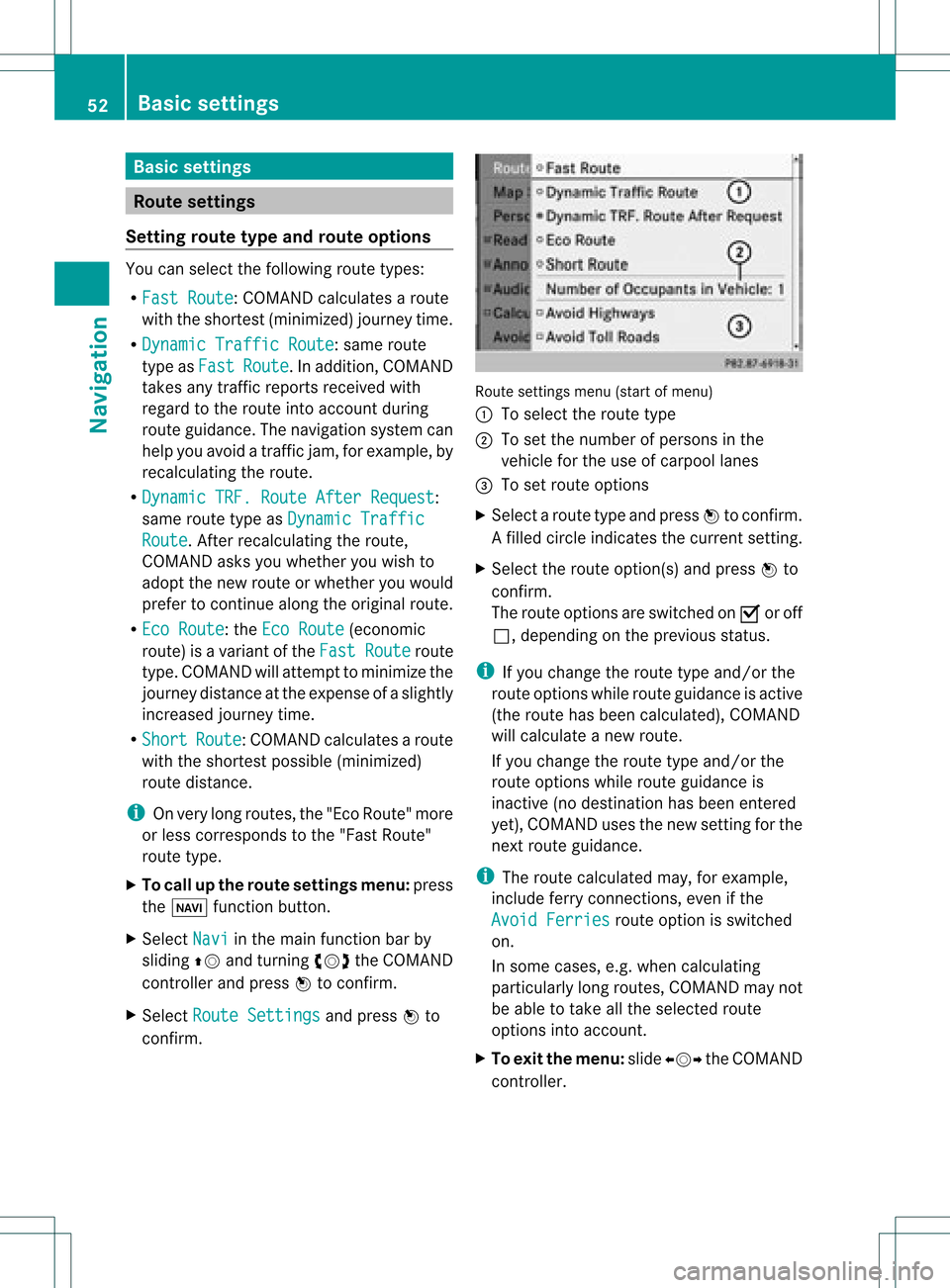
confirm. Route
settings menu(startofmenu)
: Toselect theroute type
; Toset the number ofpersons inthe
vehicle forthe use ofcarpool lanes
= Toset route options
X Select aroute typeandpress Wtoconfirm.
Af illed circle indic ates thecurr entsetting.
X Selec tthe route option(s) andpress Wto
confirm .
The route options areswitched onO oroff
ª, depending onthe previous status.
i Ifyou change theroute typeand/or the
route options whileroute guidanceisactive
(the route hasbeen calculated), COMAND
will calculate anew route.
If you change theroute typeand/or the
route options whileroute guidanceis
inactive (nodestination hasbeen entered
yet), COMAND usesthenew settin gfor the
next route guidance.
i The route calculated may,forexample,
include ferryconnections, evenifthe
Avoid Ferries route
option isswitched
on.
In some cases, e.g.when calculating
particularly longroutes, COMAND maynot
be able totake allthe selected route
options intoaccount.
X To exit themenu: slideXVY theCOMAND
cont roller. 52
Basic
settingsNavigat ion
Page 56 of 234

Ent
erin gad esti nation byaddress
Intr odu ction When
enterin gan addres sas thedest ination,
you have thefollo wing options:
R ent erin gth est ate/ province,cit y/ZI Pcod e
and street
R ent erin gth est ate/ province,cit yand
cen ter
R ent erin gth est ate/ province,cit y/z ipcod e,
st reet andhouse number
R ent erin gth est ate/ province,cit y/z ipcod e,
st reet andinters ect ion
R ent erin gth est ate/ province,street ,cit y
and house number
R ent erin gth est ate/ province,street and
house number
R ent erin gth est ate/ province,street and
int ers ect ion
i You canonlyent erthose cities, street s,
zip cod esetc. that are stored inthedigit al
map. Thismean sth at for som ecoun tries,
you cannote nter zipcod es,forexa mpl e.
Ex ample :en teri nganaddres s The
followi ng isastep -by-step exampl eof
how toente rana ddress. Thedestin ation
address isas follows:
New York (state)
New York (city)
40 Broadway
Of course, youcan freely enterinfor mation
like state/prov ince,city,str eet and house
number, forexample toent eryour home
address.
Calling upthe address entrymenu X
To switch onnavigat ionmode: pressthe
Ø function button.
X To show themenu: pressWthe COMAND
con troller. X
Select Dest. by
turn ingcVd theCOMAND
con troller and pressin gW tocon firm.
X Select Addres sEntry and
press Wto
con firm.
The address entrymenu appears. Ifyou
have previously entered adestin ation, this
will beshown inthe display. Addres
sent rymenu
Depen dingonthe sequenc ein which you
ent erthe address andonthe data statusof
the digital map,some menu itemsmaynotbe
available atall ormay notyetbeavailable.
Ex ample: afterentering state/prov ince,the
menu itemsMap ,
No. ,
Center ,
Inters ection ,
Save and
Start are
not
available; orthe menu itemZIP is
not
available ifthe digital mapdoes nothave any
zip codes.
Selecting astate/ province X
Sel ect State/Prov in
the addre ssentry
menu byturning cVd theCOMAND
contro ller and pressW toconfi rm.
Am enu with theavailable listsappears: 54
Destination
entryNavigation
Page 62 of 234

Selec
tingadesti nation from the
dest inationmem ory(e.g. Myaddress)
Intr odu ction The
dest inationmem oryalways contain san
ent rynam ed"My addre ss".You may wish to
assign yourhomeaddres sto this ent ry,for
exam ple(Ypage 57),and selec tit for rout e
guidan ce.This entryisalways locatedatthe
to pof thelist inthedest inationmem ory.
X To switch onnav igat ionmod e:pres sth e
Ø function butt on.
X To show themen u:pres sW theCOMA ND
con troller .
X Sele ctDes tination in
thenav igat ion
syst emmen ubar byturnin gcVd the
COMA NDcontroller andpres singW to
con firm.
X Sele ctFro mMem ory and
pres sW to
con firm.
You willsee thedest inationmem orylist
eit her with thechar acterbar (opt ion1)or
as aselec tionlist (op tion 2).
Op tion 1:dest inationmem orylistwith
cha racter bar X
En teradestinat ion,e.g. "My address".
Ins truc tionsfor entering charac tersusing
cit yinput asan example canbefound inthe
"Ent ering charac tersinnavigat ionmode
(ent ering acit y)" sect ion(Ypage 31). :
Character entered bythe user
; Character sautomatic allyadded bythe
system
= List entrymost closely resemblin gthe
charac tersentered sofar
? Toswitc hto the select ionlist
A Todelete anent ry
B Character snot curren tlyavailable
C Character bar
D Current lyselect edcharac ter
E Tocanc elan ent ry
F Character scurren tlyavailable
Opt ion 2:destina tionmem orylistas
selection list Dest
ination memorylist
X Select MyAddres s by
turn ingcVd the
COMAND controller.
X Irres pectiveofthe option ,press Wto
con firm your select ion.
The address entrymenu appears again.
"My address" hasbeen entered. 60
Destinat
ionentr yNavigat ion
Page 63 of 234
X
To start route calculati on:sel ect Start and
pressW toconfi rm. En
teri ngadesti nation from thelist of
last dest inations
X To switch onnav igat ionmod e:pres sth e
Ø function butt on.
X To show themen u:pres sW theCOMA ND
con troller .
X Sele ctDes tin ation in
thenav igat ion
syst emmen ubar byturnin gcVd the
COMA NDcontroller andpres singW to
con firm.
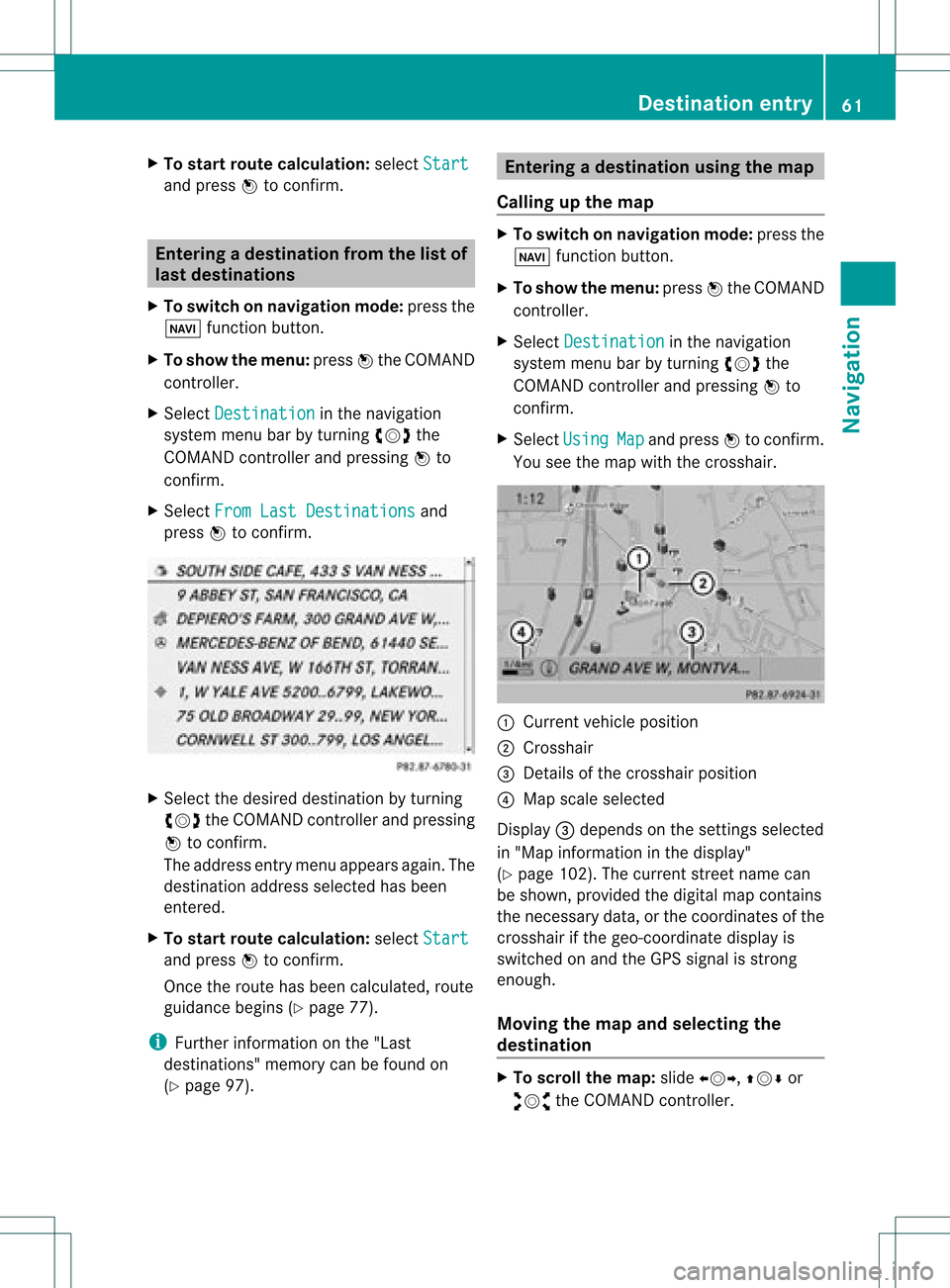
X Sele ctFro mLas tDes tinations and
pres sW tocon firm. X
Sele ctthedesir eddest inationbyturnin g
cVd theCOMA NDcontroller andpres sing
W tocon firm.
The addres sent rymen uappears again.The
destination addressselected hasbeen
entered.
X To star troute calculation: selectStart and
press Wtoconfirm .
Once theroute hasbeen calculated, route
guida ncebegins (Ypage 77).
i Further information onthe "Last
destinations" memorycanbefound on
(Y page 97). Entering
adesti nation usin gthe map
Call ingupthe map X
To swi tch onnavig ation mode: pressthe
Ø function button.
X To show themenu: pressWthe COMAND
controlle r.
X Select Destin ation in
the navig ation
sys tem menu barbyturning cVdthe
COMAND controllerand pre ssing W to
confi rm.
X Sel ect Usi ng Map and
pressW toconfi rm.
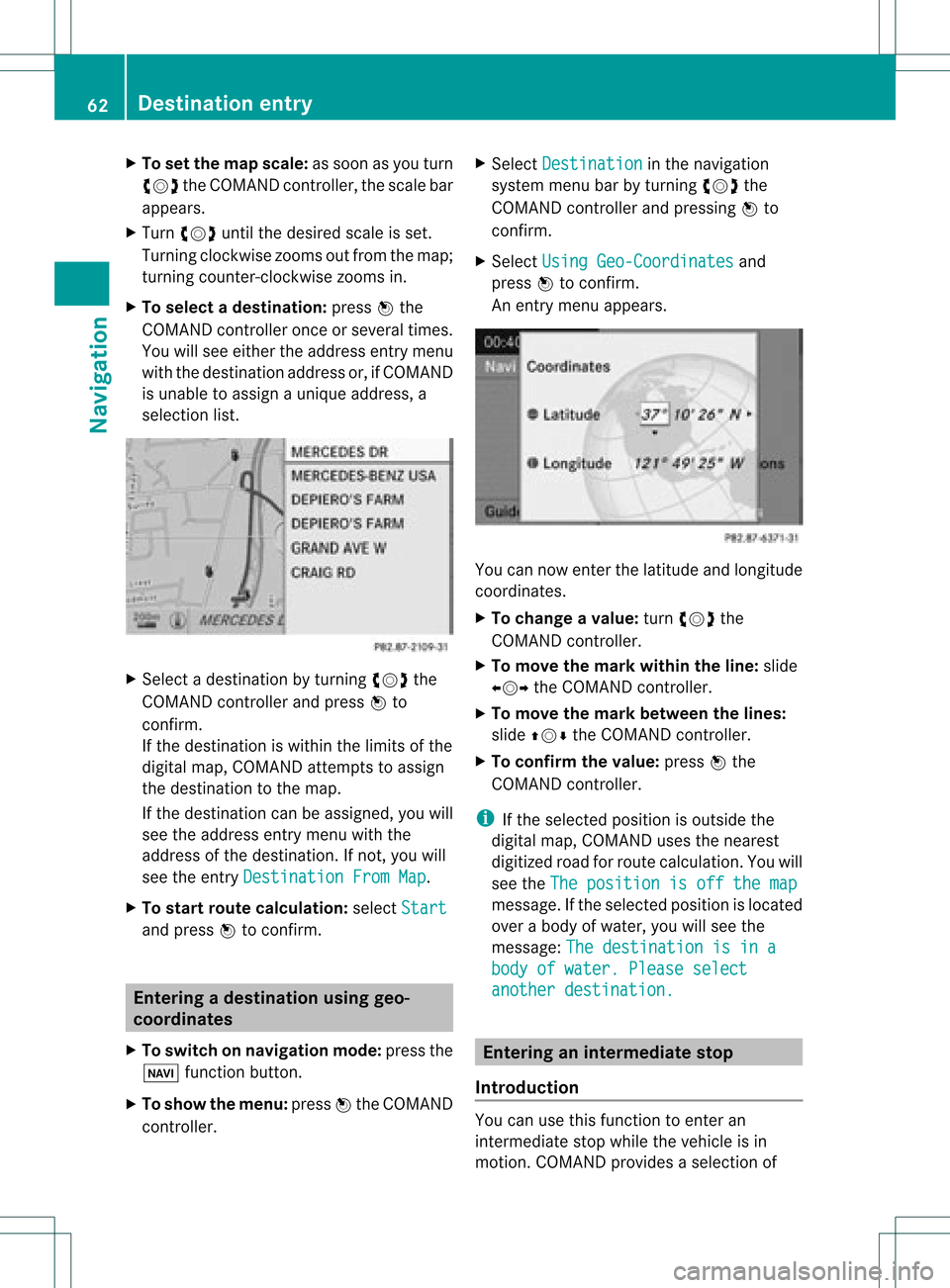
Yo usee themapwi th the cros shair. :
Curre ntveh iclepo sitio n
; Cross hair
= Deta ils of the cros shairpo sitio n
? Mapsca lesel ecte d
Dis play = depends onthe setti ngsselecte d
in "M ap info rma tionint he displa y"
(Y page 102). Thecurrent streetnamecan
be shown, provided thedigital mapcontains
the necessary data,orthe coordinates ofthe
crosshair ifthe geo-coordinate displayis
switched onand theGPS signal isstron g
enough.
Moving themap andselec tingthe
destination X
To scroll themap :slide XVY, ZVÆor
aVb theCOMAND controller. Des
tination entry
61Navigat ion Z
Page 64 of 234
X
To setthe map scale:as soon asyou turn
cVd theCOMAND controller,the scal ebar
app ears .
X Turn cVd untilthedesi redscal eis set.
Turni ngclockwi sezooms outfrom themap;
turning counter-clockwi sezooms in.
X To selectad estination: pressW the
COMA NDcontroller onceor seve raltim es.
You willsee either theaddres sent rymen u
with thedest inationaddres sor, ifCOMA ND
is unable toassign aunique address,a
selec tionlist. X
Selec tadestination byturn ingcVd the
COMAND controller and press Wto
con firm.
If the destin ationiswithin thelimits ofthe
digital map,COMAND attempts toassign
the destin ationtothe map.
If the destin ationcanbeassigned, youwill
see theaddress entrymenu withthe
address ofthe destin ation. Ifnot ,you will
see theentryDestin ationFromMap .
X To sta rtrout ecalculat ion:select Start and
press Wtocon firm. Entering
adesti nation usin ggeo-
coord inates
X To switch onnav igat ionmod e:pres sth e
Ø function butt on.
X To show themen u:pres sW theCOMA ND
con troller . X
Sele ctDes tination in
thenav igat ion
syst emmen ubar byturnin gcVd the
COMA NDcontroller andpres singW to
con firm.
X Sele ctUsi ngGeo-Coordinates and
pres sW tocon firm.
An entrymen uappears . You
cannowent erthelatit ude andlongitude
coo rdin ates .
X To cha nge avalu e:tur ncVd the
COMA NDcontroller .
X To mov eth ema rkwith intheline: slide
XVY theCOMA NDcontroller .
X To mov eth ema rkbetween thelines:
slide ZVÆ theCOMA NDcontroller .
X To confir mthevalu e:pres sW the
COMA NDcontroller .
i Ifth eselec tedposit ionisout side the
digit almap, COMA NDuses then earest
digitized roadforroute calculation .You will
see theThe position isoff themap message.
Ifthe selected positionislocated
over abody ofwater, youwillsee the
message: Thedestination isina body
ofwater. Pleaseselect another
destination. Entering
aninterm ediate stop
Introdu ction You
canusethis funct iontoenter an
interm ediate stopwhile thevehicle isin
motion .COMAND provides aselection of 62
Destination
entryNavigation
Page 65 of 234
predefin
eddestin ations ineight categories
for this purpose, e.g.FILLIN GSTATIO N or
CAFÉ .
When youhave entered yourintermediate
stop, COMAND automaticallyrecalc ulates
the route tothe main destin ation.
Entering predefined destinations X
To switch onnavigat ionmode: pressthe
Ø function button.
X To show themenu: pressWthe COMAND
con troller.
X Select Destin ation in
the navigat ion
system menubarbyturn ingcVd the
COMAND controller and pressin gW to
con firm.
X Select Stopov er and
press Wtocon firm.
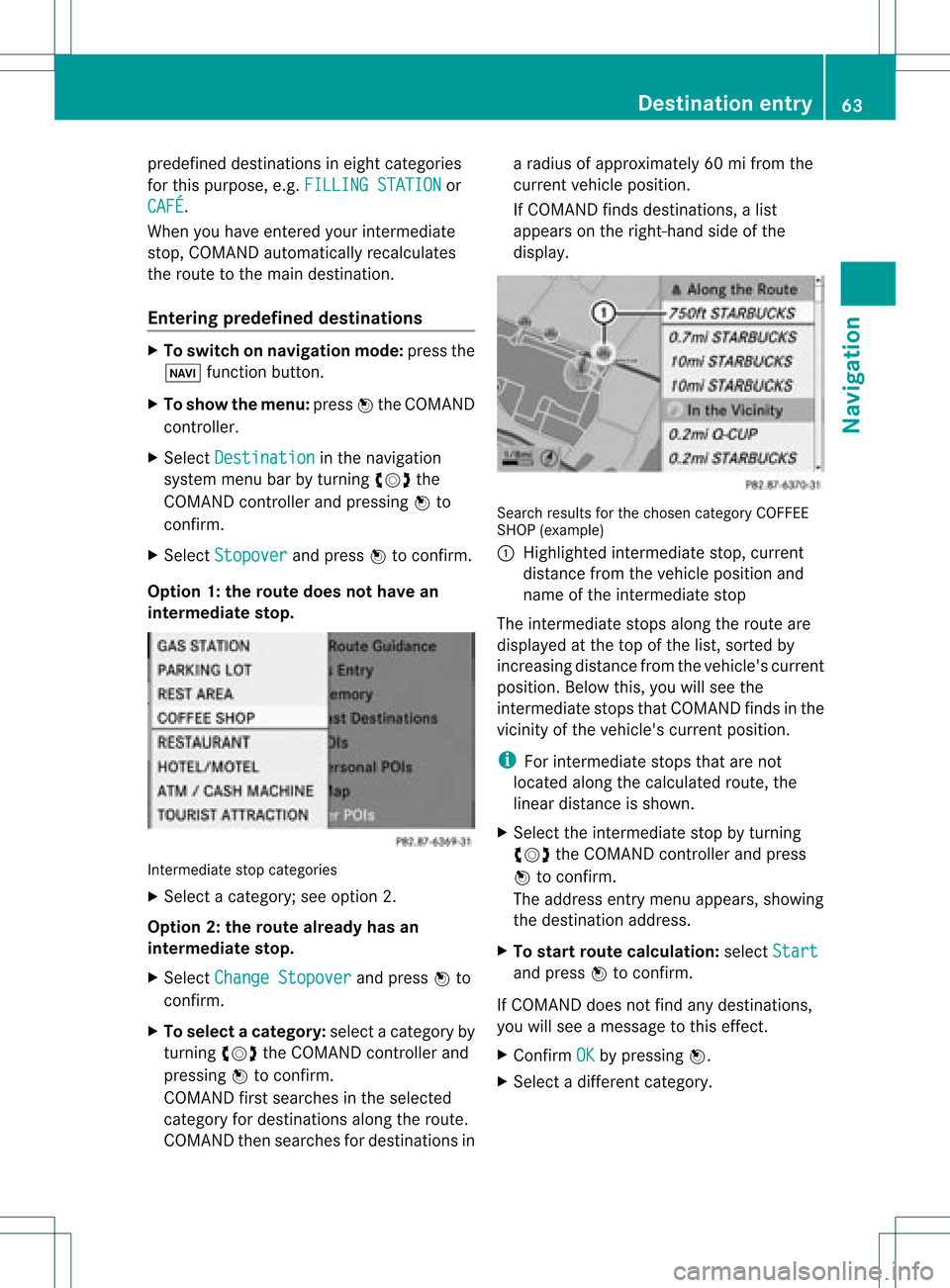
Opt ion 1:the rout edoes nothave an
inter media testop. Int
ermediat estop categ ories
X Select acateg ory;seeoption 2.
Opt ion 2:the rout ealrea dyhas an
inter media testop.
X Select Change Stopover and
press Wto
con firm.
X To select acatego ry:select acatego ryby
turning cVdtheCOM AND controll erand
press ingWtoconfirm.
COM AND firstsearches inthe selected
catego ryfor desti nations along theroute .
COM AND thensearches fordesti nations ina
rad iusof app roxima tely60mifrom the
current vehicleposi tion.
If COM AND finds destinations, alis t
app ears onthe right-hand sideof the
dis pla y. Search
resultsfor the chosen categoryCOFFEE
SHOP (example )
: Highl ighted intermed iate stop, current
dis tance fromthevehi cleposi tion and
name ofthe intermed iate stop
The intermed iate stops along theroute are
dis pla yedat the top ofthe list,sorted by
increa singdistance fromthevehi cle's current
posi tion. Belowthis, youwillsee the
intermed iate stops thatCOM AND finds inthe
vicini tyof the vehi cle's current position.
i For intermed iate stops thatarenot
loca tedalong thecalcu lated route ,the
line ardis tance isshow n.
X Sele ctthe intermed iate stop byturning
cVd theCOM AND controll erand press
W toconfirm.
The address entry menu appears ,show ing
the desti nation address.
X To start route calcul ation :sel ect Start and
press Wtoconfirm.
If COM AND doesnot find anydesti nations,
you willsee amessa getothis effect.
X Confi rmOK by
press ingW.
X Sele ctadiffe rent catego ry. De
stinati onentry
63Navigatio n Z
Page 66 of 234
Delet
inganinterme diat est op If
an inte rm ediat est op has already been
en tered ,you can dele teit.
X To swit chon navig ation mode: pressthe
Ø function button.
X To show theme nu:pre ssW theCOM AND
co ntro ller .
X Se lec tDes tination in
thenav igat ion
syst emmen ubar byturn ing cVd the
COM ANDc ontroller andpressing Wto
conf irm.
X Select Stopover and
press Wtoconf irm.
X Select Delete Stopover and
press Wto
conf irm.
COMAND deletestheinter mediate stop
and recalculates theroute tothe main
destinat ion. Entering
waypoints
Introdu ction You
canmap theroute yourself byenter ing
up totwo wayp oints. Thesequence ofthe
wayp oints canbechanged atany time.
i Aninter mediate stopisalwa ysbetween
the current position ofthe vehicle andthe
first wayp oint.
Creating waypoints X
To switch onnavigation mode:pressthe
Ø functionbutton .
X To show themenu: pressWthe COMAND
cont roller.
X Select Dest. in
the navigation system
menu barbyturnin gcVd theCOMAND
cont roller andpressing Wtoconf irm.
X Select Intermediate Destinations and
press Wtoconf irm.
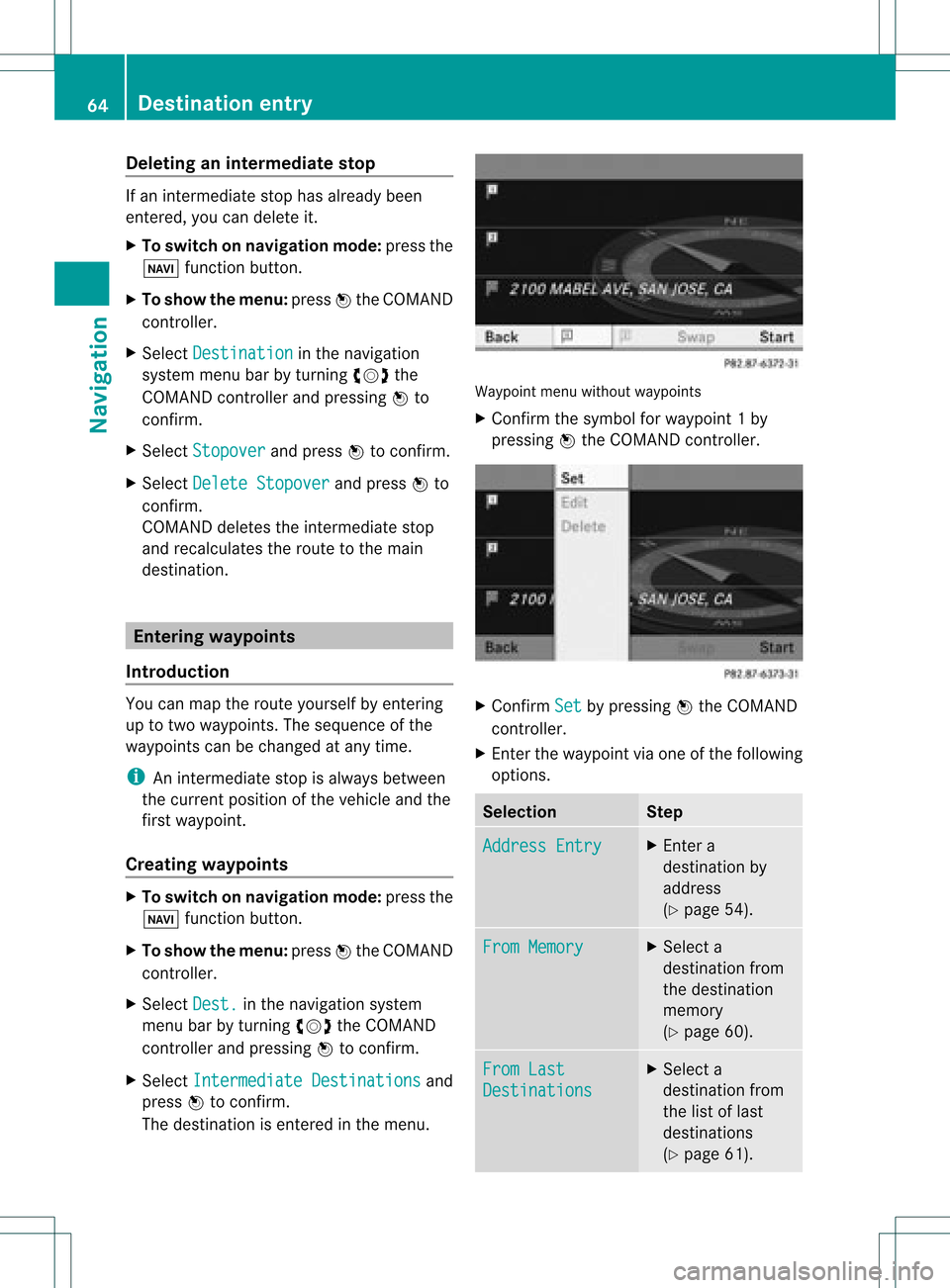
The destinat ionisenter edinthe menu. Waypoint
menuwithout waypoints
X Confirm thesymbol forwayp oint1by
pressin gW the COMAND controller. X
Confirm Set by
pressin gW the COMAND
con troller.
X En ter the waypoint viaone ofthe following
option s. Selection Step
Addres
sEntry X
En ter a
destin ationby
address
(Y page 54). From
Memory X
Select a
destin ationfrom
the destin ation
memor y
(Y page 60). From
Last Destin
ations X
Select a
destin ationfrom
the listoflast
destin ations
(Y page 61). 64
Destinat
ionentr yNavigat ion
Page 67 of 234
Selec
tion Step
From
POIs X
Ent erapoint of
interest
(Y page 66). From
Personal POIs X
Ent era
destination from
the personal
points ofinterest
(Y page 75). Using
Map X
Ent era
destination using
the map
(Y page 61). Using
Geo- Coordinates X
Ent era
destination using
the geo-
coordinates
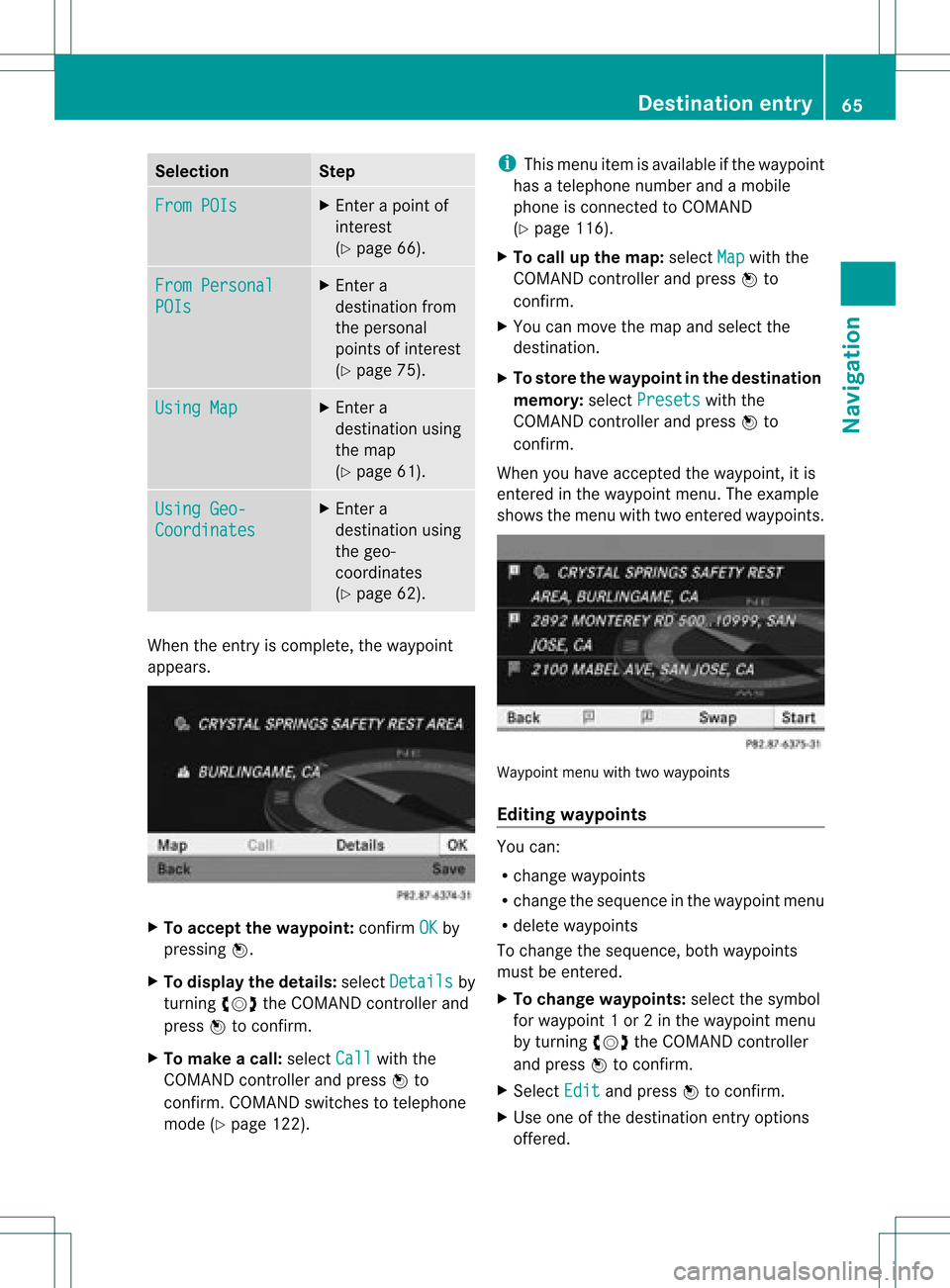
(Y page 62). When
theentr yis complete, theway point
appea rs. X
To accept thewaypoint: confirmOK by
pressing W.
X To display thedetails: selectDetails by
turnin gcVd theCOMAND controller and
press Wtoconf irm.
X To make acall: select Call with
the
COMAND controller andpress Wto
conf irm. COMAND switchestotelephone
mode (Ypage 122). i
This menu itemisavaila bleifthe way point
has atelephone numberandamobile
phone isconn ected toCOMAND
(Y page 116).
X To call upthe map :select Map with
the
COMAND controller andpress Wto
conf irm.
X You canmove themap andselect the
destination.
X To store thewaypoint inthe destination
memory :select Presets with
the
COMAND controller andpress Wto
conf irm.
When youhave accepted theway point, itis
entered inthe way point menu. Theexample
shows themenu withtwoentered waypoints. Waypoi
ntmenu withtwowayp oints
Editing waypoints You
can:
R change waypoints
R change thesequence inthe way point menu
R delete waypoints
To change thesequence, bothwaypoints
must beentered.
X To change waypoints: selectthesymbol
for way point 1or 2in the way point menu
by turnin gcVd theCOMAND controller
and press Wtoconf irm.
X Select Edit and
press Wtoconf irm.
X Use oneofthe destination entryoptions
offered. Des
tinat ionentry
65Navigat ion Z
Page 68 of 234
X
To chang ethe seque nceof the
wa ypo ints: select Swap in
the waypoint
menu byturning cVd theCOMAND
contro ller and pressW toconfi rm.
The entri esaresw appe d.
X To del ete waypo ints: select the symbo l
for waypoint 1or 2in the waypoint menu
by turning cVd theCOMAND controller
and pressW toconfi rm.
X Sel ect Delete and
pressW toconfi rm.
i Youcan delete awa ypoint directl yaf ter
entry using thismenu item.
Ac ceptin gwa ypo ints forthe route X
Sel ect Start in
the waypoint menu by
tur ning cVd theCOMAND controller and
pre ssW toconfi rm.
The routeiscal cul ate dwi th the ente red
wa ypoints.
i Con t. is
displ ayed instea dof Sta rt wh
en
Cal culate AlternativeRoutes is
acti vated inthe navigati on menu
(Y page 82) ,op tio n2 . In
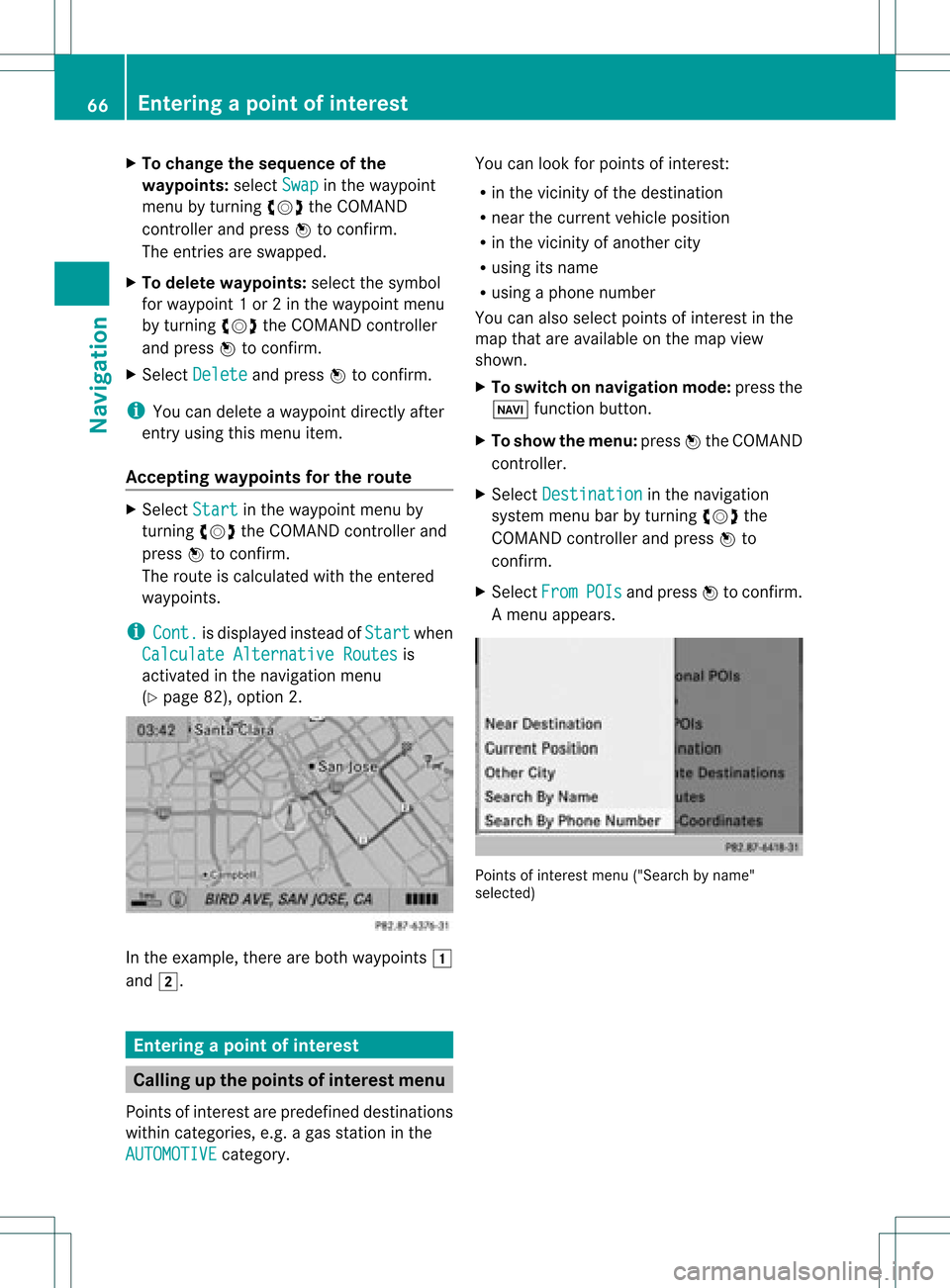
the exampl e,there areboth waypoints 1
and 2. Enterin
gap oint ofint eres t Callin
gup thepoint sof int eres tmenu
Poin tsof int eres tare prede fineddestina tions
withi ncate gor ies, e.g.ag asstatio nint he
AUTOMOTIVE category. You
canlook forpoints ofinterest :
R in the vicinity ofthe destination
R near thecurrent vehicleposition
R in the vicinity ofanother city
R using itsname
R using aphone number
You canalso select points ofinterest inthe
map thatareavaila bleonthe map view
shown.
X To switch onnavigation mode:pressthe
Ø functionbutton.
X To show themenu: pressWthe COMAND
cont roller.
X Select Destination in
the navigation
system menubarbyturning cVdthe
COMAND controller andpress Wto
confirm .
X Select From POIs and
press Wtoconfirm .
Am enu appears. Point
sof inter estmenu ("Search byname"
select ed) 66
Entering
apoint ofint eres tNavi gatio n
Page 70 of 234
Selec
tion Charact
eristic Instructions
Search
ByName You
cancallupallthe
points ofinterest inthe
digital maporfocus your
search onthe three
previously selected
positions. X
Select Search By Name in
the points of
interest menuandpress Wtoconf irm.
X Select AllPOIs or
one ofthe three
previously selectedpositions.
The point ofinterest listwith character
bar appea rs.
X Proceed asdescribed inthe "point of
interest listwith character bar"section
(Y page 71). Search By Phone
Number This
funct iongives you
access toall points of
interest thathave a
phone number. X
Select Search ByPhone Number and
press Wtoconf irm.
You willsee alist ofphone numbers.
X Proceed asdescribed inthe "point of
interest listwith character bar"section
(Y page 71). Searching
bypoint ofinterest
category
Aft erselecting themenu items, thepoint of
interest categories appear:
R Near Destination R
Current Position R
Other City (after
enterin gacity)
i Ifyou have selected Search By Name and
then defined theposition forthe search,
the point ofinterest listwith character bar
appea rs(Y page 71). X
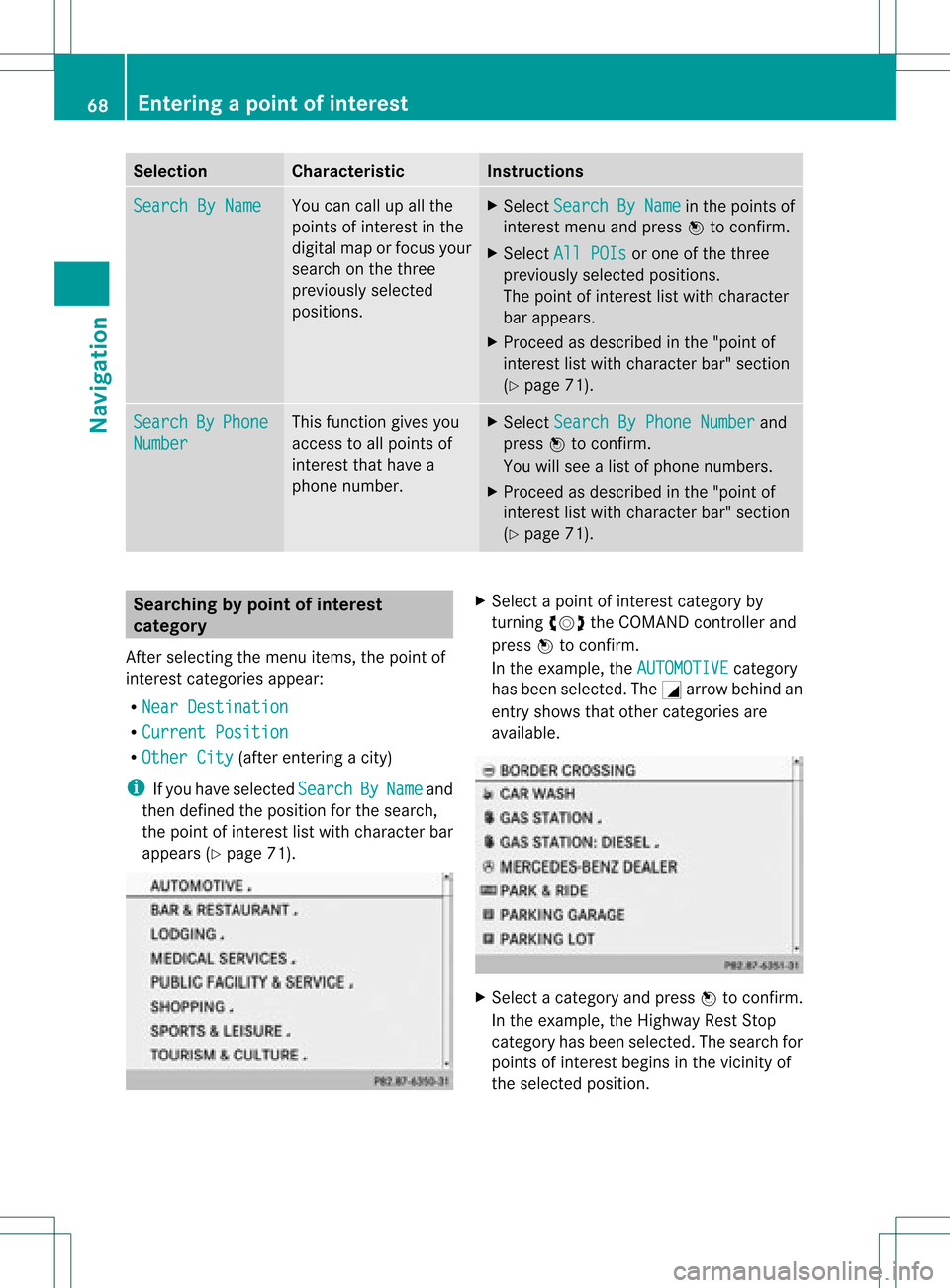
Select apoint ofinterest category by
turnin gcVd theCOMAND controller and
press Wtoconf irm.
In the example, theAUTOMOTIVE category
has been selected. TheGarrow behind an
entr yshows thatother categories are
availa ble. X
Select acategory andpress Wtoconf irm.
In the example, theHighway RestStop
category hasbeen selected. Thesearch for
points ofinterest beginsinthe vicinity of
the selected position. 68
Entering
apoint ofint eres tNavi gatio n