com MERCEDES-BENZ CLS-Class 2013 W218 Owner's Guide
[x] Cancel search | Manufacturer: MERCEDES-BENZ, Model Year: 2013, Model line: CLS-Class, Model: MERCEDES-BENZ CLS-Class 2013 W218Pages: 376, PDF Size: 13.45 MB
Page 27 of 376
You can obtain additional information about
vehicle safety from:
http://www.safercar.gov
Limited Warranty
! Follow the instructions in this manual
about the proper operation of your vehicle
as well as about possible vehicle damage.
Damage to your vehicle that arises from
culpable contraventions against these
instructions is not covered either by the
Mercedes-Benz
Limited Warranty or by the
New or Used-Vehicle Warranty. Data stored in the vehicle
Information about electronic data
acquisition in the vehicle
(Including
notice pursuant to California Code
§ 9951)
Your vehicle records electronic data. If your
vehicle is equipped with mbrace (Canada:
TELE AID), data is transmitted in the event of
an accident.
This information helps, for example, to test
vehicle systems after an accident and to
continually improve vehicle safety.
Daimler AG can access this data and submit
it:
R for safety research or vehicle diagnosis
purposes
R with the consent of the vehicle owner
R on the instruction of prosecuting
authorities
R for use in arbitration of disputes that
involve Daimler AG, its affiliates or its sales
and service organizations
R as otherwise required or permitted by law.
Please check your mbrace (Canada: TELE
AID) purchase agreement to find out more
about data that can be recorded and
transmitted by this system. Information on copyright
Registered trademarks
Registered trademarks:
R Bluetooth ®
is a registered trademark of
Bluetooth SIG Inc.
R DTS is a registered trademark of DTS, Inc.
R Dolby and MLP are registered trademarks
of DOLBY Laboratories.
R BabySmart™, ESP ®
and PRE-SAFE ®
are
registered trademarks of Daimler AG.
R HomeLink ®
is a registered trademark of
Prince.
R iPod ®
and iTunes ®
are registered
trademarks of Apple Inc.
R Logic7 ®
is a registered trademark of
Harman International Industries.
R Microsoft ®
and Windows media ®
are
registered trademarks of Microsoft
Corporation.
R SIRIUS is a registered trademark of Sirius
XM radio Inc.
R HD Radio is a registered trademark of
iBiquity Digital Corporation.
R Gracenote ®
is a registered trademark of
Gracenote, Inc.
R ZAGATSurvey ®
and related brands are
registered trademarks of ZagatSurvey,
LLC. FreeType
Portions
of this software are copyright ©
2005
The FreeType Project (www.freetype.org). All
rights reserved. ©
1996-2000 by David
Turner, Robert Wilhelm, and Werner Lemberg. Gnu compiler
Copyright ©
1982, 1986 Regents of the
University of California. All rights reserved.
The Berkeley software License Agreement
specifies the terms and conditions for Introduction
25 Z
Page 30 of 376
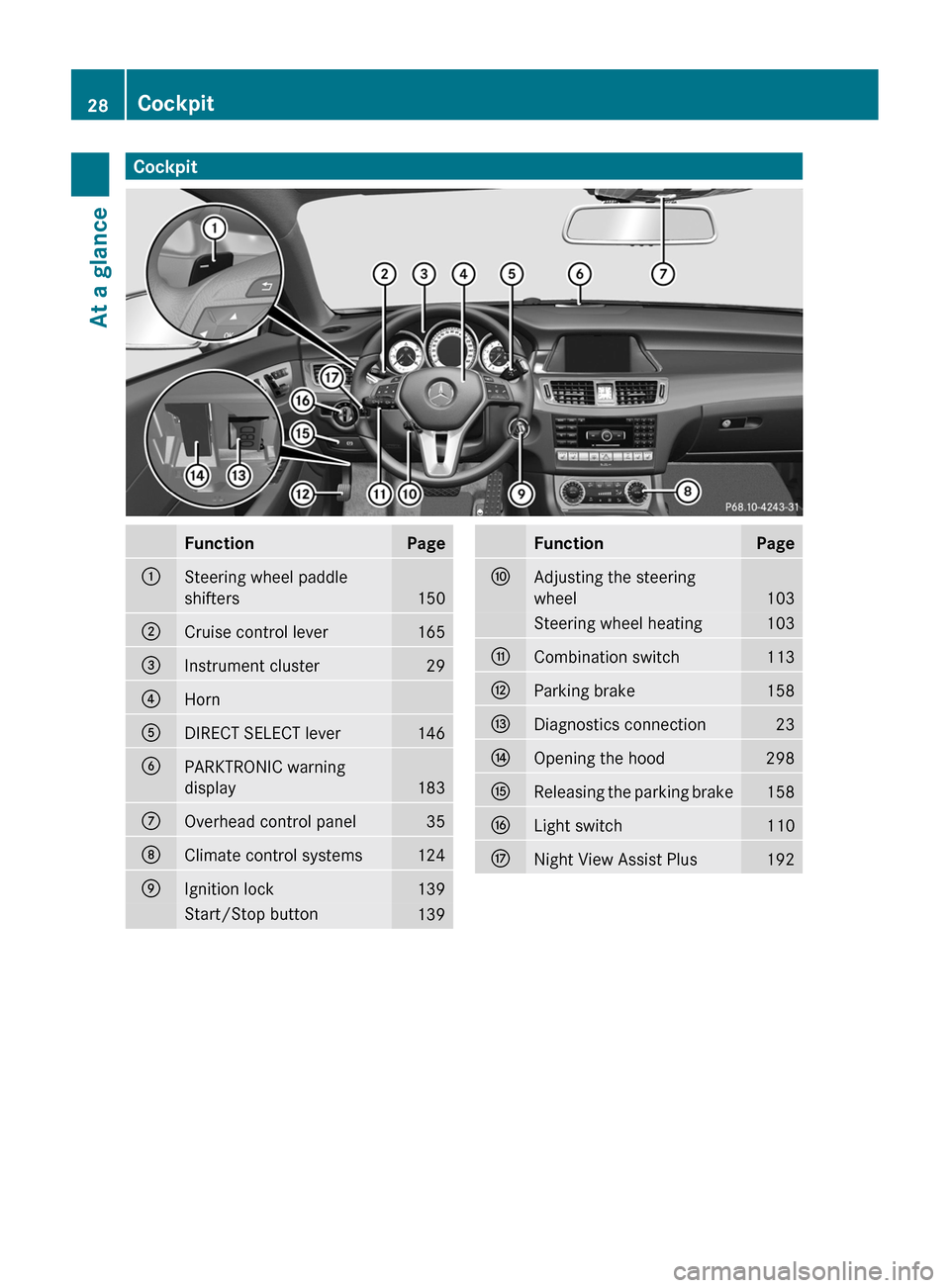
Cockpit
Function Page
:
Steering wheel paddle
shifters
150
;
Cruise control lever 165
=
Instrument cluster 29
?
Horn
A
DIRECT SELECT lever 146
B
PARKTRONIC warning
display
183
C
Overhead control panel 35
D
Climate control systems 124
E
Ignition lock 139
Start/Stop button
139 Function Page
F
Adjusting the steering
wheel
103
Steering wheel heating 103
G
Combination switch 113
H
Parking brake 158
I
Diagnostics connection 23
J
Opening the hood 298
K
Releasing the parking brake 158
L
Light switch 110
M
Night View Assist Plus 19228
CockpitAt a glance
Page 31 of 376
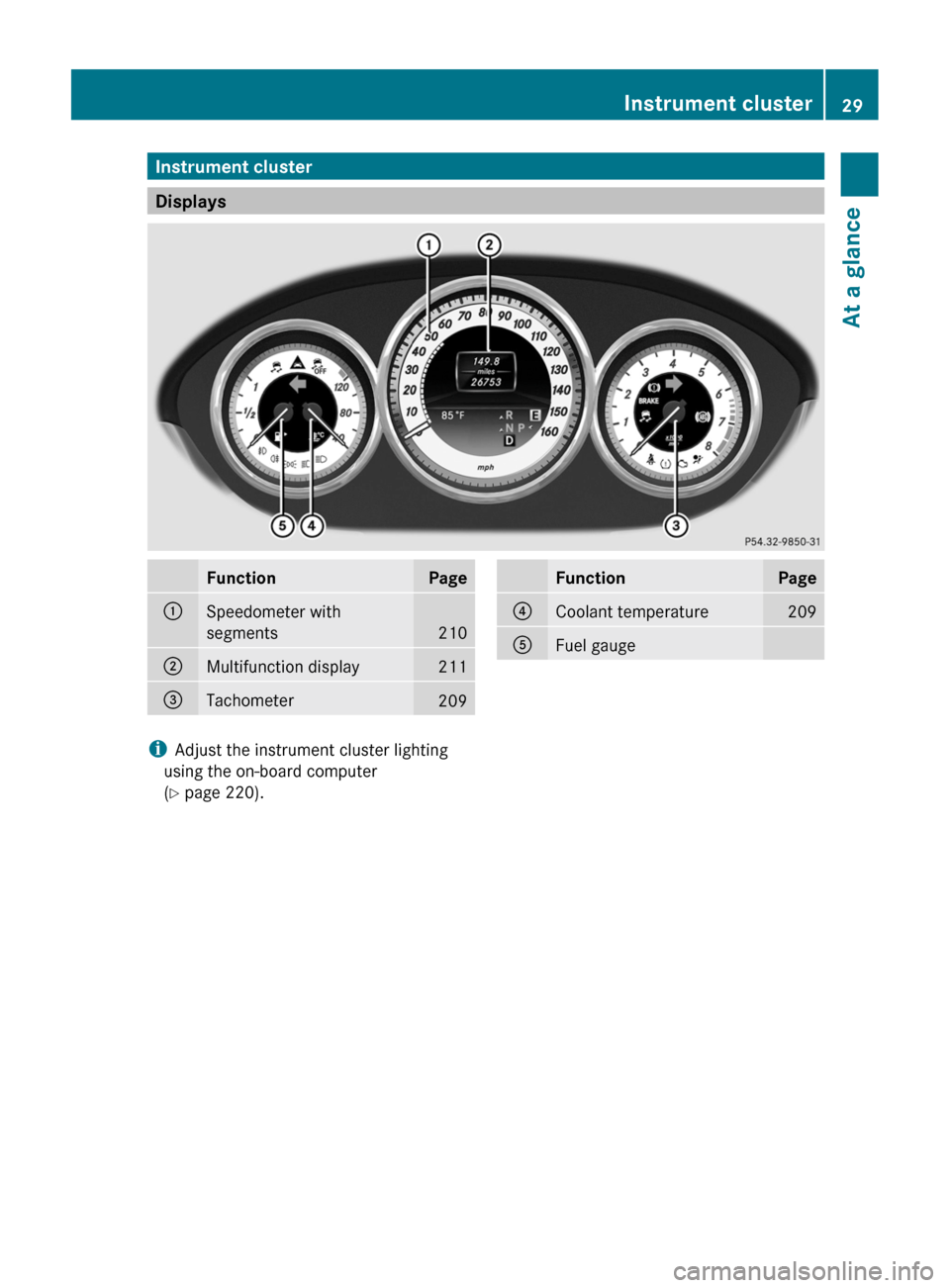
Instrument cluster
Displays
Function Page
:
Speedometer with
segments
210
;
Multifunction display 211
=
Tachometer
209 Function Page
?
Coolant temperature 209
A
Fuel gauge
i
Adjust the instrument cluster lighting
using the on-board computer
(Y page 220). Instrument cluster
29At a glance
Page 33 of 376
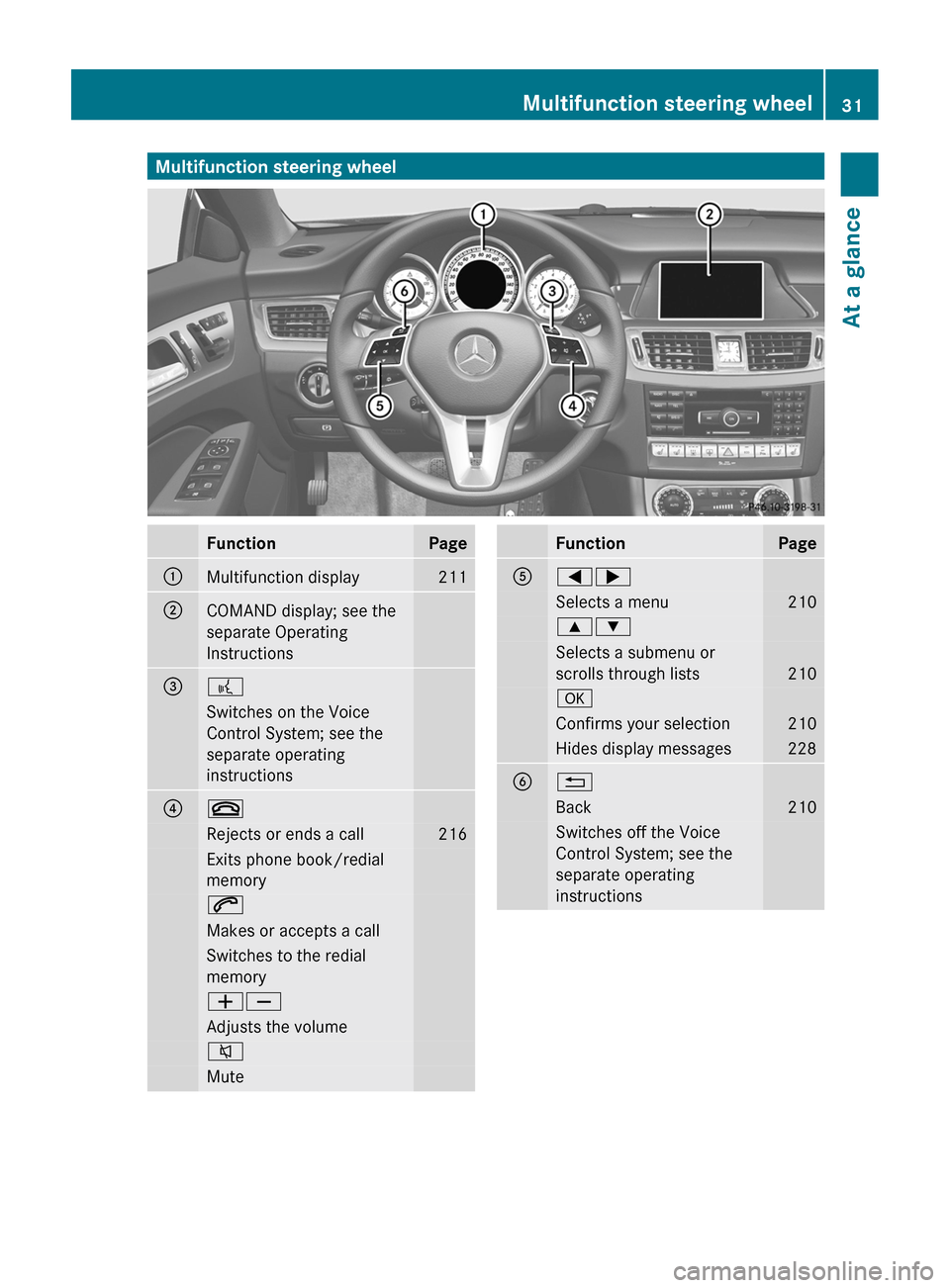
Multifunction steering wheel
Function Page
:
Multifunction display 211
;
COMAND display; see the
separate Operating
Instructions
=
?
Switches on the Voice
Control System; see the
separate operating
instructions
?
~
Rejects or ends a call 216
Exits phone book/redial
memory
6
Makes or accepts a call
Switches to the redial
memory
WX
Adjusts the volume
8
Mute Function Page
A
=;
Selects a menu 210
9:
Selects a submenu or
scrolls through lists
210
a
Confirms your selection 210
Hides display messages 228
B
%
Back 210
Switches off the Voice
Control System; see the
separate operating
instructionsMultifunction steering wheel
31At a glance
Page 34 of 376
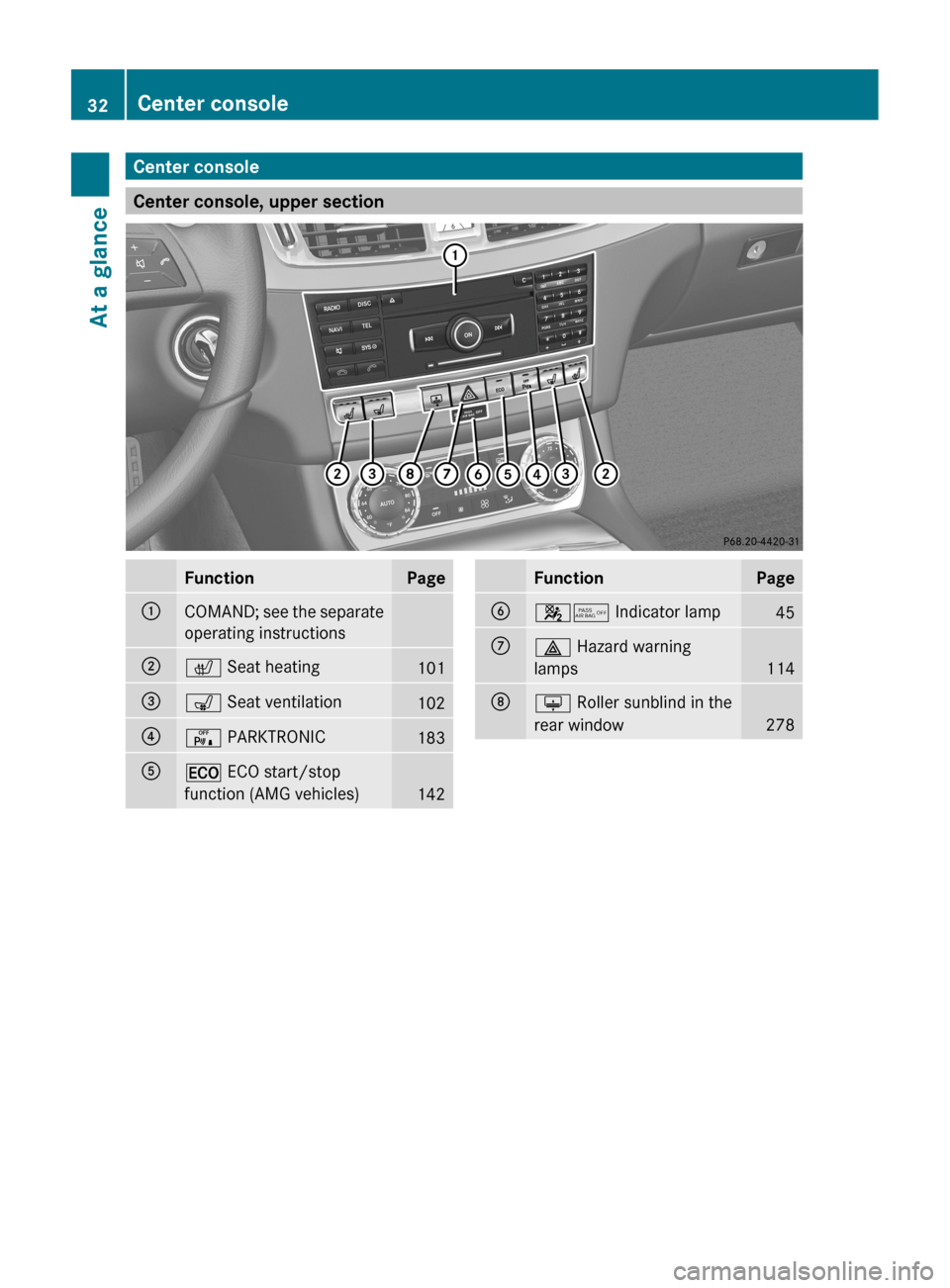
Center console
Center console, upper section
Function Page
:
COMAND; see the separate
operating instructions
;
c Seat heating
101
=
s Seat ventilation
102
?
c PARKTRONIC
183
A
¤ ECO start/stop
function (AMG vehicles)
142 Function Page
B
45 Indicator lamp
45
C
£ Hazard warning
lamps
114
D
u Roller sunblind in the
rear window
27832
Center consoleAt a glance
Page 35 of 376
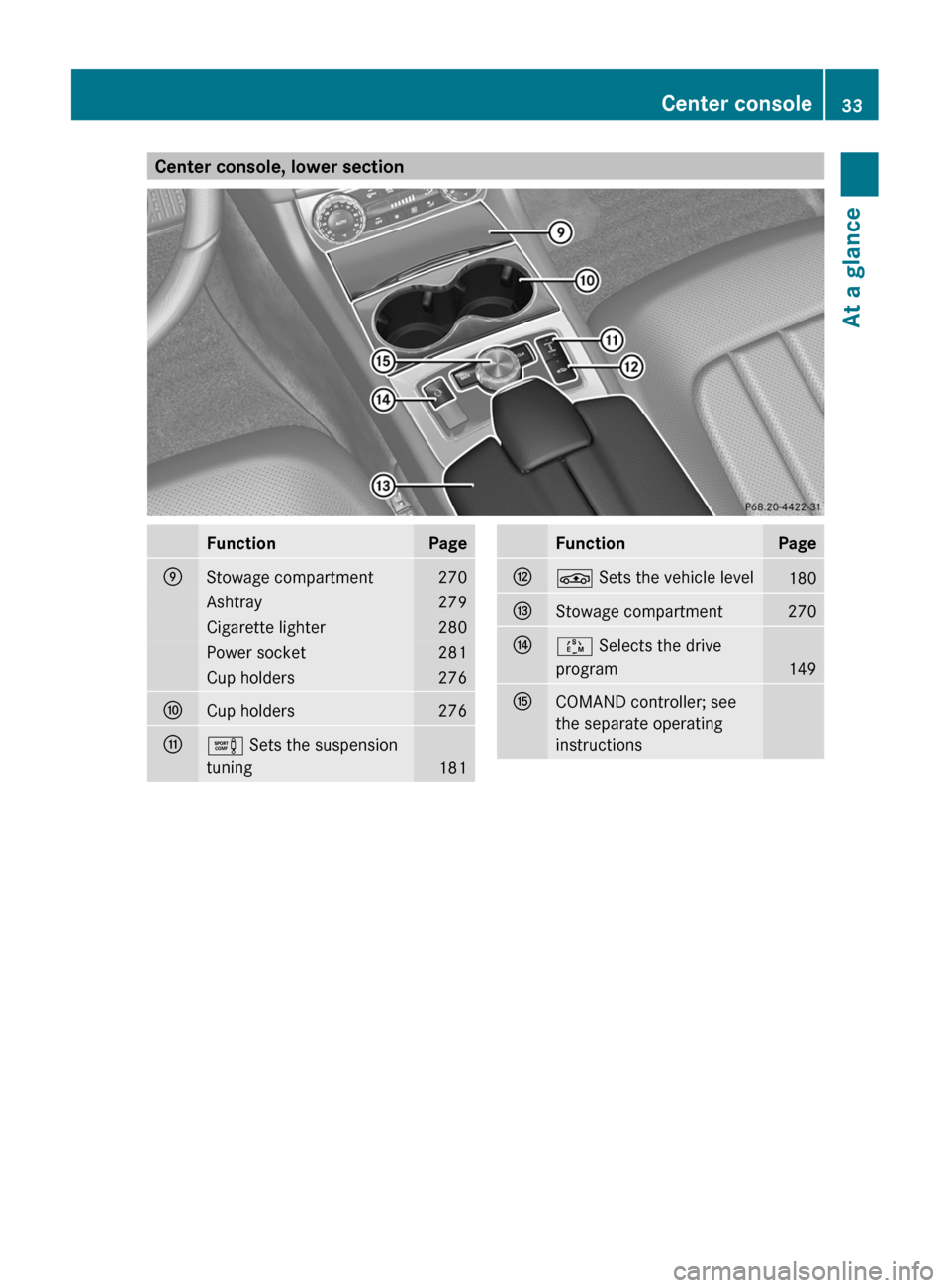
Center console, lower section
Function Page
E
Stowage compartment 270
Ashtray 279
Cigarette lighter 280
Power socket 281
Cup holders 276
F
Cup holders 276
G
e Sets the suspension
tuning
181 Function Page
H
É Sets the vehicle level
180
I
Stowage compartment 270
J
Ú Selects the drive
program
149
K
COMAND controller; see
the separate operating
instructions Center console
33At a glance
Page 36 of 376
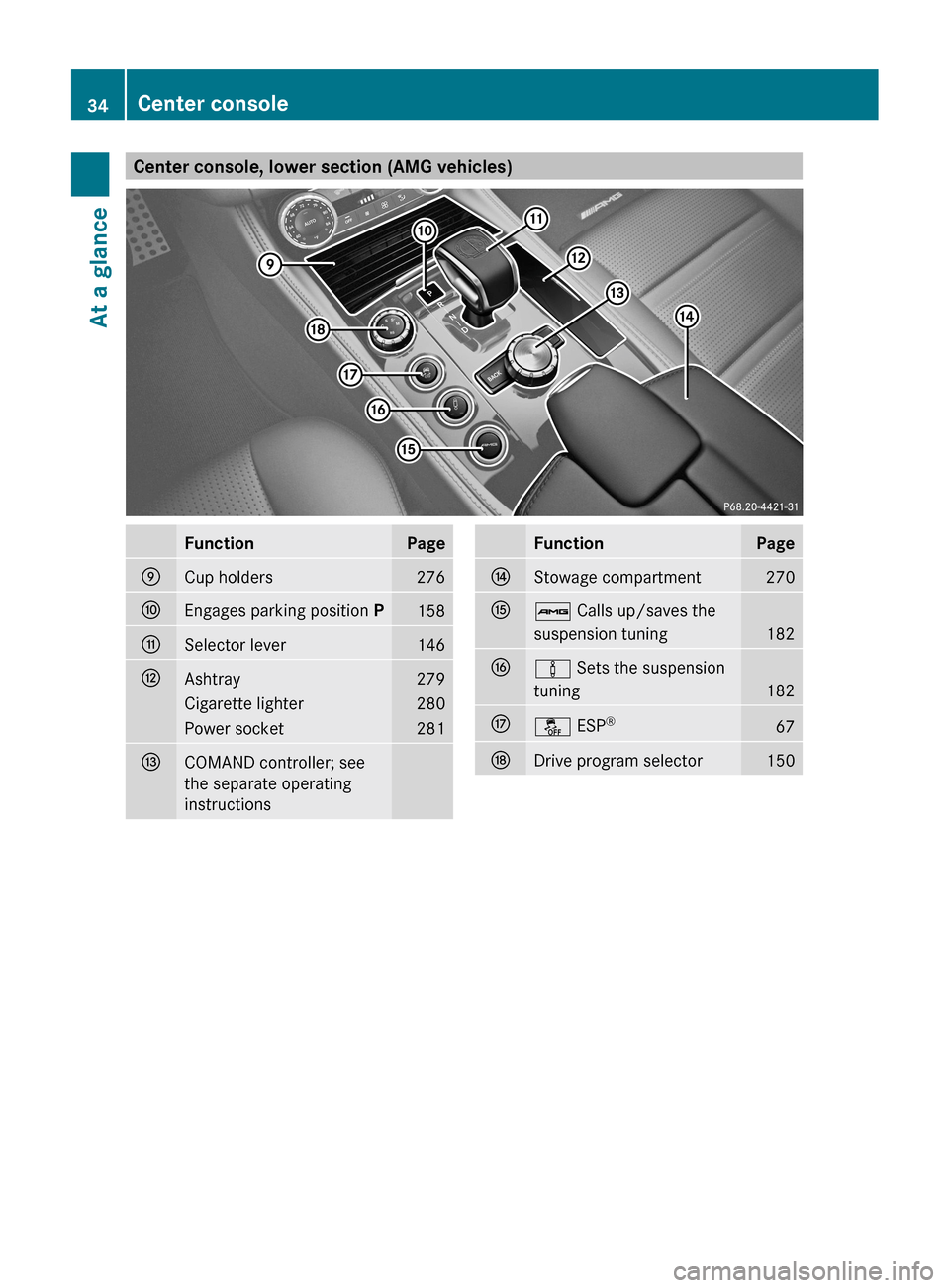
Center console, lower section (AMG vehicles)
Function Page
E
Cup holders 276
F
Engages parking position P
158
G
Selector lever 146
H
Ashtray 279
Cigarette lighter 280
Power socket 281
I
COMAND controller; see
the separate operating
instructions Function Page
J
Stowage compartment 270
K
ß Calls up/saves the
suspension tuning
182
L
à Sets the suspension
tuning
182
M
å ESP
® 67
N
Drive program selector 15034
Center consoleAt a glance
Page 37 of 376
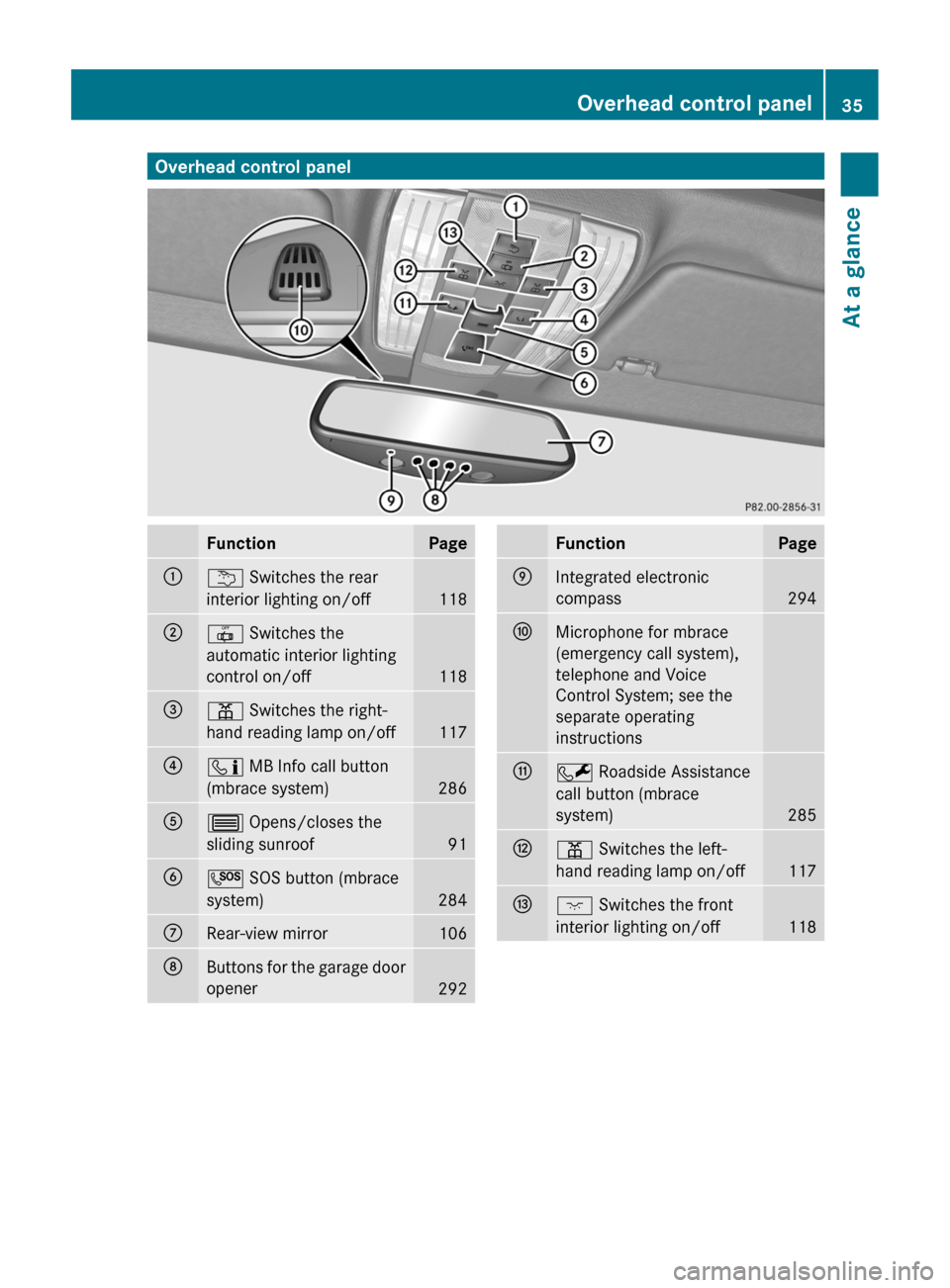
Overhead control panel
Function Page
:
u Switches the rear
interior lighting on/off
118
;
| Switches the
automatic interior lighting
control on/off
118
=
p Switches the right-
hand reading lamp on/off
117
?
ï MB Info call button
(mbrace system)
286
A
3 Opens/closes the
sliding sunroof
91
B
G SOS button (mbrace
system)
284
C
Rear-view mirror 106
D
Buttons for the garage door
opener
292 Function Page
E
Integrated electronic
compass
294
F
Microphone for mbrace
(emergency call system),
telephone and Voice
Control System; see the
separate operating
instructions
G
F Roadside Assistance
call button (mbrace
system)
285
H
p Switches the left-
hand reading lamp on/off
117
I
c Switches the front
interior lighting on/off
118Overhead control panel
35At a glance
Page 38 of 376
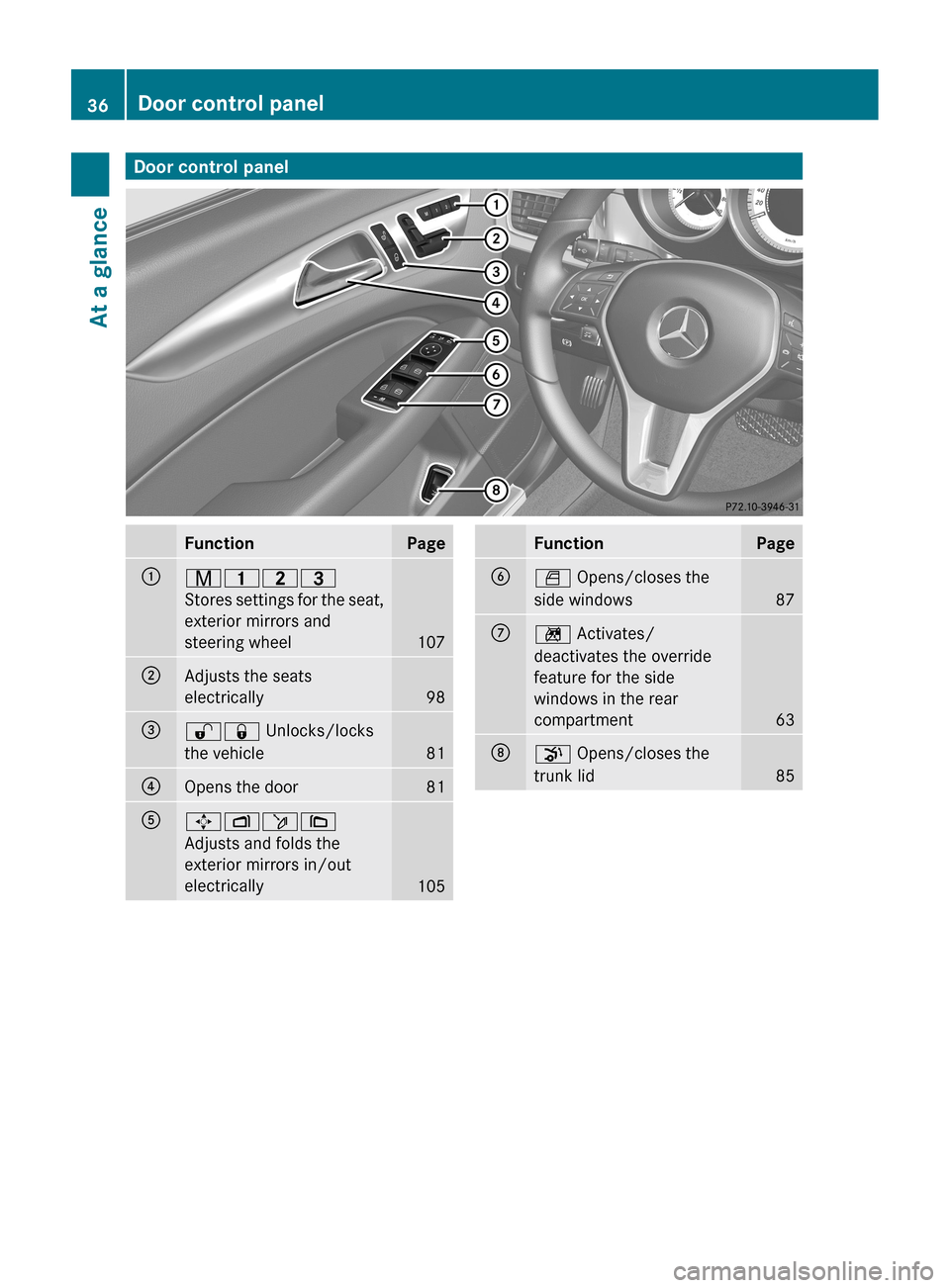
Door control panel
Function Page
:
r45=
Stores
settings for the seat,
exterior mirrors and
steering wheel 107
;
Adjusts the seats
electrically
98
=
%& Unlocks/locks
the vehicle
81
?
Opens the door 81
A
7Zö\
Adjusts and folds the
exterior mirrors in/out
electrically
105 Function Page
B
W Opens/closes the
side windows
87
C
n Activates/
deactivates the override
feature for the side
windows in the rear
compartment
63
D
p Opens/closes the
trunk lid
8536
Door control panel
At a glance
Page 40 of 376
Useful information
i This Operator's Manual describes all
models and all standard and optional
equipment of your vehicle available at the
time of publication of the Operator's
Manual. Country-specific differences are
possible.
Please note that your vehicle may
not be equipped with all features
described. This also applies to safety-
related systems and functions.
i Read the information on qualified
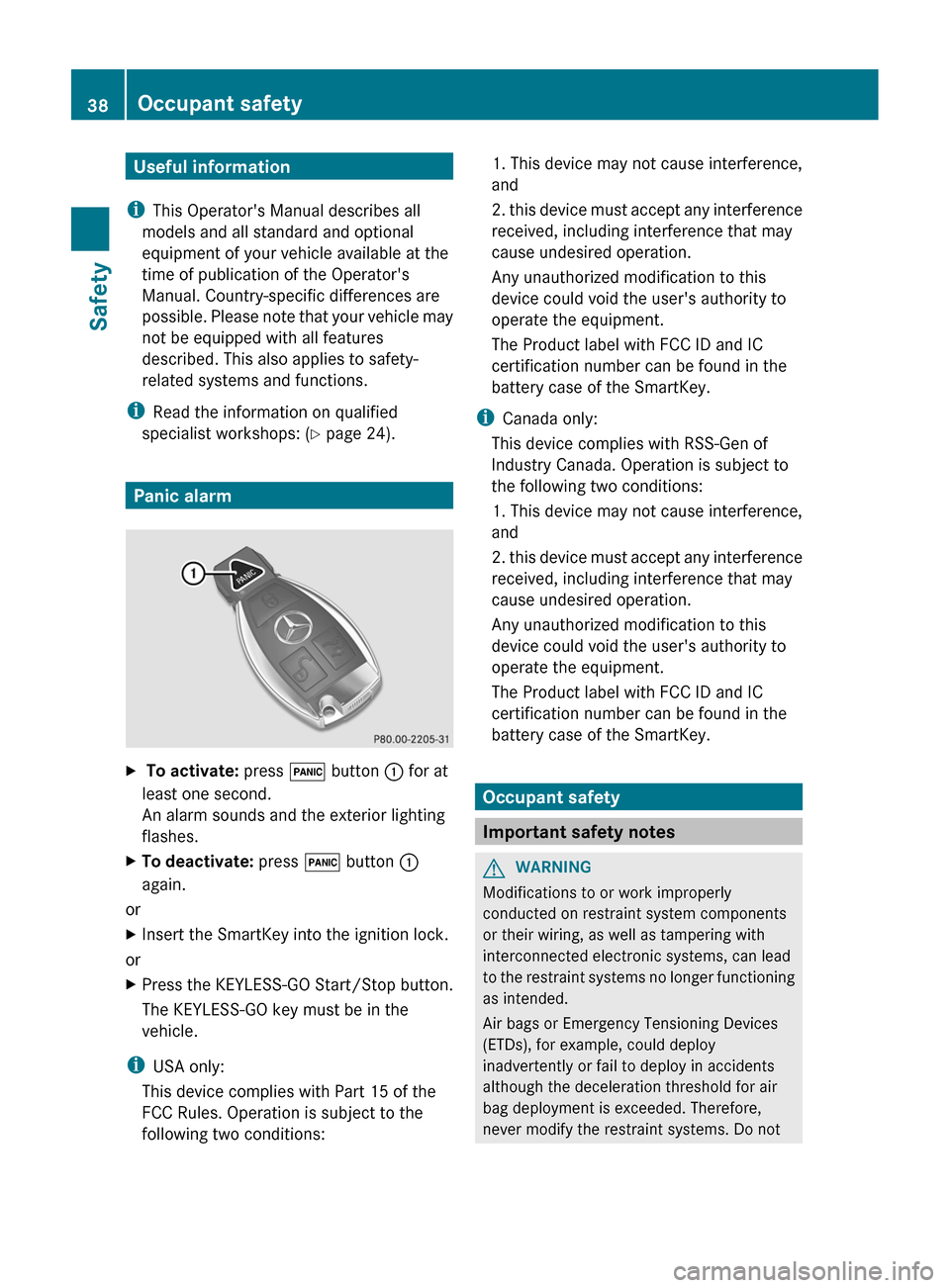
specialist workshops: ( Y page 24).Panic alarm
X
To activate: press ! button : for at
least one second.
An alarm sounds and the exterior lighting
flashes.
X To deactivate: press ! button :
again.
or
X Insert the SmartKey into the ignition lock.
or
X Press the KEYLESS-GO Start/Stop button.
The KEYLESS-GO key must be in the
vehicle.
i USA only:
This device complies with
Part 15 of the
FCC Rules. Operation is subject to the
following two conditions: 1. This device may not cause interference,
and
2.
this device must accept any interference
received, including interference that may
cause undesired operation.
Any unauthorized modification to this
device could void the user's authority to
operate the equipment.
The Product label with FCC ID and IC
certification number can be found in the
battery case of the SmartKey.
i Canada only:
This device complies with RSS-Gen of
Industry Canada. Operation is subject to
the following two conditions:
1. This device may not cause interference,
and
2. this device must accept any interference
received, including interference that may
cause undesired operation.
Any unauthorized modification to this
device could void the user's authority to
operate the equipment.
The Product label with FCC ID and IC
certification number can be found in the
battery case of the SmartKey. Occupant safety
Important safety notes
G
WARNING
Modifications to or work improperly
conducted on restraint system components
or their wiring, as well as tampering with
interconnected electronic systems, can lead
to
the restraint systems no longer functioning
as intended.
Air bags or Emergency Tensioning Devices
(ETDs), for example, could deploy
inadvertently or fail to deploy in accidents
although the deceleration threshold for air
bag deployment is exceeded. Therefore,
never modify the restraint systems. Do not 38
Occupant safety
Safety