light MERCEDES-BENZ CLS-Class 2014 W218 Owners Manual
[x] Cancel search | Manufacturer: MERCEDES-BENZ, Model Year: 2014, Model line: CLS-Class, Model: MERCEDES-BENZ CLS-Class 2014 W218Pages: 382, PDF Size: 5.36 MB
Page 178 of 382

Cruise control lever
001A
To activat eorincreas espeed
0010 To activat eorreducespeed
0024 To deactivate cruise control
0021 To activat eatthecurren tspeed/last
stored speed
When you activate cruise control, the stored
speed is shown in the multifunction display
for five seconds. In the multifunction display,
the segments between the stored speed and
the maximum speed light up.
Activation conditions To activate cruise control, all of the following
activation condition smust be fulfilled:
R the parkin gbrake must be released.
R you are drivin gfaster than 20 mph
(30 km/h).
R ESP ®
must be active, but not intervening.
R the transmission must be in position D.
Storing and maintaining the current
speed You can accept the curren
tspeed if you are
driving faster than 20 mph (30 km/h).
X Accelerat ethe vehicle to the desired
speed.
X Briefly press the cruise contro llever
up 001A or down 0010.
X Remove your foot from the accelerator
pedal.
Cruise contro lisactivated. The vehicle
automatically maintains the stored speed.
i Cruise contro lmay be unable to maintain
the stored speed on uphill gradients. The
stored speed is resumed when the gradient
evens out. Cruise contro lmaintains the
store dspee dond ownhill gradients by
automaticall yapplyin gthe brakes.
Storing th ecurren tspee dorc alling up
the last stored speed X
Briefl ypullt he cruise control leve rtowards
you 001A.
X Remove your foot from the accelerator
pedal.
The first time cruise control is activated, it
stores the current speed or regulates the
speed of the vehicle to the previously
stored speed. 176
Driving systemsDriving and parking
Page 181 of 382

sensor system. DISTRONIC PLUS brakes
automaticallysot hat the set speed is not
exceeded.
Change into alower gear in good time on long
and steep downhill gradients. This is
especially important if the vehicle is laden. By
doing so, you will make use of the braking
effect of the engine. This relieves the load on
the brake system and prevents the brakes
from overheating and wearing too quickly.
If DISTRONIC PLUS detects that there is arisk
of ac ollision, you will be warned visually and
acoustically.D ISTRONIC PLUS cannot
prevent acollision without your intervention.
An intermittent warning tone will then sound
and the distance warning lamp will light up in
the instrument cluster. Brake immediately in
order to increase the distance to the vehicle
in front or take evasive action provided it is
safe to do so.
For DISTRONIC PLUS to assist you, the radar
sensor system must be operational.
If there is no vehicle in front,D ISTRONIC
PLUS operates in the same way as cruise
control in the speed range between 20 mph
(Canada: 30 km/h) and 120 mph (Canada:
200 km/h). If avehicle is driving in front of
you, it operates in the speed range between
0m ph (0 km/h) and 120 mph (Canada:
200 km/h).
Do not use DISTRONIC PLUS while driving on
roads with steep gradients.
As DISTRONIC PLUS transmits radar waves,
it can resemble the radar detectors of the
responsible authorities. You can refer to the
relevant chapter in the Operator's Manual if
questions are asked aboutt his.
i USA only: This device has been approved
by the FCC as a"VehicularR adar System".
The radar sensor is intended for use in an
automotive radar system only. Removal,
tampering ,oralterin gofthedevice will void
any warranties, and is no tpermitted by the
FCC. Do not tamper with, alter, or use in
any non-approved way. Anyu
nauthorized modification to this
device could void the user's authorit yto
operate the equipment.
i Canada only: This device complies with
RSS-210 of Industry Canada. Operation is
subject to the following two conditions:
1. This device may not cause harmful
interference, and
2. this device must accept any interference
received, including interference that may
cause undesired operation of the device.
Removal, tampering, or altering of the
device will void any warranties, and is not
permitted. Do not tamper with, alter, or use
in any non-approved way.
Anyu nauthorized modification to this
device could void the user's authorit yto
operate the equipment.
Cruise control lever 001A
To stor ethe curren tspeed or ahigher
speed
0010 To stor ethe curren tspeed or alower
speed
0024 To deactivate DISTRONIC PLUS
0021 To stor ethe curren tspeed or call up the
last stored speed
001E To set the specified minimum distance Driving systems
179Driving and parking Z
Page 186 of 382

When DISTRONIC PLUS is activated, one or
two segments
0010in the set speed range light
up.
If DISTRONIC PLUS detect savehicle in front,
segments 0010between speed of the vehicle in
front 001Aand stored speed 0024light up.
i For design reasons, the speed displayed
in the speedometer may differ slightly from
the speed set for DISTRONIC PLUS.
DISTRONIC PLUS displays in the
multifunction display General notes
In the assistanc
egraphics display menu
(Y page 227)oft he on-board computer, you
can select the assistanc egraphics display.
Display when DISTRONIC PLUS is
deactivated 001A
Vehicle in front, if detected
0010 Distance indicator, curren tdistanc eto
the vehicle in front
0024 Specified minimum distanc etothe
vehicle in front; adjustable
0021 Own vehicle
X Select the DistanceDisplay function
using the on-board computer
(Y page 227). Display when DISTRONIC PLUS is
activated
001A
Vehicle in front, if detected
0010 Specified minimum distanc etothe
vehicle in front; adjustable
0024 Own vehicle
0021 DISTRONIC PLUS active (tex tonly
appears when the cruise control lever is
actuated)
You will see the stored speed for about five
seconds when you activat eDISTRONIC PLUS.
X Select the DistanceDisplay function
using the on-board computer
(Y page 227).
i You will see the stored speed for about
five seconds when you activate DISTRONIC
PLUS.
Deactivating DISTRONIC PLUS 184
Driving systemsDriving and parking
Page 188 of 382
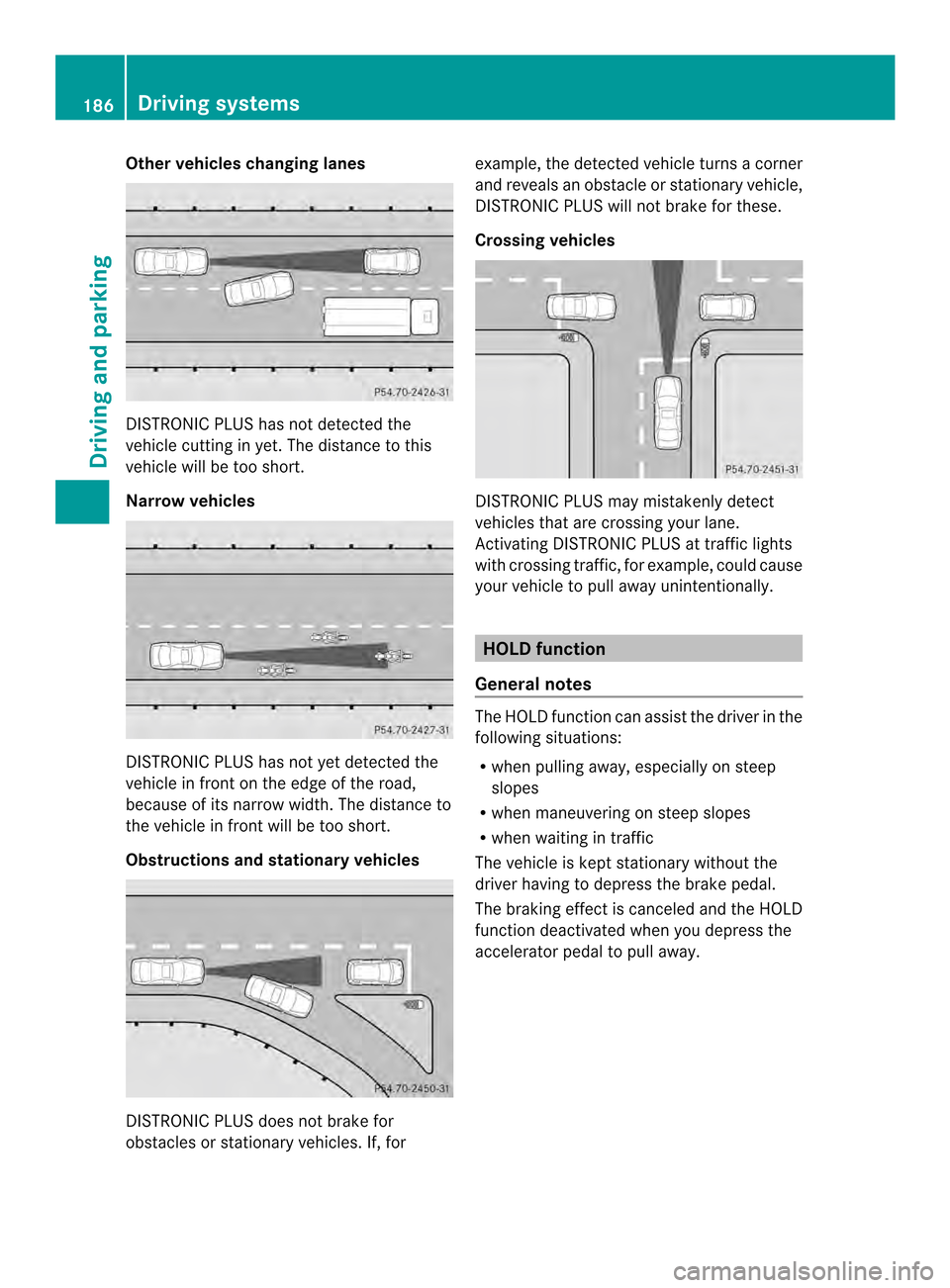
Other vehicles changing lanes
DISTRONIC PLUS has not detected the
vehicle cutting in yet. The distanc etothis
vehicle will be too short.
Narrow vehicles DISTRONIC PLUS has not yet detected the
vehicle in fron tonthe edge of the road,
because of its narrow width. The distance to
the vehicle in front will be too short.
Obstructions and stationary vehicles DISTRONIC PLUS does not brake for
obstacles or stationary vehicles. If, for example, the detected vehicle turns
acorner
and reveals an obstacle or stationary vehicle,
DISTRONIC PLUS will not brake for these.
Crossing vehicles DISTRONIC PLUS may mistakenly detect
vehicles that are crossing your lane.
Activating DISTRONIC PLUS at traffic lights
with crossing traffic, for example, could cause
your vehicle to pull away unintentionally.
HOLD function
General notes The HOLD function can assist the driver in the
following situations:
R
when pulling away,e speciallyonsteep
slopes
R when maneuvering on steep slopes
R when waiting in traffic
The vehicle is kept stationary without the
driver having to depress the brake pedal.
The braking effect is canceled and the HOLD
function deactivated when you depress the
accelerator pedal to pull away. 186
Driving systemsDriving and parking
Page 190 of 382
RAC
ESTART
Important safety notes i
Observe the safety notes for the SPORT
handling mod e(Ypage 70).
RAC ESTART is intended solely for activation
on dedicated race circuits.
RACE START enables optimal acceleration
from astandin gstart .The precondition for
this is asuitable high-grip road surface.
i RACE START is only available in AMG
vehicles.
Conditions for activation You can activat
eRACE START if:
R the doors are closed.
R the engine is runnin gand it has reached an
operating temperature of approximately
176 ‡(80 †). This is the case when the
engine oil temperature in the multifunction
display stops flashing.
R SPORT handling mode is activated.
(Y page 70)
R the steerin gwheel is in the straight-ahead
position
R the vehicle is stationary and the brake
pedal is depressed (left foot).
R the transmission is in position D.
Activating RACE START X
Depress the brake pedal with your left foot
and keep it depressed.
X Turn the drive program selector clockwise
(Y page 159) until the RSlamp lights up.
The RACE START Confirm: Paddle UP Cancel: Paddle DOWN message appears
in the multifunction display.
i If the activation conditions are no longer
fulfilled, RACE START is canceled. The
START Canceled message appears in the
multifunction display. X
To cancel: pull the left steerin gwheel
paddle shifter (Y page 160).
or
X To confirm: pull the right steerin gwheel
paddle shifter (Y page 160).
The RACE START Available Depress gas pedal message appears in the
multifunction display.
i If you do not depress the accelerator
pedal fully within two seconds, RACE
START is canceled. The RACE START Not Possible See Operator's Manual
message appears in the multifunction
display.
X Fully depress the accelerator pedal.
The engine speed rises to approximately
3,500 rpm.
The RACE START Release brake to start message appears in the
multifunction display.
i If you do not release the brake pedal
within five seconds, RACE START is
canceled. The RACE START Canceled message appears in the multifunction
display.
X Take your foot off the brake, but keep the
accelerator pedal depressed.
The vehicle pulls away at maximum
acceleration.
The RACE START Active message appears
in the multifunction display.
RACE START is deactivated when the vehicle
reaches aspeed of approximately 30 mph
(Canada: 50 km/h) .Drive program S+is
activated. SPORT handling mode remains
activated.
RACE START is deactivated immediately if
you release the accelerator pedal during
RACE START or if any of the activation
conditions are no longer fulfilled. The RACE START Not Possible See Operator's
Manual message appears in the multifunction
display.
i If RACE START is used repeatedly within
as hort period of time, it is only available 188
Driving systemsDriving and parking
Page 191 of 382
again after th
evehicle has been driven a
certain distance. AIRMATIC
Vehicle level Important safety notes
G
WARNING
When th evehicle is bein glowered, people
could become trapped if their limbs are
between th evehicle body and th ewheel sor
underneat hthe vehicle .There is arisk of
injury.
Make sure no one is underneath the vehicle
or in the immediate vicinity of the wheel
arches when the vehicle is being lowered. G
WARNING
Vehicles with level control:
The vehicle is slightly lowered if:
R you have selected comfort suspension
tuning and
R you lock the vehicle within approximately
60 seconds of switching off the engine
You and people in the vicinity of the wheel
arch or the underbody may thus become
trapped. There is arisk of injury.
Make sure that nobody is in the vicinity of the
wheel arch or the underbody when you lock
the vehicle.
! The vehicle is lowered by about 15 mm if:
R you have selected "Comfort tuning"
R you switch off the engine and then
R you lock the vehicle within approximately
60 seconds
When parking, position your vehicle so that
it does not make contact with the curb as
the vehicle is lowered. Your vehicle could
otherwise be damaged.
If you lock the vehicle within 60 seconds of
switching the engine off, it lowers slightly to
the selected Comfort suspension mode. Your vehicle regulates its height
automatically
.All-round level control ensures
the best possible suspension and constant
groun dclearance, even with aladen vehicle.
When you drive fast ,the vehicle is lowered
automatically to improve drivin gsafet yand to
reduc efuel consumption.
The followin gvehicle levels are possible:
R normal
R raised: the vehicle is raised by about
0.80 in (20 mm) when compared with the
normal level
R lowered: the vehicle is raised by about
0.40 in (10 mm) when compared with the
normal level
i These changes in level are so slight that
you are hardly aware of them.
The "Normal" and "Raised" vehicle levels can
be set manually.
The "Lowered” vehicle level is set
automatically:
R at speeds above 70 mph (11 3km/ h)
R if you have selected "Sports tuning"
(Y page 190)
Setting th evehicle level
Selec tthe "Normal" settin gfor normal road
surfaces and "Raised" for drivin gwith snow
chain soronp articularly poor road surfaces.
Your selection remain sstored even if you
remove the SmartKey fro mthe ignition lock.
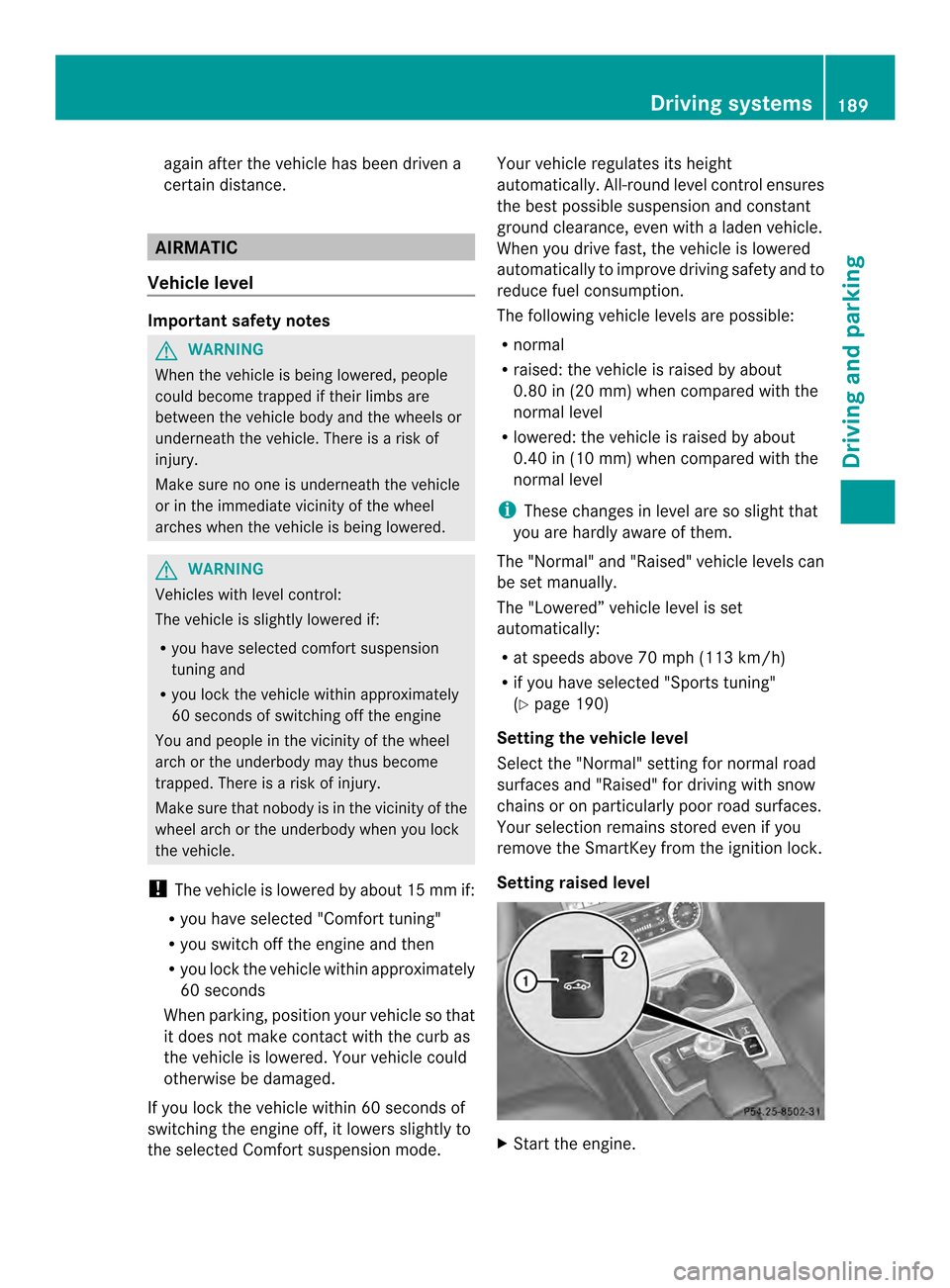
Setting raised level X
Start the engine. Driving systems
189Driving and parking Z
Page 192 of 382
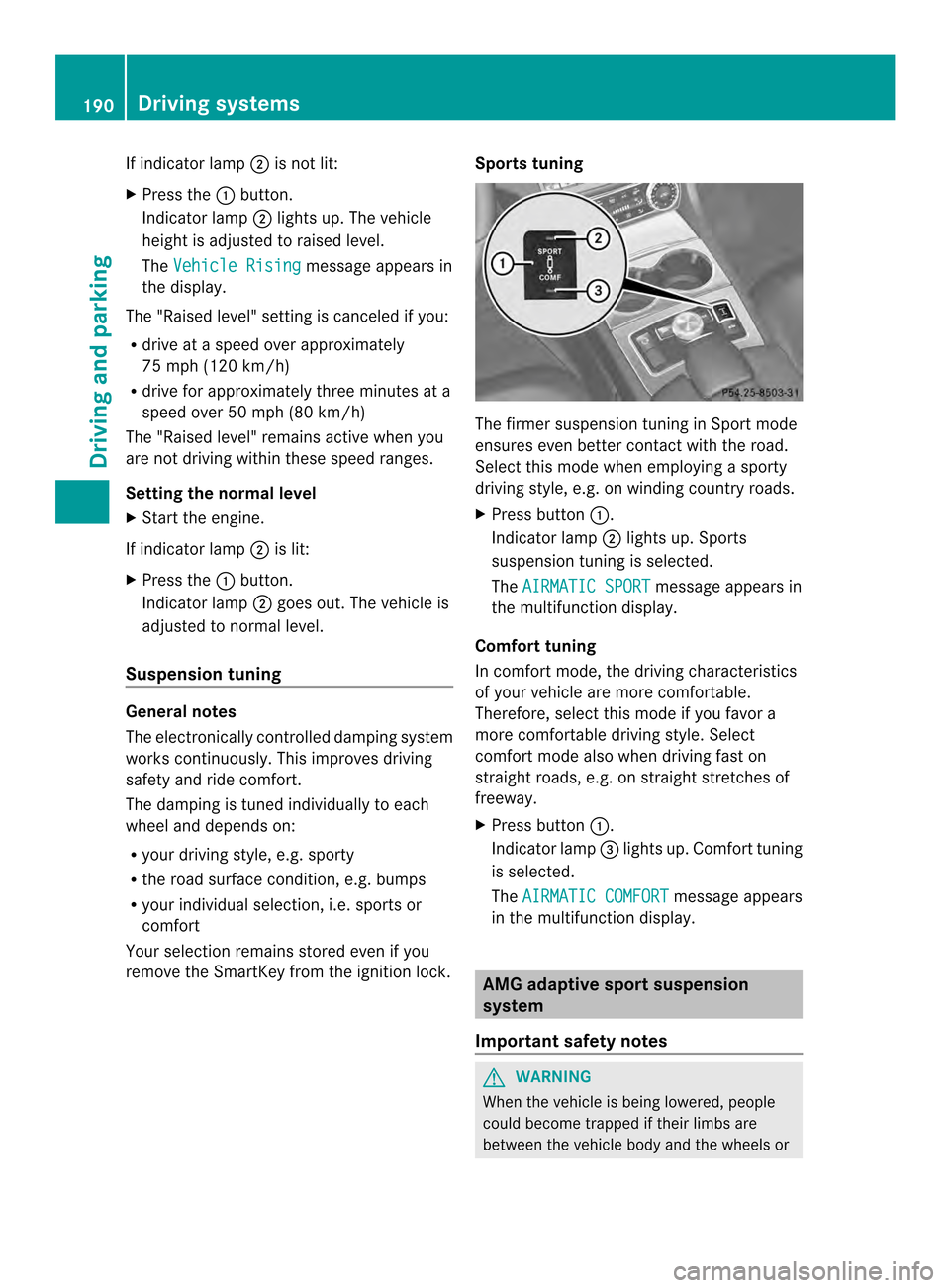
If indicator lamp
0010is not lit:
X Press the 001Abutton.
Indicator lamp 0010lights up. The vehicle
heightisa djusted to raised level.
The Vehicle Rising message appears in
the display.
The "Raised level" setting is canceled if you:
R drive at aspeed over approximately
75 mph (120 km/h)
R drive for approximately three minutes at a
speed over 50 mph (80 km/h)
The "Raised level" remains active when you
are not driving within these speed ranges.
Setting the normal level
X Start the engine.
If indicator lamp 0010is lit:
X Press the 001Abutton.
Indicator lamp 0010goes out. The vehicle is
adjusted to normal level.
Suspension tuning General notes
The electronically controlled damping system
works continuously. This improves driving
safety and ride comfort.
The damping is tuned individually to each
wheel and depends on:
R your driving style, e.g. sporty
R the road surface condition, e.g. bumps
R your individuals election, i.e. sports or
comfort
Your selection remains stored even if you
remove the SmartKey from the ignition lock. Sports tuning The firmer suspension tuning in Sport mode
ensures even better contact with the road.
Select this mode when employing
asporty
driving style, e.g. on winding country roads.
X Press button 001A.
Indicator lamp 0010lights up. Sports
suspension tuning is selected.
The AIRMATIC SPORT message appears in
the multifunction display.
Comfort tuning
In comfort mode, the driving characteristics
of your vehicle are more comfortable.
Therefore, select this mode if you favor a
more comfortable driving style. Select
comfort mode also when driving fast on
straight roads, e.g. on straight stretches of
freeway.
X Press button 001A.
Indicator lamp 0024lights up. Comfort tuning
is selected.
The AIRMATIC COMFORT message appears
in the multifunction display. AMG adaptive sport suspension
system
Important safety notes G
WARNING
When the vehicle is being lowered, people
could become trapped if their limbs are
between the vehicle body and the wheels or 190
Driving systemsDriving and parking
Page 193 of 382
underneat
hthe vehicle .There is arisk of
injury.
Make sure no one is underneath the vehicle
or in the immediate vicinity of the wheel
arches when the vehicle is being lowered. G
WARNING
Vehicles with level control:
The vehicle is slightly lowered if:
R you have selected comfort suspension
tuning and
R you lock the vehicle within approximately
60 seconds of switching off the engine
You and people in the vicinity of the wheel
arch or the underbody may thus become
trapped. There is arisk of injury.
Make sure that nobody is in the vicinity of the
wheel arch or the underbody when you lock
the vehicle.
! The vehicle is lowered by about 0.8 in
(20 mm) if:
R you have selected "Comfortable tuning"
R you switch off the engine and then
R you lock the vehicle within approximately
60 seconds
When parking, position your vehicle so that
it does not make contact with the curb as
the vehicle is lowered. Your vehicle could
otherwise be damaged.
Suspension tuning General notes
The electronically controlled damping system
works continuously.T his improves driving
safety and ride comfort.
The damping is tuned individually to each
wheel and depends on:
R your driving style, e.g. sporty
R the road surface condition,e .g. bumps
R your individual selection of Sport, Spor t+
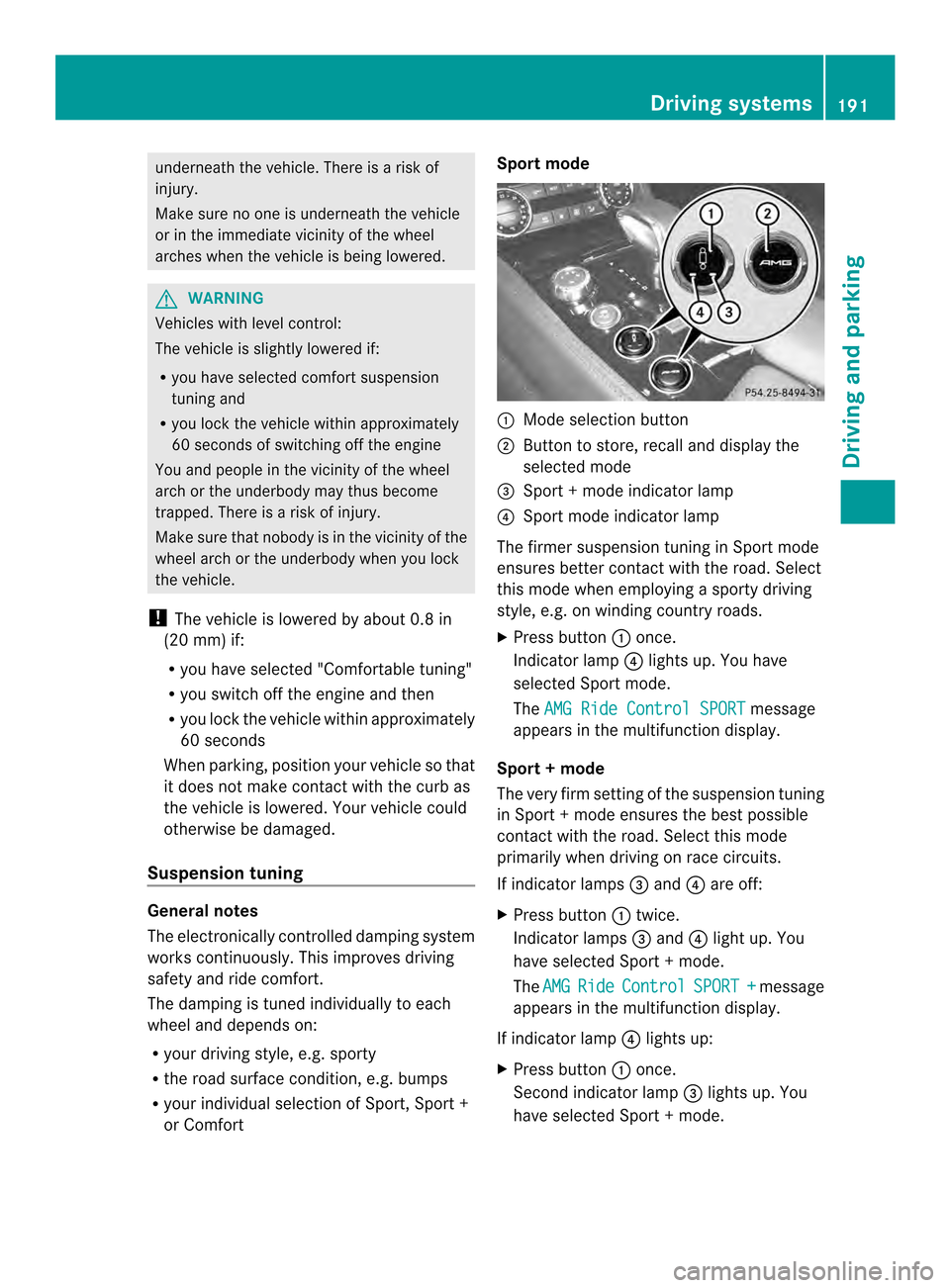
or Comfort Sport mode
001A
Mode selection button
0010 Button to store, recall and display the
selected mode
0024 Sport +mode indicator lamp
0021 Sport mode indicator lamp
The firmer suspension tuning in Sport mode
ensures better contact with the road. Select
this mode when employing asporty driving
style, e.g. on winding country roads.
X Press button 001Aonce.
Indicator lamp 0021lights up. You have
selected Sport mode.
The AMG Ride Control SPORT message
appears in the multifunction display.
Sport +mode
The very firm setting of the suspension tuning
in Sport +mode ensures the best possible
contact with the road. Select this mode
primarily when driving on race circuits.
If indicator lamps 0024and 0021are off:
X Press button 001Atwice.
Indicator lamps 0024and 0021light up. You
have selected Sport +mode.
The AMG Ride Control SPORT + message
appears in the multifunction display.
If indicator lamp 0021lights up:
X Press button 001Aonce.
Secondi ndicator lamp 0024lights up. You
have selected Sport +mode. Driving systems
191Driving and parking Z
Page 196 of 382
Rang
eoft he sensors General notes
PARKTRONIC doe
snot take objects into
consideration that are:
R below the detection range, e.g. people,
animal sorobjects
R above the detection range, e.g.
overhanging loads, truck overhangs or
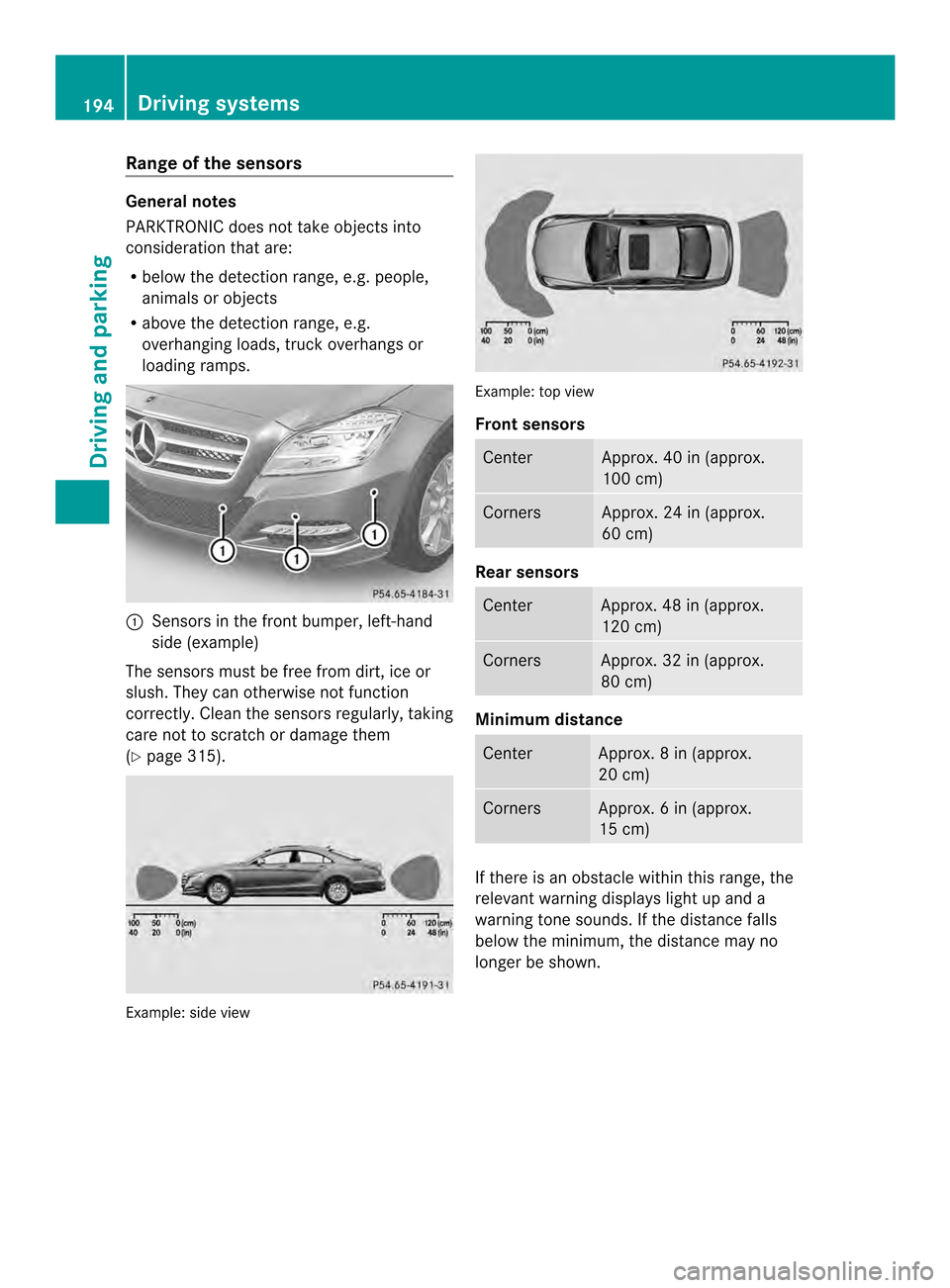
loading ramps. 001A
Sensors in the front bumper, left-hand
sid e(example)
The sensors mus tbefree from dirt, ice or
slush. They can otherwise not function
correctly. Clean the sensor sregularly, taking
care not to scratch or damage them
(Y page 315). Example: side view Example: top view
Front sensors
Center Approx
.40in(approx.
100 cm) Corners Approx
.24in(approx.
60 cm) Rear sensors
Center Approx
.48in(approx.
120 cm) Corners Approx
.32in(approx.
80 cm) Minimu
mdistance Center Approx
.8in(approx.
20 cm) Corners Approx
.6in(approx.
15 cm) If
there is an obstacle withi nthis range, the
relevant warning displays light up and a
warning tone sounds. If the distance falls
below the minimum, the distance may no
longer be shown. 194
Driving systemsDriving and parking
Page 197 of 382
Warning displays
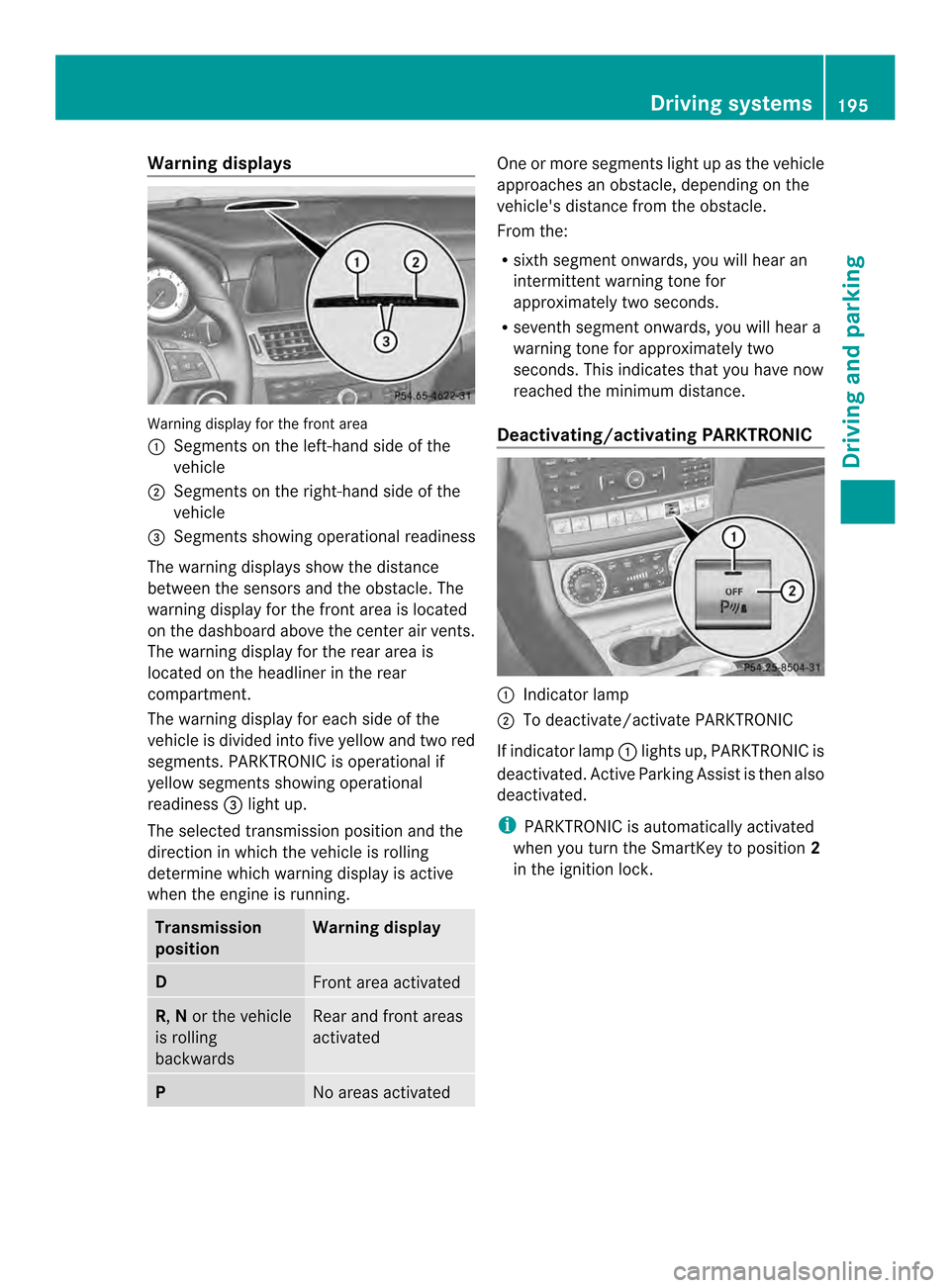
Warning display for the front area
001A
Segments on the left-hand side of the
vehicle
0010 Segments on the right-hand side of the
vehicle
0024 Segments showing operational readiness
The warning displays show the distance
between the sensors and the obstacle. The
warning displayf or the front area is located
on the dashboard above the center airv ents.
The warning display for the rear area is
located on the headliner in the rear
compartment.
The warning display for each side of the
vehicle is divided intof ive yellow and two red
segments. PARKTRONIC is operational if
yellow segments showing operational
readiness 0024light up.
The selected transmission position and the
direction in which the vehicle is rolling
determine which warning display is active
when the engin eisrunning. Transmission
position Warning display
D
Fron
tarea activated R,
Nor the vehicle
is rolling
backwards Rear and fron
tareas
activated P
No areas activated One or more segments light up as the vehicle
approaches an obstacle, depending on the
vehicle's distanc
efrom the obstacle.
From the:
R sixt hsegmen tonwards ,you will hea ran
intermitten twarnin gtonef or
approximately two seconds.
R sevent hsegment onwards, you will hear a
warning tonef or approximately two
seconds. This indicates that you have now
reached the minimum distance.
Deactivating/activating PARKTRONIC 001A
Indicator lamp
0010 To deactivate/activate PARKTRONIC
If indicator lamp 001Alights up, PARKTRONIC is
deactivated. Active Parking Assist is then also
deactivated.
i PARKTRONIC is automatically activated
when you turn the SmartKey to position 2
in the ignition lock. Driving systems
195Driving and parking Z