stop start MERCEDES-BENZ CLS-Class 2014 W218 User Guide
[x] Cancel search | Manufacturer: MERCEDES-BENZ, Model Year: 2014, Model line: CLS-Class, Model: MERCEDES-BENZ CLS-Class 2014 W218Pages: 382, PDF Size: 5.36 MB
Page 72 of 382
Deactivating/activating ESP
®
(AMG
vehicles) Activating/deactivating SPORT handling
mode G
WARNING
Whe nSPORT handling mode is activated,
there is agreater risk of skidding and
accidents.
Only activat eSPORT handling mode in the
situations described in the following. X
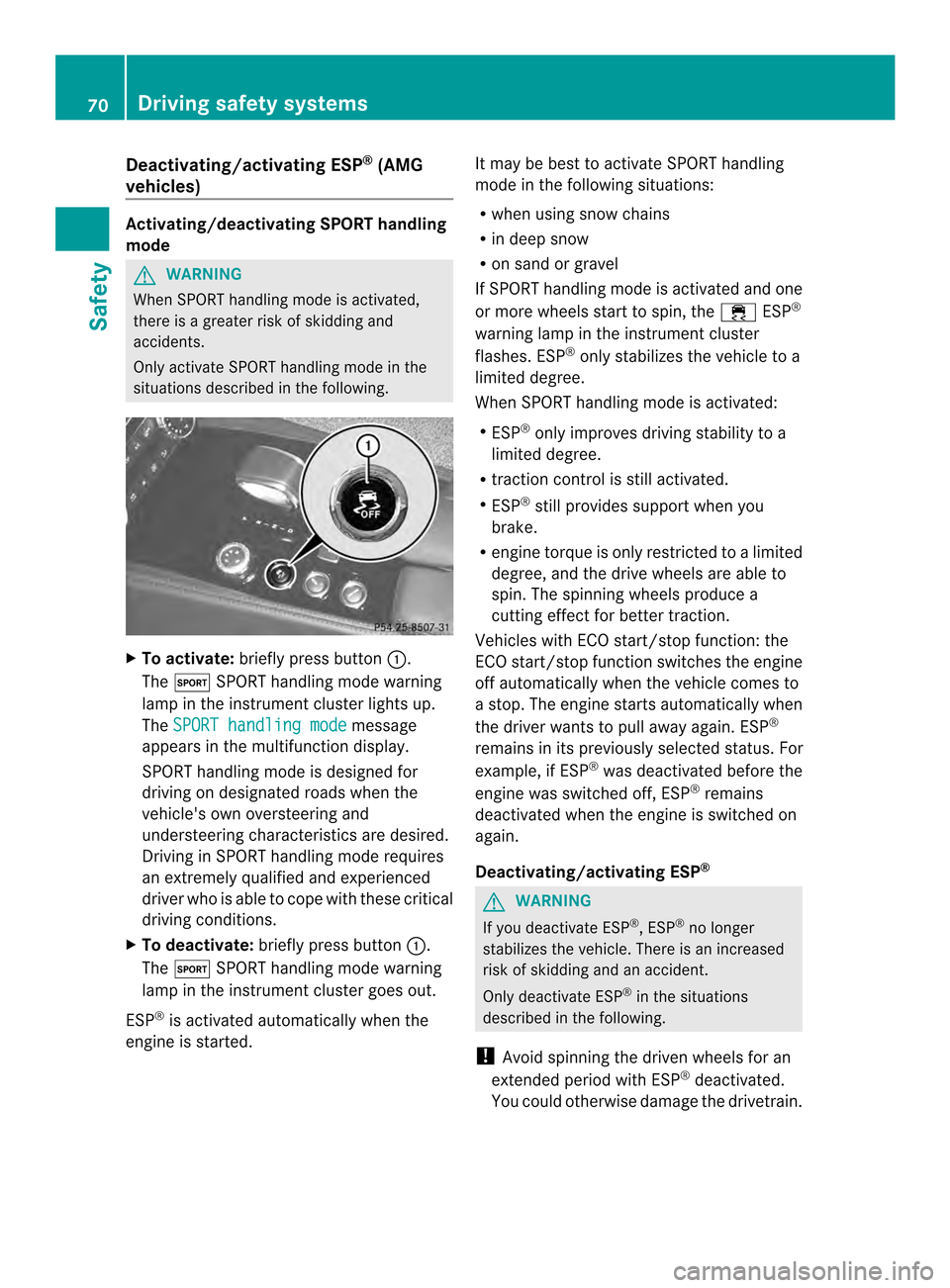
To activate: briefly press button 001A.
The 0005 SPORT handling mode warning
lamp in the instrument cluster lights up.
The SPORT handling mode message
appears in the multifunction display.
SPORT handling mode is designed for
driving on designated roads when the
vehicle's own oversteering and
understeering characteristics are desired.
Drivin ginSPORT handling mode requires
an extremely qualified and experienced
driver who is able to cope with these critical
driving conditions.
X To deactivate: briefly press button 001A.
The 0005 SPORT handling mode warning
lamp in the instrument cluster goes out.
ESP ®
is activated automatically when the
engine is started. It may be best to activat
eSPORT handling
mode in the following situations:
R when using snow chains
R in deep snow
R on sand or gravel
If SPORT handling mode is activated and one
or more wheels start to spin, the 0011ESP®
warning lamp in the instrument cluster
flashes. ESP ®
only stabilizes the vehicle to a
limited degree.
When SPORT handling mode is activated:
R ESP ®
only improves driving stability to a
limited degree.
R traction control is still activated.
R ESP ®
still provides support when you
brake.
R engine torque is only restricted to alimited
degree, and the drive wheels are able to
spin. The spinnin gwheels produce a
cutting effect for better traction.
Vehicles with ECO start/stop function: the
ECO start/stop function switches the engine
off automatically when the vehicle comes to
as top. The engine start sautomatically when
the driver wants to pull away again. ESP ®
remains in its previously selected status. For
example, if ESP ®
was deactivated before the
engine was switched off, ESP ®
remains
deactivated when the engine is switched on
again.
Deactivating/activating ESP ® G
WARNING
If you deactivate ESP ®
,E SP ®
no longer
stabilizes the vehicle. There is an increased
risk of skidding and an accident.
Only deactivate ESP ®
in the situations
described in the following.
! Avoid spinnin gthe driven wheels for an
extended period with ESP ®
deactivated.
You could otherwise damage the drivetrain. 70
Driving safety systemsSafety
Page 73 of 382
X
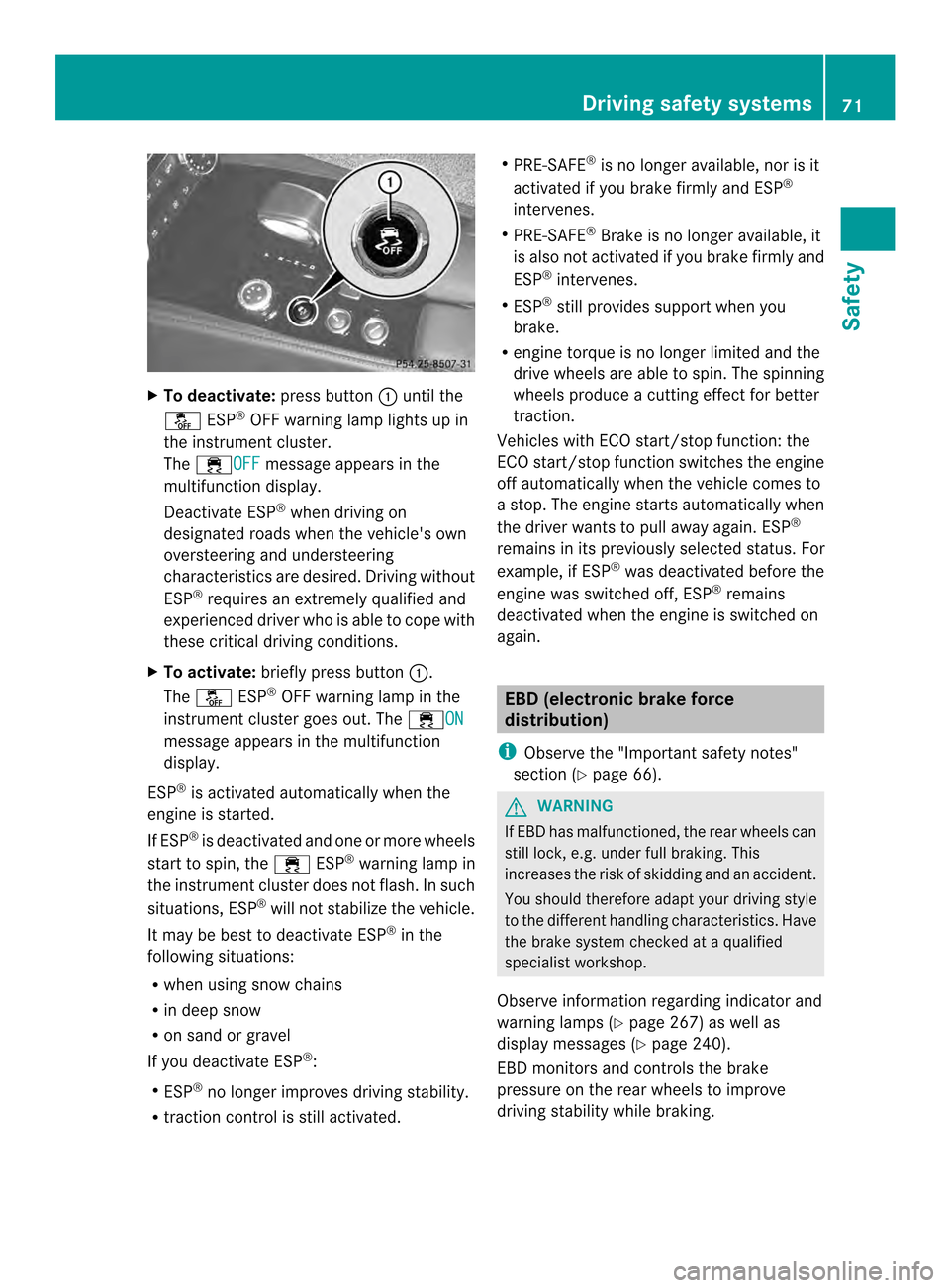
To deactivate: press button001Aunti lthe
0009 ESP®
OFF warning lamp lights up in
the instrument cluster.
The 0011OFF message appear
sinthe
multifunctio ndisplay.
Deactivate ESP ®
when drivin gon
designated roads when the vehicle's own
oversteerin gand understeering
characteristics are desired. Drivin gwithout
ESP ®
require sanextremely qualified and
experienced drive rwho is able to cope with
these critical driving conditions.
X To activate: briefly press button 001A.
The 0009 ESP®
OFF warning lamp in the
instrumentc luster goes out. The 0011ON message appears in the multifunction
display.
ESP ®
is activated automatically when the
engine is started.
If ESP ®
is deactivated and one or mor ewheels
start to spin ,the 0011 ESP®
warnin glamp in
the instrumen tcluster does not flash. In such
situations, ESP ®
will not stabilize the vehicle.
It may be best to deactivat eESP®
in the
followin gsituations:
R when using sno wchains
R in deep snow
R on sand or gravel
If you deactivat eESP®
:
R ESP ®
no longer improves drivin gstability.
R traction control is still activated. R
PRE-SAFE ®
is no longer available, nor is it
activated if you brak efirmly and ESP ®
intervenes.
R PRE-SAFE ®
Brake is no longer available, it
is also not activated if you brak efirmly and
ESP ®
intervenes.
R ESP ®
still provides support when you
brake.
R engine torque is no longer limited and the
drive wheels are able to spin .The spinning
wheels produce acuttin geffect for better
traction.
Vehicles with ECO start/stop function: the
ECO start/stop function switches the engine
off automatically when the vehicle comes to
as top. The engine starts automatically when
the driver wants to pull away again. ESP ®
remains in its previously selected status. For
example, if ESP ®
was deactivated before the
engine was switched off, ESP ®
remains
deactivated when the engine is switched on
again. EBD (electronic brake force
distribution)
i Observe the "Important safety notes"
section (Y page 66). G
WARNING
If EBD has malfunctioned, the rear wheels can
still lock, e.g. under full braking. This
increases the risk of skidding and an accident.
You should therefore adapt your driving style
to the different handling characteristics. Have
the brake system checked at aqualified
specialist workshop.
Observe information regarding indicator and
warning lamps (Y page 267) as well as
displaym essages (Y page 240).
EBD monitors and controls the brake
pressure on the rear wheels to improve
driving stability while braking. Driving safety systems
71Safety Z
Page 74 of 382
ADAPTIVE BRAKE
ADAPTIV EBRAKE enhance sbraking safety
and offers increased braking comfort .In
addition to th ebraking function ,ADAPT IVE
BRAKE also has th eHOLDf unction
(Y page 186) and hill start assist
(Y page 150). PRE-SAFE
®
Brake
Genera linformation i
Observ ethe "Importan tsafet ynotes"
sectio n(Ypage 66).
PRE-SAFE ®
Brak eiso nly available in vehicles
with DISTRONIC PLUS.
If PRE-SAFE ®
Brak eistoa id you, the radar
senso rsystem mus tbe:
R activated (Y page 232)
R operational
With the help of the radar sensor system,
PRE-SAFE ®
Brak ecan detec tobstacles that
are in fron tofyour vehicle for an extended
period of time.
PRE-SAFE ®
Brak ecan help you to minimize
the risk of acollision with avehicle ahead or
reduce the effects of such acollision. If PRE-
SAFE ®
Brak ehas detected arisk of collision,
you will be warned visually and acoustically
as well as by automatic braking. PRE-SAFE ®
Brak ecannot preven tacollision withou tyour
intervention.
At speeds of up to approximately 40 mph
(70 km/h) PRE-SAFE®
Brake can also detect
stationary objects. Examples of stationary
object sare stopped or parked vehicles.
Important safety notes G
WARNING
PRE-SAFE ®
Brake will initially brake your
vehicle by apartial application of the brakes
if ad anger of collision is detected. There may
be acollision unless you also brake. Automatic emergenc
ybraking cannot prevent
ac ollision. There is arisk of an accident.
Always apply the brakes yourself and try to
take evasive action. G
WARNING
PRE-SAFE ®
Brake cannot alwaysc learly
identify objects and comple xtraffic
conditions.
In these cases, PRE-SAFE ®
Brake may:
R give an unnecessary warning and then
brake the vehicle
R not give awarning or intervene
There is arisk of an accident.
Always pay particular attention to the traffic
situation and be read ytobrake, especially if
PRE-SAFE ®
Brake warns you.T erminate the
intervention in anon-critical driving situation.
In particular, the detection of obstacles can
be impaired if there is:
R dirt on the sensors or anything else
covering the sensors
R snow or heavy rain
R interference by other rada rsources
R there are strongr adar reflections, for
example in parking garages
R an arrow vehicle traveling in front,e .g. a
motorbike
R av ehicle traveling in front on adifferent line
relative to the center of your vehicle G
WARNING
PRE-SAFE ®
Brake does not react:
R to people or animals
R to oncoming vehicles
R to crossin gtraffic
R when cornering
As aresult, PRE-SAFE ®
Brake may neither
give warnings nor intervene in all critical
situations. There is arisk of an accident.
Always pay careful attention to the traffic
situation and be ready to brake. 72
Driving safety systemsSafety
Page 76 of 382
Contac
tanauthorize dMercedes-Benz
Cente rorcall 1-800-FOR-MERCedes (in the
USA) or 1-800-387-0100 (in Canada). ATA (anti-thef
talarm system) X
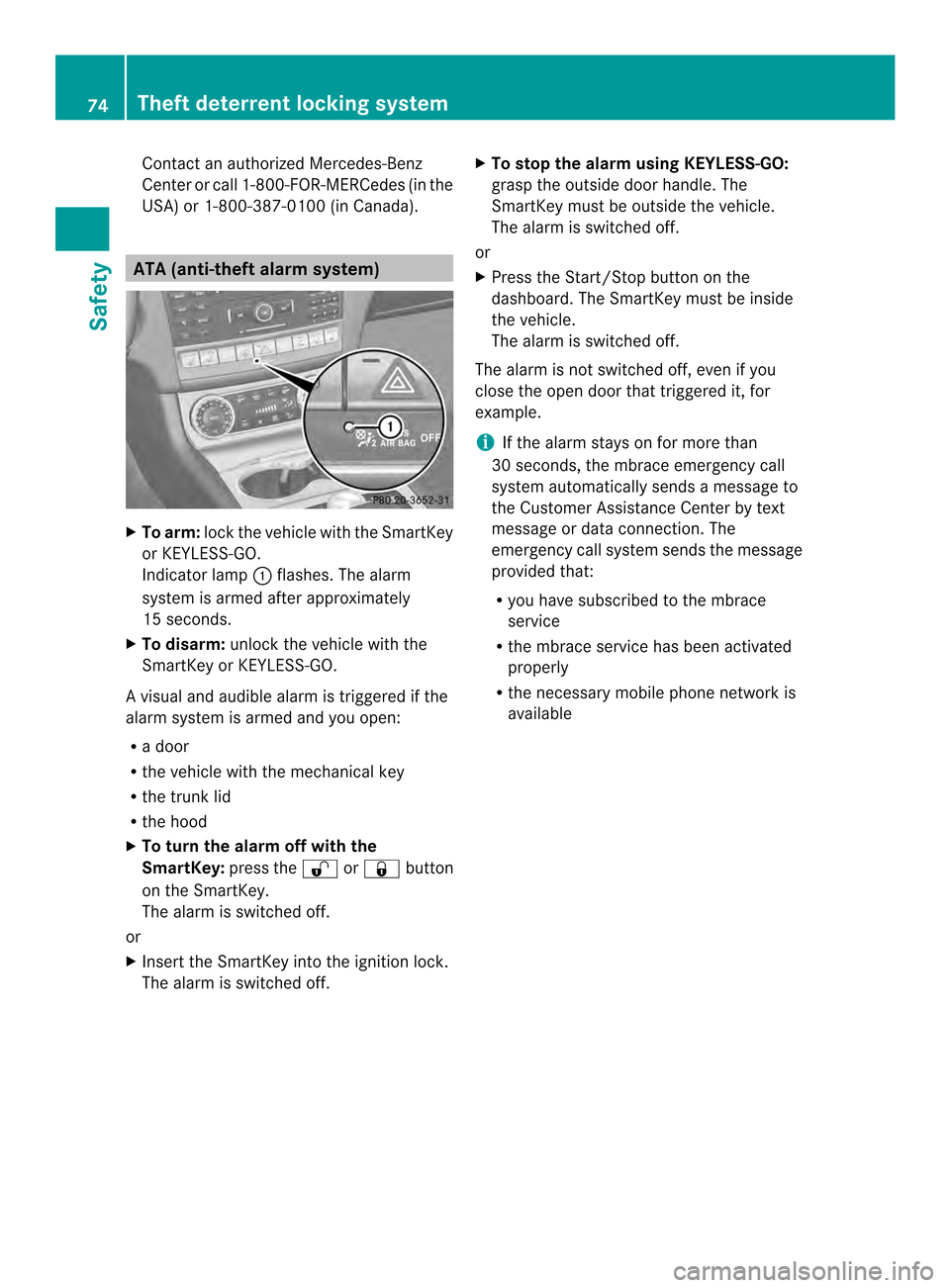
To arm: lockthe vehicle with the SmartKey
or KEYLESS-GO.
Indicator lamp 001Aflashes. The alarm
system is armed after approximately
15 seconds.
X To disarm: unlock the vehicle with the
SmartKey or KEYLESS-GO.
Av isual and audible alarm is triggere difthe
alarm system is armed and you open:
R ad oor
R the vehicle with the mechanical key
R the trunk lid
R the hood
X To turn th ealarmo ff with the
SmartKey: press the0014or000F button
on the SmartKey.
The alarm is switched off.
or
X Insert the SmartKey int othe ignition lock.
The alarm is switched off. X
To stop th ealarmu sing KEYLESS-GO:
grasp the outside door handle. The
SmartKey must be outside the vehicle.
The alarm is switched off.
or
X Press the Start/Stop button on the
dashboard. The SmartKey must be inside
the vehicle.
The alarm is switched off.
The alarm is not switched off, even if you
close the open door that triggered it, for
example.
i If the alarm stays on for more than
30 seconds, the mbrace emergency call
system automatically sends amessage to
the Customer Assistance Center by text
message or data connection .The
emergency call system sends the message
provided that:
R you have subscribed to the mbrace
service
R the mbrace service has been activated
properly
R the necessary mobile phone network is
available 74
Theft deterrent locking systemSafety
Page 80 of 382

approximately six seconds until th
ebattery
check lamp flashes twice (Y page 79).
i If th esettin goft helockin gsystem is
changed within th esignal range of the
vehicle ,pressin gthe 000F or0014 button:
R locks or
R unlock sthe vehicle
The SmartKey no wfunction sasfollows:
X To unlock th edriver's door: pressthe
0014 buttononce.
X To unlock centrally: pressthe 0014
butto ntwice.
X To lock centrally: pressthe 000F button.
The KEYLESS-GO function is changed as
follows:
X To unlock th edriver's door: touch the
inner surface of th edoor handle on the
driver' sdoor.
X To unlock centrally: touch theinner
surface of th edoor handle on th efront-
passenger door or th erear door.
X To lock centrally: touch theoute rsensor
surface on one of the door handles.
X To restor ethe factor ysettings: press
and hold down the 0014and000F buttons
simultaneously for approximately six
seconds until the batter ychec klamp
flashes twice ( Ypage 79). Mechanica
lkey
General notes If th
evehicle can no longer be locke dor
unlocked wit hthe SmartKey, use the
mechanical key.
If you use th emechanical ke ytou nlock and
open th edriver' sdoor or th etrunk lid, the
anti-thef talarm system will be triggered
(Y page 74). There are several ways to tur
noff the alarm:
X To turn the alarm off with the
SmartKey: press the0014or000F button
on the SmartKey.
or
X Insert the SmartKey into the ignition lock.
or
X To deactivate the alarm with KEYLESS-
GO: press the Start/Stop button in the
ignition lock. The SmartKey must be in the
vehicle.
or
X Lock or unlock the vehicle using KEYLESS-
GO. The SmartKey must be outside the
vehicle.
If you unlock the vehicle using the mechanical
key, the fuel filler fla pwill not be unlocked
automatically.
X To unlock th efuel filler flap: insert the
SmartKey int othe ignition lock.
Removing th emechanical key 001A
Release catch
0010 Mechanical key
X Push release catch 001Ain the direction of
the arrow and at the same tim eremove
mechanical key 0010fromt he SmartKey. 78
SmartKeyOpening and closing
Page 91 of 382
block
sorrestrict saside window during the
closin gprocess, the side window opens again
automatically. However ,the automatic
reversing feature is only an aid and does not
relieve you of the responsibility of paying
attention when closin gaside window. G
WARNING
The reversing feature does not react:
R to soft ,light and thin objects, e.g. small
fingers
R over the last 4mmofthe closing movement
R during resetting
R when closing the side window again
manually immediately after automatic
reversing
This means that the reversing feature cannot
prevent someone being trapped in these
situations. There is arisk of injury.
Make sure that no body parts are in close
proximity during the closing procedure. If
someone becomes trapped, press the switch
to open the side window again. Opening and closing the side
windows
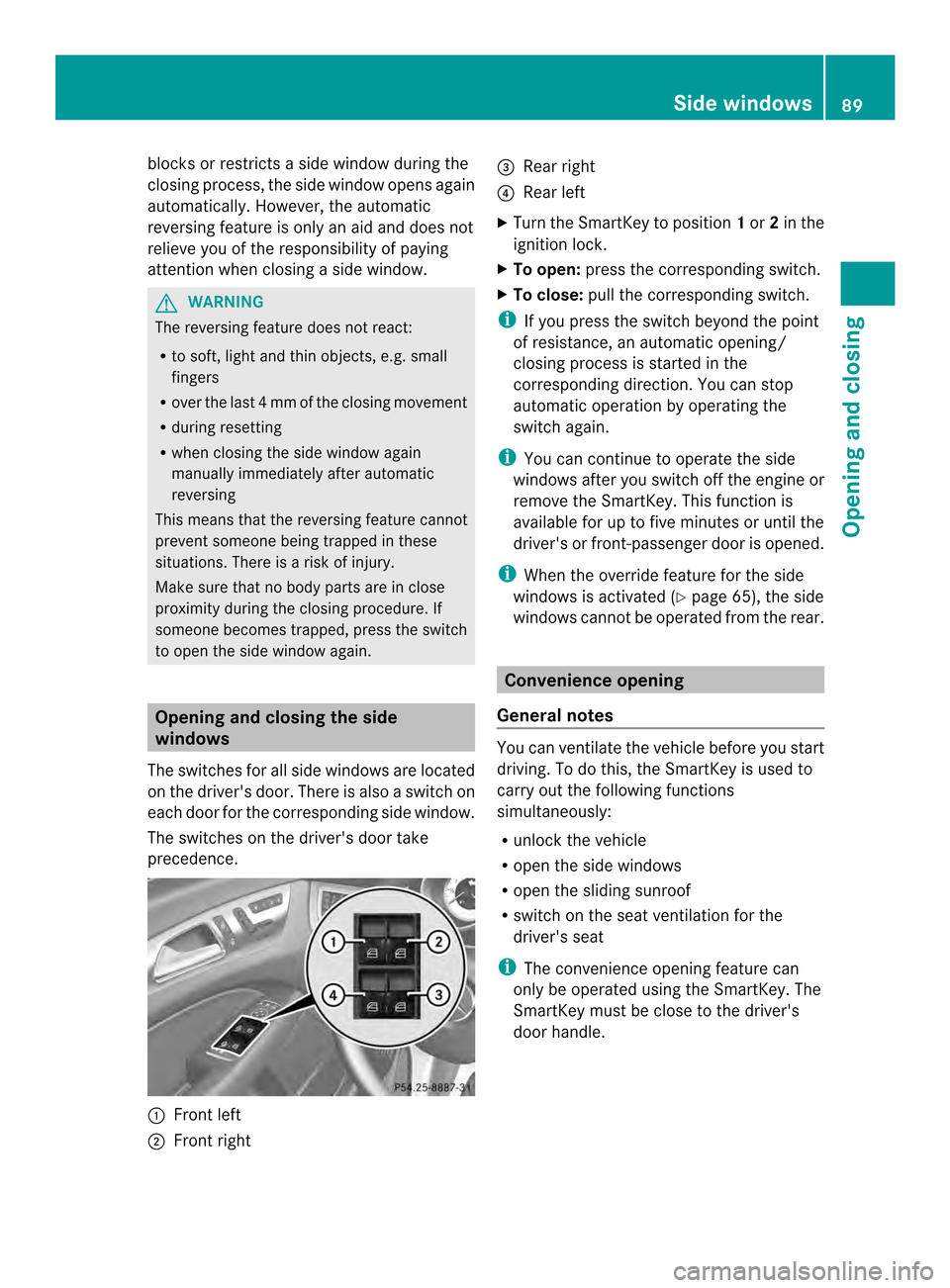
The switches for all side windows are located
on the driver's door. There is also aswitch on
each door for the corresponding side window.
The switches on the driver's door take
precedence. 001A
Front left
0010 Front right 0024
Rear right
0021 Rear left
X Turn the SmartKey to position 1or 2in the
ignition lock.
X To open: press the corresponding switch.
X To close: pull the corresponding switch.
i If you press the switch beyond the point
of resistance, an automatic opening/
closing process is started in the
corresponding direction. You can stop
automatic operation by operating the
switch again.
i You can continue to operate the side
windows after you switch off the engine or
remove the SmartKey. This function is
available for up to five minutes or until the
driver's or front-passenger door is opened.
i When the override feature for the side
windows is activated (Y page 65), the side
windows cannot be operated from the rear. Convenienceo
pening
General notes You can ventilate the vehicle before you start
driving. To do this, the SmartKey is used to
carry out the following functions
simultaneously:
R
unlock the vehicle
R open the side windows
R open the sliding sunroof
R switch on the seat ventilation for the
driver's seat
i The convenience opening feature can
only be operated using the SmartKey. The
SmartKey must be close to the driver's
door handle. Side windows
89Opening and closing Z
Page 95 of 382

Do not allo
wanything to protrude fro mthe
sliding sunroof. Otherwise, the seals could
be damaged.
! The weather can change abruptly. It could
start to rain or snow. Make sure that the
sliding sunroof is closed when you leave the
vehicle. The vehicle electronicsc an be
damaged if water enters the vehicle
interior.
i Resonance noises can occur in addition
to the usuala irflow noises when the sliding
sunroof is open. They are caused by minor
pressure fluctuations in the vehicle interior.
Change the position of the sliding sunroof
or open aside window slightly to reduce or
eliminate these noises. Sliding sunroof reversing feature
The sliding sunroof is equipped with an
automatic reversing feature. If asolid object
blocks or restrictst he sliding sunroof during
the closing process, the sliding sunroof opens
again automatically .However, the automatic
reversing feature is only an aid and does not
relieve you of the responsibility of paying
attention when closing the sliding sunroof. G
WARNING
The reversing feature does not react:
R to soft, light and thin objects, e.g. small
fingers
R over the last 4mmofthe closing movement
R during resetting
R when closing the sliding sunroof again
manually immediately after automatic
reversing
This means that the reversing feature cannot
prevent someone being trapped in these
situations. There is arisk of injury.
Make sure that no body parts are in close
proximity during the closing procedure. If somebody becomes trapped:
R
release the switch immediately, or
R during automatic operation, push the
switch briefly in any direction
The closing process is stopped. Operating the sliding sunroof
Opening and closing Overhead control panel
001A
To raise
0010 To open
0024 To close/lower
X Turn the SmartKey to position 1or 2in the
ignition lock.
X Press or pull the 0006switch in the
corresponding direction.
i If you press the 0006switch beyond the
point of resistance, an automatic opening/
closing process is started in the
corresponding direction. You can stop
automatic operation by operating the
switch again.
i The automatic opening and raising
feature is available only when the sliding
sunroof is closed.
The sun protection cover automatically opens
along with the sliding sunroof. You can open
or close the sun protection cover manually
when the sliding sunroof is raised or closed.
i You can continue to operate the sliding
sunroof after switching off the engine or Sliding sunroof
93Opening and closing Z
Page 111 of 382
Position of the steering wheel for
driving
The steering wheel is moved to the last
selected position when:
R the driver's door is closed
R with KEYLESS-GO: you press the Start/
Stop button once on vehicles with
KEYLESS-GO
or
R with the SmartKey: you insert the
SmartKey into the ignition lock.
When you close the driver's door with the
ignition switched on, the steering wheel is
also automatically moved to the previously
set position.
The last position of the steering wheel is
stored when you switch off the ignition or
when you store the settingw ith the memory
function (Y page 112).
Crash-responsive EASY-EXIT feature If the crash-responsiv
eEASY-EXI Tfeature is
triggere dinana ccident,the steerin gcolumn
will mov eupwards when the driver's door is
opened. This occurs irrespective of the
position of the SmartKey in the ignition lock.
This makes it easier to exit the vehicle and
rescue the occupants.
The crash-responsiv eEASY-EXI Tfeature is
only operational if the EASY-EXIT/ENTRY
feature is activated in the on-board computer.
(Y page 233) Mirrors
Exterior mirrors
Adjusting th eexterior mirrors G
WARNING
You could lose control of your vehicle if you
do the followin gwhile driving:
R adjust the driver's seat ,head restraint,
steerin gwheel or mirrors
R fasten the seat belt
There is arisk of an accident.
Adjust the driver's seat, head restraint,
steerin gwheel and mirror and fasten your
seat belt before starting the engine. G
WARNING
The exterior mirror on the front-passenger
side reduces the size of the image. Visible
objects are actually closer than they appear.
This means that you could misjudge the
distanc efrom road users travelin gbehind,
e.g. when changin glane. There is arisk of an
accident.
For this reason, alway smake sure of the
actual distanc efrom the road users traveling
behind by glancin gover your shoulder. X
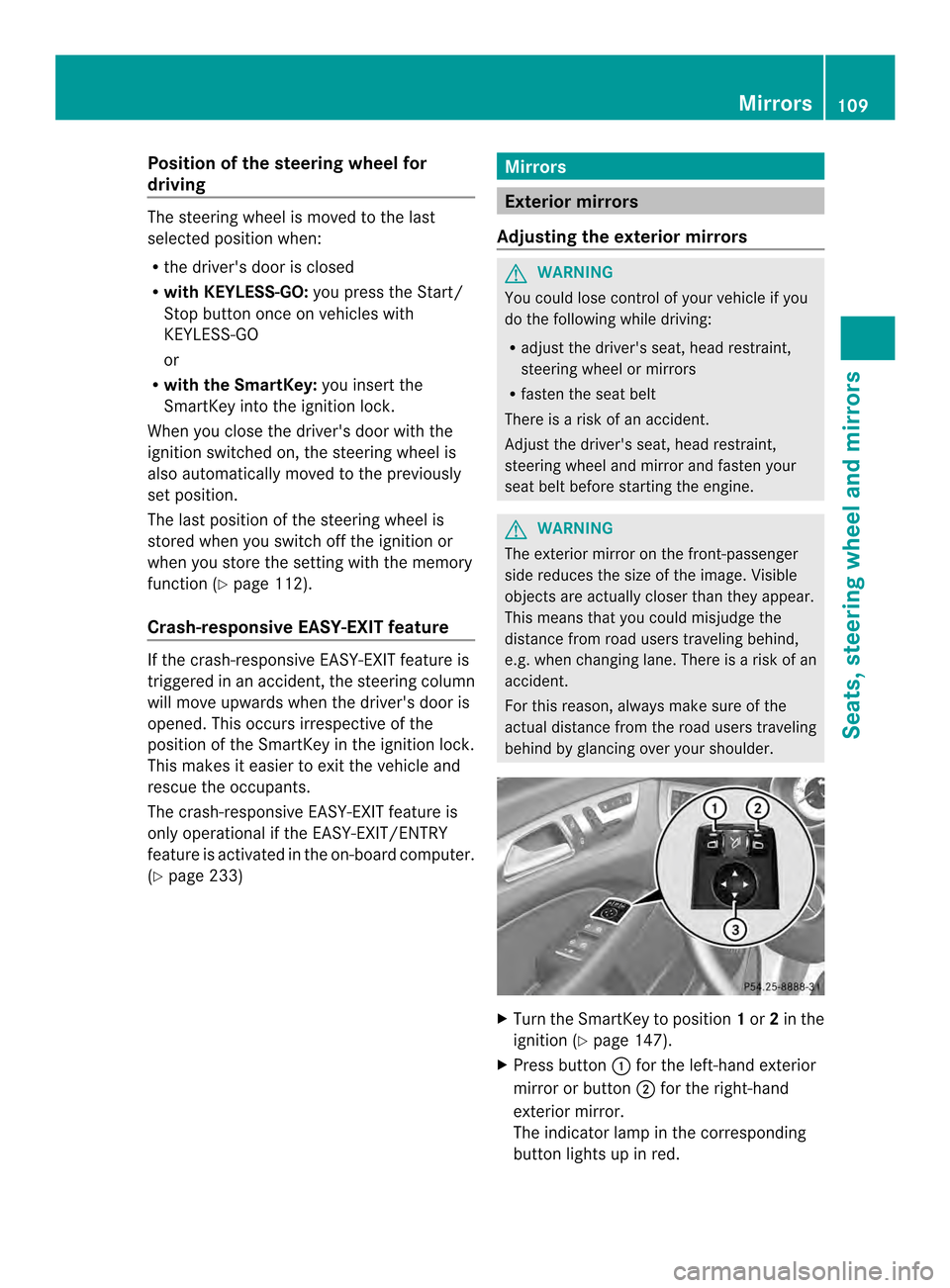
Turn the SmartKey to position 1or 2in the
ignition (Y page 147).
X Press button 001Afor the left-hand exterior
mirror or button 0010for the right-hand
exterior mirror.
The indicator lamp in the corresponding
button lights up in red. Mirrors
109Seats, steering wheel and mirrors Z
Page 130 of 382
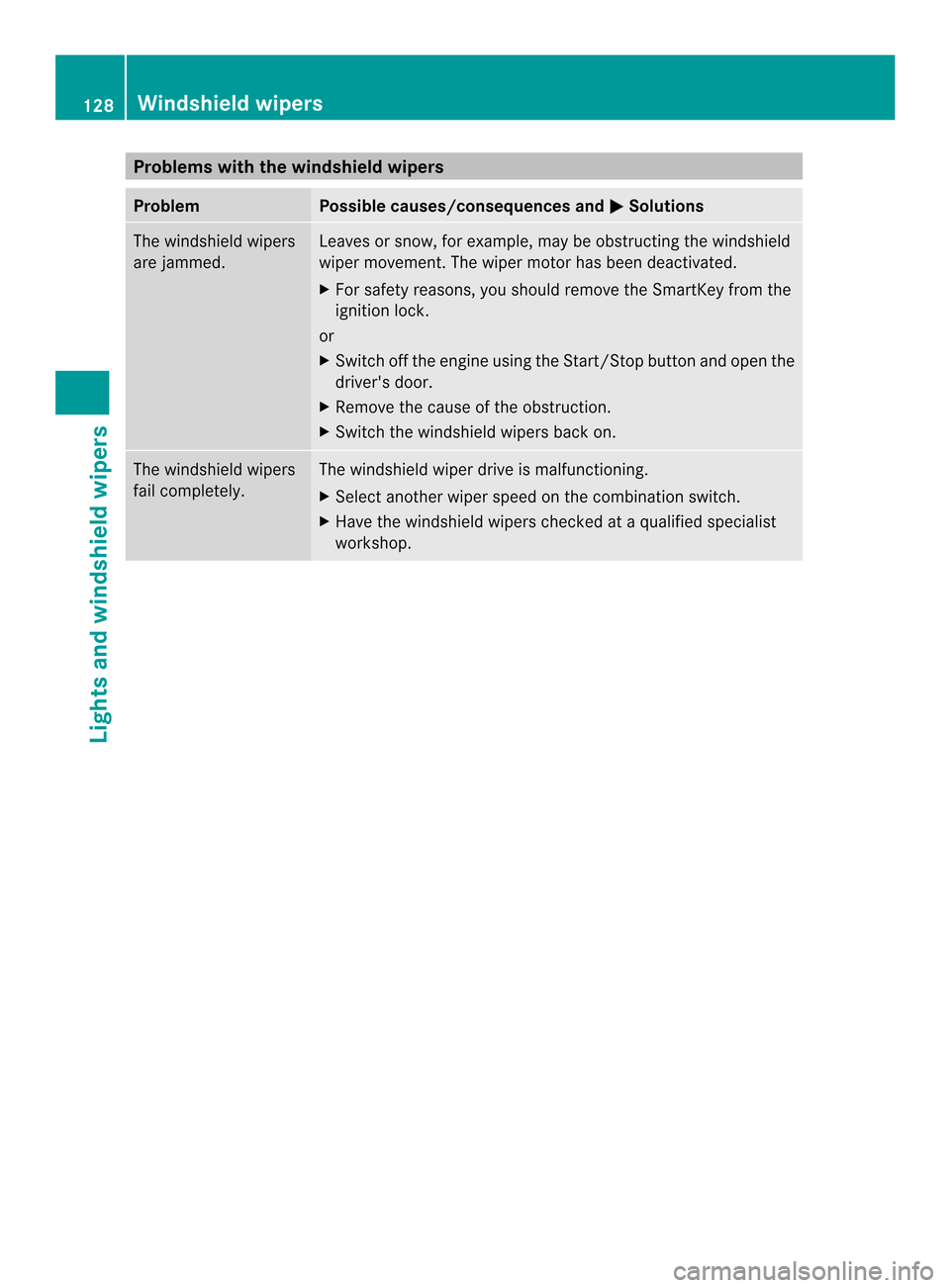
Problems with the windshield wipers
Problem Possible causes/consequences and
000B Solutions
The windshield wipers
are jammed. Leaves or snow, for example, may be obstructing the windshield
wiper movement.T
he wiper motor has been deactivated.
X For safety reasons, you should remove the SmartKey from the
ignition lock.
or
X Switch off the engine using the Start/Stop button and open the
driver's door.
X Remove the cause of the obstruction.
X Switch the windshield wipers back on. The windshield wipers
fail completely. The windshield wiper drive is malfunctioning.
X
Select another wiper speed on the combination switch.
X Have the windshield wipers checked at aqualified specialist
workshop. 128
Windshield wipersLights and windshield wipers
Page 135 of 382
indicator lamp above the
0010button goes
out.
R Vehicles with COMAN DMultimedia-
System: if you change the settings of the
climate control system, the climate status
display appears for approximately three
seconds at the bottom of the screen in the
COMAND display. See also the separate
COMAND operating instructions .You will
see the current settings of the various
climate control functions.
ECO start/stop function During automatic engine switch-off, the ECO
start/stop function only operates at a
reduced capacity. If you require the full
climate control output, you can switch off the
ECO start/stop function by pressing the ECO
button (Y page 152). Overview of climate control systems
133Climate control