brakes MERCEDES-BENZ CLS-Class 2014 W218 Owner's Guide
[x] Cancel search | Manufacturer: MERCEDES-BENZ, Model Year: 2014, Model line: CLS-Class, Model: MERCEDES-BENZ CLS-Class 2014 W218Pages: 382, PDF Size: 5.36 MB
Page 189 of 382
Important safety notes
G
WARNING
When leaving th evehicle, it can still rol laway
despit ebein gbraked by th eHOLD function if:
R there is amalfunction in the system or in
the voltage supply.
R the HOLD function has been deactivated by
pressing the accelerator pedal or the brake
pedal,e .g. byavehicle occupant.
R the electrical system in the engine
compartment,t he battery or the fuses have
been tampered with.
R the battery is disconnected
There is arisk of an accident.
If you wish to exit the vehicle, always turn off
the HOLD function and secure the vehicle
against rolling away.
! If DISTRONIC PLUS or the HOLD function
is activated, the vehicle brakes
automaticallyinc ertain situations. To
prevent damage to the vehicle, deactivate
DISTRONIC PLUS and the HOLD function in
the following or other similars ituations:
R when towin gthe vehicle
R in the car wash
Activation conditions You can activat
ethe HOL Dfunction if:
R the vehicle is stationary
R the engine is running or if it has been
automatically switched off by the ECO
start/stop function
R the driver's door is closed or your seat belt
is fastened
R the parking brak eisreleased
R the hood is closed
R the transmission is in position D,Ror N
R DISTRONIC PLUS is deactivated Activating th
eHOLD function X
Make sure that the activation conditions
are met.
X Depress the brak epedal.
X Quickly depres sthe brak epedal further
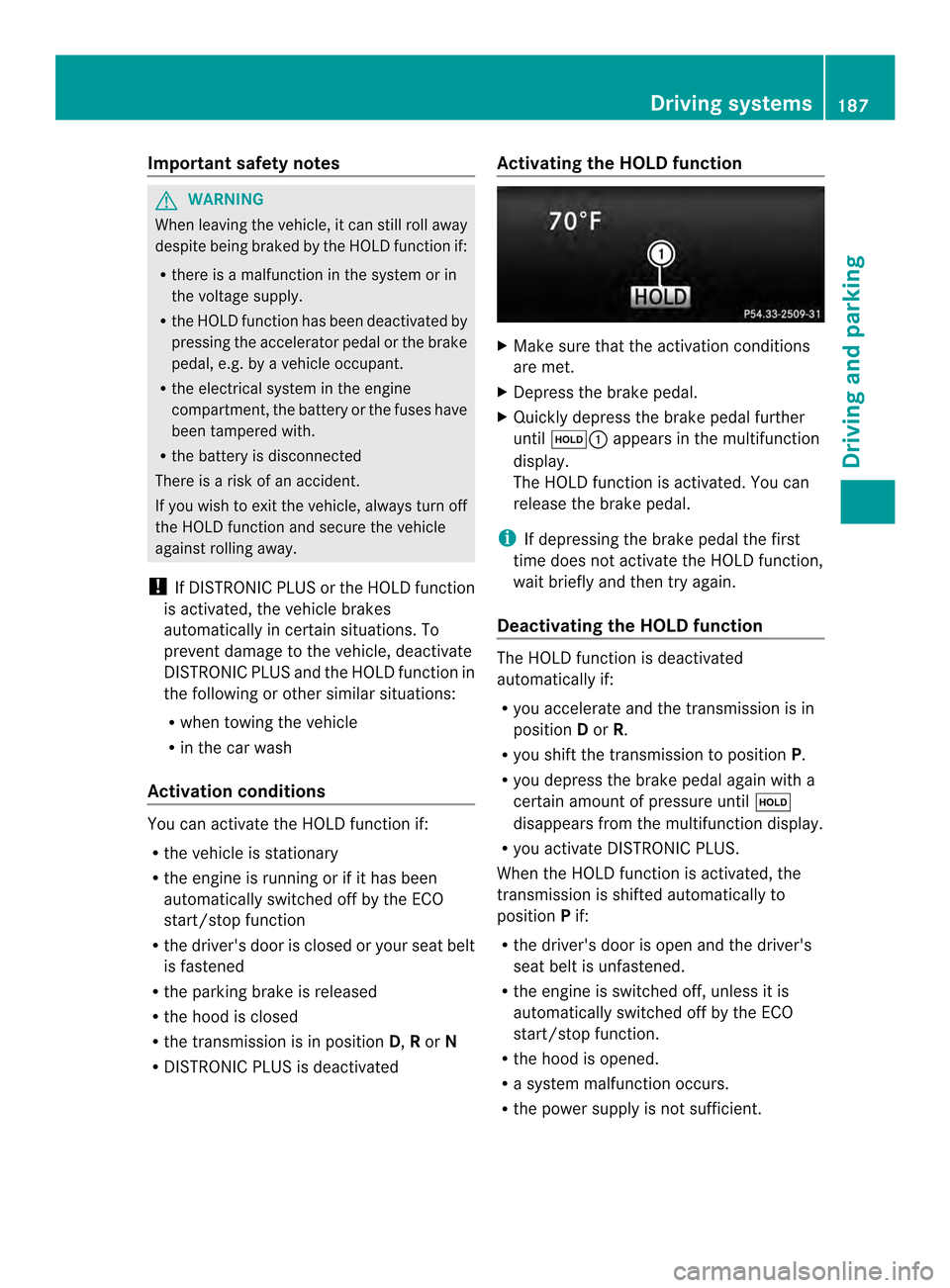
until 0007001A appears in the multifunction
display.
The HOL Dfunction is activated. You can
release the brak epedal.
i If depressing the brak epedal the first
tim edoes not activat ethe HOL Dfunction,
wait briefly and the ntry again.
Deactivatin gthe HOLD function The HOLD function is deactivated
automatically if:
R
you accelerate and the transmission is in
position Dor R.
R you shift the transmission to position P.
R you depress the brake peda lagain with a
certain amount of pressure until 0007
disappears from the multifunction display.
R you activate DISTRONIC PLUS.
When the HOLD function is activated ,the
transmission is shifted automatically to
position Pif:
R the driver's door is open and the driver's
seat beltisu nfastened.
R the engine is switched off, unless it is
automaticallys witched off by the ECO
start/stop function.
R the hood is opened.
R as ystem malfunction occurs.
R the power supplyisn ot sufficient. Driving systems
187Driving and parking Z
Page 195 of 382
Load compensation
The vehicle can compensat
edifferences in
th ev ehicle level by raisin gorlowering the
rear axle. This is the case, for example, if
people get out or if luggage is being loaded.
Load compensation takes place if:
R ad oor or the trunk lid/tailgate is opened
R the parked vehicle is unlocked
For larger level changes, the engine must be
running. 4MATIC (permanent four-wheel drive)
If you fail to adapt your driving style, 4MATIC
can neither reduce the risk of accident nor
override the laws of physics. 4MATIC cannot
take account of road, weather and traffic
conditions. 4MATIC is only an aid. You are
responsible for the distance to the vehicle in
front,f or vehicle speed, for braking in good
time and for staying in your lane.
If ad rive wheel spins due to insufficien tgrip:
R Only depress the accelerator peda lasfar
as necessary when pulling away.
R Accelerate less when driving.
! Never tow the vehicl ewith one axle
raised. This may damage the transfer case.
Damag eofthis sort is not covered by the
Mercedes-Benz Limited Warranty. All
wheels must remai neithe ront he ground
or be fully raised. Observe the instructions
for towing the vehicle with all wheels in full
contact with the ground.
i In wintry driving conditions, the maximum
effect of 4MATIC can only be achieved if
you use winter tires (M+S tires), with snow
chains if necessary.
4MATIC ensures that allf our wheels are
permanently driven. Together with ESP ®
,it
improves the traction of you rvehicle
whenever adrive wheel spins due to
insufficient grip. PARKTRONIC
Important safet ynotes PARKTRONIC is an electronic parkin
gaid with
ultrasonic sensors. It indicates visually and
audibly the distanc ebetween your vehicle
and an object.
PARKTRONIC is only an aid. It is not a
replacemen tfor your attention to your
immediate surroundings. You are always
responsible for safe maneuvering, parking
and exiting aparkin gspace. When
maneuvering, parkin gorpulling out of a
parkin gspace, make sure that ther eare no
persons, animals or objects in the area in
which you are maneuvering.
! When parking, pay particular attention to
objects above or below the sensors, such
as flower pots or trailer drawbars.
PARKTRONIC does not detec tsuch objects
when they are in th eimmediat evicinity of
th ev ehicle. You could damag ethe vehicle
or the objects.
The sensors may not detect snow and other
objectst hat absorb ultrasonic waves.
Ultrasonic sources such as an automatic
car wash, the compressed-air brakes on a
truck or apneumatic drill could cause
PARKTRONIC to malfunction.
PARKTRONIC may not function correctly on
uneven terrain.
PARKTRONIC is activated automatically when
you:
R switch on the ignition
R shift the transmission to position D,Ror N
R release the parking brake
PARKTRONIC is deactivated at speeds above
11 mph (18 km/h). It is reactivated at lower
speeds.
PARKTRONIC monitors the area around your
vehicle using six sensors in the front bumper
and four sensors in the rear bumper. Driving systems
193Driving and parking Z
Page 200 of 382
status indicator in the instrument cluster.
When
aparking space has been detected, an
arrow towards the right or the left also
appears. By default, Active Parking Assist
only displays parking spaces on the front-
passenger side. Parking spaces on the
driver's side are displayed as soon as the turn
signal on the driver's side is activated. When
parking on the driver's side, this must remain
switched on until you acknowledge the use of
Active Parking Assist by pressing the 000C
button on the multifunction steering wheel.
i Take note that Active Parking Assist
cannot measure the size of parking spaces
that are at right angles to the direction of
travel. You must decide for yourself
whether the vehicle will fit in the parking
space.
Ap arking spac eisdisplayed while you are
driving past it, and until you are
approximately 50 ft (15 m) away from it.
Parking G
WARNING
Activ eParking Assist merely aids you by
intervening activel yinthesteering .Ifyou do
no tb rak ethere is ariskofana ccident.
Always apply th ebrakes yourself when
maneuverin gand parking.
X Stop th evehicle when th eparking space
symbol shows th edesired parking spac ein
th ei nstrumen tcluster.
X Shift th etransmission to position R.
The Start Par kAssist ?Yes:OKN o: 0002
message appear sinthemultifunction
display. X
To cancel th eprocedure: pressthe
0002 buttonont hemultifunction steering
wheel or pull away.
or
X To park usin gActiv eParking Assist:
pres sthe 000C buttonont he multifunction
steering wheel.
The Park Assist Active Accelerate and Brake Observe Surroundings
message appears in the multifunction
display.
X Let go of the multifunction steering wheel.
X Back up the vehicle, being ready to brake
at all times. When backing up, drive at a
speed below approximately 6mph
(10 km/h). Otherwise Active Parkin gAssist
will be canceled.
i In tight parkin gspaces, you will achieve
the best parkin gresults by backin gupas
far as possible. When doing so, also
observe the PARKTRONI Cmessages.
X Stop as soon as PARKTRONI Csounds the
continuous warning tone, if not before.
Maneuverin gmay be required in tight
parkin gspaces.
The Park Assist Active Select D Observe Surroundings message appears in
the multifunction display.
X Shift the transmission to position Dwhile
the vehicle is stationary.
Active Parkin gAssist immediately steer sin
the other direction.
The Park Assist Active Accelerate and Brake Observ
eSurroundings message appears in the multifunction
display.
i You will achieve the best results by
waiting for the steering procedure to
complet ebefore pulling away.
X Driv eforwards and be ready to brake at all
times.
X Stop as soon as PARKTRONI Csounds the
continuous warning tone, if not before. 198
Driving systemsDriving and parking
Page 216 of 382
Active Lan
eKeeping Assist Genera
lnotes Active Lan
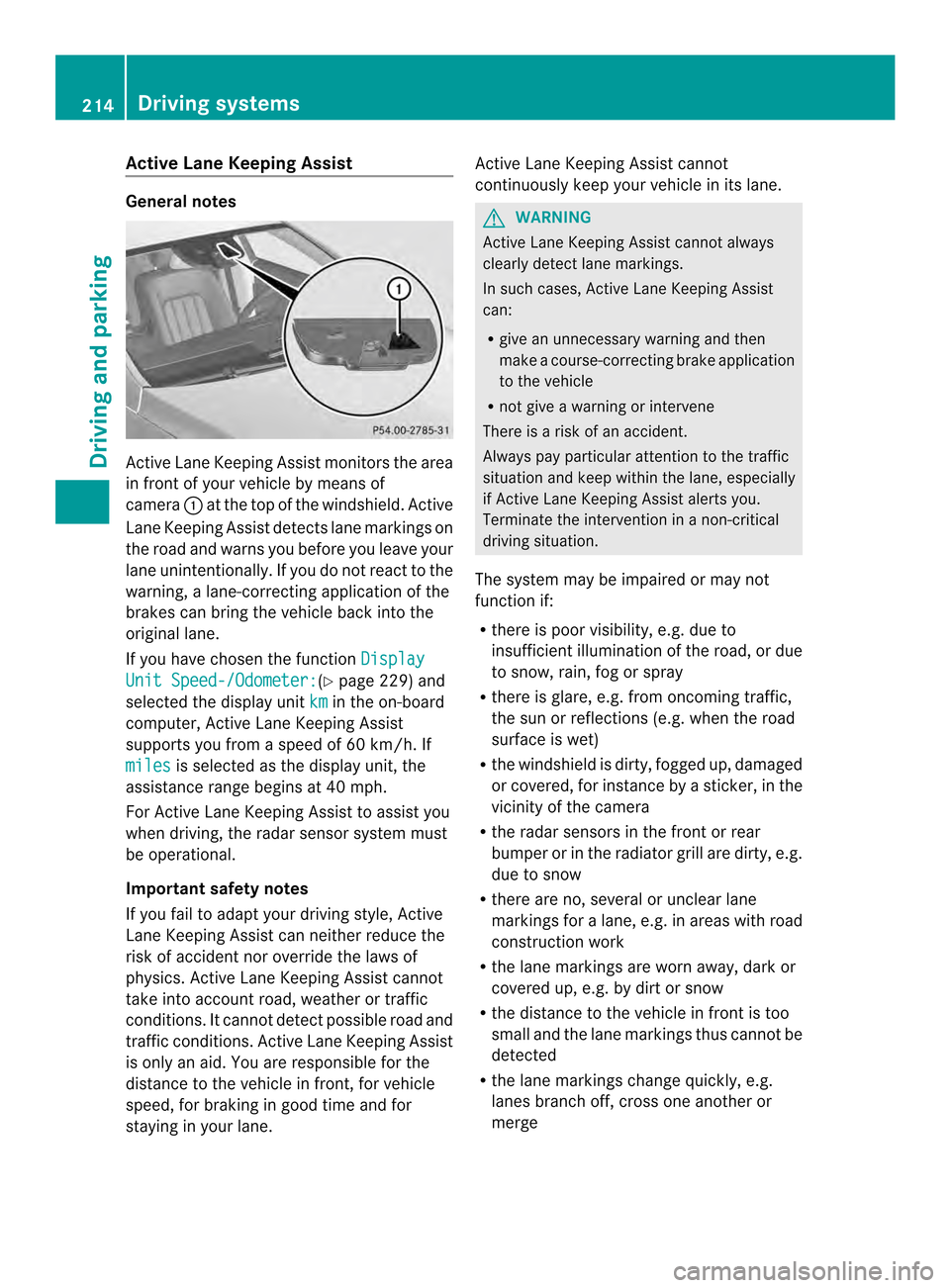
eKeepin gAssistm onitor sthe area
in front of your vehicle by means of
camera 001Aat the top of the windshield. Active
Lane Keeping Assist detect slane markings on
th er oad and warn syou before you leave your
lane unintentionally. If you do no treact to the
warning, alane-correctinga pplication of the
brakes can bring the vehicle back intot he
original lane.
If you have chosen the function DisplayUnit Speed-/Odometer: (Y
page 229)a nd
selected the display unit km in the on-board
computer, Active Lane Keeping Assist
supports you from aspeed of 60 km/h. If
miles is selected as the display unit, the
assistanc erange begins at 40 mph.
For Active Lane Keeping Assist to assist you
when driving, the radar sensor system must
be operational.
Important safet ynotes
If you fail to adapt your driving style, Active
Lane Keeping Assist can neither reduce the
risk of acciden tnor override the laws of
physics. Active Lane Keeping Assist cannot
take into account road, weather or traffic
conditions. It cannot detect possible road and
traffic conditions. Active Lane Keeping Assist
is only an aid. You are responsible for the
distance to the vehicle in front,f or vehicle
speed, for braking in good time and for
staying in your lane. Active Lane Keeping Assist cannot
continuously keep your vehicle in its lane. G
WARNING
Active Lane Keeping Assist cannot always
clearly detect lane markings.
In such cases, Active Lane Keeping Assist
can:
R give an unnecessary warning and then
make acourse-correcting brake application
to the vehicle
R not give awarning or intervene
There is arisk of an accident.
Always pay particular attention to the traffic
situation and keep within the lane, especially
if Active Lane Keeping Assist alerts you.
Terminate the intervention in anon-critical
driving situation.
The system may be impaired or may not
function if:
R there is poor visibility, e.g. due to
insufficient illumination of the road, or due
to snow, rain, fog or spray
R there is glare, e.g. from oncoming traffic,
the sun or reflections (e.g. when the road
surface is wet)
R the windshield is dirty, fogged up, damaged
or covered, for instance by asticker, in the
vicinit yofthe camera
R the radar sensors in the front or rear
bumper or in the radiator grill are dirty, e.g.
due to snow
R there are no, several or unclear lane
markings for alane, e.g. in areas with road
construction work
R the lane markings are worn away,d ark or
covered up, e.g. by dirt or snow
R the distance to the vehicle in front is too
small and the lane markings thus cannot be
detected
R the lane markings change quickly, e.g.
lanes branch off, cross one another or
merge 214
Driving systemsDriving and parking
Page 266 of 382
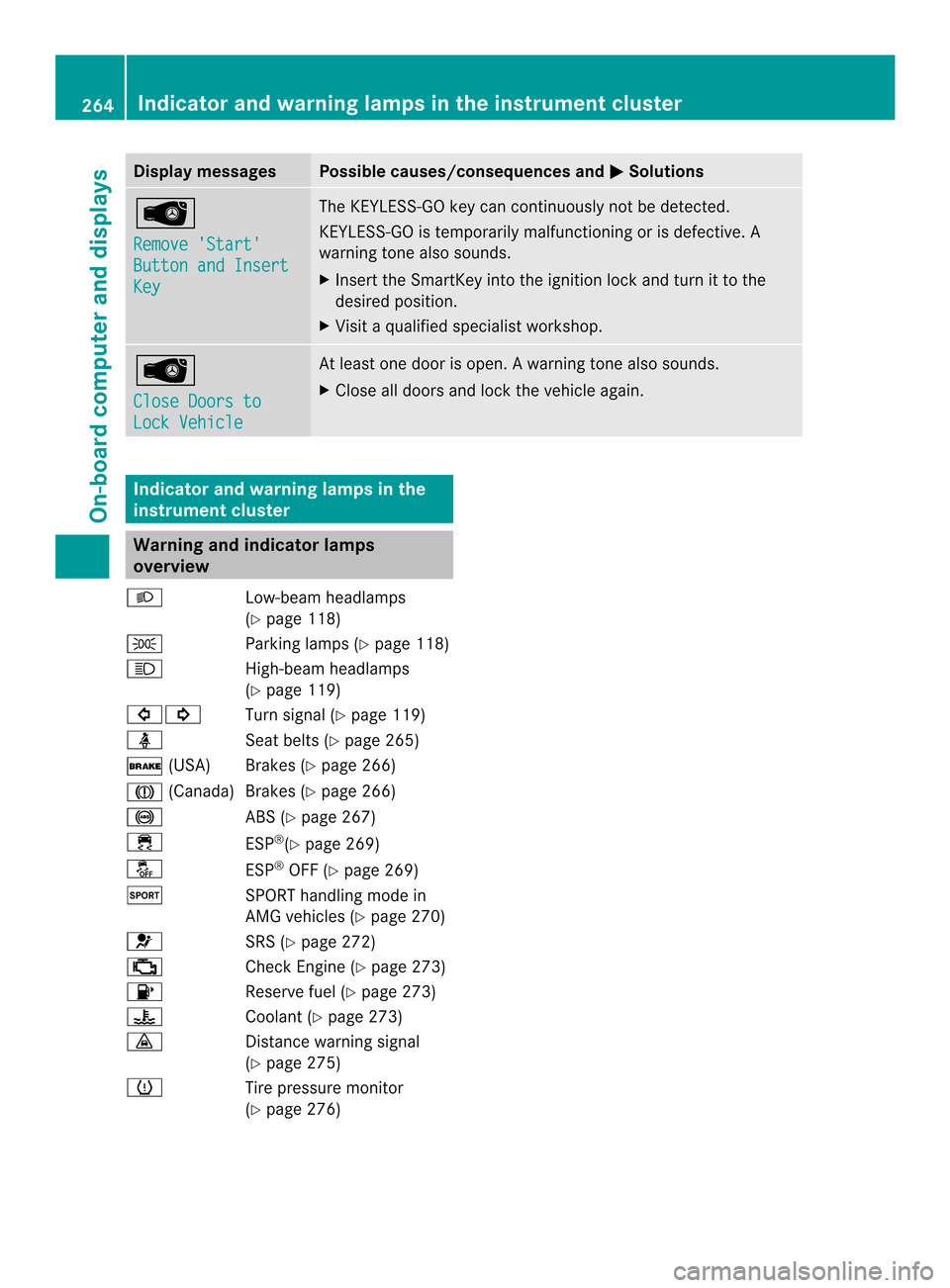
Display messages Possible causes/consequences and
000B Solutions
0002
Remove 'Start'
Button and Insert
Key The KEYLESS-GO ke
ycan continuousl ynotbe detected.
KEYLESS-GO is temporarily malfunctionin gorisdefective. A
warnin gtonea lso sounds.
X Inser tthe SmartKey into th eignition loc kand tur nittot he
desire dposition.
X Visit aqualified specialist workshop. 0002
Close Doors to
Loc
kV ehicle At leas
tone door is open. Awarning tone also sounds.
X Close all door sand loc kthe vehicle again. Indicator and warning lamps in the
instrument cluster Warning and indicator lamps
overview
001D Low-beam headlamps
(Ypage 118)
0008 Parking lamps (Y page 118)
0015 High-beam headlamps
(Ypage 119)
00020001 Turn signal (Ypage 119)
0006 Seat belts (Ypage 265)
0004 (USA) Brakes (Y page 266)
0001 (Canada)B rakes (Ypage266)
001C ABS (Ypage267)
0011 ESP®
(Y page2 69)
0009 ESP®
OFF (Y page269)
0005 SPORT handling mode in
AMG vehicles (Y page270)
0012 SRS (Ypage272)
000A Check Engine (Y page273)
0007 Reserve fuel (Ypage273)
0017 Coolant (Ypage273)
0008 Distance warning signal
(Ypage2 75)
0008 Tire pressure monitor
(Ypage2 76) 264
Indicator and warnin
glamps in the instrument clusterOn-board computer and displays
Page 300 of 382
about various special offers at your
workshop.
R monthly status informatio ne-mail on oil
level ,air pr essure, maintenance, brakes,
etc. If applicable,y ou willreceive
information on special offers in the e-mail.
USA only :this information can alsobe
called up under "Owners Online" at http://
www.mbusa.com.
Information on the data stored in the vehicle
(Y page2 7).
Information on Roadsid eAssistance
(Y page2 3).
Downloading routes Downloading routes allows you to transfer
and save predefined routes in the navigation
system. To do this, an SD memory card must
be inserted into the COMAND system. If no
SD memory card is inserted, you must insert
the card into the card slot on the COMAND
system before saving.
Ar oute can be prepared and sent either by a
customer service representative or via the
mbrace portal on the Internet.
Each route can include up to 20 way points.
Once aroute has been received by the
navigation system, you will see the
Do you want to start route
guidance? message in the COMAND display.
The route is saved to the SD memory card.
X To startr outeguidance: selectYes .
An overview of the route is shown in the
display.
i If you select No ,t
he saved route can be
called up later via the navigation menu.
X Select Start .
Route guidance is started.
i Downloaded and saved data can be called
up again in COMAND.
You can find further information in the
separate COMAND Operating Instructions. Speed alert You can define the upper speed limit, which
must not be exceeded by the vehicle. If this
selected speed is exceeded by the vehicle, a
message will be sent to the Customer
Assistance center. The Customer Assistance
center then forwards this information to you.
You can select the way in which you receive
this information beforehand. Possible options
include text message, e-mail or an automated
call.
The data which is sent to the Customer
Assistance Center contains the following
information:
R
the location where the speed limit was
exceeded
R the time at which the speed limit was
exceeded
R the selected speed limit which was
exceeded
Geo fencing Geo fencing allows you to select areas which
the vehicle should not enter or leave. You will
be informed if the vehicle crosses the
boundaries of the selected areas. You can
select the way in which you receive this
information beforehand. Possible options
include text message, e-mail or an automated
call.
The area can be determined as either acircle
or ap olygon with amaximum of ten corners.
You can specify up to ten areas
simultaneously. Different settings are
possible for each area.
USA only: these settings can be called up
under "Owners Online" at http://
www.mbusa.com.
Alternatively, you can trigger an MB Info call
and inform the customer service
representative that you wish to activate geo
fencing.
Currently inactive areas can be activated by
text message. 298
FeaturesStowage and features
Page 313 of 382
Under these or similarc
onditions, have, for
example, the air filter, engine oil and oil filter
replaced or changed more frequently. Under
arduous operating conditions, the tires must
be checked more often.F urther information
can be obtained at aqualified specialist
workshop, e.g. an authorized Mercedes-Benz
Center.
Driving abroad
An extensive Mercedes-Benz Servic enetwork
is also available in other countries. You can
obtain further information from any
authorized Mercedes-Benz Center. Care
General notes
H
Environmental note
Dispose of empty packagin gand cleaning
cloth sinane nvironmentally responsible
manner.
! For cleanin gyour vehicle, do not use any
of the following:
R dry, rough or hard cloths
R abrasive cleanin gagents
R solvents
R cleanin gagents containin gsolvents
Do not scrub.
Do not touch the surfaces or protective
films with hard objects, e.g. aring or ice
scraper. You could otherwise scratch or
damage the surfaces and protective film.
! Do not park the vehicle for an extended
period straight after cleanin git, particularly
after having cleaned the wheels with wheel
cleaner. Wheel cleaners could cause
increased corrosion of the brake discs and
brake pads/linings. For this reason, you
should drive for afew minutes after
cleaning. Braking heats the brake discs and
the brake pads/linings, thus drying them.
The vehicle can then be parked. Regular care of your vehicle is
acondition for
retaining the quality in the long term.
Use care product sand cleanin gagents
recommended and approved by Mercedes-
Benz. Washing the vehicle and cleaning the
paintwork
Automatic car wash G
WARNING
Braking efficiency is reduced after washing
the vehicle. There is arisk of an accident.
After the vehicle has been washed, brake
carefully while paying attention to the traffic
conditions until full brakin gpower is restored.
! If DISTRONIC PLUS or the HOLD function
is activated, the vehicle brakes
automatically in certain situations. To
preven tdamage to th evehicle ,deactivate
DISTRONI CPLUS and the HOLD function in
the following or other similar situations:
R when towing the vehicle
R in the car wash
! Never clean yourv ehicle inaTouchless
Automatic Car Wash as these use special
cleanin gagents .These cleaning agents can
damage the paintwork or plastic parts.
! Make sure that:
R the side windows and the sliding sunroof
are fully closed.
R the ventilation/heating is switched off
(the OFF button has been pressed).
R the windshield wiper switch is in position
0.
Otherwise, the vehicle might be damaged.
! In car washes with atowing mechanism,
make sure that the automatic transmission
is in transmission position N,otherwise the
vehicle could be damaged.
R Vehicles with aSmartKey: Care
311Maintenance and care Z
Page 330 of 382
X
First, remove the jumper cable sfrom earth point 001Eand negative terminal 0021,then from
positiv eclamp 0010and positiv eterminal 0024.Begine acht ime at the contacts on your own
vehicle first.
X Close cover 001Aof positiv eclamp 0010afte rremoving the jumper cables.
X Have the battery checke dataqualified specialist workshop.
i Jump-startin gisnot considered to be anormal operatin gcondition.
i Jumper cables and further information regardin gjump-starting can be obtained at any
qualified specialist workshop. Towing and tow-starting
Importan
tsafet ynotes G
WARNING
Function srelevant to safety are restricted or
no longer available if:
R the engin eisnot running.
R the brake system or the power steering is
malfunctioning.
R ther eisam alfunction in the voltage supply
or the vehicle's electrical system.
If your vehicle is being towed, much more
forc emay be necessary to steer or brake.
There is arisk of an accident.
In such cases, use atow bar. Befor etowing,
make sure that the steering moves freely. G
WARNING
If the weight of the vehicle to be towed or tow-
started is greater than the permissible gross
weight of your vehicle:
R the towin geye could detach itself
R the vehicle/trailer combination could
rollover.
There is arisk of an accident.
When towin gortow-starting another vehicle,
its weight should not be greater than the
permissible gross weight of your vehicle.
Information on your vehicle's gross vehicle
weight ratin gcan be found on the vehicle
identification plate (Y page 372). !
If DISTRONIC PLUS or the HOLD function
is activated, the vehicle brakes
automatically in certain situations. To
preven tdamage to th evehicle ,deactivate
DISTRONI CPLUS and the HOLD function in
the following or other similar situations:
R when towing the vehicle
R in the car wash
! Only secure the tow rope or tow bar at the
towing eyes. Otherwise ,the vehicle could
be damaged.
! Do not use the towing eye for recovery,
this could damage the vehicle .Ifindoubt,
recover the vehicle with acrane.
! When towing, pulla wayslowly and
smoothly .Ifthe tractive power is too high,
the vehicles could be damaged.
! Do not tow with sling-type equipment.
This could damage the vehicle.
! When towing vehicles with KEYLESS-GO,
use the key instead of the Start/Stop
button. Otherwise, the automatic
transmission may shift to position Pwhen
the driver's or front-passenger door are
opened, which could lead to damage to the
transmission.
! The vehicle can be towed amaximum of
30 miles (50km). The towing speed of
30 mph (50 km/h) must not be exceeded.
If the vehicle has to be towed more than
30 miles (50km), the entire vehicle must be
raised and transported. 328
Towing and tow-startingBreakdown assistance
Page 336 of 382
Useful information
i This Operator's Manual describes all
models and all standard and optional
equipment of your vehicle available at the
time of publication of the Operator's
Manual. Country-specific differences are
possible. Please not ethat your vehicle may
not be equipped with all features
described. This also applies to safety-
related system sand functions.
i Read the information on qualified
specialist workshops: (Y page 26).Important safet
ynotes G
WARNING
If wheels and tires of the wrong size are used,
the wheel brakes or suspension components
may be damaged. There is arisk of an
accident.
Always replac ewheels and tires with those
that fulfill the specifications of the original
part.
When replacing wheels, make sure to use the
correct:
R designation
R model
When replacing tires, make sure to use the
correct:
R designation
R manufacturer
R model G
WARNING
Af lat tir eseverely impairs the driving,
steerin gand braking characteristics of the
vehicle. There is arisk of accident.
Tires without run-flat characteristics:
R do not drive with aflat tire.
R immediately replac ethe flat tir ewith your
emergenc yspare wheel or spare wheel, or
consult aqualified specialist workshop. Tires with run-flat characteristics:
R
pay attention to the information and
warnin gnotices on MOExtended tires (tires
with run-flat characteristics).
Accessories that are not approved for your
vehicle by Mercedes-Ben zorthat are not
being used correctly can impair the operating
safety.
Before purchasing and using non-approved
accessories, visit aqualified specialist
workshop and inquire about:
R suitability
R legal stipulations
R factory recommendations
Information on the dimensions and types of
wheels and tires for your vehicle can be found
in the "Wheel/tire combinations" section
(Y page 362).
Information on air pressure for the tires on
your vehicle can be found:
R on the vehicle's Tire and Loading
Information placard on the B-pillar
(Y page 345)
R on the tire pressure label on the fuel filler
flap (Y page 165)
R under "Tire pressure" (Y page 338) Operation
Information on driving
If the vehicle is heavily loaded, check the tire
pressures and correct them if necessary.
While driving, pay attention to vibrations,
noises and unusual handling characteristics,
e.g. pulling to one side. This may indicate that
the wheels or tires are damaged. If you
suspect that atire is defective, reduce your
speed immediately. Stop the vehicle as soon
as possible to check the wheels and tires for
damage. Hidden tire damage could also be
causing the unusual handling characteristics.
If you find no signs of damage, have the tires 334
OperationWheels and tires
Page 358 of 382
Cur
bw eight
The weight of avehicle with standard
equipment includin gthe maximum capacity
of fuel, oil and coolant .Italso includes the air-
conditionin gsystem and optional equipment
if these are installed in the vehicle, but does
not include passengers or luggage.
Maximu mload rating
The maximum tir eload is the maximum
permissible weight in kilograms or lbs for
which atireisa pproved.
Maximu mpermissible tir epressure
Maximum permissible tir epressure for one
tire.
Maximu mload on one tire
Maximum load on one tire. This is calculated
by dividin gthe maximum axle load of one axle
by two.
PSI (pounds per squar einch)
As tandar dunitofm easure for tire pressure.
Aspect ratio
Relationship between tire height and tire
width in percent.
Tirep ressure
This is pressure inside the tire applying an
outward forc etoeach square inch of the tire's
surface. The tire pressure is specified in
pounds per square inch (psi), in kilopascal
(kPa) or in bar. The tire pressure should only
be corrected when the tires are cold.
Cold tirep ressure
The tires are cold:
R if the vehicle has been parked without
direct sunlight on the tires for at least three
hours and
R if the vehicle has been driven for less than
1m ile (1.6 km). Tread
The part of the tire that comes intoc
ontact
with the road.
Bead
The tire bead ensures that the tire sits
securely on the wheel. There are several steel
wires in the bead to preven tthe tire from
comin gloose from the wheel rim.
Sidewall
The part of the tire between the tread and the
bead.
Weight of optional extras
The combined weight of those optional extras
that weigh more than the replaced standard
parts and more than 2.3 kilograms (5 lbs).
These optional extras, such as high-
performance brakes, level control, aroof rack
or ah igh-performanc ebattery, are not
included in the curb weight and the weight of
the accessories.
TIN (Tire Identification Number)
This is aunique identifier which can be used
by atire manufacturer to identify tires, for
example for aproduct recall, and thus identify
the purchasers. The TIN is made up of the
manufacturer's identity code, tire size, tire
type code and the manufacturing date.
Load bearing index
The load bearing index (also load index) is a
code that contains the maximum load bearing
capacity of atire.
Traction
Traction is the result of friction between the
tires and the road surface.
Treadwear indicators
Narrow bars (tread wear bars) that are
distributed over the tire tread. If the tire tread
is level with the bars, the wear limit of 0014in
(1.6 mm) has been reached. 356
All about wheels and tiresWheels and tires