start stop button MERCEDES-BENZ CLS-Class 2014 W218 Owner's Guide
[x] Cancel search | Manufacturer: MERCEDES-BENZ, Model Year: 2014, Model line: CLS-Class, Model: MERCEDES-BENZ CLS-Class 2014 W218Pages: 382, PDF Size: 5.36 MB
Page 156 of 382
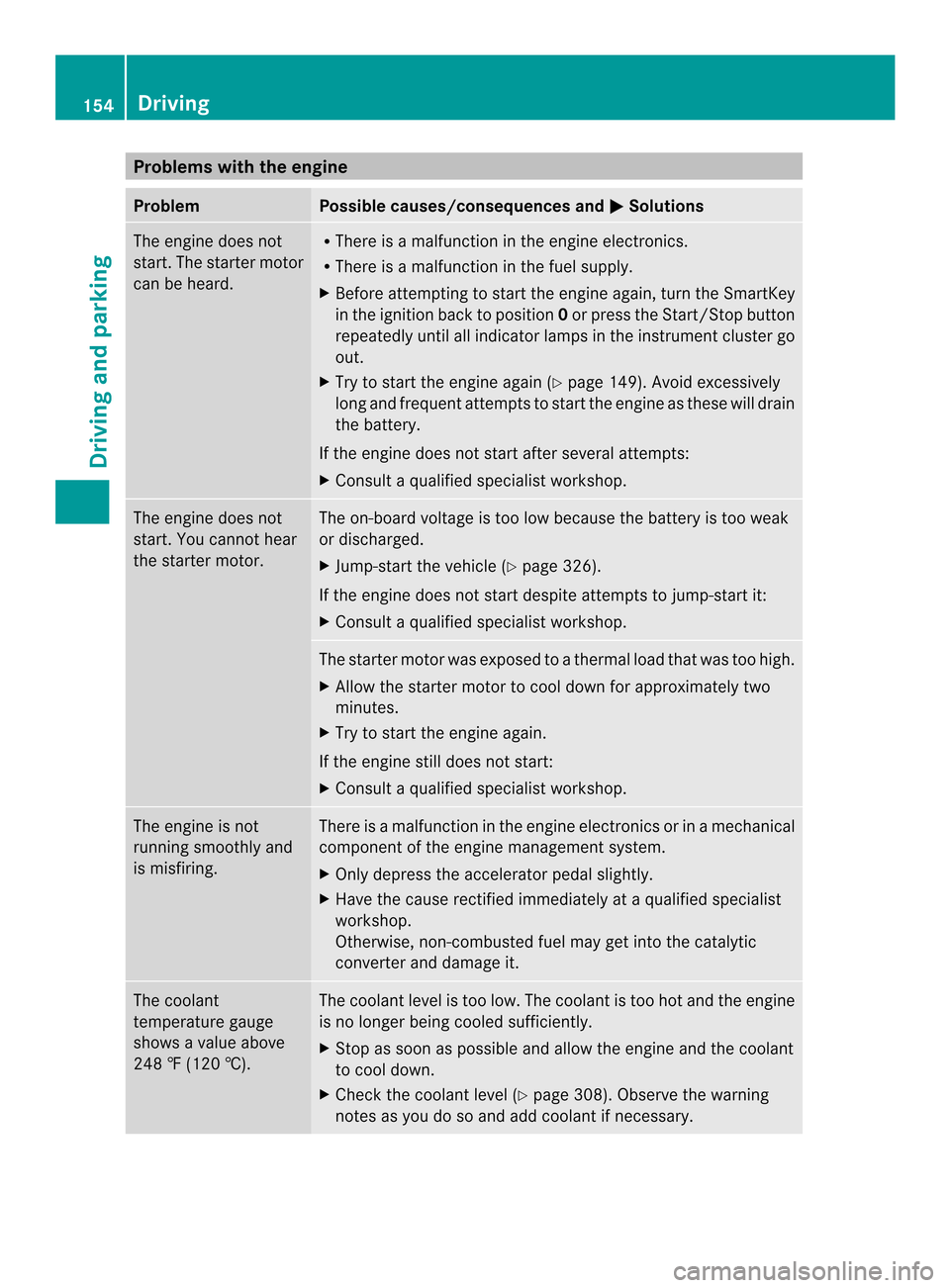
Problems with the engine
Problem Possible causes/consequences and
000B Solutions
The engine does not
start. The starter motor
can be heard. R
There is amalfunction in the engine electronics.
R There is amalfunction in the fuel supply.
X Before attempting to start the engine again, turn the SmartKey
in the ignition back to position 0or press the Start/Stop button
repeatedly until all indicator lamps in the instrumen tcluster go
out.
X Try to start the engine again (Y page 149). Avoid excessively
long and frequent attempt stostart the engine as these will drain
the battery.
If the engine does not start after several attempts:
X Consult aqualified specialist workshop. The engine does not
start
.You cannot hear
the starter motor. The on-board voltage is too low because the battery is too weak
or discharged.
X
Jump-star tthe vehicle (Y page 326).
If the engine does not start despite attemptstoj ump-start it:
X Consult aqualified specialist workshop. The starter motor was exposed to
athermal load that was too high.
X Allow the starter motor to cool down for approximately two
minutes.
X Try to start the engine again.
If the engine still does not start:
X Consult aqualified specialist workshop. The engine is not
running smoothly and
is misfiring. There is
amalfunction in the engine electronics or in amechanical
componentoft he engine management system.
X Only depress the accelerator pedal slightly.
X Have the cause rectified immediately at aqualified specialist
workshop.
Otherwise, non-combusted fuel may get into the catalytic
converter and damage it. The coolant
temperature gauge
shows
avalue above
248 ‡(120 †). The coolant level is too low. The coolant is too hot and the engine
is no longer being cooled sufficiently.
X
Stop as soon as possible and allow the engine and the coolant
to cool down.
X Check the coolant level (Y page 308). Observe the warning
notes as you do so and add coolant if necessary. 154
DrivingDriving and parking
Page 159 of 382
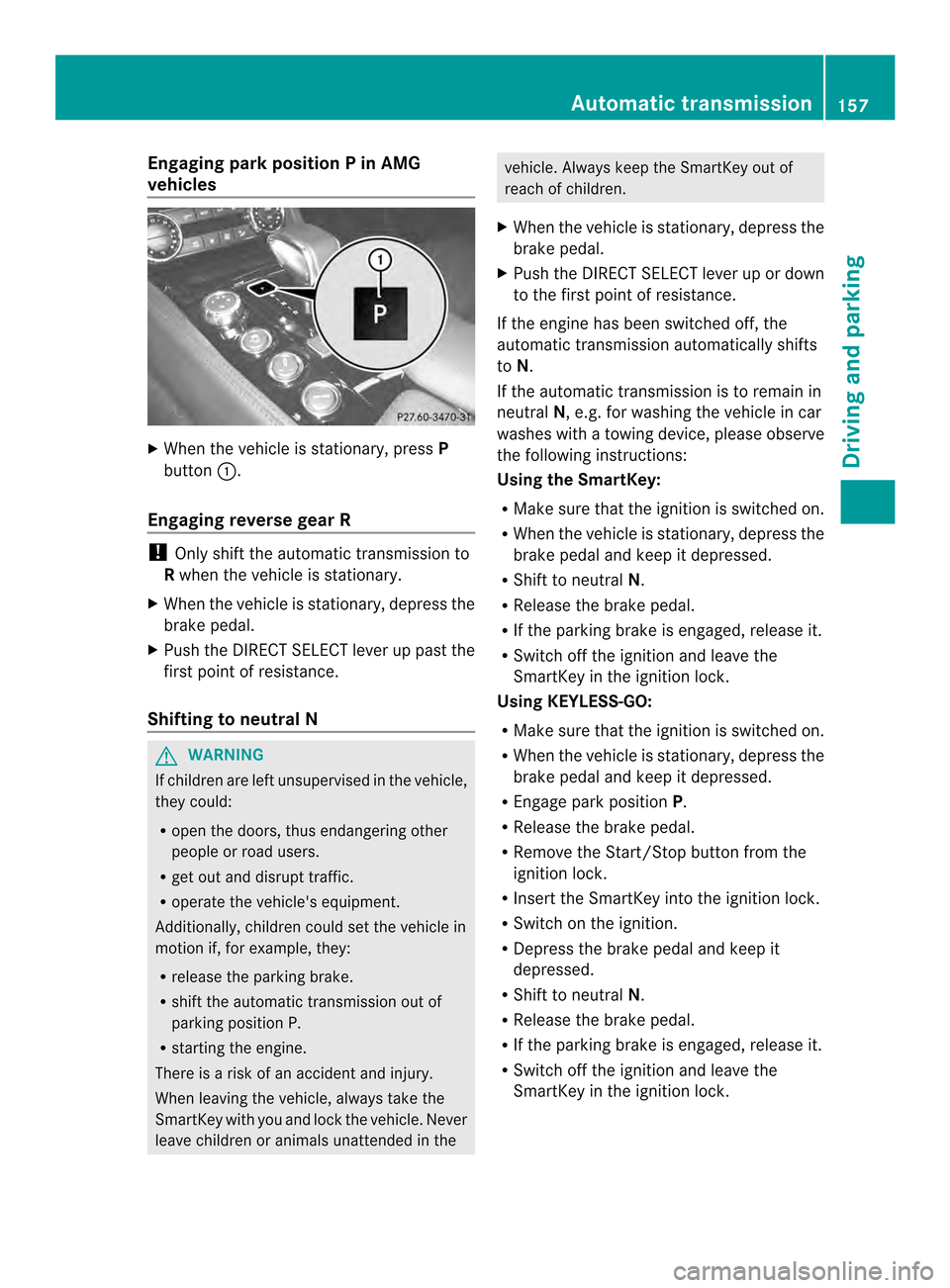
Engaging park position
PinAMG
vehicles X
When th evehicle is stationary, press P
button 001A.
Engaging revers egear R !
Only shif tthe automatic transmission to
R when the vehicle is stationary.
X When the vehicle is stationary, depress the
brake pedal.
X Push the DIRECT SELECT lever up past the
first point of resistance.
Shifting to neutralN G
WARNING
If children are left unsupervised in the vehicle,
they could:
R open the doors, thus endangering other
people or road users.
R get out and disrupt traffic.
R operate the vehicle's equipment.
Additionally, children could set the vehicle in
motion if, for example, they:
R release the parking brake.
R shift the automatic transmission out of
parking position P.
R startingt he engine.
There is arisk of an accident and injury.
When leaving the vehicle, always take the
SmartKey with you and lock the vehicle. Never
leave children or animals unattended in the vehicle. Always keep the SmartKey out of
reach of children.
X When the vehicle is stationary, depress the
brake pedal.
X Push the DIRECT SELECT lever up or down
to the first point of resistance.
If the engine has been switched off, the
automatic transmission automatically shifts
to N.
If the automatic transmission is to remain in
neutral N,e.g. for washing the vehicle in car
washes with atowing device, please observe
the following instructions:
Using the SmartKey:
R Make sure that the ignition is switched on.
R When the vehicle is stationary, depress the
brake pedal and keep it depressed.
R Shift to neutral N.
R Release the brake pedal.
R If the parking brake is engaged, release it.
R Switch off the ignition and leave the
SmartKey in the ignition lock.
Using KEYLESS-GO:
R Make sure that the ignition is switched on.
R When the vehicle is stationary, depress the
brake pedal and keep it depressed.
R Engage park position P.
R Release the brake pedal.
R Remove the Start/Stop button from the
ignition lock.
R Insert the SmartKey into the ignition lock.
R Switch on the ignition.
R Depress the brake pedal and keep it
depressed.
R Shift to neutral N.
R Release the brake pedal.
R If the parking brake is engaged, release it.
R Switch off the ignition and leave the
SmartKey in the ignition lock. Automatic transmission
157Driving and parking Z
Page 170 of 382
When leaving the vehicle, alway
stake the
SmartKey with you and lock the vehicle. Never
leave children unsupervised in the vehicle.
! Always secure the vehicle correctly
against rolling away .Otherwise, the vehicle
or its drivetrai ncould be damaged.
To ensure that the vehicle is secured against
rolling away unintentionally:
R the parking brake must be applied.
R the transmission must be in position Pand
the SmartKey must be removed from the
ignition lock.
R on uphill or downhill gradients, the front
wheels must be turned towards the curb. Switching off the engine
Important safety notes G
WARNING
The automatic transmission switches to
neutral position Nwhen you switch off the
engine. The vehicle may roll away.T here is a
risk of an accident.
After switching off the engine, always switch
to parking position P.Prevent the parked
vehicle from rolling away by applying the
parking brake.
Vehicles with automatic transmission X
Apply the parking brake firmly.
X All vehicles( except AMG vehicles): shift
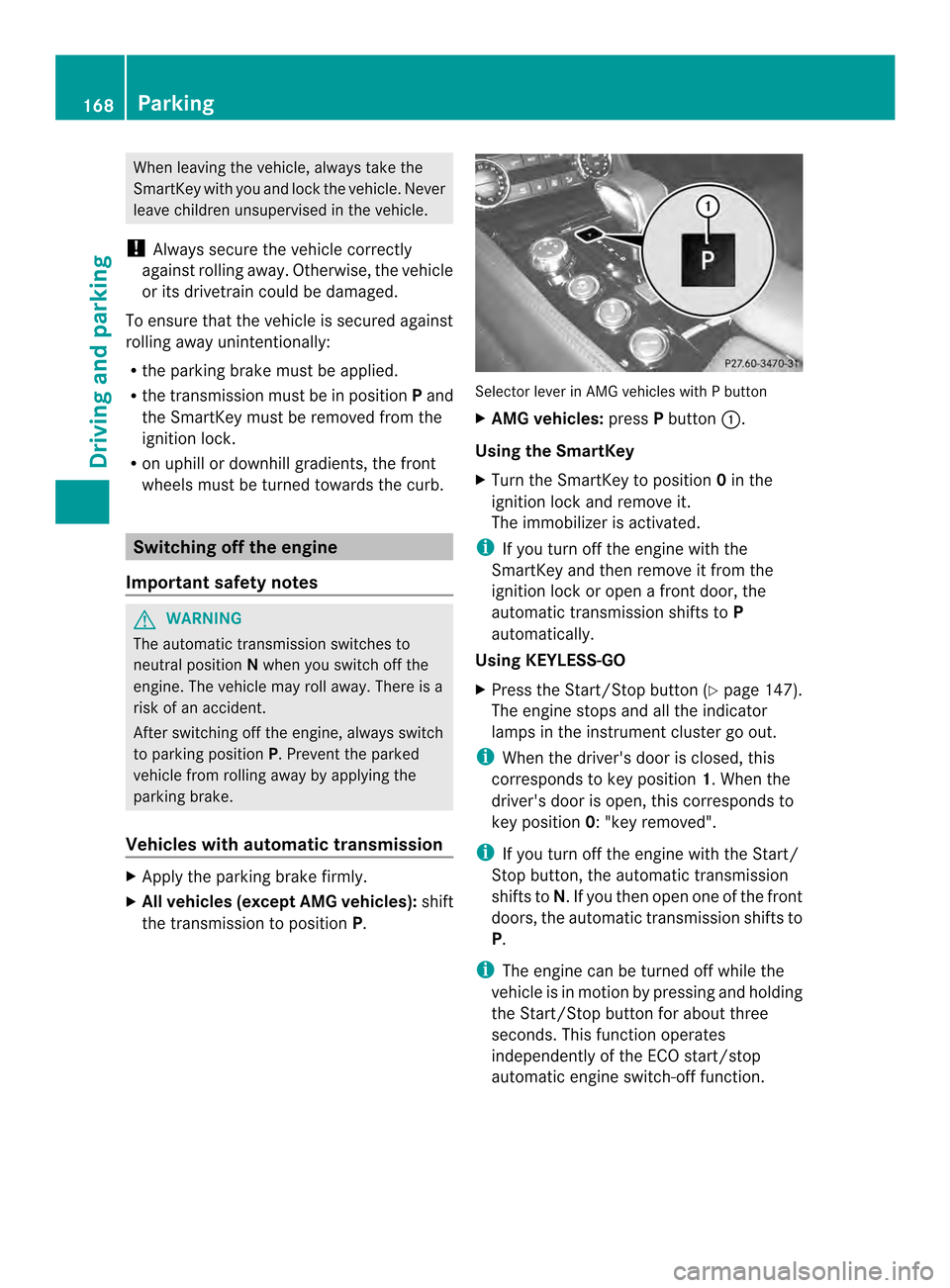
the transmission to position P. Selector lever in AMG vehicles with
Pbutton
X AMG vehicles: pressPbutton 001A.
Using the SmartKey
X Turn the SmartKey to position 0in the
ignition lock and remove it.
The immobilizer is activated.
i If you turn off the engine with the
SmartKey and then remove it from the
ignition lock or open afront door, the
automatic transmission shifts to P
automatically.
Using KEYLESS-GO
X Press the Start/Stop button (Y page 147).
The engine stops and all the indicator
lamps in the instrumentc luster go out.
i When the driver's door is closed, this
corresponds to key position 1.When the
driver's door is open ,this corresponds to
key position 0:"key removed".
i If yo uturno ff the engine with the Start/
Stop button, the automatic transmission
shifts to N.Ifyou then open one of the front
doors, the automatic transmission shifts to
P.
i The engine can be turned off while the
vehicle is in motion by pressing and holding
the Start/Stop button for about three
seconds. This function operates
independently of the ECO start/stop
automatic engine switch-off function. 168
ParkingDriving and parking
Page 175 of 382
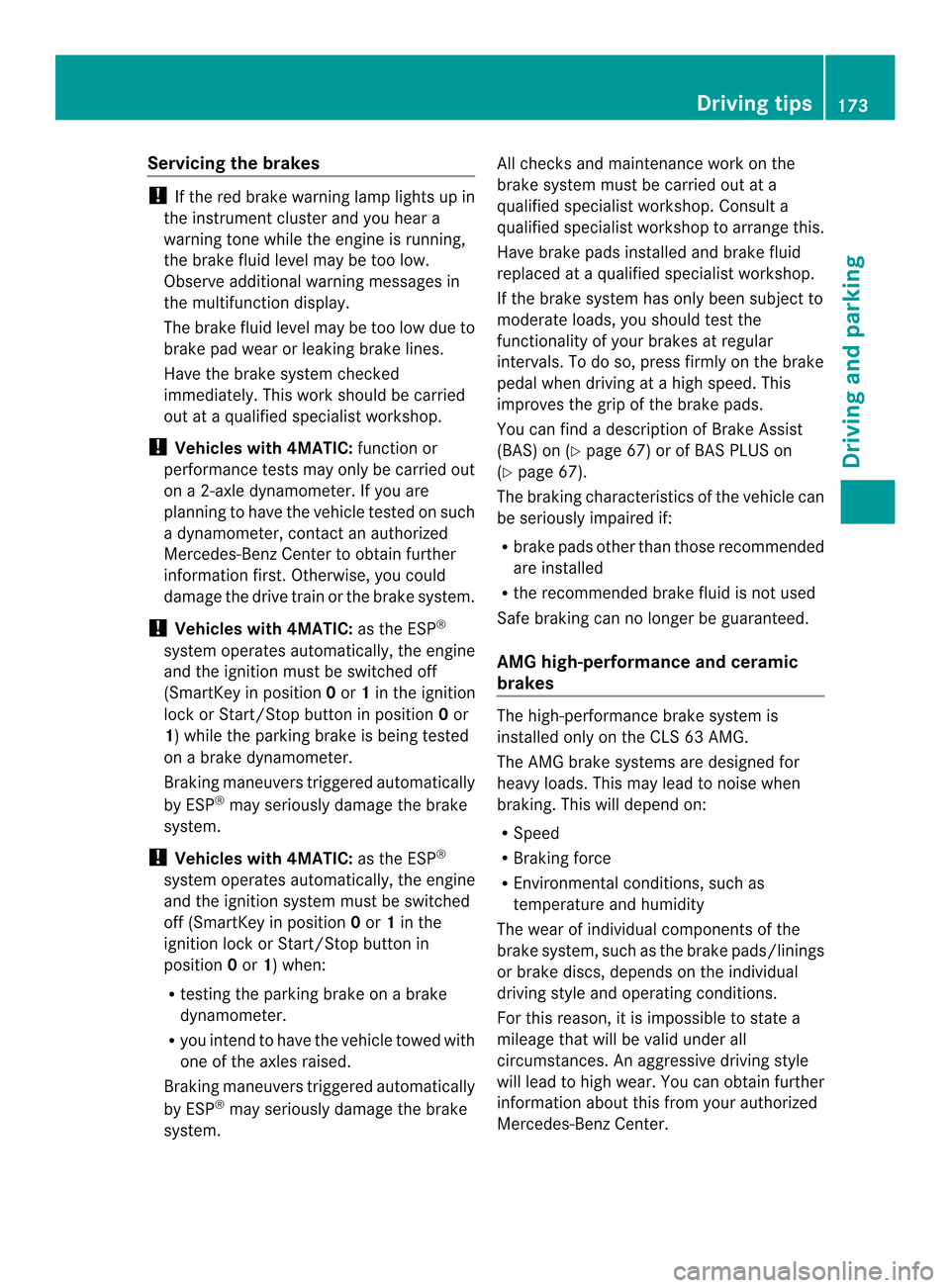
Servicing the brakes
!
If the red brake warning lamp lights up in
the instrumen tcluster and you hear a
warnin gtonew hile the engine is running,
the brak efluid level may be too low.
Observe additional warnin gmessages in
the multifunction display.
The brak efluid level may be too low due to
brak epad wear or leakin gbrak elines.
Have the brak esystem checked
immediately. This work should be carried
out at aqualified specialist workshop.
! Vehicles with 4MATIC: function or
performanc etests may only be carried out
on a2 -axle dynamometer. If you are
planning to have the vehicle tested on such
ad ynamometer, contac tanauthorized
Mercedes-Ben zCenter to obtain further
information first. Otherwise, you could
damage the drive train or the brak esystem.
! Vehicles with 4MATIC: as the ESP®
system operates automatically, the engine
and the ignition must be switched off
(SmartKey in position 0or 1in the ignition
lock or Start/Stop button in position 0or
1)w hile the parking brak eisbeing tested
on abrak edynamometer.
Brakin gmaneuvers triggere dautomatically
by ESP ®
may seriousl ydamag ethe brake
system.
! Vehicles with 4MATIC: as theESP®
system operate sautomatically, th eengine
and th eignition system must be switched
off (SmartKey in position 0or 1in the
ignition loc korStart/Sto pbutto nin
position 0or 1)w hen:
R testing th eparking brak eonabrake
dynamometer.
R you inten dtohave th evehicl etow ed with
on eoft heaxle sraised.
Braking maneuvers triggered automatically
by ESP ®
may seriousl ydamag ethe brake
system. All check
sand maintenance work on the
brak esystem must be carried out at a
qualified specialist workshop. Consult a
qualified specialist worksho ptoarrangethis.
Hav ebrak epads installed and brak efluid
replace dataq ualified specialist workshop.
If th ebrak esystem has only been subject to
moderat eloads ,you should test the
functionalit yofyour brakes at regular
intervals. To do so, press firmly on th ebrake
pedal when driving at ahigh speed. This
improve sthe gripoft hebrak epads.
You can fin dadescription of Brake Assist
(BAS) on (Y page 67)orofBASPLU Son
( Ypage 67).
The braking characteristics of th evehicl ecan
be seriousl yimpaired if:
R brak epads other than those recommended
are installed
R ther ecommended brak efluid is no tused
Safe braking can no longer be guaranteed.
AMG high-performance and ceramic
brakes The high-performance brake system is
installed only on the CLS 63 AMG.
The AMG brake systems are designed for
heavy loads. This may lead to noise when
braking. This will depend on:
R
Speed
R Braking force
R Environmental conditions, such as
temperature and humidity
The wear of individualc omponentsofthe
brake system, such as the brake pads/linings
or brake discs, depends on the individual
driving style and operating conditions.
For this reason, it is impossibletos tate a
mileage that will be valid under all
circumstances. An aggressive driving style
will lead to high wear. You can obtain further
information aboutt his from your authorized
Mercedes-Ben zCenter. Driving tips
173Driving and parking Z
Page 200 of 382
status indicator in the instrument cluster.
When
aparking space has been detected, an
arrow towards the right or the left also
appears. By default, Active Parking Assist
only displays parking spaces on the front-
passenger side. Parking spaces on the
driver's side are displayed as soon as the turn
signal on the driver's side is activated. When
parking on the driver's side, this must remain
switched on until you acknowledge the use of
Active Parking Assist by pressing the 000C
button on the multifunction steering wheel.
i Take note that Active Parking Assist
cannot measure the size of parking spaces
that are at right angles to the direction of
travel. You must decide for yourself
whether the vehicle will fit in the parking
space.
Ap arking spac eisdisplayed while you are
driving past it, and until you are
approximately 50 ft (15 m) away from it.
Parking G
WARNING
Activ eParking Assist merely aids you by
intervening activel yinthesteering .Ifyou do
no tb rak ethere is ariskofana ccident.
Always apply th ebrakes yourself when
maneuverin gand parking.
X Stop th evehicle when th eparking space
symbol shows th edesired parking spac ein
th ei nstrumen tcluster.
X Shift th etransmission to position R.
The Start Par kAssist ?Yes:OKN o: 0002
message appear sinthemultifunction
display. X
To cancel th eprocedure: pressthe
0002 buttonont hemultifunction steering
wheel or pull away.
or
X To park usin gActiv eParking Assist:
pres sthe 000C buttonont he multifunction
steering wheel.
The Park Assist Active Accelerate and Brake Observe Surroundings
message appears in the multifunction
display.
X Let go of the multifunction steering wheel.
X Back up the vehicle, being ready to brake
at all times. When backing up, drive at a
speed below approximately 6mph
(10 km/h). Otherwise Active Parkin gAssist
will be canceled.
i In tight parkin gspaces, you will achieve
the best parkin gresults by backin gupas
far as possible. When doing so, also
observe the PARKTRONI Cmessages.
X Stop as soon as PARKTRONI Csounds the
continuous warning tone, if not before.
Maneuverin gmay be required in tight
parkin gspaces.
The Park Assist Active Select D Observe Surroundings message appears in
the multifunction display.
X Shift the transmission to position Dwhile
the vehicle is stationary.
Active Parkin gAssist immediately steer sin
the other direction.
The Park Assist Active Accelerate and Brake Observ
eSurroundings message appears in the multifunction
display.
i You will achieve the best results by
waiting for the steering procedure to
complet ebefore pulling away.
X Driv eforwards and be ready to brake at all
times.
X Stop as soon as PARKTRONI Csounds the
continuous warning tone, if not before. 198
Driving systemsDriving and parking
Page 223 of 382
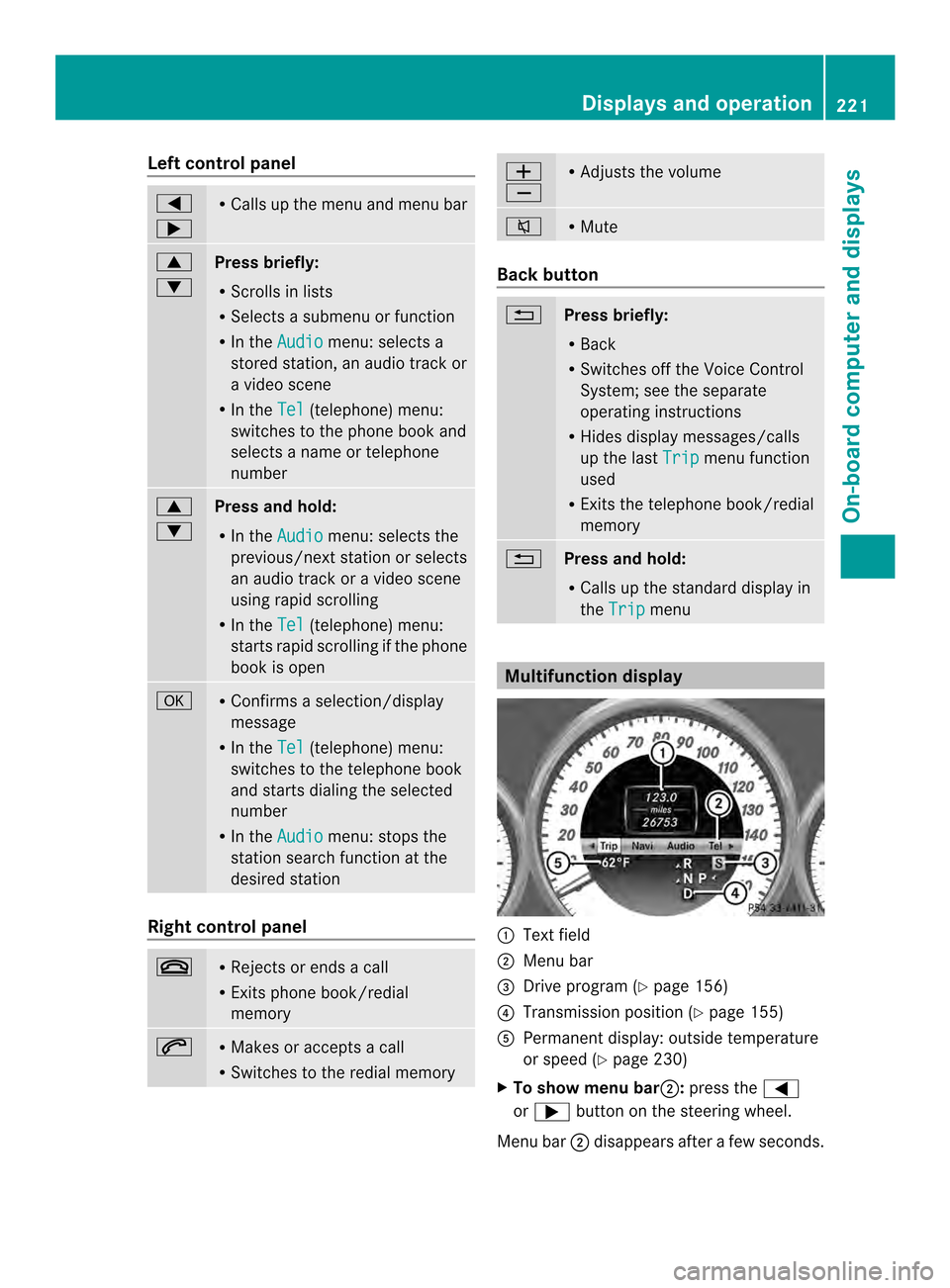
Left control panel
000A
0004 R
Calls up th emenua nd men ubar 0006
0005
Press briefly:
R
Scrolls in lists
R Select sasubmenu or function
R In the Audio menu: selects a
stored station, an audio track or
av ideo scene
R In the Tel (telephone) menu:
switche stothephon ebook and
selects anam eort elephone
number 0006
0005
Press and hold:
R
In the Audio menu: selects the
previous/nex tstation or selects
an audi otrack or avideo scene
using rapi dscrolling
R In the Tel (telephone
)menu:
starts rapi dscrolling if the phone
book is open 000C R
Confirms aselect ion/display
message
R In the Tel (telephone
)menu:
switches to the telephone book
and starts dialing the selected
number
R In the Audio menu
:stops the
statio nsearch functio natthe
desired station Right contro
lpanel 0008 R
Rejects or end sacall
R Exits phone book/redial
memory 0006 R
Makes or accepts acall
R Switche stothe redia lmemory 0008
0009 R
Adjusts the volume 0001 R
Mute Bac
kbutton 0002
Press briefly:
R
Back
R Switche soff the Voice Control
System; se ethe separate
operating instructions
R Hides displa ymessages/calls
up the last Trip menu function
used
R Exits the telephone book/redial
memory 0002
Press and hold:
R
Call supthe standard displa yin
the Trip menu
Multifunctio
ndisplay 001A
Text field
0010 Menu bar
0024 Drive progra m(Ypage 156)
0021 Transmission positio n(Ypage 155)
001E Permanent display: outside temperature
or speed (Y page 230)
X To show menu bar 0010:press the 000A
or 0004 button on the steering wheel.
Menu bar 0010disappears after afew seconds. Displays and operation
221On-boardcomputer and displays Z
Page 224 of 382
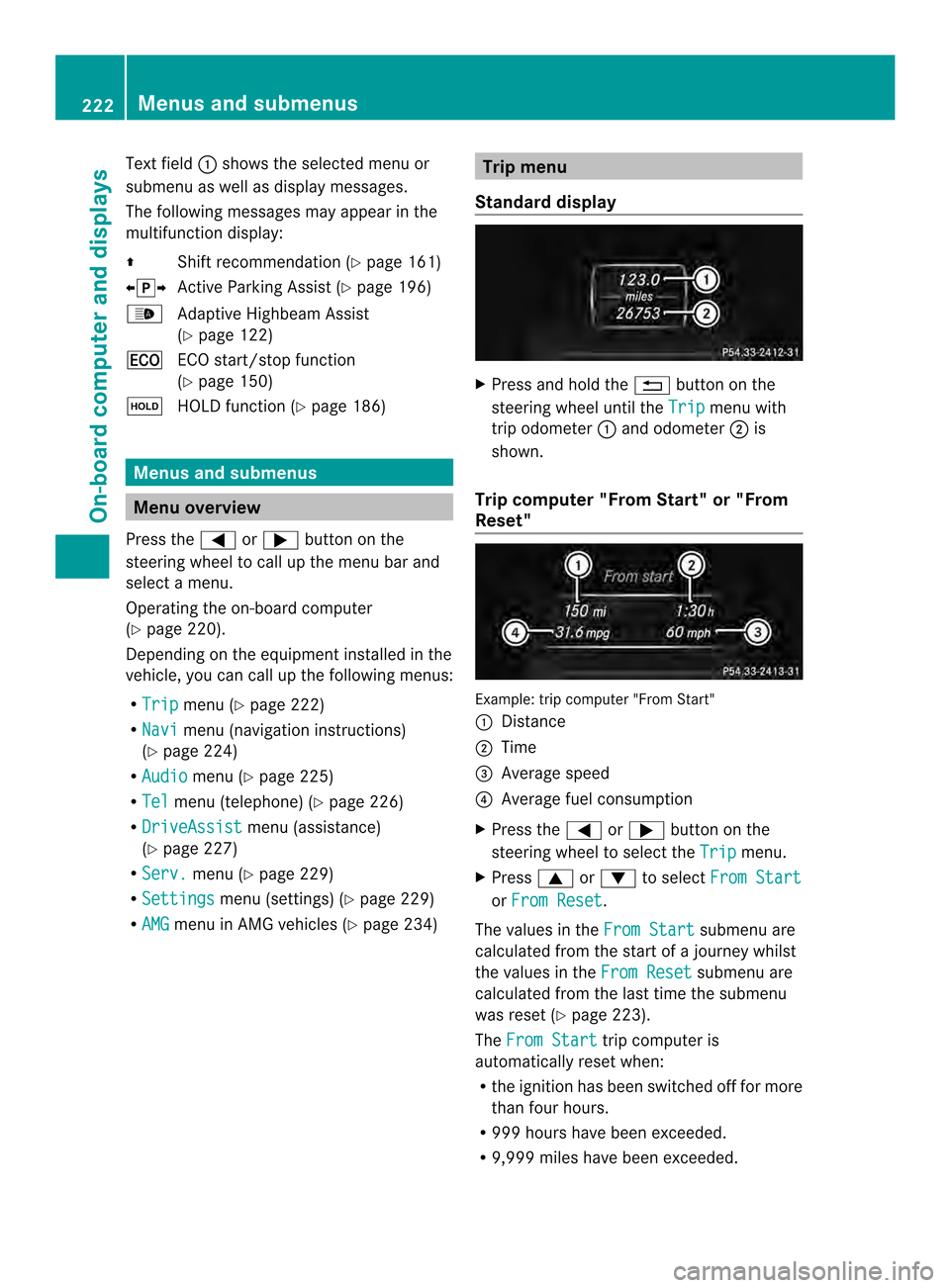
Text field
001Ashows the selected menu or
submenu as well as display messages.
The following messages may appear in the
multifunction display:
000A Shift recommendation (Y page 161)
000300080009 Active Parking Assist (Y page 196)
0010 Adaptive Highbeam Assist
(Ypage 122)
000C ECO start/stop function
(Ypage 150)
0007 HOLD function (Y page 186)Menus and submenus
Menu overview
Press the 000Aor0004 button on the
steerin gwheel to call up the menu bar and
select amenu.
Operating the on-board computer
(Y page 220).
Dependin gonthe equipment installed in the
vehicle, you can call up the following menus:
R Trip menu (Y
page 222)
R Navi menu (navigation instructions)
(Y page 224)
R Audio menu (Y
page 225)
R Tel menu (telephone) (Y
page 226)
R DriveAssist menu (assistance)
(Y page 227)
R Serv. menu (Y
page 229)
R Settings menu (settings) (Y
page 229)
R AMG menu in AMG vehicles (Y
page 234) Trip menu
Standard display X
Press and hold the 0002button on the
steerin gwheel until the Trip menu with
trip odometer 001Aand odometer 0010is
shown.
Trip computer "From Start" or "From
Reset" Example: trip computer "From Start"
001A
Distance
0010 Time
0024 Average speed
0021 Average fuel consumption
X Press the 000Aor0004 button on the
steerin gwheel to select the Trip menu.
X Press 0006or0005 to select From Start or
From Reset .
The values in the From Start submenu are
calculated from the start of ajourney whilst
the values in the From Reset submenu are
calculated from the last time the submenu
was reset (Y page 223).
The From Start trip computer is
automatically reset when:
R the ignition has been switched off for more
than four hours.
R 999 hours have been exceeded.
R 9,999 miles have been exceeded. 222
Menus and submenusOn-board computer and displays
Page 229 of 382
X
Press the 0006or0005 button to select the
desired name.
or
X To begin rapid scrolling: press and hold
the 0006 or0005 button for longer than
one second.
Rapid scrolling stops when you release the
button or reach the end of the list.
X If only one telephone number is stored
for aname: press the 0006or000C button
to start dialing.
or
X If thereism ore thanone number for a
particular name: press the0006or000C
button to display the numbers.
X Press the 0006or0005 button to select the
number you want to dial.
X Press the 0006or000C button to start
dialing.
or
X To exit the telephone book: press the
0008 or0002 button.
Redialing The on-board computer saves the last names
or numbers dialed in the redial memory.
X Press the 000Aor0004 button on the
steerin gwheel to select the Tel menu.
X Press the 0006button to switch to the
redial memory.
X Press the 0006or0005 button to select the
desired name or number.
X Press the 0006or000C button to start
dialing.
or
X To exit the redial memory: press the
0008 or0002 button. Assistance menu
Introduction In the
DriveAssist menu, you have the
following options:
R Displaying the assistanc egraphic
(Y page 227)
R Activating/deactivating
ESP ®
(Y page 227)
R Activating/deactivating PRE-SAFE ®
Brake
(Y page 228)
R Activating/deactivating ATTENTION
ASSIST (Y page 228)
R Activating/deactivating Blind Spot Assist
or Active Blind Spot Assist (Y page 228)
R Activating/deactivating Lane Keeping
Assist or Active Lane Keeping Assist
(Y page 229)
Displaying the assistance graphic X
Press the 000Aor0004 button on the
steerin gwheel to select the DriveAssist menu.
X Press the 0006or0005 button to select
Assist. Graphic .
X Press the 000Cbutton.
The DISTRONIC PLUS assistanc egraphic
appears in the multifunction display
(Y page 184).
Deactivating/activating ESP ® i
Observe the "Importan tsafet ynotes"
sectio ninthedescription of ESP
(Y page 68). Menu
sand submenus
227On-boardcomputer and displays Z
Page 236 of 382
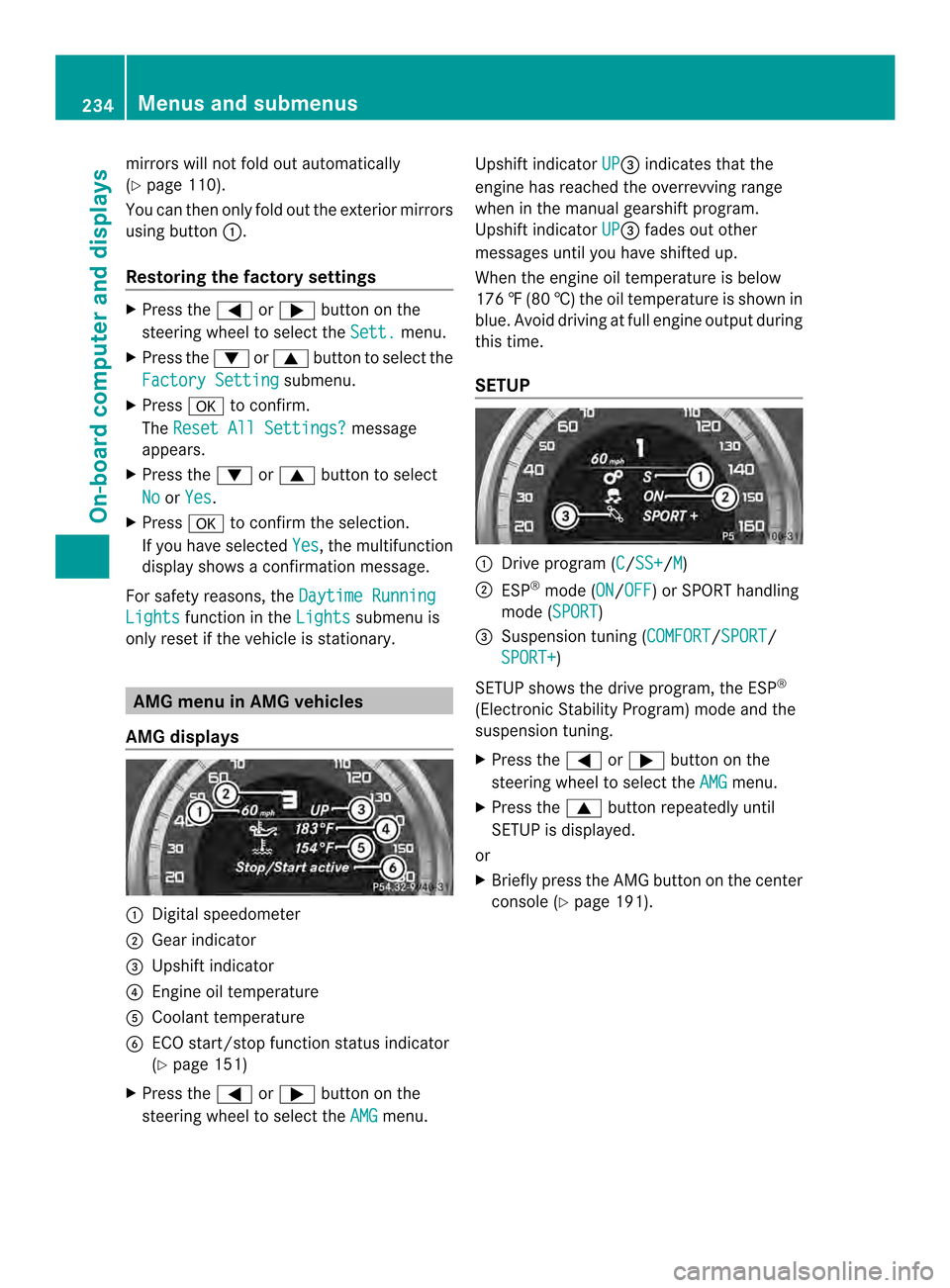
mirrors willn
ot fold out automatically
(Y page1 10).
You can then only fold out the exterior mirrors
using button 001A.
Restorin gthe factory settings X
Press the 000Aor0004 button on the
steering whee ltoselect the Sett. menu.
X Press the 0005or0006 button to select the
Factory Setting submenu.
X Press 000Cto confirm.
The Reset All Settings? message
appears.
X Press the 0005or0006 button to select
No or
Yes .
X Press 000Cto confirm the selection.
If you have selected Yes ,t
he multifunction
display show saconfirmation message.
For safety reasons, the Daytime RunningLights function in the
Lights submenu is
only reset if the vehicl eisstationary. AMG menu in AMG vehicles
AMG displays 001A
Digital speedometer
0010 Gear indicator
0024 Upshift indicator
0021 Engine oil temperature
001E Coolant temperature
0025 ECO start/stop function status indicator
(Ypage 151)
X Press the 000Aor0004 button on the
steering wheel to select the AMG menu.Upshift indicator
UP 0024
indicates that the
engine has reached the overrevving range
when in the manual gearshift program.
Upshift indicator UP 0024
fades out other
messages until you have shifted up.
When the engine oil temperature is below
176 ‡(80 †) the oil temperature is show nin
blue. Avoid drivin gatfull engin eoutput during
this time.
SETUP 001A
Driv eprogram (C /SS+ /M )
0010 ESP ®
mode (ON /OFF )orS
PORT handling
mode (SPORT )
0024 Suspension tunin g(COMFORT /SPORT /
SPORT+ )
SETUP shows the drive program, the ESP ®
(Electronic Stability Program) mode and the
suspension tuning.
X Press the 000Aor0004 button on the
steering wheel to select the AMG menu.
X Press the 0006button repeatedly until
SETUP is displayed.
or
X Briefly press the AMG button on the center
console (Y page 191).234
Menus and submenusOn-boar
dcomputer and displays
Page 237 of 382
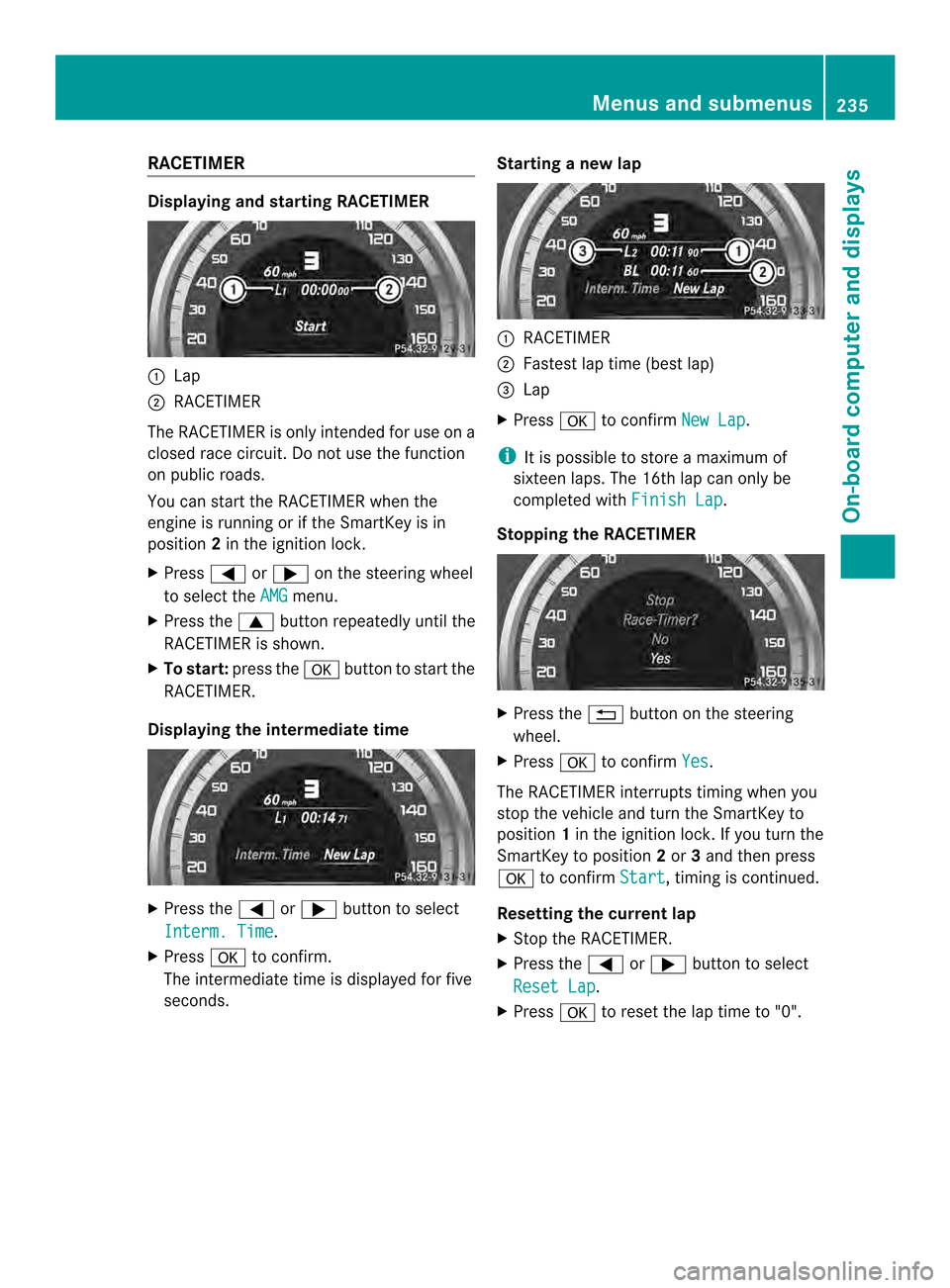
RACETIMER
Displaying and startin
gRACETIMER 001A
Lap
0010 RACETIMER
The RACETIMER is only intended for us eona
closed race circuit. Do not us ethe function
on public roads.
Yo uc an star tthe RACETIMER when the
engine is running or if the SmartKey is in
position 2in the ignition lock.
X Press 000Aor0004 on the steering wheel
to select the AMG menu.
X Press the 0006button repeatedl yuntilthe
RACETIMER is shown.
X To start: press the 000Cbutton to star tthe
RACETIMER.
Displaying the intermediate time X
Press the 000Aor0004 button to select
Interm. Time .
X Press 000Cto confirm.
The intermediate time is displayed for five
seconds. Startin
ganewlap 001A
RACETIMER
0010 Fastest la ptime (best lap)
0024 Lap
X Press 000Cto confirm New Lap .
i It is possible to store amaximum of
sixteen laps. The 16th la pcan only be
completed with Finish Lap .
Stoppin gthe RACETIMER X
Press the 0002button on the steering
wheel.
X Press 000Cto confirm Yes .
The RACETIMER interrupts timing when you
stop the vehicl eand turn the SmartKey to
position 1in the ignition lock. If yo uturn the
SmartKey to position 2or 3and then press
000C to confirm Start ,t
iming is continued.
Resetting the current lap
X Stop the RACETIMER.
X Press the 000Aor0004 button to select
Rese tLap .
X Press 000Cto reset the la ptime to "0". Menus and submenus
235On-board computer and displays Z