trunk release MERCEDES-BENZ CLS-Class 2015 W218 Owner's Manual
[x] Cancel search | Manufacturer: MERCEDES-BENZ, Model Year: 2015, Model line: CLS-Class, Model: MERCEDES-BENZ CLS-Class 2015 W218Pages: 398, PDF Size: 7.43 MB
Page 11 of 398
BAS PLUS with Cross-Traffic
Assist ............................................... 71
COLLISION PREVENTION ASSIST
PLUS ................................................ 73
Distance warning function ............... 74
EBD (electronic brake force distri- bution) ............................................. 78
ESP ®
(Electronic Stability Pro-
gram) ............................................... 75
ETS/4ETS (Electronic Traction
System) ........................................... 76
Important safety information ........... 70
Overview .......................................... 70
PRE-SAFE ®
Brake ............................. 79
Driving systems
360°camera .................................. 209
Active Blind Spot Assist ................. 218
Active Driving Assistance pack-
age ................................................. 218
Active Lane Keeping Assist ............ 221
Active Parking Assist .................... .200
AIRMATIC ...................................... 193
AMG adaptive sport suspension
system .......................................... .195
ATTENTION ASSIST ........................ 213
Blind Spot Assist ............................ 214
Cruise control ................................ 178
Display message ............................ 261
DISTRONIC PLUS ........................... 181
DISTRONIC PLUS with Steering
Assist and Stop&Go Pilot .............. .189
HOLD function ............................... 191
Lane Keeping Assist ..................... .216
Lane Tracking package .................. 214
PARKTRONIC ................................. 197
RACE START (AMG vehicles) .......... 192
Rear view camera .......................... 205
Driving tips
AMG ceramic brakes ..................... 176
Automatic transmission ................. 161
Brakes .......................................... .175
Break-in period .............................. 148
Downhill gradient ........................... 175
Drinking and driving ....................... 173
Driving in winter ............................ .177
Driving on flooded roads ................ 177
Driving on wet roads ..................... .177
Exhaust check ............................... 173 Fuel ................................................ 173
General .......................................... 173
Hydroplaning ................................. 177
Icy road surfaces ........................... 177
Limited braking efficiency on sal-
ted roads ....................................... 175
Snow chains .................................. 347
Wet road surface ........................... 175
DVD video
Operating (on-board computer) ..... 233 E
E10 see Fuel
EASY-ENTRY feature
Activating/deactivating ................. 240
Function/notes ............................ .115
EASY-EXIT feature
Crash-responsive ........................... 116
Function/notes ............................ .115
Switching on/off ........................... 240
EASY-PACK trunk box ....................... 291
EBD (electronic brake force distri-
bution)
Display message ............................ 248
Function/notes ................................ 78
ECO display
Function/notes ............................ .174
On-board computer ....................... 230
ECO start/stop function
Automatic engine start .................. 154
Automatic engine switch-off .......... 153
Deactivating/activating ................. 154
General information ....................... 153
Important safety notes .................. 153
Introduction ................................... 153
Electronic Stability Program
see ESP ®
(Electronic Stability Program)
Emergency
Automatic measures after an acci-
dent ................................................. 63
Emergency release
Driver's door ................................... .92
Fuel filler fla p................................. 169
Trunk ............................................... 96
Vehicle ............................................. 92 Index
9
Page 13 of 398
Displaying the current consump-
tion ................................................ 230
Displaying the range ...................... 230
Driving tips .................................... 173
Fuel gaug e....................................... 33
Grade (gasoline )............................ 388
Important safety notes .................. 387
Premium-grade unleaded gaso-
line ................................................. 388
Problem (malfunction) ................... 170
Refueling ........................................ 167
Tank content/reserve fue l............. 388
Fuel filler flap
Emergency release ........................ 169
Opening ......................................... 168
Fuel level
Calling up the range (on-board
computer) ...................................... 230
Fuel tank
Capacity ........................................ 388
Problem (malfunction) ................... 170
Fuse allocation chart (vehicle tool
kit) ...................................................... 326
Fuses
Allocation chart ............................. 340
Before changing ............................. 340
Fuse box in the engine compart-
ment .............................................. 341
Fuse box in the trunk ..................... 341
Important safety notes .................. 340 G
Garage door opener Clearing the memory ..................... 310
General notes ................................ 307
Important safety notes .................. 307
Opening/closing the garage doo r..3 09
Programming (button in the rear-
view mirror) ................................... 307
Synchronizing the rolling code ....... 308
Gear indicator (on-board com-
puter, AMG vehicles) ......................... 242
Genuine parts ...................................... 22
Glove box .......................................... .287 H
Handbrake see Parking brake
Hazard warning lamps ......................124
Head bags
Display message ............................ 252
Head restraints
Adjusting ....................................... 108
Adjusting (electrically) ................... 109
Adjusting (rear) .............................. 109
Installing/removing (rear) .............. 109
Luxury ............................................ 109
see NECK-PRO head restraints
see NECK-PRO luxury head restraints
Headlamps
Cleaning system (notes) ................ 391
Fogging up ..................................... 127
see Automatic headlamp mode
Heating
see Climate control
High-beam headlamps
Adaptive Highbeam Assist ............. 125
Display message ............................ 256
Switching on/off ........................... 124
Hill start assist .................................. 152
HOLD function
Activating ....................................... 191
Deactivating ................................... 192
Display message ............................ 262
Function/notes ............................ .191
Hood
Closing .......................................... .313
Display message ............................ 271
Important safety notes .................. 312
Opening ......................................... 312
Horn ...................................................... 32
Hydroplaning ..................................... 177 I
Ignition lock see Key positions
Immobilizer .......................................... 81
Indicator and warning lamps
COLLISION PREVENTION ASSIST
PLUS .............................................. 282 Index
11
Page 22 of 398
Transporting the vehicle
.................. 339
Trim pieces (cleaning instruc-
tions) .................................................. 323
Trip computer (on-board com-
puter) .................................................. 230
Trip odometer
Calling up ....................................... 229
Resetting (on-board computer) ...... 231
Trunk
Emergency release .......................... 96
Important safety notes .................... 92
Locking separately ........................... 96
Opening/closing (automatically
from inside) ...................................... 95
Opening/closing (automatically
from outside) ................................... 94
Opening/closing (manually from
outside) ............................................ 93
Trunk lid
Display message ............................ 271
Opening dimensions ...................... 392
Trunk load (maximum) ...................... 392
Turn signals
Display message ............................ 255
Switching on/off ........................... 124
Two-way radio
Frequencies ................................... 384
Installation ..................................... 384
Transmission output (maximum) .... 384
Type identification plate
see Vehicle identification plate U
Unlocking Emergency unlocking ....................... 92
From inside the vehicle (central
unlocking button) ............................. 91 V
Vanity mirror (in the sun visor) ........ 295
Vehicle
Correct use ...................................... 27
Data acquisition ............................... 28
Display message ............................ 270
Equipment ....................................... 23
Individual settings .......................... 237 Limited Warranty ............................. 27
Loading .......................................... 355
Locking (in an emergency) ............... 92
Locking (SmartKey) .......................... 84
Lowering ........................................ 371
Maintenance .................................... 24
Parking for a long period ................ 172
Pulling away ................................... 152
Raising ........................................... 368
Reporting problems ........................ .27
Securing from rolling away ............ 368
Towing away .................................. 337
Transporting .................................. 339
Unlocking (in an emergency) ........... 92
Unlocking (SmartKey )...................... 84
Vehicle data ................................... 392
Vehicle data ....................................... 392
Vehicle dimensions ........................... 392
Vehicle emergency locking ................ 92
Vehicle identification number
see VIN
Vehicle identification plate .............. 386
Vehicle level
AIRMATIC ...................................... 193
Vehicle level (display message) ....... 262
Vehicle maintenance
see ASSYST PLUS
Vehicle tool kit .................................. 326
Video
Operating the DVD ......................... 233
VIN
Seat ............................................... 386
Type plate ...................................... 386 W
Warning and indicator lamps ABS ................................................ 276
Brakes ........................................... 275
Check Engine ................................. 280
Coolant .......................................... 280
Distance warning ........................... 282
ESP ®
.............................................. 277
ESP ®
OFF ....................................... 278
Fuel tank ........................................ 280
General notes ................................ 274
Overview .......................................... 34
PASSENGER AIR BAG OFF ............... 45 20
Index
Page 86 of 398
Useful information
i This Operator's Manual describes all
models and all standard and optional equip- ment of your vehicle available at the time of
publication of the Operator's Manual.
Country-specific differences are possible.
Please note that your vehicle may not be
equipped with all features described. This
also applies to safety-related systems and
functions.
i Read the information on qualified special-
ist workshops (Y page 26). SmartKey
Important safety notes
G
WARNING
If children are left unsupervised in the vehicle, they could:
R open the doors, thus endangering other
people or road users.
R get out and disrupt traffic.
R operate the vehicle's equipment.
Additionally, children could set the vehicle in
motion if, for example, they:
R release the parking brake.
R shifting the automatic transmission out of
park position P
R Start the engine.
There is a risk of an accident and injury.
When leaving the vehicle, always take the
SmartKey with you and lock the vehicle. Never
leave children or animals unattended in the
vehicle. Always keep the SmartKey out of
reach of children. G
WARNING
If you attach heavy or large objects to the
SmartKey, the SmartKey could be uninten-
tionally turned in the ignition lock. This could
cause the engine to be switched off. There is a risk of an accident. Do not attach any heavy or large objects to the
SmartKey. Remove any bulky key rings before
inserting the SmartKey into the ignition lock.
! Keep the SmartKey away from strong
magnetic fields. Otherwise, the remote
control function could be affected.
Strong magnetic fields can occur in the
vicinity of powerful electrical installations.
Do not keep the SmartKey: R with electronic devices, e.g. a mobile
phone or another SmartKey.
R with metallic objects, e.g. coins or metal
foil.
R inside metallic objects, e.g. a metal case.
This can affect the functionality of the
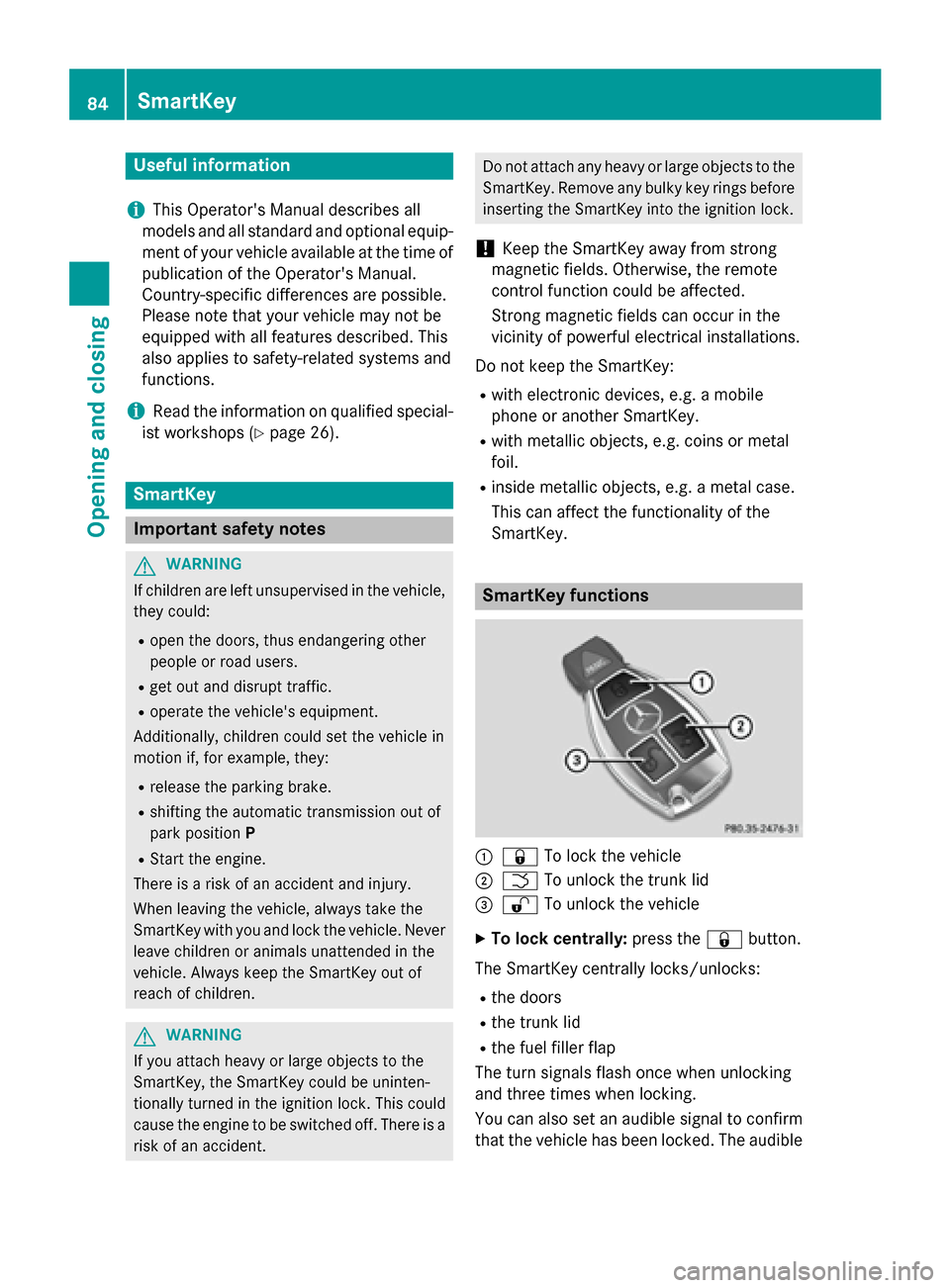
SmartKey. SmartKey functions
:
& To lock the vehicle
; F To unlock the trunk lid
= % To unlock the vehicle
X To lock centrally: press the&button.
The SmartKey centrally locks/unlocks: R the doors
R the trunk lid
R the fuel filler flap
The turn signals flash once when unlocking
and three times when locking.
You can also set an audible signal to confirm that the vehicle has been locked. The audible 84
SmartKeyOpening and closing
Page 89 of 398
X
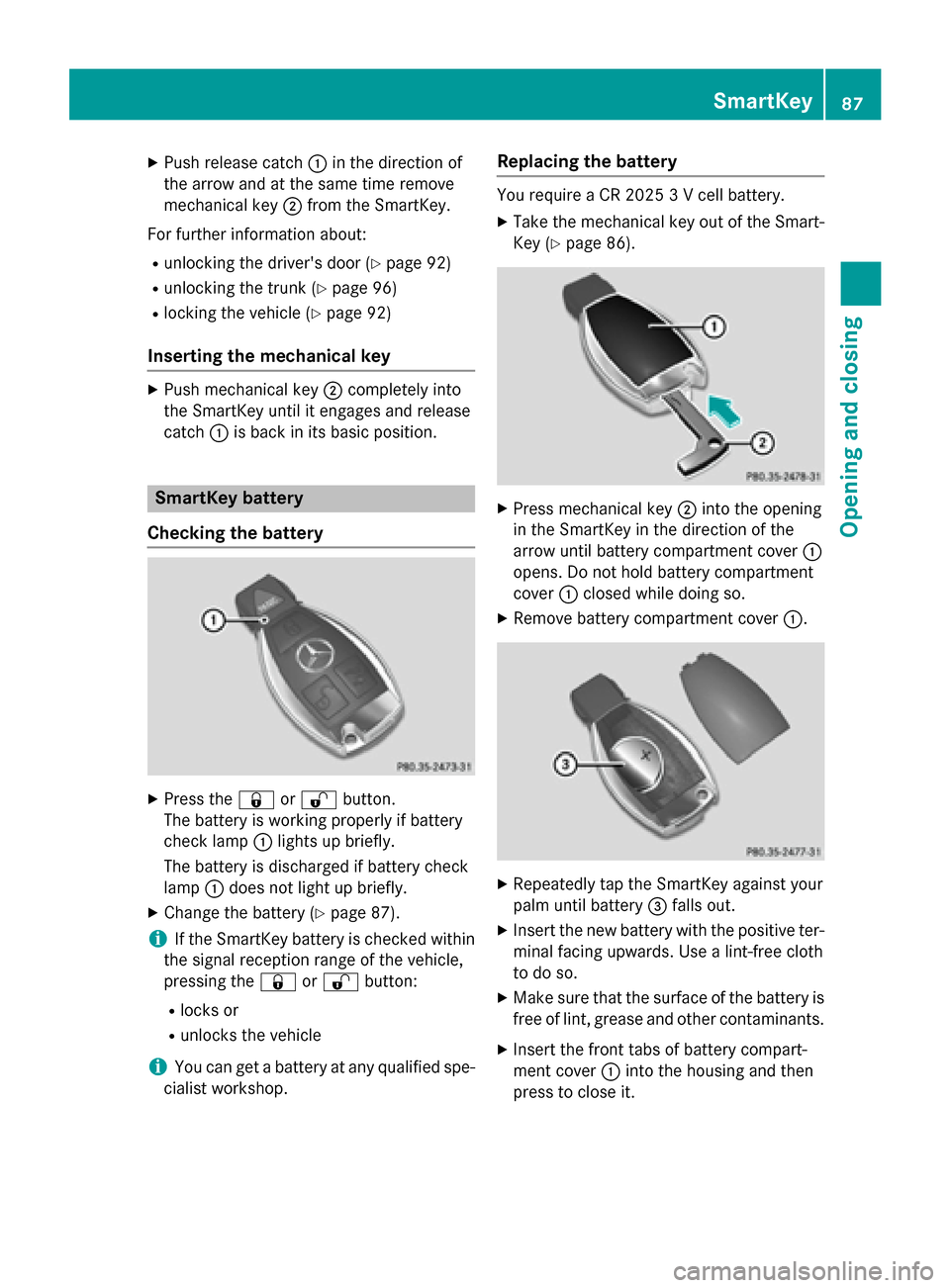
Push release catch :in the direction of
the arrow and at the same time remove
mechanical key ;from the SmartKey.
For further information about: R unlocking the driver's door (Y page 92)
R unlocking the trunk (Y page 96)
R locking the vehicle (Y page 92)
Inserting the mechanical key X
Push mechanical key ;completely into
the SmartKey until it engages and release
catch :is back in its basic position. SmartKey battery
Checking the battery X
Press the &or% button.
The battery is working properly if battery
check lamp :lights up briefly.
The battery is discharged if battery check
lamp :does not light up briefly.
X Change the battery (Y page 87).
i If the SmartKey battery is checked within
the signal reception range of the vehicle,
pressing the &or% button:
R locks or
R unlocks the vehicle
i You can get a battery at any qualified spe-
cialist workshop. Replacing the battery You require a CR 2025 3 V cell battery.
X Take the mechanical key out of the Smart-
Key (Y page 86). X
Press mechanical key ;into the opening
in the SmartKey in the direction of the
arrow until battery compartment cover :
opens. Do not hold battery compartment
cover :closed while doing so.
X Remove battery compartment cover :. X
Repeatedly tap the SmartKey against your
palm until battery =falls out.
X Insert the new battery with the positive ter-
minal facing upwards. Use a lint-free cloth
to do so.
X Make sure that the surface of the battery is
free of lint, grease and other contaminants.
X Insert the front tabs of battery compart-
ment cover :into the housing and then
press to close it. SmartKey
87Opening and closing Z
Page 92 of 398
Problem
Possible causes/consequences and
M
MSolutions You have lost the
mechanical key. X
Report the loss immediately to the vehicle insurers.
X If necessary, have the locks changed as well. The engine cannot be
started using the
SmartKey. the on-board voltage is too low.
X Switch off non-essential consumers, e.g. seat heating or interior
lighting, and try to start the engine again.
If this does not work: X Check the starter battery and charge it if necessary
(Y page 333).
or
X Jump-start the vehicle (Y page 335).
or
X Consult a qualified specialist workshop. The engine cannot be
started using KEYLESS-
GO. The SmartKey is in
the vehicle. The vehicle is locked.
X Unlock the vehicle and try to start the vehicle again. There is interference from a powerful source of radio waves.
X Start your vehicle with the SmartKey in the ignition lock. Doors
Important safety notes
G
WARNING
If children are left unsupervised in the vehicle, they could:
R open the doors, thus endangering other
people or road users.
R get out and disrupt traffic.
R operate the vehicle's equipment.
Additionally, children could set the vehicle in
motion if, for example, they:
R release the parking brake.
R shifting the automatic transmission out of
park position P
R Start the engine.
There is a risk of an accident and injury.
When leaving the vehicle, always take the
SmartKey with you and lock the vehicle. Never
leave children or animals unattended in the vehicle. Always keep the SmartKey out of
reach of children.
You should preferably place luggage or loads in the trunk. Observe the loading guidelines
(Y page 286). Unlocking and opening doors from
the inside
You can open a door from inside the vehicle
even if it has been locked.
If the vehicle has previously been locked from
the outside, opening a door from the inside
will trigger the anti-theft alarm system.
Switch off the alarm (Y page 81).
You can only open the rear doors from inside
the vehicle if they are not secured by the
child-proof locks (Y page 69).90
DoorsOpening and closing
Page 95 of 398
especially if the vehicle is in motion. There is a
risk of poisoning.
Always switch off the engine before opening
the trunk lid. Never drive with the trunk lid
open.
! The trunk lid swings upwards when
opened. Therefore, make sure that there is
sufficient clearance above the trunk lid.
i Opening dimensions of the trunk lid
(Y page 392).
You should preferably place luggage or loads
in the trunk. Observe the loading guidelines
(Y page 286).
Do not leave the SmartKey in the trunk. You
could otherwise lock yourself out.
Vehicles without the trunk lid remote
closing feature: the trunk lid can be:
R opened and closed manually from outside
R opened automatically from outside
R opened automatically from inside
R locked separately
R unlocked with the mechanical key
R opened with the emergency release button
Vehicles with the trunk lid remote closing
feature: the trunk lid can be:
R opened and closed manually from outside
R opened and closed automatically from out-
side
R opened and closed automatically from
inside
R locked separately
R unlocked with the mechanical key
R opened with the emergency release button Trunk lid reversing feature
The trunk lid is equipped with an automatic
reversing feature. It reacts if a solid object
obstructs or restricts the trunk lid during the
closing procedure. The trunk lid opens again
automatically. The automatic reversing fea-
ture is only an aid and is not a substitute for your attentiveness to the trunk lid while it is
closing. G
WARNING
The reversing feature does not react:
R to soft, light and thin objects, e.g. small fin-
gers
R over the last 1/3 in (8 mm) of the closing
movement
This means that the reversing feature cannot
prevent someone being trapped in these sit-
uations. There is a risk of injury.
Make sure that no body parts are in close
proximity during the closing procedure.
If somebody becomes trapped:
R press the Fbutton on the SmartKey, or
R pull or press the remote operating switch
on the driver's door or
R press the closing or locking button on the
trunk lid, or
R pull on the trunk lid handle Opening/closing from outside
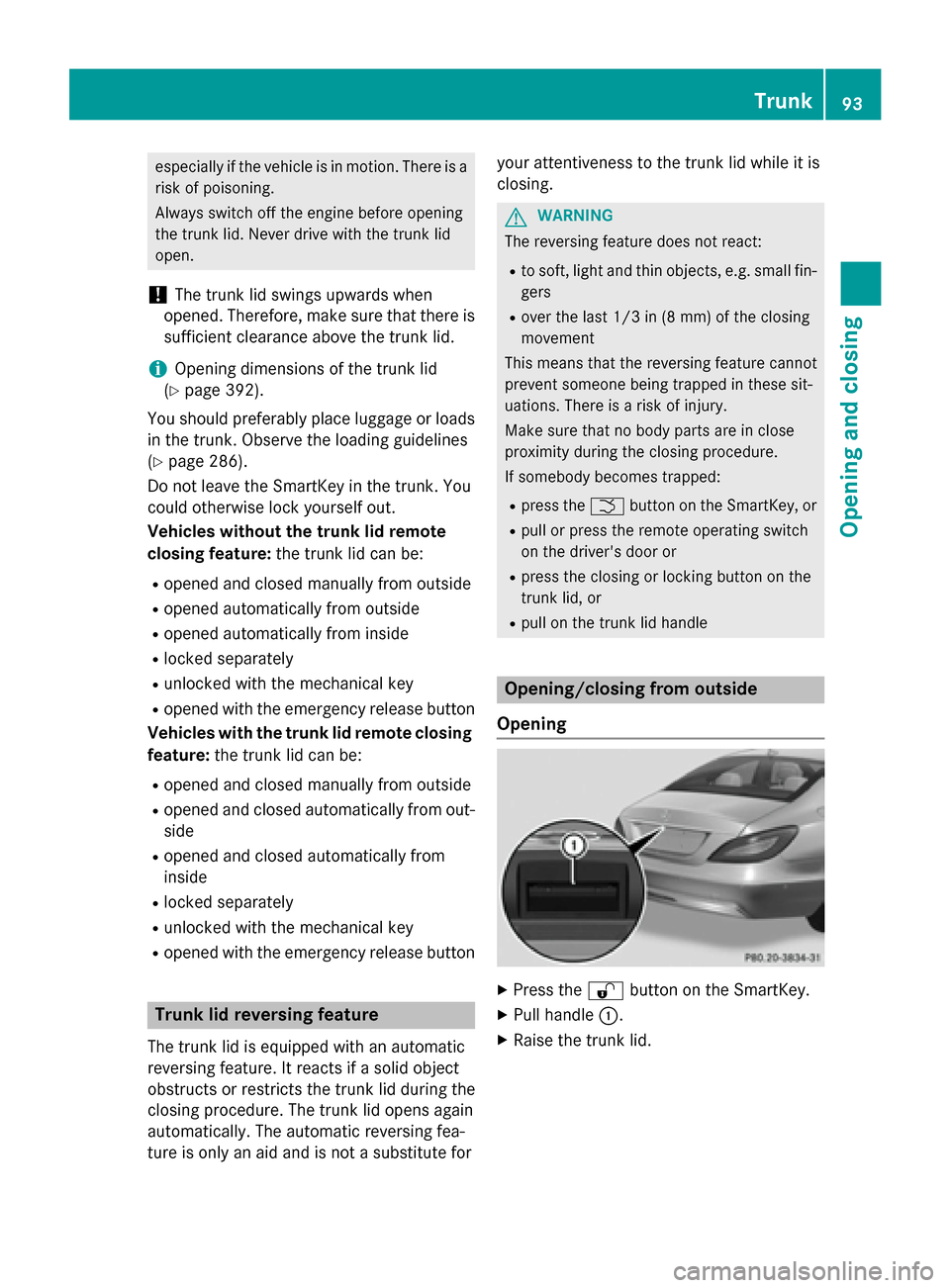
Opening X
Press the %button on the SmartKey.
X Pull handle :.
X Raise the trunk lid. Trunk
93Opening and closing Z
Page 96 of 398
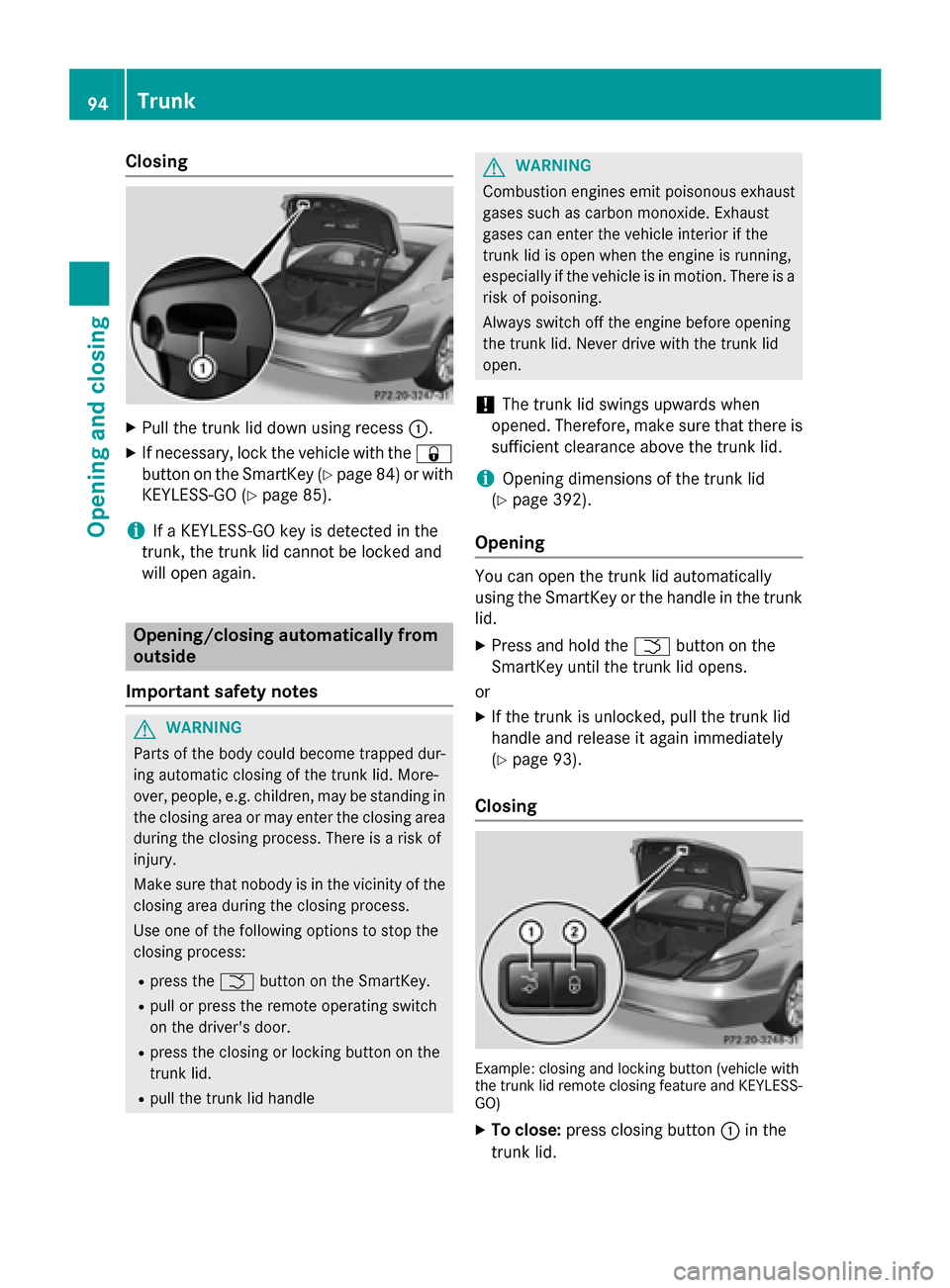
Closing
X
Pull the trunk lid down using recess :.
X If necessary, lock the vehicle with the &
button on the SmartKey (Y page 84)or with
KEYLESS-GO (Y page 85).
i If a KEYLESS-GO key is detected in the
trunk, the trunk lid cannot be locked and
will open again. Opening/closing automatically from
outside
Important safety notes G
WARNING
Parts of the body could become trapped dur-
ing automatic closing of the trunk lid. More-
over, people, e.g. children, may be standing in the closing area or may enter the closing area
during the closing process. There is a risk of
injury.
Make sure that nobody is in the vicinity of the closing area during the closing process.
Use one of the following options to stop the
closing process:
R press the Fbutton on the SmartKey.
R pull or press the remote operating switch
on the driver's door.
R press the closing or locking button on the
trunk lid.
R pull the trunk lid handle G
WARNING
Combustion engines emit poisonous exhaust
gases such as carbon monoxide. Exhaust
gases can enter the vehicle interior if the
trunk lid is open when the engine is running,
especially if the vehicle is in motion. There is a risk of poisoning.
Always switch off the engine before opening
the trunk lid. Never drive with the trunk lid
open.
! The trunk lid swings upwards when
opened. Therefore, make sure that there is
sufficient clearance above the trunk lid.
i Opening dimensions of the trunk lid
(Y page 392).
Opening You can open the trunk lid automatically
using the SmartKey or the handle in the trunk
lid.
X Press and hold the Fbutton on the
SmartKey until the trunk lid opens.
or
X If the trunk is unlocked, pull the trunk lid
handle and release it again immediately
(Y page 93).
Closing Example: closing and locking button (vehicle with
the trunk lid remote closing feature and KEYLESS-
GO)
X To close: press closing button :in the
trunk lid. 94
TrunkOpening and closing
Page 98 of 398
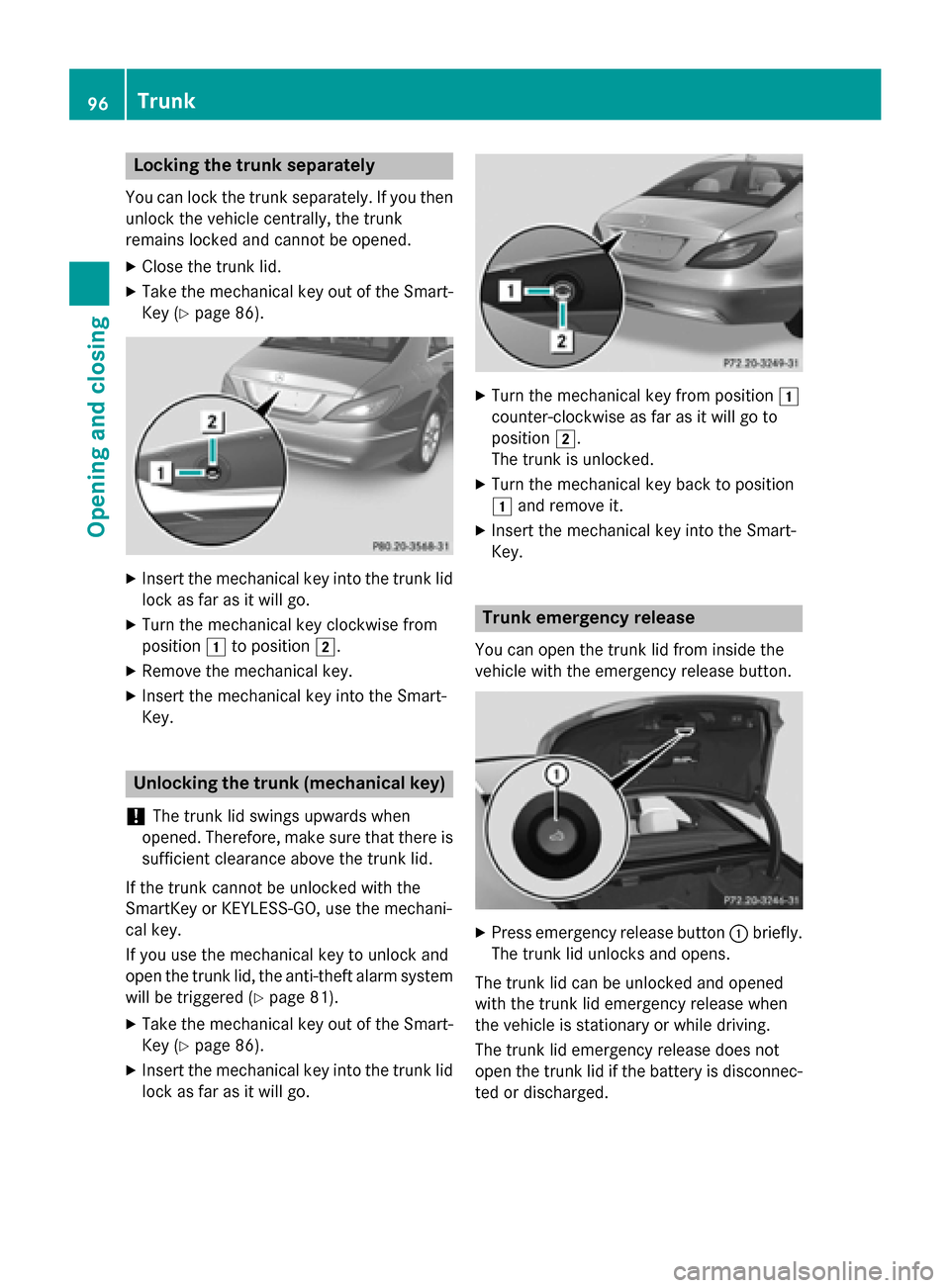
Locking the trunk separately
You can lock the trunk separately. If you then
unlock the vehicle centrally, the trunk
remains locked and cannot be opened.
X Close the trunk lid.
X Take the mechanical key out of the Smart-
Key (Y page 86). X
Insert the mechanical key into the trunk lid
lock as far as it will go.
X Turn the mechanical key clockwise from
position 1to position 2.
X Remove the mechanical key.
X Insert the mechanical key into the Smart-
Key. Unlocking the trunk (mechanical key)
! The trunk lid swings upwards when
opened. Therefore, make sure that there is sufficient clearance above the trunk lid.
If the trunk cannot be unlocked with the
SmartKey or KEYLESS-GO, use the mechani-
cal key.
If you use the mechanical key to unlock and
open the trunk lid, the anti-theft alarm system will be triggered (Y page 81).
X Take the mechanical key out of the Smart-
Key (Y page 86).
X Insert the mechanical key into the trunk lid
lock as far as it will go. X
Turn the mechanical key from position 1
counter-clockwise as far as it will go to
position 2.
The trunk is unlocked.
X Turn the mechanical key back to position
1 and remove it.
X Insert the mechanical key into the Smart-
Key. Trunk emergency release
You can open the trunk lid from inside the
vehicle with the emergency release button. X
Press emergency release button :briefly.
The trunk lid unlocks and opens.
The trunk lid can be unlocked and opened
with the trunk lid emergency release when
the vehicle is stationary or while driving.
The trunk lid emergency release does not
open the trunk lid if the battery is disconnec- ted or discharged. 96
TrunkOpening and closing
Page 99 of 398
Trunk lid emergency release light:
R emergency release button :flashes for
30 minutes after the trunk lid is opened.
R emergency release button :flashes for
60 minutes after the trunk lid is closed. Side windows
Important safety notes
G
WARNING
While opening the side windows, body parts
could become trapped between the side win- dow and the door frame as the side window
moves. There is a risk of injury.
Make sure that nobody touches the side win-
dow during the opening procedure. If some-
body becomes trapped, release the switch or pull the switch to close the side window again. G
WARNING
While closing the side windows, body parts in the closing area could become trapped. There is a risk of injury.
When closing make sure that no parts of the
body are in the closing area. If somebody
becomes trapped, release the switch or press
the switch to open the side window again. G
WARNING
If children operate the side windows they
could become trapped, particularly if they are left unsupervised. There is a risk of injury.
Activate the override feature for the rear side
windows. When leaving the vehicle, always
take the SmartKey with you and lock the vehi-
cle. Never leave children unsupervised in the
vehicle. Side window reversing feature
The side windows are equipped with an auto- matic reversing feature. If a solid object
blocks or restricts a side window during the
closing process, the side window opens again automatically. However, the automatic
reversing feature is only an aid and does not
relieve you of the responsibility of paying
attention when closing a side window. G
WARNING
The reversing feature does not react:
R to soft, light and thin objects, e.g. small fin-
gers
R over the last 1/6 in(4 mm) of the closing
movement
R during resetting
R when closing the side window again man-
ually immediately after automatic reversing
This means that the reversing feature cannot
prevent someone being trapped in these sit-
uations. There is a risk of injury.
Make sure that no body parts are in close
proximity during the closing procedure. If
someone becomes trapped, press the switch to open the side window again. Opening and closing the side win-
dows
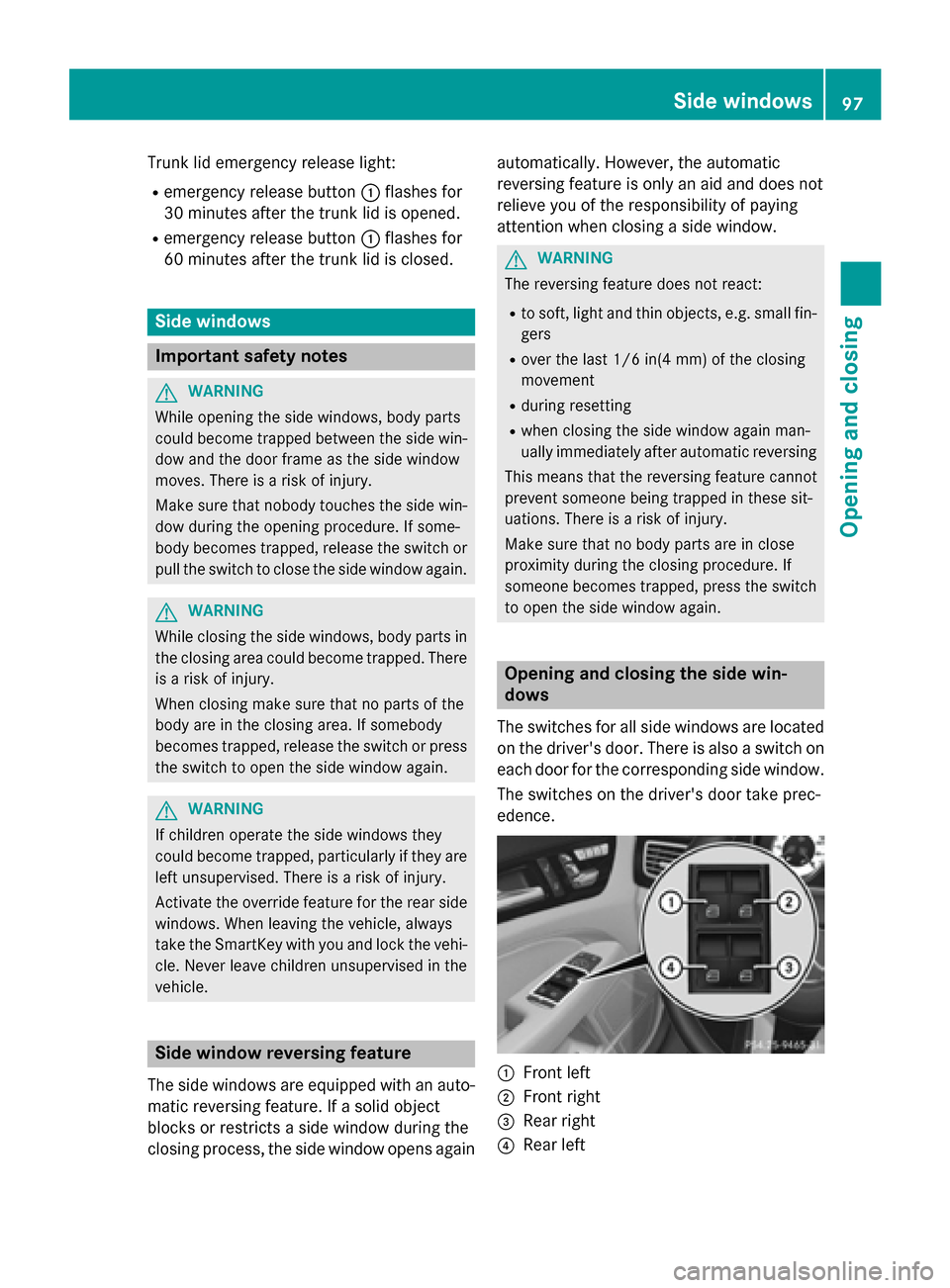
The switches for all side windows are located on the driver's door. There is also a switch on
each door for the corresponding side window.
The switches on the driver's door take prec-
edence. :
Front left
; Front right
= Rear right
? Rear left Side windows
97Opening and closing Z