Indicator MERCEDES-BENZ CLS-Class 2017 W218 Repair Manual
[x] Cancel search | Manufacturer: MERCEDES-BENZ, Model Year: 2017, Model line: CLS-Class, Model: MERCEDES-BENZ CLS-Class 2017 W218Pages: 334, PDF Size: 8.22 MB
Page 195 of 334
able to complete the next two changes of direc-
tion without changing lane.
Other status indicators of the naviga-
tion system
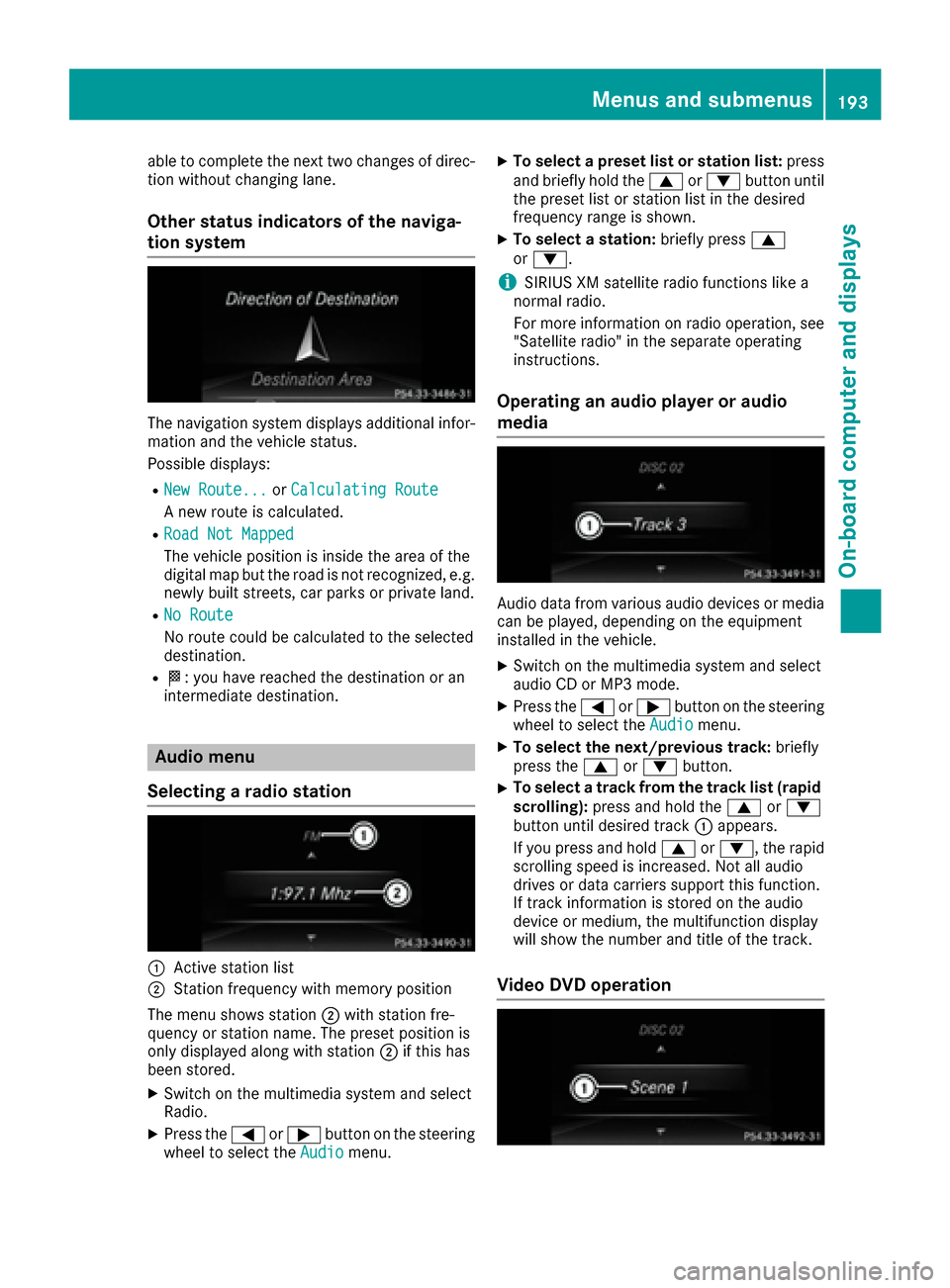
The navigation system displays additional infor-
mation and the vehicle status.
Possible displays:
RNew Route...orCalculating Route
A new route is calculated.
RRoad Not Mapped
The vehicle position is inside the area of the
digital map but the road is not recognized, e.g.
newly built streets, car parks or private land.
RNo Route
No route could be calculated to the selected
destination.
RO: you have reached the destination or an
intermediate destination.
Audio menu
Selecting a radio station
:Active station list
;Station frequency with memory position
The menu shows station ;with station fre-
quency or station name. The preset position is
only displayed along with station ;if this has
been stored.
XSwitch on the multimedia system and select
Radio.
XPress the =or; button on the steering
wheel to select the Audiomenu.
XTo select a preset list or station list: press
and briefly hold the 9or: button until
the preset list or station list in the desired
frequency range is shown.
XTo select a station: briefly press9
or :.
iSIRIUS XM satellite radio functions like a
normal radio.
For more information on radio operation, see
"Satellite radio" in the separate operating
instructions.
Operating an audio player or audio
media
Audio data from various audio devices or media
can be played, depending on the equipment
installed in the vehicle.
XSwitch on the multimedia system and select
audio CD or MP3 mode.
XPress the =or; button on the steering
wheel to select the Audiomenu.
XTo select the next/previous track: briefly
press the 9or: button.
XTo select a track from the track list (rapid
scrolling): press and hold the 9or:
button until desired track :appears.
If you press and hold 9or:, the rapid
scrolling speed is increased. Not all audio
drives or data carriers support this function.
If track information is stored on the audio
device or medium, the multifunction display
will show the number and title of the track.
Video DVD operation
Menus and submenus193
On-board computer and displays
Z
Page 203 of 334
AMG menu (Mercedes-AMG vehicles)
Warm -up
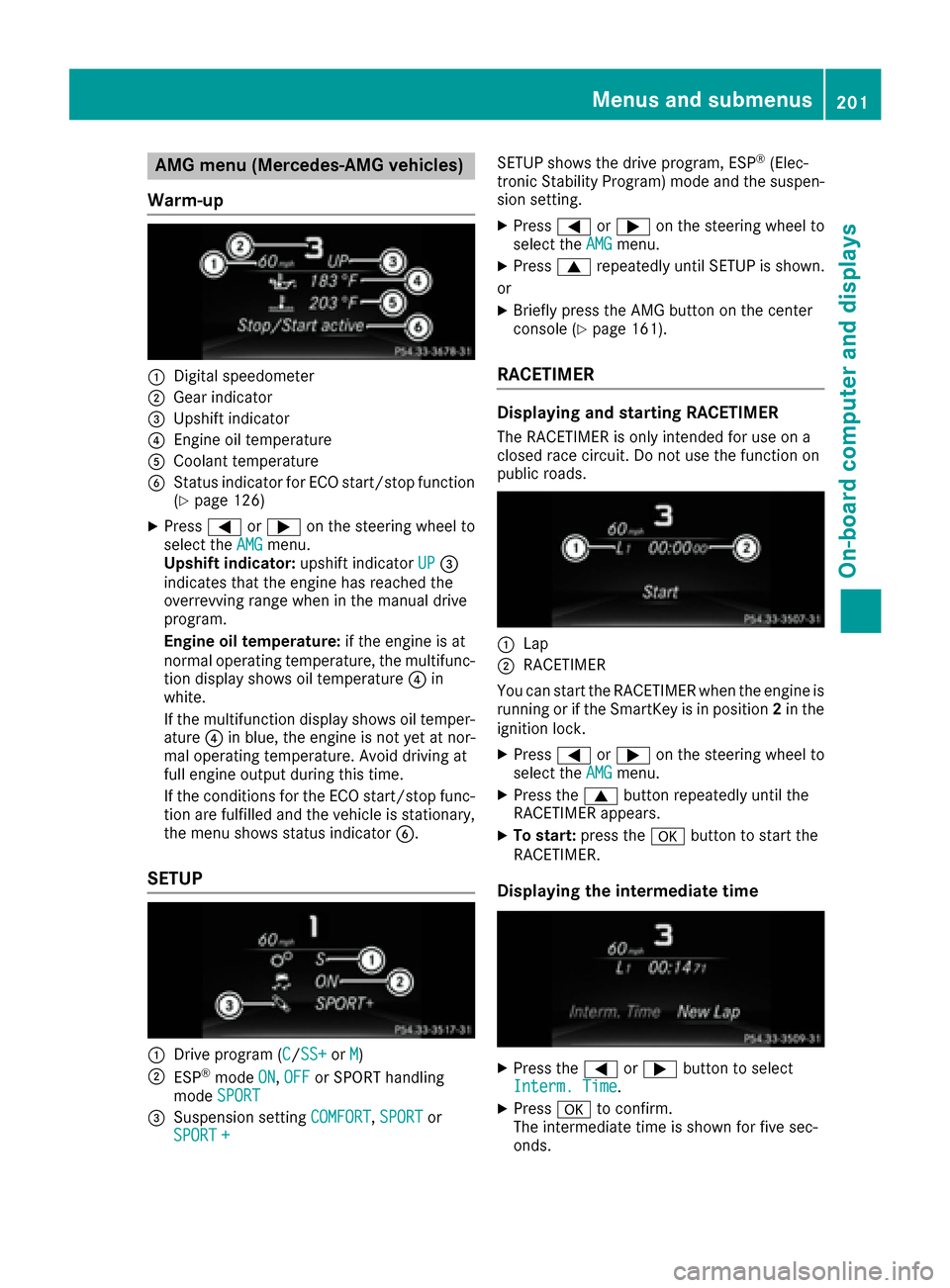
:Digital speedometer
;Gear indicator
=Upshiftindicator
?Engin eoil temperature
ACoolan ttemperature
BStatus indicator for ECO start/sto pfunction
(Ypage 126)
XPress =or; on thesteering whee lto
select th eAMGmenu.
Upshift indicator: upshift indicatorUP=
indicates that th eengin ehas reached th e
overrevving range when in th emanual drive
program .
Engin eoil temperature: if theengin eis at
normal operating temperature, th emultifunc-
tion display shows oil temperature ?in
white.
If th emultifunction display shows oil temper-
atur e? in blue, th eengin eis no tyet at nor-
mal operating temperature. Avoid drivin gat
full engin eoutput during this time.
If th econdition sfor th eECO start/sto pfunc-
tion are fulfilled and th evehicl eis stationary,
th emen ushows status indicator B.
SETUP
:Drive program(C/SS+orM)
;ESP®mod eON,OFFor SPORT handlin g
mod eSPORT
=Suspension setting COMFORT,SPORTor
SPORT +
SETUP shows th edrive program ,ES P®(Elec -
tronic Stabilit yProgram )mod eand th esuspen -
sion setting .
XPress=or; on thesteering whee lto
select th eAMGmenu.
XPress 9repeatedly until SETUP is shown.
or
XBriefly press th eAM Gbutto non th ecenter
console (Ypage 161).
RACETIMER
Displaying and starting RACETIMER
The RACETIMER is only intended for use on a
closed rac ecircuit .Do no tuse th efunction on
public roads.
:Lap
;RACETIMER
You can start th eRACETIMER when th eengin eis
runnin gor if th eSmartKey is in position 2in th e
ignition lock.
XPress =or; on thesteering whee lto
select th eAMGmenu.
XPress th e9 buttonrepeatedly until th e
RACETIMER appears.
XTo start: press thea buttonto start th e
RACETIMER.
Displaying th eintermediat etime
XPress th e= or; buttonto select
Interm .Tim e.
XPress ato confirm .
The intermediat etime is shown for fiv esec -
onds.
Menus and submenus20 1
On-board computer and displays
Z
Page 212 of 334
Display messagesPossible causes/consequences andMSolutions
FrontPassengerAir‐bag Disabled
See Operator' sMan ‐ual
The front-passenger fron tair bag and front-passenger knee bag are
deactivated during th ejourney, although:
Ran adult
or
Raperson of th ecorrespondin gstatur eis on th efront-passenger seat
If additional force sare applie dto th eseat ,th esystem may interpret
th eoccupant's weigh tas lower than it actually is.
GWARNIN G
The front-passenger fron tair bag and front-passenger knee bag does
no tdeploy in th eevent of an accident.
There is an increased ris kof injury.
XPull ove rand stop th evehicl esafely as soo nas possible, payin g
attention to roa dand traffic conditions.
XSecur eth evehicl eagainst rollin gaway (Ypage 141).
XSwitchth eignition off .
XHaveth eoccupant get out of th evehicle.
XKee pth eseat unoccupied ,close th efront-passenger door and
switch on th eignition .
XObserveth ePASSENGER AI RBA GOF Findicator lamp in th ecenter
console and th emultifunction display and chec kth efollowing:
Seat unoccupied and ignition switched on :
Raself-diagnosis is carrie dout .The PASSENGER AI RBA GOF Fand
PASSENGER AI RBA GON indicator lamp smus tligh tup simulta-
neousl yfor approximately six seconds
Rth ePASSENGER AI RBA GOF Findicator lamp mus tthen ligh tup
and remain lit after th eself-diagnosis .If th eindicator lamp is on ,
th eOCS (Occupant Classification System) has disabled th efront-
passenger fron tair bag and front-passenger knee bag
(
Ypage 49)
Rth eFront Passenger Airbag Enable dSee Operator' sManualorFront Passenger Airbag Disabled See Opera‐tor's Manualdisplay message smus tno tbe shown in th emul-
tifunction display
XWait for aperiod of at least 60 seconds until th enecessar ysystem
checks hav ebeen completed.
XMak esur ethat th edisplay message sdo no tappear in th emulti-
function display.
If these condition sare fulfilled ,th efront-passenger seat can be occu-
pied again .Whether th ePASSENGER AI RBA GOF Findicator lamp
remain slit or goe sout depend son how OCS classifies th eoccupant .
If th econdition sare no tfulfilled ,th esystem is no toperating correctly.
XVisit aqualified specialist workshop immediately.
Observ eth eadditional information on OCS (
Ypage 49).
FrontPassengerAir‐bag Enable dThe front-passenger fron tair bag and front-passenger knee bag are
enabled during th ejourney, although:
210Display messages
On-board computer and displays
Page 213 of 334
Display messagesPossible causes/consequences andMSolutions
See Operator'sMan ‐ual
Rachild, asmall adult or an objec tweighing less than th esystem' s
weigh tthreshold is locate don th efront-passenger seat
or
Rth efront-passenger seat is unoccupied
The system may detec tobjects or force sapplyin gadditional weigh ton
th eseat .
GWARNIN G
The front-passenger fron tair bag and front-passenger knee bag may
deploy unintentionally.
There is an increased ris kof injury.
XPull ove rand stop th evehicl esafely as soo nas possible, payin g
attention to roa dand traffic conditions.
XSecur eth evehicl eagainst rollin gaway (Ypage 141).
XSwitchth eignition off .
XOpenth efront-passenger door .
XRemove thechild and th echild restrain tsystem from th efront-
passenger seat .
XMakesur ethat there are no objects on th eseat addin gto th e
weight.
The system may otherwise detec tth eadditional weigh tand inter-
pre tth eseat occupant's weigh tas greate rthan it actually is.
XKee pth eseat unoccupied ,close th efront-passenger door and
switch on th eignition .
XObserveth ePASSENGER AI RBA GOF Findicator lamp in th ecenter
console and th emultifunction display and chec kth efollowing:
Seat unoccupied and ignition switched on :
Ra
self-diagnosis is carrie dout .The PASSENGER AI RBA GOF Fand
PASSENGER AI RBA GON indicator lamp smus tligh tup simultane -
ousl yfor approximately six seconds
Rth ePASSENGER AI RBA GOF Findicator lamp mus tthen ligh tup and
remain lit after th eself-diagnosis .If th eindicator lamp is on ,th e
OCS has disabled th efront-passenger fron tair bag and front-
passenger knee bag (
Ypage 49)
RtheFrontPassengerAirbagEnable dSeeOperator' sMan‐ualorFront Passenger Airbag Disabled See Operator' sManualdisplay messagesmus tno tbe shown in th emultifunction
display
XWait for aperiod of at least 60 seconds until th enecessar ysystem
checks hav ebeen completed.
XMak esur ethat th edisplay message sdo no tappear in th emulti-
function display.
If these condition sare fulfilled ,th efront-passenger seat can be occu-
pied again .Whether th ePASSENGER AI RBA GOF Findicator lamp
remain slit or goe sout depend son how OCS classifies th eoccupant .
If th econdition sare no tfulfilled ,th esystem is no toperating correctly.
XVisit aqualified specialist workshop immediately.
Observ eth eadditional information on OCS (
Ypage 49).
Display messages211
On-board computer and displays
Z
Page 219 of 334
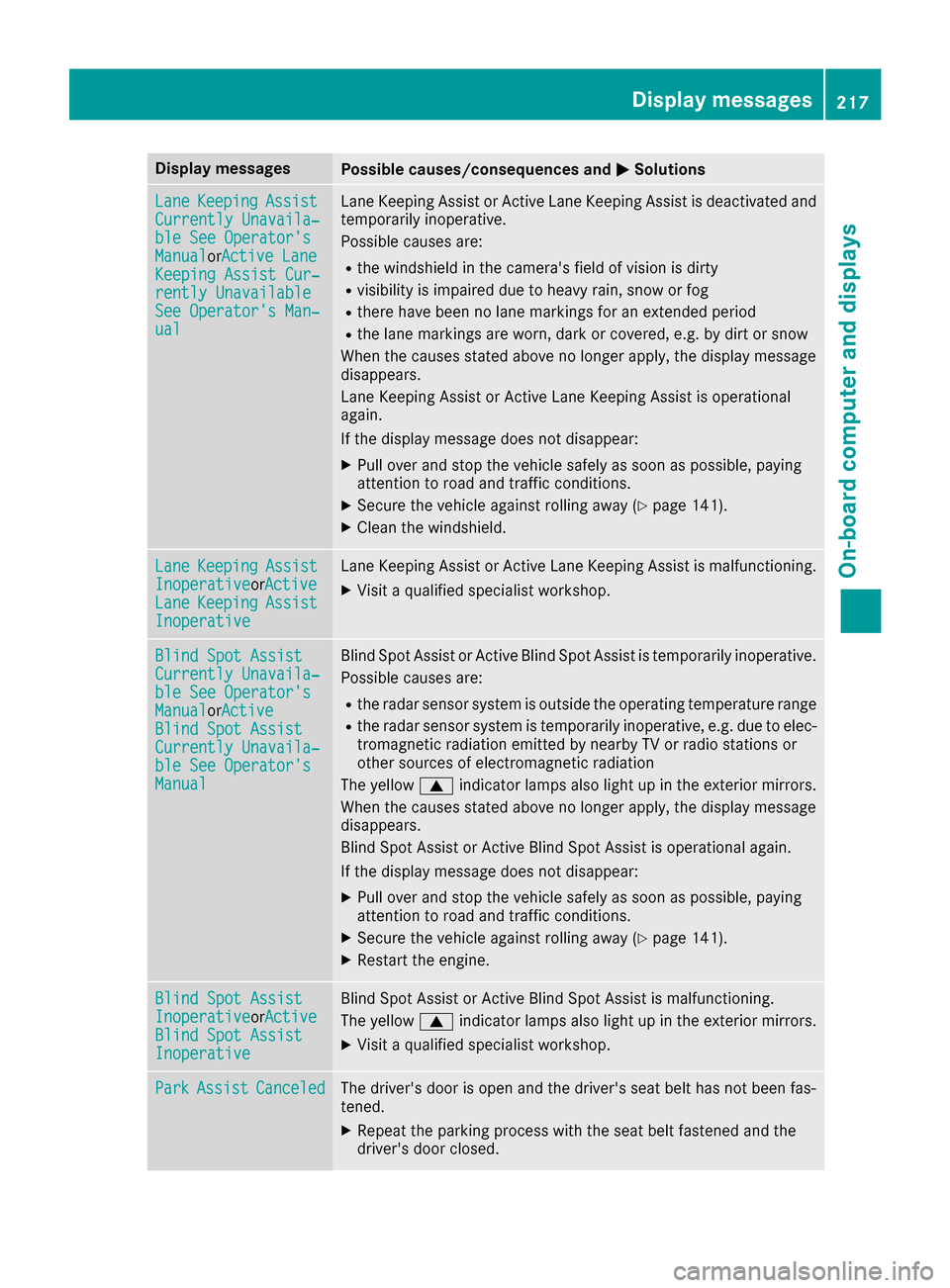
Display messagesPossible causes/consequences andMSolutions
LaneKeepin gAssistCurrently Unavaila‐ble See Operator' sManualorActive Lan eKeepingAssist Cur ‐rently UnavailableSee Operator' sMan ‐ual
LaneKeepin gAssis tor Active Lan eKeepin gAssis tis deactivated and
temporarily inoperative.
Possibl ecauses are:
Rth ewindshield in th ecamera' sfield of vision is dirty
Rvisibilit yis impaire ddue to heav yrain ,snow or fog
Rthere hav ebeen no lan emarking sfor an extended period
Rth elan emarking sare worn, dark or covered, e.g. by dir tor snow
Whe nth ecauses state dabov eno longer apply, th edisplay message
disappears.
Lan eKeepin gAssis tor Active Lan eKeepin gAssis tis operational
again .
If th edisplay message does no tdisappear :
XPull overand stop th evehicl esafely as soo nas possible, payin g
attention to roa dand traffic conditions.
XSecur eth evehicl eagainst rollin gaway (Ypage 141).
XClean th ewindshield.
Lan eKeepin gAssistInoperativeorActiveLan eKeepin gAssistInoperative
LaneKeepin gAssis tor Active Lan eKeepin gAssis tis malfunctioning .
XVisitaqualified specialist workshop .
Blind SpotAssistCurrently Unavaila‐ble See Operator' sManualorActiveBlind Spo tAssistCurrently Unavaila‐ble See Operator' sManual
Blind Spot Assistor Active Blind Spot Assis tis temporarily inoperative.
Possibl ecauses are:
Rth eradar sensor system is outside th eoperating temperature range
Rth eradar sensor system is temporarily inoperative, e.g. due to elec -
tromagneti cradiation emitted by nearby TV or radi ostation sor
other source sof electromagneti cradiation
The yellow 9indicator lamp salso ligh tup in th eexterio rmirrors.
Whe nth ecauses state dabov eno longer apply, th edisplay message
disappears.
Blind Spot Assis tor Active Blind Spot Assis tis operational again .
If th edisplay message does no tdisappear :
XPull overand stop th evehicl esafely as soo nas possible, payin g
attention to roa dand traffic conditions.
XSecur eth evehicl eagainst rollin gaway (Ypage 141).
XRestart th eengine.
Blind Spo tAssistInoperativeorActiveBlind Spo tAssistInoperative
Blind Spot Assis tor Active Blind Spot Assis tis malfunctioning .
The yellow 9indicator lamp salso ligh tup in th eexterio rmirrors.
XVisit aqualified specialist workshop .
ParkAssistCanceledThe driver's door is open and th edriver's seat belt has no tbeen fas -
tened.
XRepeat th eparking process wit hth eseat belt fastene dand th e
driver's door closed .
Display messages217
On-board computer and displays
Z
Page 223 of 334
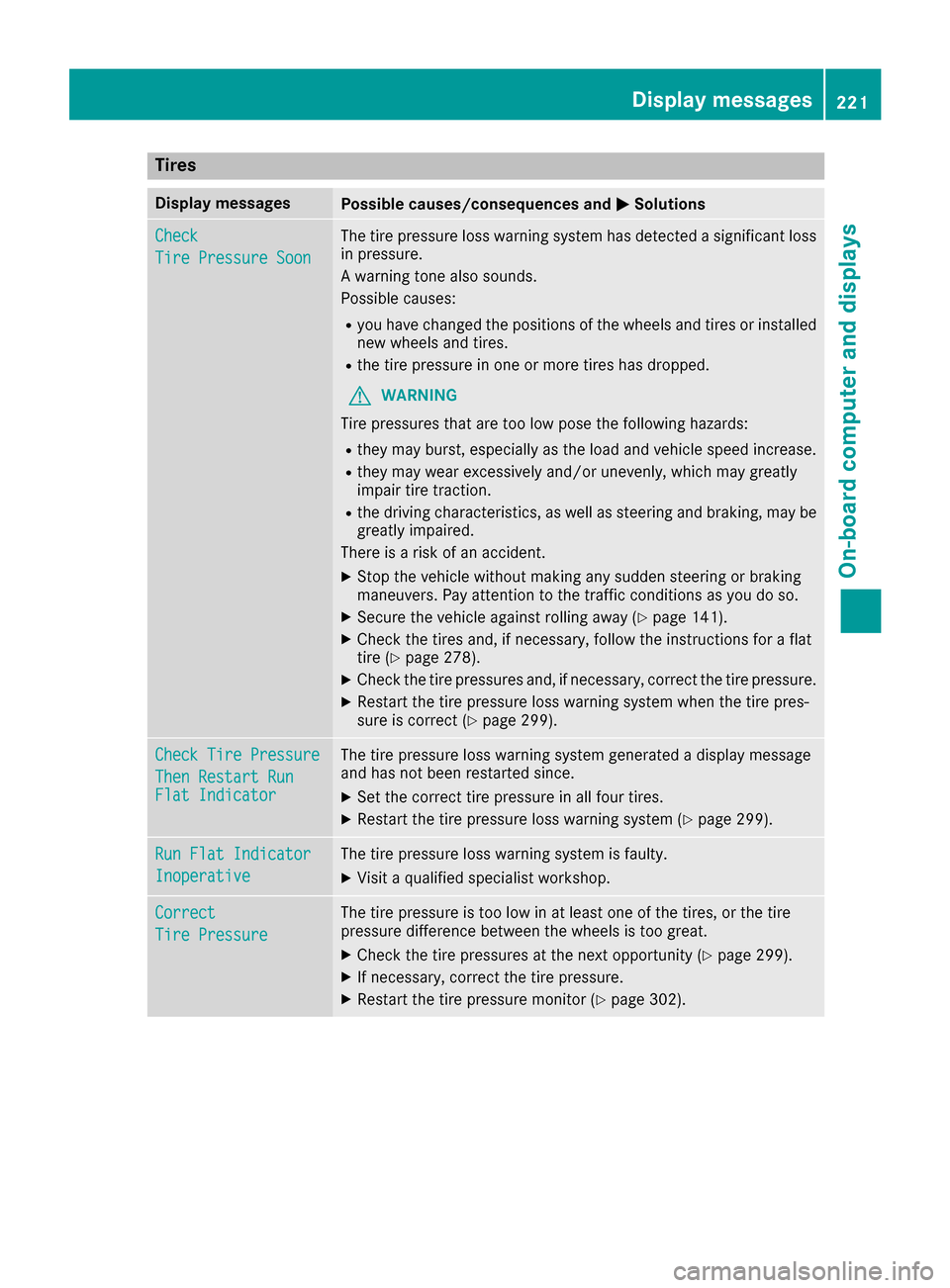
Tires
Display messagesPossible causes/consequences andMSolutions
Check
Tire Pressure Soon
The tire pressure loss warning system has detected a significant loss
in pressure.
A warning tone also sounds.
Possible causes:
Ryou have changed the positions of the wheels and tires or installed
new wheels and tires.
Rthe tire pressure in one or more tires has dropped.
GWARNING
Tire pressures that are too low pose the following hazards:
Rthey may burst, especially as the load and vehicle speed increase.
Rthey may wear excessively and/or unevenly, which may greatly
impair tire traction.
Rthe driving characteristics, as well as steering and braking, may be
greatly impaired.
There is a risk of an accident.
XStop the vehicle without making any sudden steering or braking
maneuvers. Pay attention to the traffic conditions as you do so.
XSecure the vehicle against rolling away (Ypage 141).
XCheck the tires and, if necessary, follow the instructions for a flat
tire (Ypage 278).
XCheck the tire pressures and, if necessary, correct the tire pressure.
XRestart the tire pressure loss warning system when the tire pres-
sure is correct (Ypage 299).
Check Tire Pressure
Then Restart RunFlat Indicator
The tire pressure loss warning system generated a display message
and has not been restarted since.
XSet the correct tire pressure in all four tires.
XRestart the tire pressure loss warning system (Ypage 299).
Run Flat Indicator
Inoperative
The tire pressure loss warning system is faulty.
XVisit a qualified specialist workshop.
Correct
Tire Pressure
The tire pressure is too low in at least one of the tires, or the tire
pressure difference between the wheels is too great.
XCheck the tire pressures at the next opportunity (Ypage 299).
XIf necessary, correct the tire pressure.
XRestart the tire pressure monitor (Ypage 302).
Displa y messages221
On-board computer and displays
Z
Page 228 of 334

Display messagesPossible causes/consequences andMSolutions
Â
Don't Forget YourKey
The KEYLESS-GO ke yis no tin th eignition lock. You hav eopened th e
driver's door wit hth eengin eswitched off . awarning tone sounds
The multifunction display shows th edisplay message amaximum of
60 seconds and is simply areminder.
XRemembe rto tak eth eKEYLESS-GO ke ywit hyou when you leav e
th evehicle.
Â
Key Not Detected(re ddisplay message )
The KEYLESS-GO ke yis no tin th evehicle.
A warning tone also sounds.
If th eengin eis switched off ,you can no longer loc kth evehicl ecen-
trally or start th eengine.
XPull ove rand stop th evehicl esafely as soo nas possible, payin g
attention to roa dand traffic conditions.
XSecur eth evehicl eagainst rollin gaway (Ypage 141).
XLocate th eKEYLESS-GO key.
A stron gsource of radi owave sis causing interferenc eand this is
preventing th eKEYLESS-GO ke yfrom bein grecognized when th e
engin eis running.
A warning tone also sounds.
XPull ove rand stop th evehicl esafely as soo nas possible, payin g
attention to roa dand traffic conditions.
XSecur eth evehicl eagainst rollin gaway (Ypage 141).
XInsertth eSmartKey int oth eignition loc kand drive in SmartKey
mode.
Â
Key Not Detected(whit edisplay message )
The KEYLESS-GO ke ycanno tbe detecte dat present.
XChange th elocation of th eKEYLESS-GO ke yin th evehicle.
If th eKEYLESS-GO ke yis still no tdetected:
XOperat eth evehicl ewit hth eSmartKey in th eignition lock.
Â
Remove 'Start 'But ‐ton and Insert Key
The KEYLESS-GO ke ycan continuousl yno tbe detected.
KEYLESS-GO is temporarily malfunctioning or is defective. Awarning
tone also sounds.
XInser tth eSmartKey int oth eignition loc kand tur nit to th edesire d
position .
XVisitaqualified specialist workshop .
Warning and indicat orlamps in the instrume nt cluster
General notes
Some systems carry out aself-diagnosis when th eignition is switched on .Therefore ,som eindicator
and warning lamp smay ligh tup or flas htemporarily. This behavio ris non-critical .These indicator
and warning lamp sonly indicat e amalfunction if they ligh tup or flas hafter starting th eengin eor
whils tdriving.
226Warning and indicator lamps in the instrument cluster
On-board computer and displays
Page 229 of 334
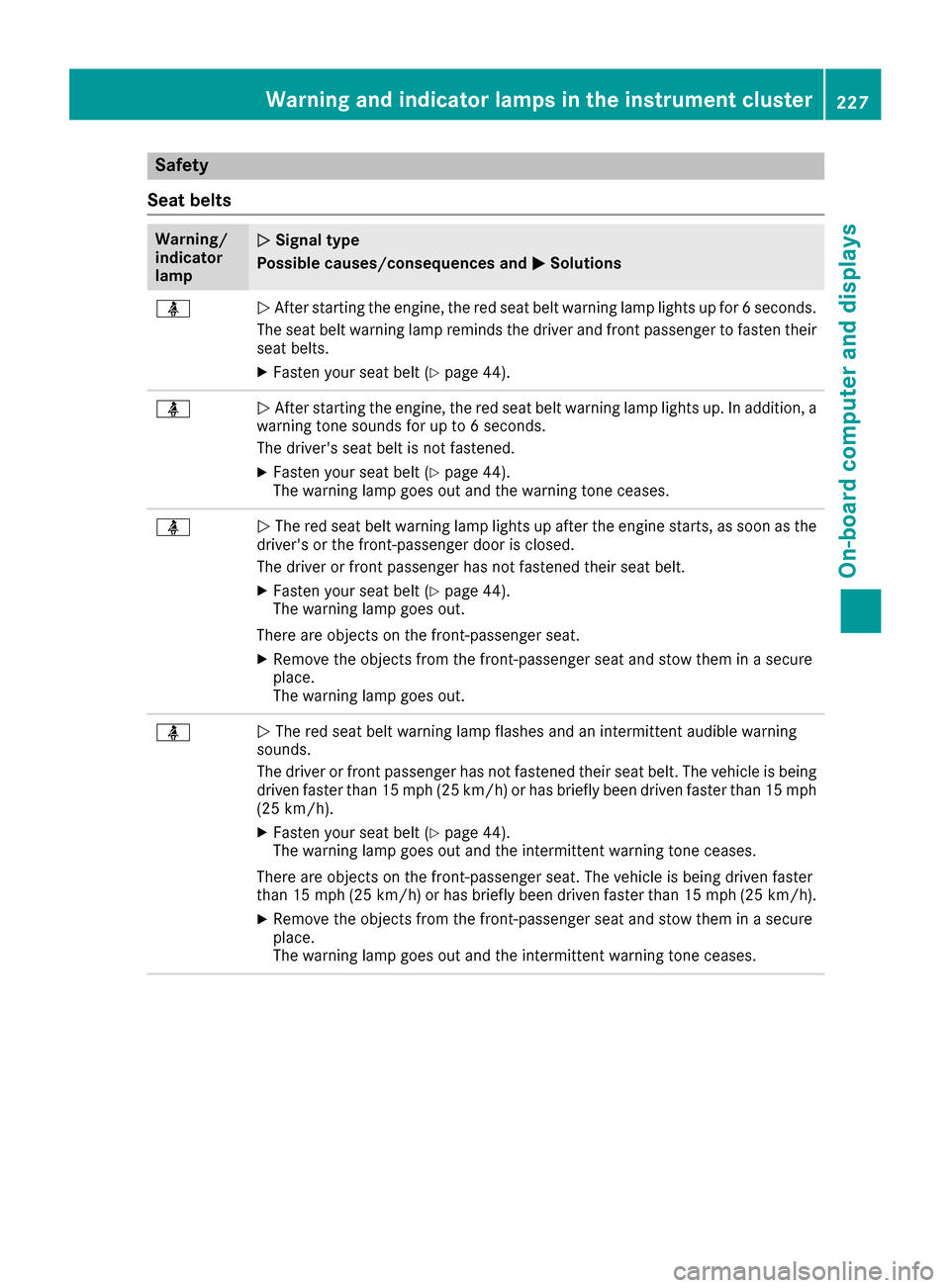
Safety
Seat belts
Warning/
indicator
lampNSignal type
Possible causes/consequences and M
Solutions
üNAfter starting the engine, the red seat belt warning lamp lights up for 6 seconds.
The seat belt warning lamp reminds the driver and front passenger to fasten their
seat belts.
XFasten your seat belt (Ypage 44).
üN After starting the engine, the red seat belt warning lamp lights up. In addition, a
warning tone sounds for up to 6 seconds.
The driver's seat belt is not fastened.
XFasten your seat belt (Ypage 44).
The warning lamp goes out and the warning tone ceases.
üN The red seat belt warning lamp lights up after the engine starts, as soon as the
driver's or the front-passenger door is closed.
The driver or front passenger has not fastened their seat belt.
XFasten your seat belt (Ypage 44).
The warning lamp goes out.
There are objects on the front-passenger seat.
XRemove the objects from the front-passenger seat and stow them in a secure
place.
The warning lamp goes out.
üN The red seat belt warning lamp flashes and an intermittent audible warning
sounds.
The driver or front passenger has not fastened their seat belt. The vehicle is being
driven faster than 15 mph (25 km/h) or has briefly been driven faster than 15 mph
(25 km/h).
XFasten your seat belt (Ypage 44).
The warning lamp goes out and the intermittent warning tone ceases.
There are objects on the front-passenger seat. The vehicle is being driven faster
than 15 mph (25 km/h) or has briefly been driven faster than 15 mph (25 km/h).
XRemove the objects from the front-passenger seat and stow them in a secure
place.
The warning lamp goes out and the intermittent warning tone ceases.
Warning and indicator lamps in the instrument cluster227
On-board computer and displays
Z
Page 230 of 334
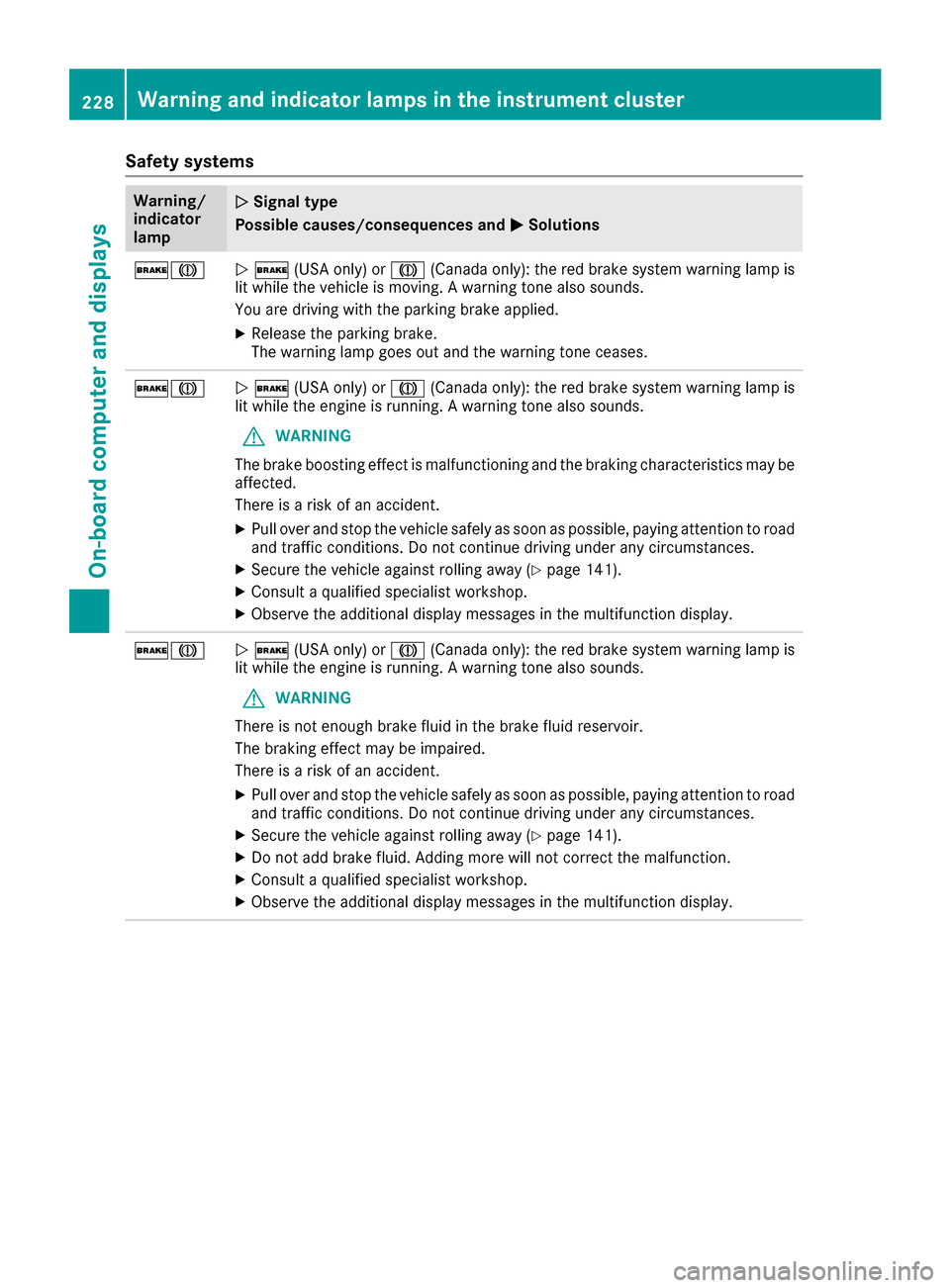
Safety systems
Warning/
indicator
lampNSignal type
Possible causes/consequences and M
Solutions
$JN$ (USA only) or J(Canada only): the red brake system warning lamp is
lit while the vehicle is moving. A warning tone also sounds.
You are driving with the parking brake applied.
XRelease the parking brake.
The warning lamp goes out and the warning tone ceases.
$JN $ (USA only) or J(Canada only): the red brake system warning lamp is
lit while the engine is running. A warning tone also sounds.
GWARNING
The brake boosting effect is malfunctioning and the braking characteristics may be
affected.
There is a risk of an accident.
XPull over and stop the vehicle safely as soon as possible, paying attention to road
and traffic conditions. Do not continue driving under any circumstances.
XSecure the vehicle against rolling away (Ypage 141).
XConsult a qualified specialist workshop.
XObserve the additional display messages in the multifunction display.
$JN $ (USA only) or J(Canada only): the red brake system warning lamp is
lit while the engine is running. A warning tone also sounds.
GWARNING
There is not enough brake fluid in the brake fluid reservoir.
The braking effect may be impaired.
There is a risk of an accident.
XPull over and stop the vehicle safely as soon as possible, paying attention to road
and traffic conditions. Do not continue driving under any circumstances.
XSecure the vehicle against rolling away (Ypage 141).
XDo not add brake fluid. Adding more will not correct the malfunction.
XConsult a qualified specialist workshop.
XObserve the additional display messages in the multifunction display.
228Warning and indicator lamps in the instrument cluster
On-board computer and displays
Page 231 of 334
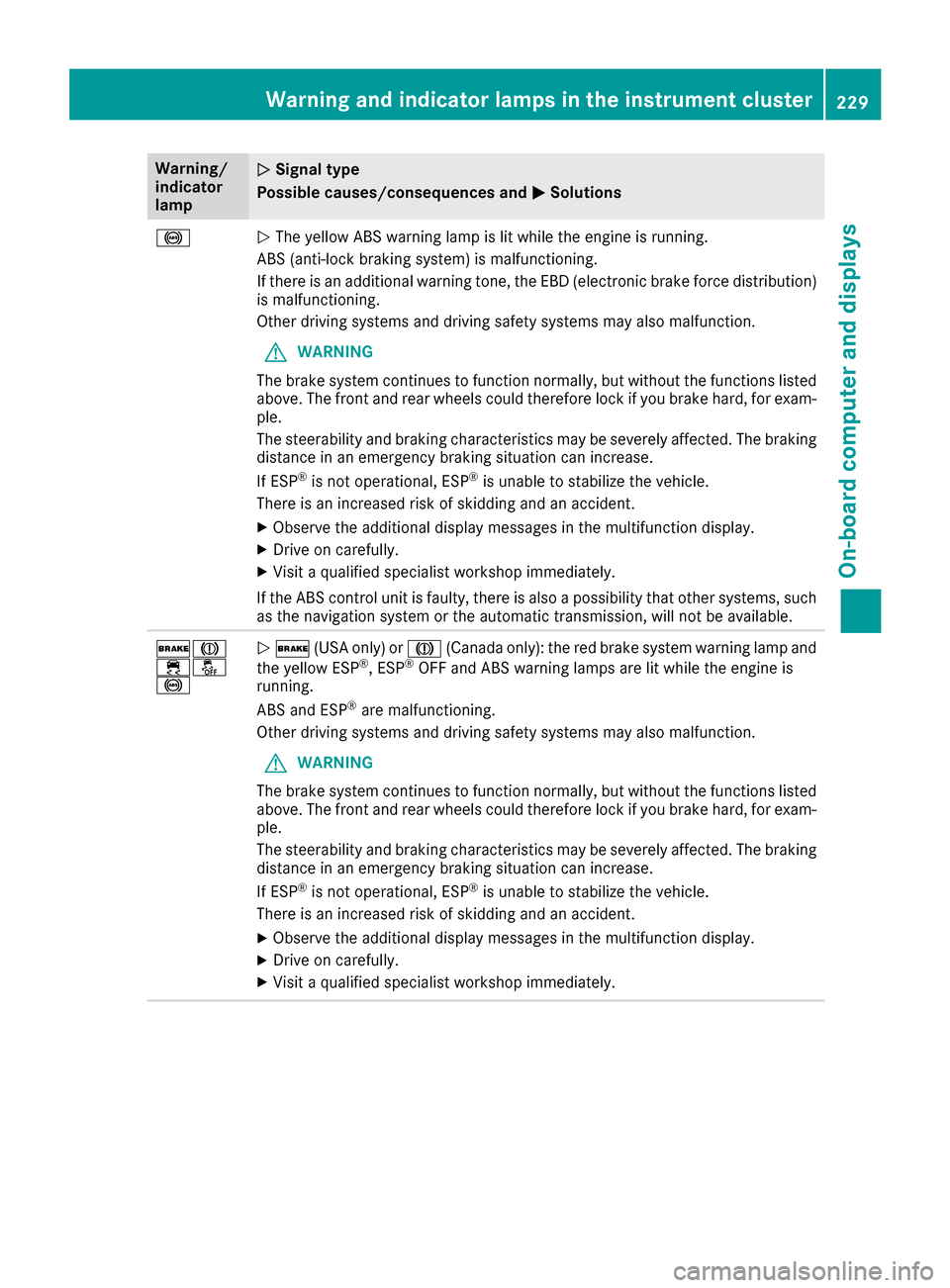
Warning/
indicator
lampNSignal type
Possible causes/consequences and M
Solutions
!NThe yellow ABS warning lamp is lit while the engine is running.
ABS (anti-lock braking system) is malfunctioning.
If there is an additional warning tone, the EBD (electronic brake force distribution)
is malfunctioning.
Other driving systems and driving safety systems may also malfunction.
GWARNING
The brake system continues to function normally, but without the functions listed
above. The front and rear wheels could therefore lock if you brake hard, for exam-
ple.
The steerability and braking characteristics may be severely affected. The braking
distance in an emergency braking situation can increase.
If ESP
®is not operational, ESP®is unable to stabilize the vehicle.
There is an increased risk of skidding and an accident.
XObserve the additional display messages in the multifunction display.
XDrive on carefully.
XVisit a qualified specialist workshop immediately.
If the ABS control unit is faulty, there is also a possibility that other systems, such
as the navigation system or the automatic transmission, will not be available.
$J
֌
!N $ (USA only) or J(Canada only): the red brake system warning lamp and
the yellow ESP®, ESP®OFF and ABS warning lamps are lit while the engine is
running.
ABS and ESP
®are malfunctioning.
Other driving systems and driving safety systems may also malfunction.
GWARNING
The brake system continues to function normally, but without the functions listed
above. The front and rear wheels could therefore lock if you brake hard, for exam-
ple.
The steerability and braking characteristics may be severely affected. The braking
distance in an emergency braking situation can increase.
If ESP
®is not operational, ESP®is unable to stabilize the vehicle.
There is an increased risk of skidding and an accident.
XObserve the additional display messages in the multifunction display.
XDrive on carefully.
XVisit a qualified specialist workshop immediately.
Warning and indicator lamps in the instrument cluster229
On-board computer and displays
Z