lock MERCEDES-BENZ CLS COUPE 2012 Owner's Manual
[x] Cancel search | Manufacturer: MERCEDES-BENZ, Model Year: 2012, Model line: CLS COUPE, Model: MERCEDES-BENZ CLS COUPE 2012Pages: 373, PDF Size: 9.12 MB
Page 67 of 373
BAS PLUS (Brak
eAssis tSystem Plus)
i Observ ethe "Important safety notes "sec-
tio n(Ypage 62).
BAS PLU Sisonly available on vehicles with
DISTRONIC PLUS.
BAS PLUS provides braking assistance in haz-
ardous situations at speeds greater than
7k m/h and uses rada rsensor technology to
assess the traffic situation.
With the help of the radar sensor system, BAS
PLUS can detec tobstacles that are in the
path of your vehicle for an extended period of
time.
At speeds up to approximately 70 km/h, BAS
PLUS may also detect stationar yobstacles,
for example, stopped or parked vehicles.
To prevent afront-end collision, BAS PLUS
calculates the brake force necessary if:
R yo ua pproach an obstacle, and
R BAS PLUS ha sdetected arisk of collision
If you ar edriving at aspeed over
30 km/h:ify ou depress the brake sharply,
BAS PLUS automatically raises the brake
pressure to avalue adapted to the traffic sit-
uation.
If you are driving at aspeed under
30 km/h:ify ou depress the brake, BAS PLUS
is activated. Brakin gwill be carried out at the
last possible moment.
If BAS PLUS demands particularly high brak-
ing force, preventative passenger protection
measures (PRE-SAFE ®
)a re activated simul-
taneously.
X Keep the brake pedal depressed until the
emergenc ybraking situation is over.
ABS prevent sthe wheels from locking.
BAS PLUS is deactivated and the brakes func-
tion as usual,i f:
R you release the brake pedal.
R there is no longer any danger of arear-end
collision.
R no obstacle is detected in front of your
vehicle. The radar sensor system is switched off auto-
matically in the vicinit
yofradio telescope
facilities in the following vehicles:
R vehicles with COMAND Online and naviga-
tion
R vehicles with Audio 20 and Becker ®
MAP
PILOT
Becker ®
MAP PILOT must be connected;
see the separate operating instructions.
The radar sensor system must be switched off
using the on-board computer in the vicinit yof
radio telescope facilities in the following vehi-
cles:
R vehicles without COMAND Online and nav-
igation
R vehicles without Audio 20 and Becker ®
MAP PILOT
R vehicles for Australia
For information on switching off the radar
sensor system using the on-board computer,
see (Y page 225).
For BAS PLUS to assist you when driving, the
radar sensor system must:
R be switched on (Y page 225)
R be operational (Y page 245)
If the radar sensor system is malfunctioning,
BAS PLUS will not be available. The brake
system is still available with complete brake
boosting effect and BAS. G
WARNING
BAS PLUS cannot alwaysc learly identify
object sand complex traffic situations. BAS
PLUS cannot intervene in these cases. There
is ar isk of an accident.
Always pay careful attention to the traffic sit-
uation and be ready to brake.
In particular, the detection of obstacles can
be impaired if there is:
R dirt on the sensors or anything else cover-
ing the sensors
R snow or heavy rain
R interference by other radar sources 64
Driving safety systemsSafety
Page 71 of 373
driver who is able to cope with these critical
drivin
gconditions.
X To activate: briefly press button :.
The å ESP®
OFF warning lamp in the
instrument cluster goes out. The ÷ON message appears in the multifunction dis-
play.
ESP ®
is activated automatically when the
engin eisstarted.
If ESP ®
is deactivated and one or more wheels
start to spin, the ÷ESP®
warning lamp in
the instrument cluster does not flash. In such
situations, ESP ®
will not stabilise the vehicle.
It may be best to deactivate ESP ®
in the fol-
lowing situations:
R when using snow chains
R in deep snow
R on sand or gravel
If you deactivate ESP ®
:
R ESP ®
no longer improves drivin gstability.
R traction contro lisstill activated.
R PRE-SAFE ®
is no longer available; nor is it
activated if you brake firmly and ESP ®
inter-
venes.
R PRE-SAFE ®
Brak eisnol onger available; it
is also not activated if you brake firmly and
ESP ®
intervenes.
R ABSs tillp rovide ssuppo rt when yo ubrake.
R engine torque is no longe rlimited and the
drive wheels are able to spin .The spinning
of the wheels results in acuttin gaction for
better traction.
Vehicles with ECO start/stop function: the
ECO start/stop function switches the engine
off automatically when the vehicle comes to
as top. When pulling away again, the engine
starts automatically .ESP ®
remains in its pre-
viously selected status. Example :ifESP®
was
deactivate dbefore the engine wa sswitched
off, ESP ®
remains deactivate dwhent he
engine is switche donagain. EBD (electroni
cbrake forc edistribu-
tion)
i Observe the "Importan tsafet ynotes "sec-
tio n(Ypage 62). G
WARNING
If EB Dhas malfunctioned ,the rear wheels can
still lock, e.g .unde rfull braking .This increa-
ses the risk of skidding and an accident.
You should therefore adapt your driving style
to the different handling characteristics. Have
the brake system checked at aqualified spe-
cialist workshop.
Observe information regarding indicator and
warning lamps (Y page 261) as well as dis-
play messages (Y page 234).
EBD monitors and controls the brake pres-
sure on the rear wheels to improve driving
stability while braking. ADAPTIVE BRAKE
ADAPTIVE BRAKE enhances braking safety
and offers increased braking comfort.Ina ddi-
tion to the brakin gfunction ,ADAPTIVE BRAKE
also ha sthe HOLD functio n(Ypage 179 )and
hill start assist (Y page 144). PRE-SAFE
®
Brake
i Observ ethe "Important safety notes "sec-
tio n(Ypage 62).
PRE-SAFE ®
Brake is onl yavailable in vehicles
with DISTRONI CPLUS.
PRE-SAFE ®
Brake can hel pyou to minimise
the ris kofacollision with avehicle ahea dor
reduce the effects of such acollision. If PRE-
SAFE ®
Brake detects ariskofc ollision, you
will be warned visually and acoustically as
well as by automatic braking. PRE-SAFE ®
Brake cannot prevent acollision without your
intervention. 68
Driving safety systemsSafety
Page 73 of 373
In particular, the detection of obstacle
scan
be impaired if there is:
R dirt on the sensors or anything else cover-
ing the sensors
R snow or heavy rain
R interference by other radars ources
R the possibility of strongr adar reflections,
for example, in multi-storey car parks
R an arrow vehicle travelling in front,e .g. a
motorcycle
R av ehicle travelling in front on adifferent
line G
WARNING
PRE-SAFE ®
Brake does not react:
R to people or animals
R to oncoming vehicles
R to crossin gtraffic
R when cornering
As aresult, PRE-SAFE ®
Brake may neither
give warnings nor intervene in all critical sit-
uations. There is arisk of an accident.
Always pay careful attention to the traffic sit-
uation and be ready to brake.
In order to maintain the appropriate distance
to the vehicle in front and thus prevent acol-
lision, you must apply the brakes yourself.
X To activate/deactivate: activate or deac-
tivate PRE-SAFE ®
Brake in the on-board
computer (Y page 219).
When PRE-SAFE ®
Brake is activated, the
Ä symbol appears in multifunction dis-
play, as long as the HOLD function is deac-
tivated (Y page 179). On vehicles with the
Active Parking Assist driving system, the
Ä symbol is displayed when position P
is engaged or you are driving faster than
35 km/h.
For PRE-SAFE ®
Brake to assist you when driv-
ing, the radar sensor system must be
switched on (Y page 225) and be opera-
tional. The radar sensor system is switched off auto-
matically in the vicinit
yofradio telescope
facilities in the following vehicles:
R vehicles with COMAND Online and naviga-
tion
R vehicles with Audio 20 and Becker ®
MAP
PILOT
Becker ®
MAP PILOT must be connected;
see the separate operating instructions.
The radar sensor system must be switched off
using the on-board computer in the vicinit yof
radio telescope facilities in the following vehi-
cles:
R vehicles without COMAND Online and nav-
igation
R vehicles without Audio 20 and Becker ®
MAP PILOT
R vehicles for Australia
For information on switching off the radar
sensor system using the on-board computer,
see (Y page 225).
Following damage to the front end of the vehi-
cle, have the configuration and operation of
the radar sensors checked at aqualified spe-
cialist workshop. This also applies to colli-
sions at slow speeds where there is no visible
damage to the front of the vehicle. Anti-theft systems
Immobiliser
X To activat ewith th ekey: remove th ekey
fro mt heignitio nlock.
X To activat ewith KEYLESS-GO: switch the
ignitio noff and open the driver's door.
X To deactivate: switch on the ignition.
The immobiliser prevents you rvehicle from
being started without the correct key.
When leaving the vehicle, alway stake the key
with you and lock the vehicle. Anyone can
start the engin eifavalid key has been left
inside the vehicle. 70
Anti-theft systemsSafety
Page 74 of 373
i
The immobiliser is alway sdeactivated
when you start the engine. ATA (Anti-Theft Alarm system)
X
To prime: lock the vehicle with the key or
KEYLESS-GO.
Indicator lamp :flashes. The alarm sys-
tem is primed after approximately
15 seconds.
X To switch off: unlock the vehicle with the
key or KEYLESS-GO.
Av isual and audible alarm is triggere difthe
alarm system is prime dand you open:
R ad oor
R the vehicle with the emergency key ele-
ment
R the boot lid
R the bonnet
X To turn th ealarmo ff with th ekey: press
the % or& button on th ekey.
The alarm is switche doff.
or
X Insert th ekey int othe ignitio nlock.
The alarm is switche doff.
X To stop th ealarm using KEYLESS-GO:
grasp th eoutside door handle. The key
must be outside th evehicle.
The alarm is switche doff.
or
X Pres sthe Start/Sto pbutton on th edash-
board. The key must be inside th evehicle.
The alarm is switche doff. The alarm is not switche
doff,e ven if you
clos ethe open door that has triggered it, for
example. Tow-away protection
Function An audible and visual alarm is triggered if your
vehicle'
sangle of inclination is altered while
tow-away protection is primed. This can occur
if th evehicle is jacked up on one side, for
example.
Activating X
Make sure that:
R
thed oor sare closed.
R theb oot lid is closed.
Only then is th etow -away protection
primed.
X Loc kthe vehicle with th ekey or KEYLESS-
GO.
Tow-away protection is primed after
approximately 30 seconds.
To deactivate X
To switch off: unlockthe vehicle with the
key or KEYLESS-GO.
Tow-away protection is switched off auto-
matically.
Deactivating Anti-theft systems
71Safety Z
Page 75 of 373
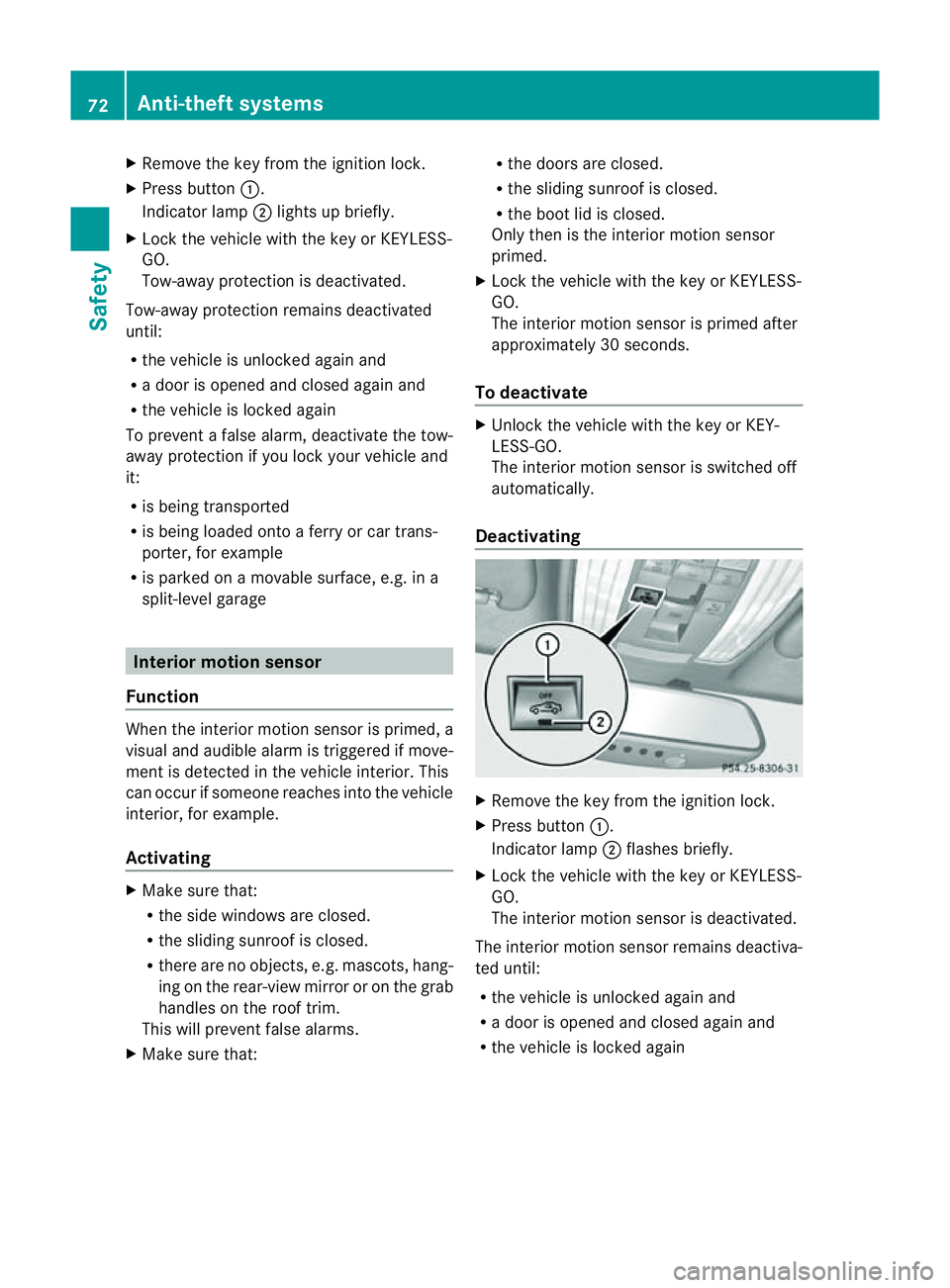
X
Remove th ekeyfrom th eignition lock.
X Press button :.
Indicato rlamp ;light supb riefly.
X Loc kthe vehicle wit hthe keyorK EYLESS-
GO.
Tow-away protection is deactivated.
Tow-away protection remains deactivated
until:
R thev ehicle is unlocked again and
R ad oor is opened and closed again and
R thev ehicle is locke dagain
To preven tafalse alarm, deactivate the tow-
away protection if you lock you rvehicle and
it:
R is being transported
R is being loaded ontoaf erry or car trans-
porter ,for example
R is parked on amovable surface, e.g. in a
split-level garage Interior motion sensor
Function When the interior motion sensor is primed, a
visual and audible alarm is triggered if move-
ment is detected in the vehicle interior. This
can occur if someon ereaches intot he vehicle
interior, for example.
Activating X
Make sure that:
R
the side windows are closed.
R the sliding sunroof is closed.
R ther eare no objects, e.g. mascots, hang-
ing on the rear-view mirror or on the grab
handles on the roof trim.
This will preven tfalse alarms.
X Mak esure that: R
thed oor sare closed.
R thes lidin gsunroo fisclosed.
R the boot lid is closed.
Only then is the interior motion sensor
primed.
X Lock the vehicle with the key or KEYLESS-
GO.
The interior motion sensor is primed after
approximately 30 seconds.
To deactivate X
Unlock the vehicle with the key or KEY-
LESS-GO.
The interior motion sensor is switched off
automatically.
Deactivating X
Remove the key from the ignition lock.
X Press button :.
Indicator lamp ;flashes briefly.
X Lock the vehicle with the key or KEYLESS-
GO.
The interior motion sensor is deactivated.
The interior motion sensor remains deactiva-
ted until:
R the vehicle is unlocked againa nd
R ad ooriso peneda nd closed agai nand
R the vehicl eislocked again 72
Anti-theft systemsSafety
Page 76 of 373
To prevent
afalse alarm, deactivate the inte-
rior motion sensor if you lock your vehicle
and:
R people or animals remain in the vehicle.
R the side windows remain open.
R the sliding sunroof remains open.
i UK only: your vehicle is equipped with a
double lock function. The doors cannot be
opened from the inside if the vehicle was
locked with the key or with KEYLESS-GO
(Y page 82). Deactivate the interior
motion sensor before you lock the vehicle.
The doors can then be opened from the
inside after the vehicle has been locked
from the outside. Observe the "Important
safety notes" (Y page 82). Anti-theft systems
73Safety Z
Page 79 of 373
Useful information
i This Owner's Manual describes all mod-
els, series and optional equipment for your
vehicle that were available at the time of
going to press. National variation sare pos-
sible. Not ethat your vehicle may not be
equipped with all of the function sdescri-
bed. This is also the case for system sand
function srelevan ttosafety.
i Read the information on qualified special-
ist workshops: (Y page 23). Key
Important safet
ynotes G
WARNING
Only for the United Kingdom: if the vehicle
has been locked with the key or with KEY-
LESS-GO, the double lock function is activa-
ted as standard. It is then not possible to open
the doors from inside the vehicle.
Therefore, do not leave any people behind in
the vehicle, particularly children ,elderly peo-
ple or people requiring special assistance. As
ar esult, they may not be able to free them-
selves in the even tofanemergency. They
could be seriously or even fatally injured by
prolonged exposur etoextremely high or low
temperatures, for example. In this case, res-
cuing people from outside the vehicle is diffi-
cult.
Deactivate the interior motion senso rbefore
you lock the vehicle. The doors can then be
opened from the inside after the vehicle has
been locked from the outside. G
WARNING
If children are left unsupervised in the vehicle,
they could: R
open adoor from inside the vehicle at any
time, even if it has been locked
R start the vehicle using akey which has been
left in the vehicle
R release the parking brake
They could thereby endanger themselves and
others. Never leave children unsupervised in
the vehicle. Always take the key with you
when leaving the vehicle, even if you are only
leaving it for ashort time. G
WARNING
If ak ey ring is too heavy or too large, the
weight actin gonthe key could cause it to turn
in the ignition lock or catc honthe steering
wheel. This could cause the engine to be
switched off suddenly. You may lose control
of the vehicle and cause an accident. Do not
attac hany heavy or large key rings to the key
that is inserted in the ignition.
R Do not keep the key:
- with electronic devices, e.g. amobile
phone or another key
- with metallic objects, e.g. coins or metal
foil
- inside metallic objects, e.g. ametal case
This can affect the key's functionality.
Keep the key away from strong magnetic
fields. Otherwise, the remot econtrol function
could be affected. 76
KeyOpening and closing
Page 80 of 373
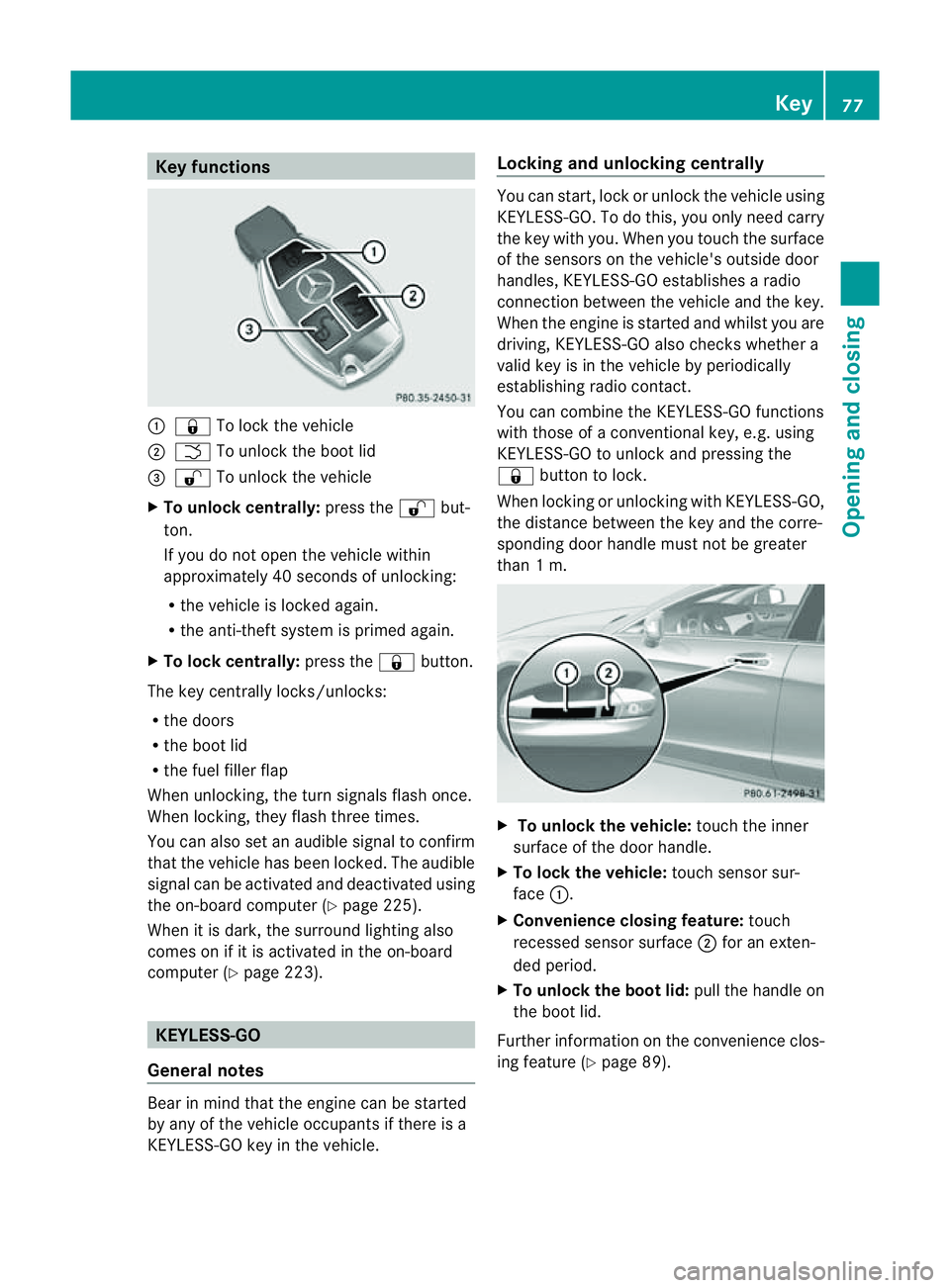
Key functions
:
& To loc kthe vehicle
; F To unlock the boot lid
= % To unlock the vehicle
X To unlock centrally: press the%but-
ton.
If you do not open the vehicle within
approximately 40 seconds of unlocking:
R the vehicle is locked again.
R the anti-theft system is primed again.
X To lock centrally: press the&button.
The key centrally locks/unlocks:
R the doors
R the boot lid
R the fuel filler flap
When unlocking, the turn signals flash once.
When locking, they flash three times.
You can also set an audible signal to confirm
that the vehicle has been locked. The audible
signal can be activated and deactivated using
the on-board computer (Y page 225).
When it is dark, the surround lighting also
comes on if it is activated in the on-board
computer (Y page 223). KEYLESS-GO
General notes Bear in mind that the engine can be started
by any of the vehicle occupants if there is a
KEYLESS-GO key in the vehicle. Locking and unlocking centrally You can start, lock or unlock the vehicle using
KEYLESS-GO. To do this, you only need carry
the key with you. When you touch the surface
of the sensors on the vehicle's outside door
handles, KEYLESS-GO establishes
aradio
connection between the vehicle and the key.
When the engine is started and whilst you are
driving, KEYLESS-GO also checksw hether a
valid key is in the vehicle by periodically
establishing radio contact.
You can combine the KEYLESS-GO functions
with those of aconventional key, e.g. using
KEYLESS-GO to unlock and pressing the
& button to lock.
When locking or unlocking with KEYLESS-GO,
the distance between the key and the corre-
sponding door handle must not be greater
than 1m. X
To unlock the vehicle: touch the inner
surface of the door handle.
X To lock the vehicle: touch sensor sur-
face :.
X Convenience closing feature: touch
recessed sensor surface ;for an exten-
ded period.
X To unlock the boot lid: pull the handle on
the boot lid.
Further information on the convenience clos-
ing feature (Y page 89). Key
77Opening and closing Z
Page 81 of 373
Changing th
esettings of th elocking
system
You can chang ethe settings of th elocking
system. This mean stha tonlyt he driver' sdoor
and th efuel fille rflap are unlocked when the
vehicle is unlocked. This is useful if you fre-
quently travel on your own.
X To chang ethe setting: press and hold
down the %and& buttons on the
key simultaneously for approximately six
seconds until the battery chec klamp
flashes twice ( Ypage 79).
i If th esettin goft helockin gsystem is
changed within th esignal range of th evehi-
cle ,pressin gthe & or% button:
R locks or
R unlock sthe vehicle
The ke ynow function sasfollows:
X To unlock th edriver's door: pressthe
% buttononce.
X To unlock centrally: pressthe % but-
to nt wice.
X To lock centrally: pressthe & button.
The KEYLESS-GO function is changed as fol-
lows:
X To unlock th edriver's door: touch the
inner surface of th edoor handle on the
driver' sdoor.
X To unlock centrally: touch theinner sur-
fac eoft hedoor handle on th efront-
passenger door or th erear door.
X To lock centrally: touch theouter sensor
surface on on eofthedoor handles.
X To restor ethe factor ysettings: press
and hold down the %and& buttons
simultaneousl yfor approximately six sec-
onds until th ebattery check lamp flashes
twice (Y page 79). Emergency key element
General notes If th
evehicle can no longer be locke dor
unlocked wit hthe key, use th eemergency
ke ye lement.
If you use th eemergenc ykey element to
unlock and open the driver's door or the boot
lid, the anti-thef talarm system will be trig-
gered (Y page 71).
There are several ways to tur noff the alarm:
X To turn the alarm off with the key: press
the % or& button on the key.
or
X Insert the key into the ignition lock.
or
X To deactivate the alarm with KEYLESS-
GO: press the Start/Stop button in the igni-
tion lock. The key must be in the vehicle.
or
X Lock or unlock the vehicle using KEYLESS-
GO. The key must be outside the vehicle.
If you unlock the vehicle using the emergency
key element, the fuel filler fla pwilln ot be
unlocked automatically.
X To unlock the fuel filler flap: insert the
key into the ignition lock.
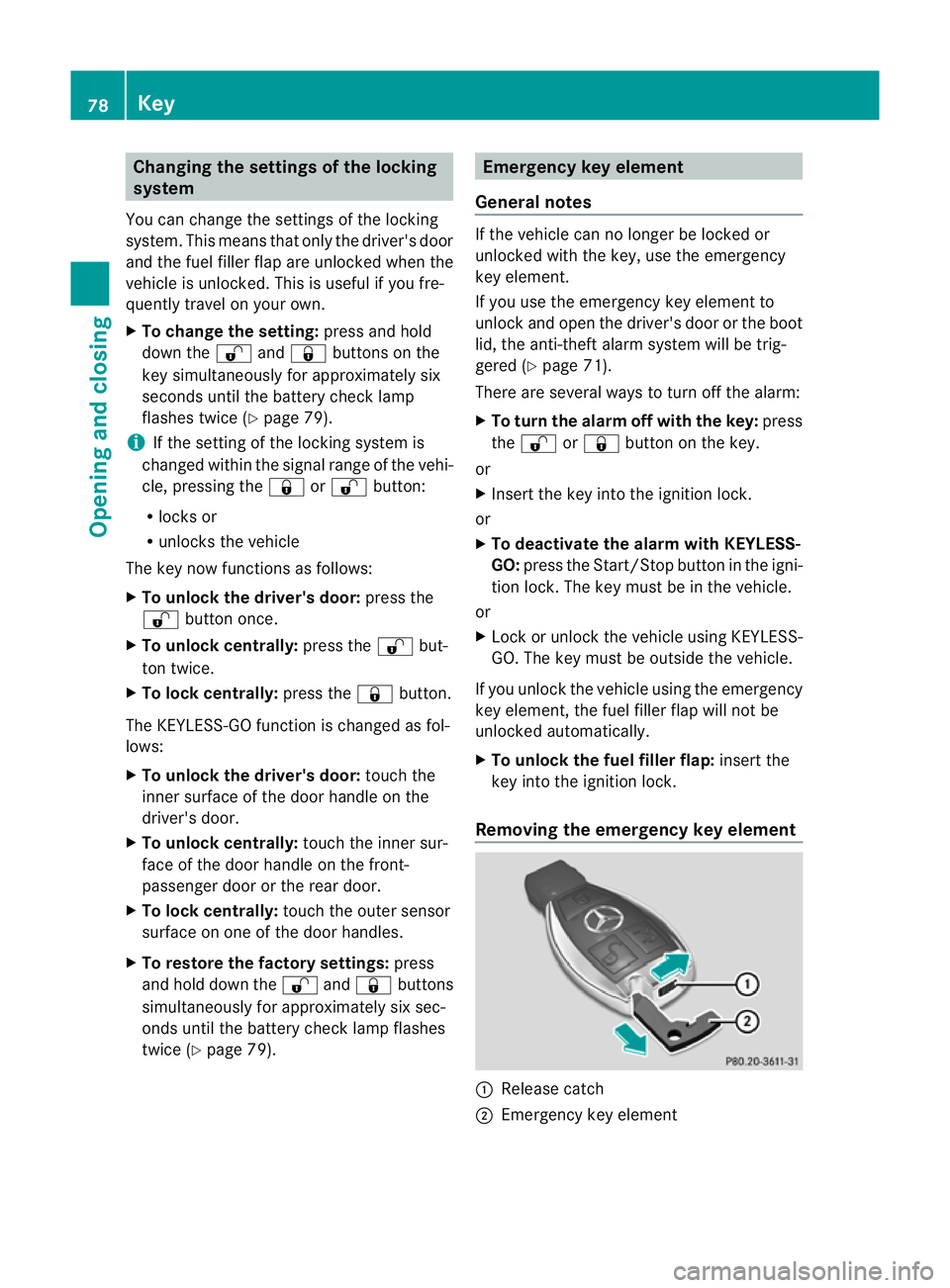
Removing the emergency key element :
Releas ecatch
; Emergency key element 78
KeyOpening and closing
Page 82 of 373
X
Push release catch :in the direction of
the arrow and at the same time, remove
emergenc ykey element ;from the key. Battery of the key
Important safety notes G
WARNING
Batteries are toxic and contain caustic sub-
stances. For this reason, keep batteries out of
the reach of children.
If ab attery has been swallowed, visit adoctor
immediately. H
Environmenta
lnote Batteries contain pollutants.
It is illegal to dispose of them
with the household rubbish.
They must be collected sep-
arately and disposed of in an
environmentally responsible
recycling system.
Dispose of batteries in an
environmentally responsible
manner
.Take discharged
batteries to aqualified spe-
cialis tworkshop or to acol-
lection point for used batter-
ies.
Mercedes-Benz recommends that you have
the batteries replaced at aqualified specialist
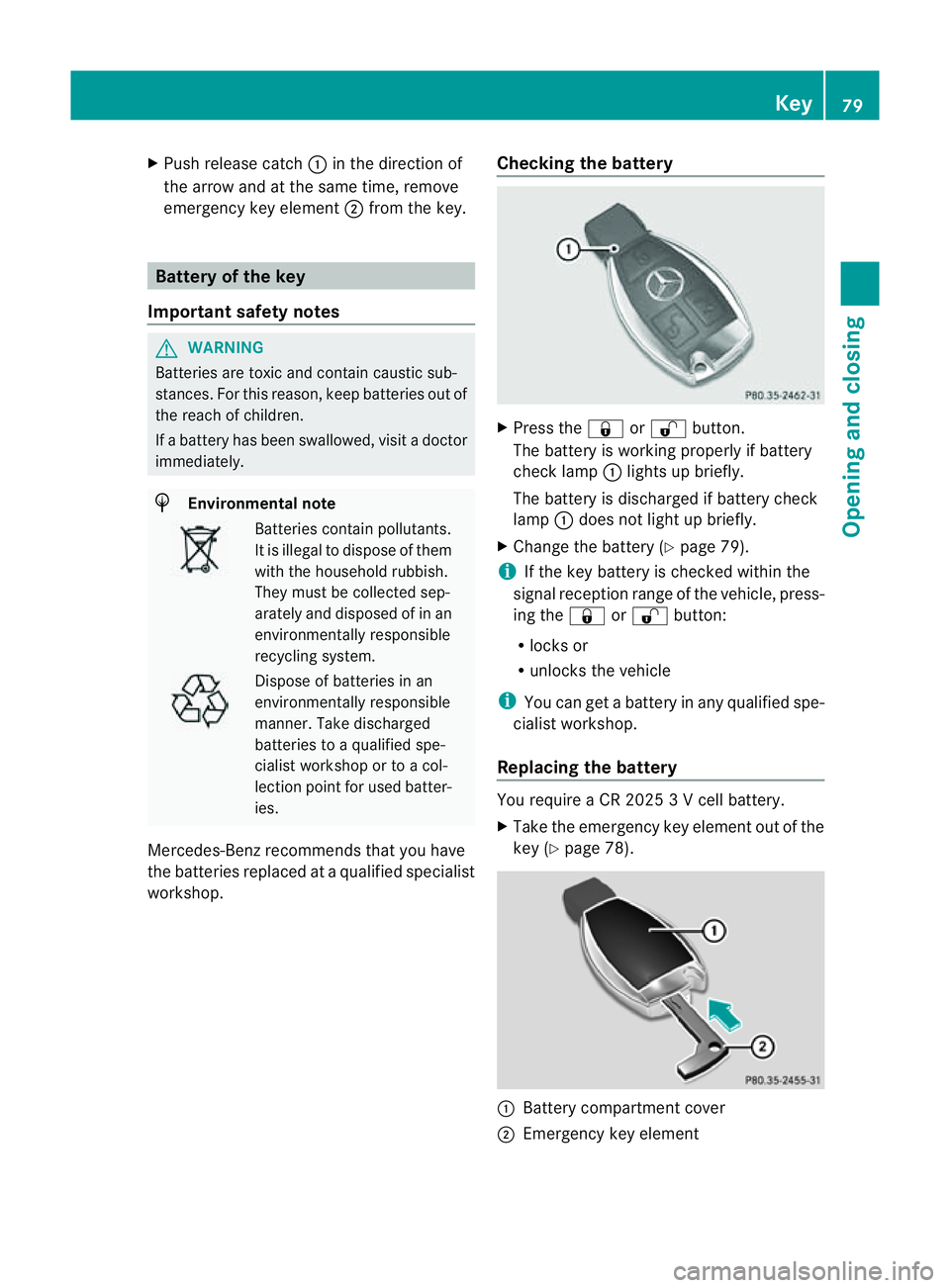
workshop. Checking the battery X
Press the &or% button.
The battery is working properly if battery
check lamp :lights up briefly.
The battery is discharged if battery check
lamp :does not light up briefly.
X Change the battery (Y page 79).
i If the key battery is checked within the
signal reception range of the vehicle, press-
ing the &or% button:
R locks or
R unlocks the vehicle
i You can get abattery in any qualified spe-
cialist workshop.
Replacing the battery You require
aCR20253Vc ell battery.
X Take the emergenc ykey element out of the
key (Y page 78). :
Battery compartment cover
; Emergency key element Key
79Opening and closing Z