start stop button MERCEDES-BENZ CLS COUPE 2012 Owner's Manual
[x] Cancel search | Manufacturer: MERCEDES-BENZ, Model Year: 2012, Model line: CLS COUPE, Model: MERCEDES-BENZ CLS COUPE 2012Pages: 373, PDF Size: 9.12 MB
Page 163 of 373
Switching off the engine
Vehicles with automatic transmission X
Firmly depress the parking brake.
X All vehicles (except AMG vehicles): shift
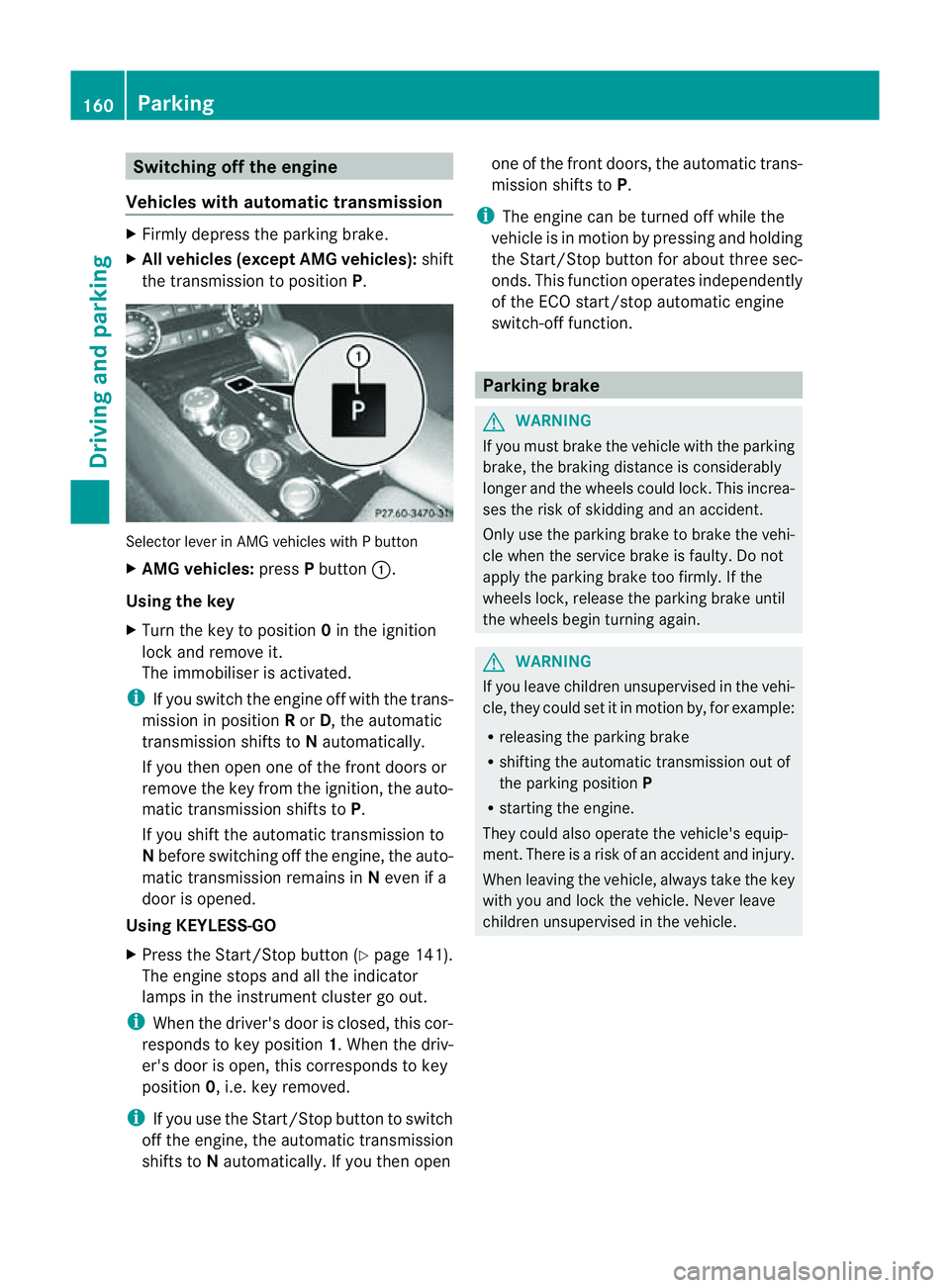
the transmission to position P.Selector lever in AMG vehicles with
Pbutton
X AMG vehicles: pressPbutton :.
Using the key
X Turn the key to position 0in the ignition
lock and remove it.
The immobiliser is activated.
i If you switch the engine off with the trans-
mission in position Ror D,t he automatic
transmission shifts to Nautomatically.
If you then open one of the front doors or
remove the key from the ignition, the auto-
matic transmission shifts to P.
If you shift the automatic transmission to
N before switching off the engine, the auto-
matic transmission remains in Neven if a
door is opened.
Using KEYLESS-GO
X Press the Start/Stop button (Y page 141).
The engine stops and all the indicator
lamps in the instrumen tcluster go out.
i When the driver's door is closed, this cor-
responds to key position 1.When the driv-
er's door is open ,this corresponds to key
position 0,i.e. key removed.
i If you use the Start/Stop button to switch
off the engine, the automatic transmission
shift stoNautomatically. If you the nopen one of the fron
tdoors, the automatic trans-
mission shifts to P.
i The engine can be turned off while the
vehicle is in motion by pressing and holding
the Start/Stop button for about three sec-
onds. This function operates independently
of the ECO start/stop automatic engine
switch-off function. Parking brake
G
WARNING
If you must brake the vehicle with the parking
brake, the braking distance is considerably
longer and the wheels could lock. This increa-
ses the risk of skidding and an accident.
Only use the parking brake to brake the vehi-
cle when the service brake is faulty. Do not
apply the parking brake too firmly. If the
wheels lock, release the parking brake until
the wheels begin turnin gagain. G
WARNING
If you leave children unsupervised in the vehi-
cle, they could set it in motion by, for example:
R releasing the parking brake
R shifting the automatic transmission out of
the parking position P
R starting the engine.
They could also operate the vehicle's equip-
ment.T here isarisk of an accident and injury.
When leaving the vehicle, always take the key
with you and lock the vehicle. Never leave
children unsupervised in the vehicle. 160
ParkingDriving and parking
Page 192 of 373
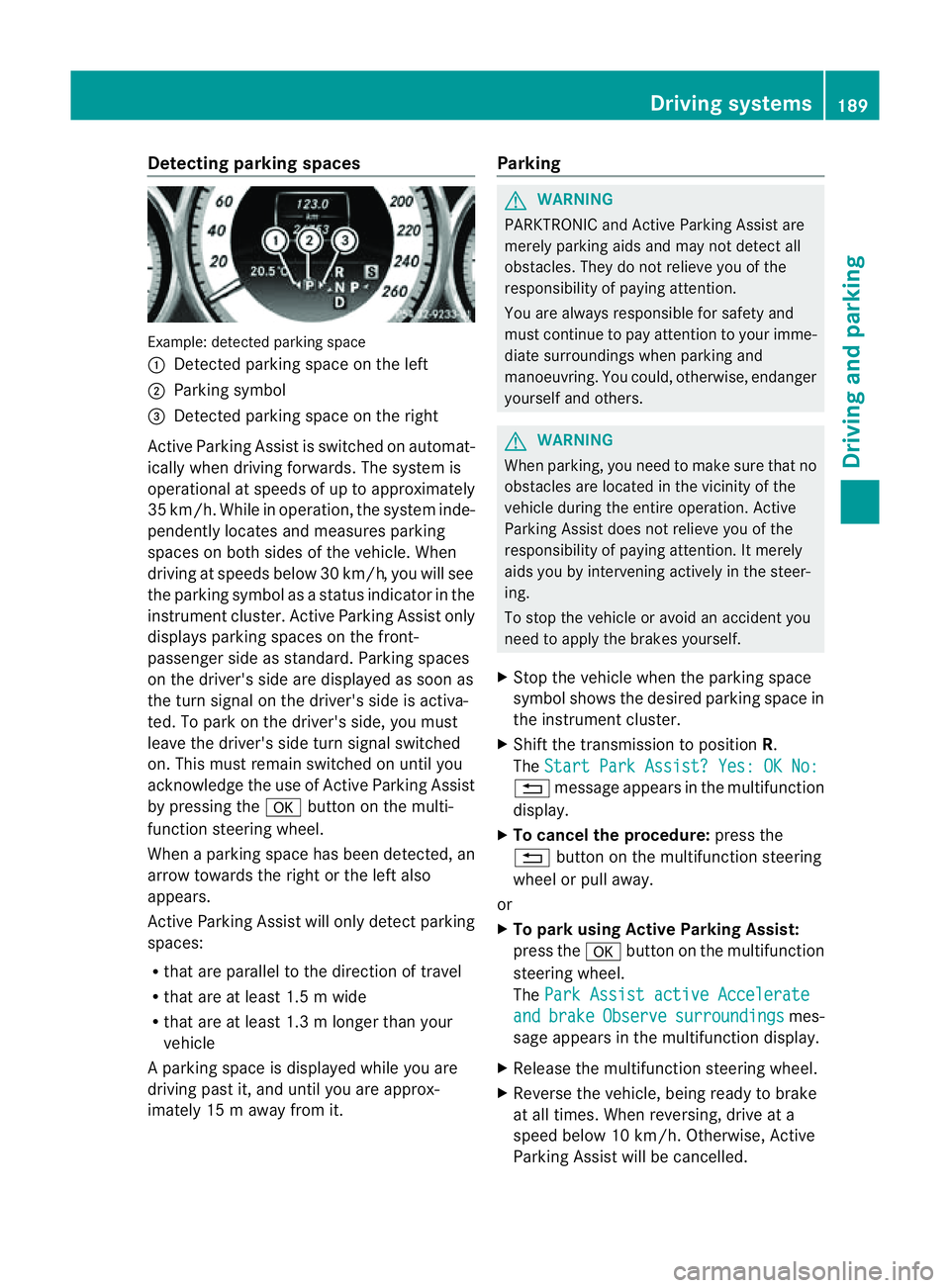
Detecting parking spaces
Example: detecte
dparking space
: Detected parking spac eontheleft
; Parking symbol
= Detected parking spac eontheright
Active Parking Assis tisswitched on automat-
ically when driving forwards. The system is
operational at speed sofuptoapproximately
35 km/h. While in operation, th esystem inde-
pendently locates and measures parking
spaces on bot hsides of th evehicle. When
driving at speeds below 30 km/h, you will see
th ep arkin gsymbol as astatu sind icator in the
instrumen tcluster .Active Parking Assist only
display sparking spaces on the front-
passenger sid easstandard .Parking spaces
on th edriver' sside are displayed as soon as
th et urns ignal on the driver's side is activa-
ted. To park on the driver's side, you must
leave the driver's side tur nsignal switched
on. This must remain switched on until you
acknowledge the use of Activ eParking Assist
by pressing the abutton on the multi-
function steerin gwheel.
When aparking space has been detected, an
arrow towards the right or the left also
appears.
Activ eParking Assist will only detect parking
spaces:
R that are parallel to the direction of travel
R that are at least 1. 5mwide
R that are at least 1. 3mlonger than your
vehicle
Ap arking spac eisdisplayed while you are
driving past it, and until you are approx-
imately 15 maway from it. Parking G
WARNING
PARKTRONIC and Activ eParking Assist are
merely parking aids and may no tdetec tall
obstacles. They do not reliev eyou of the
responsibilit yofpaying attention.
You are always responsible for safet yand
must continue to pay attention to your imme-
diate surroundings when parking and
manoeuvring. You could, otherwise, endanger
yourself and others. G
WARNING
When parking, you need to make sure that no
obstacles are located in the vicinity of the
vehicle durin gthe entire operation. Active
Parking Assist does not reliev eyou of the
responsibilit yofpaying attention. It merely
aids you by intervenin gactively in the steer-
ing.
To sto pthe vehicle or avoid an accident you
need to apply the brakes yourself.
X Stop the vehicle when the parking space
symbol shows the desired parking space in
the instrumen tcluster.
X Shif tthe transmission to position R.
The Start Park Assist? Yes: OK No: %
message appears in the multifunction
display.
X To cancel the procedure: press the
% button on the multifunction steering
wheel or pull away.
or
X To parku sing Active Parking Assist:
press the abutton on the multifunction
steerin gwheel.
The Park Assist active Accelerate and brake Observe surroundings mes-
sage appears in the multifunction display.
X Release the multifunction steerin gwheel.
X Reverse the vehicle, being ready to brake
at all times. When reversing, drive at a
speed below 10 km/h. Otherwise, Active
Parking Assist will be cancelled. Driving systems
189Driving and parking Z
Page 214 of 373
X
To activate the on-board computer: turn
the key to position 1in the ignition lock.
Yo uc an contro lthe multifunctio ndisplay and
the settings in the on-board computer using
the buttons on the multifunction steering
wheel.
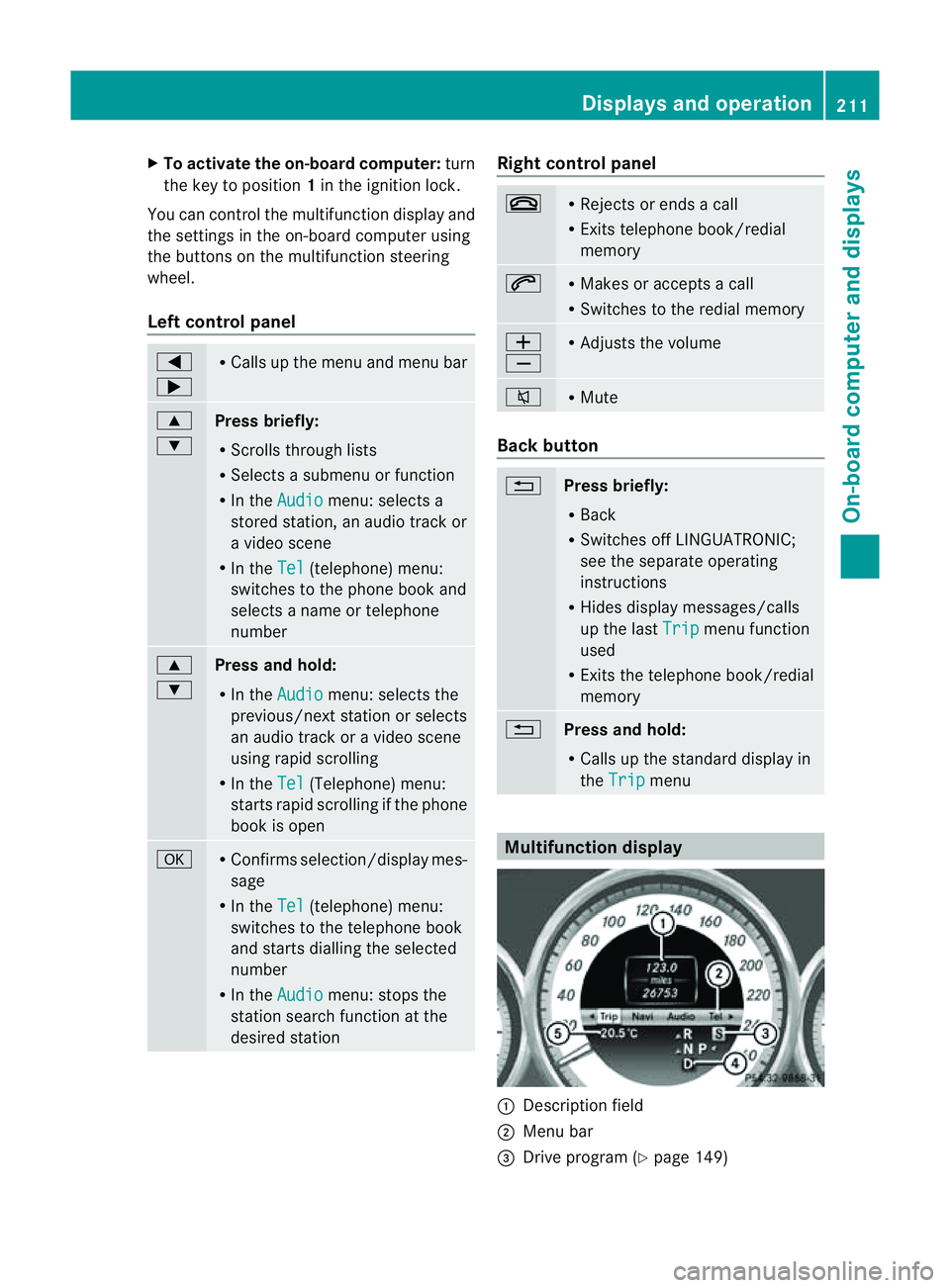
Left control panel =
; R
Calls up the men uand men ubar 9
:
Pres
sbriefly:
R Scrolls through lists
R Selects asubmen uorfunction
R In the Audio menu: selects a
stored station ,anaudio track or
av ideo scene
R In the Tel (telephone) menu:
switches to the phon ebook and
selects aname or telephone
number 9
:
Pres
sand hold:
R In the Audio menu: selects the
previous/next station or selects
an audio track or avideo scene
using rapid scrolling
R In the Tel (Telephone) menu:
start srapid scrolling if the phone
book is open a R
Confirms selection/display mes-
sage
R In the Tel (telephone) menu:
switches to the telephon ebook
and start sdialling the selected
number
R In the Audio menu: stops the
station searc hfunction at the
desire dstation Righ
tcontrol panel ~ R
Reject sorendsac all
R Exits telephone book/redial
memory 6 R
Makes or accept sacall
R Switche stotheredial memory W
X R
Adjust sthe volume 8 R
Mute Back button
%
Press briefly:
R
Back
R Switche soff LINGUATRONIC;
see th eseparate operating
instructions
R Hide sdisplay messages/calls
up th elast Trip men
ufunction
used
R Exits th etelephone book/redial
memory %
Press and hold:
R
Calls up th estandar ddisplay in
the Trip menu
Multifunction display
:
Description field
; Men ubar
= Drive program (Y page 149) Displays and operation
211On-boardcomputer and displays Z
Page 215 of 373
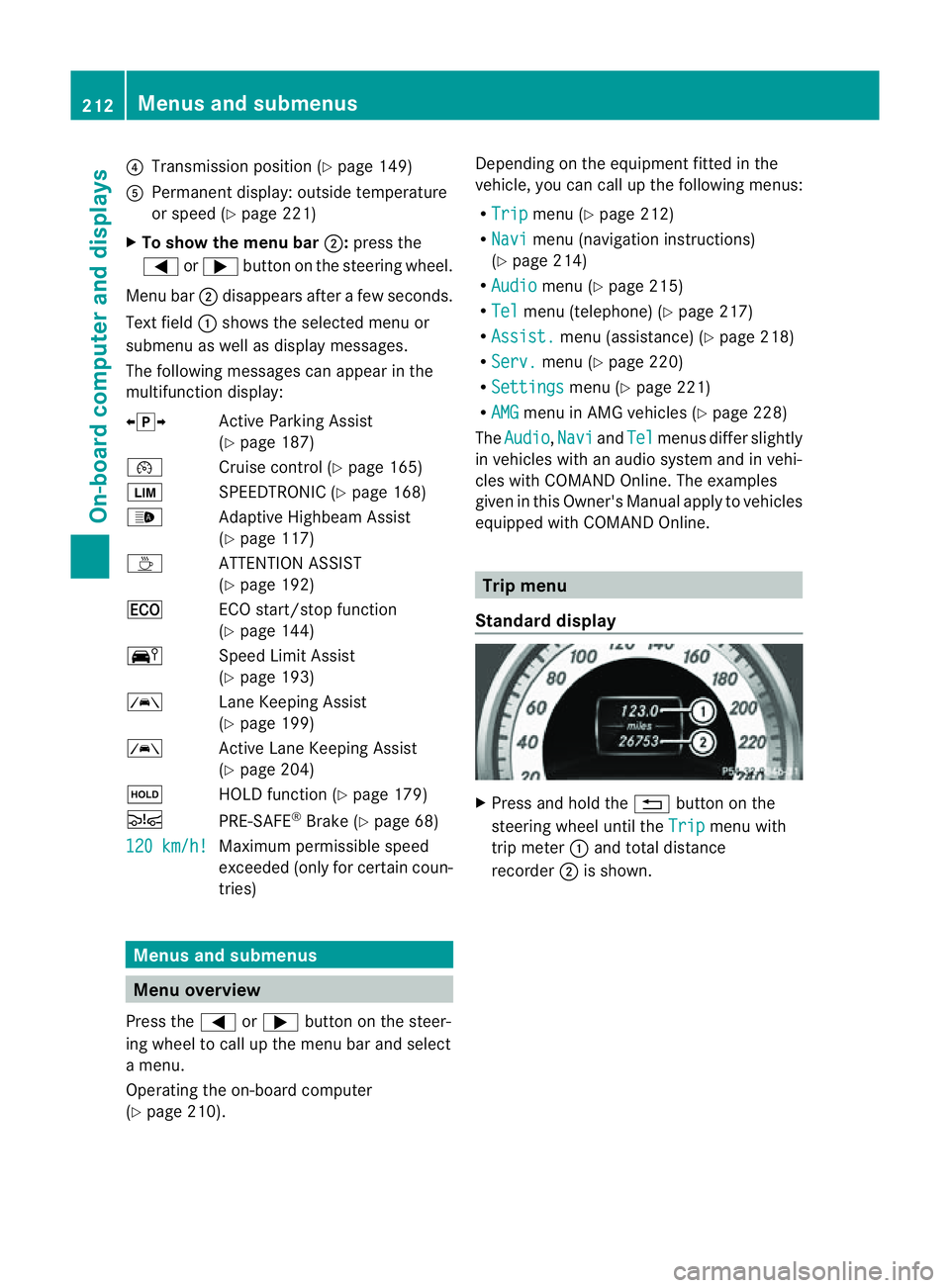
?
Transmission position (Y page 149)
A Permanen tdisplay: outside temperature
or speed (Y page 221)
X To show th emenu bar ;:press the
= or; button on the steerin gwheel.
Menu bar ;disappears after afew seconds.
Text field :shows the selected menu or
submenu as well as displaym essages.
The following messages can appearint he
multifunction display:
XjY Active Parking Assist
(Y page 187)
¯ Cruise control (Y page 165)
È SPEEDTRONIC (Y page 168)
_ Adaptive Highbeam Assist
(Ypage 117)
À ATTENTION ASSIST
(Ypage 192)
¤ ECO start/stop function
(Ypage 144)
Ä Speed Limit Assist
(Ypage 193)
à Lane Keeping Assist
(Ypage 199)
à Active Lane Keeping Assist
(Ypage 204)
ë HOLD function (Y page 179)
Ä PRE-SAFE®
Brake (Y page 68)
120 km/h! Maximum permissible speed
exceeded (only for certain coun-
tries)
Menus and submenus
Menu overview
Press the =or; button on the steer-
ing wheel to call up the menu bar and select
am enu.
Operating the on-board computer
(Y page 210). Depending on the equipment fitted in the
vehicle, you can call up the following menus:
R
Trip menu (Y
page 212)
R Navi menu (navigation instructions)
(Y page 214)
R Audio menu (Y
page 215)
R Tel menu (telephone) (Y
page 217)
R Assist. menu (assistance) (Y
page 218)
R Serv. menu (Y
page 220)
R Settings menu (Y
page 221)
R AMG menu in AMG vehicles (Y
page 228)
The Audio ,
Navi and
Tel menus differ slightly
in vehicles with an audios ystem and in vehi-
cles with COMAND Online. The examples
given in this Owner's Manual apply to vehicles
equipped with COMAND Online. Trip menu
Standard display X
Press and hold the %button on the
steering wheel until the Trip menu with
trip meter :and total distance
recorder ;is shown. 212
Menus and submenusOn-board computer and displays
Page 221 of 373
X
Press the 9or: button to select the
desired name.
or
X To begin rapid scrolling: press and hold
the 9 or: button for longer than
one second.
Rapid scrolling stops when you release the
button or reach the end of the list.
X If only one telephone number is stored
for aname: press the 6ora button
to start dialling.
or
X If thereism ore thanone number for a
particular name: press the6ora
button to display the numbers.
X Press the 9or: button to select the
number you want to dial.
X Press the 6ora button to start dial-
ling.
or
X To exit the telephone book: press the
~ or% button.
Redialling The on-board computer saves the last names
or numbers dialled in the redial memory.
X Press the =or; button on the steer-
ing wheel to select the Tel menu.
X Press the 6button to switch to the
redial memory.
X Press the 9or: button to select the
desired name or number.
X Press the 6ora button to start dial-
ling.
or
X To exit the redial memory: press the
~ or% button. Assistance menu
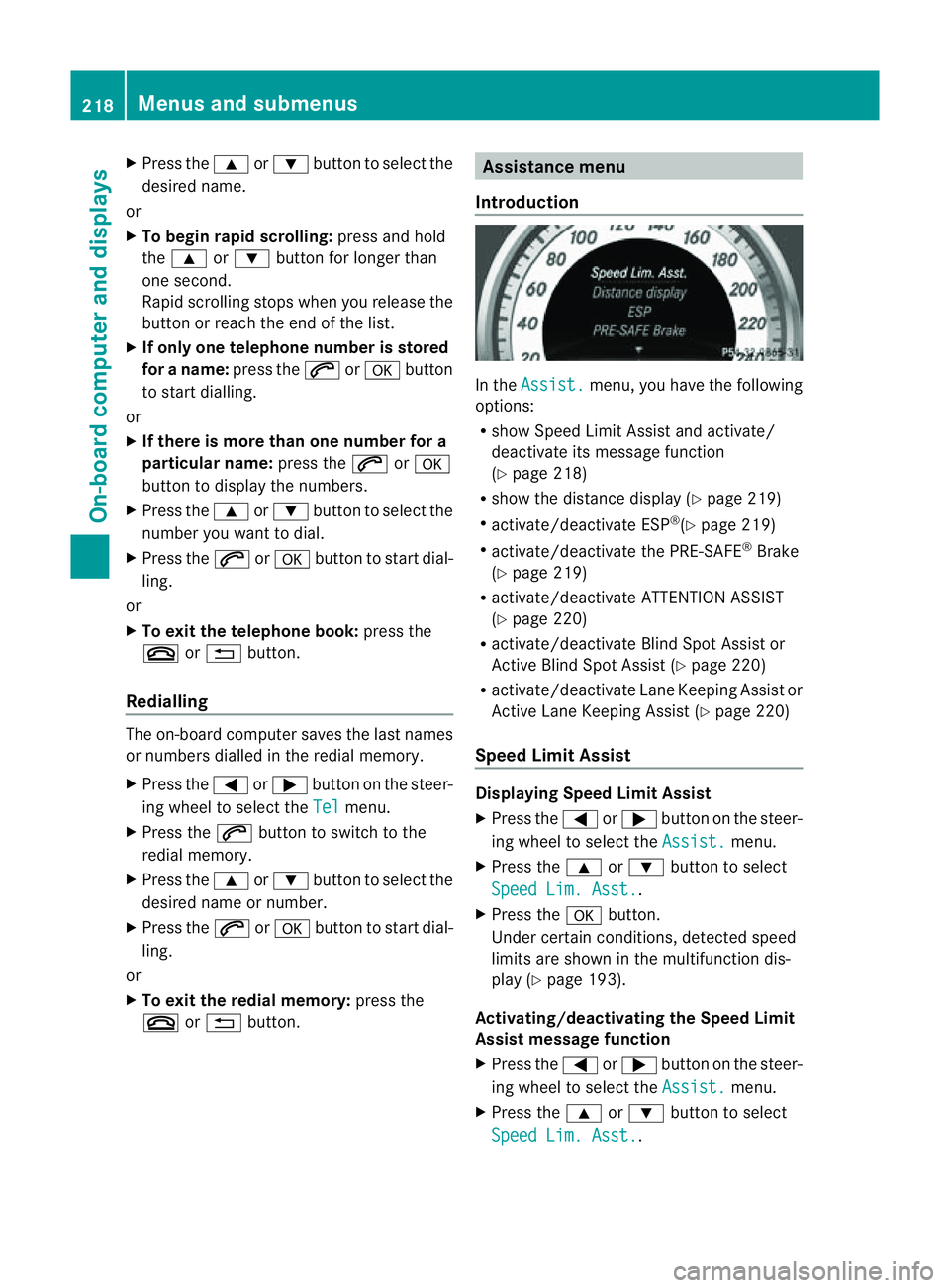
Introduction In the
Assist. menu, you have the following
options:
R show Speed Limit Assist and activate/
deactivat eits message function
(Y page 218)
R show the distanc edisplay ( Ypage 219)
R activate/deactivate ESP ®
(Y page 219)
R activate/deactivate the PRE-SAFE ®
Brake
(Y page 219)
R activate/deactivate ATTENTION ASSIST
(Y page 220)
R activate/deactivate Blind Spot Assist or
Active Blind Spot Assist (Y page 220)
R activate/deactivate Lane Keeping Assist or
Active Lane Keeping Assist (Y page 220)
Speed Limit Assist Displaying Speed Limit Assist
X
Press the =or; button on the steer-
ing wheel to select the Assist. menu.
X Press the 9or: button to select
Speed Lim. Asst. .
X Press the abutton.
Under certain conditions, detected speed
limits are shown in the multifunction dis-
play (Y page 193).
Activating/deactivating the Speed Limit
Assist message function
X Press the =or; button on the steer-
ing wheel to select the Assist. menu.
X Press the 9or: button to select
Speed Lim. Asst. .218
Menus and submenusOn-board computer and displays
Page 231 of 373
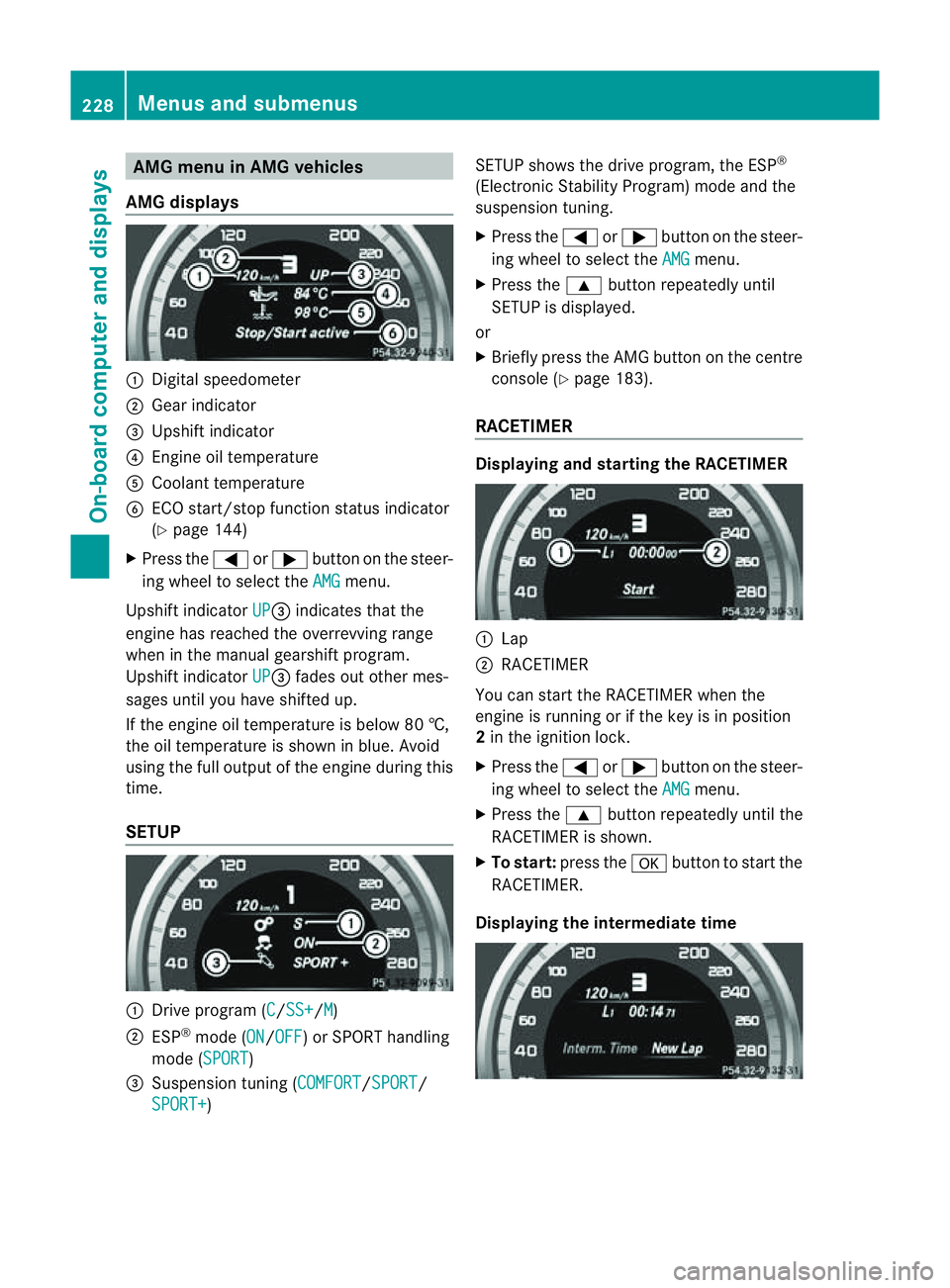
AMG men
uinAMG vehicles
AMG displays :
Digital speedometer
; Gear indicator
= Upshift indicator
? Engine oil temperature
A Coolant temperature
B ECO start/stop function status indicator
(Y page 144)
X Press the =or; button on the steer-
ing wheel to select the AMG menu.
Upshift indicator UP =
indicates that the
engin ehas reached the overrevving range
when in the manual gearshift program.
Upshift indicator UP =
fades out other mes-
sages until you have shifted up.
If the engin eoil temperature is below 80 †,
the oil temperature is shown in blue. Avoid
using the full output of the engin eduring this
time.
SETUP :
Driv eprogram (C /SS+ /M )
; ESP ®
mode (ON /OFF )orS
PORT handling
mode (SPORT )
= Suspension tunin g(COMFORT /SPORT /
SPORT+ ) SETUP shows the drive program, the ESP
®
(Electronic Stability Program) mode and the
suspension tuning.
X Press the =or; button on the steer-
ing wheel to select the AMG menu.
X Press the 9button repeatedly until
SETUP is displayed.
or
X Briefly press the AMG button on the centre
console (Y page 183).
RACETIMER Displaying and starting the RACETIMER
:
Lap
; RACETIMER
You can start the RACETIME Rwhen the
engin eisrunning or if the key is in position
2 in the ignition lock.
X Press the =or; button on the steer-
ing wheel to select the AMG menu.
X Press the 9button repeatedly until the
RACETIME Risshown.
X To start: press the abutton to start the
RACETIMER.
Displaying the intermediat etime 228
Menus and submenusOn-boar
dcomputer and displays
Page 232 of 373
X
Press the =or; button to select
Interm. Time .
X Press ato confirm.
The intermediate time is displaye dfor five
seconds.
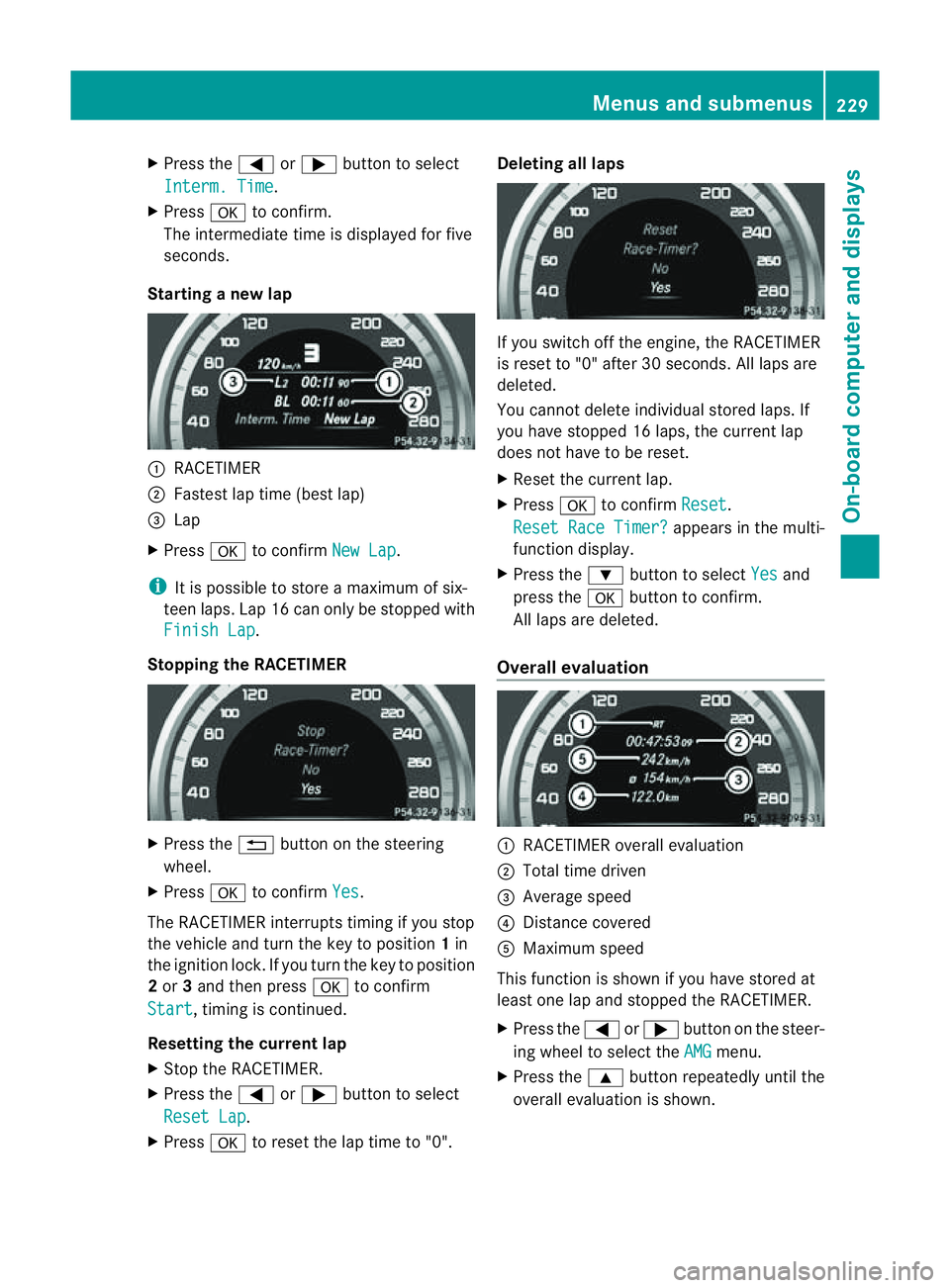
Starting anew lap :
RACETIMER
; Fastest lap time (best lap)
= Lap
X Press ato confirm New Lap .
i It is possible to store amaximum of six-
teen laps. Lap 16 can only be stopped with
Finish Lap .
Stopping the RACETIMER X
Press the %button on the steering
wheel.
X Press ato confirm Yes .
The RACETIME Rinterrupts timing if you stop
the vehicle and turn the key to position 1in
the ignition lock. If you turn the key to position
2 or 3and then press ato confirm
Start ,t
iming is continued.
Resetting the current lap
X Stop the RACETIMER.
X Press the =or; button to select
Reset Lap .
X Press ato reset the lap time to "0". Deleting all laps
If you switch off the engine, the RACETIMER
is reset to "0" after 30 seconds. All laps are
deleted.
You cannot delete individual stored laps. If
you have stopped 16 laps, the curren tlap
does no thave to be reset.
X Reset th ecurren tlap.
X Press ato confirm Reset .
Reset Rac eTimer? appear
sinthemulti-
function display.
X Press the :buttontos electYes and
pres sthe a buttontoc onfirm.
All laps are deleted.
Overall evaluation :
RACETIMER overall evaluation
; Total tim edriven
= Averag espeed
? Distance covered
A Maximum speed
This function is shown if you have store dat
least on elap and stopped th eRACETIMER.
X Press the =or; button on the steer-
ing whee ltoselect the AMG menu.
X Press the 9button repeatedly unti lthe
overall evaluation is shown. Menus and submenus
229On-board computer and displays Z
Page 302 of 373
X
Replac ecap : on th efiller neck and turn
clockwise.
Mak esuret hatthe cap locks securel yinto
place.
X Chec kthe oil level again with the oil dip-
stick (Y page 298).
For further information on engine oil, see
(Y page 363). Other service products
Checking the coolant level G
WARNING
The cooling system is pressurised. Therefore,
only unscrew the cap once the engine has
cooled down. The coolant temperature gauge
must display less than 70 †.Otherwise, you
could be scalded if hot coolant escapes. X
Park the vehicl eonalevel surface.
Onl ycheck the coolant level if the vehicle
is on alevel surface and the engine has
coole ddown.
X Turn the key to position 2in the ignition
lock (Y page 141).
On vehicles with KEYLESS-GO, press the
Start/Stop button twice (Y page 141).
X Check the coolant temperatur edisplay in
the instrument cluster.
Th ec oolant temperatur emustbeb elow
70 †.
X Turn the key to position 0(Y page 141) in
the ignition lock. X
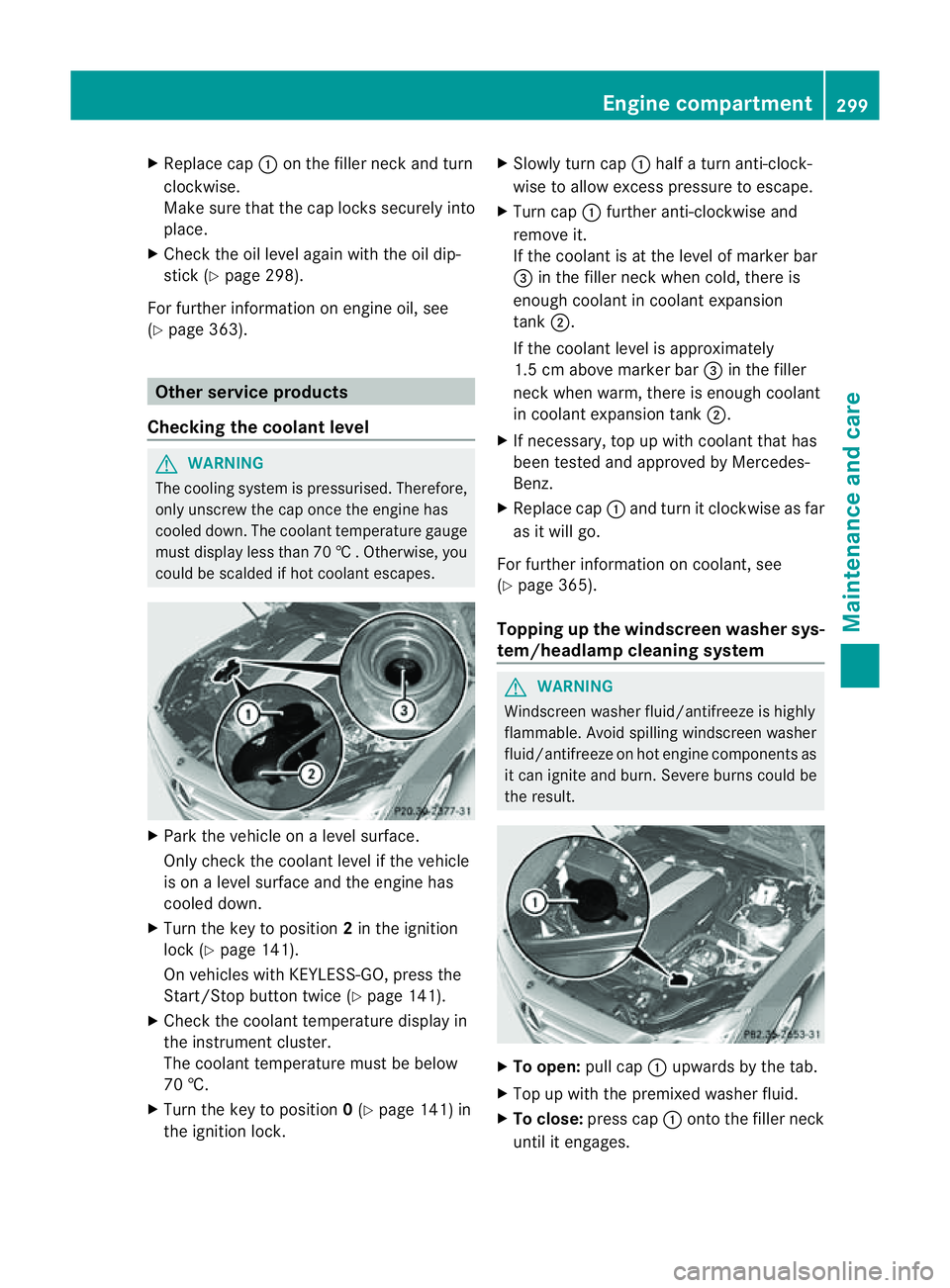
Slowl yturnc ap : half aturna nti-clock-
wise to allow exces spressure to escape.
X Turn cap :further anti-clockwis eand
remove it.
If th ecoolan tisatt heleve lofm arkerbar
= in th efille rneck when cold, ther eis
enough coolant in coolant expansion
tank ;.
If the coolant level is approximately
1.5 cm above marker bar =in the filler
neckw hen warm, there is enough coolant
in coolant expansion tank ;.
X If necessary, top up with coolant that has
been tested and approved by Mercedes-
Benz.
X Replace cap :and turn it clockwise as far
as it will go.
For further information on coolant, see
(Y page 365).
Topping up the windscreen washer sys-
tem/headlam pcleaning system G
WARNING
Windscreen washer fluid/antifreez eishighly
flammable. Avoid spilling windscreen washer
fluid/antifreez eonhot engin ecomponent sas
it can ignit eand burn. Severe burns could be
the result. X
To open: pull cap:upwards by the tab.
X Top up with the premixed washer fluid.
X To close: press cap :ontothe filler neck
until it engages. Engine compartment
299Maintenance and care Z
Page 307 of 373
Cleaning th
ewindows G
WARNING
Switch off th ewindscree nwipers and remove
the key fro mthe ignition lock before cleaning
the windscreen or the wiper blades. On vehi-
cles with KEYLESS-GO, press the Start/Stop
button repeatedly until all indicator lamps in
the instrument cluster have gone off. The
windscreen wipers could otherwise move and
injure you.
! Do not use dry cloths, abrasive products,
solvents or cleaning agents containing sol-
ventstoc lean the inside of the windows.
Do not touch the insides of the windows
with hard objects, e.g. an ice scraper or
ring. There is otherwise arisk of damaging
the windows.
! Cleant he water drainage channels of the
windscreen and the rear window at regular
intervals. Deposits such as leaves, petals
and pollen may under certain circumstan-
ces prevent water from draining away.T his
can lead to corrosion damage and damage
to electronic components.
X Cleant he inside and outside of the win-
dows with adamp cloth and acleaning
agent that is recommended and approved
by Mercedes-Benz.
Cleaningt he wiper blades G
WARNING
Switch off the windscreen wipers and remove
the key from the ignition lock before cleaning
the windscreen or the wiper blades. On vehi-
cles with KEYLESS-GO, press the Start/Stop
button repeatedly until all indicator lamps in
the instrumentc luster have gone off. The
windscreen wipers could otherwise move and
injure you.
! Do not pull on the wiper blade. Otherwise,
the wiper blade could be damaged.
! Do not clean wiper blades too often and
do not rub them too hard. Otherwise, the graphite coating could be damaged. This
could cause wiper noise.
! Hold the wiper arm securely when folding
back. The windscreen could be damaged if
the wiper arm hits against it suddenly.
X Fold the wiper arms away from the wind-
screen.
X Carefully clean the wiper blades with a
damp cloth.
X Fold the windscreen wipers back again
before switching on the ignition.
Cleaningt he exterior lighting !
Only use cleaning agents or cleaning
cloths that are suitable for plastic lenses.
Unsuitable cleaning agents or cleaning
cloths could scratchord amage the plastic
lenses of the exterior lighting.
X Cleant he plastic lenses of the exterior
lighting using awet sponge and amild
cleaning agent, e.g. Mercedes-Ben zcar
shampoo or cleanin gcloths.
Mirror turn signal !
Only use cleanin gagents or cleaning
cloth sthata re suitable for plastic lenses.
Unsuitable cleanin gagents or cleaning
cloth scould scratch or damag ethe plastic
lenses of th emirror tur nsignals.
X Clean the plastic lenses of the mirror turn
signals in the exterior mirror housing using
aw et sponge and mild cleanin gagent, e.g.
Mercedes-Benz car shampoo or cleaning
cloths.
Cleaning the sensors !
If you clean th esensor swithah igh-pres-
sure cleaner, mak esure that you keep a
distanc eofatl east 30 cm between the
vehicle and th ehigh-pressure cleane rnoz-
zle. Information about the correc tdistance
is available from the equipment manufac-
turer. 304
CareMaintenance and care
Page 315 of 373
The vehicle tool kit contains:
R
Foldable wheel chock
R Fuse allocation chart
R Jack
R Centrin gpin
R One pair of gloves
R Wheel wrench
R Towing eye
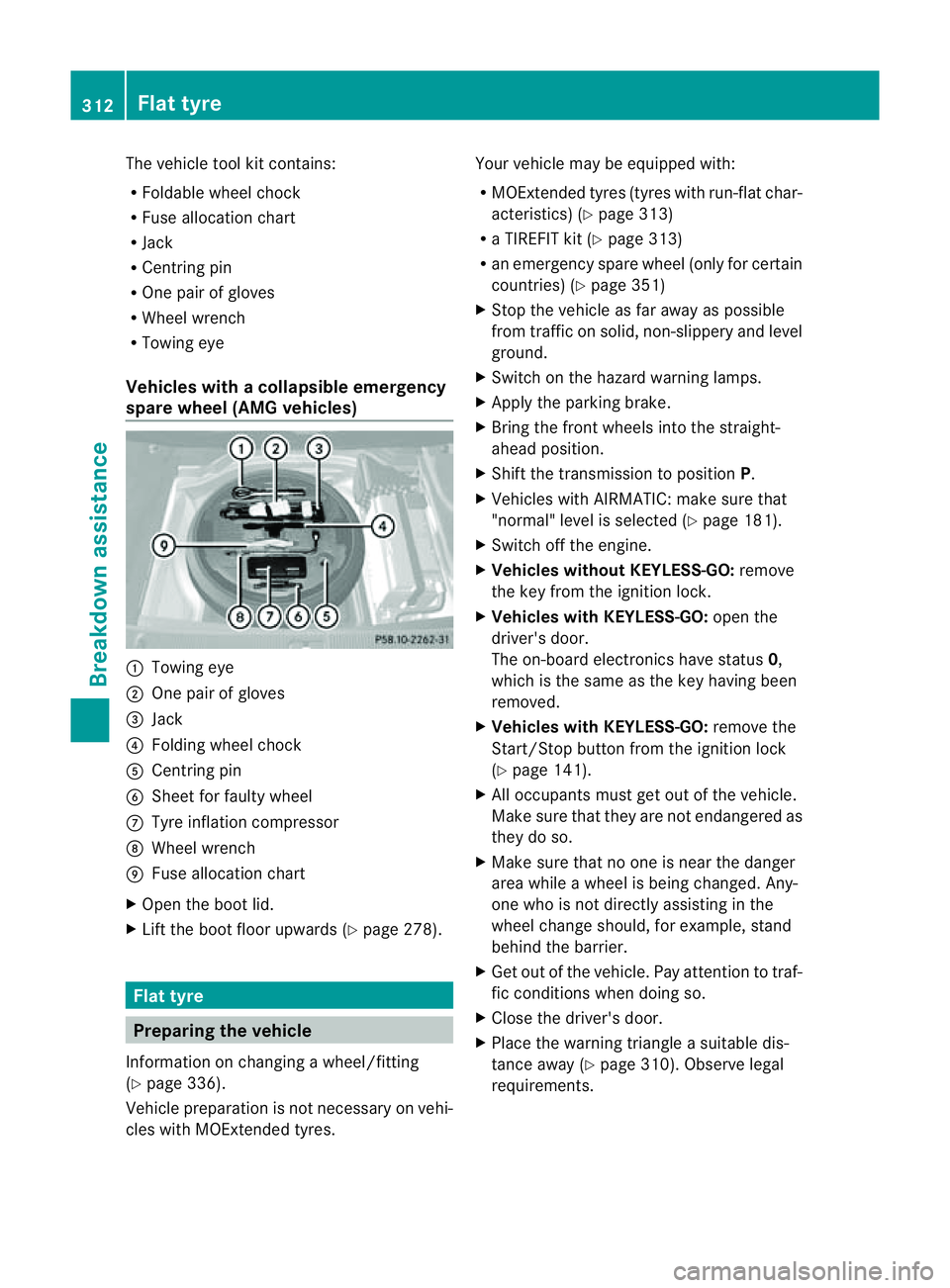
Vehicles with acollapsible emergency
spare wheel (AMG vehicles) :
Towin geye
; Onep air of gloves
= Jack
? Folding wheel chock
A Centrin gpin
B Sheet for fault ywheel
C Tyre inflatio ncompressor
D Wheel wrench
E Fuse allocation chart
X Open the boot lid.
X Lift the boot floor upwards (Y page 278).Flat tyre
Preparing the vehicle
Information on changing awheel/fitting
(Y page 336).
Vehicle preparation is not necessary on vehi-
cles with MOExtended tyres. Your vehicle may be equipped with:
R
MOExtended tyres (tyres with run-flat char-
acteristics) (Y page 313)
R aT IREFIT kit (Y page 313)
R an emergenc yspare wheel (only for certain
countries) (Y page 351)
X Stop the vehicle as far away as possible
from traffic on solid, non-slippery and level
ground.
X Switch on the hazard warning lamps.
X Apply the parking brake.
X Bring the front wheels into the straight-
ahead position.
X Shift the transmission to position P.
X Vehicles with AIRMATIC: make sure that
"normal" level is selected (Y page 181).
X Switch off the engine.
X Vehicles without KEYLESS-GO: remove
the key from the ignition lock.
X Vehicles with KEYLESS-GO: open the
driver's door.
The on-board electronics have status 0,
which is the same as the key having been
removed.
X Vehicles with KEYLESS-GO: remove the
Start/Stop button from the ignition lock
(Y page 141).
X All occupant smust get out of the vehicle.
Make sure that they are not endangered as
they do so.
X Make sure that no one is near the danger
area while awheel is being changed. Any-
one who is not directly assisting in the
wheel change should, for example, stand
behind the barrier.
X Get out of the vehicle. Pay attention to traf-
fic conditions when doing so.
X Close the driver's door.
X Place the warning triangle asuitable dis-
tancea way (Y page 310). Observe legal
requirements. 312
Flat tyreBreakdown assistance