Comand MERCEDES-BENZ E-Class 2012 W212 Comand Manual
[x] Cancel search | Manufacturer: MERCEDES-BENZ, Model Year: 2012, Model line: E-Class, Model: MERCEDES-BENZ E-Class 2012 W212Pages: 234, PDF Size: 6.74 MB
Page 166 of 234
see
acorresponding displayin the displa y/
selection window.Seetheexample ofthe
displa yin audi oCD mode (Ypage 158).
i The "Normal tracksequence" optionis
automaticall yselected whenyouchange
the medium youarecurrently listeningto
or when youselect adifferent medium. If
an option isselected, itremains selected
after COMAND isswitched onoroff. Notes
onMP3 mode
General informat ion Depending
onthe volume andformat ofthe
MP3 data, thelength oftime required for
reading thedata mayincrease.
Permissible datacarriers R
CD-R andCD-RW
R DVD-R andDVD-RW
R DVD+R andDVD+RW
R SD memory card
R USB storag edevi ce
Permis siblefilesyste ms R
ISO 9660/Jol ietstanda rdfor CDs
R UDF foraudio and videoDVDs
R FAT16 orFAT32 forSD memory cardsand
USB storag emedi a
Multis ession CD s For
multises sionC Ds, theconte ntofthe first
se ssi on determ inesho wCO MAND will
pro ces sthe CD. COMAND play sonl yone
se ssi on and gives priorityto the audio CD
se ssi on.
If po ssi ble, useCO MAND toplay onl yCDs
wh ich have been writte nino neses sion.
Fi le struc tureofadata carrie r Whe
nyou create adisc with compressed
music files,thetrack scan beorganized infolders.
Afolder mayalsocontainsubfolders.
A disc cancont ainam axim umof25 5fold ers.
Eac hfold ercan contain amax imum of
25 5track sand 255subf older s.
The disc may contain nomor eth an eigh t
dire ctory leve ls.File sbeyon dth eeight hleve l
will notb erecogn izedbythe system.
Tr ack and filenames When
youcreat eadisc with compr essed
music files,youcan assign names tothe
trac ksand folders.
COMAND usesthese names accordingly for
the display. Folderswhichcontain data other
than MP3 orWMA tracksare not displayed by
COMAND .
If MP3 orWMA filesarestor edinthe root
direct oryitself, theroot direct orywill also be
treat edasafolder. COMAND willthen show
the name ofthe root direct oryasthe folder
name.
You must observe thefollowing when
assigning tracknames :
R track nam esmust haveatleast one
ch arac ter.
R track nam esmust havetheex tens ion
"mp3 "or "wma".
R there must beafull stop bet ween thetrack
nam eand theex tens ion .
Ex ample ofaco rrect track nam e:
"Trac k1.m p3".
Per missibl efor ma ts COMA
NDsuppo rts th efoll owin gfor mat s:
R MPE G1Audi oLayer 3(MP3)
R Microsoft WindowsMediaAudioV2,V7,V8
and V9(WMA)
R additional musicfilesinAAC format with
the fileexten sions .aac,.mp4, .m4a
and .m4b, butnot copy-protect ediTunes
music fileswith theexten sion.m4p.
i If,inaddition toMP3 files, there areother
music filesinthese audioformats storedon 164
Audio
CD/DVD andMP3 modeAudio
Page 167 of 234
the
disc, the load ing proces sma yreq uire a
lo nge rtime befor ethe firsttrack ispla yed .
i The MP3 audio encoding methodisunder
license fromFraunho ferIIS(Institut
Integrierte Schaltungen–Institute for
Integrated Circuits)and Thomso n.
Permissi blebitand sampling rates COMAND
supports MP3filesof the followi ng
types :
R fixed andvaria blebitrates from32kbit/s
to 320 kbit/s
R samp lingrates of8kHz to48 kHz
COMAND supports WMA filesof the
foll owi ngtypes :
R fixed bitrates from5kbit/s to384 kbit/s
R samp lingrates of8kHz to48 kHz
COMAND doesnotsupport WMA filesof the
foll owi ngtypes :
R DRM (DigitalRights Manag ement)
encrypted files
i Only usetracks withabit rate ofat lea st
128 kbit/s andasamp lingrate ofat lea st
44.1 kHz.Lowe rrates cancaus ea
noticeab ledeteri oratio ninq ualit y.This is
espe ciallythecas eif you have activat eda
surr oundsoun dfun ction .
Not eson copy right MP3
orWMA track sth at you creat eor play
bac karegenera llysub ject tocopyri ght
protection inaccorda ncewith theapplicable
internationa land national regulations.
In many countries, reproductions, evenfor
priva teuse ,are not permi ttedwitho utthe
prior consent ofthe copyri ghthold er.
Make surethatyouknow aboutthe app licable
copyri ghtregu lations and that youcomply
with these.
If you own these rights yourself, e.g.foryou r
own composi tionsandrecordi ngs,orifthe
copyri ghthold erhas granted youpermi ssion,
these restrictions donot apply. Notes
onCDs/D VDs Discs
withcopy protection arenot
compati blewith theaudio CDstandard and
therefore maynotbeabletobe playe dby
COMAND.
Playba ckproblems mayoccur whenplaying
copied discs.Thereisawide range ofdata
carriers, disc-writingsoftware andwriters
availa ble.This variety meansthatthere isno
guarantee thatthesystem willbeable toplay
discs thatyouhave copied yourself.
There maybeplayb ackproblems ifyou play
CDs thatyouhave copied yourself witha
storage capacity ofmore than700MB.CDs
of this type donot conf orm tothe current ly
applicabl estandards.
i Onmany DVDaudio discs, thelast track
does notcont ainany music andCOMAND
then switches tothe next disc. Thisis
normal system behavior anddoes notmean
that there isamalfunct ion.
! Donot affix stick ersorlabels tothe discs.
They could peeloffand damage thedrive.
The drive isdesigned tohold discs which
comply withtheEN6090 8standard.
Therefore, youcan only usediscs witha
maximum thickness of1.3 mm.
If you insert thickerdiscs, e.g.those that
cont aindata onboth sides (DVD onone
side andaudio dataonthe other), they
cann otbe eject edand candamage the
drive.
Do not use discs withadiameter of8cm,
even withanadapter. Onlyuseround discs
with adiameter of12 cm.
i COMAND isable toplay back audio CDs
in multichann elaudio format. Music
search Calling
upacatego rylist
X Switch onanaudio source and callupthe
bas icdis pla y,e.g. CDmode (Ypag e158). Music
search
165Audio Z
Page 168 of 234
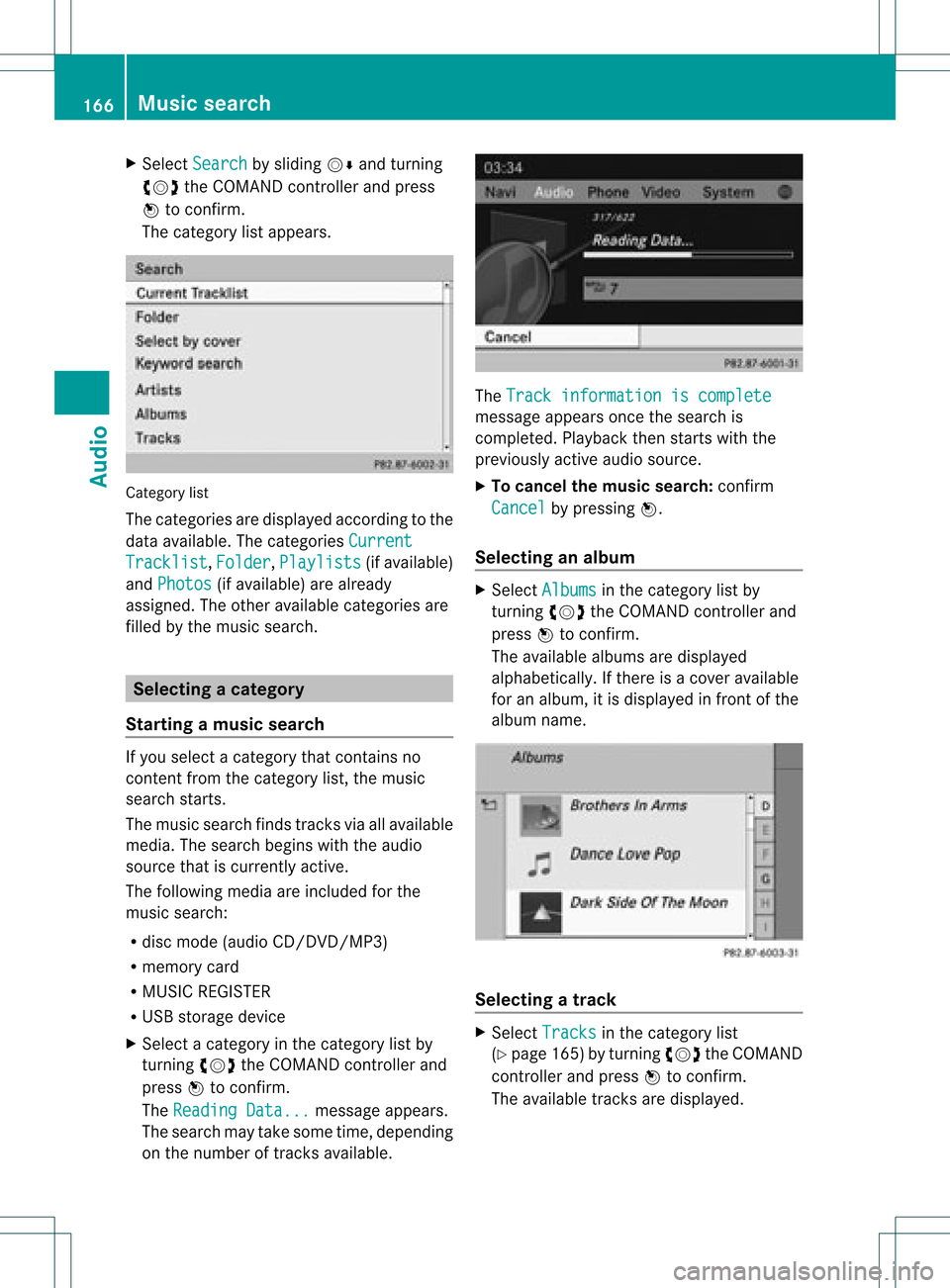
X
Sel ect Search by
sliding VÆ andturni ng
cVd theCOMAND controllerand press
W toconfi rm.
The cate gorylist appe ars . Ca
tego rylist
The cate goriesare displ ayed acco rding tothe
da ta ava ilab le.T he categories Current Tracklist ,
Folder ,
Playlists (if
availa ble)
and Photos (if
availa ble)arealready
assigned. Theother availablecategories are
filled bythe music search. Selec
tingacatego ry
Starting amusic search If
you select acatego rythat contains no
content fromthecatego rylist,the musi c
sea rch starts.
The musi csearch findstracksvia allavailable
media. Thesearch beginswiththeaudio
source thatiscurren tlyactive.
The following mediaareincluded forthe
music search:
R disc mode (audio CD/DVD/MP3)
R memory card
R MUSIC REGISTE R
R USB storage device
X Select acategor yin the categor ylist by
turn ingcVd theCOMAND controller and
press Wtocon firm.
The Reading Data... message
appears.
The search maytake some time,depending
on the number oftrac ksavailable. The
Track informa tioniscomplet e message
appearsoncethe search is
complet ed.Playback thenstartswith the
previously activeaudio source.
X To cancel themusic search: confirm
Cancel by
pressing W.
Selecting analbum X
Select Albums in
the categor ylist by
turn ingcVd theCOMAND controller and
press Wtocon firm.
The available albumsaredisplayed
alphabetically. Ifther eis acover available
for analbum, itis displayed infron tofthe
albu mname. Select
ingatrac k X
Sel ect Tracks in
the categ ory list
(Y page 165) bytur ning cVd theCOMAND
contr ollera nd pre ssW toconfi rm.
The availabl e trac ksaredispl ayed . 16
6 Musi
cse archAu dio
Page 169 of 234
X
Sel ect atrack andpressW toconfi rm.
Pl ay ba ck star ts.
Se lecti ng ayear ofpublicat ion X
Sele ctYea r in
thecat egor ylist
(Y page 165)by tur nin gcVd theCOMA ND
con troller andpres sW tocon firm. X
Sele ctan ent ryand pres sW tocon firm.
The genrelist isdisplayed .
X Sele ctagen re,e.g.pop, and press Wto
conf irm.
The track listisdisplay ed.
X Select atrack andpress Wtoconf irm.
Playba ckstart s.
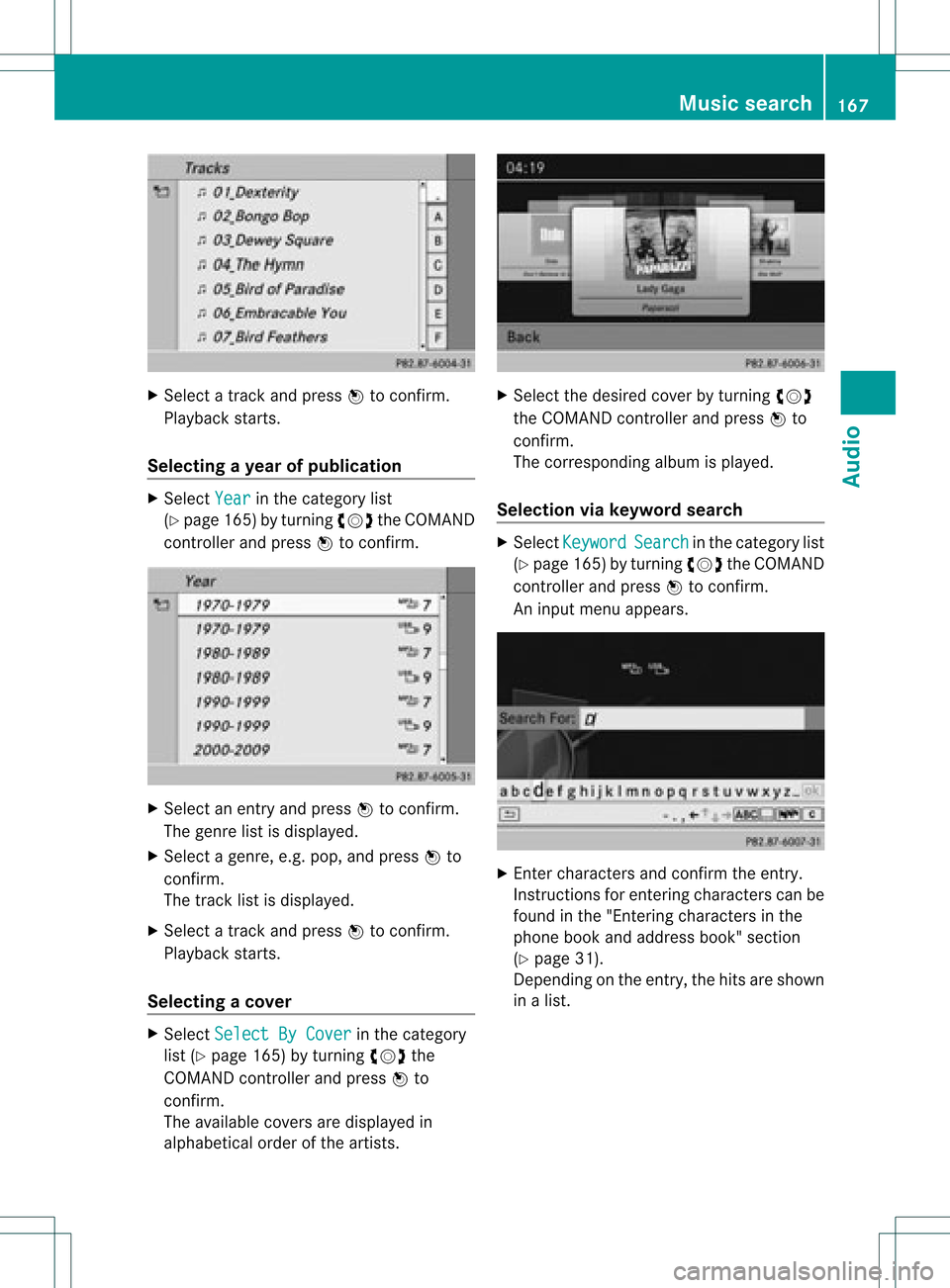
Selecting acover X
Sele ctSel ect ByCover in
thecat egor y
list (Ypage 165)by turnin gcVd the
COMA NDcontroller andpres sW to
con firm.
The available covers are displayed in
alphabet icalorde rofthe artists. X
Select thedesired coverbyturning cVd
the COMAND controller andpress Wto
confirm .
The corresponding albumisplay ed.
Selec tionviakeyword search X
Select Keyword Search in
the category list
(Y page 165)byturning cVdtheCOMAND
cont roller andpress Wtoconfirm.
An input menu appears. X
Ent ercharacters andconfirm theentry.
Instr uctions forentering characters canbe
found inthe "Enterin gcharacters inthe
phone bookandaddress book"section
(Y page 31).
Depending onthe entry, thehits areshown
in alist. Music
search
167Audio Z
Page 171 of 234
If
music filesareavai lable,pla yba ckbegi nsat
the point lastlistened to.
If there arenomusic files,you willsee a
messag eto this effect.
X Confirm themessag eby pressi ngW the
COMAND controller andcopy themusic
files (Ypage 169).
Option 2 X
Select Audio in
the main function barby
slid ing ZV andturning cVdtheCOMAND
controller andpress Wtoconfirm.
If MUSIC REGISTER wasthelast mode
selected, itis now switched on.
If another audiosource isswitched on,you
can now switch onthe MUSIC REGISTER in
the audiomenu.
X Select Audio by
slid ing ZV andturning
cVd theCOMAND controller andpress
W toconfirm.
The audiomenu appears.
X Select Music Register and
press Wto
confirm.
Option 3 X
Press ther number key(DVD changer).
The MUSIC REGISTER isswitched on. Importing
musicfiles
Introductio n You
cancopy music filesinthe fileformats
MP3, WMA andAAC (withthe file
extensions .m4p,.m4a,.m4band.aac) from
the follo wing media :
R discs inthe DVD changer
R memory card
R USB storage device
i CDinformation suchasalb um name, disc
name, artistandtrack isprovide dby the
Gracenote MediaDataba se(Ypage 161). X
Switch onaud ioCD mode (Ypage 157).
X With anaud ioCD inserted, selectREC in
the
CD basi cdisplay byslidin gVÆ andturnin g
cVd theCOMA NDcontroller andpress
W tocon firm .
Step 1:selecting tracks toimp ort X
Selec tTrac k(s) by
turnin gcVd the
COMA NDcontroller andpress Wto
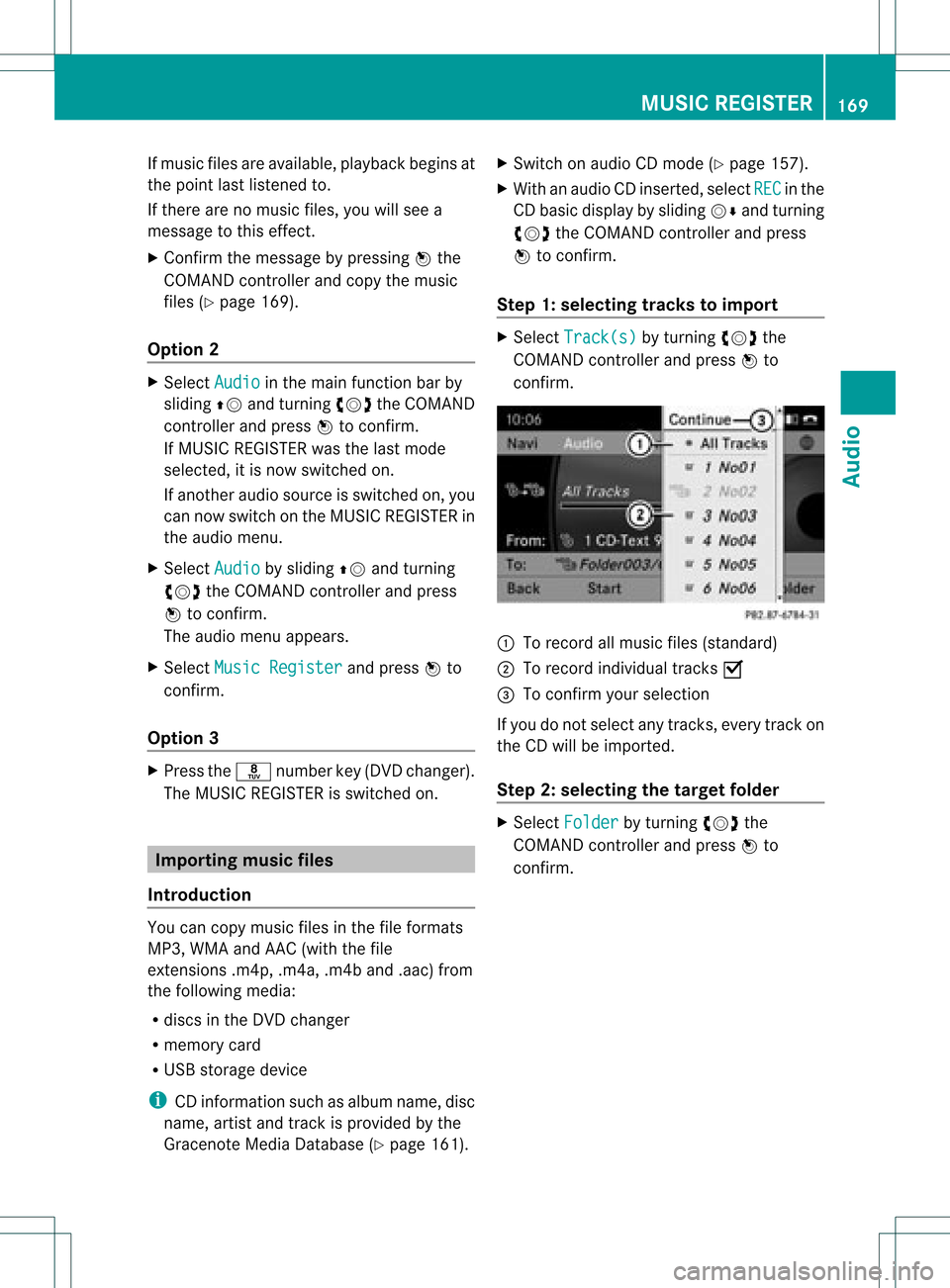
con firm . :
Torec ord allmusic files(standard )
; Torec ord indiv idual track sO
= Tocon firm your selec tion
If you donot selec tany trac ks,eve rytrac kon
the CDwillbe impo rted .
Ste p2:selectin gth eta rget folder X
Sele ctFol der by
turnin gcVd the
COMA NDcontroller andpres sW to
con firm. MUSIC
REGISTER
169Audio Z
Page 172 of 234
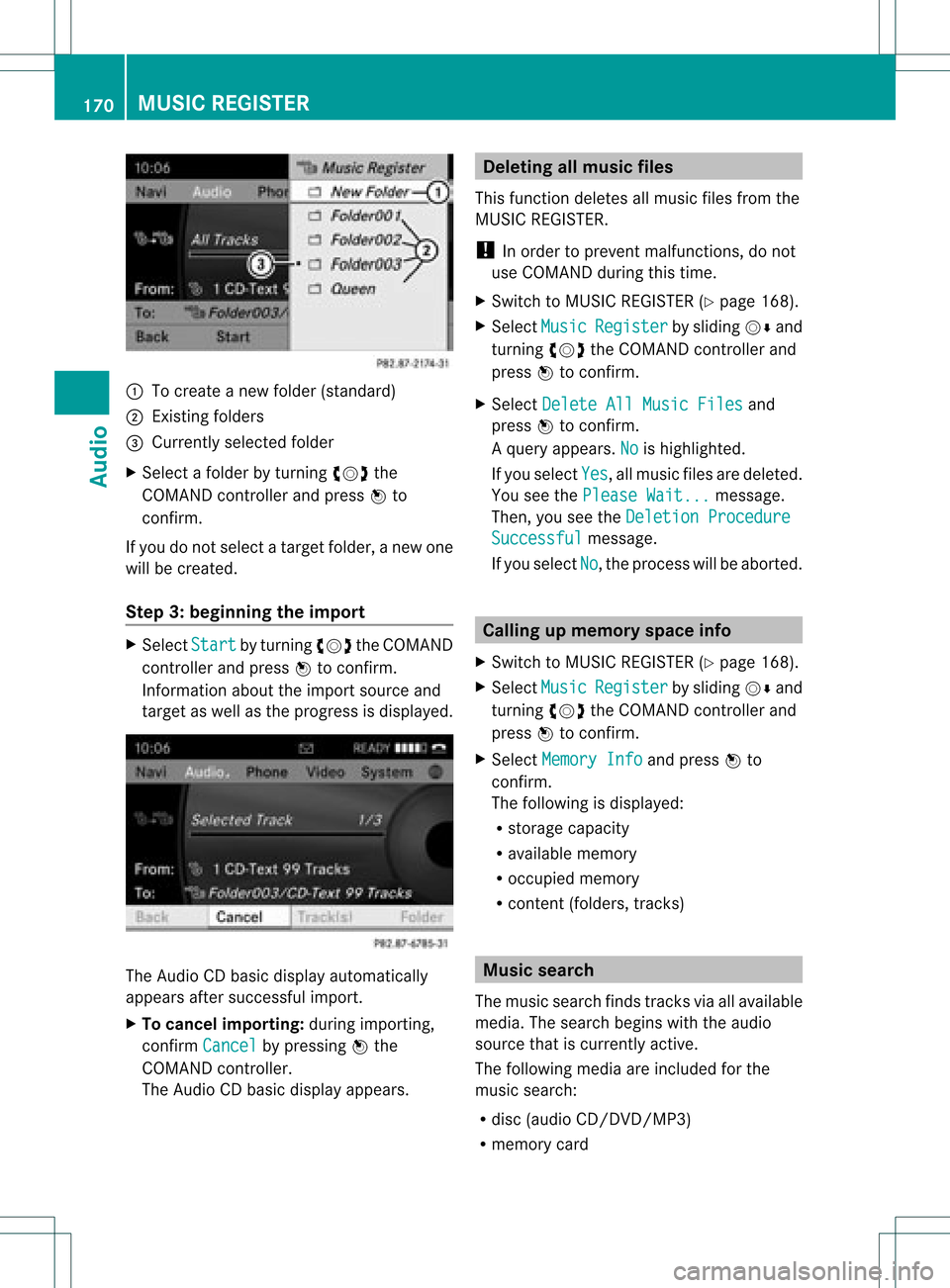
:
Tocreate anew folder (standard)
; Existing folders
= Currently selectedfolder
X Select afolder byturnin gcVd the
COMAND controller andpress Wto
conf irm.
If you donot select atarget folder, anew one
will becreated.
Step 3:beginning theimpor t X
Select Start by
turnin gcVd theCOMAND
cont roller andpress Wtoconf irm.
Infor mation abouttheimport source and
target aswell asthe progress isdisplay ed. The
Audio CDbasic display automatically
appears aftersuccessf ulimport.
X To cancel importing:during importin g,
conf irmCancel by
pressing Wthe
COMAND controller.
The Audio CDbasic display appears. Dele
ting allmusic files
This funct iondeletes allmusic filesfrom the
MUSIC REGISTE R.
! Inorder toprevent malfunct ions,donot
use COMAND duringthistime.
X Switc hto MUSIC REGISTE R(Y page 168).
X Select Music Register by
sliding VÆand
turnin gcVd theCOMAND controller and
press Wtoconf irm.
X Select Delete AllMusic Files and
press Wtoconf irm.
Aq uery appear s.No is
high light ed.
If you sele ctYes ,
all musi cfiles aredelet ed.
You seethePlea seWait ... mess
age.
Then ,you seetheDele tion Procedure Succ
essful mess
age.
If you selec tNo ,
the proc esswillbeabort ed. Calling
upmem oryspaceinfo
X Swit chtoMUS ICREGIS TER(Ypage 168).
X Selec tMusi c Regi
ster by
slidin gVÆ and
tur nin gcVd theCOMA NDcontroller and
press Wtocon firm .
X Selec tMemo ryInfo and
press Wto
con firm .
The followin gis displayed:
R storage capacity
R available memory
R occ upied memo ry
R con tent(folder s,track s) Mus
icsear ch
The music searchfin ds track svia allavailable
media. Thesearc hbegin swith theaudio
sourc ethat iscurr entlyact ive.
The followin gmedia areincluded forthe
music search:
R disc (audio CD/DVD/ MP3)
R memo rycard 170
MUSIC
REGISTERAudio
Page 173 of 234
R
MUSIC REGISTER
R USB storage device
X Switch toMUSIC REGISTER (Ypage 168).
X Select Search by
sliding VÆandturning
cVd theCOMAND controller andpress
W toconfirm .
The category listappea rs.
X Select atrack inacategory (Ypage 165).
Example: openingafolder X
Sele ctFol der in
thecat egor ylist by
tur nin gcVd theCOMA NDcontroller and
pres sW tocon firm.
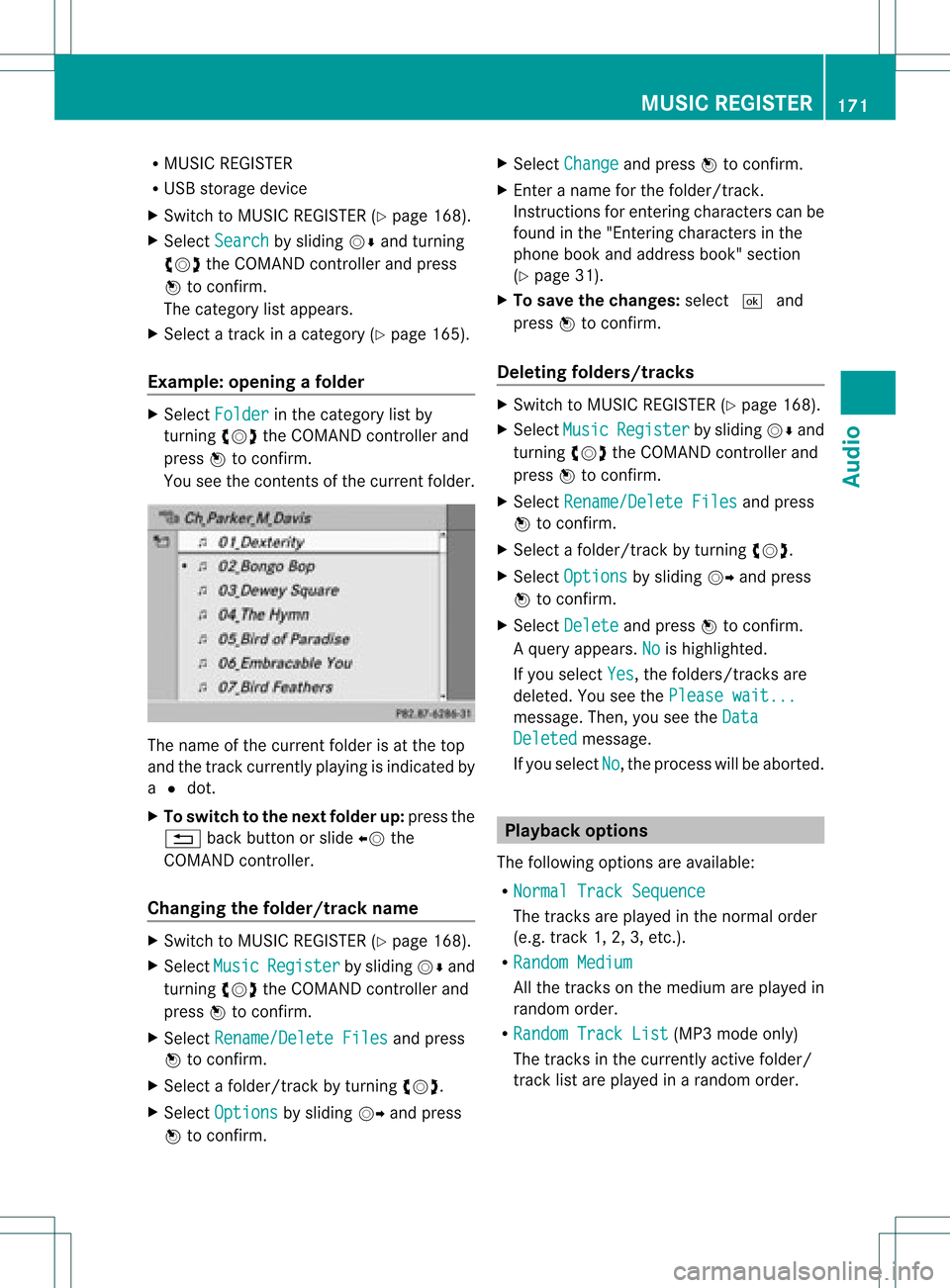
You seethecon tent sof thecur ren tfolder. The
name ofthe current folderisat the top
and thetrack current lyplayi ngisindicated by
a # dot.
X To switch tothe next folder up:press the
% backbutton orslide XVthe
COMAND controller.
Changing thefolder/tr ackname X
Switch toMUSIC REGISTER (Ypage 168).
X Select Music Register by
sliding VÆand
turnin gcVd theCOMAND controller and
press Wtoconf irm.
X Select Rename/Delet eFiles and
press
W toconf irm.
X Select afolder/t rackbyturnin gcVd.
X Select Options by
sliding VYandpress
W toconf irm. X
Select Change and
press Wtoconf irm.
X En ter aname forthe folder/t rack.
Inst ruction sfor enter ingcharact erscan be
found inthe "Ent ering charact ersinthe
phone bookandaddress book"section
(Y page 31).
X To save thechanges: select¬and
press Wtoconf irm.
Dele ting folders/tr acks X
Switch toMUSIC REGISTER (Ypage 168).
X Select Music Register by
sliding VÆand
turnin gcVd theCOMAND controller and
press Wtoconf irm.
X Select Rename/Delet eFiles and
press
W toconf irm.
X Select afolder/t rackbyturnin gcVd.
X Select Options by
sliding VYandpress
W toconf irm.
X Select Delete and
press Wtoconf irm.
Aq uery appear s.No is
high light ed.
If you selectYes ,
th efol der s/track sare
delet ed.You seethePle ase wait... mes
sage .Then, youseetheData Deleted message.
If you select No ,
the process willbeaborted. Playback
options
The following optionsareavaila ble:
R Normal TrackSequence The
track sare play edinthe normal order
(e.g. track 1,2,3, etc. ).
R Random Medium All
the track son the medium areplay edin
random order.
R Random TrackList (MP3
mode only)
The track sin the current lyactive folder/
track listare play edinarandom order. MUSIC
REGISTER
171Audio Z
Page 174 of 234
X
To select opti ons:sw itch tothe MUSI C
REG ISTER (Ypage 168) .
X Sel ect Mus ic Reg
ister by
slid ing VÆ and
tur ning cVd theCOMAND controller and
pre ssW toconfi rm.
The optio ns list appe ars. The #dot
ind icates the optio ns elected.
X Select anoption andpress Wtocon firm.
The option isswitch edon. For alloption s
exc ept Normal TrackSequenc e ,
you will
see acorr espondin gdisplay inthe display/
select ionwindow.
i The Normal TrackSequenc e option
is
automatic allyselect edwhen youchange
the disc youarecurren tlylisten ingtoor
when youselect adifferen tmedium. Ifan
option isselect ed,itremains selectedafter
COMAND isswitch edon oroff. Bluet
ooth®
aud iomode Connecting
Bluetooth®
aud iodevices
Conditions Bluet
ooth®
aud iodevice
Bluetoot h®
audio mode requires a
Bluetoot h®
-c apable audiodevice.
i Not allBluetoot h®
audio devices available
on the market areequally suitable. For
more detailed information onsuitable
Bluetoot h®
audio devices andon
con nectingBluetoot h®
audio devices to
COMAND ,visit
htt p://ww w.mbu sa-mobile.com (for
USA ).Alt ernat ively, calltheMercedes- Benz
Customer AssistanceCenter at
1-8 00- FOR-ME RCedes (1-800-367 -6372)
(for USA )or Customer Relationsat
1-8 00- 387 -0100(for Canada). Befor
eusing Bluetoot h®
audio mode, you
should checkyour Bluetooth ®
audio device
for the following (seetheBluetooth ®
audio
device's operating instructions):
R Bluetooth ®
audio profile
The Bluetooth ®
audio device mustsupport
the A2D Pand AVRCP Bluetooth ®
audio
profiles.
R Bluetooth ®
visibility
On cert ainBluetooth ®
audio devices, as
well asactivatin gthe Bluetooth ®
funct ion,
the device itselfmust alsobemade
"visible" toother devices (seethe
Bluetooth ®
audio device's operating
instr uctions).
R Bluetooth ®
device name
This device nameispredetermin edbut can
usual lybe changed. Tomake aclear
selection ofthe Bluetooth ®
device
possible, Mercedes-B enzrecomm ends
that youcustomiz ethe device name(see
the Bluetooth ®
audio device's operating
instr uctions).
i A2D P(Advanced AudioDistribution
Profile): Bluetooth ®
audio profile foraudio
data trans mission
AVRCP (AudioVideoRemote Control
Profile): Bluetooth ®
audio profile foraudio
data playb ack
X Act ivate Bluetooth ®
and Bluetooth ®
visibility onthe Bluetooth ®
audio device.
On COMAND
X Act ivate theBluetooth ®
funct ionin
COMAND (Ypage 45).
General information Before
usingyourBluetooth ®
audio device
with COMAND forthe first time, youwillneed
to authorize it.
When youauthorize anew Bluetooth ®
audio
device, itis conn ected automatically.
Connect ioninvolves firstsearching fora 172
Bluetooth ®
aud iomodeAudio
Page 175 of 234

Blu
etoo th®
au diodev iceand then authori zing
it.
You canauthori zeup tofifte enBlu etoo th®
dev ices.
i Ifyo uau thori zeamob ile pho nethat
su ppo rtsBluetoo th®
au dio, the A2DP and
AVRC PBlu etoo th®
au dio pro files are
connected automa tically. The mob ile
pho neisthen entere din both the
Blu etoo th®
tele pho nelist (Y page 116) and
in the Bluetoo th®
dev icelist (Y page 173).
Merce des-Benz recom mendsau thori zinga
mob ile pho neinBlu etoo th®
tele pho ny
(Y page 116).
Se archi ngfor and authori zinga
Blue tooth®
audio device X
Swi tch onBlu etoo th®
au dio mod e
(Y page 175).
If yo usee theNoBlue toothAudi o Devi
ceAuth orized mess
age, youwi ll
need toconnect theBluetoo th®
au dio
dev icefirst.
X Sele ctBT Audi
o by
sliding VÆ andturni ng
cVd theCOMAND controllerand press
W toconfir m.
X Co nfirm BluetoothAudi oDevi ceList by
pre ssing W the COMAND controller.
X To search: confirmUpda te by
pre ssing
W the COMAND controller.
CO MAND searches forBluetoo th®
au dio
dev iceswi thin rang eand adds them tothe
Blu etoo th®
dev icelist. Blu etoo th®
au dio
dev icesare dete cted ifthey suppo rtthe
Blu etoo th®
au dio pro files (A2DP, AVRCP).
The durati onofthe search depends onthe
numb erofBlu etoo th®
au diodev iceswi thin
rang eand theircharacteristics. Example:
Bluetooth®
device list
: Newly detectedmobile phonewith
Bluetooth ®
audi ofunct ioninrange
; Bluetooth ®
audi oplay ernot within range
but previously authorized (iconappea rsin
gray)
The Bluetooth ®
device listdispla ysall
authorized devices,whether theyarewithin
range ornot. Afteradevice search, devices
which arewithin rangebutnot authorized are
also displa yed.
i With some Bluetooth ®
audi odevices,
play back must beinitially started onthe
device itself,sothat COMAND canplay the
audi odata.
X To auth orize: select anunauthorized
Bluetooth ®
audi odevice fromthelist
(example: :)byturning cVdthe
COMAND controller.
X Select thesymbol tothe right ofthe
Bluetooth ®
audi odevice bysliding VYthe
COMAND controller andpress Wto
confirm .
X Select Authorize and
press Wtoconfirm .
Depending onthe Bluetooth ®
audi odevice
used, younow have twooptions for
cont inuing withauthorization.
X Option 1:enter thepasskey. Todo so,
proceed asdescribed inthe "Authorizing
(registering) amobile phone" section
(Y page 117).
Aft ersuccessful authorization, the
Bluetooth ®
audi odevice isconn ected and
starts playing. Bluetooth
®
aud iomode 173Audio Z
Page 176 of 234
X
Opt ion 2(Secure SimplePairing): ifthe
digit codes displayed inCOMAND andon
the Bluetoot h®
audio device arethe same,
con firm Yes by
pressing W.
If you select Yes ,
authorizat ioncontinues
and theBluetoot h®
audio device is
con nect ed.Playback starts.
If you select No ,
authorizat ionwill be
canc eled.
i The Bluetoot h®
audio device must
support theBluetoot h®
version 2.1for
con nect ionviaSecure SimplePairing.
COMAND createsasix- digit code, which is
displayed onthe two devices thataretobe
con nect ed.
X Externa laut horiz ation: COMAND may
not beable tolocate yourBluetoot h®
audio
device duetothe specific securitysett ings
of the Bluetoot h®
audio device itself.Inthis
case, check whether yourBluetoot h®
audio
device canlocate theCOMAND system
(Y page 118).The Bluetoot h®
device name
of COMAND isMB Bluetoot h .
Aft ersuccess fulauthorizat ion,the
Bluetoot h®
audio device iscon nect edand
start splaying.
Reconnecting aBluet ooth ®
aud io
device The
Bluet ooth®
audio profilesareconnected
automat icallyunder thefollowin g
circ umst ances:
R one ofthe last two mobile phonestohave
been connected has also been usedasa
Bluet ooth®
audio player (ifthis func tion is
support edbythe mobile phone).
R the mobile phonetak esover theautomat ic
con nection itself.
AB luetoo th®
audio player withouttelep hone
func tionsis not autom atically reconn ected,
even ifit was thelast devic econ nected.
If the NoBlue toothAudi oDevi ce Conn
ected mess
ageappears, youhave two opt
ions tocon necta Bluet ooth®
audio
devic e:
Opt ion 1
X Conf irmConn ectLast Device in
the
basic display bypress ingWthe COMA ND
con troller.
If COMA NDcan locat ethe Bluet ooth®
audio device,itwill becon nected and will
st art playing.
i With some Bluetooth®
audio devices,
playback mustbeinit ially start ed on the
devic eits elf, sothat COMA NDcan play the
audio data.
Opt ion 2
X Selec tBT Audi o by
turnin gcVd the
COMA NDcontroller andpress Wto
con firm .
X Conf irmBlue toothAudi oDevi ceList by
press ingWthe COMA NDcontroller.
X Selec taBluetooth ®
au diodev icebyturni ng
cVd theCOMAND controllerand press
W toconfi rm.
If CO MAND canlocatethe Bluetoo th®
au dio dev ice,it wi llbe connected andwill
star tplaying.
i With some Bluetooth®
audio devices,
playback mustbeinit ially start ed on the
devic eits elf, sothat COMA NDcan play the
audio data.
Blu etoot h®
aud iodevice and
simu ltaneous searchfor mobile phones Dur
ing the searc hfor mobile phones
(Y page 116),the connection with the
Bluet ooth®
audio deviceis ter min ated. Inthe
Bluet ooth®
audio basicdisplay
(Y page 176),you willsee theRece ived Busi
ness Cards mess
ageand the
Rece ived Business Cards men
uitem
can not beselec ted. 174
Bluetoot h®
au dio mod eAudio